traction control FORD C MAX ENERGI 2017 Owners Manual
[x] Cancel search | Manufacturer: FORD, Model Year: 2017, Model line: C MAX ENERGI, Model: FORD C MAX ENERGI 2017Pages: 497, PDF Size: 7.64 MB
Page 6 of 497
Hybrid Vehicle Frequently AskedQuestions....................................................140
Fuel and Refueling
Safety Precautions.......................................142
Fuel Quality.....................................................143
Fuel Filler Funnel Location........................144
Running Out of Fuel....................................144
Refueling..........................................................145
Fuel Consumption.......................................148
Emission Control System..........................149
High Voltage Battery
General Information.....................................151
Charging the High Voltage Battery........153
High Voltage Battery Cut-OffSwitch...........................................................158
Transmission
Automatic Transmission...........................159
Brakes
General Information....................................162
Hints on Driving With Anti-LockBrakes...........................................................163
Parking Brake.................................................163
Hill Start Assist..............................................163
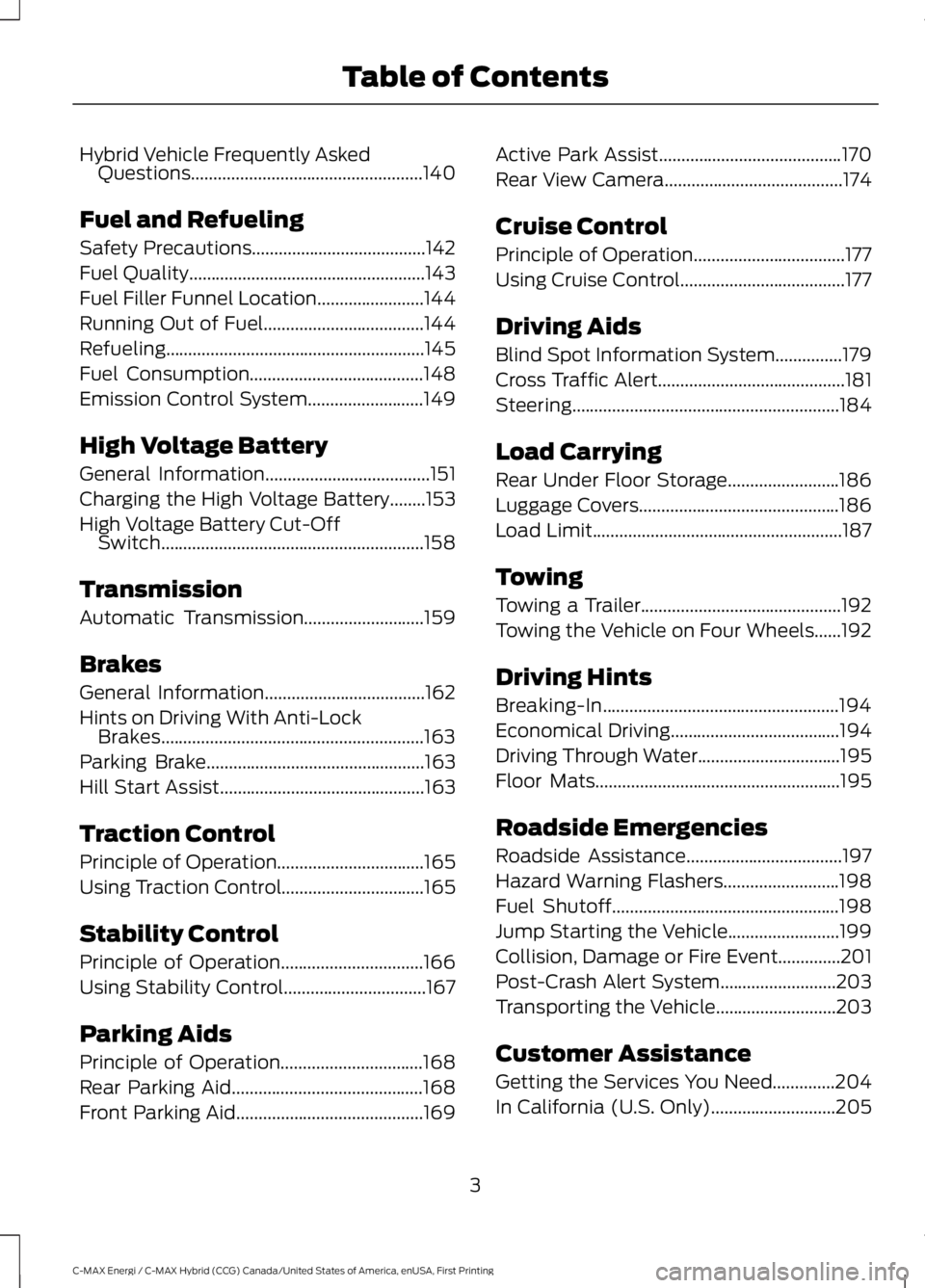
Traction Control
Principle of Operation.................................165
Using Traction Control................................165
Stability Control
Principle of Operation................................166
Using Stability Control................................167
Parking Aids
Principle of Operation................................168
Rear Parking Aid...........................................168
Front Parking Aid..........................................169
Active Park Assist.........................................170
Rear View Camera........................................174
Cruise Control
Principle of Operation..................................177
Using Cruise Control.....................................177
Driving Aids
Blind Spot Information System...............179
Cross Traffic Alert..........................................181
Steering............................................................184
Load Carrying
Rear Under Floor Storage.........................186
Luggage Covers.............................................186
Load Limit........................................................187
Towing
Towing a Trailer.............................................192
Towing the Vehicle on Four Wheels......192
Driving Hints
Breaking-In.....................................................194
Economical Driving......................................194
Driving Through Water................................195
Floor Mats.......................................................195
Roadside Emergencies
Roadside Assistance...................................197
Hazard Warning Flashers..........................198
Fuel Shutoff...................................................198
Jump Starting the Vehicle.........................199
Collision, Damage or Fire Event..............201
Post-Crash Alert System..........................203
Transporting the Vehicle...........................203
Customer Assistance
Getting the Services You Need..............204
In California (U.S. Only)............................205
3
C-MAX Energi / C-MAX Hybrid (CCG) Canada/United States of America, enUSA, First Printing
Table of Contents
Page 56 of 497
•Various vehicle speed minders can beset. Once you select a speed, it will beshown in the display, followed by anaudible tone when the preselectedvehicle speed is exceeded.
•Audio system maximum volume of45%. A message will be shown in thedisplay when you attempt to exceedthe limited volume. Also, thespeed-sensitive or compensatedautomatic volume control will bedisabled.
•Always on setting. When this isselected, you will not be able to turnoff Advance Trac or traction control (ifyour vehicle is equipped with thisfeature).
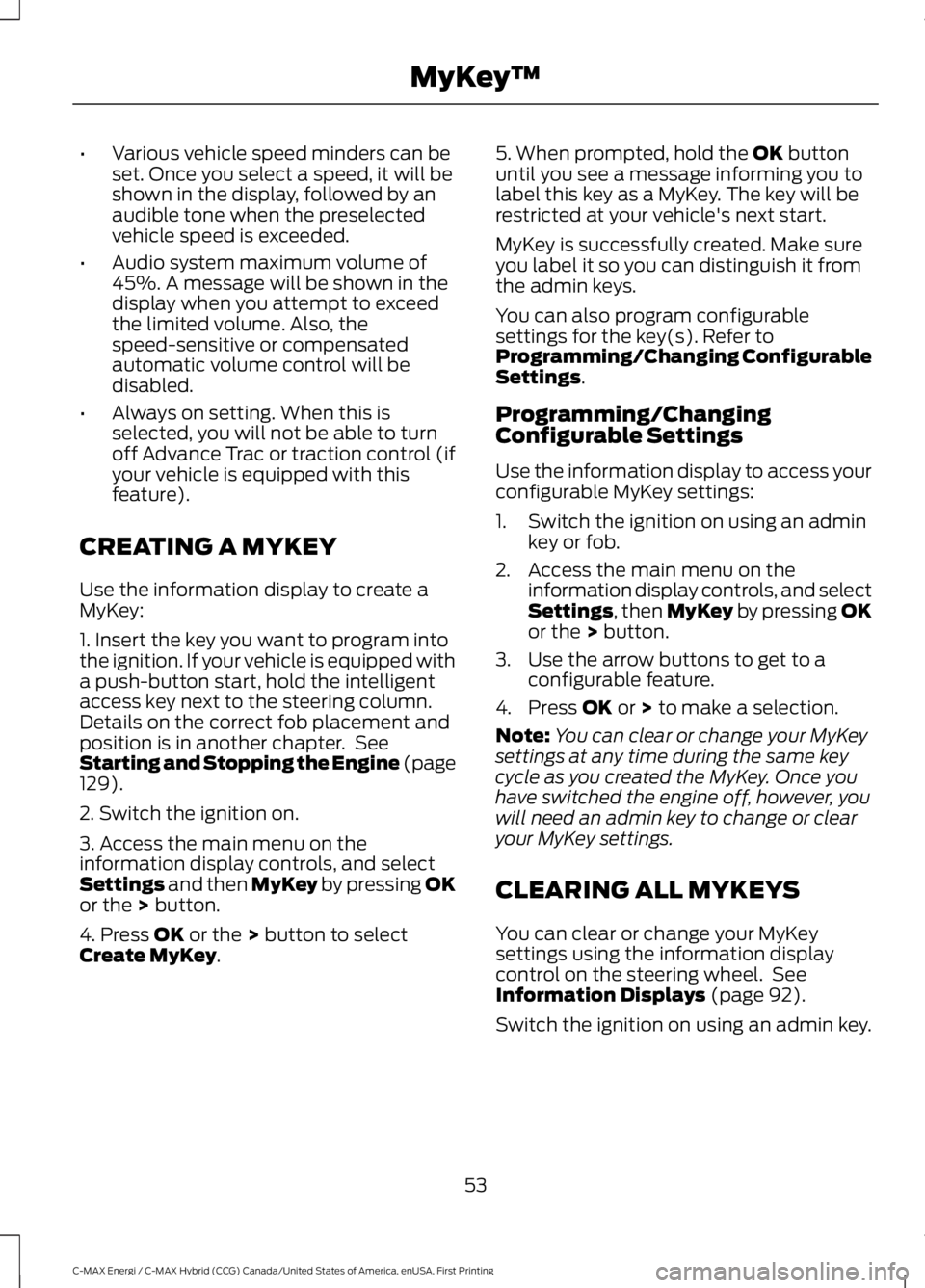
CREATING A MYKEY
Use the information display to create aMyKey:
1. Insert the key you want to program intothe ignition. If your vehicle is equipped witha push-button start, hold the intelligentaccess key next to the steering column.Details on the correct fob placement andposition is in another chapter. SeeStarting and Stopping the Engine (page129).
2. Switch the ignition on.
3. Access the main menu on theinformation display controls, and selectSettings and then MyKey by pressing OKor the > button.
4. Press OK or the > button to selectCreate MyKey.
5. When prompted, hold the OK buttonuntil you see a message informing you tolabel this key as a MyKey. The key will berestricted at your vehicle's next start.
MyKey is successfully created. Make sureyou label it so you can distinguish it fromthe admin keys.
You can also program configurablesettings for the key(s). Refer toProgramming/Changing ConfigurableSettings.
Programming/ChangingConfigurable Settings
Use the information display to access yourconfigurable MyKey settings:
1. Switch the ignition on using an adminkey or fob.
2. Access the main menu on theinformation display controls, and selectSettings, then MyKey by pressing OKor the > button.
3. Use the arrow buttons to get to aconfigurable feature.
4. Press OK or > to make a selection.
Note:You can clear or change your MyKeysettings at any time during the same keycycle as you created the MyKey. Once youhave switched the engine off, however, youwill need an admin key to change or clearyour MyKey settings.
CLEARING ALL MYKEYS
You can clear or change your MyKeysettings using the information displaycontrol on the steering wheel. SeeInformation Displays (page 92).
Switch the ignition on using an admin key.
53
C-MAX Energi / C-MAX Hybrid (CCG) Canada/United States of America, enUSA, First Printing
MyKey™
Page 100 of 497
Settings
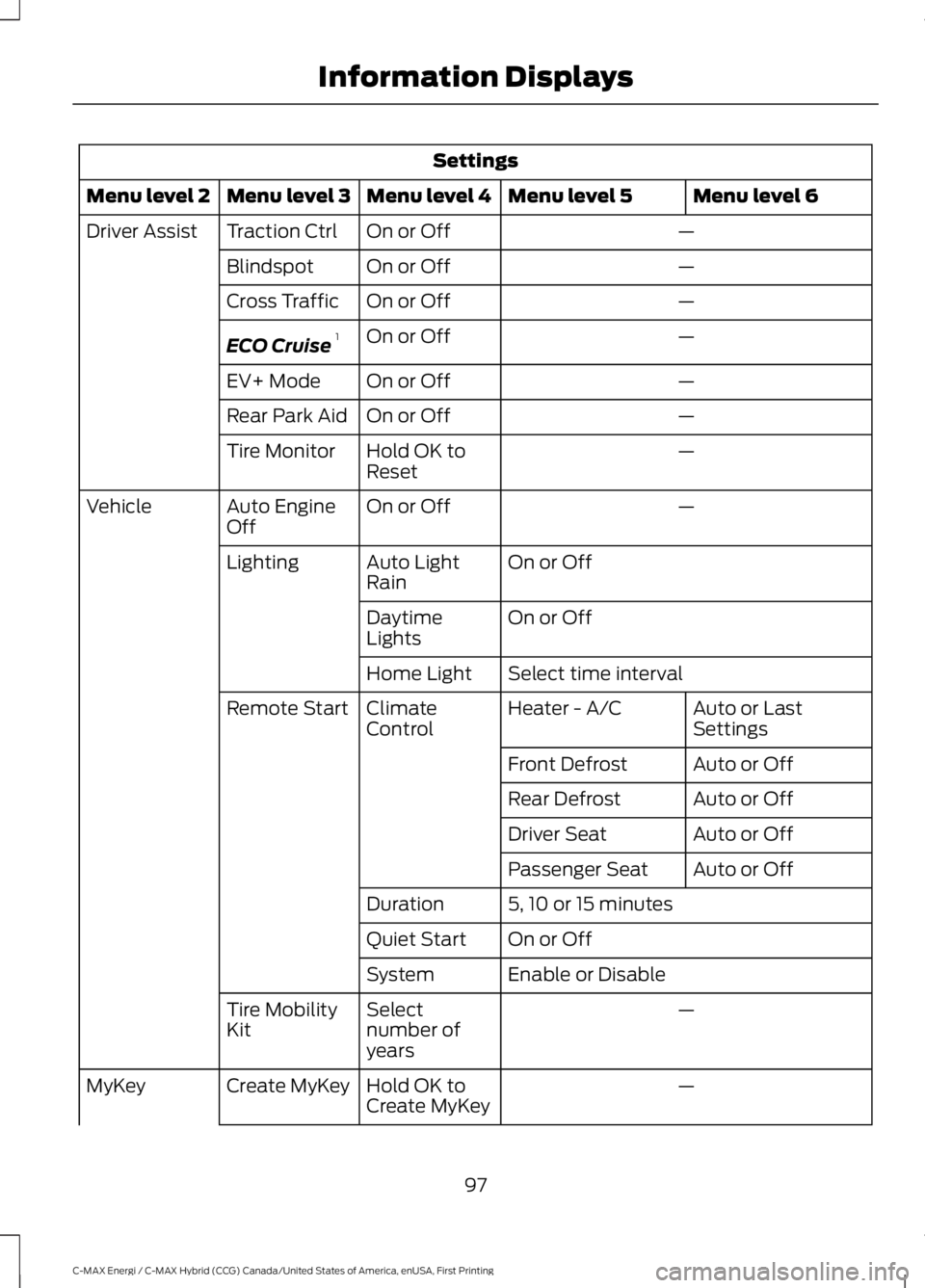
Menu level 6Menu level 5Menu level 4Menu level 3Menu level 2
—On or OffTraction CtrlDriver Assist
—On or OffBlindspot
—On or OffCross Traffic
—On or OffECO Cruise1
—On or OffEV+ Mode
—On or OffRear Park Aid
—Hold OK toResetTire Monitor
—On or OffAuto EngineOffVehicle
On or OffAuto LightRainLighting
On or OffDaytimeLights
Select time intervalHome Light
Auto or LastSettingsHeater - A/CClimateControlRemote Start
Auto or OffFront Defrost
Auto or OffRear Defrost
Auto or OffDriver Seat
Auto or OffPassenger Seat
5, 10 or 15 minutesDuration
On or OffQuiet Start
Enable or DisableSystem
—Selectnumber ofyears
Tire MobilityKit
—Hold OK toCreate MyKeyCreate MyKeyMyKey
97
C-MAX Energi / C-MAX Hybrid (CCG) Canada/United States of America, enUSA, First Printing
Information Displays
Page 101 of 497
Settings
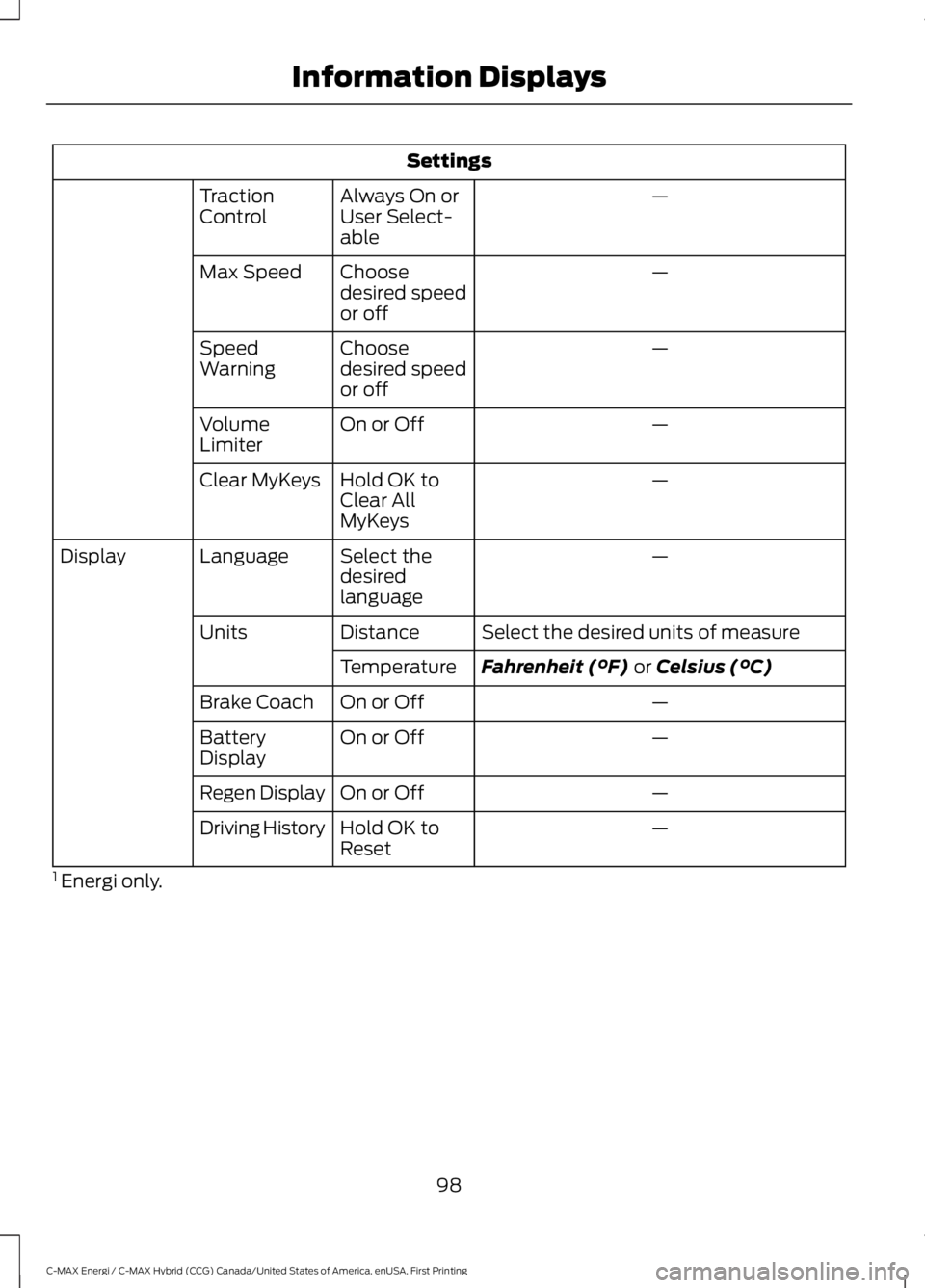
—Always On orUser Select-able
TractionControl
—Choosedesired speedor off
Max Speed
—Choosedesired speedor off
SpeedWarning
—On or OffVolumeLimiter
—Hold OK toClear AllMyKeys
Clear MyKeys
—Select thedesiredlanguage
LanguageDisplay
Select the desired units of measureDistanceUnits
Fahrenheit (°F) or Celsius (°C)Temperature
—On or OffBrake Coach
—On or OffBatteryDisplay
—On or OffRegen Display
—Hold OK toResetDriving History
1 Energi only.
98
C-MAX Energi / C-MAX Hybrid (CCG) Canada/United States of America, enUSA, First Printing
Information Displays
Page 109 of 497
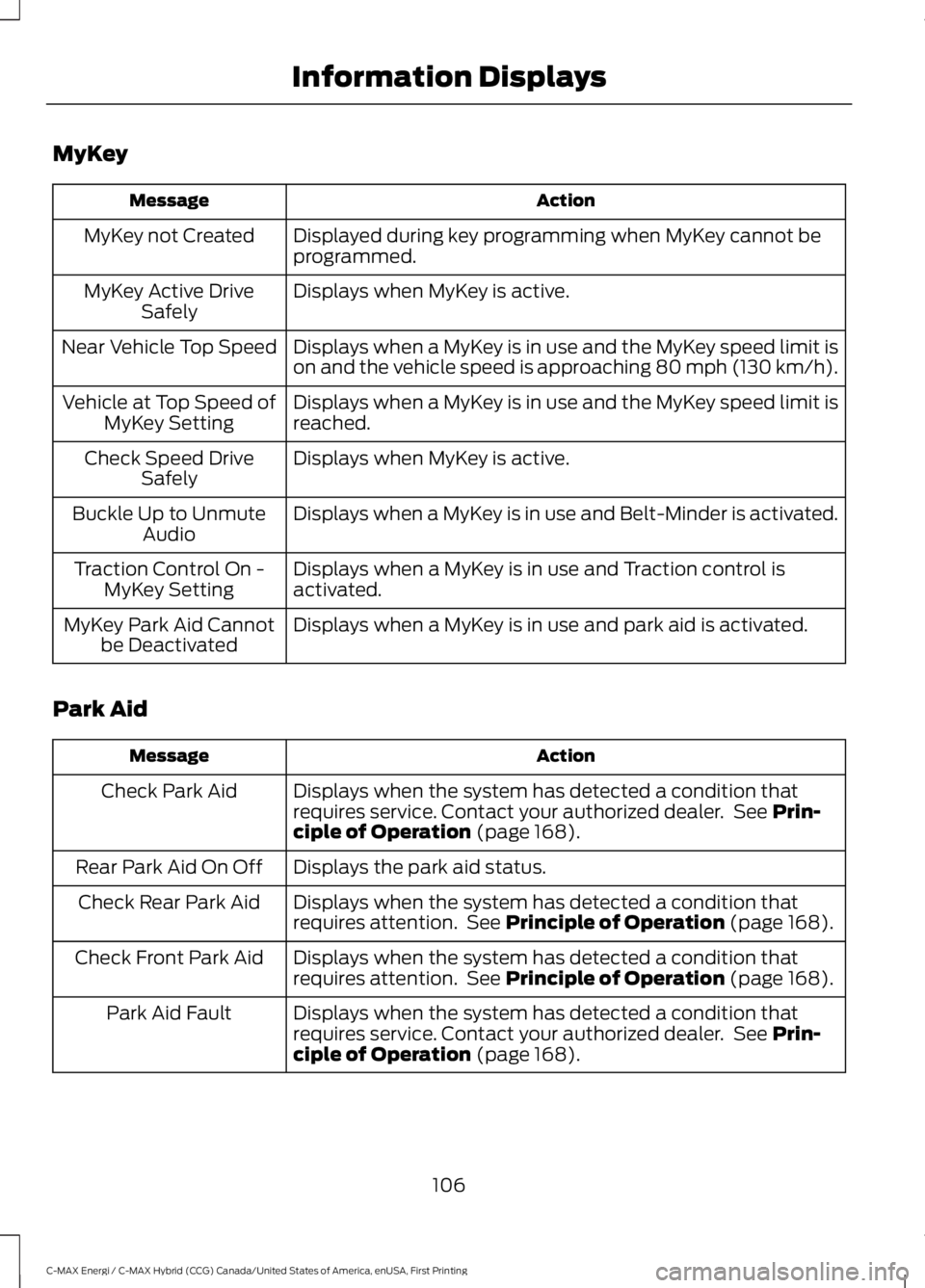
MyKey
ActionMessage
Displayed during key programming when MyKey cannot beprogrammed.MyKey not Created
Displays when MyKey is active.MyKey Active DriveSafely
Displays when a MyKey is in use and the MyKey speed limit ison and the vehicle speed is approaching 80 mph (130 km/h).Near Vehicle Top Speed
Displays when a MyKey is in use and the MyKey speed limit isreached.Vehicle at Top Speed ofMyKey Setting
Displays when MyKey is active.Check Speed DriveSafely
Displays when a MyKey is in use and Belt-Minder is activated.Buckle Up to UnmuteAudio
Displays when a MyKey is in use and Traction control isactivated.Traction Control On -MyKey Setting
Displays when a MyKey is in use and park aid is activated.MyKey Park Aid Cannotbe Deactivated
Park Aid
ActionMessage
Displays when the system has detected a condition thatrequires service. Contact your authorized dealer. See Prin-ciple of Operation (page 168).
Check Park Aid
Displays the park aid status.Rear Park Aid On Off
Displays when the system has detected a condition thatrequires attention. See Principle of Operation (page 168).Check Rear Park Aid
Displays when the system has detected a condition thatrequires attention. See Principle of Operation (page 168).Check Front Park Aid
Displays when the system has detected a condition thatrequires service. Contact your authorized dealer. See Prin-ciple of Operation (page 168).
Park Aid Fault
106
C-MAX Energi / C-MAX Hybrid (CCG) Canada/United States of America, enUSA, First Printing
Information Displays
Page 168 of 497
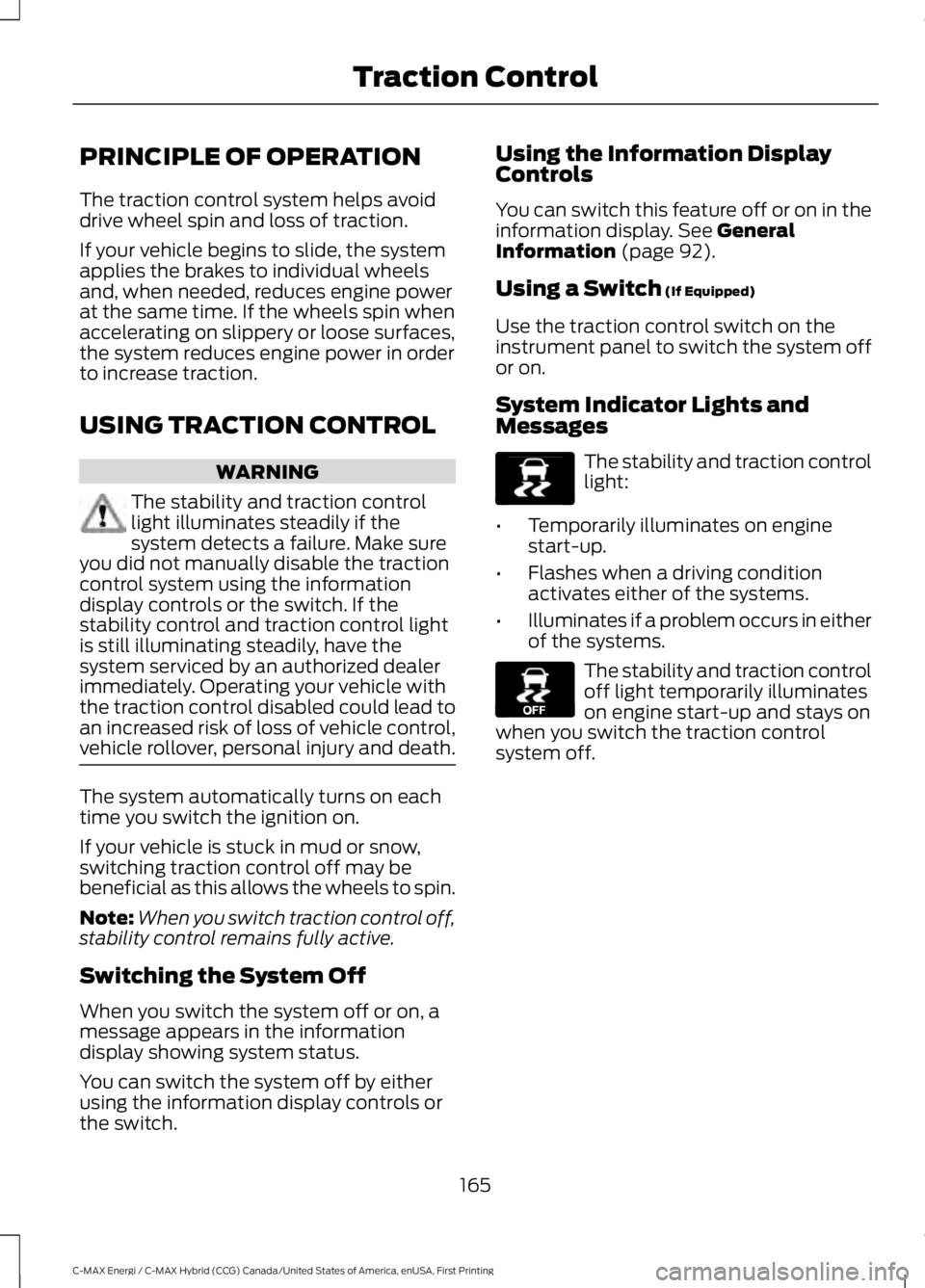
PRINCIPLE OF OPERATION
The traction control system helps avoiddrive wheel spin and loss of traction.
If your vehicle begins to slide, the systemapplies the brakes to individual wheelsand, when needed, reduces engine powerat the same time. If the wheels spin whenaccelerating on slippery or loose surfaces,the system reduces engine power in orderto increase traction.
USING TRACTION CONTROL
WARNING
The stability and traction controllight illuminates steadily if thesystem detects a failure. Make sureyou did not manually disable the tractioncontrol system using the informationdisplay controls or the switch. If thestability control and traction control lightis still illuminating steadily, have thesystem serviced by an authorized dealerimmediately. Operating your vehicle withthe traction control disabled could lead toan increased risk of loss of vehicle control,vehicle rollover, personal injury and death.
The system automatically turns on eachtime you switch the ignition on.
If your vehicle is stuck in mud or snow,switching traction control off may bebeneficial as this allows the wheels to spin.
Note:When you switch traction control off,stability control remains fully active.
Switching the System Off
When you switch the system off or on, amessage appears in the informationdisplay showing system status.
You can switch the system off by eitherusing the information display controls orthe switch.
Using the Information DisplayControls
You can switch this feature off or on in theinformation display. See GeneralInformation (page 92).
Using a Switch (If Equipped)
Use the traction control switch on theinstrument panel to switch the system offor on.
System Indicator Lights andMessages
The stability and traction controllight:
•Temporarily illuminates on enginestart-up.
•Flashes when a driving conditionactivates either of the systems.
•Illuminates if a problem occurs in eitherof the systems.
The stability and traction controloff light temporarily illuminateson engine start-up and stays onwhen you switch the traction controlsystem off.
165
C-MAX Energi / C-MAX Hybrid (CCG) Canada/United States of America, enUSA, First Printing
Traction ControlE138639 E130458
Page 169 of 497
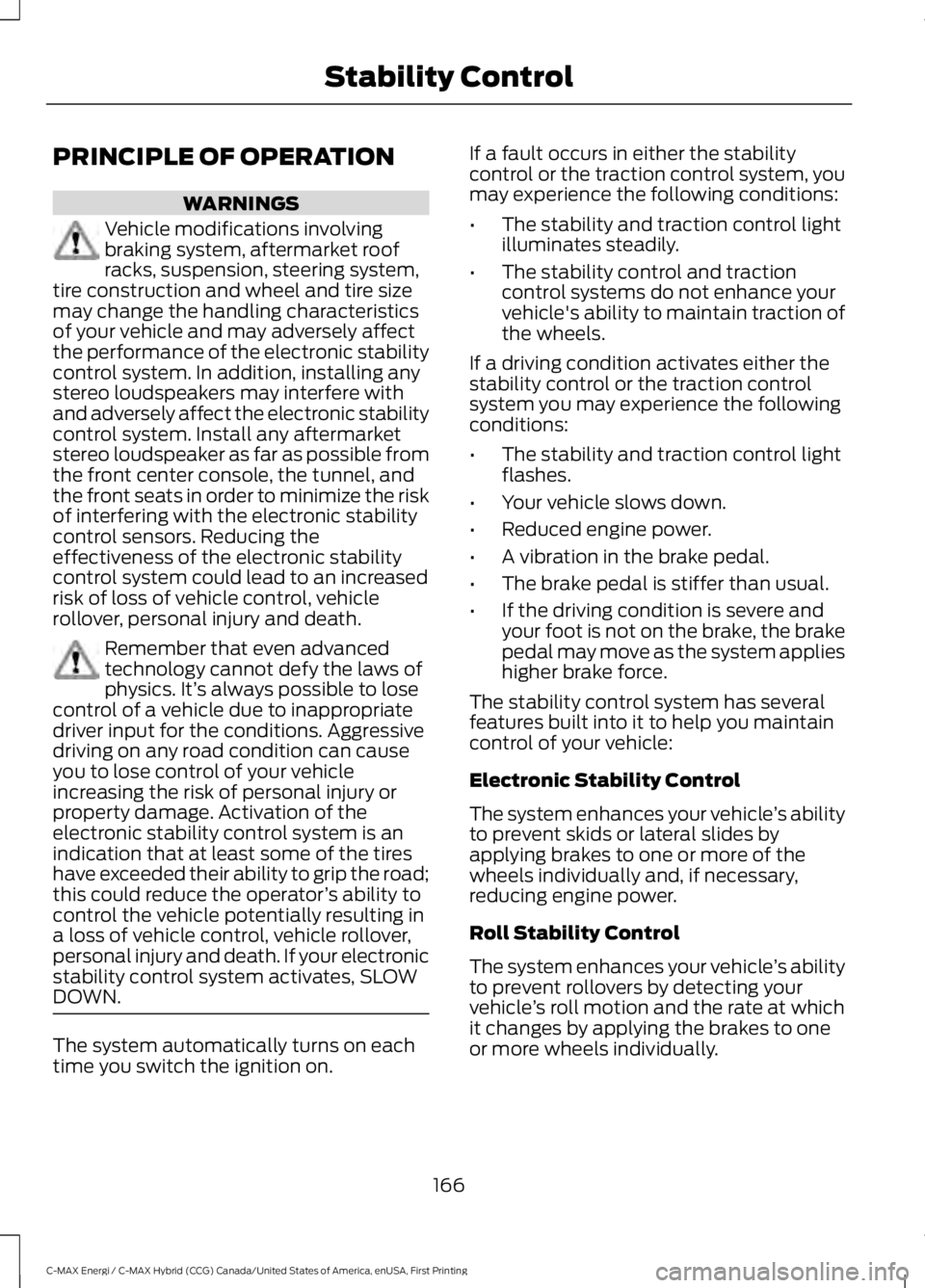
PRINCIPLE OF OPERATION
WARNINGS
Vehicle modifications involvingbraking system, aftermarket roofracks, suspension, steering system,tire construction and wheel and tire sizemay change the handling characteristicsof your vehicle and may adversely affectthe performance of the electronic stabilitycontrol system. In addition, installing anystereo loudspeakers may interfere withand adversely affect the electronic stabilitycontrol system. Install any aftermarketstereo loudspeaker as far as possible fromthe front center console, the tunnel, andthe front seats in order to minimize the riskof interfering with the electronic stabilitycontrol sensors. Reducing theeffectiveness of the electronic stabilitycontrol system could lead to an increasedrisk of loss of vehicle control, vehiclerollover, personal injury and death.
Remember that even advancedtechnology cannot defy the laws ofphysics. It’s always possible to losecontrol of a vehicle due to inappropriatedriver input for the conditions. Aggressivedriving on any road condition can causeyou to lose control of your vehicleincreasing the risk of personal injury orproperty damage. Activation of theelectronic stability control system is anindication that at least some of the tireshave exceeded their ability to grip the road;this could reduce the operator’s ability tocontrol the vehicle potentially resulting ina loss of vehicle control, vehicle rollover,personal injury and death. If your electronicstability control system activates, SLOWDOWN.
The system automatically turns on eachtime you switch the ignition on.
If a fault occurs in either the stabilitycontrol or the traction control system, youmay experience the following conditions:
•The stability and traction control lightilluminates steadily.
•The stability control and tractioncontrol systems do not enhance yourvehicle's ability to maintain traction ofthe wheels.
If a driving condition activates either thestability control or the traction controlsystem you may experience the followingconditions:
•The stability and traction control lightflashes.
•Your vehicle slows down.
•Reduced engine power.
•A vibration in the brake pedal.
•The brake pedal is stiffer than usual.
•If the driving condition is severe andyour foot is not on the brake, the brakepedal may move as the system applieshigher brake force.
The stability control system has severalfeatures built into it to help you maintaincontrol of your vehicle:
Electronic Stability Control
The system enhances your vehicle’s abilityto prevent skids or lateral slides byapplying brakes to one or more of thewheels individually and, if necessary,reducing engine power.
Roll Stability Control
The system enhances your vehicle’s abilityto prevent rollovers by detecting yourvehicle’s roll motion and the rate at whichit changes by applying the brakes to oneor more wheels individually.
166
C-MAX Energi / C-MAX Hybrid (CCG) Canada/United States of America, enUSA, First Printing
Stability Control
Page 170 of 497
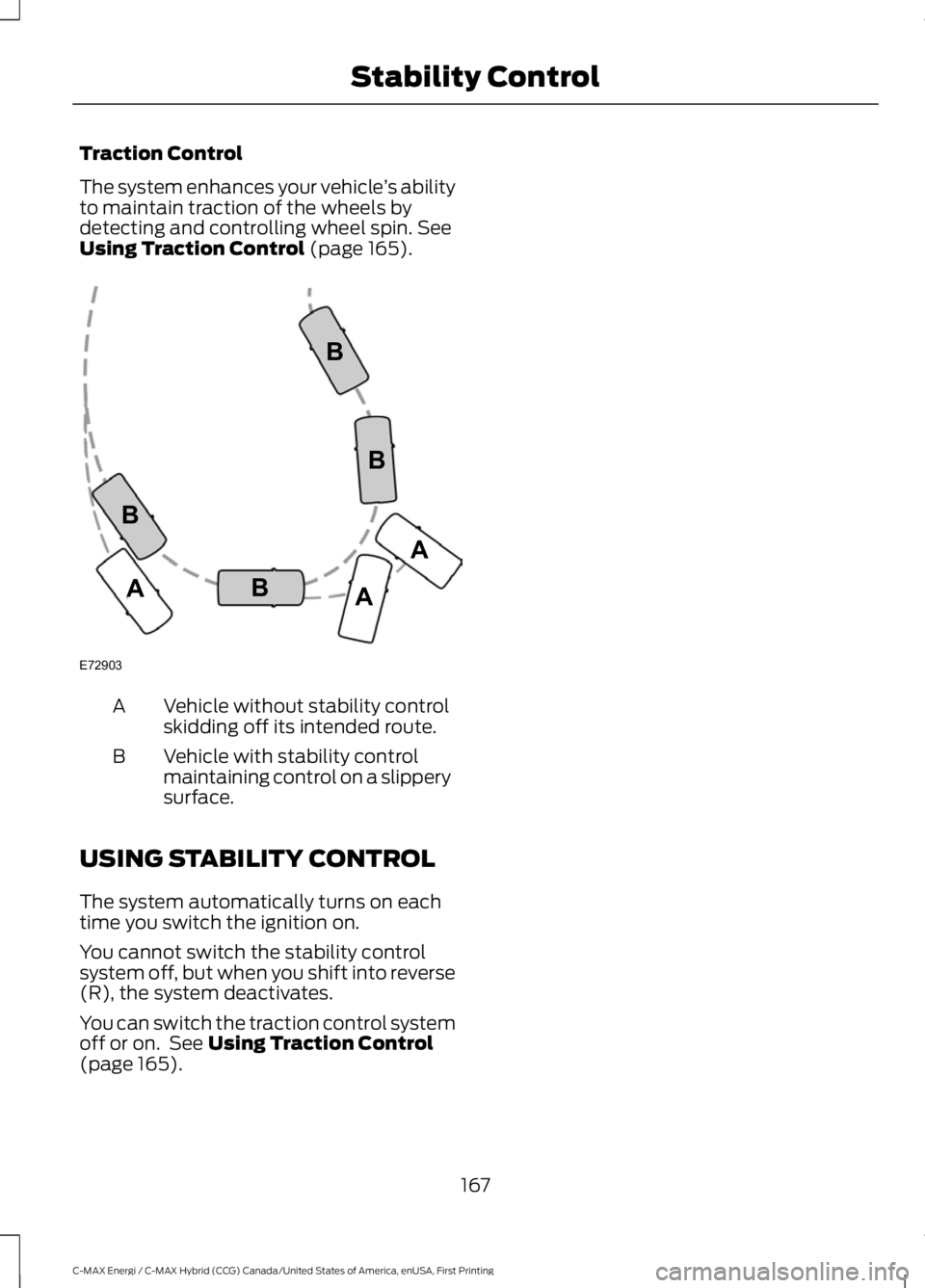
Traction Control
The system enhances your vehicle’s abilityto maintain traction of the wheels bydetecting and controlling wheel spin. SeeUsing Traction Control (page 165).
Vehicle without stability controlskidding off its intended route.A
Vehicle with stability controlmaintaining control on a slipperysurface.
B
USING STABILITY CONTROL
The system automatically turns on eachtime you switch the ignition on.
You cannot switch the stability controlsystem off, but when you shift into reverse(R), the system deactivates.
You can switch the traction control systemoff or on. See Using Traction Control(page 165).
167
C-MAX Energi / C-MAX Hybrid (CCG) Canada/United States of America, enUSA, First Printing
Stability ControlE72903A
AA
B
BB
B
Page 175 of 497
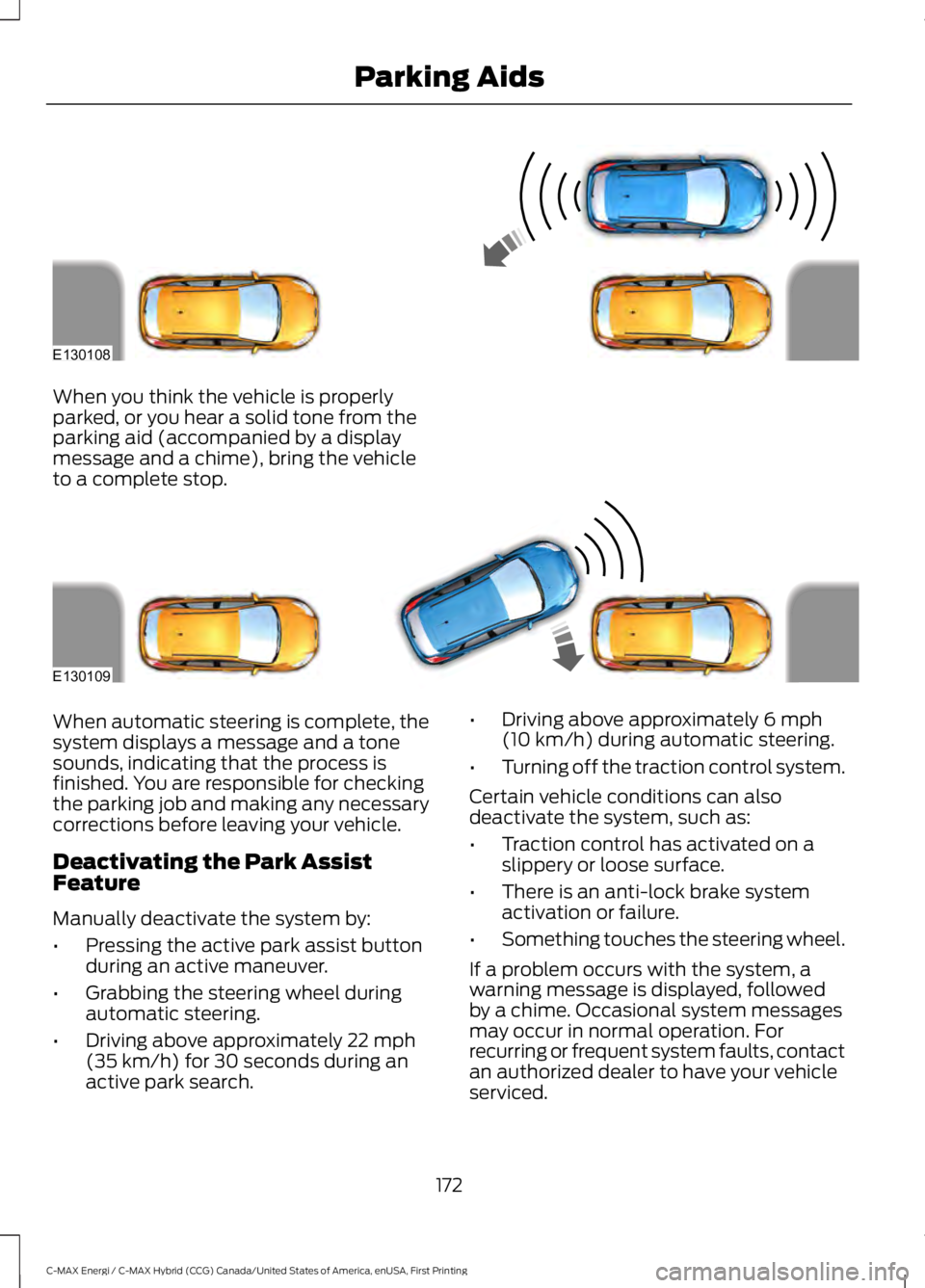
When you think the vehicle is properlyparked, or you hear a solid tone from theparking aid (accompanied by a displaymessage and a chime), bring the vehicleto a complete stop.
When automatic steering is complete, thesystem displays a message and a tonesounds, indicating that the process isfinished. You are responsible for checkingthe parking job and making any necessarycorrections before leaving your vehicle.
Deactivating the Park AssistFeature
Manually deactivate the system by:
•Pressing the active park assist buttonduring an active maneuver.
•Grabbing the steering wheel duringautomatic steering.
•Driving above approximately 22 mph(35 km/h) for 30 seconds during anactive park search.
•Driving above approximately 6 mph(10 km/h) during automatic steering.
•Turning off the traction control system.
Certain vehicle conditions can alsodeactivate the system, such as:
•Traction control has activated on aslippery or loose surface.
•There is an anti-lock brake systemactivation or failure.
•Something touches the steering wheel.
If a problem occurs with the system, awarning message is displayed, followedby a chime. Occasional system messagesmay occur in normal operation. Forrecurring or frequent system faults, contactan authorized dealer to have your vehicleserviced.
172
C-MAX Energi / C-MAX Hybrid (CCG) Canada/United States of America, enUSA, First Printing
Parking AidsE130108 E130109
Page 176 of 497
Troubleshooting the System
The system does not look for a space
The traction control system may be off.
The transmission is in reverse (R). Your vehicle must be moving forward to be able todetect a parking space.
The system does not offer a particular space
The sensors may be covered (for example snow, ice or dirt buildup). Covered sensorscan affect the system's functionality.
There is not enough space for the parking maneuver on the opposite side of the parkingspace.
The parking space is farther than 5 ft (1.5 m) away or closer than 16 in (40 cm).
Your vehicle is going faster than 22 mph (35 km/h).
You may have recently disconnected or replaced the battery. After a battery disconnect,your vehicle must be driven on a straight road at a speed greater than 12 mph (20 km/h)for up to 30 seconds.
The system does not position the vehicle where I want in the space
The vehicle is rolling in the opposite direction of the transmission (for example, rollingforward when reverse [R] is selected).
An irregular curb along the parking space prevents the system from aligning the vehicleproperly.
Vehicles or objects bordering the space may not be positioned correctly.
The vehicle was pulled too far past the parking space. The system performs best whenyou drive the same distance past the parking space.
The tires may not be installed or maintained correctly (for example, tires not inflatedcorrectly, improper tire size, or tires of different sizes).
A repair or alteration has changed detection capabilities.
173
C-MAX Energi / C-MAX Hybrid (CCG) Canada/United States of America, enUSA, First Printing
Parking Aids