lock FORD C-MAY HYBRID 2018 Owners Manual
[x] Cancel search | Manufacturer: FORD, Model Year: 2018, Model line: C-MAY HYBRID, Model: FORD C-MAY HYBRID 2018Pages: 475, PDF Size: 8.09 MB
Page 402 of 475
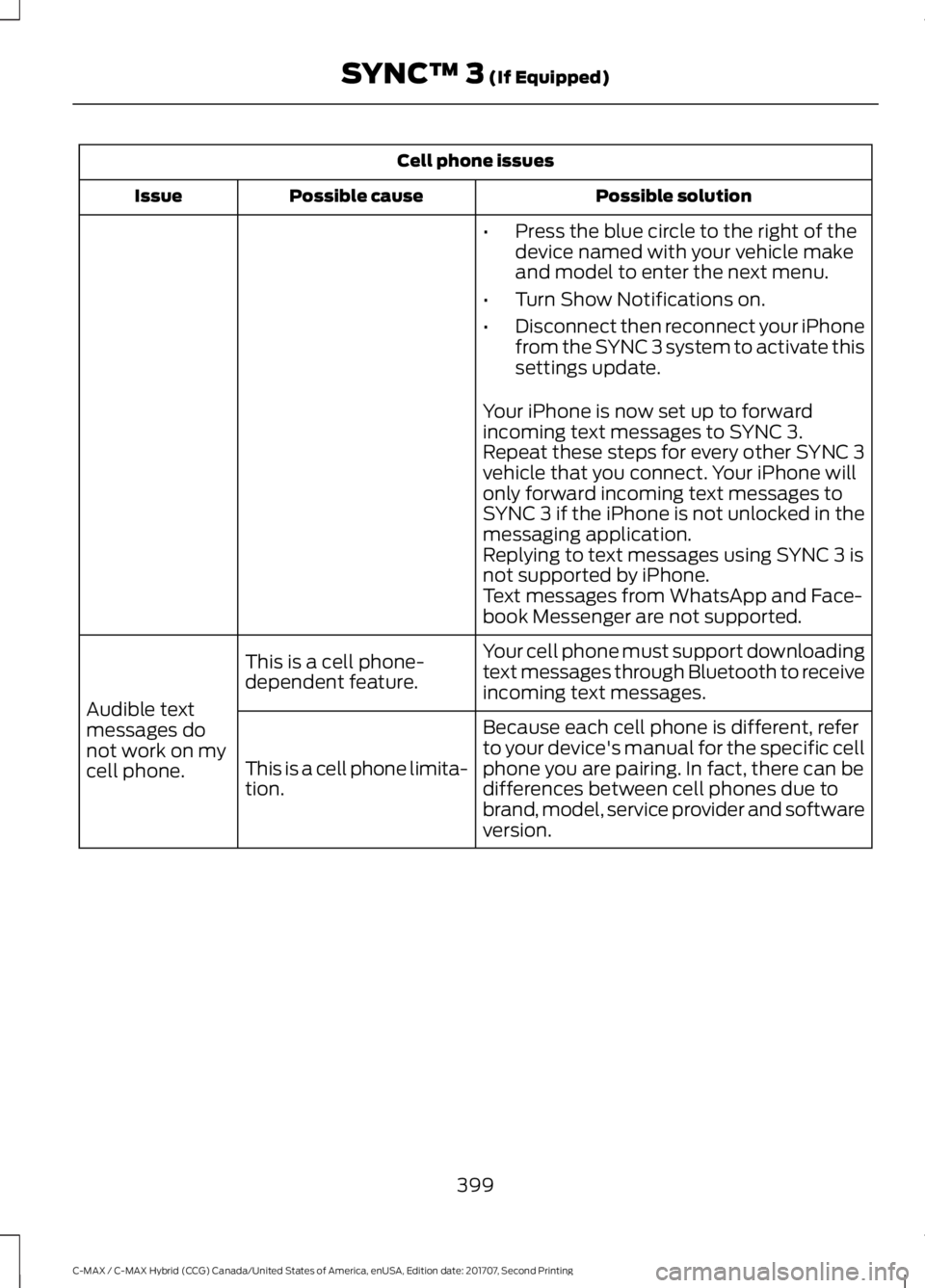
Cell phone issues
Possible solution
Possible cause
Issue
•Press the blue circle to the right of the
device named with your vehicle make
and model to enter the next menu.
• Turn Show Notifications on.
• Disconnect then reconnect your iPhone
from the SYNC 3 system to activate this
settings update.
Your iPhone is now set up to forward
incoming text messages to SYNC 3.
Repeat these steps for every other SYNC 3
vehicle that you connect. Your iPhone will
only forward incoming text messages to
SYNC 3 if the iPhone is not unlocked in the
messaging application.
Replying to text messages using SYNC 3 is
not supported by iPhone.
Text messages from WhatsApp and Face-
book Messenger are not supported.
Your cell phone must support downloading
text messages through Bluetooth to receive
incoming text messages.
This is a cell phone-
dependent feature.
Audible text
messages do
not work on my
cell phone. Because each cell phone is different, refer
to your device's manual for the specific cell
phone you are pairing. In fact, there can be
differences between cell phones due to
brand, model, service provider and software
version.
This is a cell phone limita-
tion.
399
C-MAX / C-MAX Hybrid (CCG) Canada/United States of America, enUSA, Edition date: 201707, Second Printing SYNC™ 3 (If Equipped)
Page 403 of 475
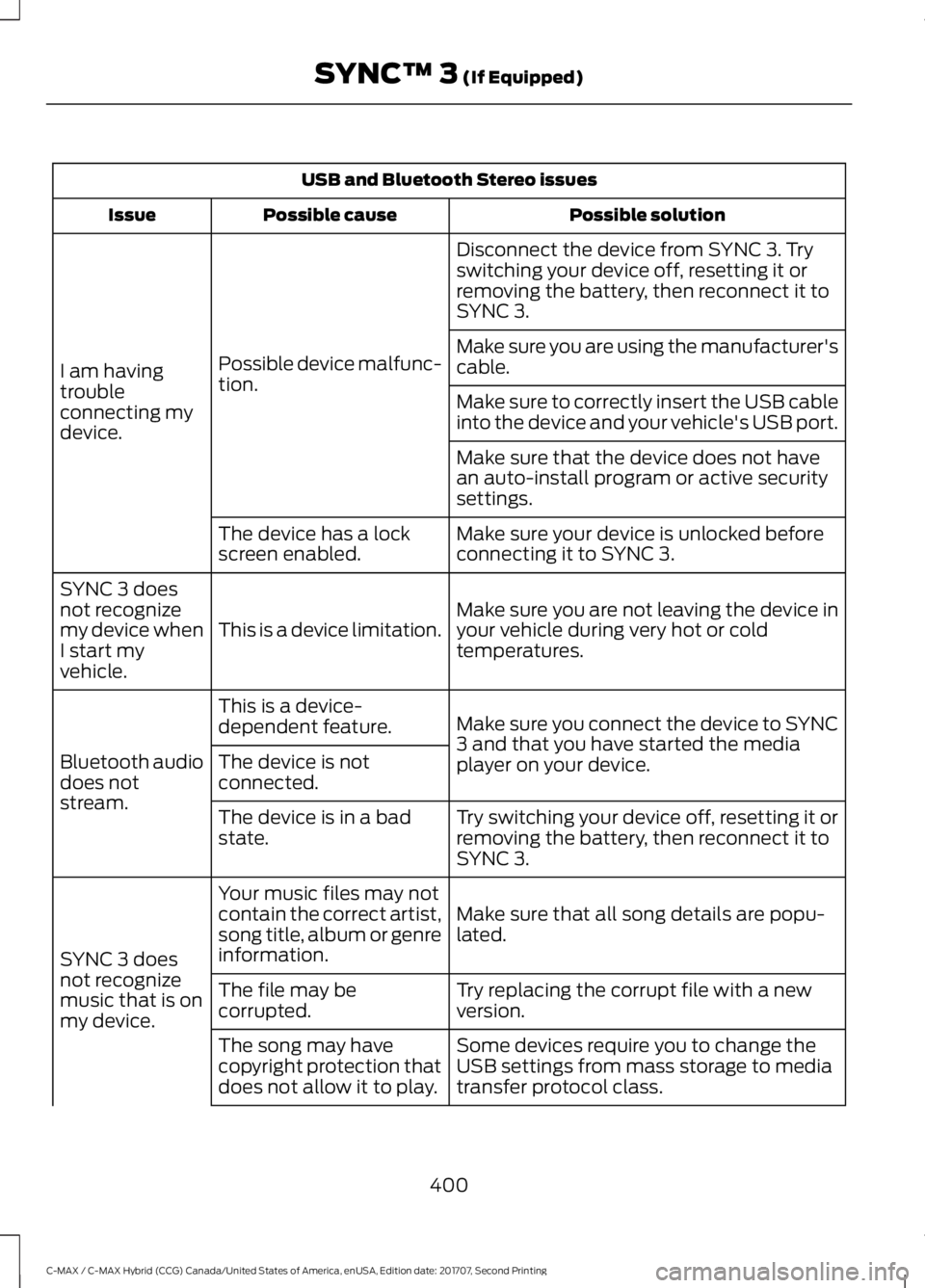
USB and Bluetooth Stereo issues
Possible solution
Possible cause
Issue
Disconnect the device from SYNC 3. Try
switching your device off, resetting it or
removing the battery, then reconnect it to
SYNC 3.
Possible device malfunc-
tion.
I am having
trouble
connecting my
device. Make sure you are using the manufacturer's
cable.
Make sure to correctly insert the USB cable
into the device and your vehicle's USB port.
Make sure that the device does not have
an auto-install program or active security
settings.
Make sure your device is unlocked before
connecting it to SYNC 3.
The device has a lock
screen enabled.
Make sure you are not leaving the device in
your vehicle during very hot or cold
temperatures.
This is a device limitation.
SYNC 3 does
not recognize
my device when
I start my
vehicle.
Make sure you connect the device to SYNC
3 and that you have started the media
player on your device.
This is a device-
dependent feature.
Bluetooth audio
does not
stream. The device is not
connected.
Try switching your device off, resetting it or
removing the battery, then reconnect it to
SYNC 3.
The device is in a bad
state.
Make sure that all song details are popu-
lated.
Your music files may not
contain the correct artist,
song title, album or genre
information.
SYNC 3 does
not recognize
music that is on
my device. Try replacing the corrupt file with a new
version.
The file may be
corrupted.
Some devices require you to change the
USB settings from mass storage to media
transfer protocol class.
The song may have
copyright protection that
does not allow it to play.
400
C-MAX / C-MAX Hybrid (CCG) Canada/United States of America, enUSA, Edition date: 201707, Second Printing SYNC™ 3 (If Equipped)
Page 404 of 475
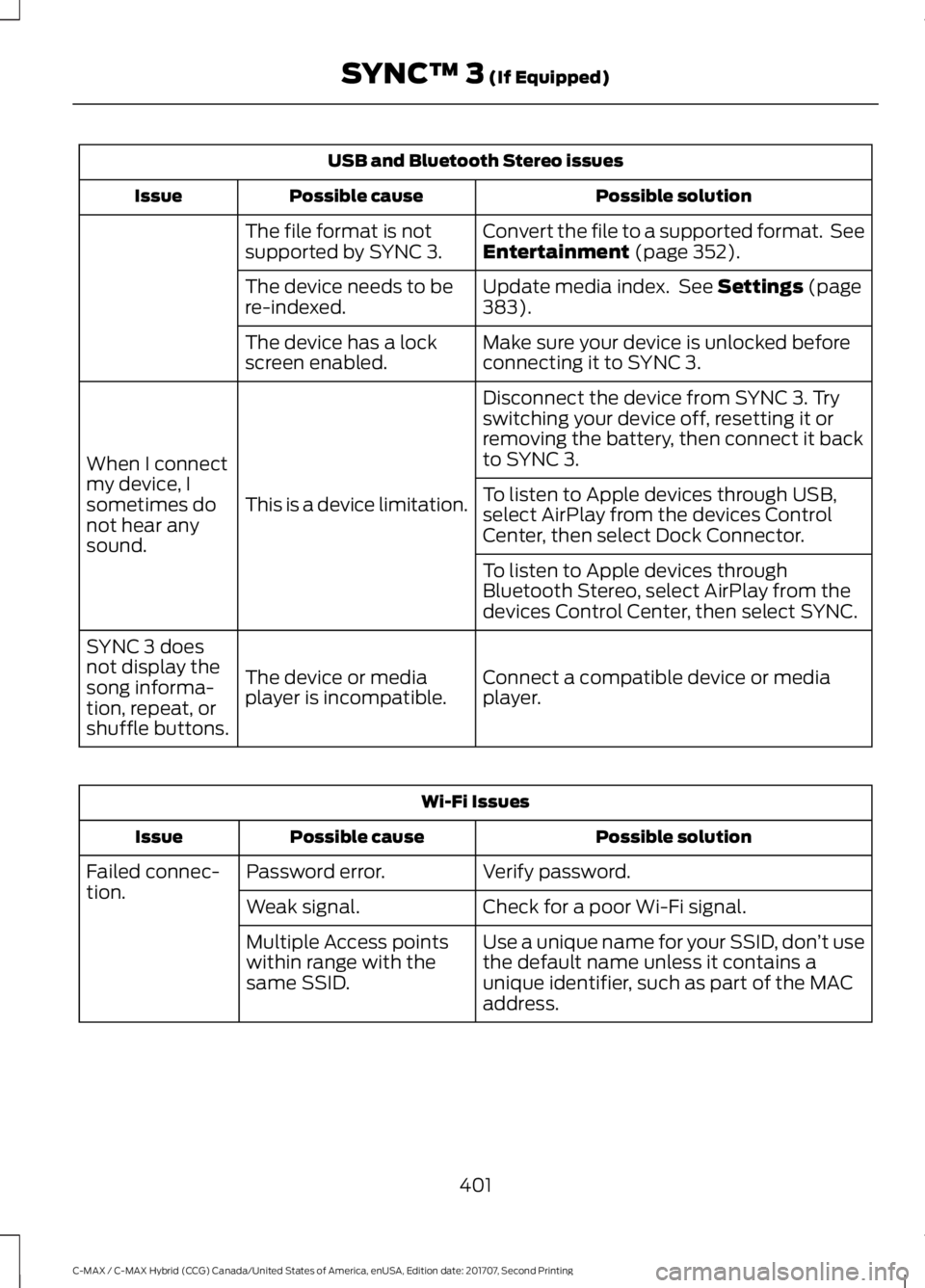
USB and Bluetooth Stereo issues
Possible solution
Possible cause
Issue
Convert the file to a supported format. See
Entertainment (page 352).
The file format is not
supported by SYNC 3.
Update media index. See
Settings (page
383).
The device needs to be
re-indexed.
Make sure your device is unlocked before
connecting it to SYNC 3.
The device has a lock
screen enabled.
Disconnect the device from SYNC 3. Try
switching your device off, resetting it or
removing the battery, then connect it back
to SYNC 3.
This is a device limitation.
When I connect
my device, I
sometimes do
not hear any
sound. To listen to Apple devices through USB,
select AirPlay from the devices Control
Center, then select Dock Connector.
To listen to Apple devices through
Bluetooth Stereo, select AirPlay from the
devices Control Center, then select SYNC.
Connect a compatible device or media
player.
The device or media
player is incompatible.
SYNC 3 does
not display the
song informa-
tion, repeat, or
shuffle buttons. Wi-Fi Issues
Possible solution
Possible cause
Issue
Verify password.
Password error.
Failed connec-
tion.
Check for a poor Wi-Fi signal.
Weak signal.
Use a unique name for your SSID, don ’t use
the default name unless it contains a
unique identifier, such as part of the MAC
address.
Multiple Access points
within range with the
same SSID.
401
C-MAX / C-MAX Hybrid (CCG) Canada/United States of America, enUSA, Edition date: 201707, Second Printing SYNC™ 3
(If Equipped)
Page 411 of 475
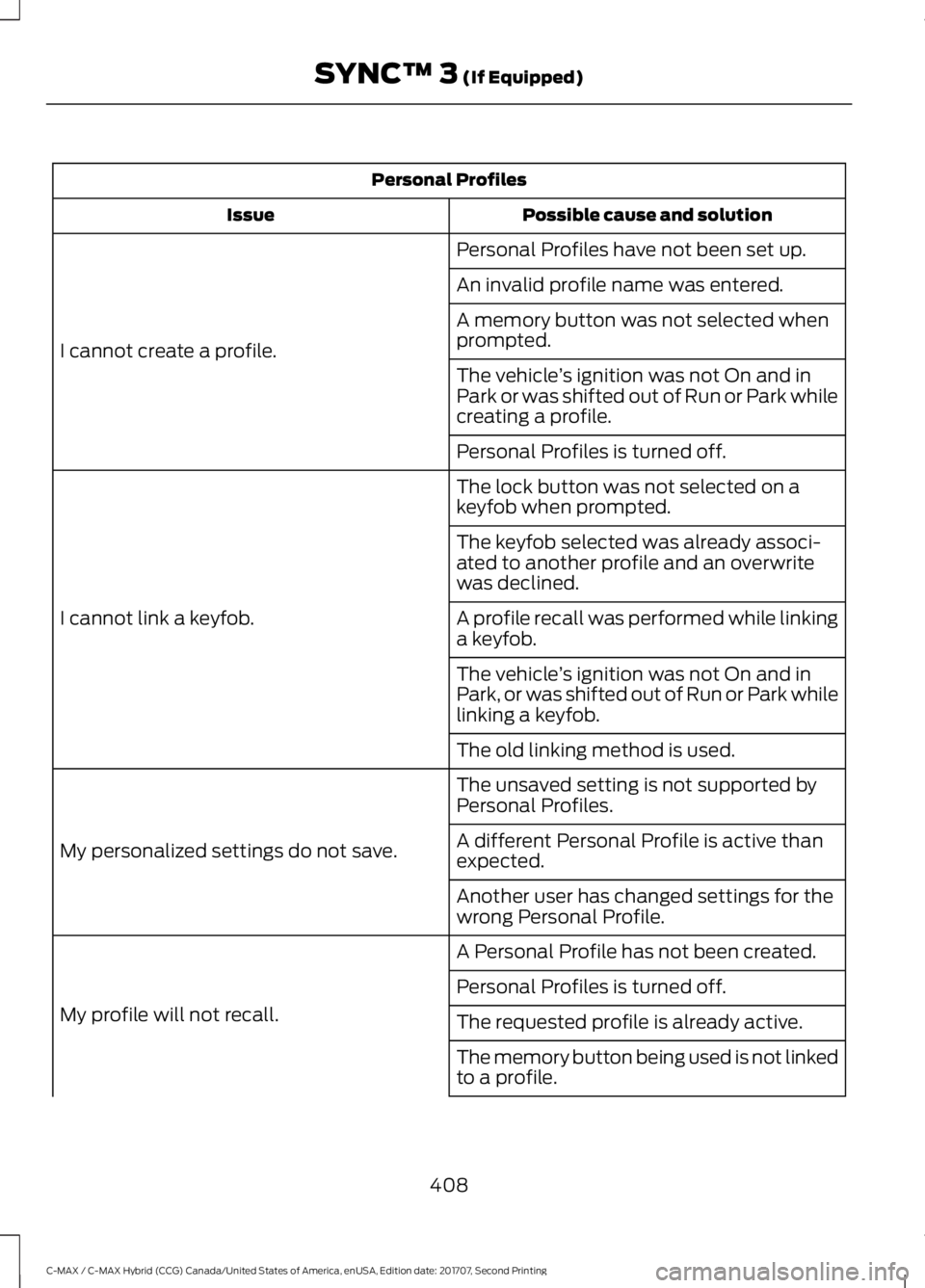
Personal Profiles
Possible cause and solution
Issue
Personal Profiles have not been set up.
I cannot create a profile. An invalid profile name was entered.
A memory button was not selected when
prompted.
The vehicle
’s ignition was not On and in
Park or was shifted out of Run or Park while
creating a profile.
Personal Profiles is turned off.
The lock button was not selected on a
keyfob when prompted.
I cannot link a keyfob. The keyfob selected was already associ-
ated to another profile and an overwrite
was declined.
A profile recall was performed while linking
a keyfob.
The vehicle
’s ignition was not On and in
Park, or was shifted out of Run or Park while
linking a keyfob.
The old linking method is used.
The unsaved setting is not supported by
Personal Profiles.
My personalized settings do not save. A different Personal Profile is active than
expected.
Another user has changed settings for the
wrong Personal Profile.
A Personal Profile has not been created.
My profile will not recall. Personal Profiles is turned off.
The requested profile is already active.
The memory button being used is not linked
to a profile.
408
C-MAX / C-MAX Hybrid (CCG) Canada/United States of America, enUSA, Edition date: 201707, Second Printing SYNC™ 3 (If Equipped)
Page 412 of 475
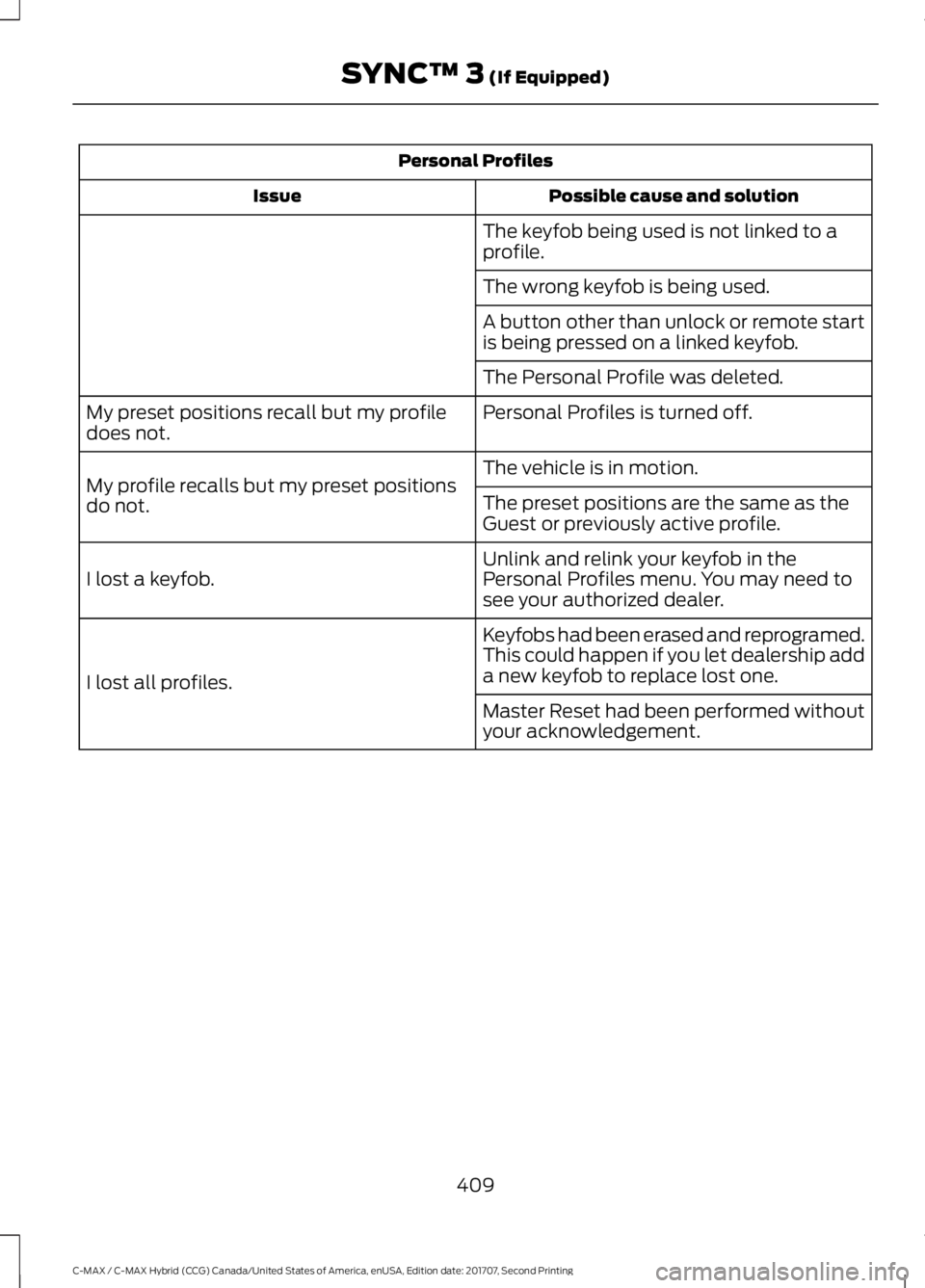
Personal Profiles
Possible cause and solution
Issue
The keyfob being used is not linked to a
profile.
The wrong keyfob is being used.
A button other than unlock or remote start
is being pressed on a linked keyfob.
The Personal Profile was deleted.
Personal Profiles is turned off.
My preset positions recall but my profile
does not.
The vehicle is in motion.
My profile recalls but my preset positions
do not. The preset positions are the same as the
Guest or previously active profile.
Unlink and relink your keyfob in the
Personal Profiles menu. You may need to
see your authorized dealer.
I lost a keyfob.
Keyfobs had been erased and reprogramed.
This could happen if you let dealership add
a new keyfob to replace lost one.
I lost all profiles.
Master Reset had been performed without
your acknowledgement.
409
C-MAX / C-MAX Hybrid (CCG) Canada/United States of America, enUSA, Edition date: 201707, Second Printing SYNC™ 3 (If Equipped)
Page 414 of 475
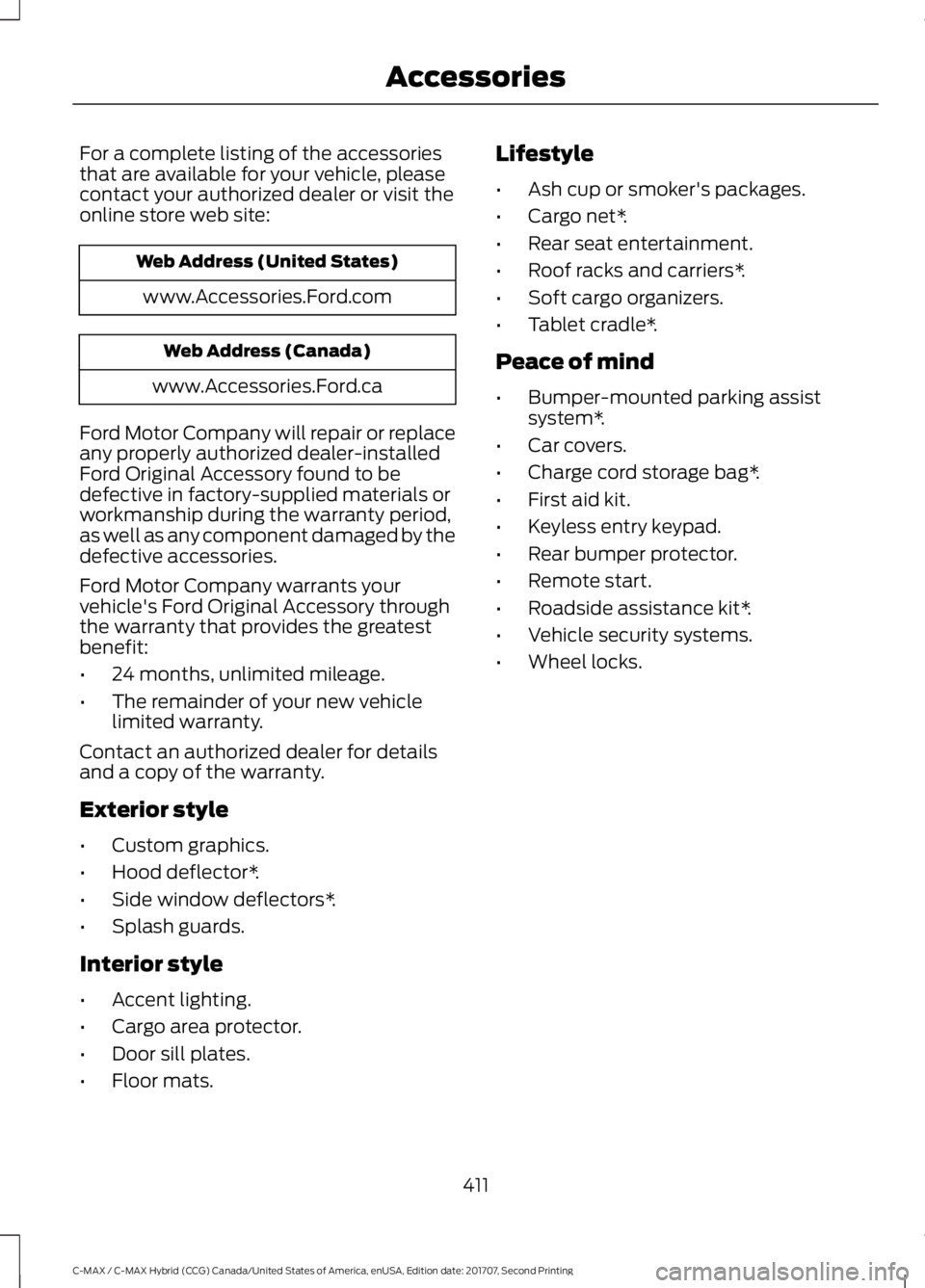
For a complete listing of the accessories
that are available for your vehicle, please
contact your authorized dealer or visit the
online store web site:
Web Address (United States)
www.Accessories.Ford.com Web Address (Canada)
www.Accessories.Ford.ca
Ford Motor Company will repair or replace
any properly authorized dealer-installed
Ford Original Accessory found to be
defective in factory-supplied materials or
workmanship during the warranty period,
as well as any component damaged by the
defective accessories.
Ford Motor Company warrants your
vehicle's Ford Original Accessory through
the warranty that provides the greatest
benefit:
• 24 months, unlimited mileage.
• The remainder of your new vehicle
limited warranty.
Contact an authorized dealer for details
and a copy of the warranty.
Exterior style
• Custom graphics.
• Hood deflector*.
• Side window deflectors*.
• Splash guards.
Interior style
• Accent lighting.
• Cargo area protector.
• Door sill plates.
• Floor mats. Lifestyle
•
Ash cup or smoker's packages.
• Cargo net*.
• Rear seat entertainment.
• Roof racks and carriers*.
• Soft cargo organizers.
• Tablet cradle*.
Peace of mind
• Bumper-mounted parking assist
system*.
• Car covers.
• Charge cord storage bag*.
• First aid kit.
• Keyless entry keypad.
• Rear bumper protector.
• Remote start.
• Roadside assistance kit*.
• Vehicle security systems.
• Wheel locks.
411
C-MAX / C-MAX Hybrid (CCG) Canada/United States of America, enUSA, Edition date: 201707, Second Printing Accessories
Page 416 of 475
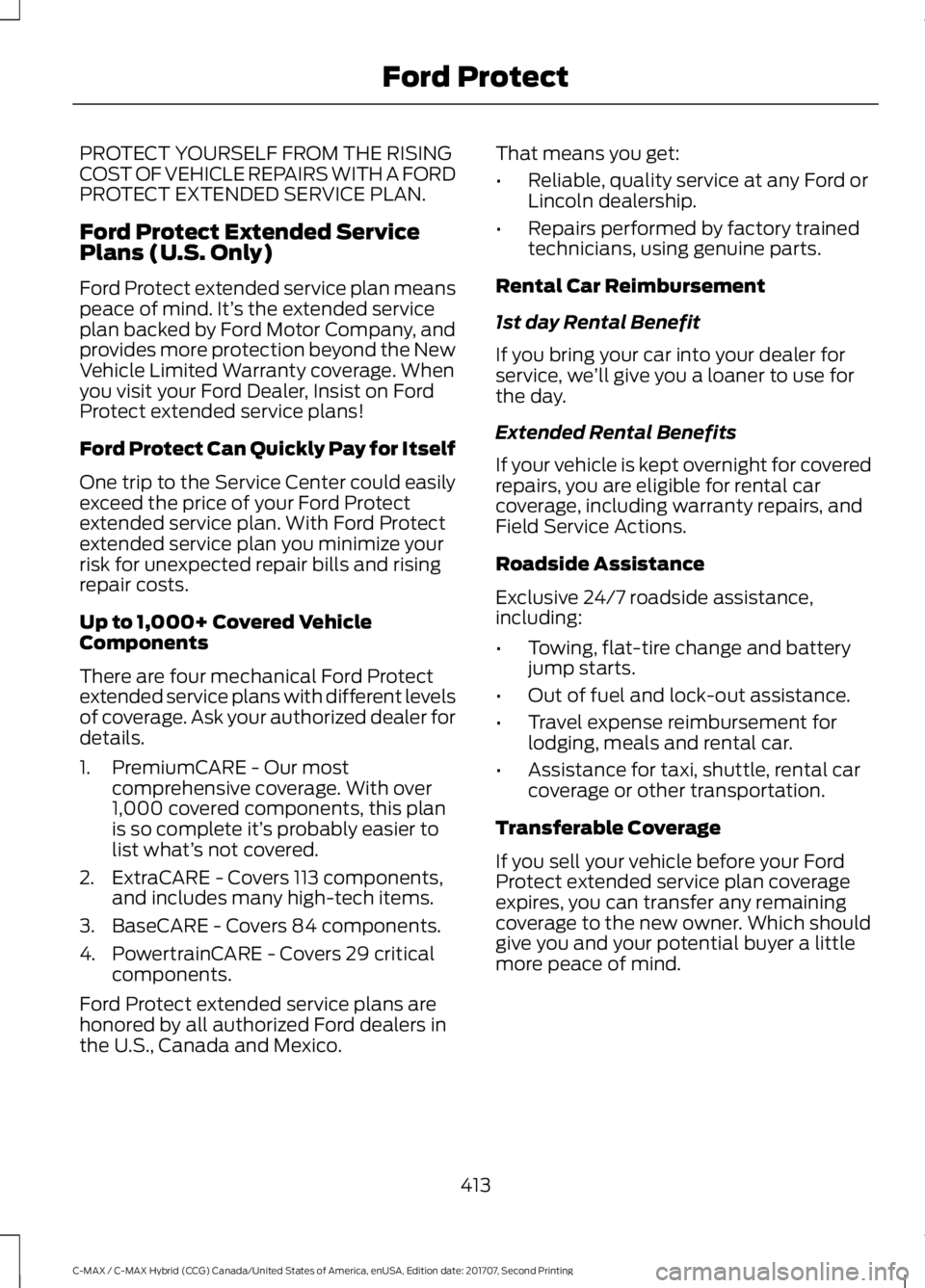
PROTECT YOURSELF FROM THE RISING
COST OF VEHICLE REPAIRS WITH A FORD
PROTECT EXTENDED SERVICE PLAN.
Ford Protect Extended Service
Plans (U.S. Only)
Ford Protect extended service plan means
peace of mind. It’
s the extended service
plan backed by Ford Motor Company, and
provides more protection beyond the New
Vehicle Limited Warranty coverage. When
you visit your Ford Dealer, Insist on Ford
Protect extended service plans!
Ford Protect Can Quickly Pay for Itself
One trip to the Service Center could easily
exceed the price of your Ford Protect
extended service plan. With Ford Protect
extended service plan you minimize your
risk for unexpected repair bills and rising
repair costs.
Up to 1,000+ Covered Vehicle
Components
There are four mechanical Ford Protect
extended service plans with different levels
of coverage. Ask your authorized dealer for
details.
1. PremiumCARE - Our most comprehensive coverage. With over
1,000 covered components, this plan
is so complete it’ s probably easier to
list what’ s not covered.
2. ExtraCARE - Covers 113 components, and includes many high-tech items.
3. BaseCARE - Covers 84 components.
4. PowertrainCARE - Covers 29 critical components.
Ford Protect extended service plans are
honored by all authorized Ford dealers in
the U.S., Canada and Mexico. That means you get:
•
Reliable, quality service at any Ford or
Lincoln dealership.
• Repairs performed by factory trained
technicians, using genuine parts.
Rental Car Reimbursement
1st day Rental Benefit
If you bring your car into your dealer for
service, we ’ll give you a loaner to use for
the day.
Extended Rental Benefits
If your vehicle is kept overnight for covered
repairs, you are eligible for rental car
coverage, including warranty repairs, and
Field Service Actions.
Roadside Assistance
Exclusive 24/7 roadside assistance,
including:
• Towing, flat-tire change and battery
jump starts.
• Out of fuel and lock-out assistance.
• Travel expense reimbursement for
lodging, meals and rental car.
• Assistance for taxi, shuttle, rental car
coverage or other transportation.
Transferable Coverage
If you sell your vehicle before your Ford
Protect extended service plan coverage
expires, you can transfer any remaining
coverage to the new owner. Which should
give you and your potential buyer a little
more peace of mind.
413
C-MAX / C-MAX Hybrid (CCG) Canada/United States of America, enUSA, Edition date: 201707, Second Printing Ford Protect
Page 420 of 475
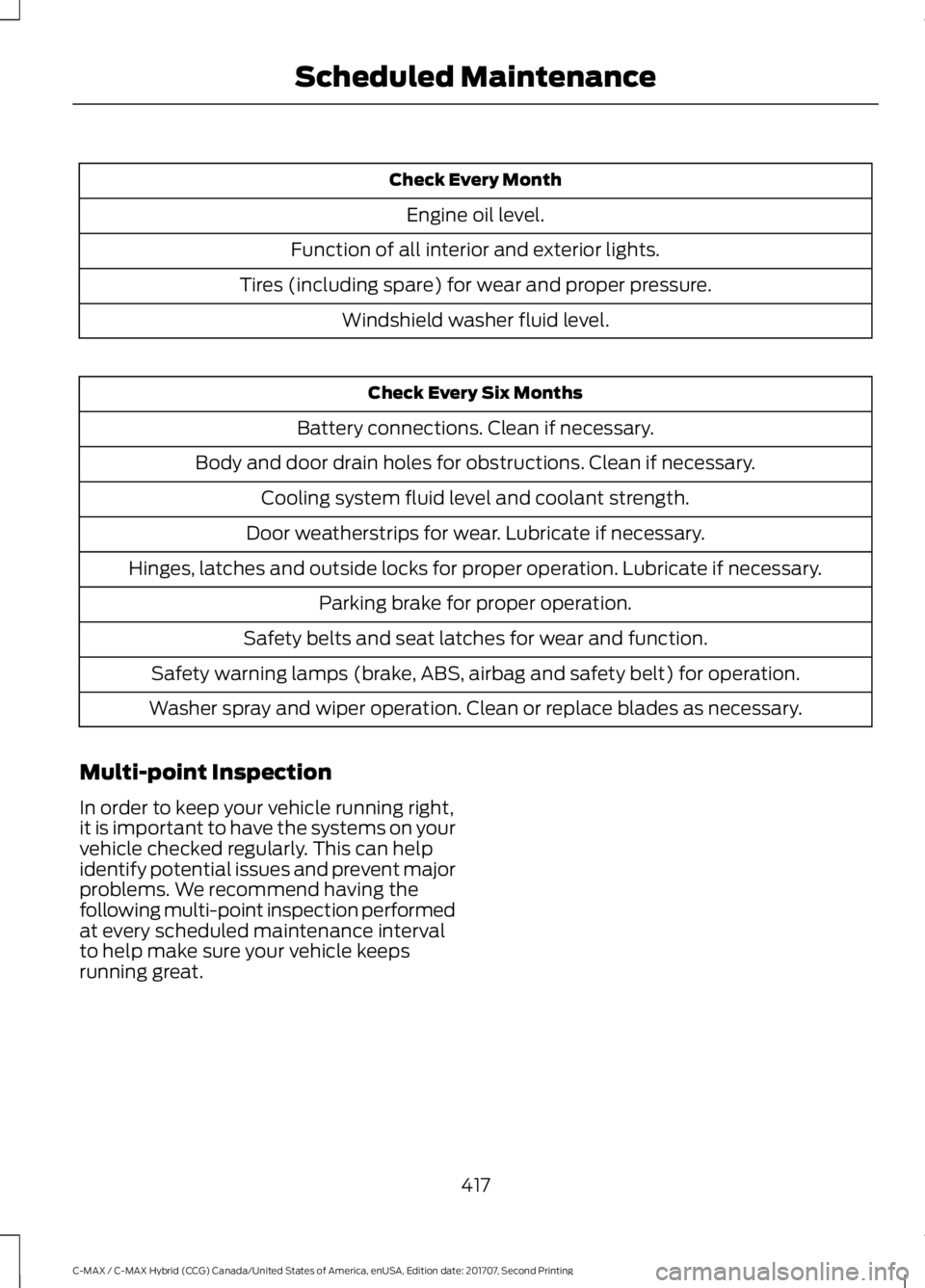
Check Every Month
Engine oil level.
Function of all interior and exterior lights.
Tires (including spare) for wear and proper pressure. Windshield washer fluid level. Check Every Six Months
Battery connections. Clean if necessary.
Body and door drain holes for obstructions. Clean if necessary. Cooling system fluid level and coolant strength.
Door weatherstrips for wear. Lubricate if necessary.
Hinges, latches and outside locks for proper operation. Lubricate if necessary. Parking brake for proper operation.
Safety belts and seat latches for wear and function.
Safety warning lamps (brake, ABS, airbag and safety belt) for operation.
Washer spray and wiper operation. Clean or replace blades as necessary.
Multi-point Inspection
In order to keep your vehicle running right,
it is important to have the systems on your
vehicle checked regularly. This can help
identify potential issues and prevent major
problems. We recommend having the
following multi-point inspection performed
at every scheduled maintenance interval
to help make sure your vehicle keeps
running great.
417
C-MAX / C-MAX Hybrid (CCG) Canada/United States of America, enUSA, Edition date: 201707, Second Printing Scheduled Maintenance
Page 466 of 475
A
A/C
See: Climate Control......................................... 106
About This Manual...........................................7
ABS See: Brakes............................................................ 153
ABS driving hints See: Hints on Driving With Anti-Lock
Brakes................................................................ 154
Accessories......................................................411 Exterior style.......................................................... 411
Interior style........................................................... 411
Lifestyle................................................................... 411
Peace of mind....................................................... 411
Accessories See: Replacement Parts
Recommendation............................................ 12
Active Park Assist..........................................161 Automatic Steering into Parking
Space................................................................. 163
Deactivating the Park Assist Feature..........163
Troubleshooting the System.......................... 164
Using Active Park Assist................................... 162
Adjusting the Headlamps.........................225 Horizontal Aim Adjustment........................... 226
Vertical Aim Adjustment................................. 225
Adjusting the Steering Wheel...................68
Airbag Disposal
..............................................46
Air Conditioning See: Climate Control......................................... 106
Air Filter See: Changing the Engine Air Filter.............232
Alarm See: Anti-Theft Alarm......................................... 67
Ambient Lighting
............................................78
Anti-Theft Alarm............................................67
Arming the Alarm................................................. 67
Disarming the Alarm........................................... 67
Appendices....................................................433
Apps.................................................................380 ........................................................................\
.......... 380
SiriusXM Traffic and Travel Link................... 382
At a Glance........................................................16
Audible Warnings and Indicators............90 Automatic Transmission Warning
Chime................................................................... 91
Engine On Warning Chime............................... 90Headlamps On Warning Chime.......................
91
Key in Ignition Warning Chime........................ 90
Keyless Warning Alert ....................................... 90
Parking Brake On Warning Chime................... 91
Audio Control..................................................68 Seek, Next or Previous....................................... 69
Audio System.................................................277 General Information.......................................... 277
Audio Unit - Vehicles With: AM/FM/CD/ Satellite Radio...........................................282
Menu Structure.................................................. 284
Audio Unit - Vehicles With: AM/FM/CD/ SYNC/Touchscreen Display
.................280
Audio Unit - Vehicles With: AM/FM/CD/ SYNC.............................................................278
Audio Unit - Vehicles With: Sony Audio System..........................................................287
Autolamps.........................................................75 Windshield Wiper Activated
Headlamps......................................................... 75
Automatic Climate Control
......................106
Smart Zone........................................................... 107
Automatic Engine Shutdown...................129
Automatic Transmission...........................150 Brake-Shift Interlock Override........................ 151
If Your Vehicle Gets Stuck In Mud or Snow................................................................... 152
Understanding the Shift Positions of your Automatic Transmission............................ 150
Automatic Transmission Fluid Check
............................................................220
Autowipers.........................................................71 Autowipers Settings............................................ 72
Auxiliary Power Points
................................122
110 Volt AC Power Point.................................... 122
12 Volt DC Power Point...................................... 122
Locations................................................................ 122
B
Battery See: Changing the 12V Battery...................... 222
Blind Spot Information System...............170 Switching the System Off and On.................171
System Errors......................................................... 171
Using the Blind Spot Information System............................................................... 170
463
C-MAX / C-MAX Hybrid (CCG) Canada/United States of America, enUSA, Edition date: 201707, Second Printing Index
Page 467 of 475
BLIS
See: Blind Spot Information System...........170
Body Styling Kits..........................................243
Bonnet Lock See: Opening and Closing the Hood............212
Booster Seats..................................................25 Types of Booster Seats...................................... 26
Brake Fluid Check
.........................................221
Brakes...............................................................153
General Information.......................................... 153
Breaking-In......................................................183
Bulb Specification Chart............................231
C
Cabin Air Filter...............................................109
California Proposition 65..............................11
Capacities and Specifications
................274
Specifications...................................................... 274
Car Wash See: Cleaning the Exterior.............................. 235
Catalytic Converter......................................144 On-Board Diagnostics (OBD-II).................... 145
Readiness for Inspection and Maintenance (I/M) Testing................................................... 145
Center Console
..............................................124
Changing a Bulb...........................................226
Replacing Fog, Park and Direction Indicator
Bulbs.................................................................. 228
Replacing Headlamp Bulbs........................... 226
Replacing License Plate Lamp Bulb..........230
Replacing Reverse Lamp and Tail Lamp Bulbs.................................................................. 229
Replacing Tail, Brake and Direction Indicator Bulbs............................................... 228
Replacing the Center High Mounted Brake Lamp Bulbs..................................................... 230
Changing a Fuse...........................................210 Fuses....................................................................... 210
Changing the 12V Battery..........................222
Changing the Engine Air Filter.................232 Air Cleaner Assembly Components............232
Installing the Engine Air Filter
Element............................................................ 233
Removing the Engine Air Filter Element............................................................ 233Changing the Wiper Blades.....................223
Changing the Rear Window Wiper
Blade
.................................................................. 224
Changing the Windshield Wiper Blades................................................................ 224
Service Position.................................................. 223
Checking MyKey System Status...............55 MyKey Distance.................................................... 55
Number of Admin Keys...................................... 55
Number of MyKeys.............................................. 55
Checking the Wiper Blades......................223
Child Restraint and Seatbelt Maintenance.................................................35
Child Restraint Positioning
..........................27
Child Safety.......................................................18
General Information............................................. 18
Child Safety Locks.........................................28 Left-Hand Side...................................................... 29
Right-Hand Side................................................... 29
Cleaning Leather Seats
.............................240
Cleaning Products.......................................235
Materials................................................................ 235
Cleaning the Engine
....................................237
Cleaning the Exterior..................................235
Body Paintwork Preservation........................ 236
Cleaning Stripes or Graphics......................... 236
Cleaning the Chrome Trim............................. 236
Cleaning the Headlamps................................ 236
Cleaning the Rear Window............................ 236
Cleaning the Instrument Panel and Instrument Cluster Lens.........................239
Cleaning the Interior...................................238 Fabric, Carpets, Cloth Seats, Headliners
and Floor Mats............................................... 238
Instrument Cluster Screens, LCD Screens and Radio Screens....................................... 239
Leather Interior................................................... 238
Rear Windows..................................................... 239
Seatbelts............................................................... 238
Storage Compartments, Cup Holders and Ashtrays............................................................ 239
Suede Micro Fiber Fabric................................ 238
Cleaning the Wheels
..................................240
Cleaning the Windows and Wiper Blades............................................................237
Clearing All MyKeys.......................................53
Climate Control
............................................106
464
C-MAX / C-MAX Hybrid (CCG) Canada/United States of America, enUSA, Edition date: 201707, Second Printing Index