audio FORD C-MAY HYBRID 2018 Owners Manual
[x] Cancel search | Manufacturer: FORD, Model Year: 2018, Model line: C-MAY HYBRID, Model: FORD C-MAY HYBRID 2018Pages: 475, PDF Size: 8.09 MB
Page 5 of 475
Audio Control
.................................................68
Voice Control ..................................................
69
Cruise Control ................................................
69
Information Display Control ......................
70
Wipers and Washers
Windshield Wipers .........................................
71
Autowipers ........................................................
71
Windshield Washers .....................................
72
Rear Window Wiper and Washers ..........
72
Lighting
General Information .....................................
74
Lighting Control ..............................................
74
Autolamps ........................................................
75
Instrument Lighting Dimmer .....................
75
Headlamp Exit Delay ...................................
76
Daytime Running Lamps ............................
76
Front Fog Lamps ............................................
77
Direction Indicators .......................................
77
Interior Lamps .................................................
77
Ambient Lighting ...........................................
78
Windows and Mirrors
Power Windows .............................................
79
Global Opening .............................................
80
Exterior Mirrors ..............................................
80
Interior Mirror ..................................................
82
Sun Visors ........................................................
82
Sun Shades .....................................................
83
Instrument Cluster
Gauges ..............................................................
85
Warning Lamps and Indicators ................
87
Audible Warnings and Indicators ...........
90
Information Displays
General Information .....................................
92
Information Messages ................................
99Climate Control
Automatic Climate Control
.....................
106
Hints on Controlling the Interior Climate ........................................................................\
108
Heated Windows and Mirrors .................
108
Cabin Air Filter ..............................................
109
Remote Start ................................................
109
Seats
Sitting in the Correct Position ...................
111
Head Restraints ..............................................
111
Manual Seats .................................................
113
Power Seats ....................................................
114
Rear Seats .......................................................
116
Heated Seats ..................................................
117
Rear Seat Armrest ........................................
117
Universal Garage Door Opener
Universal Garage Door Opener ...............
118
Auxiliary Power Points
Auxiliary Power Points ...............................
122
Storage Compartments
Center Console .............................................
124
Overhead Console .......................................
124
Starting and Stopping the Engine
General Information ...................................
125
Ignition Switch ..............................................
125
Keyless Starting ............................................
125
Starting a Hybrid Electric Vehicle System ........................................................................\
.
126
Engine Block Heater ...................................
128
Automatic Engine Shutdown ..................
129
2
C-MAX / C-MAX Hybrid (CCG) Canada/United States of America, enUSA, Edition date: 201707, Second Printing Table of Contents
Page 8 of 475
Audio System
General Information
...................................277
Audio Unit - Vehicles With: AM/FM/CD/ SYNC ...........................................................
278
Audio Unit - Vehicles With: AM/FM/CD/ SYNC/Touchscreen Display ...............
280
Audio Unit - Vehicles With: AM/FM/CD/ Satellite Radio .........................................
282
Audio Unit - Vehicles With: Sony Audio System ........................................................
287
Digital Radio .................................................
288
Satellite Radio .............................................
290
USB Port ........................................................
293
SYNC™
General Information ..................................
294
Using Voice Recognition ..........................
296
Using SYNC™ With Your Phone ...........
298
SYNC™ Applications and Services ......
310
Using SYNC™ With Your Media Player ........................................................................\
.
315
SYNC™ Troubleshooting ........................
324
SYNC™ 3
General Information ..................................
332
Home Screen ...............................................
344
Using Voice Recognition ..........................
346
Entertainment ..............................................
352
Phone ..............................................................
363
Navigation .....................................................
368
Electric Vehicle Information ....................
376
Apps ................................................................
380
Settings ..........................................................
383
SYNC™ 3 Troubleshooting .....................
397
Accessories
Accessories .....................................................
411
Ford Protect
Ford Protect ...................................................
413Scheduled Maintenance
General Maintenance Information
.......
415
Normal Scheduled Maintenance ..........
418
Special Operating Conditions Scheduled Maintenance ............................................
420
Scheduled Maintenance Record ...........
422
Appendices
Electromagnetic Compatibility .............
433
End User License Agreement ................
435
5
C-MAX / C-MAX Hybrid (CCG) Canada/United States of America, enUSA, Edition date: 201707, Second Printing Table of Contents
Page 19 of 475
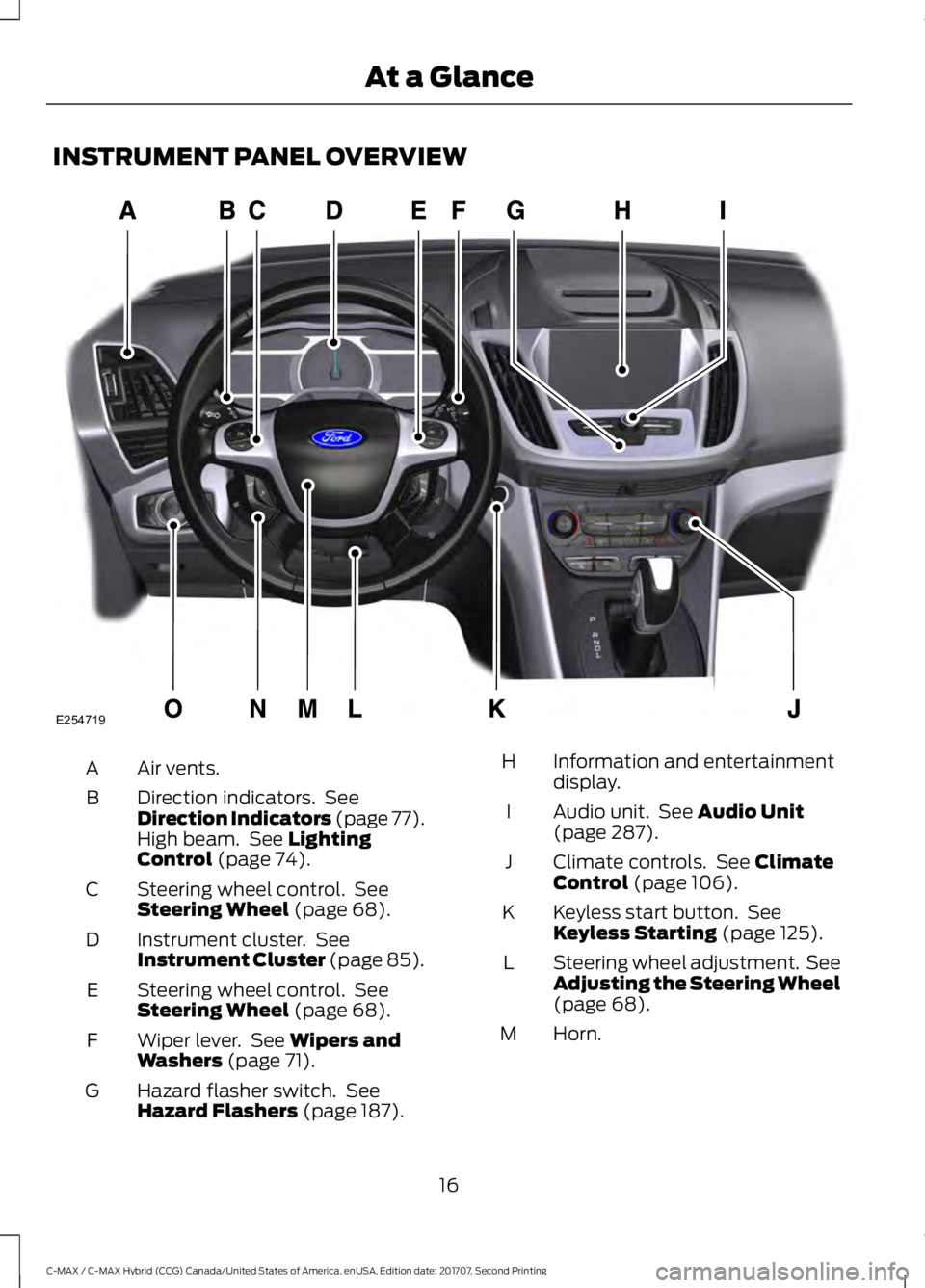
INSTRUMENT PANEL OVERVIEW
Air vents.
A
Direction indicators. See
Direction Indicators (page 77).
High beam. See Lighting
Control (page 74).
B
Steering wheel control. See
Steering Wheel
(page 68).
C
Instrument cluster. See
Instrument Cluster
(page 85).
D
Steering wheel control. See
Steering Wheel
(page 68).
E
Wiper lever. See
Wipers and
Washers (page 71).
F
Hazard flasher switch. See
Hazard Flashers
(page 187).
G Information and entertainment
display.
H
Audio unit. See
Audio Unit
(page 287).
I
Climate controls. See
Climate
Control (page 106).
J
Keyless start button. See
Keyless Starting
(page 125).
K
Steering wheel adjustment. See
Adjusting the Steering Wheel
(page
68).
L
Horn.
M
16
C-MAX / C-MAX Hybrid (CCG) Canada/United States of America, enUSA, Edition date: 201707, Second Printing At a GlanceE254719
Page 55 of 475
PRINCIPLE OF OPERATION
MyKey allows you to program keys with
restricted driving modes to promote good
driving habits. All but one of the keys
programmed to the vehicle can be
activated with these restricted modes.
Any keys that have not been programmed
are referred to as administrator keys or
admin keys. These can be used to:
•
Create a MyKey.
• Program configurable MyKey settings.
• Clear all MyKey features.
When you have programmed a MyKey, you
can access the following information using
the information display:
• How many admin keys and MyKeys are
programmed to your vehicle.
• The total distance your vehicle has
traveled using a MyKey.
Note: All MyKeys are programmed to the
same settings. You cannot program them
individually.
Note: For vehicles with push-button start,
when both a MyKey and an admin remote
transmitter are present, the admin remote
transmitter will be recognized by the vehicle
while switching the ignition on to start the
vehicle.
Non-configurable Settings
The following settings cannot be changed
by an admin key user: •
Seat belt reminder or Belt Minder. You
cannot disable this feature. The audio
system will mute when the front seat
passengers' safety belts are not
fastened.
• Early low fuel. The low-fuel warning
activates earlier, giving the MyKey user
more time to refuel.
• Driver assist features, if equipped on
your vehicle, are forced on: parking aid.
Configurable Settings
With an admin key, you can configure
certain MyKey settings when you first
create a MyKey and before you recycle the
key or restart the vehicle. You can also
change the settings afterward with an
admin key.
• A vehicle speed limit can be set.
Warnings will be shown in the display
followed by an audible tone when your
vehicle reaches the set speed. You
cannot override the set speed by fully
depressing the accelerator pedal or by
setting cruise control. WARNING
Do not set MyKey maximum speed
limit to a limit that will prevent the
driver from maintaining a safe speed
considering posted speed limits and
prevailing road conditions. The driver is
always responsible to drive in accordance
with local laws and prevailing conditions.
Failure to do so could result in accident or
injury. 52
C-MAX / C-MAX Hybrid (CCG) Canada/United States of America, enUSA, Edition date: 201707, Second Printing MyKey
™
Page 56 of 475
•
Various vehicle speed minders can be
set. Once you select a speed, it will be
shown in the display, followed by an
audible tone when the preselected
vehicle speed is exceeded.
• Audio system maximum volume of
45%. A message will be shown in the
display when you attempt to exceed
the limited volume. Also, the
speed-sensitive or compensated
automatic volume control will be
disabled.
• Always on setting. When this is
selected, you will not be able to turn
off Advance Trac or traction control (if
your vehicle is equipped with this
feature).
CREATING A MYKEY
Use the information display to create a
MyKey:
1. Insert the key you want to program into
the ignition. If your vehicle is equipped with
a push-button start, hold the intelligent
access key next to the steering column.
Details on the correct fob placement and
position is in another chapter. See
Starting a Hybrid Electric Vehicle
System (page 126).
2. Switch the ignition on.
3. Access the main menu on the
information display controls, and select
Settings
and then MyKey by pressing OK
or the > button.
4. Press
OK or the > button to select
Create MyKey. 5. When prompted, hold the
OK button
until you see a message informing you to
label this key as a MyKey. The key will be
restricted at your vehicle's next start.
MyKey is successfully created. Make sure
you label it so you can distinguish it from
the admin keys.
You can also program configurable
settings for the key(s). Refer to
Programming/Changing Configurable
Settings
.
Programming/Changing
Configurable Settings
Use the information display to access your
configurable MyKey settings:
1. Switch the ignition on using an admin key or fob.
2. Access the main menu on the information display controls, and select
Settings
, then MyKey by pressing OK
or the > button.
3. Use the arrow buttons to get to a configurable feature.
4. Press
OK or > to make a selection.
Note: You can clear or change your MyKey
settings at any time during the same key
cycle as you created the MyKey. Once you
have switched the engine off, however, you
will need an admin key to change or clear
your MyKey settings.
CLEARING ALL MYKEYS
You can clear or change your MyKey
settings using the information display
control on the steering wheel. See
Information Displays
(page 92).
Switch the ignition on using an admin key.
53
C-MAX / C-MAX Hybrid (CCG) Canada/United States of America, enUSA, Edition date: 201707, Second Printing MyKey
™
Page 71 of 475
ADJUSTING THE STEERING
WHEEL
WARNING
Do not adjust the steering wheel
when your vehicle is moving.
Note:
Make sure that you are sitting in the
correct position. See Sitting in the Correct
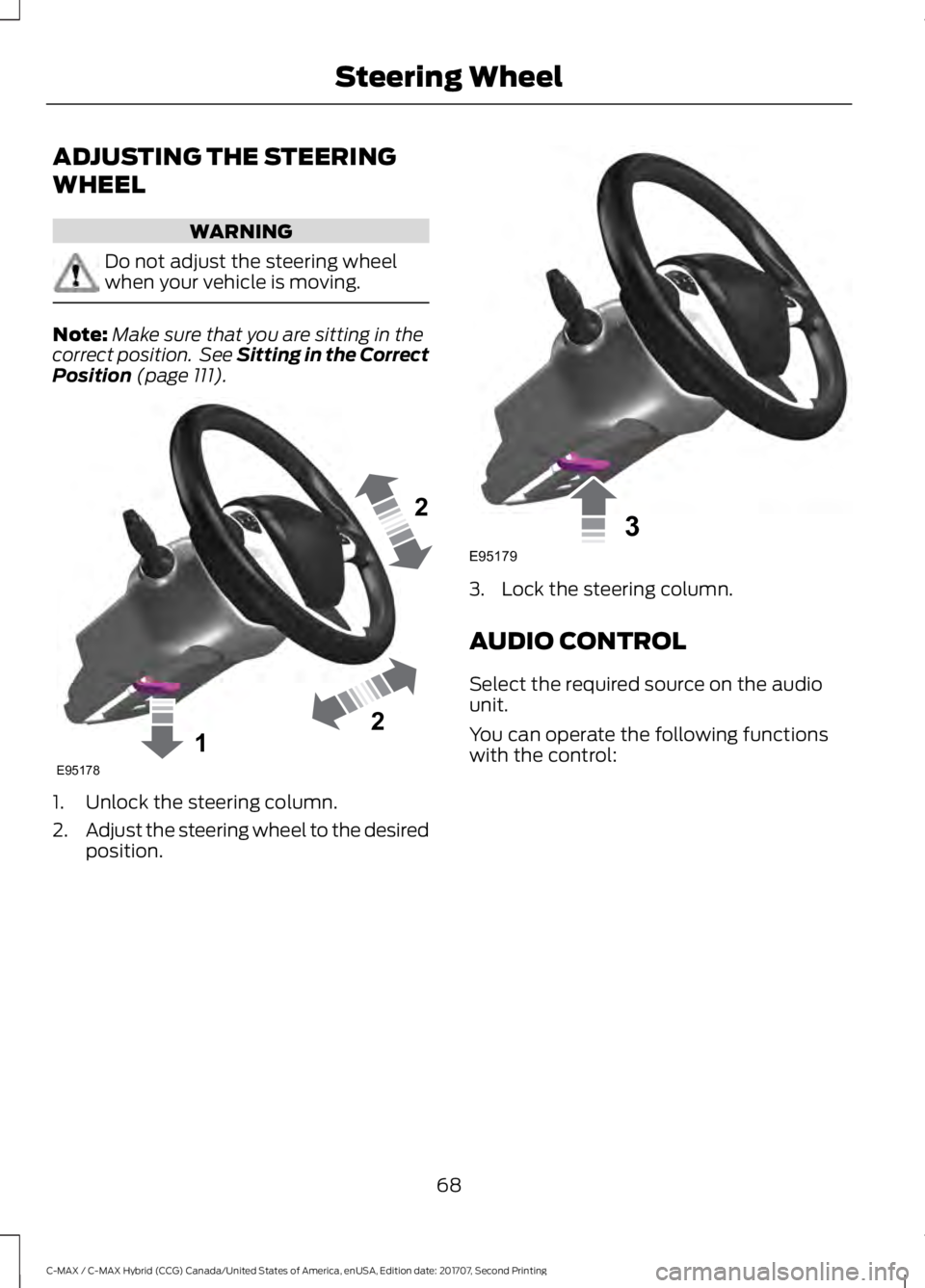
Position (page 111). 1. Unlock the steering column.
2.
Adjust the steering wheel to the desired
position. 3. Lock the steering column.
AUDIO CONTROL
Select the required source on the audio
unit.
You can operate the following functions
with the control:
68
C-MAX / C-MAX Hybrid (CCG) Canada/United States of America, enUSA, Edition date: 201707, Second Printing Steering Wheel122E95178 3E95179
Page 106 of 475
MyKey
Action
Message
Displayed during key programming when MyKey cannot be
programmed.
MyKey not Created
Displays when MyKey is active.
MyKey Active Drive
Safely
Displays when a MyKey is in use and the MyKey speed limit is
on and the vehicle speed is approaching 80 mph (130 km/h).
Near Vehicle Top Speed
Displays when a MyKey is in use and the MyKey speed limit is
reached.
Vehicle at Top Speed of
MyKey Setting
Displays when MyKey is active.
Check Speed Drive
Safely
Displays when a MyKey is in use and Belt-Minder is activated.
Buckle Up to Unmute
Audio
Displays when a MyKey is in use and Traction control is
activated.
Traction Control On -
MyKey Setting
Displays when a MyKey is in use and park aid is activated.
MyKey Park Aid Cannot
be Deactivated
Park Aid Action
Message
Displays when the system has detected a condition that
requires service. Contact your authorized dealer. See Prin-
ciple of Operation (page 159).
Check Park Aid
Displays the park aid status.
Rear Park Aid On Off
Displays when the system has detected a condition that
requires attention. See
Principle of Operation (page 159).
Check Rear Park Aid
Displays when the system has detected a condition that
requires attention. See
Principle of Operation (page 159).
Check Front Park Aid
Displays when the system has detected a condition that
requires service. Contact your authorized dealer. See
Prin-
ciple of Operation (page 159).
Park Aid Fault
103
C-MAX / C-MAX Hybrid (CCG) Canada/United States of America, enUSA, Edition date: 201707, Second Printing Information Displays
Page 163 of 475
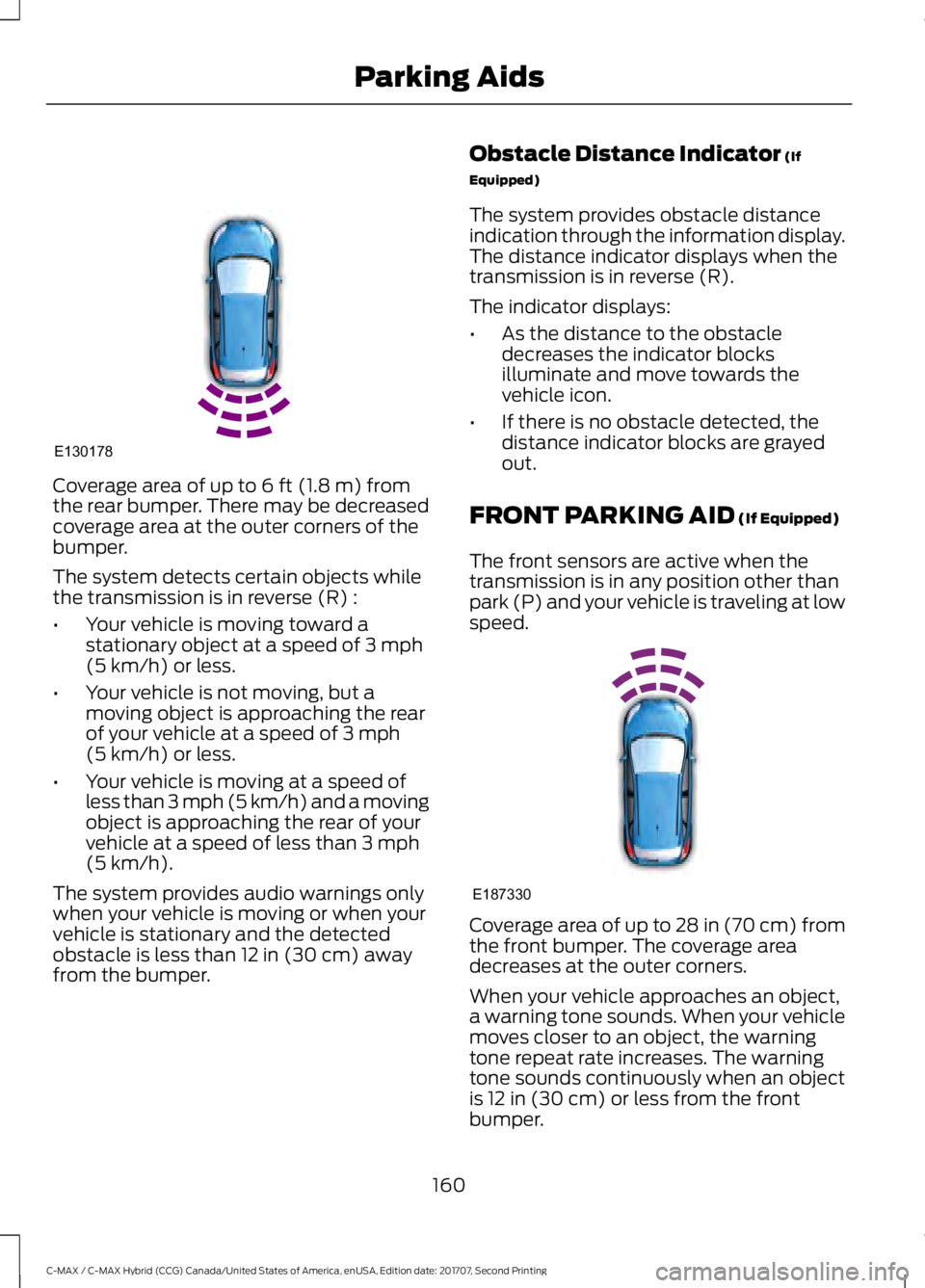
Coverage area of up to 6 ft (1.8 m) from
the rear bumper. There may be decreased
coverage area at the outer corners of the
bumper.
The system detects certain objects while
the transmission is in reverse (R) :
• Your vehicle is moving toward a
stationary object at a speed of
3 mph
(5 km/h) or less.
• Your vehicle is not moving, but a
moving object is approaching the rear
of your vehicle at a speed of
3 mph
(5 km/h) or less.
• Your vehicle is moving at a speed of
less than 3 mph (5 km/h) and a moving
object is approaching the rear of your
vehicle at a speed of less than
3 mph
(5 km/h).
The system provides audio warnings only
when your vehicle is moving or when your
vehicle is stationary and the detected
obstacle is less than
12 in (30 cm) away
from the bumper. Obstacle Distance Indicator
(If
Equipped)
The system provides obstacle distance
indication through the information display.
The distance indicator displays when the
transmission is in reverse (R).
The indicator displays:
• As the distance to the obstacle
decreases the indicator blocks
illuminate and move towards the
vehicle icon.
• If there is no obstacle detected, the
distance indicator blocks are grayed
out.
FRONT PARKING AID
(If Equipped)
The front sensors are active when the
transmission is in any position other than
park (P) and your vehicle is traveling at low
speed. Coverage area of up to
28 in (70 cm) from
the front bumper. The coverage area
decreases at the outer corners.
When your vehicle approaches an object,
a warning tone sounds. When your vehicle
moves closer to an object, the warning
tone repeat rate increases. The warning
tone sounds continuously when an object
is
12 in (30 cm) or less from the front
bumper.
160
C-MAX / C-MAX Hybrid (CCG) Canada/United States of America, enUSA, Edition date: 201707, Second Printing Parking AidsE130178 E187330
Page 164 of 475
You can switch the system off through the
information display menu or from the
pop-up message that appears once you
shift the transmission into reverse (R). See
General Information (page 92). If your
vehicle has a parking aid button, you can
switch the system off by pressing the
button.
Obstacle Distance Indicator
(If
Equipped)
The system provides obstacle distance
indication through the information display.
The indicator displays:
• As the distance to the obstacle
decreases, the indicator blocks
illuminate and move towards the
vehicle icon.
• If the system does not detect an
obstacle, the distance indicator blocks
are grayed out.
If the transmission is in reverse (R), the
front sensing system provides audio
warnings when your vehicle is moving and
the detected obstacle is moving towards
your vehicle.
ACTIVE PARK ASSIST (If Equipped) WARNINGS
You must remain in your vehicle
when the system turns on. At all
times, you are responsible for
controlling your vehicle, supervising the
system and intervening, if required. Failure
to take care may result in the loss of
control of your vehicle, serious personal
injury or death. The system is designed to aid the
driver. It is not intended to replace
your attention and judgment. You are
still responsible to drive with due care and
attention. WARNINGS
The sensors may not detect objects
in heavy rain or other conditions that
cause interference.
Active park assist does not apply the
brakes under any circumstances.
Note:
The blind spot information system
does not detect traffic alongside or behind
your vehicle during an active park assist
maneuver.
The system detects an available parallel
parking space and automatically steers
your vehicle (hands-free) while you control
the accelerator, gearshift and brakes. The
system visually and audibly guides you to
park your vehicle.
If you are uncomfortable with the proximity
to any vehicle or object, you may choose
to override the system by grabbing the
steering wheel or pushing the active park
assist button.
The system may not operate correctly in
any of the following conditions:
• You use a spare tire or a tire
significantly worn more than the other
tires.
• One or more tires are improperly
inflated.
• You try to park on a tight curve.
• Something passes between the front
bumper and the parking space. For
example, a pedestrian or cyclist.
• The edge of the neighboring parking
vehicle is high off the ground. For
example, a bus, tow truck or flatbed
truck.
• The weather conditions are poor. For
example, during heavy rain, snow or
fog.
161
C-MAX / C-MAX Hybrid (CCG) Canada/United States of America, enUSA, Edition date: 201707, Second Printing Parking Aids
Page 226 of 475
presets, are also maintained in memory by
power from the low voltage battery. When
a technician disconnects and connects the
low voltage battery, these settings are
erased. Complete the following procedure
in order to restore the settings:
1. With the vehicle at a complete stop,
set the parking brake.
2. Shift into park (P).
3. Switch off all accessories.
4. Fully press the brake pedal and start the vehicle.
5. Run the engine until it reaches normal operating temperature. While the
engine is warming up, complete the
following: Reset the clock. See Audio
System (page 277). Reset the power
windows bounce-back feature. See
Windows and Mirrors
(page 79).
Reset the radio station presets. See
Audio System
(page 277).
6. Allow the engine to idle for at least one
minute. If the engine turns off, press
the accelerator pedal to start the
engine.
7. While the engine is running, press the brake pedal and shift into neutral (N).
8. Allow the engine to run for at least one
minute by pressing on the accelerator
pedal.
9. Drive the vehicle at least 12 mi (20 km)
to completely relearn the idle and fuel
trim strategy.
Note: If you do not allow the engine to
relearn the idle and fuel trim strategy, the
idle quality of your vehicle may be adversely
affected until the engine computer
eventually relearns the idle trim and fuel
trim strategy.
Make sure that you dispose of old batteries
in an environmentally friendly way. Seek
advice from your local authority about
recycling old batteries. CHECKING THE WIPER
BLADES
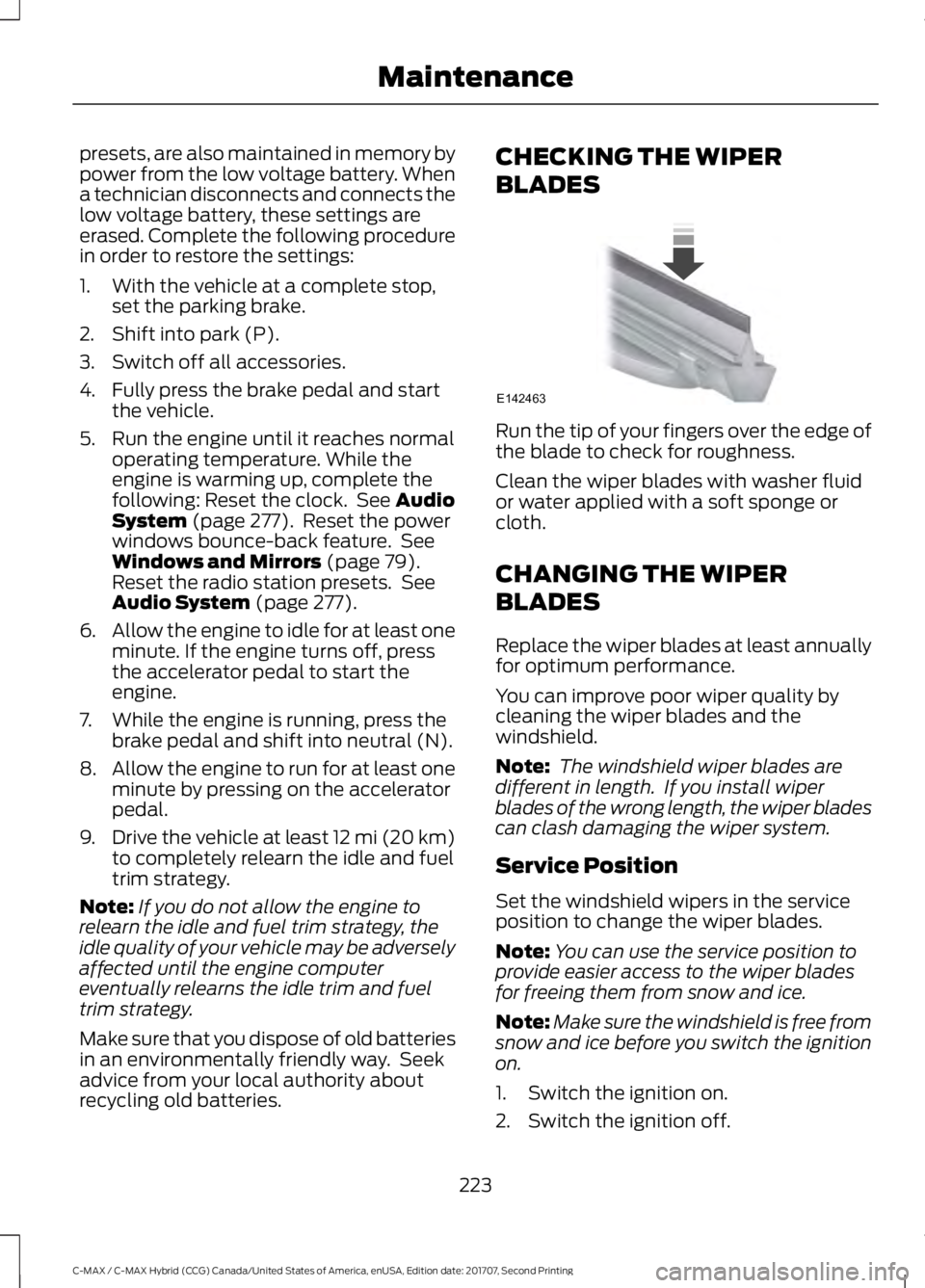
Run the tip of your fingers over the edge of
the blade to check for roughness.
Clean the wiper blades with washer fluid
or water applied with a soft sponge or
cloth.
CHANGING THE WIPER
BLADES
Replace the wiper blades at least annually
for optimum performance.
You can improve poor wiper quality by
cleaning the wiper blades and the
windshield.
Note:
The windshield wiper blades are
different in length. If you install wiper
blades of the wrong length, the wiper blades
can clash damaging the wiper system.
Service Position
Set the windshield wipers in the service
position to change the wiper blades.
Note: You can use the service position to
provide easier access to the wiper blades
for freeing them from snow and ice.
Note: Make sure the windshield is free from
snow and ice before you switch the ignition
on.
1. Switch the ignition on.
2. Switch the ignition off.
223
C-MAX / C-MAX Hybrid (CCG) Canada/United States of America, enUSA, Edition date: 201707, Second Printing MaintenanceE142463