ECO mode FORD E-350 2019 User Guide
[x] Cancel search | Manufacturer: FORD, Model Year: 2019, Model line: E-350, Model: FORD E-350 2019Pages: 329, PDF Size: 6.24 MB
Page 38 of 329
The passenger side airbag should always
be on (the airbag off light should not be
illuminated) unless the passenger is a
person who meets the requirements stated
either in Category 1, 2 or 3 of the National
Highway Traffic Safety
Administration/Transport Canada
deactivation criteria which follows.
The vast majority of drivers and passengers
are much safer with an airbag than
without. To do their job and reduce the risk
of life threatening injuries, airbags must
open with great force, and this force can
pose a potentially deadly risk in some
situations, particularly when a front seat
occupant is not properly buckled up. The
most effective way to reduce the risk of
unnecessary airbag injuries without
reducing the overall safety of the vehicle
is to make sure all occupants are properly
restrained in the vehicle, especially in the
front seat. This provides the protection of
seatbelts and permits the airbags to
provide the additional protection they were
designed to provide. If you choose to
deactivate your airbag, you are losing the
very significant risk reducing benefits of
the airbag and you are also reducing the
effectiveness of the seatbelts, because
seatbelts in modern vehicles are designed
to work as a safety system with the
airbags.
National Highway Traffic Safety
Administration Deactivation Criteria
(Excluding Canada)
WARNING: This vehicle has
special energy management seatbelts
for the driver and right front passenger.
These particular seatbelts are
specifically designed to work with
airbags to help reduce the risk of injury
in a crash. The energy management
seatbelt gives or releases additional
seatbelt webbing in some accidents to reduce the concentration of force on an
occupant's chest and to reduce the risk
of certain bone fractures and injuries to
underlying organs. In a crash, if the airbag
is off, this energy management seatbelt
might permit the passenger wearing the
seatbelt to move forward enough to
have a serious or fatal injury. The more
severe the crash, and the heavier the
occupant, the greater the risk. Make sure
the airbag is on for any passenger who
does not qualify under the National
Highway Traffic Safety Administration
deactivation criteria.
1. Infant.
An infant (less than 1 year old)
must ride in the front seat because:
• The vehicle has no rear seat.
• The vehicle has a rear seat too small
to accommodate a rear-facing infant
seat.
• The infant has a medical condition
which, according to the infant's
physician, makes it necessary for the
infant to ride in the front so that the
driver can constantly monitor the
child's condition.
2. Child age 1 to 12. A child age 1 to 12 must
ride in the front seat because:
• The vehicle has no rear seat.
• Although children ages 1 to 12 ride in
the rear seat(s) whenever possible,
children ages 1 to 12 sometimes must
ride in the front because no space is
available in the rear seat(s) of the
vehicle.
• The child has a medical condition
which, according to the child's
physician, makes it necessary for the
child to ride in the front seat so that the
driver can constantly monitor the
child's condition.
35
E-Series (TE4) Canada/United States of America, enUSA, Edition date: 201804, Second-Printing Supplementary Restraints System
Page 46 of 329
Autolock Feature
The autolock feature locks all the doors
when:
•
All doors are closed.
• The ignition is on.
• You shift into any gear putting your
vehicle in motion.
• The ignition is on, all the doors are
closed and your vehicle has been in
motion at a speed greater than 12 mph
(20 km/h).
Autounlock Feature
The autounlock feature unlocks all the
doors when:
• Your vehicle comes to a stop and you
switch the ignition off or to accessory.
• You open the driver door within 10
minutes of switching the ignition off or
to accessory.
Note: If you electronically lock your vehicle
after you switch the ignition off with the
driver door closed, the doors do not
autounlock.
Enabling or Disabling Autolock and
Autounlock
You can enable or disable the autolock and
autounlock features independently of each
other.
To enable or disable autolock, do the
following:
1. Switch the ignition on.
2. Press the power door unlock control three times.
3. Switch the ignition off.
4. Press the power door unlock control three times.
5. Switch the ignition on. The horn sounds
indicating your vehicle is in
programming mode. 6. Press the power door unlock control
and within five seconds, press the
power door lock control. The horn
sounds once if disabled or twice if
enabled.
7. Switch the ignition off. The horn sounds
indicating programming is complete.
Note: You can also switch this feature on
or off using the information display. See
Information Displays
(page 58).
To enable or disable autounlock, do the
following:
1. Switch the ignition on.
2. Press the power door unlock control three times.
3. Switch the ignition off.
4. Press the power door unlock control three times.
5. Switch the ignition on. The horn sounds
indicating your vehicle is in
programming mode.
6. Press the power door lock control and within five seconds, press the power
door unlock control. The horn sounds
once if disabled or twice if enabled.
7. Switch the ignition off. The horn sounds
indicating programming is complete.
Note: You can also switch this feature on
or off using the information display. See
Information Displays
(page 58).
Illuminated Entry
The interior lamps and some exterior
lamps illuminate when you unlock the
doors with the remote control.
The lamps turn off if:
• The ignition is on.
• You press the remote control lock
button.
• 25 seconds have elapsed.
43
E-Series (TE4) Canada/United States of America, enUSA, Edition date: 201804, Second-Printing Doors and Locks
Page 59 of 329
If it illuminates when the engine is running
this indicates a malfunction. Stop your
vehicle as soon as it is safe to do so and
switch the engine off. Check the engine oil
level. If the oil level is sufficient, this
indicates a system malfunction. Have your
vehicle checked as soon as possible.
See Engine Oil Check (page 143).
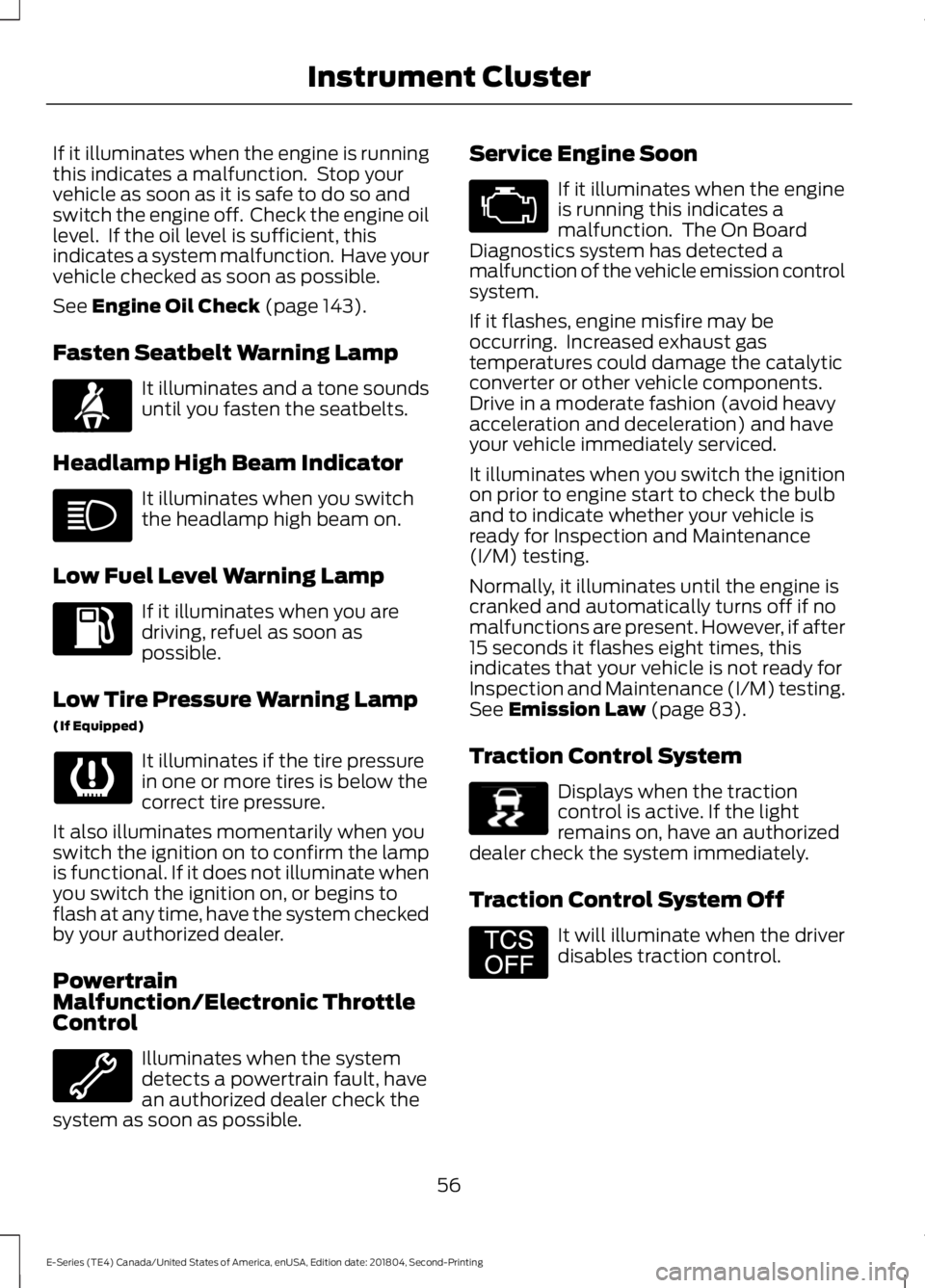
Fasten Seatbelt Warning Lamp It illuminates and a tone sounds
until you fasten the seatbelts.
Headlamp High Beam Indicator It illuminates when you switch
the headlamp high beam on.
Low Fuel Level Warning Lamp If it illuminates when you are
driving, refuel as soon as
possible.
Low Tire Pressure Warning Lamp
(If Equipped) It illuminates if the tire pressure
in one or more tires is below the
correct tire pressure.
It also illuminates momentarily when you
switch the ignition on to confirm the lamp
is functional. If it does not illuminate when
you switch the ignition on, or begins to
flash at any time, have the system checked
by your authorized dealer.
Powertrain
Malfunction/Electronic Throttle
Control Illuminates when the system
detects a powertrain fault, have
an authorized dealer check the
system as soon as possible. Service Engine Soon If it illuminates when the engine
is running this indicates a
malfunction. The On Board
Diagnostics system has detected a
malfunction of the vehicle emission control
system.
If it flashes, engine misfire may be
occurring. Increased exhaust gas
temperatures could damage the catalytic
converter or other vehicle components.
Drive in a moderate fashion (avoid heavy
acceleration and deceleration) and have
your vehicle immediately serviced.
It illuminates when you switch the ignition
on prior to engine start to check the bulb
and to indicate whether your vehicle is
ready for Inspection and Maintenance
(I/M) testing.
Normally, it illuminates until the engine is
cranked and automatically turns off if no
malfunctions are present. However, if after
15 seconds it flashes eight times, this
indicates that your vehicle is not ready for
Inspection and Maintenance (I/M) testing.
See
Emission Law (page 83).
Traction Control System Displays when the traction
control is active. If the light
remains on, have an authorized
dealer check the system immediately.
Traction Control System Off It will illuminate when the driver
disables traction control.
56
E-Series (TE4) Canada/United States of America, enUSA, Edition date: 201804, Second-Printing Instrument ClusterE71880 E138639 E194301
Page 63 of 329
System check and vehicle feature
customization (If Equipped)
Note: System check and vehicle feature
customization is only available with the
optional information display controls.
Note: When returning to the setup menu
and you select a non-English language, you
will see a message appear HOLD RESET
FOR ENGLISH to change back to English.
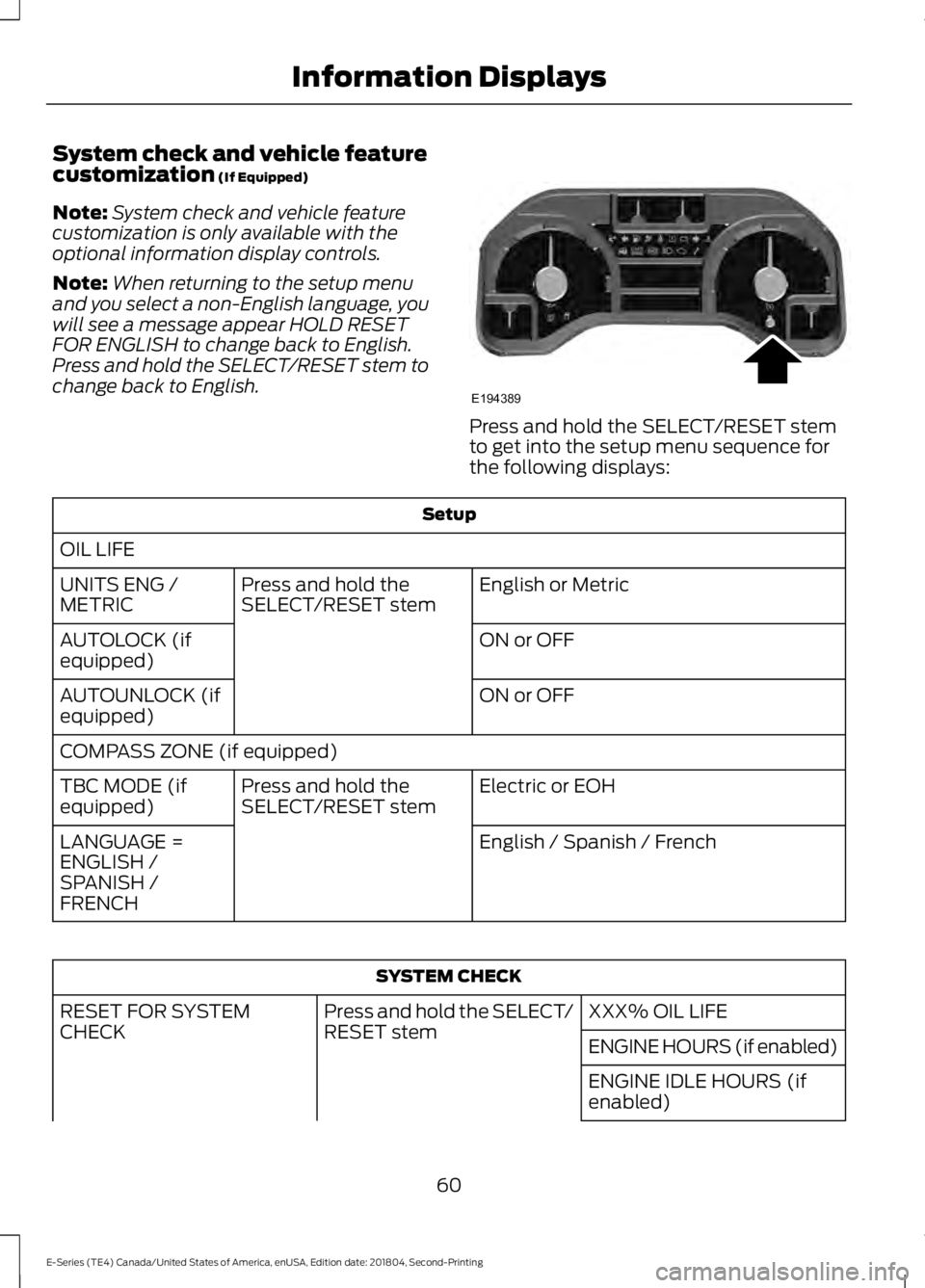
Press and hold the SELECT/RESET stem to
change back to English. Press and hold the SELECT/RESET stem
to get into the setup menu sequence for
the following displays:
Setup
OIL LIFE English or Metric
Press and hold the
SELECT/RESET stem
UNITS ENG /
METRIC
ON or OFF
AUTOLOCK (if
equipped)
ON or OFF
AUTOUNLOCK (if
equipped)
COMPASS ZONE (if equipped)
Electric or EOH
Press and hold the
SELECT/RESET stem
TBC MODE (if
equipped)
English / Spanish / French
LANGUAGE =
ENGLISH /
SPANISH /
FRENCH SYSTEM CHECK
XXX% OIL LIFE
Press and hold the SELECT/
RESET stem
RESET FOR SYSTEM
CHECK
ENGINE HOURS (if enabled)
ENGINE IDLE HOURS (if
enabled)
60
E-Series (TE4) Canada/United States of America, enUSA, Edition date: 201804, Second-Printing Information DisplaysE194389
Page 65 of 329
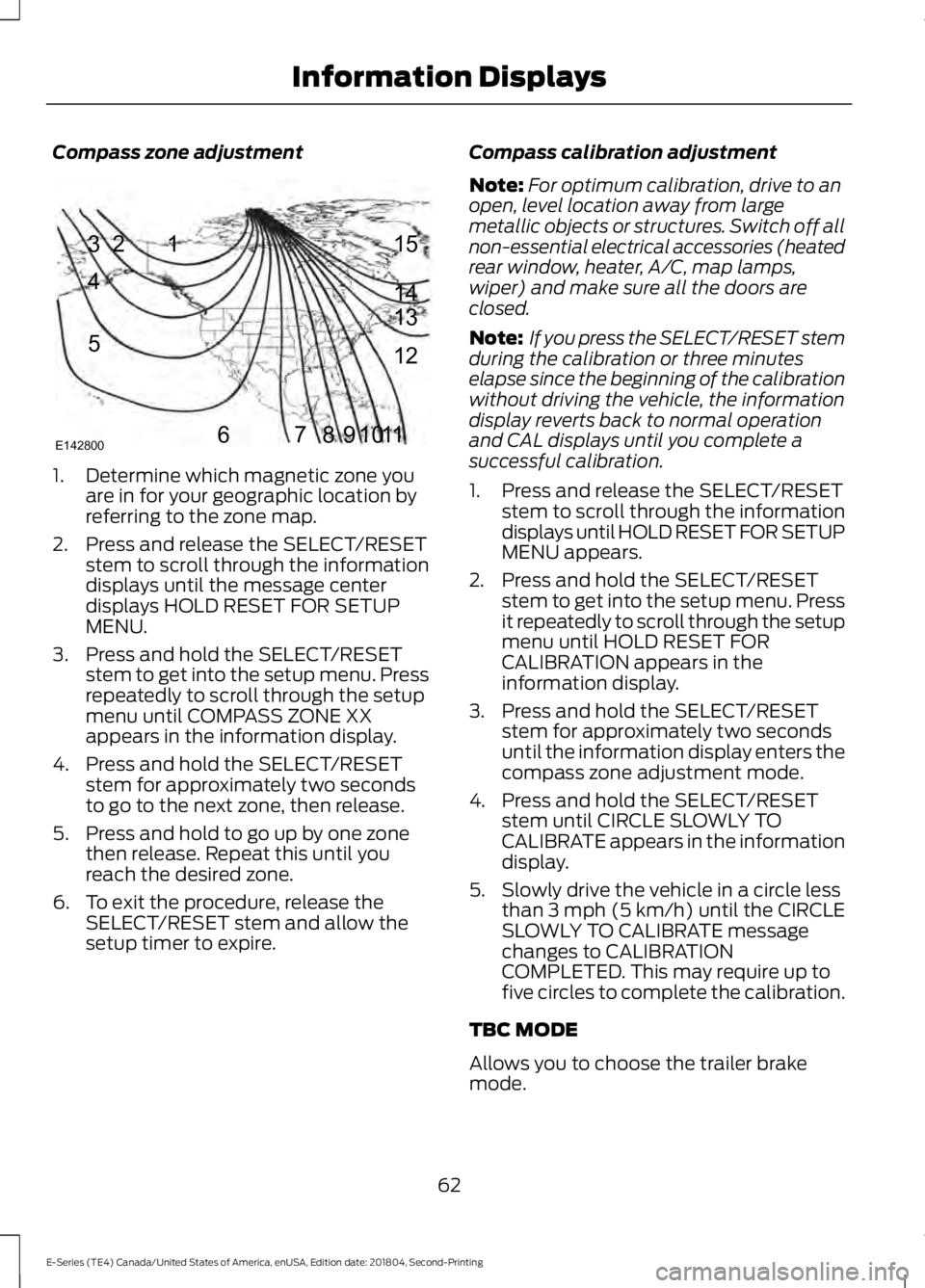
Compass zone adjustment
1. Determine which magnetic zone you
are in for your geographic location by
referring to the zone map.
2. Press and release the SELECT/RESET stem to scroll through the information
displays until the message center
displays HOLD RESET FOR SETUP
MENU.
3. Press and hold the SELECT/RESET stem to get into the setup menu. Press
repeatedly to scroll through the setup
menu until COMPASS ZONE XX
appears in the information display.
4. Press and hold the SELECT/RESET stem for approximately two seconds
to go to the next zone, then release.
5. Press and hold to go up by one zone then release. Repeat this until you
reach the desired zone.
6. To exit the procedure, release the SELECT/RESET stem and allow the
setup timer to expire. Compass calibration adjustment
Note:
For optimum calibration, drive to an
open, level location away from large
metallic objects or structures. Switch off all
non-essential electrical accessories (heated
rear window, heater, A/C, map lamps,
wiper) and make sure all the doors are
closed.
Note: If you press the SELECT/RESET stem
during the calibration or three minutes
elapse since the beginning of the calibration
without driving the vehicle, the information
display reverts back to normal operation
and CAL displays until you complete a
successful calibration.
1. Press and release the SELECT/RESET stem to scroll through the information
displays until HOLD RESET FOR SETUP
MENU appears.
2. Press and hold the SELECT/RESET stem to get into the setup menu. Press
it repeatedly to scroll through the setup
menu until HOLD RESET FOR
CALIBRATION appears in the
information display.
3. Press and hold the SELECT/RESET stem for approximately two seconds
until the information display enters the
compass zone adjustment mode.
4. Press and hold the SELECT/RESET stem until CIRCLE SLOWLY TO
CALIBRATE appears in the information
display.
5. Slowly drive the vehicle in a circle less than 3 mph (5 km/h) until the CIRCLE
SLOWLY TO CALIBRATE message
changes to CALIBRATION
COMPLETED. This may require up to
five circles to complete the calibration.
TBC MODE
Allows you to choose the trailer brake
mode.
62
E-Series (TE4) Canada/United States of America, enUSA, Edition date: 201804, Second-Printing Information Displays1
2
3
4
5
678910 1112 13 14 15
E142800
Page 76 of 329
When the indicator light on the power point
is:
•
On: The power point is working, the
ignition is on and a device is plugged
in.
• Off: The power point is off, the ignition
is off or no device is plugged in.
• Flashing: The power point is in fault
mode.
The power outlet temporarily turns off
power when in fault mode if the device
exceeds the 150 watt limit. Unplug your
device and switch the ignition off. Switch
the ignition back on, but do not plug your
device back in. Let the system cool off and
switch the ignition off to reset the fault
mode. Switch the ignition back on and
make sure the indicator light remains on.
Do not use the power point for certain
electric devices, including:
• Cathode-ray, tube-type televisions.
• Motor loads, such as vacuum cleaners,
electric saws and other electric power
tools or compressor-driven
refrigerators.
• Measuring devices, which process
precise data, such as medical
equipment or measuring equipment.
• Other appliances requiring an
extremely stable power supply such as
microcomputer-controlled electric
blankets or touch-sensor lamps.
73
E-Series (TE4) Canada/United States of America, enUSA, Edition date: 201804, Second-Printing Auxiliary Power Points
Page 91 of 329
Tow/Haul Mode
To activate tow/haul, press the
button on the gearshift lever.
The TOW HAUL indicator light
illuminates in the instrument cluster.
The tow/haul feature:
• Delays upshifts to reduce the frequency
of transmission shifting.
• Provides engine braking in all forward
gears, which slows your vehicle and
assists you in controlling your vehicle
when descending a slope.
• Depending on driving conditions and
load conditions, may downshift the
transmission, slow your vehicle and
control your vehicle speed when
descending a hill, without pressing the
accelerator pedal. The amount of
downshift braking provided will vary
based upon the amount you press the
brake pedal.
The tow/haul feature improves
transmission operation when towing a
trailer or a heavy load. All transmission
gear ranges are available when using
tow/haul.
To deactivate the tow/haul feature and
return to normal driving mode, press the
button on the gearshift lever again. The
TOW HAUL light deactivates. Tow/haul
also deactivates when you power down
your vehicle. WARNING: Do not use tow/haul
when the road surface is slippery. Failure
to follow this instruction could result in
the loss of control of your vehicle. Brake-Shift Interlock WARNING:
When doing this
procedure, you need to take the
transmission out of park (P) which
means your vehicle can roll freely. To
avoid unwanted vehicle movement,
always fully apply the parking brake prior
to doing this procedure. Use wheels
chocks if appropriate. WARNING:
If the parking brake is
fully released, but the brake warning
lamp remains illuminated, the brakes
may not be working properly. Have your
vehicle checked as soon as possible.
Note: Do not drive your vehicle until you
verify that the brake lamps are working.
Your vehicle has a brake-shift interlock
feature that prevents the gearshift lever
from moving from park (P) when the
ignition is in the 3 (on) position and the
brake pedal is not pressed.
If you cannot move the gearshift lever out
of park (P) position with the ignition in the
4 (on) position and the brake pedal
pressed, a malfunction may have occurred.
It is possible that a fuse has blown or your
vehicle ’s brake lamps are not operating
properly.
See Fuse Specification Chart
(page 131).
If the fuse is not blown and the brake
lamps are working properly, the following
procedure allows you to move the gearshift
lever from park (P):
1. Apply the parking brake and turn the ignition on.
2. Use a screwdriver to remove the lower
trim panel under the steering column.
Make sure not to disturb the wires on
the electrical connector.
88
E-Series (TE4) Canada/United States of America, enUSA, Edition date: 201804, Second-Printing TransmissionE161509
Page 100 of 329
Canceling the Set Speed
Tap the brake pedal to cancel the set
speed.
Note:
The system remembers the set
speed.
Resuming the Set Speed Press and release to resume the
set speed.
Switching Cruise Control Off Press and release when the
system is in standby mode, or
switch the ignition off.
Note: You erase the set speed when you
switch the system off.
97
E-Series (TE4) Canada/United States of America, enUSA, Edition date: 201804, Second-Printing Cruise Control (If Equipped) E265297
Page 111 of 329
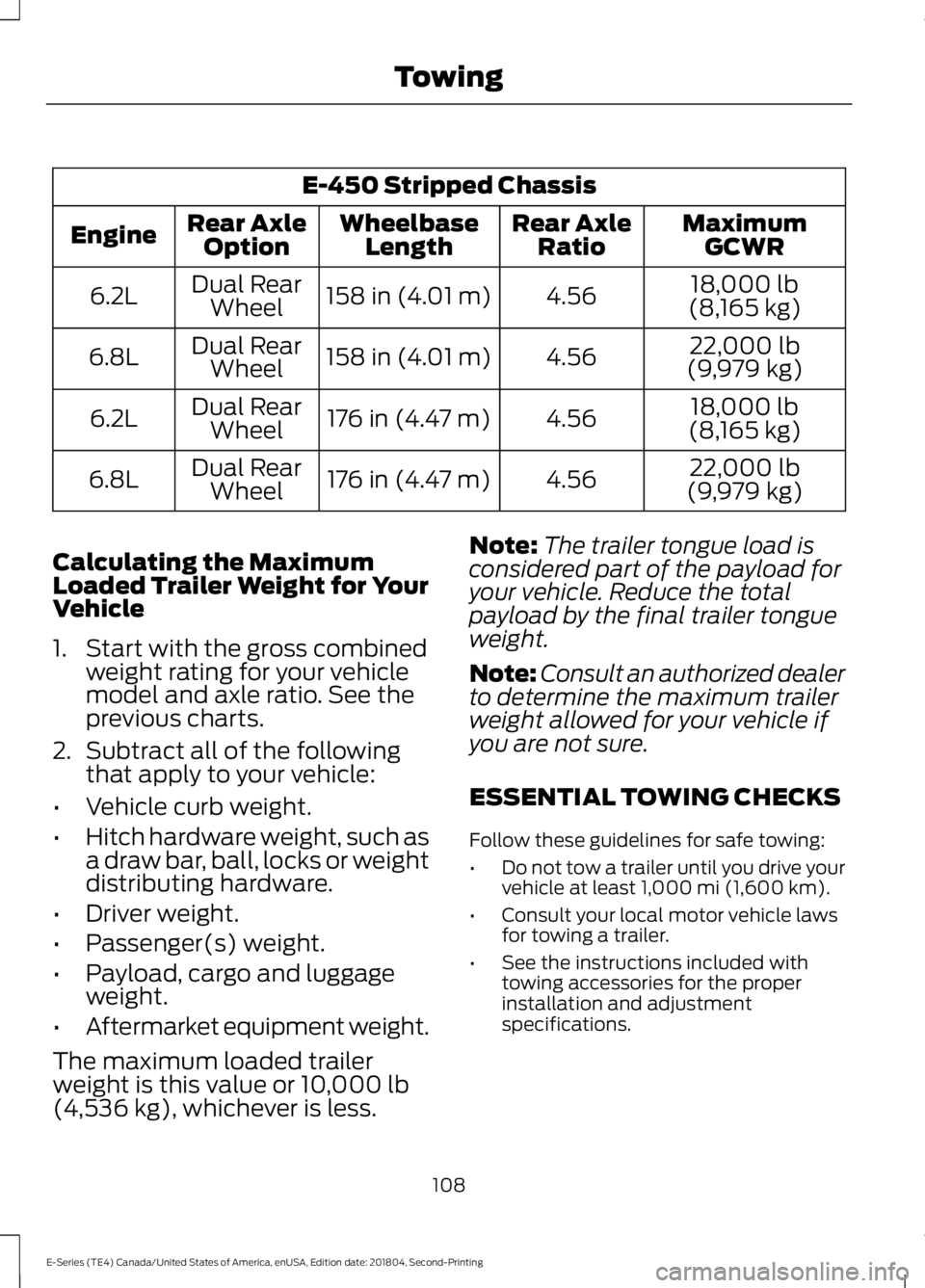
E-450 Stripped Chassis
MaximumGCWR
Rear Axle
Ratio
Wheelbase
Length
Rear Axle
Option
Engine
18,000 lb
(8,165 kg)
4.56
158 in (4.01 m)
Dual Rear
Wheel
6.2L
22,000 lb
(9,979 kg)
4.56
158 in (4.01 m)
Dual Rear
Wheel
6.8L
18,000 lb
(8,165 kg)
4.56
176 in (4.47 m)
Dual Rear
Wheel
6.2L
22,000 lb
(9,979 kg)
4.56
176 in (4.47 m)
Dual Rear
Wheel
6.8L
Calculating the Maximum
Loaded Trailer Weight for Your
Vehicle
1. Start with the gross combined weight rating for your vehicle
model and axle ratio. See the
previous charts.
2. Subtract all of the following
that apply to your vehicle:
• Vehicle curb weight.
• Hitch hardware weight, such as
a draw bar, ball, locks or weight
distributing hardware.
• Driver weight.
• Passenger(s) weight.
• Payload, cargo and luggage
weight.
• Aftermarket equipment weight.
The maximum loaded trailer
weight is this value or 10,000 lb
(4,536 kg), whichever is less. Note:
The trailer tongue load is
considered part of the payload for
your vehicle. Reduce the total
payload by the final trailer tongue
weight.
Note: Consult an authorized dealer
to determine the maximum trailer
weight allowed for your vehicle if
you are not sure.
ESSENTIAL TOWING CHECKS
Follow these guidelines for safe towing:
• Do not tow a trailer until you drive your
vehicle at least
1,000 mi (1,600 km).
• Consult your local motor vehicle laws
for towing a trailer.
• See the instructions included with
towing accessories for the proper
installation and adjustment
specifications.
108
E-Series (TE4) Canada/United States of America, enUSA, Edition date: 201804, Second-Printing Towing
Page 118 of 329
TOWING THE VEHICLE ON
FOUR WHEELS
Emergency Towing
WARNING: If your vehicle has a
steering wheel lock make sure the
ignition is in the accessory or on position
when being towed.
You can flat-tow (all wheels on the
ground, regardless of the powertrain or
transmission configuration) your disabled
vehicle (without access to wheel dollies
or vehicle transport trailer) under the
following conditions:
• Your vehicle is facing forward so you
tow it in a forward direction.
• You shift into Neutral (N). If you cannot
shift into Neutral (N), you may need to
override the transmission. See
Transmission
(page 87).
• Maximum speed is 35 mph (56 km/h).
• Maximum distance is
50 mi (80 km).
Recreational Towing
Note: Put your climate control system in
recirculated air mode to prevent exhaust
fumes from entering the vehicle. See
Climate Control
(page 66).
Follow these guidelines if you have a need
for recreational (RV) towing. An example
of recreational towing would be towing
your vehicle behind a motorhome. These
guidelines are to make sure you do not
damage the transmission during towing.
Do not tow your vehicle with any wheels
on the ground, as vehicle or transmission
damage may occur. It is recommended to
tow your vehicle with all four wheels off
the ground, for example when using a
vehicle transport trailer. Otherwise, you
cannot tow your vehicle.
115
E-Series (TE4) Canada/United States of America, enUSA, Edition date: 201804, Second-Printing Towing