change time FORD E SERIES 2018 Owners Manual
[x] Cancel search | Manufacturer: FORD, Model Year: 2018, Model line: E SERIES, Model: FORD E SERIES 2018Pages: 323, PDF Size: 7.09 MB
Page 2 of 323

The information contained in this publication was correct at the time of going to print. In the interest ofcontinuous development, we reserve the right to change specifications, design or equipment at any timewithout notice or obligation. No part of this publication may be reproduced, transmitted, stored in aretrieval system or translated into any language in any form by any means without our written permission.Errors and omissions excepted.© Ford Motor Company 2017
All rights reserved.Part Number: 201712 20171222173223
Page 43 of 323
LOCKING AND UNLOCKING
You can use the power door lock controlor the remote control to lock and unlockyour vehicle.
Power Door Locks (If Equipped)
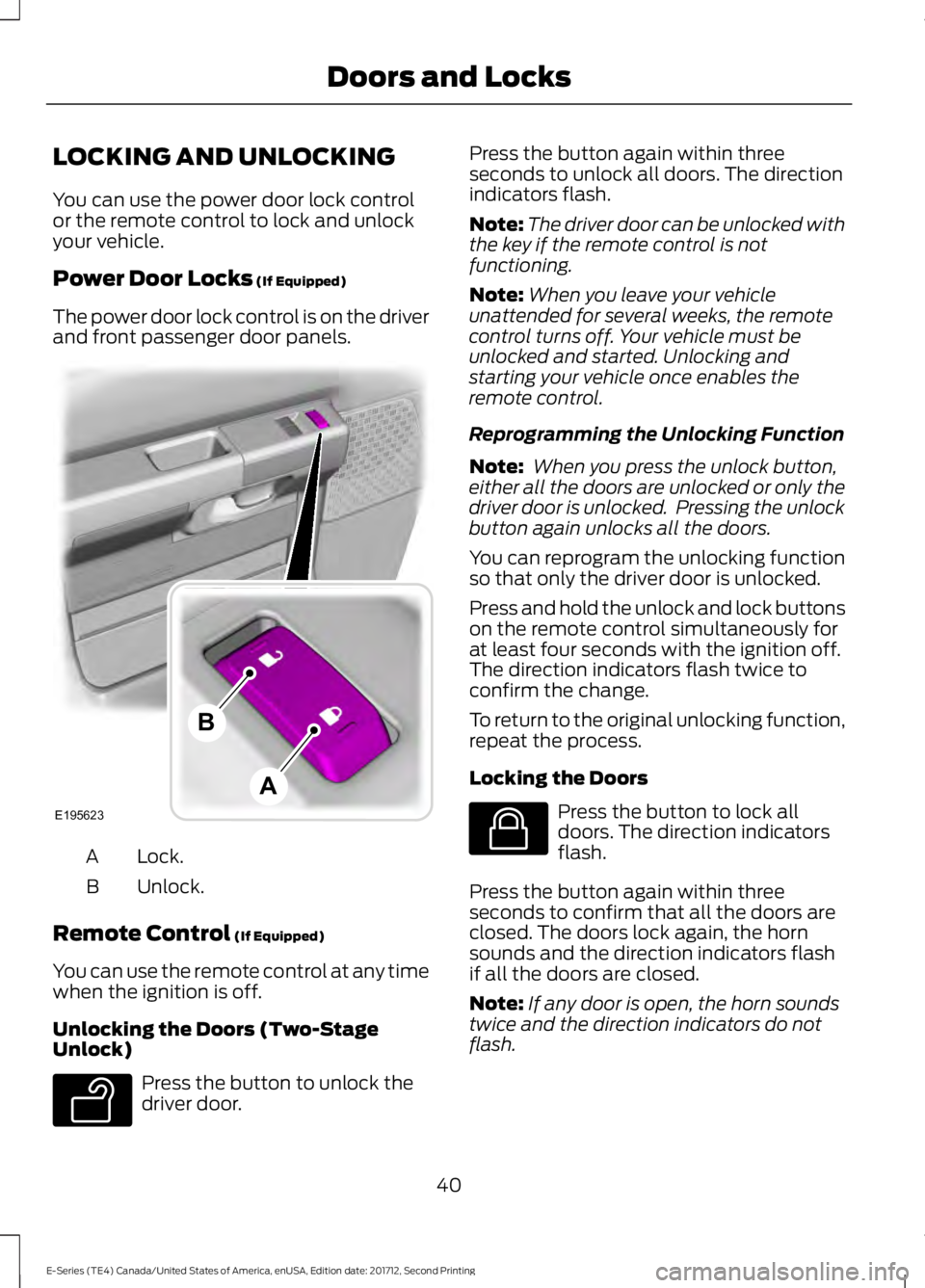
The power door lock control is on the driverand front passenger door panels.
Lock.A
Unlock.B
Remote Control (If Equipped)
You can use the remote control at any timewhen the ignition is off.
Unlocking the Doors (Two-StageUnlock)
Press the button to unlock thedriver door.
Press the button again within threeseconds to unlock all doors. The directionindicators flash.
Note:The driver door can be unlocked withthe key if the remote control is notfunctioning.
Note:When you leave your vehicleunattended for several weeks, the remotecontrol turns off. Your vehicle must beunlocked and started. Unlocking andstarting your vehicle once enables theremote control.
Reprogramming the Unlocking Function
Note: When you press the unlock button,either all the doors are unlocked or only thedriver door is unlocked. Pressing the unlockbutton again unlocks all the doors.
You can reprogram the unlocking functionso that only the driver door is unlocked.
Press and hold the unlock and lock buttonson the remote control simultaneously forat least four seconds with the ignition off.The direction indicators flash twice toconfirm the change.
To return to the original unlocking function,repeat the process.
Locking the Doors
Press the button to lock alldoors. The direction indicatorsflash.
Press the button again within threeseconds to confirm that all the doors areclosed. The doors lock again, the hornsounds and the direction indicators flashif all the doors are closed.
Note:If any door is open, the horn soundstwice and the direction indicators do notflash.
40
E-Series (TE4) Canada/United States of America, enUSA, Edition date: 201712, Second Printing
Doors and LocksE195623
A
B E138629 E138623
Page 50 of 323
GENERAL INFORMATION
Condensation in the Exterior FrontLamps and Rear Lamps
Exterior front lamps and rear lamps havevents to accommodate normal changesin air pressure.
Condensation can be a natural by-productof this design. When moist air enters thelamp assembly through the vents, there isa possibility that condensation can occurwhen the temperature is cold. Whennormal condensation occurs, a fine mistcan form on the interior of the lens. Thefine mist eventually clears and exitsthrough the vents during normal operation.
Clearing time may take as long as 48 hoursunder dry weather conditions.
Examples of acceptable condensation are:
•The presence of a fine mist (no streaks,drip marks or large droplets).
•A fine mist covers less than 50% of thelens.
Examples of unacceptable condensationare:
•A water puddle inside the lamp.
•Streaks, drip marks or large dropletspresent on the interior of the lens.
If you see any unacceptable condensation,have your vehicle checked by an authorizeddealer.
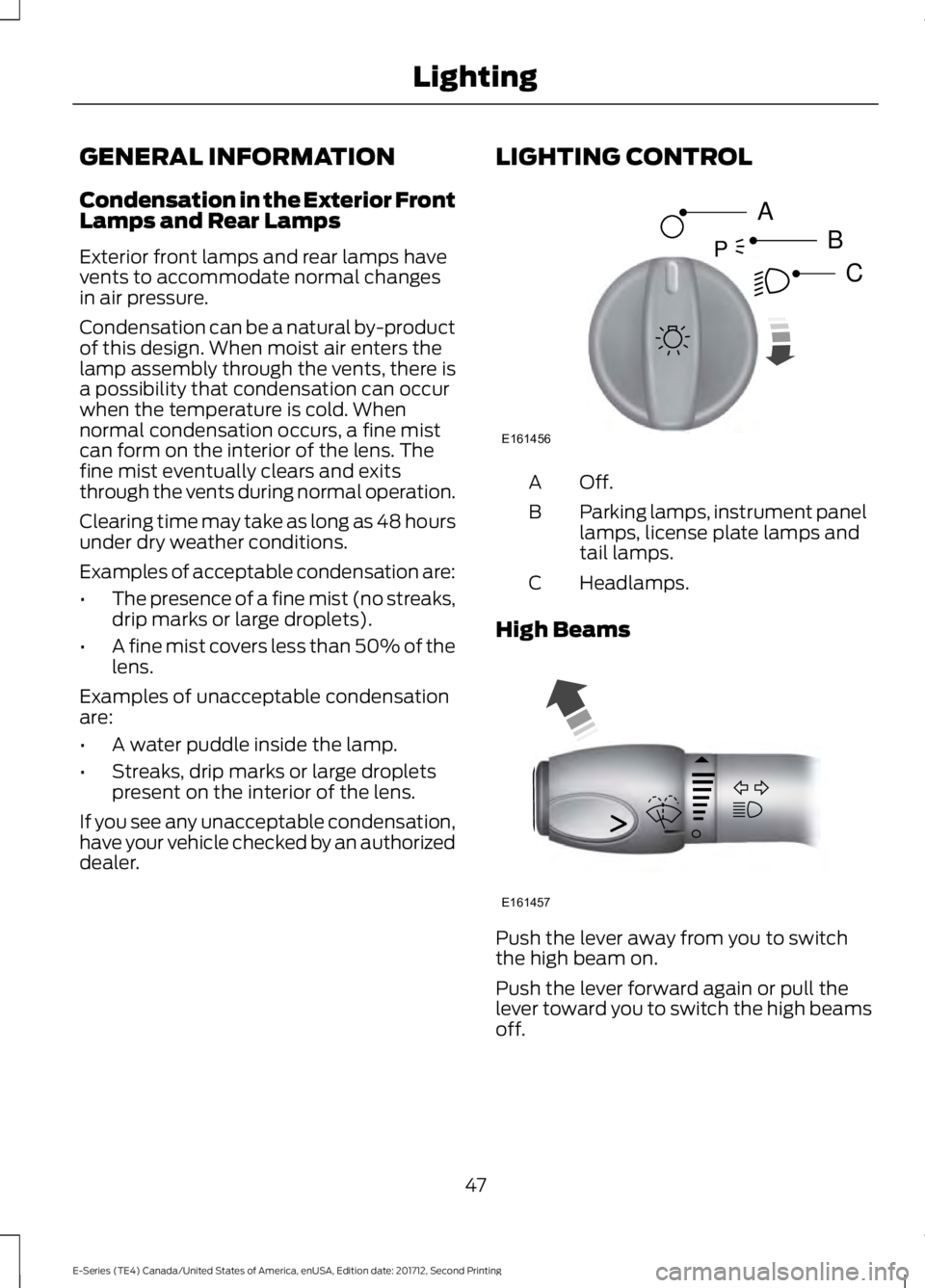
LIGHTING CONTROL
Off.A
Parking lamps, instrument panellamps, license plate lamps andtail lamps.
B
Headlamps.C
High Beams
Push the lever away from you to switchthe high beam on.
Push the lever forward again or pull thelever toward you to switch the high beamsoff.
47
E-Series (TE4) Canada/United States of America, enUSA, Edition date: 201712, Second Printing
LightingE161456
A
B
CP E161457
Page 51 of 323
Headlamp Flasher
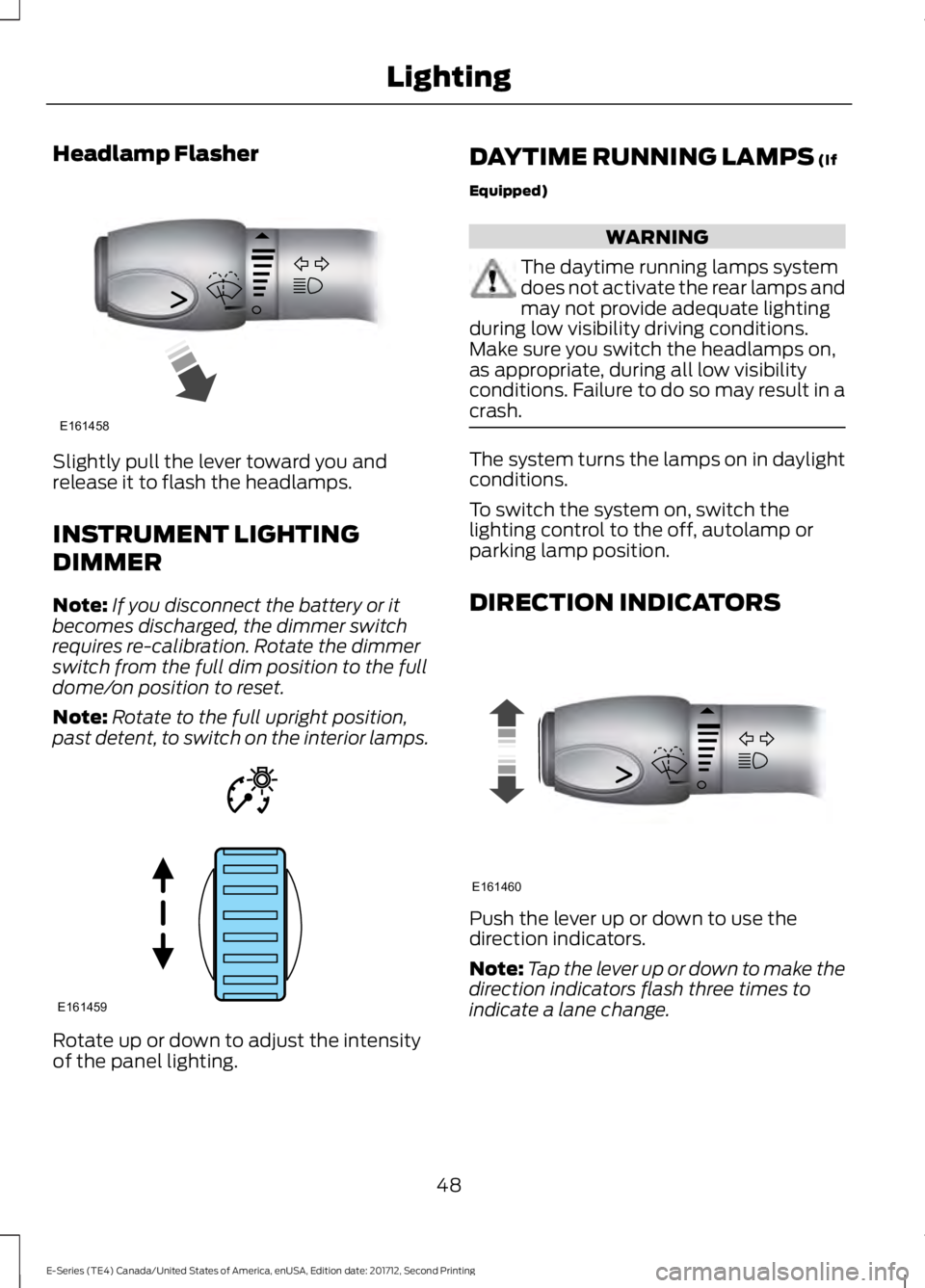
Slightly pull the lever toward you andrelease it to flash the headlamps.
INSTRUMENT LIGHTING
DIMMER
Note:If you disconnect the battery or itbecomes discharged, the dimmer switchrequires re-calibration. Rotate the dimmerswitch from the full dim position to the fulldome/on position to reset.
Note:Rotate to the full upright position,past detent, to switch on the interior lamps.
Rotate up or down to adjust the intensityof the panel lighting.
DAYTIME RUNNING LAMPS (If
Equipped)
WARNING
The daytime running lamps systemdoes not activate the rear lamps andmay not provide adequate lightingduring low visibility driving conditions.Make sure you switch the headlamps on,as appropriate, during all low visibilityconditions. Failure to do so may result in acrash.
The system turns the lamps on in daylightconditions.
To switch the system on, switch thelighting control to the off, autolamp orparking lamp position.
DIRECTION INDICATORS
Push the lever up or down to use thedirection indicators.
Note:Tap the lever up or down to make thedirection indicators flash three times toindicate a lane change.
48
E-Series (TE4) Canada/United States of America, enUSA, Edition date: 201712, Second Printing
LightingE161458 E161459 E161460
Page 63 of 323
1. Determine which magnetic zone youare in for your geographic location byreferring to the zone map.
2. Press and release the SELECT/RESETstem to scroll through the informationdisplays until the message centerdisplays HOLD RESET FOR SETUPMENU.
3. Press and hold the SELECT/RESETstem to get into the setup menu. Pressrepeatedly to scroll through the setupmenu until COMPASS ZONE XXappears in the information display.
4. Press and hold the SELECT/RESETstem for approximately two secondsto go to the next zone, then release.
5. Press and hold to go up by one zonethen release. Repeat this until youreach the desired zone.
6. To exit the procedure, release theSELECT/RESET stem and allow thesetup timer to expire.
Compass calibration adjustment
Note:For optimum calibration, drive to anopen, level location away from largemetallic objects or structures. Switch off allnon-essential electrical accessories (heatedrear window, heater, A/C, map lamps, wiper,etc.) and make sure all the doors are closed.
Note: If you press the SELECT/RESET stemduring the calibration or three minuteselapse since the beginning of the calibrationwithout driving the vehicle, the informationdisplay reverts back to normal operationand CAL displays until you complete asuccessful calibration.
1. Press and release the SELECT/RESETstem to scroll through the informationdisplays until HOLD RESET FOR SETUPMENU appears.
2. Press and hold the SELECT/RESETstem to get into the setup menu. Pressit repeatedly to scroll through the setupmenu until HOLD RESET FORCALIBRATION appears in theinformation display.
3. Press and hold the SELECT/RESETstem for approximately two secondsuntil the information display enters thecompass zone adjustment mode.
4. Press and hold the SELECT/RESETstem until CIRCLE SLOWLY TOCALIBRATE appears in the informationdisplay.
5. Slowly drive the vehicle in a circle lessthan 3 mph (5 km/h) until the CIRCLESLOWLY TO CALIBRATE messagechanges to CALIBRATIONCOMPLETED. This may require up tofive circles to complete the calibration.
TBC MODE (if equipped)
Allows you to choose the trailer brakemode.
LANGUAGE = ENGLISH / SPANISH /FRENCH
Allows you to choose which languageappears in the information display.
Waiting four seconds or pressing theSELECT/RESET stem cycles theinformation display through each of thelanguage choices.
Press the SELECT/RESET stem to set thelanguage choice when the language youwant appears.
HOLD RESET FOR SYSTEM CHECK
The information display begins to cyclethrough the vehicle systems and providesa status of the item if needed. Somesystems show a message only if acondition is present.
60
E-Series (TE4) Canada/United States of America, enUSA, Edition date: 201712, Second Printing
Information Displays
Page 64 of 323
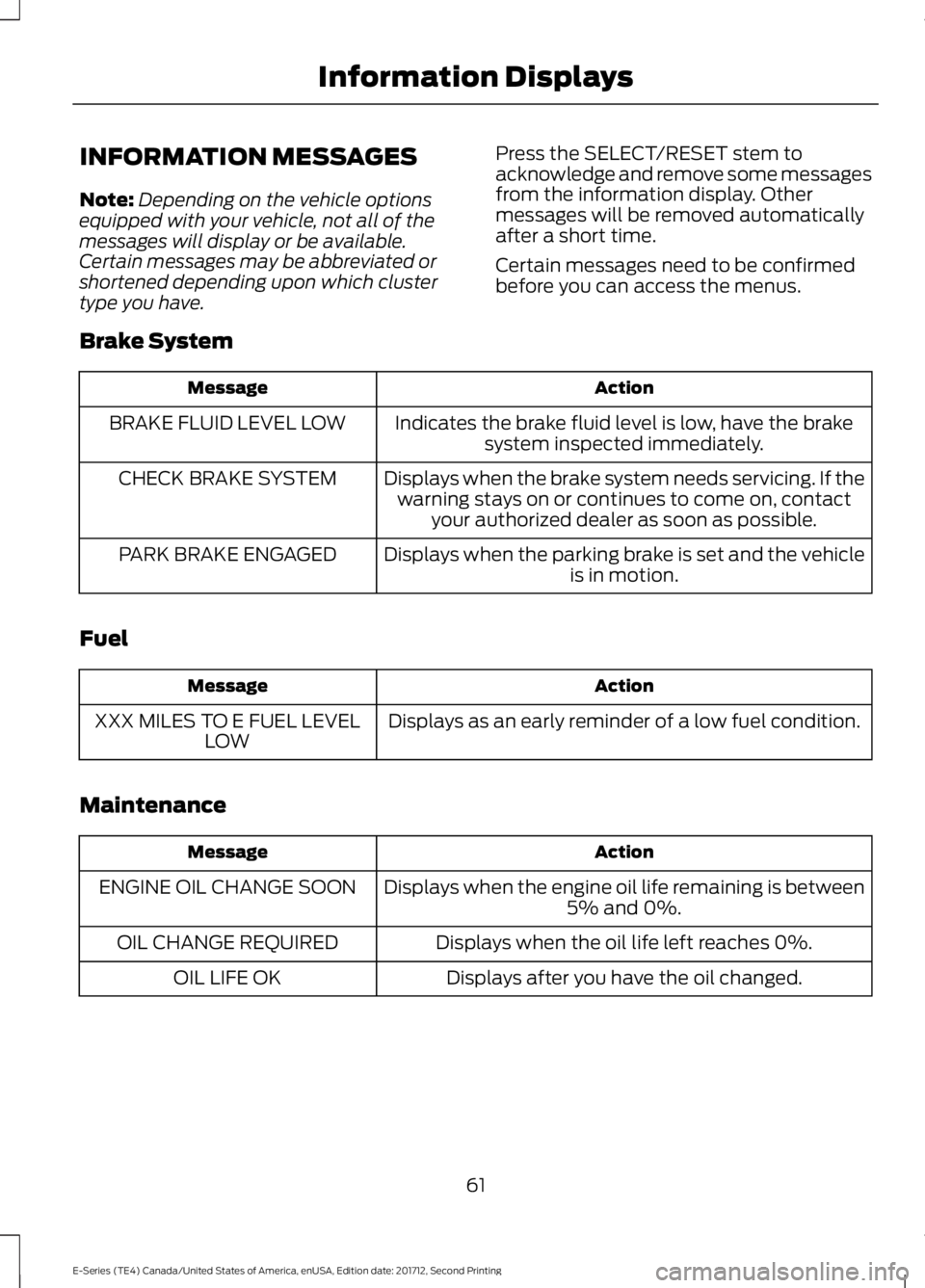
INFORMATION MESSAGES
Note:Depending on the vehicle optionsequipped with your vehicle, not all of themessages will display or be available.Certain messages may be abbreviated orshortened depending upon which clustertype you have.
Press the SELECT/RESET stem toacknowledge and remove some messagesfrom the information display. Othermessages will be removed automaticallyafter a short time.
Certain messages need to be confirmedbefore you can access the menus.
Brake System
ActionMessage
Indicates the brake fluid level is low, have the brakesystem inspected immediately.BRAKE FLUID LEVEL LOW
Displays when the brake system needs servicing. If thewarning stays on or continues to come on, contactyour authorized dealer as soon as possible.
CHECK BRAKE SYSTEM
Displays when the parking brake is set and the vehicleis in motion.PARK BRAKE ENGAGED
Fuel
ActionMessage
Displays as an early reminder of a low fuel condition.XXX MILES TO E FUEL LEVELLOW
Maintenance
ActionMessage
Displays when the engine oil life remaining is between5% and 0%.ENGINE OIL CHANGE SOON
Displays when the oil life left reaches 0%.OIL CHANGE REQUIRED
Displays after you have the oil changed.OIL LIFE OK
61
E-Series (TE4) Canada/United States of America, enUSA, Edition date: 201712, Second Printing
Information Displays
Page 80 of 323
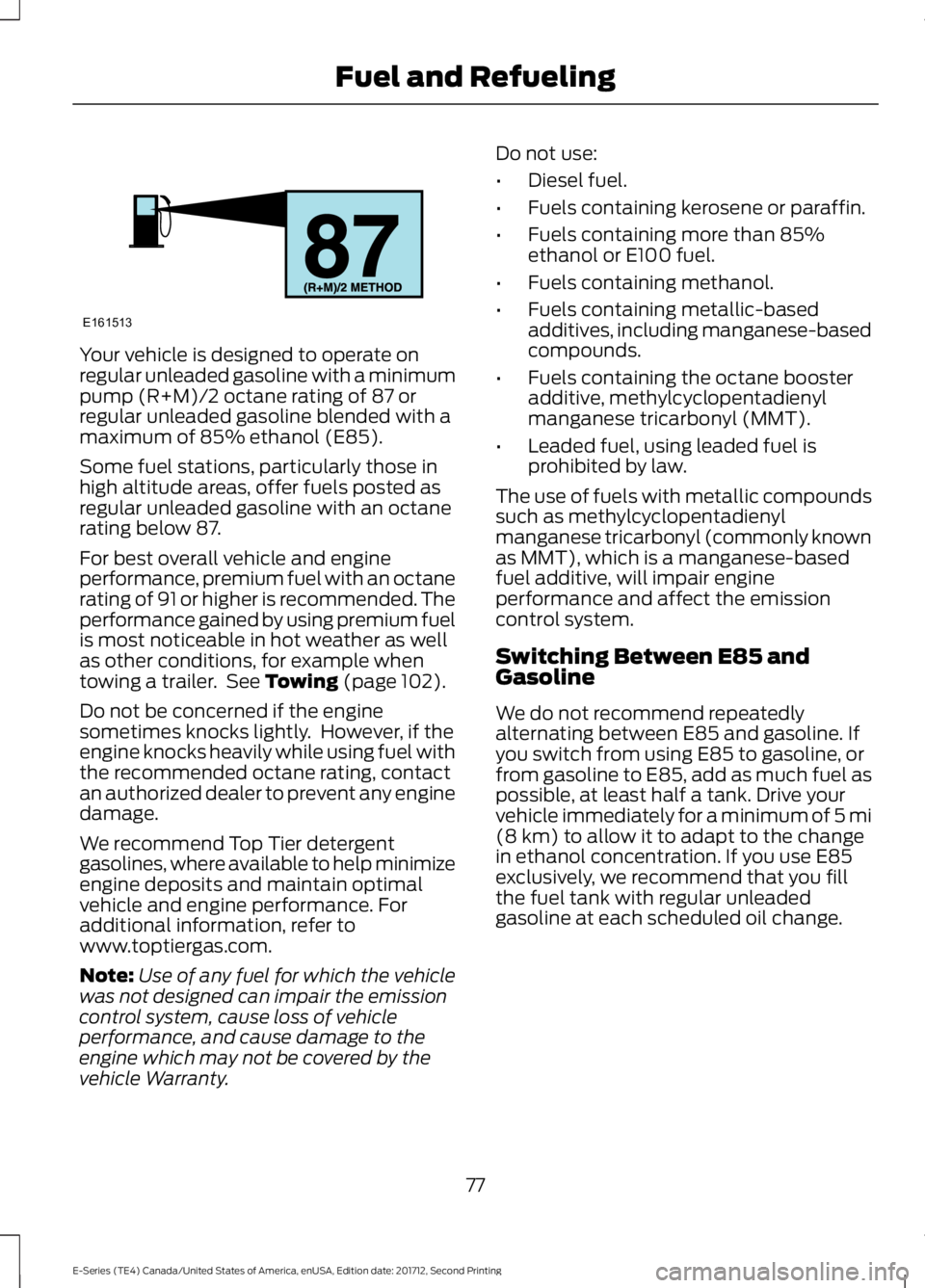
Your vehicle is designed to operate onregular unleaded gasoline with a minimumpump (R+M)/2 octane rating of 87 orregular unleaded gasoline blended with amaximum of 85% ethanol (E85).
Some fuel stations, particularly those inhigh altitude areas, offer fuels posted asregular unleaded gasoline with an octanerating below 87.
For best overall vehicle and engineperformance, premium fuel with an octanerating of 91 or higher is recommended. Theperformance gained by using premium fuelis most noticeable in hot weather as wellas other conditions, for example whentowing a trailer. See Towing (page 102).
Do not be concerned if the enginesometimes knocks lightly. However, if theengine knocks heavily while using fuel withthe recommended octane rating, contactan authorized dealer to prevent any enginedamage.
We recommend Top Tier detergentgasolines, where available to help minimizeengine deposits and maintain optimalvehicle and engine performance. Foradditional information, refer towww.toptiergas.com.
Note:Use of any fuel for which the vehiclewas not designed can impair the emissioncontrol system, cause loss of vehicleperformance, and cause damage to theengine which may not be covered by thevehicle Warranty.
Do not use:
•Diesel fuel.
•Fuels containing kerosene or paraffin.
•Fuels containing more than 85%ethanol or E100 fuel.
•Fuels containing methanol.
•Fuels containing metallic-basedadditives, including manganese-basedcompounds.
•Fuels containing the octane boosteradditive, methylcyclopentadienylmanganese tricarbonyl (MMT).
•Leaded fuel, using leaded fuel isprohibited by law.
The use of fuels with metallic compoundssuch as methylcyclopentadienylmanganese tricarbonyl (commonly knownas MMT), which is a manganese-basedfuel additive, will impair engineperformance and affect the emissioncontrol system.
Switching Between E85 andGasoline
We do not recommend repeatedlyalternating between E85 and gasoline. Ifyou switch from using E85 to gasoline, orfrom gasoline to E85, add as much fuel aspossible, at least half a tank. Drive yourvehicle immediately for a minimum of 5 mi(8 km) to allow it to adapt to the changein ethanol concentration. If you use E85exclusively, we recommend that you fillthe fuel tank with regular unleadedgasoline at each scheduled oil change.
77
E-Series (TE4) Canada/United States of America, enUSA, Edition date: 201712, Second Printing
Fuel and RefuelingE161513
Page 87 of 323
Illumination of the service engine soonindicator, charging system warning light orthe temperature warning light, fluid leaks,strange odors, smoke or loss of enginepower could indicate that the emissioncontrol system is not working properly.
An improperly operating or damagedexhaust system may allow exhaust toenter the vehicle. Have a damaged orimproperly operating exhaust systeminspected and repaired immediately.
Do not make any unauthorized changes toyour vehicle or engine. By law, vehicleowners and anyone who manufactures,repairs, services, sells, leases, tradesvehicles, or supervises a fleet of vehiclesare not permitted to intentionally removean emission control device or prevent itfrom working. Information about yourvehicle’s emission system is on the VehicleEmission Control Information Decallocated on or near the engine. This decalalso lists engine displacement.
Please consult your warranty informationfor complete details.
On-Board Diagnostics (OBD-II)
Your vehicle has a computer known as theon-board diagnostics system (OBD-II) thatmonitors the engine’s emission controlsystem. The system protects theenvironment by making sure that yourvehicle continues to meet governmentemission standards. The OBD-II systemalso assists a service technician in properlyservicing your vehicle.
When the service engine soonindicator illuminates, the OBD-IIsystem has detected amalfunction. Temporary malfunctions maycause the service engine soon indicator toilluminate. Examples are:
1. Your vehicle has run out of fuel—theengine may misfire or run poorly.
2. Poor fuel quality or water in thefuel—the engine may misfire or runpoorly.
3. The fuel fill inlet may not have closedproperly. See Refueling (page 79).
4. Driving through deep water—theelectrical system may be wet.
You can correct these temporarymalfunctions by filling the fuel tank withgood quality fuel, properly closing the fuelfill inlet or letting the electrical system dryout. After three driving cycles without theseor any other temporary malfunctionspresent, the service engine soon indicatorshould stay off the next time you start theengine. A driving cycle consists of a coldengine startup followed by mixed city andhighway driving. No additional vehicleservice is required.
If the service engine soon indicator remainson, have your vehicle serviced at the firstavailable opportunity. Although somemalfunctions detected by the OBD-II maynot have symptoms that are apparent,continued driving with the service enginesoon indicator on can result in increasedemissions, lower fuel economy, reducedengine and transmission smoothness andlead to more costly repairs.
Readiness for Inspection andMaintenance (I/M) Testing
Some state and provincial and localgovernments may haveInspection/Maintenance (I/M) programsto inspect the emission control equipmenton your vehicle. Failure to pass thisinspection could prevent you from gettinga vehicle registration.
If the service engine soonindicator is on or the bulb doesnot work, your vehicle may needservice. See On-Board Diagnostics.
84
E-Series (TE4) Canada/United States of America, enUSA, Edition date: 201712, Second Printing
Engine Emission Control
Page 114 of 323
wiring. Consult your trailer dealer forassistance. This can be a short to ground(such as a chaffed wire), short to voltage(such as a pulled pin on trailer emergencybreakaway battery) or the trailer brakesmay be drawing too much current.
Points to Remember
Note:Do not attempt removal of the trailerbrake controller without consulting theWorkshop Manual. Damage to the unit mayresult.
•Adjust gain setting before using thetrailer brake controller for the first time.
•Adjust gain setting, using the procedureabove, whenever road, weather andtrailer or vehicle loading conditionschange from when the gain was initiallyset.
•Only use the manual control lever forproper adjustment of the gain duringtrailer setup. Misuse, such asapplication during trailer sway, couldcause instability of trailer or towvehicle.
•Avoid towing in adverse weatherconditions. The trailer brake controllerdoes not provide anti-lock control ofthe trailer wheels. Trailer wheels canlock up on slippery surfaces, resultingin reduced stability of trailer and towvehicle.
•The trailer brake controller is equippedwith a feature that reduces output atvehicle speeds below 11 mph (18 km/h)so trailer and vehicle braking is not jerkyor harsh. This feature is only availablewhen applying the brakes using yourvehicle's brake pedal, not thecontroller.
•The controller interacts with the brakecontrol system and powertrain controlsystem of your vehicle to provide thebest performance on different roadconditions.
•Your vehicle's brake system and thetrailer brake system workindependently of each other. Changingthe gain setting on the controller doesnot affect the operation of yourvehicle's brakes whether you attach atrailer or not.
•When you switch the engine off, thecontroller output is disabled and thedisplay and module shut down. Thecontroller module and display turn onwhen you switch the ignition on.
•The trailer brake controller is only afactory-installed or dealer-installeditem. Ford is not responsible forwarranty or performance of thecontroller due to misuse or customerinstallation.
Trailer Lamps
WARNING
Never connect any trailer lamp wiringto the vehicle's tail lamp wiring; thismay damage the electrical systemresulting in fire. Contact your authorizeddealer as soon as possible for assistancein proper trailer tow wiring installation.Additional electrical equipment may berequired.
Trailer lamps are required on most towedvehicles. Make sure all running lights, brakelights, direction indicators and hazard lightsare working.
Before Towing a Trailer
Practice turning, stopping and backing upto get the feel of your vehicle-trailercombination before starting on a trip.When turning, make wider turns so thetrailer wheels clear curbs and otherobstacles.
111
E-Series (TE4) Canada/United States of America, enUSA, Edition date: 201712, Second Printing
Towing
Page 116 of 323
Exceeding these limits may allow water toenter vehicle components:
•Causing internal damage to thecomponents.
•Affecting driveability, emissions andreliability.
Replace the rear axle lubricant anytimethe rear axle has been submerged in water.Water may have contaminated the rearaxle lubricant, which is not normallychecked or changed unless a leak issuspected or other axle repair is required.
TOWING THE VEHICLE ON
FOUR WHEELS
Emergency Towing
WARNING
If your vehicle has a steering wheellock make sure the ignition is in theaccessory or on position when beingtowed.
You can flat-tow (all wheels on theground, regardless of the powertrain ortransmission configuration) your disabledvehicle (without access to wheel dolliesor vehicle transport trailer) under thefollowing conditions:
•Your vehicle is facing forward so youtow it in a forward direction.
•You shift into Neutral (N). If you cannotshift into Neutral (N), you may need tooverride the transmission. SeeTransmission (page 86).
•Maximum speed is 35 mph (56 km/h).
•Maximum distance is 50 mi (80 km).
Recreational Towing
Note: Put your climate control system inrecirculated air mode to prevent exhaustfumes from entering the vehicle. SeeClimate Control (page 64).
Follow these guidelines if you have a needfor recreational (RV) towing. An exampleof recreational towing would be towingyour vehicle behind a motorhome. Theseguidelines are to make sure you do notdamage the transmission during towing.
Do not tow your vehicle with any wheelson the ground, as vehicle or transmissiondamage may occur. It is recommended totow your vehicle with all four wheels offthe ground, for example when using avehicle transport trailer. Otherwise, youcannot tow your vehicle.
113
E-Series (TE4) Canada/United States of America, enUSA, Edition date: 201712, Second Printing
Towing