lock FORD E SERIES 2019 Repair Manual
[x] Cancel search | Manufacturer: FORD, Model Year: 2019, Model line: E SERIES, Model: FORD E SERIES 2019Pages: 329, PDF Size: 2.92 MB
Page 248 of 329
If you do not cancel the call, and SYNCmakes a successful call, a pre-recordedmessage plays for the 911 operator, andthen the occupant(s) in your vehicle is ableto talk with the operator. Be prepared toprovide your name, phone number andlocation immediately, because not all 911systems are capable of receiving thisinformation electronically.
911 Assist May Not Work If
•Your cellular phone or 911 Assisthardware sustains damage in a crash.
•The vehicle's battery or the SYNCsystem has no power.
•The phone(s) thrown from your vehicleare the ones paired and connected tothe system.
911 Assist Privacy Notice
When you turn on 911 Assist, it maydisclose to emergency services that yourvehicle has been in a crash involving thedeployment of an airbag or activation ofthe fuel pump shut-off. Certain versions orupdates to 911 Assist may also be capableof electronically or verbally disclosing to911 operators your vehicle location or otherdetails about your vehicle or crash to assist911 operators to provide the mostappropriate emergency services. If you donot want to disclose this information, donot turn the feature on.
Vehicle Health Report (IfEquipped, United States Only)
WARNING: Always followscheduled maintenance instructions,regularly inspect your vehicle, and seekrepair for any damage or problem yoususpect. Vehicle Health Reportsupplements, but cannot replace, normalmaintenance and vehicle inspection.Vehicle Health Report only monitors
certain systems electronically monitoredby your vehicle and will not monitor orreport the status of any other system,(such as brake lining wear). Failure toperform scheduled maintenance andregularly inspect your vehicle may resultin vehicle damage and serious injury.
Note:This feature is only available in theUnited States.
Note:Your Vehicle Health Report featurerequires activation before use. Visitwww.SYNCMyRide.com to register. Thereis no fee or subscription associated withVehicle Health Report, but you must registerto use this feature.
Note:This feature may not functionproperly if you have enabled caller IDblocking on your cellular phone. Beforerunning a report, review the Vehicle HealthReport Privacy Notice.
Note:In order to allow a break-in period foryour vehicle, you may not be able to createa Vehicle Health Report until your vehicleodometer has reached 200 miles.
Note:Cellular phone and SMS charges mayapply when making a report.
Register for Vehicle Health Report and setyour report preferences atwww.SYNCMyRide.com. After registering,you can request a Vehicle Health Report(inside your vehicle). Return to youraccount at www.SYNCMyRide.com to viewyour report. You can also choose for SYNCto remind you automatically to run reportsat specific mileage intervals.
The system allows you to check yourvehicle's overall health in the form of adiagnostic report card. The Vehicle HealthReport contains valuable information, forexample:
•Vehicle diagnostic information
•Scheduled maintenance
245
E-Series (TE4) Canada/United States of America, enUSA, Edition date: 201804, Second-Printing
SYNC™
Page 250 of 329
collect more vehicle information. Ford mayuse your vehicle information it collects forany purpose. If you do not want to discloseyour cellular phone number or vehicleinformation, do not run the feature or setup your Vehicle Health Report profile atwww.SYNCMyRide.com. Seewww.SYNCMyRide.com (Vehicle HealthReport Terms and Conditions, and PrivacyStatement) for more information.
SYNC Services: Traffic, Directions& Information (TDI) (If Equipped,United States Only)
Note:SYNC Services varies by trim leveland model year and may require asubscription. Traffic alerts and turn-by-turndirections available in select markets.Message and data rates may apply. FordMotor Company reserves the right to changeor discontinue this product service at anytime without prior notification or incurringany future obligation.
Note:SYNC Services requires activationbefore use. Visit www.SYNCMyRide.com toregister and check your eligibility forcomplimentary services. Standard phoneand message rates may apply. Subscriptionmay be required. You must also have theactive SYNC Services Bluetooth-enabledcellular phone paired and connected to thesystem in order to connect to, and use,SYNC Services. See Using SYNC™ WithYour Phone (page 230).
Note:This feature does not functionproperly if you have enabled caller IDblocking on your cellular phone. Make sureyour cellular phone is not blocking caller IDbefore using SYNC Services.
Note:The driver is ultimately responsiblefor the safe operation of the vehicle, andtherefore, must evaluate whether it is safeto follow the suggested directions. Anynavigation features provided are only an aid.Make your driving decisions based on yourobservations of local conditions and existingtraffic regulations. Do not follow the routesuggestions if doing so would result in anunsafe or illegal maneuver, place you in anunsafe situation, or if you would be directedinto an area that you consider unsafe. Mapsused by this system may be inaccuratebecause of errors, changes in roads, trafficconditions or driving conditions.
Note:When you connect, the service usesGPS technology and advanced vehiclesensors to collect your vehicle's currentlocation, travel direction and speed to helpprovide you with the directions, trafficreports, or business searches you request.Further, to provide the services you request,for continuous improvement, the servicemay collect and record call details and voicecommunications. For more information, seeSYNC Services Terms and Conditions atwww.SYNCMyRide.com. If you do not wantFord or its service providers to collect yourvehicle travel information or otherinformation identified in the Terms andConditions, do not subscribe or use theservice.
SYNC Services uses advanced vehiclesensors, integrated GPS technology andcomprehensive map and traffic data, togive you personalized traffic reports,precise turn-by-turn directions, businesssearch, news, sports, weather and more.For a complete list of services, or to learnmore, please visit www.SYNCMyRide.com.
247
E-Series (TE4) Canada/United States of America, enUSA, Edition date: 201804, Second-Printing
SYNC™
Page 268 of 329
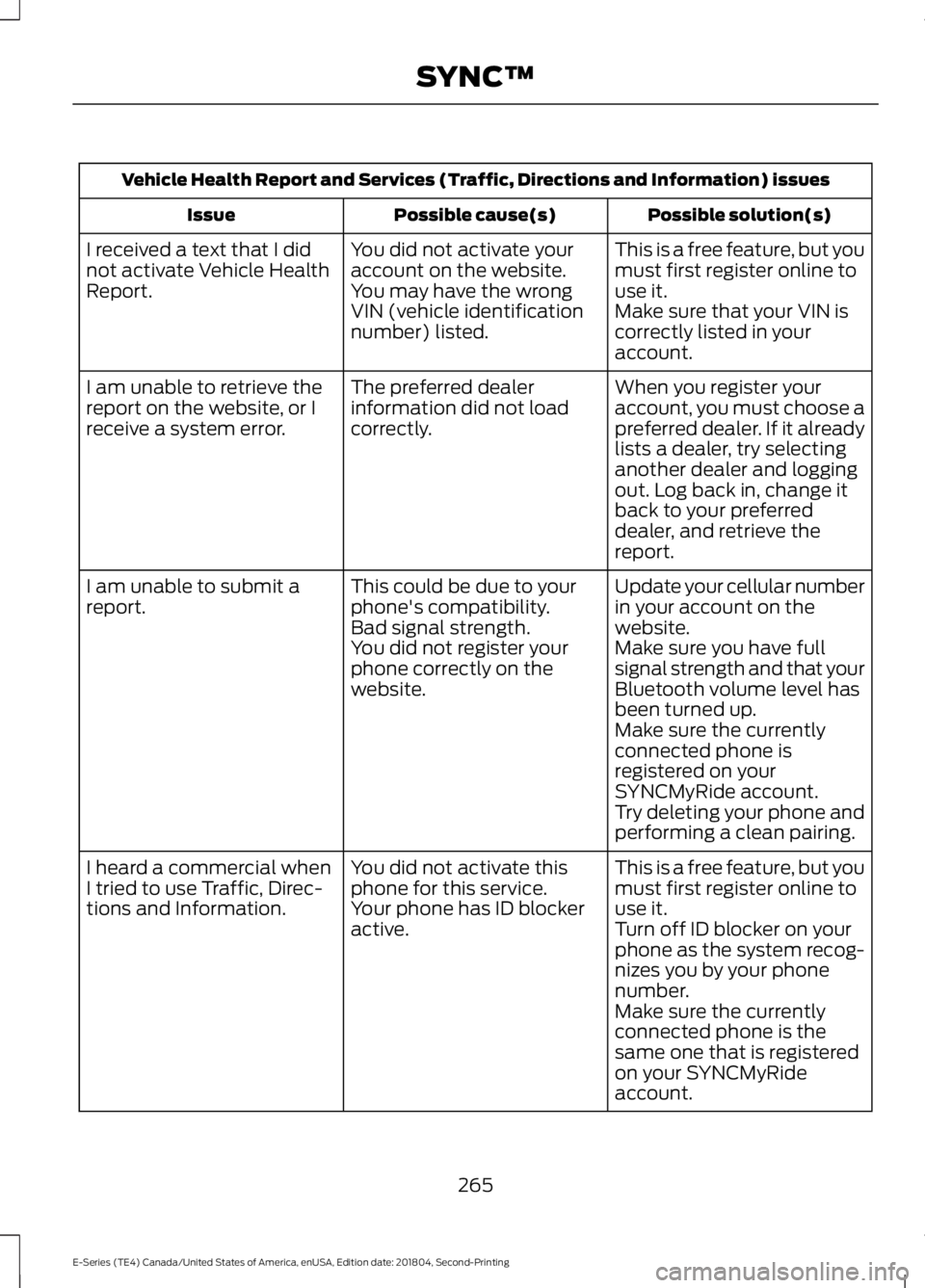
Vehicle Health Report and Services (Traffic, Directions and Information) issues
Possible solution(s)Possible cause(s)Issue
This is a free feature, but youmust first register online touse it.
You did not activate youraccount on the website.You may have the wrongVIN (vehicle identificationnumber) listed.
I received a text that I didnot activate Vehicle HealthReport.Make sure that your VIN iscorrectly listed in youraccount.
When you register youraccount, you must choose apreferred dealer. If it alreadylists a dealer, try selectinganother dealer and loggingout. Log back in, change itback to your preferreddealer, and retrieve thereport.
The preferred dealerinformation did not loadcorrectly.
I am unable to retrieve thereport on the website, or Ireceive a system error.
Update your cellular numberin your account on thewebsite.
This could be due to yourphone's compatibility.Bad signal strength.
I am unable to submit areport.
Make sure you have fullsignal strength and that yourBluetooth volume level hasbeen turned up.
You did not register yourphone correctly on thewebsite.
Make sure the currentlyconnected phone isregistered on yourSYNCMyRide account.Try deleting your phone andperforming a clean pairing.
This is a free feature, but youmust first register online touse it.
You did not activate thisphone for this service.Your phone has ID blockeractive.
I heard a commercial whenI tried to use Traffic, Direc-tions and Information.Turn off ID blocker on yourphone as the system recog-nizes you by your phonenumber.Make sure the currentlyconnected phone is thesame one that is registeredon your SYNCMyRideaccount.
265
E-Series (TE4) Canada/United States of America, enUSA, Edition date: 201804, Second-Printing
SYNC™
Page 276 of 329
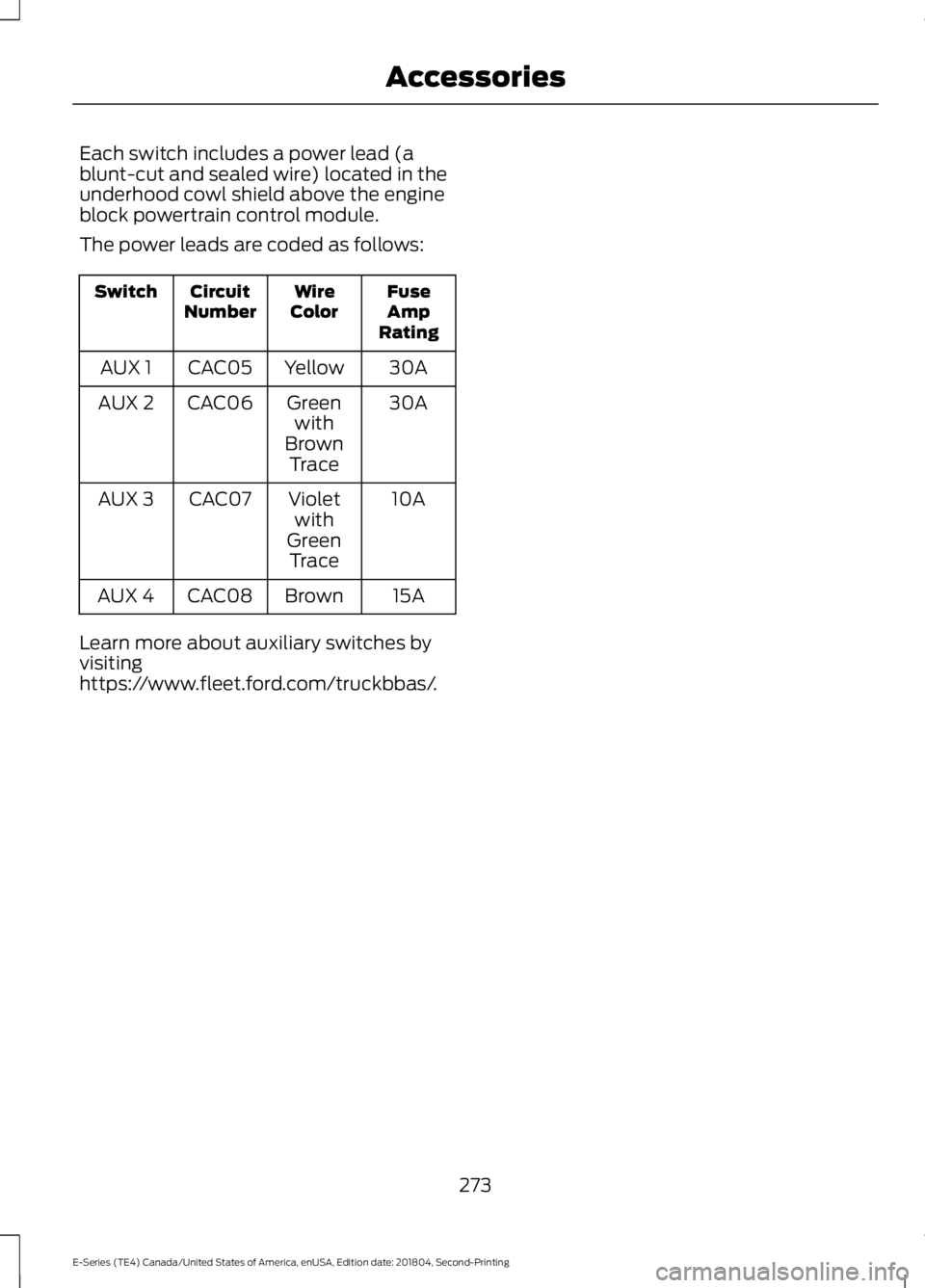
Each switch includes a power lead (ablunt-cut and sealed wire) located in theunderhood cowl shield above the engineblock powertrain control module.
The power leads are coded as follows:
FuseAmpRating
WireColorCircuitNumberSwitch
30AYellowCAC05AUX 1
30AGreenwithBrownTrace
CAC06AUX 2
10AVioletwithGreenTrace
CAC07AUX 3
15ABrownCAC08AUX 4
Learn more about auxiliary switches byvisitinghttps://www.fleet.ford.com/truckbbas/.
273
E-Series (TE4) Canada/United States of America, enUSA, Edition date: 201804, Second-Printing
Accessories
Page 277 of 329
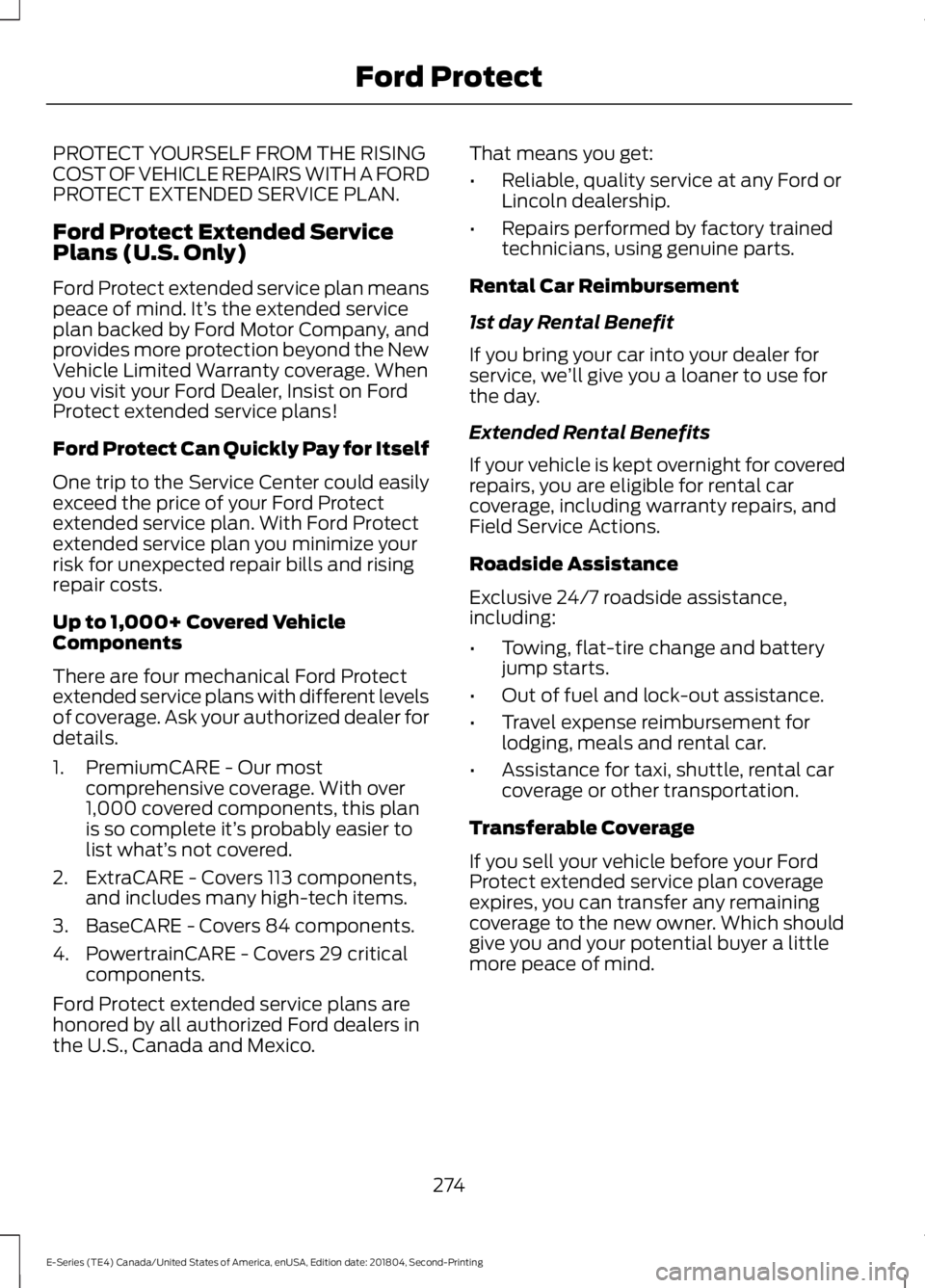
PROTECT YOURSELF FROM THE RISINGCOST OF VEHICLE REPAIRS WITH A FORDPROTECT EXTENDED SERVICE PLAN.
Ford Protect Extended ServicePlans (U.S. Only)
Ford Protect extended service plan meanspeace of mind. It’s the extended serviceplan backed by Ford Motor Company, andprovides more protection beyond the NewVehicle Limited Warranty coverage. Whenyou visit your Ford Dealer, Insist on FordProtect extended service plans!
Ford Protect Can Quickly Pay for Itself
One trip to the Service Center could easilyexceed the price of your Ford Protectextended service plan. With Ford Protectextended service plan you minimize yourrisk for unexpected repair bills and risingrepair costs.
Up to 1,000+ Covered VehicleComponents
There are four mechanical Ford Protectextended service plans with different levelsof coverage. Ask your authorized dealer fordetails.
1. PremiumCARE - Our mostcomprehensive coverage. With over1,000 covered components, this planis so complete it’s probably easier tolist what’s not covered.
2. ExtraCARE - Covers 113 components,and includes many high-tech items.
3. BaseCARE - Covers 84 components.
4. PowertrainCARE - Covers 29 criticalcomponents.
Ford Protect extended service plans arehonored by all authorized Ford dealers inthe U.S., Canada and Mexico.
That means you get:
•Reliable, quality service at any Ford orLincoln dealership.
•Repairs performed by factory trainedtechnicians, using genuine parts.
Rental Car Reimbursement
1st day Rental Benefit
If you bring your car into your dealer forservice, we’ll give you a loaner to use forthe day.
Extended Rental Benefits
If your vehicle is kept overnight for coveredrepairs, you are eligible for rental carcoverage, including warranty repairs, andField Service Actions.
Roadside Assistance
Exclusive 24/7 roadside assistance,including:
•Towing, flat-tire change and batteryjump starts.
•Out of fuel and lock-out assistance.
•Travel expense reimbursement forlodging, meals and rental car.
•Assistance for taxi, shuttle, rental carcoverage or other transportation.
Transferable Coverage
If you sell your vehicle before your FordProtect extended service plan coverageexpires, you can transfer any remainingcoverage to the new owner. Which shouldgive you and your potential buyer a littlemore peace of mind.
274
E-Series (TE4) Canada/United States of America, enUSA, Edition date: 201804, Second-Printing
Ford Protect
Page 281 of 329
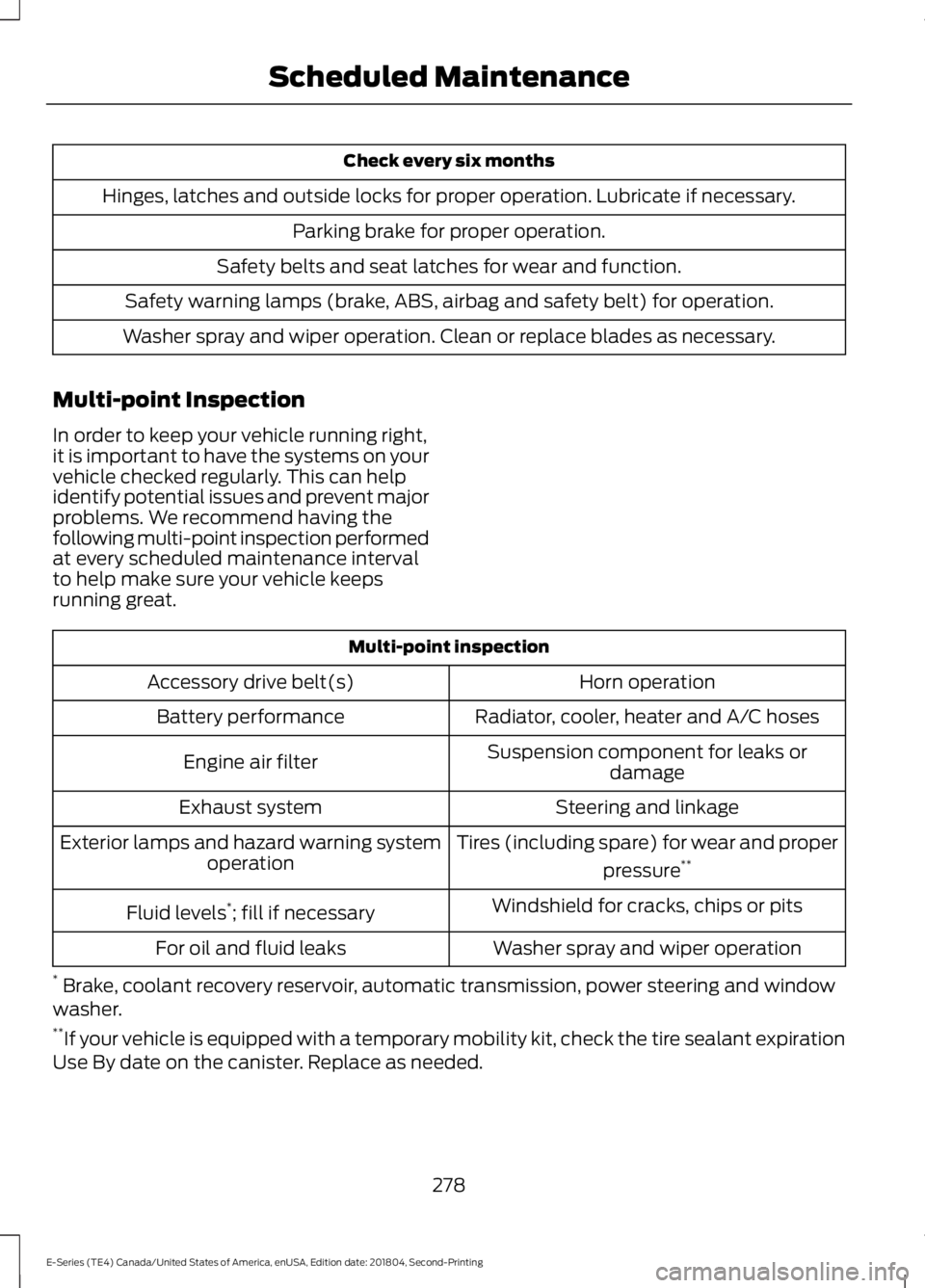
Check every six months
Hinges, latches and outside locks for proper operation. Lubricate if necessary.
Parking brake for proper operation.
Safety belts and seat latches for wear and function.
Safety warning lamps (brake, ABS, airbag and safety belt) for operation.
Washer spray and wiper operation. Clean or replace blades as necessary.
Multi-point Inspection
In order to keep your vehicle running right,it is important to have the systems on yourvehicle checked regularly. This can helpidentify potential issues and prevent majorproblems. We recommend having thefollowing multi-point inspection performedat every scheduled maintenance intervalto help make sure your vehicle keepsrunning great.
Multi-point inspection
Horn operationAccessory drive belt(s)
Radiator, cooler, heater and A/C hosesBattery performance
Suspension component for leaks ordamageEngine air filter
Steering and linkageExhaust system
Tires (including spare) for wear and proper
pressure**Exterior lamps and hazard warning systemoperation
Windshield for cracks, chips or pitsFluid levels*; fill if necessary
Washer spray and wiper operationFor oil and fluid leaks
* Brake, coolant recovery reservoir, automatic transmission, power steering and windowwasher.**If your vehicle is equipped with a temporary mobility kit, check the tire sealant expirationUse By date on the canister. Replace as needed.
278
E-Series (TE4) Canada/United States of America, enUSA, Edition date: 201804, Second-Printing
Scheduled Maintenance
Page 322 of 329
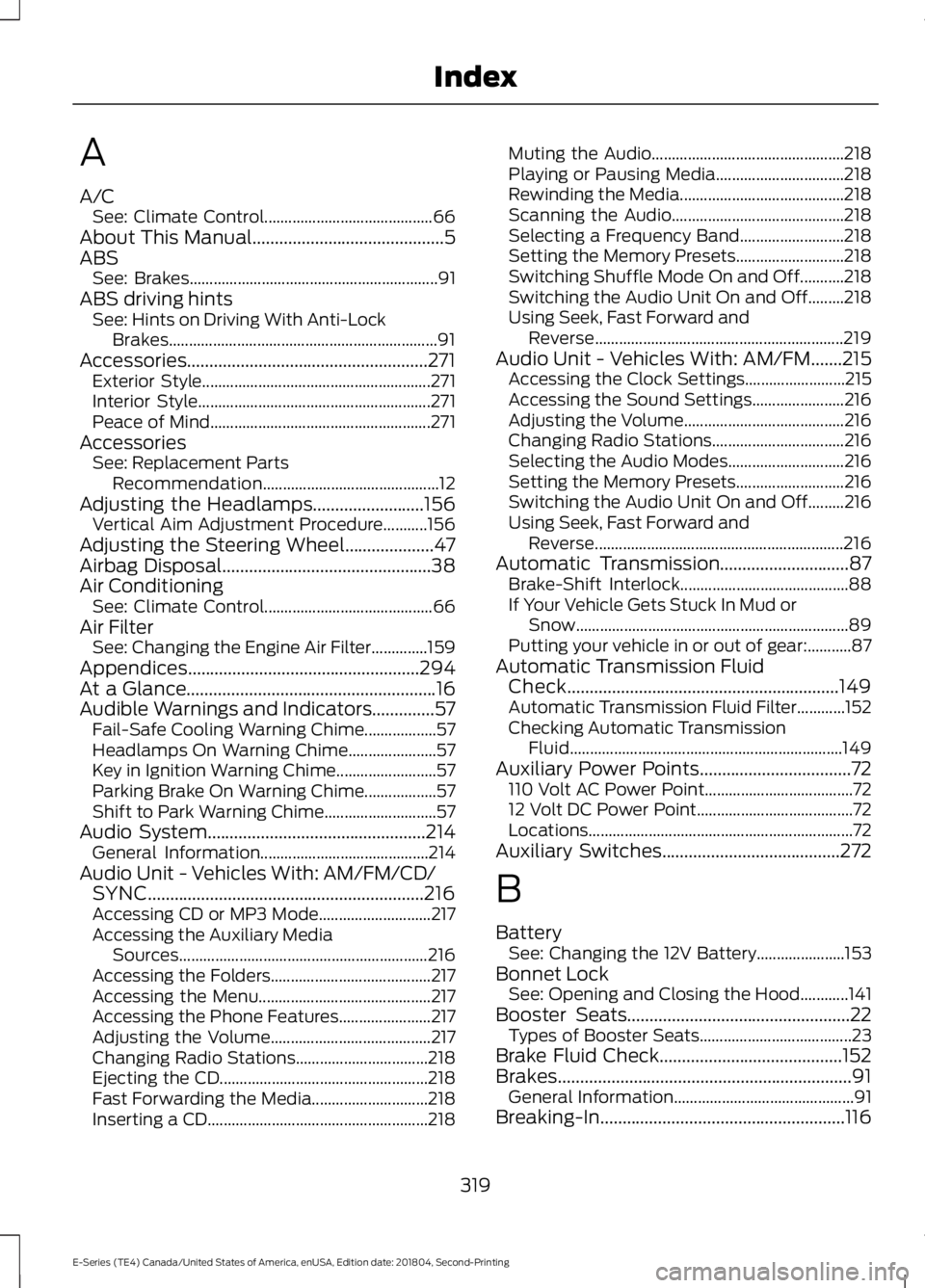
A
A/CSee: Climate Control..........................................66About This Manual...........................................5ABSSee: Brakes..............................................................91ABS driving hintsSee: Hints on Driving With Anti-LockBrakes...................................................................91Accessories......................................................271Exterior Style.........................................................271Interior Style..........................................................271Peace of Mind.......................................................271AccessoriesSee: Replacement PartsRecommendation............................................12Adjusting the Headlamps.........................156Vertical Aim Adjustment Procedure...........156Adjusting the Steering Wheel....................47Airbag Disposal...............................................38Air ConditioningSee: Climate Control..........................................66Air FilterSee: Changing the Engine Air Filter..............159Appendices....................................................294At a Glance........................................................16Audible Warnings and Indicators..............57Fail-Safe Cooling Warning Chime..................57Headlamps On Warning Chime......................57Key in Ignition Warning Chime.........................57Parking Brake On Warning Chime..................57Shift to Park Warning Chime............................57Audio System.................................................214General Information..........................................214Audio Unit - Vehicles With: AM/FM/CD/SYNC..............................................................216Accessing CD or MP3 Mode............................217Accessing the Auxiliary MediaSources..............................................................216Accessing the Folders........................................217Accessing the Menu...........................................217Accessing the Phone Features.......................217Adjusting the Volume........................................217Changing Radio Stations.................................218Ejecting the CD....................................................218Fast Forwarding the Media.............................218Inserting a CD.......................................................218
Muting the Audio................................................218Playing or Pausing Media................................218Rewinding the Media.........................................218Scanning the Audio...........................................218Selecting a Frequency Band..........................218Setting the Memory Presets...........................218Switching Shuffle Mode On and Off...........218Switching the Audio Unit On and Off.........218Using Seek, Fast Forward andReverse..............................................................219Audio Unit - Vehicles With: AM/FM.......215Accessing the Clock Settings.........................215Accessing the Sound Settings.......................216Adjusting the Volume........................................216Changing Radio Stations.................................216Selecting the Audio Modes.............................216Setting the Memory Presets...........................216Switching the Audio Unit On and Off.........216Using Seek, Fast Forward andReverse..............................................................216Automatic Transmission.............................87Brake-Shift Interlock..........................................88If Your Vehicle Gets Stuck In Mud orSnow....................................................................89Putting your vehicle in or out of gear:...........87Automatic Transmission FluidCheck.............................................................149Automatic Transmission Fluid Filter............152Checking Automatic TransmissionFluid....................................................................149Auxiliary Power Points..................................72110 Volt AC Power Point.....................................7212 Volt DC Power Point.......................................72Locations..................................................................72Auxiliary Switches........................................272
B
BatterySee: Changing the 12V Battery......................153Bonnet LockSee: Opening and Closing the Hood............141Booster Seats..................................................22Types of Booster Seats......................................23Brake Fluid Check.........................................152Brakes..................................................................91General Information.............................................91Breaking-In.......................................................116
319
E-Series (TE4) Canada/United States of America, enUSA, Edition date: 201804, Second-Printing
Index
Page 323 of 329
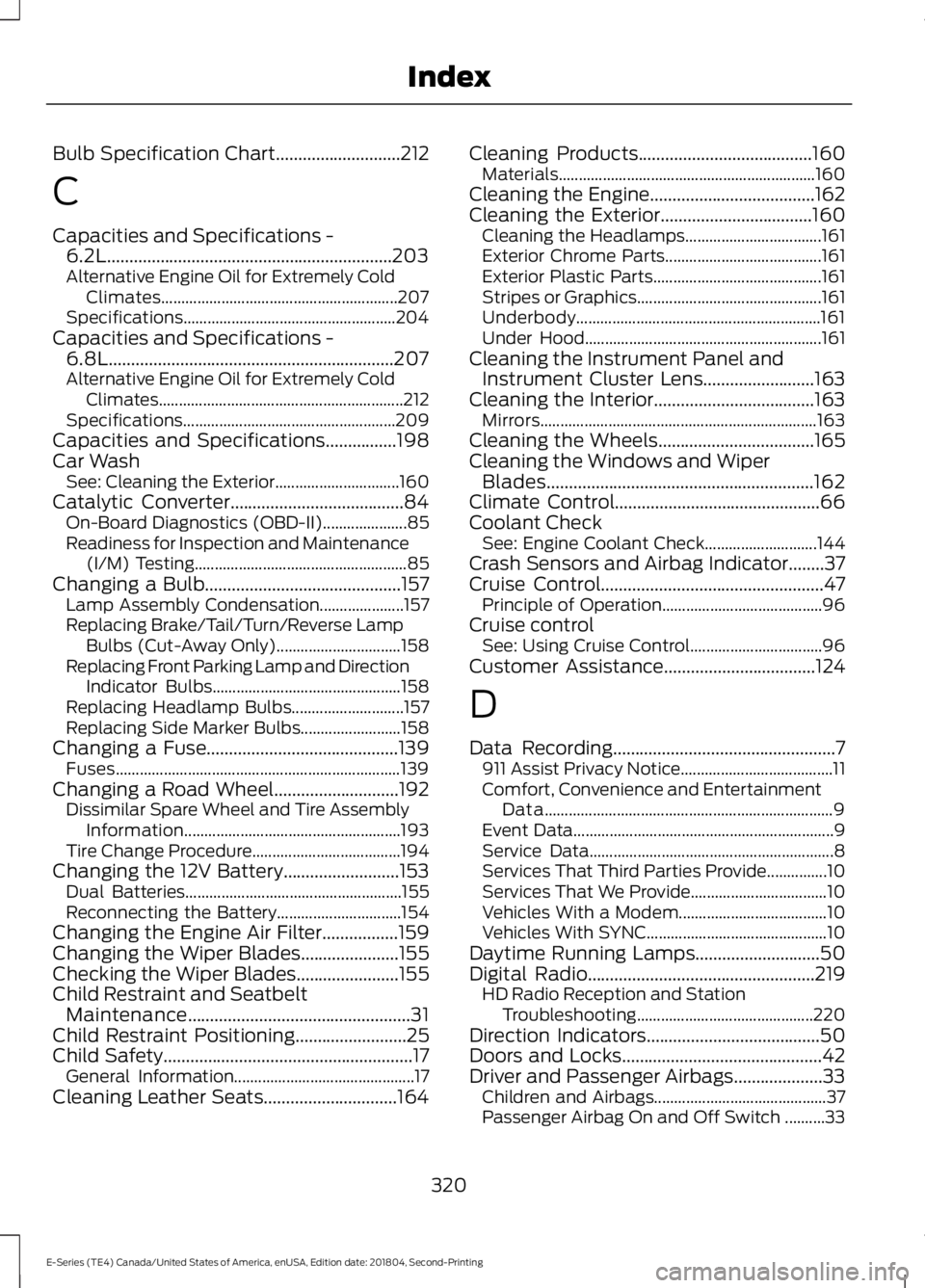
Bulb Specification Chart............................212
C
Capacities and Specifications -6.2L................................................................203Alternative Engine Oil for Extremely ColdClimates...........................................................207Specifications.....................................................204Capacities and Specifications -6.8L................................................................207Alternative Engine Oil for Extremely ColdClimates.............................................................212Specifications.....................................................209Capacities and Specifications................198Car WashSee: Cleaning the Exterior...............................160Catalytic Converter.......................................84On-Board Diagnostics (OBD-II).....................85Readiness for Inspection and Maintenance(I/M) Testing.....................................................85Changing a Bulb............................................157Lamp Assembly Condensation.....................157Replacing Brake/Tail/Turn/Reverse LampBulbs (Cut-Away Only)...............................158Replacing Front Parking Lamp and DirectionIndicator Bulbs...............................................158Replacing Headlamp Bulbs............................157Replacing Side Marker Bulbs.........................158Changing a Fuse...........................................139Fuses.......................................................................139Changing a Road Wheel............................192Dissimilar Spare Wheel and Tire AssemblyInformation......................................................193Tire Change Procedure.....................................194Changing the 12V Battery..........................153Dual Batteries......................................................155Reconnecting the Battery...............................154Changing the Engine Air Filter.................159Changing the Wiper Blades......................155Checking the Wiper Blades.......................155Child Restraint and SeatbeltMaintenance..................................................31Child Restraint Positioning.........................25Child Safety........................................................17General Information.............................................17Cleaning Leather Seats..............................164
Cleaning Products.......................................160Materials................................................................160Cleaning the Engine.....................................162Cleaning the Exterior..................................160Cleaning the Headlamps..................................161Exterior Chrome Parts.......................................161Exterior Plastic Parts..........................................161Stripes or Graphics..............................................161Underbody.............................................................161Under Hood...........................................................161Cleaning the Instrument Panel andInstrument Cluster Lens.........................163Cleaning the Interior....................................163Mirrors.....................................................................163Cleaning the Wheels...................................165Cleaning the Windows and WiperBlades............................................................162Climate Control..............................................66Coolant CheckSee: Engine Coolant Check............................144Crash Sensors and Airbag Indicator........37Cruise Control..................................................47Principle of Operation........................................96Cruise controlSee: Using Cruise Control.................................96Customer Assistance..................................124
D
Data Recording..................................................7911 Assist Privacy Notice......................................11Comfort, Convenience and EntertainmentData........................................................................9Event Data.................................................................9Service Data.............................................................8Services That Third Parties Provide...............10Services That We Provide..................................10Vehicles With a Modem.....................................10Vehicles With SYNC.............................................10Daytime Running Lamps............................50Digital Radio...................................................219HD Radio Reception and StationTroubleshooting............................................220Direction Indicators.......................................50Doors and Locks.............................................42Driver and Passenger Airbags....................33Children and Airbags...........................................37Passenger Airbag On and Off Switch ..........33
320
E-Series (TE4) Canada/United States of America, enUSA, Edition date: 201804, Second-Printing
Index
Page 324 of 329
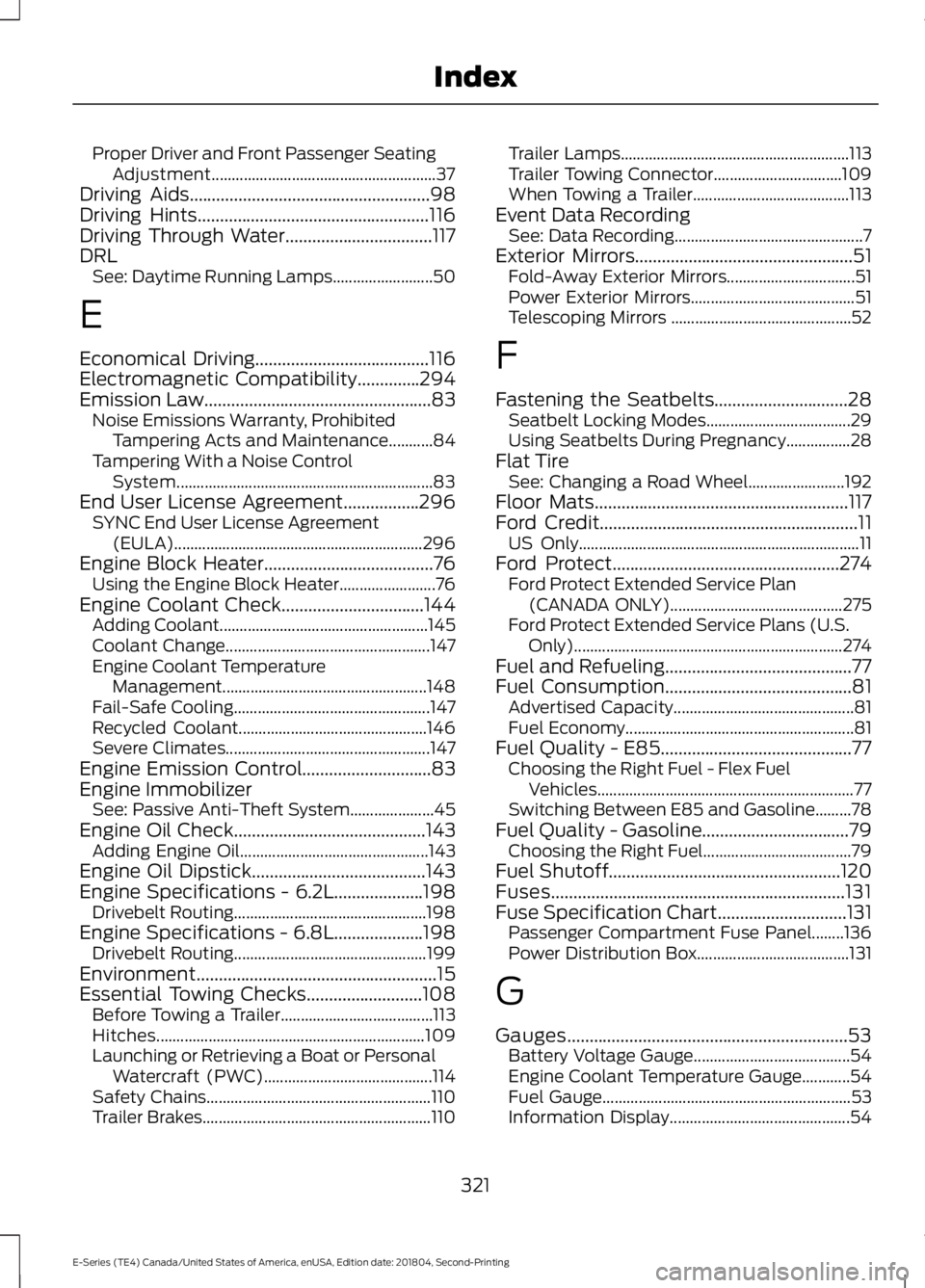
Proper Driver and Front Passenger SeatingAdjustment........................................................37Driving Aids......................................................98Driving Hints....................................................116Driving Through Water.................................117DRLSee: Daytime Running Lamps.........................50
E
Economical Driving.......................................116Electromagnetic Compatibility..............294Emission Law...................................................83Noise Emissions Warranty, ProhibitedTampering Acts and Maintenance...........84Tampering With a Noise ControlSystem................................................................83End User License Agreement.................296SYNC End User License Agreement(EULA)..............................................................296Engine Block Heater......................................76Using the Engine Block Heater........................76Engine Coolant Check................................144Adding Coolant....................................................145Coolant Change...................................................147Engine Coolant TemperatureManagement...................................................148Fail-Safe Cooling.................................................147Recycled Coolant...............................................146Severe Climates...................................................147Engine Emission Control.............................83Engine ImmobilizerSee: Passive Anti-Theft System.....................45Engine Oil Check...........................................143Adding Engine Oil...............................................143Engine Oil Dipstick.......................................143Engine Specifications - 6.2L....................198Drivebelt Routing................................................198Engine Specifications - 6.8L....................198Drivebelt Routing................................................199Environment......................................................15Essential Towing Checks..........................108Before Towing a Trailer......................................113Hitches...................................................................109Launching or Retrieving a Boat or PersonalWatercraft (PWC)..........................................114Safety Chains........................................................110Trailer Brakes.........................................................110
Trailer Lamps.........................................................113Trailer Towing Connector................................109When Towing a Trailer.......................................113Event Data RecordingSee: Data Recording...............................................7Exterior Mirrors.................................................51Fold-Away Exterior Mirrors................................51Power Exterior Mirrors.........................................51Telescoping Mirrors .............................................52
F
Fastening the Seatbelts..............................28Seatbelt Locking Modes....................................29Using Seatbelts During Pregnancy................28Flat TireSee: Changing a Road Wheel........................192Floor Mats.........................................................117Ford Credit..........................................................11US Only......................................................................11Ford Protect...................................................274Ford Protect Extended Service Plan(CANADA ONLY)...........................................275Ford Protect Extended Service Plans (U.S.Only)...................................................................274Fuel and Refueling..........................................77Fuel Consumption..........................................81Advertised Capacity.............................................81Fuel Economy.........................................................81Fuel Quality - E85...........................................77Choosing the Right Fuel - Flex FuelVehicles................................................................77Switching Between E85 and Gasoline.........78Fuel Quality - Gasoline.................................79Choosing the Right Fuel.....................................79Fuel Shutoff....................................................120Fuses..................................................................131Fuse Specification Chart.............................131Passenger Compartment Fuse Panel........136Power Distribution Box......................................131
G
Gauges...............................................................53Battery Voltage Gauge.......................................54Engine Coolant Temperature Gauge............54Fuel Gauge..............................................................53Information Display.............................................54
321
E-Series (TE4) Canada/United States of America, enUSA, Edition date: 201804, Second-Printing
Index
Page 325 of 329
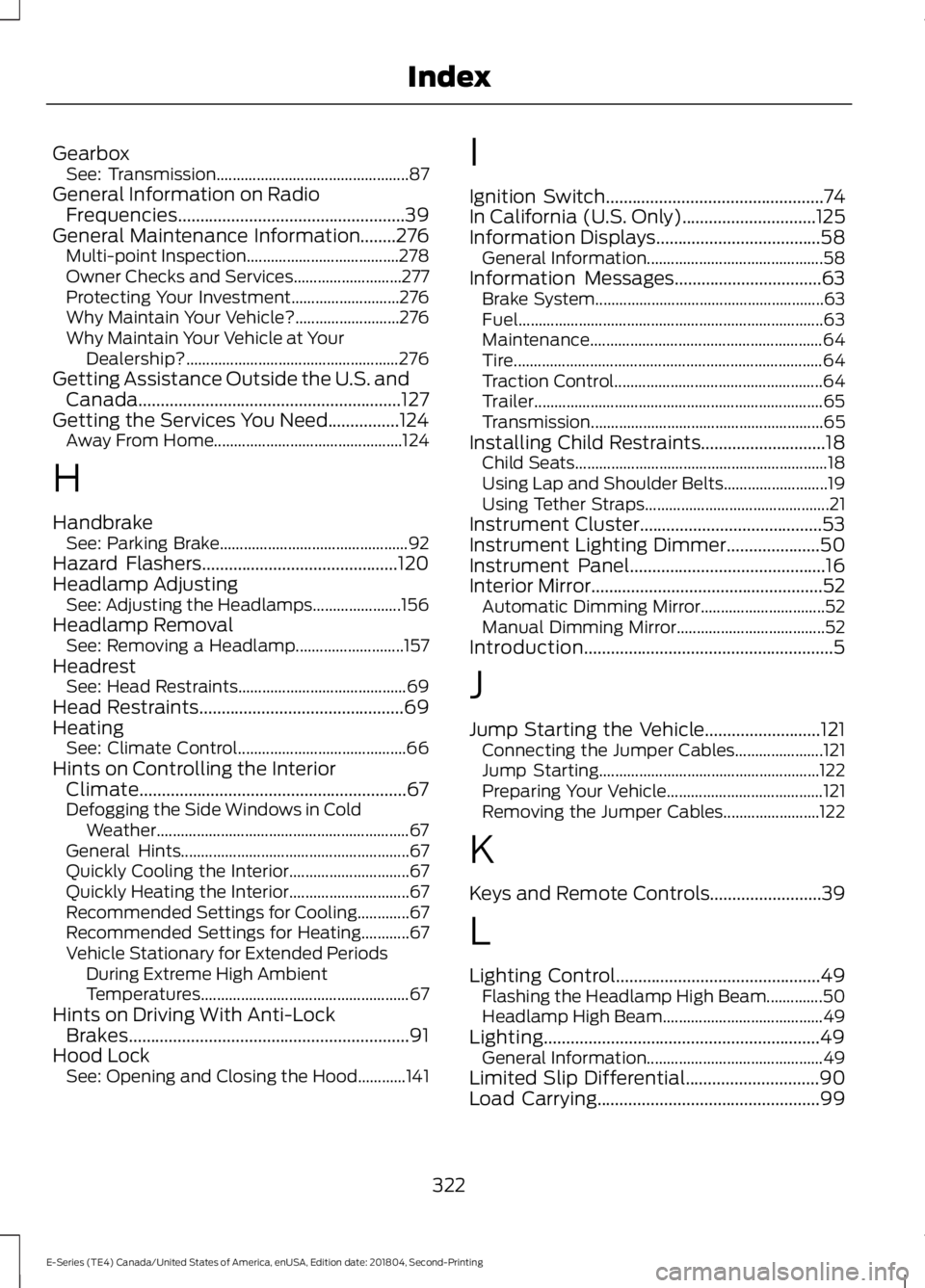
GearboxSee: Transmission................................................87General Information on RadioFrequencies...................................................39General Maintenance Information........276Multi-point Inspection......................................278Owner Checks and Services...........................277Protecting Your Investment...........................276Why Maintain Your Vehicle?..........................276Why Maintain Your Vehicle at YourDealership?.....................................................276Getting Assistance Outside the U.S. andCanada...........................................................127Getting the Services You Need................124Away From Home...............................................124
H
HandbrakeSee: Parking Brake...............................................92Hazard Flashers............................................120Headlamp AdjustingSee: Adjusting the Headlamps......................156Headlamp RemovalSee: Removing a Headlamp...........................157HeadrestSee: Head Restraints..........................................69Head Restraints..............................................69HeatingSee: Climate Control..........................................66Hints on Controlling the InteriorClimate............................................................67Defogging the Side Windows in ColdWeather...............................................................67General Hints.........................................................67Quickly Cooling the Interior..............................67Quickly Heating the Interior..............................67Recommended Settings for Cooling.............67Recommended Settings for Heating............67Vehicle Stationary for Extended PeriodsDuring Extreme High AmbientTemperatures....................................................67Hints on Driving With Anti-LockBrakes...............................................................91Hood LockSee: Opening and Closing the Hood............141
I
Ignition Switch.................................................74In California (U.S. Only)..............................125Information Displays.....................................58General Information............................................58Information Messages.................................63Brake System.........................................................63Fuel............................................................................63Maintenance..........................................................64Tire.............................................................................64Traction Control....................................................64Trailer........................................................................65Transmission..........................................................65Installing Child Restraints............................18Child Seats...............................................................18Using Lap and Shoulder Belts..........................19Using Tether Straps..............................................21Instrument Cluster.........................................53Instrument Lighting Dimmer.....................50Instrument Panel............................................16Interior Mirror....................................................52Automatic Dimming Mirror...............................52Manual Dimming Mirror.....................................52Introduction........................................................5
J
Jump Starting the Vehicle..........................121Connecting the Jumper Cables......................121Jump Starting.......................................................122Preparing Your Vehicle.......................................121Removing the Jumper Cables........................122
K
Keys and Remote Controls.........................39
L
Lighting Control..............................................49Flashing the Headlamp High Beam..............50Headlamp High Beam........................................49Lighting..............................................................49General Information............................................49Limited Slip Differential..............................90Load Carrying..................................................99
322
E-Series (TE4) Canada/United States of America, enUSA, Edition date: 201804, Second-Printing
Index