instrument cluster FORD E SERIES 2024 Owner's Manual
[x] Cancel search | Manufacturer: FORD, Model Year: 2024, Model line: E SERIES, Model: FORD E SERIES 2024Pages: 303, PDF Size: 6.95 MB
Page 168 of 303
Engine Oil Pressure Warning Lamp
WARNING: If it illuminates whenyou are driving do not continue yourjourney, even if the oil level is correct.Have your vehicle checked.
It illuminates when you switchthe ignition on.
If it illuminates when the engineis running this indicates a malfunction.Stop your vehicle as soon as it is safe todo so and switch the engine off. Check theengine oil level. If the oil level is sufficient,this indicates a system malfunction. Haveyour vehicle checked as soon as possible.
OIL CHANGE INDICATOR
RESET
Base Cluster
Use the information display controls onthe steering wheel to reset the oil changeindicator.
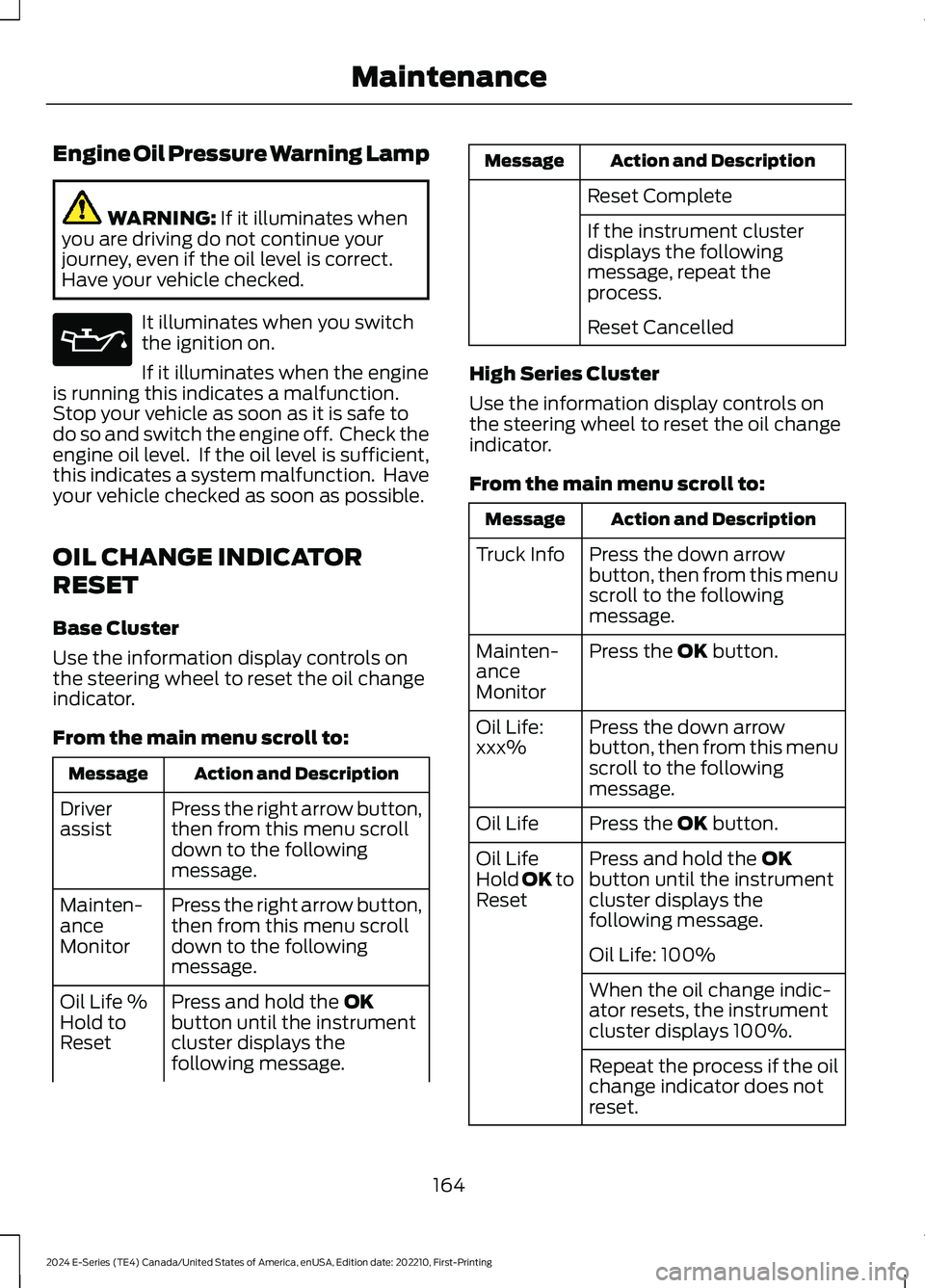
From the main menu scroll to:
Action and DescriptionMessage
Press the right arrow button,then from this menu scrolldown to the followingmessage.
Driverassist
Press the right arrow button,then from this menu scrolldown to the followingmessage.
Mainten-anceMonitor
Press and hold the OKbutton until the instrumentcluster displays thefollowing message.
Oil Life %Hold toReset
Action and DescriptionMessage
Reset Complete
If the instrument clusterdisplays the followingmessage, repeat theprocess.
Reset Cancelled
High Series Cluster
Use the information display controls onthe steering wheel to reset the oil changeindicator.
From the main menu scroll to:
Action and DescriptionMessage
Press the down arrowbutton, then from this menuscroll to the followingmessage.
Truck Info
Press the OK button.Mainten-anceMonitor
Press the down arrowbutton, then from this menuscroll to the followingmessage.
Oil Life:xxx%
Press the OK button.Oil Life
Press and hold the OKbutton until the instrumentcluster displays thefollowing message.
Oil LifeHold OK toReset
Oil Life: 100%
When the oil change indic-ator resets, the instrumentcluster displays 100%.
Repeat the process if the oilchange indicator does notreset.
164
2024 E-Series (TE4) Canada/United States of America, enUSA, Edition date: 202210, First-PrintingMaintenanceE67022
Page 172 of 303
Severe Climates
If you drive in extremely cold climates:
•It may be necessary to increase thecoolant concentration above 50%.
•A coolant concentration of 60%provides improved freeze pointprotection. Coolant concentrationsabove 60% decrease the overheatprotection characteristics of thecoolant and may cause enginedamage.
If you drive in extremely hot climates:
•You can decrease the coolantconcentration to 40%.
•Coolant concentrations below 40%decrease the freeze and corrosionprotection characteristics of thecoolant and may cause enginedamage.
Vehicles driven year-round in non-extremeclimates should use prediluted coolant foroptimum cooling system and engineprotection.
Coolant Change
Change the engine coolant at the specificmileage intervals listed in scheduledmaintenance. See Capacities andSpecifications (page 226).
Fail-Safe Cooling
Fail-safe cooling allows you to temporarilydrive your vehicle before any incrementalcomponent damage occurs. The fail-safedistance depends on ambienttemperature, vehicle load and terrain.
How Fail-Safe Cooling Works
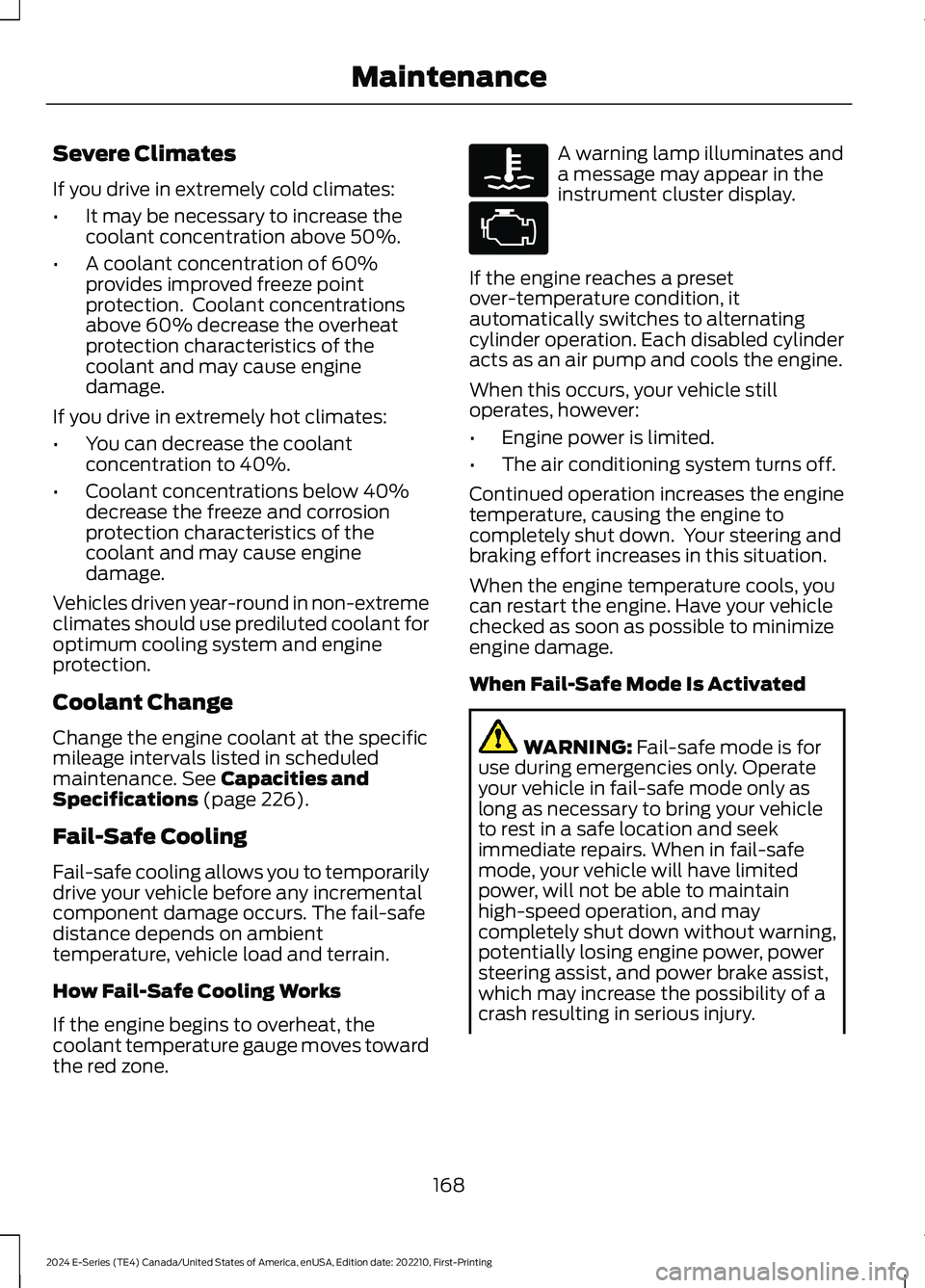
If the engine begins to overheat, thecoolant temperature gauge moves towardthe red zone.
A warning lamp illuminates anda message may appear in theinstrument cluster display.
If the engine reaches a presetover-temperature condition, itautomatically switches to alternatingcylinder operation. Each disabled cylinderacts as an air pump and cools the engine.
When this occurs, your vehicle stilloperates, however:
•Engine power is limited.
•The air conditioning system turns off.
Continued operation increases the enginetemperature, causing the engine tocompletely shut down. Your steering andbraking effort increases in this situation.
When the engine temperature cools, youcan restart the engine. Have your vehiclechecked as soon as possible to minimizeengine damage.
When Fail-Safe Mode Is Activated
WARNING: Fail-safe mode is foruse during emergencies only. Operateyour vehicle in fail-safe mode only aslong as necessary to bring your vehicleto rest in a safe location and seekimmediate repairs. When in fail-safemode, your vehicle will have limitedpower, will not be able to maintainhigh-speed operation, and maycompletely shut down without warning,potentially losing engine power, powersteering assist, and power brake assist,which may increase the possibility of acrash resulting in serious injury.
168
2024 E-Series (TE4) Canada/United States of America, enUSA, Edition date: 202210, First-PrintingMaintenanceE103308 E67028
Page 173 of 303
WARNING: Do not remove thecoolant reservoir cap when the engine ison or the cooling system is hot. Wait 10minutes for the cooling system to cooldown. Cover the coolant reservoir capwith a thick cloth to prevent thepossibility of scalding and slowly removethe cap. Failure to follow this instructioncould result in personal injury.
Your vehicle has limited engine powerwhen in the fail-safe mode, drive yourvehicle with caution. Your vehicle does notmaintain high-speed operation and theengine may operate poorly.
Remember that the engine is capable ofautomatically shutting down to preventengine damage. In this situation:
1.Pull off the road as soon as safelypossible and switch the engine off.
2.If you are a member of a roadsideassistance program, contact yourroadside assistance service provider.
3.If this is not possible, wait a shortperiod for the engine to cool.
4.Check the coolant level. If the coolantlevel is at or below the minimum mark,add prediluted coolant immediately.
5.When the engine temperature cools,you can restart the engine. Have yourvehicle checked as soon as possible tominimize engine damage.
Note:Driving your vehicle without repairincreases the chance of engine damage.
Engine Coolant TemperatureManagement (If Equipped)
WARNING: To reduce the risk ofcrash and injury, be prepared that thevehicle speed may reduce and thevehicle may not be able to acceleratewith full power until the coolanttemperature reduces.
If you tow a trailer with your vehicle, theengine may temporarily reach a highertemperature during severe operatingconditions, for example ascending a longor steep slope in high ambienttemperatures.
At this time, you may notice the coolanttemperature gauge moves toward the redzone and a message may appear in theinstrument cluster display.
You may notice a reduction in vehiclespeed caused by reduced engine power tomanage the engine coolant temperature.Your vehicle may enter this mode if certainhigh-temperature and high-load conditionstake place. The amount of speedreduction depends on vehicle loading,grade and ambient temperature. If thisoccurs, there is no need to pull off theroad. You can continue to drive yourvehicle.
The air conditioning may automaticallyturn on and off during severe operatingconditions to protect the engine fromoverheating. When the coolanttemperature returns to the normaloperating temperature, the air conditioningturns on.
If the coolant temperature gauge movesfully into the red zone, or if the coolanttemperature warning or service enginesoon messages appear in your instrumentcluster display, do the following:
169
2024 E-Series (TE4) Canada/United States of America, enUSA, Edition date: 202210, First-PrintingMaintenance
Page 174 of 303
1.Pull off the road as soon as safelypossible and shift the transmission intopark (P).
2.Leave the engine running until thecoolant temperature gauge needlereturns to the normal position. If thetemperature does not drop afterseveral minutes, follow the remainingsteps.
3.Switch the engine off and wait for it tocool. Check the coolant level.
4.If the coolant level is at or below theminimum mark, immediately addprediluted coolant.
5.If the coolant level is normal, restartthe engine and continue driving.
AUTOMATIC TRANSMISSION
FLUID CHECK
Have an authorized dealer check andchange the transmission fluid and filter atthe correct service interval. SeeScheduled Maintenance (page 249).
Do not use supplemental transmissionfluid additives, treatments or cleaningagents. The use of these materials mayaffect transmission operation and resultin damage to internal transmissioncomponents.
Checking Automatic TransmissionFluid
For scheduled intervals of the fluid checksand changes, See ScheduledMaintenance (page 249). Yourtransmission does not consume fluid.However, if the transmission is not workingproperly, for example, if the transmissionslips or shifts slowly, or if you notice somesign of fluid leakage, check the fluid levelas soon as possible.
Automatic transmission fluid expandswhen warmed. Obtain an accurate readingas follows :
1.Drive the vehicle approximately 19 mi(30 km) to reach normal operatingtemperature via the transmission fluidtemperature gauge on the instrumentcluster.
2.Park the vehicle on a level surface andengage the parking brake.
3.With the engine running, parking brakeengaged and your foot on the brakepedal, move the gearshift lever throughall of the gear ranges. Allow sufficienttime for each gear to engage.
4.Put the transmission in park (P) andleave the engine running.
5.Remove the dipstick, wiping it cleanwith a clean, dry, lint free rag.
6.Install the dipstick, fully seating it in thefiller tube.
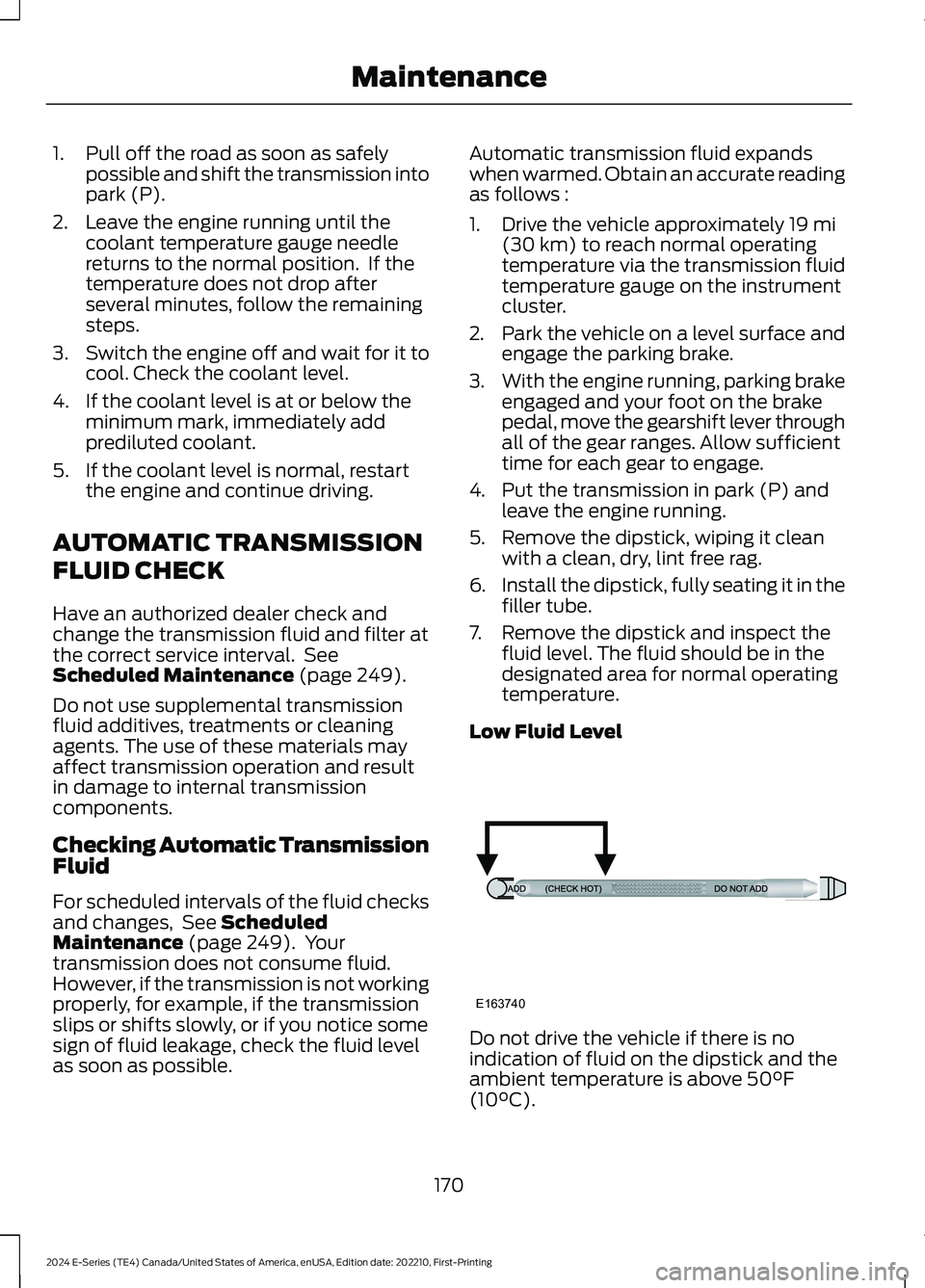
7.Remove the dipstick and inspect thefluid level. The fluid should be in thedesignated area for normal operatingtemperature.
Low Fluid Level
Do not drive the vehicle if there is noindication of fluid on the dipstick and theambient temperature is above 50°F(10°C).
170
2024 E-Series (TE4) Canada/United States of America, enUSA, Edition date: 202210, First-PrintingMaintenanceE163740
Page 190 of 303
CLEANING THE INSTRUMENT
PANEL AND INSTRUMENT
CLUSTER LENS
WARNING: Do not use chemicalsolvents or strong detergents whencleaning the steering wheel orinstrument panel to avoid contaminationof the airbag system.
Note:Follow the same procedure ascleaning leather seats for cleaning leatherinstrument panels and leather interior trimsurfaces. See Cleaning Leather Seats(page 186).
Clean the instrument panel and clusterlens with a clean, damp and soft cloth,then use a clean, dry and soft cloth to drythese areas.
•Avoid cleaners or polishes that increasethe gloss of the upper portion of theinstrument panel. The dull finish in thisarea helps protect you fromundesirable windshield reflection.
•Do not use any household cleaningproducts or glass cleaners as thesemay damage the finish of theinstrument panel, interior trim andcluster lens.
•Wash or wipe your hands clean if youhave been in contact with certainproducts such as insect repellent andsuntan lotion to avoid possible damageto the interior painted surfaces.
•Do not allow air fresheners and handsanitizers to spill onto interior surfaces.If a spill occurs, wipe off immediately.Your warranty may not cover thesedamages.
If a staining liquid like coffee or juice hasbeen spilled on the instrument panel or oninterior trim surfaces:
1.Wipe up spilled liquid using a clean,soft cloth as quickly as possible.
2.Use Motorcraft Premium Leather andVinyl Cleaner or a commerciallyavailable leather cleaning product forautomotive interiors. Test any cleaneror stain remover on an inconspicuousarea.
3.Alternatively, wipe the surface with aclean, soft cloth and a mild soap andwater solution. Dry the area with aclean, soft cloth.
4.If necessary, apply more soap andwater solution or cleaning product toa clean, soft cloth and press it onto thesoiled area. Allow this to set at roomtemperature for 30 minutes.
5.Remove the soaked cloth, then with aclean, damp cloth, use a rubbingmotion for 60 seconds on the soiledarea.
6.Dry the area with a clean, soft cloth.
CLEANING LEATHER SEATS
Note:Follow the same procedure ascleaning leather seats for cleaning leatherinstrument panels and leather interior trimsurfaces.
For routine cleaning, wipe the surface witha soft, damp cloth and a mild soap andwater solution. Dry the area with a clean,soft cloth.
For cleaning and removing stains such asdye transfer, use Motorcraft PremiumLeather and Vinyl Cleaner or acommercially available leather cleaningproduct for automotive interiors.
Note:Test any cleaner or stain remover onan inconspicuous area.
186
2024 E-Series (TE4) Canada/United States of America, enUSA, Edition date: 202210, First-PrintingVehicle Care
Page 299 of 303
A
A/CSee: Climate Control...........................................73About This Manual...........................................7ABSSee: Brakes.............................................................99ABS driving hintsSee: Hints on Driving With Anti-LockBrakes................................................................100Accessories....................................................244AccessoriesSee: Replacement PartsRecommendation..............................................8ACCSee: Using Adaptive Cruise Control.............107Adjusting the Headlamps..........................176Adjusting the Steering Wheel...................48Airbag Disposal................................................41Air ConditioningSee: Climate Control...........................................73Air Conditioning System Capacity andSpecification...............................................232Air FilterSee: Changing the Engine Air Filter..............165Appendices....................................................270At a Glance........................................................18Audible Warnings and Indicators.............63Audio System................................................239General Information.........................................239Audio Unit.......................................................239Autolamps........................................................52Automatic Crash Shutoff...........................143Automatic Crash ShutoffPrecautions......................................................143Re-Enabling Your Vehicle................................143What Is Automatic Crash Shutoff................143Automatic High Beam Control..................54Automatic High Beam ControlIndicators........................................................54Automatic Transmission.............................95Automatic Transmission Fluid Capacityand Specification......................................233Automatic Transmission FluidCheck..............................................................170Auxiliary Power Points..................................79Auxiliary Switches.......................................245
B
BatterySee: Changing the 12V Battery.......................173Bonnet LockSee: Opening and Closing the Hood............161Booster Seats..................................................26Brake Fluid Check..........................................172Brake Fluid Specification..........................234Brakes................................................................99General Information...........................................99Breaking-In......................................................137Bulb Specification Chart...........................228
C
Canceling the Set Speed...........................107Capacities and Specifications................226Car WashSee: Cleaning the Exterior...............................183Catalytic Converter........................................92Changing a Bulb............................................179Changing a Fuse...........................................159Changing a Road Wheel............................218Changing the 12V Battery...........................173Changing the Engine Air Filter.................165Changing the Wiper Blades......................178Checking the Wiper Blades.......................178Child Restraint and SeatbeltMaintenance.................................................34Child Restraint Positioning.........................28Child Safety......................................................20General Information............................................20Cleaning Leather Seats..............................186Cleaning Products........................................182Cleaning the Engine....................................184Cleaning the Exterior...................................183Cleaning the Instrument Panel andInstrument Cluster Lens.........................186Cleaning the Interior....................................185Cleaning the Wheels...................................187Cleaning the Windows and WiperBlades............................................................185Climate Control...............................................73Connected Vehicle......................................238Connected Vehicle –Troubleshooting............................................238
295
2024 E-Series (TE4) Canada/United States of America, enUSA, Edition date: 202210, First-PrintingIndex
Page 301 of 303
G
Gauges...............................................................58GearboxSee: Transmission................................................95General Information on RadioFrequencies...................................................42General Maintenance Information.......249Getting Assistance Outside the U.S. andCanada...........................................................147Getting the Services You Need...............144
H
HandbrakeSee: Parking Brake.............................................100Hazard Flashers............................................139Headlamp AdjustingSee: Adjusting the Headlamps......................176Headlamp RemovalSee: Removing a Headlamp...........................179HeadrestSee: Head Restraints...........................................76Head Restraints..............................................76HeatingSee: Climate Control...........................................73Hill Start Assist...............................................101Hints on Controlling the InteriorClimate............................................................74Hints on Driving With Anti-LockBrakes............................................................100Hood LockSee: Opening and Closing the Hood............161Horn....................................................................49Hydraulic Power Steering Fluid Capacityand Specification......................................236
I
Ignition Switch.................................................81In California (U.S. Only).............................145Information Display Control......................49Information Displays....................................64General Information...........................................64Information Messages.................................68Installing Child Restraints...........................22Instrument Cluster........................................58Instrument Lighting Dimmer......................52
Instrument Panel............................................18Interior Mirror....................................................57Introduction.........................................................7
J
Jump Starting the Vehicle.........................139
K
Keys and Remote Controls.........................42
L
Lane Keeping System..................................115Lighting Control...............................................51Lighting...............................................................51General Information.............................................51Load Carrying.................................................122Load Limit........................................................122Locking and Unlocking.................................45Lug NutsSee: Changing a Road Wheel........................218
M
Maintenance...................................................161General Information...........................................161Manual Climate Control...............................73Manual Seats....................................................77Message CenterSee: Information Displays.................................64MirrorsSee: Windows and Mirrors................................56Mobile CommunicationsEquipment......................................................10Motorcraft Parts - 7.3L................................227
N
Normal Scheduled Maintenance...........252
O
Oil Change Indicator Reset.......................164Oil CheckSee: Engine Oil Check.......................................163Opening and Closing the Hood................161
297
2024 E-Series (TE4) Canada/United States of America, enUSA, Edition date: 202210, First-PrintingIndex