audio FORD ECOSPORT 2018 User Guide
[x] Cancel search | Manufacturer: FORD, Model Year: 2018, Model line: ECOSPORT, Model: FORD ECOSPORT 2018Pages: 452, PDF Size: 17.04 MB
Page 290 of 452
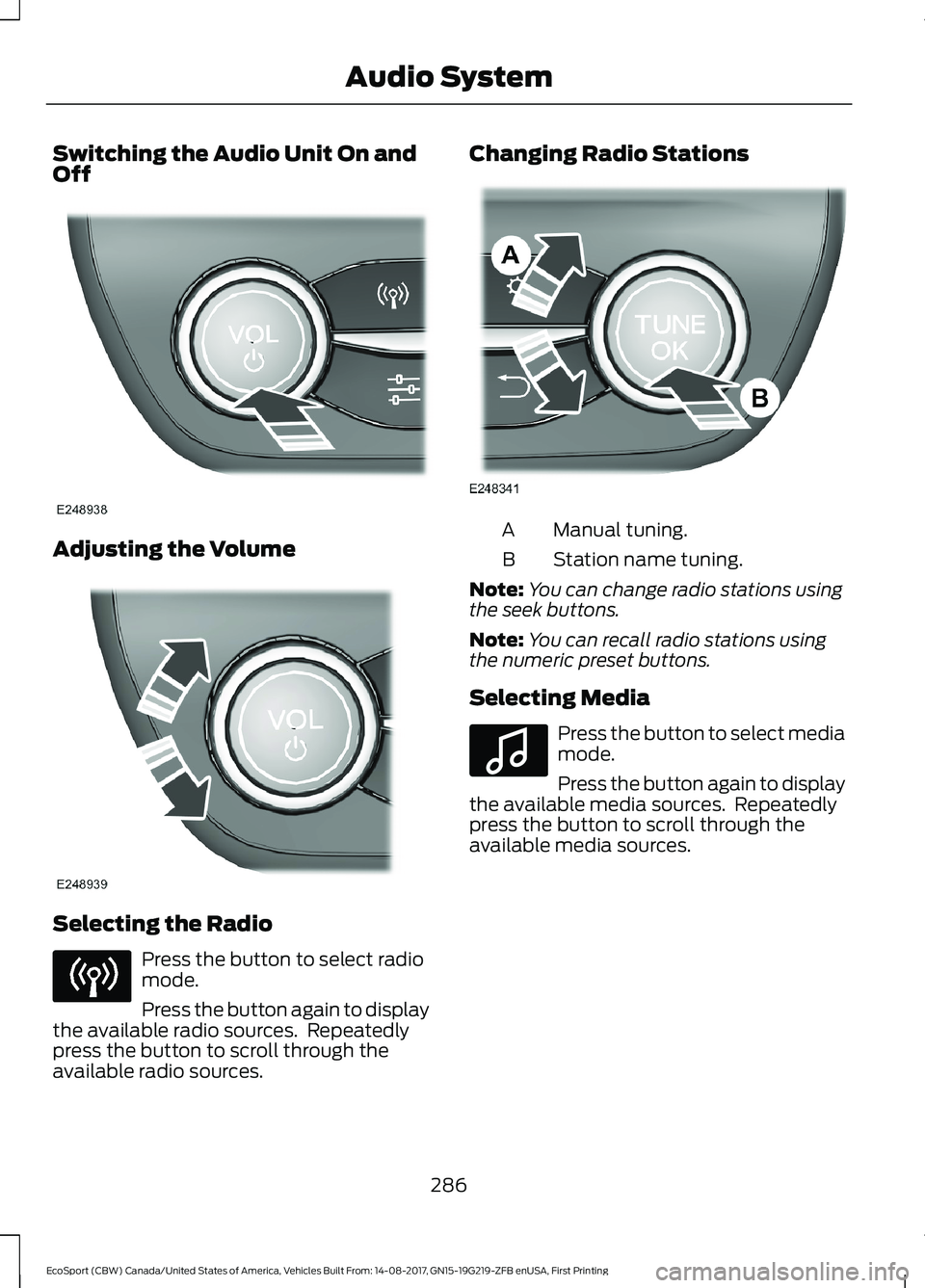
Switching the Audio Unit On andOff
Adjusting the Volume
Selecting the Radio
Press the button to select radiomode.
Press the button again to displaythe available radio sources. Repeatedlypress the button to scroll through theavailable radio sources.
Changing Radio Stations
Manual tuning.A
Station name tuning.B
Note:You can change radio stations usingthe seek buttons.
Note:You can recall radio stations usingthe numeric preset buttons.
Selecting Media
Press the button to select mediamode.
Press the button again to displaythe available media sources. Repeatedlypress the button to scroll through theavailable media sources.
286EcoSport (CBW) Canada/United States of America, Vehicles Built From: 14-08-2017, GN15-19G219-ZFB enUSA, First PrintingAudio System
Page 291 of 452
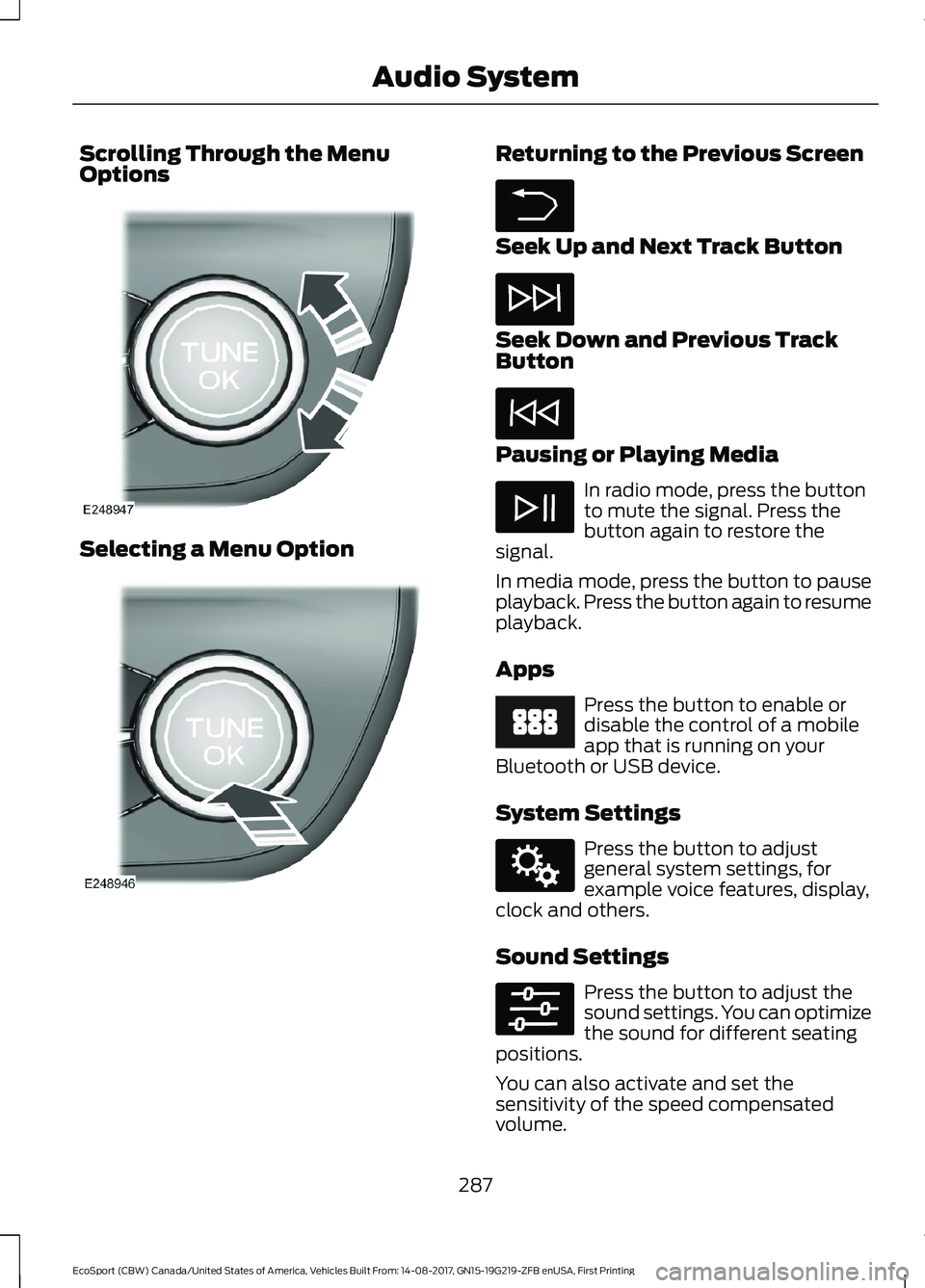
Scrolling Through the MenuOptions
Selecting a Menu Option
Returning to the Previous Screen
Seek Up and Next Track Button
Seek Down and Previous TrackButton
Pausing or Playing Media
In radio mode, press the buttonto mute the signal. Press thebutton again to restore thesignal.
In media mode, press the button to pauseplayback. Press the button again to resumeplayback.
Apps
Press the button to enable ordisable the control of a mobileapp that is running on yourBluetooth or USB device.
System Settings
Press the button to adjustgeneral system settings, forexample voice features, display,clock and others.
Sound Settings
Press the button to adjust thesound settings. You can optimizethe sound for different seatingpositions.
You can also activate and set thesensitivity of the speed compensatedvolume.
287EcoSport (CBW) Canada/United States of America, Vehicles Built From: 14-08-2017, GN15-19G219-ZFB enUSA, First PrintingAudio System
Page 292 of 452
Using a Cell Phone
You can make a call from arecent call list, contact list or diala number.
AUDIO UNIT - VEHICLES WITH:
SYNC 3
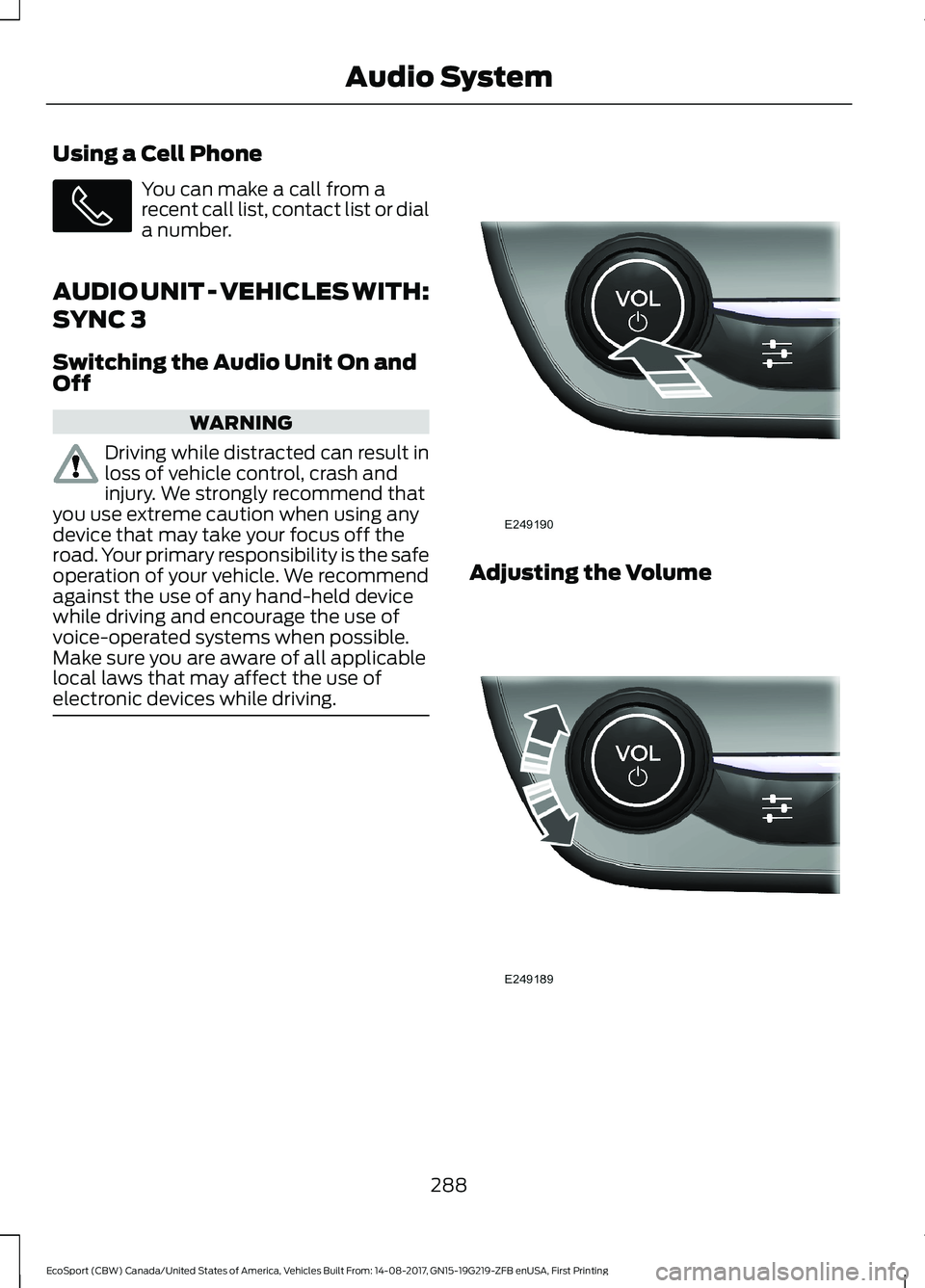
Switching the Audio Unit On andOff
WARNING
Driving while distracted can result inloss of vehicle control, crash andinjury. We strongly recommend thatyou use extreme caution when using anydevice that may take your focus off theroad. Your primary responsibility is the safeoperation of your vehicle. We recommendagainst the use of any hand-held devicewhile driving and encourage the use ofvoice-operated systems when possible.Make sure you are aware of all applicablelocal laws that may affect the use ofelectronic devices while driving.
Adjusting the Volume
288EcoSport (CBW) Canada/United States of America, Vehicles Built From: 14-08-2017, GN15-19G219-ZFB enUSA, First PrintingAudio System
Page 293 of 452
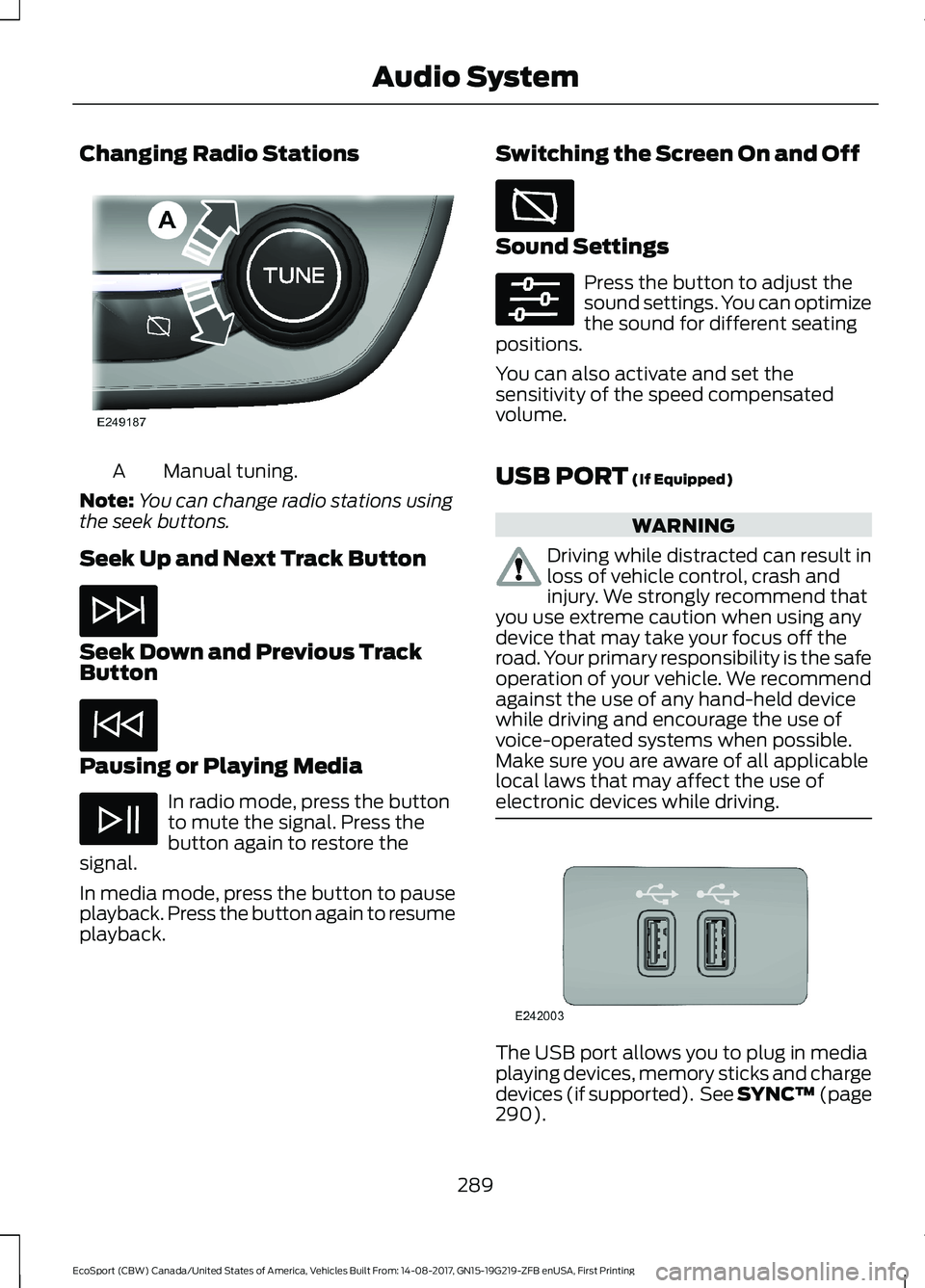
Changing Radio Stations
Manual tuning.A
Note:You can change radio stations usingthe seek buttons.
Seek Up and Next Track Button
Seek Down and Previous TrackButton
Pausing or Playing Media
In radio mode, press the buttonto mute the signal. Press thebutton again to restore thesignal.
In media mode, press the button to pauseplayback. Press the button again to resumeplayback.
Switching the Screen On and Off
Sound Settings
Press the button to adjust thesound settings. You can optimizethe sound for different seatingpositions.
You can also activate and set thesensitivity of the speed compensatedvolume.
USB PORT (If Equipped)
WARNING
Driving while distracted can result inloss of vehicle control, crash andinjury. We strongly recommend thatyou use extreme caution when using anydevice that may take your focus off theroad. Your primary responsibility is the safeoperation of your vehicle. We recommendagainst the use of any hand-held devicewhile driving and encourage the use ofvoice-operated systems when possible.Make sure you are aware of all applicablelocal laws that may affect the use ofelectronic devices while driving.
The USB port allows you to plug in mediaplaying devices, memory sticks and chargedevices (if supported). See SYNC™ (page290).
289EcoSport (CBW) Canada/United States of America, Vehicles Built From: 14-08-2017, GN15-19G219-ZFB enUSA, First PrintingAudio System
Page 297 of 452
To adjust this setting press the voice button, when prompted say:
Action and DescriptionVoice Command
Voice Settings
Then any of the following:
When enabled, this feature will prompt youto confirm any voice initiated call commandprior to the call being placed.
Phone Confirmation Off
The system will make a best guess; youmay still occasionally be asked to confirmsettings.
Phone Confirmation On
USING SYNC™ WITH YOUR
PHONE
Hands-free calling is one of the mainfeatures of SYNC. While the systemsupports a variety of features, many aredependent on your cellular phone'sfunctionality. At a minimum, most cellularphones with Bluetooth wireless technologysupport the following functions:
•Answering an incoming call.
•Ending a call.
•Dialing a number.
•Redialing.
•Call waiting notification.
•Caller ID.
Other features, such as text messagingusing Bluetooth and automatic phonebookdownload, are phone-dependent features.
Pairing a Phone
Wirelessly pairing your phone with SYNCallows you to make and receive hands-freecalls.
Note:Make sure to switch on the ignitionand the radio. Shift the transmission intopark (P) for automatic transmission or firstgear for manual transmission.
Using the Audio System
Note:To scroll through the menus, pressthe up and down arrows on your audiosystem.
1.Make sure to switch on your phone'sBluetooth feature before starting thesearch. See your device's manual ifnecessary.
2.Press the Settings button.
3.Select Bluetooth from the menu.
4.Press the OK button.
5.Select the option to add. This startsthe pairing process.
6.When a message to begin pairingappears in the audio display, search forSYNC on your device.
293EcoSport (CBW) Canada/United States of America, Vehicles Built From: 14-08-2017, GN15-19G219-ZFB enUSA, First PrintingSYNC™
Page 298 of 452
7.When prompted on your cell phone’sdisplay, confirm that the PIN providedby SYNC matches the PIN displayedon your cell phone. Your phone is nowpaired and the display indicates thatthe pairing was successful. If you areprompted to enter a PIN on your device,enter the PIN displayed on the screen.The display indicates when the pairingis successful.
Depending on your phone's capability andyour market, the system may prompt youwith questions, such as setting the currentphone as the primary phone anddownloading your phonebook.
Using Voice Commands
Make sure to switch on yourphone's Bluetooth featurebefore starting the search. Seeyour device's manual if necessary.
Press the voice button and whenprompted say:
Action and Descrip-tionVoice Command
Follow the instruc-tions on the audiodisplay.
Pair Phone
Phone Voice Commands
Press the voice button. You cando things like place a phone calland access text messages.When prompted, say a command. See thefollowing table for example commands.
Voice Command
___ List of Commands
Help
Call ___
Dial ___
Text Messages
__ is a dynamic listing, meaning that itcould be the name of anything, such as acontact or phone number.
Phone Controls
Use the phone buttons on your steeringwheel to answer, reject, or hang up a call.
Accessing Features through thePhone Menu
You can access your call history,phonebook, sent text messages, as wellas access phone and system settings.
1.Press the PHONE button to enter thephone menu.
2.Scroll through the menu to viewcontacts, text messages, and thephone dialer.
SYNC™ APPLICATIONS AND
SERVICES
•911 Assist: Can alert 911 in the event ofan emergency.
•SYNC AppLink: Allows you to connectto and use certain applications such asSpotify and Glympse (if your phone iscompatible).
These features may require activation.Available AppLink enabled apps vary bymarket.
294EcoSport (CBW) Canada/United States of America, Vehicles Built From: 14-08-2017, GN15-19G219-ZFB enUSA, First PrintingSYNC™
Page 302 of 452
•To allow your vehicle to providelocation information, including: GPSand speed.
•To allow the app to send pushnotifications using the vehicle displayand voice capabilities while running ina background state. Push notificationsmay be particularly useful for news orlocation based apps.
Note:You only need to grant permissionsthe first time you use an app with SYNC.
Note:Ford is not responsible or liable forany damages or loss of privacy relating tousage of an app, or dissemination of anyvehicle data that you approve Ford toprovide to an app.
Enabling SYNC Mobile Apps
In order to enable mobile apps, SYNCrequires user consent to send and receiveapp authorization information and updatesusing the data plan associated with theconnected device.
Data is sent to Ford in the United Statesthrough the connected device. Theinformation is encrypted and includes yourVIN, SYNC module number, anonymoususage statistics and debugginginformation. Updates may take placeautomatically.
Note:You must enable mobile apps foreach connected device the first time youselect a mobile app using the system.
Note:Standard data rates apply. Ford isnot responsible for any additional chargesyou may receive from your service provider,when your vehicle sends or receives datathrough the connected device. This includesany additional charges incurred due todriving in areas when roaming out of a homenetwork.
USING SYNC™ WITH YOUR
MEDIA PLAYER
SYNC supports digital media sourcesincluding: iPod, Bluetooth devices, andmost USB drives. SYNC also supportsaudio formats, such as MP3, WMA, WAVand ACC.
Media Sources
The AUX button allows you to view andselect available media sources.
Press the AUX button to view yoursources. Use the directional arrows and OKbutton to select your source. You can alsouse the steering wheel audio controls.
Audio Voice Commands
Press the voice button. You cando things like play a specific songor album, skip to the next song,or tune to a radio station. When prompted,say a command. See the following tablefor example commands. Not allcommands may be available on yourvehicle.
Command
___ List of Commands
Help
Pause
Play
Next Track
Previous Track
AM ___
FM ___
CD Player
298EcoSport (CBW) Canada/United States of America, Vehicles Built From: 14-08-2017, GN15-19G219-ZFB enUSA, First PrintingSYNC™
Page 303 of 452
Command
Sirius Channel ___
USB
Bluetooth Audio
__ is a dynamic listing, meaning that itcould be the name of anything, such as anartist, station, or media source.
SYNC™ TROUBLESHOOTING
Your SYNC system is easy to use. However,should questions arise, see the tablesbelow.
Use your regional Ford website at any timeto check your phone's compatibility,register your account and set preferencesas well as access a customerrepresentative via an online chat (duringcertain hours).
Website(s)Market
www.SYNCMyRide.comNorth Americawww.SYNCMyRide.cawww.sync-maroute.ca
Phone issues
Possible solution(s)Possible cause(s)Issue
Review your phone's manualabout audio adjustments.The audio control settingson your phone may beaffecting SYNC perform-ance.
There is excessive back-ground noise during a phonecall.
Try turning off the device,resetting the device,removing the device'sbattery, then trying again.
This may be a possiblephone malfunction.
During a call, I can hear theother person but theycannot hear me.
Go to the website to reviewyour phone's compatibility.
This is a phone-dependentfeature.
SYNC is not able to down-load my phonebook.
Try turning off the device,resetting the device orremoving the device'sbattery, then trying again.
Try pushing your phonebookcontacts to SYNC by usingthe Add Contacts feature.This may be a possiblephone malfunction.Use the SYNCmyphonefeature available on thewebsite.
299EcoSport (CBW) Canada/United States of America, Vehicles Built From: 14-08-2017, GN15-19G219-ZFB enUSA, First PrintingSYNC™
Page 305 of 452
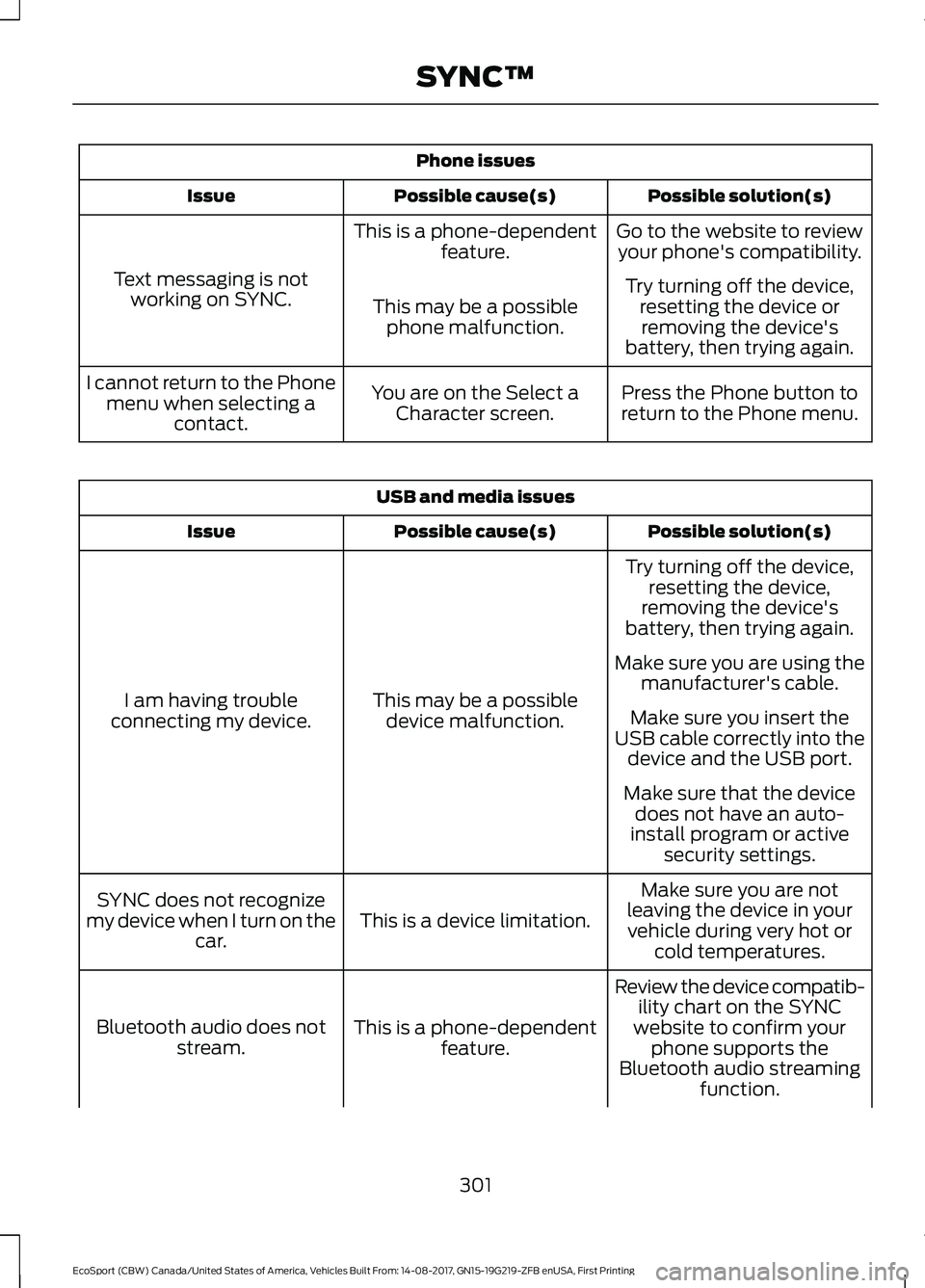
Phone issues
Possible solution(s)Possible cause(s)Issue
Go to the website to reviewyour phone's compatibility.This is a phone-dependentfeature.
Text messaging is notworking on SYNC.Try turning off the device,resetting the device orremoving the device'sbattery, then trying again.
This may be a possiblephone malfunction.
Press the Phone button toreturn to the Phone menu.You are on the Select aCharacter screen.
I cannot return to the Phonemenu when selecting acontact.
USB and media issues
Possible solution(s)Possible cause(s)Issue
Try turning off the device,resetting the device,removing the device'sbattery, then trying again.
This may be a possibledevice malfunction.I am having troubleconnecting my device.
Make sure you are using themanufacturer's cable.
Make sure you insert theUSB cable correctly into thedevice and the USB port.
Make sure that the devicedoes not have an auto-install program or activesecurity settings.
Make sure you are notleaving the device in yourvehicle during very hot orcold temperatures.
This is a device limitation.SYNC does not recognizemy device when I turn on thecar.
Review the device compatib-ility chart on the SYNCwebsite to confirm yourphone supports theBluetooth audio streamingfunction.
This is a phone-dependentfeature.Bluetooth audio does notstream.
301EcoSport (CBW) Canada/United States of America, Vehicles Built From: 14-08-2017, GN15-19G219-ZFB enUSA, First PrintingSYNC™
Page 311 of 452
GENERAL INFORMATION
WARNING
Driving while distracted can result inloss of vehicle control, crash andinjury. We strongly recommend thatyou use extreme caution when using anydevice that may take your focus off theroad. Your primary responsibility is the safeoperation of your vehicle. We recommendagainst the use of any hand-held devicewhile driving and encourage the use ofvoice-operated systems when possible.Make sure you are aware of all applicablelocal laws that may affect the use ofelectronic devices while driving.
Getting to Know Your System
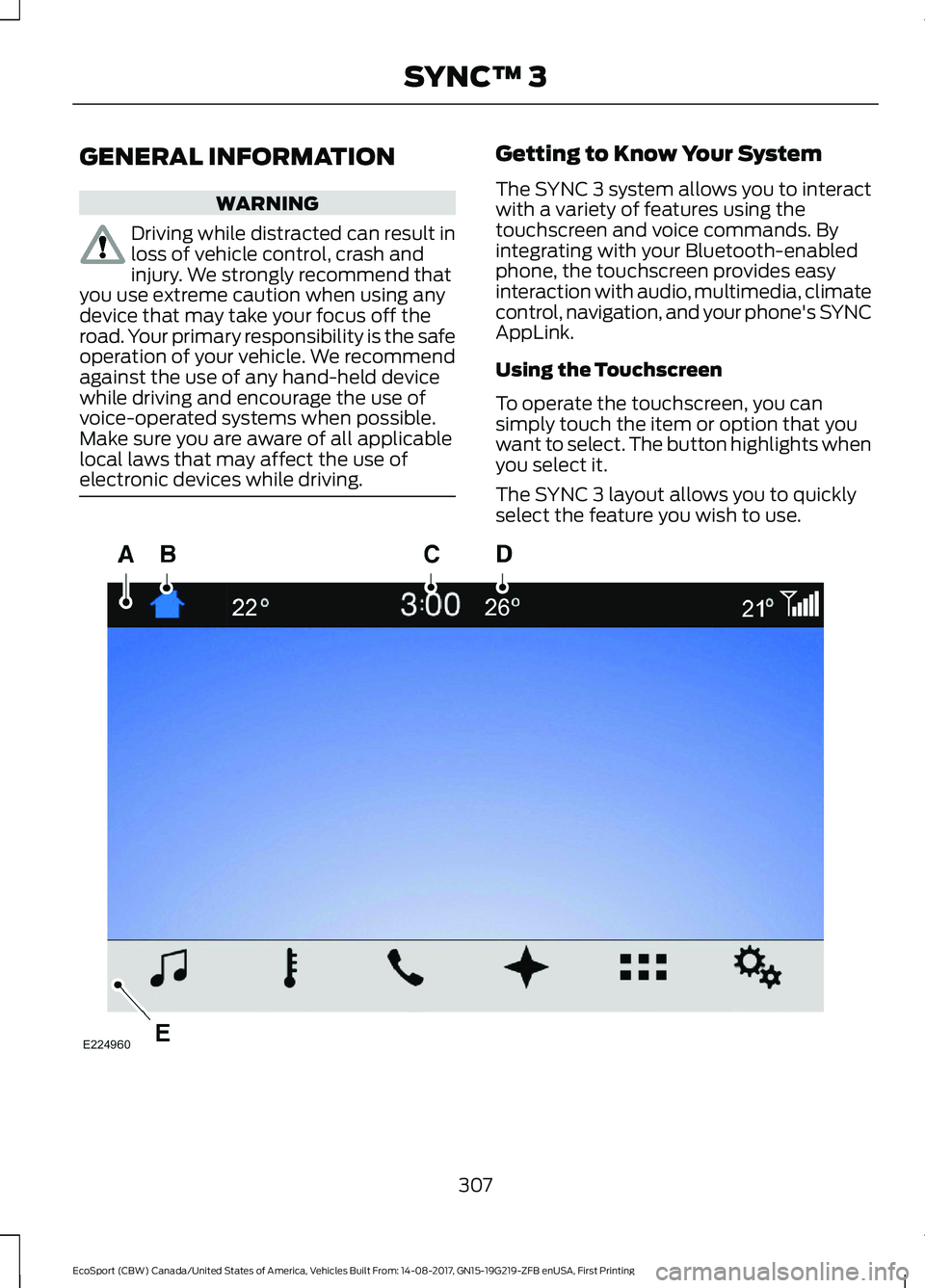
The SYNC 3 system allows you to interactwith a variety of features using thetouchscreen and voice commands. Byintegrating with your Bluetooth-enabledphone, the touchscreen provides easyinteraction with audio, multimedia, climatecontrol, navigation, and your phone's SYNCAppLink.
Using the Touchscreen
To operate the touchscreen, you cansimply touch the item or option that youwant to select. The button highlights whenyou select it.
The SYNC 3 layout allows you to quicklyselect the feature you wish to use.
307EcoSport (CBW) Canada/United States of America, Vehicles Built From: 14-08-2017, GN15-19G219-ZFB enUSA, First PrintingSYNC™ 3