page 22 FORD ECOSPORT 2018 User Guide
[x] Cancel search | Manufacturer: FORD, Model Year: 2018, Model line: ECOSPORT, Model: FORD ECOSPORT 2018Pages: 452, PDF Size: 17.04 MB
Page 46 of 452
WARNINGS
Close the glove box door when yourvehicle is moving. Failure to followthis instruction could reduce theeffectiveness of the passenger knee airbagand increase the risk of injury in a crash.
A driver knee airbag is located under orwithin the instrument panel. A passengerknee airbag is located within or under theglove box door. During a crash, therestraints control module may activate thedriver and passenger knee airbags basedon crash severity and occupant conditions.Under certain crash and occupantconditions, the driver and passenger kneeairbag may deploy but the driver frontairbag may not activate. As with front andside airbags, it is important to be properlyseated and restrained to reduce the risk ofdeath or serious injury.
Make sure the knee airbags areoperating properly. See CrashSensors and Airbag Indicator(page 43).
SAFETY CANOPY™
WARNINGS
Do not place objects or mountequipment on or near the headlinerat the siderail that may come intocontact with a deploying curtain airbag.Failure to follow these instructions mayincrease the risk of personal injury in theevent of a crash.
Do not lean your head on the door.The curtain airbag could injure youas it deploys from the headliner.
Do not attempt to service, repair, ormodify the supplementary restraintsystem or associated components.Failure to follow this instruction couldresult in personal injury or death.
WARNINGS
All occupants of your vehicle,including the driver, should alwaysproperly wear their seatbelts, evenwhen an airbag supplemental restraintsystem is provided. Failure to properly wearyour seatbelt could seriously increase therisk of injury or death.
To reduce risk of injury, do notobstruct or place objects in thedeployment path of the airbag.
If a supplementary restraint systemcomponent has deployed, it will notfunction again. Have the system andassociated components inspected as soonas possible. Failure to follow thisinstruction could result in personal injuryor death.
The Safety Canopy deploys duringsignificant side crashes or when a certainlikelihood of a rollover event is detectedby the rollover sensor. The Safety Canopyis mounted to the roof side rail sheet metal,behind the headliner, above each row ofseats. In certain sideways crashes orrollover events, the Safety Canopy will beactivated, regardless of which seats areoccupied. The Safety Canopy is designedto inflate between the side window areaand occupants to further enhanceprotection provided in side impact crashesand rollover events.
42EcoSport (CBW) Canada/United States of America, Vehicles Built From: 14-08-2017, GN15-19G219-ZFB enUSA, First PrintingSupplementary Restraints System
Page 47 of 452
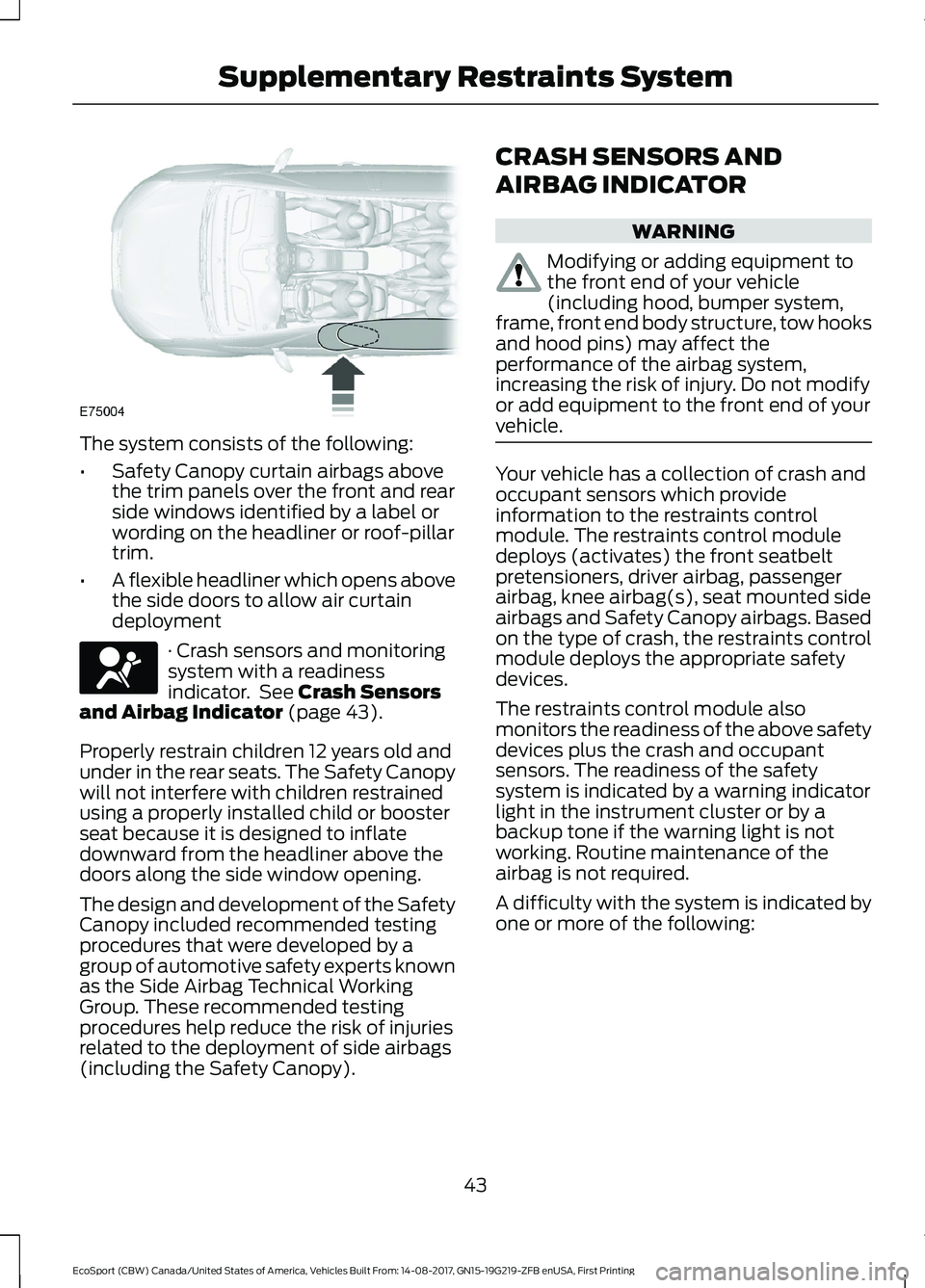
The system consists of the following:
•Safety Canopy curtain airbags abovethe trim panels over the front and rearside windows identified by a label orwording on the headliner or roof-pillartrim.
•A flexible headliner which opens abovethe side doors to allow air curtaindeployment
· Crash sensors and monitoringsystem with a readinessindicator. See Crash Sensorsand Airbag Indicator (page 43).
Properly restrain children 12 years old andunder in the rear seats. The Safety Canopywill not interfere with children restrainedusing a properly installed child or boosterseat because it is designed to inflatedownward from the headliner above thedoors along the side window opening.
The design and development of the SafetyCanopy included recommended testingprocedures that were developed by agroup of automotive safety experts knownas the Side Airbag Technical WorkingGroup. These recommended testingprocedures help reduce the risk of injuriesrelated to the deployment of side airbags(including the Safety Canopy).
CRASH SENSORS AND
AIRBAG INDICATOR
WARNING
Modifying or adding equipment tothe front end of your vehicle(including hood, bumper system,frame, front end body structure, tow hooksand hood pins) may affect theperformance of the airbag system,increasing the risk of injury. Do not modifyor add equipment to the front end of yourvehicle.
Your vehicle has a collection of crash andoccupant sensors which provideinformation to the restraints controlmodule. The restraints control moduledeploys (activates) the front seatbeltpretensioners, driver airbag, passengerairbag, knee airbag(s), seat mounted sideairbags and Safety Canopy airbags. Basedon the type of crash, the restraints controlmodule deploys the appropriate safetydevices.
The restraints control module alsomonitors the readiness of the above safetydevices plus the crash and occupantsensors. The readiness of the safetysystem is indicated by a warning indicatorlight in the instrument cluster or by abackup tone if the warning light is notworking. Routine maintenance of theairbag is not required.
A difficulty with the system is indicated byone or more of the following:
43EcoSport (CBW) Canada/United States of America, Vehicles Built From: 14-08-2017, GN15-19G219-ZFB enUSA, First PrintingSupplementary Restraints System
Page 51 of 452
5.Install a new battery (3V CR 2032) withthe + facing upwards.
6.Replace the battery cover.
Remote Control
Intelligent Access Key (If Equipped)
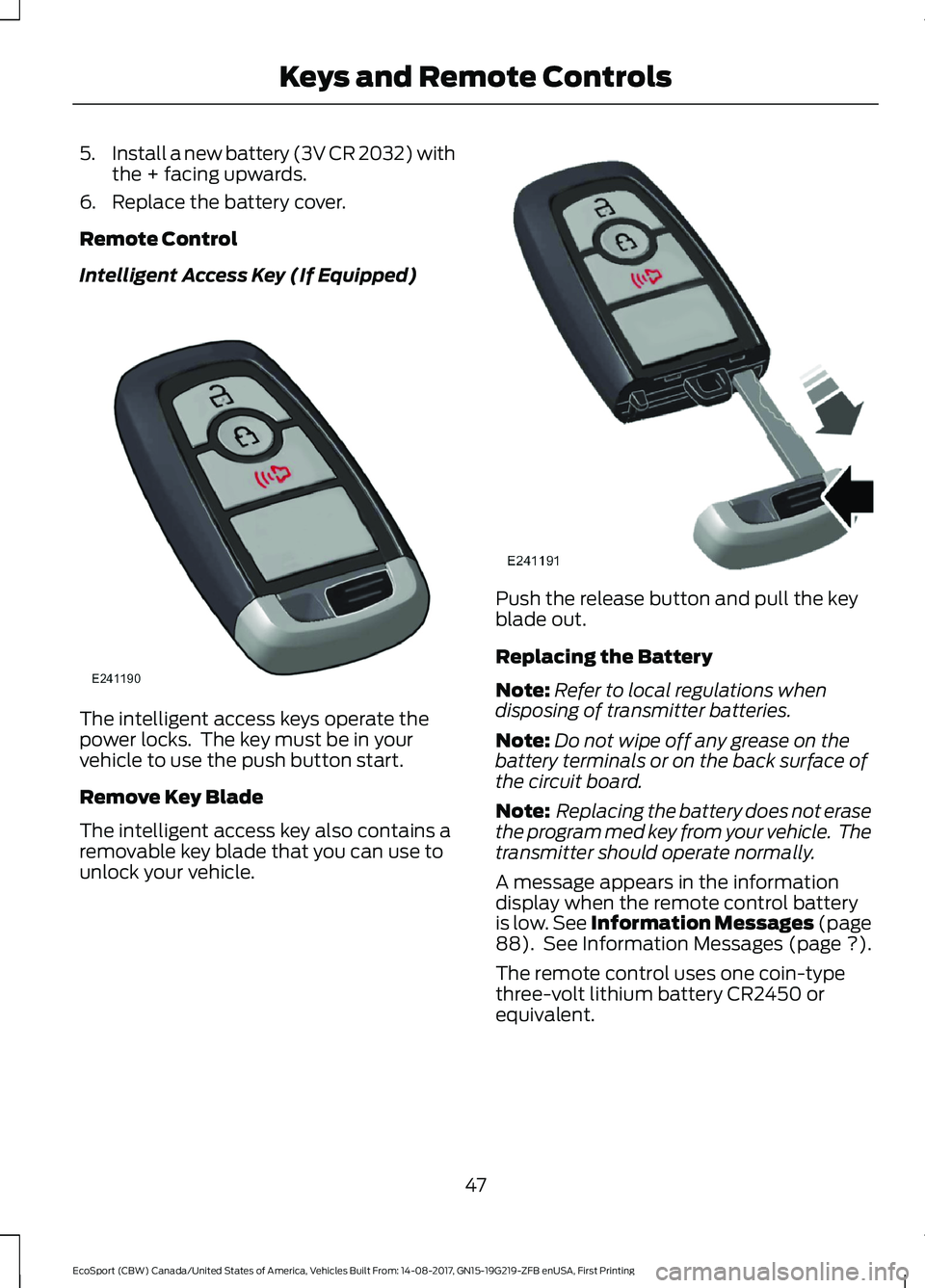
The intelligent access keys operate thepower locks. The key must be in yourvehicle to use the push button start.
Remove Key Blade
The intelligent access key also contains aremovable key blade that you can use tounlock your vehicle.
Push the release button and pull the keyblade out.
Replacing the Battery
Note:Refer to local regulations whendisposing of transmitter batteries.
Note:Do not wipe off any grease on thebattery terminals or on the back surface ofthe circuit board.
Note: Replacing the battery does not erasethe program med key from your vehicle. Thetransmitter should operate normally.
A message appears in the informationdisplay when the remote control batteryis low. See Information Messages (page88). See Information Messages (page ?).
The remote control uses one coin-typethree-volt lithium battery CR2450 orequivalent.
47EcoSport (CBW) Canada/United States of America, Vehicles Built From: 14-08-2017, GN15-19G219-ZFB enUSA, First PrintingKeys and Remote Controls
Page 53 of 452
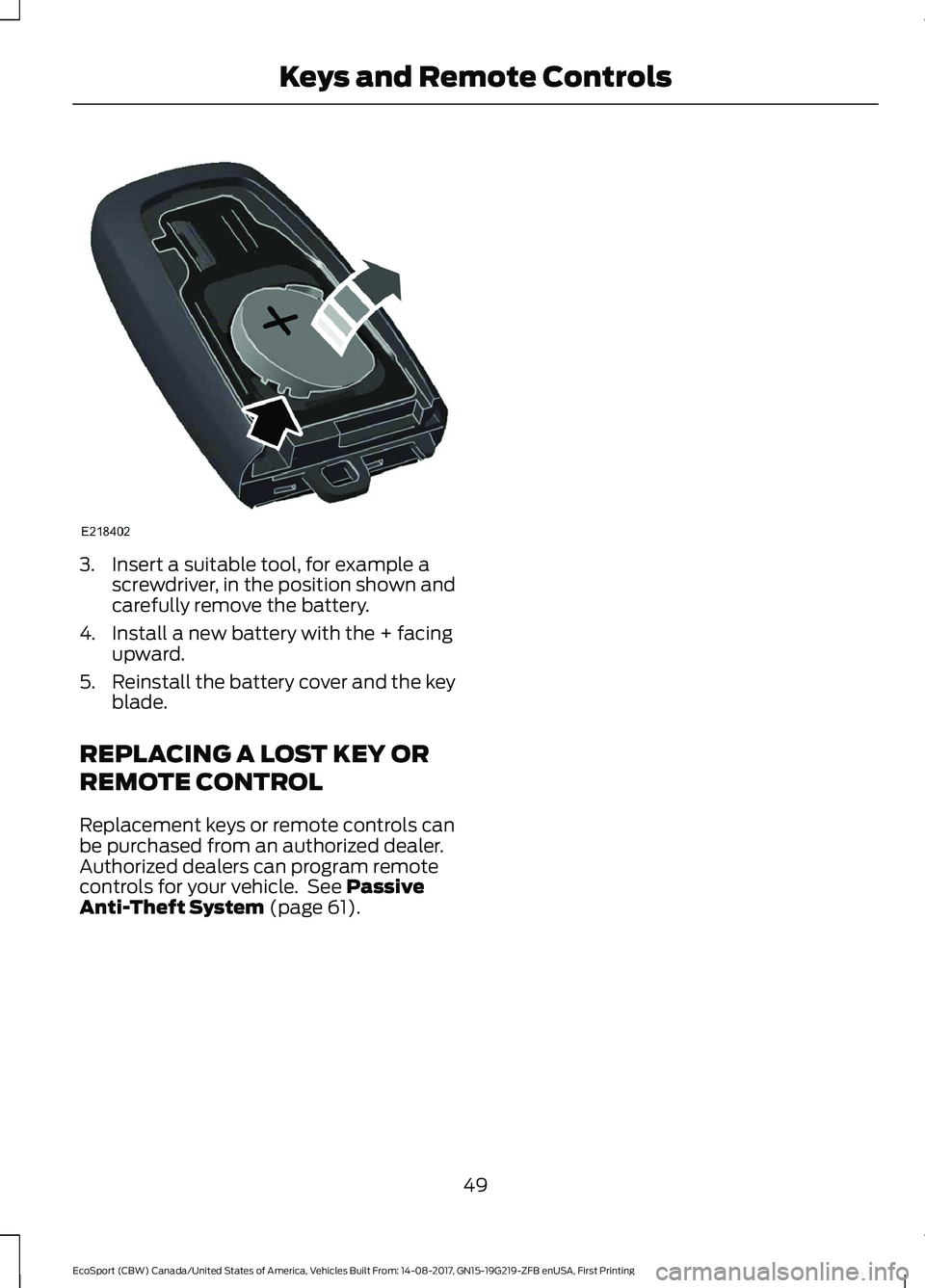
3.Insert a suitable tool, for example ascrewdriver, in the position shown andcarefully remove the battery.
4.Install a new battery with the + facingupward.
5.Reinstall the battery cover and the keyblade.
REPLACING A LOST KEY OR
REMOTE CONTROL
Replacement keys or remote controls canbe purchased from an authorized dealer.Authorized dealers can program remotecontrols for your vehicle. See PassiveAnti-Theft System (page 61).
49EcoSport (CBW) Canada/United States of America, Vehicles Built From: 14-08-2017, GN15-19G219-ZFB enUSA, First PrintingKeys and Remote Controls
Page 56 of 452
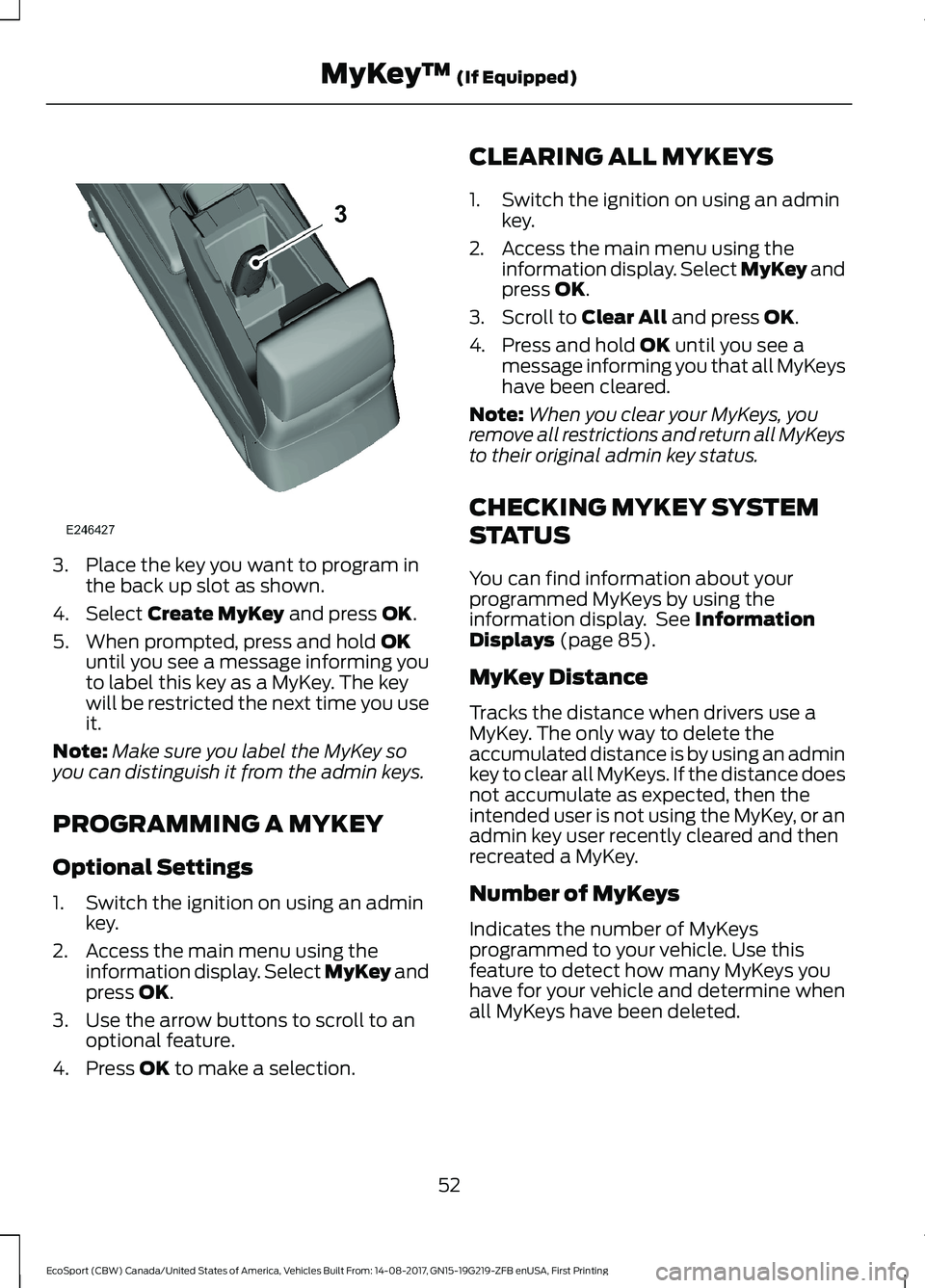
3.Place the key you want to program inthe back up slot as shown.
4.Select Create MyKey and press OK.
5.When prompted, press and hold OKuntil you see a message informing youto label this key as a MyKey. The keywill be restricted the next time you useit.
Note:Make sure you label the MyKey soyou can distinguish it from the admin keys.
PROGRAMMING A MYKEY
Optional Settings
1.Switch the ignition on using an adminkey.
2.Access the main menu using theinformation display. Select MyKey andpress OK.
3.Use the arrow buttons to scroll to anoptional feature.
4.Press OK to make a selection.
CLEARING ALL MYKEYS
1.Switch the ignition on using an adminkey.
2.Access the main menu using theinformation display. Select MyKey andpress OK.
3.Scroll to Clear All and press OK.
4.Press and hold OK until you see amessage informing you that all MyKeyshave been cleared.
Note:When you clear your MyKeys, youremove all restrictions and return all MyKeysto their original admin key status.
CHECKING MYKEY SYSTEM
STATUS
You can find information about yourprogrammed MyKeys by using theinformation display. See InformationDisplays (page 85).
MyKey Distance
Tracks the distance when drivers use aMyKey. The only way to delete theaccumulated distance is by using an adminkey to clear all MyKeys. If the distance doesnot accumulate as expected, then theintended user is not using the MyKey, or anadmin key user recently cleared and thenrecreated a MyKey.
Number of MyKeys
Indicates the number of MyKeysprogrammed to your vehicle. Use thisfeature to detect how many MyKeys youhave for your vehicle and determine whenall MyKeys have been deleted.
52EcoSport (CBW) Canada/United States of America, Vehicles Built From: 14-08-2017, GN15-19G219-ZFB enUSA, First PrintingMyKey™ (If Equipped)
Page 57 of 452
Number of Admin Keys
Indicates how many admin keys areprogrammed to your vehicle. Use thisfeature to determine how many adminkeys you have for your vehicle, and detectif an additional MyKey has beenprogrammed.
USING MYKEY WITH REMOTE
START SYSTEMS
MyKey is not compatible withnon-Ford-approved aftermarket remotestart systems. If you choose to install aremote start system, please see anauthorized dealer for a Ford-approvedremote start system.
MYKEY TROUBLESHOOTING
All Vehicles
Potential CausesCondition
The key in the ignition is not an admin key.I cannot create a MyKey.The key in the ignition is the only key. Therealways has to be at least one admin key.
The key in the ignition is not an admin key.I cannot program the optional settings.There are no MyKeys programmed to yourvehicle. See Creating a MyKey (page 51).
The key in the ignition is not an admin key.I cannot clear the MyKeys.There are no MyKeys programmed to yourvehicle. See Creating a MyKey (page 51).
Purchase a new key from an authorizeddealer.I have lost the only admin key.
The MyKey is not being used by theintended user.The MyKey distance does not accumulate.
The MyKeys have been cleared. SeeClearing All MyKeys (page 52).
53EcoSport (CBW) Canada/United States of America, Vehicles Built From: 14-08-2017, GN15-19G219-ZFB enUSA, First PrintingMyKey™ (If Equipped)
Page 58 of 452
LOCKING AND UNLOCKING
Note:All doors will be unlocked 10 secondsafter the airbag deploys due to impact andfollowing this the hazard warning flasherswill flash.
Power Door Locks
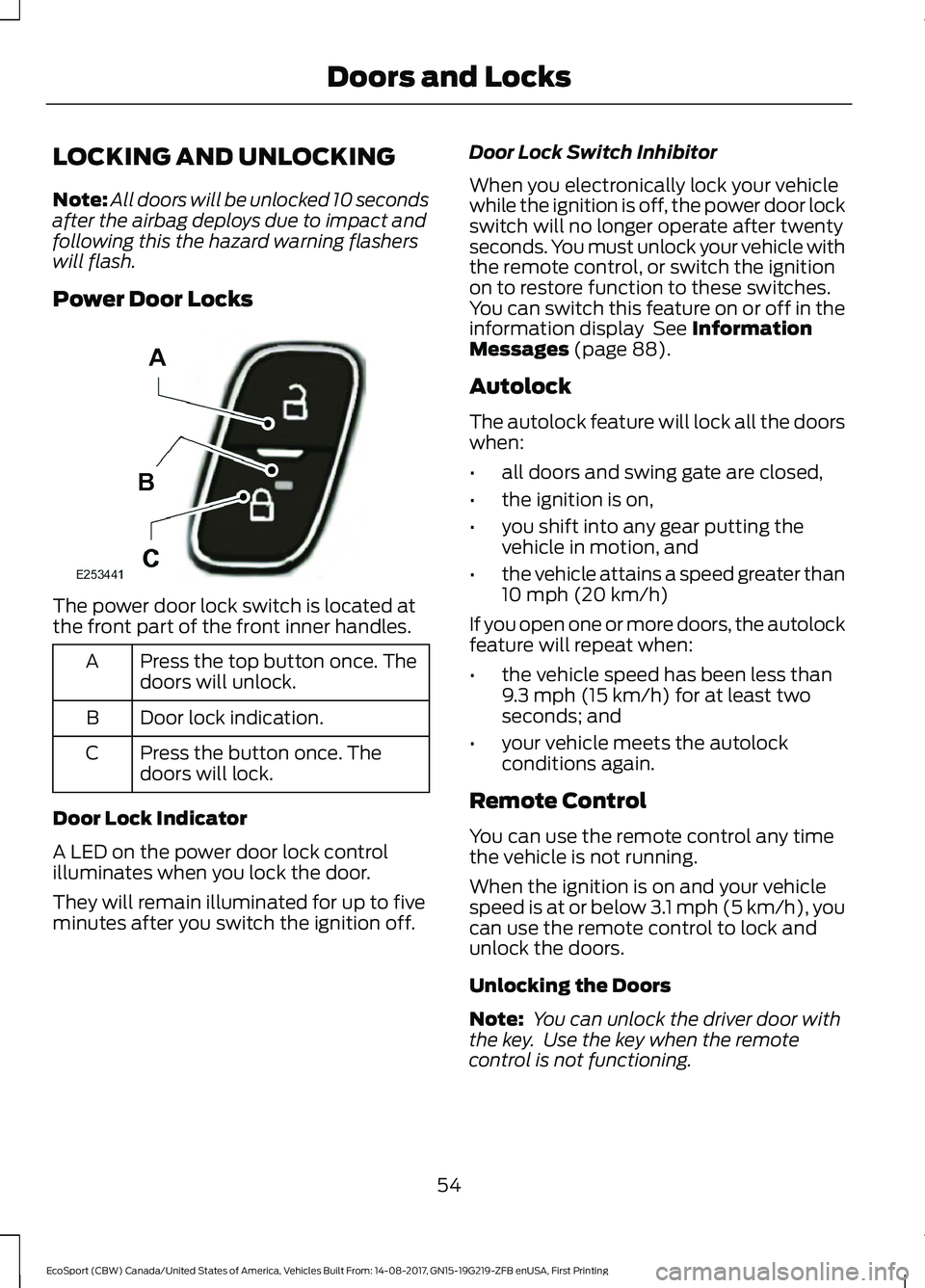
The power door lock switch is located atthe front part of the front inner handles.
Press the top button once. Thedoors will unlock.A
Door lock indication.B
Press the button once. Thedoors will lock.C
Door Lock Indicator
A LED on the power door lock controlilluminates when you lock the door.
They will remain illuminated for up to fiveminutes after you switch the ignition off.
Door Lock Switch Inhibitor
When you electronically lock your vehiclewhile the ignition is off, the power door lockswitch will no longer operate after twentyseconds. You must unlock your vehicle withthe remote control, or switch the ignitionon to restore function to these switches.You can switch this feature on or off in theinformation display See InformationMessages (page 88).
Autolock
The autolock feature will lock all the doorswhen:
•all doors and swing gate are closed,
•the ignition is on,
•you shift into any gear putting thevehicle in motion, and
•the vehicle attains a speed greater than10 mph (20 km/h)
If you open one or more doors, the autolockfeature will repeat when:
•the vehicle speed has been less than9.3 mph (15 km/h) for at least twoseconds; and
•your vehicle meets the autolockconditions again.
Remote Control
You can use the remote control any timethe vehicle is not running.
When the ignition is on and your vehiclespeed is at or below 3.1 mph (5 km/h), youcan use the remote control to lock andunlock the doors.
Unlocking the Doors
Note: You can unlock the driver door withthe key. Use the key when the remotecontrol is not functioning.
54EcoSport (CBW) Canada/United States of America, Vehicles Built From: 14-08-2017, GN15-19G219-ZFB enUSA, First PrintingDoors and Locks
Page 59 of 452
Note: When you lock your vehicle forseveral weeks, the remote control switchesoff. Your vehicle must be unlocked and theengine started using the key. Unlocking andstarting your vehicle once will enable theremote control.
Press the button to unlock all thethe doors. The turn signals willflash once.
Reprogramming the UnlockingFunction
You can reprogram the unlocking function.Using the remote control, you can choosebetween unlocking only the driver door orall doors in the first press. To do so, pressand hold lock and unlock buttons in theremote control for 4 seconds. The turnlamps will flash twice. To revert, repeatthe process. You can also reprogramthrough the cluster. See InformationDisplays (page 85).
Locking the Doors
Press the button to lock all thedoors. The direction indicatorswill flash.
Press the button again within threeseconds to confirm that all the doors areclosed. The doors will lock again, the hornwill sound once and the direction indicatorswill flash if all the doors and the luggagecompartment are closed.
Note:If hood or luggage compartment isopen when you press the button once, thedirection indicators will not flash. Thisindicates your vehicle did not lock. If a reardoor, the luggage compartment or the hoodis open (on vehicles with an anti-theftalarm) when you press the button againwithin three seconds, the horn sounds twiceand the direction indicators will not flash.This indicates your vehicle locked but thereis one or more items open.
Note:The direction indicators will flash aslocking feedback only when ignition is OFF.
Automatic Relocking (If Equipped)
The doors will relock automatically if youdo not open a door within 45 seconds ofunlocking the doors with the remotecontrol. The door locks and the alarm willreturn to their previous state.
This feature will be disabled when youreceive the vehicle.You can switch thisfeature on or off in the information display.See Information Displays (page 85).
Locking and Unlocking the Doorswith the Key
Note:Do not leave your keys in your vehicle.
Locking with the Key
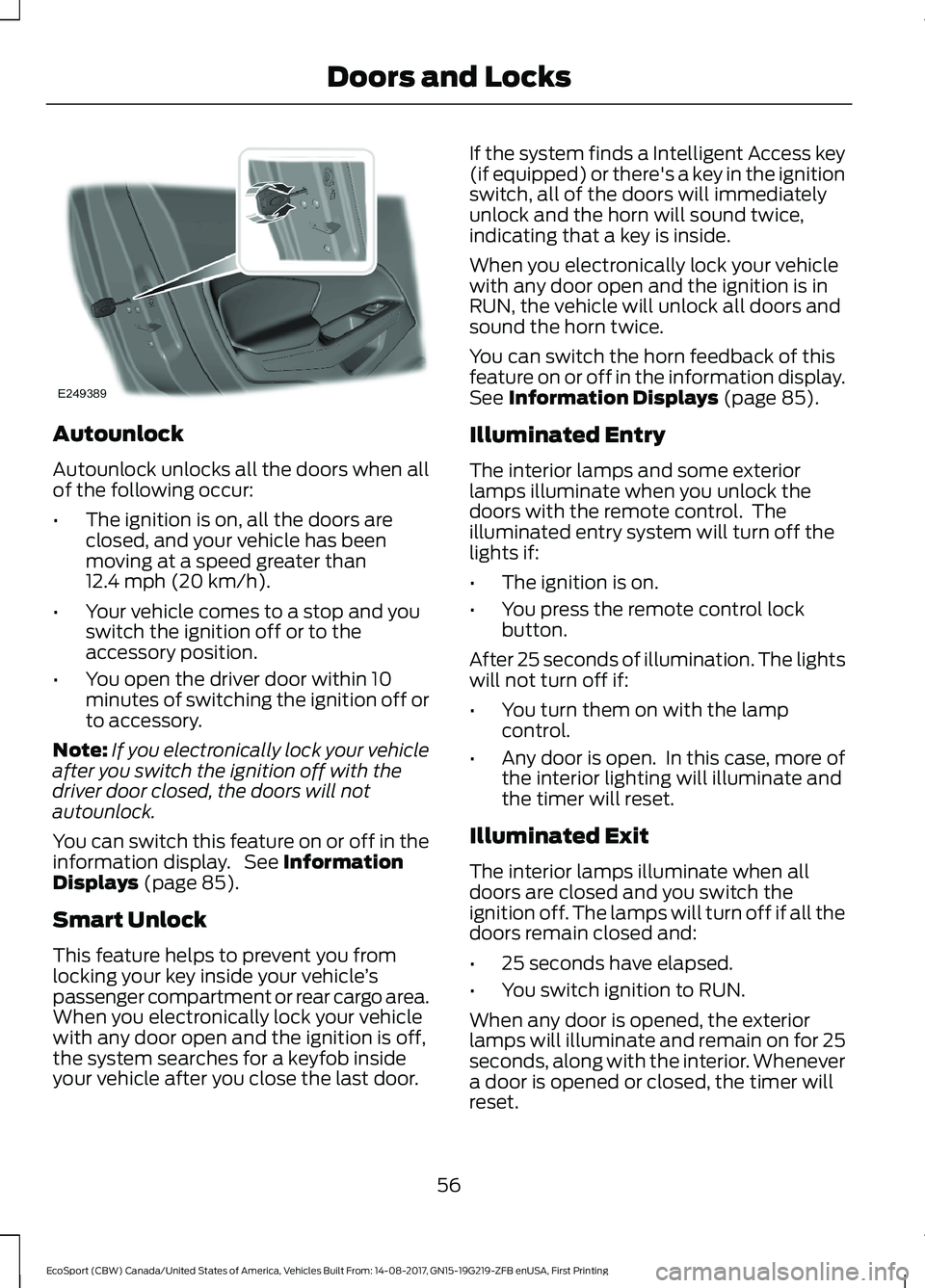
Turn the top of the key toward the front ofyour vehicle.
Unlocking with the Key
Note: If the child safety locks are on andyou pull the interior handle, you will onlyswitch off the emergency locking, not thechild safety lock. You can only open thedoors using the external door handle.
Note:If the doors have been unlocked usingthis method, the doors must be lockedindividually until the central locking functionhas been repaired.
Turn the top of the key toward the rear ofyour vehicle. You can unlock all otherdoors individually by pulling the interiordoor handles.
Note:When the central locking functionfails to operate, lock the doors individuallyusing the key in the position shown.
55EcoSport (CBW) Canada/United States of America, Vehicles Built From: 14-08-2017, GN15-19G219-ZFB enUSA, First PrintingDoors and Locks
Page 60 of 452
Autounlock
Autounlock unlocks all the doors when allof the following occur:
•The ignition is on, all the doors areclosed, and your vehicle has beenmoving at a speed greater than12.4 mph (20 km/h).
•Your vehicle comes to a stop and youswitch the ignition off or to theaccessory position.
•You open the driver door within 10minutes of switching the ignition off orto accessory.
Note:If you electronically lock your vehicleafter you switch the ignition off with thedriver door closed, the doors will notautounlock.
You can switch this feature on or off in theinformation display. See InformationDisplays (page 85).
Smart Unlock
This feature helps to prevent you fromlocking your key inside your vehicle’spassenger compartment or rear cargo area.When you electronically lock your vehiclewith any door open and the ignition is off,the system searches for a keyfob insideyour vehicle after you close the last door.
If the system finds a Intelligent Access key(if equipped) or there's a key in the ignitionswitch, all of the doors will immediatelyunlock and the horn will sound twice,indicating that a key is inside.
When you electronically lock your vehiclewith any door open and the ignition is inRUN, the vehicle will unlock all doors andsound the horn twice.
You can switch the horn feedback of thisfeature on or off in the information display.See Information Displays (page 85).
Illuminated Entry
The interior lamps and some exteriorlamps illuminate when you unlock thedoors with the remote control. Theilluminated entry system will turn off thelights if:
•The ignition is on.
•You press the remote control lockbutton.
After 25 seconds of illumination. The lightswill not turn off if:
•You turn them on with the lampcontrol.
•Any door is open. In this case, more ofthe interior lighting will illuminate andthe timer will reset.
Illuminated Exit
The interior lamps illuminate when alldoors are closed and you switch theignition off. The lamps will turn off if all thedoors remain closed and:
•25 seconds have elapsed.
•You switch ignition to RUN.
When any door is opened, the exteriorlamps will illuminate and remain on for 25seconds, along with the interior. Whenevera door is opened or closed, the timer willreset.
56EcoSport (CBW) Canada/United States of America, Vehicles Built From: 14-08-2017, GN15-19G219-ZFB enUSA, First PrintingDoors and Locks
Page 61 of 452
KEYLESS ENTRY (If Equipped)
General Information
Note:The system may not function if thekey is close to metal objects or electronicdevices such as cell phones.
The system will not function if:
•Your vehicle battery has no charge.
•The passive key frequencies arejammed.
•The passive key battery is flat.
Note:If the system does not function, youwill need to use the key blade to lock andunlock your vehicle.
The system allows you to operate yourvehicle without the use of a key or remotecontrol.
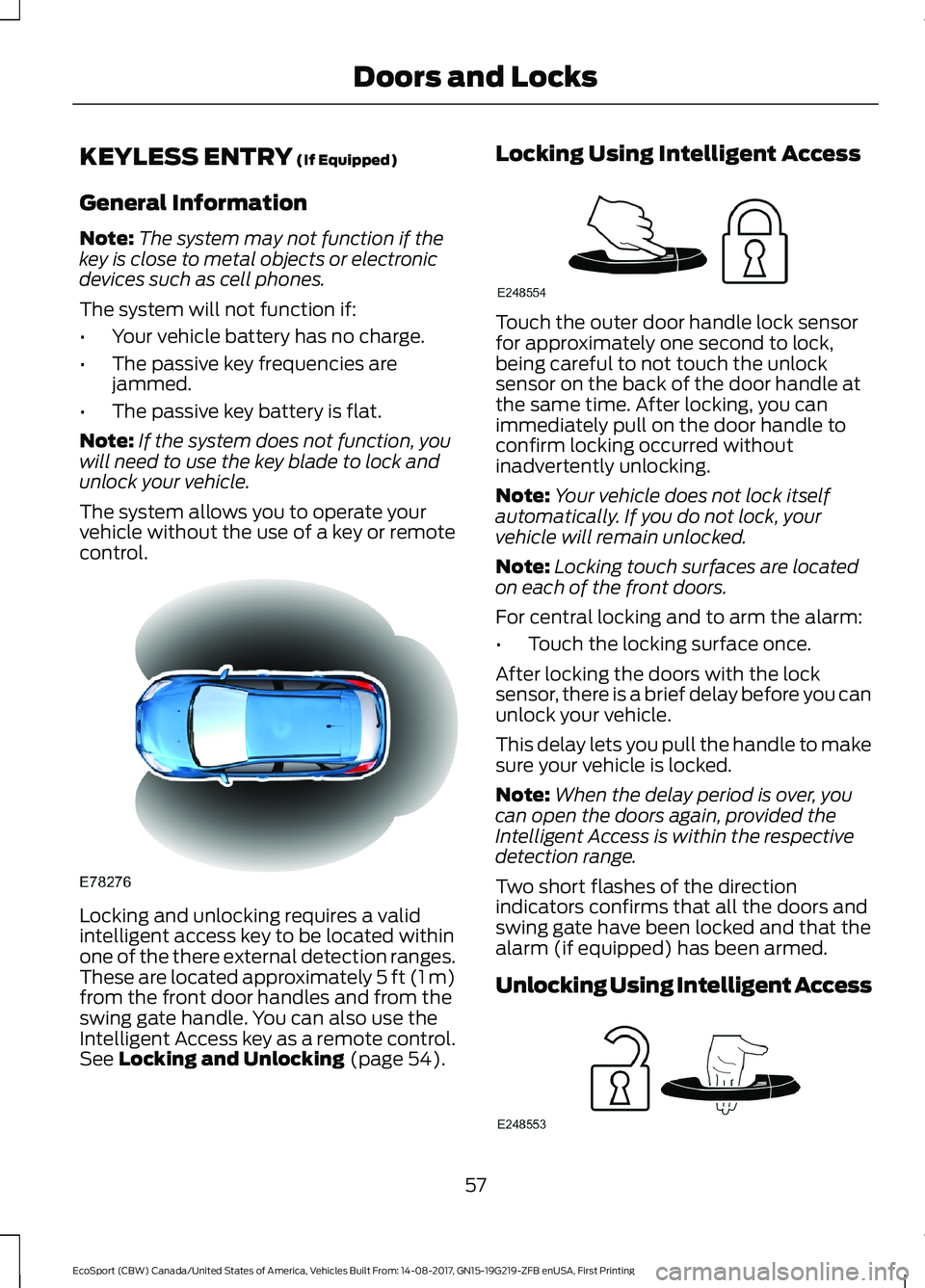
Locking and unlocking requires a validintelligent access key to be located withinone of the there external detection ranges.These are located approximately 5 ft (1 m)from the front door handles and from theswing gate handle. You can also use theIntelligent Access key as a remote control.See Locking and Unlocking (page 54).
Locking Using Intelligent Access
Touch the outer door handle lock sensorfor approximately one second to lock,being careful to not touch the unlocksensor on the back of the door handle atthe same time. After locking, you canimmediately pull on the door handle toconfirm locking occurred withoutinadvertently unlocking.
Note:Your vehicle does not lock itselfautomatically. If you do not lock, yourvehicle will remain unlocked.
Note:Locking touch surfaces are locatedon each of the front doors.
For central locking and to arm the alarm:
•Touch the locking surface once.
After locking the doors with the locksensor, there is a brief delay before you canunlock your vehicle.
This delay lets you pull the handle to makesure your vehicle is locked.
Note:When the delay period is over, youcan open the doors again, provided theIntelligent Access is within the respectivedetection range.
Two short flashes of the directionindicators confirms that all the doors andswing gate have been locked and that thealarm (if equipped) has been armed.
Unlocking Using Intelligent Access
57EcoSport (CBW) Canada/United States of America, Vehicles Built From: 14-08-2017, GN15-19G219-ZFB enUSA, First PrintingDoors and Locks