ECO mode FORD ECOSPORT 2018 Owner's Manual
[x] Cancel search | Manufacturer: FORD, Model Year: 2018, Model line: ECOSPORT, Model: FORD ECOSPORT 2018Pages: 452, PDF Size: 17.04 MB
Page 142 of 452
AUTOMATIC TRANSMISSION
WARNINGS
Always fully apply the parking brake.Make sure you shift into park (P) forvehicles with an automatictransmission. Switch the ignition off andremove the key whenever you leave yourvehicle.
Do not apply the brake pedal andaccelerator pedal simultaneously.Applying both pedals simultaneouslyfor more than a few seconds will limitengine performance, which may result indifficulty maintaining speed in traffic andcould lead to serious injury.
When your vehicle is stationary, keepthe brake pedal fully pressed whenshifting gears. Failure to follow thisinstruction could result in personal injury,death or property damage.
Note:Under certain conditions you may notbe able to shift out of park unless theIntelligent Access Key is inside the vehicle.
Selector Lever Positions
•P Park
•R Reverse
•N Neutral
•D Drive
•S Sport mode
Press the button on the front of thegearshift lever to shift to each position.
Brake needs to be depressed to move outof (P).
The gearshift lever position will be shownin the instrument cluster display.
Park (P)
In this position, power is not transmittedto the driven wheels and the transmissionis locked.
You can start the engine with the gearshiftlever in this position.
Note:A warning tone sounds if you openthe driver door and you have not shifted thegearshift lever to park (P).
Reverse (R)
Shift the gearshift lever to reverse (R) toallow your vehicle to move backward
Neutral (N)
In this position, power is not transmittedto the driven wheels but the transmissionis not locked.
You can start the engine with the gearshiftlever in this position.
Drive (D)
Drive (D) is the normal driving position forthe best fuel economy and smoothness.The overdrive function allows automaticupshifts and downshifts through allforward gears.
Shift the gearshift lever to drive (D) toallow your vehicle to move forward andshift automaticallu through the forwardgears.
The transmission will shift to theappropriate gear for optimum performancebased on ambient temperature, roadgradient, vehicle load and your input.
Sport Mode (S)
Switch on sport mode by shifting thegearshift lever to sport (S). In Sport modethe transmission will select the optimumgear for best performance. This gearselection is typically lower than that ofdrive (D) and the shifts are faster.
138EcoSport (CBW) Canada/United States of America, Vehicles Built From: 14-08-2017, GN15-19G219-ZFB enUSA, First PrintingTransmission
Page 143 of 452
SelectShift™ AutomaticTransmission
This feature gives you the ability to changegears up or down as desired.
Downshifts are allowed unless the enginespeed after the shift exceeds themaximum allowable limit.
In order to prevent engine stalls,SelectShift automatically downshifts atlow engine speeds.
Note:Engine damage may occur if youmaintain excessive engine revving withoutshifting.
SelectShift does not automatically upshift,even if the engine is approaching the RPMlimit, unless the accelerator pedal is at fulltravel.
Take notice of the shift indicator lamp,which alerts you when to shift to make sureyou achieve the highest level of efficiencyand fuel economy.
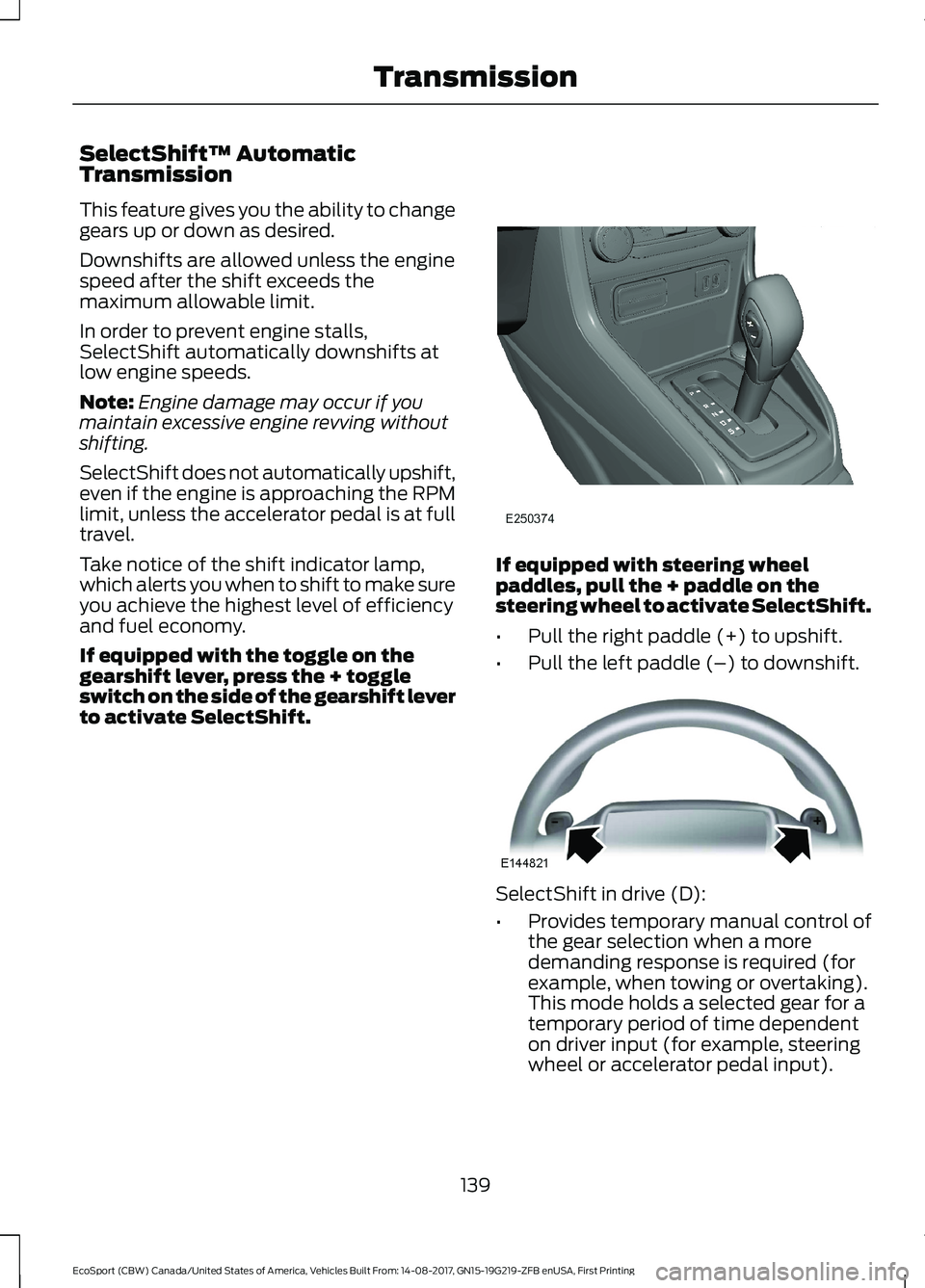
If equipped with the toggle on thegearshift lever, press the + toggleswitch on the side of the gearshift leverto activate SelectShift.
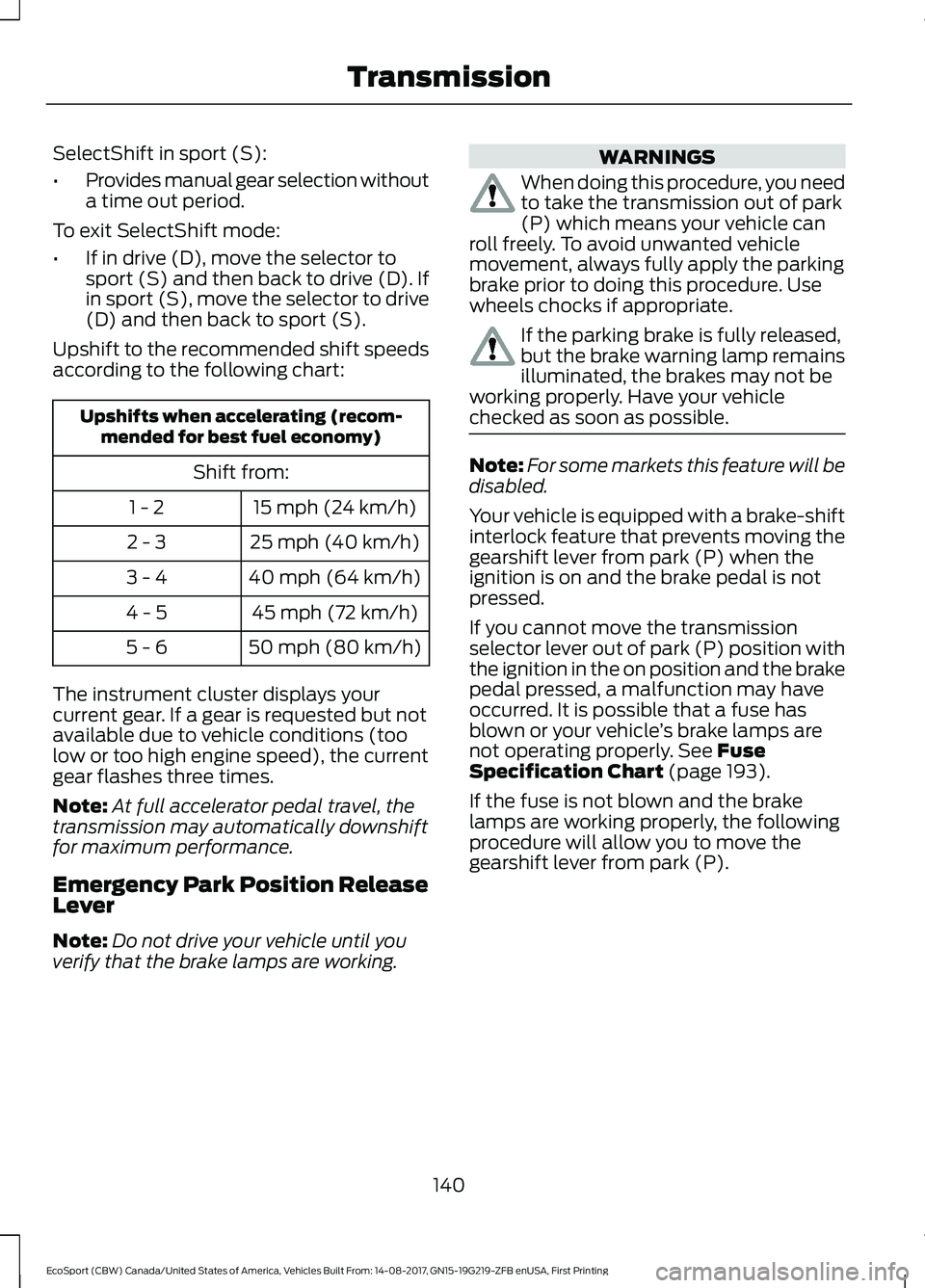
If equipped with steering wheelpaddles, pull the + paddle on thesteering wheel to activate SelectShift.
•Pull the right paddle (+) to upshift.
•Pull the left paddle (–) to downshift.
SelectShift in drive (D):
•Provides temporary manual control ofthe gear selection when a moredemanding response is required (forexample, when towing or overtaking).This mode holds a selected gear for atemporary period of time dependenton driver input (for example, steeringwheel or accelerator pedal input).
139EcoSport (CBW) Canada/United States of America, Vehicles Built From: 14-08-2017, GN15-19G219-ZFB enUSA, First PrintingTransmission
Page 144 of 452
SelectShift in sport (S):
•Provides manual gear selection withouta time out period.
To exit SelectShift mode:
•If in drive (D), move the selector tosport (S) and then back to drive (D). Ifin sport (S), move the selector to drive(D) and then back to sport (S).
Upshift to the recommended shift speedsaccording to the following chart:
Upshifts when accelerating (recom-mended for best fuel economy)
Shift from:
15 mph (24 km/h)1 - 2
25 mph (40 km/h)2 - 3
40 mph (64 km/h)3 - 4
45 mph (72 km/h)4 - 5
50 mph (80 km/h)5 - 6
The instrument cluster displays yourcurrent gear. If a gear is requested but notavailable due to vehicle conditions (toolow or too high engine speed), the currentgear flashes three times.
Note:At full accelerator pedal travel, thetransmission may automatically downshiftfor maximum performance.
Emergency Park Position ReleaseLever
Note:Do not drive your vehicle until youverify that the brake lamps are working.
WARNINGS
When doing this procedure, you needto take the transmission out of park(P) which means your vehicle canroll freely. To avoid unwanted vehiclemovement, always fully apply the parkingbrake prior to doing this procedure. Usewheels chocks if appropriate.
If the parking brake is fully released,but the brake warning lamp remainsilluminated, the brakes may not beworking properly. Have your vehiclechecked as soon as possible.
Note:For some markets this feature will bedisabled.
Your vehicle is equipped with a brake-shiftinterlock feature that prevents moving thegearshift lever from park (P) when theignition is on and the brake pedal is notpressed.
If you cannot move the transmissionselector lever out of park (P) position withthe ignition in the on position and the brakepedal pressed, a malfunction may haveoccurred. It is possible that a fuse hasblown or your vehicle’s brake lamps arenot operating properly. See FuseSpecification Chart (page 193).
If the fuse is not blown and the brakelamps are working properly, the followingprocedure will allow you to move thegearshift lever from park (P).
140EcoSport (CBW) Canada/United States of America, Vehicles Built From: 14-08-2017, GN15-19G219-ZFB enUSA, First PrintingTransmission
Page 146 of 452
USING FOUR-WHEEL DRIVE
Four-wheel drive uses all four wheels topower the vehicle. This increases traction,enabling you to drive over terrain and roadconditions that a conventional two-wheeldrive vehicle cannot. The 4WD system isactive all the time and requires no inputfrom the operator.
Note:Your 4WD vehicle is not intended foroff-road use. The 4WD feature gives yourvehicle some limited off-road capabilitiesin which driving surfaces are relatively level,obstruction-free and otherwise similar tonormal on-road driving conditions.Operating your vehicle under other thanthose conditions could subject the vehicleto excessive stress which might result indamage which is not covered under yourwarranty.
Note:A warning message will be displayedin the information display when an 4WDsystem fault is present See InformationMessages (page 88). An 4WD system faultwill cause the 4WD system to default tofront-wheel drive only mode. When thiswarning message is displayed, have yourvehicle serviced at an authorized dealer
Note:A warning message will be displayedin the information display if the 4WD systemhas overheated See InformationMessages (page 88). This condition mayoccur if the vehicle was operated in extremeconditions with excessive wheel slip, suchas deep sand. To resume normal 4WDfunction as soon as possible, stop thevehicle in a safe location and stop theengine for at least 10 minutes. After theengine has been restarted and the 4WDsystem has adequately cooled, the warningmessage will turn off and normal 4WDfunction will return.
Do not use a spare tire of a different sizeother than the tire provided. If themini-spare tire is installed, the 4WD systemmay disable automatically and enterfront-wheel drive only mode to protectdriveline components. This condition willbe indicated by a warning in theinformation display See InformationMessages (page 88). If there is a warningmessage in the information display fromusing the spare tire, this indicator shouldturn off after reinstalling the repaired orreplaced normal road tire and cycling theignition off and on. It is recommended toreinstall the repaired or replaced road tireas soon as possible. Major dissimilar tiresizes between the front and rear axlescould cause the 4WD system to stopfunctioning and default to front-wheeldrive or damage the 4WD system.
Driving In Special Conditions WithFour-Wheel Drive (4WD)
WARNING
If you are driving in slipperyconditions that require tire chains orcables, then it is critical that you drivecautiously. Keep speeds down, allow forlonger stopping distances and avoidaggressive steering to reduce the chancesof a loss of vehicle control which can leadto serious injury or death. If the rear end ofyour vehicle slides while cornering, steer inthe direction of the slide until you regaincontrol of your vehicle.
4WD vehicles are equipped for driving onsand, snow, mud and rough roads and haveoperating characteristics that aresomewhat different from conventionalvehicles, both on and off the highway.
Under severe operating conditions, the A/Cmay cycle on and off to protectoverheating of the engine.
142EcoSport (CBW) Canada/United States of America, Vehicles Built From: 14-08-2017, GN15-19G219-ZFB enUSA, First PrintingFour-Wheel Drive (If Equipped)
Page 153 of 452
PRINCIPLE OF OPERATION
The traction control system helps avoiddrive wheel spin and loss of traction.
If your vehicle begins to slide, the systemapplies the brakes to individual wheelsand, when needed, reduces engine powerat the same time. If the wheels spin whenaccelerating on slippery or loose surfaces,the system reduces engine power in orderto increase traction.
USING TRACTION CONTROL
In certain situations for example, stuck insnow or mud, turning the traction controloff may be beneficial as this allows thewheels to spin with full engine power.Depending on the type of system you haveon your vehicle, you can either turn thesystem off using the information displayor by pressing the button.
Switching the System Off Usingthe Information Display Controls
(If Equipped)
Your vehicle comes with this featurealready enabled. If required, you can switchthis feature off using the informationdisplay controls. See Principle ofOperation (page 149).
Switching the System Off Using aSwitch (If Equipped)
The button is located in the instrumentpanel.
Press the button. You will see a messagein conjunction with an illuminated icon inthe display. Press the button again toreturn the system to normal mode.
When you switch the traction controlsystem off, stability control remains fullyactive.
System Indicator Lights andMessages
WARNING
If a failure has been detected withinthe AdvanceTrac system, thestability control light will illuminatesteadily. Verify that the AdvanceTracsystem was not manually disabled throughthe information display. If the stabilitycontrol light still illuminates steadily, havethe system serviced by an authorizeddealer immediately. Operating your vehiclewith AdvanceTrac disabled could lead toan increased risk of loss of vehicle control,vehicle rollover, personal injury and death.
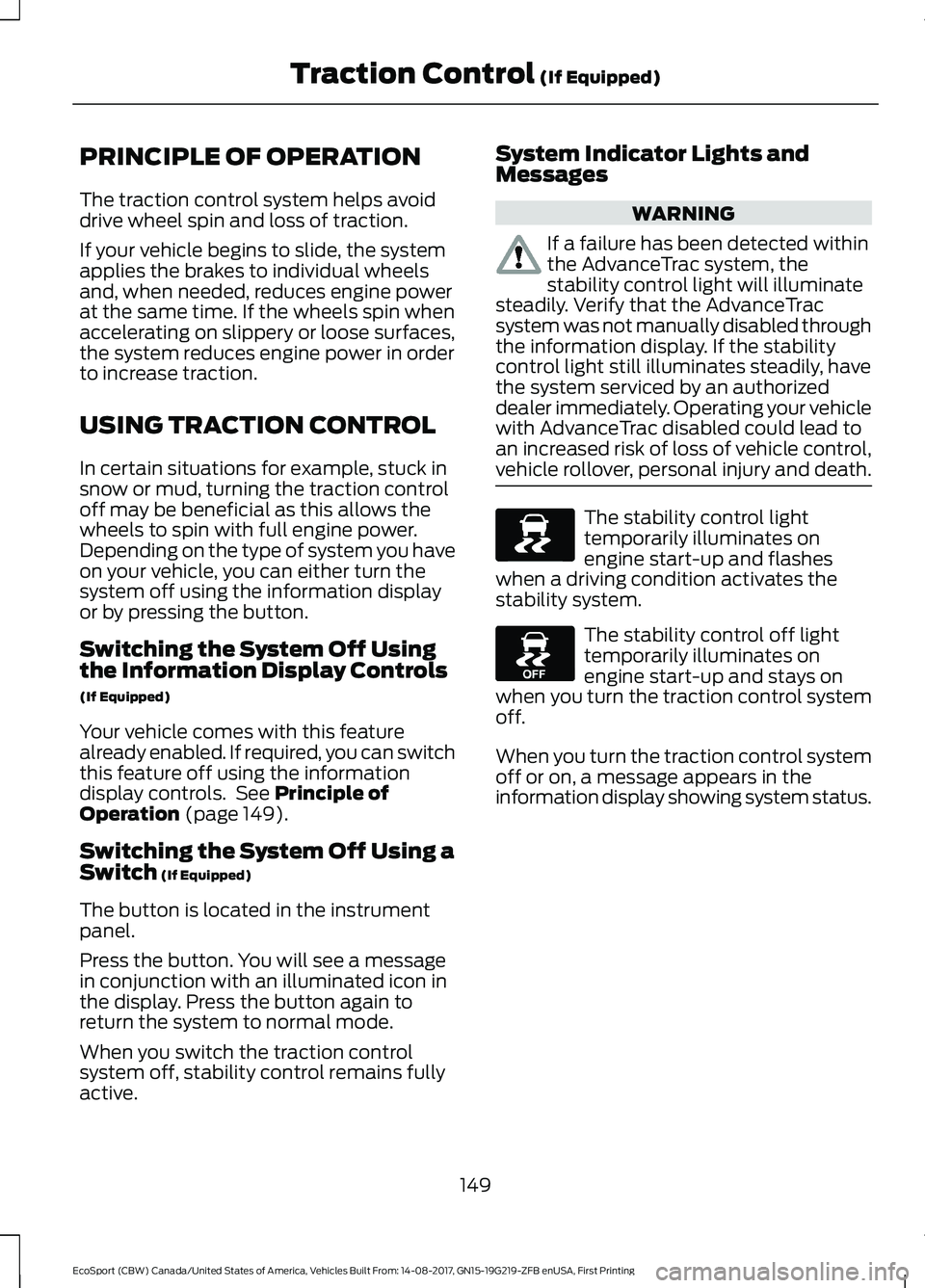
The stability control lighttemporarily illuminates onengine start-up and flasheswhen a driving condition activates thestability system.
The stability control off lighttemporarily illuminates onengine start-up and stays onwhen you turn the traction control systemoff.
When you turn the traction control systemoff or on, a message appears in theinformation display showing system status.
149EcoSport (CBW) Canada/United States of America, Vehicles Built From: 14-08-2017, GN15-19G219-ZFB enUSA, First PrintingTraction Control (If Equipped)
Page 161 of 452
Switching Cruise Control Off
Press and release the OFF button, whenthe system is in standby mode or switchthe ignition off.
Note:You erase the set speed when youswitch the system off.
157EcoSport (CBW) Canada/United States of America, Vehicles Built From: 14-08-2017, GN15-19G219-ZFB enUSA, First PrintingCruise Control (If Equipped)
Page 180 of 452
TRANSPORTING THE VEHICLE
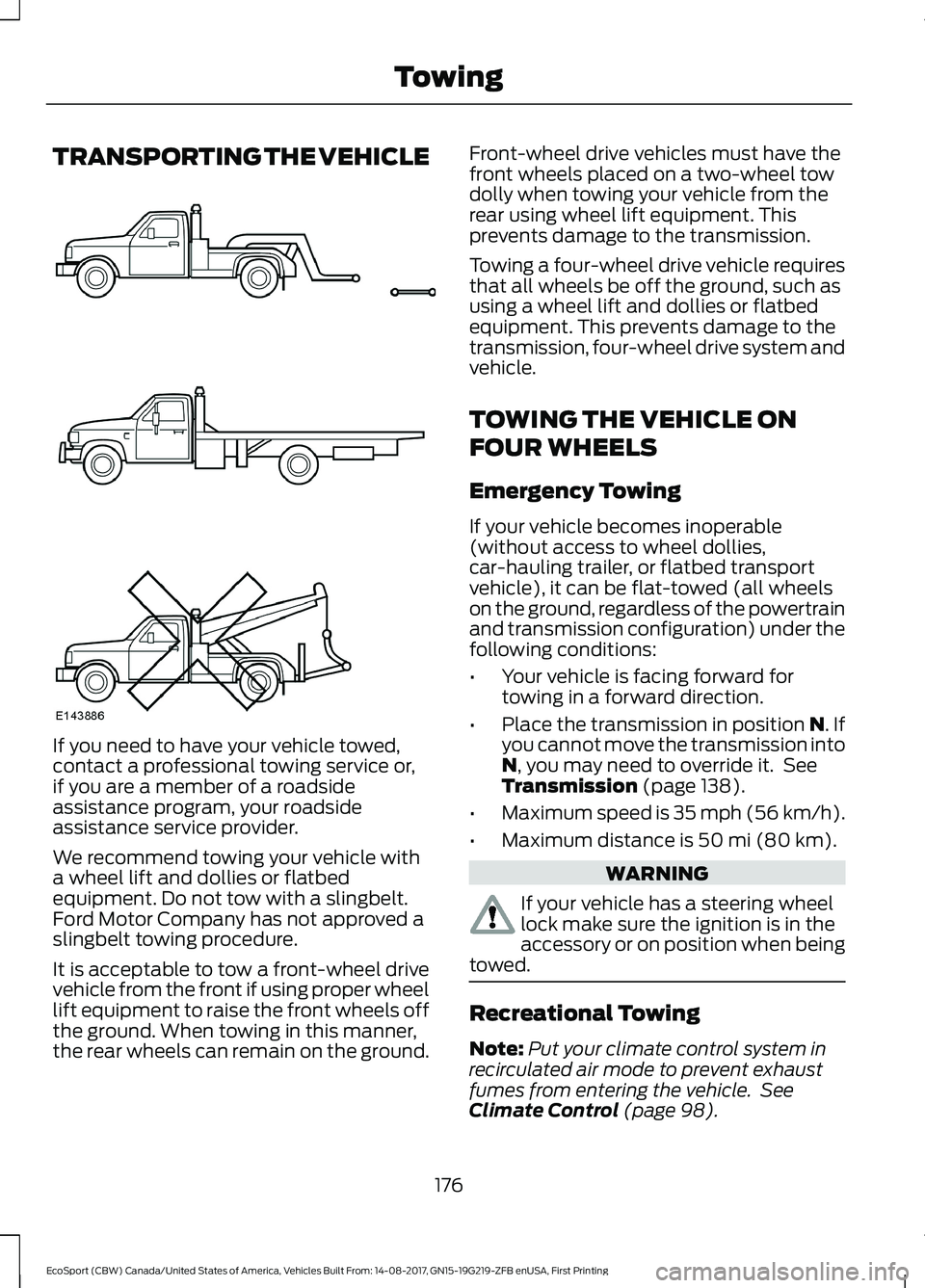
If you need to have your vehicle towed,contact a professional towing service or,if you are a member of a roadsideassistance program, your roadsideassistance service provider.
We recommend towing your vehicle witha wheel lift and dollies or flatbedequipment. Do not tow with a slingbelt.Ford Motor Company has not approved aslingbelt towing procedure.
It is acceptable to tow a front-wheel drivevehicle from the front if using proper wheellift equipment to raise the front wheels offthe ground. When towing in this manner,the rear wheels can remain on the ground.
Front-wheel drive vehicles must have thefront wheels placed on a two-wheel towdolly when towing your vehicle from therear using wheel lift equipment. Thisprevents damage to the transmission.
Towing a four-wheel drive vehicle requiresthat all wheels be off the ground, such asusing a wheel lift and dollies or flatbedequipment. This prevents damage to thetransmission, four-wheel drive system andvehicle.
TOWING THE VEHICLE ON
FOUR WHEELS
Emergency Towing
If your vehicle becomes inoperable(without access to wheel dollies,car-hauling trailer, or flatbed transportvehicle), it can be flat-towed (all wheelson the ground, regardless of the powertrainand transmission configuration) under thefollowing conditions:
•Your vehicle is facing forward fortowing in a forward direction.
•Place the transmission in position N. Ifyou cannot move the transmission intoN, you may need to override it. SeeTransmission (page 138).
•Maximum speed is 35 mph (56 km/h).
•Maximum distance is 50 mi (80 km).
WARNING
If your vehicle has a steering wheellock make sure the ignition is in theaccessory or on position when beingtowed.
Recreational Towing
Note:Put your climate control system inrecirculated air mode to prevent exhaustfumes from entering the vehicle. SeeClimate Control (page 98).
176EcoSport (CBW) Canada/United States of America, Vehicles Built From: 14-08-2017, GN15-19G219-ZFB enUSA, First PrintingTowing
Page 182 of 452
BREAKING-IN
Tires
Note:New tires need to be run-in forapproximately 310.7 mi (500 km). Duringthis time, you may experience differentdriving characteristics.
Brakes and Clutch
Note:If possible, avoid heavy braking andclutching during the first 93.2 mi (150 km)in the city, and the first 932.1 mi (1,500 km)in highways.
ECONOMICAL DRIVING
Fuel economy is affected by several thingssuch as how you drive, the conditions youdrive under and how you maintain yourvehicle.
There are some things to keep in mind thatmay improve your fuel economy:
•Accelerate and slow down in a smooth,moderate fashion.
•Drive at steady speeds.
•Anticipate stops; slowing down mayeliminate the need to stop.
•Combine errands and minimizestop-and-go driving (When runningerrands, go to the furthest destinationfirst and then work your way backhome).
•Close the windows for high-speeddriving.
•Drive at reasonable speeds.
•Keep the tires properly inflated and useonly the recommended size.
•Use the recommended engine oil.
•Perform all regularly scheduledmaintenance.
There are also some things you may wantto avoid doing because they reduce yourfuel economy:
•Avoid sudden or hard accelerations.
•Avoid revving the engine before turningoff the car.
•Avoid long idle periods.
•Do not warm up your vehicle on coldmornings.
•Reduce the use of air conditioning andheat.
•Avoid using speed control in hillyterrain.
•Do not rest your foot on the brakepedal while driving.
•Avoid carrying unnecessary weight.
•Avoid adding particular accessories toyour vehicle (e.g. bug deflectors,rollbars/light bars, running boards, skiracks).
•Avoid driving with the wheels out ofalignment.
COLD WEATHER
PRECAUTIONS
The functional operation of somecomponents and systems can be affectedat temperatures below -13°F (-25°C).
DRIVING THROUGH WATER
WARNING
Do not drive through flowing or deepwater as you may lose control of yourvehicle.
Note:Driving through standing water cancause vehicle damage.
Note:Engine damage can occur if waterenters the air filter.
178EcoSport (CBW) Canada/United States of America, Vehicles Built From: 14-08-2017, GN15-19G219-ZFB enUSA, First PrintingDriving Hints
Page 186 of 452
Vehicles Sold in Canada: GettingRoadside Assistance
To fully assist you should you have avehicle concern, Ford Motor Company ofCanada, Limited offers a complimentaryroadside assistance program. Thisprogram is eligible within Canada or thecontinental United States.
This program is separate from the NewVehicle Limited Warranty, but the coverageis concurrent with the powertrain coverageperiod of your vehicle.
Canadian customers who require roadsideassistance, call 1-800-665-2006.
Vehicles Sold in Canada: UsingRoadside Assistance
Complete the roadside assistanceidentification card and place it in yourwallet for quick reference.
In Canada, this card is found in theWarranty Guide in the glove compartmentof your vehicle.
Vehicles Sold in Canada: RoadsideAssistance Program Coverage
The service is available 24 hours a day,seven days a week.
Canadian roadside coverage and benefitsmay differ from the U.S. coverage.
If you require more information, pleaserefer to the coverage section of yourwarranty guide, call us in Canada at1-800-665-2006, or visit our website atwww.ford.ca.
HAZARD FLASHERS
The hazard warning button islocated on the instrument panel.
Use it when your vehicle is creating a safetyhazard for other motorists.
Press the button to turn on the hazardwarning function, and the front and reardirection indicators will flash.
Press the button again to turn them off.
Note:If used when the engine is notrunning, the battery will lose charge. Theremay be insufficient power to restart yourengine.
Note:Depending on applicable laws andregulations in the country for which yourvehicle was originally built, the hazardwarning flashers may flash if you brakeheavily.
FUEL SHUTOFF
WARNING
If your vehicle has been involved in acrash, have the fuel system checked.Failure to follow this instructioncould result in fire, personal injury or death.
In the event of a moderate to severecollision, this vehicle includes a fuel pumpshutoff feature that stops the flow of fuelto the engine. Not every impact will causea shutoff.
Should your vehicle shut off after acollision, you may restart your vehicle. Forvehicles equipped with a key system:
1.Switch off the ignition.
2.Switch to start position.
3.Switch off the ignition.
4.Switch on the ignition to re-enable thefuel pump.
For vehicles equipped with a push buttonstart system:
1.Press the START/STOP button toswitch off the ignition.
2.Press the brake pedal and press theSTART/STOP button to switch on theignition.
182EcoSport (CBW) Canada/United States of America, Vehicles Built From: 14-08-2017, GN15-19G219-ZFB enUSA, First PrintingRoadside Emergencies
Page 188 of 452
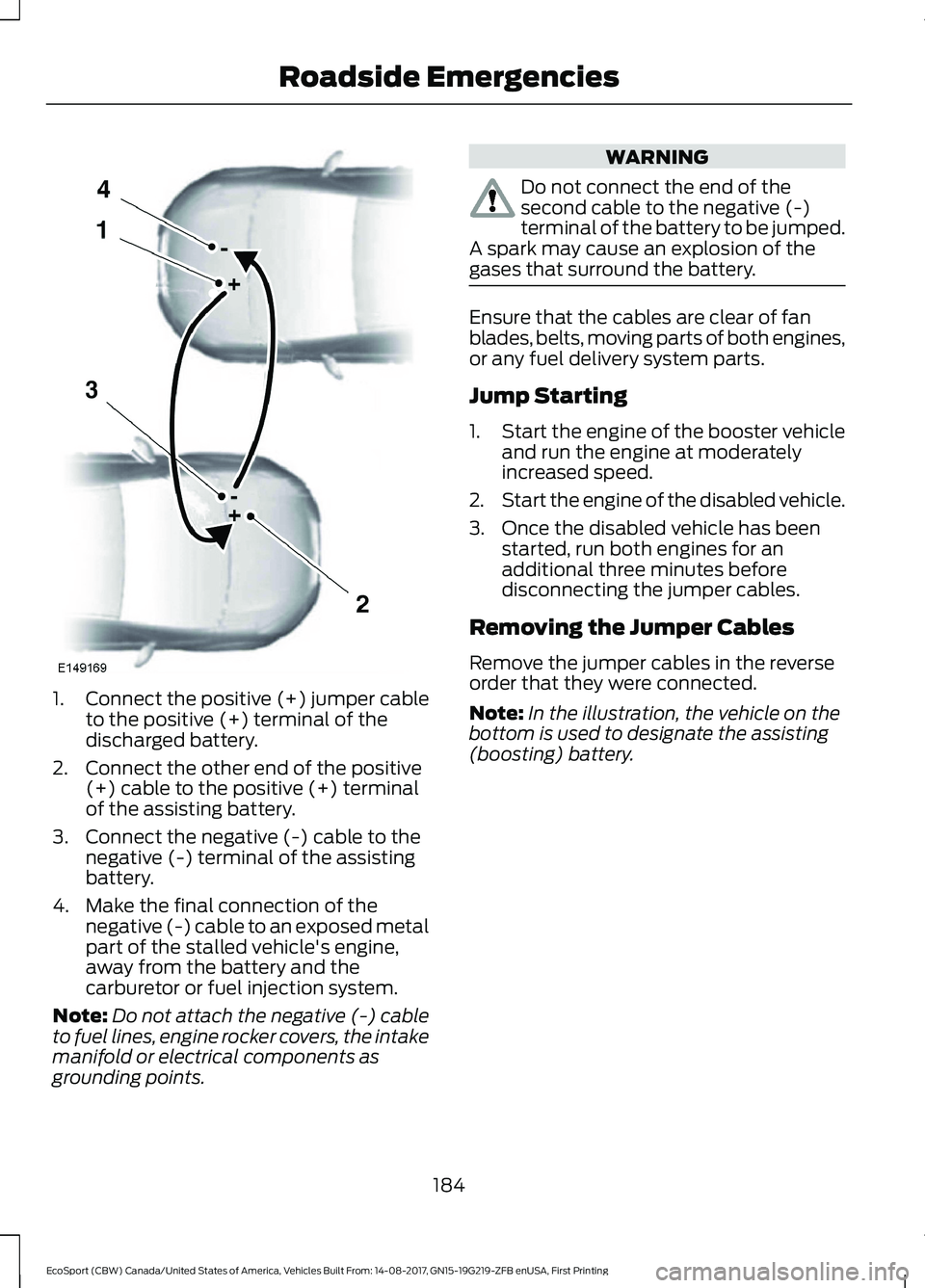
1.Connect the positive (+) jumper cableto the positive (+) terminal of thedischarged battery.
2.Connect the other end of the positive(+) cable to the positive (+) terminalof the assisting battery.
3.Connect the negative (-) cable to thenegative (-) terminal of the assistingbattery.
4.Make the final connection of thenegative (-) cable to an exposed metalpart of the stalled vehicle's engine,away from the battery and thecarburetor or fuel injection system.
Note:Do not attach the negative (-) cableto fuel lines, engine rocker covers, the intakemanifold or electrical components asgrounding points.
WARNING
Do not connect the end of thesecond cable to the negative (-)terminal of the battery to be jumped.A spark may cause an explosion of thegases that surround the battery.
Ensure that the cables are clear of fanblades, belts, moving parts of both engines,or any fuel delivery system parts.
Jump Starting
1.Start the engine of the booster vehicleand run the engine at moderatelyincreased speed.
2.Start the engine of the disabled vehicle.
3.Once the disabled vehicle has beenstarted, run both engines for anadditional three minutes beforedisconnecting the jumper cables.
Removing the Jumper Cables
Remove the jumper cables in the reverseorder that they were connected.
Note:In the illustration, the vehicle on thebottom is used to designate the assisting(boosting) battery.
184EcoSport (CBW) Canada/United States of America, Vehicles Built From: 14-08-2017, GN15-19G219-ZFB enUSA, First PrintingRoadside Emergencies