ECO mode FORD ECOSPORT 2018 Repair Manual
[x] Cancel search | Manufacturer: FORD, Model Year: 2018, Model line: ECOSPORT, Model: FORD ECOSPORT 2018Pages: 452, PDF Size: 17.04 MB
Page 364 of 452
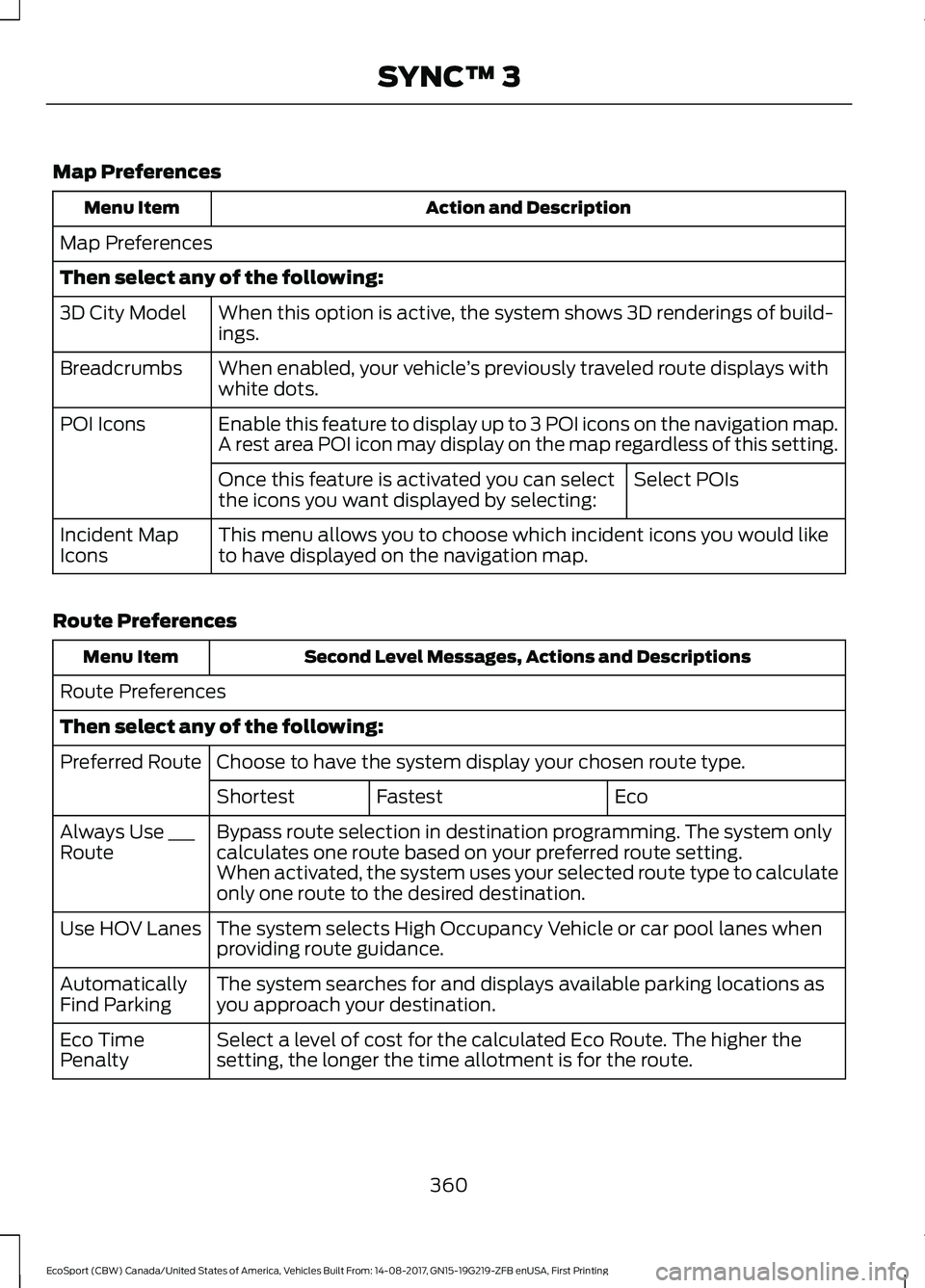
Map Preferences
Action and DescriptionMenu Item
Map Preferences
Then select any of the following:
When this option is active, the system shows 3D renderings of build-ings.3D City Model
When enabled, your vehicle’s previously traveled route displays withwhite dots.Breadcrumbs
Enable this feature to display up to 3 POI icons on the navigation map.POI IconsA rest area POI icon may display on the map regardless of this setting.
Select POIsOnce this feature is activated you can selectthe icons you want displayed by selecting:
This menu allows you to choose which incident icons you would liketo have displayed on the navigation map.Incident MapIcons
Route Preferences
Second Level Messages, Actions and DescriptionsMenu Item
Route Preferences
Then select any of the following:
Choose to have the system display your chosen route type.Preferred Route
EcoFastestShortest
Bypass route selection in destination programming. The system onlycalculates one route based on your preferred route setting.Always Use ___RouteWhen activated, the system uses your selected route type to calculateonly one route to the desired destination.
The system selects High Occupancy Vehicle or car pool lanes whenproviding route guidance.Use HOV Lanes
The system searches for and displays available parking locations asyou approach your destination.AutomaticallyFind Parking
Select a level of cost for the calculated Eco Route. The higher thesetting, the longer the time allotment is for the route.Eco TimePenalty
360EcoSport (CBW) Canada/United States of America, Vehicles Built From: 14-08-2017, GN15-19G219-ZFB enUSA, First PrintingSYNC™ 3
Page 369 of 452
Note:: Data, e.g. the Vehicle IdentificationNumber (VIN), SIM Card ID, and data planusage, is shared between Ford and thevehicle network carrier to provide theVehicle Hotspot service in accordance withyour vehicle network carrier agreement,coverage and availability, and may be usedto enable a seamless transition from an oldto new embedded modem and to confirmany updates are successfully delivered.
Note:: For your convenience data usagemay be available for monitoring underSettings but may not reflect actual orcurrent usage. The vehicle network carrieris responsible for providing informationabout your account. Please contact thevehicle network carrier for more information.
Note:: Ford may need to update operatingsystem software on your vehicle, includingsecurity updates and bug fixes, to keepconnected services current, like VehicleHotspot, without prior notice to you.
Note:If you do not have an active vehiclehotspot data plan, open your web browserand go to a website using the HTTP protocolto be automatically redirected to the vehiclenetwork carrier landing page where you canpurchase data. Websites using HTTPS willnot automatically redirect.
Ambient Lighting (If Equipped)
Tap a color once to active ambient lighting.This sets the color to the highest intensity.
You can drag the colors up and down toincrease or decrease the intensity.
To switch ambient lighting off, press theactive color once or drag the active colorall the way down to zero intensity.
Vehicle
Note:Your vehicle may not have all ofthese features.
You can select the following features toupdate their settings.
Door Keypad Code (If equipped)
Select this button to add or erase apersonal door keypad code. To add orerase a personal code, you first need toenter the five-digit factory set code. Youcan find this code on the owner's walletcard in the glove box or from yourauthorized dealer.
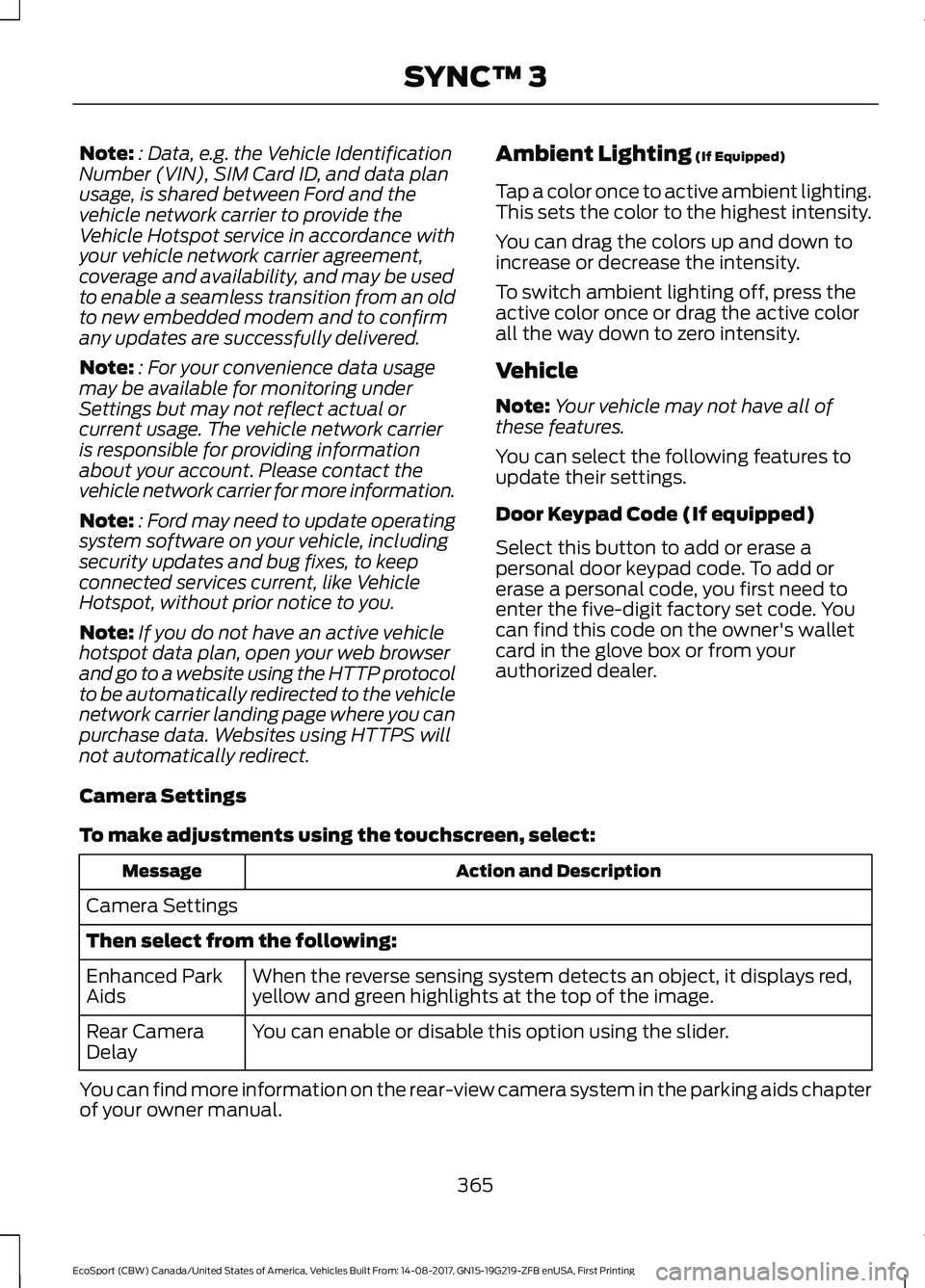
Camera Settings
To make adjustments using the touchscreen, select:
Action and DescriptionMessage
Camera Settings
Then select from the following:
When the reverse sensing system detects an object, it displays red,yellow and green highlights at the top of the image.Enhanced ParkAids
You can enable or disable this option using the slider.Rear CameraDelay
You can find more information on the rear-view camera system in the parking aids chapterof your owner manual.
365EcoSport (CBW) Canada/United States of America, Vehicles Built From: 14-08-2017, GN15-19G219-ZFB enUSA, First PrintingSYNC™ 3
Page 370 of 452
Onboard Modem Serial Number (ESN)
Selecting this button on the settings menu
shows you the ESN number for yoursystem. You need this number for certainregistrations such as Satellite Radio.
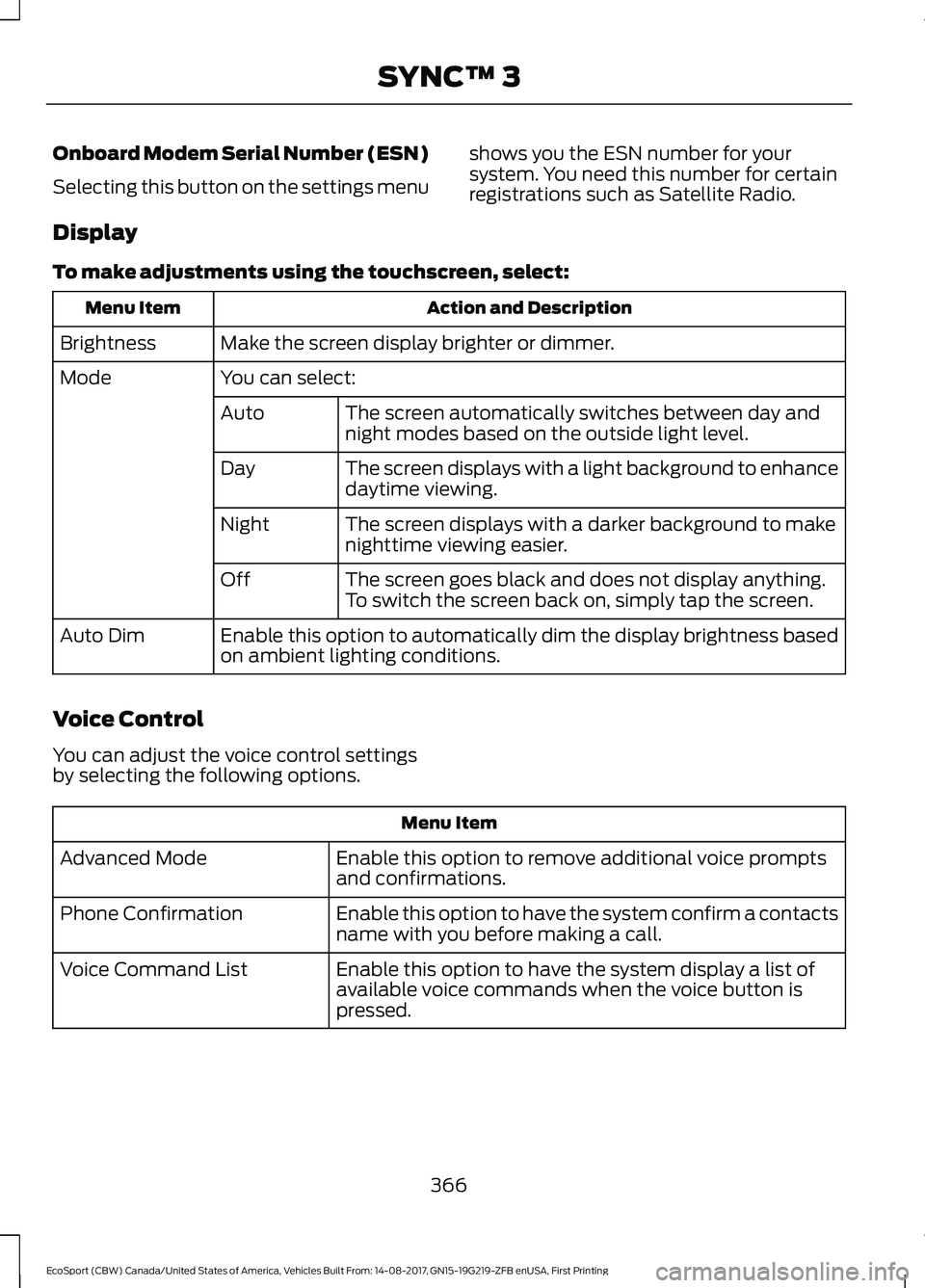
Display
To make adjustments using the touchscreen, select:
Action and DescriptionMenu Item
Make the screen display brighter or dimmer.Brightness
You can select:Mode
The screen automatically switches between day andnight modes based on the outside light level.Auto
The screen displays with a light background to enhancedaytime viewing.Day
The screen displays with a darker background to makenighttime viewing easier.Night
The screen goes black and does not display anything.To switch the screen back on, simply tap the screen.Off
Enable this option to automatically dim the display brightness basedon ambient lighting conditions.Auto Dim
Voice Control
You can adjust the voice control settingsby selecting the following options.
Menu Item
Enable this option to remove additional voice promptsand confirmations.Advanced Mode
Enable this option to have the system confirm a contactsname with you before making a call.Phone Confirmation
Enable this option to have the system display a list ofavailable voice commands when the voice button ispressed.
Voice Command List
366EcoSport (CBW) Canada/United States of America, Vehicles Built From: 14-08-2017, GN15-19G219-ZFB enUSA, First PrintingSYNC™ 3
Page 371 of 452
Valet Mode
Valet mode allows you to lock the system.No information is accessible until thesystem is unlocked with the correct PIN.
When you select valet mode a pop upappears informing you that a four digitcode must be entered to enable anddisable valet mode. You can use any PINyou chose but you must use the same PINto disable valet mode. The system asksyou to input the code.
Note:If the system is locked and youcannot remember the PIN, please contactthe Customer Relationship Center.
United States: 1-800-392-3673Canada: 1-800-565-3673
To enable valet mode, enter your chosenPIN. The system then asks to confirm yourPIN by reentering it. The system then locks.
To unlock the system, enter the same pinnumber. The system reconnects to yourphone and all of your options are availableagain.
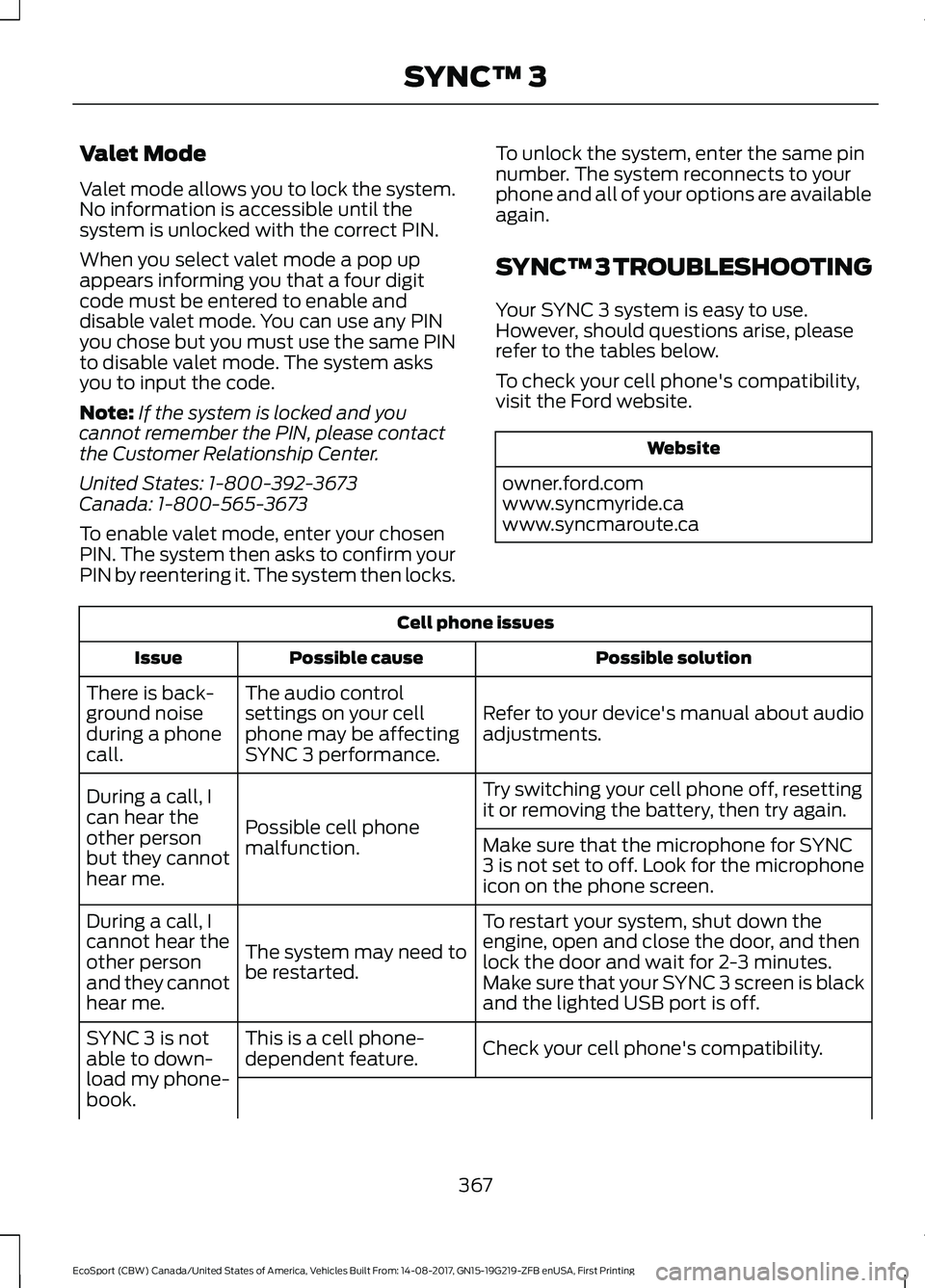
SYNC™ 3 TROUBLESHOOTING
Your SYNC 3 system is easy to use.However, should questions arise, pleaserefer to the tables below.
To check your cell phone's compatibility,visit the Ford website.
Website
owner.ford.comwww.syncmyride.cawww.syncmaroute.ca
Cell phone issues
Possible solutionPossible causeIssue
Refer to your device's manual about audioadjustments.
The audio controlsettings on your cellphone may be affectingSYNC 3 performance.
There is back-ground noiseduring a phonecall.
Try switching your cell phone off, resettingit or removing the battery, then try again.Possible cell phonemalfunction.
During a call, Ican hear theother personbut they cannothear me.
Make sure that the microphone for SYNC3 is not set to off. Look for the microphoneicon on the phone screen.
To restart your system, shut down theengine, open and close the door, and thenlock the door and wait for 2-3 minutes.Make sure that your SYNC 3 screen is blackand the lighted USB port is off.
The system may need tobe restarted.
During a call, Icannot hear theother personand they cannothear me.
Check your cell phone's compatibility.This is a cell phone-dependent feature.SYNC 3 is notable to down-load my phone-book.
367EcoSport (CBW) Canada/United States of America, Vehicles Built From: 14-08-2017, GN15-19G219-ZFB enUSA, First PrintingSYNC™ 3
Page 373 of 452
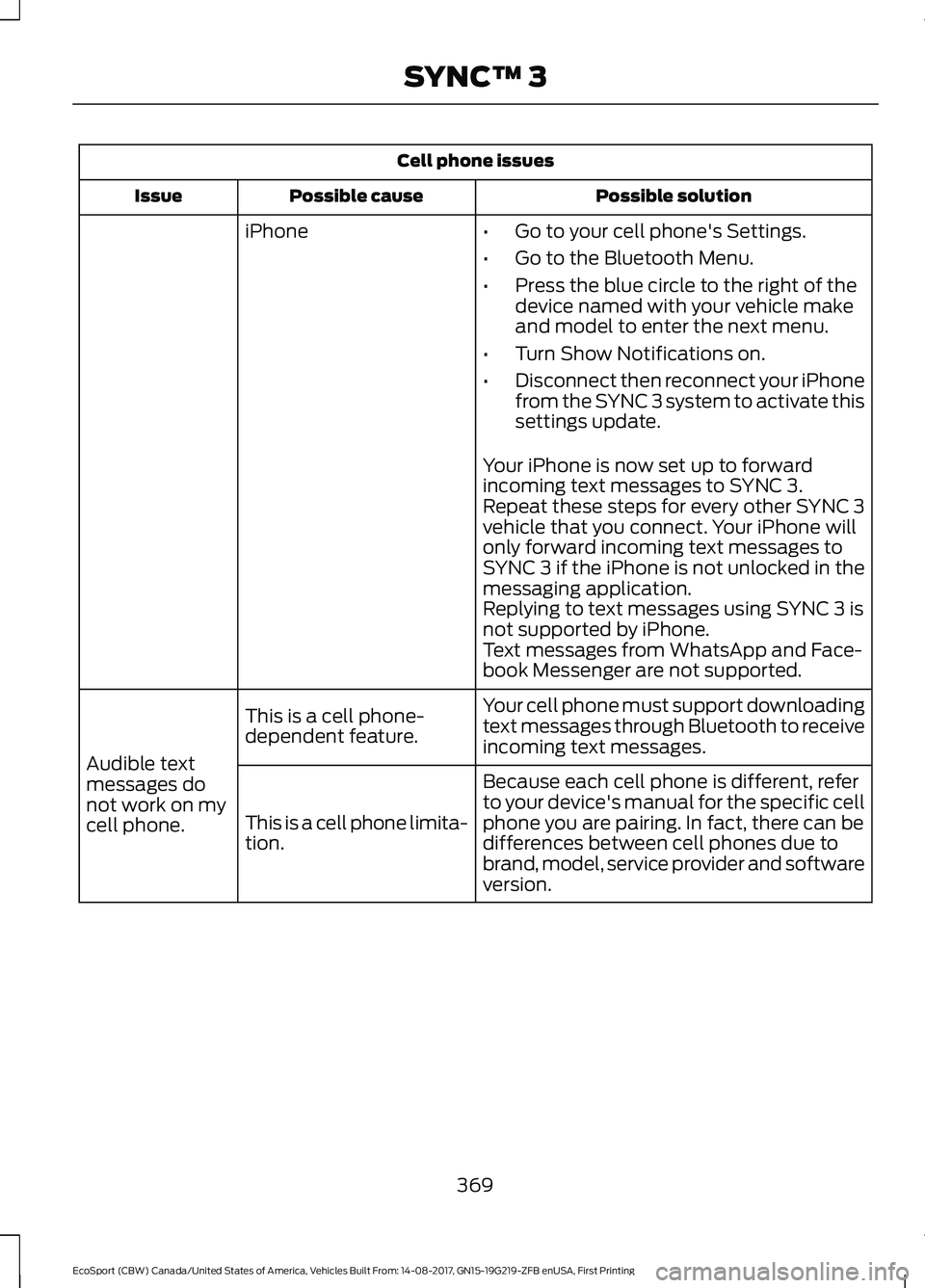
Cell phone issues
Possible solutionPossible causeIssue
iPhone•Go to your cell phone's Settings.
•Go to the Bluetooth Menu.
•Press the blue circle to the right of thedevice named with your vehicle makeand model to enter the next menu.
•Turn Show Notifications on.
•Disconnect then reconnect your iPhonefrom the SYNC 3 system to activate thissettings update.
Your iPhone is now set up to forwardincoming text messages to SYNC 3.Repeat these steps for every other SYNC 3vehicle that you connect. Your iPhone willonly forward incoming text messages toSYNC 3 if the iPhone is not unlocked in themessaging application.Replying to text messages using SYNC 3 isnot supported by iPhone.Text messages from WhatsApp and Face-book Messenger are not supported.
Your cell phone must support downloadingtext messages through Bluetooth to receiveincoming text messages.
This is a cell phone-dependent feature.
Audible textmessages donot work on mycell phone.
Because each cell phone is different, referto your device's manual for the specific cellphone you are pairing. In fact, there can bedifferences between cell phones due tobrand, model, service provider and softwareversion.
This is a cell phone limita-tion.
369EcoSport (CBW) Canada/United States of America, Vehicles Built From: 14-08-2017, GN15-19G219-ZFB enUSA, First PrintingSYNC™ 3
Page 429 of 452
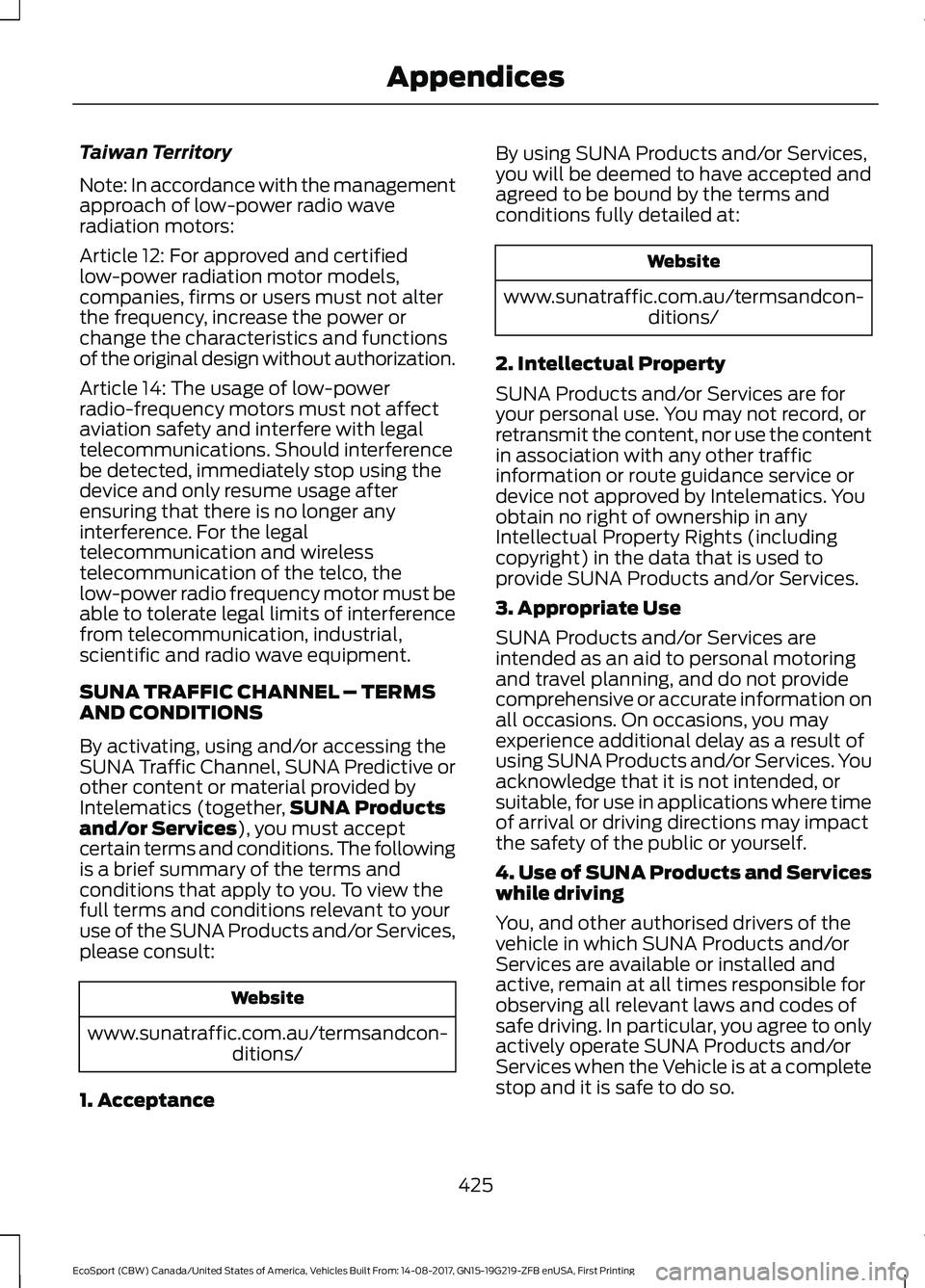
Taiwan Territory
Note: In accordance with the managementapproach of low-power radio waveradiation motors:
Article 12: For approved and certifiedlow-power radiation motor models,companies, firms or users must not alterthe frequency, increase the power orchange the characteristics and functionsof the original design without authorization.
Article 14: The usage of low-powerradio-frequency motors must not affectaviation safety and interfere with legaltelecommunications. Should interferencebe detected, immediately stop using thedevice and only resume usage afterensuring that there is no longer anyinterference. For the legaltelecommunication and wirelesstelecommunication of the telco, thelow-power radio frequency motor must beable to tolerate legal limits of interferencefrom telecommunication, industrial,scientific and radio wave equipment.
SUNA TRAFFIC CHANNEL – TERMSAND CONDITIONS
By activating, using and/or accessing theSUNA Traffic Channel, SUNA Predictive orother content or material provided byIntelematics (together,SUNA Productsand/or Services), you must acceptcertain terms and conditions. The followingis a brief summary of the terms andconditions that apply to you. To view thefull terms and conditions relevant to youruse of the SUNA Products and/or Services,please consult:
Website
www.sunatraffic.com.au/termsandcon-ditions/
1. Acceptance
By using SUNA Products and/or Services,you will be deemed to have accepted andagreed to be bound by the terms andconditions fully detailed at:
Website
www.sunatraffic.com.au/termsandcon-ditions/
2. Intellectual Property
SUNA Products and/or Services are foryour personal use. You may not record, orretransmit the content, nor use the contentin association with any other trafficinformation or route guidance service ordevice not approved by Intelematics. Youobtain no right of ownership in anyIntellectual Property Rights (includingcopyright) in the data that is used toprovide SUNA Products and/or Services.
3. Appropriate Use
SUNA Products and/or Services areintended as an aid to personal motoringand travel planning, and do not providecomprehensive or accurate information onall occasions. On occasions, you mayexperience additional delay as a result ofusing SUNA Products and/or Services. Youacknowledge that it is not intended, orsuitable, for use in applications where timeof arrival or driving directions may impactthe safety of the public or yourself.
4. Use of SUNA Products and Serviceswhile driving
You, and other authorised drivers of thevehicle in which SUNA Products and/orServices are available or installed andactive, remain at all times responsible forobserving all relevant laws and codes ofsafe driving. In particular, you agree to onlyactively operate SUNA Products and/orServices when the Vehicle is at a completestop and it is safe to do so.
425EcoSport (CBW) Canada/United States of America, Vehicles Built From: 14-08-2017, GN15-19G219-ZFB enUSA, First PrintingAppendices
Page 440 of 452
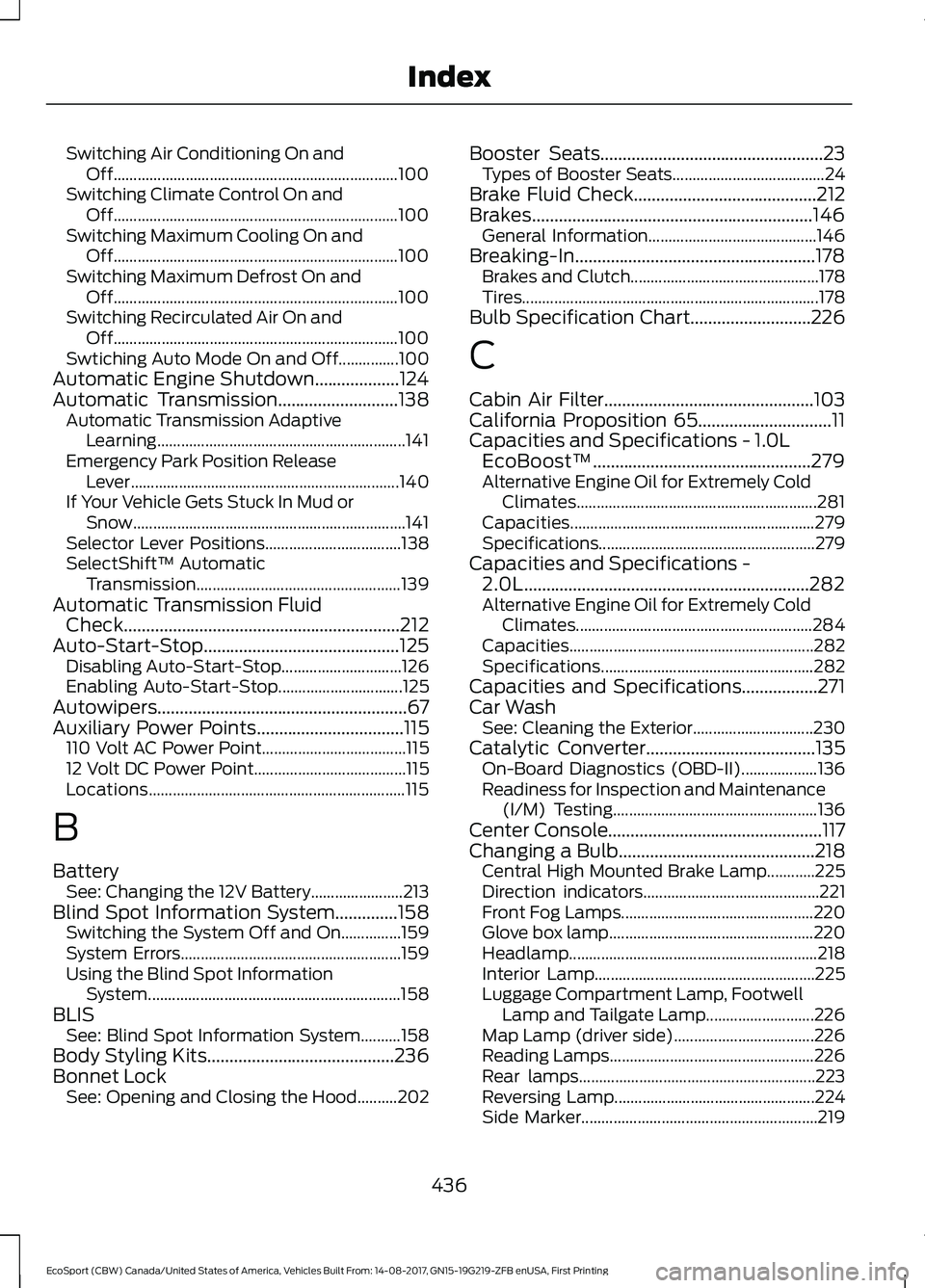
Switching Air Conditioning On andOff.......................................................................100Switching Climate Control On andOff.......................................................................100Switching Maximum Cooling On andOff.......................................................................100Switching Maximum Defrost On andOff.......................................................................100Switching Recirculated Air On andOff.......................................................................100Swtiching Auto Mode On and Off...............100Automatic Engine Shutdown...................124Automatic Transmission...........................138Automatic Transmission AdaptiveLearning..............................................................141Emergency Park Position ReleaseLever...................................................................140If Your Vehicle Gets Stuck In Mud orSnow....................................................................141Selector Lever Positions..................................138SelectShift™ AutomaticTransmission...................................................139Automatic Transmission FluidCheck..............................................................212Auto-Start-Stop............................................125Disabling Auto-Start-Stop..............................126Enabling Auto-Start-Stop...............................125Autowipers........................................................67Auxiliary Power Points.................................115110 Volt AC Power Point....................................11512 Volt DC Power Point......................................115Locations................................................................115
B
BatterySee: Changing the 12V Battery.......................213Blind Spot Information System..............158Switching the System Off and On...............159System Errors.......................................................159Using the Blind Spot InformationSystem...............................................................158BLISSee: Blind Spot Information System..........158Body Styling Kits..........................................236Bonnet LockSee: Opening and Closing the Hood..........202
Booster Seats..................................................23Types of Booster Seats......................................24Brake Fluid Check.........................................212Brakes...............................................................146General Information..........................................146Breaking-In......................................................178Brakes and Clutch...............................................178Tires..........................................................................178Bulb Specification Chart...........................226
C
Cabin Air Filter...............................................103California Proposition 65..............................11Capacities and Specifications - 1.0LEcoBoost™.................................................279Alternative Engine Oil for Extremely ColdClimates............................................................281Capacities.............................................................279Specifications......................................................279Capacities and Specifications -2.0L................................................................282Alternative Engine Oil for Extremely ColdClimates...........................................................284Capacities.............................................................282Specifications.....................................................282Capacities and Specifications.................271Car WashSee: Cleaning the Exterior..............................230Catalytic Converter......................................135On-Board Diagnostics (OBD-II)...................136Readiness for Inspection and Maintenance(I/M) Testing...................................................136Center Console................................................117Changing a Bulb............................................218Central High Mounted Brake Lamp............225Direction indicators............................................221Front Fog Lamps................................................220Glove box lamp...................................................220Headlamp..............................................................218Interior Lamp.......................................................225Luggage Compartment Lamp, FootwellLamp and Tailgate Lamp...........................226Map Lamp (driver side)...................................226Reading Lamps...................................................226Rear lamps...........................................................223Reversing Lamp..................................................224Side Marker...........................................................219
436EcoSport (CBW) Canada/United States of America, Vehicles Built From: 14-08-2017, GN15-19G219-ZFB enUSA, First PrintingIndex
Page 442 of 452
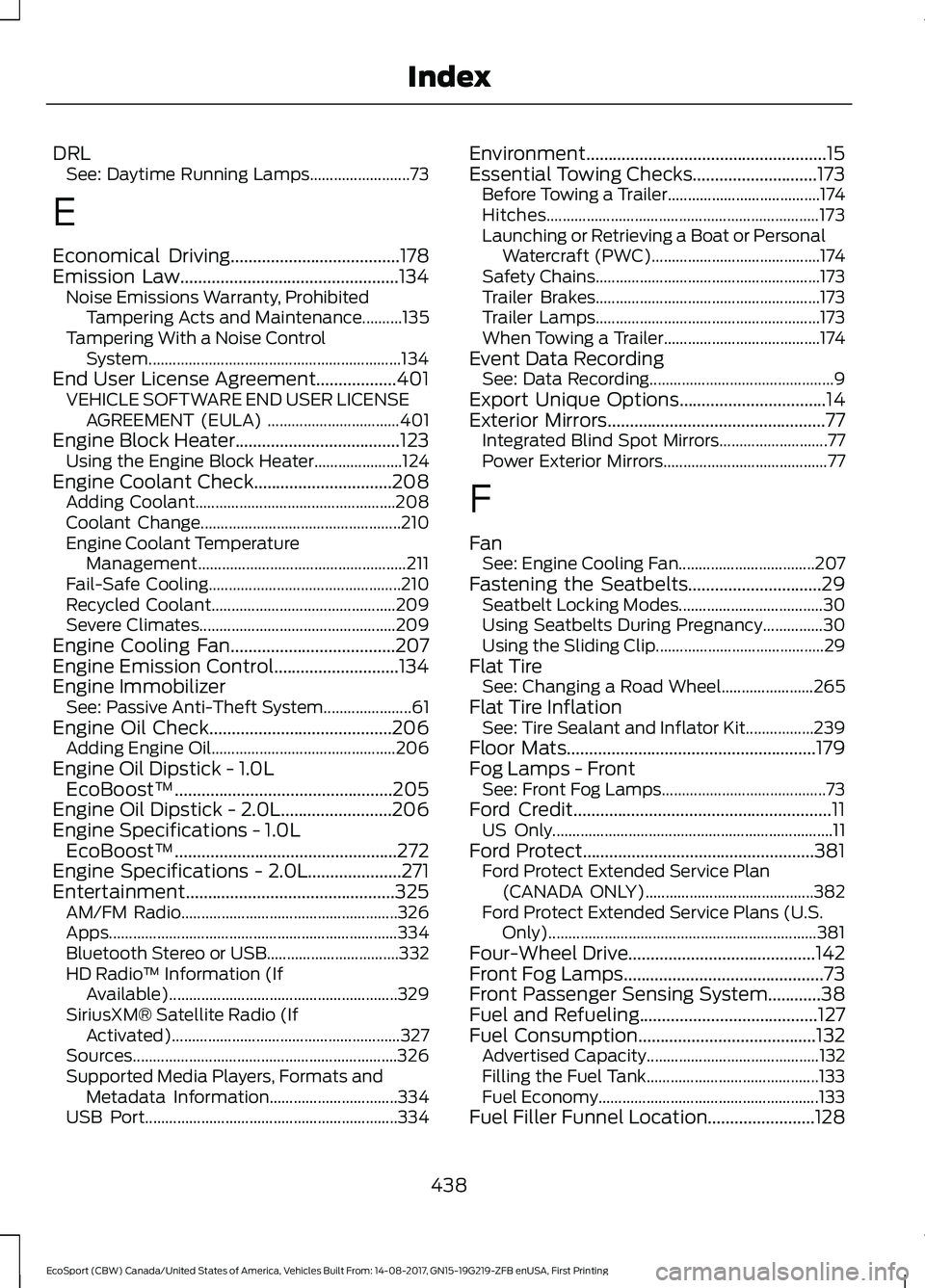
DRLSee: Daytime Running Lamps.........................73
E
Economical Driving......................................178Emission Law.................................................134Noise Emissions Warranty, ProhibitedTampering Acts and Maintenance..........135Tampering With a Noise ControlSystem...............................................................134End User License Agreement..................401VEHICLE SOFTWARE END USER LICENSEAGREEMENT (EULA) .................................401Engine Block Heater.....................................123Using the Engine Block Heater......................124Engine Coolant Check...............................208Adding Coolant..................................................208Coolant Change..................................................210Engine Coolant TemperatureManagement....................................................211Fail-Safe Cooling................................................210Recycled Coolant..............................................209Severe Climates.................................................209Engine Cooling Fan.....................................207Engine Emission Control............................134Engine ImmobilizerSee: Passive Anti-Theft System......................61Engine Oil Check.........................................206Adding Engine Oil..............................................206Engine Oil Dipstick - 1.0LEcoBoost™.................................................205Engine Oil Dipstick - 2.0L.........................206Engine Specifications - 1.0LEcoBoost™..................................................272Engine Specifications - 2.0L.....................271Entertainment...............................................325AM/FM Radio......................................................326Apps........................................................................334Bluetooth Stereo or USB.................................332HD Radio™ Information (IfAvailable).........................................................329SiriusXM® Satellite Radio (IfActivated).........................................................327Sources..................................................................326Supported Media Players, Formats andMetadata Information................................334USB Port...............................................................334
Environment......................................................15Essential Towing Checks............................173Before Towing a Trailer......................................174Hitches....................................................................173Launching or Retrieving a Boat or PersonalWatercraft (PWC)..........................................174Safety Chains........................................................173Trailer Brakes........................................................173Trailer Lamps........................................................173When Towing a Trailer.......................................174Event Data RecordingSee: Data Recording..............................................9Export Unique Options.................................14Exterior Mirrors.................................................77Integrated Blind Spot Mirrors...........................77Power Exterior Mirrors.........................................77
F
FanSee: Engine Cooling Fan..................................207Fastening the Seatbelts..............................29Seatbelt Locking Modes....................................30Using Seatbelts During Pregnancy...............30Using the Sliding Clip..........................................29Flat TireSee: Changing a Road Wheel.......................265Flat Tire InflationSee: Tire Sealant and Inflator Kit.................239Floor Mats........................................................179Fog Lamps - FrontSee: Front Fog Lamps.........................................73Ford Credit..........................................................11US Only......................................................................11Ford Protect....................................................381Ford Protect Extended Service Plan(CANADA ONLY)..........................................382Ford Protect Extended Service Plans (U.S.Only)...................................................................381Four-Wheel Drive..........................................142Front Fog Lamps.............................................73Front Passenger Sensing System............38Fuel and Refueling........................................127Fuel Consumption........................................132Advertised Capacity...........................................132Filling the Fuel Tank...........................................133Fuel Economy.......................................................133Fuel Filler Funnel Location........................128
438EcoSport (CBW) Canada/United States of America, Vehicles Built From: 14-08-2017, GN15-19G219-ZFB enUSA, First PrintingIndex
Page 444 of 452
I
Ignition Switch................................................119Starting the Engine............................................120Switching the Ignition Off................................119Switching the Ignition On.................................119Switching the Ignition to AccessoryMode....................................................................119In California (U.S. Only)..............................187Information Display Control......................66Information Displays.....................................85General Information............................................85Information Messages.................................88Accessory Power..................................................89Airbag.......................................................................89Alarm........................................................................89Battery and Charging System.........................90Brake System........................................................90Engine........................................................................91Fuel System.............................................................91Hill Start Assist......................................................91Keyless Vehicle......................................................92Lighting....................................................................92Maintenance..........................................................92MyKey.......................................................................93Park Aid....................................................................94Park Brake...............................................................94Power Steering......................................................95Stability Control....................................................95Starting System ...................................................95Tire Pressure Monitoring System...................90Traction Control...................................................96Transmission.........................................................96Vehicle Settings....................................................97Installing Child Restraints.............................17Child Seats...............................................................17Using Lap and Shoulder Belts..........................18Using Lower Anchors and Tethers forCHildren (LATCH)...........................................20Using Tether Straps.............................................22Instrument Cluster........................................80Instrument Lighting Dimmer......................72Interior Lamps..................................................74Courtesy lamp........................................................74Reading lamps.......................................................74Vanity lamp.............................................................75Interior Mirror....................................................78Auto-Dimming Mirror..........................................78
Introduction.........................................................7
J
Jump Starting the Vehicle.........................183Connecting the Jumper Cables.....................183Jump Starting......................................................184Preparing Your Vehicle.....................................183Removing the Jumper Cables........................184
K
Keyless Entry....................................................57Disabled Keys........................................................58General Information............................................57Intelligent Access - Locking and Unlockingthe Doors with the Key Blade.....................58Locking Using Intelligent Access....................57Unlocking only Driver Door...............................58Unlocking Using Intelligent Access................57Keys and Remote Controls.........................45Principle of Operation........................................45
L
Lighting Control..............................................70Headlamp Flasher.................................................71High Beams..............................................................71Parking Lamps.......................................................70Lighting..............................................................70General Information............................................70Load CarriersSee: Roof Racks and Load Carriers.............164Load Carrying.................................................163Load Limit.......................................................165Special Loading Instructions for Owners ofPick-up Trucks and Utility-typeVehicles.............................................................170Vehicle Loading - with and without aTrailer..................................................................165Locking and Unlocking.................................54Autolock..................................................................54Autounlock.............................................................56Illuminated Entry..................................................56Illuminated Exit.....................................................56Locking and Unlocking the Doors with theKey........................................................................55Power Door Locks................................................54
440EcoSport (CBW) Canada/United States of America, Vehicles Built From: 14-08-2017, GN15-19G219-ZFB enUSA, First PrintingIndex
Page 445 of 452
Remote Control....................................................54Smart Unlock.........................................................56Luggage Anchor Points..............................163Luggage Covers.............................................163Lug NutsSee: Changing a Road Wheel.......................265Lug Nuts..........................................................270
M
Maintenance.................................................202General Information.........................................202Manual Climate Control - Vehicles With:Electronic Manual TemperatureControl (EMTC)...........................................99Adjusting the Blower Motor Speed...............99Adjusting the Temperature..............................99Changing the Direction of Airflow.................99Switching Air Conditioning On andOff.........................................................................99Switching Climate Control On andOff.........................................................................99Switching Maximum Cooling On andOff.........................................................................99Switching Maximum Defrost On andOff.........................................................................99Switching Recirculated Air On andOff.........................................................................99Manual Seats.................................................106Adjusting the Height of the Driver’sSeat....................................................................108Adjusting the Lumbar Support......................107Moving the Seat Backward andForward.............................................................107Recline Adjustment...........................................108Message CenterSee: Information Displays.................................85MirrorsSee: Windows and Mirrors................................76Mobile Communications Equipment.......13Moonroof...........................................................78Bounce-Back.........................................................79Opening and Closing the Moonroof..............79Venting the Moonroof.........................................79Motorcraft Parts - 1.0LEcoBoost™..................................................275Motorcraft Parts - 2.0L..............................276
MyKey Troubleshooting...............................53All Vehicles..............................................................53MyKey™............................................................50Principle of Operation........................................50
N
Navigation......................................................340Destination Mode..............................................342Map Mode............................................................340Map search Mode..............................................347Navigation Map Updates...............................350Navigation Menu................................................348Route Guidance Mode.....................................345Waypoints............................................................350Normal Scheduled Maintenance..........386
O
Oil Change Indicator Reset......................207Resetting the Oil Life MonitoringSystem..............................................................207Oil CheckSee: Engine Oil Check......................................206Opening and Closing the Hood..............202Closing the Hood...............................................203Opening the Hood.............................................202Ordering Additional Owner'sLiterature.......................................................191Obtaining a French Owner’s Manual...........191
P
Parking Aids.....................................................151Principle of Operation........................................151Parking Brake..................................................147All Vehicles............................................................147Vehicles With AutomaticTransmission....................................................147Vehicles With Manual Transmission............147Passive Anti-Theft System..........................61Principle of Operation.........................................61SecuriLock®............................................................61PATSSee: Passive Anti-Theft System......................61Perchlorate.........................................................11
441EcoSport (CBW) Canada/United States of America, Vehicles Built From: 14-08-2017, GN15-19G219-ZFB enUSA, First PrintingIndex