remote control FORD ECOSPORT 2020 Owner's Manual
[x] Cancel search | Manufacturer: FORD, Model Year: 2020, Model line: ECOSPORT, Model: FORD ECOSPORT 2020Pages: 448, PDF Size: 16.57 MB
Page 117 of 448
•The alarm horn is sounding.
•The hood is open.
•The transmission is not in park (P).
Setting Remote Start to Active
1.Using the information display controlson the steering wheel, select Settings.
2.Select Vehicle Settings.
3.Select Remote Start.
4.Switch System on.
Note:You have to enable the modem usingthe FordPass app to use remote start. SeeGeneral Information (page 319).
Remotely Starting the Engine
WARNING: To avoid exhaustfumes, do not use remote start if yourvehicle is parked indoors or in areas thatare not well ventilated.
Use the FordPass app to start the engine.
Note:The direction indicators flash twice.
Note:The parking lamps turn on when theengine is running.
Note:The horn sounds if the system failsto start.
Note:You must switch on the ignitionbefore driving your vehicle.
Extending the Vehicle Run Time
To extend the engine running time durationof your vehicle during remote start, repeatthe activation using FordPass app whilethe engine is running. If you programmedthe duration to last 10 minutes, the second10 minutes will begin after what is left of
the first activation time. For example, ifyour vehicle had been running from the firstremote start for 5 minutes, your vehiclecontinues to run now for a total of 20minutes. You can extend the remote startup to a maximum of 30 minutes.
Remotely Stopping the Engine
Use the FordPass app to stop the engine.
Remote Start Settings
Use the information display to adjust theremote start settings.
Note:You cannot adjust the climate controlsettings when you have remotely startedthe engine.
Note:When you switch the ignition on, theclimate control system returns to the lastused settings.
Switching Auto On
1.Using the information display controlson the steering wheel, select Settings.
2.Select Vehicle Settings.
3.Select Remote Start.
4.Select Climate Control.
5.Switch Auto on.
Note:If you switch Auto on, the systemattempts to heat or cool the interior to 72°F(22°C).
Note:The heated windshield, heated rearwindow, heated mirrors, heated seats andheated steering wheel could turn on in coldweather.
Switching Last Settings On
1.Using the information display controlson the steering wheel, select Settings.
2.Select Vehicle Settings.
3.Select Remote Start.
4.Select Climate Control.
113
EcoSport (CBW) Canada/United States of America, Vehicles Built From: 17-06-2019, LN1J-19A321-ZFA enUSA, Edition date: 201904, First-PrintingClimate Control
Page 118 of 448
5.Switch Last Settings on.
Note:If you switch Last Settings on, thesystem remembers the last used settings.
Switching the Heated Seats and theHeated Steering Wheel Settings On
1.Using the information display controlson the steering wheel, select Settings.
2.Select Vehicle Settings.
3.Select Remote Start.
4.Select Seats and Wheel.
5.Switch Auto on.
Note:If you switch the heated seats andthe heated steering wheel settings on, theheated seats and heated steering wheelturn on during cold weather.
Setting the Duration
You can set a duration for the engine torun.
Note:Wait a few seconds before remotelystarting the engine after the engine stopsrunning.
1.Using the information display controlson the steering wheel, select Settings.
2.Select Vehicle Settings.
3.Select Remote Start.
4.Select Duration.
114
EcoSport (CBW) Canada/United States of America, Vehicles Built From: 17-06-2019, LN1J-19A321-ZFA enUSA, Edition date: 201904, First-PrintingClimate Control
Page 135 of 448
Starting the Engine
Turn the key to position III. Release thekey when the engine starts.
PUSH BUTTON IGNITION
SWITCH (IF EQUIPPED)
WARNING: Always check that thesteering wheel lock is deactivated beforeattempting to move your vehicle. Failureto deactivate the steering wheel lockcould result in a crash.
Note:The system may not function if theremote control is close to metal objects orelectronic devices such as cell phones.
Note:The ignition automatically switchesoff when you leave your vehicle unattended.This is to prevent your vehicle battery fromlosing charge.
Note:A valid key must be located insideyour vehicle to switch the ignition on andstart the engine.
Switching the Ignition On(Accessory Mode)
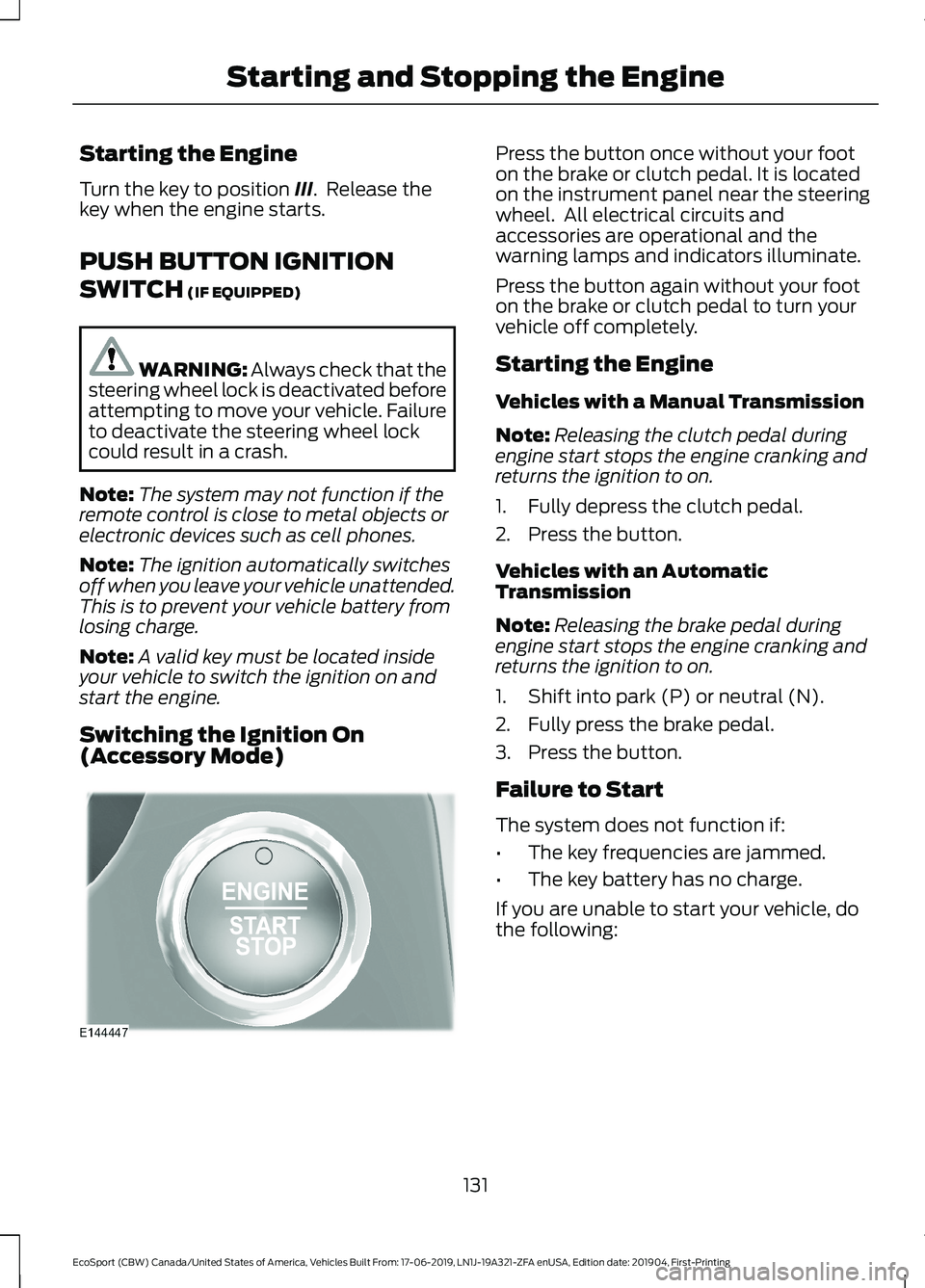
Press the button once without your footon the brake or clutch pedal. It is locatedon the instrument panel near the steeringwheel. All electrical circuits andaccessories are operational and thewarning lamps and indicators illuminate.
Press the button again without your footon the brake or clutch pedal to turn yourvehicle off completely.
Starting the Engine
Vehicles with a Manual Transmission
Note:Releasing the clutch pedal duringengine start stops the engine cranking andreturns the ignition to on.
1.Fully depress the clutch pedal.
2.Press the button.
Vehicles with an AutomaticTransmission
Note:Releasing the brake pedal duringengine start stops the engine cranking andreturns the ignition to on.
1.Shift into park (P) or neutral (N).
2.Fully press the brake pedal.
3.Press the button.
Failure to Start
The system does not function if:
•The key frequencies are jammed.
•The key battery has no charge.
If you are unable to start your vehicle, dothe following:
131
EcoSport (CBW) Canada/United States of America, Vehicles Built From: 17-06-2019, LN1J-19A321-ZFA enUSA, Edition date: 201904, First-PrintingStarting and Stopping the Engine
Page 199 of 448
POST-CRASH ALERT SYSTEM
The system flashes the turn signal lampsand sounds the horn (intermittently) in theevent of a serious impact that deploys anairbag (front, side, side curtain or SafetyCanopy) or the seatbelt pretensioners.
The horn and lamps will turn off when:
•The hazard control button is pressed
•The panic button (if equipped) ispressed on the remote entrytransmitter
•Your vehicle runs out of power
195
EcoSport (CBW) Canada/United States of America, Vehicles Built From: 17-06-2019, LN1J-19A321-ZFA enUSA, Edition date: 201904, First-PrintingRoadside Emergencies
Page 371 of 448
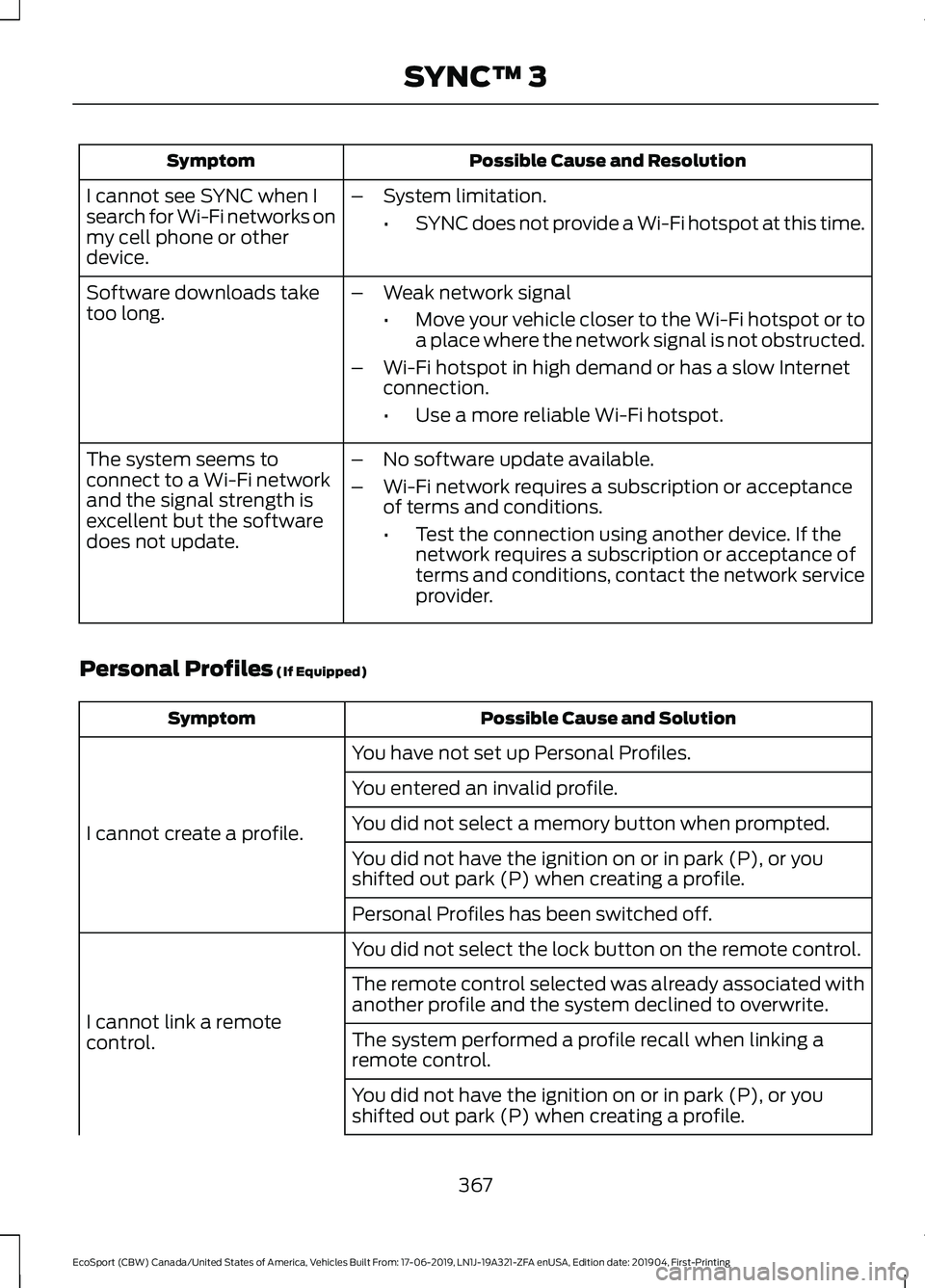
Possible Cause and ResolutionSymptom
I cannot see SYNC when Isearch for Wi-Fi networks onmy cell phone or otherdevice.
–System limitation.
•SYNC does not provide a Wi-Fi hotspot at this time.
–Weak network signal
•Move your vehicle closer to the Wi-Fi hotspot or toa place where the network signal is not obstructed.
–Wi-Fi hotspot in high demand or has a slow Internetconnection.
•Use a more reliable Wi-Fi hotspot.
Software downloads taketoo long.
–No software update available.
–Wi-Fi network requires a subscription or acceptanceof terms and conditions.
•Test the connection using another device. If thenetwork requires a subscription or acceptance ofterms and conditions, contact the network serviceprovider.
The system seems toconnect to a Wi-Fi networkand the signal strength isexcellent but the softwaredoes not update.
Personal Profiles (If Equipped)
Possible Cause and SolutionSymptom
You have not set up Personal Profiles.
I cannot create a profile.
You entered an invalid profile.
You did not select a memory button when prompted.
You did not have the ignition on or in park (P), or youshifted out park (P) when creating a profile.
Personal Profiles has been switched off.
You did not select the lock button on the remote control.
I cannot link a remotecontrol.
The remote control selected was already associated withanother profile and the system declined to overwrite.
The system performed a profile recall when linking aremote control.
You did not have the ignition on or in park (P), or youshifted out park (P) when creating a profile.
367
EcoSport (CBW) Canada/United States of America, Vehicles Built From: 17-06-2019, LN1J-19A321-ZFA enUSA, Edition date: 201904, First-PrintingSYNC™ 3
Page 372 of 448
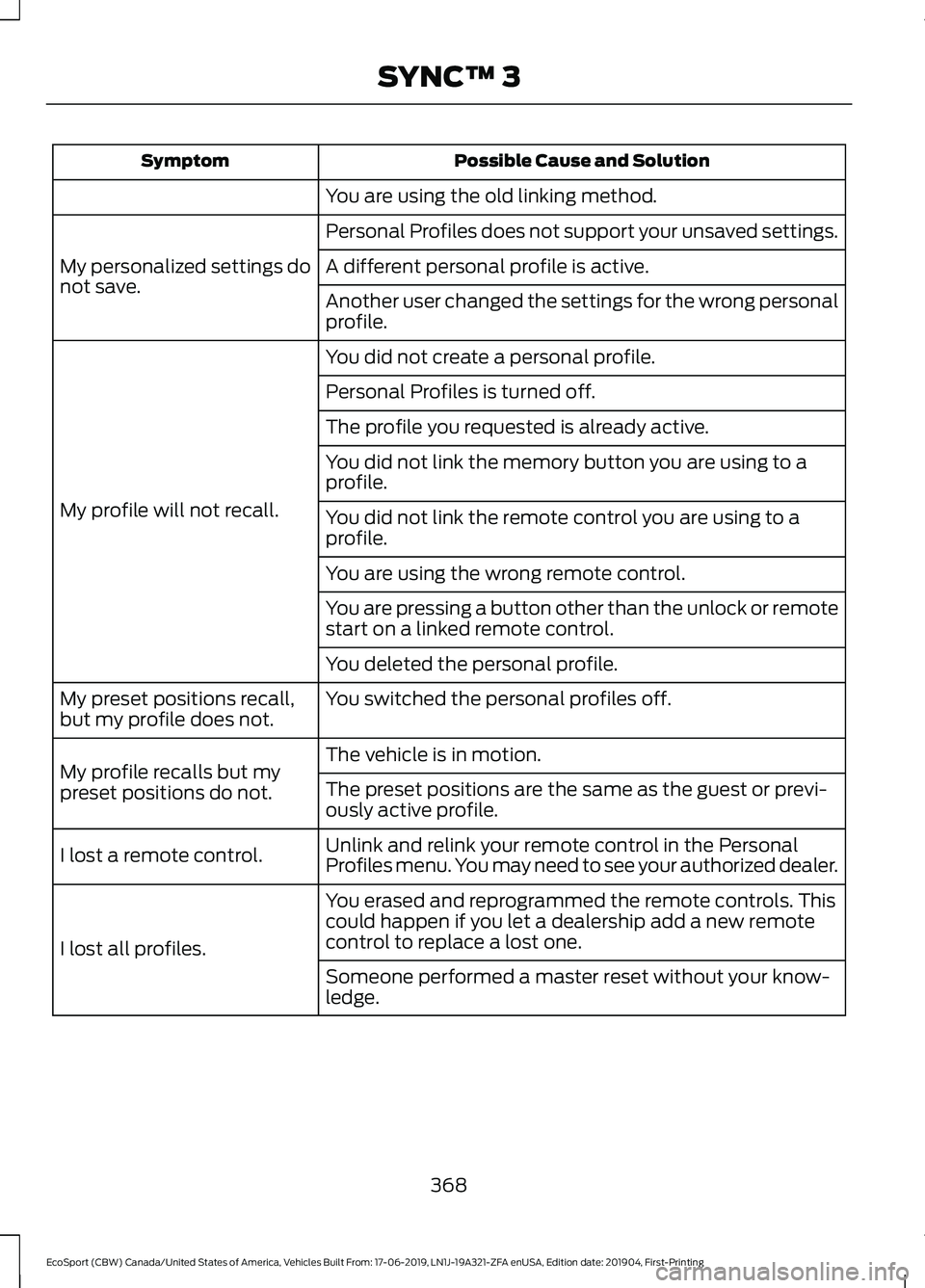
Possible Cause and SolutionSymptom
You are using the old linking method.
Personal Profiles does not support your unsaved settings.
My personalized settings donot save.A different personal profile is active.
Another user changed the settings for the wrong personalprofile.
You did not create a personal profile.
My profile will not recall.
Personal Profiles is turned off.
The profile you requested is already active.
You did not link the memory button you are using to aprofile.
You did not link the remote control you are using to aprofile.
You are using the wrong remote control.
You are pressing a button other than the unlock or remotestart on a linked remote control.
You deleted the personal profile.
You switched the personal profiles off.My preset positions recall,but my profile does not.
The vehicle is in motion.My profile recalls but mypreset positions do not.The preset positions are the same as the guest or previ-ously active profile.
Unlink and relink your remote control in the PersonalProfiles menu. You may need to see your authorized dealer.I lost a remote control.
You erased and reprogrammed the remote controls. Thiscould happen if you let a dealership add a new remotecontrol to replace a lost one.I lost all profiles.
Someone performed a master reset without your know-ledge.
368
EcoSport (CBW) Canada/United States of America, Vehicles Built From: 17-06-2019, LN1J-19A321-ZFA enUSA, Edition date: 201904, First-PrintingSYNC™ 3
Page 432 of 448
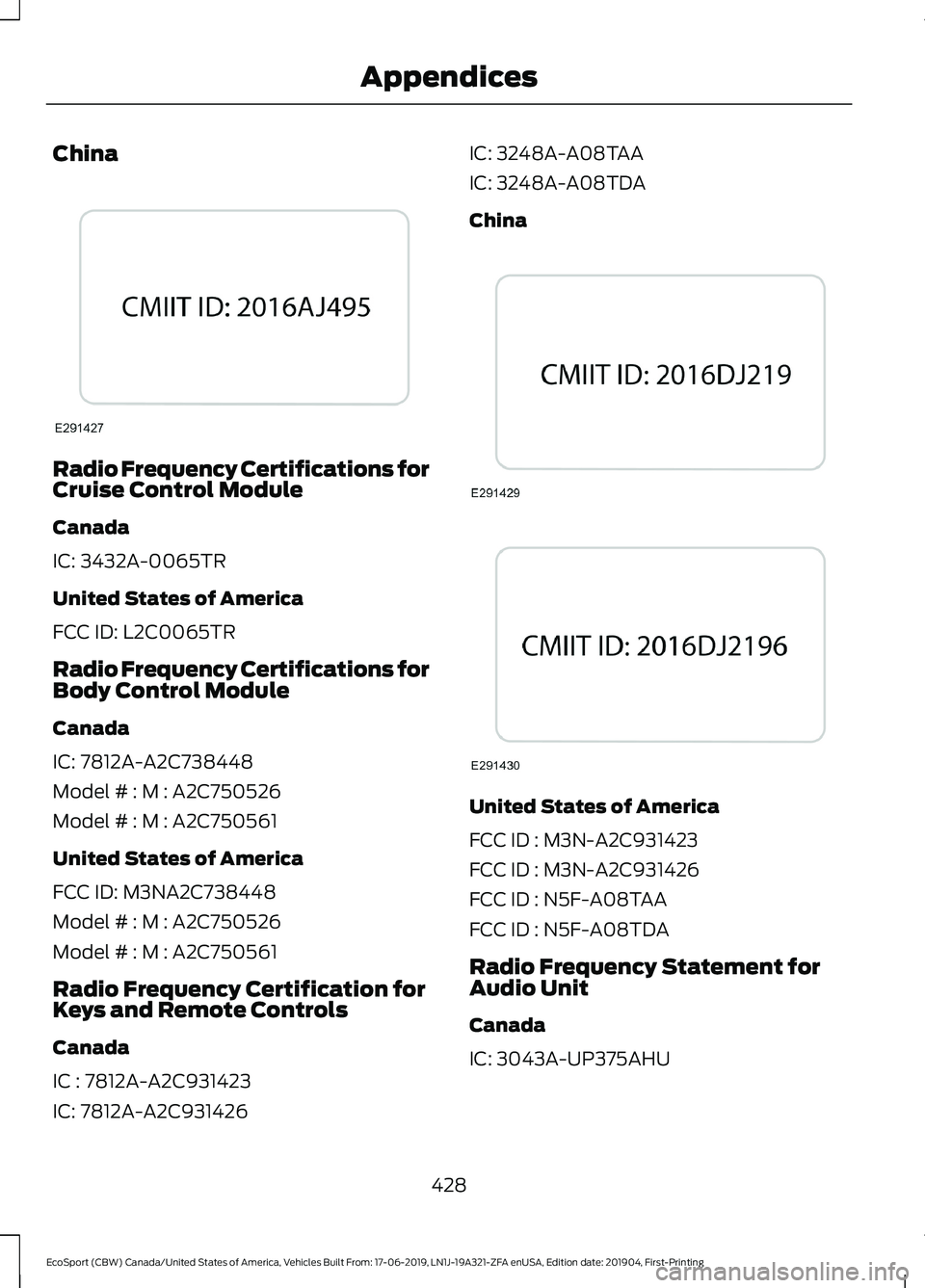
China
Radio Frequency Certifications forCruise Control Module
Canada
IC: 3432A-0065TR
United States of America
FCC ID: L2C0065TR
Radio Frequency Certifications forBody Control Module
Canada
IC: 7812A-A2C738448
Model # : M : A2C750526
Model # : M : A2C750561
United States of America
FCC ID: M3NA2C738448
Model # : M : A2C750526
Model # : M : A2C750561
Radio Frequency Certification forKeys and Remote Controls
Canada
IC : 7812A-A2C931423
IC: 7812A-A2C931426
IC: 3248A-A08TAA
IC: 3248A-A08TDA
China
United States of America
FCC ID : M3N-A2C931423
FCC ID : M3N-A2C931426
FCC ID : N5F-A08TAA
FCC ID : N5F-A08TDA
Radio Frequency Statement forAudio Unit
Canada
IC: 3043A-UP375AHU
428
EcoSport (CBW) Canada/United States of America, Vehicles Built From: 17-06-2019, LN1J-19A321-ZFA enUSA, Edition date: 201904, First-PrintingAppendices
Page 441 of 448
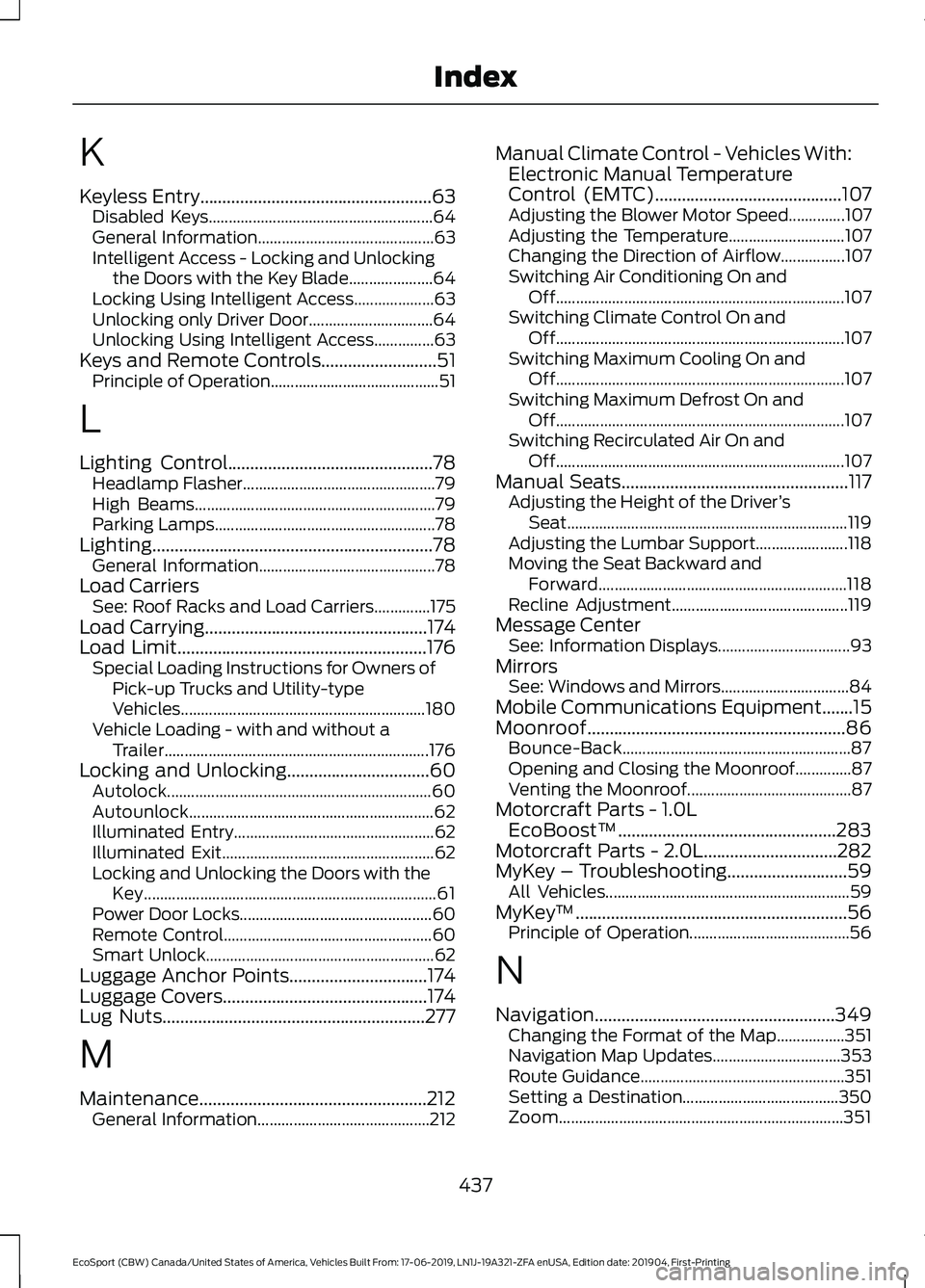
K
Keyless Entry....................................................63Disabled Keys........................................................64General Information............................................63Intelligent Access - Locking and Unlockingthe Doors with the Key Blade.....................64Locking Using Intelligent Access....................63Unlocking only Driver Door...............................64Unlocking Using Intelligent Access...............63Keys and Remote Controls..........................51Principle of Operation..........................................51
L
Lighting Control..............................................78Headlamp Flasher................................................79High Beams............................................................79Parking Lamps.......................................................78Lighting...............................................................78General Information............................................78Load CarriersSee: Roof Racks and Load Carriers..............175Load Carrying..................................................174Load Limit........................................................176Special Loading Instructions for Owners ofPick-up Trucks and Utility-typeVehicles.............................................................180Vehicle Loading - with and without aTrailer..................................................................176Locking and Unlocking................................60Autolock..................................................................60Autounlock.............................................................62Illuminated Entry..................................................62Illuminated Exit.....................................................62Locking and Unlocking the Doors with theKey.........................................................................61Power Door Locks................................................60Remote Control....................................................60Smart Unlock.........................................................62Luggage Anchor Points...............................174Luggage Covers..............................................174Lug Nuts...........................................................277
M
Maintenance...................................................212General Information...........................................212
Manual Climate Control - Vehicles With:Electronic Manual TemperatureControl (EMTC)..........................................107Adjusting the Blower Motor Speed..............107Adjusting the Temperature.............................107Changing the Direction of Airflow................107Switching Air Conditioning On andOff........................................................................107Switching Climate Control On andOff........................................................................107Switching Maximum Cooling On andOff........................................................................107Switching Maximum Defrost On andOff........................................................................107Switching Recirculated Air On andOff........................................................................107Manual Seats...................................................117Adjusting the Height of the Driver’sSeat......................................................................119Adjusting the Lumbar Support.......................118Moving the Seat Backward andForward..............................................................118Recline Adjustment............................................119Message CenterSee: Information Displays.................................93MirrorsSee: Windows and Mirrors................................84Mobile Communications Equipment.......15Moonroof..........................................................86Bounce-Back.........................................................87Opening and Closing the Moonroof..............87Venting the Moonroof.........................................87Motorcraft Parts - 1.0LEcoBoost™.................................................283Motorcraft Parts - 2.0L..............................282MyKey – Troubleshooting...........................59All Vehicles.............................................................59MyKey™.............................................................56Principle of Operation........................................56
N
Navigation......................................................349Changing the Format of the Map.................351Navigation Map Updates................................353Route Guidance...................................................351Setting a Destination.......................................350Zoom.......................................................................351
437
EcoSport (CBW) Canada/United States of America, Vehicles Built From: 17-06-2019, LN1J-19A321-ZFA enUSA, Edition date: 201904, First-PrintingIndex
Page 442 of 448
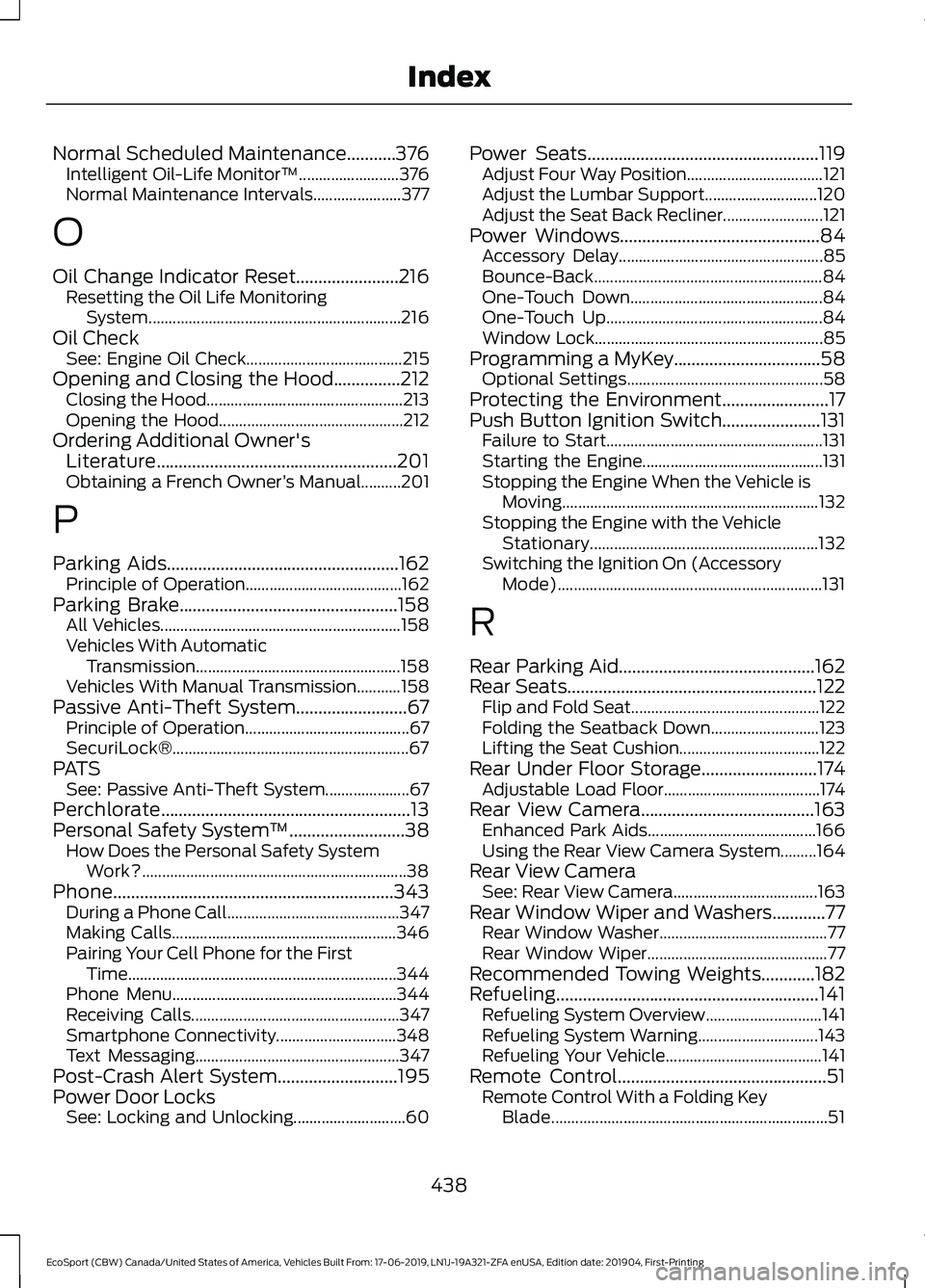
Normal Scheduled Maintenance...........376Intelligent Oil-Life Monitor™.........................376Normal Maintenance Intervals......................377
O
Oil Change Indicator Reset.......................216Resetting the Oil Life MonitoringSystem...............................................................216Oil CheckSee: Engine Oil Check.......................................215Opening and Closing the Hood...............212Closing the Hood.................................................213Opening the Hood..............................................212Ordering Additional Owner'sLiterature......................................................201Obtaining a French Owner’s Manual..........201
P
Parking Aids....................................................162Principle of Operation.......................................162Parking Brake.................................................158All Vehicles............................................................158Vehicles With AutomaticTransmission...................................................158Vehicles With Manual Transmission...........158Passive Anti-Theft System.........................67Principle of Operation.........................................67SecuriLock®...........................................................67PATSSee: Passive Anti-Theft System.....................67Perchlorate........................................................13Personal Safety System™..........................38How Does the Personal Safety SystemWork?..................................................................38Phone...............................................................343During a Phone Call...........................................347Making Calls........................................................346Pairing Your Cell Phone for the FirstTime...................................................................344Phone Menu........................................................344Receiving Calls....................................................347Smartphone Connectivity..............................348Text Messaging...................................................347Post-Crash Alert System...........................195Power Door LocksSee: Locking and Unlocking............................60
Power Seats....................................................119Adjust Four Way Position..................................121Adjust the Lumbar Support............................120Adjust the Seat Back Recliner.........................121Power Windows.............................................84Accessory Delay...................................................85Bounce-Back.........................................................84One-Touch Down................................................84One-Touch Up......................................................84Window Lock.........................................................85Programming a MyKey.................................58Optional Settings.................................................58Protecting the Environment........................17Push Button Ignition Switch......................131Failure to Start......................................................131Starting the Engine.............................................131Stopping the Engine When the Vehicle isMoving................................................................132Stopping the Engine with the VehicleStationary.........................................................132Switching the Ignition On (AccessoryMode)..................................................................131
R
Rear Parking Aid............................................162Rear Seats........................................................122Flip and Fold Seat...............................................122Folding the Seatback Down...........................123Lifting the Seat Cushion...................................122Rear Under Floor Storage..........................174Adjustable Load Floor.......................................174Rear View Camera.......................................163Enhanced Park Aids..........................................166Using the Rear View Camera System.........164Rear View CameraSee: Rear View Camera....................................163Rear Window Wiper and Washers............77Rear Window Washer..........................................77Rear Window Wiper.............................................77Recommended Towing Weights............182Refueling...........................................................141Refueling System Overview.............................141Refueling System Warning..............................143Refueling Your Vehicle.......................................141Remote Control...............................................51Remote Control With a Folding KeyBlade.....................................................................51
438
EcoSport (CBW) Canada/United States of America, Vehicles Built From: 17-06-2019, LN1J-19A321-ZFA enUSA, Edition date: 201904, First-PrintingIndex
Page 443 of 448
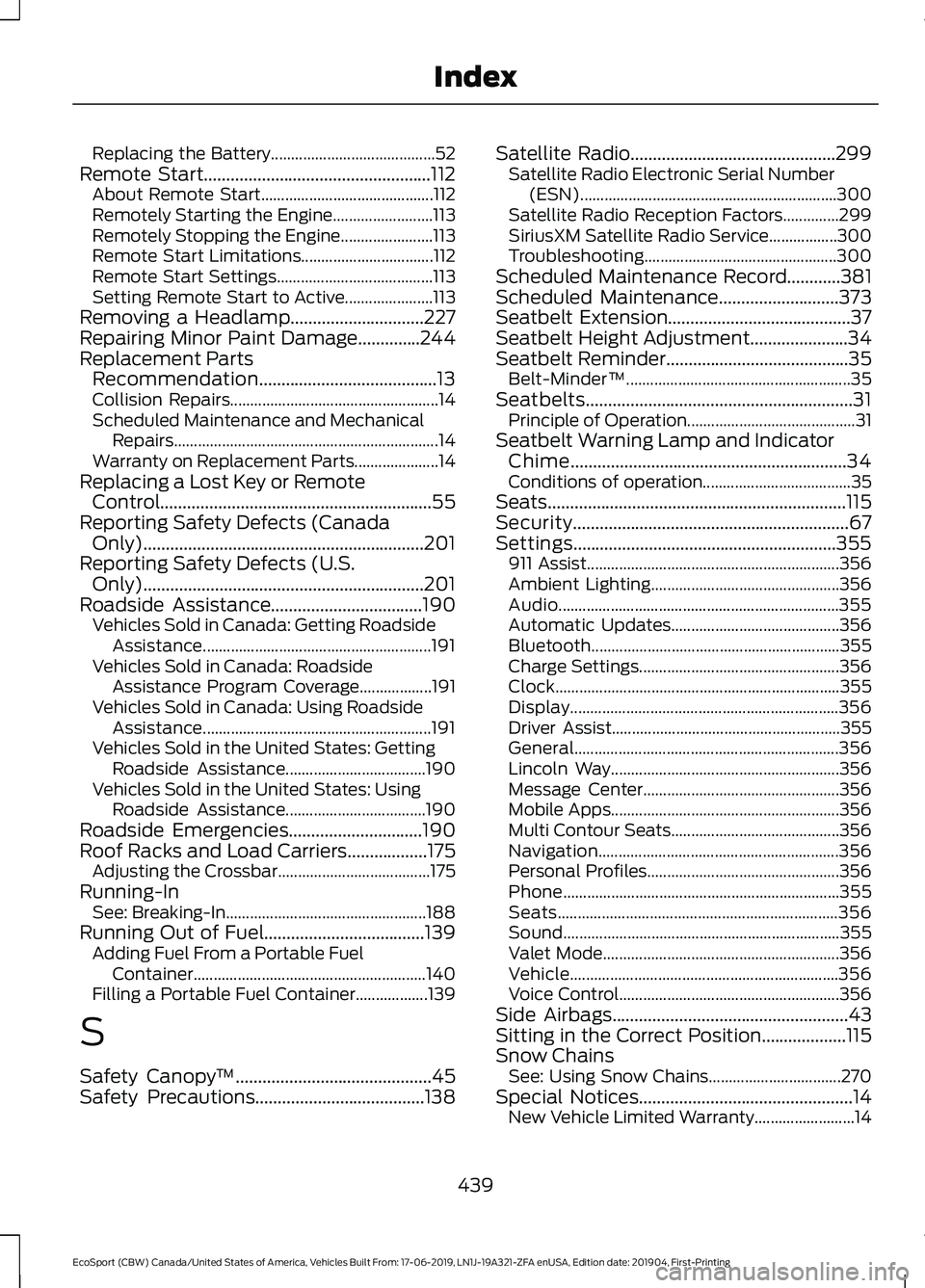
Replacing the Battery.........................................52Remote Start...................................................112About Remote Start...........................................112Remotely Starting the Engine.........................113Remotely Stopping the Engine.......................113Remote Start Limitations.................................112Remote Start Settings.......................................113Setting Remote Start to Active......................113Removing a Headlamp..............................227Repairing Minor Paint Damage..............244Replacement PartsRecommendation........................................13Collision Repairs....................................................14Scheduled Maintenance and MechanicalRepairs..................................................................14Warranty on Replacement Parts.....................14Replacing a Lost Key or RemoteControl.............................................................55Reporting Safety Defects (CanadaOnly)...............................................................201Reporting Safety Defects (U.S.Only)...............................................................201Roadside Assistance..................................190Vehicles Sold in Canada: Getting RoadsideAssistance.........................................................191Vehicles Sold in Canada: RoadsideAssistance Program Coverage..................191Vehicles Sold in Canada: Using RoadsideAssistance.........................................................191Vehicles Sold in the United States: GettingRoadside Assistance...................................190Vehicles Sold in the United States: UsingRoadside Assistance...................................190Roadside Emergencies..............................190Roof Racks and Load Carriers..................175Adjusting the Crossbar......................................175Running-InSee: Breaking-In..................................................188Running Out of Fuel....................................139Adding Fuel From a Portable FuelContainer..........................................................140Filling a Portable Fuel Container..................139
S
Safety Canopy™............................................45Safety Precautions......................................138
Satellite Radio..............................................299Satellite Radio Electronic Serial Number(ESN)................................................................300Satellite Radio Reception Factors..............299SiriusXM Satellite Radio Service.................300Troubleshooting................................................300Scheduled Maintenance Record............381Scheduled Maintenance...........................373Seatbelt Extension.........................................37Seatbelt Height Adjustment......................34Seatbelt Reminder.........................................35Belt-Minder™........................................................35Seatbelts............................................................31Principle of Operation..........................................31Seatbelt Warning Lamp and IndicatorChime..............................................................34Conditions of operation.....................................35Seats...................................................................115Security..............................................................67Settings...........................................................355911 Assist...............................................................356Ambient Lighting...............................................356Audio......................................................................355Automatic Updates..........................................356Bluetooth..............................................................355Charge Settings..................................................356Clock.......................................................................355Display...................................................................356Driver Assist.........................................................355General..................................................................356Lincoln Way.........................................................356Message Center.................................................356Mobile Apps.........................................................356Multi Contour Seats..........................................356Navigation............................................................356Personal Profiles................................................356Phone.....................................................................355Seats......................................................................356Sound.....................................................................355Valet Mode...........................................................356Vehicle...................................................................356Voice Control.......................................................356Side Airbags.....................................................43Sitting in the Correct Position...................115Snow ChainsSee: Using Snow Chains.................................270Special Notices................................................14New Vehicle Limited Warranty.........................14
439
EcoSport (CBW) Canada/United States of America, Vehicles Built From: 17-06-2019, LN1J-19A321-ZFA enUSA, Edition date: 201904, First-PrintingIndex