wheel FORD EDGE 2014 1.G Manual Online
[x] Cancel search | Manufacturer: FORD, Model Year: 2014, Model line: EDGE, Model: FORD EDGE 2014 1.GPages: 540, PDF Size: 7.52 MB
Page 334 of 540
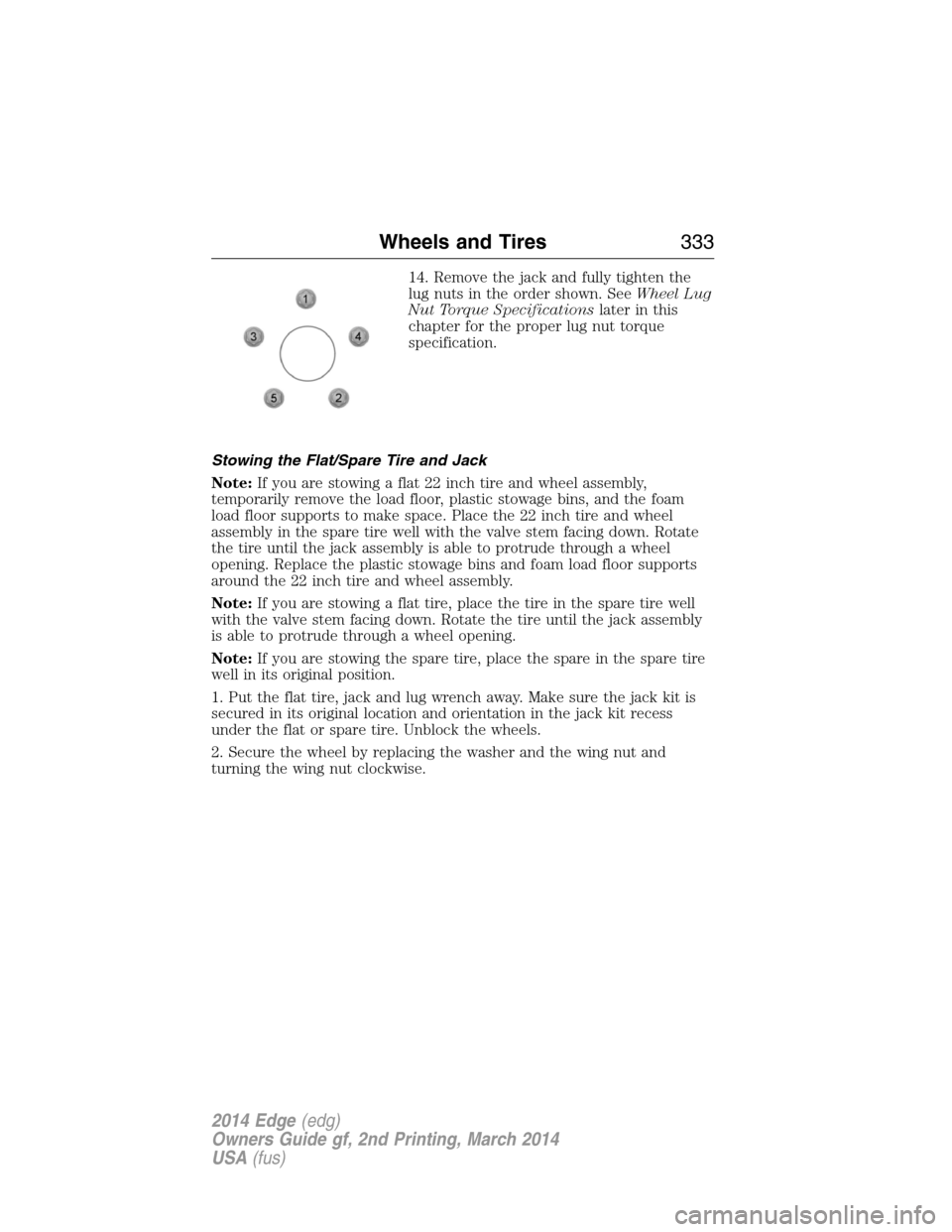
14. Remove the jack and fully tighten the
lug nuts in the order shown. SeeWheel Lug
Nut Torque Specificationslater in this
chapter for the proper lug nut torque
specification.
Stowing the Flat/Spare Tire and Jack
Note:If you are stowing a flat 22 inch tire and wheel assembly,
temporarily remove the load floor, plastic stowage bins, and the foam
load floor supports to make space. Place the 22 inch tire and wheel
assembly in the spare tire well with the valve stem facing down. Rotate
the tire until the jack assembly is able to protrude through a wheel
opening. Replace the plastic stowage bins and foam load floor supports
around the 22 inch tire and wheel assembly.
Note:If you are stowing a flat tire, place the tire in the spare tire well
with the valve stem facing down. Rotate the tire until the jack assembly
is able to protrude through a wheel opening.
Note:If you are stowing the spare tire, place the spare in the spare tire
well in its original position.
1. Put the flat tire, jack and lug wrench away. Make sure the jack kit is
secured in its original location and orientation in the jack kit recess
under the flat or spare tire. Unblock the wheels.
2. Secure the wheel by replacing the washer and the wing nut and
turning the wing nut clockwise.
Wheels and Tires333
2014 Edge(edg)
Owners Guide gf, 2nd Printing, March 2014
USA(fus)
Page 335 of 540
TECHNICAL SPECIFICATIONS
Wheel Lug Nut Torque Specifications
WARNING:When a wheel is installed, always remove any
corrosion, dirt or foreign materials present on the mounting
surfaces of the wheel or the surface of the wheel hub, brake drum or
brake disc that contacts the wheel. Make sure that any fasteners that
attach the rotor to the hub are secured so they do not interfere with
the mounting surfaces of the wheel. Installing wheels without correct
metal-to-metal contact at the wheel mounting surfaces can cause the
wheel nuts to loosen and the wheel to come off while your vehicle is in
motion, resulting in loss of control.
Retighten the lug nuts to the specified torque within 100 miles
(160 kilometers) after any wheel disturbance (such as rotation, flat tire,
wheel removal).
Lug nut socket
size/Bolt sizeWheel lug nut torque*
ft-lb N•m
12x 20 100 135
* Torque specifications are for nut and bolt threads free of dirt and
rust. Use only Ford recommended replacement fasteners.
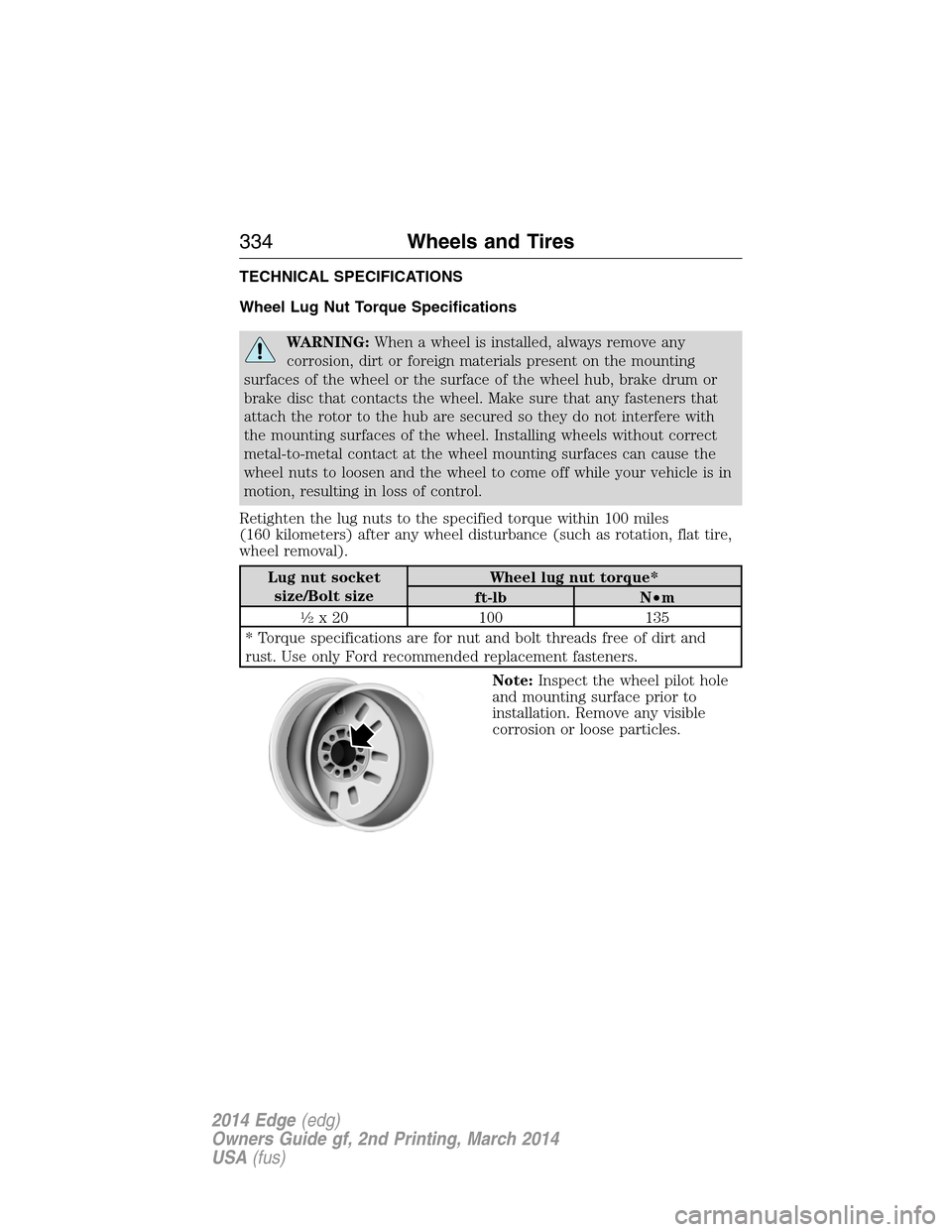
Note:Inspect the wheel pilot hole
and mounting surface prior to
installation. Remove any visible
corrosion or loose particles.
334Wheels and Tires
2014 Edge(edg)
Owners Guide gf, 2nd Printing, March 2014
USA(fus)
Page 338 of 540
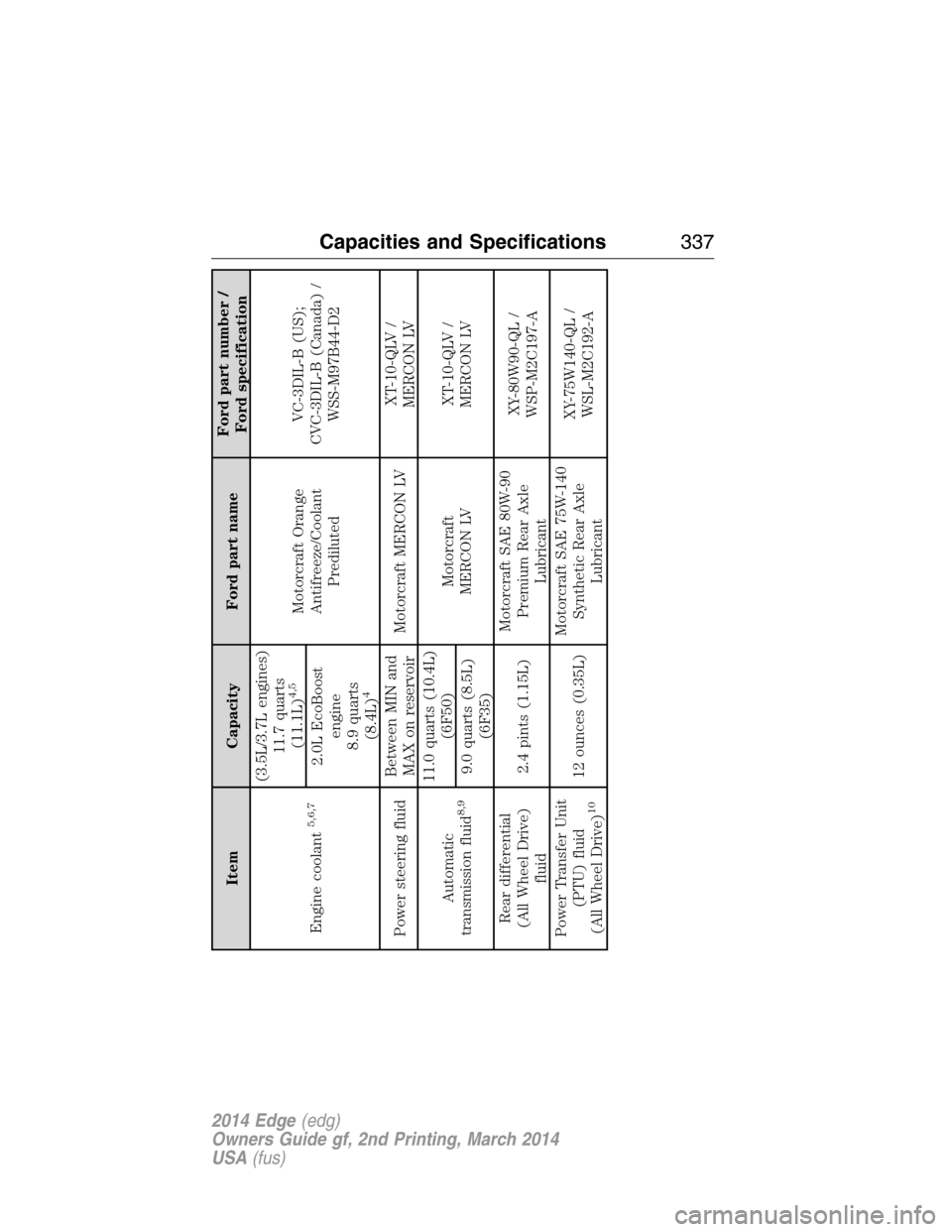
Item Capacity Ford part nameFord part number /
Ford specification
Engine coolant
5,6,7
(3.5L/3.7L engines)
11.7 quarts
(11.1L)
4,5
Motorcraft Orange
Antifreeze/Coolant
PredilutedVC-3DIL-B (US);
CVC-3DIL-B (Canada) /
WSS-M97B44-D2 2.0L EcoBoost
engine
8.9 quarts
(8.4L)
4
Power steering fluidBetween MIN and
MAX on reservoirMotorcraft MERCON LVXT-10-QLV /
MERCON LV
Automatic
transmission fluid
8,9
11.0 quarts (10.4L)
(6F50)
Motorcraft
MERCON LVXT-10-QLV /
MERCON LV
9.0 quarts (8.5L)
(6F35)
Rear differential
(All Wheel Drive)
fluid2.4 pints (1.15L)Motorcraft SAE 80W-90
Premium Rear Axle
LubricantXY-80W90-QL /
WSP-M2C197-A
Power Transfer Unit
(PTU) fluid
(All Wheel Drive)
10
12 ounces (0.35L)Motorcraft SAE 75W-140
Synthetic Rear Axle
LubricantXY-75W140-QL /
WSL-M2C192-A
Capacities and Specifications337
2014 Edge(edg)
Owners Guide gf, 2nd Printing, March 2014
USA(fus)
Page 339 of 540
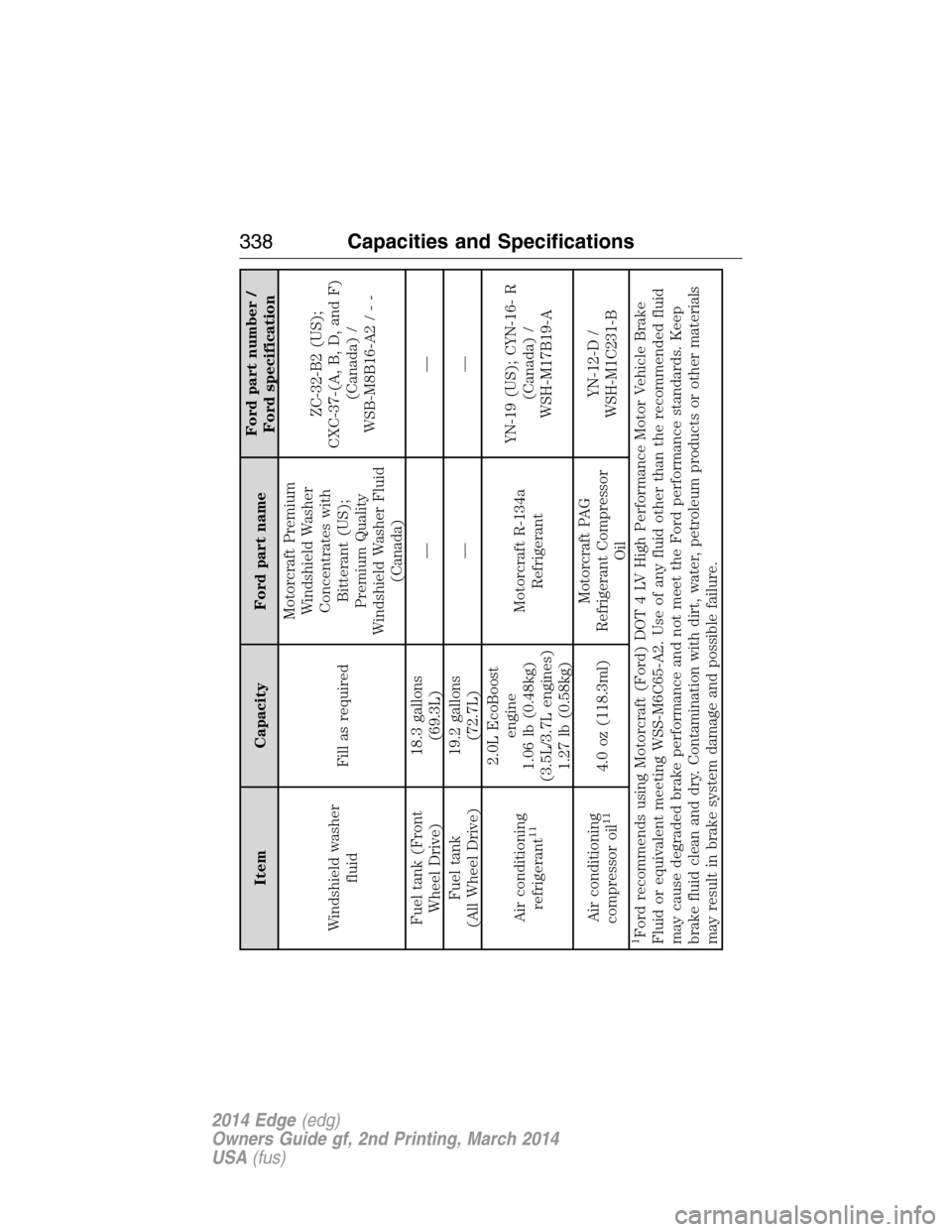
Item Capacity Ford part nameFord part number /
Ford specification
Windshield washer
fluidFill as requiredMotorcraft Premium
Windshield Washer
Concentrates with
Bitterant (US);
Premium Quality
Windshield Washer Fluid
(Canada)ZC-32-B2 (US);
CXC-37-(A, B, D, and F)
(Canada) /
WSB-M8B16-A2/--
Fuel tank (Front
Wheel Drive)18.3 gallons
(69.3L)——
Fuel tank
(All Wheel Drive)19.2 gallons
(72.7L)——
Air conditioning
refrigerant
11
2.0L EcoBoost
engine
1.06 lb (0.48kg)
(3.5L/3.7L engines)
1.27 lb (0.58kg)Motorcraft R-134a
RefrigerantYN-19 (US); CYN-16- R
(Canada) /
WSH-M17B19-A
Air conditioning
compressor oil
11
4.0 oz (118.3ml)Motorcraft PAG
Refrigerant Compressor
OilYN-12-D /
WSH-M1C231-B
1Ford recommends using Motorcraft (Ford) DOT 4 LV High Performance Motor Vehicle Brake
Fluid or equivalent meeting WSS-M6C65-A2. Use of any fluid other than the recommended fluid
may cause degraded brake performance and not meet the Ford performance standards. Keep
brake fluid clean and dry. Contamination with dirt, water, petroleum products or other materials
may result in brake system damage and possible failure.
338Capacities and Specifications
2014 Edge(edg)
Owners Guide gf, 2nd Printing, March 2014
USA(fus)
Page 345 of 540
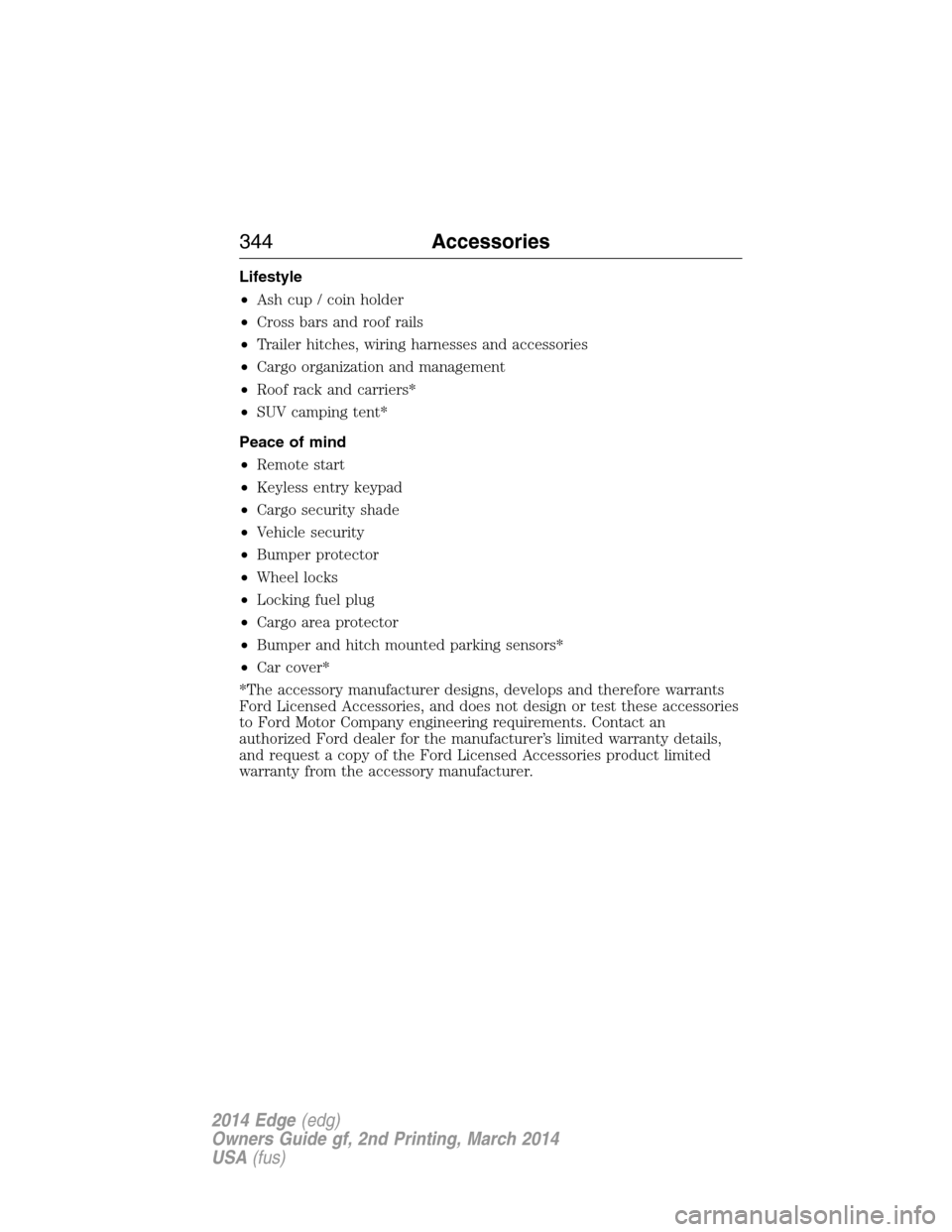
Lifestyle
•Ash cup / coin holder
•Cross bars and roof rails
•Trailer hitches, wiring harnesses and accessories
•Cargo organization and management
•Roof rack and carriers*
•SUV camping tent*
Peace of mind
•Remote start
•Keyless entry keypad
•Cargo security shade
•Vehicle security
•Bumper protector
•Wheel locks
•Locking fuel plug
•Cargo area protector
•Bumper and hitch mounted parking sensors*
•Car cover*
*The accessory manufacturer designs, develops and therefore warrants
Ford Licensed Accessories, and does not design or test these accessories
to Ford Motor Company engineering requirements. Contact an
authorized Ford dealer for the manufacturer’s limited warranty details,
and request a copy of the Ford Licensed Accessories product limited
warranty from the accessory manufacturer.
344Accessories
2014 Edge(edg)
Owners Guide gf, 2nd Printing, March 2014
USA(fus)
Page 371 of 540
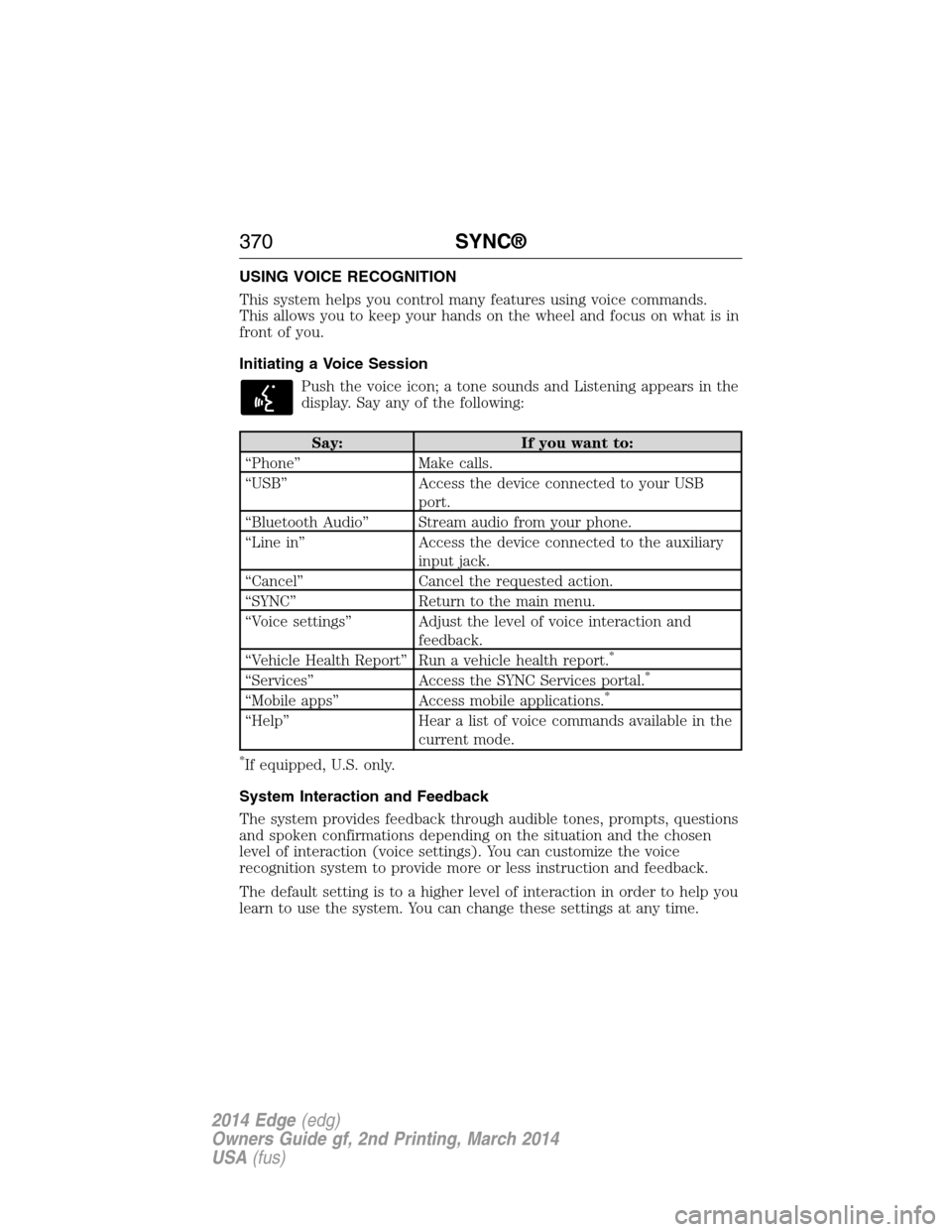
USING VOICE RECOGNITION
This system helps you control many features using voice commands.
This allows you to keep your hands on the wheel and focus on what is in
front of you.
Initiating a Voice Session
Push the voice icon; a tone sounds and Listening appears in the
display. Say any of the following:
Say: If you want to:
“Phone” Make calls.
“USB” Access the device connected to your USB
port.
“Bluetooth Audio” Stream audio from your phone.
“Line in” Access the device connected to the auxiliary
input jack.
“Cancel” Cancel the requested action.
“SYNC” Return to the main menu.
“Voice settings” Adjust the level of voice interaction and
feedback.
“Vehicle Health Report” Run a vehicle health report.
*
“Services” Access the SYNC Services portal.*
“Mobile apps” Access mobile applications.*
“Help” Hear a list of voice commands available in the
current mode.
*If equipped, U.S. only.
System Interaction and Feedback
The system provides feedback through audible tones, prompts, questions
and spoken confirmations depending on the situation and the chosen
level of interaction (voice settings). You can customize the voice
recognition system to provide more or less instruction and feedback.
The default setting is to a higher level of interaction in order to help you
learn to use the system. You can change these settings at any time.
370SYNC®
2014 Edge(edg)
Owners Guide gf, 2nd Printing, March 2014
USA(fus)
Page 391 of 540
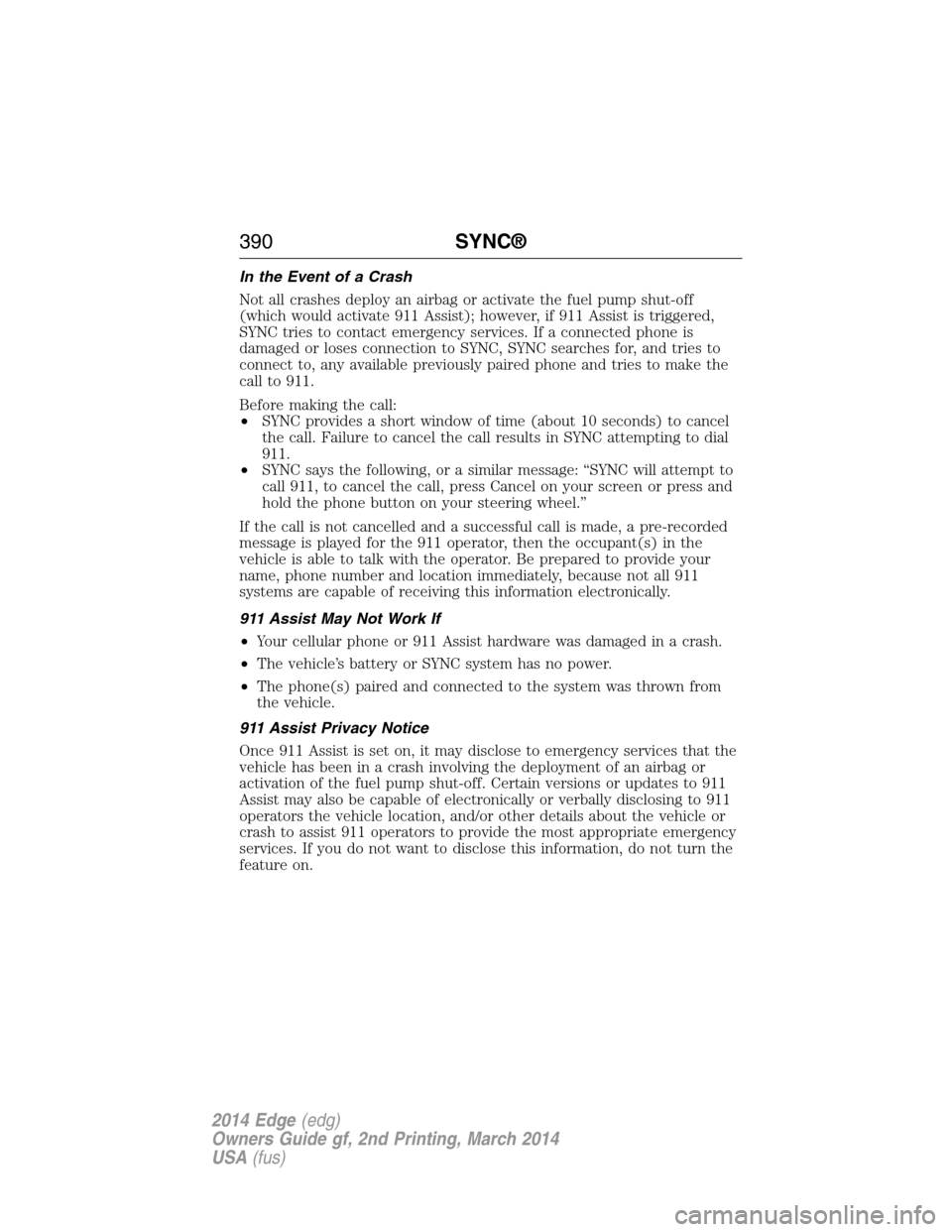
In the Event of a Crash
Not all crashes deploy an airbag or activate the fuel pump shut-off
(which would activate 911 Assist); however, if 911 Assist is triggered,
SYNC tries to contact emergency services. If a connected phone is
damaged or loses connection to SYNC, SYNC searches for, and tries to
connect to, any available previously paired phone and tries to make the
call to 911.
Before making the call:
•SYNC provides a short window of time (about 10 seconds) to cancel
the call. Failure to cancel the call results in SYNC attempting to dial
911.
•SYNC says the following, or a similar message: “SYNC will attempt to
call 911, to cancel the call, press Cancel on your screen or press and
hold the phone button on your steering wheel.”
If the call is not cancelled and a successful call is made, a pre-recorded
message is played for the 911 operator, then the occupant(s) in the
vehicle is able to talk with the operator. Be prepared to provide your
name, phone number and location immediately, because not all 911
systems are capable of receiving this information electronically.
911 Assist May Not Work If
•Your cellular phone or 911 Assist hardware was damaged in a crash.
•The vehicle’s battery or SYNC system has no power.
•The phone(s) paired and connected to the system was thrown from
the vehicle.
911 Assist Privacy Notice
Once 911 Assist is set on, it may disclose to emergency services that the
vehicle has been in a crash involving the deployment of an airbag or
activation of the fuel pump shut-off. Certain versions or updates to 911
Assist may also be capable of electronically or verbally disclosing to 911
operators the vehicle location, and/or other details about the vehicle or
crash to assist 911 operators to provide the most appropriate emergency
services. If you do not want to disclose this information, do not turn the
feature on.
390SYNC®
2014 Edge(edg)
Owners Guide gf, 2nd Printing, March 2014
USA(fus)
Page 396 of 540
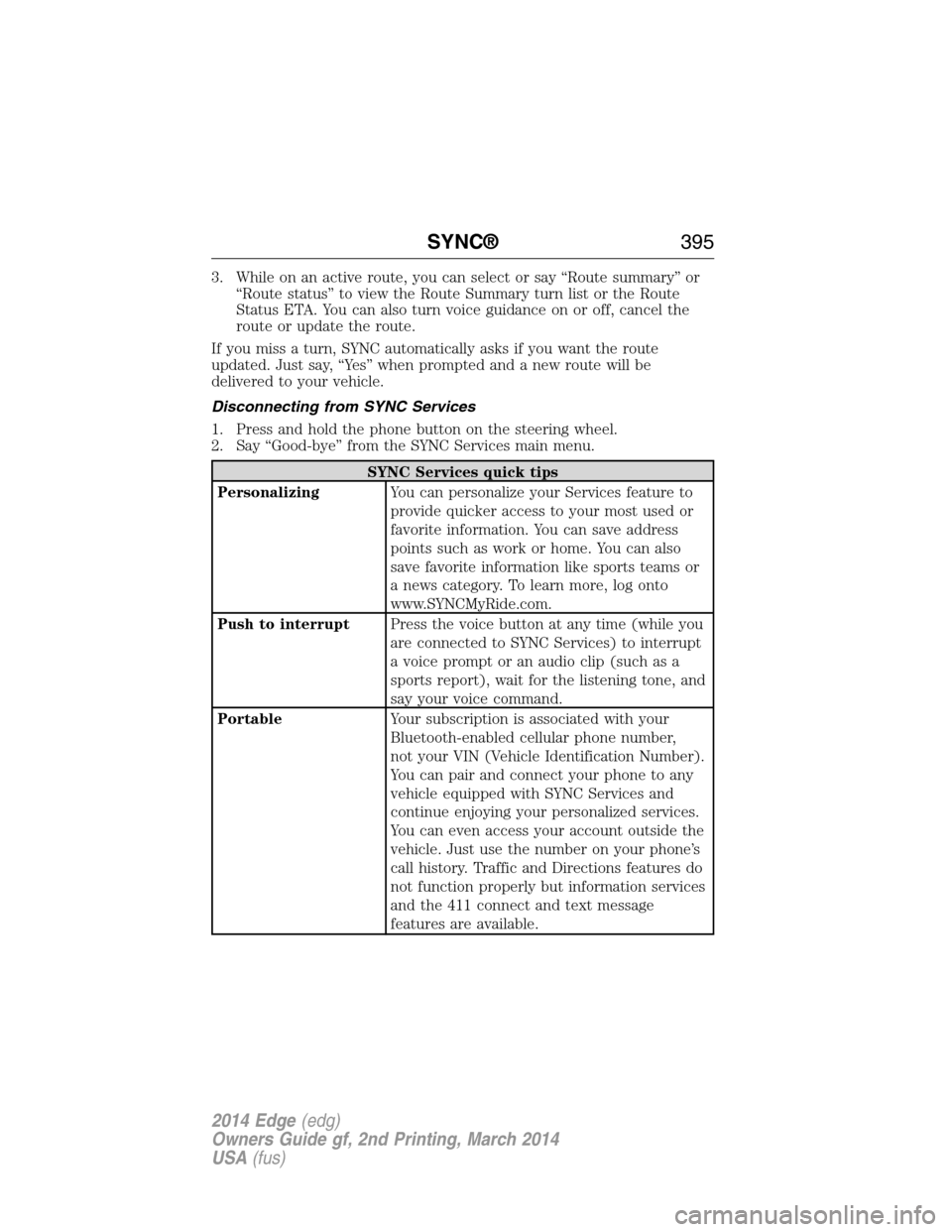
3. While on an active route, you can select or say “Route summary” or
“Route status” to view the Route Summary turn list or the Route
Status ETA. You can also turn voice guidance on or off, cancel the
route or update the route.
If you miss a turn, SYNC automatically asks if you want the route
updated. Just say, “Yes” when prompted and a new route will be
delivered to your vehicle.
Disconnecting from SYNC Services
1. Press and hold the phone button on the steering wheel.
2. Say “Good-bye” from the SYNC Services main menu.
SYNC Services quick tips
PersonalizingYou can personalize your Services feature to
provide quicker access to your most used or
favorite information. You can save address
points such as work or home. You can also
save favorite information like sports teams or
a news category. To learn more, log onto
www.SYNCMyRide.com.
Push to interruptPress the voice button at any time (while you
are connected to SYNC Services) to interrupt
a voice prompt or an audio clip (such as a
sports report), wait for the listening tone, and
say your voice command.
PortableYour subscription is associated with your
Bluetooth-enabled cellular phone number,
not your VIN (Vehicle Identification Number).
You can pair and connect your phone to any
vehicle equipped with SYNC Services and
continue enjoying your personalized services.
You can even access your account outside the
vehicle. Just use the number on your phone’s
call history. Traffic and Directions features do
not function properly but information services
and the 411 connect and text message
features are available.
SYNC®395
2014 Edge(edg)
Owners Guide gf, 2nd Printing, March 2014
USA(fus)
Page 397 of 540
SYNC AppLink™
Note:This feature is only available in the United States.
Note:You must pair and connect your smartphone to SYNC to access
AppLink.
Note:iPhone users need to connect the phone to the USB port in order
to start the application. We recommend you lock your iPhone after
starting an application.
Note:The AppLink feature is not available if your vehicle is equipped
with the MyFord Touch or MyLincoln Touch system.
Depending on your display type, you can access AppLink from the media
menu, the phone menu, or by using voice commands. Once an app is
running through AppLink, you can control main features of the app
through voice commands and steering wheel controls.
To Access Using the Phone Menu
1. Press the phone button to access the SYNC phone menu on-screen.
2. Scroll to Mobile Apps and pressOKto access a list of available
applications.
3. Scroll through the list of available applications and pressOKto
select a particular app.
4. Once an app is running through SYNC, you can access an app’s menu
by pressing theMENUbutton to first access the SYNC menu.
5. Select “SYNC-Media” by pressingOK.
6. Scroll until “
Menu), then pressOK.From here, you can access an application’s
features, such as Thumbs up, Thumbs down, etc. For more
information, please visit www.SYNCMyRide.com.
To Access Using the Media Menu
1. PressAUXbutton on the center console.
2. Press MENU to access the SYNC menu.
3. Select “SYNC-Media” by pressingOK.
4. Then scroll to Mobile Apps and pressOKto access a list of available
applications.
5. Scroll through the list of available applications and pressOKto
select a particular app.
6. Once an app is running through SYNC, you can access an app’s menu
by pressing theMENUbutton to first access the SYNC menu.
396SYNC®
2014 Edge(edg)
Owners Guide gf, 2nd Printing, March 2014
USA(fus)
Page 426 of 540
ACCESSING AND ADJUSTING MODES THROUGH YOUR RIGHT
VEHICLE INFORMATION DISPLAY (IF EQUIPPED)
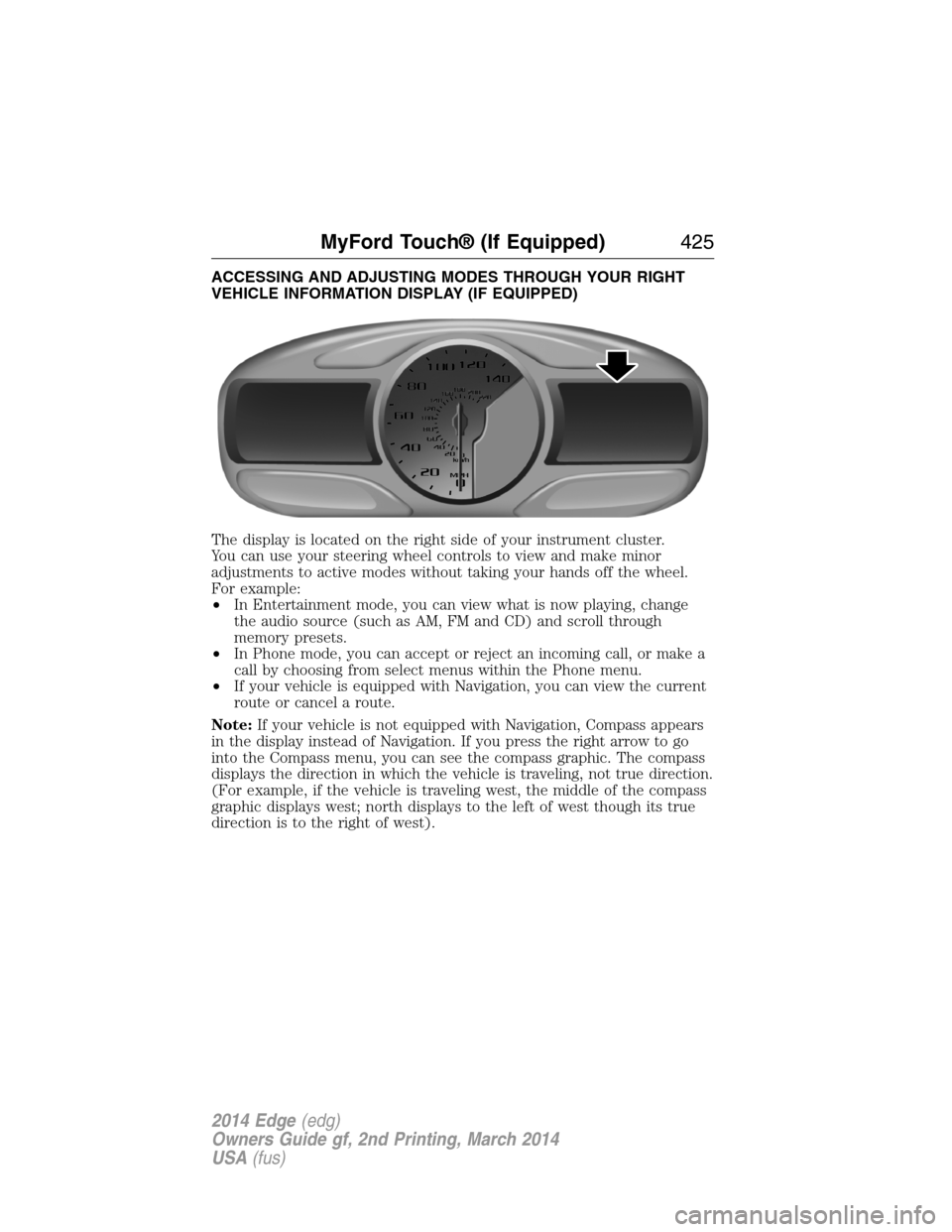
The display is located on the right side of your instrument cluster.
You can use your steering wheel controls to view and make minor
adjustments to active modes without taking your hands off the wheel.
For example:
•In Entertainment mode, you can view what is now playing, change
the audio source (such as AM, FM and CD) and scroll through
memory presets.
•In Phone mode, you can accept or reject an incoming call, or make a
call by choosing from select menus within the Phone menu.
•If your vehicle is equipped with Navigation, you can view the current
route or cancel a route.
Note:If your vehicle is not equipped with Navigation, Compass appears
in the display instead of Navigation. If you press the right arrow to go
into the Compass menu, you can see the compass graphic. The compass
displays the direction in which the vehicle is traveling, not true direction.
(For example, if the vehicle is traveling west, the middle of the compass
graphic displays west; north displays to the left of west though its true
direction is to the right of west).
MyFord Touch® (If Equipped)425
2014 Edge(edg)
Owners Guide gf, 2nd Printing, March 2014
USA(fus)