heating FORD EDGE 2015 2.G User Guide
[x] Cancel search | Manufacturer: FORD, Model Year: 2015, Model line: EDGE, Model: FORD EDGE 2015 2.GPages: 508, PDF Size: 6.2 MB
Page 203 of 508
The system may apply the brakes to slow
the vehicle to the new set speed. The set
speed displays continuously in the
information display while the system is
active.
Resuming the Set Speed
Press and release RES. The vehicle returns
to the previously set speed and gap setting.
The set speed displays continuously in the
information display while the system is
active.
Note:
Only use resume if you are aware of
the set speed and intend to return to it.
Automatic Cancellation
The system does not operate below
12 mph (20 km/h). An audible warning
sounds and the automatic braking releases
if the vehicle drops below this speed.
Hilly Condition Usage
You should select a lower gear position
when the system is active in situations
such as prolonged downhill driving on
steep grades, for example in mountainous
areas. The system needs additional engine
braking in these situations to reduce the
load on the vehicle ’s regular brake system
to prevent them from overheating.
Note: An audible warning sounds and the
system shuts down if it applies brakes for
an extended period of time. This allows the
brakes to cool down. The system functions
normally again when the brakes have cooled
down.
Switching Adaptive Cruise Control
Off
Press and release the
OFF button when
the system is in stand by mode or switch
the ignition off.
Note: The set speed memory erases when
you switch off the system. Detection Issues WARNING
On rare occasions, detection issues
can occur due to the road
infrastructures, for example bridges,
tunnels and safety barriers. In these cases,
the system may brake late or
unexpectedly. At all times, you are
responsible for controlling your vehicle,
supervising the system and intervening, if
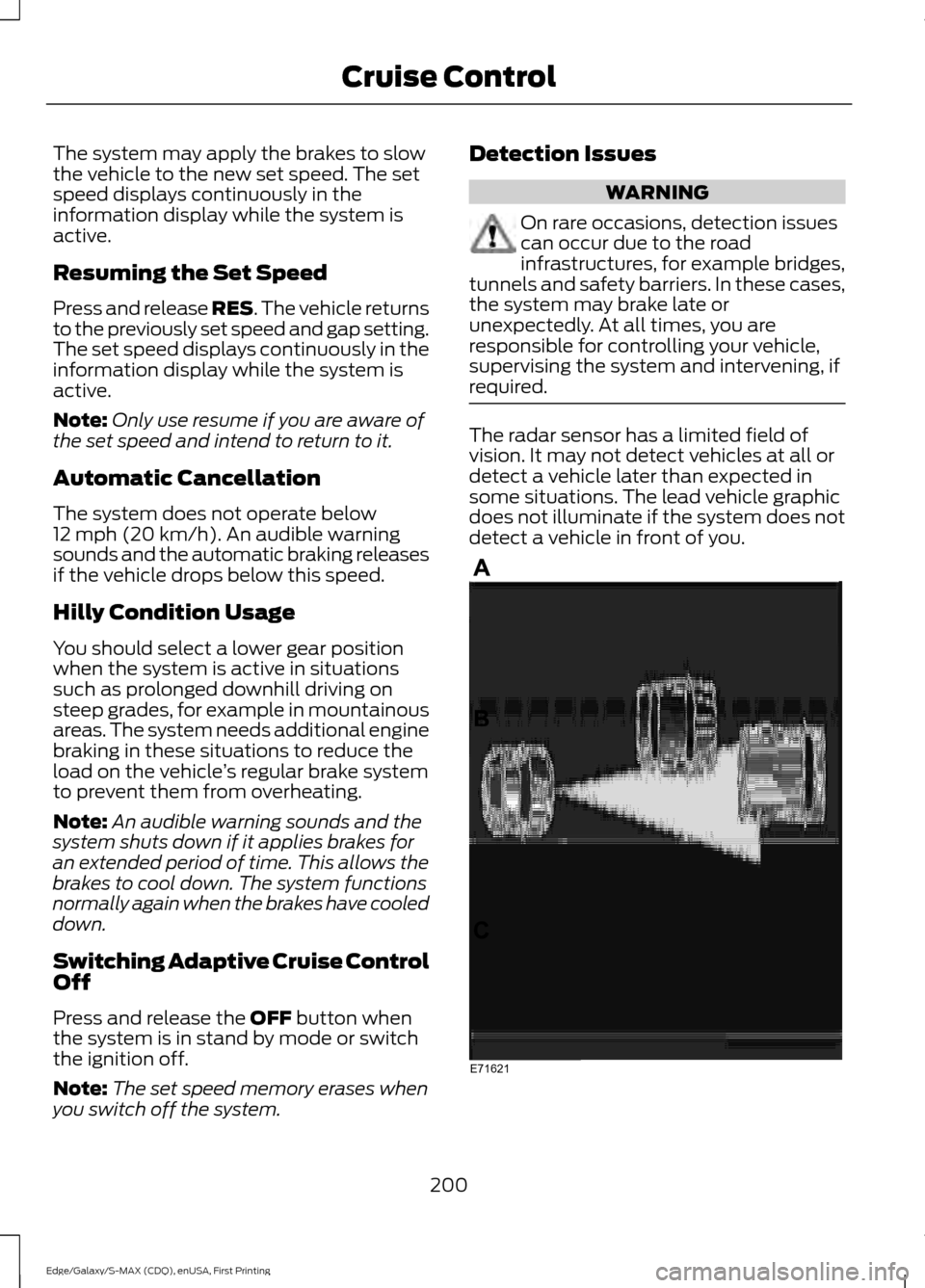
required. The radar sensor has a limited field of
vision. It may not detect vehicles at all or
detect a vehicle later than expected in
some situations. The lead vehicle graphic
does not illuminate if the system does not
detect a vehicle in front of you.
200
Edge/Galaxy/S-MAX (CDQ), enUSA, First Printing Cruise ControlE71621
Page 215 of 508
You cannot switch one or both systems
off when MyKey is used. See Principle of
Operation (page 54).
You can also have one or both systems
switched off permanently at an authorized
dealer. Once switched off, only an
authorized dealer can switch the system
back on.
STEERING
Electric Power Steering WARNING
The electric power steering system
has diagnostic checks that
continuously monitor the system. If
a fault is detected, a message displays in
the information display. Stop your vehicle
as soon as it is safe to do so. Switch the
ignition off. After at least 10 seconds,
switch the ignition on and watch the
information display for a steering system
warning message. If a steering system
warning message returns, have the system
checked by an authorized dealer. Your vehicle has an electric power steering
system. There is no fluid reservoir. No
maintenance is required.
If your vehicle loses electrical power while
you are driving, electric power steering
assistance is lost. The steering system still
operates and you can steer your vehicle
manually. Manually steering your vehicle
requires more effort.
Extreme continuous steering may increase
the effort required for you to steer your
vehicle. This increased effort prevents
overheating and permanent damage to
the steering system. You do not lose the
ability to steer your vehicle manually.
Typical steering and driving maneuvers
allow the system to cool and return to
normal operation. Steering Tips
If the steering wanders or pulls, check for:
•
Correct tire pressures.
• Uneven tire wear.
• Loose or worn suspension
components.
• Loose or worn steering components.
• Improper vehicle alignment.
Note: A high crown in the road or high
crosswinds may also make the steering
seem to wander or pull.
Adaptive Learning
The electronic power steering system
adaptive learning helps correct road
irregularities and improves overall handling
and steering feel. It communicates with
the brake system to help operate
advanced stability control and accident
avoidance systems. Additionally, whenever
the battery is disconnected or a new
battery installed, you must drive your
vehicle a short distance before the system
relearns the strategy and reactivates all
systems.
COLLISION WARNING SYSTEM
(If Equipped)
PRINCIPLE OF OPERATION WARNINGS
This system is an extra driving aid. It
does not replace your attention and
judgment, or the need to apply the
brakes. This system does NOT
automatically brake your vehicle. If you fail
to press the brake pedal when necessary,
you may collide with another vehicle.
212
Edge/Galaxy/S-MAX (CDQ), enUSA, First Printing Driving Aids
Page 267 of 508
WARNINGS
Do not add coolant further than the
MAX mark.
Checking the Engine Coolant
When the engine is cold, check the
concentration and level of the engine
coolant at the intervals listed in the
scheduled maintenance information. See
Scheduled Maintenance (page 455).
Note: Make sure that the coolant level is
between the MIN and MAX marks on the
coolant reservoir.
Note: Coolant expands when it is hot. The
level may extend beyond the MAX mark.
Note: If the level is at the MIN mark, below
the MIN mark, or empty, add coolant
immediately. See
Adding Engine Coolant
in this chapter.
Maintain coolant concentration within
48% to 50%, which equates to a freeze
point between -30°F (-34°C) and -34°F
(-37°C).
Note: For best results, coolant
concentration should be tested with a
refractometer such as Robinair® Coolant
and Battery Refractometer 75240. We do
not recommend the use of hydrometers or
coolant test strips for measuring coolant
concentrations.
Note: Automotive fluids are not
interchangeable. Do not use engine coolant,
antifreeze or windshield washer fluid outside
of its specified function and vehicle location.
Adding Engine Coolant
Note: Do not use stop leak pellets, cooling
system sealants or additives as they can
cause damage to the engine cooling or
heating systems. Your warranty may not
cover these damages. Note:
During normal vehicle operation, the
engine coolant may change color from
orange to pink or light red. As long as the
engine coolant is clear and uncontaminated,
any color change does not indicate the
engine coolant has degraded, nor does it
require the engine coolant to be drained, the
system to be flushed, or the engine coolant
to be replaced.
Do not mix different colors or types of
coolant in your vehicle. Mixing of engine
coolants may harm your engine ’s cooling
system. The use of an improper coolant
may harm engine and cooling system
components and may void the warranty.
Use prediluted engine coolant meeting the
Ford specification. See
Capacities and
Specifications (page 321).
In case of emergency, you can add a large
amount of water without engine coolant
in order to reach a vehicle service location.
In this instance, qualified personnel:
1. Must drain the cooling system.
2. Chemically clean the coolant system with Motorcraft Premium Cooling
System Flush.
3. Refill with engine coolant as soon as possible.
Water alone, without engine coolant, can
cause engine damage from corrosion,
overheating or freezing.
Do not use the following as a coolant
substitute:
• Alcohol.
• Methanol.
• Brine.
• Any engine coolant mixed with alcohol
or methanol antifreeze or coolant.
Alcohol and other liquids can cause engine
damage from overheating or freezing.
264
Edge/Galaxy/S-MAX (CDQ), enUSA, First Printing Maintenance
Page 270 of 508
AUTOMATIC TRANSMISSION
FLUID CHECK - 2.7L
ECOBOOST™/3.5L
WARNING
Do not use supplemental
transmission fluid additives,
treatments or cleaning agents. The
use of these materials may affect
transmission operation and result in
damage to internal transmission
components. The transmission does not consume fluid.
However, if the transmission slips or shifts
slowly you should check the fluid level. If
you notice a sign of leaking fluid, contact
an authorized dealer.
Checking the Transmission Fluid
Level
*
Only check the transmission fluid level
when the engine is at normal operating
temprature 179°F (82°C)-199°F (93°C).
Normal operating temprature is reached
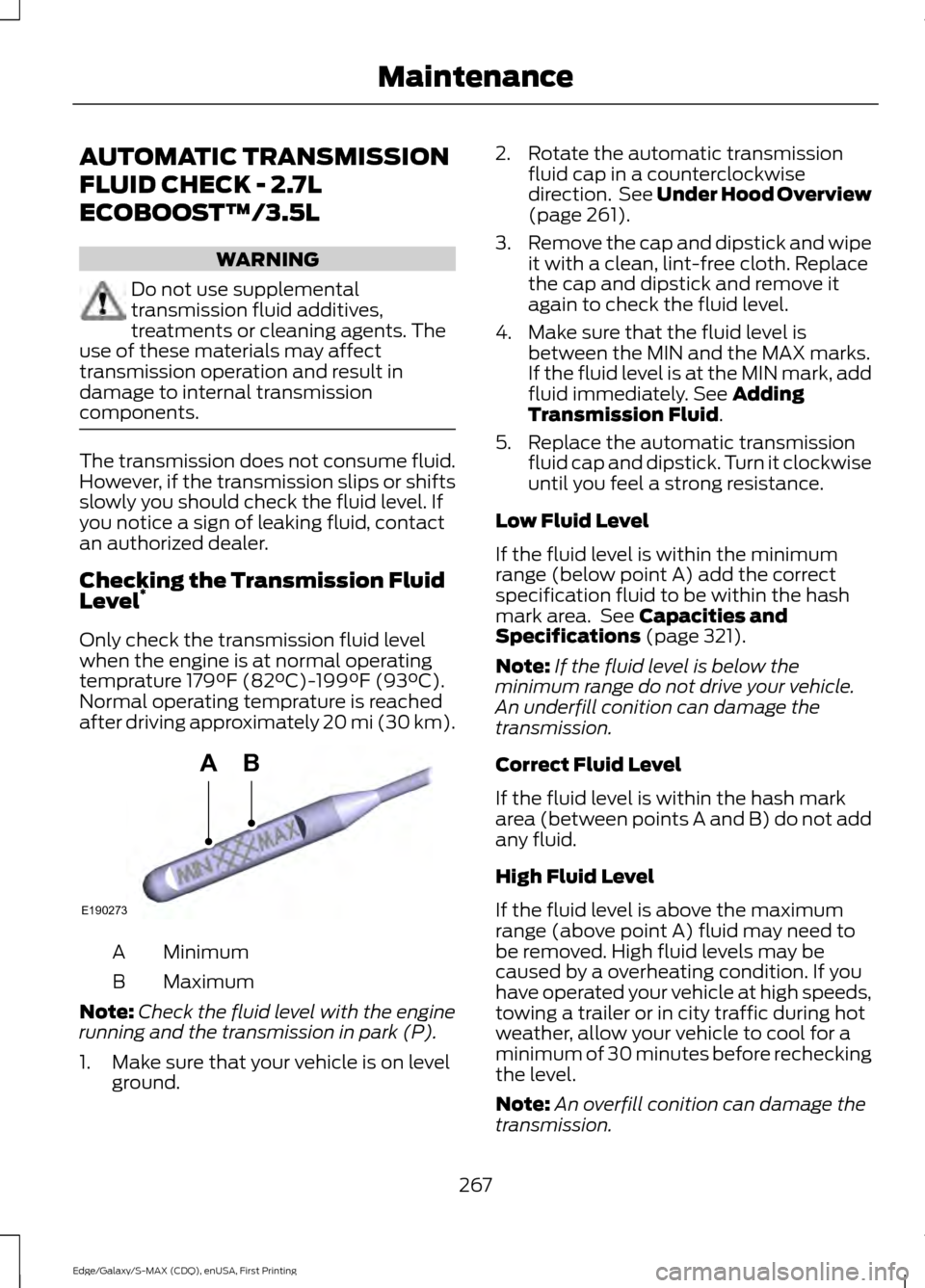
after driving approximately 20 mi (30 km). Minimum
A
Maximum
B
Note: Check the fluid level with the engine
running and the transmission in park (P).
1. Make sure that your vehicle is on level ground. 2. Rotate the automatic transmission
fluid cap in a counterclockwise
direction. See
Under Hood Overview
(page 261).
3. Remove the cap and dipstick and wipe
it with a clean, lint-free cloth. Replace
the cap and dipstick and remove it
again to check the fluid level.
4. Make sure that the fluid level is between the MIN and the MAX marks.
If the fluid level is at the MIN mark, add
fluid immediately. See
Adding
Transmission Fluid.
5. Replace the automatic transmission fluid cap and dipstick. Turn it clockwise
until you feel a strong resistance.
Low Fluid Level
If the fluid level is within the minimum
range (below point A) add the correct
specification fluid to be within the hash
mark area. See
Capacities and
Specifications (page 321).
Note: If the fluid level is below the
minimum range do not drive your vehicle.
An underfill conition can damage the
transmission.
Correct Fluid Level
If the fluid level is within the hash mark
area (between points A and B) do not add
any fluid.
High Fluid Level
If the fluid level is above the maximum
range (above point A) fluid may need to
be removed. High fluid levels may be
caused by a overheating condition. If you
have operated your vehicle at high speeds,
towing a trailer or in city traffic during hot
weather, allow your vehicle to cool for a
minimum of 30 minutes before rechecking
the level.
Note: An overfill conition can damage the
transmission.
267
Edge/Galaxy/S-MAX (CDQ), enUSA, First Printing MaintenanceE190273
AB
Page 293 of 508
•
Do not remove any foreign objects,
such as nails or screws, from the tire.
• When using the kit, leave the engine
running (only if the vehicle is outdoors
or in a well-ventilated area) so the
compressor does not drain the
vehicle's battery.
• Do not allow the compressor to
operate continuously for more than 15
minutes. This will help prevent the
compressor from overheating.
• Never leave the kit unattended during
operation.
• Sealant compound contains latex.
Those with latex sensitivities should
use appropriate precautions to avoid
an allergic reaction.
• Keep the kit away from children.
• Only use the kit when the ambient
temperature is between -22°F (-30°C)
and 158°F (70°C).
• Only use the sealing compound before
the use-by date. The use-by date is on
a label on the sealant canister, which
you can see through the rectangular
viewing window on the bottom of the
compressor. Check the use-by date
regularly and replace the canister after
four years of non-use.
• Do not store the kit unsecured inside
the passenger compartment of the
vehicle as it may cause injury during a
sudden stop or crash. Always store the
kit in its original location.
• After sealant use, an authorized Ford
dealer must replace the tire pressure
monitoring system sensor and valve
stem on the wheel.
• Operating the kit could cause an
electrical disturbance in radio, CD and
DVD player operation. * When inflation only is required
for a tire or other objects, the
selector must be in the Air
position.
What to do When a Tire Is
Punctured
You can repair a tire puncture within the
tire's tread area in two stages with the kit.
• In the first stage, inflate the tire with a
sealing compound and air. After you
inflate the tire, you will need to drive
the vehicle a short distance (about 4
miles [6 kilometers]) to distribute the
sealant in the tire.
• In the second stage, check the tire
pressure and adjust, if necessary, to the
vehicle's specified tire inflation
pressure.
First Stage: Inflating the Tire with
Sealing Compound and Air WARNINGS
Do not stand directly over the kit
while inflating the tire. If you notice
any unusual bulges or deformations
in the tire's sidewall during inflation, stop
and call roadside assistance. If the tire does not inflate to the
recommended tire pressure within
15 minutes, stop and call roadside
assistance. Do not run the engine during kit
operation unless the vehicle is
outdoors or in a well-ventilated area.
Preparation: Park the vehicle in a safe, level
and secure area, away from moving traffic.
Switch the hazard lights on. Apply the
parking brake and switch the engine off.
Inspect the flat tire for visible damage.
290
Edge/Galaxy/S-MAX (CDQ), enUSA, First Printing Wheels and TiresE175978
Page 314 of 508
USING SUMMER TIRES
Summer tires provide superior
performance on wet and dry roads.
Summer tires do not have the Mud and
Snow (M+S or M/S) tire traction rating on
the tire side wall. Since summer tires do
not have the same traction performance
as All-season or Snow tires, we do not
recommend using summer tires when
temperatures drop to about 40ºF (5ºC)
or below (depending on tire wear and
environmental conditions) or in snow and
ice conditions. Like any tire, summer tire
performance is affected by tire wear and
environmental conditions. If you must drive
in those conditions, we recommend using
Mud and Snow (M+S, M/S), All-season or
Snow tires.
Always store your summer tires indoors at
temperatures above 20ºF (-7ºC). The
rubber compounds used in these tires lose
flexibility and may develop surface cracks
in the tread area at temperatures below
20ºF (-7ºC). If the tires have been
subjected to 20ºF (-7ºC) or less, warm
them in a heated space to at least 40ºF
(5ºC) for at least 24 hours before installing
them on a vehicle, or moving the vehicle
with the tires installed, or checking tire
inflation. Do not place tires near heaters
or heating devices used to warm the room
where the tires are stored. Do not apply
heat or blow heated air directly on the tires.
Always inspect the tires after storage
periods and before use.
USING SNOW CHAINS WARNING
Snow tires must be the same size,
load index, speed rating as those
originally provided by Ford. Use of
any tire or wheel not recommended by
Ford can affect the safety and
performance of your vehicle, which could
result in an increased risk of loss of vehicle
control, vehicle rollover, personal injury and
death. Additionally, the use of
non-recommended tires and wheels could
cause steering, suspension, axle, transfer
case or power transfer unit failure. The tires on your vehicle may have
all-weather treads to provide traction in
rain and snow. However, in some climates,
you may need to use snow tires and cables.
If you need to use cables, we recommend
that you use steel wheels (of the same size
and specifications), as cables may chip
aluminum wheels.
Follow these guidelines when using snow
tires and traction device:
•
If possible, avoid fully loading your
vehicle.
• Purchase chains or cables from a
manufacturer that clearly labels body
to tire dimension restrictions.
• Use no larger than 10 mm cables or
chains ONLY on the front axle with
235/60R18 tires. Do not use chains or
cables on any other size tires.
• The snow chains or cables must be
mounted in pairs on the front axle.
• When driving with tire cables, do not
exceed 30 mph (48 km/h) or the
maximum speed recommended by the
chain manufacturer, whichever is less.
311
Edge/Galaxy/S-MAX (CDQ), enUSA, First Printing Wheels and Tires
Page 459 of 508
When the oil change message appears in
the information display, it is time for an oil
change. Make sure you perform the oil
change within two weeks or 500 miles
(800 kilometers) of the message
appearing. Make sure you reset the
Intelligent Oil-Life Monitor after each oil
change. See Oil Change Indicator Reset
(page 263).
If your information display resets
prematurely or becomes inoperative, you
should perform the oil change interval at
six months or 5000 miles (8000
kilometers) from your last oil change.
Never exceed one year or 10000 miles
(16000 kilometers) between oil change
intervals.
Your vehicle is very sophisticated and built
with multiple, complex, performance
systems. Every manufacturer develops
these systems using different
specifications and performance features.
That is why it is important to rely upon your
dealership to properly diagnose and repair
your vehicle.
Ford Motor Company has recommended
maintenance intervals for various parts
and component systems based upon
engineering testing. Ford Motor Company
relies upon this testing to determine the
most appropriate mileage for replacement
of oils and fluids to protect your vehicle at
the lowest overall cost to you and
recommends against maintenance
schedules that deviate from the scheduled
maintenance information.
We strongly recommend the use of only
genuine Ford, Motorcraft or
Ford-authorized re-manufactured
replacement parts engineered for your
vehicle. Additives and Chemicals
This owner's manual and the Ford
Workshop Manual list the recommended
additives and chemicals for your vehicle.
We do not recommend using chemicals or
additives not approved by us as part of
your vehicle
’s normal maintenance. Please
consult your warranty information.
Oils, Fluids and Flushing
In many cases, fluid discoloration is a
normal operating characteristic and, by
itself, does not necessarily indicate a
concern or that the fluid needs to be
changed. However, a qualified expert, such
as the factory-trained technicians at your
dealership, should inspect discolored fluids
that also show signs of overheating or
foreign material contamination
immediately.
Make sure to change your vehicle ’s oils and
fluids at the specified intervals or in
conjunction with a repair. Flushing is a
viable way to change fluid for many vehicle
sub-systems during scheduled
maintenance. It is critical that systems are
flushed only with new fluid that is the same
as that required to fill and operate the
system or using a Ford-approved flushing
chemical.
Owner Checks and Services
Make sure you perform the following basic
maintenance checks and inspections every
month or at six-month intervals.
456
Edge/Galaxy/S-MAX (CDQ), enUSA, First Printing Scheduled Maintenance
Page 502 of 508
Getting the Services You Need...............242
Away From Home.............................................. 242
Global Opening..............................................88
Opening the Windows....................................... 89
H
Hazard Warning Flashers.........................238
Headlamp Exit Delay....................................83
Head Restraints
.............................................133
Adjusting the Head Restraint......................... 134
Tilting Head Restraints .................................... 134
Heated Seats
.................................................140
Front Seats........................................................... 140
Rear Seats............................................................. 140
Heated Steering Wheel
................................77
Heated Windows and Mirrors...................131 Heated Exterior Mirror........................................ 131
Heated Rear Window......................................... 131
Heating See: Climate Control......................................... 124
Hill Start Assist
..............................................178
Switching the System On and Off................179
Using Hill Start Assist........................................ 179
Hints on Controlling the Interior Climate..........................................................129
Cooling the Interior Quickly............................ 130
General Hints....................................................... 129
Heating the Interior Quickly............................ 130
Recommended Settings for Cooling .........130
Recommended Settings for Heating..........130
Side Window Defogging in Cold Weather............................................................. 130
Hints on Driving With Anti-Lock Brakes.............................................................175
Hood Lock See: Opening and Closing the Hood..........258
I
Ignition Switch
...............................................150
In California (U.S. Only).............................243
Information Display Control........................77 Information Display Control Features...........77
Information Displays
..................................100
General Information......................................... 100Information....................................................430
911 Assist............................................................... 436
Alerts...................................................................... 436
Calendar............................................................... 436
Sirius Travel Link................................................ 433
SYNC Services (If Equipped, United States Only)................................................................. 430
Vehicle Health Report (If Equipped, United States Only)................................................... 438
Information Messages...............................109 Active Park............................................................. 110
Adaptive Cruise Control.................................... 110
Airbag........................................................................\
111
Alarm........................................................................\
. 111
All-Wheel Drive..................................................... 112
Automatic Engine Shutdown.......................... 112
Automatic High Beam Control....................... 112
Auto Start-Stop.................................................... 113
Battery and Charging System......................... 113
Blind Spot Information and Cross Traffic Alert System..................................................... 114
Doors and Locks................................................... 114
Driver Alert.............................................................. 115
Electronic Stability Control.............................. 115
Engine...................................................................... 115
Fuel........................................................................\
... 116
Hill Start Assist..................................................... 116
Keys and Keyless Entry...................................... 116
Lane Keeping System......................................... 117
Maintenance.......................................................... 117
MyKey....................................................................... 118
Park Aid................................................................... 119
Park Brake.............................................................. 119
Power Steering.................................................... 120
Pre-Collision Warning System....................... 120
Remote Start......................................................... 121
Seats........................................................................\
. 121
Starting System ................................................... 121
Tire Pressure Monitoring System................... 121
Towing..................................................................... 122
Traction Control................................................... 122
Transmission ......................................................... 122
Installing Child Seats.....................................16 Child Seats............................................................... 16
Using Lap and Shoulder Belts.......................... 17
Using Lower Anchors and Tethers for CHildren (LATCH)............................................. 21
Using Tether Straps............................................. 23
499
Edge/Galaxy/S-MAX (CDQ), enUSA, First Printing Index