brake FORD EDGE 2015 2.G Repair Manual
[x] Cancel search | Manufacturer: FORD, Model Year: 2015, Model line: EDGE, Model: FORD EDGE 2015 2.GPages: 508, PDF Size: 6.2 MB
Page 238 of 508
Note:
Driving through standing water can
cause vehicle damage.
Note: Engine damage can occur if water
enters the air filter.
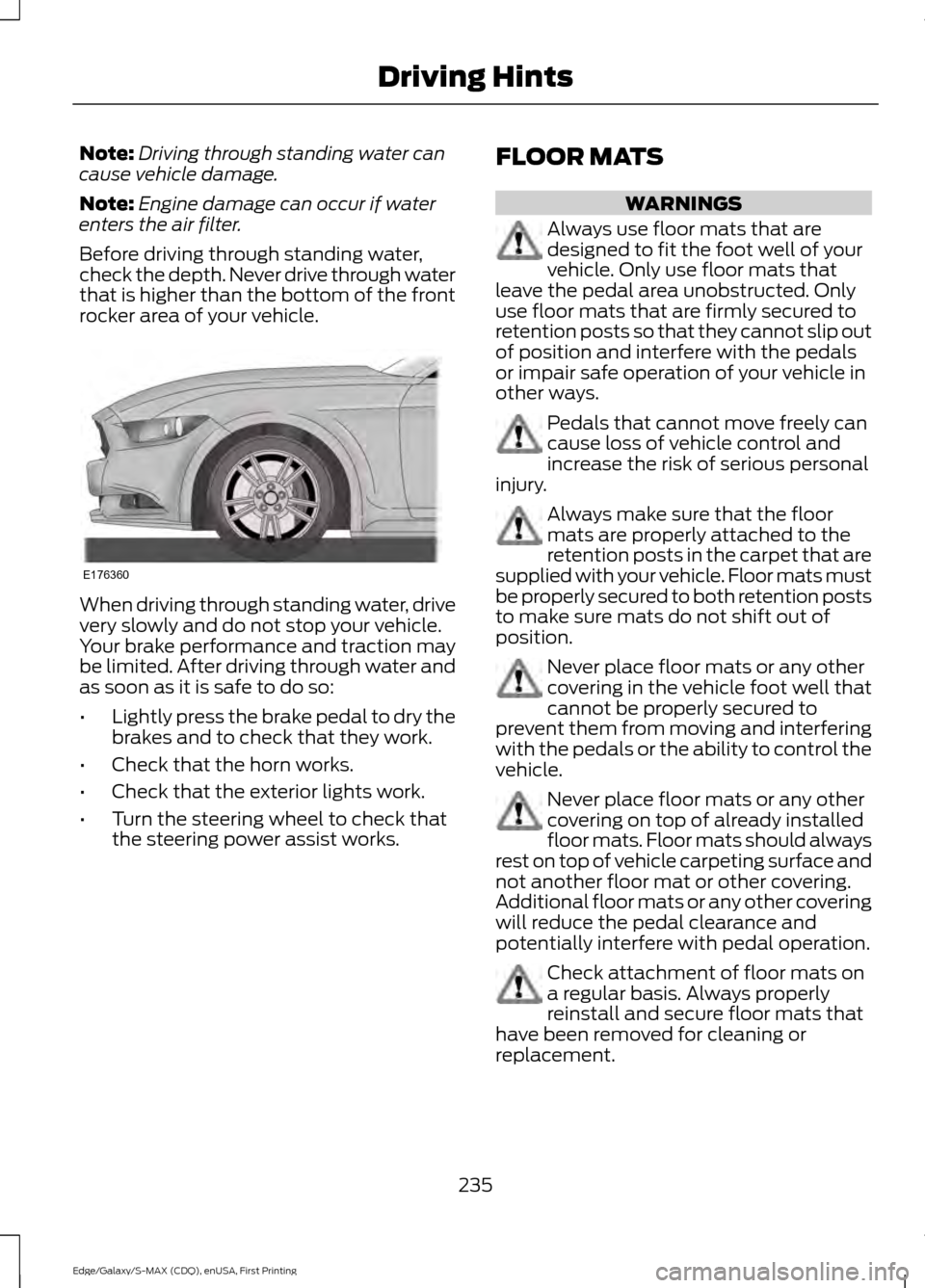
Before driving through standing water,
check the depth. Never drive through water
that is higher than the bottom of the front
rocker area of your vehicle. When driving through standing water, drive
very slowly and do not stop your vehicle.
Your brake performance and traction may
be limited. After driving through water and
as soon as it is safe to do so:
•
Lightly press the brake pedal to dry the
brakes and to check that they work.
• Check that the horn works.
• Check that the exterior lights work.
• Turn the steering wheel to check that
the steering power assist works. FLOOR MATS WARNINGS
Always use floor mats that are
designed to fit the foot well of your
vehicle. Only use floor mats that
leave the pedal area unobstructed. Only
use floor mats that are firmly secured to
retention posts so that they cannot slip out
of position and interfere with the pedals
or impair safe operation of your vehicle in
other ways. Pedals that cannot move freely can
cause loss of vehicle control and
increase the risk of serious personal
injury. Always make sure that the floor
mats are properly attached to the
retention posts in the carpet that are
supplied with your vehicle. Floor mats must
be properly secured to both retention posts
to make sure mats do not shift out of
position. Never place floor mats or any other
covering in the vehicle foot well that
cannot be properly secured to
prevent them from moving and interfering
with the pedals or the ability to control the
vehicle. Never place floor mats or any other
covering on top of already installed
floor mats. Floor mats should always
rest on top of vehicle carpeting surface and
not another floor mat or other covering.
Additional floor mats or any other covering
will reduce the pedal clearance and
potentially interfere with pedal operation. Check attachment of floor mats on
a regular basis. Always properly
reinstall and secure floor mats that
have been removed for cleaning or
replacement.
235
Edge/Galaxy/S-MAX (CDQ), enUSA, First Printing Driving HintsE176360
Page 241 of 508
Canadian roadside coverage and benefits
may differ from the U.S. coverage. If you
require more information, please refer to
the coverage section of your warranty
guide, call us in Canada at
1-800-665-2006, or visit our website at
www.ford.ca.
Sykes Assistance Services Corporation
administers the Roadside Assistance
program. You must receive covered
services in Canada or the continental
United States. Coverage extends to
vehicles that use public, non-seasonal,
annually traveled roadways. Roadside
Assistance coverage does not extend to
vehicles involved in cross-country driving,
logging, autocross and any other form of
off-road use. Well maintained roads and
surfaces help ensure safe travel for the
supplier, and allow their representatives
to perform service as per the standard
operating procedures.
In Remote Locations
If our supplier cannot take your vehicle by
road to the nearest authorized dealership,
transportation by rail or water may be
necessary. The program covers a tow to
the dock or rail terminal and also to the
dealership at the end of the trip.
For rail or water transportation, however,
contact your authorized dealer to confirm
if you are eligible for additional coverage
before you authorize or pay for the service.
Call the Ford Roadside Assistance at
1-800-665-2006 for additional
information.
HAZARD WARNING FLASHERS
Note:
If used when the vehicle is not
running, the battery will lose charge. There
may be insufficient power to restart your
vehicle. The hazard warning button is
located on the instrument panel.
Use it when your vehicle is
creating a safety hazard for other
motorists.
• Press the button to turn on the hazard
warning function, and the front and
rear direction indicators will flash.
• Press the button again to turn them
off.
FUEL SHUTOFF WARNING
Failure to inspect and, if necessary,
repair fuel leaks after a collision may
increase the risk of fire and serious
injury. Ford Motor Company recommends
that the fuel system be inspected by an
authorized dealer after any collision. In the event of a moderate to severe
collision, this vehicle includes a fuel pump
shutoff feature that stops the flow of fuel
to the engine. Not every impact will cause
a shutoff.
Should your vehicle shut off after a
collision, you may restart your vehicle. For
vehicles equipped with a key system:
1. Switch off the ignition.
2. Switch on the ignition.
3. Repeat Steps 1 and 2 to re-enable the
fuel pump.
For vehicles equipped with a push button
start system:
1. Press the START/STOP button to
switch off the ignition.
2. Press the brake pedal and press the START/STOP
button to switch on the
ignition.
238
Edge/Galaxy/S-MAX (CDQ), enUSA, First Printing Roadside Emergencies
Page 242 of 508
3.
Remove your foot from the brake pedal
and press the START/STOP button
to switch off the ignition.
4. You can either attempt to start the engine by pressing the brake pedal and
the
START/STOP button, or switch
on the ignition only by pressing the
START/STOP
button without
pressing the brake pedal. Both ways
re-enable the fuel system.
Note: When you try to restart your vehicle
after a fuel shutoff, the vehicle makes sure
that various systems are safe to restart.
Once your vehicle determines that the
systems are safe, then the vehicle will allow
you to restart.
Note: In the event that your vehicle does
not restart after your third attempt, contact
an authorized dealer.
JUMP STARTING THE VEHICLE WARNINGS
The gases around the battery can
explode if exposed to flames, sparks,
or lit cigarettes. An explosion could
result in personal injury or vehicle damage. Batteries contain sulfuric acid which
can burn skin, eyes and clothing, if
contacted.
Use only an adequate-sized cable
with insulated clamps.
Preparing Your Vehicle
Note:
Do not attempt to push-start your
automatic transmission vehicle. Automatic
transmissions do not have push-start
capability. Attempting to push-start a
vehicle with an automatic transmission may
cause transmission damage.
Note: Use only a 12-volt supply to start your
vehicle. Note:
Do not disconnect the battery of the
disabled vehicle as this could damage the
vehicle's electrical system.
Park the booster vehicle close to the hood
of the disabled vehicle, making sure the
two vehicles do not touch. Turn all
accessories off.
Connecting the Jumper Cables WARNING
Do not attach the cables to fuel lines,
engine rocker covers, the intake
manifold or electrical components
as grounding points. Stay clear of moving
parts. To avoid reverse polarity
connections, make sure that you correctly
identify the positive (+) and negative (-)
terminals on both the disabled and booster
vehicles before connecting the cables. Note:
In the illustration, the bottom vehicle
represents the booster vehicle.
239
Edge/Galaxy/S-MAX (CDQ), enUSA, First Printing Roadside Emergencies
Page 253 of 508
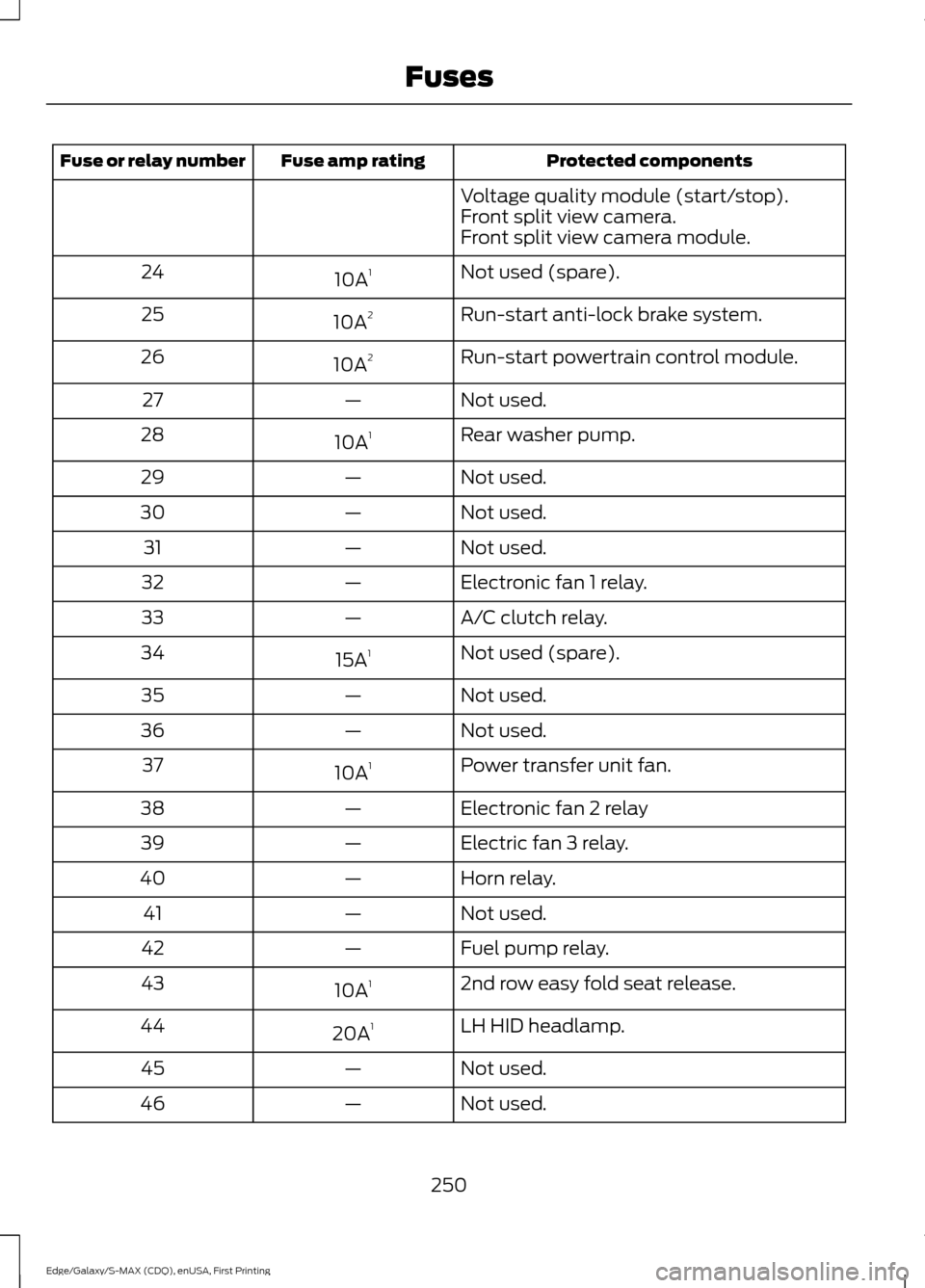
Protected components
Fuse amp rating
Fuse or relay number
Voltage quality module (start/stop).
Front split view camera.
Front split view camera module.
Not used (spare).
10A 1
24
Run-start anti-lock brake system.
10A 2
25
Run-start powertrain control module.
10A 2
26
Not used.
—
27
Rear washer pump.
10A 1
28
Not used.
—
29
Not used.
—
30
Not used.
—
31
Electronic fan 1 relay.
—
32
A/C clutch relay.
—
33
Not used (spare).
15A 1
34
Not used.
—
35
Not used.
—
36
Power transfer unit fan.
10A 1
37
Electronic fan 2 relay
—
38
Electric fan 3 relay.
—
39
Horn relay.
—
40
Not used.
—
41
Fuel pump relay.
—
42
2nd row easy fold seat release.
10A 1
43
LH HID headlamp.
20A 1
44
Not used.
—
45
Not used.
—
46
250
Edge/Galaxy/S-MAX (CDQ), enUSA, First Printing Fuses
Page 254 of 508
Protected components
Fuse amp rating
Fuse or relay number
Not used.
—
47
Not used.
—
48
Not used.
—
49
Horn.
20A 1
50
Not used.
—
51
Not used.
—
52
Not used.
—
53
Brake on off switch.
10A 2
54
ALT sensor.
10A 2
55
1 Micro fuse.
2 Dual micro fuse.
3 M-type fuse.
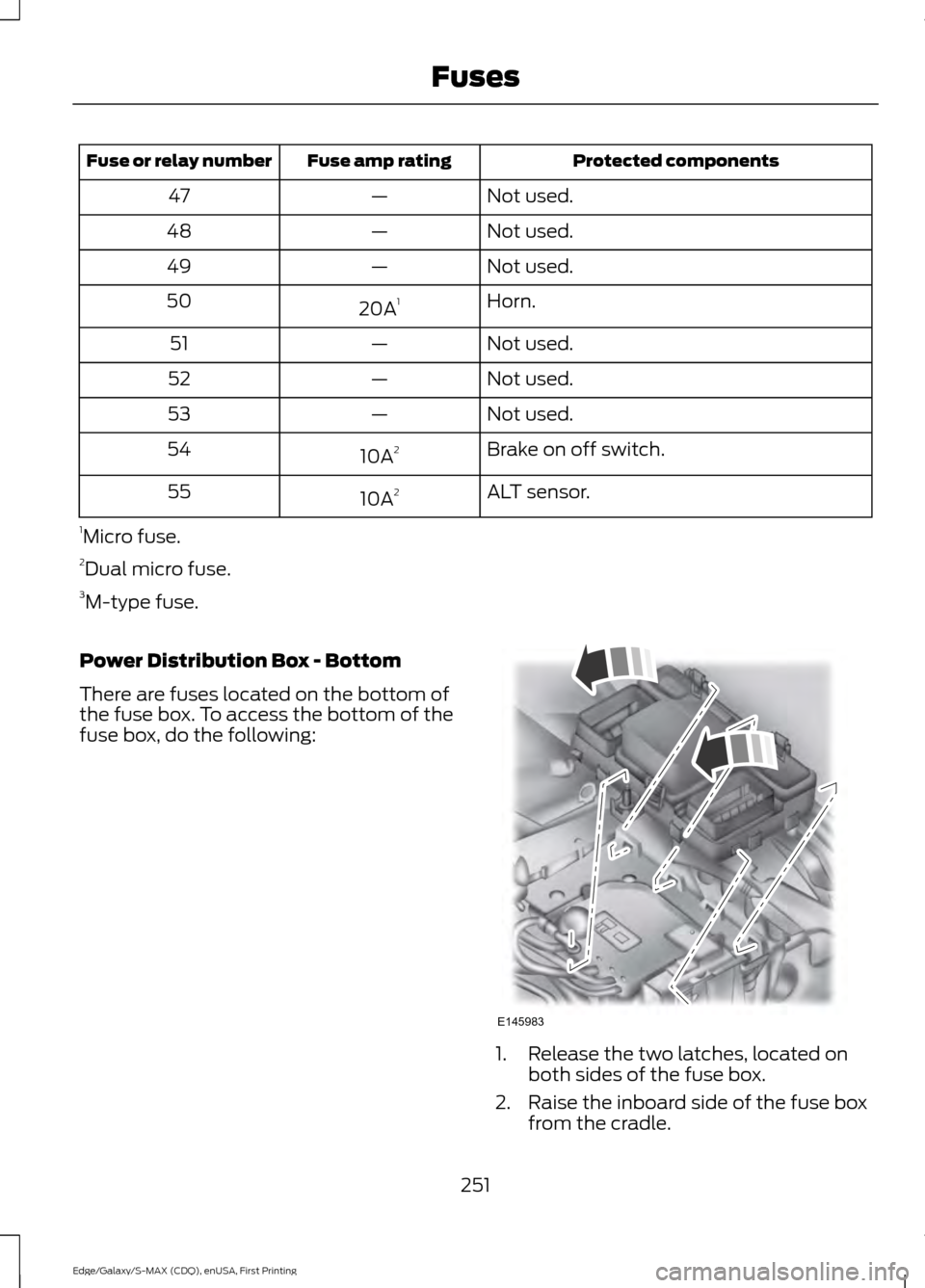
Power Distribution Box - Bottom
There are fuses located on the bottom of
the fuse box. To access the bottom of the
fuse box, do the following: 1. Release the two latches, located on
both sides of the fuse box.
2. Raise the inboard side of the fuse box from the cradle.
251
Edge/Galaxy/S-MAX (CDQ), enUSA, First Printing FusesE145983
Page 256 of 508
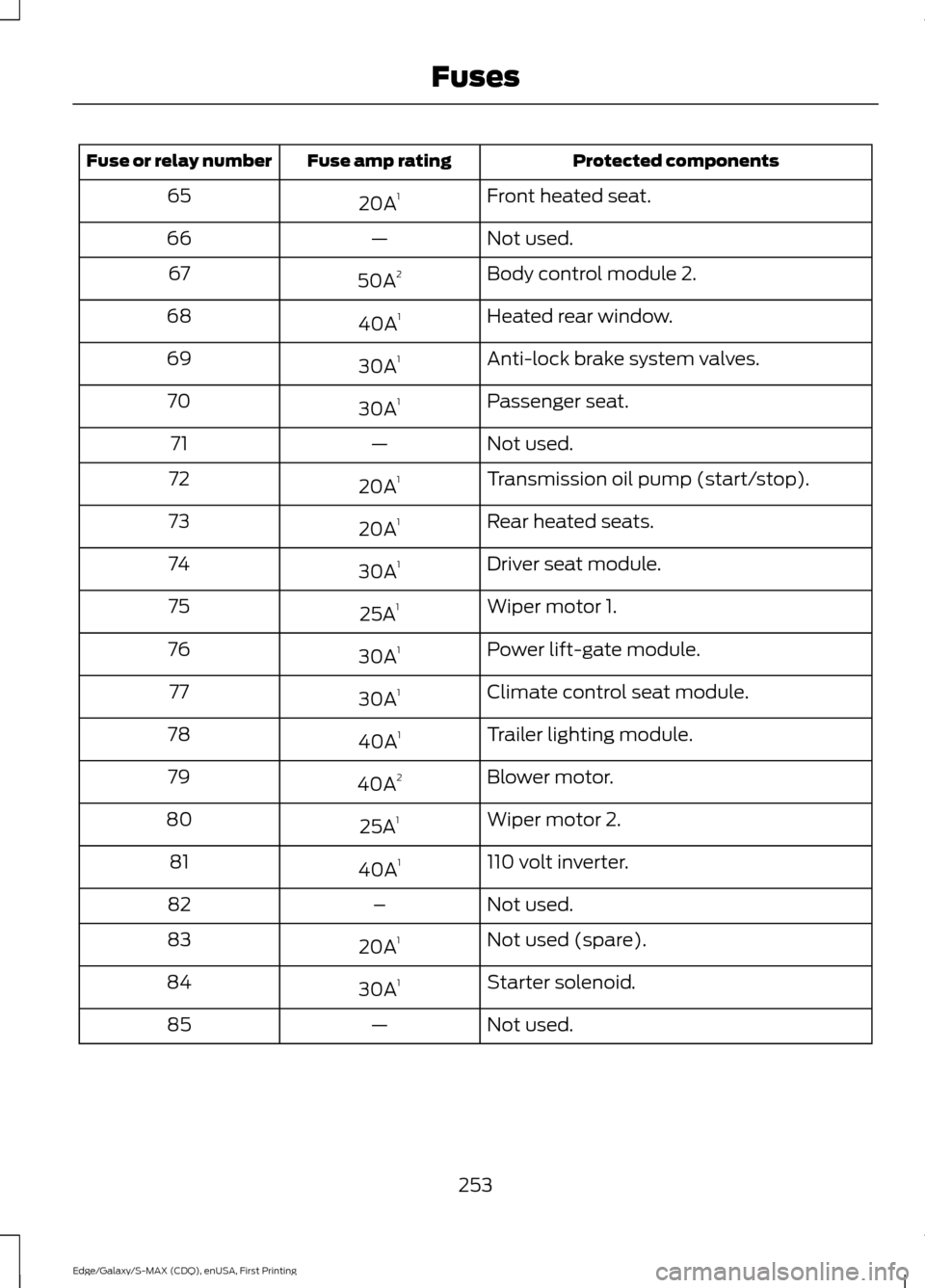
Protected components
Fuse amp rating
Fuse or relay number
Front heated seat.
20A 1
65
Not used.
—
66
Body control module 2.
50A 2
67
Heated rear window.
40A 1
68
Anti-lock brake system valves.
30A 1
69
Passenger seat.
30A 1
70
Not used.
—
71
Transmission oil pump (start/stop).
20A 1
72
Rear heated seats.
20A 1
73
Driver seat module.
30A 1
74
Wiper motor 1.
25A 1
75
Power lift-gate module.
30A 1
76
Climate control seat module.
30A 1
77
Trailer lighting module.
40A 1
78
Blower motor.
40A 2
79
Wiper motor 2.
25A 1
80
110 volt inverter.
40A 1
81
Not used.
–
82
Not used (spare).
20A 1
83
Starter solenoid.
30A 1
84
Not used.
—
85
253
Edge/Galaxy/S-MAX (CDQ), enUSA, First Printing Fuses
Page 257 of 508
Protected components
Fuse amp rating
Fuse or relay number
Not used.
–
86
Anti-lock brake system pump.
60A 2
87
1 M-type fuse.
2 J-type fuse.
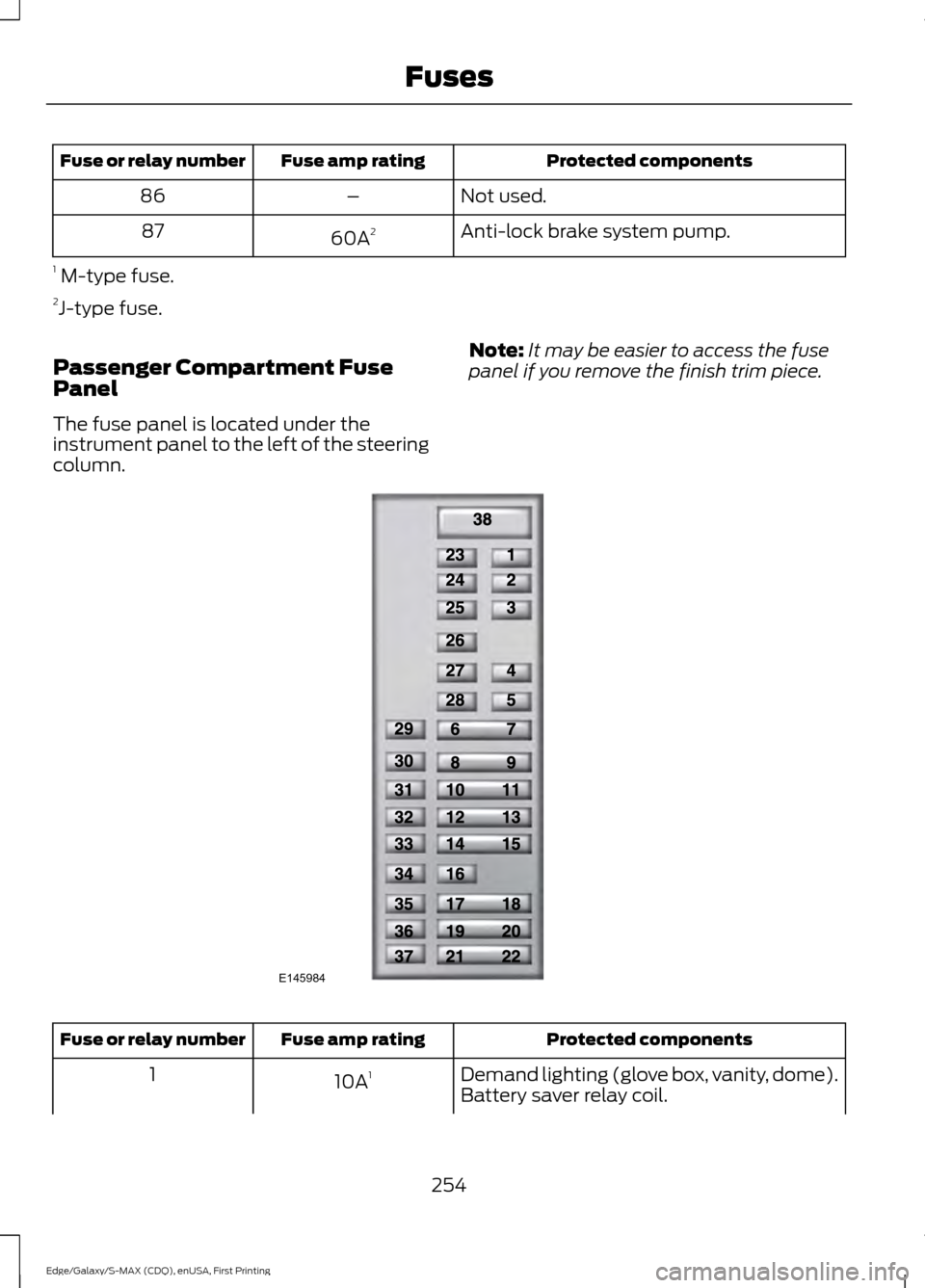
Passenger Compartment Fuse
Panel
The fuse panel is located under the
instrument panel to the left of the steering
column. Note:
It may be easier to access the fuse
panel if you remove the finish trim piece. Protected components
Fuse amp rating
Fuse or relay number
Demand lighting (glove box, vanity, dome).
10A 1
1
Battery saver relay coil.
254
Edge/Galaxy/S-MAX (CDQ), enUSA, First Printing FusesE145984
Page 261 of 508
GENERAL INFORMATION
Have your vehicle serviced regularly to help
maintain its roadworthiness and resale
value. There is a large network of
authorized dealers that are there to help
you with their professional servicing
expertise. We believe that their specially
trained technicians are best qualified to
service your vehicle properly and expertly.
They are supported by a wide range of
highly specialized tools developed
specifically for servicing your vehicle.
To help you service your vehicle, we
provide scheduled maintenance
information which makes tracking routine
service easy. See Scheduled
Maintenance (page 455).
If your vehicle requires professional service,
an authorized dealer can provide the
necessary parts and service. Check your
warranty information to find out which
parts and services are covered.
Use only recommended fuels, lubricants,
fluids and service parts conforming to
specifications. Motorcraft® parts are
designed and built to provide the best
performance in your vehicle.
Precautions
• Do not work on a hot engine.
• Make sure that nothing gets caught in
moving parts.
• Do not work on a vehicle with the
engine running in an enclosed space,
unless you are sure you have enough
ventilation.
• Keep all open flames and other burning
material (such as cigarettes) away
from the battery and all fuel related
parts. Working with the Engine Off
1.
Set the parking brake and shift to park
(P).
2. Switch off the engine.
3. Block the wheels.
Working with the Engine On WARNING
To reduce the risk of vehicle damage
and/or personal burn injuries, do not
start your engine with the air cleaner
removed and do not remove it while the
engine is running. 1.
Set the parking brake and shift to park
(P).
2. Block the wheels
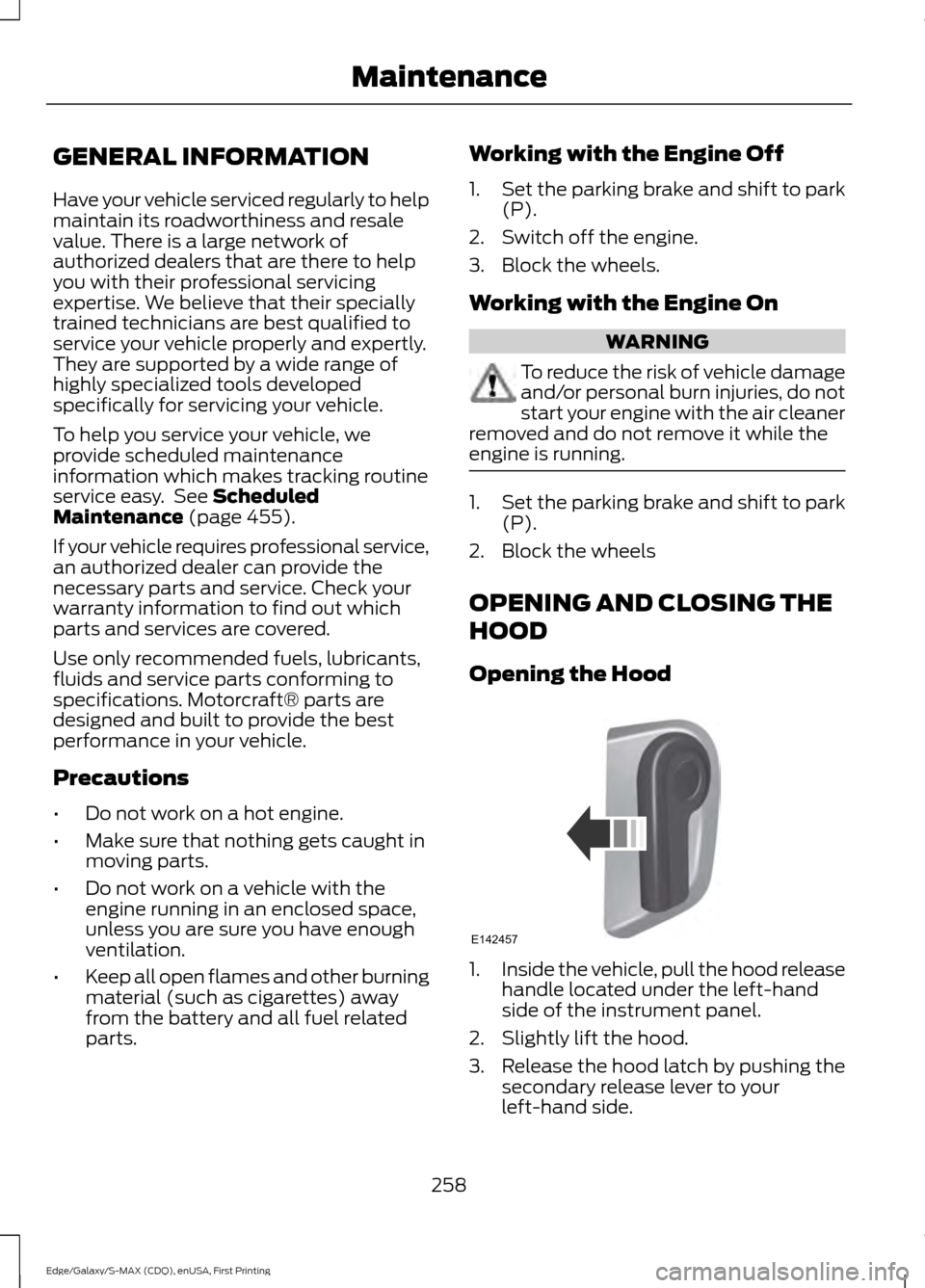
OPENING AND CLOSING THE
HOOD
Opening the Hood 1.
Inside the vehicle, pull the hood release
handle located under the left-hand
side of the instrument panel.
2. Slightly lift the hood.
3. Release the hood latch by pushing the secondary release lever to your
left-hand side.
258
Edge/Galaxy/S-MAX (CDQ), enUSA, First Printing MaintenanceE142457
Page 262 of 508

4. Open the hood. The hood strut
automatically supports the hood.
Closing the Hood
1. Lower the hood and allow it to drop under its own weight for the last 8-12
in (20-30 cm).
Note: Make sure that the hood is correctly
closed.
UNDER HOOD OVERVIEW - 2.0L ECOBOOST™ Engine coolant reservoir. See Engine Coolant Check (page 263).
A
Brake fluid reservoir (right-hand drive).
See Brake Fluid Check (page 268).
B
Engine oil dipstick.
See Engine Oil Dipstick (page 262).
C
Engine oil filler cap.
See Engine Oil Check (page 262).
D
Brake fluid reservoir (left-hand drive).
See Brake Fluid Check (page 268).
E
Battery.
See Changing the 12V Battery (page 269).
F
259
Edge/Galaxy/S-MAX (CDQ), enUSA, First Printing MaintenanceE191432
4 A
IH
EBCDFG
E188729
Page 263 of 508
Power distribution box. See Fuses (page 248).
G
Air filter assembly.
See Changing the Engine Air Filter (page 278).
H
Windshield washer fluid reservoir.
See Washer Fluid Check (page 269).
I
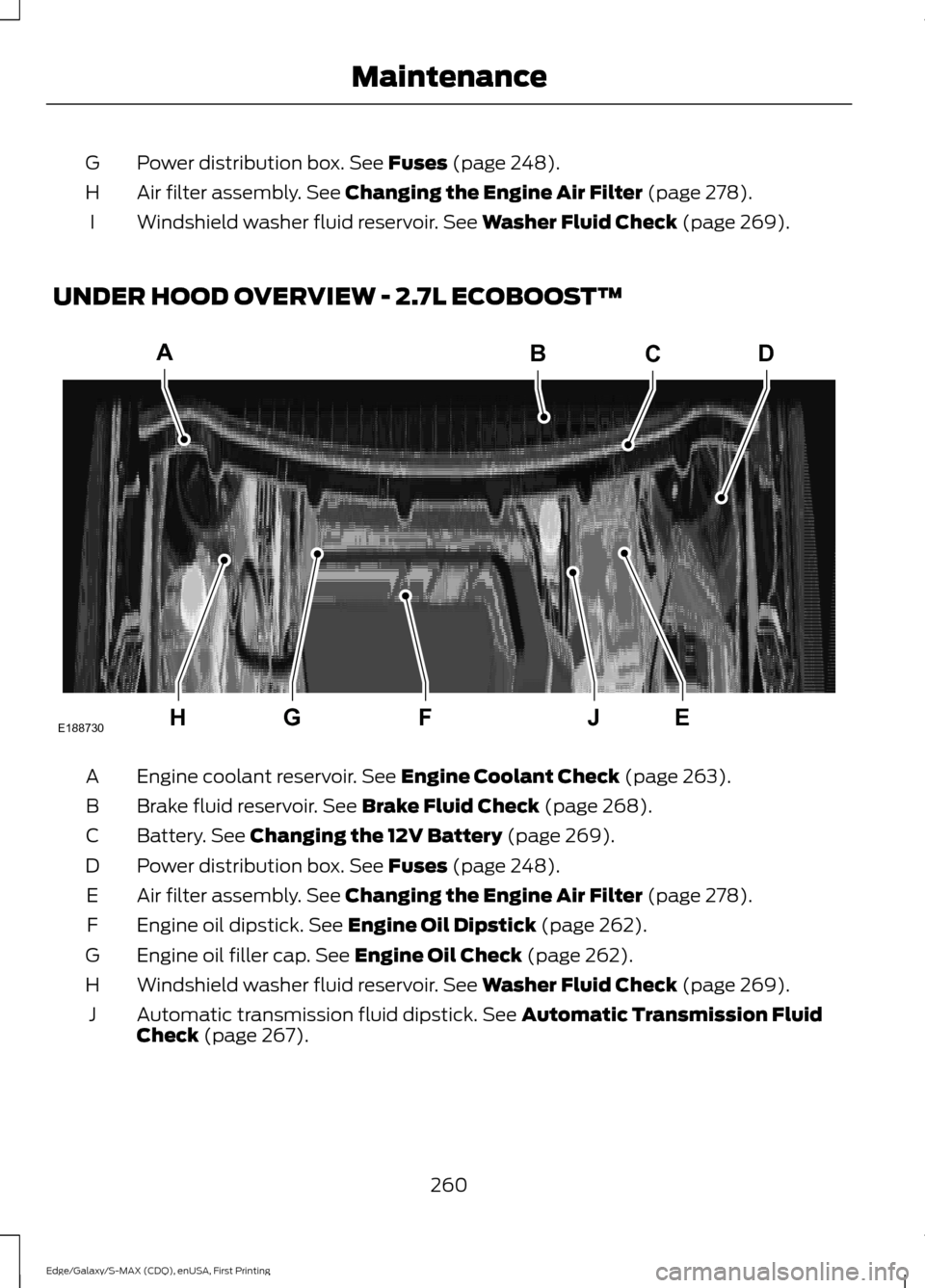
UNDER HOOD OVERVIEW - 2.7L ECOBOOST™ Engine coolant reservoir.
See Engine Coolant Check (page 263).
A
Brake fluid reservoir.
See Brake Fluid Check (page 268).
B
Battery.
See Changing the 12V Battery (page 269).
C
Power distribution box.
See Fuses (page 248).
D
Air filter assembly.
See Changing the Engine Air Filter (page 278).
E
Engine oil dipstick.
See Engine Oil Dipstick (page 262).
F
Engine oil filler cap.
See Engine Oil Check (page 262).
G
Windshield washer fluid reservoir.
See Washer Fluid Check (page 269).
H
Automatic transmission fluid dipstick.
See Automatic Transmission Fluid
Check (page 267).
J
260
Edge/Galaxy/S-MAX (CDQ), enUSA, First Printing MaintenanceA
HEJFG
BCD
E188730