reset FORD EDGE 2015 2.G Repair Manual
[x] Cancel search | Manufacturer: FORD, Model Year: 2015, Model line: EDGE, Model: FORD EDGE 2015 2.GPages: 508, PDF Size: 6.2 MB
Page 421 of 508
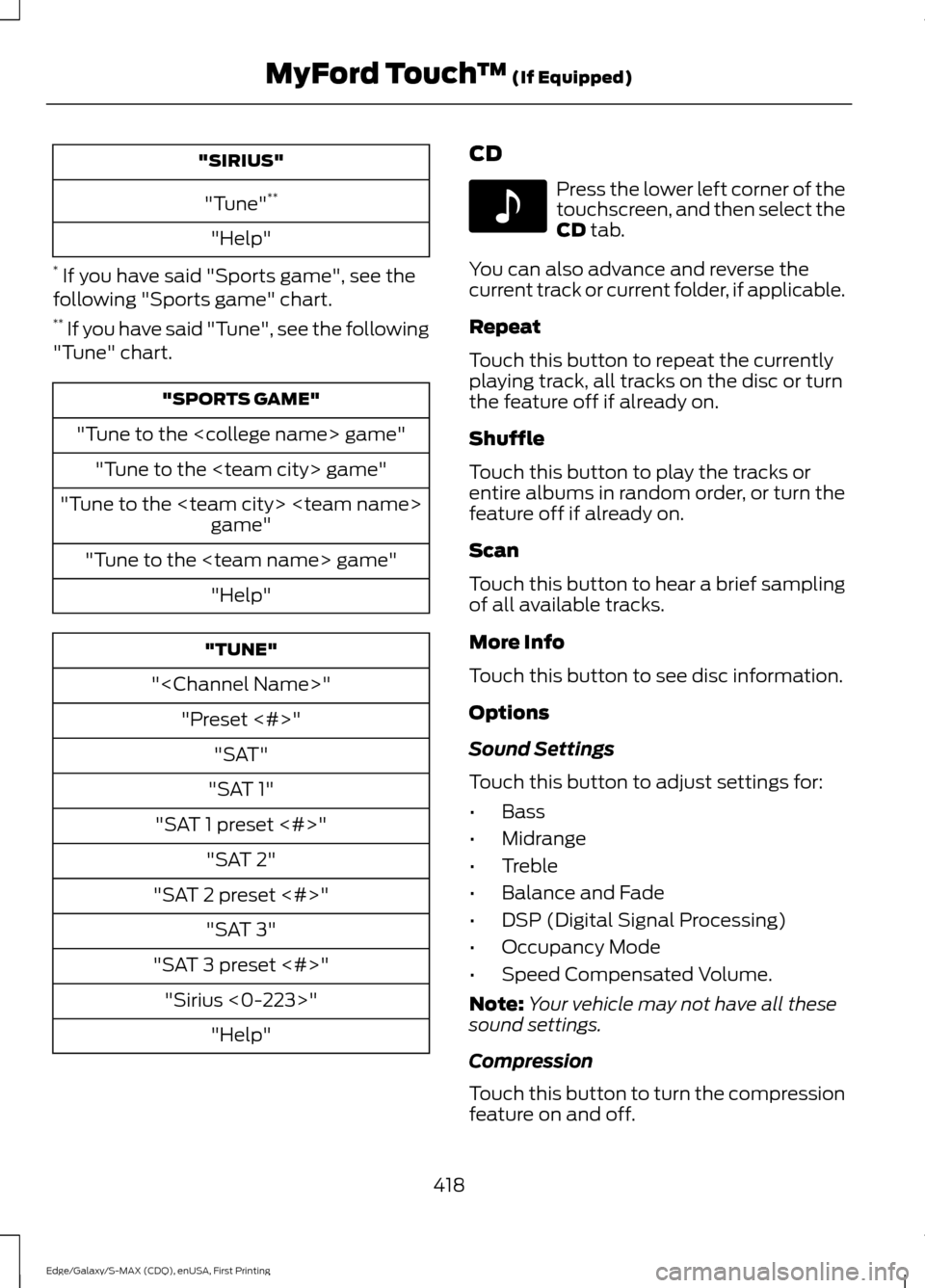
"SIRIUS"
"Tune" **
"Help"
* If you have said "Sports game", see the
following "Sports game" chart.
** If you have said "Tune", see the following
"Tune" chart. "SPORTS GAME"
"Tune to the
"Tune to the
"Tune to the
"
"SAT 1"
"SAT 1 preset <#>" "SAT 2"
"SAT 2 preset <#>" "SAT 3"
"SAT 3 preset <#>" "Sirius <0-223>" "Help" CD Press the lower left corner of the
touchscreen, and then select the
CD tab.
You can also advance and reverse the
current track or current folder, if applicable.
Repeat
Touch this button to repeat the currently
playing track, all tracks on the disc or turn
the feature off if already on.
Shuffle
Touch this button to play the tracks or
entire albums in random order, or turn the
feature off if already on.
Scan
Touch this button to hear a brief sampling
of all available tracks.
More Info
Touch this button to see disc information.
Options
Sound Settings
Touch this button to adjust settings for:
• Bass
• Midrange
• Treble
• Balance and Fade
• DSP (Digital Signal Processing)
• Occupancy Mode
• Speed Compensated Volume.
Note: Your vehicle may not have all these
sound settings.
Compression
Touch this button to turn the compression
feature on and off.
418
Edge/Galaxy/S-MAX (CDQ), enUSA, First Printing MyFord Touch
™
(If Equipped)E142611
Page 444 of 508
Note: To prevent window fogging, you cannot select recirculated air when MAX
Defrost is on.
Driver settings:
K
Touch the
+ or – to increase or decrease the air temperature on the driver side
of the vehicle.
Touch the heated seat icon to switch the heated seat off and on (if equipped).
Touch the climate-controlled seat icon to switch the climate-controlled seat
off and on (if equipped).
Touch
MyTemp to select your preset temperature setpoint. Touch and hold
MyTemp to save a new preset temperature setpoint.
Touch the heated steering wheel icon to switch the heated steering wheel on
and off (if equipped).
Note: If your vehicle is equipped with a
wood-trimmed steering wheel, it does not
heat between the 10 o'clock and 2 o'clock
positions.
Climate Control Voice Commands
Note: The fan speed automatically
decreases when you start a voice command
session or phone call through SYNC. This
feature is dependent on the current climate
control settings and helps to reduce the
background noise in the vehicle. The fan
speed returns to normal when the voice
session ends. You can adjust the fan speed
manually during this time by using the fan
button or knob to reach the desired setting.
To disable or enable automatic fan speed,
press and hold the
AC and Recirculated air
buttons at the same time. Release the
buttons and immediately increase the fan
speed. Press the voice button on the
steering wheel controls. When
prompted, say any of the
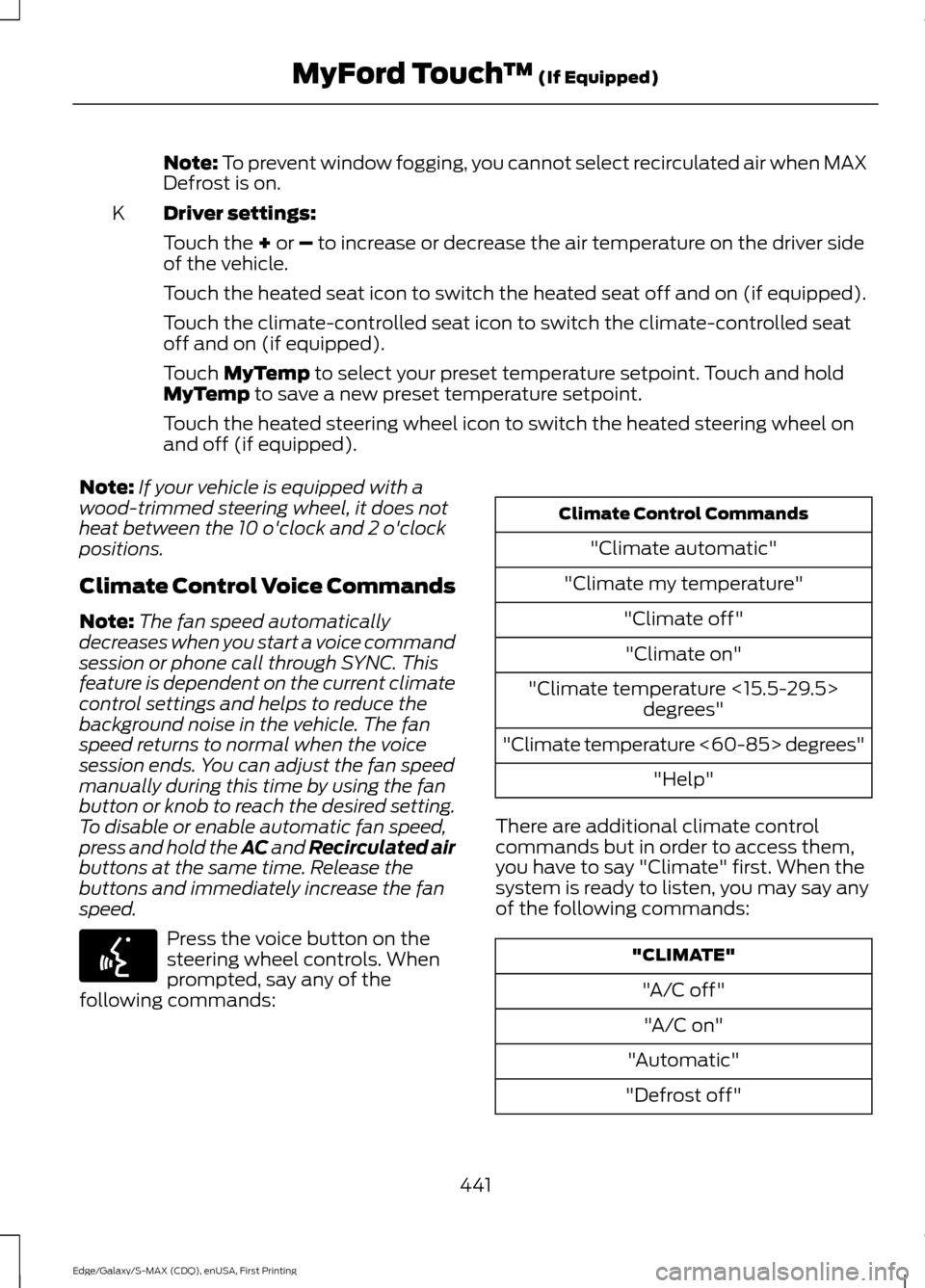
following commands: Climate Control Commands
"Climate automatic"
"Climate my temperature" "Climate off""Climate on"
"Climate temperature <15.5-29.5> degrees"
"Climate temperature <60-85> degrees" "Help"
There are additional climate control
commands but in order to access them,
you have to say "Climate" first. When the
system is ready to listen, you may say any
of the following commands: "CLIMATE"
"A/C off""A/C on"
"Automatic"
"Defrost off"
441
Edge/Galaxy/S-MAX (CDQ), enUSA, First Printing MyFord Touch
™
(If Equipped)E142599
Page 459 of 508
When the oil change message appears in
the information display, it is time for an oil
change. Make sure you perform the oil
change within two weeks or 500 miles
(800 kilometers) of the message
appearing. Make sure you reset the
Intelligent Oil-Life Monitor after each oil
change. See Oil Change Indicator Reset
(page 263).
If your information display resets
prematurely or becomes inoperative, you
should perform the oil change interval at
six months or 5000 miles (8000
kilometers) from your last oil change.
Never exceed one year or 10000 miles
(16000 kilometers) between oil change
intervals.
Your vehicle is very sophisticated and built
with multiple, complex, performance
systems. Every manufacturer develops
these systems using different
specifications and performance features.
That is why it is important to rely upon your
dealership to properly diagnose and repair
your vehicle.
Ford Motor Company has recommended
maintenance intervals for various parts
and component systems based upon
engineering testing. Ford Motor Company
relies upon this testing to determine the
most appropriate mileage for replacement
of oils and fluids to protect your vehicle at
the lowest overall cost to you and
recommends against maintenance
schedules that deviate from the scheduled
maintenance information.
We strongly recommend the use of only
genuine Ford, Motorcraft or
Ford-authorized re-manufactured
replacement parts engineered for your
vehicle. Additives and Chemicals
This owner's manual and the Ford
Workshop Manual list the recommended
additives and chemicals for your vehicle.
We do not recommend using chemicals or
additives not approved by us as part of
your vehicle
’s normal maintenance. Please
consult your warranty information.
Oils, Fluids and Flushing
In many cases, fluid discoloration is a
normal operating characteristic and, by
itself, does not necessarily indicate a
concern or that the fluid needs to be
changed. However, a qualified expert, such
as the factory-trained technicians at your
dealership, should inspect discolored fluids
that also show signs of overheating or
foreign material contamination
immediately.
Make sure to change your vehicle ’s oils and
fluids at the specified intervals or in
conjunction with a repair. Flushing is a
viable way to change fluid for many vehicle
sub-systems during scheduled
maintenance. It is critical that systems are
flushed only with new fluid that is the same
as that required to fill and operate the
system or using a Ford-approved flushing
chemical.
Owner Checks and Services
Make sure you perform the following basic
maintenance checks and inspections every
month or at six-month intervals.
456
Edge/Galaxy/S-MAX (CDQ), enUSA, First Printing Scheduled Maintenance
Page 463 of 508
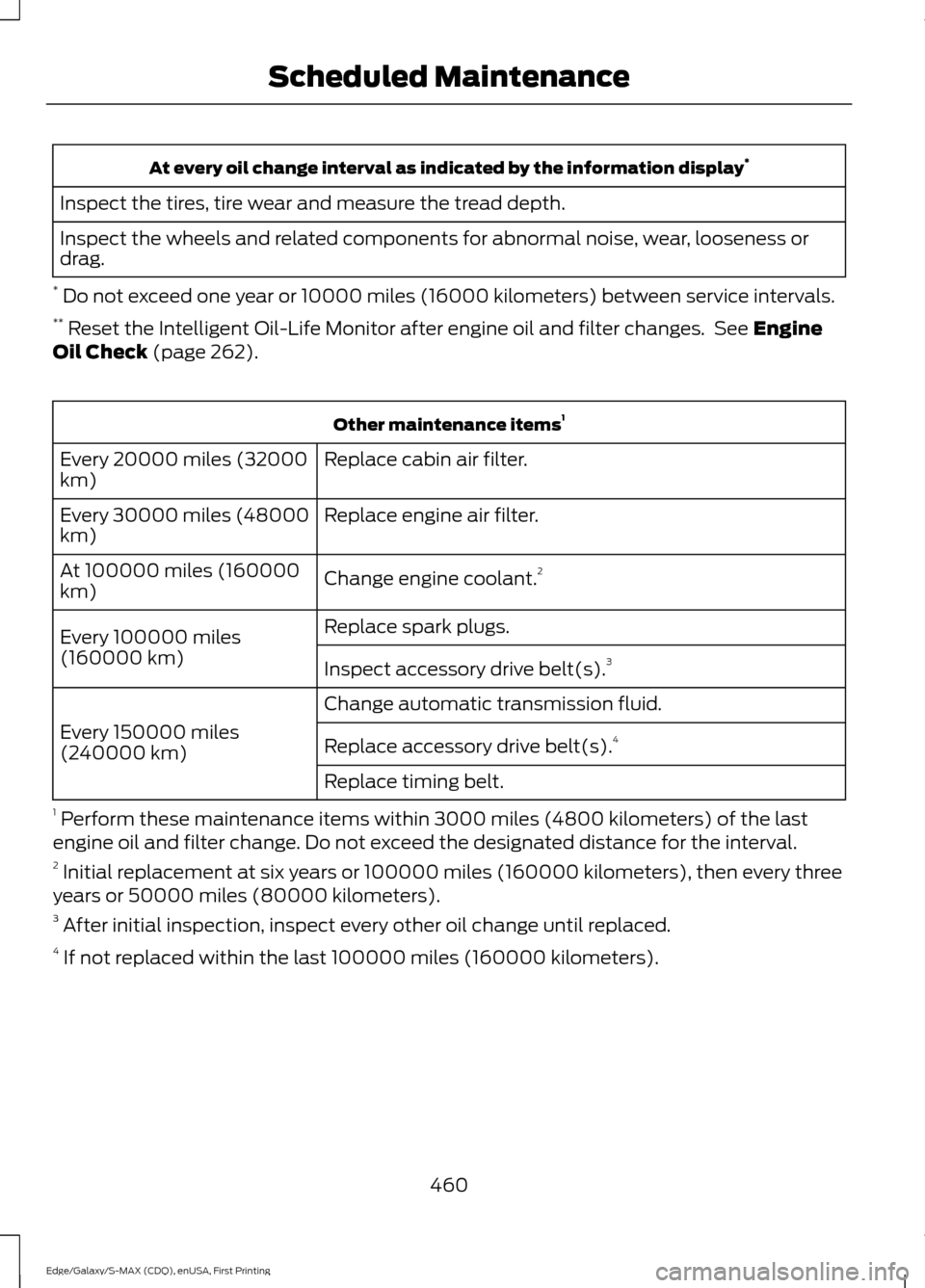
At every oil change interval as indicated by the information display
*
Inspect the tires, tire wear and measure the tread depth.
Inspect the wheels and related components for abnormal noise, wear, looseness or
drag.
* Do not exceed one year or 10000 miles (16000 kilometers) between service intervals.
** Reset the Intelligent Oil-Life Monitor after engine oil and filter changes. See Engine
Oil Check (page 262). Other maintenance items
1
Replace cabin air filter.
Every 20000 miles (32000
km)
Replace engine air filter.
Every 30000 miles (48000
km)
Change engine coolant.2
At 100000 miles (160000
km)
Replace spark plugs.
Every 100000 miles
(160000 km) Inspect accessory drive belt(s). 3
Change automatic transmission fluid.
Every 150000 miles
(240000 km) Replace accessory drive belt(s). 4
Replace timing belt.
1 Perform these maintenance items within 3000 miles (4800 kilometers) of the last
engine oil and filter change. Do not exceed the designated distance for the interval.
2 Initial replacement at six years or 100000 miles (160000 kilometers), then every three
years or 50000 miles (80000 kilometers).
3 After initial inspection, inspect every other oil change until replaced.
4 If not replaced within the last 100000 miles (160000 kilometers).
460
Edge/Galaxy/S-MAX (CDQ), enUSA, First Printing Scheduled Maintenance
Page 464 of 508
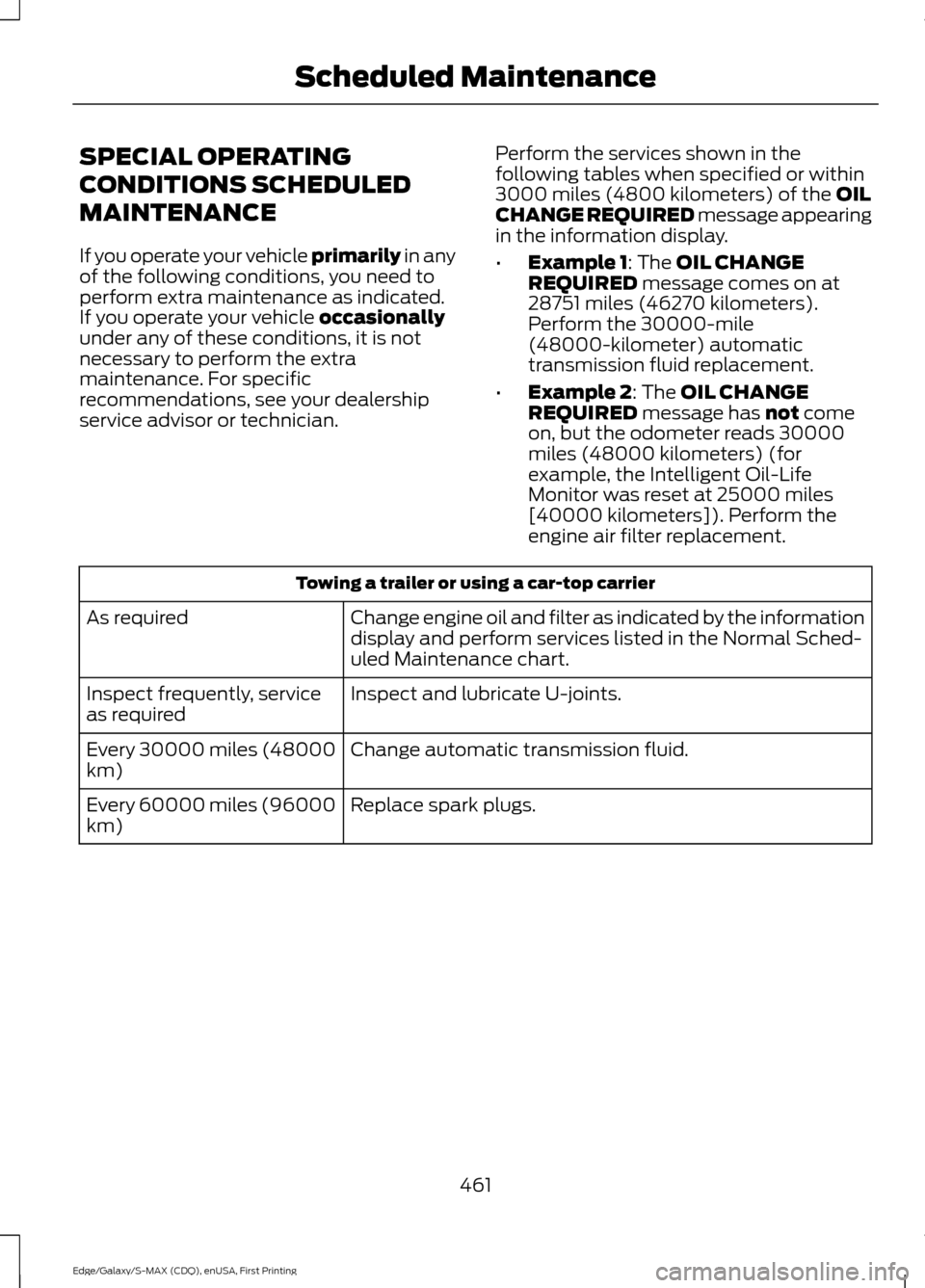
SPECIAL OPERATING
CONDITIONS SCHEDULED
MAINTENANCE
If you operate your vehicle primarily in any
of the following conditions, you need to
perform extra maintenance as indicated.
If you operate your vehicle
occasionally
under any of these conditions, it is not
necessary to perform the extra
maintenance. For specific
recommendations, see your dealership
service advisor or technician. Perform the services shown in the
following tables when specified or within
3000 miles (4800 kilometers) of the
OIL
CHANGE REQUIRED message appearing
in the information display.
• Example 1
: The OIL CHANGE
REQUIRED message comes on at
28751 miles (46270 kilometers).
Perform the 30000-mile
(48000-kilometer) automatic
transmission fluid replacement.
• Example 2
: The OIL CHANGE
REQUIRED message has not come
on, but the odometer reads 30000
miles (48000 kilometers) (for
example, the Intelligent Oil-Life
Monitor was reset at 25000 miles
[40000 kilometers]). Perform the
engine air filter replacement. Towing a trailer or using a car-top carrier
Change engine oil and filter as indicated by the information
display and perform services listed in the Normal Sched-
uled Maintenance chart.
As required
Inspect and lubricate U-joints.
Inspect frequently, service
as required
Change automatic transmission fluid.
Every 30000 miles (48000
km)
Replace spark plugs.
Every 60000 miles (96000
km)
461
Edge/Galaxy/S-MAX (CDQ), enUSA, First Printing Scheduled Maintenance
Page 465 of 508
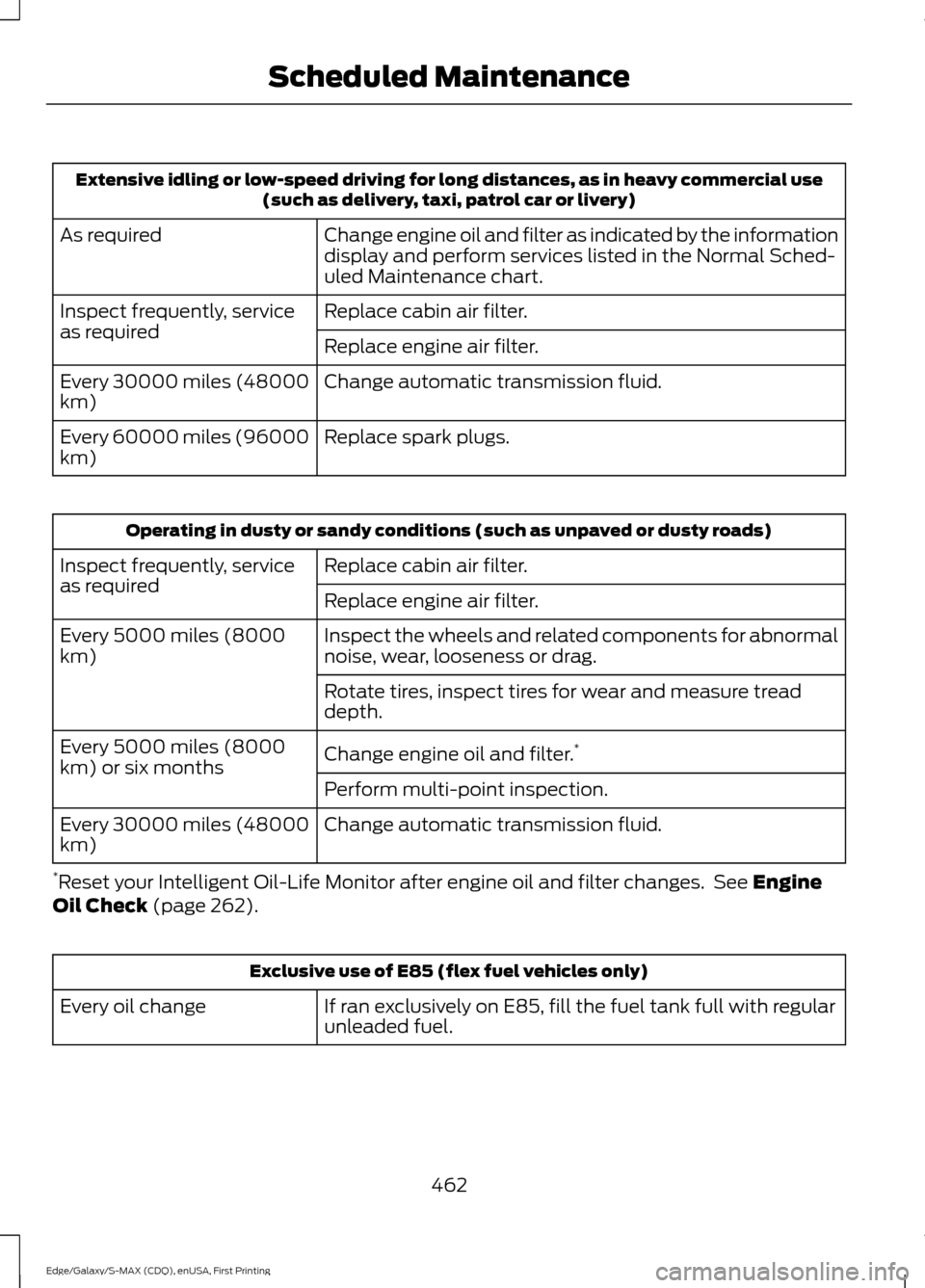
Extensive idling or low-speed driving for long distances, as in heavy commercial use
(such as delivery, taxi, patrol car or livery)
Change engine oil and filter as indicated by the information
display and perform services listed in the Normal Sched-
uled Maintenance chart.
As required
Replace cabin air filter.
Inspect frequently, service
as required
Replace engine air filter.
Change automatic transmission fluid.
Every 30000 miles (48000
km)
Replace spark plugs.
Every 60000 miles (96000
km) Operating in dusty or sandy conditions (such as unpaved or dusty roads)
Replace cabin air filter.
Inspect frequently, service
as required
Replace engine air filter.
Inspect the wheels and related components for abnormal
noise, wear, looseness or drag.
Every 5000 miles (8000
km)
Rotate tires, inspect tires for wear and measure tread
depth.
Change engine oil and filter.*
Every 5000 miles (8000
km) or six months
Perform multi-point inspection.
Change automatic transmission fluid.
Every 30000 miles (48000
km)
* Reset your Intelligent Oil-Life Monitor after engine oil and filter changes. See Engine
Oil Check (page 262). Exclusive use of E85 (flex fuel vehicles only)
If ran exclusively on E85, fill the fuel tank full with regular
unleaded fuel.
Every oil change
462
Edge/Galaxy/S-MAX (CDQ), enUSA, First Printing Scheduled Maintenance
Page 503 of 508
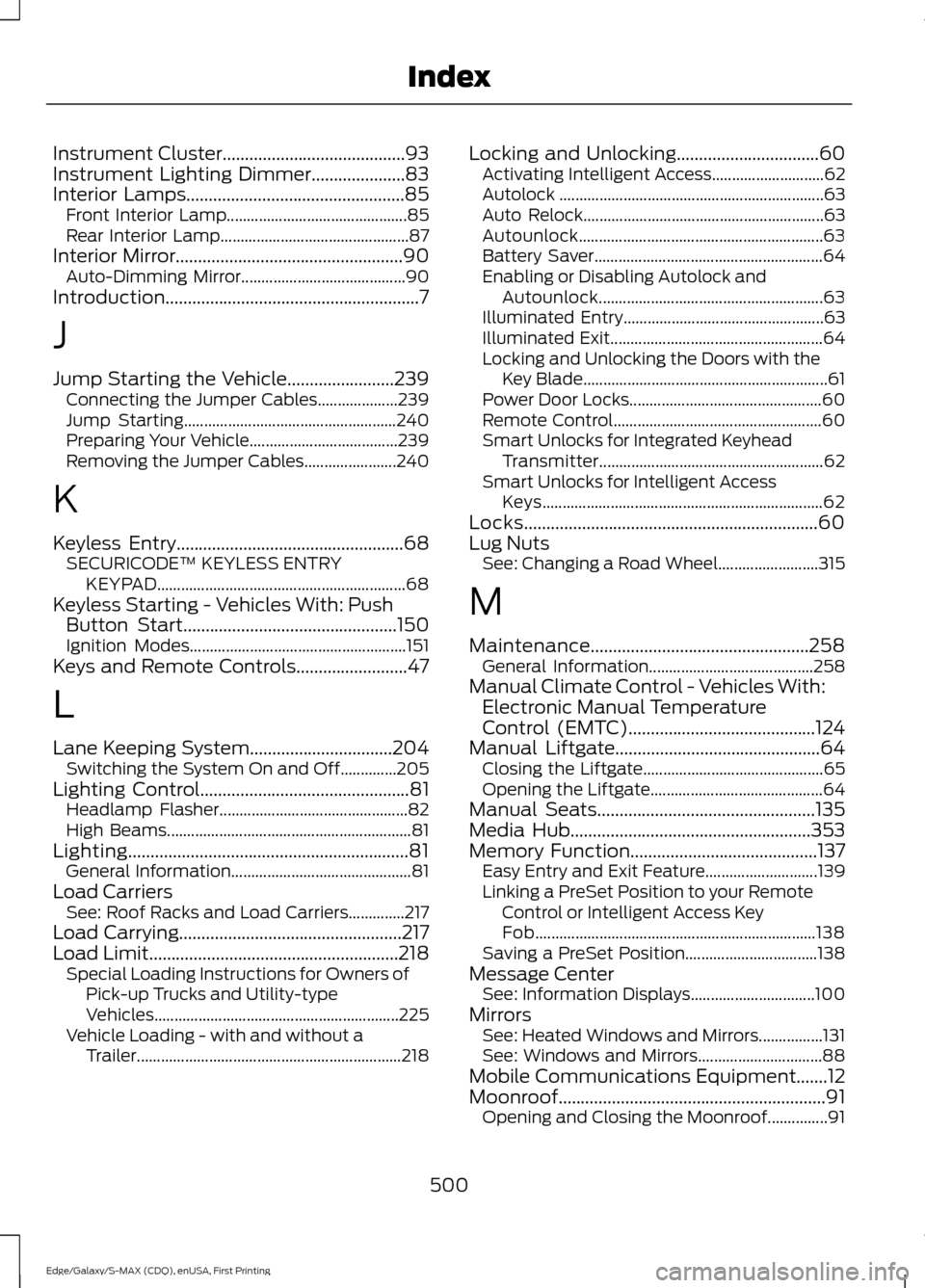
Instrument Cluster.........................................93
Instrument Lighting Dimmer.....................83
Interior Lamps
.................................................85
Front Interior Lamp............................................. 85
Rear Interior Lamp............................................... 87
Interior Mirror...................................................90 Auto-Dimming Mirror......................................... 90
Introduction.........................................................7
J
Jump Starting the Vehicle........................239 Connecting the Jumper Cables.................... 239
Jump Starting..................................................... 240
Preparing Your Vehicle..................................... 239
Removing the Jumper Cables....................... 240
K
Keyless Entry
...................................................68
SECURICODE™ KEYLESS ENTRY
KEYPAD.............................................................. 68
Keyless Starting - Vehicles With: Push Button Start................................................150
Ignition Modes...................................................... 151
Keys and Remote Controls.........................47
L
Lane Keeping System................................204 Switching the System On and Off..............205
Lighting Control
...............................................81
Headlamp Flasher............................................... 82
High Beams............................................................. 81
Lighting...............................................................81 General Information............................................. 81
Load Carriers See: Roof Racks and Load Carriers..............217
Load Carrying
..................................................217
Load Limit........................................................218 Special Loading Instructions for Owners of
Pick-up Trucks and Utility-type
Vehicles............................................................. 225
Vehicle Loading - with and without a Trailer.................................................................. 218Locking and Unlocking................................60
Activating Intelligent Access............................ 62
Autolock .................................................................. 63
Auto Relock............................................................ 63
Autounlock............................................................. 63
Battery Saver......................................................... 64
Enabling or Disabling Autolock and Autounlock........................................................ 63
Illuminated Entry.................................................. 63
Illuminated Exit..................................................... 64
Locking and Unlocking the Doors with the Key Blade............................................................. 61
Power Door Locks................................................ 60
Remote Control.................................................... 60
Smart Unlocks for Integrated Keyhead Transmitter........................................................ 62
Smart Unlocks for Intelligent Access Keys...................................................................... 62
Locks..................................................................60
Lug Nuts See: Changing a Road Wheel......................... 315
M
Maintenance.................................................258 General Information......................................... 258
Manual Climate Control - Vehicles With: Electronic Manual Temperature
Control (EMTC)
..........................................124
Manual Liftgate..............................................64 Closing the Liftgate............................................. 65
Opening the Liftgate........................................... 64
Manual Seats
.................................................135
Media Hub......................................................353
Memory Function
..........................................137
Easy Entry and Exit Feature............................ 139
Linking a PreSet Position to your Remote Control or Intelligent Access Key
Fob...................................................................... 138
Saving a PreSet Position................................. 138
Message Center See: Information Displays............................... 100
Mirrors See: Heated Windows and Mirrors................131
See: Windows and Mirrors............................... 88
Mobile Communications Equipment
.......12
Moonroof............................................................91 Opening and Closing the Moonroof...............91
500
Edge/Galaxy/S-MAX (CDQ), enUSA, First Printing Index
Page 504 of 508
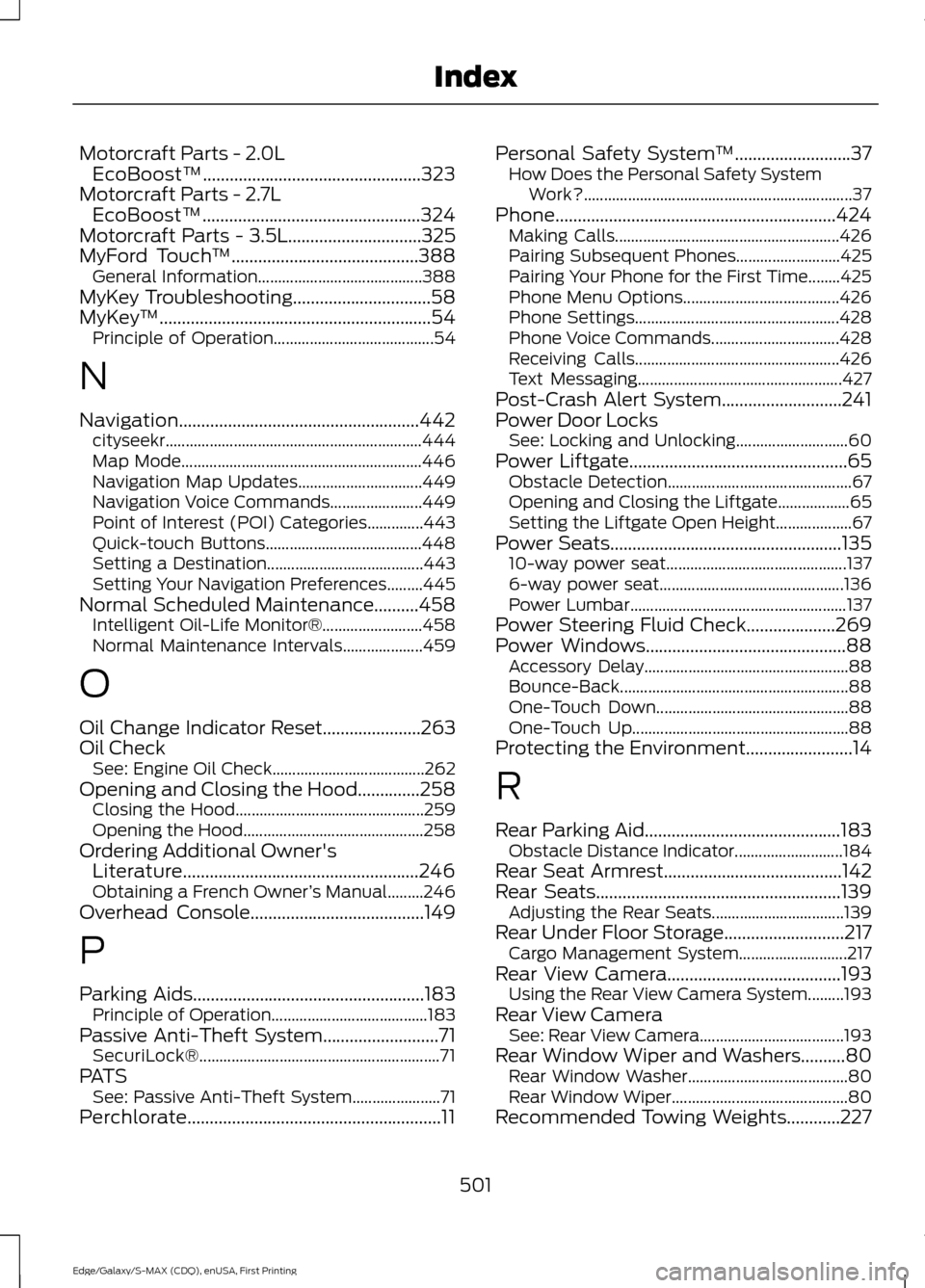
Motorcraft Parts - 2.0L
EcoBoost™.................................................323
Motorcraft Parts - 2.7L EcoBoost™.................................................324
Motorcraft Parts - 3.5L..............................325
MyFord Touch ™..........................................388
General Information......................................... 388
MyKey Troubleshooting...............................58
MyKey ™
.............................................................54
Principle of Operation........................................ 54
N
Navigation......................................................442 cityseekr................................................................ 444
Map Mode............................................................ 446
Navigation Map Updates............................... 449
Navigation Voice Commands....................... 449
Point of Interest (POI) Categories..............443
Quick-touch Buttons....................................... 448
Setting a Destination....................................... 443
Setting Your Navigation Preferences.........445
Normal Scheduled Maintenance..........458 Intelligent Oil-Life Monitor®......................... 458
Normal Maintenance Intervals.................... 459
O
Oil Change Indicator Reset......................263
Oil Check See: Engine Oil Check...................................... 262
Opening and Closing the Hood..............258 Closing the Hood............................................... 259
Opening the Hood............................................. 258
Ordering Additional Owner's Literature.....................................................246
Obtaining a French Owner ’s Manual.........246
Overhead Console.......................................149
P
Parking Aids....................................................183 Principle of Operation....................................... 183
Passive Anti-Theft System..........................71 SecuriLock®............................................................ 71
PATS See: Passive Anti-Theft System...................... 71
Perchlorate.........................................................11 Personal Safety System
™
..........................37
How Does the Personal Safety System
Work?................................................................... 37
Phone...............................................................424 Making Calls........................................................ 426
Pairing Subsequent Phones.......................... 425
Pairing Your Phone for the First Time........425
Phone Menu Options....................................... 426
Phone Settings................................................... 428
Phone Voice Commands................................ 428
Receiving Calls................................................... 426
Text Messaging................................................... 427
Post-Crash Alert System...........................241
Power Door Locks See: Locking and Unlocking............................ 60
Power Liftgate.................................................65 Obstacle Detection.............................................. 67
Opening and Closing the Liftgate.................. 65
Setting the Liftgate Open Height................... 67
Power Seats....................................................135 10-way power seat............................................. 137
6-way power seat.............................................. 136
Power Lumbar...................................................... 137
Power Steering Fluid Check....................269
Power Windows.............................................88 Accessory Delay................................................... 88
Bounce-Back......................................................... 88
One-Touch Down................................................ 88
One-Touch Up...................................................... 88
Protecting the Environment........................14
R
Rear Parking Aid............................................183 Obstacle Distance Indicator........................... 184
Rear Seat Armrest
........................................142
Rear Seats.......................................................139 Adjusting the Rear Seats................................. 139
Rear Under Floor Storage
...........................217
Cargo Management System........................... 217
Rear View Camera
.......................................193
Using the Rear View Camera System.........193
Rear View Camera See: Rear View Camera.................................... 193
Rear Window Wiper and Washers..........80 Rear Window Washer........................................ 80
Rear Window Wiper............................................ 80
Recommended Towing Weights............227
501
Edge/Galaxy/S-MAX (CDQ), enUSA, First Printing Index