air conditioning FORD EDGE 2019 User Guide
[x] Cancel search | Manufacturer: FORD, Model Year: 2019, Model line: EDGE, Model: FORD EDGE 2019Pages: 547, PDF Size: 40.86 MB
Page 353 of 547
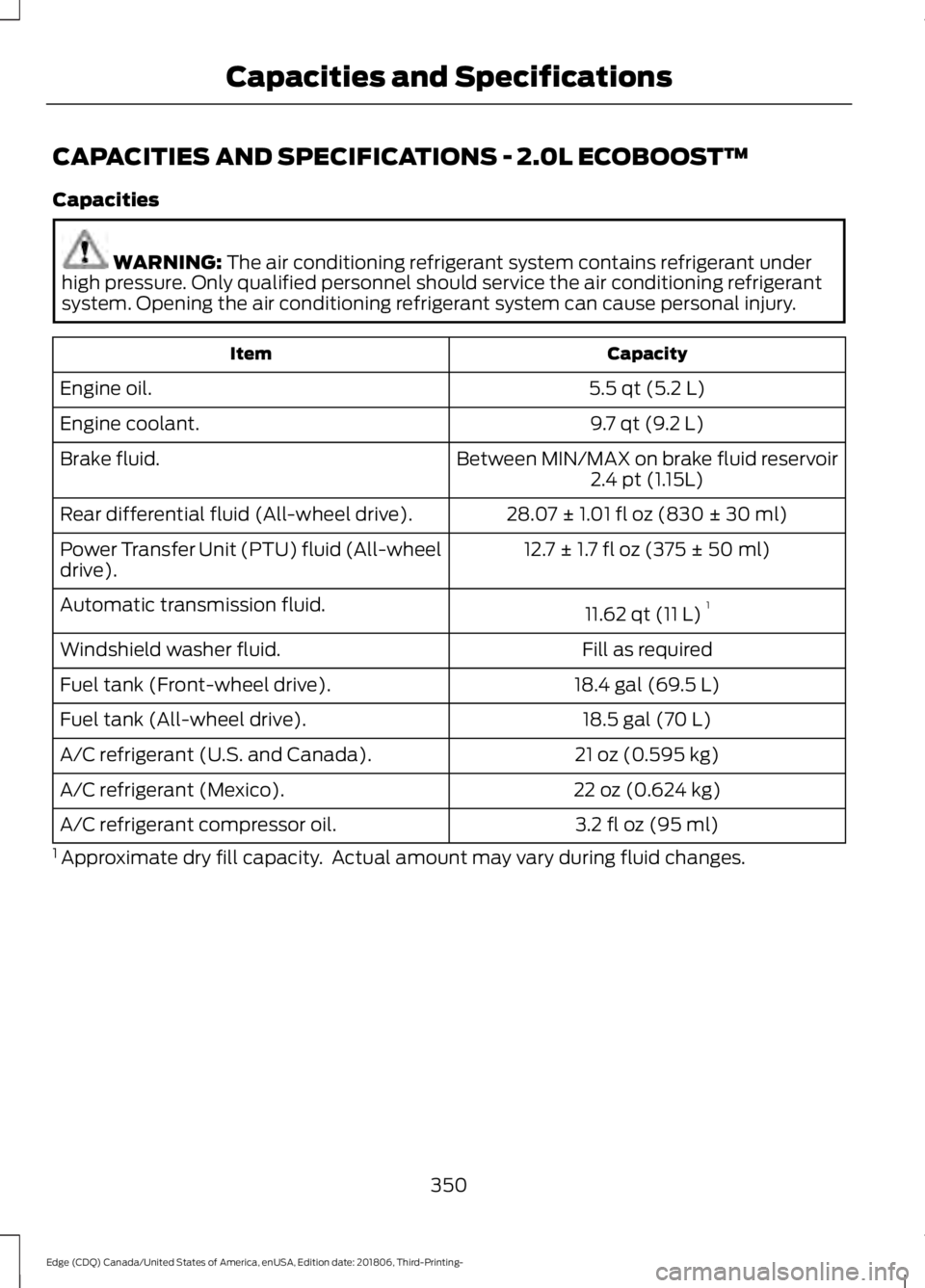
CAPACITIES AND SPECIFICATIONS - 2.0L ECOBOOST™
Capacities
WARNING: The air conditioning refrigerant system contains refrigerant under
high pressure. Only qualified personnel should service the air conditioning refrigerant
system. Opening the air conditioning refrigerant system can cause personal injury. Capacity
Item
5.5 qt (5.2 L)
Engine oil.
9.7 qt (9.2 L)
Engine coolant.
Between MIN/MAX on brake fluid reservoir
Brake fluid.
2.4 pt (1.15L)
28.07 ± 1.01 fl oz (830 ± 30 ml)
Rear differential fluid (All-wheel drive).
12.7 ± 1.7 fl oz (375 ± 50 ml)
Power Transfer Unit (PTU) fluid (All-wheel
drive).
11.62 qt (11 L)1
Automatic transmission fluid.
Fill as required
Windshield washer fluid.
18.4 gal (69.5 L)
Fuel tank (Front-wheel drive).
18.5 gal (70 L)
Fuel tank (All-wheel drive).
21 oz (0.595 kg)
A/C refrigerant (U.S. and Canada).
22 oz (0.624 kg)
A/C refrigerant (Mexico).
3.2 fl oz (95 ml)
A/C refrigerant compressor oil.
1 Approximate dry fill capacity. Actual amount may vary during fluid changes.
350
Edge (CDQ) Canada/United States of America, enUSA, Edition date: 201806, Third-Printing- Capacities and Specifications
Page 357 of 547
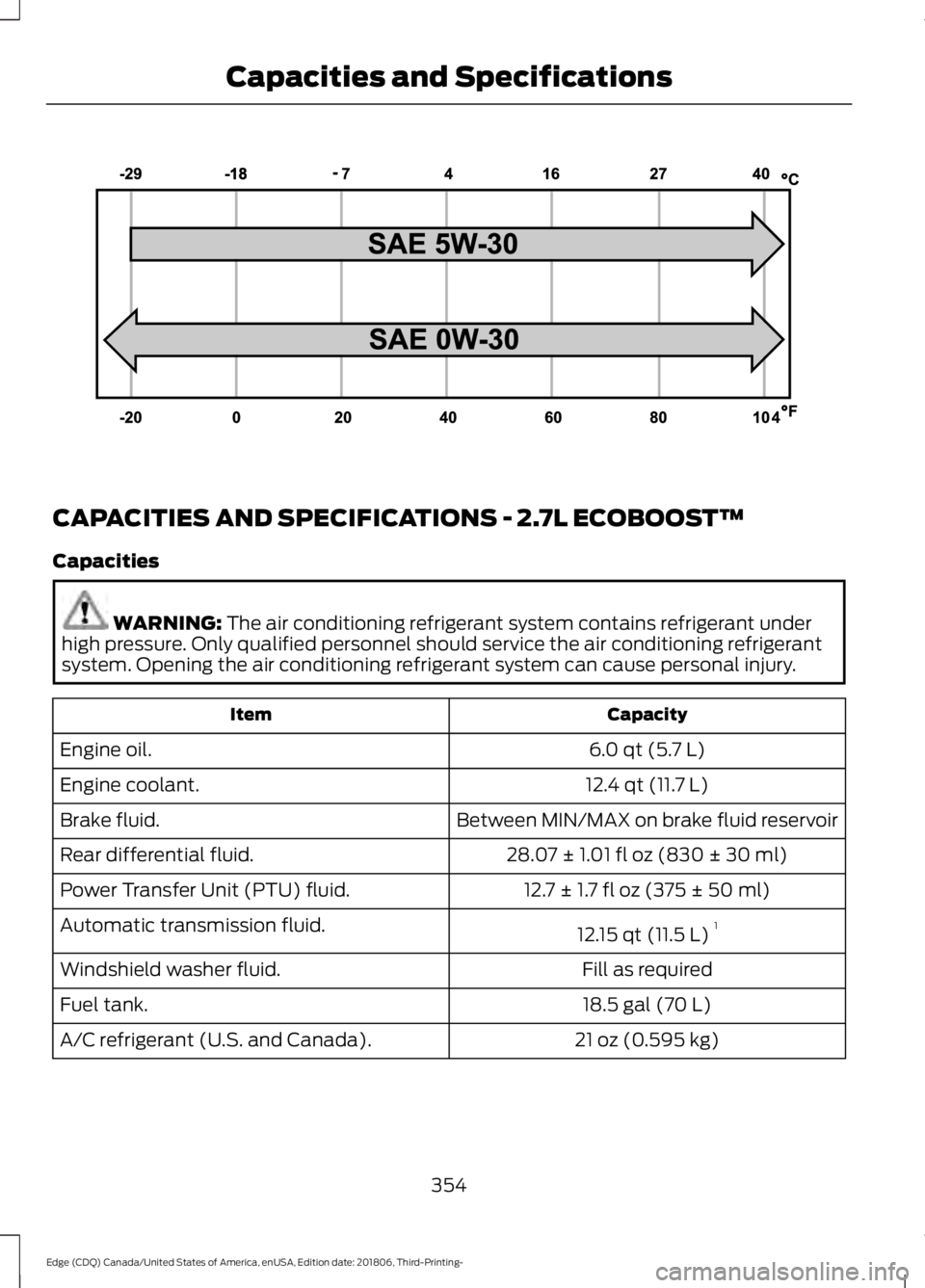
CAPACITIES AND SPECIFICATIONS - 2.7L ECOBOOST™
Capacities
WARNING: The air conditioning refrigerant system contains refrigerant under
high pressure. Only qualified personnel should service the air conditioning refrigerant
system. Opening the air conditioning refrigerant system can cause personal injury. Capacity
Item
6.0 qt (5.7 L)
Engine oil.
12.4 qt (11.7 L)
Engine coolant.
Between MIN/MAX on brake fluid reservoir
Brake fluid.
28.07 ± 1.01 fl oz (830 ± 30 ml)
Rear differential fluid.
12.7 ± 1.7 fl oz (375 ± 50 ml)
Power Transfer Unit (PTU) fluid.
12.15 qt (11.5 L)1
Automatic transmission fluid.
Fill as required
Windshield washer fluid.
18.5 gal (70 L)
Fuel tank.
21 oz (0.595 kg)
A/C refrigerant (U.S. and Canada).
354
Edge (CDQ) Canada/United States of America, enUSA, Edition date: 201806, Third-Printing- Capacities and SpecificationsE240523
Page 424 of 547
Supported USB file systems include: FAT,
exFAT, and NTFS.
SYNC 3 is also able to organize the media
from your USB device by metadata tags.
Metadata tags, which are descriptive
software identifiers embedded in the
media files, provide information about the
file.
If your indexed media files contain no
information embedded in these metadata
tags, SYNC 3 may classify the empty
metadata tags as unknown.
SYNC 3 is capable of indexing up to
50,000 songs per USB device, for up to 10
devices.
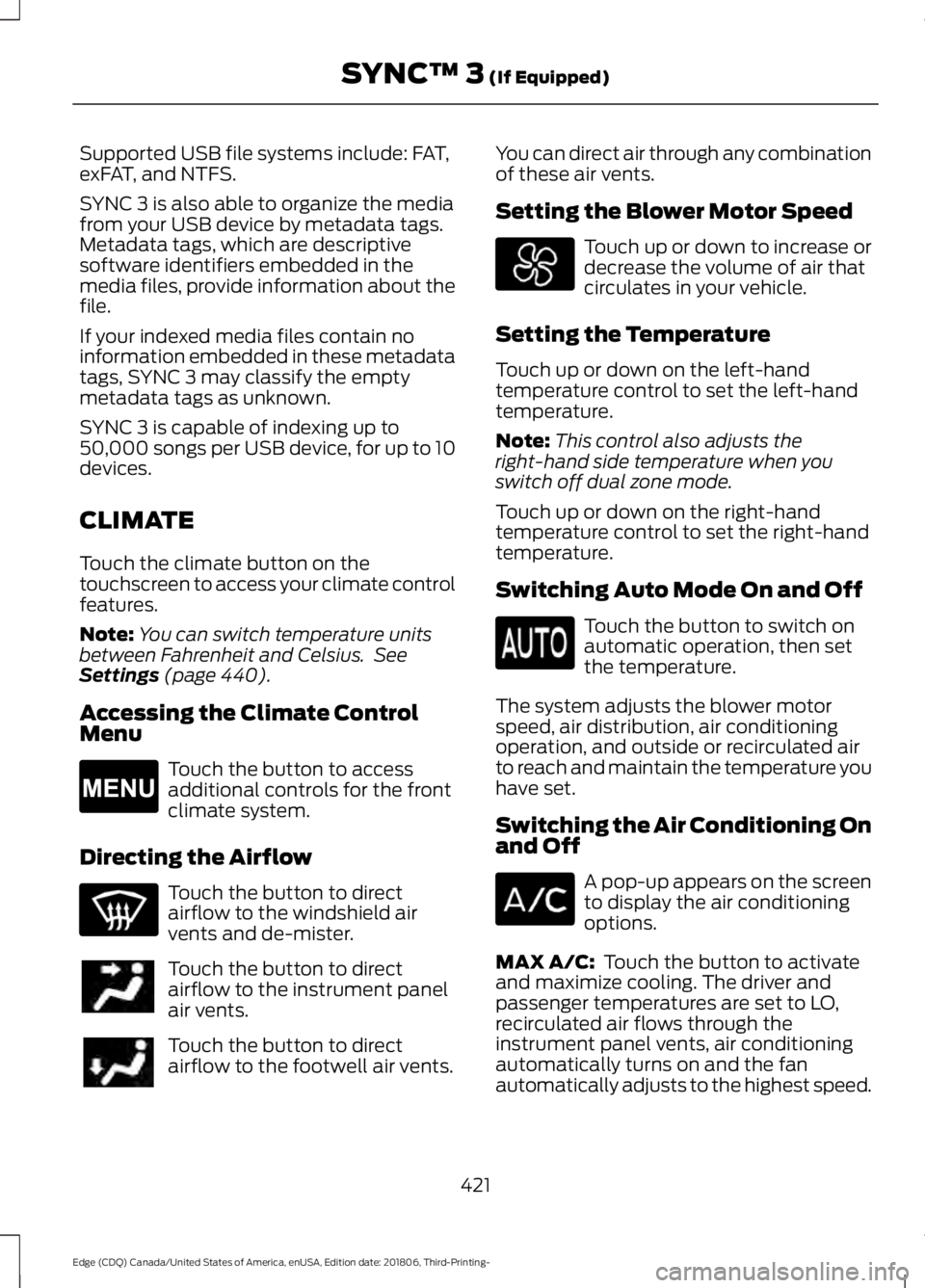
CLIMATE
Touch the climate button on the
touchscreen to access your climate control
features.
Note:
You can switch temperature units
between Fahrenheit and Celsius. See
Settings (page 440).
Accessing the Climate Control
Menu Touch the button to access
additional controls for the front
climate system.
Directing the Airflow Touch the button to direct
airflow to the windshield air
vents and de-mister.
Touch the button to direct
airflow to the instrument panel
air vents.
Touch the button to direct
airflow to the footwell air vents. You can direct air through any combination
of these air vents.
Setting the Blower Motor Speed Touch up or down to increase or
decrease the volume of air that
circulates in your vehicle.
Setting the Temperature
Touch up or down on the left-hand
temperature control to set the left-hand
temperature.
Note: This control also adjusts the
right-hand side temperature when you
switch off dual zone mode.
Touch up or down on the right-hand
temperature control to set the right-hand
temperature.
Switching Auto Mode On and Off Touch the button to switch on
automatic operation, then set
the temperature.
The system adjusts the blower motor
speed, air distribution, air conditioning
operation, and outside or recirculated air
to reach and maintain the temperature you
have set.
Switching the Air Conditioning On
and Off A pop-up appears on the screen
to display the air conditioning
options.
MAX A/C:
Touch the button to activate
and maximize cooling. The driver and
passenger temperatures are set to LO,
recirculated air flows through the
instrument panel vents, air conditioning
automatically turns on and the fan
automatically adjusts to the highest speed.
421
Edge (CDQ) Canada/United States of America, enUSA, Edition date: 201806, Third-Printing- SYNC™ 3
(If Equipped)E265038
Page 425 of 547
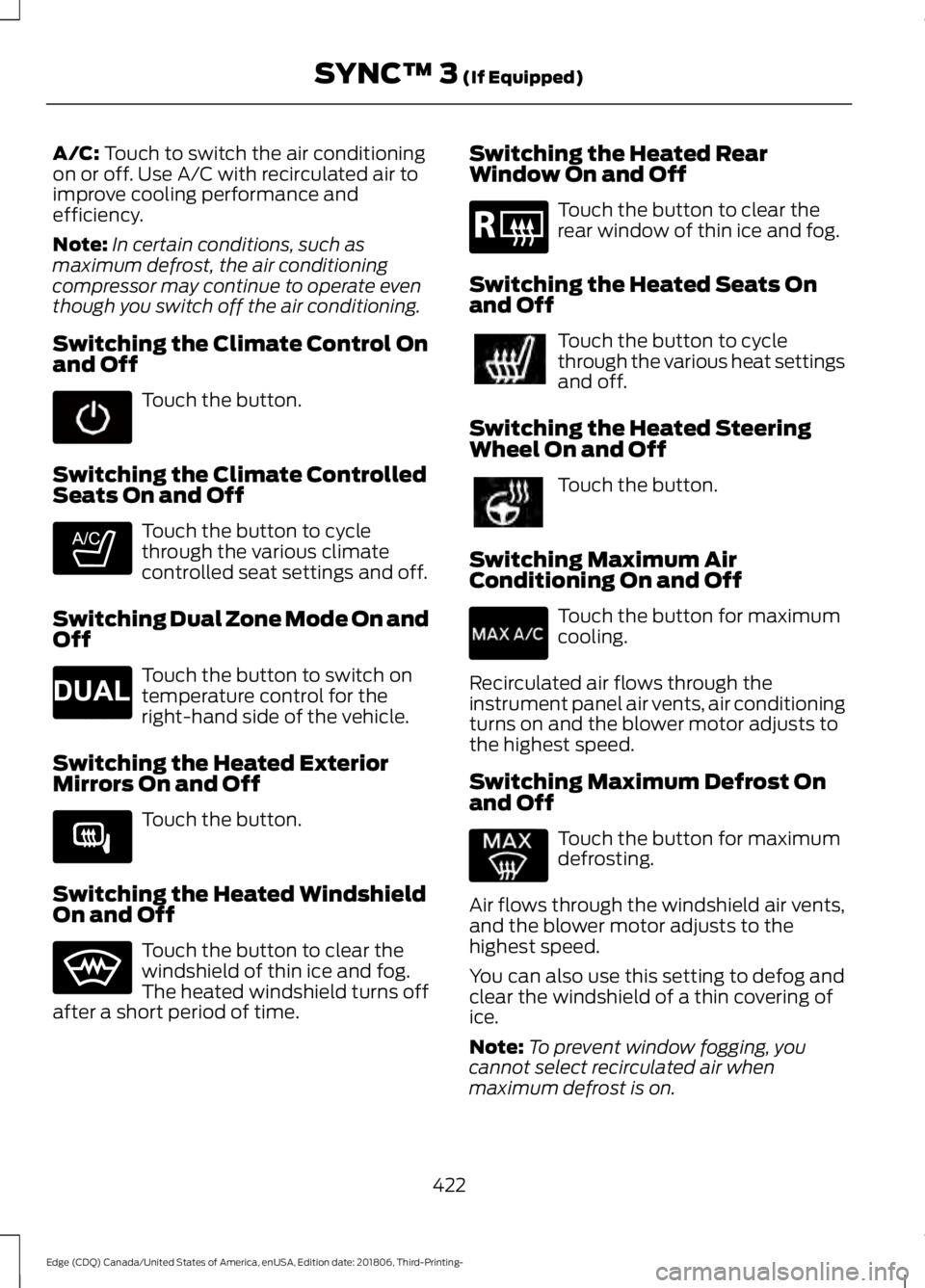
A/C: Touch to switch the air conditioning
on or off. Use A/C with recirculated air to
improve cooling performance and
efficiency.
Note: In certain conditions, such as
maximum defrost, the air conditioning
compressor may continue to operate even
though you switch off the air conditioning.
Switching the Climate Control On
and Off Touch the button.
Switching the Climate Controlled
Seats On and Off Touch the button to cycle
through the various climate
controlled seat settings and off.
Switching Dual Zone Mode On and
Off Touch the button to switch on
temperature control for the
right-hand side of the vehicle.
Switching the Heated Exterior
Mirrors On and Off Touch the button.
Switching the Heated Windshield
On and Off Touch the button to clear the
windshield of thin ice and fog.
The heated windshield turns off
after a short period of time. Switching the Heated Rear
Window On and Off Touch the button to clear the
rear window of thin ice and fog.
Switching the Heated Seats On
and Off Touch the button to cycle
through the various heat settings
and off.
Switching the Heated Steering
Wheel On and Off Touch the button.
Switching Maximum Air
Conditioning On and Off Touch the button for maximum
cooling.
Recirculated air flows through the
instrument panel air vents, air conditioning
turns on and the blower motor adjusts to
the highest speed.
Switching Maximum Defrost On
and Off Touch the button for maximum
defrosting.
Air flows through the windshield air vents,
and the blower motor adjusts to the
highest speed.
You can also use this setting to defog and
clear the windshield of a thin covering of
ice.
Note: To prevent window fogging, you
cannot select recirculated air when
maximum defrost is on.
422
Edge (CDQ) Canada/United States of America, enUSA, Edition date: 201806, Third-Printing- SYNC™ 3
(If Equipped) E265282 E265280 E266189 E184884
Page 477 of 547
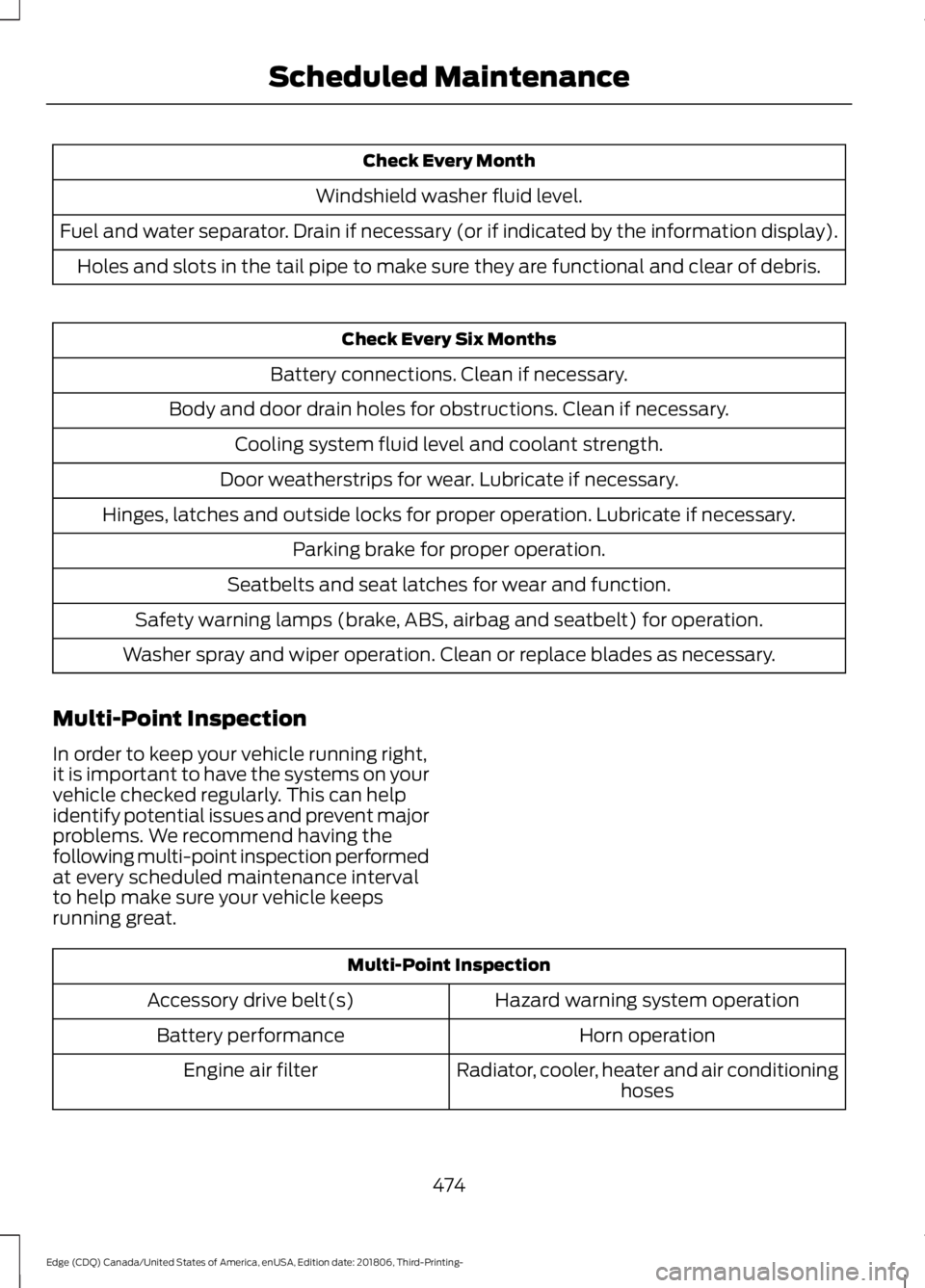
Check Every Month
Windshield washer fluid level.
Fuel and water separator. Drain if necessary (or if indicated by the information display). Holes and slots in the tail pipe to make sure they are functional and clear of debris. Check Every Six Months
Battery connections. Clean if necessary.
Body and door drain holes for obstructions. Clean if necessary. Cooling system fluid level and coolant strength.
Door weatherstrips for wear. Lubricate if necessary.
Hinges, latches and outside locks for proper operation. Lubricate if necessary. Parking brake for proper operation.
Seatbelts and seat latches for wear and function.
Safety warning lamps (brake, ABS, airbag and seatbelt) for operation.
Washer spray and wiper operation. Clean or replace blades as necessary.
Multi-Point Inspection
In order to keep your vehicle running right,
it is important to have the systems on your
vehicle checked regularly. This can help
identify potential issues and prevent major
problems. We recommend having the
following multi-point inspection performed
at every scheduled maintenance interval
to help make sure your vehicle keeps
running great. Multi-Point Inspection
Hazard warning system operation
Accessory drive belt(s)
Horn operation
Battery performance
Radiator, cooler, heater and air conditioninghoses
Engine air filter
474
Edge (CDQ) Canada/United States of America, enUSA, Edition date: 201806, Third-Printing- Scheduled Maintenance
Page 534 of 547
1
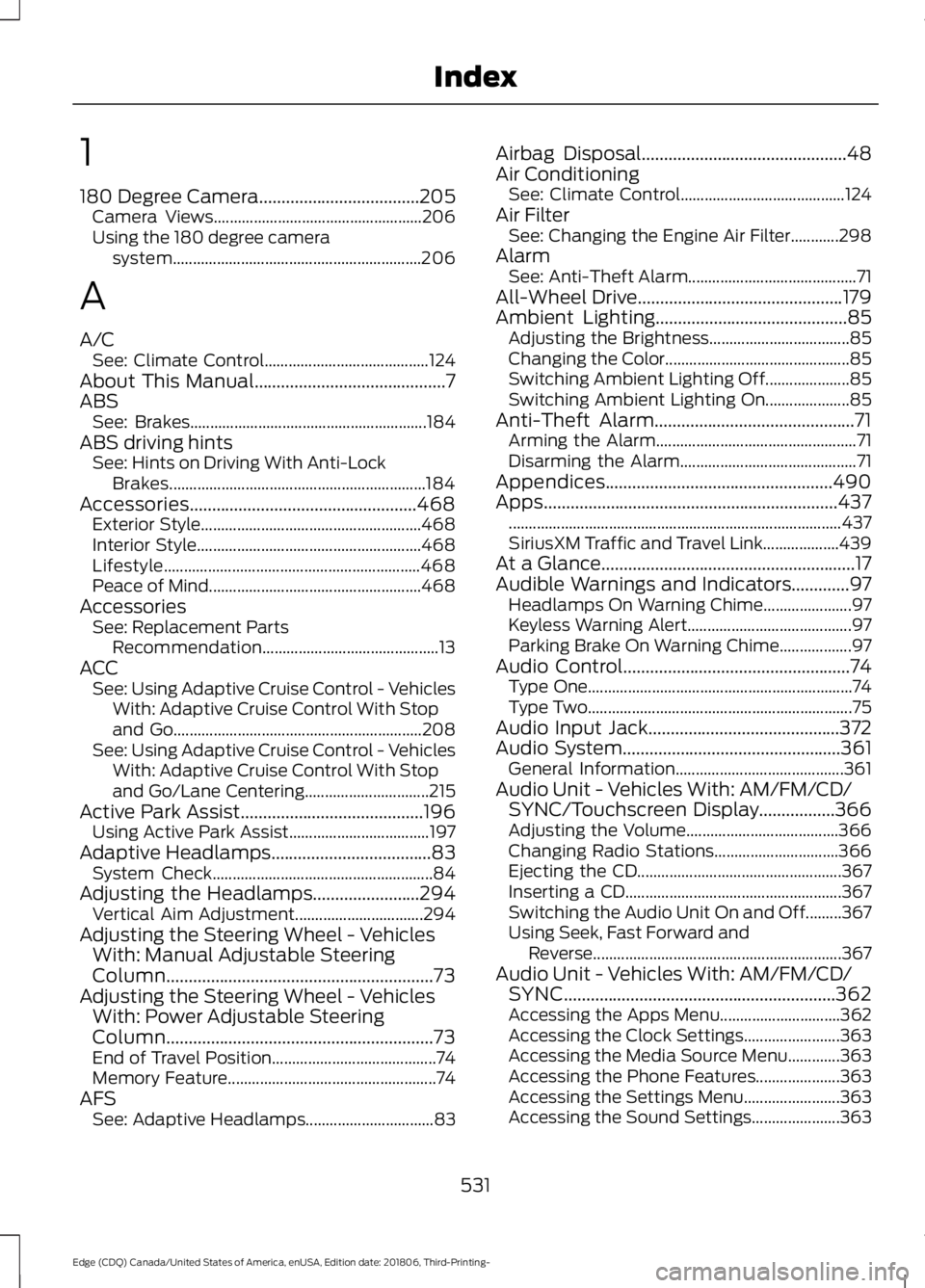
180 Degree Camera....................................205
Camera Views.................................................... 206
Using the 180 degree camera system.............................................................. 206
A
A/C See: Climate Control......................................... 124
About This Manual...........................................7
ABS See: Brakes........................................................... 184
ABS driving hints See: Hints on Driving With Anti-Lock
Brakes................................................................ 184
Accessories...................................................468 Exterior Style....................................................... 468
Interior Style........................................................ 468
Lifestyle................................................................ 468
Peace of Mind..................................................... 468
Accessories See: Replacement Parts
Recommendation............................................ 13
ACC See: Using Adaptive Cruise Control - Vehicles
With: Adaptive Cruise Control With Stop
and Go.............................................................. 208
See: Using Adaptive Cruise Control - Vehicles With: Adaptive Cruise Control With Stop
and Go/Lane Centering............................... 215
Active Park Assist.........................................196 Using Active Park Assist................................... 197
Adaptive Headlamps
....................................83
System Check....................................................... 84
Adjusting the Headlamps........................294 Vertical Aim Adjustment................................ 294
Adjusting the Steering Wheel - Vehicles With: Manual Adjustable Steering
Column............................................................73
Adjusting the Steering Wheel - Vehicles With: Power Adjustable Steering
Column............................................................73
End of Travel Position......................................... 74
Memory Feature.................................................... 74
AFS See: Adaptive Headlamps................................ 83Airbag Disposal..............................................48
Air Conditioning
See: Climate Control......................................... 124
Air Filter See: Changing the Engine Air Filter............298
Alarm See: Anti-Theft Alarm.......................................... 71
All-Wheel Drive
..............................................179
Ambient Lighting...........................................85 Adjusting the Brightness................................... 85
Changing the Color.............................................. 85
Switching Ambient Lighting Off..................... 85
Switching Ambient Lighting On..................... 85
Anti-Theft Alarm.............................................71 Arming the Alarm.................................................. 71
Disarming the Alarm............................................ 71
Appendices...................................................490
Apps..................................................................437 ........................................................................\
........... 437
SiriusXM Traffic and Travel Link................... 439
At a Glance
.........................................................17
Audible Warnings and Indicators.............97 Headlamps On Warning Chime...................... 97
Keyless Warning Alert......................................... 97
Parking Brake On Warning Chime..................97
Audio Control
...................................................74
Type One.................................................................. 74
Type Two.................................................................. 75
Audio Input Jack...........................................372
Audio System
.................................................361
General Information.......................................... 361
Audio Unit - Vehicles With: AM/FM/CD/ SYNC/Touchscreen Display
.................366
Adjusting the Volume...................................... 366
Changing Radio Stations............................... 366
Ejecting the CD................................................... 367
Inserting a CD...................................................... 367
Switching the Audio Unit On and Off.........367
Using Seek, Fast Forward and Reverse .............................................................. 367
Audio Unit - Vehicles With: AM/FM/CD/ SYNC
.............................................................362
Accessing the Apps Menu.............................. 362
Accessing the Clock Settings........................ 363
Accessing the Media Source Menu.............363
Accessing the Phone Features..................... 363
Accessing the Settings Menu........................ 363
Accessing the Sound Settings...................... 363
531
Edge (CDQ) Canada/United States of America, enUSA, Edition date: 201806, Third-Printing- Index
Page 535 of 547
Adjusting the Volume.......................................
363
Changing Radio Stations................................ 363
Listening to the Radio...................................... 364
Playing or Pausing Media............................... 364
Switching Radio Text On and Off................364
Switching Repeat Mode On and Off..........364
Switching Shuffle Mode On and Off..........364
Switching the Audio Unit On and Off........364
Switching the Display On and Off...............364
Using Seek, Fast Forward and Reverse............................................................. 364
Using the Display Control............................... 364
Using the Number Block................................. 364
Audio Unit - Vehicles With: Bang and Olufsen Audio System............................365
Accessing the Sound Settings...................... 365
Adjusting the Volume...................................... 365
Changing Radio Stations................................ 365
Ejecting the CD................................................... 365
Inserting a CD...................................................... 365
Switching the Audio Unit On and Off........365
Using Seek, Fast Forward and Reverse............................................................. 366
Autolamps.......................................................80 Windshield Wiper Activated
Headlamps........................................................80
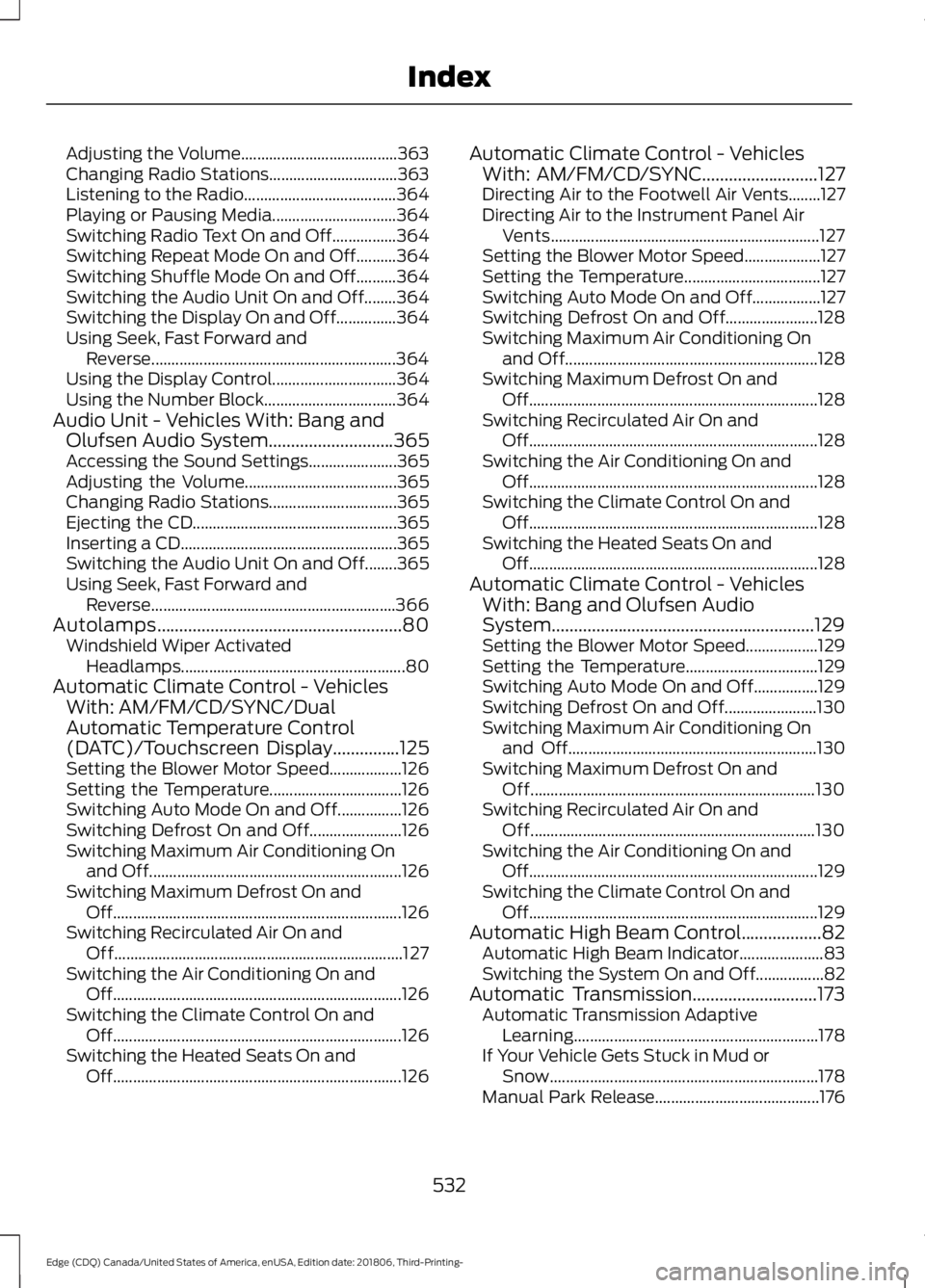
Automatic Climate Control - Vehicles With: AM/FM/CD/SYNC/Dual
Automatic Temperature Control
(DATC)/Touchscreen Display
...............125
Setting the Blower Motor Speed.................. 126
Setting the Temperature................................. 126
Switching Auto Mode On and Off................126
Switching Defrost On and Off....................... 126
Switching Maximum Air Conditioning On and Off............................................................... 126
Switching Maximum Defrost On and Off........................................................................\
126
Switching Recirculated Air On and Off........................................................................\
127
Switching the Air Conditioning On and Off........................................................................\
126
Switching the Climate Control On and Off........................................................................\
126
Switching the Heated Seats On and Off........................................................................\
126Automatic Climate Control - Vehicles
With: AM/FM/CD/SYNC
..........................127
Directing Air to the Footwell Air Vents........127
Directing Air to the Instrument Panel Air
Vents................................................................... 127
Setting the Blower Motor Speed................... 127
Setting the Temperature.................................. 127
Switching Auto Mode On and Off.................127
Switching Defrost On and Off....................... 128
Switching Maximum Air Conditioning On and Off............................................................... 128
Switching Maximum Defrost On and Off........................................................................\
128
Switching Recirculated Air On and Off........................................................................\
128
Switching the Air Conditioning On and Off........................................................................\
128
Switching the Climate Control On and Off........................................................................\
128
Switching the Heated Seats On and Off........................................................................\
128
Automatic Climate Control - Vehicles With: Bang and Olufsen Audio
System...........................................................129
Setting the Blower Motor Speed.................. 129
Setting the Temperature................................. 129
Switching Auto Mode On and Off................129
Switching Defrost On and Off....................... 130
Switching Maximum Air Conditioning On and Off.............................................................. 130
Switching Maximum Defrost On and Off....................................................................... 130
Switching Recirculated Air On and Off....................................................................... 130
Switching the Air Conditioning On and Off........................................................................\
129
Switching the Climate Control On and Off........................................................................\
129
Automatic High Beam Control..................82 Automatic High Beam Indicator..................... 83
Switching the System On and Off.................82
Automatic Transmission............................173 Automatic Transmission Adaptive
Learning............................................................. 178
If Your Vehicle Gets Stuck in Mud or Snow................................................................... 178
Manual Park Release......................................... 176
532
Edge (CDQ) Canada/United States of America, enUSA, Edition date: 201806, Third-Printing- Index
Page 537 of 547
Child Safety Locks.........................................30
Left-Hand Side....................................................... 31
Right-Hand Side.................................................... 31
Cleaning Leather Seats.............................303
Cleaning Products.......................................299
Materials............................................................... 299
Cleaning the Engine
....................................301
Cleaning the Exterior..................................299 Cleaning the Headlamps............................... 300
Exterior Chrome Parts..................................... 300
Exterior Plastic Parts....................................... 300
Stripes or Graphics........................................... 300
Underbody........................................................... 300
Under Hood......................................................... 300
Cleaning the Instrument Panel and Instrument Cluster Lens........................302
Cleaning the Interior...................................302 Mirrors.................................................................... 302
Cleaning the Wheels..................................304
Cleaning the Windows and Wiper Blades............................................................301
Clearing All MyKeys........................................57
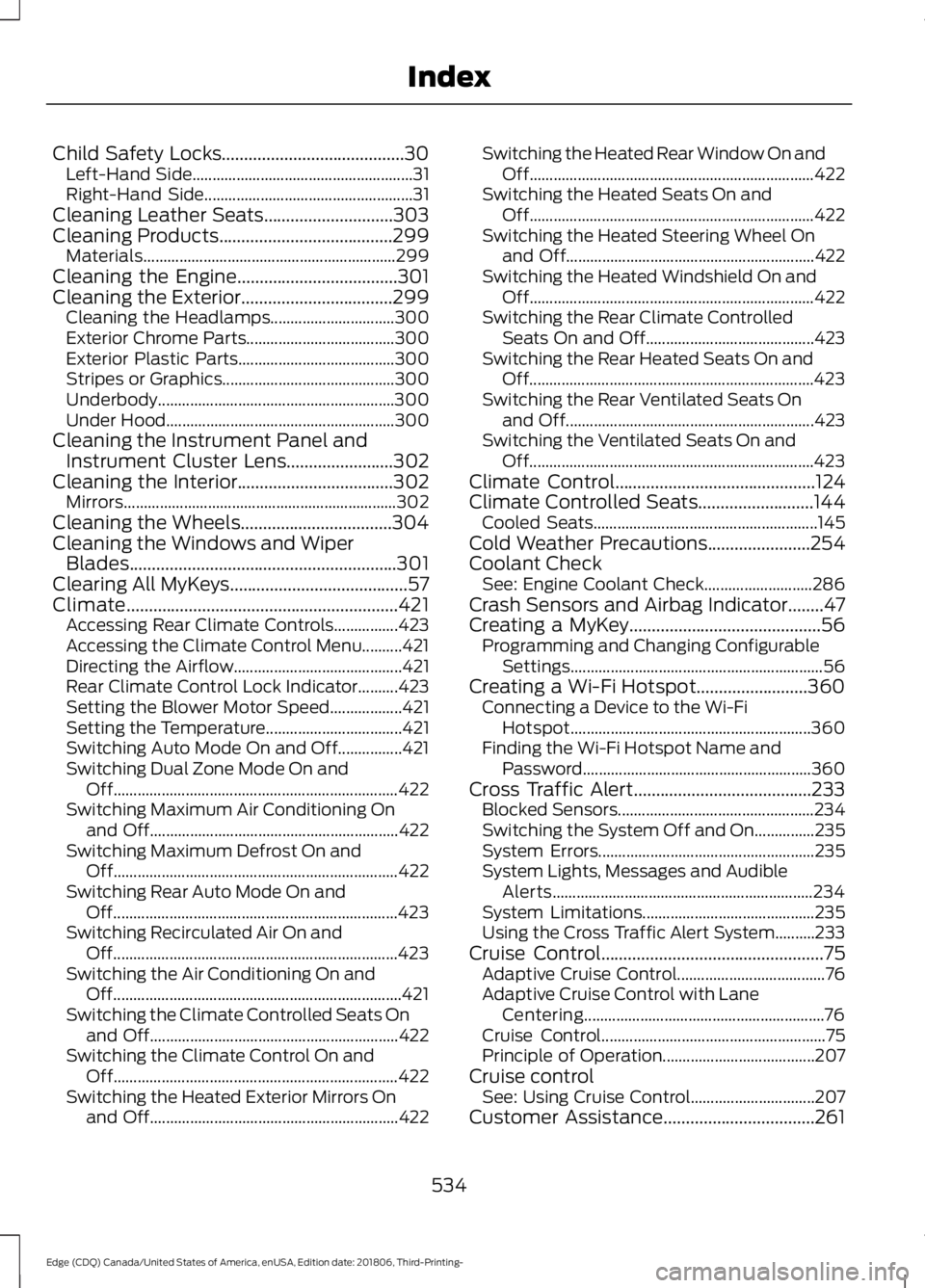
Climate.............................................................421 Accessing Rear Climate Controls................423
Accessing the Climate Control Menu..........421
Directing the Airflow.......................................... 421
Rear Climate Control Lock Indicator..........423
Setting the Blower Motor Speed.................. 421
Setting the Temperature.................................. 421
Switching Auto Mode On and Off................421
Switching Dual Zone Mode On and Off....................................................................... 422
Switching Maximum Air Conditioning On and Off.............................................................. 422
Switching Maximum Defrost On and Off....................................................................... 422
Switching Rear Auto Mode On and Off....................................................................... 423
Switching Recirculated Air On and Off....................................................................... 423
Switching the Air Conditioning On and Off........................................................................\
421
Switching the Climate Controlled Seats On and Off.............................................................. 422
Switching the Climate Control On and Off....................................................................... 422
Switching the Heated Exterior Mirrors On and Off.............................................................. 422Switching the Heated Rear Window On and
Off....................................................................... 422
Switching the Heated Seats On and Off....................................................................... 422
Switching the Heated Steering Wheel On and Off.............................................................. 422
Switching the Heated Windshield On and Off....................................................................... 422
Switching the Rear Climate Controlled Seats On and Off.......................................... 423
Switching the Rear Heated Seats On and Off....................................................................... 423
Switching the Rear Ventilated Seats On and Off.............................................................. 423
Switching the Ventilated Seats On and Off....................................................................... 423
Climate Control
.............................................124
Climate Controlled Seats..........................144
Cooled Seats........................................................ 145
Cold Weather Precautions
.......................254
Coolant Check See: Engine Coolant Check........................... 286
Crash Sensors and Airbag Indicator........47
Creating a MyKey...........................................56 Programming and Changing Configurable
Settings............................................................... 56
Creating a Wi-Fi Hotspot.........................360 Connecting a Device to the Wi-Fi
Hotspot............................................................ 360
Finding the Wi-Fi Hotspot Name and Password......................................................... 360
Cross Traffic Alert........................................233 Blocked Sensors................................................. 234
Switching the System Off and On...............235
System Errors...................................................... 235
System Lights, Messages and Audible Alerts................................................................. 234
System Limitations........................................... 235
Using the Cross Traffic Alert System..........233
Cruise Control
..................................................75
Adaptive Cruise Control..................................... 76
Adaptive Cruise Control with Lane Centering............................................................ 76
Cruise Control........................................................ 75
Principle of Operation...................................... 207
Cruise control See: Using Cruise Control............................... 207
Customer Assistance..................................261
534
Edge (CDQ) Canada/United States of America, enUSA, Edition date: 201806, Third-Printing- Index
Page 541 of 547
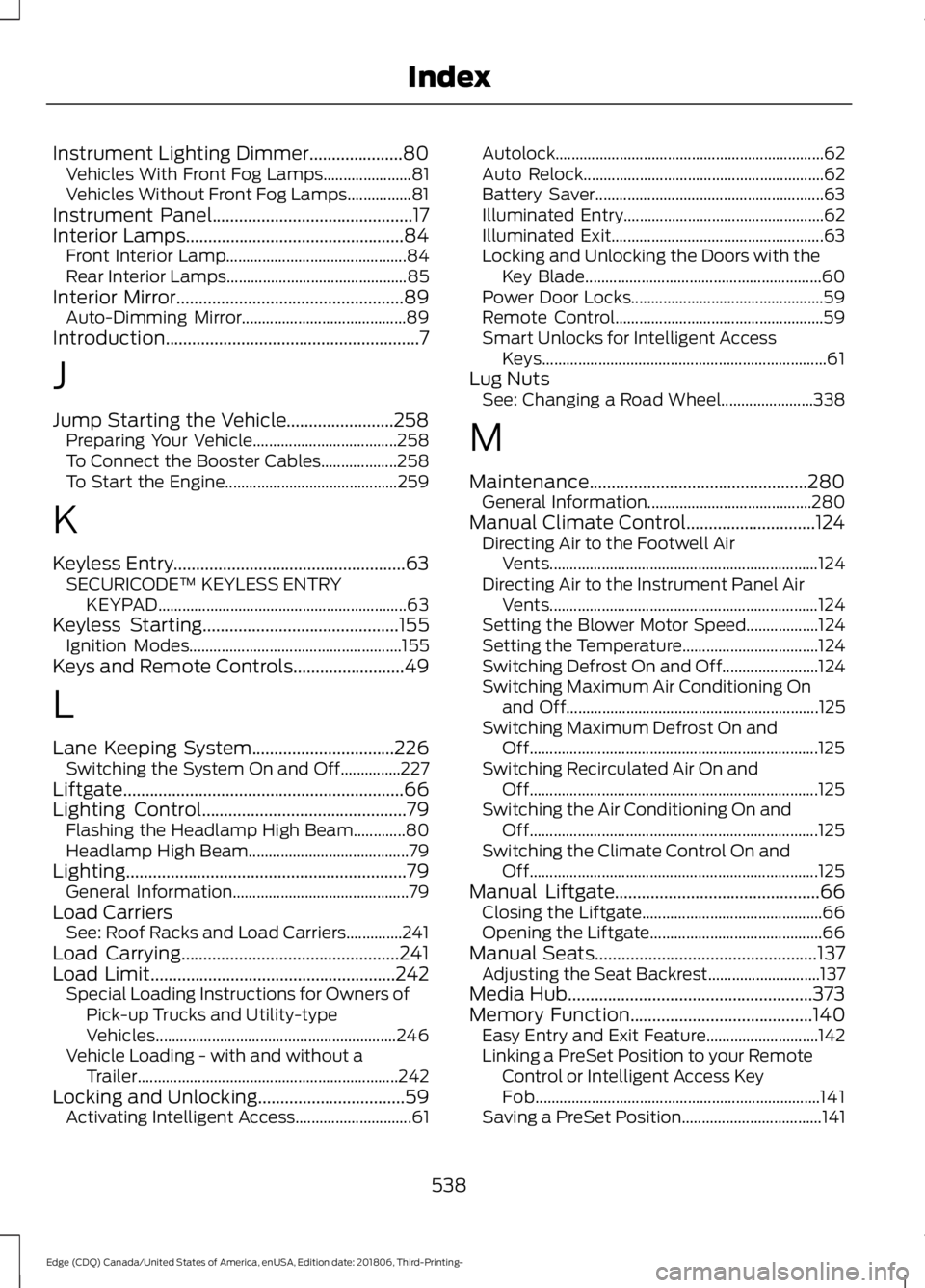
Instrument Lighting Dimmer.....................80
Vehicles With Front Fog Lamps...................... 81
Vehicles Without Front Fog Lamps................81
Instrument Panel.............................................17
Interior Lamps.................................................84
Front Interior Lamp............................................. 84
Rear Interior Lamps............................................. 85
Interior Mirror...................................................89 Auto-Dimming Mirror......................................... 89
Introduction.........................................................7
J
Jump Starting the Vehicle........................258 Preparing Your Vehicle.................................... 258
To Connect the Booster Cables................... 258
To Start the Engine........................................... 259
K
Keyless Entry
....................................................63
SECURICODE™ KEYLESS ENTRY
KEYPAD.............................................................. 63
Keyless Starting
............................................155
Ignition Modes..................................................... 155
Keys and Remote Controls.........................49
L
Lane Keeping System................................226 Switching the System On and Off...............227
Liftgate...............................................................66
Lighting Control
..............................................79
Flashing the Headlamp High Beam.............80
Headlamp High Beam........................................ 79
Lighting
...............................................................79
General Information............................................ 79
Load Carriers See: Roof Racks and Load Carriers..............241
Load Carrying.................................................241
Load Limit
.......................................................242
Special Loading Instructions for Owners of
Pick-up Trucks and Utility-type
Vehicles............................................................ 246
Vehicle Loading - with and without a Trailer................................................................. 242
Locking and Unlocking.................................59 Activating Intelligent Access............................. 61Autolock...................................................................
62
Auto Relock............................................................ 62
Battery Saver......................................................... 63
Illuminated Entry.................................................. 62
Illuminated Exit..................................................... 63
Locking and Unlocking the Doors with the Key Blade........................................................... 60
Power Door Locks................................................ 59
Remote Control.................................................... 59
Smart Unlocks for Intelligent Access Keys....................................................................... 61
Lug Nuts See: Changing a Road Wheel....................... 338
M
Maintenance.................................................280 General Information......................................... 280
Manual Climate Control.............................124 Directing Air to the Footwell Air
Vents................................................................... 124
Directing Air to the Instrument Panel Air Vents................................................................... 124
Setting the Blower Motor Speed.................. 124
Setting the Temperature.................................. 124
Switching Defrost On and Off........................ 124
Switching Maximum Air Conditioning On and Off............................................................... 125
Switching Maximum Defrost On and Off........................................................................\
125
Switching Recirculated Air On and Off........................................................................\
125
Switching the Air Conditioning On and Off........................................................................\
125
Switching the Climate Control On and Off........................................................................\
125
Manual Liftgate
..............................................66
Closing the Liftgate............................................. 66
Opening the Liftgate........................................... 66
Manual Seats..................................................137 Adjusting the Seat Backrest............................ 137
Media Hub
.......................................................373
Memory Function.........................................140
Easy Entry and Exit Feature............................ 142
Linking a PreSet Position to your Remote Control or Intelligent Access Key
Fob....................................................................... 141
Saving a PreSet Position................................... 141
538
Edge (CDQ) Canada/United States of America, enUSA, Edition date: 201806, Third-Printing- Index