gear FORD EDGE 2019 Owners Manual
[x] Cancel search | Manufacturer: FORD, Model Year: 2019, Model line: EDGE, Model: FORD EDGE 2019Pages: 547, PDF Size: 40.86 MB
Page 58 of 547
PRINCIPLE OF OPERATION
MyKey allows you to program keys with
restricted driving modes to promote good
driving habits. All but one of the keys can
be activated with these restricted modes.
Any keys that remain unprogrammed are
referred to as administrator keys or admin
keys. They can be used to:
•
Create a MyKey.
• Program configurable MyKey settings.
• Clear all MyKey features.
When you have created a MyKey, you can
access the following information by using
the information display to determine:
• How many admin keys and MyKeys are
programmed to your vehicle.
• The total distance your vehicle traveled
with a MyKey.
Note: Switch the vehicle on to use the
system.
Note: All MyKeys are programmed to the
same settings. You cannot program them
individually.
Note: For vehicles equipped with
push-button start, when both a MyKey and
an admin remote transmitter are present,
the admin remote transmitter will be
recognized by the vehicle while switching
the vehicle on to start the vehicle. Non-configurable Settings
The following settings cannot be changed
by an admin key user:
•
Safety belt reminder. You cannot
disable this feature. The audio system
will mute when the driver and front
seat passengers’ safety belts are not
fastened.
• Early low fuel or charge. The low-fuel
or low charge warning activates earlier,
giving the MyKey user more time to
refuel or recharge.
• Restricted touchscreen operation in
some markets. For example, MyKey
may prevent manual navigation
destination input while the vehicle is in
any gear other than park (P) or when
the vehicle reaches a certain rate of
speed.
• Satellite radio adult content
restrictions, if equipped on your vehicle.
Note: Audio system may not mute on
vehicles equipped with a basic AM/FM radio.
Note: You may be able to turn the lane
departure warning feature off, but feature
will automatically re-activate with every
new key cycle.
Configurable Settings
With an admin key, you can configure
certain MyKey settings when you first
create a MyKey and before you recycle the
key or restart the vehicle. You can also
change the settings afterward with an
admin key.
Note: Available vehicle features will appear
in your information display, providing
choices to switch them on or off, or to select
a more specific setting.
55
Edge (CDQ) Canada/United States of America, enUSA, Edition date: 201806, Third-Printing- MyKey
™
Page 65 of 547
When you electronically lock your vehicle
with any door open, transmission in park
(P) and the ignition off, the system
searches for an intelligent access key in
the passenger compartment after you
close the last door. If the system finds a
key, all of the doors immediately unlock
and the horn sounds twice, indicating that
a key is inside.
You can override the smart unlock feature
and intentionally lock the intelligent access
key inside your vehicle. To do this, lock your
vehicle after you have closed all the doors
by:
•
Using the keyless entry keypad.
• Pressing the lock button on another
intelligent access key.
• Touching the locking area on the
handle with another intelligent access
key in your hand.
When you open one of the front doors and
lock your vehicle using the power door lock
control, all doors lock then unlock if:
• The ignition is on.
• The ignition is off and the transmission
is not in park (P).
Auto Relock
If you press the unlock button on the
remote control and do not open a door
within 45 seconds, your vehicle locks and
the alarm arms. You can switch this
feature on or off in the information display.
See General Information (page 98).
Autolock
(If Equipped)
Autolock locks all the doors when:
• All doors are closed.
• The ignition is on.
• You shift into any gear putting your
vehicle in motion.
• Your vehicle reaches a speed greater
than Autolock repeats when:
•
You open then close any door while the
ignition is on and your vehicle speed is
9 mph (15 km/h)
or lower.
• Your vehicle reaches a speed greater
than
Autounlock
Autounlock unlocks all the doors when:
• The ignition is on, all the doors are
closed, and your vehicle has been
moving at a speed greater than 12 mph
(20 km/h)
.
• Your vehicle comes to a stop and you
switch the ignition off or to the
accessory position.
• You open the driver door within 10
minutes of switching the ignition off or
to accessory.
Note: The doors do not autounlock if you
electronically lock your vehicle after you
switch the ignition off and before you open
the driver door.
Enabling or Disabling Autounlock
You can enable or disable the autounlock
feature in the information display or an
authorized dealer can do it for you.
Illuminated Entry
The interior lamps and some exterior
lamps illuminate when you unlock the
doors with the remote control.
The lamps turn off if:
• The ignition is on.
• You press the remote control lock
button.
• 25 seconds have elapsed.
The lamps do not turn off if:
• You turn them on with the lamp
control.
• Any door is open.
62
Edge (CDQ) Canada/United States of America, enUSA, Edition date: 201806, Third-Printing- Doors and Locks
Page 81 of 547
When you release the lever, the wipers
operate for a short time. When activated,
a courtesy wipe occurs a short time after
the wipers stop to clear any remaining
washer fluid.
Note:
You can switch courtesy wipe on or
off in the information display See
Information Messages (page 108).
Note: Do not operate the washers when
the washer reservoir is empty. This could
cause the washer pump to overheat.
Front Camera Washer
(If Equipped)
Operating the windshield washer also turns
on the front camera washer.
REAR WINDOW WIPER AND
WASHERS
Note: Make sure you switch the windshield
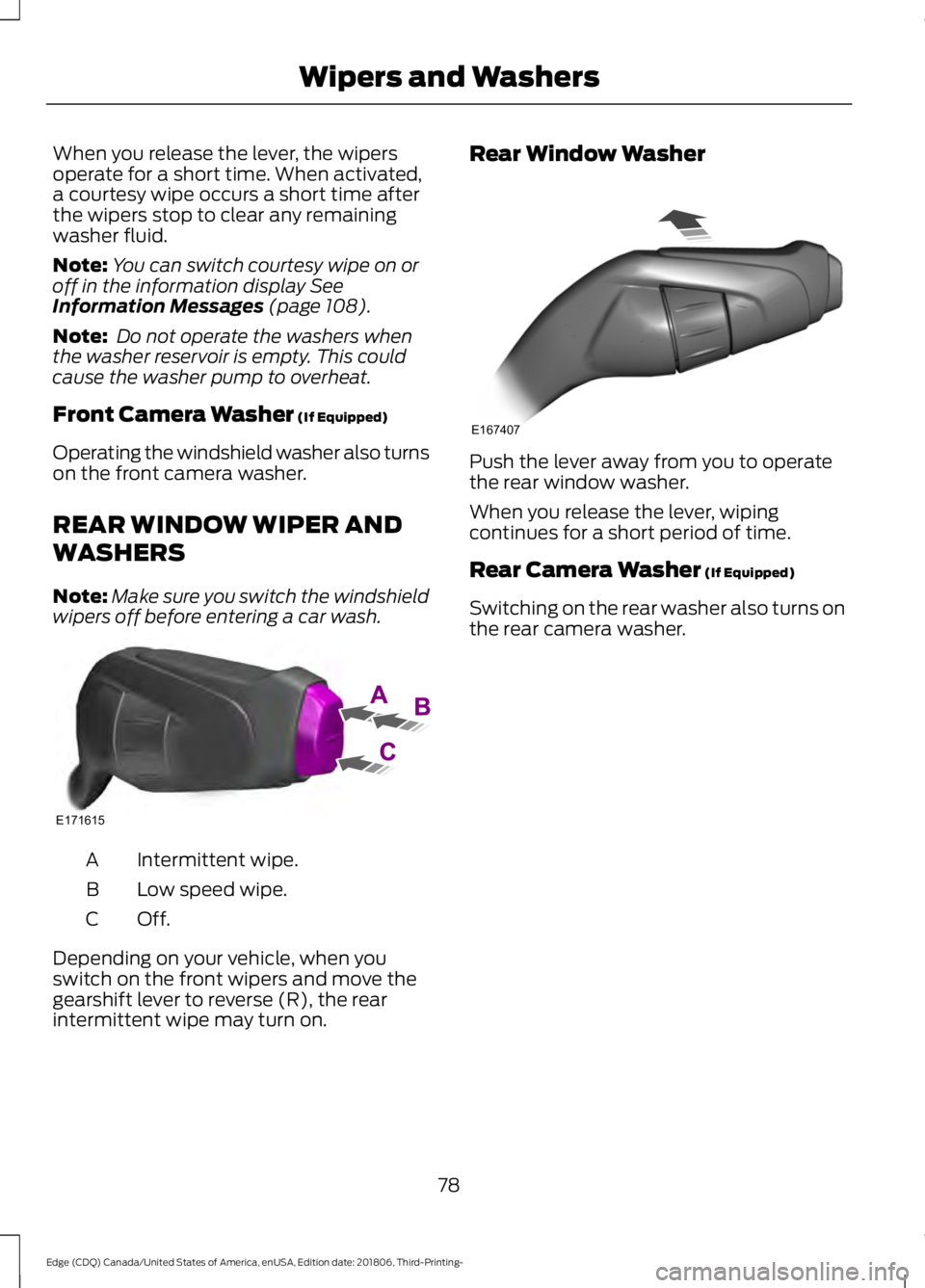
wipers off before entering a car wash. Intermittent wipe.
A
Low speed wipe.
B
Off.C
Depending on your vehicle, when you
switch on the front wipers and move the
gearshift lever to reverse (R), the rear
intermittent wipe may turn on. Rear Window Washer
Push the lever away from you to operate
the rear window washer.
When you release the lever, wiping
continues for a short period of time.
Rear Camera Washer
(If Equipped)
Switching on the rear washer also turns on
the rear camera washer.
78
Edge (CDQ) Canada/United States of America, enUSA, Edition date: 201806, Third-Printing- Wipers and WashersE171615 E167407
Page 107 of 547
Option 4
Option 3
Option 2
Option 1
Display Mode
Intelligent AWD
Turbo Boost Gauge 1
1 ST only.
• XXX mi (km) to empty: Shows the approximate distance the vehicle will travel.
• Round tachometer: Indicates the engine speed in revolutions per minute. Driving with
your tachometer pointer continuously at the top of the scale may damage the engine.
During SelectShift Automatic ™ transmission (SST) use, the currently selected gear
will appear in the display.
Trip 1 & 2
You can access the menu using the
information display control. Note:
Some options may appear slightly
different or not at all if the items are
optional. Trip 1 & 2
All Values
All Values — shows all trip values (Trip Timer, Odometer and Average Fuel).
• Trip Odometer — Shows your accumulated trip distance.
• Average Fuel — Shows your average fuel economy for a given trip.
• Trip Timer — The timer stops when you turn your vehicle off and restarts when you
restart your vehicle.
Note: You can reset your trip information by pressing and holding the OK button on the left
hand steering wheel controls.
Fuel Economy
Use the left and right arrow buttons to
choose the desired fuel economy display.
104
Edge (CDQ) Canada/United States of America, enUSA, Edition date: 201806, Third-Printing- Information Displays
Page 112 of 547
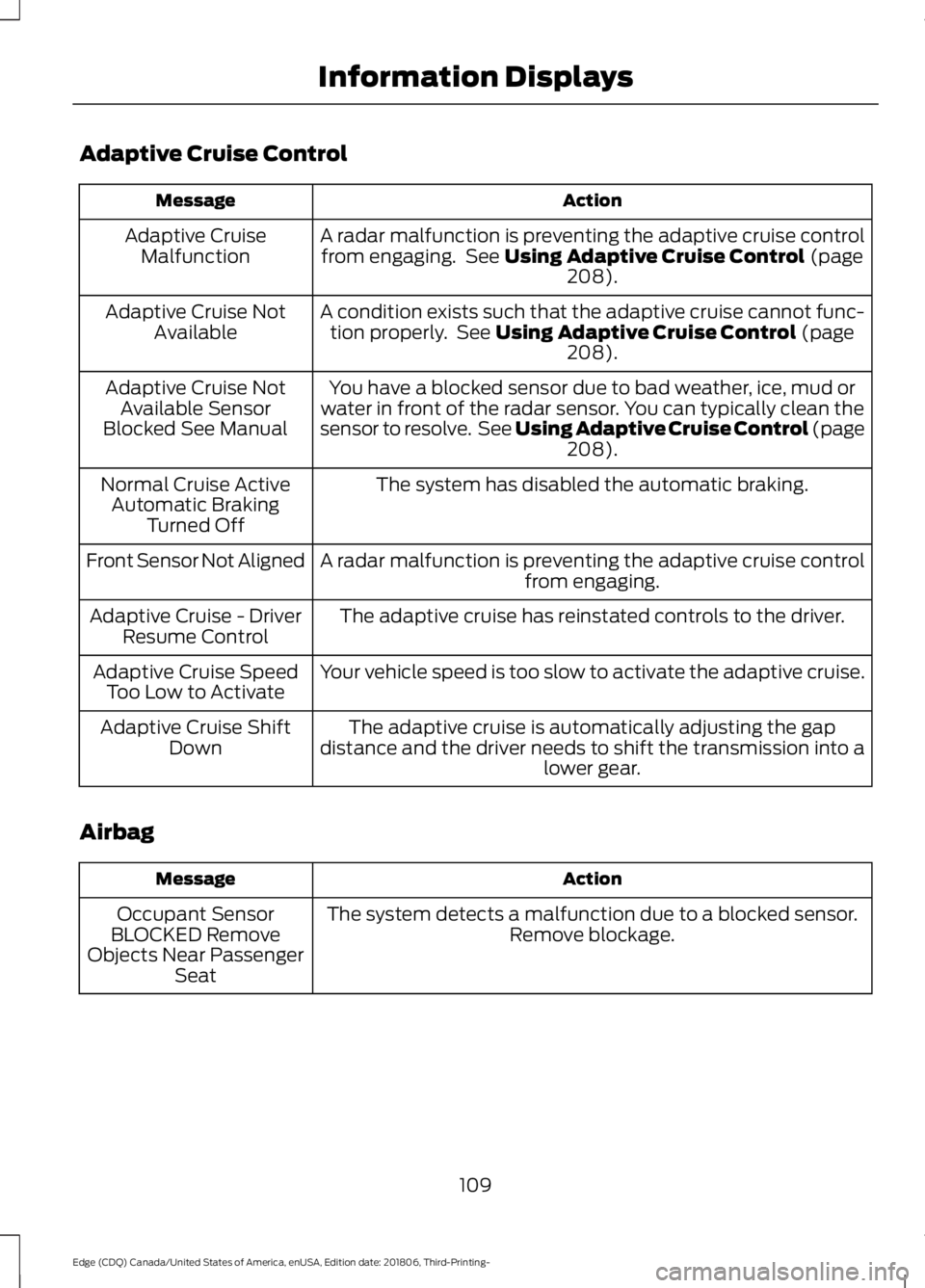
Adaptive Cruise Control
Action
Message
A radar malfunction is preventing the adaptive cruise controlfrom engaging. See Using Adaptive Cruise Control (page
208).
Adaptive Cruise
Malfunction
A condition exists such that the adaptive cruise cannot func-tion properly. See
Using Adaptive Cruise Control (page
208).
Adaptive Cruise Not
Available
You have a blocked sensor due to bad weather, ice, mud or
water in front of the radar sensor. You can typically clean the
sensor to resolve. See Using Adaptive Cruise Control (page 208
).
Adaptive Cruise Not
Available Sensor
Blocked See Manual
The system has disabled the automatic braking.
Normal Cruise Active
Automatic Braking Turned Off
A radar malfunction is preventing the adaptive cruise control from engaging.
Front Sensor Not Aligned
The adaptive cruise has reinstated controls to the driver.
Adaptive Cruise - Driver
Resume Control
Your vehicle speed is too slow to activate the adaptive cruise.
Adaptive Cruise Speed
Too Low to Activate
The adaptive cruise is automatically adjusting the gap
distance and the driver needs to shift the transmission into a lower gear.
Adaptive Cruise Shift
Down
Airbag Action
Message
The system detects a malfunction due to a blocked sensor. Remove blockage.
Occupant Sensor
BLOCKED Remove
Objects Near Passenger Seat
109
Edge (CDQ) Canada/United States of America, enUSA, Edition date: 201806, Third-Printing- Information Displays
Page 123 of 547
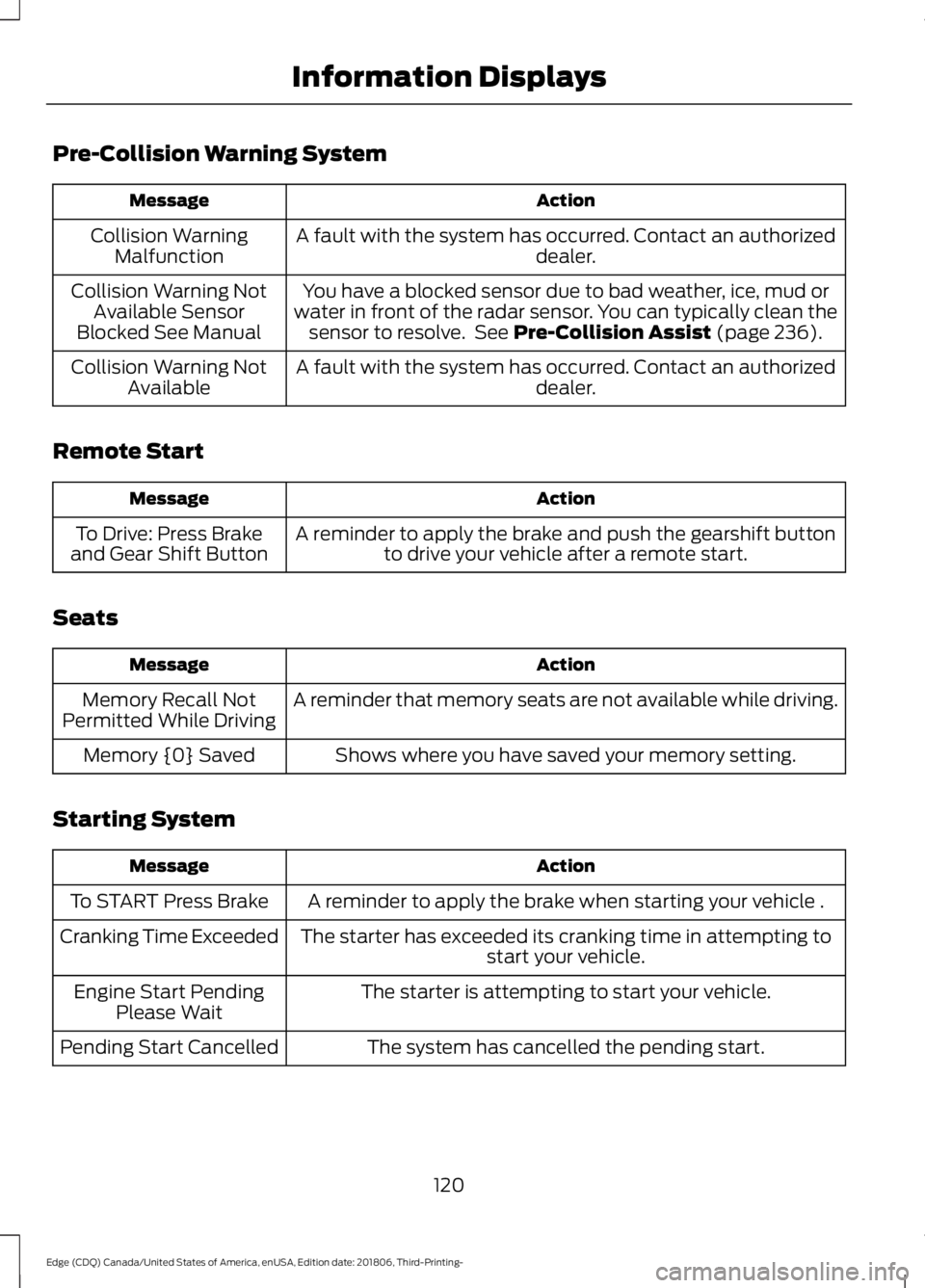
Pre-Collision Warning System
Action
Message
A fault with the system has occurred. Contact an authorized dealer.
Collision Warning
Malfunction
You have a blocked sensor due to bad weather, ice, mud or
water in front of the radar sensor. You can typically clean the sensor to resolve. See Pre-Collision Assist (page 236).
Collision Warning Not
Available Sensor
Blocked See Manual
A fault with the system has occurred. Contact an authorized dealer.
Collision Warning Not
Available
Remote Start Action
Message
A reminder to apply the brake and push the gearshift buttonto drive your vehicle after a remote start.
To Drive: Press Brake
and Gear Shift Button
Seats Action
Message
A reminder that memory seats are not available while driving.
Memory Recall Not
Permitted While Driving
Shows where you have saved your memory setting.
Memory {0} Saved
Starting System Action
Message
A reminder to apply the brake when starting your vehicle .
To START Press Brake
The starter has exceeded its cranking time in attempting tostart your vehicle.
Cranking Time Exceeded
The starter is attempting to start your vehicle.
Engine Start Pending
Please Wait
The system has cancelled the pending start.
Pending Start Cancelled
120
Edge (CDQ) Canada/United States of America, enUSA, Edition date: 201806, Third-Printing- Information Displays
Page 125 of 547
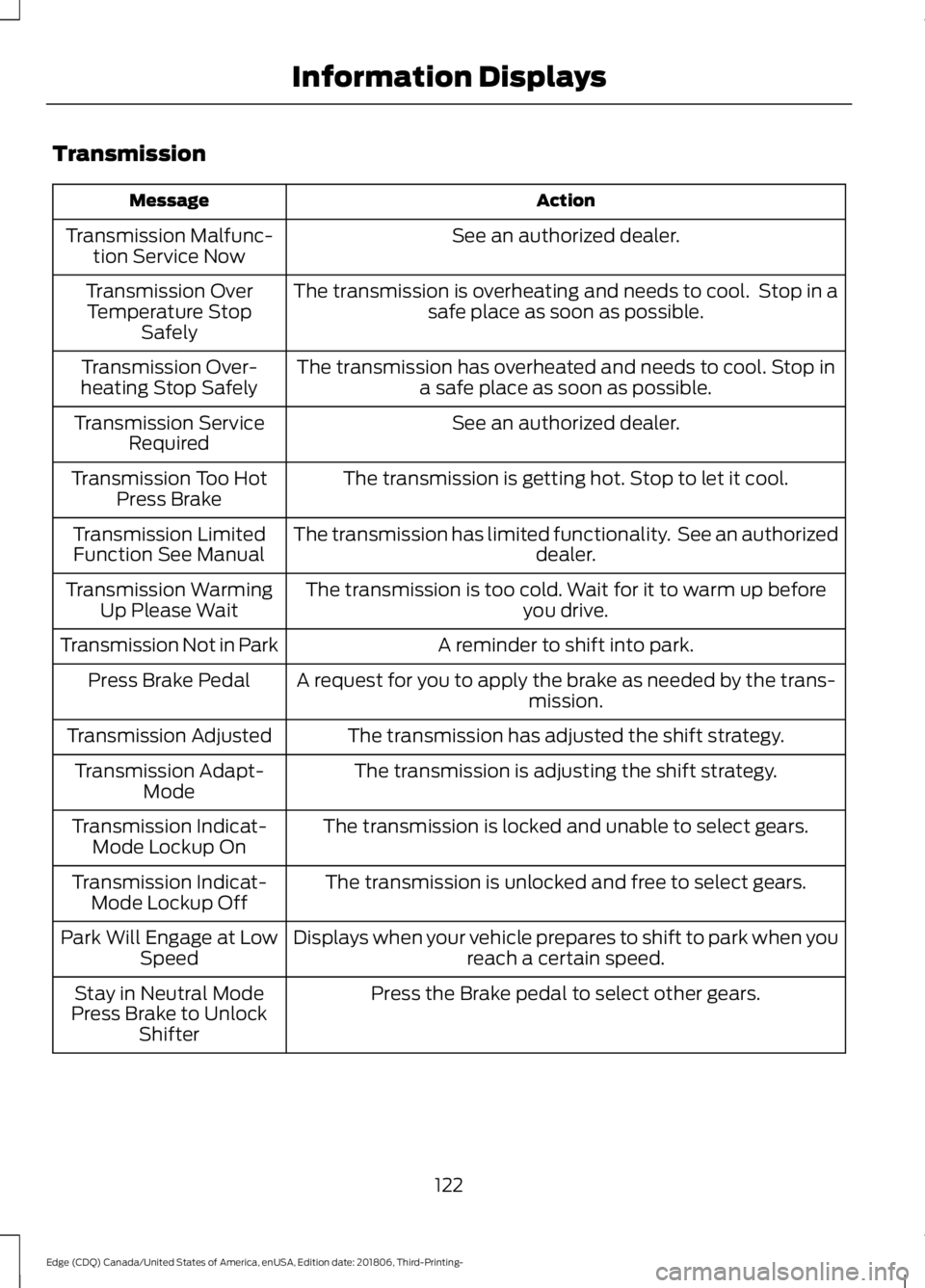
Transmission
Action
Message
See an authorized dealer.
Transmission Malfunc-
tion Service Now
The transmission is overheating and needs to cool. Stop in asafe place as soon as possible.
Transmission Over
Temperature Stop Safely
The transmission has overheated and needs to cool. Stop ina safe place as soon as possible.
Transmission Over-
heating Stop Safely
See an authorized dealer.
Transmission Service
Required
The transmission is getting hot. Stop to let it cool.
Transmission Too Hot
Press Brake
The transmission has limited functionality. See an authorized dealer.
Transmission Limited
Function See Manual
The transmission is too cold. Wait for it to warm up beforeyou drive.
Transmission Warming
Up Please Wait
A reminder to shift into park.
Transmission Not in Park
A request for you to apply the brake as needed by the trans-mission.
Press Brake Pedal
The transmission has adjusted the shift strategy.
Transmission Adjusted
The transmission is adjusting the shift strategy.
Transmission Adapt-
Mode
The transmission is locked and unable to select gears.
Transmission Indicat-
Mode Lockup On
The transmission is unlocked and free to select gears.
Transmission Indicat-
Mode Lockup Off
Displays when your vehicle prepares to shift to park when youreach a certain speed.
Park Will Engage at Low
Speed
Press the Brake pedal to select other gears.
Stay in Neutral Mode
Press Brake to Unlock Shifter
122
Edge (CDQ) Canada/United States of America, enUSA, Edition date: 201806, Third-Printing- Information Displays
Page 126 of 547
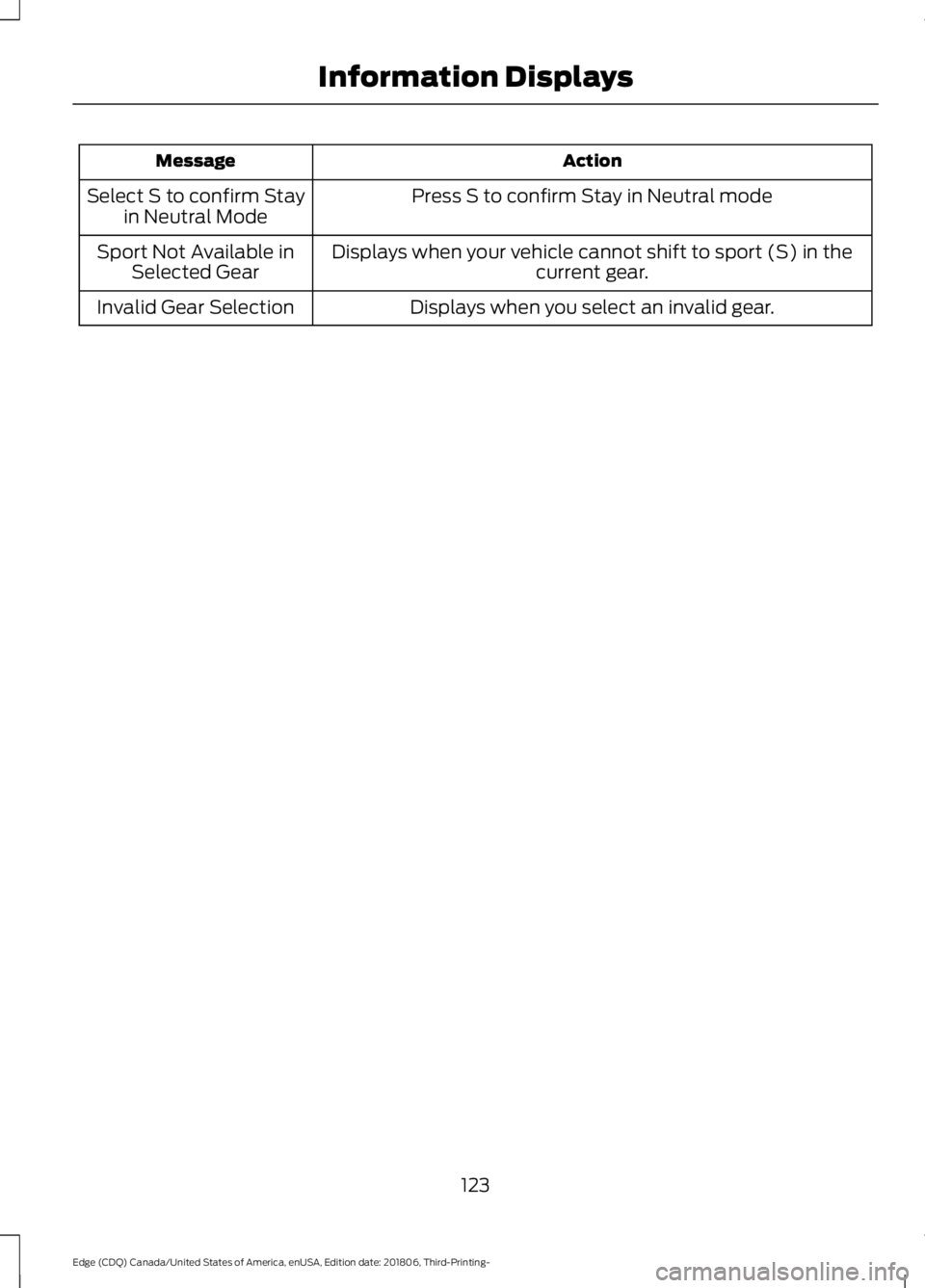
Action
Message
Press S to confirm Stay in Neutral mode
Select S to confirm Stay
in Neutral Mode
Displays when your vehicle cannot shift to sport (S) in thecurrent gear.
Sport Not Available in
Selected Gear
Displays when you select an invalid gear.
Invalid Gear Selection
123
Edge (CDQ) Canada/United States of America, enUSA, Edition date: 201806, Third-Printing- Information Displays
Page 176 of 547
AUTOMATIC TRANSMISSION
WARNING: Always fully apply the
parking brake and make sure you shift
into park (P). Failure to follow this
instruction could result in personal injury
or death. WARNING:
Do not apply the brake
pedal and accelerator pedal
simultaneously. Applying both pedals
simultaneously for more than a few
seconds will limit engine performance,
which may result in difficulty maintaining
speed in traffic and could lead to serious
injury. WARNING:
When your vehicle is
stationary, keep the brake pedal fully
pressed when shifting gears. Failure to
follow this instruction could result in
personal injury, death or property
damage.
Note: You may not be able to shift out of
park (P) unless the intelligent access key is
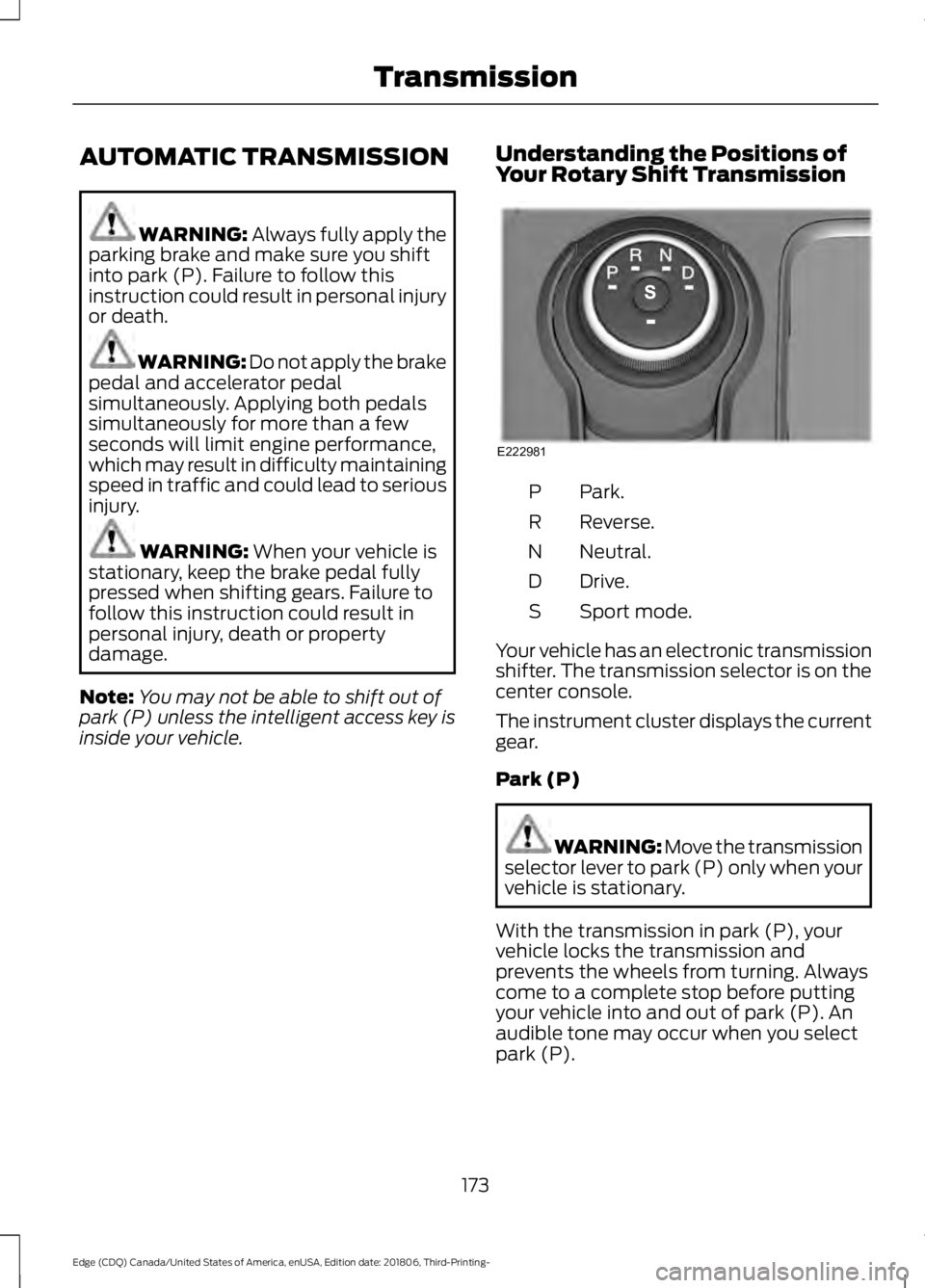
inside your vehicle. Understanding the Positions of
Your Rotary Shift Transmission Park.
P
Reverse.
R
Neutral.
N
Drive.
D
Sport mode.
S
Your vehicle has an electronic transmission
shifter. The transmission selector is on the
center console.
The instrument cluster displays the current
gear.
Park (P) WARNING: Move the transmission
selector lever to park (P) only when your
vehicle is stationary.
With the transmission in park (P), your
vehicle locks the transmission and
prevents the wheels from turning. Always
come to a complete stop before putting
your vehicle into and out of park (P). An
audible tone may occur when you select
park (P).
173
Edge (CDQ) Canada/United States of America, enUSA, Edition date: 201806, Third-Printing- TransmissionE222981
Page 178 of 547
Extended usage of Stay in Neutral mode
may result in a battery voltage reduction
to level where the vehicle may no longer
start.
Do not tow your vehicle in this mode.
To enter Stay in Neutral mode, do the
following:
1. Bring your vehicle to a complete stop.
2. Shift into neutral (N).
Note:
A message appears in the
information display.
3. Press the sport (S) button.
Note: A confirmation message appears in
the information display when your vehicle
has entered Stay in Neutral mode and the
neutral (N) button on the transmission
selector slowly blinks.
To exit Stay in Neutral mode, press the
brake pedal and shift into another gear.
Drive (D)
Drive (D) is the normal driving position for
the optimum fuel economy and
smoothness. Shift the transmission
selector to drive (D) to allow your vehicle
to move forward and shift automatically
through the forward gears.
The transmission shifts to the appropriate
gear for optimum performance based on
ambient temperature, road slope, vehicle
load and your input.
Sport Mode (S)
With the transmission selector in sport (S),
the driver can change gears up or down.
By moving the transmission selector lever
from drive position drive (D) to sport (S)
you can shift up or down the gear by using
shift buttons on the steering wheel. See
SelectShift Automatic ™ transmission
section. SelectShift Automatic
™
Transmission (If Equipped)
Your vehicle has a SelectShift Automatic
transmission selector lever. The
SelectShift Automatic transmission gives
you the ability to change gears up or down
as desired.
Downshifts are allowed unless the engine
speed after the shift exceeds the
maximum allowable limit.
In order to prevent engine stalls,
SelectShift automatically downshifts at
low engine speeds.
Note: Engine damage may occur if you
maintain excessive engine revving without
shifting.
SelectShift does not automatically upshift,
even if the engine is approaching the RPM
limit, unless the accelerator pedal is at full
travel.
Take notice of the shift indicator lamp,
which alerts you when to shift to help you
achieve the optimum level of efficiency
and fuel economy.
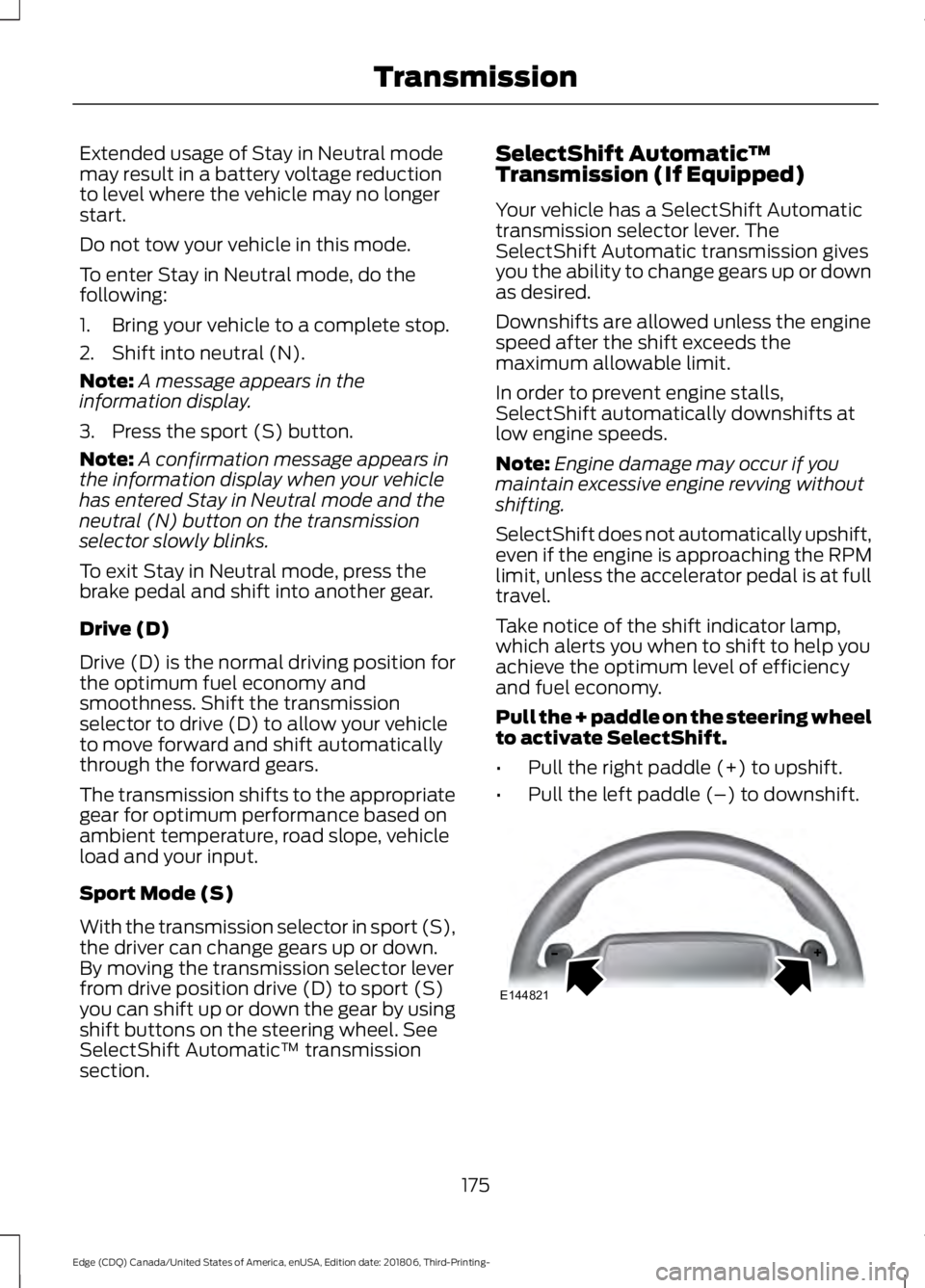
Pull the + paddle on the steering wheel
to activate SelectShift.
• Pull the right paddle (+) to upshift.
• Pull the left paddle (–) to downshift. 175
Edge (CDQ) Canada/United States of America, enUSA, Edition date: 201806, Third-Printing- TransmissionE144821