turn signal FORD EDGE 2021 Owners Manual
[x] Cancel search | Manufacturer: FORD, Model Year: 2021, Model line: EDGE, Model: FORD EDGE 2021Pages: 500, PDF Size: 8.52 MB
Page 66 of 500
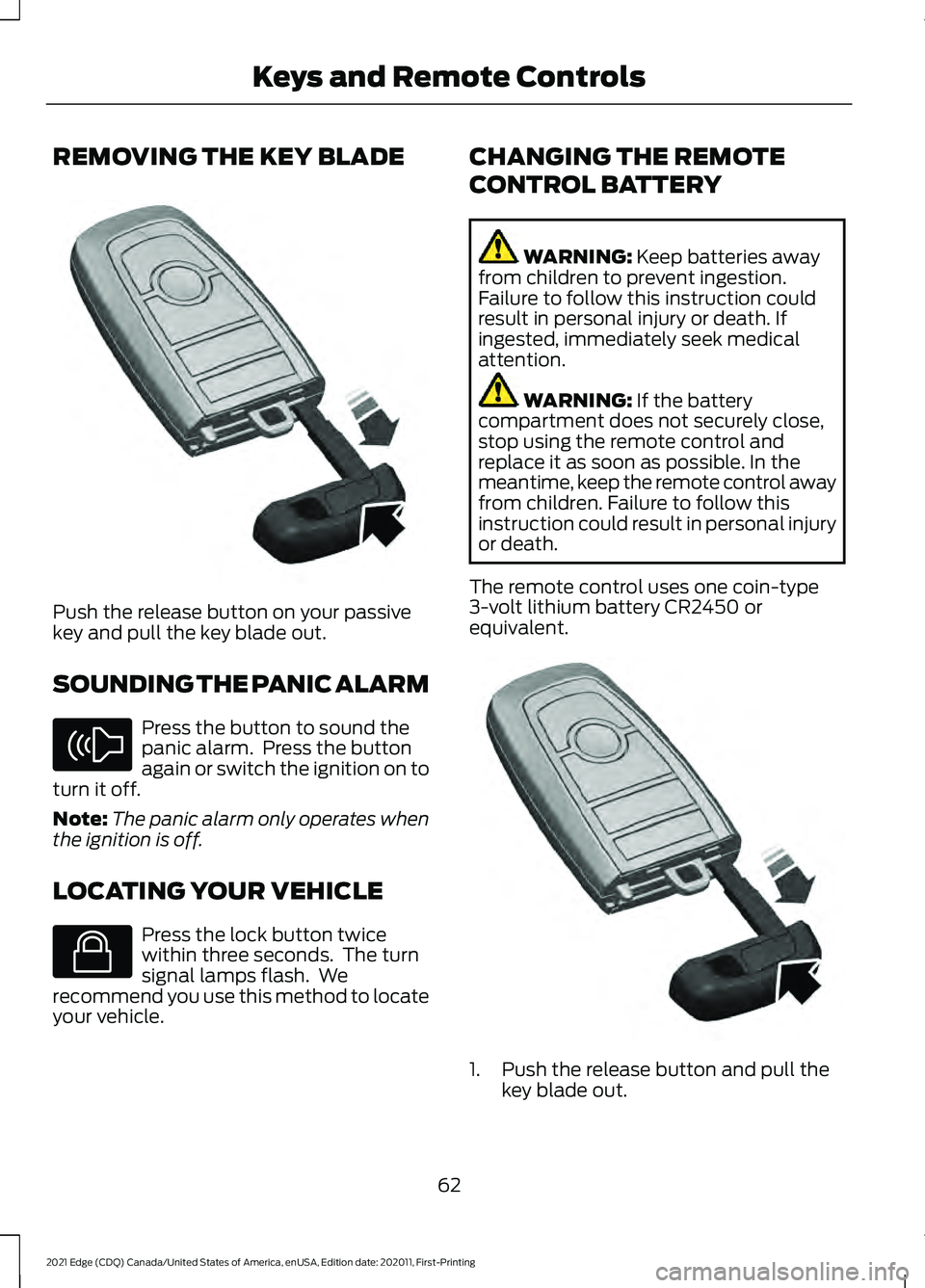
REMOVING THE KEY BLADE
Push the release button on your passive
key and pull the key blade out.
SOUNDING THE PANIC ALARM
Press the button to sound the
panic alarm. Press the button
again or switch the ignition on to
turn it off.
Note: The panic alarm only operates when
the ignition is off.
LOCATING YOUR VEHICLE Press the lock button twice
within three seconds. The turn
signal lamps flash. We
recommend you use this method to locate
your vehicle. CHANGING THE REMOTE
CONTROL BATTERY WARNING: Keep batteries away
from children to prevent ingestion.
Failure to follow this instruction could
result in personal injury or death. If
ingested, immediately seek medical
attention. WARNING:
If the battery
compartment does not securely close,
stop using the remote control and
replace it as soon as possible. In the
meantime, keep the remote control away
from children. Failure to follow this
instruction could result in personal injury
or death.
The remote control uses one coin-type
3-volt lithium battery CR2450 or
equivalent. 1. Push the release button and pull the
key blade out.
62
2021 Edge (CDQ) Canada/United States of America, enUSA, Edition date: 202011, First-Printing Keys and Remote ControlsE322866 E138624 E138623 E322866
Page 74 of 500
OPERATING THE DOORS
FROM OUTSIDE YOUR
VEHICLE
Unlocking and Locking the Doors
Using the Remote Control
You can only use the remote control when
your vehicle is stationary.
Unlocking the Doors
Press the button to unlock all
doors.
Locking the Doors Press the button to lock all
doors. One short flash of the
turn signal lamps confirms that
your vehicle has locked.
Note: For more information on operating
the doors from outside your vehicle See
Keyless Entry (page 74).
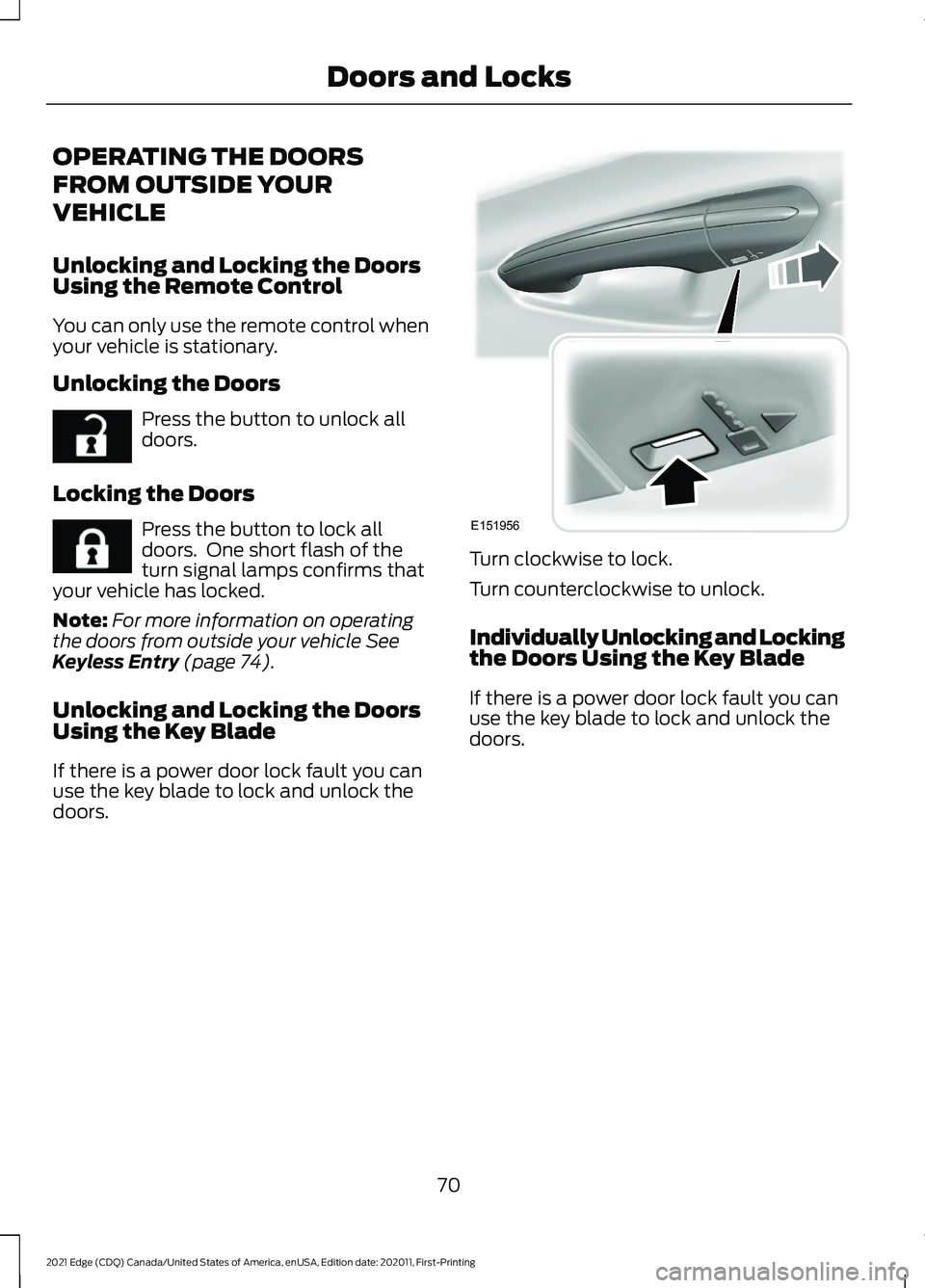
Unlocking and Locking the Doors
Using the Key Blade
If there is a power door lock fault you can
use the key blade to lock and unlock the
doors. Turn clockwise to lock.
Turn counterclockwise to unlock.
Individually Unlocking and Locking
the Doors Using the Key Blade
If there is a power door lock fault you can
use the key blade to lock and unlock the
doors.
70
2021 Edge (CDQ) Canada/United States of America, enUSA, Edition date: 202011, First-Printing Doors and LocksE267112 E267111 E151956
Page 102 of 500
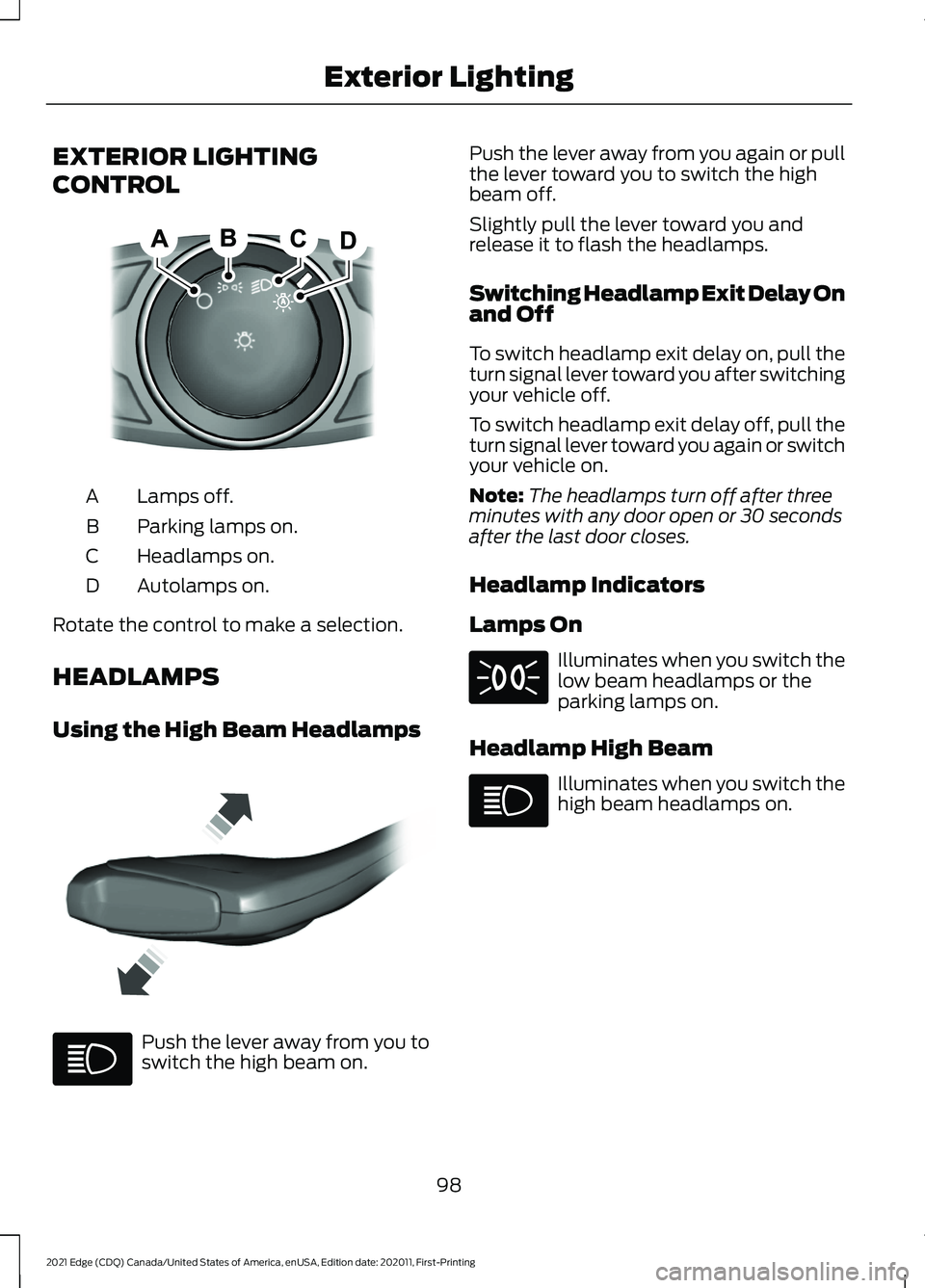
EXTERIOR LIGHTING
CONTROL
Lamps off.
A
Parking lamps on.
B
Headlamps on.
C
Autolamps on.
D
Rotate the control to make a selection.
HEADLAMPS
Using the High Beam Headlamps Push the lever away from you to
switch the high beam on. Push the lever away from you again or pull
the lever toward you to switch the high
beam off.
Slightly pull the lever toward you and
release it to flash the headlamps.
Switching Headlamp Exit Delay On
and Off
To switch headlamp exit delay on, pull the
turn signal lever toward you after switching
your vehicle off.
To switch headlamp exit delay off, pull the
turn signal lever toward you again or switch
your vehicle on.
Note:
The headlamps turn off after three
minutes with any door open or 30 seconds
after the last door closes.
Headlamp Indicators
Lamps On Illuminates when you switch the
low beam headlamps or the
parking lamps on.
Headlamp High Beam Illuminates when you switch the
high beam headlamps on.
98
2021 Edge (CDQ) Canada/United States of America, enUSA, Edition date: 202011, First-Printing Exterior LightingE322426 E339577
Page 104 of 500
EXTERIOR LAMPS
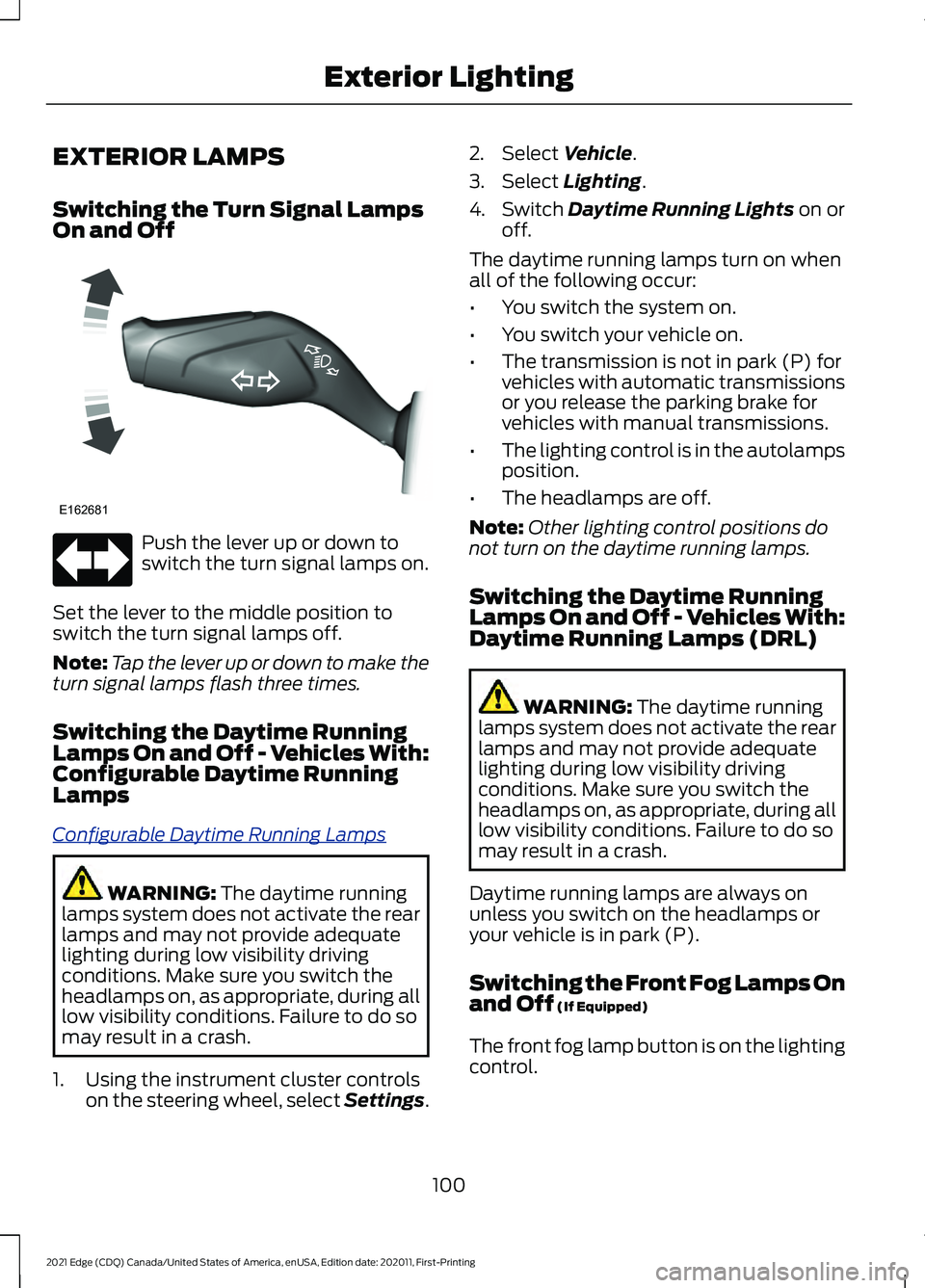
Switching the Turn Signal Lamps
On and Off
Push the lever up or down to
switch the turn signal lamps on.
Set the lever to the middle position to
switch the turn signal lamps off.
Note: Tap the lever up or down to make the
turn signal lamps flash three times.
Switching the Daytime Running
Lamps On and Off - Vehicles With:
Configurable Daytime Running
Lamps
C onfig ur abl e D a ytime R unning L amp s
WARNING: The daytime running
lamps system does not activate the rear
lamps and may not provide adequate
lighting during low visibility driving
conditions. Make sure you switch the
headlamps on, as appropriate, during all
low visibility conditions. Failure to do so
may result in a crash.
1. Using the instrument cluster controls on the steering wheel, select Settings. 2. Select
Vehicle.
3. Select
Lighting.
4. Switch
Daytime Running Lights on or
off.
The daytime running lamps turn on when
all of the following occur:
• You switch the system on.
• You switch your vehicle on.
• The transmission is not in park (P) for
vehicles with automatic transmissions
or you release the parking brake for
vehicles with manual transmissions.
• The lighting control is in the autolamps
position.
• The headlamps are off.
Note: Other lighting control positions do
not turn on the daytime running lamps.
Switching the Daytime Running
Lamps On and Off - Vehicles With:
Daytime Running Lamps (DRL) WARNING:
The daytime running
lamps system does not activate the rear
lamps and may not provide adequate
lighting during low visibility driving
conditions. Make sure you switch the
headlamps on, as appropriate, during all
low visibility conditions. Failure to do so
may result in a crash.
Daytime running lamps are always on
unless you switch on the headlamps or
your vehicle is in park (P).
Switching the Front Fog Lamps On
and Off
(If Equipped)
The front fog lamp button is on the lighting
control.
100
2021 Edge (CDQ) Canada/United States of America, enUSA, Edition date: 202011, First-Printing Exterior LightingE162681
Page 105 of 500
Press the button to switch the
front fog lamps on or off.
Note: Only switch the front fog lamps on
during reduced visibility.
Note: The brightness of the daytime running
lamps may decrease when the front fog
lamps are switched on.
Note: When the lighting control is in the
autolamps position, you cannot switch the
fog lamps on unless the headlamps are on.
Exterior Lamp Indicators
Front Fog Lamp It illuminates when you switch
the front fog lamps on.
Turn Signal Lamp It flashes when you switch the
turn signal lamps on.
Note: An increase in the rate of flashing
warns of a failed turn signal lamp bulb.
AUTOMATIC HIGH BEAM
CONTROL
How Does Automatic High Beam
Control Work
A ut o High Be ams
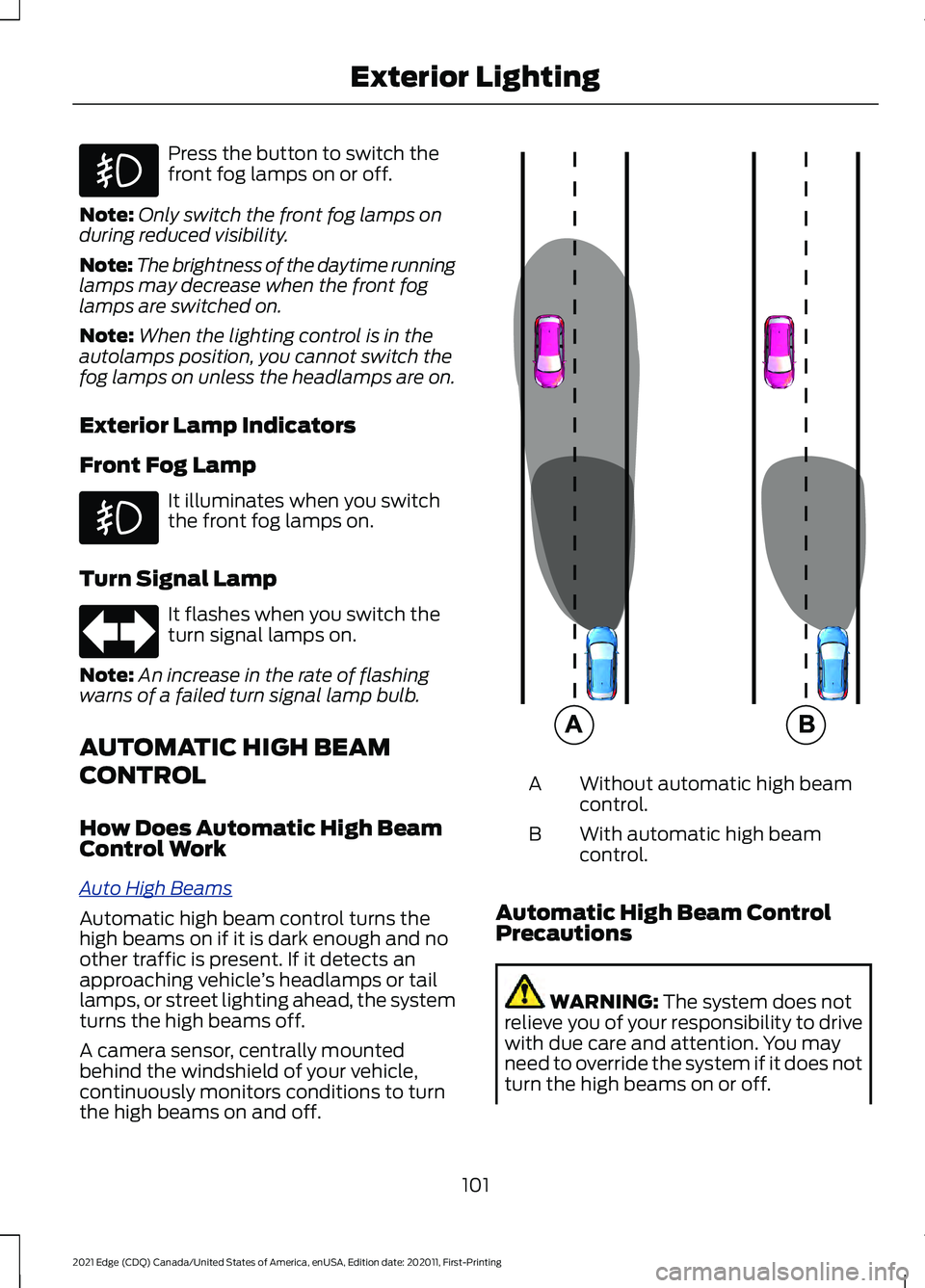
Automatic high beam control turns the
high beams on if it is dark enough and no
other traffic is present. If it detects an
approaching vehicle
’s headlamps or tail
lamps, or street lighting ahead, the system
turns the high beams off.
A camera sensor, centrally mounted
behind the windshield of your vehicle,
continuously monitors conditions to turn
the high beams on and off. Without automatic high beam
control.
A
With automatic high beam
control.
B
Automatic High Beam Control
Precautions WARNING: The system does not
relieve you of your responsibility to drive
with due care and attention. You may
need to override the system if it does not
turn the high beams on or off.
101
2021 Edge (CDQ) Canada/United States of America, enUSA, Edition date: 202011, First-Printing Exterior Lighting E327596
Page 120 of 500
WHAT ARE THE INSTRUMENT
CLUSTER INDICATORS
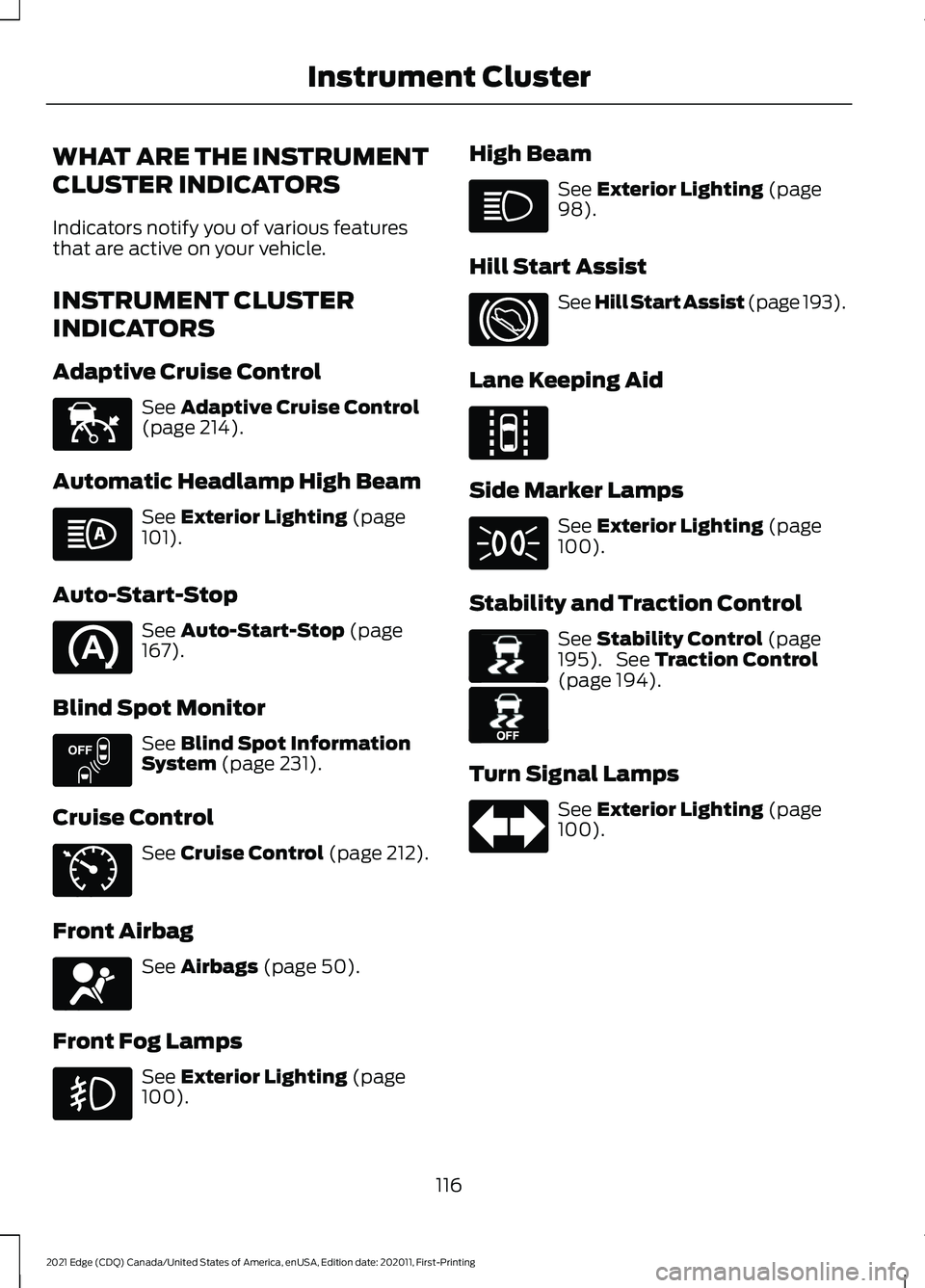
Indicators notify you of various features
that are active on your vehicle.
INSTRUMENT CLUSTER
INDICATORS
Adaptive Cruise Control
See Adaptive Cruise Control
(page 214).
Automatic Headlamp High Beam See
Exterior Lighting (page
101).
Auto-Start-Stop See
Auto-Start-Stop (page
167).
Blind Spot Monitor See
Blind Spot Information
System (page 231).
Cruise Control See
Cruise Control (page 212).
Front Airbag See
Airbags (page 50).
Front Fog Lamps See
Exterior Lighting (page
100). High Beam See
Exterior Lighting (page
98).
Hill Start Assist See Hill Start Assist (page
193).
Lane Keeping Aid Side Marker Lamps
See
Exterior Lighting (page
100).
Stability and Traction Control See
Stability Control (page
195). See Traction Control
(page 194).
Turn Signal Lamps See
Exterior Lighting (page
100).
116
2021 Edge (CDQ) Canada/United States of America, enUSA, Edition date: 202011, First-Printing Instrument ClusterE144524 E151262 E71340 E67017 E144813 E138639 E130458
Page 129 of 500
WHAT IS REMOTE START
R
emo t e S t art S y s t em
The system allows you to remotely start
your vehicle and to adjust the interior
temperature according to the settings that
you chose.
REMOTE START
PRECAUTIONS
WARNING: Do not start the engine
in a closed garage or in other enclosed
areas. Exhaust fumes are toxic. Always
open the garage door before you start
the engine. Failure to follow this
instruction could result in personal injury
or death.
REMOTE START LIMITATIONS
Remote start does not work under the
following conditions:
• The alarm horn is sounding.
• The hood is open.
• The transmission is not in park (P).
• The ignition is on.
• The battery voltage is below the
minimum operating voltage.
Note: Do not use remote start if your fuel
level is low.
Note: You can use remote start with
FordPass. See Connecting the Vehicle to
a Wi-Fi Network (page 360).
ENABLING REMOTE START
1. Using the information display controls on the steering wheel, select Settings.
2. Select
Settings. 3. Select
Vehicle.
4. Select
Remote Start.
5. Switch
System on.
Note: To use remote start, make sure that
the modem is enabled. See
Enabling and
Disabling the Modem (page 360).
REMOTELY STARTING AND
STOPPING THE VEHICLE
Remotely Starting the Vehicle Press the button on the remote
control.
Within three seconds, press the
button on the remote control.
Within three seconds, press the
button again.
Note: You can also use FordPass to start
the vehicle.
Note: The turn signal lamps flash twice.
Note: The parking lamps turn on when the
vehicle is running.
Note: The horn sounds if the system fails
to start.
Note: All other vehicle systems remain off
when you have remotely started the vehicle.
Note: The vehicle remains secured when
you have remotely started the vehicle. A
valid key must be inside your vehicle to
switch the ignition on and drive your vehicle.
Remotely Stopping the Vehicle Within three seconds, press the
button on the remote control.
Within three seconds, press the
button again.
125
2021 Edge (CDQ) Canada/United States of America, enUSA, Edition date: 202011, First-Printing Remote Start
(If Equipped)E138623 E138625 E138625
Page 213 of 500
Note:
The system detects other vehicles
and curbs to find a parking space.
3. Use the turn signal lever to search for a parking space on the driver or
passenger side of your vehicle.
Note: The system defaults to searching for
a parking spot on the passenger side of your
vehicle if you do not use the turn signal lever.
4. Drive your vehicle approximately 3 ft
(1 m) away from and parallel to the
other parked vehicles when searching
for a parking space.
Note: A tone sounds and a message
appears in the information and
entertainment display when active park
assist finds a parking space.
5. Press and hold the brake pedal.
6. Release the steering wheel and shift into reverse (R).
7. Use the accelerator and brake to control your vehicle's speed when
parking. You are responsible for
stopping your vehicle.
8. Active park assist is a multi-step process and requires you to shift the
transmission multiple times. Follow the
onscreen instructions until parking is
complete.
Note: You can slow down your vehicle at
any time by pressing the brake pedal.
Note: When parallel parking between
objects, the system will park closer to the
object in front of your vehicle to allow easier
access to the luggage compartment.
ENTERING A PERPENDICULAR
PARKING SPACE
1. Press the active park assist button.
2. Select perpendicular parking. Note:
Active park assist does not recognize
parking space lines and centers your vehicle
between objects.
Note: Active park assist backs your vehicle
into parking spaces.
3. Use the turn signal lever to search for a parking space on the driver or
passenger side of your vehicle.
Note: The system defaults to searching for
a parking spot on the passenger side of your
vehicle if you do not use the turn signal lever.
4. Drive your vehicle approximately
3 ft
(1 m) away from and perpendicular to
the other parked vehicles when
searching for a parking space.
Note: A tone sounds and a message
appears in the information and
entertainment display when active park
assist finds a parking space.
5. Press and hold the brake pedal.
6. Release the steering wheel and shift into reverse (R).
7. Use the accelerator and brake to control your vehicle's speed when
parking. You are responsible for
stopping your vehicle.
8. Active park assist is a multi-step process and requires you to shift the
transmission multiple times. Follow the
onscreen instructions until parking is
complete.
Note: Active park assist aligns the front-end
of your vehicle with the lane side of the
object next to it.
Note: When only one object is detected,
the system allows enough distance to open
the door on either side.
Note: You can slow down your vehicle at
any time by pressing the brake pedal.
209
2021 Edge (CDQ) Canada/United States of America, enUSA, Edition date: 202011, First-Printing Active Park Assist
(If Equipped)
Page 214 of 500
EXITING A PARKING SPACE
Active park assist only assists leaving
parallel parking spaces.
1. Press the active park assist button.
2. Select parallel park exit.
3. Use the turn signal to choose the
direction to exit the parking space.
4. Press and hold the brake pedal.
5. Release the steering wheel and shift into the instructed gear.
6. Release the parking brake.
7. Use the accelerator and brake to control your vehicle's speed when
exiting the parking space. You are
responsible for stopping your vehicle.
8. Active park assist is multi-step process
and requires you to shift the
transmission multiple times. Follow the
onscreen instructions until operation
is complete.
Note: After active park assist drives your
vehicle to a position where you can exit the
parking space in a forward movement, a
message appears instructing you to take full
control of your vehicle.
9. Take control of your vehicle.
Note: You can slow down your vehicle at
any time by pressing the brake pedal. ACTIVE PARK ASSIST –
TROUBLESHOOTING
Active Park Assist – Information
Messages Action
Message
The system
requires service.
Have your vehicle
checked as soon as possible.
Active Park Fault
Active Park Assist – Frequently
Asked Questions
Why does active park assist not
operate correctly? The system is unable to detect a
vehicle, curb or object to park next to
or in between. The system needs
boundary objects to operate correctly.
Why does active park assist not search
for a parking space? You have switched traction control off.
Why does active park assist not search
for a parking space? The transmission is in reverse (R). Your
vehicle must be moving forward to be
able to detect a parking space.
Why does active park assist not offer
a parking space? The sensors could be blocked. For
example, snow, ice or large
accumulations of dirt. Blocked sensors
can affect how the system functions.
Why does active park assist not offer
a parking space? The sensors in the front or rear bumper
could be damaged.
210
2021 Edge (CDQ) Canada/United States of America, enUSA, Edition date: 202011, First-Printing Active Park Assist (If Equipped)
Page 223 of 500
Note:
When you are following a vehicle and
you switch on a turn signal lamp, adaptive
cruise control may provide a small,
temporary acceleration to help you pass.
Your vehicle maintains a consistent gap
from the vehicle ahead until:
• The vehicle in front of you accelerates
to a speed above the set speed.
• The vehicle in front of you moves out
of the lane you are in.
• You set a new gap distance.
The system applies the brakes to slow
down your vehicle to maintain a safe gap
distance from the vehicle in front of you.
The system only applies limited braking.
You can override the system by applying
the brakes.
Note: The brakes may emit noise when
applied by the system.
If the system determines that its maximum
braking level is not sufficient, an audible
warning sounds, a message appears in the
instrument cluster display and an indicator
flashes when the system continues to
brake. Take immediate action.
CANCELING THE SET SPEED Press the button or tap the brake
pedal.
The set speed does not erase.
RESUMING THE SET SPEED Press the button.
Your vehicle speed returns to the
previously set speed and gap setting. The
set speed displays continuously in the
information display when the system is
active. Note:
Only use resume if you are aware of
the set speed and intend to return to it.
Resuming the Set Speed from a
Complete Stop
If your vehicle follows a vehicle to a
complete stop and remains stationary for
less than three seconds, your vehicle
accelerates from a stationary position to
follow the vehicle ahead. If your vehicle follows a vehicle
to a complete stop and remains
stationary for more than three
seconds, press and release the button or
press the accelerator pedal to follow the
vehicle ahead.
OVERRIDING THE SET SPEED WARNING: If you override the
system by pressing the accelerator
pedal, it does not automatically apply
the brakes to maintain a gap from any
vehicle ahead.
When you press the accelerator pedal, you
override the set speed and gap distance.
Use the accelerator pedal to intentionally
exceed the set speed limit.
When you override the system, the green
indicator illuminates and the vehicle icon
does not appear in the instrument cluster
display.
The system resumes operation when you
release the accelerator pedal. The vehicle
speed decreases to the set speed, or a
lower speed if following a slower vehicle.
219
2021 Edge (CDQ) Canada/United States of America, enUSA, Edition date: 202011, First-Printing Adaptive Cruise Control
(If Equipped)E265298