wipers and washers FORD EDGE 2021 Owners Manual
[x] Cancel search | Manufacturer: FORD, Model Year: 2021, Model line: EDGE, Model: FORD EDGE 2021Pages: 500, PDF Size: 8.52 MB
Page 7 of 500
Adjusting the Steering Wheel - Vehicles
With: Power Adjustable Steering
Column .........................................................92
Resetting the Stopping Position - Vehicles With: Power Adjustable
Steering Column .......................................
93
Horn ....................................................................
93
Switching the Heated Steering Wheel On and Off ...................................................
93
Wipers and Washers
Wipers ...............................................................
94
Autowipers ......................................................
94
Switching the Rear Window Wiper On and Off ..........................................................
95
Reverse Wipe ..................................................
95
Checking the Wiper Blades .......................
95
Replacing the Front Wiper Blades ..........
95
Replacing the Rear Wiper Blades ...........
96
Washers ............................................................
96
Wipers and Washers – Troubleshooting ........................................................................\
...
97
Exterior Lighting
Exterior Lighting Control ............................
98
Headlamps ......................................................
98
Headlamps – Troubleshooting ...............
99
Autolamps .......................................................
99
Exterior Lamps .............................................
100
Automatic High Beam Control ................
101
Automatic High Beam Control – Troubleshooting ......................................
103
Adaptive Front Lighting ............................
103
Interior Lighting
Switching All of the Interior Lamps On and Off ........................................................
105
Switching the Front Interior Lamps On and Off ........................................................
105
Switching the Rear Interior Lamps On and Off ........................................................
105
Interior Lamp Function ..............................
105Adjusting the Instrument Panel Lighting
Brightness ..................................................
106
Ambient Lighting .........................................
106
Interior Lighting – Troubleshooting ......
106
Windows
Opening and Closing the Windows ......
107
Global Opening ............................................
107
Window Bounce-Back ..............................
108
Locking the Rear Window Controls ......
108
Interior Mirror
Interior Mirror Precautions .......................
109
Manually Dimming the Interior Mirror ........................................................................\
109
Auto-Dimming Interior Mirror .................
109
Exterior Mirrors
Adjusting the Exterior Mirrors ..................
110
Folding the Exterior Mirrors ......................
110
Auto-Dimming Exterior Mirror .................
110
Moonroof
Opening and Closing the Sun Shade ........................................................................\
...
111
Opening and Closing the Moonroof .......
111
Venting the Moonroof .................................
112
Moonroof Bounce-Back .............................
112
Instrument Cluster
Instrument Cluster Overview ...................
113
What Is the Tachometer ............................
113
What Is the Speedometer .........................
113
Fuel Gauge ......................................................
113
What Is the Engine Coolant Temperature Gauge ............................................................
114
What Is the Turbo Boost Gauge ..............
114
What Are the Instrument Cluster Warning Lamps .........................................
114
Instrument Cluster Warning Lamps ......
114
3
2021 Edge (CDQ) Canada/United States of America, enUSA, Edition date: 202011, First-Printing Table of Contents
Page 98 of 500
WIPERS
Wiper Precautions
Do not operate the wipers on a dry
windshield. This could scratch the glass or
damage the wiper blades. Use the
windshield washers before wiping a dry
windshield.
Fully defrost the windshield before you
switch the windshield wipers on.
Switch the windshield wipers off before
entering a car wash.
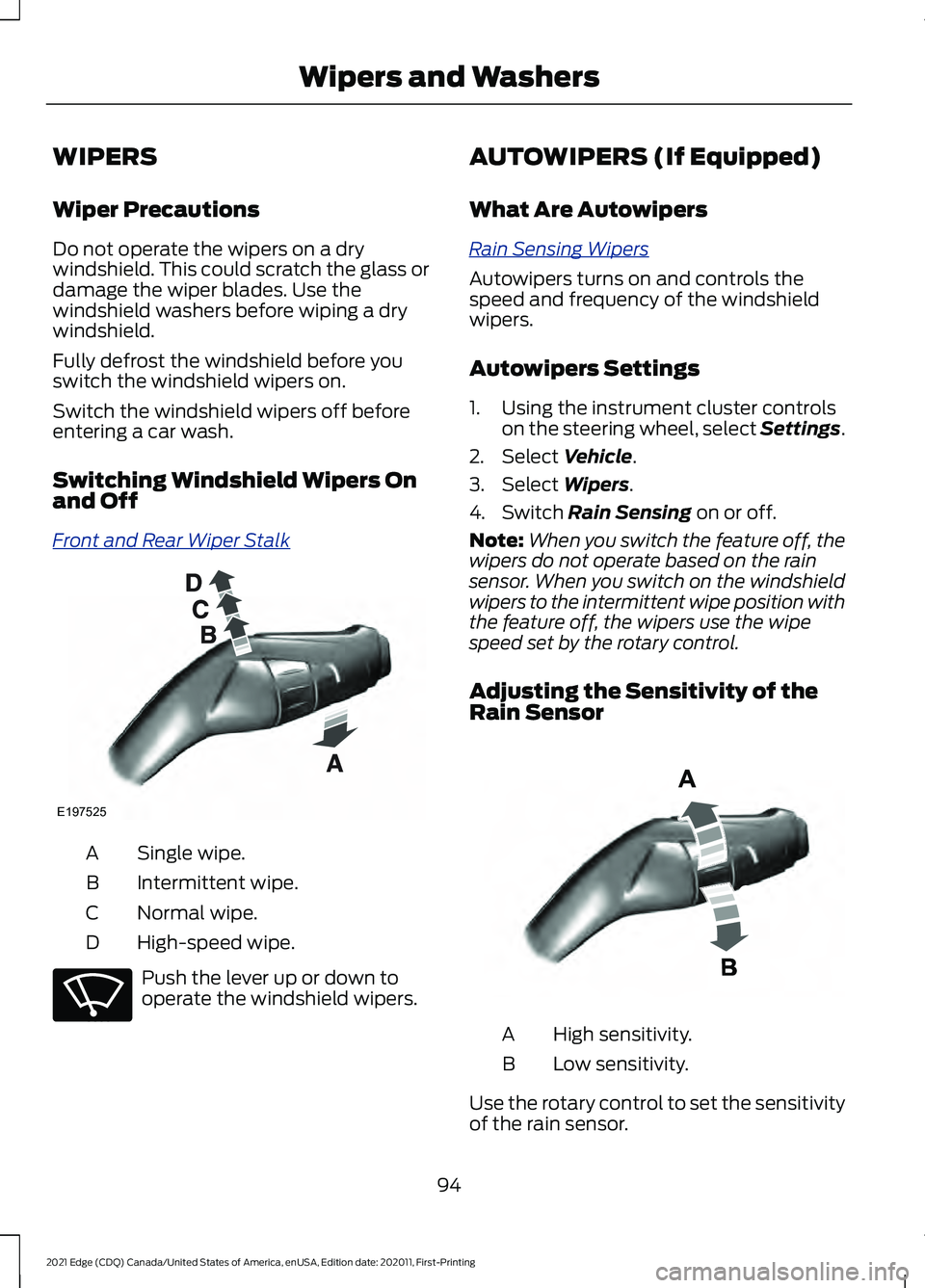
Switching Windshield Wipers On
and Off
Fr
ont and R e ar W iper S t alk
Single wipe.
A
Intermittent wipe.
B
Normal wipe.
C
High-speed wipe.
D Push the lever up or down to
operate the windshield wipers. AUTOWIPERS (If Equipped)
What Are Autowipers
R ain S ensing W iper s
Autowipers turns on and controls the
speed and frequency of the windshield
wipers.
Autowipers Settings
1. Using the instrument cluster controls
on the steering wheel, select Settings.
2. Select Vehicle.
3. Select
Wipers.
4. Switch
Rain Sensing on or off.
Note: When you switch the feature off, the
wipers do not operate based on the rain
sensor. When you switch on the windshield
wipers to the intermittent wipe position with
the feature off, the wipers use the wipe
speed set by the rotary control.
Adjusting the Sensitivity of the
Rain Sensor High sensitivity.
A
Low sensitivity.
B
Use the rotary control to set the sensitivity
of the rain sensor.
94
2021 Edge (CDQ) Canada/United States of America, enUSA, Edition date: 202011, First-Printing Wipers and WashersE197525 E270969 E331276
Page 99 of 500
When you select high sensitivity, the wipers
operate when the sensor detects a small
amount of water on the windshield.
When you select low sensitivity, the wipers
operate when the sensor detects a large
amount of water on the windshield.
SWITCHING THE REAR
WINDOW WIPER ON AND OFF
Fr
ont and R e ar W iper S t alk
Intermittent wipe.
A
Continuous wipe.
B
Rear window wiper off.
C
REVERSE WIPE
What Is Reverse Wipe
Reverse wipe turns on the rear window
wiper when you shift into reverse (R) and
the windshield wipers are on.
Reverse Wipe Settings
1. Using the instrument cluster controls on the steering wheel, select Settings.
2. Select Vehicle.
3. Select
Wipers.
4. Switch
Reverse Wiper on or off. CHECKING THE WIPER
BLADES
Run the tip of your fingers over the edge of
the blade to check for roughness.
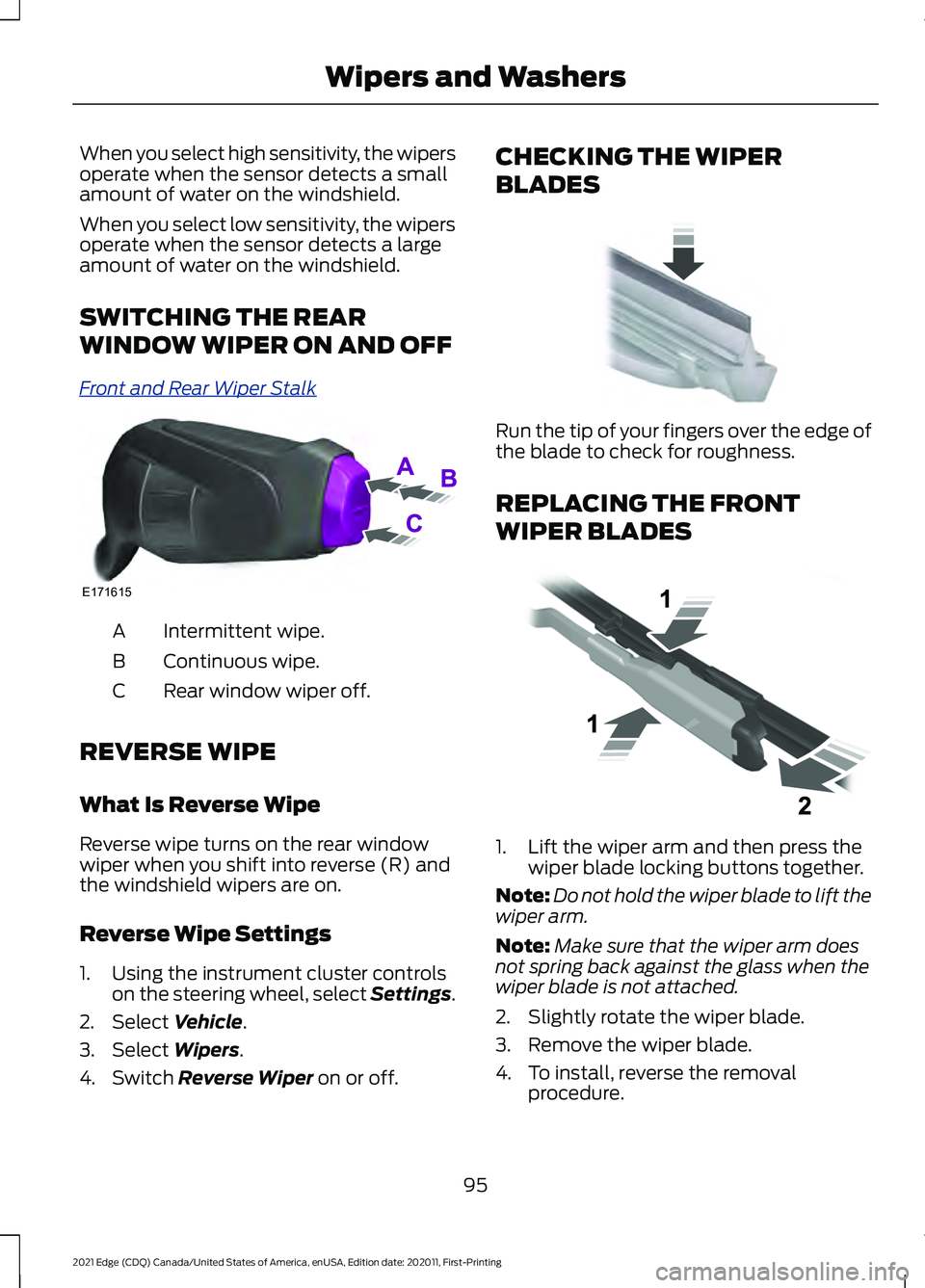
REPLACING THE FRONT
WIPER BLADES
1. Lift the wiper arm and then press the
wiper blade locking buttons together.
Note: Do not hold the wiper blade to lift the
wiper arm.
Note: Make sure that the wiper arm does
not spring back against the glass when the
wiper blade is not attached.
2. Slightly rotate the wiper blade.
3. Remove the wiper blade.
4. To install, reverse the removal procedure.
95
2021 Edge (CDQ) Canada/United States of America, enUSA, Edition date: 202011, First-Printing Wipers and WashersE171615 E142463 E129990
Page 100 of 500
Note:
Make sure that the wiper blade locks
into place.
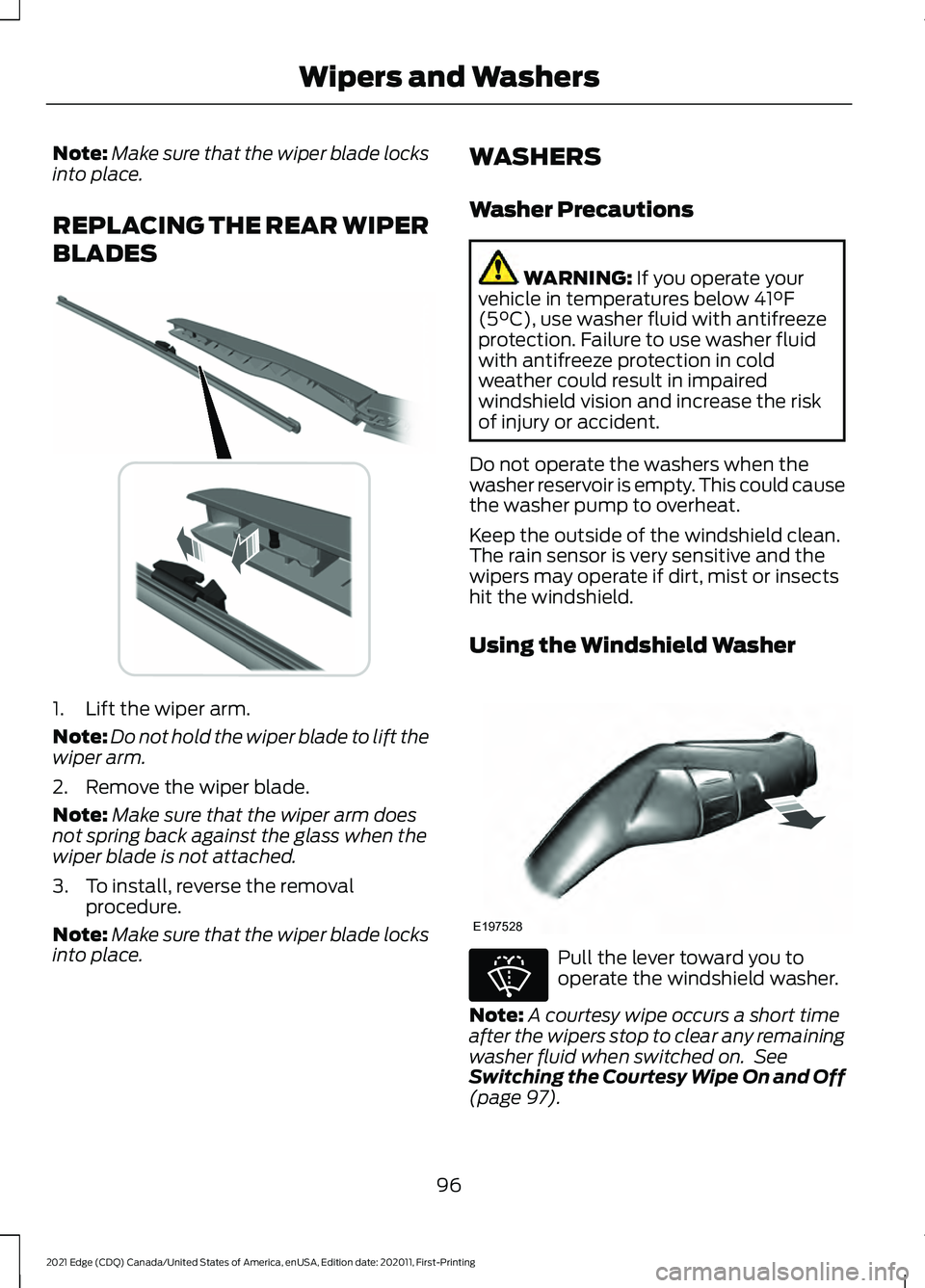
REPLACING THE REAR WIPER
BLADES 1. Lift the wiper arm.
Note:
Do not hold the wiper blade to lift the
wiper arm.
2. Remove the wiper blade.
Note: Make sure that the wiper arm does
not spring back against the glass when the
wiper blade is not attached.
3. To install, reverse the removal procedure.
Note: Make sure that the wiper blade locks
into place. WASHERS
Washer Precautions WARNING: If you operate your
vehicle in temperatures below 41°F
(5°C), use washer fluid with antifreeze
protection. Failure to use washer fluid
with antifreeze protection in cold
weather could result in impaired
windshield vision and increase the risk
of injury or accident.
Do not operate the washers when the
washer reservoir is empty. This could cause
the washer pump to overheat.
Keep the outside of the windshield clean.
The rain sensor is very sensitive and the
wipers may operate if dirt, mist or insects
hit the windshield.
Using the Windshield Washer Pull the lever toward you to
operate the windshield washer.
Note: A courtesy wipe occurs a short time
after the wipers stop to clear any remaining
washer fluid when switched on. See
Switching the Courtesy Wipe On and Off
(page
97).
96
2021 Edge (CDQ) Canada/United States of America, enUSA, Edition date: 202011, First-Printing Wipers and Washers E271380 E197528 E270967
Page 101 of 500
Switching the Courtesy Wipe On
and Off
1. Using the instrument cluster controls
on the steering wheel, select Settings.
2. Select Vehicle.
3. Select
Wipers.
4. Switch
Courtesy Wipe on or off.
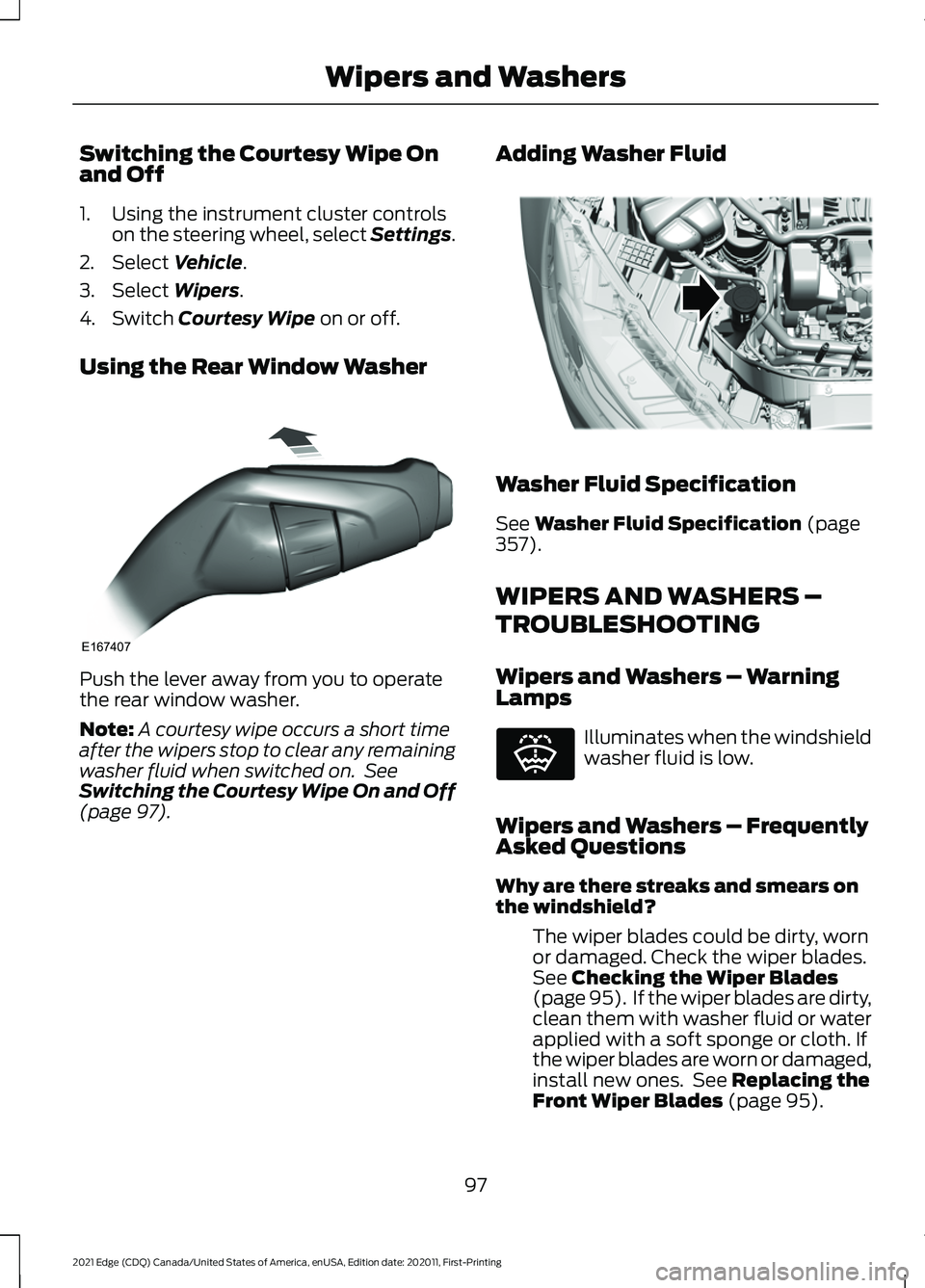
Using the Rear Window Washer Push the lever away from you to operate
the rear window washer.
Note:
A courtesy wipe occurs a short time
after the wipers stop to clear any remaining
washer fluid when switched on. See
Switching the Courtesy Wipe On and Off
(page
97). Adding Washer Fluid Washer Fluid Specification
See
Washer Fluid Specification (page
357).
WIPERS AND WASHERS –
TROUBLESHOOTING
Wipers and Washers – Warning
Lamps Illuminates when the windshield
washer fluid is low.
Wipers and Washers – Frequently
Asked Questions
Why are there streaks and smears on
the windshield? The wiper blades could be dirty, worn
or damaged. Check the wiper blades.
See
Checking the Wiper Blades
(page 95). If the wiper blades are dirty,
clean them with washer fluid or water
applied with a soft sponge or cloth. If
the wiper blades are worn or damaged,
install new ones. See
Replacing the
Front Wiper Blades (page 95).
97
2021 Edge (CDQ) Canada/United States of America, enUSA, Edition date: 202011, First-Printing Wipers and WashersE167407 E330184 E132353
Page 210 of 500
WHAT IS THE 180 DEGREE
CAMERA
The 180 degree camera system consists
of front and rear cameras.
HOW DOES THE 180 DEGREE
CAMERA WORK
The 180 degree camera system allows you
to see what is directly in front or behind
your vehicle, provides a cross traffic view
in front of your vehicle and provides
visibility when parking your vehicle.
180 DEGREE CAMERA
PRECAUTIONS
WARNING: The rear view camera
system is a reverse aid supplement
device that still requires the driver to use
it in conjunction with the interior and
exterior mirrors for maximum coverage. WARNING:
Objects that are close
to either corner of the bumper or under
the bumper, might not be seen on the
screen due to the limited coverage of the
camera system. WARNING:
Use caution when
turning camera features on or off when
the transmission is not in park (P). Make
sure your vehicle is not moving.
180 DEGREE CAMERA
LIMITATIONS
Note: The area displayed on the screen may
vary according to your vehicle's orientation
or road condition. Note:
The front view camera will switch off
if your vehicle speed exceeds
6 mph
(10 km/h). You will have to switch the
system back on by using the camera system
button once below the speed threshold.
Note: The camera system may not operate
correctly if mud, water or debris obstructs
the camera's view. You can clean the lens
with a soft, lint-free cloth and non-abrasive
cleaner or by using your front or rear washer.
See
Wipers and Washers (page 94).
LOCATING THE 180 DEGREE
CAMERAS
The front view camera is in the grille. The
rear view camera is on the liftgate.
180 DEGREE CAMERA
INDICATORS
The 180 degree camera provides an image
of your vehicle and the sensor zones. The
zones will highlight green, yellow, and red
when the parking aid sensors detect an
object in the coverage area.
180 DEGREE CAMERA
SETTINGS
Switching the 180 Degree Camera
On and Off The camera button is located on
the audio unit and allows you to
toggle through different camera
views.
Note: The camera system may not operate
correctly if mud, water or debris obstructs
the camera's view. You can clean the lens
with a soft, lint-free cloth and non-abrasive
cleaner or by using your front or rear washer.
See
Wipers and Washers (page 94).
206
2021 Edge (CDQ) Canada/United States of America, enUSA, Edition date: 202011, First-Printing 180 Degree CameraE188847
Page 496 of 500
V
Vehicle Care...................................................307
Cleaning the Exterior........................................ 307
Cleaning the Interior......................................... 309
Vehicle Identification Number................359 Locating the Vehicle Identification
Number............................................................ 359
Vehicle Identification Number Overview.......................................................... 359
Vehicle Identification.................................359
Vehicle Identification Number...................... 359
Vehicle Interior
................................................28
Vehicle System Updates..........................386
Vehicle Wi-Fi Hotspot
...............................364
Ventilation See: Climate Control......................................... 128
Venting the Moonroof..................................112
Viewing the Tire Pressures.......................338
Visual Search
...................................................26
Voice Interaction Examples.....................375
Voice Interaction..........................................375
W
Washer Fluid Specification.......................357
Washers.............................................................96 Adding Washer Fluid........................................... 97
Switching the Courtesy Wipe On and Off........................................................................\
. 97
Using the Rear Window Washer..................... 97
Using the Windshield Washer......................... 96
Washer Fluid Specification............................... 97
Washer Precautions............................................ 96
Washers See: Wipers and Washers................................. 94
Waxing Your Vehicle.....................................311
Waypoints......................................................385 Adding a Waypoint........................................... 385
Editing Waypoints............................................. 385
What Are the Instrument Cluster Indicators.......................................................116
What Are the Instrument Cluster Warning Lamps
...........................................114
What Is a Connected Vehicle.................360
What Is Active Park Assist.......................208
What Is Auto-Start-Stop...........................167 What Is Blind Spot Information
System...........................................................231
What Is Cross Traffic Alert........................234
What Is Cruise Control................................212 Requirements....................................................... 212
What Is Driver Alert
.....................................244
What Is Ford Protect..................................389 Ford Protect Extended Service Plan
(Canada Only).............................................. 390
Ford Protect Extended Service Plans - United States Only....................................... 389
What Is Hill Start Assist
.............................193
What Is MyKey................................................66
What Is Pre-Collision Assist
.....................237
What Is Remote Start.................................125
What Is the 180 Degree Camera...........206
What Is the Cabin Air Filter........................132
What Is the Catalytic Converter..............176
What Is the Electric Parking Brake........190
What Is the Engine Coolant Temperature Gauge..............................................................114
What Is the Garage Door Opener...........148 HomeLink Wireless Control System...........148
What Is the Gross Axle Weight Rating.............................................................247
GAWR (Gross Axle Weight Rating).............247
What Is the Gross Combined Weight Rating............................................................248
What Is the Gross Vehicle Weight Rating.............................................................247
What Is the Keyless Entry Keypad
...........76
What Is the Lane Keeping System........224
What Is the Maximum Loaded Trailer Weight...........................................................247
What Is the Personal Safety System............................................................49
What Is the Power Outlet..........................155
What is the Rear Occupant Alert System...........................................................144
What Is the Rear View Camera..............203
What Is the Speedometer..........................113
What Is the Tachometer.............................113
What Is the Tire Pressure Monitoring System
..........................................................336
What Is the Tire Sealant and Inflator Kit...................................................................330
What Is the Turbo Boost Gauge...............114
492
2021 Edge (CDQ) Canada/United States of America, enUSA, Edition date: 202011, First-Printing Index
Page 497 of 500
What Is the Wireless Accessory
Charger...........................................................157
What is Voice Interaction..........................375
Wheel and Tire Information......................315
Wheel Nuts....................................................346
Window Bounce-Back
...............................108
Overriding Window Bounce-Back...............108
What Is Window Bounce-Back..................... 108
Windows..........................................................107 Global Opening.................................................... 107
Window Bounce-Back..................................... 108
Wipers and Washers – Troubleshooting...........................................
97
Wipers and Washers – Frequently Asked
Questions........................................................... 97
Wipers and Washers – Warning Lamps.................................................................. 97
Wipers and Washers.....................................94 Autowipers............................................................. 94
Reverse Wipe......................................................... 95
Washers................................................................... 96
Wipers...................................................................... 94
Wipers and Washers – Troubleshooting............................................... 97
Wipers................................................................94 Switching Windshield Wipers On and
Off........................................................................\
. 94
Wiper Precautions............................................... 94
Wireless Accessory Charger Precautions..................................................157
Wireless Accessory Charger......................157
493
2021 Edge (CDQ) Canada/United States of America, enUSA, Edition date: 202011, First-Printing Index