child seat FORD EDGE 2023 Owner's Manual
[x] Cancel search | Manufacturer: FORD, Model Year: 2023, Model line: EDGE, Model: FORD EDGE 2023Pages: 504, PDF Size: 14.96 MB
Page 57 of 504
•When the front passenger sensingsystem disables the front passengerfrontal airbag, the passenger airbagstatus indicator illuminates the offlamp.
•If you have installed the child restraintand the passenger airbag statusindicator illuminates the on lamp,switch your vehicle off, remove thechild restraint from your vehicle andreinstall the restraint following thechild restraint manufacturer'sinstructions.
The front passenger sensing system workswith sensors that are part of the frontpassenger seat and seatbelt. The sensorsare designed to detect the presence of aproperly seated occupant and determineif the front passenger frontal airbag shouldbe enabled.
•When the front passenger sensingsystem enables the front passengerfrontal airbag, the passenger airbagstatus indicator illuminates the onlamp.
If a person of adult size is sitting in the frontpassenger seat, but the passenger airbagstatus indicator off lamp is illuminated, itis possible that the person is not sittingproperly in the seat. If this happens:
•Switch your vehicle off and ask theperson to place the seat backrest in anupright position.
•Have the person sit upright in the seat,centered on the seat cushion, with theperson's legs comfortably extended.
•Restart your vehicle and have theperson remain in this position for abouttwo minutes. This allows the systemto detect that person and enable thepassenger frontal airbag.
•If the indicator off lamp remainsilluminated even after this, you shouldadvise the person to ride in the rearseat.
After all occupants have adjusted theirseats and put on seatbelts, it is veryimportant that they continue to sit upright,leaning against the seat backrest, andcentered on the seat cushion, with theirfeet comfortably extended on the floor.
Sitting improperly can increase the chanceof injury in a crash event. For example, ifan occupant slouches, lies down, turnssideways, sits forward, leans forward orsideways, or puts one or both feet up, thechance of injury during a crash greatlyincreases.
If you think that the state of the passengerairbag status indicator lamp is incorrect,check for the following:
•Objects lodged underneath the seat.
•Objects between the seat cushion andthe center console.
•Objects hanging off the seat backrest.
•Objects stowed in the seat backrestmap pocket.
•Objects placed on the occupant's lap.
•Cargo interference with the seat
•Other passengers pushing or pulling onthe seat.
•Rear passenger feet and knees restingor pushing on the seat.
The listed conditions could cause theweight of a properly seated occupant tobe incorrectly interpreted by the frontpassenger sensing system. The person inthe front passenger seat could appearheavier or lighter due to the conditionslisted.
Make sure the front passengersensing system is operatingproperly. See Crash Sensorsand Airbag Indicator (page 55).
If the airbag readiness light is on, do thefollowing:
53
2023 Edge (CDQ) Canada/United States of America, enUSA, Edition date: 202207, DOMAirbagsE67017
Page 58 of 504

•Pull your vehicle over.
•Switch your vehicle off.
•Check for any objects lodgedunderneath the front passenger seator cargo interfering with the seat.
•Remove the obstruction if found.
•Restart your vehicle.
•Wait at least two minutes and verifythat the airbag readiness light in theinstrument cluster is no longerilluminated.
•If the airbag readiness light in theinstrument cluster remains illuminated,there may be a problem due to thefront passenger sensing system.
Do not attempt to repair or service thesystem. Take your vehicle in for serviceimmediately.
If it is necessary to modify an advancedfront airbag system to accommodate aperson with disabilities, contact yourCustomer Relationship Center. SeeContacting Us (page 13).
FRONT PASSENGER SENSINGSYSTEM PRECAUTIONS
WARNING: Sitting improperly, outof position or with the seatback reclinedtoo far can take weight off the seatcushion and affect the decision of thepassenger sensing system, resulting inserious injury or death in the event of acrash. Always sit upright against yourseat back, with your feet on the floor.
WARNING: Any alteration ormodification to the front passenger seatmay affect the performance of the frontpassenger sensing system. This couldseriously increase the risk of injury ordeath.
FRONT PASSENGER SENSING SYSTEM INDICATORS
Passenger AirbagPassenger Airbag StatusIndicatorOccupant
DisabledOFF: IlluminatedEmpty
ON: Not Illuminated
DisabledOFF: IlluminatedChild
ON: Not Illuminated
EnabledOFF: Not IlluminatedAdult
ON: Illuminated
54
2023 Edge (CDQ) Canada/United States of America, enUSA, Edition date: 202207, DOMAirbags
Page 85 of 504
LIFTGATE PRECAUTIONS
WARNING: It is extremelydangerous to ride in a cargo area, insideor outside of a vehicle. In a crash, peopleriding in these areas are more likely to beseriously injured or killed. Do not allowpeople to ride in any area of your vehiclethat is not equipped with seats andseatbelts. Make sure everyone in yourvehicle is in a seat and properly using aseatbelt. Failure to follow this warningcould result in serious personal injury ordeath.
WARNING: Make sure that you fullyclose the liftgate to prevent exhaustfumes from entering your vehicle. If youare unable to fully close the liftgate,open the air vents or the windows toallow fresh air to enter your vehicle.Failure to follow this instruction couldresult in personal injury or death.
WARNING: Keep keys out of reachof children. Do not allow children tooperate or play near an open or movingpower liftgate. You should supervise theoperation of the power liftgate at alltimes.
OPENING THE LIFTGATE
OPENING THE LIFTGATE FROMINSIDE YOUR VEHICLE
Power Liftgate Release
Power Liftgate Obstacle Detection
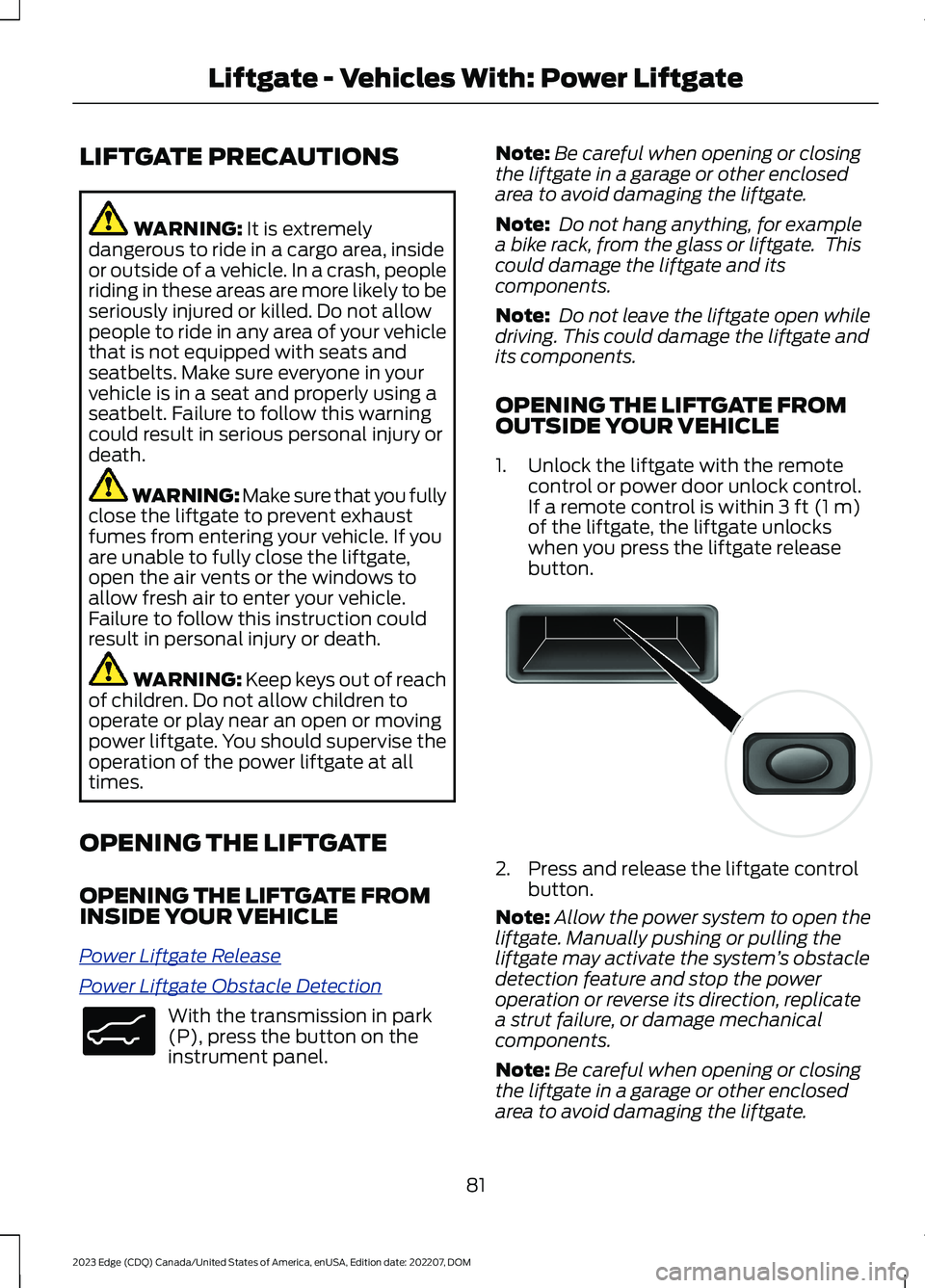
With the transmission in park(P), press the button on theinstrument panel.
Note:Be careful when opening or closingthe liftgate in a garage or other enclosedarea to avoid damaging the liftgate.
Note: Do not hang anything, for examplea bike rack, from the glass or liftgate. Thiscould damage the liftgate and itscomponents.
Note: Do not leave the liftgate open whiledriving. This could damage the liftgate andits components.
OPENING THE LIFTGATE FROMOUTSIDE YOUR VEHICLE
1.Unlock the liftgate with the remotecontrol or power door unlock control.If a remote control is within 3 ft (1 m)of the liftgate, the liftgate unlockswhen you press the liftgate releasebutton.
2.Press and release the liftgate controlbutton.
Note:Allow the power system to open theliftgate. Manually pushing or pulling theliftgate may activate the system’s obstacledetection feature and stop the poweroperation or reverse its direction, replicatea strut failure, or damage mechanicalcomponents.
Note:Be careful when opening or closingthe liftgate in a garage or other enclosedarea to avoid damaging the liftgate.
81
2023 Edge (CDQ) Canada/United States of America, enUSA, Edition date: 202207, DOMLiftgate - Vehicles With: Power LiftgateE138633 E138632
Page 147 of 504
WHAT IS THE REAR
OCCUPANT ALERT SYSTEM
The rear occupant alert system monitorsvehicle conditions and notifies you to checkfor rear seat occupants when you switchthe ignition off.
HOW DOES THE REAR
OCCUPANT ALERT SYSTEM
WORK
The system monitors when rear doors havebeen opened and closed to indicate thepotential presence of an occupant in therear seat.
A message displays in the information andentertainment display screen and anaudible warning sounds when you switchthe ignition off after any of the followingconditions have been met:
•A rear door is opened or closed whilethe ignition is on.
•You switch the ignition on within 15minutes of a rear door opening andclosing.
•You switch the ignition on within 15minutes of the alert having displayedor sounded.
REAR OCCUPANT ALERT
SYSTEM PRECAUTIONS
WARNING: On hot days, thetemperature inside the vehicle can risevery quickly. Exposure of people oranimals to these high temperatures foreven a short time can cause death orserious heat related injuries, includingbrain damage. Small children areparticularly at risk.
WARNING: Do not leave childrenor pets unattended in your vehicle.Failure to follow this instruction couldresult in personal injury or death.
REAR OCCUPANT ALERT
SYSTEM LIMITATIONS
The system does not detect the presenceof objects or passengers in the rear seat.It monitors when rear doors are openedand closed.
Note:It is possible to receive an alert whenthere is no rear seat occupant, but alertconditions are met.
Note:It is possible to receive no alert whenthere is an occupant in the rear seat, if alertconditions are not met. For example, if a rearseat occupant does not enter the vehiclethrough a rear door.
Note:The audible warning does not soundwhen the front door is opened before youswitch the ignition off.
SWITCHING REAR OCCUPANT
ALERT SYSTEM ON AND OFF
1.Access the vehicle drawer on thetouchscreen.
2.Press SETTINGS.
3.Press Vehicle.
4.Switch Rear Occupant Alert on or off.
Note:The default setting is on.
Note:Performing a master reset causes thesystem to switch on again.
143
2023 Edge (CDQ) Canada/United States of America, enUSA, Edition date: 202207, DOMRear Occupant Alert System (If Equipped)
Page 488 of 504
Brakes................................................................181Anti-Lock Braking System................................181Brakes – Troubleshooting...............................182Brakes – Troubleshooting.........................182Brakes – Frequently AskedQuestions.........................................................183Brakes – Information Messages...................183Brakes – Warning Lamps................................182Breaking-In.....................................................259
C
Calculating Payload....................................245Calculating the Load Limit.......................246Canceling the Set Speed.........................209Capacities and Specifications.................341Catalytic Converter.......................................173Catalytic Converter –Troubleshooting..............................................173Catalytic Converter Precautions.............173Catalytic Converter –Troubleshooting.........................................173Catalytic Converter – WarningLamps.................................................................173Center Display Limitations.......................365Center Display Overview..........................365Center Display Precautions.....................365Changing a Flat Tire....................................335Changing a Road Wheel...........................335Changing the 12V Battery.........................292Changing the Remote ControlBattery............................................................60Changing the Vehicle Wi-Fi HotspotName or Password...................................357Charging a Device..........................................151Charging a Wireless Device......................155Checking MyKey System Status..............66Checking the Brake Fluid............................181Checking the Coolant.................................287Checking the Seatbelts...............................45Checking the Tire Pressures.....................321Checking the Wiper Blades........................95Children and Airbags.....................................52Child Restraint Anchor Points...................30Locating the Child Restraint Lower AnchorPoints...................................................................30Locating the Child Restraint Top TetherAnchor Points....................................................31
What Are the Child Restraint AnchorPoints...................................................................30Child Restraints................................................31Child Restraint Position Information..............31Child Restraints Recommendation...............32Child Safety......................................................29Child Restraint Anchor Points.........................30Child Restraints......................................................31Installing Child Restraints.................................32Child Safety Locks.........................................39Child Safety Precautions.............................29Cleaning Products........................................301Cleaning the Exterior..................................302Cleaning Camera Lenses andSensors.............................................................303Cleaning Chrome, Aluminium or StainlessSteel..................................................................302Cleaning Headlamps and RearLamps...............................................................302Cleaning Stripes or Graphics.........................303Cleaning the Engine Compartment...........303Cleaning the Exterior Precautions...............302Cleaning the Underbody.................................303Cleaning Wheels................................................302Cleaning Windows and WiperBlades...............................................................302Cleaning the Interior...................................304Cleaning Carpets and Floor Mats................305Cleaning Displays and Screens....................304Cleaning Fabric..................................................304Cleaning Leather...............................................304Cleaning Moonroof Tracks.............................306Cleaning Plastic.................................................304Cleaning Seatbelts...........................................305Cleaning Storage Compartments...............305Cleaning the Instrument Panel....................304Cleaning Vinyl.....................................................305Clearing All MyKeys.......................................66Climate Control.............................................128Auto Mode.............................................................129Climate Control Hints.................................129Closing the Liftgate.......................................79Closing the Hands-Free Liftgate....................84Closing the Liftgate From Inside YourVehicle.................................................................83Closing the Liftgate From Outside YourVehicle.................................................................79
484
2023 Edge (CDQ) Canada/United States of America, enUSA, Edition date: 202207, DOMIndex
Page 492 of 504
G
Garage Door Opener AdditionalAssistance....................................................150Garage Door Opener....................................147Garage Door Opener Introduction..........147Garage Door Opener Precautions andFrequencies..................................................147General Maintenance Information.......388Glasses Holder..............................................156Locating the Glasses Holder..........................156Global Opening.............................................107Switching Global Opening On andOff.......................................................................108Using Global Opening.......................................107What Is Global Opening...................................107Glossary of Tire Terminology...................316
H
Headlamp AdjustingSee: Adjusting the Headlamps.....................295Headlamps.......................................................98Headlamp Indicators..........................................98Switching Headlamp Exit Delay On andOff.........................................................................98Using the High Beam Headlamps.................98Headlamps – Troubleshooting................99Headlamps – Frequently AskedQuestions...........................................................99Heated Seats.................................................138Heated Seat Precautions................................138Switching the Heated Seats On andOff.......................................................................139HeatingSee: Climate Control.........................................128Hill Start Assist..............................................187Hill Start Assist – Troubleshooting..............187Hill Start Assist Precautions.....................187Hill Start Assist – Troubleshooting........187Hill Start Assist – InformationMessages..........................................................187Hood LockSee: Opening and Closing the Hood..........282Horn.....................................................................93How Does 911 Assist Work..........................57How Does Active Park AssistWork..............................................................204
How Does Adaptive Cruise Control WithStop and Go Work.....................................210How Does All-Wheel Drive Work...........180How Does Auto Hold Work.......................188How Does Blind Spot InformationSystem Work..............................................228How Does Cross Traffic Alert Work........231How Does Driver Alert Work.....................241How Does Easy Entry and Exit Work.......78How Does Hill Start Assist Work.............187How Does Pre-Collision AssistWork...............................................................234How Does Stability Control Work...........191How Does the 180 Degree CameraWork..............................................................202How Does the Lane Keeping SystemWork................................................................221How Does the Memory FunctionWork...............................................................145How Does the Personal Safety SystemWork.................................................................47How Does the Rear Occupant AlertSystem Work...............................................143How Does the Safety Canopy™Work.................................................................49How Does Traction Control Work..........190How Does Trailer Sway ControlWork..............................................................258How Do the Front Airbags Work..............48How Do the Knee Airbags Work...............49How Do the Side Airbags Work................48
I
Identifying Fuse Types................................281Identifying the Audio Unit........................359Inflating the Tires..........................................321Information on the Tire Sidewall.............311Inspecting the Tire for Damage..............322Inspecting the Tire for Wear.....................322Inspecting the Wheel Valve Stems.......323Installing and Removing the LuggageCompartment Cargo Net.......................249Installing and Removing the LuggageCompartment Cover...............................249Installing Child Restraints...........................32Combining the Seatbelt and Lower Anchorsfor Attaching Child Restraints....................36
488
2023 Edge (CDQ) Canada/United States of America, enUSA, Edition date: 202207, DOMIndex
Page 493 of 504
Installing a Child Restraint in a CenterSeat......................................................................35Using Lower Anchors and Tethers forChildren...............................................................34Using Seatbelts.....................................................32Using Tether Straps.............................................36Instrument Cluster Display.........................117Personalized Settings.......................................120Trip Computer.......................................................118Instrument Cluster Display MainMenu................................................................117Instrument Cluster Indicators...................116Instrument Cluster........................................113Fuel Gauge.............................................................113Instrument Cluster Overview....................113Instrument Cluster Warning Lamps.......114Instrument Panel............................................25Interior Air Quality..........................................131Interior Bulbs................................................300Interior Bulb Specification Chart................300Interior Lamp Function...............................105Switching the Interior Lamp Function Onand Off..............................................................105What Is the Interior Lamp Function............105Interior Lighting.............................................105Ambient Lighting................................................106Interior Lamp Function.....................................105Interior Lighting – Troubleshooting.............106Interior Lighting –Troubleshooting........................................106Interior Lighting – Frequently AskedQuestions.........................................................106Interior Mirror.................................................109Auto-Dimming Interior Mirror........................109Interior Mirror Precautions........................109Introduction.......................................................15
J
Jump Starting the Vehicle........................264Jump Starting Precautions............................264Jump Starting the Vehicle..............................265Preparing the Vehicle.......................................265
K
Keyless Entry....................................................73Keyless Entry – Troubleshooting....................74
Keyless Entry Keypad....................................75Keyless Entry Keypad –Troubleshooting...............................................77Keyless Entry Keypad Limitations............75Keyless Entry Keypad Master AccessCode.................................................................75Keyless Entry Keypad Personal AccessCodes...............................................................76Keyless Entry Keypad –Troubleshooting...........................................77Keyless Entry Keypad – Frequently AskedQuestions............................................................77Keyless Entry Limitations............................73Keyless Entry Settings..................................73Keyless Entry – Troubleshooting..............74Keyless Entry – Frequently AskedQuestions...........................................................74Keys and Remote Controls.........................59Keys and Remote Controls –Troubleshooting...............................................63Keys and Remote Controls –Troubleshooting..........................................63Keys and Remote Controls – InformationMessages............................................................63
L
Lane Centering..............................................216How Does Lane Centering Work...................216Lane Centering Alerts.......................................218Lane Centering AutomaticCancellation.....................................................218Lane Centering Indicators...............................219Lane Centering Limitations.............................217Lane Centering Manual Cancellation.........218Lane Centering Precautions............................217Lane Centering Requirements........................217Switching Lane Centering On and Off........218Lane Keeping System Indicators...........224Lane Keeping System..................................221Aid Mode...............................................................223Alert and Aid Mode............................................223Alert Mode............................................................223Lane Keeping System –Troubleshooting............................................225Lane Keeping System Limitations..........221Lane Keeping System Precautions........221Lane Keeping System Settings...............222
489
2023 Edge (CDQ) Canada/United States of America, enUSA, Edition date: 202207, DOMIndex