phone FORD EDGE 2023 Owner's Guide
[x] Cancel search | Manufacturer: FORD, Model Year: 2023, Model line: EDGE, Model: FORD EDGE 2023Pages: 504, PDF Size: 14.96 MB
Page 482 of 504
ELECTROMAGNETIC
COMPATIBILITY
WARNING: Do not place objectsor mount equipment on or near theairbag cover, on the side of the front orrear seatbacks, or in areas that maycome into contact with a deployingairbag. Failure to follow theseinstructions may increase the risk ofpersonal injury in the event of a crash.
WARNING: Do not fasten antennacables to vehicle wiring, fuel pipes andbrake pipes.
WARNING: Keep antenna andpower cables at least 4 in (10 cm) fromany electronic modules and airbags.
Note:We test and certify your vehicle tomeet electromagnetic compatibilitylegislation. It is your responsibility to makesure that any equipment an authorizeddealer installs on your vehicle complies withapplicable local legislation and otherrequirements. Installation of someaftermarket electronic devices coulddegrade the performance of vehiclefunctions, which use radio frequency signalssuch as broadcast radio receiver, tirepressure monitoring system, push buttonstart,Bluetooth® connectivity or satellitenavigation.
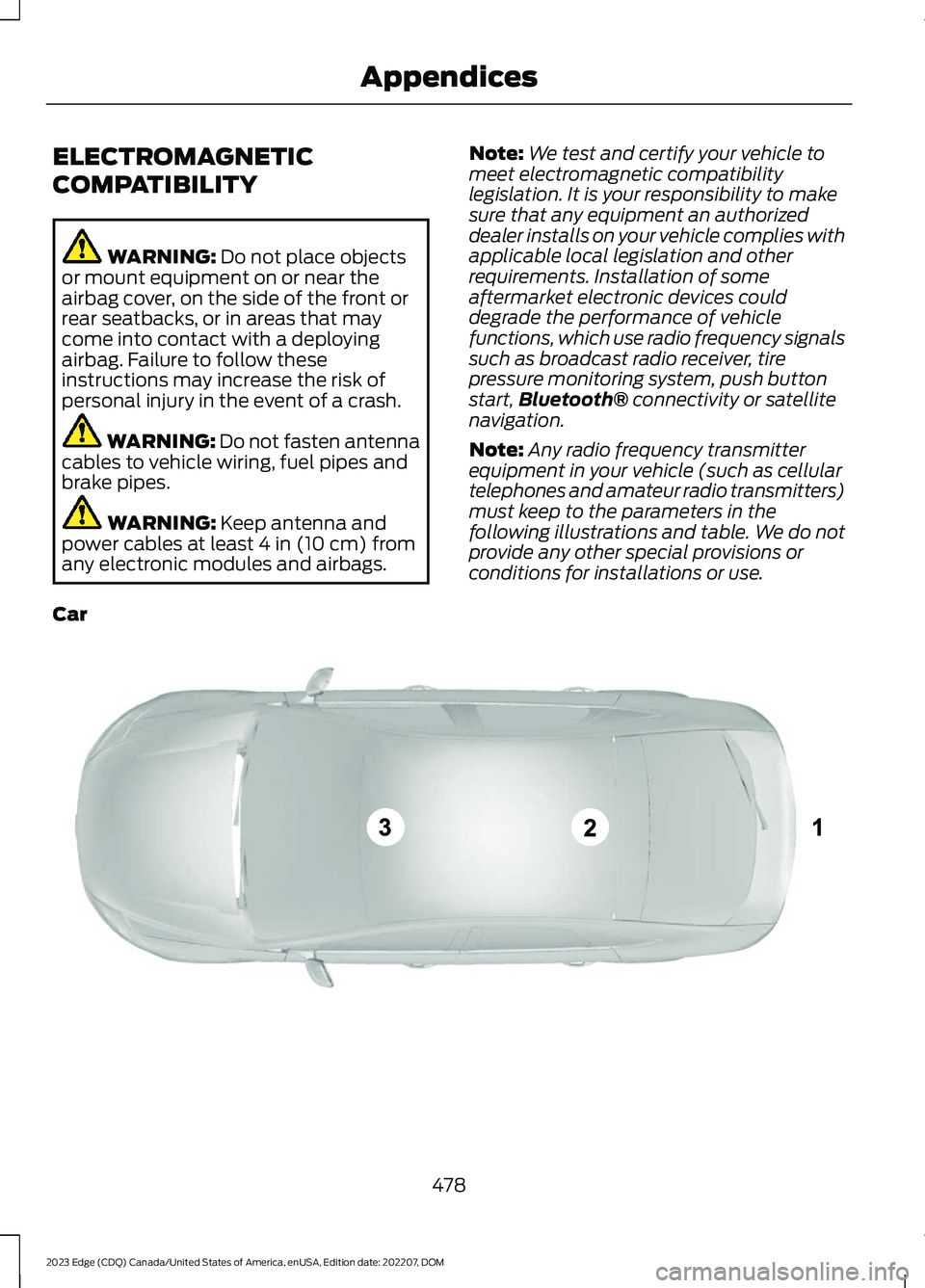
Note:Any radio frequency transmitterequipment in your vehicle (such as cellulartelephones and amateur radio transmitters)must keep to the parameters in thefollowing illustrations and table. We do notprovide any other special provisions orconditions for installations or use.
Car
478
2023 Edge (CDQ) Canada/United States of America, enUSA, Edition date: 202207, DOMAppendicesE239120
Page 489 of 504
Closing the Liftgate Using the RemoteControl................................................................84Cold Weather Precautions.......................259Connected Navigation...............................379Connected Vehicle......................................354Connected Vehicle –Troubleshooting............................................355Connecting the Vehicle to a MobileNetwork............................................................354Connected Vehicle Data..............................22Connected Vehicle Limitations..............354Connected Vehicle Requirements........354Connected Vehicle –Troubleshooting........................................355Connected Vehicle – Frequently AskedQuestions........................................................355Connecting a Bluetooth® Device..........375Connecting a Trailer.....................................251Connecting a Trailer Precautions............251Connecting the Vehicle to a MobileNetwork........................................................354Connecting FordPass to the Modem.........354Enabling and Disabling the Modem...........354What Is the Modem..........................................354Connecting the Vehicle to a Wi-FiNetwork........................................................354Connecting Your Phone..............................371Contacting Us...................................................13Cooled Seats..................................................139Switching the Cooled Seats On andOff.......................................................................139Cooling System Capacity andSpecification - 2.0L EcoBoost™........348Cooling System Capacity andSpecification - 2.7L EcoBoost™.........349Crash and BreakdownInformation.................................................263Automatic Crash Shutoff...............................266Jump Starting the Vehicle..............................264Post-Crash Alert System................................266Crash Sensors and Airbag Indicator........55Creating a MyKey...........................................65Creating a Vehicle Wi-Fi Hotspot...........357Cross Traffic Alert.........................................231Cross Traffic Alert –Troubleshooting............................................233Cross Traffic Alert Indicators...................232Cross Traffic Alert Limitations.................231
Cross Traffic Alert Precautions................231Cross Traffic Alert –Troubleshooting........................................233Cross Traffic Alert – InformationMessages.........................................................233Cruise Control...............................................208Cruise Control Indicators..........................209Cup Holders....................................................156Cup Holder Precautions...................................156Customer Information...............................397Radio Frequency CertificationLabels...............................................................400Customizing the Instrument ClusterDisplay...........................................................120
D
Data Privacy.....................................................20Department of Transportation UniformTire Quality Grades...................................310Digital Radio..................................................362Digital Radio Indicators...................................363Digital Radio Limitations................................362How Does Digital Radio Work.......................362Switching Digital Radio Reception On andOff.......................................................................362What Is Digital Radio........................................362Directing the Flow of Air.............................129Disposing of Airbags.....................................56Distance Alert................................................237Adjusting the Sensitivity of DistanceAlert....................................................................237What Is Distance Alert......................................237Distance Indication.....................................236Distance Indication Indicator.........................237Switching Distance Indication On andOff.......................................................................237What Is Distance Indication...........................236Doors and Locks Audible Warnings..........71Doors and Locks.............................................69Autolock....................................................................71Autounlock.............................................................70Doors and Locks – Troubleshooting...............71Mislock.......................................................................71Operating the Doors From Inside YourVehicle.................................................................70Operating the Doors From Outside YourVehicle.................................................................69
485
2023 Edge (CDQ) Canada/United States of America, enUSA, Edition date: 202207, DOMIndex
Page 494 of 504
Lane Keeping System –Troubleshooting........................................225Lane Keeping System – Frequently AskedQuestions.........................................................226Lane Keeping System – InformationMessages.........................................................225Launching or Retrieving a Boat orPersonal Watercraft................................255Liftgate...............................................................79Closing the Liftgate..............................................79Liftgate – Troubleshooting...............................86Opening the Liftgate...........................................79Liftgate Obstacle Detection......................86Liftgate Precautions.......................................81Liftgate – Troubleshooting........................86Liftgate – Frequently AskedQuestions...........................................................87Liftgate – Information Messages...................86Liftgate – Warning Lamps................................86Live Traffic......................................................379Switching Live Traffic On and Off................379What Is Live Traffic............................................379Load Carrying................................................243Roof Rack..............................................................247Load Carrying Precautions.......................243Loading Your Trailer....................................254Locating the 180 Degree Cameras........202Locating the Blind Spot InformationSystem Sensors.........................................229Locating the Brake Fluid Reservoir.........181Locating the Cross Traffic AlertSensors.........................................................232Locating the Fuel Filler Funnel................168Locating the Keyless Entry Keypad..........75Locating the Memory FunctionButtons..........................................................145Locating the Power Outlets......................153Locating the Pre-Collision AssistSensors.........................................................236Locating the Rear View Camera.............199Locating the Safety ComplianceCertification Labels..................................244Locating the Tire label................................310Locating the Tire Sealant and InflatorKit....................................................................325Locating the USB Ports...............................151Locating the Wireless AccessoryCharger..........................................................155
Locating Your Vehicle...................................60Locking the Rear WindowControls........................................................108Luggage Compartment.............................249
M
Maintenance..................................................282Engine Air Filter..................................................290Engine Oil..............................................................285Exterior Bulbs......................................................297Interior Bulbs......................................................300Maintenance Precautions........................282Making and Receiving a PhoneCall..................................................................372Manually Dimming the InteriorMirror..............................................................109Manually Releasing the Electric ParkingBrake..............................................................184Manually Shifting Gears.............................175Shifting Using the Paddle Shifters...............175Manual Park Release....................................177Manual Park Release Precautions................177Using Manual Park Release............................178What Is Manual Park Release.........................177Manual Seats.................................................133Adjusting the Head Restraint.........................133Adjusting the Lumbar Support......................135Adjusting the Seat Backrest...........................135Adjusting the Seat Height...............................135Folding the Seat Backrest...............................140Head Restraint Components.........................133Installing the Head Restraint.........................134Moving the Seat Backward andForward.............................................................134Removing the Head Restraint........................134Unfolding the Seat Backrest...........................141Memory Function.........................................145Memory Function Precautions................145Mislock.................................................................71Mislock Limitations...............................................71Switching Mislock On and Off..........................71What Is Mislock......................................................71Mobile CommunicationsEquipment..................................................448Mobile Device Data........................................23Moonroof Bounce-Back..............................112Overriding Moonroof Bounce-Back..............112
490
2023 Edge (CDQ) Canada/United States of America, enUSA, Edition date: 202207, DOMIndex
Page 496 of 504
Changing the Tire Pressure Unit....................123Switching the Instrument Cluster DisplayAudible Warnings On and Off...................124Personal Safety SystemComponents..................................................47Personal Safety System™..........................47Phone Menu....................................................371Phone................................................................371Phone Precautions.......................................371Playing Media Using Bluetooth®...........375Playing Media Using the USB Port..........151Playing or Pausing the AudioSource...........................................................359Post-Crash Alert System..........................266How Does the Post-Crash Alert SystemWork..................................................................266Post-Crash Alert SystemLimitations......................................................266Switching the Post-Crash Alert SystemOff......................................................................266What Is the Post-Crash AlertSystem..............................................................266Power Outlet Indicators.............................153Power Outlet Limitations..........................154Power Outlet..................................................153Power Outlet Precautions.........................153Power Seats...................................................136Adjusting the Head Restraint.........................136Adjusting the Lumbar Support......................138Adjusting the Seat Backrest...........................138Adjusting the Seat Cushion.............................137Adjusting the Seat Height...............................138Folding the Seat Backrest................................141Head Restraint Components.........................136Installing the Head Restraint..........................137Moving the Seat Backward andForward..............................................................137Removing the Head Restraint........................137Unfolding the Seat Backrest...........................141Pre-Collision Assist Limitations.............235Pre-Collision Assist Precautions............234Pre-Collision Assist.....................................234Automatic Emergency Braking.....................237Distance Alert......................................................237Distance Indication...........................................236Evasive Steering Assist....................................238Pre-Collision Assist –Troubleshooting............................................239
Pre-Collision Assist –Troubleshooting........................................239Pre-Collision Assist – Frequently AskedQuestions........................................................240Pre-Collision Assist – InformationMessages.........................................................239Preparing Your Vehicle forStorage.........................................................308Programming a MyKey................................66Programming the Garage DoorOpener...........................................................148Programming the Remote Control..........62Properly Adjusting the Driver and FrontPassenger Seats...........................................51PunctureSee: Changing a Flat Tire................................335Push Button Ignition Switch.....................157
R
Radio Frequency CertificationLabels...........................................................400Blind Spot Information SystemSensors............................................................400Body Control Module......................................406Cruise Control Module....................................409Garage Door Opener.........................................412Keys and Remote Controls.............................413Radio Transceiver Module...............................418SYNC.......................................................................421Telematics Control Unit...................................427Tire Pressure Monitoring SystemSensors.............................................................429Wireless Accessory ChargingModule..............................................................442Rear Exterior.....................................................28Rear Occupant Alert System AudibleWarnings.......................................................144Rear Occupant Alert SystemIndicators......................................................144Rear Occupant Alert SystemLimitations...................................................143Rear Occupant Alert SystemPrecautions..................................................143Rear Occupant Alert System...................143Rear Parking Aid............................................195Locating the Rear Parking AidSensors..............................................................195
492
2023 Edge (CDQ) Canada/United States of America, enUSA, Edition date: 202207, DOMIndex