instrument cluster FORD EDGE 2023 Owners Manual
[x] Cancel search | Manufacturer: FORD, Model Year: 2023, Model line: EDGE, Model: FORD EDGE 2023Pages: 504, PDF Size: 14.96 MB
Page 7 of 504
Adjusting the Steering Wheel - VehiclesWith: Power Adjustable SteeringColumn.........................................................92
Resetting the Stopping Position -Vehicles With: Power AdjustableSteering Column.......................................93
Horn....................................................................93
Switching the Heated Steering WheelOn and Off...................................................93
Wipers and Washers
Wipers...............................................................94
Autowipers......................................................94
Switching the Rear Window Wiper Onand Off..........................................................95
Reverse Wipe..................................................95
Checking the Wiper Blades.......................95
Replacing the Front Wiper Blades..........95
Replacing the Rear Wiper Blades...........96
Washers............................................................96
Wipers and Washers – Troubleshooting...........................................................................97
Exterior Lighting
Exterior Lighting Control............................98
Headlamps......................................................98
Headlamps – Troubleshooting...............99
Autolamps.......................................................99
Exterior Lamps.............................................100
Automatic High Beam Control................101
Automatic High Beam Control –Troubleshooting......................................103
Adaptive Front Lighting............................104
Interior Lighting
Switching All of the Interior Lamps Onand Off........................................................105
Switching the Front Interior Lamps Onand Off........................................................105
Switching the Rear Interior Lamps Onand Off........................................................105
Interior Lamp Function..............................105
Adjusting the Instrument Panel LightingBrightness..................................................106
Ambient Lighting.........................................106
Interior Lighting – Troubleshooting......106
Windows
Opening and Closing the Windows......107
Global Opening............................................107
Window Bounce-Back..............................108
Locking the Rear Window Controls......108
Interior Mirror
Interior Mirror Precautions.......................109
Manually Dimming the Interior Mirror........................................................................109
Auto-Dimming Interior Mirror.................109
Exterior Mirrors
Adjusting the Exterior Mirrors..................110
Folding the Exterior Mirrors......................110
Auto-Dimming Exterior Mirror.................110
Moonroof
Opening and Closing the Sunshade.......111
Opening and Closing the Moonroof.......111
Venting the Moonroof..................................111
Moonroof Bounce-Back.............................112
Instrument Cluster
Instrument Cluster Overview...................113
Tachometer.....................................................113
Speedometer.................................................113
Fuel Gauge......................................................113
Engine Coolant Temperature Gauge..........................................................................114
Turbo Boost Gauge......................................114
What Are the Instrument ClusterWarning Lamps.........................................114
Instrument Cluster Warning Lamps......114
3
2023 Edge (CDQ) Canada/United States of America, enUSA, Edition date: 202207, DOMTable of Contents
Page 8 of 504
What Are the Instrument ClusterIndicators.....................................................115
Instrument Cluster Indicators..................116
Instrument Cluster Display
Using the Instrument Cluster DisplayControls........................................................117
Instrument Cluster Display Main Menu..........................................................................117
Trip Computer................................................118
Customizing the Instrument ClusterDisplay.........................................................120
Personalized Settings................................120
Remote Start
What Is Remote Start................................125
Remote Start Precautions........................125
Remote Start Limitations.........................125
Enabling Remote Start..............................125
Remotely Starting and Stopping theVehicle.........................................................125
Extending the Remote Start Duration.........................................................................126
Remote Start Remote Control Indicators.........................................................................126
Remote Start Settings...............................126
Climate Control
Switching Climate Control On and Off.........................................................................128
Switching Recirculated Air On and Off.........................................................................128
Switching Air Conditioning On and Off.........................................................................128
Switching Maximum Defrost On and Off.........................................................................128
Switching Maximum Cooling On and Off.........................................................................128
Switching the Heated Rear Window Onand Off........................................................128
Setting the Blower Motor Speed...........129
Switching the Heated Mirrors On and Off.........................................................................129
Setting the Temperature..........................129
Directing the Flow of Air............................129
Auto Mode......................................................129
Climate Control Hints................................129
Interior Air Quality
What Is the Cabin Air Filter.......................131
Replacing the Cabin Air Filter...................131
Front Seats
Front Seat Precautions..............................132
Sitting in the Correct Position.................132
Manual Seats................................................133
Power Seats..................................................136
Heated Seats................................................138
Cooled Seats.................................................139
Rear Seats
Manual Seats................................................140
Power Seats....................................................141
Heated Seats.................................................142
Rear Occupant Alert System
What is the Rear Occupant Alert System.........................................................................143
How Does the Rear Occupant AlertSystem Work.............................................143
Rear Occupant Alert System Precautions.........................................................................143
Rear Occupant Alert System Limitations.........................................................................143
Switching Rear Occupant Alert SystemOn and Off.................................................143
Rear Occupant Alert System Indicators.........................................................................144
Rear Occupant Alert System AudibleWarnings.....................................................144
4
2023 Edge (CDQ) Canada/United States of America, enUSA, Edition date: 202207, DOMTable of Contents
Page 28 of 504
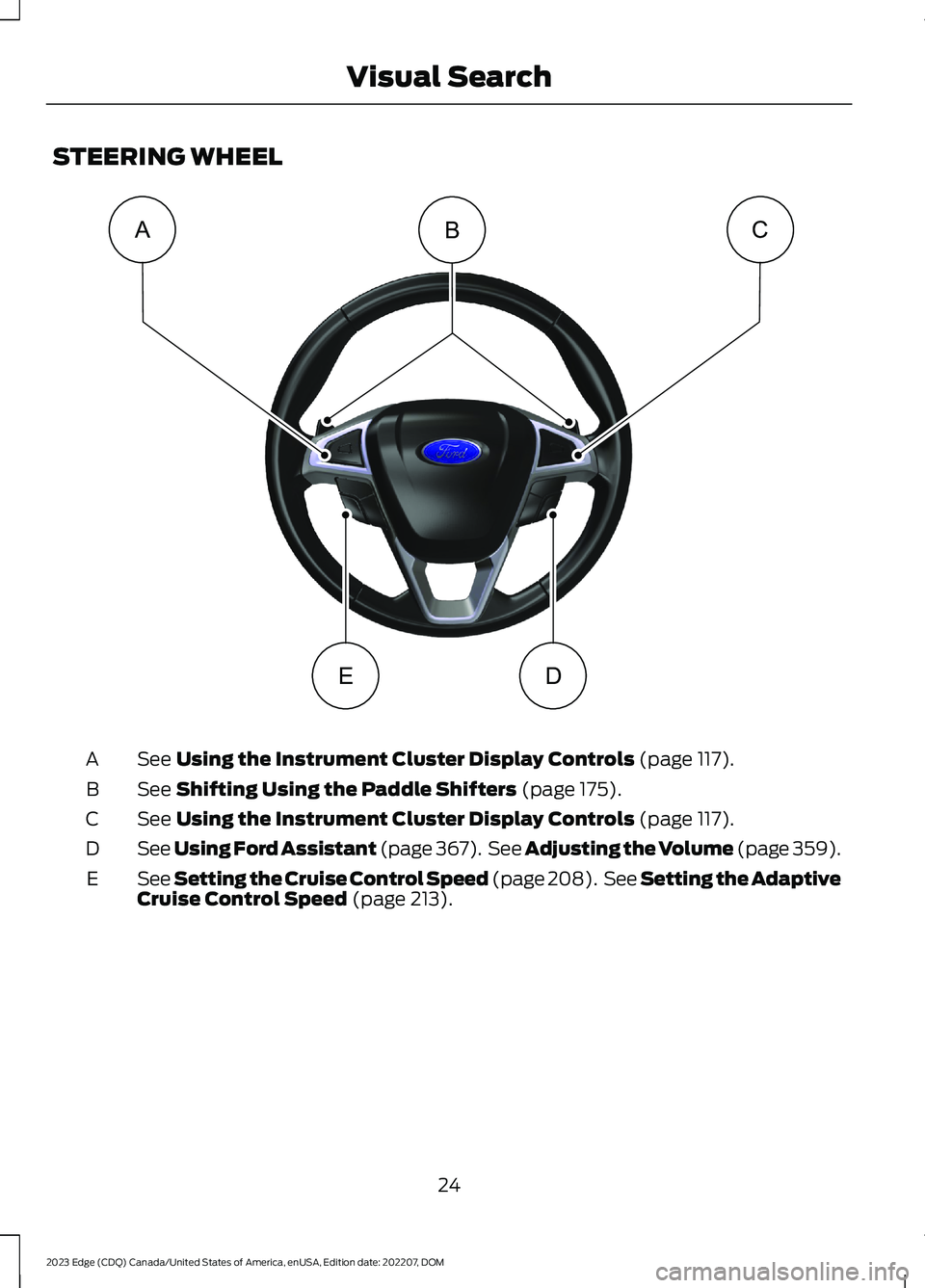
STEERING WHEEL
See Using the Instrument Cluster Display Controls (page 117).A
See Shifting Using the Paddle Shifters (page 175).B
See Using the Instrument Cluster Display Controls (page 117).C
See Using Ford Assistant (page 367). See Adjusting the Volume (page 359).D
See Setting the Cruise Control Speed (page 208). See Setting the AdaptiveCruise Control Speed (page 213).E
24
2023 Edge (CDQ) Canada/United States of America, enUSA, Edition date: 202207, DOMVisual SearchACBDEE332330
Page 29 of 504
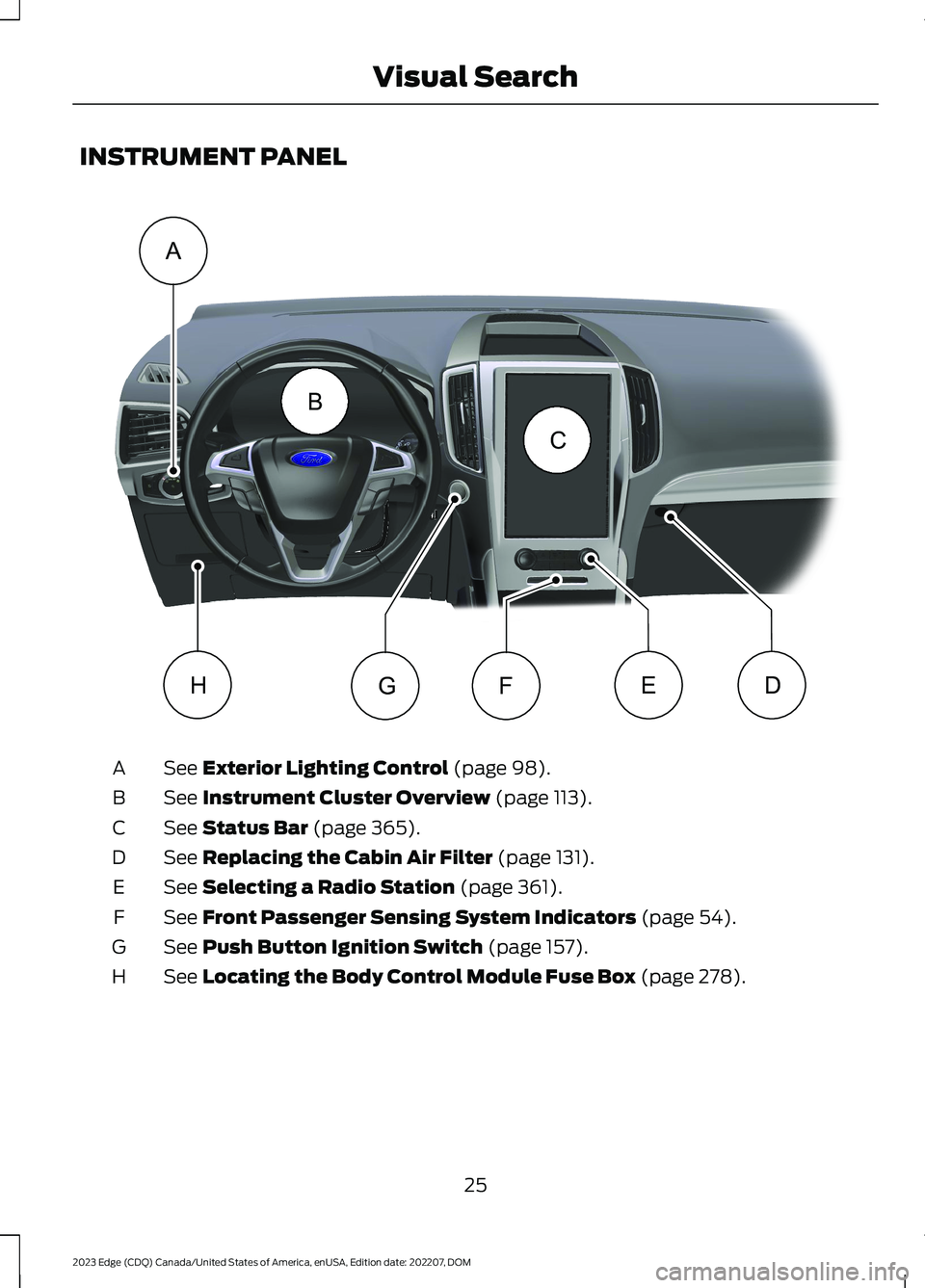
INSTRUMENT PANEL
See Exterior Lighting Control (page 98).A
See Instrument Cluster Overview (page 113).B
See Status Bar (page 365).C
See Replacing the Cabin Air Filter (page 131).D
See Selecting a Radio Station (page 361).E
See Front Passenger Sensing System Indicators (page 54).F
See Push Button Ignition Switch (page 157).G
See Locating the Body Control Module Fuse Box (page 278).H
25
2023 Edge (CDQ) Canada/United States of America, enUSA, Edition date: 202207, DOMVisual SearchABCDEFGHE332331
Page 48 of 504
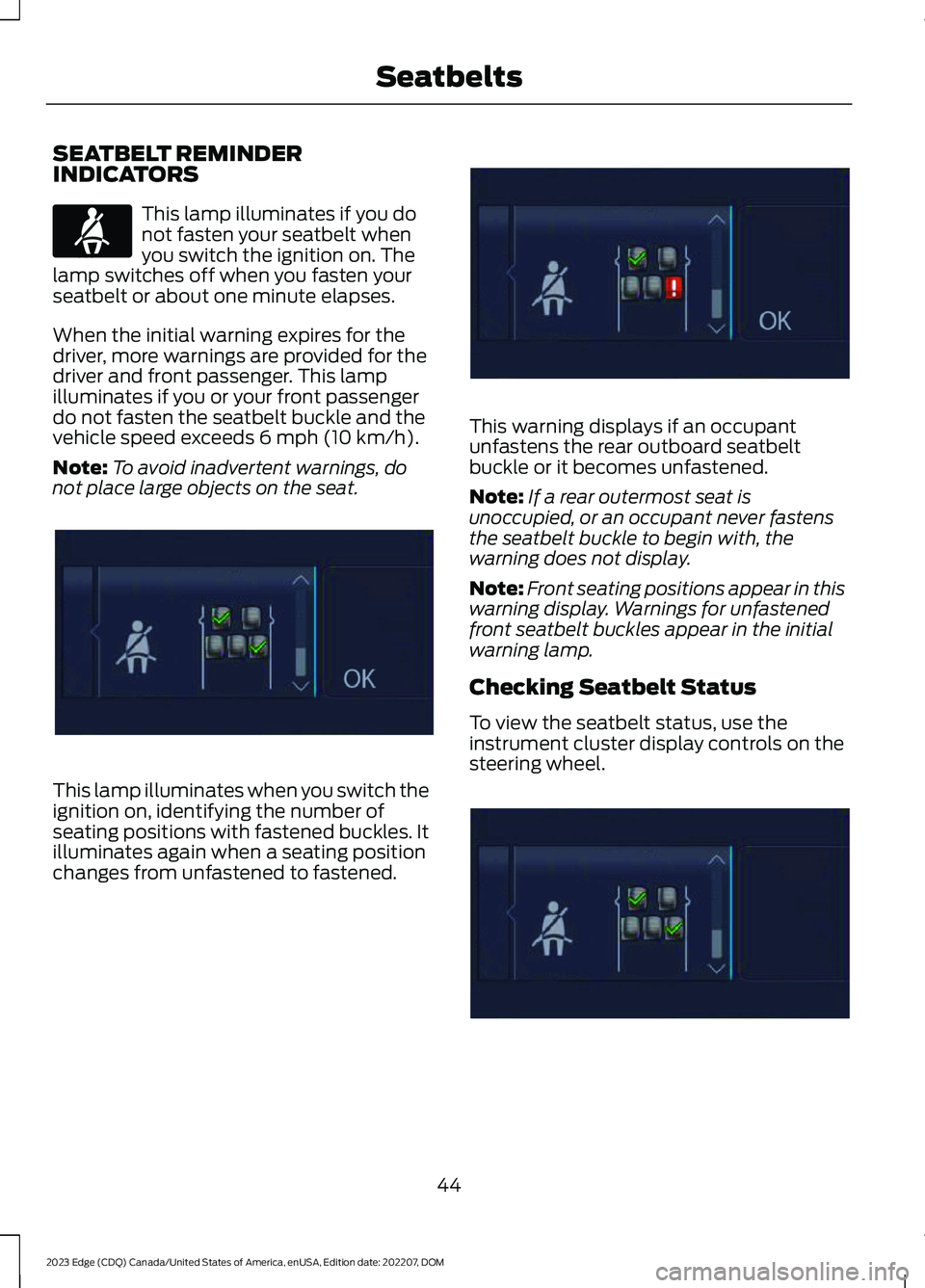
SEATBELT REMINDERINDICATORS
This lamp illuminates if you donot fasten your seatbelt whenyou switch the ignition on. Thelamp switches off when you fasten yourseatbelt or about one minute elapses.
When the initial warning expires for thedriver, more warnings are provided for thedriver and front passenger. This lampilluminates if you or your front passengerdo not fasten the seatbelt buckle and thevehicle speed exceeds 6 mph (10 km/h).
Note:To avoid inadvertent warnings, donot place large objects on the seat.
This lamp illuminates when you switch theignition on, identifying the number ofseating positions with fastened buckles. Itilluminates again when a seating positionchanges from unfastened to fastened.
This warning displays if an occupantunfastens the rear outboard seatbeltbuckle or it becomes unfastened.
Note:If a rear outermost seat isunoccupied, or an occupant never fastensthe seatbelt buckle to begin with, thewarning does not display.
Note:Front seating positions appear in thiswarning display. Warnings for unfastenedfront seatbelt buckles appear in the initialwarning lamp.
Checking Seatbelt Status
To view the seatbelt status, use theinstrument cluster display controls on thesteering wheel.
44
2023 Edge (CDQ) Canada/United States of America, enUSA, Edition date: 202207, DOMSeatbeltsE71880 E355899 E355900 E356144
Page 58 of 504

•Pull your vehicle over.
•Switch your vehicle off.
•Check for any objects lodgedunderneath the front passenger seator cargo interfering with the seat.
•Remove the obstruction if found.
•Restart your vehicle.
•Wait at least two minutes and verifythat the airbag readiness light in theinstrument cluster is no longerilluminated.
•If the airbag readiness light in theinstrument cluster remains illuminated,there may be a problem due to thefront passenger sensing system.
Do not attempt to repair or service thesystem. Take your vehicle in for serviceimmediately.
If it is necessary to modify an advancedfront airbag system to accommodate aperson with disabilities, contact yourCustomer Relationship Center. SeeContacting Us (page 13).
FRONT PASSENGER SENSINGSYSTEM PRECAUTIONS
WARNING: Sitting improperly, outof position or with the seatback reclinedtoo far can take weight off the seatcushion and affect the decision of thepassenger sensing system, resulting inserious injury or death in the event of acrash. Always sit upright against yourseat back, with your feet on the floor.
WARNING: Any alteration ormodification to the front passenger seatmay affect the performance of the frontpassenger sensing system. This couldseriously increase the risk of injury ordeath.
FRONT PASSENGER SENSING SYSTEM INDICATORS
Passenger AirbagPassenger Airbag StatusIndicatorOccupant
DisabledOFF: IlluminatedEmpty
ON: Not Illuminated
DisabledOFF: IlluminatedChild
ON: Not Illuminated
EnabledOFF: Not IlluminatedAdult
ON: Illuminated
54
2023 Edge (CDQ) Canada/United States of America, enUSA, Edition date: 202207, DOMAirbags
Page 59 of 504
CRASH SENSORS AND
AIRBAG INDICATOR
WARNING: Modifying or addingequipment to the front of your vehiclecould affect the performance of theairbag system, increasing the risk ofinjury. This includes the hood, bumpersystem, frame, front body structure, towhooks, hood pins, push bar andsnowplows.
Your vehicle has a collection of crash andoccupant sensors. These sensors provideinformation to the restraints controlmodule which activates the following:
•Front and rear seatbelt pretensioners.
•Driver airbag.
•Passenger airbag.
•Knee airbag(s).
•Seat mounted side airbags.
•Safety Canopy.
Based on the type of crash, the restraintscontrol module deploys the appropriatesafety devices.
The restraints control module alsomonitors the readiness of the above safetydevices plus the crash and occupantsensors. The readiness of the safetysystem is indicated by a warning indicatorlight in the instrument cluster or by abackup tone if the warning light is notworking. Routine maintenance of theairbag is not required.
A difficulty with the system is indicated byone or more of the following:
The readiness light will notilluminate immediately after youswitch the ignition on.
•The readiness light either flashes orstays on.
•You hear a series of five tones. Thetone pattern repeats periodically untilthe problem, the light or both arerepaired.
If any of these things happen, evenintermittently, have the supplementalrestraint system serviced immediately.Unless serviced, the system may notfunction properly in the event of a crash.
The fact that the seatbelt pretensionersor front airbags did not activate for bothfront seat occupants in a crash does notmean that something is wrong with thesystem. Rather, it means the restraintscontrol module determined the accidentconditions (crash severity, seatbelt usage)were not appropriate to activate thesesafety devices.
•The front airbags activate only infrontal and near-frontal crashes. Frontairbags may activate in rollovers, sideimpacts or rear impacts if the crashcauses sufficient frontal deceleration.
•The seatbelt pretensioners activate infrontal, near-frontal and side crashes,and in rollovers.
•The knee airbag(s) deploy based oncrash severity and occupant conditions.
•The side airbags inflate in certain sideimpact crashes or rollover events. Sideairbags may activate in other types ofcrashes if the vehicle experiencessufficient sideways motion ordeformation.
•The Safety Canopy inflates in certainside impact crashes or rollover events.The Safety Canopy may activate inother types of crashes if the vehicleexperiences sufficient sideways motionor deformation, or a certain likelihoodof rollover.
55
2023 Edge (CDQ) Canada/United States of America, enUSA, Edition date: 202207, DOMAirbagsE67017
Page 68 of 504
WHAT IS MYKEY
MyKey
MyKey allows you to program keys withrestricted driving modes to promote gooddriving habits.
MYKEY SETTINGS
NON-CONFIGURABLE MYKEYSETTINGS
Seatbelt Reminder or Belt-Minder™
MyKey mutes the audio system until thefront seat passengers buckle the front seatbelts.
Note:If your vehicle includes an AM/FMradio or a very basic audio system, then theradio may not mute.
Satellite Radio (If Equipped)
Some Satellite radio channels haverestricted access to adult radio content.
Early Low Fuel
The low fuel level warning lamp turns onearlier.
Driving and Parking Aids
You cannot configure settings for parkingaids, blind spot information system, andcross traffic alert. These systems turn onwhen the vehicle turns on, and you cannotswitch them off with a MyKey.
You cannot configure settings forpre-collision assist and lane keeping. Thesesystems turn on when the vehicle turns on,but you can switch them off with a MyKey.
A new destination in the navigation systemcan only be set using voice commandswhen using a MyKey, and with your vehiclemoving.
Note:MyKey drivers may be able to switchthe lane departure warning feature off, butthis feature turns back on automaticallywith every new key cycle.
CONFIGURABLE MYKEYSETTINGS
You can configure the following settingsafter creating a MyKey. See Creating aMyKey (page 65).
Speed Limit
WARNING: Do not set MyKeymaximum speed limit to a limit that willprevent the driver from maintaining asafe speed considering posted speedlimits and prevailing road conditions. Thedriver is always responsible to drive inaccordance with local laws andprevailing conditions. Failure to do socould result in accident or injury.
You can set a speed limit for your vehicle.Warning messages appear on theinstrument cluster display and a tonesounds if your vehicle reaches the setspeed. You cannot override the set speedwhen using a MyKey.
Speed Minder
You can set a speed reminder for yourvehicle. Warning messages appear on theinstrument cluster display and a tonesounds if your vehicle exceeds the setspeed.
64
2023 Edge (CDQ) Canada/United States of America, enUSA, Edition date: 202207, DOMMyKey™
Page 69 of 504
Audio System Volume Limit
The audio system maximum volumereduces. A message appears on theinstrument cluster display if you attemptto exceed the volume limit. Automaticvolume control turns off.
911 Assist
If you set 911 assist to always on, youcannot switch it off with a MyKey.
Do Not Disturb
If you set do not disturb to always on, youcannot switch it off with a MyKey.
Note:If a phone is connected using AppleCarPlay or Android Auto while driving witha MyKey, the driver can receive phone callsand text messages even if the do not disturbrestriction is on. And if the vehicle comeswith satellite radio, there is no restriction onthe adult content.
Traction and Stability Control
If you set traction control or stabilitycontrol to always on, you cannot switch itoff with a MyKey.
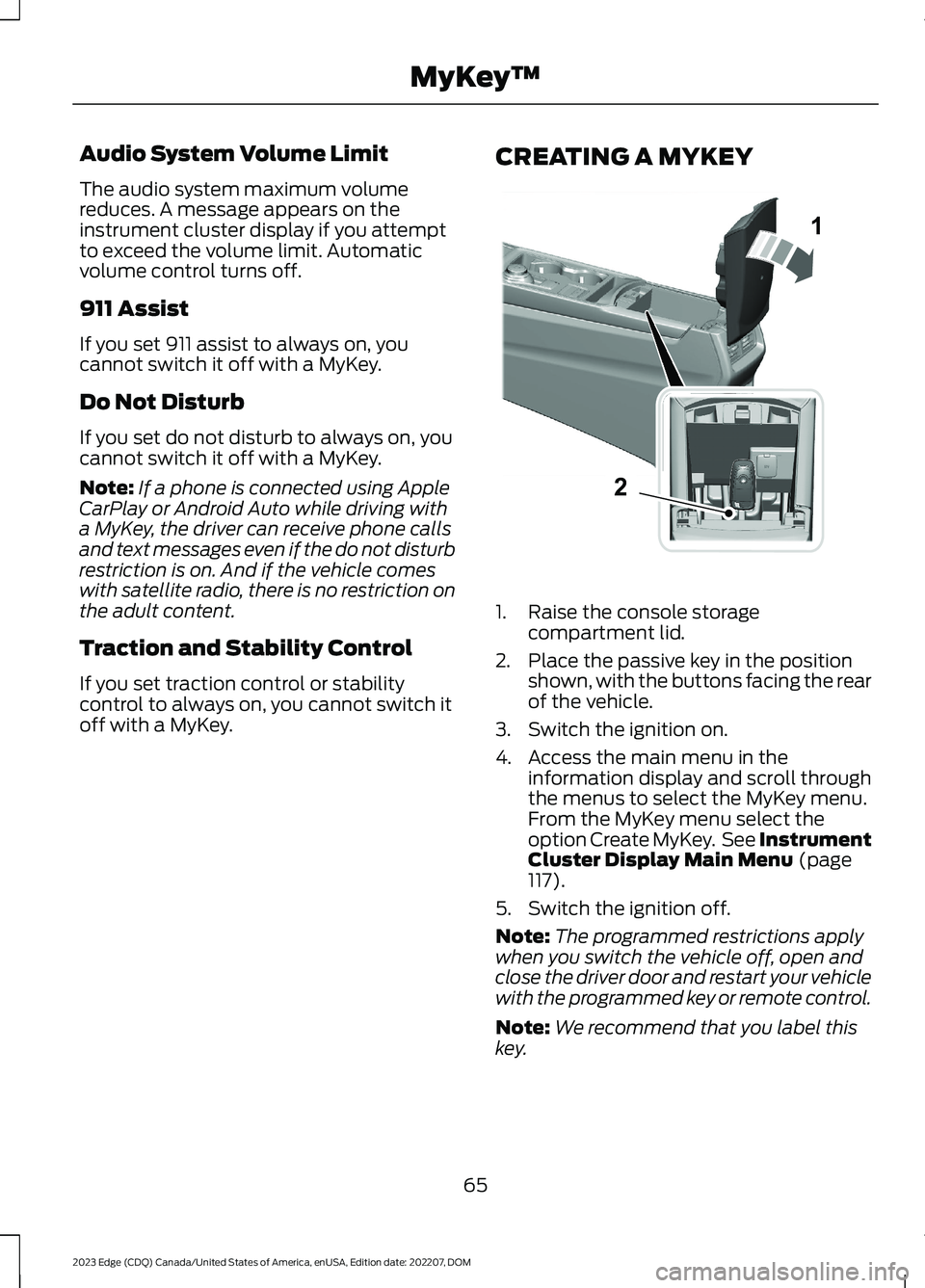
CREATING A MYKEY
1.Raise the console storagecompartment lid.
2.Place the passive key in the positionshown, with the buttons facing the rearof the vehicle.
3.Switch the ignition on.
4.Access the main menu in theinformation display and scroll throughthe menus to select the MyKey menu.From the MyKey menu select theoption Create MyKey. See InstrumentCluster Display Main Menu (page117).
5.Switch the ignition off.
Note:The programmed restrictions applywhen you switch the vehicle off, open andclose the driver door and restart your vehiclewith the programmed key or remote control.
Note:We recommend that you label thiskey.
65
2023 Edge (CDQ) Canada/United States of America, enUSA, Edition date: 202207, DOMMyKey™12E331284
Page 86 of 504
Note: Do not hang anything, for examplea bike rack, from the glass or liftgate. Thiscould damage the liftgate and itscomponents.
Note: Do not leave the liftgate open whiledriving. This could damage the liftgate andits components.
Switching the Power Liftgate Onor Off
You can switch the power liftgate on or offthrough the vehicle settings in yourinstrument cluster.
Note:Depending on your region or vehicletype the vehicle settings may be located onyour touchscreen.
When switched off, the liftgate onlyunlatches and will not power open or close.
OPENING THE LIFTGATE USINGTHE REMOTE CONTROL
Press the button twice withinthree seconds.
Note:Be careful when opening or closingthe liftgate in a garage or other enclosedarea to avoid damaging the liftgate.
Note:Do not hang anything, for example abike rack, from the glass or liftgate. Thiscould damage the liftgate and itscomponents.
Note:Do not leave the liftgate open whiledriving. This could damage the liftgate andits components.
OPENING THE HANDS-FREELIFTGATE (If Equipped)
Hands-Free Liftgate
Make sure you have the passive key within3 ft (1 m) of the liftgate.
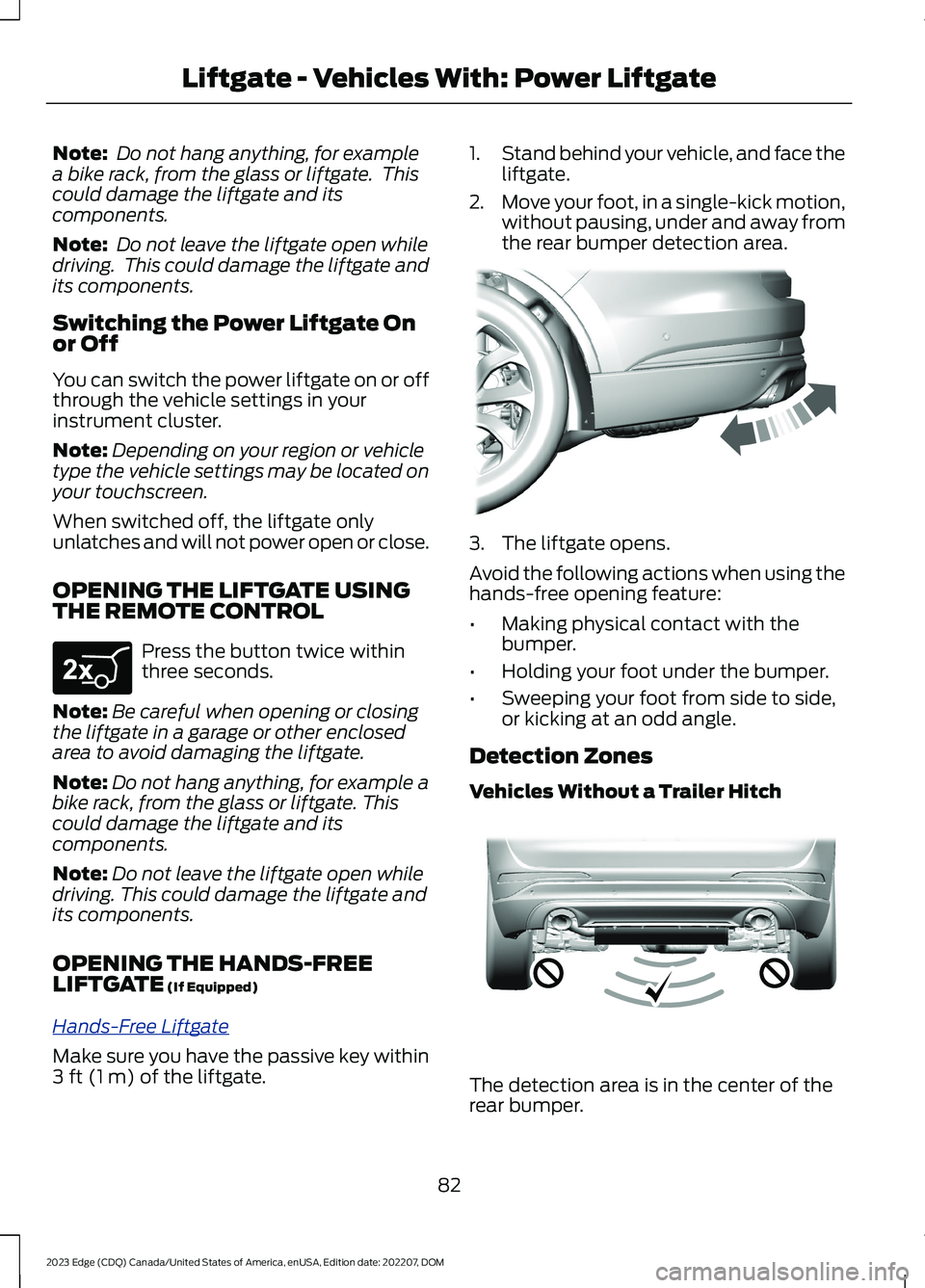
1.Stand behind your vehicle, and face theliftgate.
2.Move your foot, in a single-kick motion,without pausing, under and away fromthe rear bumper detection area.
3.The liftgate opens.
Avoid the following actions when using thehands-free opening feature:
•Making physical contact with thebumper.
•Holding your foot under the bumper.
•Sweeping your foot from side to side,or kicking at an odd angle.
Detection Zones
Vehicles Without a Trailer Hitch
The detection area is in the center of therear bumper.
82
2023 Edge (CDQ) Canada/United States of America, enUSA, Edition date: 202207, DOMLiftgate - Vehicles With: Power LiftgateE267940 E300799 E310717