change wheel FORD ESCAPE 2013 3.G User Guide
[x] Cancel search | Manufacturer: FORD, Model Year: 2013, Model line: ESCAPE, Model: FORD ESCAPE 2013 3.GPages: 423, PDF Size: 4.59 MB
Page 250 of 423
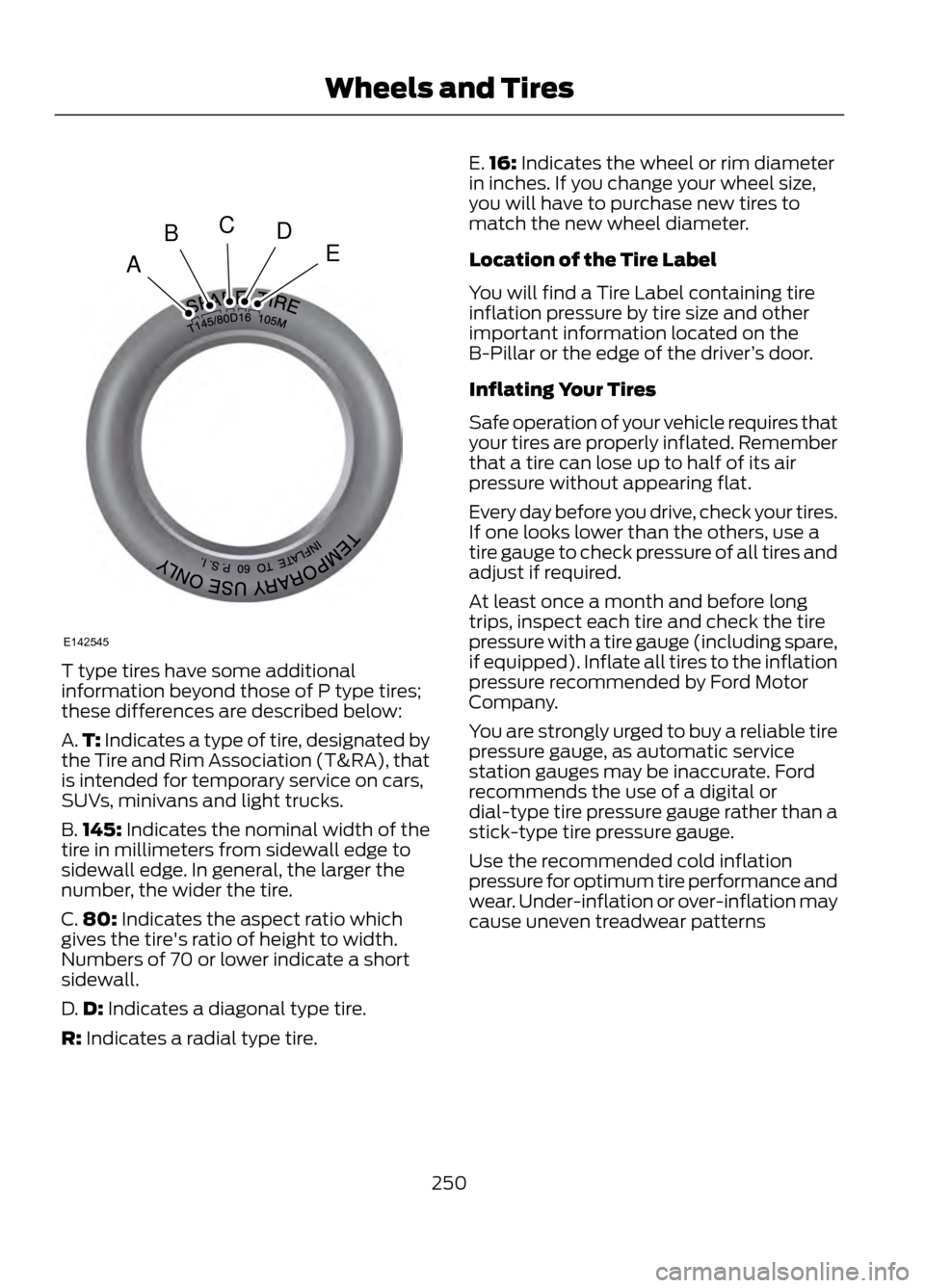
T type tires have some additional
information beyond those of P type tires;
these differences are described below:
A.T: Indicates a type of tire, designated by
the Tire and Rim Association (T&RA), that
is intended for temporary service on cars,
SUVs, minivans and light trucks.
B. 145: Indicates the nominal width of the
tire in millimeters from sidewall edge to
sidewall edge. In general, the larger the
number, the wider the tire.
C. 80: Indicates the aspect ratio which
gives the tire's ratio of height to width.
Numbers of 70 or lower indicate a short
sidewall.
D. D: Indicates a diagonal type tire.
R: Indicates a radial type tire. E.
16: Indicates the wheel or rim diameter
in inches. If you change your wheel size,
you will have to purchase new tires to
match the new wheel diameter.
Location of the Tire Label
You will find a Tire Label containing tire
inflation pressure by tire size and other
important information located on the
B-Pillar or the edge of the driver ’s door.
Inflating Your Tires
Safe operation of your vehicle requires that
your tires are properly inflated. Remember
that a tire can lose up to half of its air
pressure without appearing flat.
Every day before you drive, check your tires.
If one looks lower than the others, use a
tire gauge to check pressure of all tires and
adjust if required.
At least once a month and before long
trips, inspect each tire and check the tire
pressure with a tire gauge (including spare,
if equipped). Inflate all tires to the inflation
pressure recommended by Ford Motor
Company.
You are strongly urged to buy a reliable tire
pressure gauge, as automatic service
station gauges may be inaccurate. Ford
recommends the use of a digital or
dial-type tire pressure gauge rather than a
stick-type tire pressure gauge.
Use the recommended cold inflation
pressure for optimum tire performance and
wear. Under-inflation or over-inflation may
cause uneven treadwear patterns
250
Wheels and Tires
A
BCDE
E142545
Page 251 of 423
WARNING
Under-inflation is the most common
cause of tire failures and may result
in severe tire cracking, tread
separation or blowout, with unexpected
loss of vehicle control and increased risk
of injury. Under-inflation increases sidewall
flexing and rolling resistance, resulting in
heat buildup and internal damage to the
tire. It also may result in unnecessary tire
stress, irregular wear, loss of vehicle
control and accidents. A tire can lose up
to half of its air pressure and not appear
to be flat!
Always inflate your tires to the Ford
recommended inflation pressure even if it
is less than the maximum inflation
pressure information found on the tire. The
Ford recommended tire inflation pressure
is found on the Safety Compliance
Certification Label (affixed to either the
door hinge pillar, door-latch post, or the
door edge that meets the door-latch post,
next to the driver's seating position), or Tire
Label which is located on the B-Pillar or
the edge of the driver ’s door. Failure to
follow the tire pressure recommendations
can cause uneven treadwear patterns and
adversely affect the way your vehicle
handles Maximum Permissible Inflation
Pressure is the tire manufacturer's
maximum permissible pressure and the
pressure at which the maximum load can
be carried by the tire. This pressure is
normally higher than the manufacturer
’s
recommended cold inflation pressure
which can be found on the Safety
Compliance Certification Label (affixed to
either the door hinge pillar, door-latch post,
or the door edge that meets the door-latch
post, next to the driver's seating position),
or Tire Label which is located on the
B-Pillar or the edge of the driver ’s door. The
cold inflation pressure should never be set
lower than the recommended pressure on
the Safety Compliance Certification Label
or Tire Label.
When weather temperature changes
occur, tire inflation pressures also change.
A 10°F (6°C) temperature drop can cause
a corresponding drop of 1 psi (7 kPa) in
inflation pressure. Check your tire pressures
frequently and adjust them to the proper
pressure which can be found on the Safety
Compliance Certification Label or Tire
Label.
To check the pressure in your tire(s):
1. Make sure the tires are cool, meaning they are not hot from driving even a
mile.
Note: If you are checking tire pressure when
the tire is hot, (i.e. driven more than 1 mile
[1.6 km]), never bleed or reduce air pressure.
The tires are hot from driving and it is normal
for pressures to increase above
recommended cold pressures. A hot tire at
or below recommended cold inflation
pressure could be significantly
under-inflated.
Note: If you have to drive a distance to get
air for your tire(s), check and record the tire
pressure first and add the appropriate air
pressure when you get to the pump. It is
normal for tires to heat up and the air
pressure inside to go up as you drive.
251
Wheels and Tires
Page 262 of 423
Tire Change Procedure
WARNINGS
When one of the front wheels is off
the ground, the transmission alone
will not prevent the vehicle from
moving or slipping off the jack, even if the
vehicle is in position P.
To help prevent the vehicle from
moving when you change a tire, be
sure the parking brake is set, then
block (in both directions) the wheel that
is diagonally opposite (other side and end
of the vehicle) to the tire being changed.
If the vehicle slips off the jack, you or
someone else could be seriously
injured.
Do not attempt to change a tire on
the side of the vehicle close to
moving traffic. Pull far enough off the
road to avoid the danger of being hit when
operating the jack or changing the wheel.
To lessen the risk of personal injury,
do not put any part of your body
under the vehicle while changing a
tire. Do not start the engine when your
vehicle is on the jack. The jack is only
meant for changing the tire.
Note: Passengers should not remain in the
vehicle when the vehicle is being jacked.
1. Park on a level surface, set the parking
brake and activate the hazard flashers.
2. Place the gearshift lever in position P and turn the engine off.
3. Remove the carpeted wheel cover.
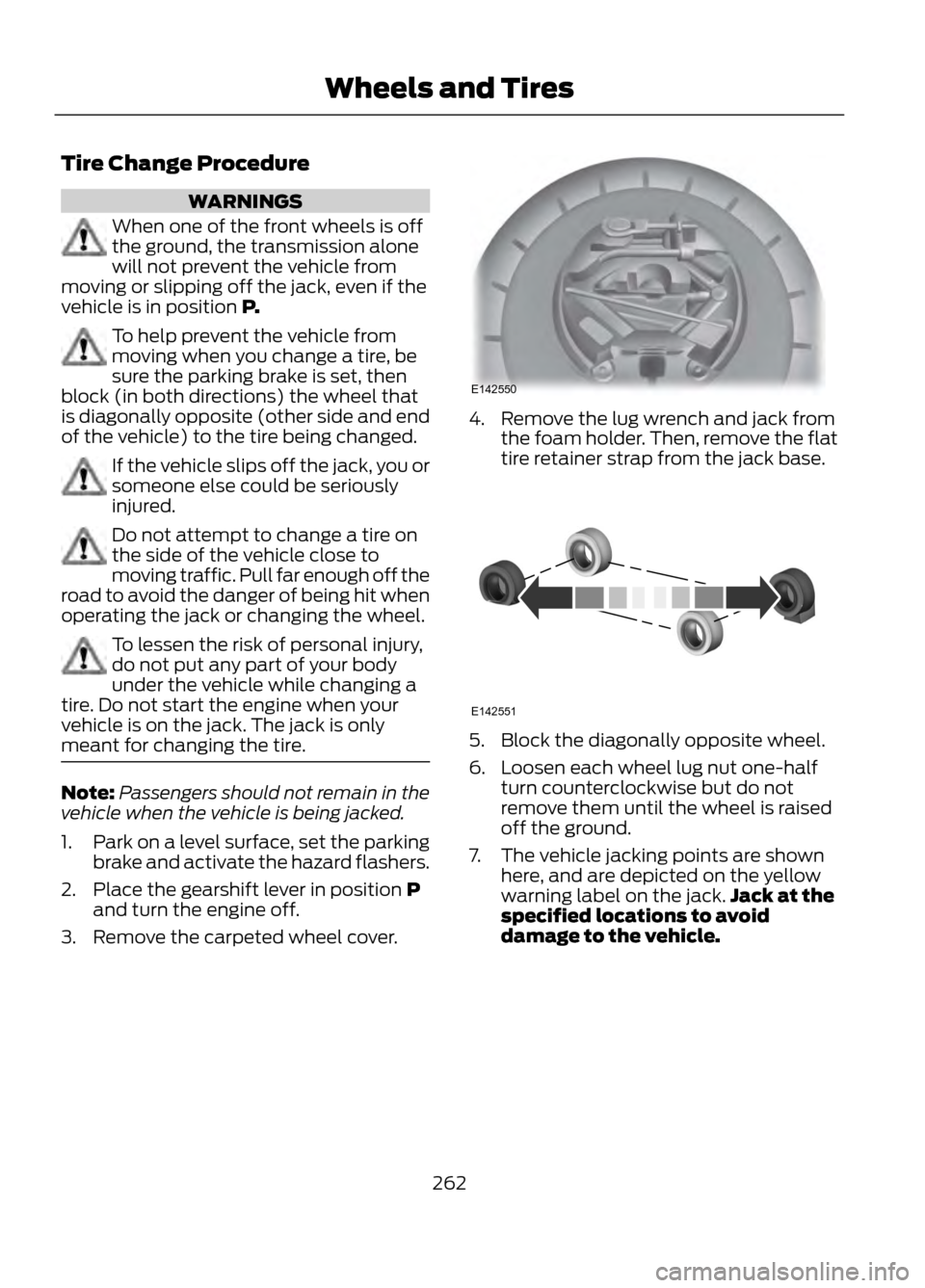
4. Remove the lug wrench and jack from the foam holder. Then, remove the flat
tire retainer strap from the jack base.
5. Block the diagonally opposite wheel.
6. Loosen each wheel lug nut one-halfturn counterclockwise but do not
remove them until the wheel is raised
off the ground.
7. The vehicle jacking points are shown here, and are depicted on the yellow
warning label on the jack. Jack at the
specified locations to avoid
damage to the vehicle.
262
Wheels and Tires
E142550
E142551
Page 326 of 423
Intersection"Enter city"
"Change city" "Enter state"
"Change state"
The dual mode feature is also available
when the voice system displays a list of
items to pick from during a voice session,
where you would be able to touch the line
item or say "Line 2". If a command is not
understood or there are multiple options,
the system returns a list for you to choose
from.
MENU
Under the menu setting, you can set your
clock, access and make adjustments to
the display, sound and vehicle settings as
well as access settings for specific modes
or the help feature.
Setting the Clock
Note: The date is set by your vehicle's GPS;
you cannot manually set the date.
Note: If the battery has been disconnected,
the vehicle needs to acquire a GPS signal
to update the clock. Once your vehicle
acquires the signal, it may take a few
minutes for the update to display the correct
time.
1. Press Menu, then Clock.
2. Press + and - to adjust the time.
From this screen, you can also make other
adjustments such as 12-hour or 24-hour
mode, activate GPS time synchronization
and have the system automatically update
new time zones.
Once you update any settings they are
automatically saved. Display Settings
To access and make adjustments to the
touchscreen display using the touchscreen,
press Menu, then Display. Select any of the
following:
•
Brightness
• Auto Dim On/Off
• Mode: Auto, Day or Night
• Edit Wallpaper
To access and make
adjustments to the touchscreen
display using voice commands,
press the voice button on your steering
wheel controls and, when prompted, say
"Display Settings".
Uploading Photos for Your Home
Screen Wallpaper
Note: You cannot load photos directly from
your camera. You must access the photos
from either your USB mass storage device
or from an SD card.
Your system allows you to upload and view
up to 32 photos. To upload photos, press
Menu, Display, then Edit Wallpaper. Follow
the system prompts to upload your
photographs.
Photo Display Limitations
Note: Photographs with extremely large
dimensions (i.e. 2048 x 1536) may not be
compatible and appear as a blank (black)
image on the display.
326
MyFord Touch®
E142599
Page 332 of 423
ENTERTAINMENT
Your system offers many media options.
You can access these options using the
touchscreen or voice commands.Browsing Device Content
When listening to any type of audio, you
can browse through other devices without
having to change sources. For example, if
you are currently listening to the radio, you
can browse all the artists that are stored
on your USB device.
Press the voice icon on the
steering wheel. When prompted,
you can say:
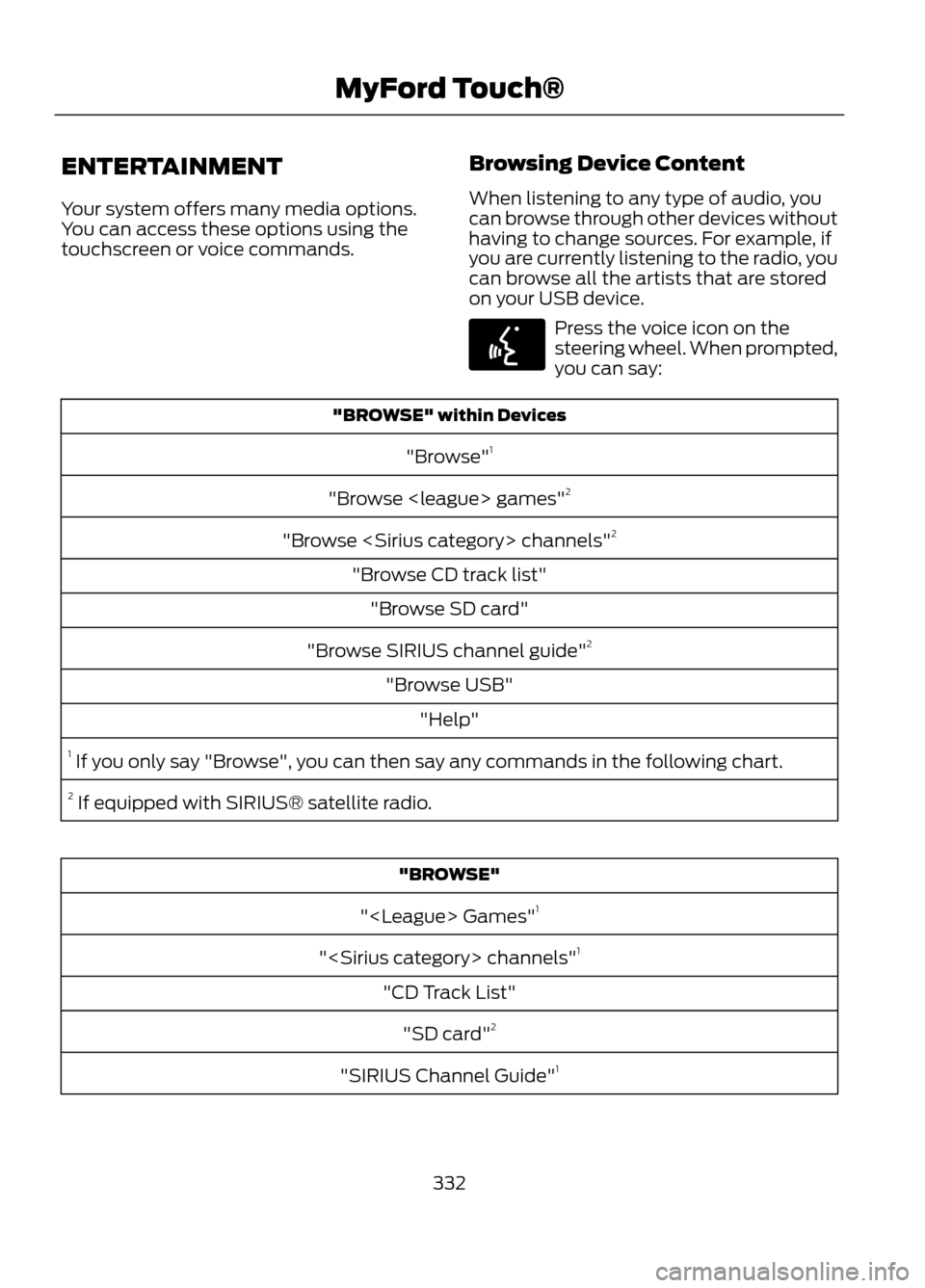
"BROWSE" within Devices
"Browse" 1
"Browse
"Browse
"Browse CD track list" "Browse SD card"
"Browse SIRIUS channel guide" 2
"Browse USB" "Help"
1 If you only say "Browse", you can then say any commands in the following chart.
2 If equipped with SIRIUS® satellite radio.
"BROWSE"
"
"
"CD Track List" "SD card" 2
"SIRIUS Channel Guide" 1
332
MyFord Touch®
E142599
Page 337 of 423
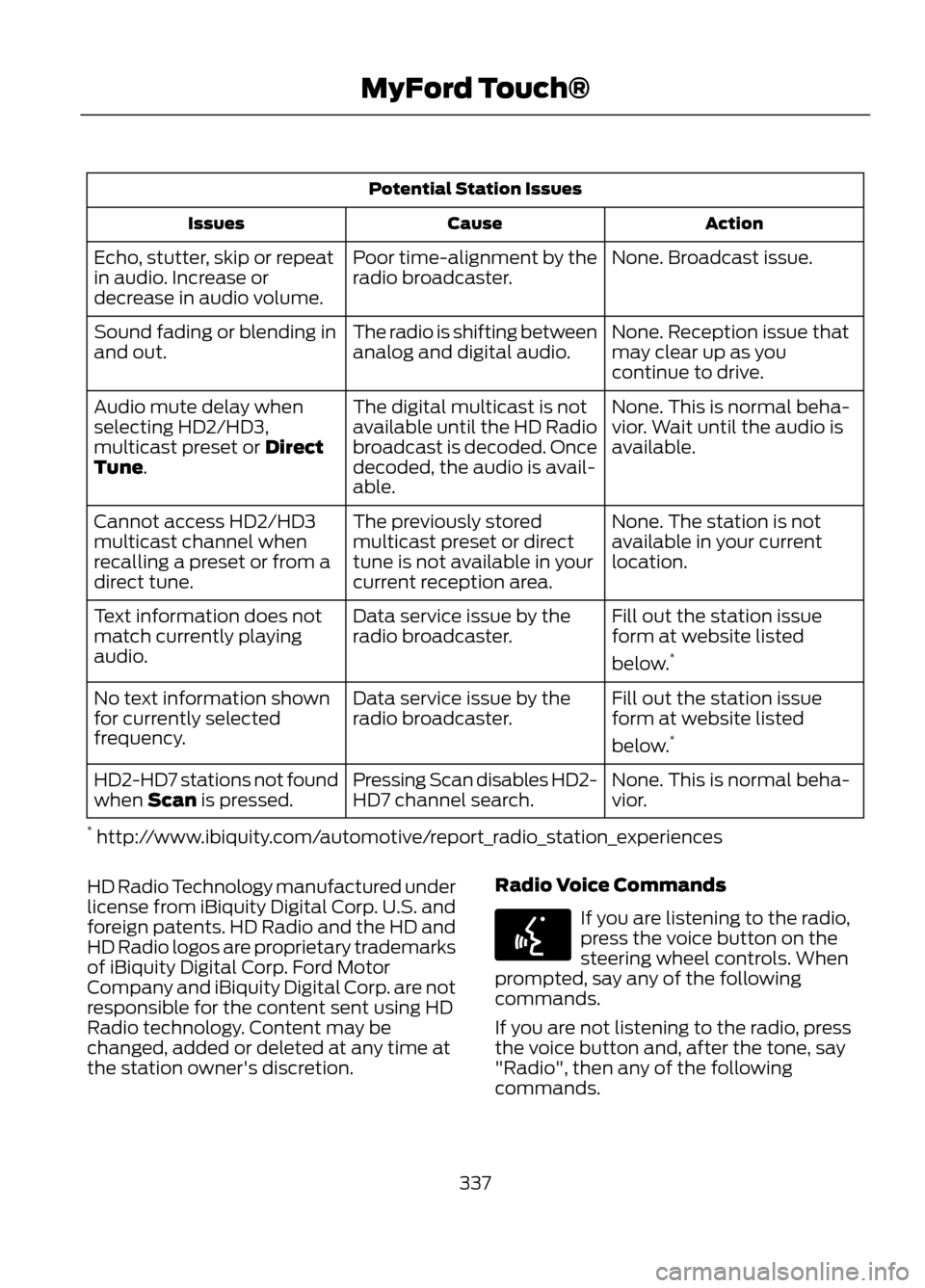
Potential Station IssuesAction
Cause
Issues
None. Broadcast issue.
Poor time-alignment by the
radio broadcaster.
Echo, stutter, skip or repeat
in audio. Increase or
decrease in audio volume.
None. Reception issue that
may clear up as you
continue to drive.
The radio is shifting between
analog and digital audio.
Sound fading or blending in
and out.
None. This is normal beha-
vior. Wait until the audio is
available.
The digital multicast is not
available until the HD Radio
broadcast is decoded. Once
decoded, the audio is avail-
able.
Audio mute delay when
selecting HD2/HD3,
multicast preset or Direct
Tune.
None. The station is not
available in your current
location.
The previously stored
multicast preset or direct
tune is not available in your
current reception area.
Cannot access HD2/HD3
multicast channel when
recalling a preset or from a
direct tune.
Fill out the station issue
form at website listed
below.*
Data service issue by the
radio broadcaster.
Text information does not
match currently playing
audio.
Fill out the station issue
form at website listed
below.*
Data service issue by the
radio broadcaster.
No text information shown
for currently selected
frequency.
None. This is normal beha-
vior.
Pressing Scan disables HD2-
HD7 channel search.
HD2-HD7 stations not found
when Scan is pressed.
* http://www.ibiquity.com/automotive/report_radio_station_experiences
HD Radio Technology manufactured under
license from iBiquity Digital Corp. U.S. and
foreign patents. HD Radio and the HD and
HD Radio logos are proprietary trademarks
of iBiquity Digital Corp. Ford Motor
Company and iBiquity Digital Corp. are not
responsible for the content sent using HD
Radio technology. Content may be
changed, added or deleted at any time at
the station owner's discretion. Radio Voice Commands
If you are listening to the radio,
press the voice button on the
steering wheel controls. When
prompted, say any of the following
commands.
If you are not listening to the radio, press
the voice button and, after the tone, say
"Radio", then any of the following
commands.
337
MyFord Touch®
E142599
Page 385 of 423
WARNING
Operating certain parts of this
system while driving can distract
your attention away from the road,
and possibly cause an accident or other
serious consequences. Do not change
system settings or enter data non-verbally
(using your hands) while driving. Stop the
vehicle in a safe and legal manner before
attempting these operations. This is
important since while setting up or
changing some functions you might be
required to distract your attention away
from the road and remove your hands from
the wheel.
General Operation
Voice Command Control: Functions
within the Windows Automotive-based
system may be accomplished using only
voice commands. Using voice commands
while driving allows you to operate the
system without removing your hands from
the wheel.
Prolonged Views of Screen: Do not
access any function requiring a prolonged
view of the screen while you are driving.
Pull over in a safe and legal manner before
attempting to access a function of the
system requiring prolonged attention. Even
occasional short scans to the screen may
be hazardous if your attention has been
diverted away from your driving task at a
critical time.
Volume Setting: Do not raise the volume
excessively. Keep the volume at a level
where you can still hear outside traffic and
emergency signals while driving. Driving
while unable to hear these sounds could
cause an accident. Use of Speech Recognition Functions:
Speech recognition software is inherently
a statistical process which is subject to
errors. It is your responsibility to monitor
any speech recognition functions included
in the system and address any errors.
Navigation Features: Any navigation
features included in the system are
intended to provide turn by turn
instructions to get you to a desired
destination. Please make certain all
persons using this system carefully read
and follow instructions and safety
information fully.
Distraction Hazard: Any navigation
features may require manual (non-verbal)
setup. Attempting to perform such set-up
or insert data while driving can seriously
distract your attention and could cause an
accident or other serious consequences.
Stop the vehicle in a safe and legal manner
before attempting these operations.
Let Your Judgment Prevail: Any
navigation features are provided only as
an aid. Make your driving decisions based
on your observations of local conditions
and existing traffic regulations. Any such
feature is not a substitute for your personal
judgment. Any route suggestions made by
this system should never replace any local
traffic regulations or your personal
judgment or knowledge of safe driving
practices.
Route Safety: Do not follow the route
suggestions if doing so would result in an
unsafe or illegal maneuver, if you would be
placed in an unsafe situation, or if you
would be directed into an area that you
consider unsafe. The driver is ultimately
responsible for the safe operation of the
vehicle and therefore, must evaluate
whether it is safe to follow the suggested
directions.
385
Appendices
Page 400 of 423
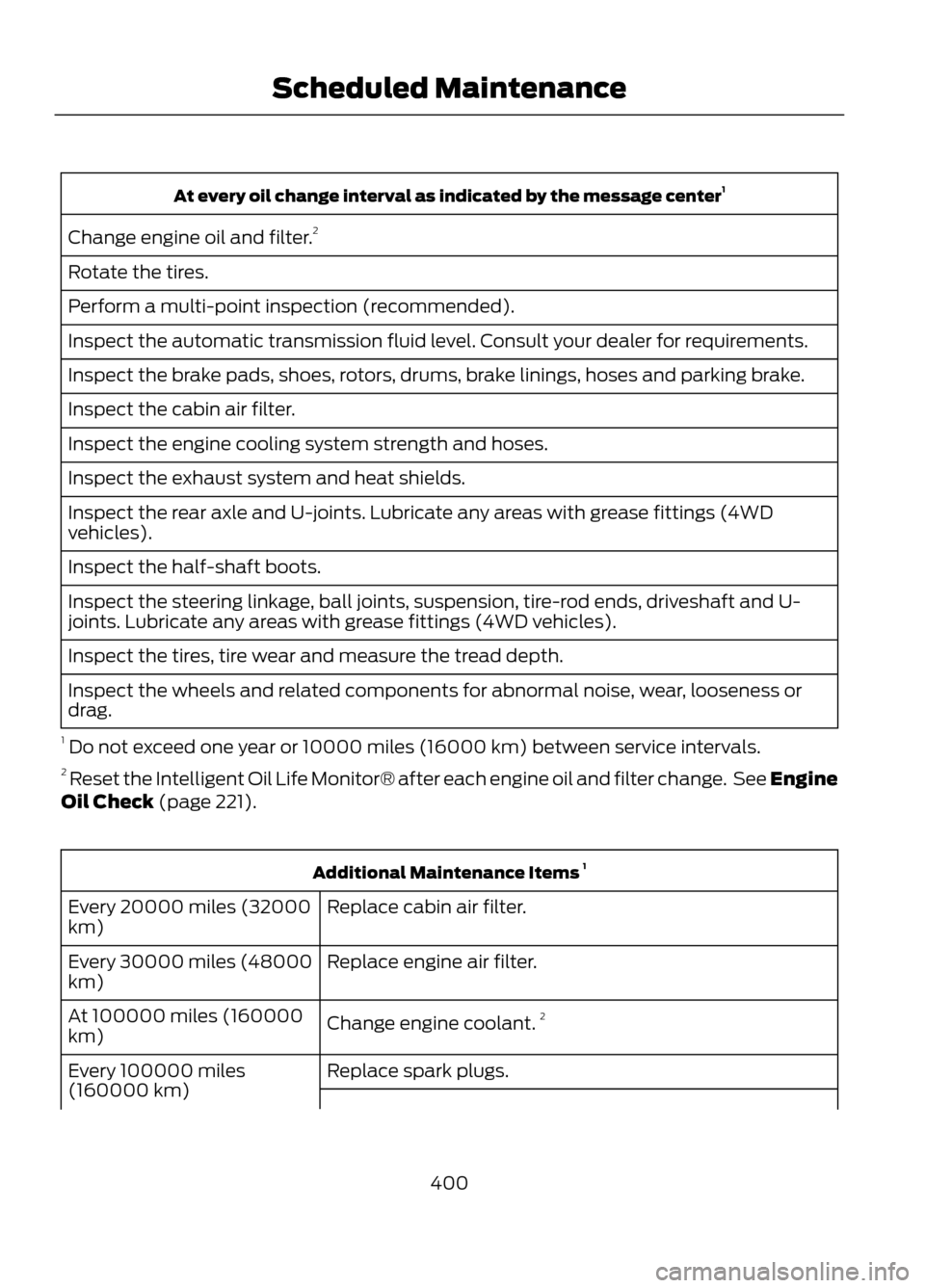
At every oil change interval as indicated by the message center1
Change engine oil and filter. 2
Rotate the tires.
Perform a multi-point inspection (recommended).
Inspect the automatic transmission fluid level. Consult your dealer for requirements.
Inspect the brake pads, shoes, rotors, drums, brake linings, hoses and parking brake.
Inspect the cabin air filter.
Inspect the engine cooling system strength and hoses.
Inspect the exhaust system and heat shields.
Inspect the rear axle and U-joints. Lubricate any areas with grease fittings (4WD
vehicles).
Inspect the half-shaft boots.
Inspect the steering linkage, ball joints, suspension, tire-rod ends, driveshaft and U-
joints. Lubricate any areas with grease fittings (4WD vehicles).
Inspect the tires, tire wear and measure the tread depth.
Inspect the wheels and related components for abnormal noise, wear, looseness or
drag.
1 Do not exceed one year or 10000 miles (16000 km) between service intervals.
2 Reset the Intelligent Oil Life Monitor® after each engine oil and filter change. See Engine
Oil Check (page 221).
Additional Maintenance Items 1
Replace cabin air filter.
Every 20000 miles (32000
km)
Replace engine air filter.
Every 30000 miles (48000
km)
Change engine coolant.2
At 100000 miles (160000
km)
Replace spark plugs.
Every 100000 miles
(160000 km)
400
Scheduled Maintenance
Page 406 of 423
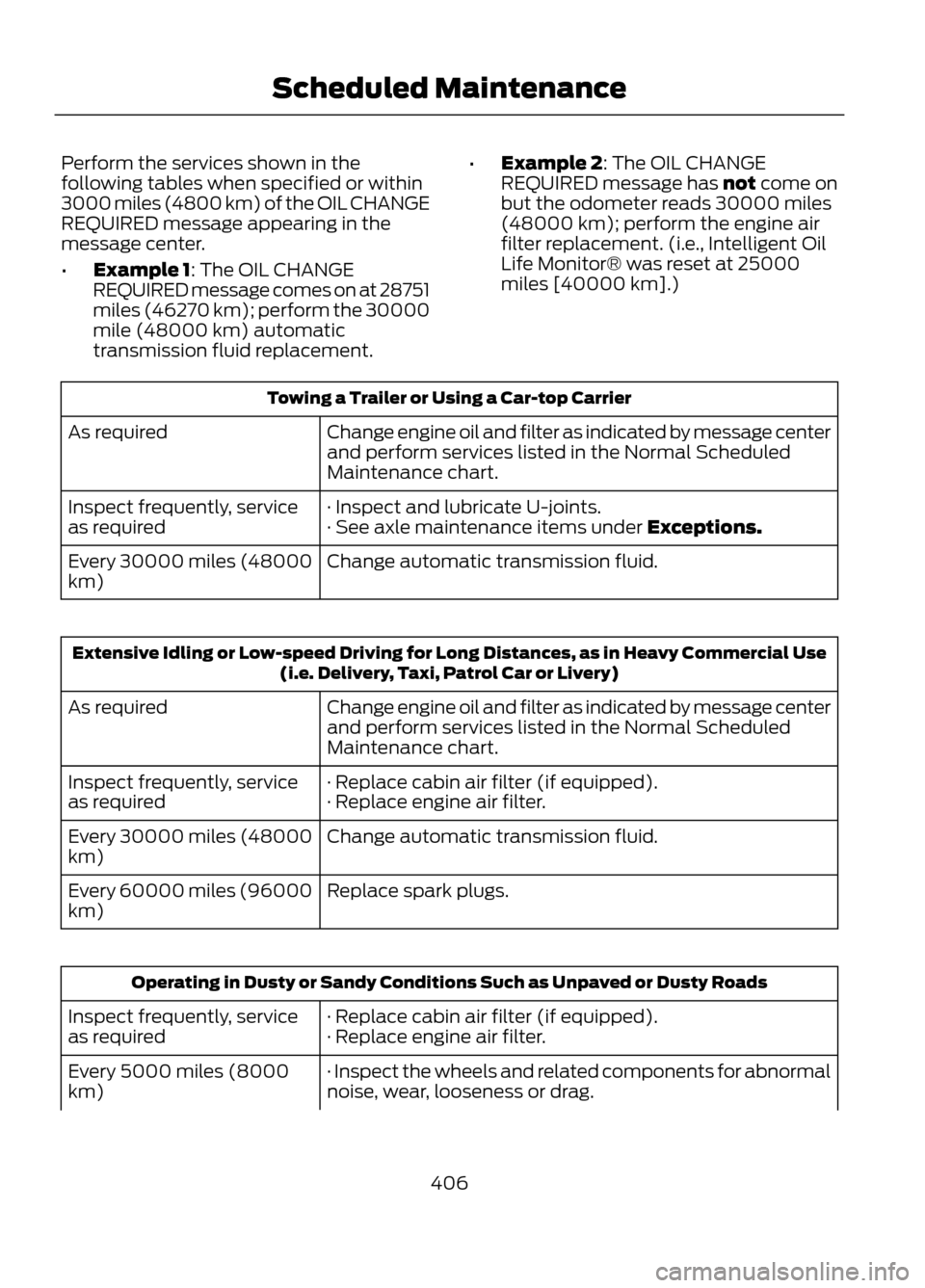
Perform the services shown in the
following tables when specified or within
3000 miles (4800 km) of the OIL CHANGE
REQUIRED message appearing in the
message center.
•Example 1: The OIL CHANGE
REQUIRED message comes on at 28751
miles (46270 km); perform the 30000
mile (48000 km) automatic
transmission fluid replacement. •
Example 2: The OIL CHANGE
REQUIRED message has not come on
but the odometer reads 30000 miles
(48000 km); perform the engine air
filter replacement. (i.e., Intelligent Oil
Life Monitor® was reset at 25000
miles [40000 km].)
Towing a Trailer or Using a Car-top Carrier
Change engine oil and filter as indicated by message center
and perform services listed in the Normal Scheduled
Maintenance chart.
As required
· Inspect and lubricate U-joints.
Inspect frequently, service
as required · See axle maintenance items under Exceptions.
Change automatic transmission fluid.
Every 30000 miles (48000
km)
Extensive Idling or Low-speed Driving for Long Distances, as in Heavy Commercial Use
(i.e. Delivery, Taxi, Patrol Car or Livery)
Change engine oil and filter as indicated by message center
and perform services listed in the Normal Scheduled
Maintenance chart.
As required
· Replace cabin air filter (if equipped).
Inspect frequently, service
as required · Replace engine air filter.
Change automatic transmission fluid.
Every 30000 miles (48000
km)
Replace spark plugs.
Every 60000 miles (96000
km)
Operating in Dusty or Sandy Conditions Such as Unpaved or Dusty Roads
· Replace cabin air filter (if equipped).
Inspect frequently, service
as required · Replace engine air filter.
· Inspect the wheels and related components for abnormal
noise, wear, looseness or drag.
Every 5000 miles (8000
km)
406
Scheduled Maintenance
Page 414 of 423
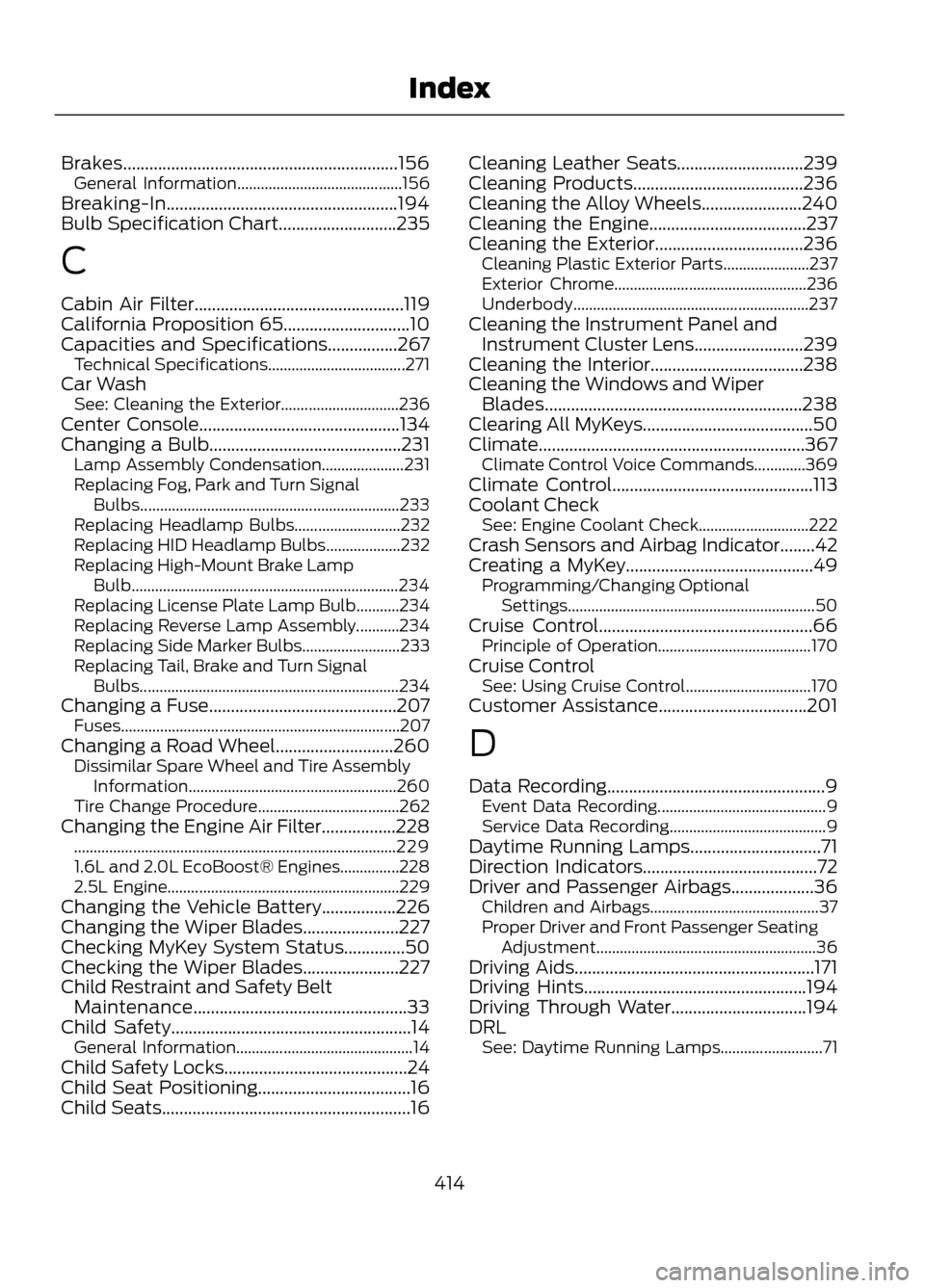
Brakes...............................................................156General Information.......................................... 156
Breaking-In.....................................................194
Bulb Specification Chart...........................235
C
Cabin Air Filter................................................119
California Proposition 65.............................10
Capacities and Specifications................267 Technical Specifications................................... 271
Car Wash See: Cleaning the Exterior.............................. 236
Center Console..............................................134
Changing a Bulb............................................231 Lamp Assembly Condensation..................... 231
Replacing Fog, Park and Turn Signal Bulbs.................................................................. 233
Replacing Headlamp Bulbs........................... 232
Replacing HID Headlamp Bulbs................... 232
Replacing High-Mount Brake Lamp Bulb.................................................................... 234
Replacing License Plate Lamp Bulb...........234
Replacing Reverse Lamp Assembly...........234
Replacing Side Marker Bulbs......................... 233
Replacing Tail, Brake and Turn Signal Bulbs.................................................................. 234
Changing a Fuse...........................................207 Fuses....................................................................... 207
Changing a Road Wheel...........................260 Dissimilar Spare Wheel and Tire Assembly
Information..................................................... 260
Tire Change Procedure.................................... 262
Changing the Engine Air Filter.................228 ........................................................................\
.......... 229
1.6L and 2.0L EcoBoost® Engines...............228
2.5L Engine........................................................... 229
Changing the Vehicle Battery.................226
Changing the Wiper Blades......................227
Checking MyKey System Status..............50
Checking the Wiper Blades......................227
Child Restraint and Safety Belt Maintenance.................................................33
Child Safety.......................................................14 General Information............................................. 14
Child Safety Locks..........................................24
Child Seat Positioning...................................16
Child Seats.........................................................16 Cleaning Leather Seats.............................239
Cleaning Products.......................................236
Cleaning the Alloy Wheels.......................240
Cleaning the Engine....................................237
Cleaning the Exterior..................................236
Cleaning Plastic Exterior Parts...................... 237
Exterior Chrome................................................. 236
Underbody............................................................ 237
Cleaning the Instrument Panel and Instrument Cluster Lens.........................239
Cleaning the Interior...................................238
Cleaning the Windows and Wiper Blades...........................................................238
Clearing All MyKeys.......................................50
Climate.............................................................367 Climate Control Voice Commands.............369
Climate Control..............................................113
Coolant Check See: Engine Coolant Check............................ 222
Crash Sensors and Airbag Indicator........42
Creating a MyKey...........................................49 Programming/Changing Optional
Settings............................................................... 50
Cruise Control.................................................66 Principle of Operation....................................... 170
Cruise Control See: Using Cruise Control................................ 170
Customer Assistance..................................201
D
Data Recording..................................................9 Event Data Recording........................................... 9
Service Data Recording........................................ 9
Daytime Running Lamps..............................71
Direction Indicators........................................72
Driver and Passenger Airbags...................36 Children and Airbags........................................... 37
Proper Driver and Front Passenger Seating Adjustment........................................................ 36
Driving Aids.......................................................171
Driving Hints...................................................194
Driving Through Water...............................194
DRL See: Daytime Running Lamps.......................... 71
414
Index