fuel FORD ESCAPE 2013 3.G User Guide
[x] Cancel search | Manufacturer: FORD, Model Year: 2013, Model line: ESCAPE, Model: FORD ESCAPE 2013 3.GPages: 423, PDF Size: 4.59 MB
Page 82 of 423
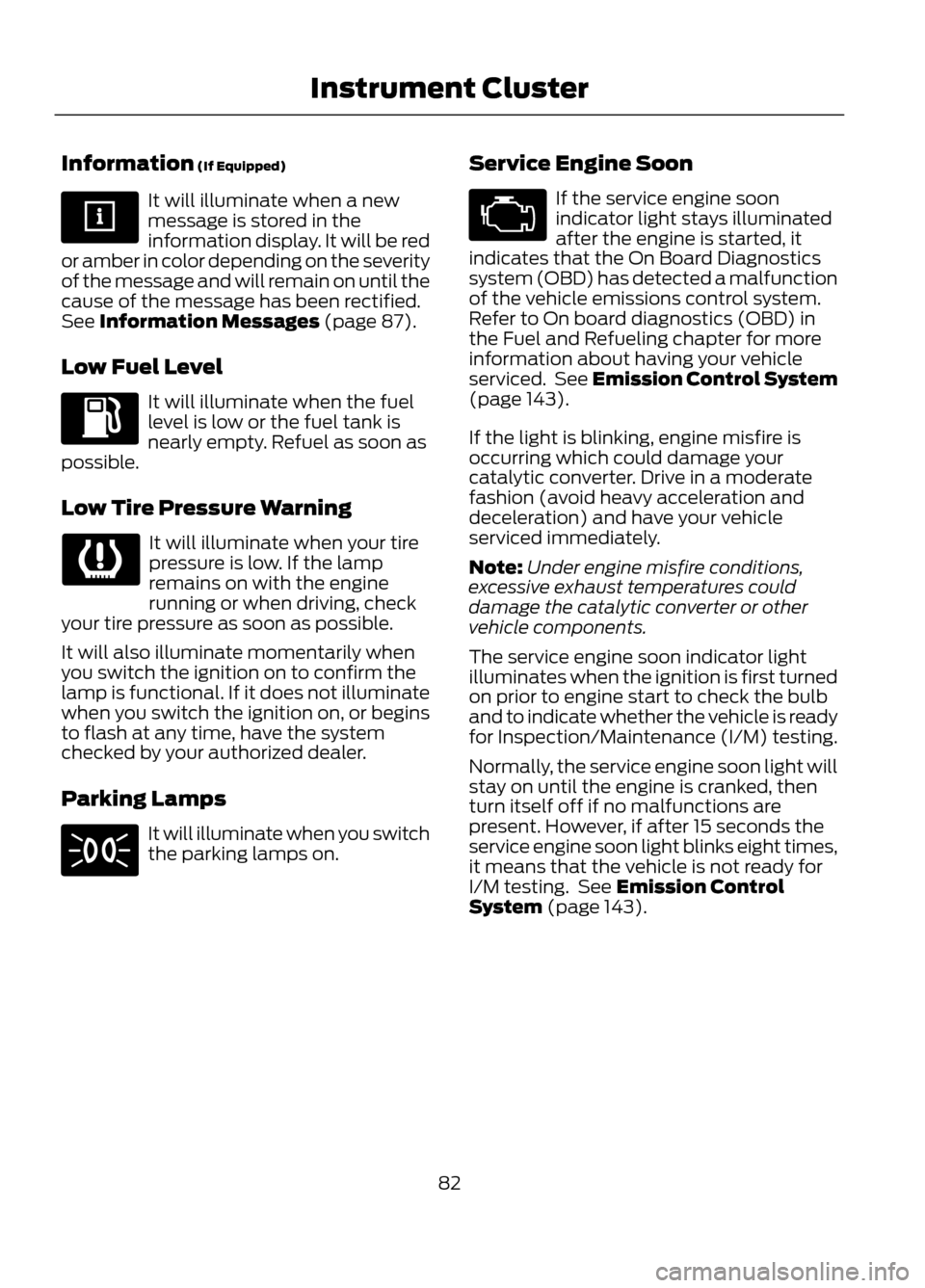
Information (If Equipped)
It will illuminate when a new
message is stored in the
information display. It will be red
or amber in color depending on the severity
of the message and will remain on until the
cause of the message has been rectified.
See Information Messages (page 87).
Low Fuel Level
It will illuminate when the fuel
level is low or the fuel tank is
nearly empty. Refuel as soon as
possible.
Low Tire Pressure Warning
It will illuminate when your tire
pressure is low. If the lamp
remains on with the engine
running or when driving, check
your tire pressure as soon as possible.
It will also illuminate momentarily when
you switch the ignition on to confirm the
lamp is functional. If it does not illuminate
when you switch the ignition on, or begins
to flash at any time, have the system
checked by your authorized dealer.
Parking Lamps
It will illuminate when you switch
the parking lamps on. Service Engine Soon
If the service engine soon
indicator light stays illuminated
after the engine is started, it
indicates that the On Board Diagnostics
system (OBD) has detected a malfunction
of the vehicle emissions control system.
Refer to On board diagnostics (OBD) in
the Fuel and Refueling chapter for more
information about having your vehicle
serviced. See Emission Control System
(page 143).
If the light is blinking, engine misfire is
occurring which could damage your
catalytic converter. Drive in a moderate
fashion (avoid heavy acceleration and
deceleration) and have your vehicle
serviced immediately.
Note: Under engine misfire conditions,
excessive exhaust temperatures could
damage the catalytic converter or other
vehicle components.
The service engine soon indicator light
illuminates when the ignition is first turned
on prior to engine start to check the bulb
and to indicate whether the vehicle is ready
for Inspection/Maintenance (I/M) testing.
Normally, the service engine soon light will
stay on until the engine is cranked, then
turn itself off if no malfunctions are
present. However, if after 15 seconds the
service engine soon light blinks eight times,
it means that the vehicle is not ready for
I/M testing. See Emission Control
System (page 143).
82
Instrument Cluster
Page 84 of 423
GENERAL INFORMATION
WARNING
Driving while distracted can result in
loss of vehicle control, accident and
injury. Ford strongly recommends
that drivers use extreme caution when
using any device or feature that may take
their focus off the road. Your primary
responsibility is the safe operation of the
vehicle. We recommend against the use
of any handheld device while driving and
that you comply with all applicable laws.
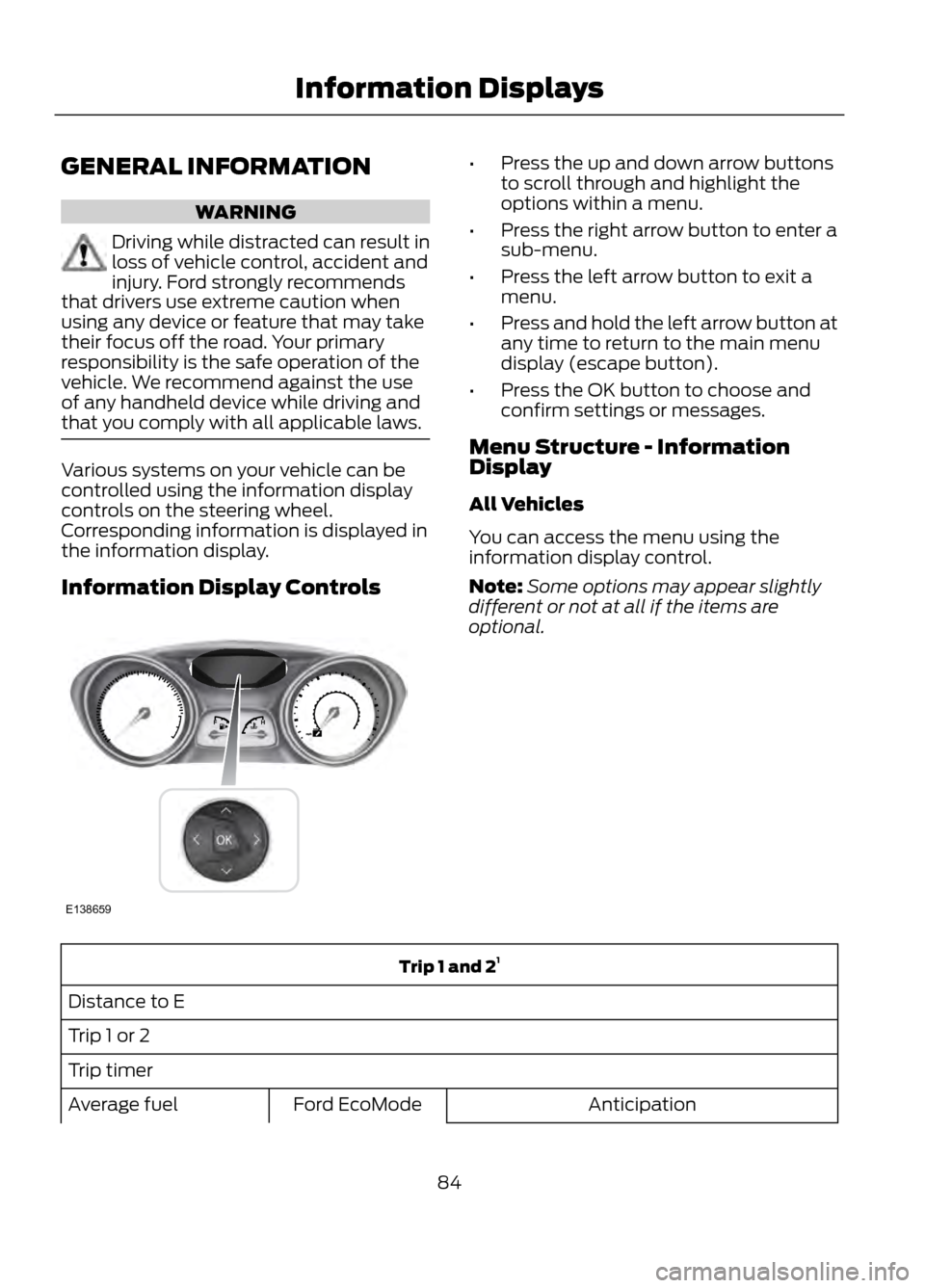
Various systems on your vehicle can be
controlled using the information display
controls on the steering wheel.
Corresponding information is displayed in
the information display.
Information Display Controls
• Press the up and down arrow buttons
to scroll through and highlight the
options within a menu.
• Press the right arrow button to enter a
sub-menu.
• Press the left arrow button to exit a
menu.
• Press and hold the left arrow button at
any time to return to the main menu
display (escape button).
• Press the OK button to choose and
confirm settings or messages.
Menu Structure - Information
Display
All Vehicles
You can access the menu using the
information display control.
Note: Some options may appear slightly
different or not at all if the items are
optional.
Trip 1 and 2 1
Distance to E
Trip 1 or 2
Trip timer Anticipation
Ford EcoMode
Average fuel
84
Information Displays
E138659
Page 86 of 423
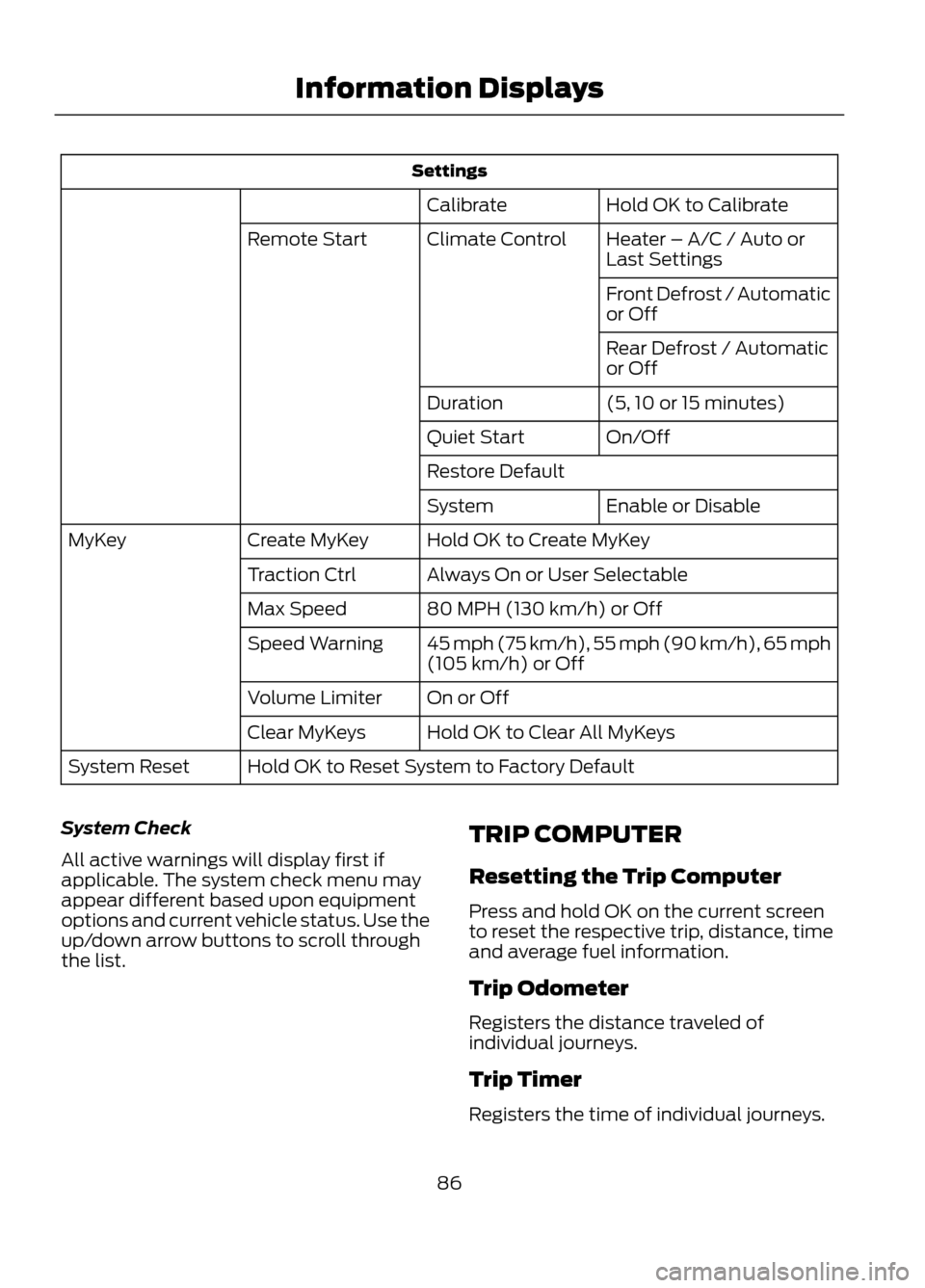
SettingsHold OK to Calibrate
Calibrate
Heater – A/C / Auto or
Last Settings
Climate Control
Remote Start
Front Defrost / Automatic
or Off
Rear Defrost / Automatic
or Off
(5, 10 or 15 minutes)
Duration
On/Off
Quiet Start
Restore Default
Enable or Disable
System
Hold OK to Create MyKey
Create MyKey
MyKey
Always On or User Selectable
Traction Ctrl
80 MPH (130 km/h) or Off
Max Speed
45 mph (75 km/h), 55 mph (90 km/h), 65 mph
(105 km/h) or Off
Speed Warning
On or Off
Volume Limiter
Hold OK to Clear All MyKeys
Clear MyKeys
Hold OK to Reset System to Factory Default
System Reset
System Check
All active warnings will display first if
applicable. The system check menu may
appear different based upon equipment
options and current vehicle status. Use the
up/down arrow buttons to scroll through
the list. TRIP COMPUTER
Resetting the Trip Computer
Press and hold OK on the current screen
to reset the respective trip, distance, time
and average fuel information.
Trip Odometer
Registers the distance traveled of
individual journeys.
Trip Timer
Registers the time of individual journeys.
86
Information Displays
Page 87 of 423
Fuel Used
Indicates the approximate distance the
vehicle will travel on the fuel remaining in
the tank. Changes in driving pattern may
cause the value to vary.
Average Fuel
Indicates the average fuel consumption
since the function was last reset.
All Value
Indicates all the respective trip, distance,
time and average fuel information.
INFORMATION MESSAGES
Note:Depending on the vehicle options
equipped with your vehicle, not all of the
messages will display or be available.
Certain messages may be abbreviated or
shortened depending upon which cluster
type you have.
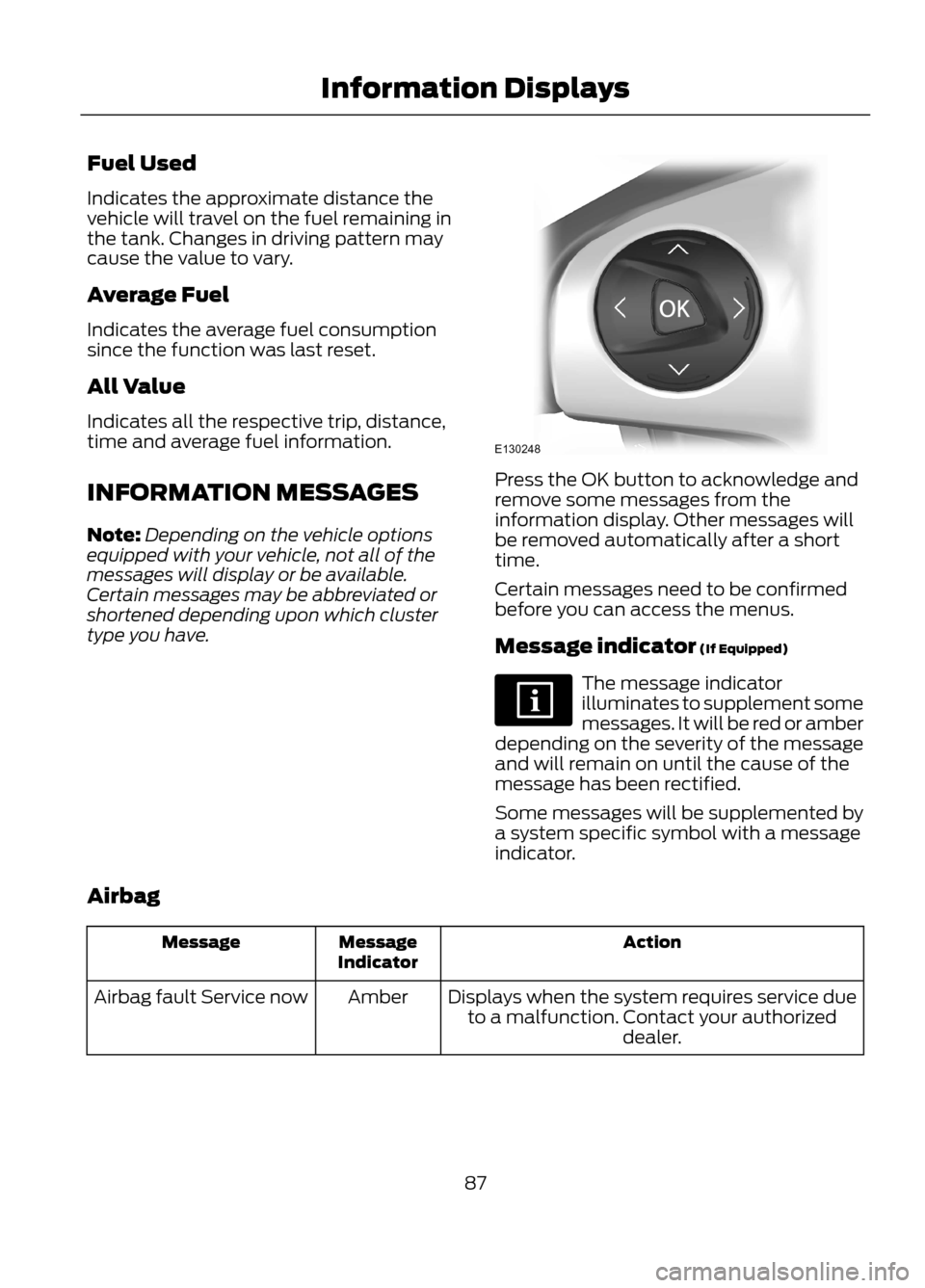
Press the OK button to acknowledge and
remove some messages from the
information display. Other messages will
be removed automatically after a short
time.
Certain messages need to be confirmed
before you can access the menus.
Message indicator (If Equipped)
The message indicator
illuminates to supplement some
messages. It will be red or amber
depending on the severity of the message
and will remain on until the cause of the
message has been rectified.
Some messages will be supplemented by
a system specific symbol with a message
indicator.
Airbag
Action
Message
Indicator
Message
Displays when the system requires service dueto a malfunction. Contact your authorized dealer.
Amber
Airbag fault Service now
87
Information Displays
E130248
Page 92 of 423
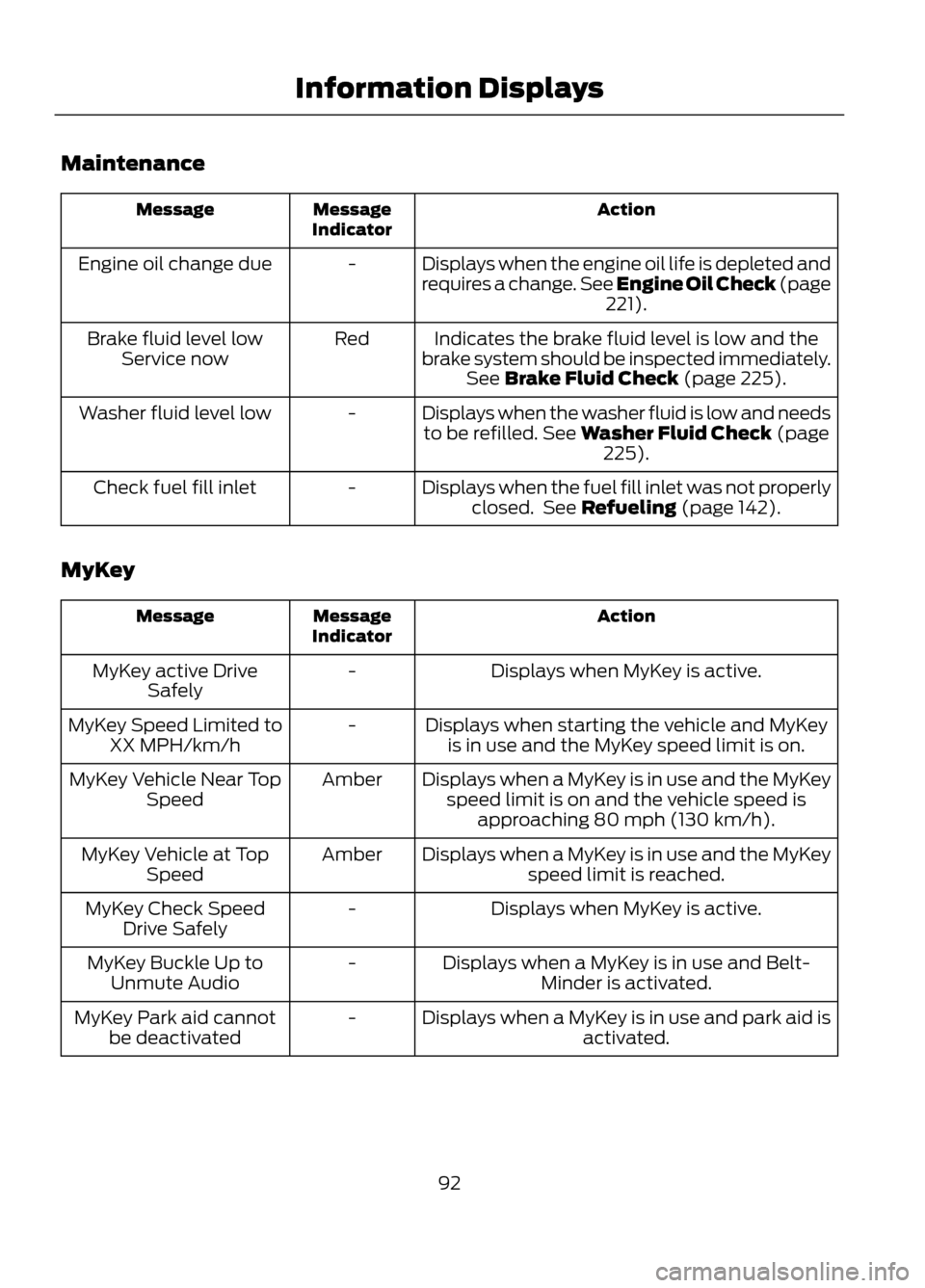
Maintenance
Action
Message
Indicator
Message
Displays when the engine oil life is depleted and
requires a change. See Engine Oil Check (page221).
-
Engine oil change due
Indicates the brake fluid level is low and the
brake system should be inspected immediately. See Brake Fluid Check (page 225).
Red
Brake fluid level low
Service now
Displays when the washer fluid is low and needsto be refilled. See Washer Fluid Check (page 225).
-
Washer fluid level low
Displays when the fuel fill inlet was not properlyclosed. See Refueling (page 142).
-
Check fuel fill inlet
MyKey
Action
Message
Indicator
Message
Displays when MyKey is active.
-
MyKey active Drive
Safely
Displays when starting the vehicle and MyKeyis in use and the MyKey speed limit is on.
-
MyKey Speed Limited to
XX MPH/km/h
Displays when a MyKey is in use and the MyKeyspeed limit is on and the vehicle speed is approaching 80 mph (130 km/h).
Amber
MyKey Vehicle Near Top
Speed
Displays when a MyKey is in use and the MyKeyspeed limit is reached.
Amber
MyKey Vehicle at Top
Speed
Displays when MyKey is active.
-
MyKey Check Speed
Drive Safely
Displays when a MyKey is in use and Belt-Minder is activated.
-
MyKey Buckle Up to
Unmute Audio
Displays when a MyKey is in use and park aid isactivated.
-
MyKey Park aid cannot
be deactivated
92
Information Displays
Page 119 of 423
Maximum Cooling Performance in
Instrument Panel or Instrument
Panel and Footwell Positions
1. Adjust the temperature control to thelowest setting.
2. Press the A/C and recirculated air buttons.
3. Adjust the fan speed to the highest setting initially and then adjust it to suit
the desired comfort level.
HEATED WINDOWS AND
MIRRORS
Heated Rear Window
Note: The ignition must be switched on to
use this feature.
Press the button to clear the rear window
of thin ice and fog. Press the button again
within 10 minutes to switch it off. It
switches off automatically after 10
minutes, or when you switch the ignition
off.
Do not use razor blades or other sharp
objects to clean the inside of the rear
window or to remove decals from the
inside of the rear window. This may
cause damage to the heated grid lines
and will not be covered by your
warranty.
Heated Exterior Mirror (If Equipped)
Note: Do not remove ice from the mirrors
with a scraper or attempt to readjust the
mirror glass if it is frozen in place. These
actions could cause damage to the glass
and mirrors.
Note: Do not clean the housing or glass of
any mirror with harsh abrasives, fuel or other
petroleum-based cleaning products. Both mirrors are heated to remove ice, mist
and fog when the heated rear window is
switched on.
CABIN AIR FILTER
Your vehicle is equipped with a cabin air
filter. It is located just in front of the
windshield under the cowl panel grille on
the passenger's side of your vehicle.
The particulate filtration system is
designed to reduce the concentration of
airborne particles such as dust, spores and
pollen in the air being supplied to the
interior of your vehicle.
Note:
A cabin air filter must be installed at
all times to prevent foreign objects from
entering the system. Running the system
without a filter in place could result in
degradation or damage to the system.
The particulate filtration system gives you
and your passengers the following
benefits:
• It improves your driving comfort by
reducing particle concentration.
• It improves the interior compartment
cleanliness.
• It protects the climate control
components from particle deposits.
The filter should be replaced at regular
intervals. See the Scheduled
Maintenance chapter.
For additional cabin air filter information,
or to replace the filter, see an authorized
dealer.
REMOTE START (IF EQUIPPED)
The climate control system adjusts the
cabin temperature during remote start.
119
Climate Control
Page 140 of 423
SAFETY PRECAUTIONS
WARNINGS
Do not overfill the fuel tank. The
pressure in an overfilled tank may
cause leakage and lead to fuel spray
and fire.
The fuel system may be under
pressure. If you hear a hissing sound
near the fuel filler door (Easy Fuel no
cap fuel system), do not refuel until the
sound stops. Otherwise, fuel may spray
out, which could cause serious personal
injury.
Automotive fuels can cause serious
injury or death if misused or
mishandled.
The flow of fuel through a fuel pump
nozzle can produce static electricity,
which can cause a fire if fuel is
pumped into an ungrounded fuel container.
Fuel ethanol and gasoline may
contain benzene, which is a
cancer-causing agent.
When refueling always shut the
engine off and never allow sparks or
open flames near the filler neck.
Never smoke while refueling. Fuel vapor is
extremely hazardous under certain
conditions. Care should be taken to avoid
inhaling excess fumes.
Observe the following guidelines when
handling automotive fuel:
• Extinguish all smoking materials and
any open flames before refueling your
vehicle.
• Always turn off the vehicle before
refueling. •
Automotive fuels can be harmful or
fatal if swallowed. Fuel such as
gasoline is highly toxic and if
swallowed can cause death or
permanent injury. If fuel is swallowed,
call a physician immediately, even if no
symptoms are immediately apparent.
The toxic effects of fuel may not be
visible for hours.
• Avoid inhaling fuel vapors. Inhaling too
much fuel vapor of any kind can lead
to eye and respiratory tract irritation.
In severe cases, excessive or prolonged
breathing of fuel vapor can cause
serious illness and permanent injury.
• Avoid getting fuel liquid in your eyes. If
fuel is splashed in the eyes, remove
contact lenses (if worn), flush with
water for 15 minutes and seek medical
attention. Failure to seek proper
medical attention could lead to
permanent injury.
• Fuels can also be harmful if absorbed
through the skin. If fuel is splashed on
the skin, clothing or both, promptly
remove contaminated clothing and
wash skin thoroughly with soap and
water. Repeated or prolonged skin
contact with fuel liquid or vapor causes
skin irritation.
• Be particularly careful if you are taking
“Antabuse ” or other forms of disulfiram
for the treatment of alcoholism.
Breathing gasoline vapors, or skin
contact could cause an adverse
reaction. In sensitive individuals, serious
personal injury or sickness may result.
If fuel is splashed on the skin, promptly
wash skin thoroughly with soap and
water. Consult a physician immediately
if you experience an adverse reaction.
140
Fuel and Refueling
Page 141 of 423
FUEL QUALITY
Note:We recommend that you use only
high quality fuel without additives or other
engine treatments.
Do not use leaded gasoline or gasoline with
additives containing other metallic
compounds (e.g. manganese-based). They
could damage the emission system.
Choosing the Right Fuel
Note: Use of any fuel other than those
recommended may cause powertrain
damage, a loss of vehicle performance and
repairs may not be covered under warranty.
If your vehicle is not a flexible fuel vehicle,
then only use unleaded fuel or unleaded
fuel blended with a maximum of 15%
ethanol. Do not use fuel ethanol (E85),
diesel fuel, fuel methanol, leaded fuel or
any other fuel because it could damage or
impair the emission control system.
The use of leaded fuel is prohibited by law.
Your vehicle was not designed to use fuel
or fuel additives with metallic compounds,
including manganese-based additives.
Octane Recommendations
Regular unleaded gasoline with a pump
(R+M)/2 octane rating of 87 is
recommended. Some fuel stations offer
fuels posted as regular with an octane
rating below 87, particularly in high altitude
areas. Fuels with octane levels below 87
are not recommended.
Note: Premium fuel will provide improved
performance for vehicles with EcoBoost®
engines and is recommended for severe duty
use such as trailer tow. Do not be concerned if your engine
sometimes knocks lightly. However, if it
knocks heavily while you are using fuel with
the recommended octane rating, see your
authorized dealer to prevent any engine
damage.
RUNNING OUT OF FUEL
Avoid running out of fuel because this
situation may have an adverse effect on
powertrain components.
If you have run out of fuel:
•
You may need to cycle the ignition from
off to on several times after refueling
to allow the fuel system to pump the
fuel from the tank to the engine. On
restarting, cranking time will take a few
seconds longer than normal. With
keyless ignition, just start the engine.
Crank time will be longer than usual.
• Normally, adding 1 gallon (3.8 liters) of
fuel is enough to restart the engine. If
the vehicle is out of fuel and on a steep
grade, more than 1 gallon (3.8 liters)
may be required.
• The service engine soon indicator may
come on. For more information on the
service engine soon indicator, See
Warning Lamps and Indicators
(page 80).
Refilling With a Portable Fuel
Container
WARNINGS
Do not insert the nozzle of portable
fuel containers or aftermarket
funnels into the capless fuel system.
This could damage the fuel system and its
seal, and may cause fuel to run onto the
ground instead of filling the tank, which
could result in serious personal injury.
141
Fuel and Refueling
Page 142 of 423
WARNINGS
Do not try to pry open or push open
the capless fuel system with foreign
objects. This could damage the fuel
system and its seal and cause injury to you
or others.
Note: Do not use aftermarket funnels; they
will not work with the capless fuel system
and can damage it. The included funnel has
been specially designed to work safely with
your vehicle.
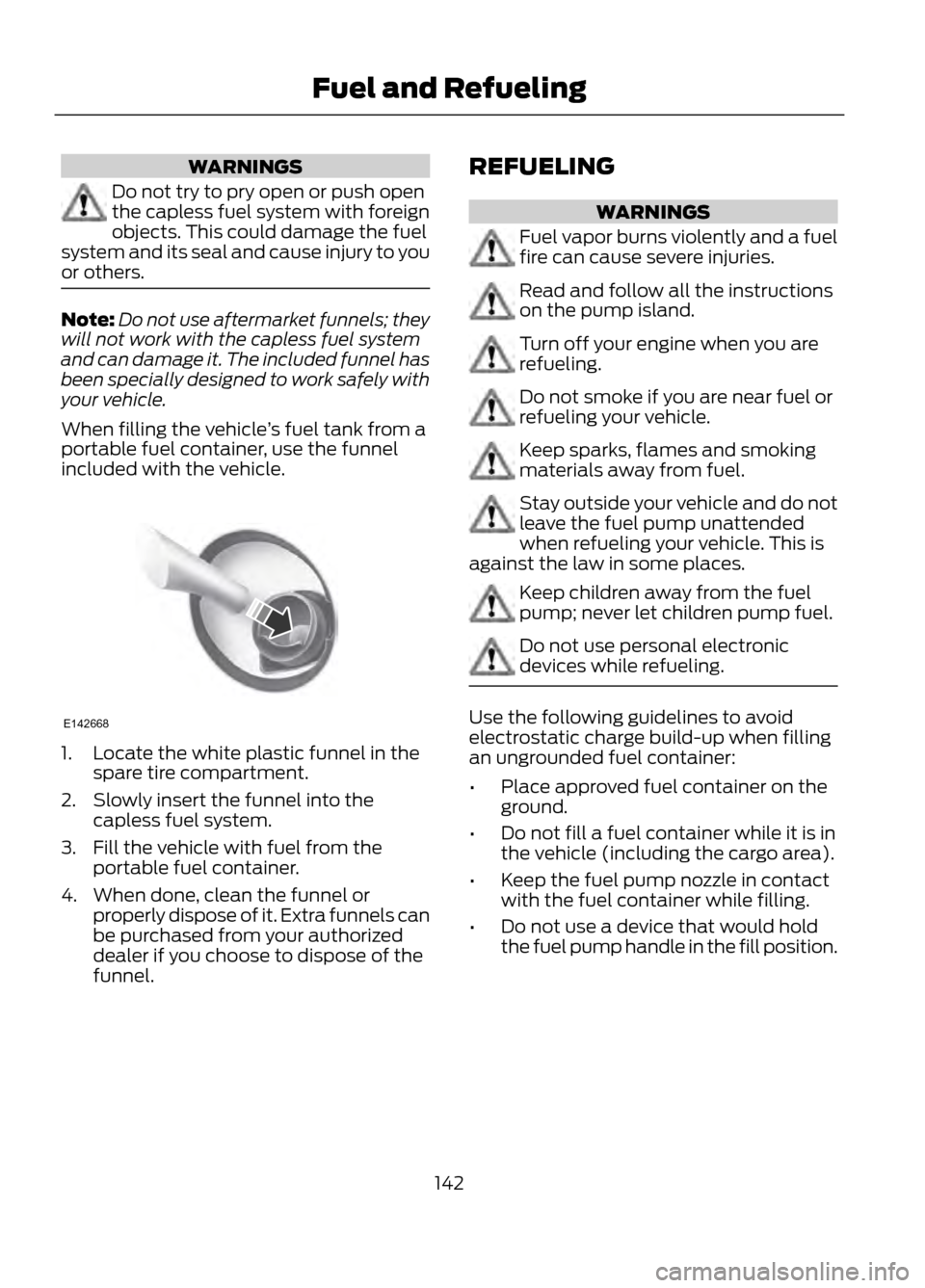
When filling the vehicle ’s fuel tank from a
portable fuel container, use the funnel
included with the vehicle.
1. Locate the white plastic funnel in the spare tire compartment.
2. Slowly insert the funnel into the capless fuel system.
3. Fill the vehicle with fuel from the portable fuel container.
4. When done, clean the funnel or properly dispose of it. Extra funnels can
be purchased from your authorized
dealer if you choose to dispose of the
funnel. REFUELING
WARNINGS
Fuel vapor burns violently and a fuel
fire can cause severe injuries.
Read and follow all the instructions
on the pump island.
Turn off your engine when you are
refueling.
Do not smoke if you are near fuel or
refueling your vehicle.
Keep sparks, flames and smoking
materials away from fuel.
Stay outside your vehicle and do not
leave the fuel pump unattended
when refueling your vehicle. This is
against the law in some places.
Keep children away from the fuel
pump; never let children pump fuel.
Do not use personal electronic
devices while refueling.
Use the following guidelines to avoid
electrostatic charge build-up when filling
an ungrounded fuel container:
• Place approved fuel container on the
ground.
• Do not fill a fuel container while it is in
the vehicle (including the cargo area).
• Keep the fuel pump nozzle in contact
with the fuel container while filling.
• Do not use a device that would hold
the fuel pump handle in the fill position.
142
Fuel and Refueling
E142668
Page 143 of 423
Easy Fuel® No Cap Fuel System
WARNING
The fuel system may be under
pressure. If you hear a hissing sound
near the fuel filler door, do not refuel
until the sound stops. Otherwise, fuel may
spray out, which could cause serious
personal injury.
When fueling your vehicle:
1. Turn the engine off.
2. Open the fuel filler door.
3. Slowly insert the fuel filler nozzle fully into the fuel system, and leave the
nozzle fully inserted until you are done
pumping.
4. After you are done pumping fuel, slowly
remove the fuel filler nozzle. Allow
about ten seconds after pumping fuel
before removing the fuel filler nozzle.
This allows residual fuel to drain back
into the fuel tank and not spill onto the
vehicle.
Note: A fuel spillage concern may occur if
overfilling the fuel tank. Do not overfill the
tank to the point that the fuel is able to
bypass the fuel filler nozzle. The overfilled
fuel may run down the drain located below
and in front of the fuel filler door.
If the fuel fill inlet was not properly closed,
a Check fuel fill inlet message may appear
on the instrument cluster. See Warning
Lamps and Indicators (page 80).
At the next opportunity, do the following:
1. Safely pull off the road.
2. Turn off the engine.
3. Open the fuel filler door and remove any visible debris from the fuel fill
opening. 4. Insert either the fuel fill nozzle or the
fuel fill funnel provided with the vehicle
several times to dislodge any debris
and allow the inlet to close properly.
If this action corrects the problem, the
message may not reset immediately. It
may take several driving cycles for the
message to turn off. A driving cycle
consists of an engine start-up (after four
or more hours with the engine off) followed
by city or highway driving. Continuing to
drive with the message on may cause the
service engine soon lamp to turn on as
well.
EMISSION CONTROL SYSTEM
WARNINGS
Do not park, idle, or drive your vehicle
in dry grass or other dry ground cover.
The emission system heats up the
engine compartment and exhaust system,
which can start a fire.
Exhaust leaks may result in entry of
harmful and potentially lethal fumes
into the passenger compartment. If
you smell exhaust fumes inside your
vehicle, have your dealer inspect your
vehicle immediately. Do not drive if you
smell exhaust fumes.
Your vehicle is equipped with various
emission control components and a
catalytic converter which will enable your
vehicle to comply with applicable exhaust
emission standards. To make sure that the
catalytic converter and other emission
control components continue to work
properly:
To make sure that the catalytic converter
and other emission control components
continue to work properly:
• Use only the specified fuel listed.
• Avoid running out of fuel.
143
Fuel and Refueling