fuel FORD ESCAPE 2013 3.G Owner's Manual
[x] Cancel search | Manufacturer: FORD, Model Year: 2013, Model line: ESCAPE, Model: FORD ESCAPE 2013 3.GPages: 423, PDF Size: 4.59 MB
Page 144 of 423
•Do not turn off the ignition while your
vehicle is moving, especially at high
speeds.
• Have the items listed in scheduled
maintenance information performed
according to the specified schedule.
The scheduled maintenance items listed
in scheduled maintenance information are
essential to the life and performance of
your vehicle and to its emissions system
If other than Ford, Motorcraft or
Ford-authorized parts are used for
maintenance replacements or for service
of components affecting emission control,
such non-Ford parts should be equivalent
to genuine Ford Motor Company parts in
performance and durability.
Illumination of the service engine soon
indicator, charging system warning light or
the temperature warning light, fluid leaks,
strange odors, smoke or loss of engine
power could indicate that the emission
control system is not working properly.
An improperly operating or damaged
exhaust system may allow exhaust to
enter the vehicle. Have a damaged or
improperly operating exhaust system
inspected and repaired immediately.
Do not make any unauthorized changes to
your vehicle or engine. By law, vehicle
owners and anyone who manufactures,
repairs, services, sells, leases, trades
vehicles, or supervises a fleet of vehicles
are not permitted to intentionally remove
an emission control device or prevent it
from working. Information about your
vehicle ’s emission system is on the Vehicle
Emission Control Information Decal
located on or near the engine. This decal
also lists engine displacement
Please consult your Warranty Guide for
complete emission warranty information On-Board Diagnostics (OBD-II)
Your vehicle is equipped with a computer
that monitors the engine
’s emission control
system. This system is commonly known
as the on-board diagnostics system
(OBD-II). The OBD-II system protects the
environment by ensuring that your vehicle
continues to meet government emission
standards. The OBD-II system also assists
your authorized dealer in properly servicing
your vehicle.
When the service engine soon
indicator illuminates, the OBD-II
system has detected a
malfunction. Temporary malfunctions may
cause the service engine soon indicator to
illuminate. Examples are:
1. The vehicle has run out of fuel —the
engine may misfire or run poorly.
2. Poor fuel quality or water in the fuel —the engine may misfire or run
poorly.
3. The fuel fill inlet may not have been properly closed. See Refueling (page
142).
4. Driving through deep water —the
electrical system may be wet.
These temporary malfunctions can be
corrected by filling the fuel tank with good
quality fuel, properly closing the fuel fill
inlet or letting the electrical system dry out.
After three driving cycles without these or
any other temporary malfunctions present,
the service engine soon indicator should
stay off the next time the engine is started.
A driving cycle consists of a cold engine
startup followed by mixed city/highway
driving. No additional vehicle service is
required.
144
Fuel and Refueling
Page 145 of 423
If the service engine soon indicator remains
on, have your vehicle serviced at the first
available opportunity. Although some
malfunctions detected by the OBD-II may
not have symptoms that are apparent,
continued driving with the service engine
soon indicator on can result in increased
emissions, lower fuel economy, reduced
engine and transmission smoothness, and
lead to more costly repairs.
Readiness for
Inspection/Maintenance (I/M)
Testing
Some state/provincial and local
governments may have
Inspection/Maintenance (I/M) programs
to inspect the emission control equipment
on your vehicle. Failure to pass this
inspection could prevent you from getting
a vehicle registration.
If the service engine soon
indicator is on or the bulb does
not work, the vehicle may need
to be serviced. See On-Board Diagnostics.
Your vehicle may not pass the I/M test if
the service engine soon indicator is on or
not working properly (bulb is burned out),
or if the OBD-II system has determined
that some of the emission control systems
have not been properly checked. In this
case, the vehicle is considered not ready
for I/M testing. If the vehicle
’s engine or transmission has
just been serviced, or the battery has
recently run down or been replaced, the
OBD-II system may indicate that the
vehicle is not ready for I/M testing. To
determine if the vehicle is ready for I/M
testing, turn the ignition key to the on
position for 15 seconds without cranking
the engine. If the service engine soon
indicator blinks eight times, it means that
the vehicle is not ready for I/M testing; if
the service engine soon indicator stays on
solid, it means that the vehicle is ready for
I/M testing.
The OBD-II system is designed to check
the emission control system during normal
driving. A complete check may take several
days. If the vehicle is not ready for I/M
testing, the following driving cycle
consisting of mixed city and highway
driving may be performed:
15 minutes of steady driving on an
expressway/highway followed by 20
minutes of stop-and-go driving with at
least four 30-second idle periods
Allow the vehicle to sit for at least eight
hours without starting the engine. Then,
start the engine and complete the above
driving cycle. The engine must warm up to
its normal operating temperature. Once
started, do not turn off the engine until the
above driving cycle is complete. If the
vehicle is still not ready for I/M testing, the
above driving cycle will have to be
repeated.
FUEL CONSUMPTION
Note: The amount of usable fuel in the
empty reserve varies and should not be
relied upon to increase driving range. When
refueling your vehicle after the fuel gauge
indicates empty, you might not be able to
refuel the full amount of the advertised
capacity of the fuel tank due to the empty
reserve still present in the tank.
145
Fuel and Refueling
Page 146 of 423
The advertised capacity is the indicated
capacity and the empty reserve combined.
Indicated capacity is the difference in the
amount of fuel in a full tank and a tank
when the fuel gauge indicates empty.
Empty reserve is the amount of fuel in the
tank after the fuel gauge indicates empty.
Filling the Tank
For consistent results when filling the fuel
tank:
•Turn the ignition off before fueling; an
inaccurate reading results if the engine
is left running.
• Use the same fill rate
(low-medium-high) each time the tank
is filled.
• Allow no more than two automatic
click-offs when filling.
Results are most accurate when the filling
method is consistent.
Calculating Fuel Economy
Do not measure fuel economy during the
first 1000 miles (1600 km) of driving (this
is your engine ’s break-in period); a more
accurate measurement is obtained after
2000 miles - 3000 miles (3200 km - 4800
km). Also, fuel expense, frequency of fill
ups or fuel gauge readings are not accurate
ways to measure fuel economy.
1. Fill the fuel tank completely and record
the initial odometer reading.
2. Each time you fill the tank, record the amount of fuel added.
3. After at least three to five tank fill ups, fill the fuel tank and record the current
odometer reading.
4. Subtract your initial odometer reading from the current odometer reading. 5. Calculate fuel economy by dividing
miles traveled by gallons used (For
Metric: Multiply liters used by 100, then
divide by kilometers traveled).
Keep a record for at least one month and
record the type of driving (city or highway).
This provides an accurate estimate of the
vehicle ’s fuel economy under current
driving conditions. Additionally, keeping
records during summer and winter show
how temperature impacts fuel economy.
In general, lower temperatures mean lower
fuel economy.
146
Fuel and Refueling
Page 147 of 423
AUTOMATIC TRANSMISSION
WARNINGS
Always set the parking brake fully
and make sure the gearshift is
latched in P (Park). Turn the ignition
to the off position and remove the key
whenever you leave your vehicle.
Do not apply the brake pedal and
accelerator pedal simultaneously.
Applying both pedals simultaneously
for more than three seconds will limit
engine rpm, which may result in difficulty
maintaining speed in traffic and could lead
to serious injury.
Understanding the Positions of
Your Automatic Transmission
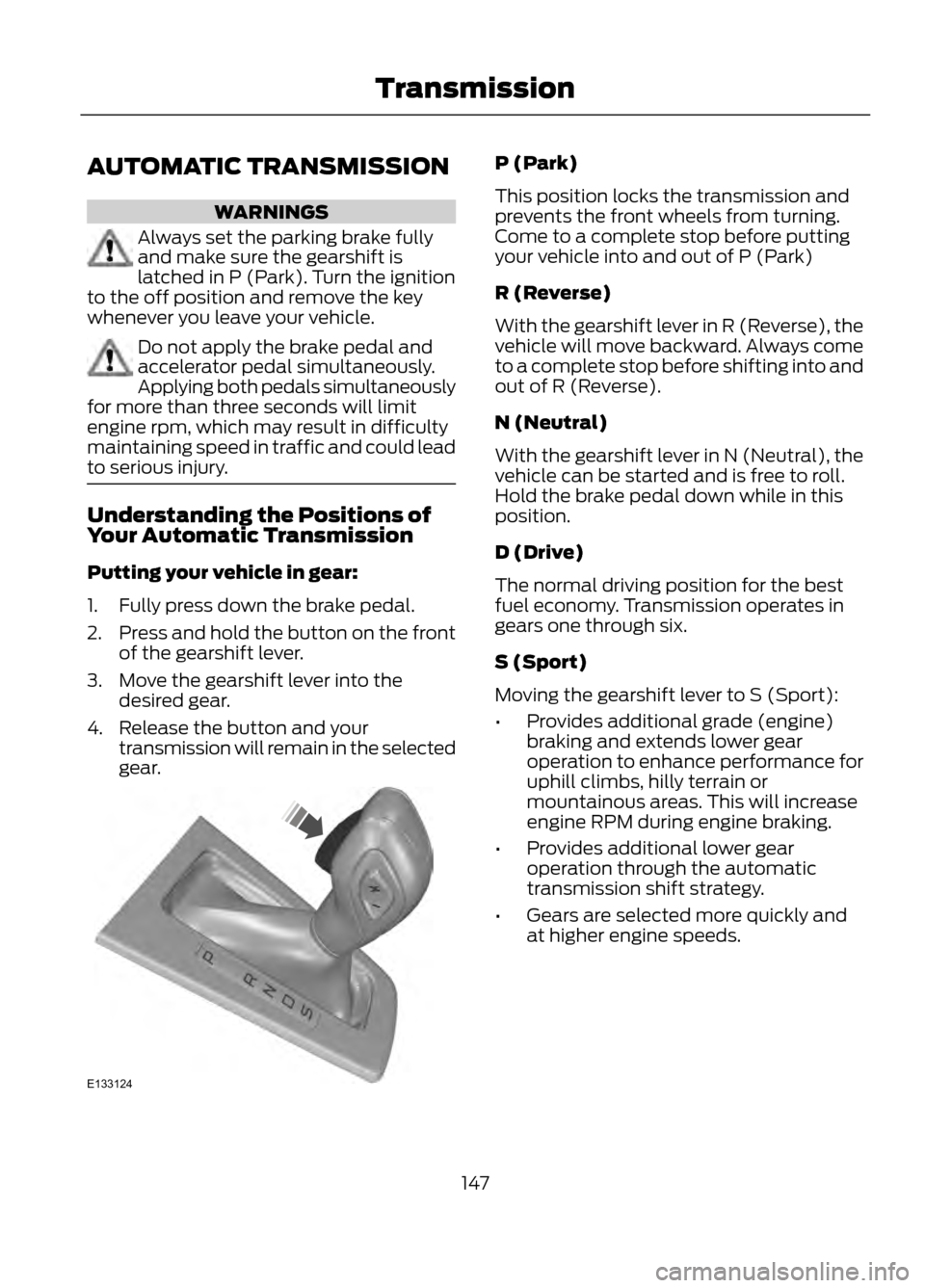
Putting your vehicle in gear:
1. Fully press down the brake pedal.
2. Press and hold the button on the front
of the gearshift lever.
3. Move the gearshift lever into the desired gear.
4. Release the button and your transmission will remain in the selected
gear.
P (Park)
This position locks the transmission and
prevents the front wheels from turning.
Come to a complete stop before putting
your vehicle into and out of P (Park)
R (Reverse)
With the gearshift lever in R (Reverse), the
vehicle will move backward. Always come
to a complete stop before shifting into and
out of R (Reverse).
N (Neutral)
With the gearshift lever in N (Neutral), the
vehicle can be started and is free to roll.
Hold the brake pedal down while in this
position.
D (Drive)
The normal driving position for the best
fuel economy. Transmission operates in
gears one through six.
S (Sport)
Moving the gearshift lever to S (Sport):
•Provides additional grade (engine)
braking and extends lower gear
operation to enhance performance for
uphill climbs, hilly terrain or
mountainous areas. This will increase
engine RPM during engine braking.
• Provides additional lower gear
operation through the automatic
transmission shift strategy.
• Gears are selected more quickly and
at higher engine speeds.
147
Transmission
E133124
Page 148 of 423
SelectShift Automatic®
Transmission (If Equipped)
Your SelectShift automatic transmission
gives you the ability to manually change
gears if you'd like. To use SelectShift, move
the gearshift lever into S (Sport). Now you
can use the +/- buttons on the side of your
gearshift lever to select gears.
When using the toggle for manual shifting:
•Press the (+) button to upshift.
• Press the (-) button to downshift.
Note: After you have assumed manual
control with SelectShift your vehicle will
remain in this mode until you return the
gearshift lever from (S) Sport, back to (D)
Drive.
Upshift to the recommended shift speeds
according to the following chart:
Upshifts when accelerating (recom- mended for best fuel economy)
Shift from:15 mph (24 km/h)
1 - 2
25 mph (40 km/h)
2 - 3
40 mph (64 km/h)
3 - 4
45 mph (72 km/h)
4 - 5
50 mph (80 km/h)
5 - 6
The instrument cluster will display the
selected gear that you are currently in.
SelectShift will automatically make some
shifts for you in the event that your engine
speed is running at too high, or to low an
RPM.
Note: Engine damage may occur if
excessive engine revving is held without
shifting. Brake-Shift Interlock
WARNINGS
Do not drive your vehicle until you
verify that the brake lamps are
working.
When doing this procedure, you will
be taking the vehicle out of park
which means the vehicle can roll
freely. To avoid unwanted vehicle
movement, always fully set the parking
brake prior to doing this procedure. Use
wheel chocks if appropriate.
If the parking brake is fully released,
but the brake warning lamp remains
illuminated, the brakes may not be
working properly. See your authorized
dealer.
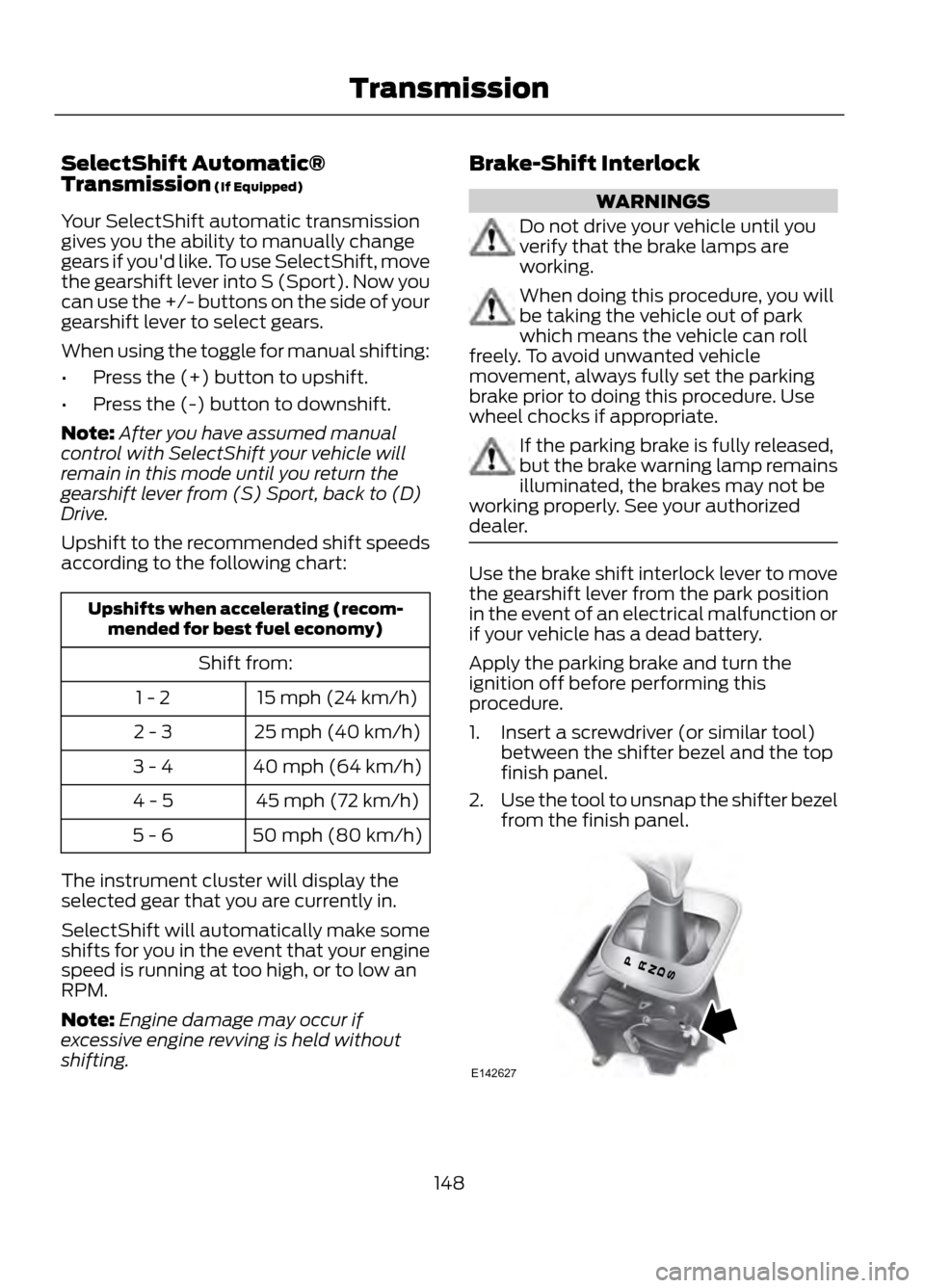
Use the brake shift interlock lever to move
the gearshift lever from the park position
in the event of an electrical malfunction or
if your vehicle has a dead battery.
Apply the parking brake and turn the
ignition off before performing this
procedure.
1. Insert a screwdriver (or similar tool) between the shifter bezel and the top
finish panel.
2. Use the tool to unsnap the shifter bezel
from the finish panel.
148
Transmission
E142627
Page 175 of 423
One or both systems can also be switched
off permanently at your authorized dealer.
Once switched off, switching it back on
must also be done at your authorized
dealer.
ECO MODE
This system assists you in driving more
efficiently by constantly monitoring
characteristics of gear changing,
anticipation of traffic conditions and
speeds while driving.
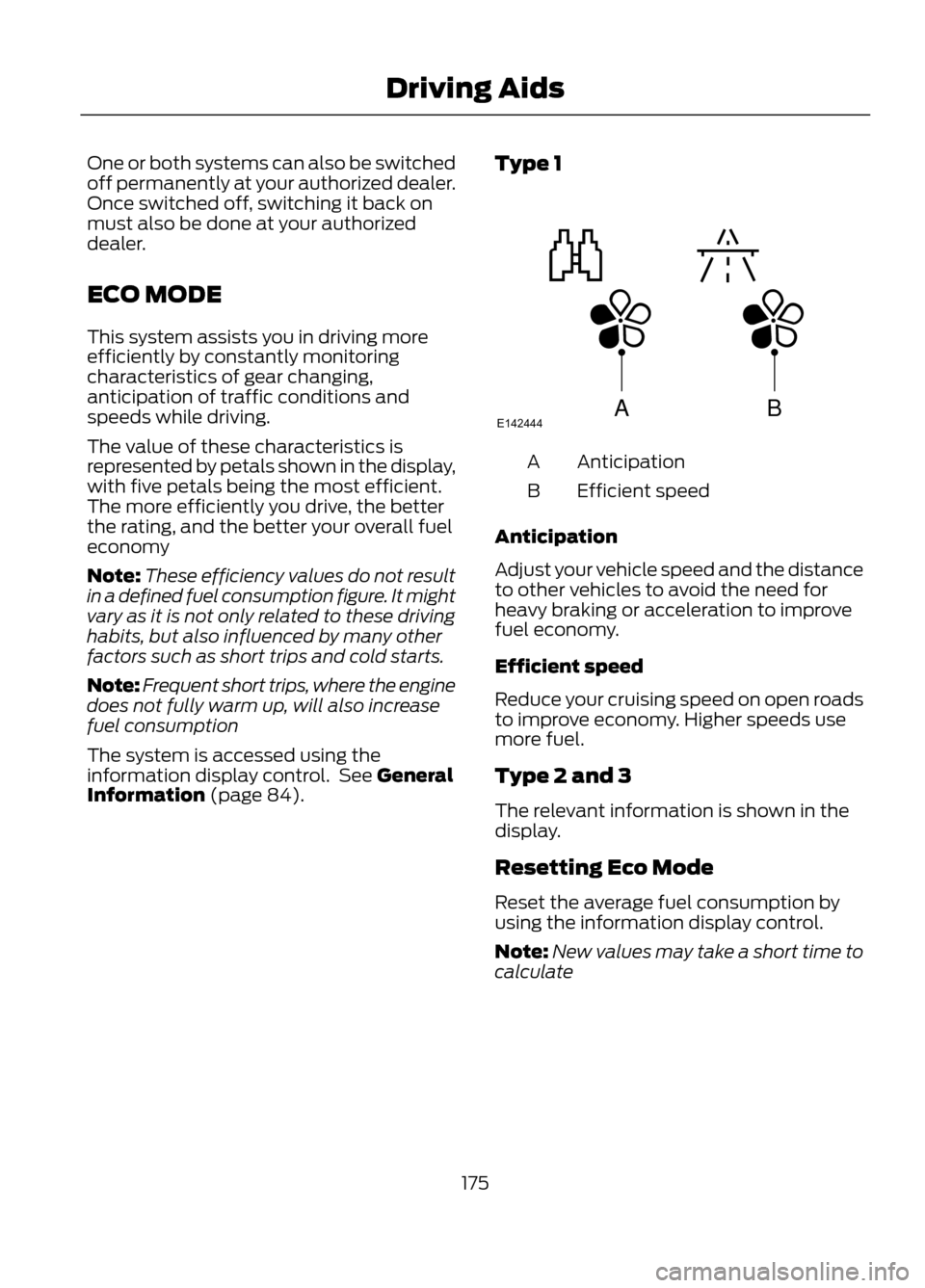
The value of these characteristics is
represented by petals shown in the display,
with five petals being the most efficient.
The more efficiently you drive, the better
the rating, and the better your overall fuel
economy
Note:These efficiency values do not result
in a defined fuel consumption figure. It might
vary as it is not only related to these driving
habits, but also influenced by many other
factors such as short trips and cold starts.
Note: Frequent short trips, where the engine
does not fully warm up, will also increase
fuel consumption
The system is accessed using the
information display control. See General
Information (page 84). Type 1
Anticipation
A
Efficient speed
B
Anticipation
Adjust your vehicle speed and the distance
to other vehicles to avoid the need for
heavy braking or acceleration to improve
fuel economy.
Efficient speed
Reduce your cruising speed on open roads
to improve economy. Higher speeds use
more fuel.
Type 2 and 3
The relevant information is shown in the
display.
Resetting Eco Mode
Reset the average fuel consumption by
using the information display control.
Note: New values may take a short time to
calculate
175
Driving Aids
ABE142444
Page 178 of 423
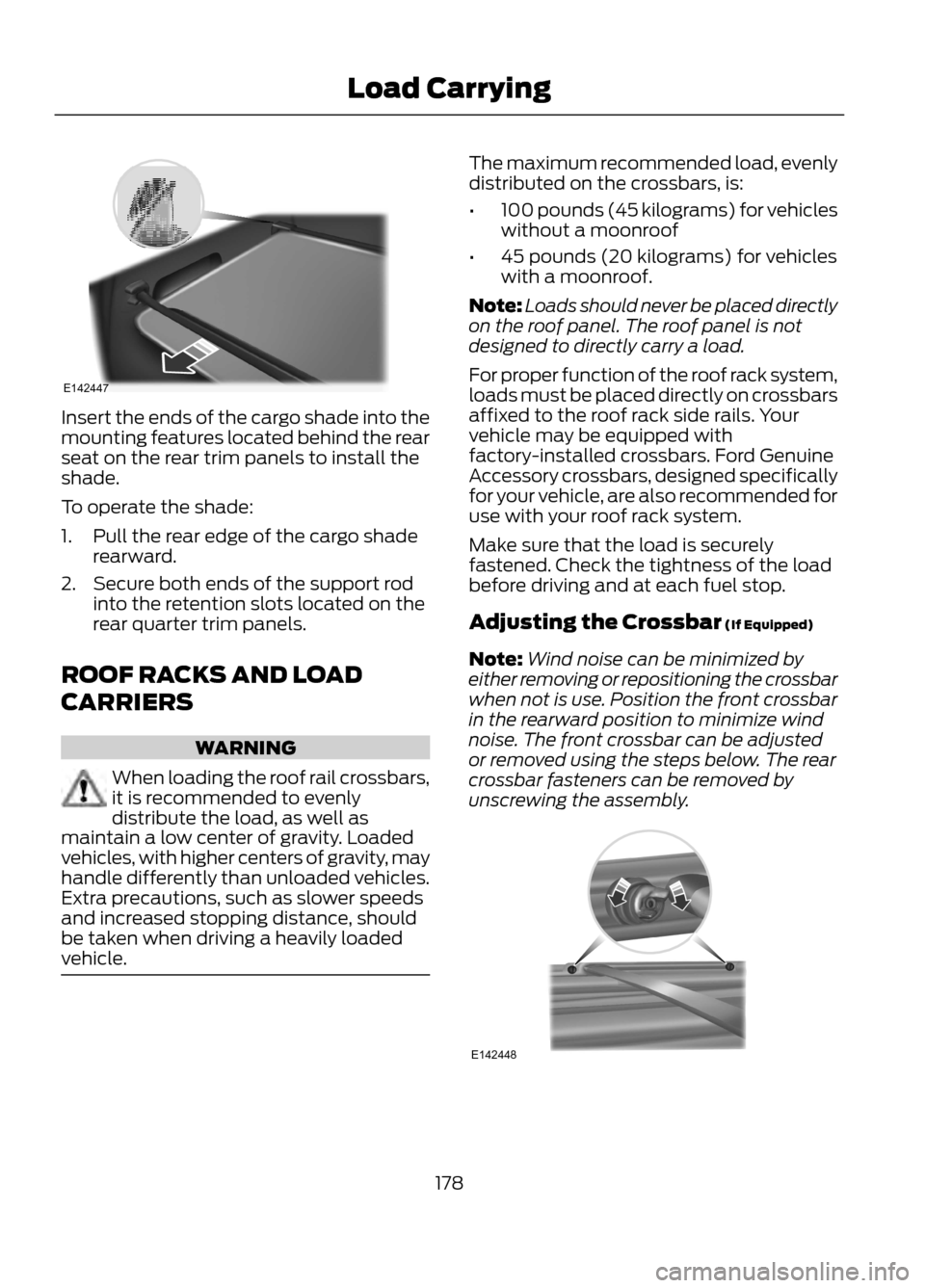
Insert the ends of the cargo shade into the
mounting features located behind the rear
seat on the rear trim panels to install the
shade.
To operate the shade:
1. Pull the rear edge of the cargo shaderearward.
2. Secure both ends of the support rod into the retention slots located on the
rear quarter trim panels.
ROOF RACKS AND LOAD
CARRIERS
WARNING
When loading the roof rail crossbars,
it is recommended to evenly
distribute the load, as well as
maintain a low center of gravity. Loaded
vehicles, with higher centers of gravity, may
handle differently than unloaded vehicles.
Extra precautions, such as slower speeds
and increased stopping distance, should
be taken when driving a heavily loaded
vehicle.
The maximum recommended load, evenly
distributed on the crossbars, is:
• 100 pounds (45 kilograms) for vehicles
without a moonroof
• 45 pounds (20 kilograms) for vehicles
with a moonroof.
Note: Loads should never be placed directly
on the roof panel. The roof panel is not
designed to directly carry a load.
For proper function of the roof rack system,
loads must be placed directly on crossbars
affixed to the roof rack side rails. Your
vehicle may be equipped with
factory-installed crossbars. Ford Genuine
Accessory crossbars, designed specifically
for your vehicle, are also recommended for
use with your roof rack system.
Make sure that the load is securely
fastened. Check the tightness of the load
before driving and at each fuel stop.
Adjusting the Crossbar (If Equipped)
Note: Wind noise can be minimized by
either removing or repositioning the crossbar
when not is use. Position the front crossbar
in the rearward position to minimize wind
noise. The front crossbar can be adjusted
or removed using the steps below. The rear
crossbar fasteners can be removed by
unscrewing the assembly.
178
Load Carrying
E142447
E142448
Page 179 of 423
1.Remove the crossbar thumbwheels at
both sides of the front crossbar by
turning them counterclockwise.
Note: A small screwdriver or similar tool
can be used to loosen the thumbwheel.
Apply to the fastener head on the top of the
thumbwheel or insert the shaft between the
two paddles of the thumbwheel and rotate
it loose.
2. Remove the crossbar by sliding the ends off of the shoulder bolts in the
side rails.
3. Move the crossbar to the new side rail position and slide the crossbar onto
the shoulder bolt at that position.
4. Replace and tighten the thumbwheels
at both sides of the crossbar by turning
them clockwise until tight. A small
screwdriver or similar tool can be used
to tighten if necessary.
Make sure to check that the thumbwheels
are tight each time load is added or
removed from the roof rack, and
periodically while traveling. Make sure that
the load is secure before traveling. LOAD LIMIT
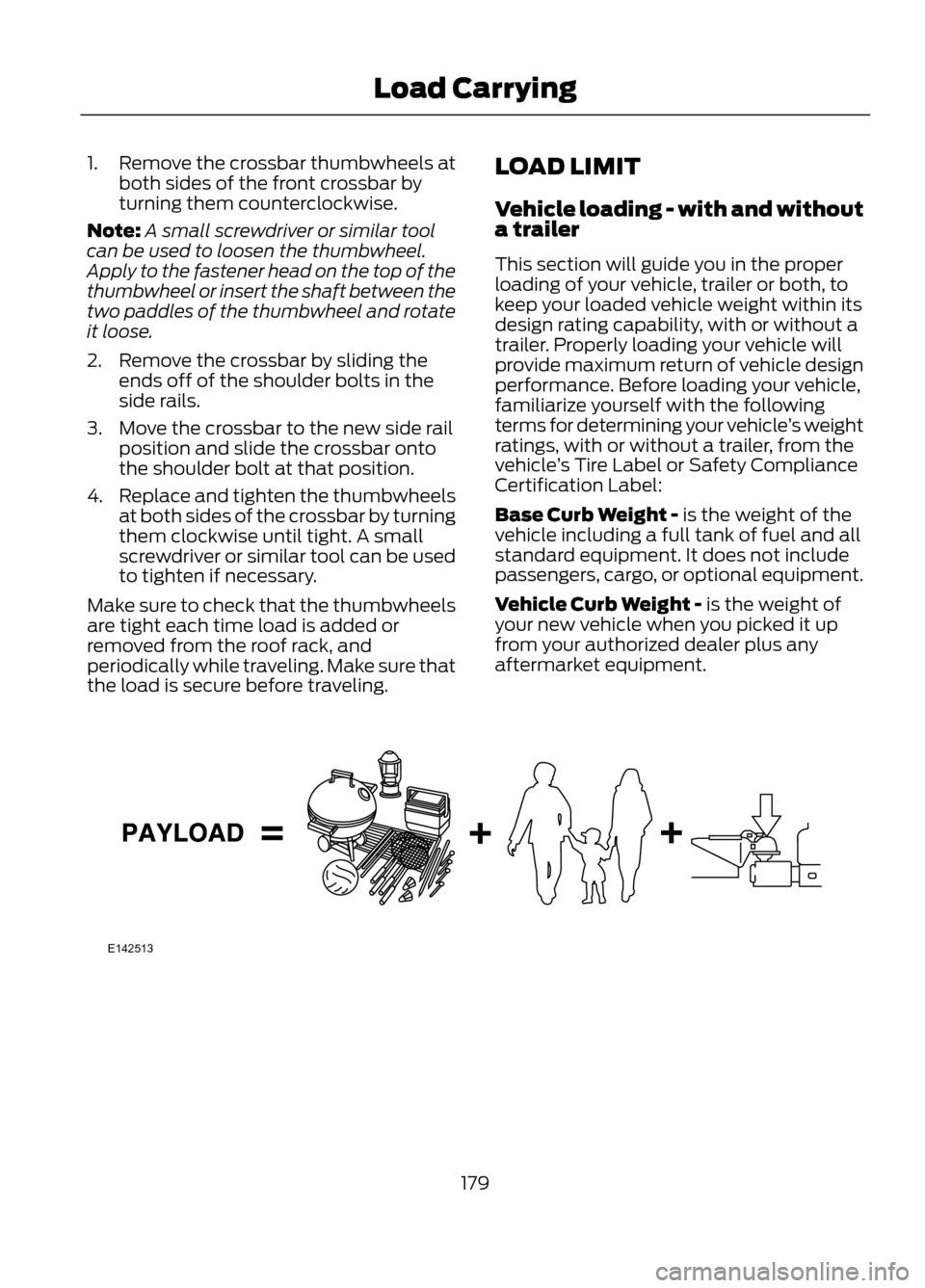
Vehicle loading - with and without
a trailer
This section will guide you in the proper
loading of your vehicle, trailer or both, to
keep your loaded vehicle weight within its
design rating capability, with or without a
trailer. Properly loading your vehicle will
provide maximum return of vehicle design
performance. Before loading your vehicle,
familiarize yourself with the following
terms for determining your vehicle
’s weight
ratings, with or without a trailer, from the
vehicle ’s Tire Label or Safety Compliance
Certification Label:
Base Curb Weight - is the weight of the
vehicle including a full tank of fuel and all
standard equipment. It does not include
passengers, cargo, or optional equipment.
Vehicle Curb Weight - is the weight of
your new vehicle when you picked it up
from your authorized dealer plus any
aftermarket equipment.
179
Load Carrying
E142513
Page 191 of 423
When Towing a Trailer
•Do not drive faster than 70 mph (113
km/h) during the first 500 miles (800
kilometers) and do not make
full-throttle starts.
• Check your hitch, electrical connections
and trailer wheel lug nuts thoroughly
after you have traveled 50 miles (80
km).
• Place the gearshift lever in position P
to aid in engine and transmission
cooling and A/C efficiency during hot
weather while stopped in traffic.
• Turn off the speed control. The speed
control may turn off automatically
when you are towing on long, steep
grades.
• Shift to a lower gear when driving down
a long or steep hill. Do not apply the
brakes continuously, as they may
overheat and become less effective.
• If your transmission is equipped with
the grade assist feature, use this
feature when towing. This provides
engine braking and helps eliminate
excessive transmission shifting for
optimum fuel economy and
transmission cooling.
• Allow more distance for stopping with
a trailer attached; anticipate stops and
brake gradually.
• Avoid parking on a grade. However, if
you must park on a grade, place wheel
chocks under the trailer's wheels.
TOWING POINTS (IF EQUIPPED)
Towing Eye Location
The screw-in towing eye is located in the
spare wheel well.
The towing eye must always be carried in
the vehicle. Installing the Towing Eye
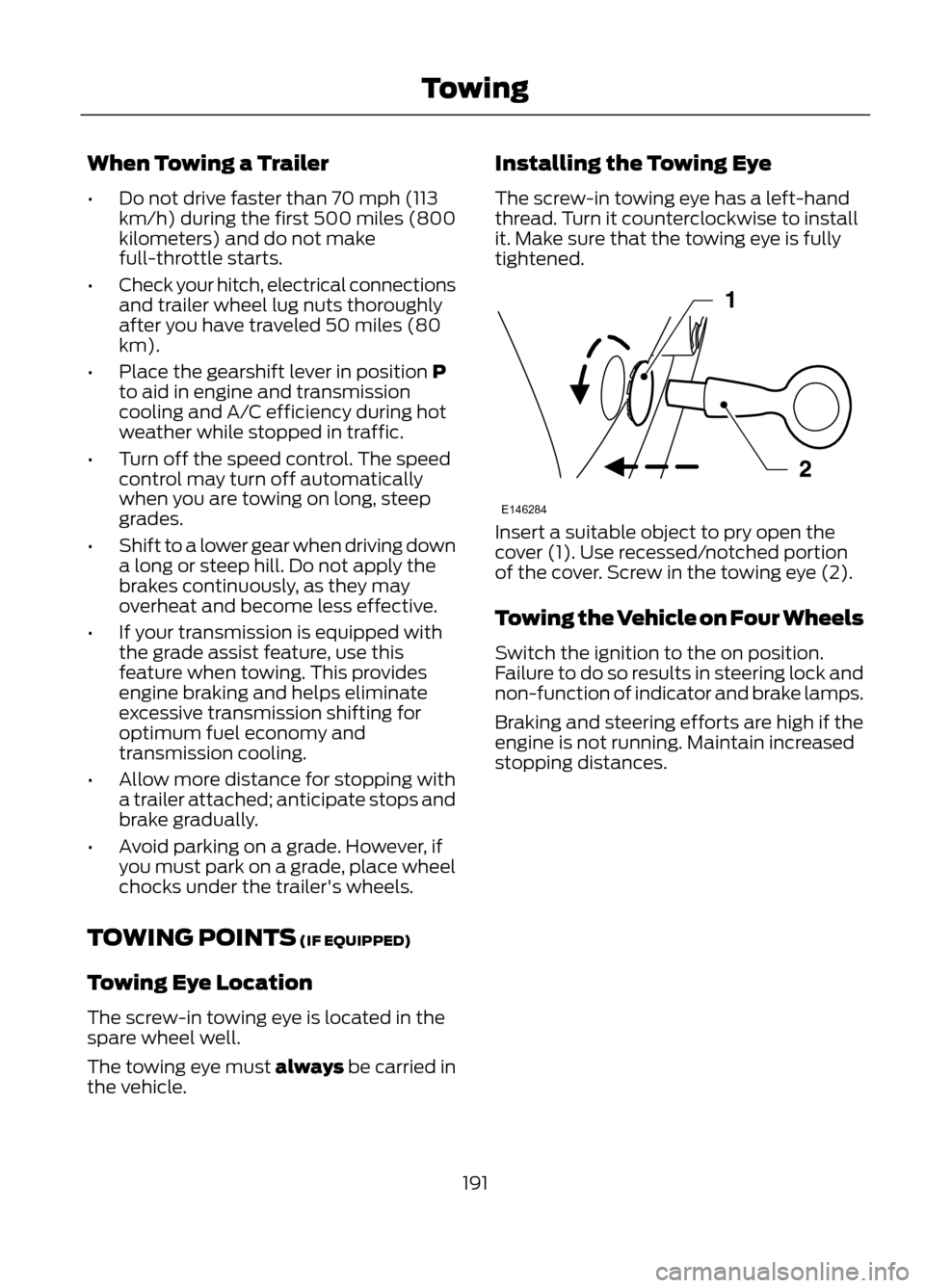
The screw-in towing eye has a left-hand
thread. Turn it counterclockwise to install
it. Make sure that the towing eye is fully
tightened.
Insert a suitable object to pry open the
cover (1). Use recessed/notched portion
of the cover. Screw in the towing eye (2).
Towing the Vehicle on Four Wheels
Switch the ignition to the on position.
Failure to do so results in steering lock and
non-function of indicator and brake lamps.
Braking and steering efforts are high if the
engine is not running. Maintain increased
stopping distances.
191
Towing
E146284
Page 194 of 423
BREAKING-IN
You need to break in new tires for
approximately 300 miles (480
kilometers). During this time, your vehicle
may exhibit some unusual driving
characteristics.
Avoid driving too fast during the first 1000
miles (1600 kilometers). Vary your speed
frequently and change up through the
gears early. Do not labor the engine.
Do not tow during the first 1000 miles
(1600 kilometers).
ECONOMICAL DRIVING
Fuel economy is affected by several things
such as how you drive, the conditions you
drive under and how you maintain your
vehicle.
There are some things to keep in mind that
may improve your fuel economy:
•Accelerate and slow down in a smooth,
moderate fashion.
• Drive at steady speeds without
stopping.
• Anticipate stops; slowing down may
eliminate the need to stop.
• Combine errands and minimize
stop-and-go driving.
• Close the windows for high-speed
driving.
• Drive at reasonable speeds (traveling
at 55 mph [88 km/h] uses 15% less
fuel than traveling at 65 mph [105
km/h]).
• Keep the tires properly inflated and use
only the recommended size.
• Use the recommended engine oil.
• Perform all regularly scheduled
maintenance. There are also some things you may not
want to do because they may reduce your
fuel economy:
•
Sudden accelerations or hard
accelerations.
• Rev the engine before turning it off.
• Idle for periods longer than one minute.
• Warm up your vehicle on cold
mornings.
• Use the air conditioner or front
defroster.
• Use the speed control in hilly terrain.
• Rest your foot on the brake pedal while
driving.
• Drive a heavily loaded vehicle or tow a
trailer.
• Carry unnecessary weight
(approximately 1 mpg [0.4 km/L] is
lost for every 400 lb [180 kg] of weight
carried).
• Add particular accessories to your
vehicle (e.g. bug deflectors,
rollbars/light bars, running boards, ski
racks).
• Drive with the wheels out of alignment.
DRIVING THROUGH WATER
Note: Driving through deep water above
the recommended levels can cause vehicle
damage.
Note: Once through the water, always dry
the brakes by moving your vehicle slowly
while applying light pressure on the brake
pedal. Wet brakes do not stop the vehicle
as quickly as dry brakes.
194
Driving Hints