radio FORD ESCAPE 2013 3.G Owner's Manual
[x] Cancel search | Manufacturer: FORD, Model Year: 2013, Model line: ESCAPE, Model: FORD ESCAPE 2013 3.GPages: 423, PDF Size: 4.59 MB
Page 161 of 423
PARKING AID (IF EQUIPPED)
WARNINGS
To help avoid personal injury, please
read and understand the limitations
of the system as contained in this
section. Sensing is only an aid for some
(generally large and fixed) objects when
moving in reverse on a flat surface at
parking speeds. Traffic control systems,
inclement weather, air brakes, and external
motors and fans may also affect the
function of the sensing system; this may
include reduced performance or a false
activation.
To help avoid personal injury, always
use caution when in R (Reverse) and
when using the sensing system.
This system is not designed to
prevent contact with small or moving
objects. The system is designed to
provide a warning to assist the driver in
detecting large stationary objects to avoid
damaging the vehicle. The system may not
detect smaller objects, particularly those
close to the ground.
Certain add-on devices such as large
trailer hitches, bike or surfboard racks
and any device that may block the
normal detection zone of the system, may
create false beeps.
Note: Keep the sensors, located on the
bumper or fascia, free from snow, ice and
large accumulations of dirt. If the sensors
are covered, the system ’s accuracy can be
affected. Do not clean the sensors with
sharp objects.
Note: If your vehicle sustains damage to
the bumper or fascia, leaving it misaligned
or bent, the sensing zone may be altered
causing inaccurate measurement of
obstacles or false alarms. Note:
If your vehicle is equipped with
MyKey®, it is possible to prevent turning the
sensing system off. See MyKey® (page 49).
The sensing system warns the driver of
obstacles within a certain range of the
bumper area. The system turns on
automatically whenever the ignition is
switched on.
When receiving a detection warning, the
radio volume is reduced to a
predetermined level. After the warning
goes away, the radio volume returns to the
previous level.
Rear Sensing System
The rear sensors are only active when the
transmission is in R (Reverse). As the
vehicle moves closer to the obstacle, the
rate of the audible warning increases.
When the obstacle is fewer than 10 inches
(25 centimeters) away, the warning
sounds continuously. If a stationary or
receding object is detected farther than 10
inches (25 centimeters) from the side of
the vehicle, the tone sounds for only three
seconds. Once the system detects an
object approaching, the warning sounds
again.
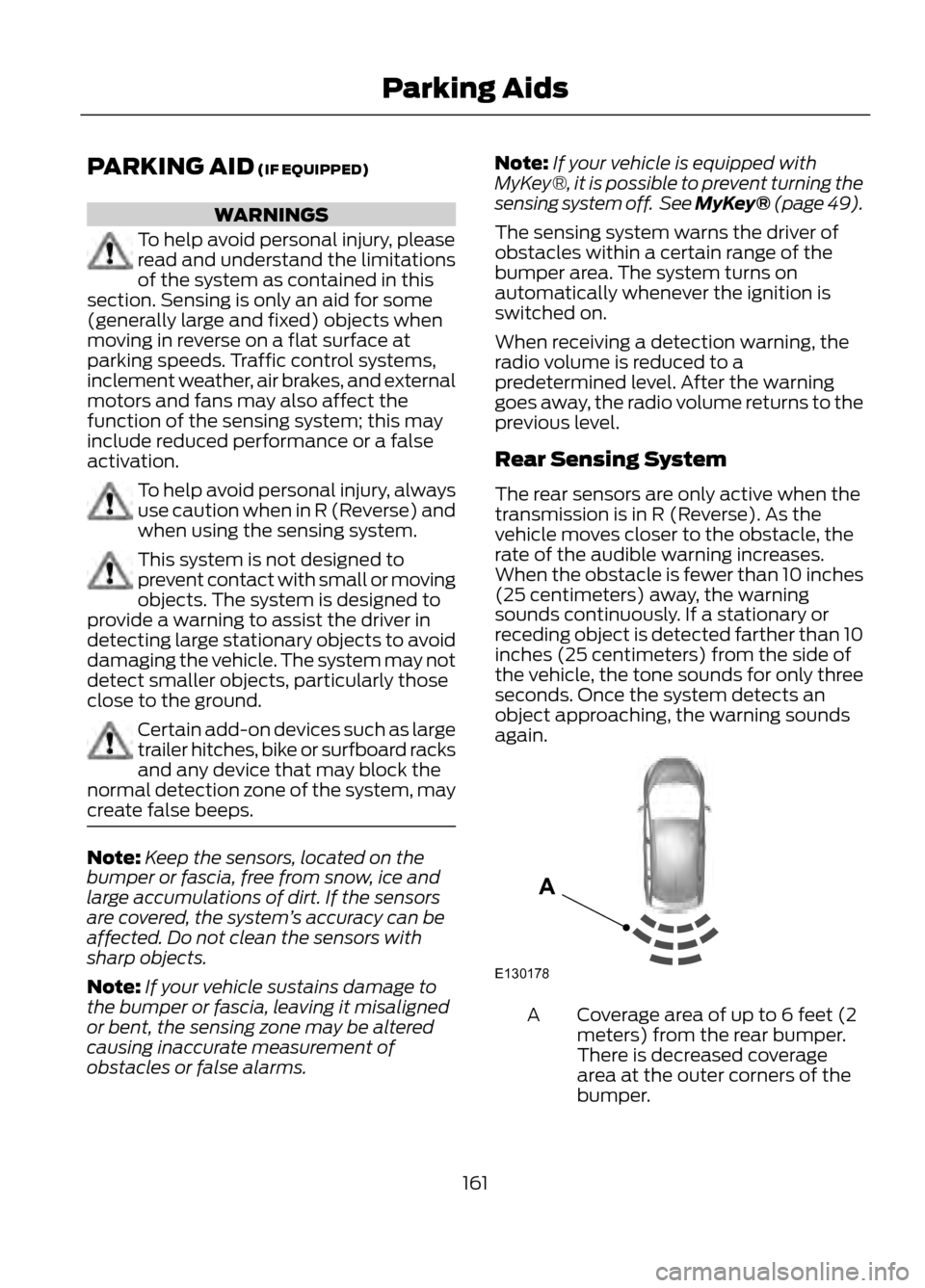
Coverage area of up to 6 feet (2
meters) from the rear bumper.
There is decreased coverage
area at the outer corners of the
bumper.
A
161
Parking Aids
E130178
A
Page 162 of 423
The system detects certain objects while
the transmission is in R (Reverse):
•and moving toward a stationary object
at a speed of 3 mph (5 km/h) or less
• but not moving, and a moving object is
approaching the rear of the vehicle at
a speed of 3 mph (5 km/h) or less
• and moving at a speed of less than 3
mph (5 km/h) and a moving object is
approaching the rear of the vehicle at
a speed of less than 3 mph (5 km/h).
The system can be turned off using the
information display control. See General
Information (page 84). If a fault is
present in the system, a warning message
appears in the information display and
does not allow the driver to switch the
faulted system on.
Front Sensing System
The front sensors are active when the
gearshift is in any position other than P
(Park) or N (Neutral) and the vehicle speed
is below 6 mph (10 km/h).
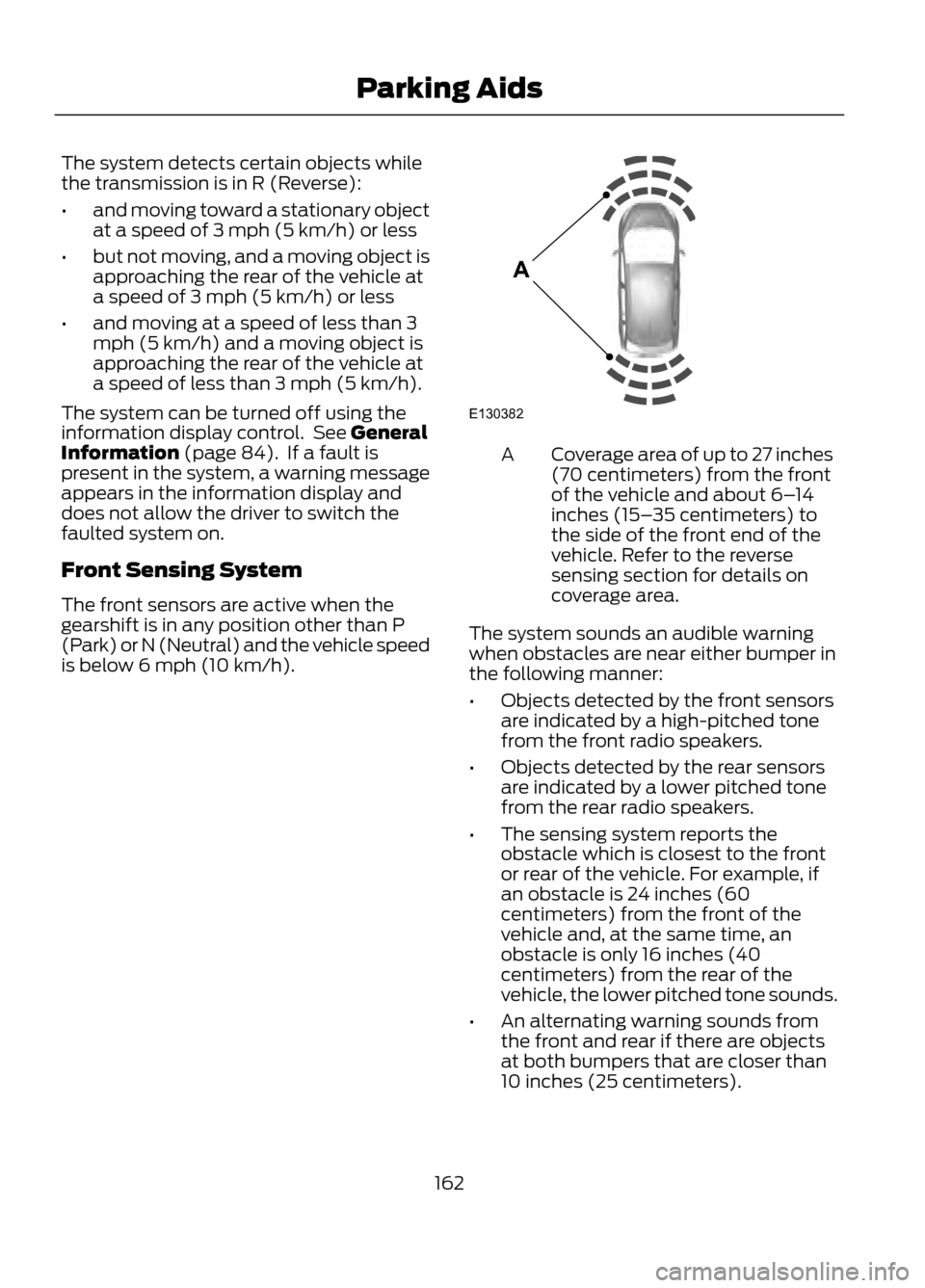
Coverage area of up to 27 inches
(70 centimeters) from the front
of the vehicle and about 6– 14
inches (15– 35 centimeters) to
the side of the front end of the
vehicle. Refer to the reverse
sensing section for details on
coverage area.
A
The system sounds an audible warning
when obstacles are near either bumper in
the following manner:
• Objects detected by the front sensors
are indicated by a high-pitched tone
from the front radio speakers.
• Objects detected by the rear sensors
are indicated by a lower pitched tone
from the rear radio speakers.
• The sensing system reports the
obstacle which is closest to the front
or rear of the vehicle. For example, if
an obstacle is 24 inches (60
centimeters) from the front of the
vehicle and, at the same time, an
obstacle is only 16 inches (40
centimeters) from the rear of the
vehicle, the lower pitched tone sounds.
• An alternating warning sounds from
the front and rear if there are objects
at both bumpers that are closer than
10 inches (25 centimeters).
162
Parking Aids
E130382
A
Page 169 of 423
Active guidelines are only shown with fixed
guidelines. To use active guidelines, turn
the steering wheel to point the guidelines
toward an intended path. If the steering
wheel position is changed while reversing,
the vehicle might deviate from the original
intended path.
The fixed and active guidelines fade in and
out depending on the steering wheel
position. The active guidelines are not
shown when the steering wheel position
is straight.
Always use caution while reversing.
Objects in the red zone are closest to your
vehicle and objects in the green zone are
farther away. Objects are getting closer to
your vehicle as they move from the green
zone to the yellow or red zones. Use the
side view mirrors and rear view mirror to
get better coverage on both sides and rear
of the vehicle.
Selectable settings for this feature are
ACTIVE + FIXED, FIXED and OFF.
Visual Park Aid Alert
Note:Visual park alert is only available
when the transmission is in R (Reverse).
Note: The reverse sensing system is not
effective at speeds above 3 mph (5 km/h)
and may not detect certain angular or
moving objects.
The system uses red, yellow and green
highlights which appear on top of the video
image when an object is detected by the
reverse sensing system. The alert highlights
the closest object detected. The reverse
sensing alert can be disabled and if visual
park aid alert is enabled, highlighted areas
are still displayed.
Selectable settings for this feature are ON
and OFF. Manual Zoom
WARNING
When manual zoom is on, the full
area behind the vehicle is not shown.
Be aware of your surroundings when
using the manual zoom feature.
Note: Manual zoom is only available when
the transmission is in R (Reverse).
Note: When manual zoom is enabled, only
the centerline is shown.
This allows you to get a closer view of an
object behind the vehicle. The zoomed
image keeps the bumper in the image to
provide a reference. The zoom is only
active while the transmission is in R
(Reverse). When the transmission is
shifted out of R (Reverse), the feature
automatically turns off and must be reset
when it is used again.
Selectable settings for this feature are OFF,
Level 1, Level 2 or Level 3. Press the up and
down arrows to change the view. The
selection level appears between the
buttons (i.e. Level 1). The default setting
for the manual zoom is OFF.
Rear Camera Delay
When shifting the transmission out of R
(Reverse) and into any gear other than P
(Park), the camera image remains in the
display until the vehicle speed reaches 5
mph (8 km/h). This occurs when the rear
camera delay feature is on, or until a radio
button is selected.
Selectable settings for this feature are ON
and OFF. The default setting for the rear
camera delay is OFF.
169
Parking Aids
Page 198 of 423
Canadian customers who need to obtain
roadside information, call
1-800-665-2006 or visit our website at
www.ford.ca.
HAZARD WARNING FLASHERS
Note:With extended use, the flashers may
run down your battery.
The hazard flasher control is
located on the instrument panel
by the radio. Use it when your
vehicle is disabled and is creating a safety
hazard for other motorists.
• Press the flasher control and all front
and rear direction signals will flash.
• Press the flasher control again to turn
them off.
FUEL CUT-OFF SWITCH
WARNING
Failure to inspect and if necessary
repair fuel leaks after a collision may
increase the risk of fire and serious
injury. Ford Motor Company recommends
that the fuel system be inspected by an
authorized dealer after any collision.
In the event of a moderate to severe
collision, this vehicle is equipped with a
fuel pump shut-off feature that stops the
flow of fuel to the engine. Not every impact
will cause a shut-off.
Should your vehicle shut off after a
collision, you may restart your vehicle by
doing the following:
1. Turn the ignition off.
2. Turn the ignition on.
3. Repeat steps 1 and 2 to re-enable fuel pump. Note:
If your vehicle has the push button
start system, press the stop/start button
twice to reactivate the fuel system.
JUMP-STARTING THE VEHICLE
WARNINGS
The gases around the battery can
explode if exposed to flames, sparks,
or lit cigarettes. An explosion could
result in injury or vehicle damage.
Batteries contain sulfuric acid which
can burn skin, eyes and clothing, if
contacted.
Do not attempt to push-start your
automatic transmission vehicle. Automatic
transmissions do not have push-start
capability. Attempting to push-start a
vehicle with an automatic transmission
may cause transmission damage.
Preparing Your Vehicle
Note: Use only a 12-volt supply to start your
vehicle.
Note: Do not disconnect the battery of the
disabled vehicle as this could damage the
vehicle's electrical system.
1. Park the booster vehicle close to the hood of the disabled vehicle making
sure the two vehicles do not touch. Set
the parking brake on both vehicles and
stay clear of the engine cooling fan and
other moving parts.
2. Check all battery terminals and remove
any excessive corrosion before you
attach the battery cables. Ensure that
vent caps are tight and level.
3. Turn the heater fan on in both vehicles
to protect from any electrical surges.
Turn all other accessories off.
198
Roadside Emergencies
Page 214 of 423
Protected Components
Fuse Amp Rating
Fuse/Relay Number
Radio, Navigation DVD player, Touch
screen, Hazard light switch, Door lock
switch
15A
79
Moonroof supply
20A
80
Radio frequency receiver
5A
81
Windshield washer relay
20A
82
Central locking
20A
83
Drive door unlock supply, Double lock
20A
84
Electronic 15 feed
7.5A
85
Air bag module, Occupant classification
system, Passenger air bag deactivation
indicator
10A
86
Not used
-
87
Not used
-
88
Not used
-
89
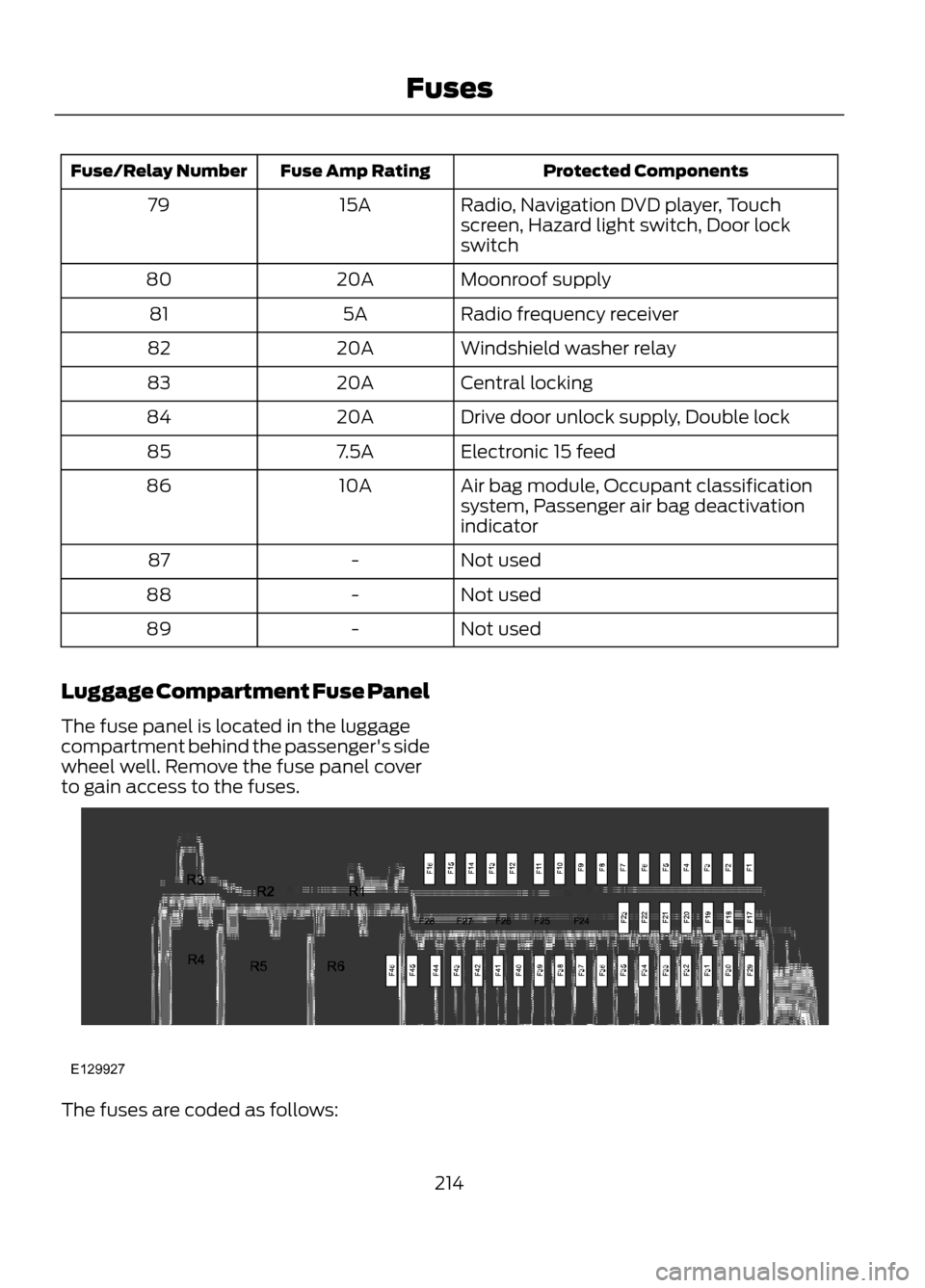
Luggage Compartment Fuse Panel
The fuse panel is located in the luggage
compartment behind the passenger's side
wheel well. Remove the fuse panel cover
to gain access to the fuses.
The fuses are coded as follows:
214
Fuses
E129927
Page 227 of 423
When a battery replacement is required,
the battery should only be replaced with
a Ford recommended replacement battery
that matches the electrical requirements
of the vehicle.
When the battery is disconnected or a new
battery installed, the automatic
transmission must relearn its adaptive
strategy. As a result of this, the
transmission may shift firmly when first
driven. This operation is considered normal
and will fully update transmission
operation to its optimum shift feel.
If the battery has been disconnected or a
new battery has been installed, the clock
and the preset radio stations must be reset
once the battery is reconnected.
Note:Always dispose of automotive
batteries in a responsible manner. Follow
your local authorized standards for disposal.
Call your local authorized recycling center
to find out more about recycling automotive
batteries.
CHECKING THE WIPER
BLADES
Run the tip of your fingers over the edge of
the blade to check for roughness.
Clean the wiper blades with washer fluid
or water applied with a soft sponge or
cloth. CHANGING THE WIPER
BLADES
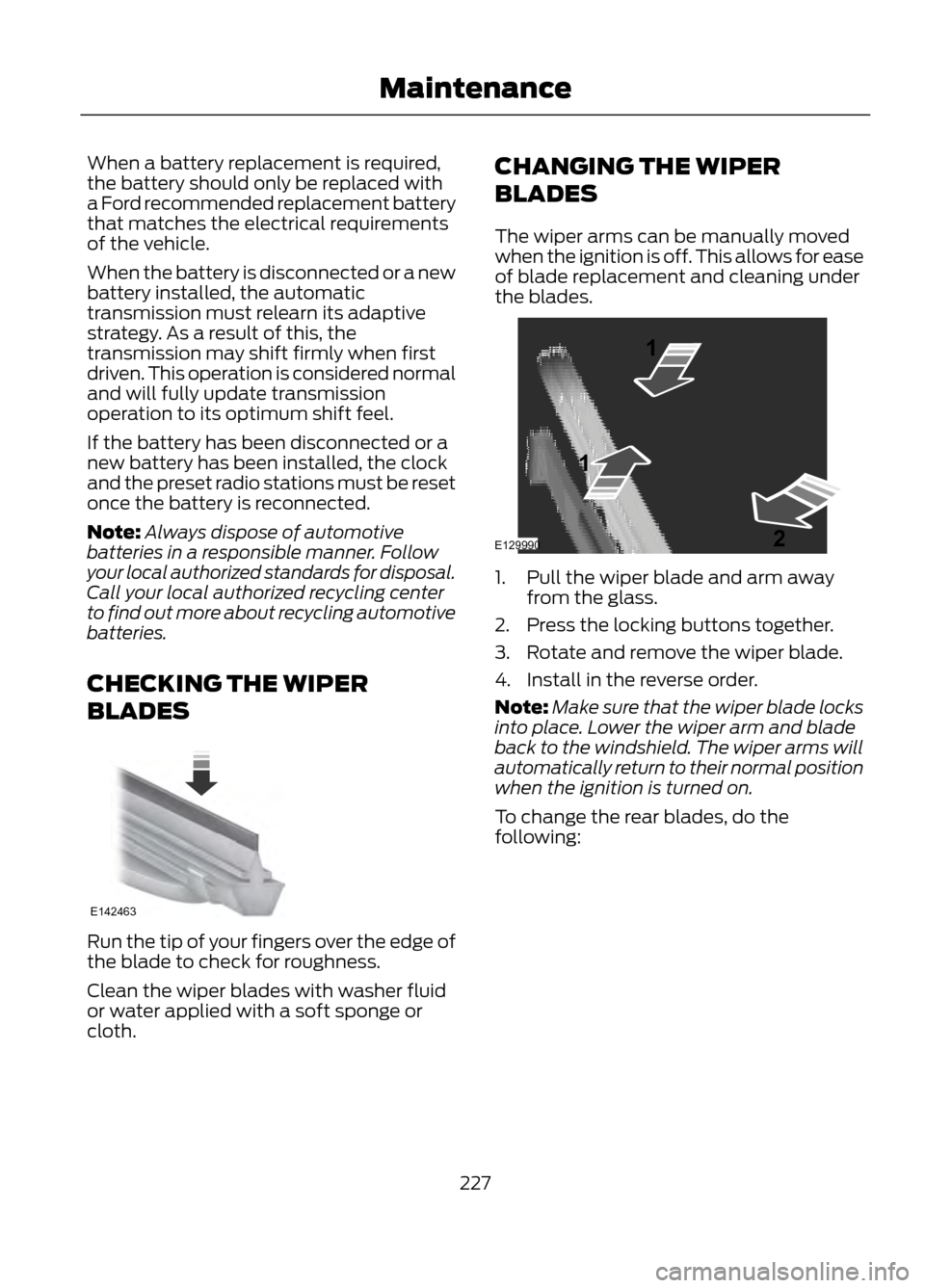
The wiper arms can be manually moved
when the ignition is off. This allows for ease
of blade replacement and cleaning under
the blades.
1. Pull the wiper blade and arm away
from the glass.
2. Press the locking buttons together.
3. Rotate and remove the wiper blade.
4. Install in the reverse order.
Note: Make sure that the wiper blade locks
into place. Lower the wiper arm and blade
back to the windshield. The wiper arms will
automatically return to their normal position
when the ignition is turned on.
To change the rear blades, do the
following:
227
Maintenance
E142463
E129990
1
1 2
Page 274 of 423
For a complete listing of the accessories
that are available for your vehicle, please
contact your dealer or visit our online store
at: Accessories.Ford.com (U.S. only).
Ford Custom Accessories are available for
your vehicle through your local Ford or Ford
of Canada dealer. Ford Motor Company
will repair or replace any properly
dealer-installed Ford Custom Accessories
found to be defective in factory-supplied
materials or workmanship during the
warranty period, as well as any component
damaged by the defective accessories. The
accessories will be warranted for
whichever provides you the greatest
benefit:
•12 months or 12,000 miles (20,000
km) (whichever occurs first), or
• the remainder of your new vehicle
limited warranty.
Contact your dealer for details and a copy
of the warranty.
Exterior style
• Asterisk hood deflectors
• Side window deflectors
• Splash guards
• Custom graphics*
Interior style
• Floor mats
Lifestyle
• Ash cup / smoker's packages
• Soft cargo organizers
• Cargo net*
• Roof racks and carriers*
Peace of mind
• Keyless entry keypad
• Remote start •
Vehicle security systems
• Wheel locks
• Bumper mounted parking assist
system*
*Ford Licensed Accessories (FLA) are
warranted by the accessory
manufacturer's warranty. Ford Licensed
Accessories are fully designed and
developed by the accessory manufacturer
and have not been designed or tested to
Ford Motor Company engineering
requirements. Contact your Ford dealer for
details regarding the manufacturer's
limited warranty and a copy of the FLA
product limited warranty offered by the
accessory manufacturer.
For maximum vehicle performance, keep
the following information in mind when
adding accessories or equipment to your
vehicle:
• When adding accessories, equipment,
passengers and luggage to your
vehicle, do not exceed the total weight
capacity of the vehicle or of the front
or rear axle (GVWR or GAWR as
indicated on the Safety Compliance
Certification label). Consult your
authorized dealer for specific weight
information.
• The Federal Communications
Commission (FCC) and Canadian
Radio Telecommunications
Commission (CRTC) regulate the use
of mobile communications systems —
such as two-way radios, telephones
and theft alarms - that are equipped
with radio transmitters. Any such
equipment installed in your vehicle
should comply with FCC or CRTC
regulations and should be installed
only by a qualified service technician.
• Mobile communications systems may
harm the operation of your vehicle,
particularly if they are not properly
designed for automotive use.
274
Accessories
Page 275 of 423
•To avoid interference with other vehicle
functions, such as anti-lock braking
systems, amateur radio users who
install radios and antennas onto their
vehicle should not locate the amateur
radio antennas in the area of the
driver's side hood.
• Any non-Ford custom electrical or
electronic accessories or components
that are added to the vehicle by the
authorized dealer or the owner, may
adversely affect battery performance
and durability, and may also adversely
affect the performance of other
electrical systems in the vehicle.
275
Accessories
Page 283 of 423
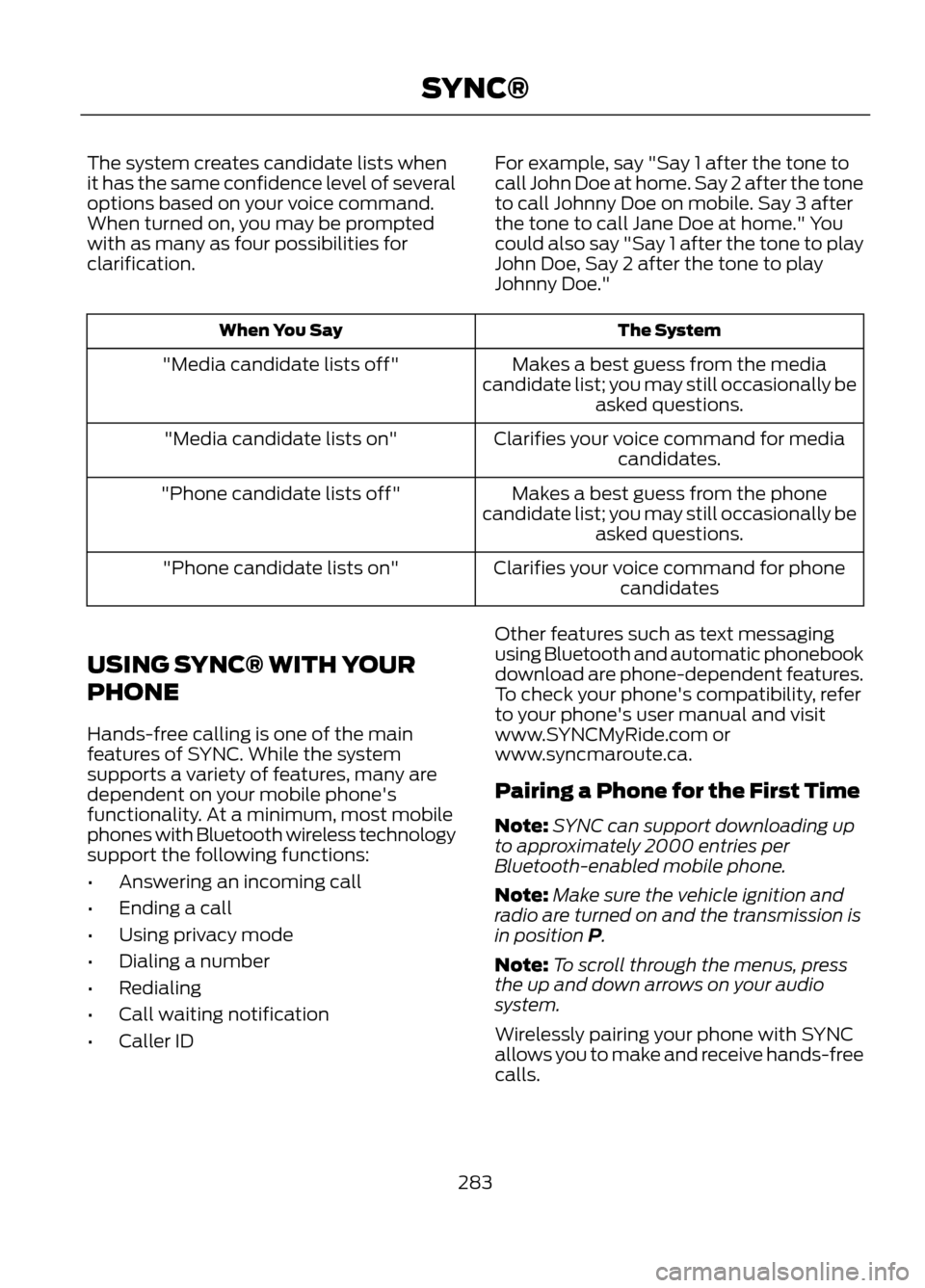
The system creates candidate lists when
it has the same confidence level of several
options based on your voice command.
When turned on, you may be prompted
with as many as four possibilities for
clarification.For example, say "Say 1 after the tone to
call John Doe at home. Say 2 after the tone
to call Johnny Doe on mobile. Say 3 after
the tone to call Jane Doe at home." You
could also say "Say 1 after the tone to play
John Doe, Say 2 after the tone to play
Johnny Doe."
The System
When You Say
Makes a best guess from the media
candidate list; you may still occasionally be asked questions.
"Media candidate lists off"
Clarifies your voice command for mediacandidates.
"Media candidate lists on"
Makes a best guess from the phone
candidate list; you may still occasionally be asked questions.
"Phone candidate lists off"
Clarifies your voice command for phonecandidates
"Phone candidate lists on"
USING SYNC® WITH YOUR
PHONE
Hands-free calling is one of the main
features of SYNC. While the system
supports a variety of features, many are
dependent on your mobile phone's
functionality. At a minimum, most mobile
phones with Bluetooth wireless technology
support the following functions:
• Answering an incoming call
• Ending a call
• Using privacy mode
• Dialing a number
• Redialing
• Call waiting notification
• Caller ID Other features such as text messaging
using Bluetooth and automatic phonebook
download are phone-dependent features.
To check your phone's compatibility, refer
to your phone's user manual and visit
www.SYNCMyRide.com or
www.syncmaroute.ca.
Pairing a Phone for the First Time
Note:
SYNC can support downloading up
to approximately 2000 entries per
Bluetooth-enabled mobile phone.
Note: Make sure the vehicle ignition and
radio are turned on and the transmission is
in position P.
Note: To scroll through the menus, press
the up and down arrows on your audio
system.
Wirelessly pairing your phone with SYNC
allows you to make and receive hands-free
calls.
283
SYNC®
Page 284 of 423
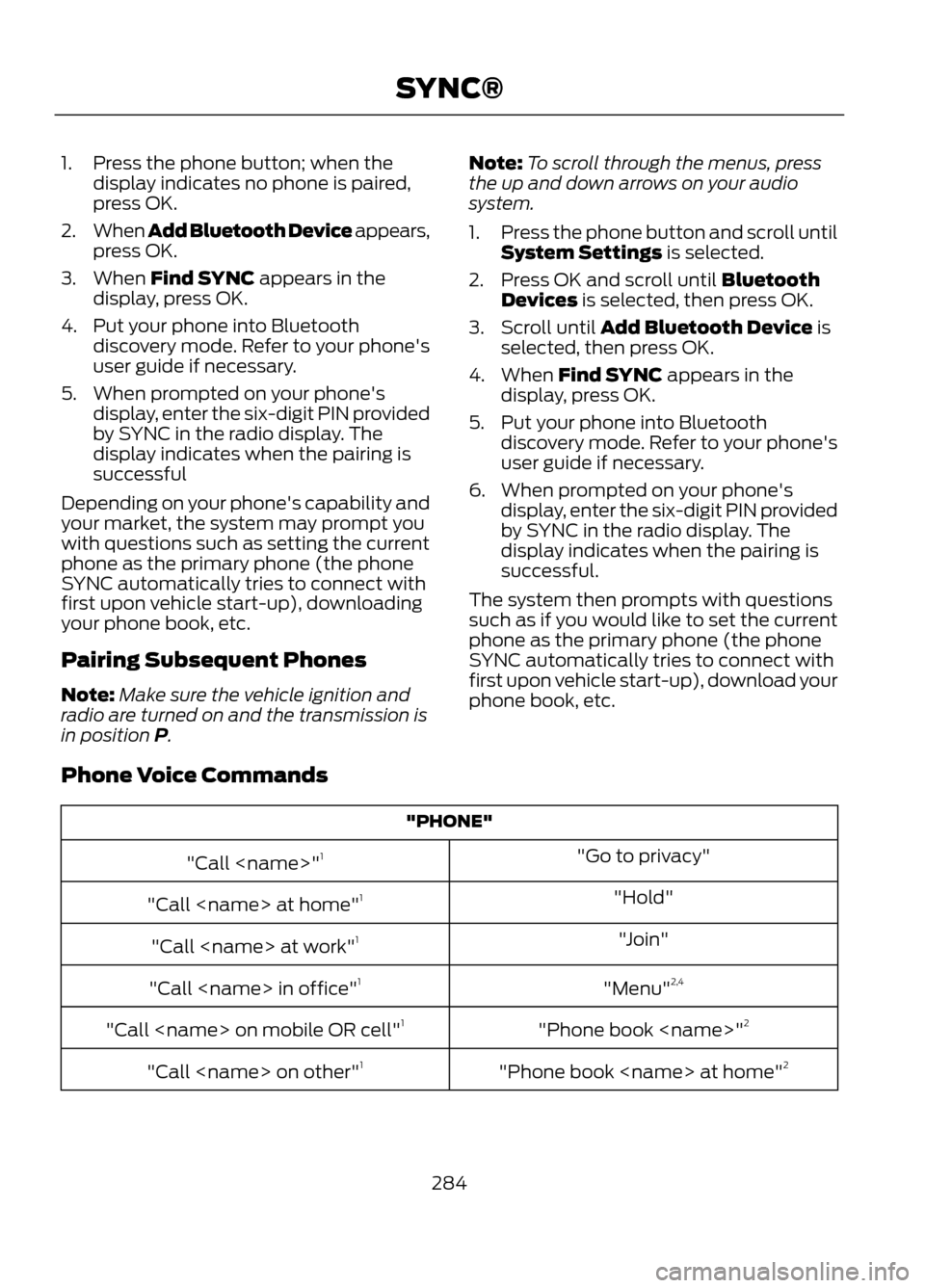
1. Press the phone button; when thedisplay indicates no phone is paired,
press OK.
2. When Add Bluetooth Device appears,
press OK.
3. When Find SYNC appears in the display, press OK.
4. Put your phone into Bluetooth discovery mode. Refer to your phone's
user guide if necessary.
5. When prompted on your phone's display, enter the six-digit PIN provided
by SYNC in the radio display. The
display indicates when the pairing is
successful
Depending on your phone's capability and
your market, the system may prompt you
with questions such as setting the current
phone as the primary phone (the phone
SYNC automatically tries to connect with
first upon vehicle start-up), downloading
your phone book, etc.
Pairing Subsequent Phones
Note: Make sure the vehicle ignition and
radio are turned on and the transmission is
in position P. Note:
To scroll through the menus, press
the up and down arrows on your audio
system.
1. Press the phone button and scroll until
System Settings is selected.
2. Press OK and scroll until Bluetooth Devices is selected, then press OK.
3. Scroll until Add Bluetooth Device is selected, then press OK.
4. When Find SYNC appears in the display, press OK.
5. Put your phone into Bluetooth discovery mode. Refer to your phone's
user guide if necessary.
6. When prompted on your phone's display, enter the six-digit PIN provided
by SYNC in the radio display. The
display indicates when the pairing is
successful.
The system then prompts with questions
such as if you would like to set the current
phone as the primary phone (the phone
SYNC automatically tries to connect with
first upon vehicle start-up), download your
phone book, etc.
Phone Voice Commands
"PHONE" "Go to privacy"
"Call
"Hold"
"Call
"Join"
"Call
"Menu"2,4
"Call
"Phone book
"Call
"Phone book
"Call
284
SYNC®