reset FORD ESCAPE 2013 3.G Owner's Manual
[x] Cancel search | Manufacturer: FORD, Model Year: 2013, Model line: ESCAPE, Model: FORD ESCAPE 2013 3.GPages: 423, PDF Size: 4.59 MB
Page 227 of 423
When a battery replacement is required,
the battery should only be replaced with
a Ford recommended replacement battery
that matches the electrical requirements
of the vehicle.
When the battery is disconnected or a new
battery installed, the automatic
transmission must relearn its adaptive
strategy. As a result of this, the
transmission may shift firmly when first
driven. This operation is considered normal
and will fully update transmission
operation to its optimum shift feel.
If the battery has been disconnected or a
new battery has been installed, the clock
and the preset radio stations must be reset
once the battery is reconnected.
Note:Always dispose of automotive
batteries in a responsible manner. Follow
your local authorized standards for disposal.
Call your local authorized recycling center
to find out more about recycling automotive
batteries.
CHECKING THE WIPER
BLADES
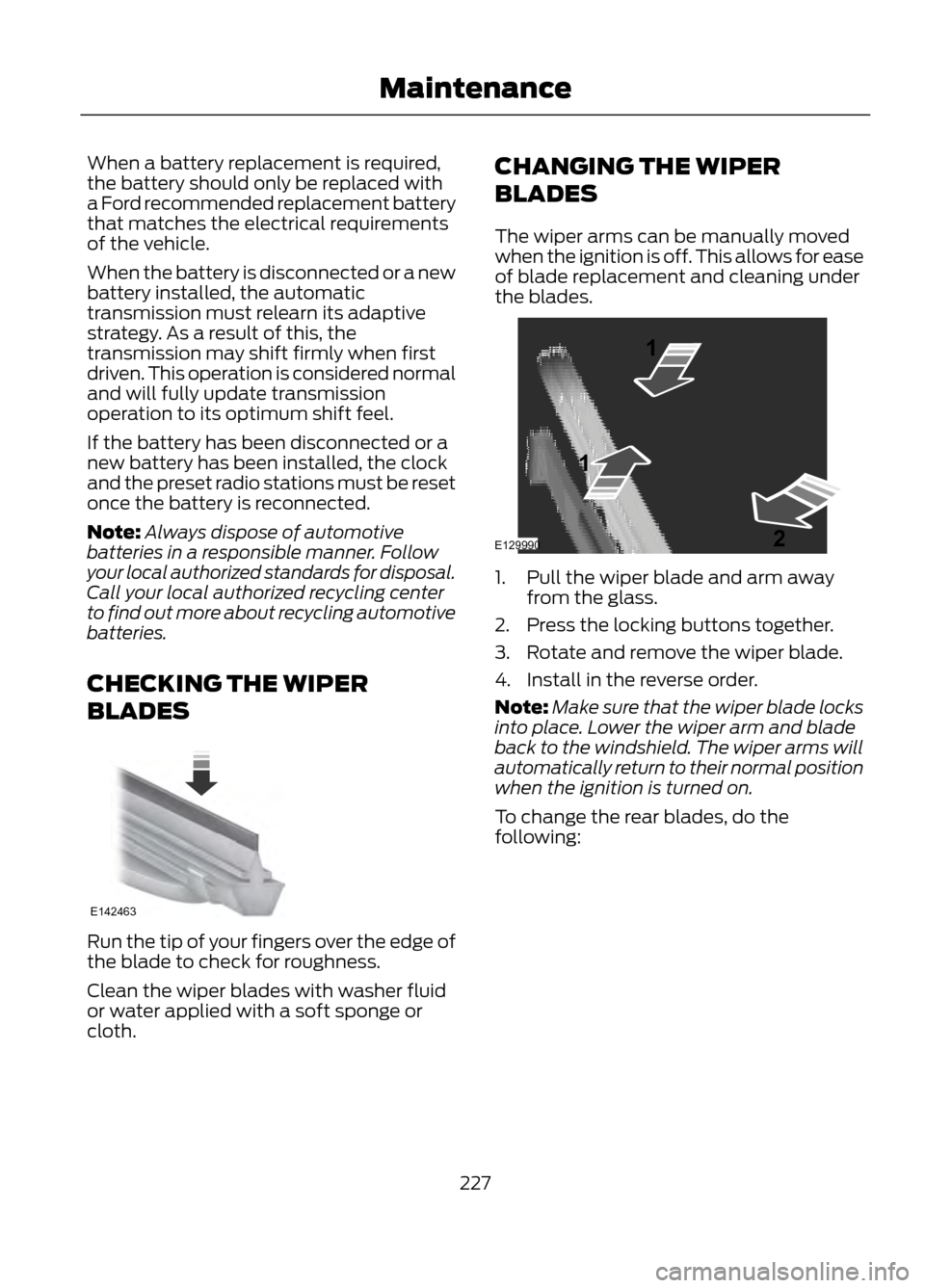
Run the tip of your fingers over the edge of
the blade to check for roughness.
Clean the wiper blades with washer fluid
or water applied with a soft sponge or
cloth. CHANGING THE WIPER
BLADES
The wiper arms can be manually moved
when the ignition is off. This allows for ease
of blade replacement and cleaning under
the blades.
1. Pull the wiper blade and arm away
from the glass.
2. Press the locking buttons together.
3. Rotate and remove the wiper blade.
4. Install in the reverse order.
Note: Make sure that the wiper blade locks
into place. Lower the wiper arm and blade
back to the windshield. The wiper arms will
automatically return to their normal position
when the ignition is turned on.
To change the rear blades, do the
following:
227
Maintenance
E142463
E129990
1
1 2
Page 241 of 423
Body
•Wash vehicle thoroughly to remove
dirt, grease, oil, tar or mud from exterior
surfaces, rear-wheel housing and
underside of front fenders.
• Periodically wash vehicles stored in
exposed locations.
• Touch-up raw or primed metal to
prevent rust
• Cover chrome and stainless steel parts
with a thick coat of auto wax to prevent
discoloration. Re-wax as necessary
when the vehicle is washed.
• Lubricate all hood, door and trunk lid
hinges, and latches with a light grade
oil.
• Cover interior trim to prevent fading.
• Keep all rubber parts free from oil and
solvents.
Engine
• The engine oil and filter should be
changed prior to storage, as used
engine oil contain contaminates that
may cause engine damage.
• Start the engine every 15 days. Run at
fast idle until it reaches normal
operating temperature
• With your foot on the brake, shift
through all the gears while the engine
is running.
Fuel system
• Fill the fuel tank with high-quality fuel
until the first automatic shutoff of the
fuel pump nozzle. Note:
During extended periods of vehicle
storage (30 days or more), fuel may
deteriorate due to oxidation. Add a quality
gas stabilizer product to the vehicle fuel
system whenever actual or expected
storage periods exceed 30 days. Follow the
instructions on the additive label. The
vehicle should then be operated at idle
speed to circulate the additive throughout
the fuel system.
Cooling system
• Protect against freezing temperatures.
• When removing vehicle from storage,
check coolant fluid level. Confirm there
are no cooling system leaks, and fluid
is at the recommended level.
Battery
• Check and recharge as necessary. Keep
connections clean.
• If storing your vehicle for more than 30
days without recharging the battery, it
may be advisable to disconnect the
battery cables to ensure battery charge
is maintained for quick starting.
Note: If battery cables are disconnected, it
will be necessary to reset memory features.
Brakes
• Make sure brakes and parking brake
are fully released.
Tires
• Maintain recommended air pressure.
Miscellaneous
• Make sure all linkages, cables, levers
and pins under vehicle are covered with
grease to prevent rust.
• Move vehicles at least 25 feet (8
meters) every 15 days to lubricate
working parts and prevent corrosion.
241
Vehicle Care
Page 280 of 423
Driving Restrictions
For your safety, certain features are
speed-dependent and restricted when your
vehicle is traveling over 3 mph (5 km/h).
Safety Information
WARNING
Driving while distracted can result in
loss of vehicle control, accident and
injury. Ford strongly recommends
that drivers use extreme caution when
using any device that may take their focus
off the road. Your primary responsibility is
the safe operation of the vehicle. We
recommend against the use of any
handheld device while driving, encourage
the use of voice-operated systems when
possible and that you become aware of
applicable state and local laws that may
affect use of electronic devices while
driving.
When using SYNC:
• Do not operate playing devices if the
power cords or cables are broken, split
or damaged. Carefully place cords and
cables where they cannot be stepped
on or interfere with the operation of
pedals, seats, compartments or safe
driving abilities.
• Do not leave playing devices in the
vehicle during extreme conditions as it
could cause them damage. Refer to
your device's user guide for further
information.
• Do not attempt to service or repair the
system. See your authorized dealer. Privacy Information
When a mobile phone is connected to
SYNC, the system creates a profile within
your vehicle that is linked to that mobile
phone. This profile is created in order to
offer you more mobile features and to
operate more efficiently. Among other
things, this profile may contain data about
your mobile phone book, text messages
(read and unread), and call history,
including history of calls when your mobile
phone was not connected to the system.
In addition, if you connect a media device,
the system creates and retains an index of
supported media content. The system also
records a short development log of
approximately 10 minutes of all recent
system activity. The log profile and other
system data may be used to improve the
system and help diagnose any problems
that may occur.
The mobile profile, media device index, and
development log will remain in the vehicle
unless you delete it and are generally
accessible only in the vehicle when the
mobile phone or media player is
connected. If you no longer plan to use the
system or the vehicle, we recommend you
perform a Master Reset to erase all stored
information.
280
SYNC®
Page 289 of 423
You Can
When You Select
Place an emergency call to a 911 operator for you after an
accident (if the feature is used properly).
911 Assist
4
Create and receive a diagnostic report card on your vehicle.
Vehicle Health Report 3
Interact with SYNC-capable mobile applications on your
smartphone.
Mobile Apps
3
Access Bluetooth Devices menu listings (add, connect,
set as primary, on/off, delete) as well as Advanced menu
listings (prompts, languages, defaults, master reset, install
application and system information).
System Settings
Exit the phone menu by pressing OK.
Exit Phone Menu
1 This is a phone-dependent feature.
2 This is a phone-dependent and speed-dependent feature.
3 If equipped, U.S. only.
4 If equipped, U.S. and Canada only.
Text Messaging
Note: This is a phone-dependent feature.
SYNC allows you to receive, send,
download and delete text messages. The
system can also read incoming text
messages to you so that you do not have
to take your eyes off the road.
Receiving a Text Message
Note: This is a phone-dependent feature.
Your phone must support downloading text
messages using Bluetooth to receive
incoming text messages.
Note: Forwarding a text message is a
speed-dependent feature and can only be
done when the vehicle is traveling at 3 mph
(5 km/h) or less.
Note: Only one recipient is allowed per text
message.
289
SYNC®
Page 292 of 423
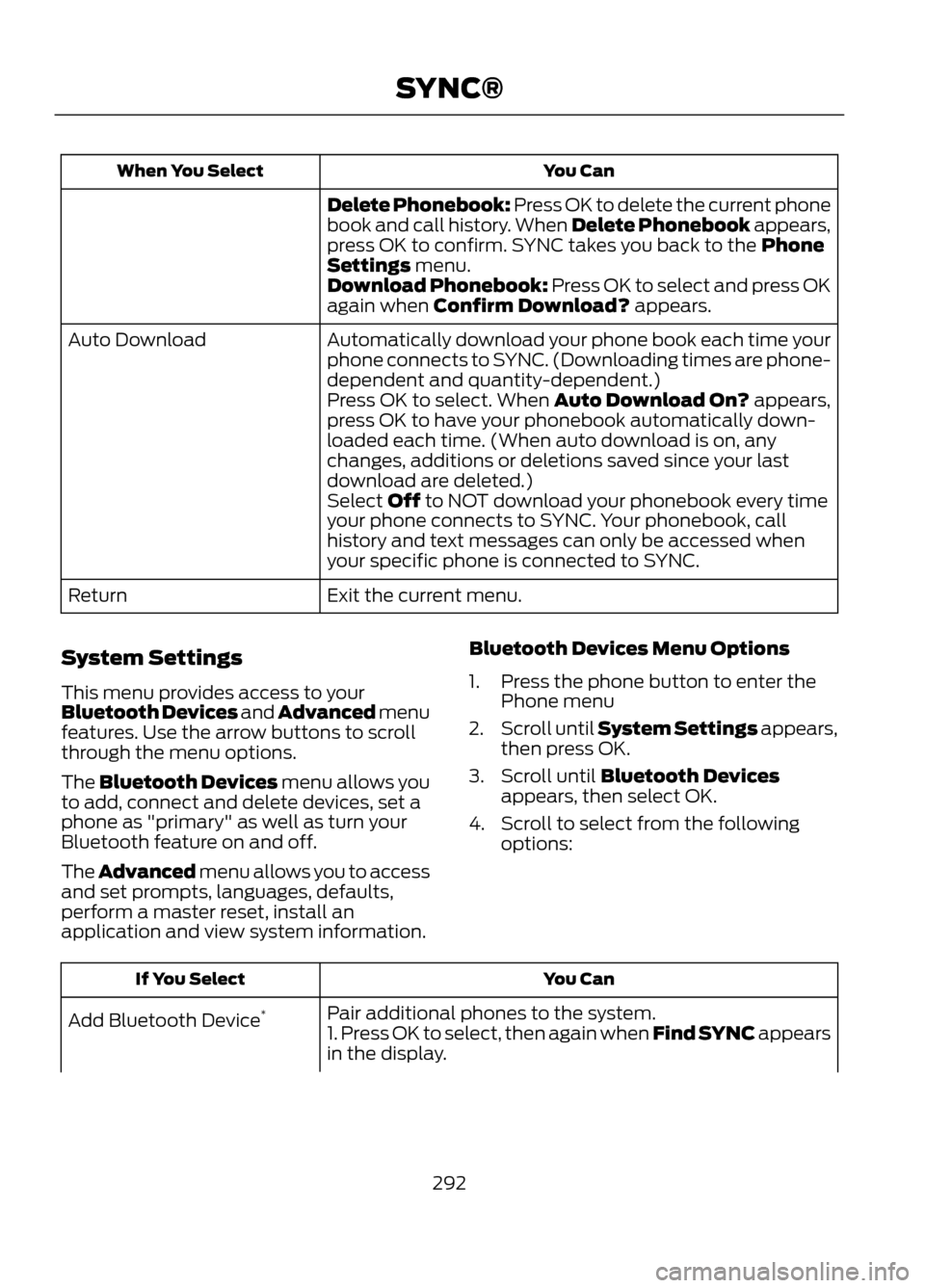
You Can
When You Select
Delete Phonebook: Press OK to delete the current phone
book and call history. When Delete Phonebook appears,
press OK to confirm. SYNC takes you back to the Phone
Settings menu.
Download Phonebook: Press OK to select and press OK
again when Confirm Download? appears.
Automatically download your phone book each time your
phone connects to SYNC. (Downloading times are phone-
dependent and quantity-dependent.)
Auto Download
Press OK to select. When Auto Download On? appears,
press OK to have your phonebook automatically down-
loaded each time. (When auto download is on, any
changes, additions or deletions saved since your last
download are deleted.)
Select Off to NOT download your phonebook every time
your phone connects to SYNC. Your phonebook, call
history and text messages can only be accessed when
your specific phone is connected to SYNC.
Exit the current menu.
Return
System Settings
This menu provides access to your
Bluetooth Devices and Advanced menu
features. Use the arrow buttons to scroll
through the menu options.
The Bluetooth Devices menu allows you
to add, connect and delete devices, set a
phone as "primary" as well as turn your
Bluetooth feature on and off.
The Advanced menu allows you to access
and set prompts, languages, defaults,
perform a master reset, install an
application and view system information. Bluetooth Devices Menu Options
1. Press the phone button to enter the
Phone menu
2. Scroll until System Settings appears,
then press OK.
3. Scroll until Bluetooth Devices appears, then select OK.
4. Scroll to select from the following options:
You Can
If You Select
Pair additional phones to the system.
Add Bluetooth Device *
1. Press OK to select, then again when Find SYNC appears
in the display.
292
SYNC®
Page 294 of 423
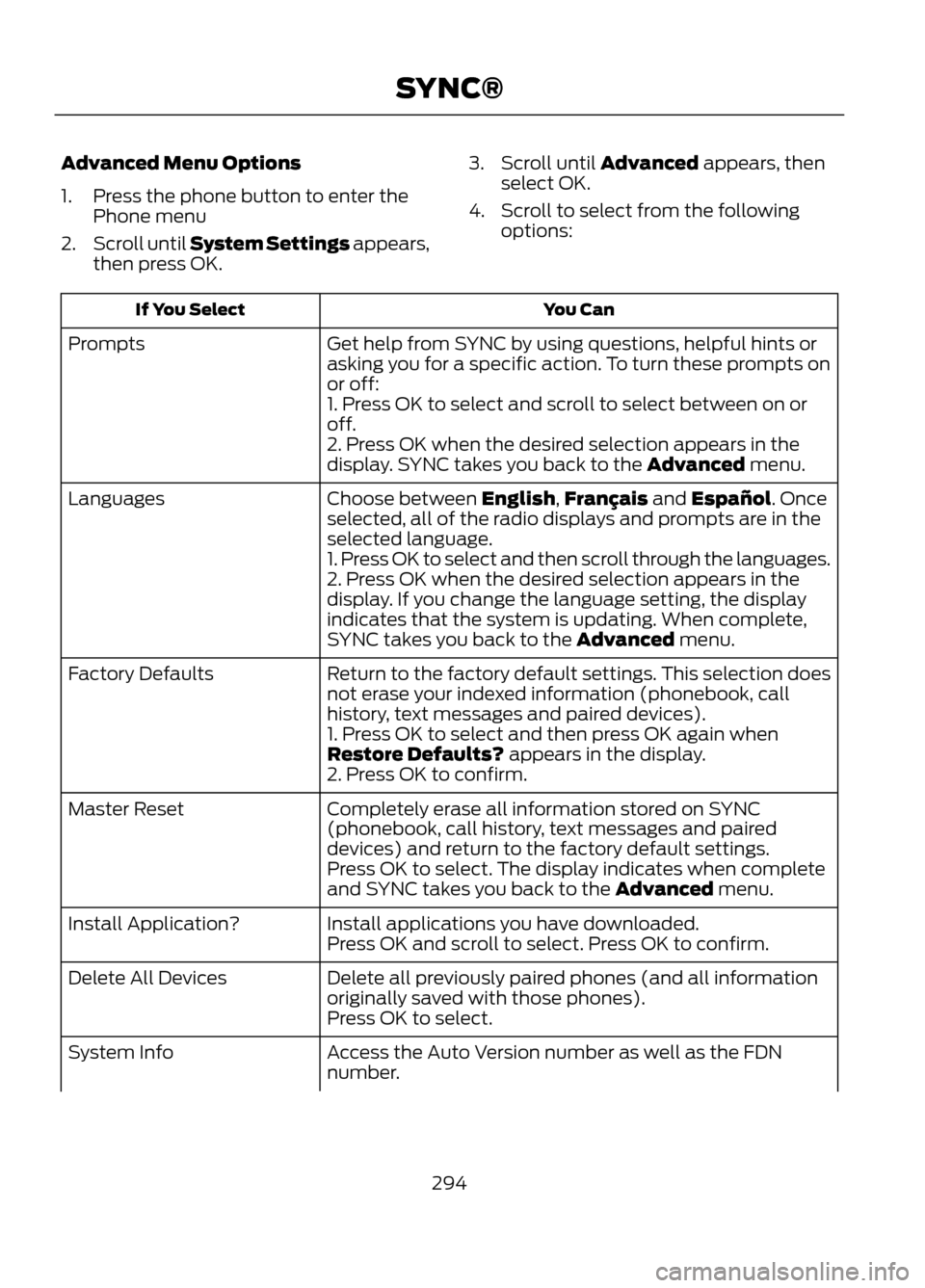
Advanced Menu Options
1. Press the phone button to enter thePhone menu
2. Scroll until System Settings appears,
then press OK. 3. Scroll until Advanced appears, then
select OK.
4. Scroll to select from the following options:
You Can
If You Select
Get help from SYNC by using questions, helpful hints or
asking you for a specific action. To turn these prompts on
or off:
Prompts
1. Press OK to select and scroll to select between on or
off.
2. Press OK when the desired selection appears in the
display. SYNC takes you back to the Advanced menu.
Choose between English,Français and Español. Once
selected, all of the radio displays and prompts are in the
selected language.
Languages
1. Press OK to select and then scroll through the languages.
2. Press OK when the desired selection appears in the
display. If you change the language setting, the display
indicates that the system is updating. When complete,
SYNC takes you back to the Advanced menu.
Return to the factory default settings. This selection does
not erase your indexed information (phonebook, call
history, text messages and paired devices).
Factory Defaults
1. Press OK to select and then press OK again when
Restore Defaults? appears in the display.
2. Press OK to confirm.
Completely erase all information stored on SYNC
(phonebook, call history, text messages and paired
devices) and return to the factory default settings.
Master Reset
Press OK to select. The display indicates when complete
and SYNC takes you back to the Advanced menu.
Install applications you have downloaded.
Install Application?
Press OK and scroll to select. Press OK to confirm.
Delete all previously paired phones (and all information
originally saved with those phones).
Delete All Devices
Press OK to select.
Access the Auto Version number as well as the FDN
number.
System Info
294
SYNC®
Page 304 of 423
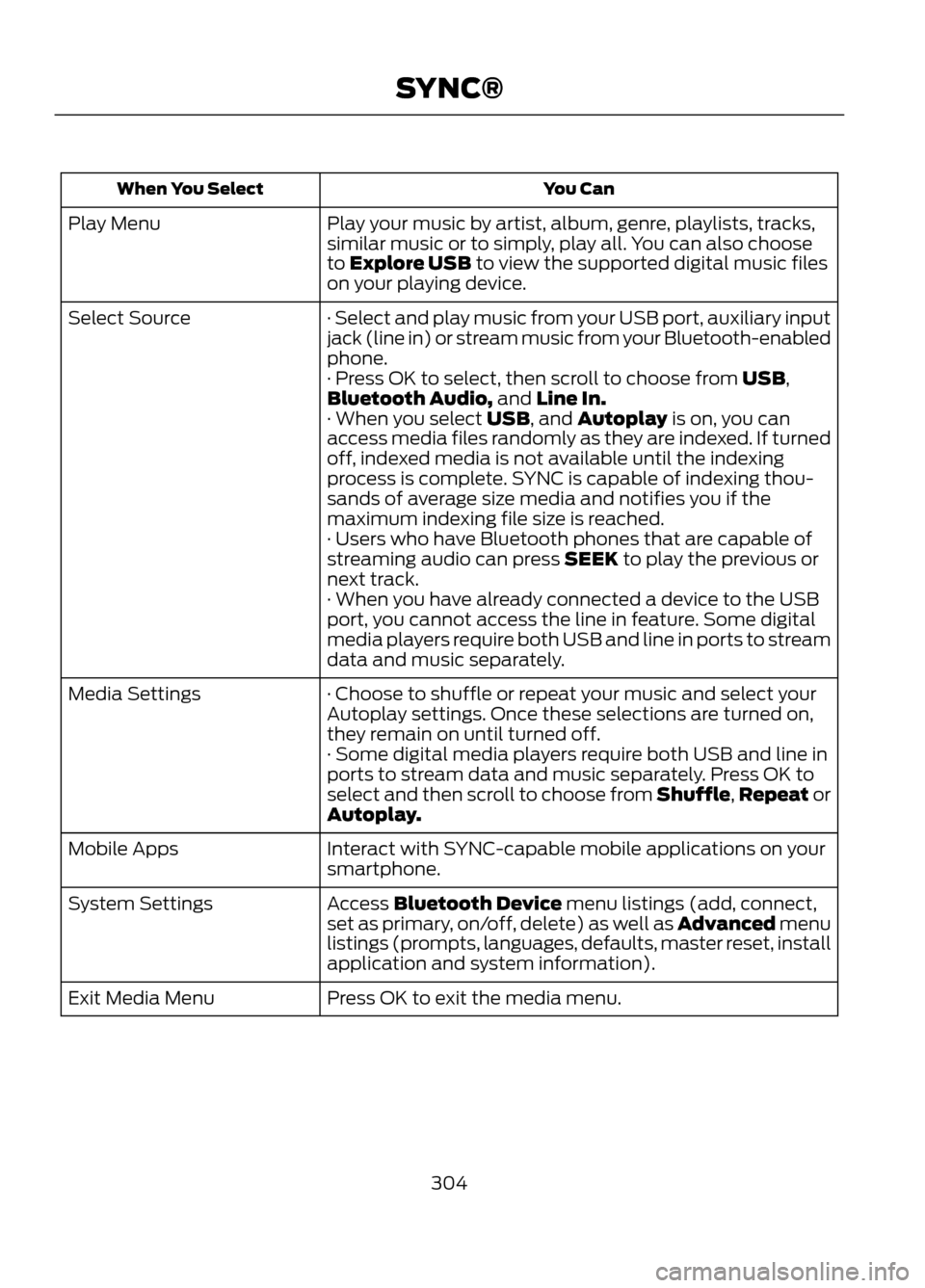
You Can
When You Select
Play your music by artist, album, genre, playlists, tracks,
similar music or to simply, play all. You can also choose
to Explore USB to view the supported digital music files
on your playing device.
Play Menu
· Select and play music from your USB port, auxiliary input
jack (line in) or stream music from your Bluetooth-enabled
phone.
Select Source
· Press OK to select, then scroll to choose from USB,
Bluetooth Audio, and Line In.
· When you select USB, and Autoplay is on, you can
access media files randomly as they are indexed. If turned
off, indexed media is not available until the indexing
process is complete. SYNC is capable of indexing thou-
sands of average size media and notifies you if the
maximum indexing file size is reached.
· Users who have Bluetooth phones that are capable of
streaming audio can press SEEK to play the previous or
next track.
· When you have already connected a device to the USB
port, you cannot access the line in feature. Some digital
media players require both USB and line in ports to stream
data and music separately.
· Choose to shuffle or repeat your music and select your
Autoplay settings. Once these selections are turned on,
they remain on until turned off.
Media Settings
· Some digital media players require both USB and line in
ports to stream data and music separately. Press OK to
select and then scroll to choose from Shuffle, Repeat or
Autoplay.
Interact with SYNC-capable mobile applications on your
smartphone.
Mobile Apps
Access Bluetooth Device menu listings (add, connect,
set as primary, on/off, delete) as well as Advanced menu
listings (prompts, languages, defaults, master reset, install
application and system information).
System Settings
Press OK to exit the media menu.
Exit Media Menu
304
SYNC®
Page 306 of 423
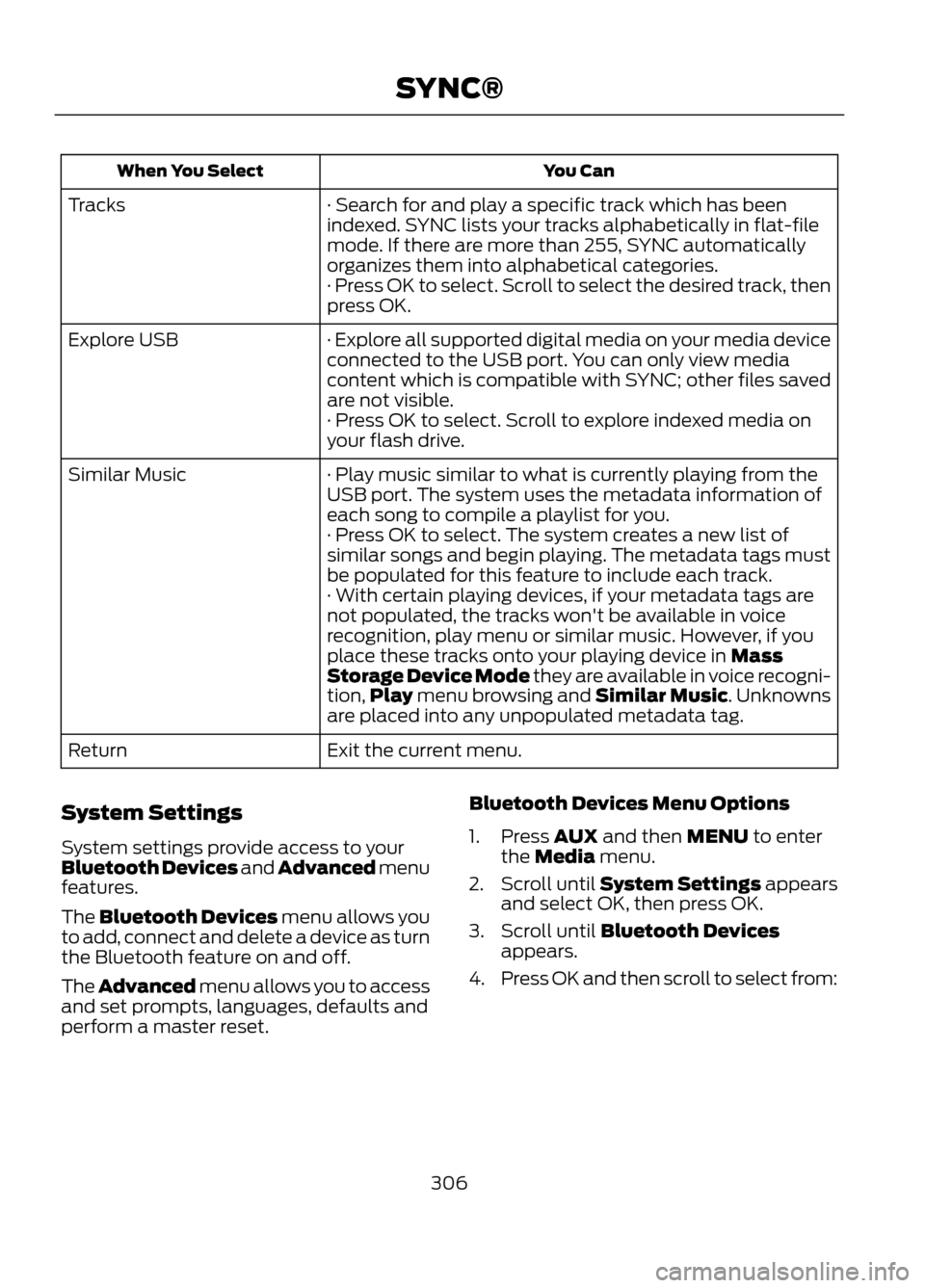
You Can
When You Select
· Search for and play a specific track which has been
indexed. SYNC lists your tracks alphabetically in flat-file
mode. If there are more than 255, SYNC automatically
organizes them into alphabetical categories.
Tracks
· Press OK to select. Scroll to select the desired track, then
press OK.
· Explore all supported digital media on your media device
connected to the USB port. You can only view media
content which is compatible with SYNC; other files saved
are not visible.
Explore USB
· Press OK to select. Scroll to explore indexed media on
your flash drive.
· Play music similar to what is currently playing from the
USB port. The system uses the metadata information of
each song to compile a playlist for you.
Similar Music
· Press OK to select. The system creates a new list of
similar songs and begin playing. The metadata tags must
be populated for this feature to include each track.
· With certain playing devices, if your metadata tags are
not populated, the tracks won't be available in voice
recognition, play menu or similar music. However, if you
place these tracks onto your playing device in Mass
Storage Device Mode they are available in voice recogni-
tion,Play menu browsing and Similar Music. Unknowns
are placed into any unpopulated metadata tag.
Exit the current menu.
Return
System Settings
System settings provide access to your
Bluetooth Devices and Advanced menu
features.
The Bluetooth Devices menu allows you
to add, connect and delete a device as turn
the Bluetooth feature on and off.
The Advanced menu allows you to access
and set prompts, languages, defaults and
perform a master reset. Bluetooth Devices Menu Options
1. Press AUX and then MENU to enter
the Media menu.
2. Scroll until System Settings appears
and select OK, then press OK.
3. Scroll until Bluetooth Devices appears.
4. Press OK and then scroll to select from:
306
SYNC®
Page 308 of 423
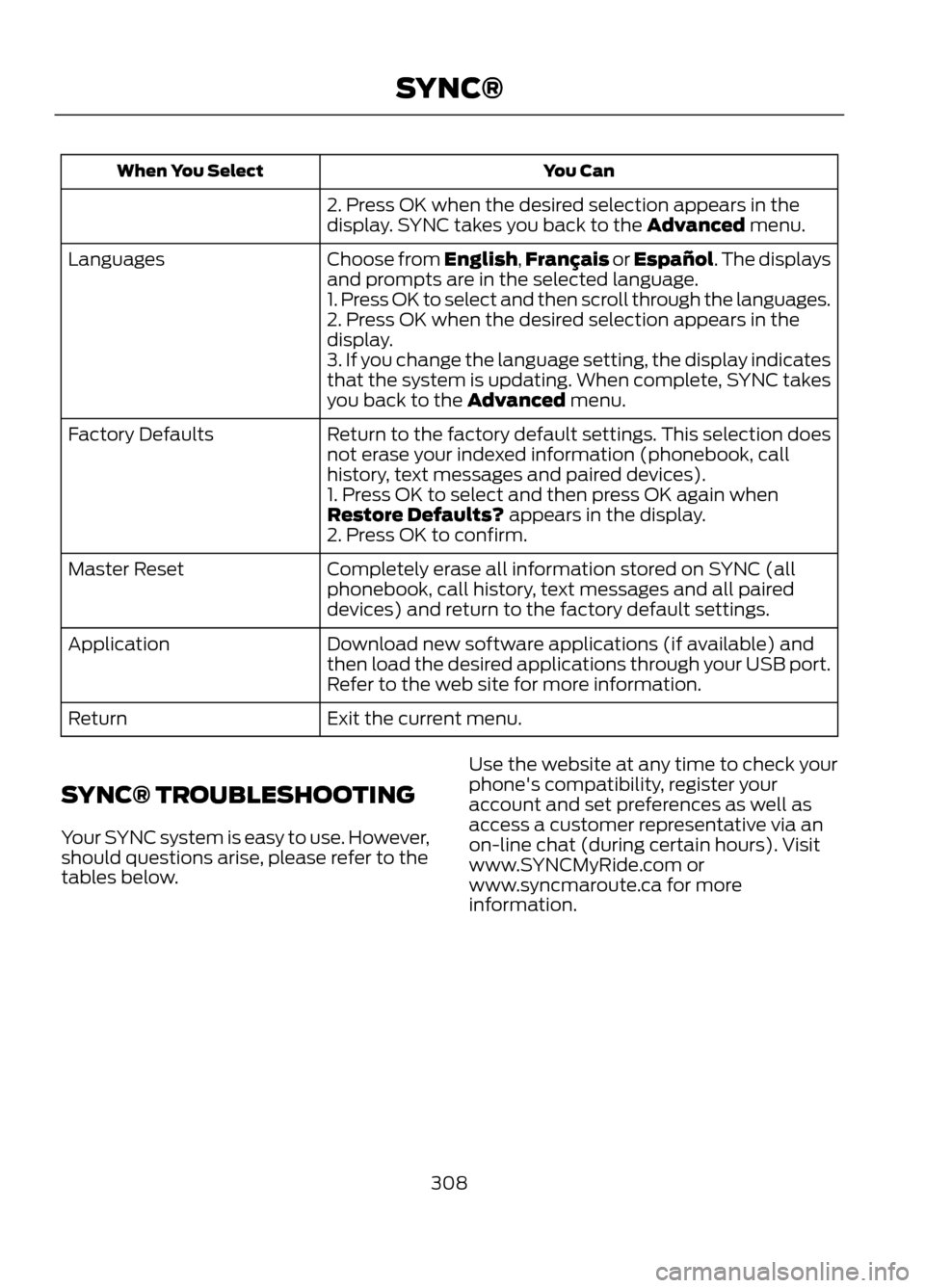
You Can
When You Select
2. Press OK when the desired selection appears in the
display. SYNC takes you back to the Advanced menu.
Choose from English,Français or Español. The displays
and prompts are in the selected language.
Languages
1. Press OK to select and then scroll through the languages.
2. Press OK when the desired selection appears in the
display.
3. If you change the language setting, the display indicates
that the system is updating. When complete, SYNC takes
you back to the Advanced menu.
Return to the factory default settings. This selection does
not erase your indexed information (phonebook, call
history, text messages and paired devices).
Factory Defaults
1. Press OK to select and then press OK again when
Restore Defaults? appears in the display.
2. Press OK to confirm.
Completely erase all information stored on SYNC (all
phonebook, call history, text messages and all paired
devices) and return to the factory default settings.
Master Reset
Download new software applications (if available) and
then load the desired applications through your USB port.
Refer to the web site for more information.
Application
Exit the current menu.
Return
SYNC® TROUBLESHOOTING
Your SYNC system is easy to use. However,
should questions arise, please refer to the
tables below. Use the website at any time to check your
phone's compatibility, register your
account and set preferences as well as
access a customer representative via an
on-line chat (during certain hours). Visit
www.SYNCMyRide.com or
www.syncmaroute.ca for more
information.
308
SYNC®
Page 309 of 423
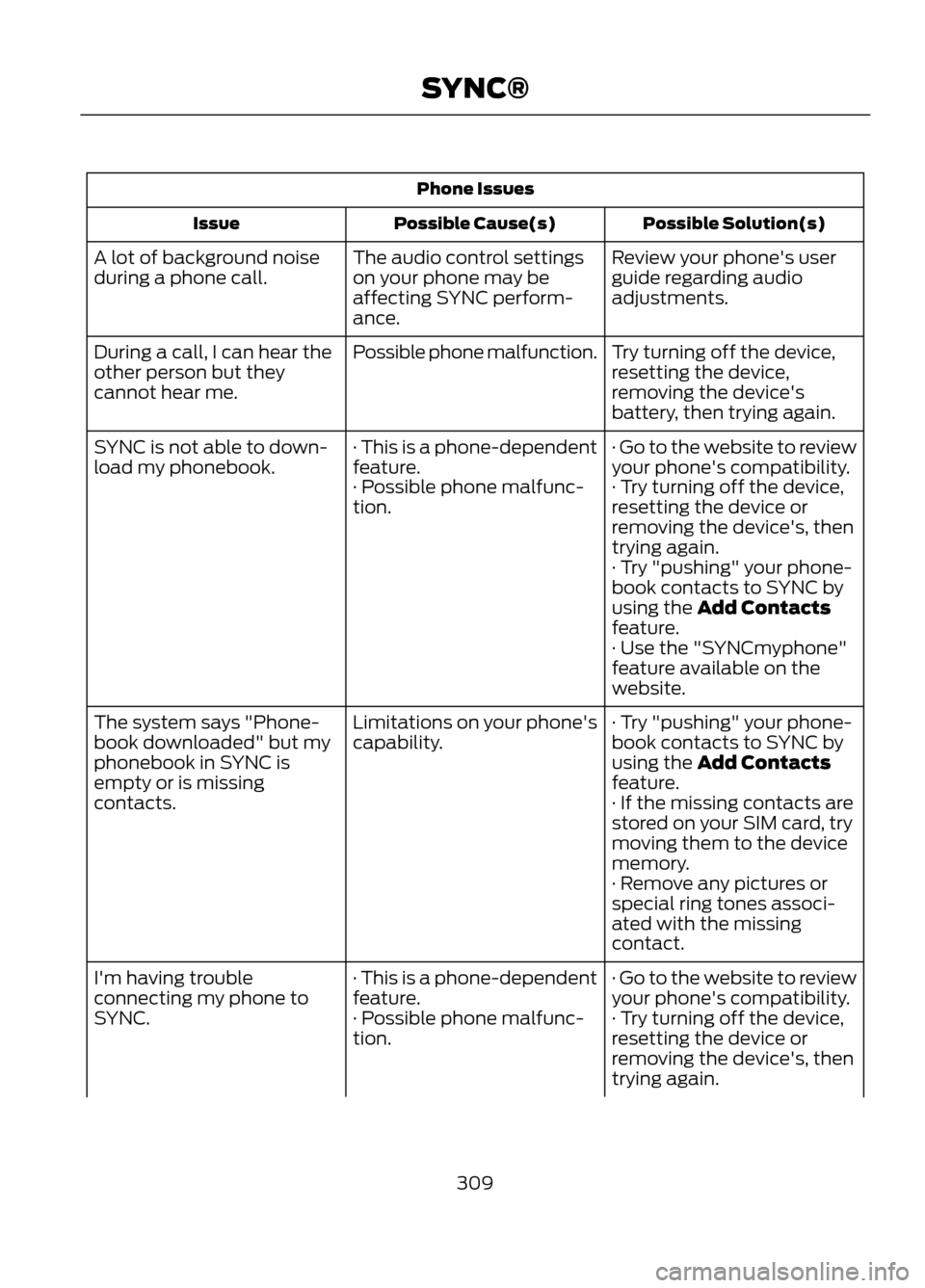
Phone IssuesPossible Solution(s)
Possible Cause(s)
Issue
Review your phone's user
guide regarding audio
adjustments.
The audio control settings
on your phone may be
affecting SYNC perform-
ance.
A lot of background noise
during a phone call.
Try turning off the device,
resetting the device,
removing the device's
battery, then trying again.
Possible phone malfunction.
During a call, I can hear the
other person but they
cannot hear me.
· Go to the website to review
your phone's compatibility.
· This is a phone-dependent
feature.
SYNC is not able to down-
load my phonebook.
· Try turning off the device,
resetting the device or
removing the device's, then
trying again.
· Possible phone malfunc-
tion.
· Try "pushing" your phone-
book contacts to SYNC by
using the Add Contacts
feature.
· Use the "SYNCmyphone"
feature available on the
website.
· Try "pushing" your phone-
book contacts to SYNC by
using the Add Contacts
feature.
Limitations on your phone's
capability.
The system says "Phone-
book downloaded" but my
phonebook in SYNC is
empty or is missing
contacts.
· If the missing contacts are
stored on your SIM card, try
moving them to the device
memory.
· Remove any pictures or
special ring tones associ-
ated with the missing
contact.
· Go to the website to review
your phone's compatibility.
· This is a phone-dependent
feature.
I'm having trouble
connecting my phone to
SYNC.
· Try turning off the device,
resetting the device or
removing the device's, then
trying again.
· Possible phone malfunc-
tion.
309
SYNC®