belt FORD ESCAPE 2013 3.G Owner's Guide
[x] Cancel search | Manufacturer: FORD, Model Year: 2013, Model line: ESCAPE, Model: FORD ESCAPE 2013 3.GPages: 423, PDF Size: 4.59 MB
Page 57 of 423
MANUAL LIFTGATE
WARNINGS
It is extremely dangerous to ride in a
cargo area, inside or outside of a
vehicle. In a collision, people riding in
these areas are more likely to be seriously
injured or killed. Do not allow people to ride
in any area of your vehicle that is not
equipped with seats and safety belts. Be
sure everyone in your vehicle is in a seat
and using a safety belt properly.
Make sure that the liftgate is closed
to prevent exhaust fumes from being
drawn into the vehicle. This will also
prevent passengers and cargo from falling
out. If you must drive with the liftgate door
open, keep the vehicle well ventilated so
outside air comes into the vehicle.
Note: Be careful when opening or closing
the liftgate in a garage or other enclosed
area to avoid damaging the liftgate.
Note: Do not hang anything (bike rack, etc.)
from the spoiler, glass or liftgate. This could
damage the liftgate and its components.
Note: Do not leave the liftgate open while
driving. This could damage the liftgate and
its components.
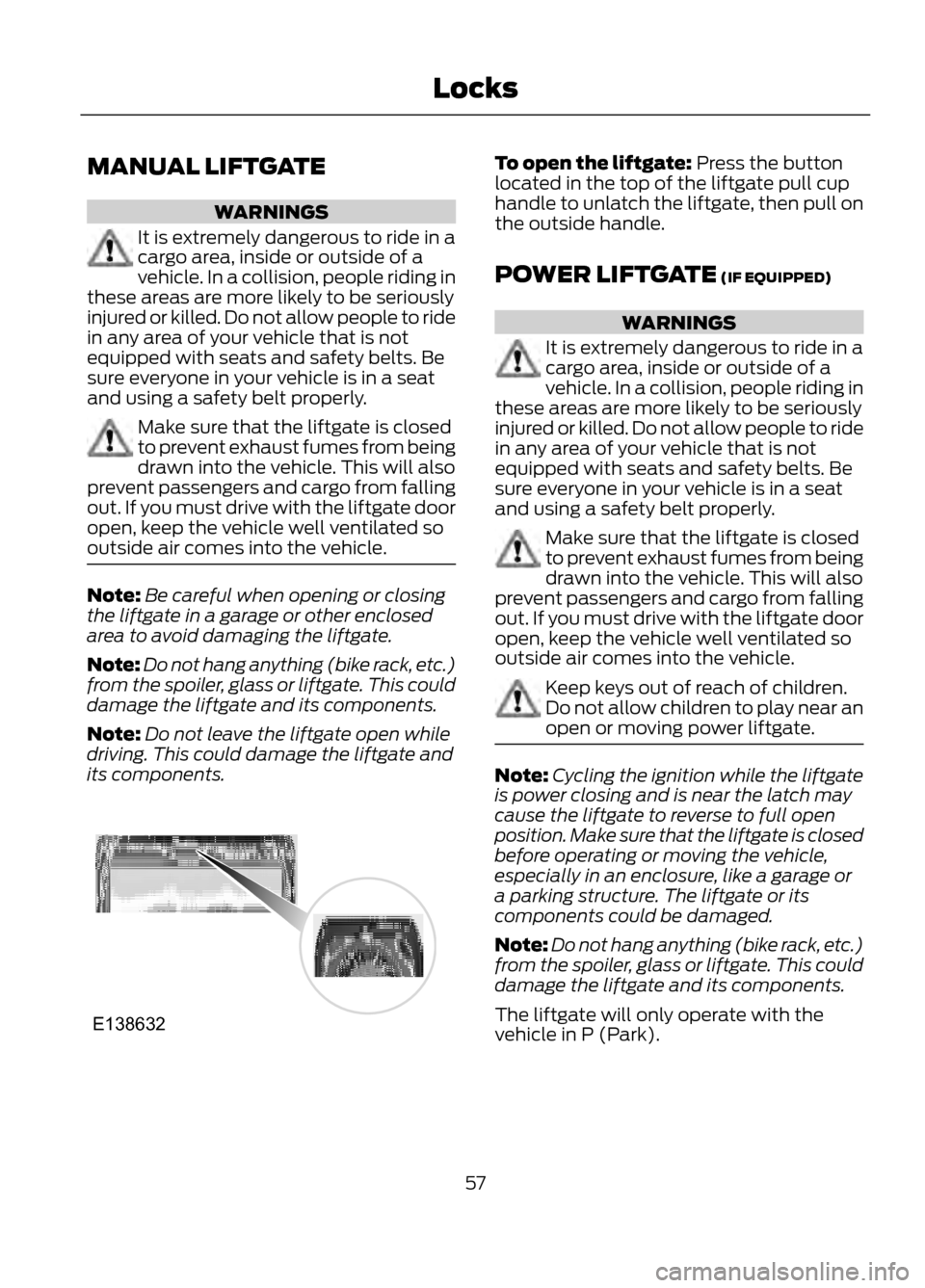
To open the liftgate: Press the button
located in the top of the liftgate pull cup
handle to unlatch the liftgate, then pull on
the outside handle.
POWER LIFTGATE (IF EQUIPPED)
WARNINGS
It is extremely dangerous to ride in a
cargo area, inside or outside of a
vehicle. In a collision, people riding in
these areas are more likely to be seriously
injured or killed. Do not allow people to ride
in any area of your vehicle that is not
equipped with seats and safety belts. Be
sure everyone in your vehicle is in a seat
and using a safety belt properly.
Make sure that the liftgate is closed
to prevent exhaust fumes from being
drawn into the vehicle. This will also
prevent passengers and cargo from falling
out. If you must drive with the liftgate door
open, keep the vehicle well ventilated so
outside air comes into the vehicle.
Keep keys out of reach of children.
Do not allow children to play near an
open or moving power liftgate.
Note: Cycling the ignition while the liftgate
is power closing and is near the latch may
cause the liftgate to reverse to full open
position. Make sure that the liftgate is closed
before operating or moving the vehicle,
especially in an enclosure, like a garage or
a parking structure. The liftgate or its
components could be damaged.
Note: Do not hang anything (bike rack, etc.)
from the spoiler, glass or liftgate. This could
damage the liftgate and its components.
The liftgate will only operate with the
vehicle in P (Park).
57
Locks
E138632
Page 81 of 423
Battery
If it illuminates while driving, it
indicates a malfunction. Switch
off all unnecessary electrical
equipment and have the system checked
by your authorized dealer immediately.
Blind Spot Monitor (If Equipped)
It will illuminate when you switch
this feature off or in conjunction
with a message. See Blind Spot
Monitor (page 171). See Information
Messages (page 87).
Brake System
It will illuminate when you
engage the parking brake with
the ignition on.
If it illuminates when you are driving, check
that the parking brake is not engaged. If
the parking brake is not engaged, this
indicates low brake fluid level or a brake
system malfunction. Have the system
checked immediately by your authorized
dealer.
WARNING
Driving your vehicle with the warning
lamp on is dangerous. A significant
decrease in braking performance
may occur. It will take you longer to stop
your vehicle. Have your vehicle checked by
your authorized dealer immediately. Driving
extended distances with the parking brake
engaged can cause brake failure and the
risk of personal injury.
Cruise Control (If Equipped)
It will illuminate when you switch
this feature on. See Using
Cruise Control (page 170). Direction Indicator
Illuminates when the left or right
turn signal or the hazard warning
flasher is turned on. If the
indicators stay on or flash faster, check for
a burned out bulb. See Changing a Bulb
(page 231).
Engine Oil
If it illuminates with the engine
running or when you are driving,
this indicates a malfunction.
Stop your vehicle as soon as it is safe to
do so and switch the engine off. Check the
engine oil level. See Engine Oil Check
(page 221).
Note: Do not resume your journey if it
illuminates despite the level being correct.
Have the system checked by your authorized
dealer immediately.
Fasten Safety Belt
It will illuminate and a chime will
sound to remind you to fasten
your safety belt. See Safety
Belt Minder (page 31).
Fog Lamps - Front (If Equipped)
It will illuminate when you switch
the front fog lamps on.
High Beam
It will illuminate when you switch
the high beam headlamps on. It
will flash when you use the
headlamp flasher.
81
Instrument Cluster
E124823
E138644
E71340
Page 92 of 423
Maintenance
Action
Message
Indicator
Message
Displays when the engine oil life is depleted and
requires a change. See Engine Oil Check (page221).
-
Engine oil change due
Indicates the brake fluid level is low and the
brake system should be inspected immediately. See Brake Fluid Check (page 225).
Red
Brake fluid level low
Service now
Displays when the washer fluid is low and needsto be refilled. See Washer Fluid Check (page 225).
-
Washer fluid level low
Displays when the fuel fill inlet was not properlyclosed. See Refueling (page 142).
-
Check fuel fill inlet
MyKey
Action
Message
Indicator
Message
Displays when MyKey is active.
-
MyKey active Drive
Safely
Displays when starting the vehicle and MyKeyis in use and the MyKey speed limit is on.
-
MyKey Speed Limited to
XX MPH/km/h
Displays when a MyKey is in use and the MyKeyspeed limit is on and the vehicle speed is approaching 80 mph (130 km/h).
Amber
MyKey Vehicle Near Top
Speed
Displays when a MyKey is in use and the MyKeyspeed limit is reached.
Amber
MyKey Vehicle at Top
Speed
Displays when MyKey is active.
-
MyKey Check Speed
Drive Safely
Displays when a MyKey is in use and Belt-Minder is activated.
-
MyKey Buckle Up to
Unmute Audio
Displays when a MyKey is in use and park aid isactivated.
-
MyKey Park aid cannot
be deactivated
92
Information Displays
Page 121 of 423
SITTING IN THE CORRECT
POSITION
WARNINGS
Sitting improperly, out of position or
with the seatback reclined too far
can take weight off the seat cushion
and affect the decision of the passenger
sensing system, resulting in serious injury
or death in the event of a collision. Always
sit upright against your seatback, with your
feet on the floor.
Do not recline the seatback as this
can cause the occupant to slide
under the safety belt, resulting in
serious injury in the event of a collision.
Do not place objects higher than the
seatback to reduce the risk of serious
injury in the event of a collision or
during heavy braking.
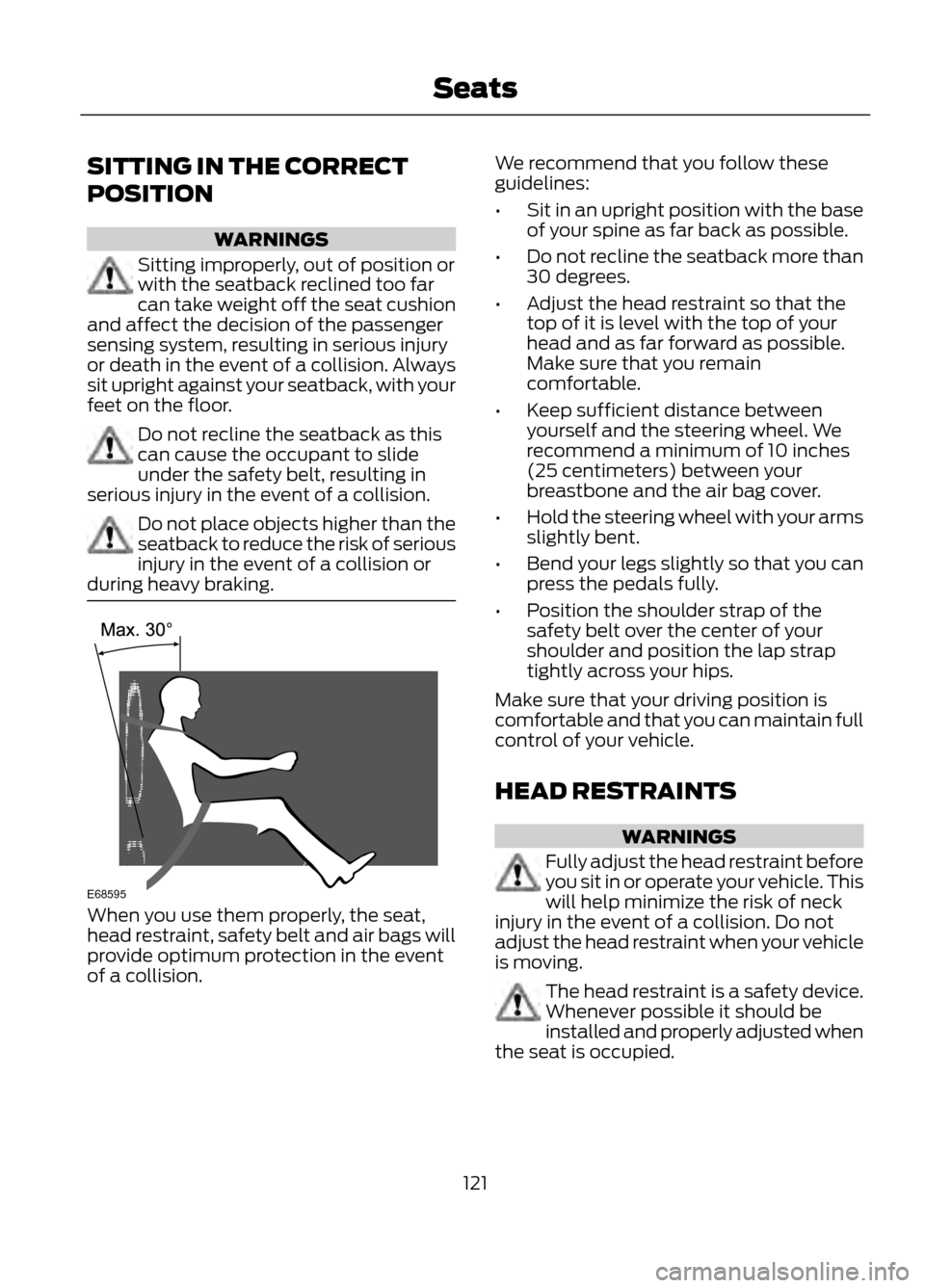
When you use them properly, the seat,
head restraint, safety belt and air bags will
provide optimum protection in the event
of a collision. We recommend that you follow these
guidelines:
•
Sit in an upright position with the base
of your spine as far back as possible.
• Do not recline the seatback more than
30 degrees.
• Adjust the head restraint so that the
top of it is level with the top of your
head and as far forward as possible.
Make sure that you remain
comfortable.
• Keep sufficient distance between
yourself and the steering wheel. We
recommend a minimum of 10 inches
(25 centimeters) between your
breastbone and the air bag cover.
• Hold the steering wheel with your arms
slightly bent.
• Bend your legs slightly so that you can
press the pedals fully.
• Position the shoulder strap of the
safety belt over the center of your
shoulder and position the lap strap
tightly across your hips.
Make sure that your driving position is
comfortable and that you can maintain full
control of your vehicle.
HEAD RESTRAINTS
WARNINGS
Fully adjust the head restraint before
you sit in or operate your vehicle. This
will help minimize the risk of neck
injury in the event of a collision. Do not
adjust the head restraint when your vehicle
is moving.
The head restraint is a safety device.
Whenever possible it should be
installed and properly adjusted when
the seat is occupied.
121
Seats
E68595
Page 137 of 423
Stopping the Engine When Your
Vehicle is Moving
1. Press and hold the START button fora moment, or press it three times within
two seconds.
2. Move the transmission selector lever to position N and use the brakes to
bring your vehicle to a safe stop.
3. When your vehicle has stopped, move the transmission selector lever to
position P and switch the ignition off.
WARNING
Switching off the engine when the
vehicle is still moving will result in a
loss of brake and steering assistance.
The steering will not lock, but higher effort
will be required. When the ignition is
switched off, some electrical circuits,
warning lamps and indicators may also be
off.
Fast Restart
The fast restart feature allows you to
restart your vehicle within 20 seconds of
switching it off, even if a valid key is not
present.
Within 20 seconds of switching your
vehicle off, press the brake pedal and press
the start button. After 20 seconds have
expired, you can no longer start your
vehicle without the key present inside the
vehicle.
Once your vehicle has started, it remains
running until you press the start button,
even if a valid key has not been detected.
If you open and close a door while your
vehicle is running, the system searches for
a valid key. You cannot start your vehicle
if a valid key is not detected within 20
seconds. STARTING A GASOLINE
ENGINE
When you start the engine the idle speed
will be increased to warm up the engine. If
the engine idle speed does not slow down
automatically, have your vehicle checked
by your authorized dealer.
Before starting the engine check the
following:
•
Make sure all occupants have fastened
their safety belts.
• Make sure the headlamps and
electrical accessories are off.
• Make sure the parking brake is on.
• Move the transmission selector lever
to position P.
• Turn the ignition key to position II.
Note: Do not touch the accelerator pedal.
1. Move the transmission selector lever to position P or N.
2. Fully press the brake pedal.
3. Start the engine. The engine may continue cranking for up to 15 seconds
or until it starts.
Note: If you cannot start the engine on the
first try, wait for a short period of time and
try again.
If you have difficulty starting the engine
when the temperature is below -13°F
(-25°C), press the accelerator pedal
slightly and try again.
If you cannot start the engine after three
attempts, wait 10 seconds and follow this
procedure.
1. Move the transmission selector lever to position P.
2. Fully press the accelerator pedal and hold it there.
3. Fully press the brake pedal.
4. Start the engine.
137
Starting and Stopping the Engine
Page 192 of 423
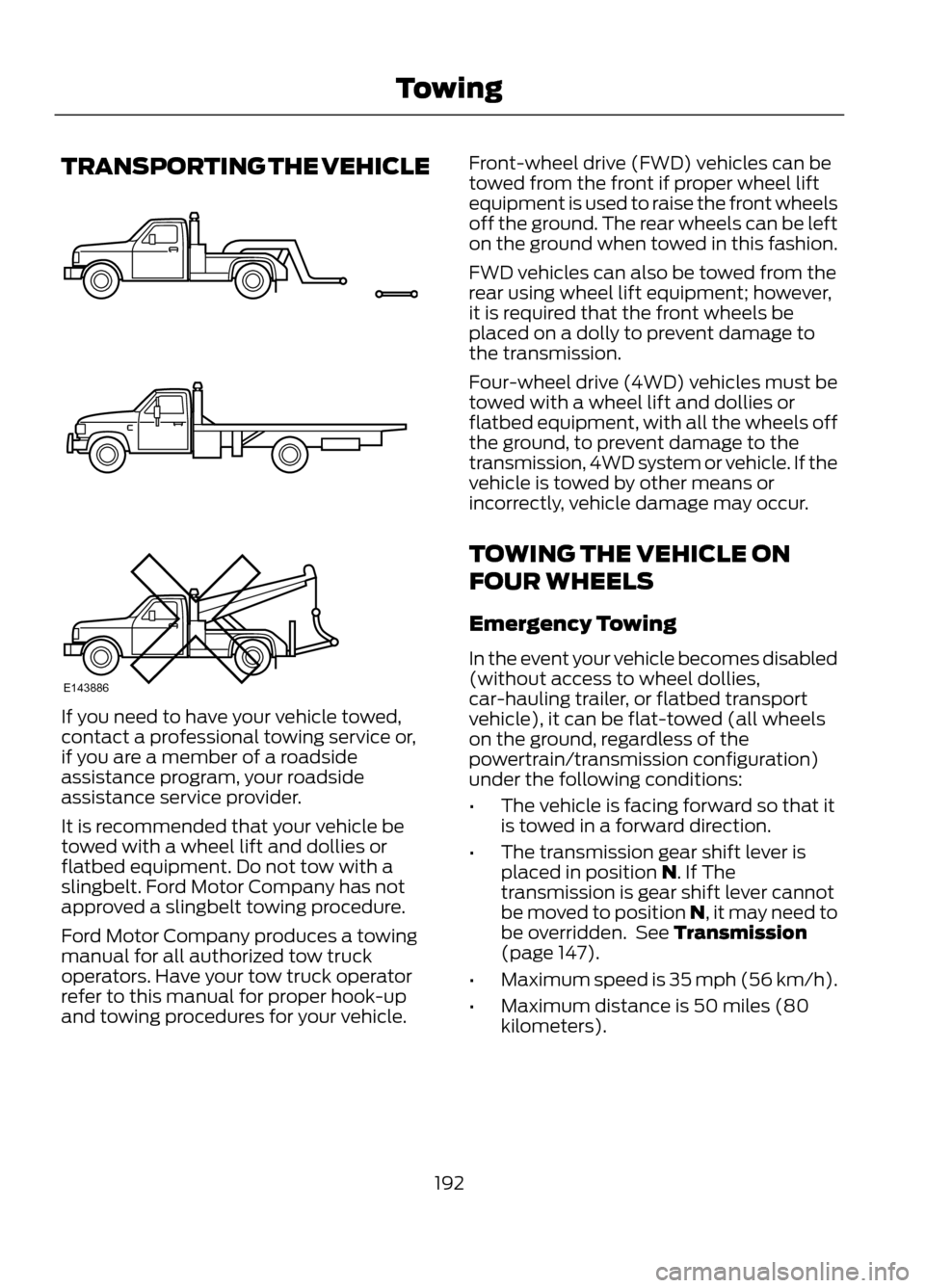
TRANSPORTING THE VEHICLE
If you need to have your vehicle towed,
contact a professional towing service or,
if you are a member of a roadside
assistance program, your roadside
assistance service provider.
It is recommended that your vehicle be
towed with a wheel lift and dollies or
flatbed equipment. Do not tow with a
slingbelt. Ford Motor Company has not
approved a slingbelt towing procedure.
Ford Motor Company produces a towing
manual for all authorized tow truck
operators. Have your tow truck operator
refer to this manual for proper hook-up
and towing procedures for your vehicle.Front-wheel drive (FWD) vehicles can be
towed from the front if proper wheel lift
equipment is used to raise the front wheels
off the ground. The rear wheels can be left
on the ground when towed in this fashion.
FWD vehicles can also be towed from the
rear using wheel lift equipment; however,
it is required that the front wheels be
placed on a dolly to prevent damage to
the transmission.
Four-wheel drive (4WD) vehicles must be
towed with a wheel lift and dollies or
flatbed equipment, with all the wheels off
the ground, to prevent damage to the
transmission, 4WD system or vehicle. If the
vehicle is towed by other means or
incorrectly, vehicle damage may occur.
TOWING THE VEHICLE ON
FOUR WHEELS
Emergency Towing
In the event your vehicle becomes disabled
(without access to wheel dollies,
car-hauling trailer, or flatbed transport
vehicle), it can be flat-towed (all wheels
on the ground, regardless of the
powertrain/transmission configuration)
under the following conditions:
•
The vehicle is facing forward so that it
is towed in a forward direction.
• The transmission gear shift lever is
placed in position N. If The
transmission is gear shift lever cannot
be moved to position N, it may need to
be overridden. See Transmission
(page 147).
• Maximum speed is 35 mph (56 km/h).
• Maximum distance is 50 miles (80
kilometers).
192
Towing
E143886
Page 199 of 423
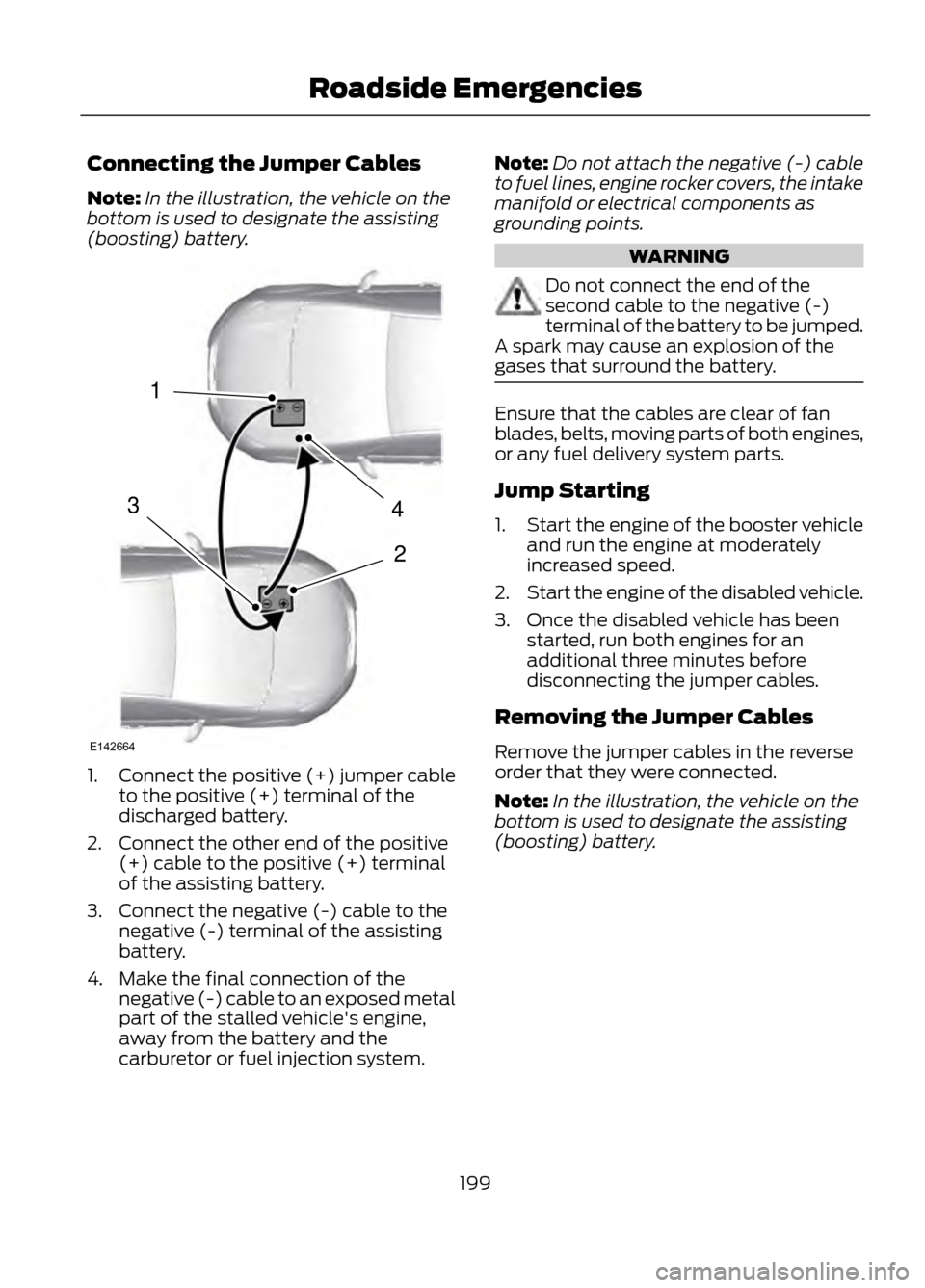
Connecting the Jumper Cables
Note:In the illustration, the vehicle on the
bottom is used to designate the assisting
(boosting) battery.
1. Connect the positive (+) jumper cable
to the positive (+) terminal of the
discharged battery.
2. Connect the other end of the positive (+) cable to the positive (+) terminal
of the assisting battery.
3. Connect the negative (-) cable to the negative (-) terminal of the assisting
battery.
4. Make the final connection of the negative (-) cable to an exposed metal
part of the stalled vehicle's engine,
away from the battery and the
carburetor or fuel injection system. Note:
Do not attach the negative (-) cable
to fuel lines, engine rocker covers, the intake
manifold or electrical components as
grounding points.
WARNING
Do not connect the end of the
second cable to the negative (-)
terminal of the battery to be jumped.
A spark may cause an explosion of the
gases that surround the battery.
Ensure that the cables are clear of fan
blades, belts, moving parts of both engines,
or any fuel delivery system parts.
Jump Starting
1. Start the engine of the booster vehicle
and run the engine at moderately
increased speed.
2. Start the engine of the disabled vehicle.
3. Once the disabled vehicle has been started, run both engines for an
additional three minutes before
disconnecting the jumper cables.
Removing the Jumper Cables
Remove the jumper cables in the reverse
order that they were connected.
Note: In the illustration, the vehicle on the
bottom is used to designate the assisting
(boosting) battery.
199
Roadside Emergencies
4
2
1
3
E142664
Page 238 of 423
•Never wash or rinse any ignition coil,
spark plug wire or spark plug well, or
the area in and around these locations.
• Cover the battery, power distribution
box, and air filter assembly to prevent
water damage when cleaning the
engine.
CLEANING THE WINDOWS AND
WIPER BLADES
The windows and wiper blades should be
cleaned regularly. If the wipers do not wipe
properly, substances on the vehicle ’s glass
or the wiper blades may cause squeaking
or chatter noise from the blades, and
streaking and smearing of the windshield.
To clean these items, follow these tips:
• The windows may be cleaned with a
non-abrasive cleaner such as
Motorcraft® Ultra-Clear Spray Glass
Cleaner.
• The wiper blades can be cleaned with
isopropyl (rubbing) alcohol or
Motorcraft® Premium Windshield
Washer Concentrate in the U.S., or
Premium Quality Windshield Washer
Fluid in Canada. Be sure to replace
wiper blades when they appear worn
or do not function properly.
• Do not use abrasives, as they may
cause scratches
• Do not use fuel, kerosene, or paint
thinner to clean any parts. If you cannot remove those streaks after
cleaning with the glass cleaner or if the
wipers chatter and move in a jerky motion,
clean the outer surface of the windshield
and the wiper blades using a sponge or
soft cloth with a neutral detergent or
mild-abrasive cleaning solution. After
cleaning, rinse the windshield and wiper
blades with clean water. The windshield
is clean if beads do not form when you
rinse the windshield with water.
Note:
Do not use sharp objects, such as a
razor blade, to clean the inside of the rear
window or to remove decals, as it may cause
damage to the rear window defroster ’s
heated grid lines.
CLEANING THE INTERIOR
WARNINGS
Do not use cleaning solvents, bleach
or dye on the vehicle ’s safety belts,
as these actions may weaken the
belt webbing.
On vehicles equipped with
seat-mounted airbags, do not use
chemical solvents or strong
detergents. Such products could
contaminate the side airbag system and
affect performance of the side airbag in a
collision.
For fabric, carpets, cloth seats, safety belts
and seats equipped with side airbags:
• Remove dust and loose dirt with a
vacuum cleaner.
• Remove light stains and soil with
Motorcraft® Professional Strength
Carpet & Upholstery Cleaner.
238
Vehicle Care
Page 243 of 423
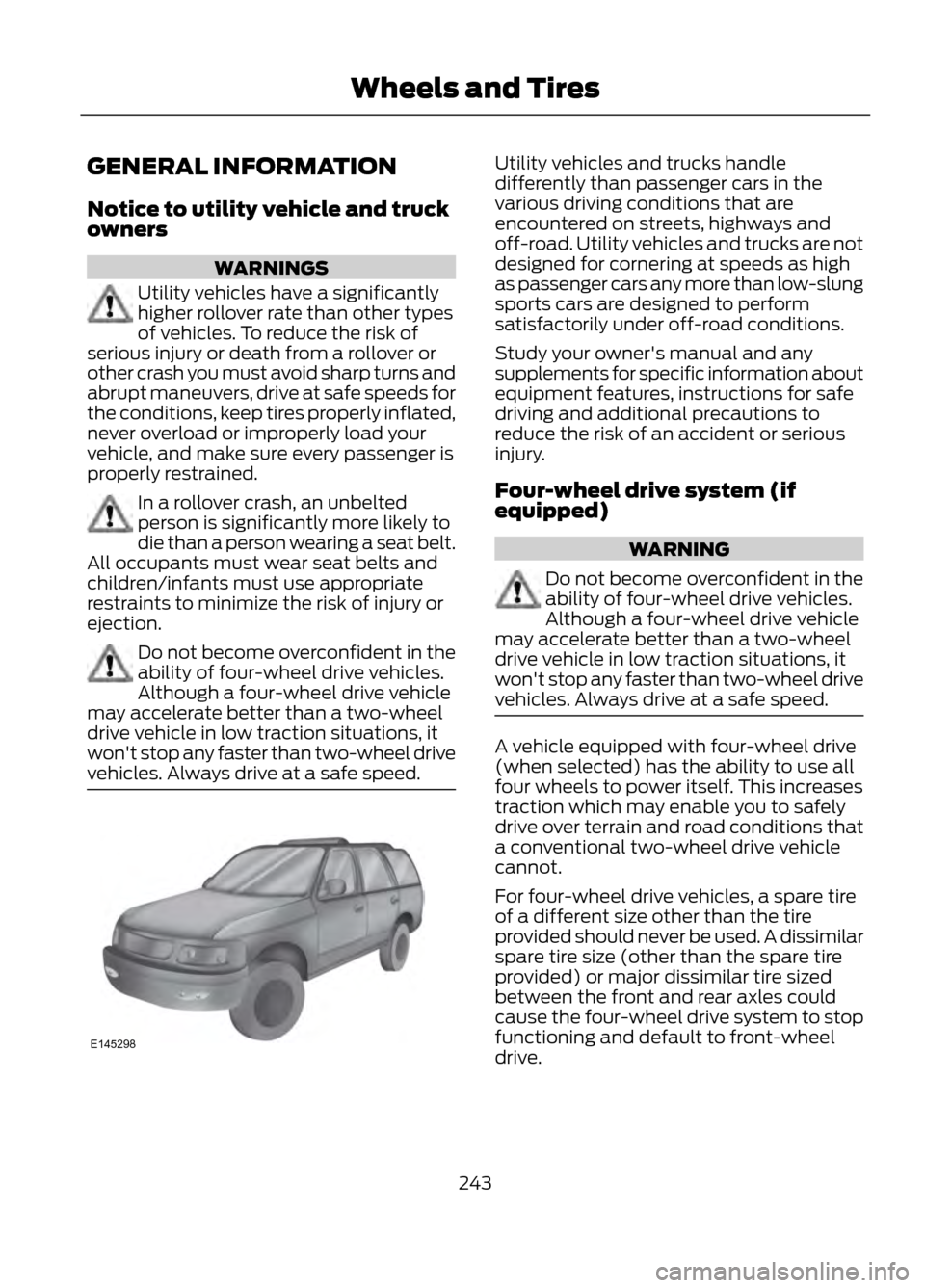
GENERAL INFORMATION
Notice to utility vehicle and truck
owners
WARNINGS
Utility vehicles have a significantly
higher rollover rate than other types
of vehicles. To reduce the risk of
serious injury or death from a rollover or
other crash you must avoid sharp turns and
abrupt maneuvers, drive at safe speeds for
the conditions, keep tires properly inflated,
never overload or improperly load your
vehicle, and make sure every passenger is
properly restrained.
In a rollover crash, an unbelted
person is significantly more likely to
die than a person wearing a seat belt.
All occupants must wear seat belts and
children/infants must use appropriate
restraints to minimize the risk of injury or
ejection.
Do not become overconfident in the
ability of four-wheel drive vehicles.
Although a four-wheel drive vehicle
may accelerate better than a two-wheel
drive vehicle in low traction situations, it
won't stop any faster than two-wheel drive
vehicles. Always drive at a safe speed.
Utility vehicles and trucks handle
differently than passenger cars in the
various driving conditions that are
encountered on streets, highways and
off-road. Utility vehicles and trucks are not
designed for cornering at speeds as high
as passenger cars any more than low-slung
sports cars are designed to perform
satisfactorily under off-road conditions.
Study your owner's manual and any
supplements for specific information about
equipment features, instructions for safe
driving and additional precautions to
reduce the risk of an accident or serious
injury.
Four-wheel drive system (if
equipped)
WARNING
Do not become overconfident in the
ability of four-wheel drive vehicles.
Although a four-wheel drive vehicle
may accelerate better than a two-wheel
drive vehicle in low traction situations, it
won't stop any faster than two-wheel drive
vehicles. Always drive at a safe speed.
A vehicle equipped with four-wheel drive
(when selected) has the ability to use all
four wheels to power itself. This increases
traction which may enable you to safely
drive over terrain and road conditions that
a conventional two-wheel drive vehicle
cannot.
For four-wheel drive vehicles, a spare tire
of a different size other than the tire
provided should never be used. A dissimilar
spare tire size (other than the spare tire
provided) or major dissimilar tire sized
between the front and rear axles could
cause the four-wheel drive system to stop
functioning and default to front-wheel
drive.
243
Wheels and Tires
E145298
Page 267 of 423
ENGINE SPECIFICATIONS
2.5L engine
2.0L EcoBoost engine
1.6L EcoBoost engine
Engine
152
122
98
Cubic inches
Minimum 87 octane
Minimum 87 octane
Minimum 87 octane
Required fuel
9.7:1
9.3:1
10.0:1
Compression
ratio
0.049-0.053 in.(1.25-1.35 mm)
0.027-0.031 in.
(0.70-0.80 mm)
0.027-0.031 in. (0.70-
0.80 mm)
Spark plug gap
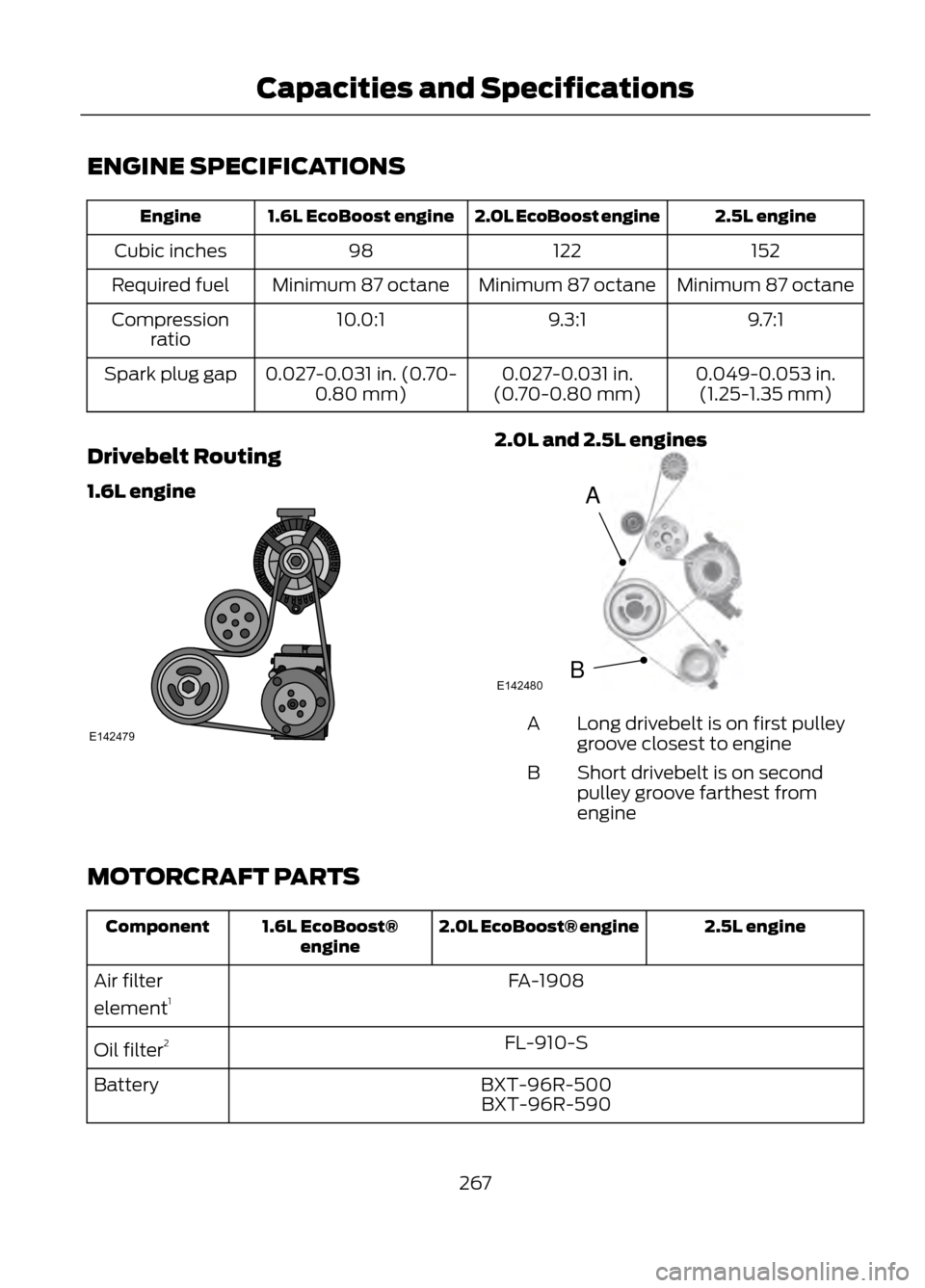
Drivebelt Routing
1.6L engine
2.0L and 2.5L engines
Long drivebelt is on first pulley
groove closest to engine
A
Short drivebelt is on second
pulley groove farthest from
engine
B
MOTORCRAFT PARTS
2.5L engine
2.0L EcoBoost® engine
1.6L EcoBoost®
engine
Component
FA-1908
Air filter
element 1
FL-910-S
Oil filter 2
BXT-96R-500
Battery
BXT-96R-590
267
Capacities and Specifications
E142479
A
BE142480