display FORD ESCAPE 2013 3.G Owner's Guide
[x] Cancel search | Manufacturer: FORD, Model Year: 2013, Model line: ESCAPE, Model: FORD ESCAPE 2013 3.GPages: 423, PDF Size: 4.59 MB
Page 109 of 423
Display Settings
Select to change display brightness.
Dimming
Select to display the language in English, French or
Spanish.
Language
Select to display the outside temperature in Fahrenheit
or Celsius.
Temp setting
Clock Settings
Select to set the time.
Set time
Select to set the calendar date.
Set date
Select to view clock time in a 12-hour mode or 24-hour
mode.
12/24 hour
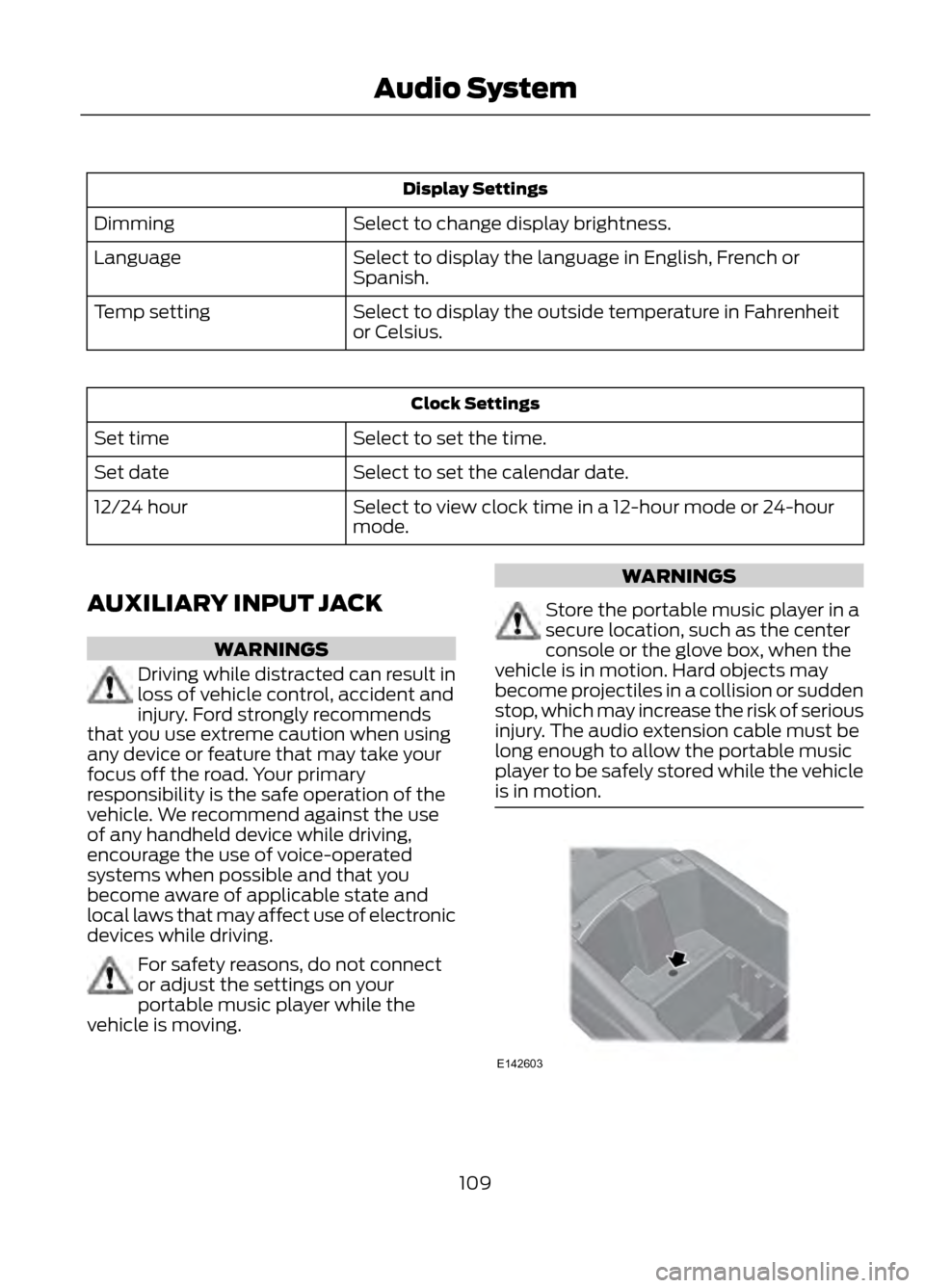
AUXILIARY INPUT JACK
WARNINGS
Driving while distracted can result in
loss of vehicle control, accident and
injury. Ford strongly recommends
that you use extreme caution when using
any device or feature that may take your
focus off the road. Your primary
responsibility is the safe operation of the
vehicle. We recommend against the use
of any handheld device while driving,
encourage the use of voice-operated
systems when possible and that you
become aware of applicable state and
local laws that may affect use of electronic
devices while driving.
For safety reasons, do not connect
or adjust the settings on your
portable music player while the
vehicle is moving.
WARNINGS
Store the portable music player in a
secure location, such as the center
console or the glove box, when the
vehicle is in motion. Hard objects may
become projectiles in a collision or sudden
stop, which may increase the risk of serious
injury. The audio extension cable must be
long enough to allow the portable music
player to be safely stored while the vehicle
is in motion.
109
Audio System
E142603
Page 110 of 423
The auxiliary input jack (AIJ) allows you to
connect and play music from your portable
music player through the vehicle speakers.
You can use any portable music player
designed for use with headphones. Your
audio extension cable must have male
one-eighth inch (three and one-half
millimeter) connectors at each end.
1. Make sure the vehicle, radio andportable music player are turned off
and the transmission is in position P.
2. Plug the extension cable from the portable music player into the AIJ.
3. Turn on the radio. Select either a tuned
FM station or a CD.
4. Adjust the volume as desired.
5. Turn on your portable music player and
adjust its volume to half its maximum
level.
6. Press AUX until LINE or LINE IN appears in the display. You should hear
music from your device even if it is low.
7. Adjust the volume on your portable music player until it reaches the volume
level of the FM station or CD. Do this
by switching back and forth between
the AUX and FM or CD controls.
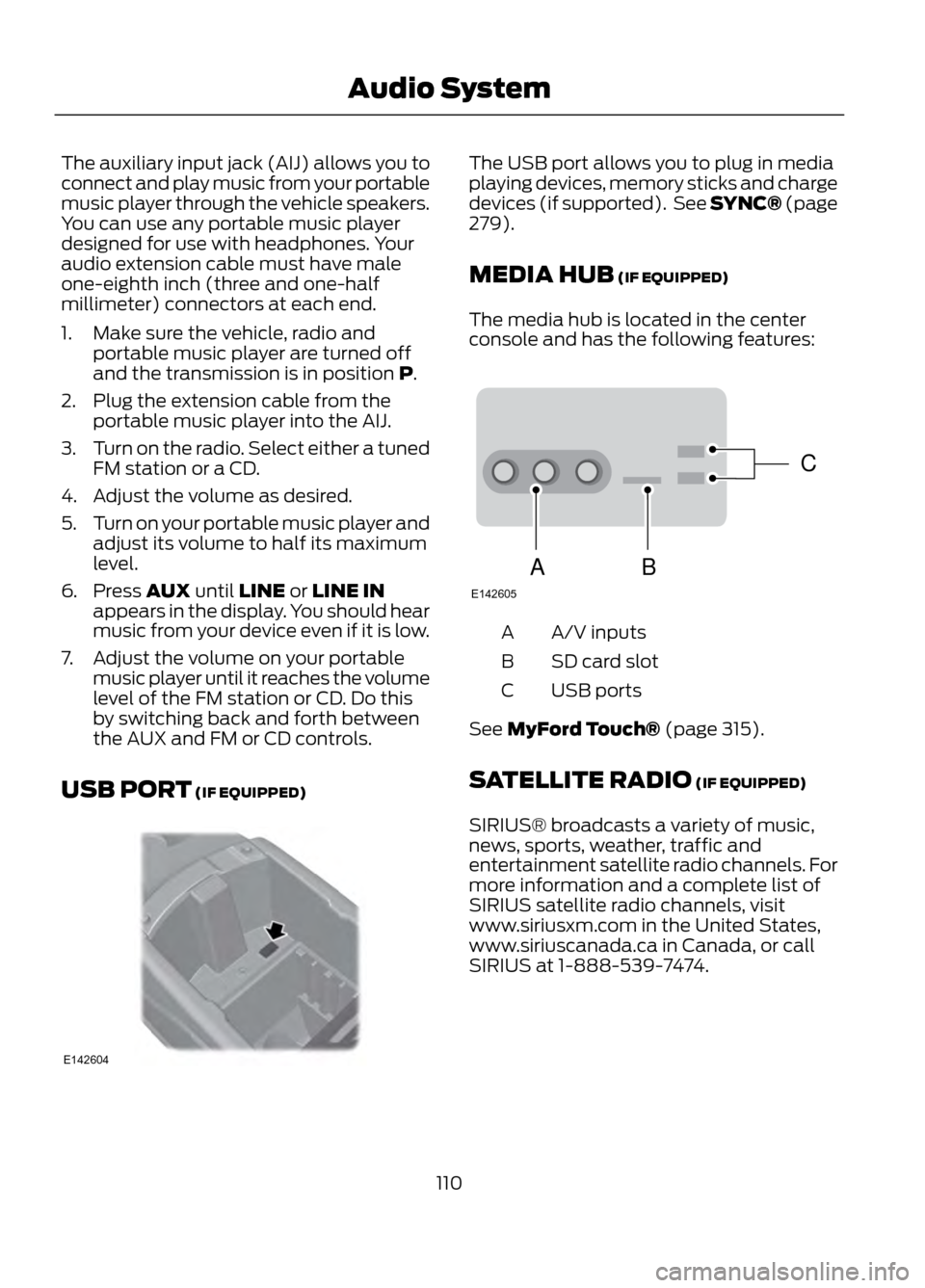
USB PORT (IF EQUIPPED)The USB port allows you to plug in media
playing devices, memory sticks and charge
devices (if supported). See SYNC® (page
279).
MEDIA HUB (IF EQUIPPED)
The media hub is located in the center
console and has the following features:
A/V inputs
A
SD card slot
B
USB ports
C
See MyFord Touch® (page 315).
SATELLITE RADIO (IF EQUIPPED)
SIRIUS® broadcasts a variety of music,
news, sports, weather, traffic and
entertainment satellite radio channels. For
more information and a complete list of
SIRIUS satellite radio channels, visit
www.siriusxm.com in the United States,
www.siriuscanada.ca in Canada, or call
SIRIUS at 1-888-539-7474.
110
Audio System
E142604
C
BA
E142605
Page 111 of 423
Satellite Radio Reception Factors
Potential Satellite Radio Reception IssuesFor optimal reception performance, keep the antenna
clear of snow and ice build-up and keep luggage and other
material as far away from the antenna as possible.
Antenna obstructions
Hills, mountains, tall buildings, bridges, tunnels, freeway
overpasses, parking garages, dense tree foliage and
thunderstorms can interfere with your reception.
Terrain
When you pass a ground-based broadcast repeating
tower, a stronger signal may overtake a weaker one and
the audio system may mute.
Station overload
Your display may show ACQUIRING...to indicate the
interference and the audio system may mute.
Satellite radio signal interfer-
ence
SIRIUS® Satellite Radio Service
Note: SIRIUS reserves the unrestricted right
to change, rearrange, add or delete
programming including canceling, moving
or adding particular channels, and its prices,
at any time, with or without notice to you.
Ford Motor Company shall not be
responsible for any such programming
changes.
SIRIUS satellite radio is a
subscription-based satellite radio service
that broadcasts a variety of music, sports,
news, weather, traffic and entertainment
programming. Your factory-installed
SIRIUS satellite radio system includes
hardware and a limited subscription term
which begins on the date of sale or lease
of the vehicle. Refer to your authorized
dealer for availability.
For more information on extended
subscription terms (a service fee is
required), the online media player and a
complete list of SIRIUS satellite radio
channels, and other features, please visit
www.siriusxm.com in the United States,
www.sirius.ca in Canada, or call SIRIUS at
1-888-539-7474.
Satellite Radio Electronic Serial
Number (ESN)
You need your ESN to activate, modify or
track your satellite radio account. When in
satellite radio mode, you can view this
number by pressing SIRIUS and memory
preset 1 at the same time.
111
Audio System
E142593
Page 112 of 423
Troubleshooting
Possible Action
Condition
Radio Display
No action required. This
message should disappear
shortly.
Radio requires more than
two seconds to produce
audio for the selected
channel.
Acquiring
If this message does not
clear shortly, or with an igni-
tion key cycle, your receiver
may have a fault. See your
authorized dealer for service.
Internal module or system
failure present.
Sat Fault/SIRIUS system
failure
Tune to another channel or
choose another preset.
Channel is no longer avail-
able.
Invalid Channel
Contact SIRIUS at 1-888-
539-7474 to subscribe to
the channel, or tune to
another channel.
Subscription not available
for this channel.
Unsubscribed Channel
The signal is currently being
blocked. When you move
into an open area, the signal
should return.
Loss of signal from the
SIRIUS satellite or SIRIUS
tower to the vehicle
antenna.
No Signal
No action required. The
process may take up to
three minutes.
Update of channel
programming in progress.
Updating
Contact SIRIUS at 1-888-
539-7474 to reactivate or
resolve subscription issues.
Satellite service has been
deactivated by SIRIUS
Satellite Radio.
Call SIRIUS 1-888-539-7474
Using the channel guide,
unlock or unskip the chan-
nels.
All the channels in the
selected category are
skipped or locked.
No Channels Available
No action required.
SIRIUS has updated the
channels available for your
vehicle.
Subscription Updated
112
Audio System
Page 114 of 423
Select to distribute air through
the windshield air vents. You can
also use this setting to defog and
clear the windshield of a thin covering of
ice. You can also increase the temperature
and fan speed to improve clearing.
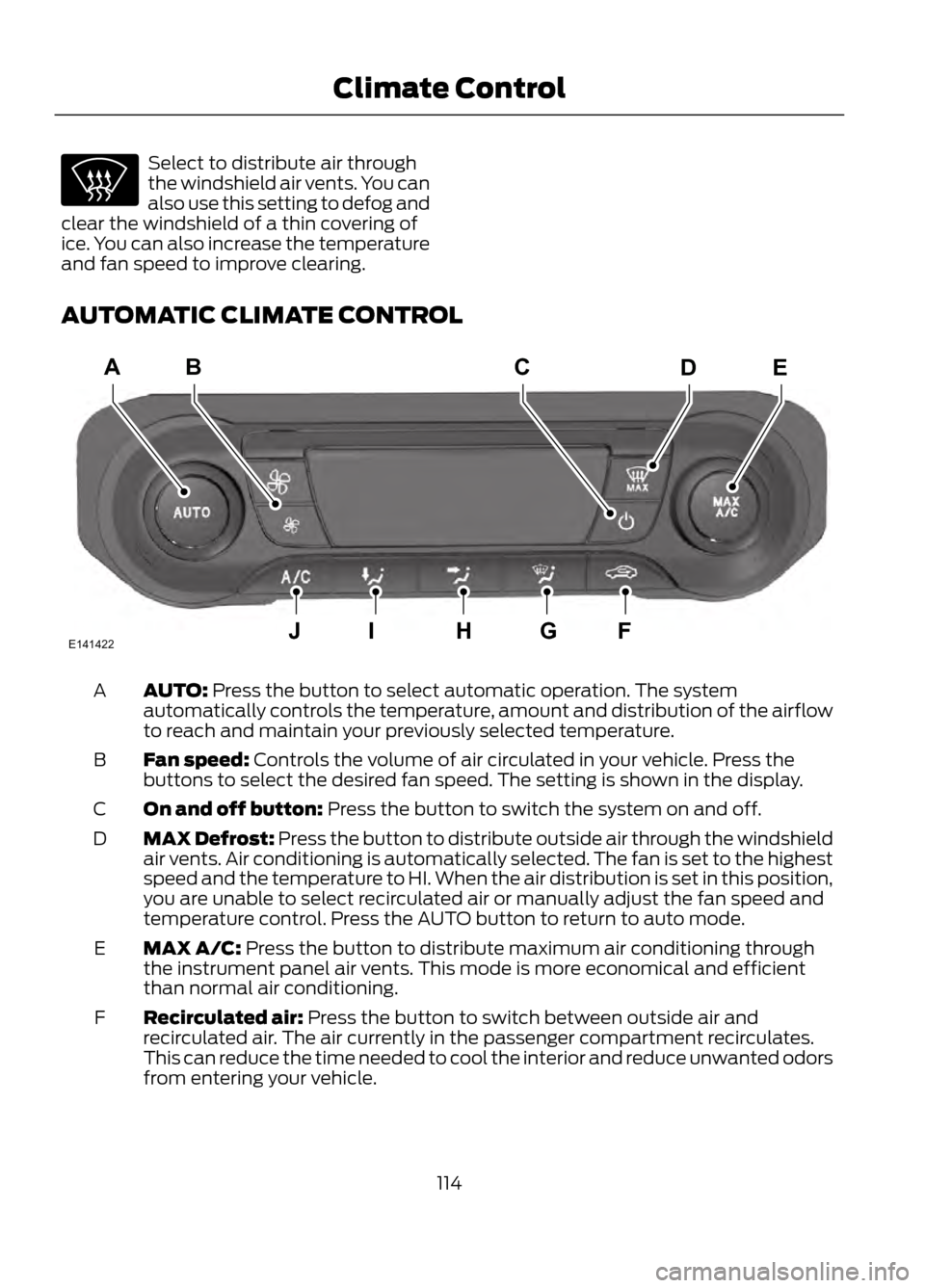
AUTOMATIC CLIMATE CONTROL
AUTO: Press the button to select automatic operation. The system
automatically controls the temperature, amount and distribution of the airflow
to reach and maintain your previously selected temperature.
A
Fan speed: Controls the volume of air circulated in your vehicle. Press the
buttons to select the desired fan speed. The setting is shown in the display.
B
On and off button: Press the button to switch the system on and off.
C
MAX Defrost: Press the button to distribute outside air through the windshield
air vents. Air conditioning is automatically selected. The fan is set to the highest
speed and the temperature to HI. When the air distribution is set in this position,
you are unable to select recirculated air or manually adjust the fan speed and
temperature control. Press the AUTO button to return to auto mode.
D
MAX A/C: Press the button to distribute maximum air conditioning through
the instrument panel air vents. This mode is more economical and efficient
than normal air conditioning.
E
Recirculated air: Press the button to switch between outside air and
recirculated air. The air currently in the passenger compartment recirculates.
This can reduce the time needed to cool the interior and reduce unwanted odors
from entering your vehicle.
F
114
Climate Control
E141422
ACDEB
JIHGF
Page 115 of 423
Defrost: Press the button to distribute air through the windshield air vents. You
can also use this setting to defog and clear the windshield of a thin covering of
ice.
G
Instrument panel: Press the button to distribute air through the instrument
panel air vents.
H
Footwell: Press the button to distribute air through the footwell air vents.
I
Air conditioning: Press the button to switch the air conditioning on or off. Air
conditioning cools your vehicle using outside air. To improve air conditioning
when starting your vehicle, drive with the windows slightly open for two to three
minutes.
J
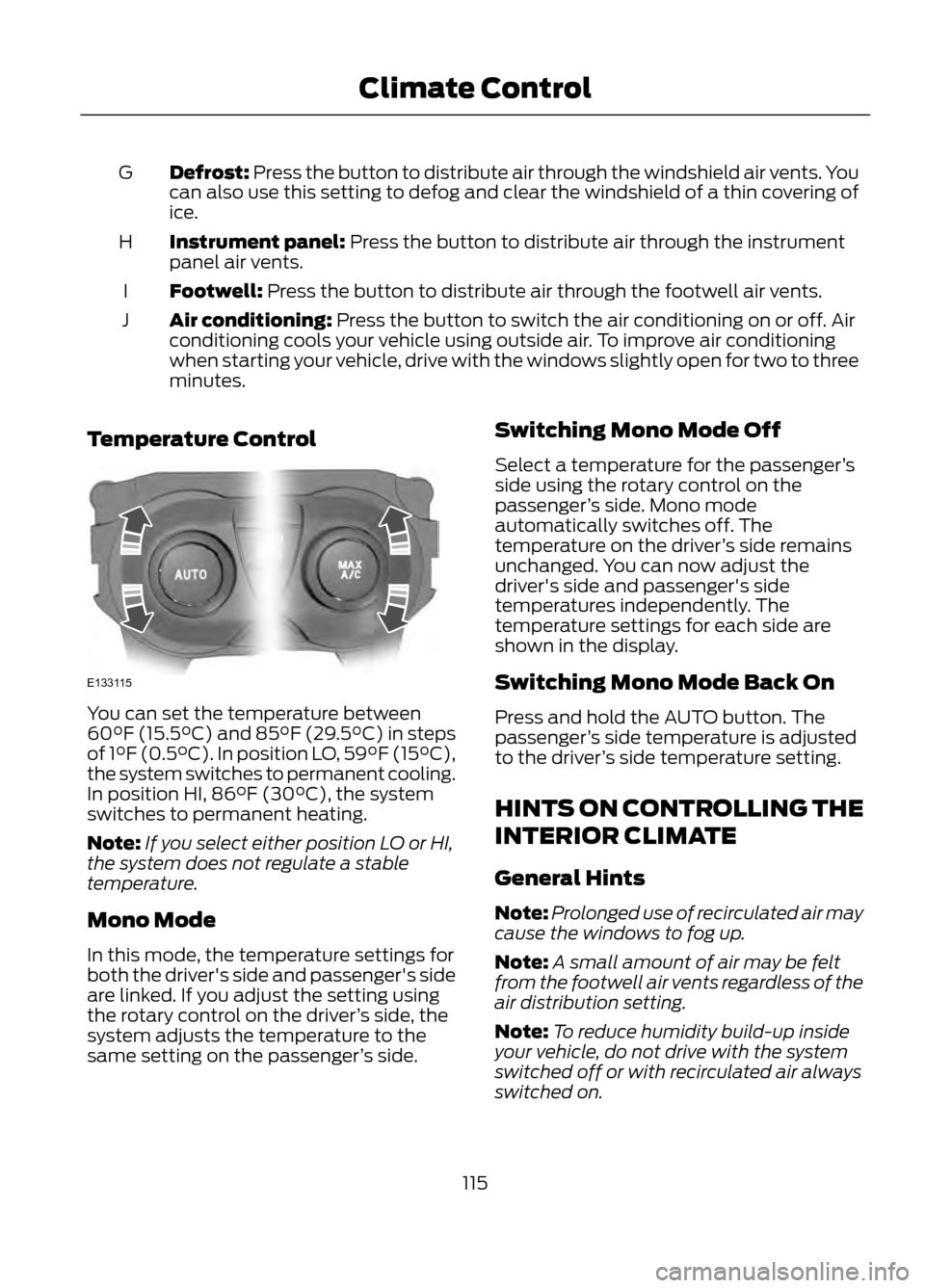
Temperature Control
You can set the temperature between
60°F (15.5°C) and 85°F (29.5°C) in steps
of 1°F (0.5°C). In position LO, 59°F (15°C),
the system switches to permanent cooling.
In position HI, 86°F (30°C), the system
switches to permanent heating.
Note: If you select either position LO or HI,
the system does not regulate a stable
temperature.
Mono Mode
In this mode, the temperature settings for
both the driver's side and passenger's side
are linked. If you adjust the setting using
the rotary control on the driver ’s side, the
system adjusts the temperature to the
same setting on the passenger ’s side. Switching Mono Mode Off
Select a temperature for the passenger
’s
side using the rotary control on the
passenger ’s side. Mono mode
automatically switches off. The
temperature on the driver ’s side remains
unchanged. You can now adjust the
driver's side and passenger's side
temperatures independently. The
temperature settings for each side are
shown in the display.
Switching Mono Mode Back On
Press and hold the AUTO button. The
passenger ’s side temperature is adjusted
to the driver ’s side temperature setting.
HINTS ON CONTROLLING THE
INTERIOR CLIMATE
General Hints
Note: Prolonged use of recirculated air may
cause the windows to fog up.
Note: A small amount of air may be felt
from the footwell air vents regardless of the
air distribution setting.
Note: To reduce humidity build-up inside
your vehicle, do not drive with the system
switched off or with recirculated air always
switched on.
115
Climate Control
E133115
Page 120 of 423

You cannot adjust the system during
remote start operation. Turn the ignition
on to return the system to its previous
settings. You can now make adjustments.
You will need to turn certain
vehicle-dependent features back on, such
as:
•heated seats
• cooled seats
• heated steering wheel
• heated mirrors
• heated rear window.
You can adjust the settings using the
information display controls. See
Information Displays (page 84).
Automatic Settings
You can set the climate control to operate
in AUTO mode through the information
display setting: Remote Start > Climate
Control > Heater-A/C > Auto. The climate
control system automatically sets the
interior temperature to 72°F (22°C).
In hot weather, the system is set to 72°F
(22°C). Cooled seats are set to high (if
available, and selected to AUTO in the
information display).
In moderate weather, the system either
heats or cools (based on previous
settings). The rear defroster, heated
mirrors and heated/cooled seats are not
automatically turned on.
In cold weather, the system is set to 72°F
(22°C). The heated seats and heated
steering wheel are set to high (if available,
and selected to AUTO in the information
display). The rear defroster and heated
mirrors are automatically turned on. Last Settings
You can set the climate control to operate
using the last climate control settings
through the information display setting:
Remote Start > Climate Control >
Heater
–A/C > Last Settings. The climate
control system automatically uses the
settings last selected before the vehicle
was turned off.
Heated and Cooled Devices
The climate control system controls other
heated and cooled devices inside the
vehicle. These devices (if available, and
selected to AUTO in the information
displays) may also be switched on during
remote start. Heated devices are typically
switched on during cold weather, and
cooled devices during hot weather.
120
Climate Control
Page 130 of 423
For questions or comments, contact
HomeLink at www.homelink.com or
1-800-355-3515.
Programming to a Genie Intellicode®
2 Garage Door Opener
Note:The Genie Intellicode 2 transmitter
must already be programmed to operate
with the garage door opener.
Note: To program HomeLink to the
transmitter you must first put the
transmitter into programming mode.
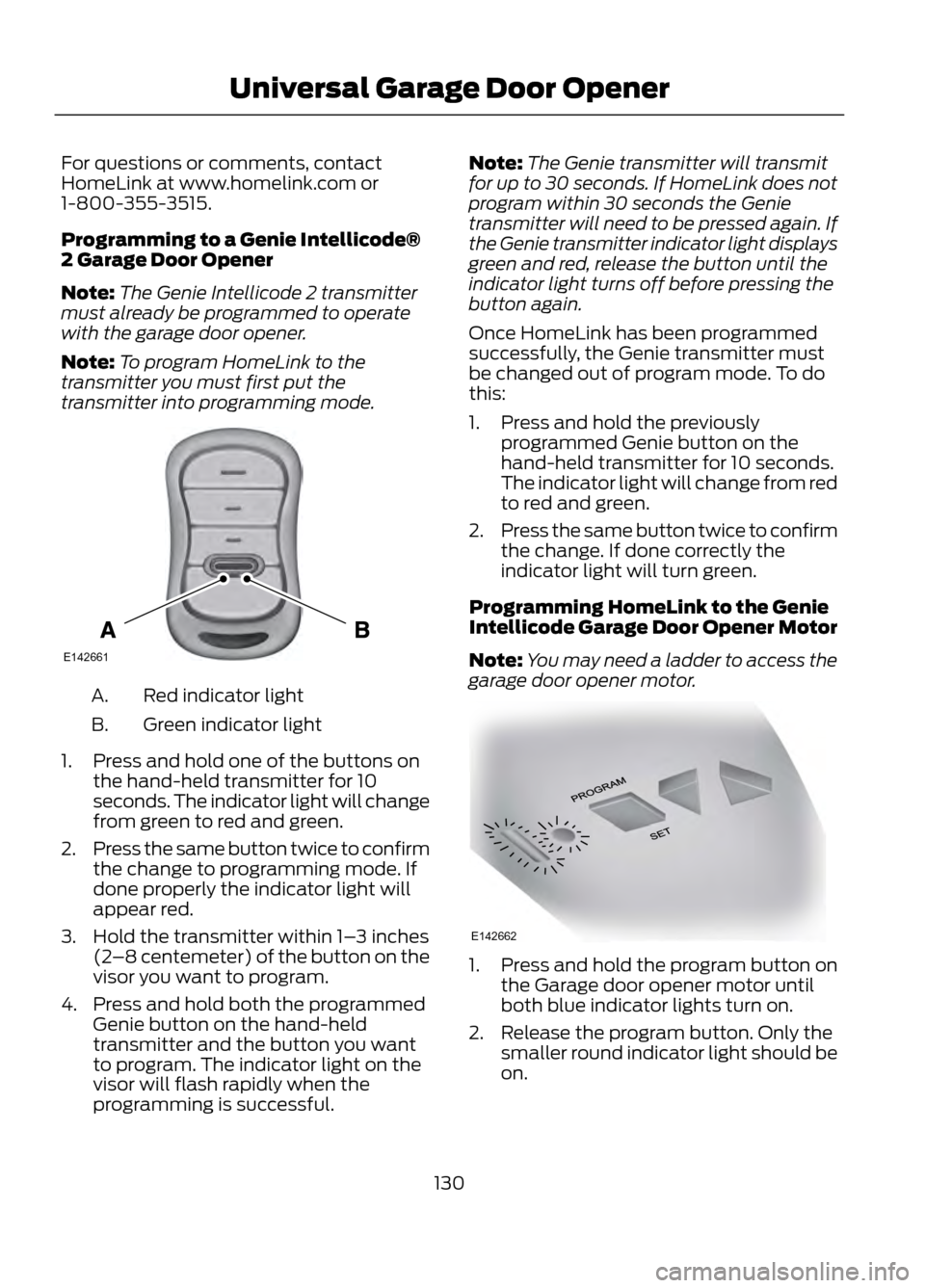
Red indicator light
A.
Green indicator light
B.
1. Press and hold one of the buttons on the hand-held transmitter for 10
seconds. The indicator light will change
from green to red and green.
2. Press the same button twice to confirm
the change to programming mode. If
done properly the indicator light will
appear red.
3. Hold the transmitter within 1– 3 inches
(2 –8 centemeter) of the button on the
visor you want to program.
4. Press and hold both the programmed Genie button on the hand-held
transmitter and the button you want
to program. The indicator light on the
visor will flash rapidly when the
programming is successful. Note:
The Genie transmitter will transmit
for up to 30 seconds. If HomeLink does not
program within 30 seconds the Genie
transmitter will need to be pressed again. If
the Genie transmitter indicator light displays
green and red, release the button until the
indicator light turns off before pressing the
button again.
Once HomeLink has been programmed
successfully, the Genie transmitter must
be changed out of program mode. To do
this:
1. Press and hold the previously programmed Genie button on the
hand-held transmitter for 10 seconds.
The indicator light will change from red
to red and green.
2. Press the same button twice to confirm
the change. If done correctly the
indicator light will turn green.
Programming HomeLink to the Genie
Intellicode Garage Door Opener Motor
Note: You may need a ladder to access the
garage door opener motor.
1. Press and hold the program button on the Garage door opener motor until
both blue indicator lights turn on.
2. Release the program button. Only the smaller round indicator light should be
on.
130
Universal Garage Door Opener
E142661
E142662
Page 148 of 423
SelectShift Automatic®
Transmission (If Equipped)
Your SelectShift automatic transmission
gives you the ability to manually change
gears if you'd like. To use SelectShift, move
the gearshift lever into S (Sport). Now you
can use the +/- buttons on the side of your
gearshift lever to select gears.
When using the toggle for manual shifting:
•Press the (+) button to upshift.
• Press the (-) button to downshift.
Note: After you have assumed manual
control with SelectShift your vehicle will
remain in this mode until you return the
gearshift lever from (S) Sport, back to (D)
Drive.
Upshift to the recommended shift speeds
according to the following chart:
Upshifts when accelerating (recom- mended for best fuel economy)
Shift from:15 mph (24 km/h)
1 - 2
25 mph (40 km/h)
2 - 3
40 mph (64 km/h)
3 - 4
45 mph (72 km/h)
4 - 5
50 mph (80 km/h)
5 - 6
The instrument cluster will display the
selected gear that you are currently in.
SelectShift will automatically make some
shifts for you in the event that your engine
speed is running at too high, or to low an
RPM.
Note: Engine damage may occur if
excessive engine revving is held without
shifting. Brake-Shift Interlock
WARNINGS
Do not drive your vehicle until you
verify that the brake lamps are
working.
When doing this procedure, you will
be taking the vehicle out of park
which means the vehicle can roll
freely. To avoid unwanted vehicle
movement, always fully set the parking
brake prior to doing this procedure. Use
wheel chocks if appropriate.
If the parking brake is fully released,
but the brake warning lamp remains
illuminated, the brakes may not be
working properly. See your authorized
dealer.
Use the brake shift interlock lever to move
the gearshift lever from the park position
in the event of an electrical malfunction or
if your vehicle has a dead battery.
Apply the parking brake and turn the
ignition off before performing this
procedure.
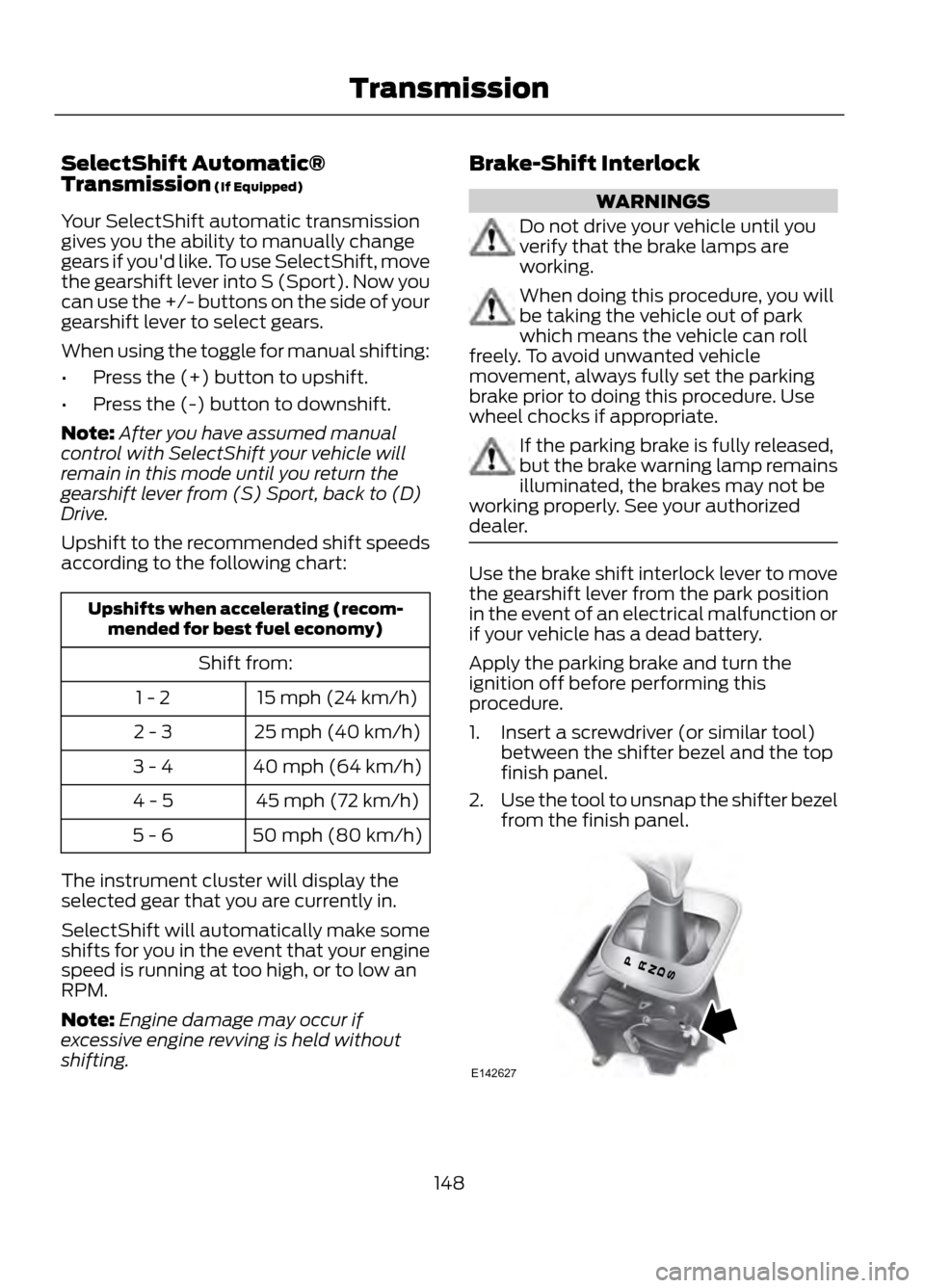
1. Insert a screwdriver (or similar tool) between the shifter bezel and the top
finish panel.
2. Use the tool to unsnap the shifter bezel
from the finish panel.
148
Transmission
E142627
Page 151 of 423

USING FOUR-WHEEL DRIVE
Note:The 4WD temporarily disabled
message will be displayed if the 4WD
system has overheated and defaulted to
front-wheel drive. This condition may occur
if the vehicle is operated in extreme high
load conditions or with excessive wheel slip,
such as deep sand. To resume normal 4WD
function as soon as possible, stop the
vehicle in a safe location and turn off the
engine. The 4WD restored message will be
displayed for approximately five seconds
after the system cools and normal 4WD
function returns.
Note: The Intelligent 4WD system gives
your vehicle some limited off-road
capabilities. Operating your vehicle in
conditions other than moderate sand, snow,
mud or rough roads could subject it to
excessive stress which might result in
damage. This damage is not covered under
your warranty.
Note: When a 4WD system fault is present,
the warning 4WD malfunction Service
required will display in the information
display. The 4WD system is not functioning
correctly and defaulted to front-wheel drive.
When this warning is displayed, have your
vehicle serviced at an authorized dealer.
You will be able to see the power
distribution between the front and rear
wheels represented by an icon in your
information display. More power to either
front or rear wheels will be displayed by
more area filled in. Your vehicle may be equipped with a
full-time four-wheel drive (4WD) system.
The 4WD system is a proactive system,
meaning it not only responds to wheel slip
between the front and rear wheels but also
has the ability to anticipate wheel slip and
transfer torque to the rear wheels before
slip occurs. Even when no wheel slip is
present, the Intelligent 4WD system is
continuously making adjustments to the
torque distribution, in an attempt to
improve the vehicle
’s straight line and
cornering behavior, both on and off road.
The system is active all the time and
requires no input from the operator.
All components of the Intelligent 4WD
system are sealed for life and require no
maintenance.
If your vehicle is equipped with Intelligent
4WD, a spare tire of a different size other
than the tire provided should never be
used. If the spare tire is installed, the 4WD
system may disable automatically and
enter front-wheel drive only mode to
protect driveline components. This
condition may be indicated by a 4WD Off
message in the Information displays
chapter. See Information displays in the
Instrument Cluster chapter for more
information. If there is a 4WD Off message
in the information display from using the
spare tire, this indicator should turn off
after reinstalling the repaired or replaced
normal road tire and driving a short
distance. It is recommended to reinstall
the repaired or replaced road tire as soon
as possible. Major dissimilar tire sizes
between the front and rear axles could
cause the 4WD system to stop functioning
and default to front-wheel drive or damage
the 4WD system.
151
Four-Wheel Drive (If Equipped)
E142669