display FORD ESCAPE 2013 3.G Manual PDF
[x] Cancel search | Manufacturer: FORD, Model Year: 2013, Model line: ESCAPE, Model: FORD ESCAPE 2013 3.GPages: 423, PDF Size: 4.59 MB
Page 301 of 423
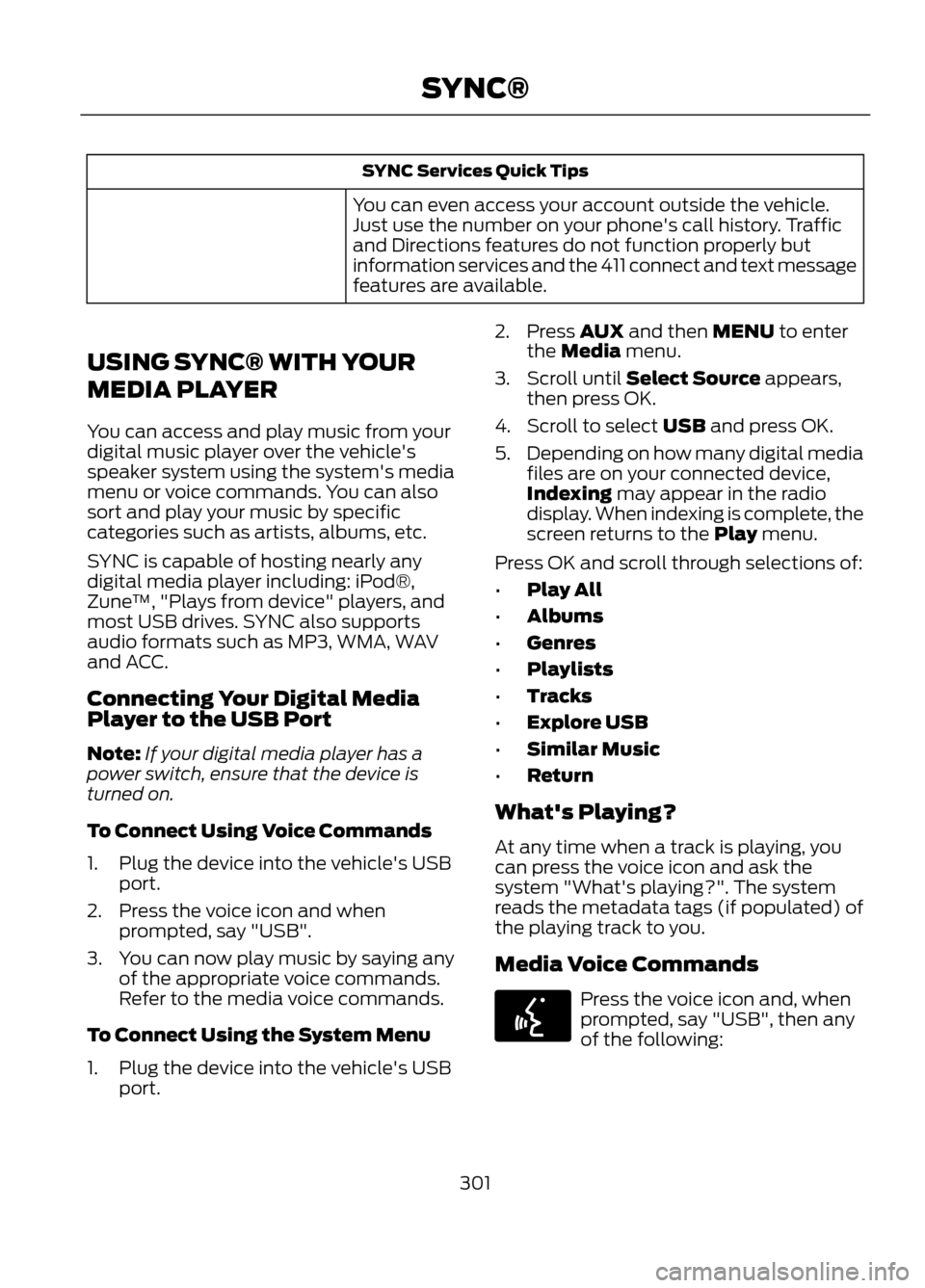
SYNC Services Quick Tips
You can even access your account outside the vehicle.
Just use the number on your phone's call history. Traffic
and Directions features do not function properly but
information services and the 411 connect and text message
features are available.
USING SYNC® WITH YOUR
MEDIA PLAYER
You can access and play music from your
digital music player over the vehicle's
speaker system using the system's media
menu or voice commands. You can also
sort and play your music by specific
categories such as artists, albums, etc.
SYNC is capable of hosting nearly any
digital media player including: iPod®,
Zune ™, "Plays from device" players, and
most USB drives. SYNC also supports
audio formats such as MP3, WMA, WAV
and ACC.
Connecting Your Digital Media
Player to the USB Port
Note: If your digital media player has a
power switch, ensure that the device is
turned on.
To Connect Using Voice Commands
1. Plug the device into the vehicle's USB port.
2. Press the voice icon and when prompted, say "USB".
3. You can now play music by saying any of the appropriate voice commands.
Refer to the media voice commands.
To Connect Using the System Menu
1. Plug the device into the vehicle's USB port. 2. Press AUX and then MENU to enter
the Media menu.
3. Scroll until Select Source appears, then press OK.
4. Scroll to select USB and press OK.
5. Depending on how many digital media
files are on your connected device,
Indexing may appear in the radio
display. When indexing is complete, the
screen returns to the Play menu.
Press OK and scroll through selections of:
• Play All
• Albums
• Genres
• Playlists
• Tracks
• Explore USB
• Similar Music
• Return
What's Playing?
At any time when a track is playing, you
can press the voice icon and ask the
system "What's playing?". The system
reads the metadata tags (if populated) of
the playing track to you.
Media Voice Commands
Press the voice icon and, when
prompted, say "USB", then any
of the following:
301
SYNC®
E142599
Page 305 of 423
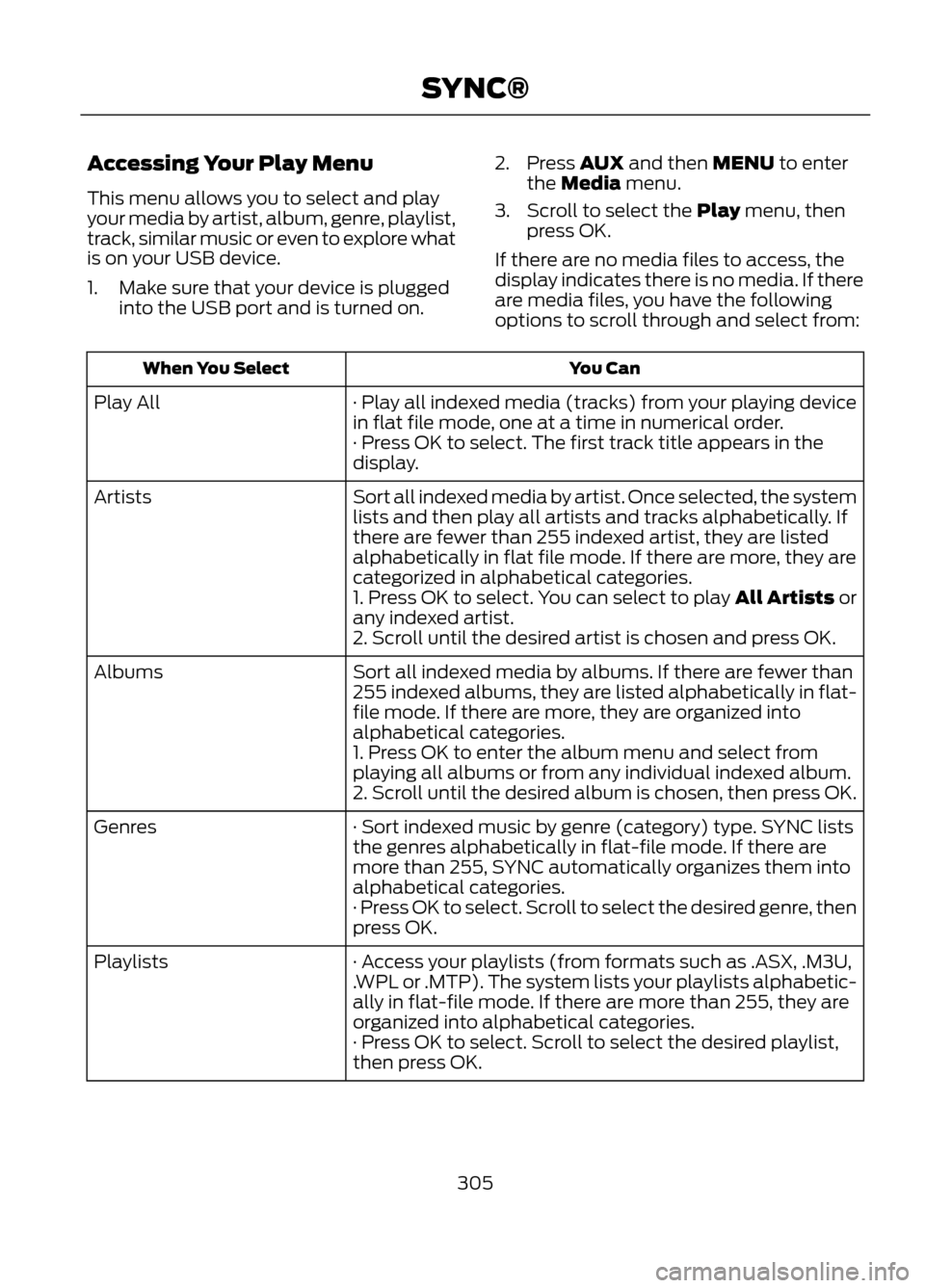
Accessing Your Play Menu
This menu allows you to select and play
your media by artist, album, genre, playlist,
track, similar music or even to explore what
is on your USB device.
1. Make sure that your device is pluggedinto the USB port and is turned on. 2. Press AUX and then MENU to enter
the Media menu.
3. Scroll to select the Play menu, then press OK.
If there are no media files to access, the
display indicates there is no media. If there
are media files, you have the following
options to scroll through and select from:
You Can
When You Select
· Play all indexed media (tracks) from your playing device
in flat file mode, one at a time in numerical order.
Play All
· Press OK to select. The first track title appears in the
display.
Sort all indexed media by artist. Once selected, the system
lists and then play all artists and tracks alphabetically. If
there are fewer than 255 indexed artist, they are listed
alphabetically in flat file mode. If there are more, they are
categorized in alphabetical categories.
Artists
1. Press OK to select. You can select to play All Artists or
any indexed artist.
2. Scroll until the desired artist is chosen and press OK.
Sort all indexed media by albums. If there are fewer than
255 indexed albums, they are listed alphabetically in flat-
file mode. If there are more, they are organized into
alphabetical categories.
Albums
1. Press OK to enter the album menu and select from
playing all albums or from any individual indexed album.
2. Scroll until the desired album is chosen, then press OK.
· Sort indexed music by genre (category) type. SYNC lists
the genres alphabetically in flat-file mode. If there are
more than 255, SYNC automatically organizes them into
alphabetical categories.
Genres
· Press OK to select. Scroll to select the desired genre, then
press OK.
· Access your playlists (from formats such as .ASX, .M3U,
.WPL or .MTP). The system lists your playlists alphabetic-
ally in flat-file mode. If there are more than 255, they are
organized into alphabetical categories.
Playlists
· Press OK to select. Scroll to select the desired playlist,
then press OK.
305
SYNC®
Page 307 of 423
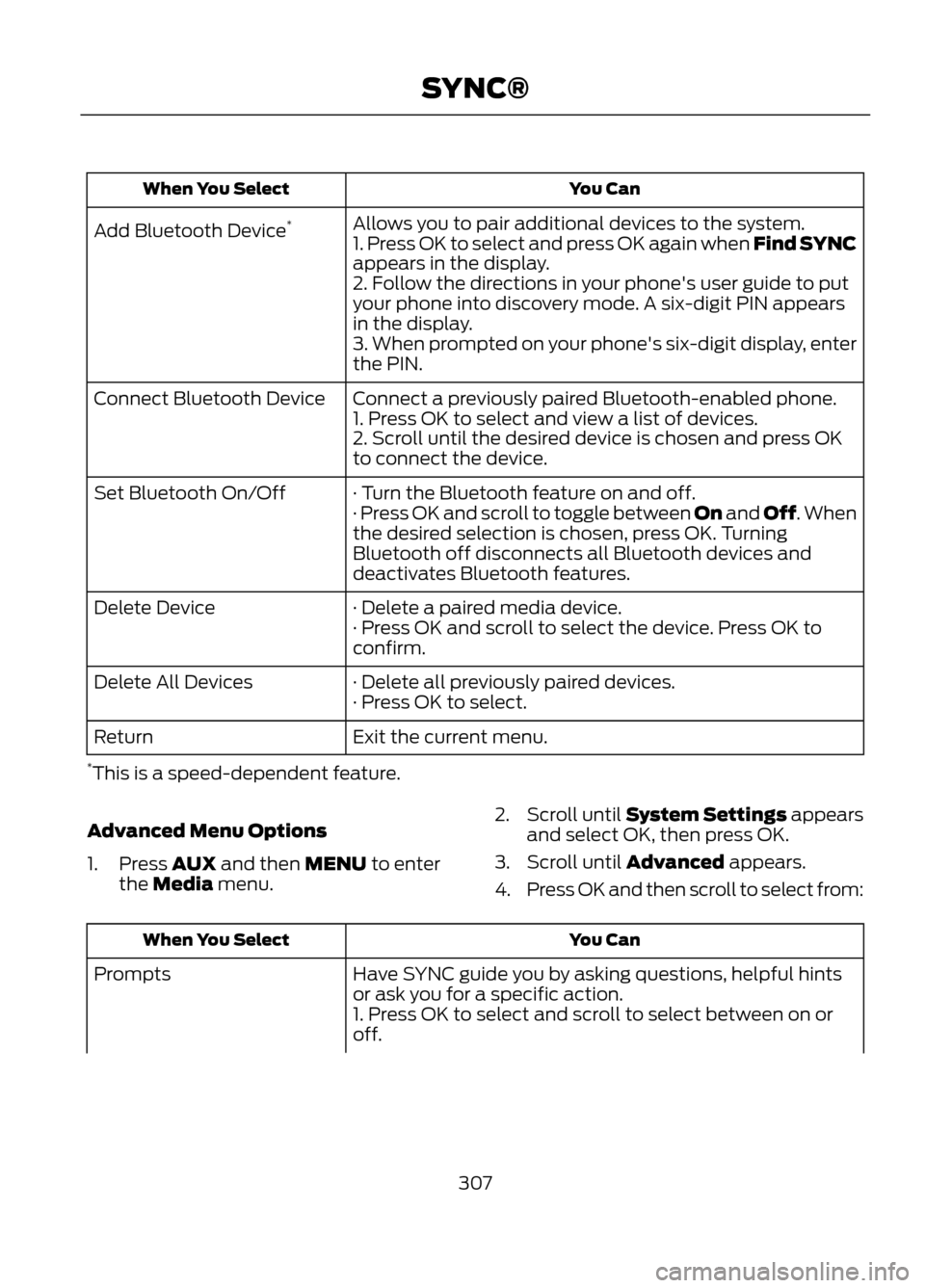
You Can
When You Select
Allows you to pair additional devices to the system.
Add Bluetooth Device *
1. Press OK to select and press OK again when Find SYNC
appears in the display.
2. Follow the directions in your phone's user guide to put
your phone into discovery mode. A six-digit PIN appears
in the display.
3. When prompted on your phone's six-digit display, enter
the PIN.
Connect a previously paired Bluetooth-enabled phone.
Connect Bluetooth Device
1. Press OK to select and view a list of devices.
2. Scroll until the desired device is chosen and press OK
to connect the device.
· Turn the Bluetooth feature on and off.
Set Bluetooth On/Off
· Press OK and scroll to toggle between On and Off. When
the desired selection is chosen, press OK. Turning
Bluetooth off disconnects all Bluetooth devices and
deactivates Bluetooth features.
· Delete a paired media device.
Delete Device
· Press OK and scroll to select the device. Press OK to
confirm.
· Delete all previously paired devices.
Delete All Devices
· Press OK to select.
Exit the current menu.
Return
* This is a speed-dependent feature.
Advanced Menu Options
1. Press AUX and then MENU to enter the Media menu. 2.
Scroll until System Settings appears
and select OK, then press OK.
3. Scroll until Advanced appears.
4. Press OK and then scroll to select from:
You Can
When You Select
Have SYNC guide you by asking questions, helpful hints
or ask you for a specific action.
Prompts
1. Press OK to select and scroll to select between on or
off.
307
SYNC®
Page 308 of 423
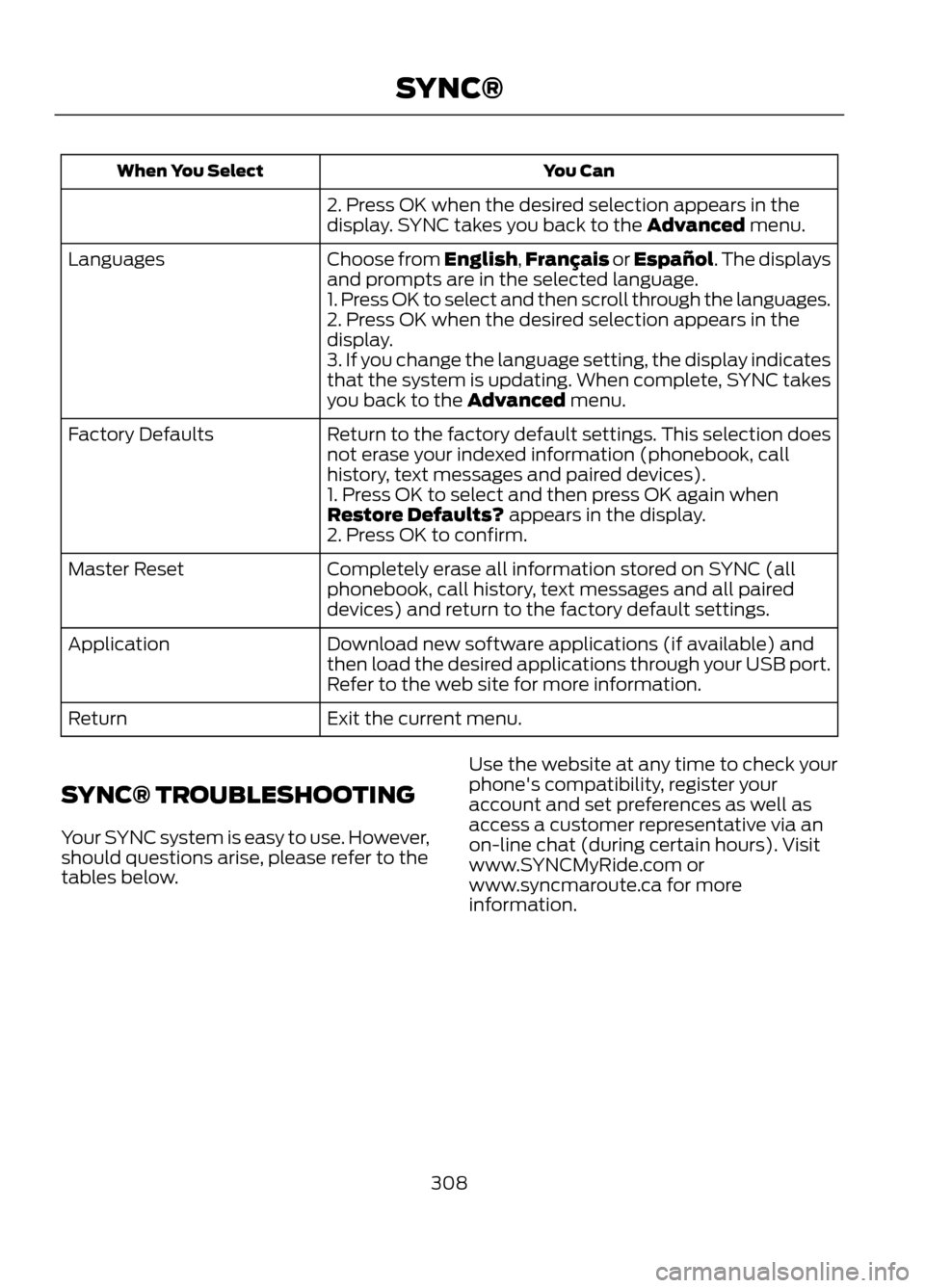
You Can
When You Select
2. Press OK when the desired selection appears in the
display. SYNC takes you back to the Advanced menu.
Choose from English,Français or Español. The displays
and prompts are in the selected language.
Languages
1. Press OK to select and then scroll through the languages.
2. Press OK when the desired selection appears in the
display.
3. If you change the language setting, the display indicates
that the system is updating. When complete, SYNC takes
you back to the Advanced menu.
Return to the factory default settings. This selection does
not erase your indexed information (phonebook, call
history, text messages and paired devices).
Factory Defaults
1. Press OK to select and then press OK again when
Restore Defaults? appears in the display.
2. Press OK to confirm.
Completely erase all information stored on SYNC (all
phonebook, call history, text messages and all paired
devices) and return to the factory default settings.
Master Reset
Download new software applications (if available) and
then load the desired applications through your USB port.
Refer to the web site for more information.
Application
Exit the current menu.
Return
SYNC® TROUBLESHOOTING
Your SYNC system is easy to use. However,
should questions arise, please refer to the
tables below. Use the website at any time to check your
phone's compatibility, register your
account and set preferences as well as
access a customer representative via an
on-line chat (during certain hours). Visit
www.SYNCMyRide.com or
www.syncmaroute.ca for more
information.
308
SYNC®
Page 315 of 423
GENERAL INFORMATION
WARNING
Driving while distracted can result in
loss of vehicle control, accident and
injury. Ford strongly recommends
that drivers use extreme caution when
using any device or feature that may take
their focus off the road. Your primary
responsibility is the safe operation of the
vehicle. We recommend against the use
of any handheld device while driving,
encourage the use of voice-operated
systems when possible and that you
become aware of applicable state and
local laws that may affect use of electronic
devices while driving.
Note: Some features are not available while
the vehicle is moving.
Note: You can also directly access the
Home screen and Information screen by
pressing the Home ("house" icon) and
Information ("i" icon) buttons on your
steering wheel controls.
This system uses a four-corner strategy to
provide quick access to vehicle features
and settings. The comprehensive
touchscreen provides easy interaction with
your mobile phone, multimedia, climate
control and navigation system. The corners
display any active modes within those
menus, such as your phone being
connected or the climate temperature.
MENU
Press to select any of the following:
• Clock
• Sound
• Settings
• Display •
Vehicle
• Help
INFORMATION
Press to select any of the following:
• SYNC® Services
• Notifications
• SYNC Apps
• SIRIUS® Travel Link ™
• Calendar
PHONE
Press to select any of the following:
• Quick Dial
• Call History
• Settings
• Phonebook
• Text Messaging
• Making and Receiving Calls
NAVIGATION
Press to select any of the following:
• My Home
• Previous Destinations
• Emergency
• Intersection
• Map
• Favorites
• Point of Interest
• Street Address
• City Center
ENTERTAINMENT
Press to select any of the following:
• AM or FM
• CD
• BT Stereo
• SD Card
• SIRIUS
315
MyFord Touch®
E142607
Page 316 of 423
•USB
• AV In
CLIMATE
Press to select any of the following:
• Driver Settings
• Recirculated Air
• Auto
• Dual
• Passenger Settings
• A/C
• Defrost
Using the Touch-Sensitive
Controls on Your System
Your vehicle's centerstack has
touch-sensitive switches for your
infotainment and climate control systems.
To turn a feature on and off, just touch the
graphic with your finger. To get the best
performance from the touch-sensitive
controls:
• Make sure your hands are clean and
dry.
• Since the touchscreen operates based
on the touch of a finger, you may have
trouble using it if you are wearing
gloves.
• Use your bare finger to touch the center
of a touch-control graphic. Touching
off-center of the graphic may cause a
nearby control to turn on or off.
• Do not press hard on the controls. They
are sensitive to light touch.
• Metal and other conductive material
should be kept away from the surface
of the touchscreen as this may cause
electronic interference (i.e. control
activation). Depending on your vehicle and option
package, you may also have these controls
on your bezel:
•
Power: Turn the media (or climate
features) on or off.
• VOL: Increase or decrease the volume.
• Fan: Increase or decrease the fan
speed.
• Seek and Tune buttons: Use as you
normally would in media modes.
• Eject: Eject a CD.
• SOURCE: Touch the word repeatedly
to see all available media modes. The
screen does not change, but you see
the media changes in the lower left
status bar.
• SOUND: Touch the word to access the
Sound menu where you can make
adjustments to settings such as: Bass,
Treble, Midrange, Balance and Fade,
THX Deep Note Demo (if equipped),
DSP (if equipped), Occupancy Mode
(if equipped), and Speed
Compensated Volume settings.
• Hazard flasher: Press the button to turn
the hazard flashers on or off.
Cleaning the Touchscreen Display
Clean the display with a clean, soft cloth
such as one used for cleaning glasses. If
dirt or finger prints are still visible, apply a
small amount of alcohol to the cloth. Do
not pour or spray alcohol onto the display.
Do not use detergent or any type of solvent
to clean the display.
Support
The SYNC support team is available to
help you with any questions you aren't able
to answer on your own.
Monday-Saturday, 8:30 am-8:00 pm.
In the United States, call: 1-888-270-1055
In Canada, call: 1-800-565-3673
316
MyFord Touch®
Page 326 of 423
Intersection"Enter city"
"Change city" "Enter state"
"Change state"
The dual mode feature is also available
when the voice system displays a list of
items to pick from during a voice session,
where you would be able to touch the line
item or say "Line 2". If a command is not
understood or there are multiple options,
the system returns a list for you to choose
from.
MENU
Under the menu setting, you can set your
clock, access and make adjustments to
the display, sound and vehicle settings as
well as access settings for specific modes
or the help feature.
Setting the Clock
Note: The date is set by your vehicle's GPS;
you cannot manually set the date.
Note: If the battery has been disconnected,
the vehicle needs to acquire a GPS signal
to update the clock. Once your vehicle
acquires the signal, it may take a few
minutes for the update to display the correct
time.
1. Press Menu, then Clock.
2. Press + and - to adjust the time.
From this screen, you can also make other
adjustments such as 12-hour or 24-hour
mode, activate GPS time synchronization
and have the system automatically update
new time zones.
Once you update any settings they are
automatically saved. Display Settings
To access and make adjustments to the
touchscreen display using the touchscreen,
press Menu, then Display. Select any of the
following:
•
Brightness
• Auto Dim On/Off
• Mode: Auto, Day or Night
• Edit Wallpaper
To access and make
adjustments to the touchscreen
display using voice commands,
press the voice button on your steering
wheel controls and, when prompted, say
"Display Settings".
Uploading Photos for Your Home
Screen Wallpaper
Note: You cannot load photos directly from
your camera. You must access the photos
from either your USB mass storage device
or from an SD card.
Your system allows you to upload and view
up to 32 photos. To upload photos, press
Menu, Display, then Edit Wallpaper. Follow
the system prompts to upload your
photographs.
Photo Display Limitations
Note: Photographs with extremely large
dimensions (i.e. 2048 x 1536) may not be
compatible and appear as a blank (black)
image on the display.
326
MyFord Touch®
E142599
Page 327 of 423
Only the photograph(s) which meet the
following conditions are displayed:
•Compatible file formats are as follows:
.jpg, .gif, .png, .bmp
• Each file must be 1.5 MB or less. •
Recommended dimensions: 800 x 384
Sound
Press Menu, then Sound to access settings
for:
Sound Settings
THX Deep Note Demo *
Bass
DSP*
Treble
Occupancy Mode*
Midrange
Speed Compensated Volume
Balance and fade
* If equipped.
Rear View Camera (If Equipped)
This menu allows you to access settings
for your rear view camera.
Press Menu, Vehicle, then Reverse Camera.
Select from the following settings:
• Rear Camera Delay
• Guideline
• Visual Park Aid Alert
Valet Mode
Note: If you are locked out and need to
reset the PIN, you can enter 3681 and the
system unlocks.
Valet mode allows you to lock the system
so that none of your information on the
system can be accessed until it is unlocked
with the correct PIN.
1. Press Menu, Vehicle, then Valet Mode.
2. Select Enable Valet Mode.
3. When prompted, enter a four-digit PIN.
After you press Continue the system is
locked until the correct PIN is entered
again. Changing Your Door Keypad Code
(If Equipped)
To change the keypad code for your
keyless entry keypad system:
1. Press Menu, Vehicle, then Edit Door
Keypad Code.
2. Enter your current factory code, then, when prompted, enter your new code.
Active Park Assist (If Equipped)
When activated, your system displays
directions for you regarding the active park
assist process. See Active Park Assist
(page 163).
Settings
Access and adjust system settings, voice
features, as well as phone, navigation and
wireless settings. Some of these settings
can also be accessed with regard to their
specific modes (i.e., phone and media).
System Settings
Press Menu, Settings, System. Select from
the following:
327
MyFord Touch®
Page 329 of 423
Select from the following:
•Map Preferences
• Route Preferences
• Navigation Preferences
• Traffic Preferences
• Avoid Areas Phone Settings
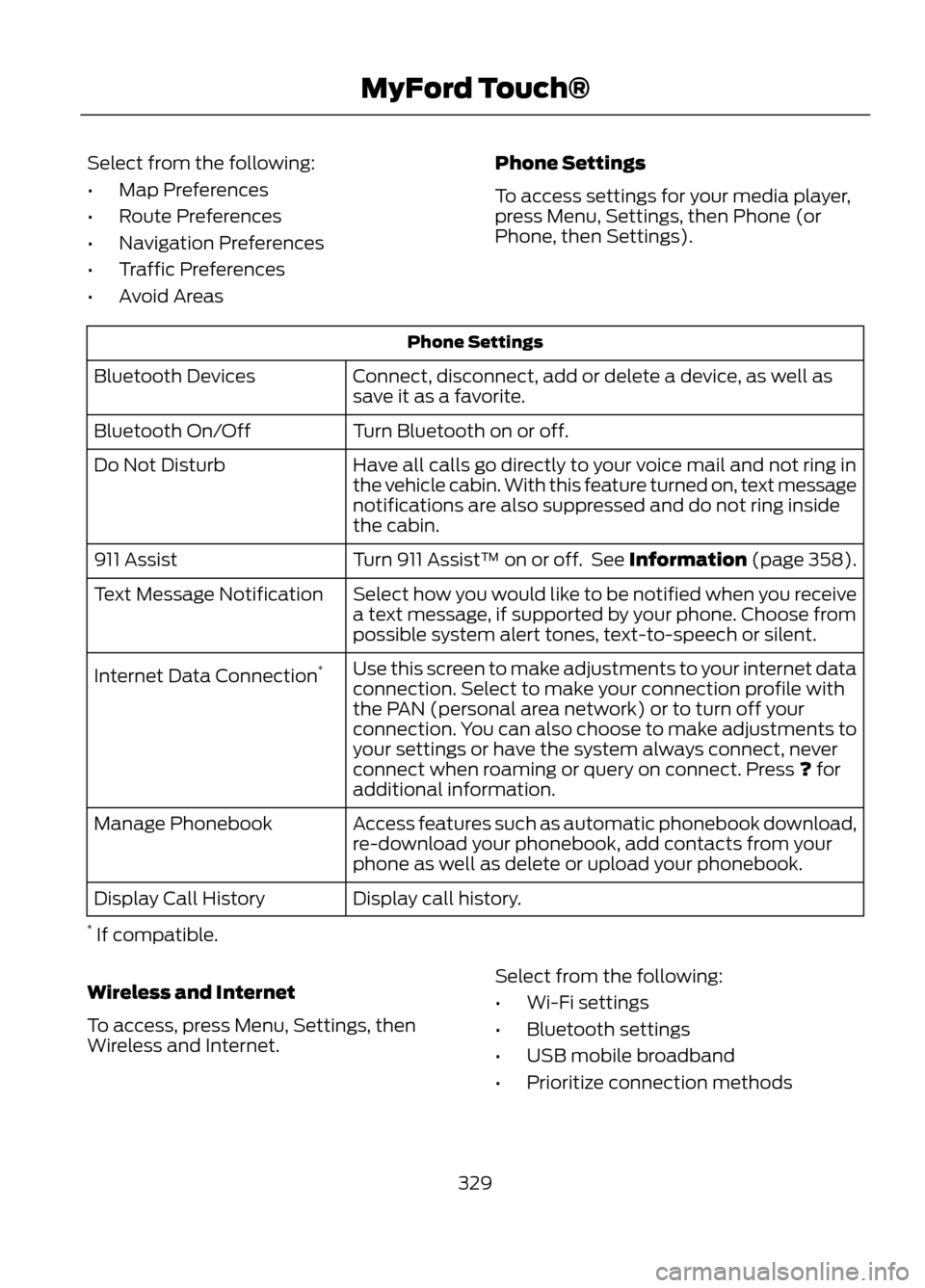
To access settings for your media player,
press Menu, Settings, then Phone (or
Phone, then Settings).
Phone Settings
Connect, disconnect, add or delete a device, as well as
save it as a favorite.
Bluetooth Devices
Turn Bluetooth on or off.
Bluetooth On/Off
Have all calls go directly to your voice mail and not ring in
the vehicle cabin. With this feature turned on, text message
notifications are also suppressed and do not ring inside
the cabin.
Do Not Disturb
Turn 911 Assist™ on or off. See Information (page 358).
911 Assist
Select how you would like to be notified when you receive
a text message, if supported by your phone. Choose from
possible system alert tones, text-to-speech or silent.
Text Message Notification
Use this screen to make adjustments to your internet data
connection. Select to make your connection profile with
the PAN (personal area network) or to turn off your
connection. You can also choose to make adjustments to
your settings or have the system always connect, never
connect when roaming or query on connect. Press ? for
additional information.
Internet Data Connection
*
Access features such as automatic phonebook download,
re-download your phonebook, add contacts from your
phone as well as delete or upload your phonebook.
Manage Phonebook
Display call history.
Display Call History
* If compatible.
Wireless and Internet
To access, press Menu, Settings, then
Wireless and Internet. Select from the following:
•
Wi-Fi settings
• Bluetooth settings
• USB mobile broadband
• Prioritize connection methods
329
MyFord Touch®
Page 330 of 423
Wi-Fi
Your system has a Wi-Fi feature which
creates a wireless network within your
vehicle, thereby allowing other devices (i.e.
personal computers or phones) in your
vehicle to speak to each other, share files,
play games, etc.Using this feature, everyone in your vehicle
can also gain access the internet if:
•
You have a USB mobile broadband
connection inside the vehicle
• Your phone supports PAN (personal
area networking)
• You are parked outside of a wireless
hotspot
To access, press Menu, Settings, Wireless
and Internet, then Wi-Fi settings. Select
from the following options:
You Can
If You Select
Turn the Wi-Fi feature on or off in your vehicle. Make sure
that On is selected for connectivity purposes.
Wi-Fi Network (Client)
Mode On/Off
Use a previously stored wireless network. You can
categorize by alphabetical listing, Priority and Signal
Strength. You can also choose to search for a network,
connect to a network, disconnect from a network, receive
more information, prioritize a network or delete a network.
Choose a Wireless Network
View a list of wireless networks.
Search for Wireless
Networks
Make SYNC an access point for a phone or a computer by
turning this feature on. This forms the local area network
within the vehicle for things such as game playing, file
transfer, internet browsing, etc.
Gateway Access Point Mode
(On/Off)
View who has connected to your Wi-Fi connection recently.
Gateway Access Point
Device List
Press the ? button (if available) for
additional information.
The
Wi-Fi
CERTIFIED Logo is a certification mark of
the Wi-Fi Alliance. USB Mobile Broadband
Note:
You must activate your mobile
broadband device on your PC prior to
connecting it to the system.
Note: USB mobile broadband settings may
not be displayed if the device is already
activated.
330
MyFord Touch®
E142626