tow FORD ESCAPE 2013 3.G Workshop Manual
[x] Cancel search | Manufacturer: FORD, Model Year: 2013, Model line: ESCAPE, Model: FORD ESCAPE 2013 3.GPages: 423, PDF Size: 4.59 MB
Page 261 of 423
1.T-type mini-spare: This spare tire
begins with the letter T for tire size and
may have Temporary Use Only molded in
the sidewall.
2. Full-size dissimilar spare with label
on wheel: This spare tire has a label on
the wheel that states: THIS WHEEL AND
TIRE ASSEMBLY FOR TEMPORARY USE
ONLY.
When driving with one of the dissimilar
spare tires listed above, do not:
• Exceed 50 miles per hour (80
kilometers per hour)
• Load the vehicle beyond maximum
vehicle load rating listed on the Safety
Compliance Label.
• Tow a trailer.
• Use snow chains on the end of the
vehicle with the dissimilar spare tire.
• Use more than one dissimilar spare tire
at a time.
• Use commercial car washing
equipment.
• Try to repair the dissimilar spare tire.
Use of one of the dissimilar spare tires
listed above at any one wheel location can
lead to impairment of the following:
• Handling, stability and braking
performance.
• Comfort and noise.
• Ground clearance and parking at curbs.
• Winter weather driving capability.
• Wet weather driving capability.
• All-wheel driving capability (if
applicable).
3. Full-size dissimilar spare without
label on wheel When driving with the full-size dissimilar
spare wheel and tire assembly,
do not:
• Exceed 70 miles per hour (113
kilometers per hour).
• Use more than one dissimilar spare
wheel and tire assembly at a time.
• Use commercial car washing
equipment.
• Use snow chains on the end of the
vehicle with the dissimilar spare wheel
and tire assembly.
The usage of a full-size dissimilar spare
wheel and tire assembly can lead to
impairment of the following:
• Handling, stability and braking
performance.
• Comfort and noise.
• Ground clearance and parking at curbs.
• Winter weather driving capability.
• Wet weather driving capability.
• All-wheel driving capability (if
applicable).
• Load leveling adjustment (if
applicable).
When driving with the full-size dissimilar
spare wheel and tire assembly additional
caution should be given to:
• Towing a trailer.
• Driving vehicles equipped with a
camper body.
• Driving vehicles with a load on the
cargo rack.
Drive cautiously when using a full-size
dissimilar spare wheel and tire assembly
and seek service as soon as possible.
261
Wheels and Tires
Page 263 of 423
8.Small arrow-shaped marks on the sills
show the location of the jacking points.
9. Remove the lug nuts with the lug
wrench.
Note: If equipped with full wheel covers
with exposed wheel nuts, the wheel nuts
must be removed prior to removing the
wheel cover or damage to the wheel cover
may occur.
10. Replace the flat tire with the spare tire, making sure the valve stem is
facing outward. Reinstall the lug nuts
until the wheel is snug against the
hub. Do not fully tighten the lug nuts
until the wheel has been lowered. 11. Lower the wheel by turning the jack
handle counterclockwise.
12.Remove the jack and fully tighten the
lug nuts in the order shown. See
Technical Specifications (page
265).
Stowing the flat tire
1. Put the jack and lug wrench away. Make sure the jack is fastened so it
does not rattle when you drive.
2. Unblock the wheels.
263
Wheels and Tires
E142552
E142553
12
3
4
5
E75442
Page 264 of 423
3. Stow the flat tire on the floor in thecargo area. Secure with the flat tire
retainer strap by following the next
steps:4. Locate the cargo tie-down near theseatback. Push the loop of the retainer
strap through the tie-down. Thread the
non-loop end through the loop.
5. Weave the retainer strap through thewheel openings. 6.
Locate the front cargo tie-down at the
opposite corner of the cargo area to
the tie-down used in Step 4. Thread
the retainer strap through the tie-down
and pull tight.
7. Secure by tying a 2-half hitch knot.
264
Wheels and Tires
E142906
E142985
Page 276 of 423
SERVICE PLANS (U.S. only)
More than 32 million Ford and Lincoln
owners have discovered the powerful
protection of Ford Extended Service Plan.
It is the only extended service plan backed
by Ford Motor Company, and provides
peace of mind protection beyond the New
Vehicle Limited Warranty coverage.
Up to 500+ Covered Vehicle
Components
There are four, new-vehicle Extended
Service Plans with different levels of
coverage. Ask your dealer for details.
1. PremiumCare - Our mostcomprehensive coverage. With over
500 covered components, this plan is
so complete that we generally only
discuss what’ s not covered!
2. ExtraCare - Covers 113 components, and includes many high-tech items.
3. BaseCare - Covers 84 components.
4. PowertrainCare - Covers 29 critical components.
Ford Extended Service Plan is honored by
all Ford and Lincoln Dealers in the U.S. and
Canada. It is the only extended service plan
authorized and backed by Ford Motor
Company. That means you get:
• Reliable, quality service anywhere you
go.
• Factory-trained technicians.
• Ford Authorized Parts used with every
covered repair.
Rental Car Reimbursement
If your vehicle is kept overnight for covered
repairs, you are eligible for rental car
coverage, including Bumper-to-Bumper
warranty repairs, or manufacturer ’s recalls. Transferable Coverage
If you sell your vehicle before your Ford
Extended Service Plan coverage expires,
you can transfer any remaining coverage
to the new owner. Whenever you’re ready
to sell your car, prospective buyers may
feel better about taking a risk on your used
vehicle. Ford Extended Service Plan may
add resale value!
Plus, exclusive 24/7 roadside assistance,
including:
•
Towing, flat-tire change and battery
jump starts.
• Out-of-fuel and lock-out assistance.
• Travel expense reimbursement for
lodging, meals and rental car.
• Destination assistance for taxi, shuttle,
rental car coverage and emergency
transportation.
Ford Extended Service Plan Can
Quickly Pay for Itself
One service bill – the cost of parts and
labor – can easily exceed the price of your
Ford Extended Service Plan Service
Contract. With a Ford Extend Service Plan,
you minimize your risk for unexpected
repair bills and rising repair costs.
Avoid the Rising Cost of Properly
Maintaining Your Vehicle!
Ford Extended Service Plan also offers a
Premium Maintenance Plan that covers
items that routinely wear out.
The coverage is prepaid, so you never have
to worry about affording your vehicle
maintenance. It covers regular checkups,
routine inspections, preventive care and
replacement of items that require periodic
attention for normal wear:
• Wiper blades
• Spark plugs (except California)
• Clutch disc
276
Ford Extended Service Plan (ESP)
Page 277 of 423
•Brake pads and linings
• Shock absorbers
• Belts and hoses
Contact your selling Ford or Lincoln
dealership today so they can customize a
Ford Extended Service Plan that fits your
driving lifestyle and budget.
Interest Free Finance Options
Available
Take advantage of our installment
payment plan, just a 10% down payment
will provide you with an affordable no
interest, no-fee payment opportunity. For More Information
PROTECT YOURSELF FROM THE RISING
COST OF VEHICLE REPAIRS WITH A FORD
EXTENDED SERVICE PLAN.
To learn more, call our Ford ESP specialists
at 800-367-3377, and don't forget to ask
about our interest free payment program,
allowing you all the security and benefits
Ford ESP has to offer while paying over
time. your pre-approved with no credit
checks, no hassles!
Or, complete the information below and
mail to:
Ford ESP
P.O. Box 8072
Royal Oak, MI 48068-0039
Name (PLEASE PRINT)
APT.#
ADDRESS
ZIP
STATE
CITY
E-MAIL
SERVICE PLANS (CANADA ONLY)
You can get more protection for your
vehicle by purchasing a Ford Extended
Service Plan. Ford Extended Service Plan
is the only service contract backed by Ford
Motor Company of Canada, Limited.
Depending on the plan you purchase, Ford
Extended Service Plan provides benefits
such as:
• Rental reimbursement
• Coverage for certain maintenance and
wear items •
Protection against repair costs after
your New Vehicle Limited Warranty
Coverage expires
• Roadside Assistance benefits
There are several Ford Extended Service
Plans available in various time, distance
and deductible combinations. Each plan
is tailored to fit your own driving needs,
including reimbursement for towing and
rental.
277
Ford Extended Service Plan (ESP)
Page 300 of 423
say "Operator" at any time within a
directions or business search to speak
with a live operator. You may also be
prompted to speak with an operator.
The live operator can assist you by
searching for businesses by name or
by category, residential addresses by
street address or by name or specific
street intersections. Operator Assist is
a feature of your SYNC Services
subscription. For more information on
Operator Assist visit
www.SYNCMyRide.com/support.
2. Follow the voice prompts to select your
destination. Once your destination is
selected, your current vehicle location
is uploaded and a route based on
current traffic conditions is calculated
and sent back to your vehicle. After the
route download is complete, the phone
call is automatically ended. You then
receive audible and visual driving
instructions as you travel towards you
destination. 3.
While on an active route, you can select
or say "Route summary" or "Route
status" to view the Route Summary
turn list or the Route Status ETA. You
can also turn voice guidance on or off,
cancel the route or update the route.
If you miss a turn, SYNC automatically asks
if you want the route updated. Just say
"Yes" when prompted and a new route is
delivered to your vehicle.
Disconnecting from SYNC Services
1. Press and hold the phone button on the steering wheel.
2. Say "Goodbye" from the SYNC Services main menu.
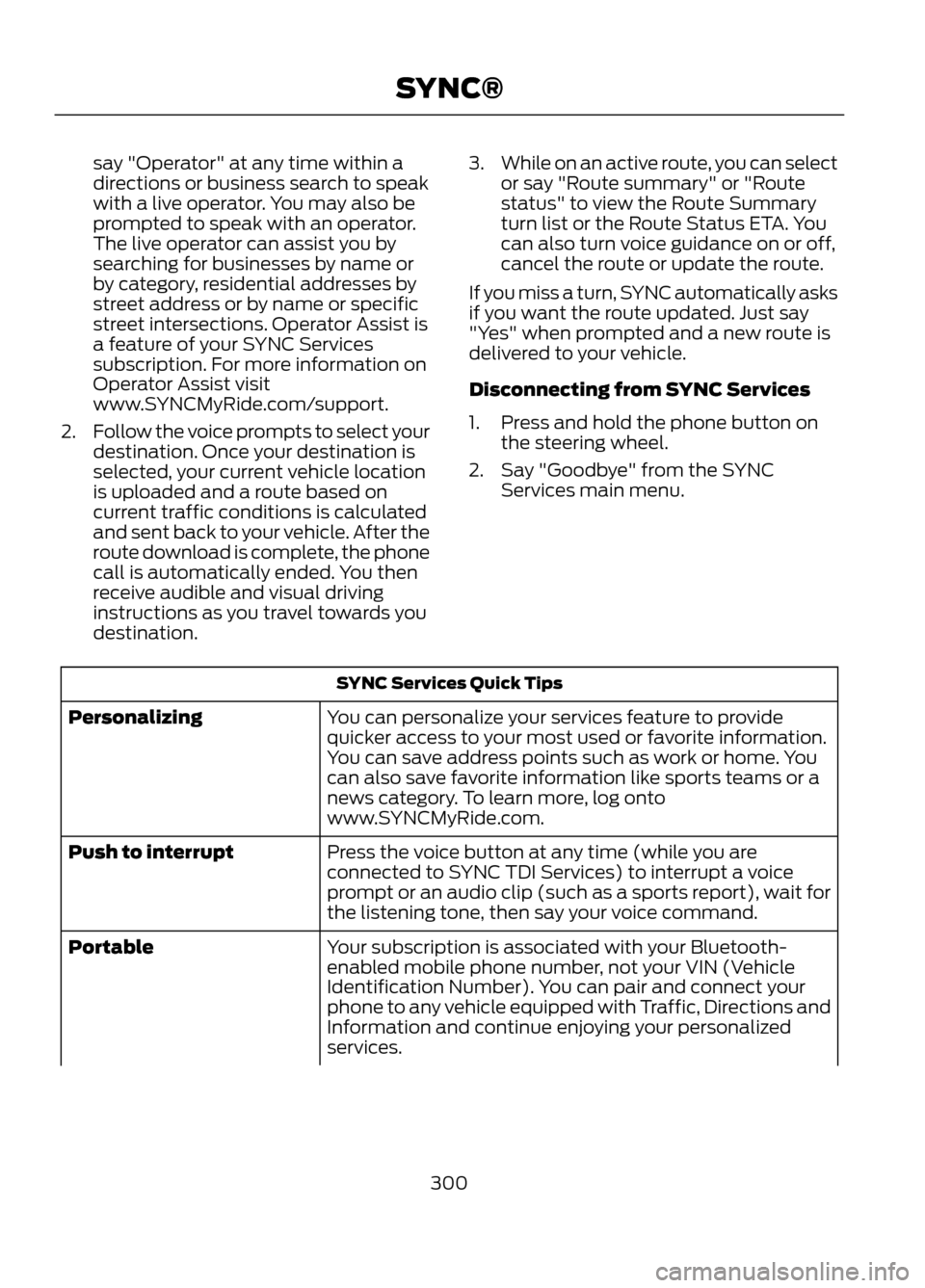
SYNC Services Quick Tips
You can personalize your services feature to provide
quicker access to your most used or favorite information.
You can save address points such as work or home. You
can also save favorite information like sports teams or a
news category. To learn more, log onto
www.SYNCMyRide.com.
Personalizing
Press the voice button at any time (while you are
connected to SYNC TDI Services) to interrupt a voice
prompt or an audio clip (such as a sports report), wait for
the listening tone, then say your voice command.
Push to interrupt
Your subscription is associated with your Bluetooth-
enabled mobile phone number, not your VIN (Vehicle
Identification Number). You can pair and connect your
phone to any vehicle equipped with Traffic, Directions and
Information and continue enjoying your personalized
services.
Portable
300
SYNC®
Page 341 of 423

SIRIUS satellite radio is a
subscription-based satellite radio service
that broadcasts a variety of music, sports,
news, weather, traffic and entertainment
programming. Your factory-installed
SIRIUS satellite radio system includes
hardware and a limited subscription term
which begins on the date of sale or lease
of the vehicle. Refer to your authorized
dealer for availability.For more information on extended
subscription terms (a service fee is
required), the online media player and a
complete list of SIRIUS satellite radio
channels, and other features, please visit
www.siriusxm.com in the United States,
www.sirius.ca in Canada, or call SIRIUS at
1-888-539-7474.
Satellite Radio Electronic Serial Number
(ESN)
You need your ESN to activate, modify or
track your satellite radio account. The ESN
is found on the System Information Screen
(SR ESN:XXXXXXXXXXXX). To access
your ESN, touch the bottom left corner of
the touchscreen. Touch SIRIUS, Options,
then ESN.
SIRIUS Satellite Radio Reception Factors and Troubleshooting
Potential Reception Issues
For optimal reception performance, keep the antenna
clear of snow and ice build-up and keep luggage and other
material as far away from the antenna as possible.
Antenna obstructions
Hills, mountains, tall buildings, bridges, tunnels, freeway
overpasses, parking garages, dense tree foliage and
thunderstorms can interfere with your reception.
Terrain
When you pass a ground-based broadcast repeating
tower, a stronger signal may overtake a weaker one and
the audio system may mute.
Station overload
Your display may show ACQUIRING... to indicate the
interference and the audio system may mute.
Satellite radio signal interfer-
ence
341
MyFord Touch®
E142593
Page 342 of 423
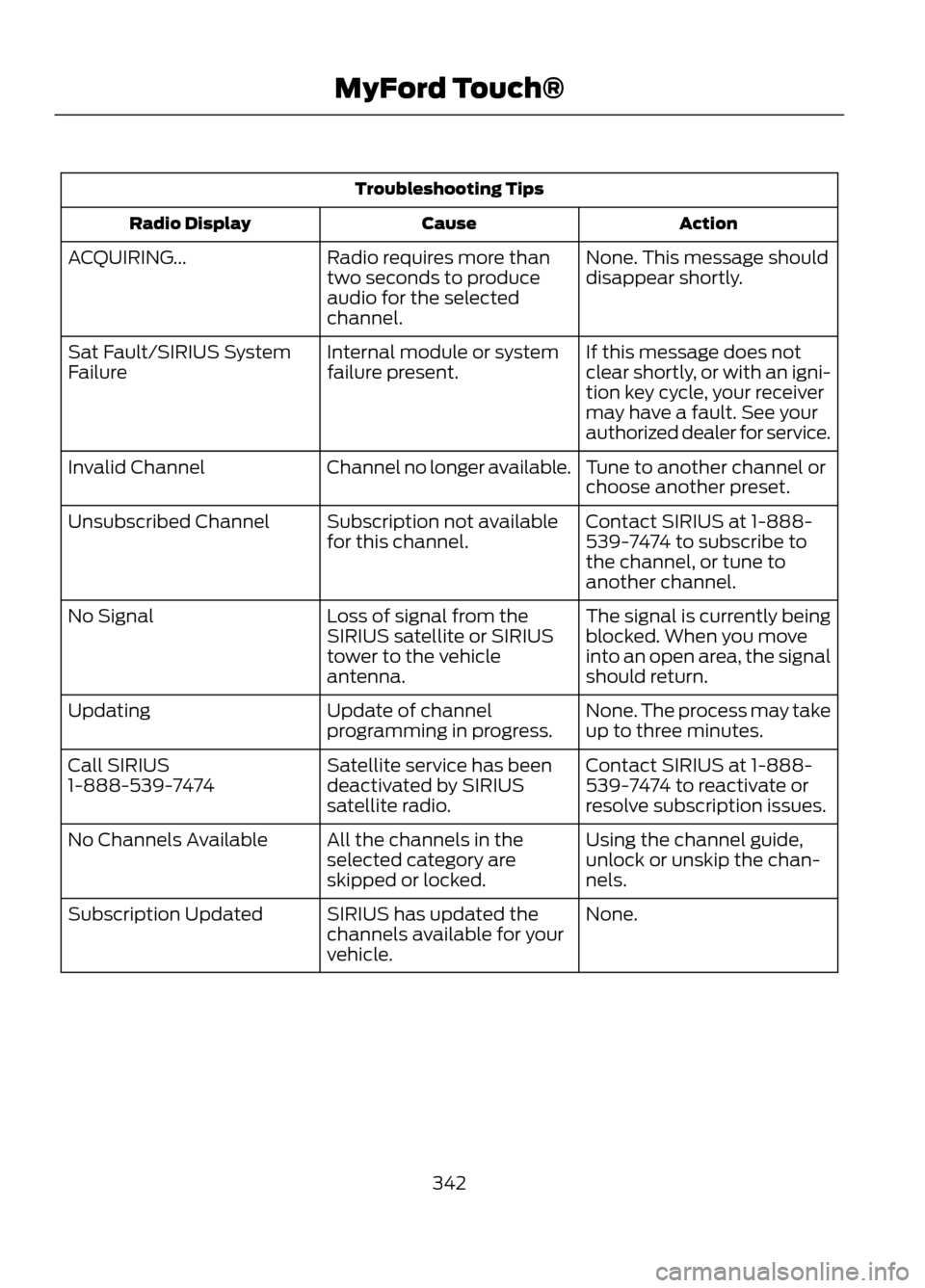
Troubleshooting TipsAction
Cause
Radio Display
None. This message should
disappear shortly.
Radio requires more than
two seconds to produce
audio for the selected
channel.
ACQUIRING...
If this message does not
clear shortly, or with an igni-
tion key cycle, your receiver
may have a fault. See your
authorized dealer for service.
Internal module or system
failure present.
Sat Fault/SIRIUS System
Failure
Tune to another channel or
choose another preset.
Channel no longer available.
Invalid Channel
Contact SIRIUS at 1-888-
539-7474 to subscribe to
the channel, or tune to
another channel.
Subscription not available
for this channel.
Unsubscribed Channel
The signal is currently being
blocked. When you move
into an open area, the signal
should return.
Loss of signal from the
SIRIUS satellite or SIRIUS
tower to the vehicle
antenna.
No Signal
None. The process may take
up to three minutes.
Update of channel
programming in progress.
Updating
Contact SIRIUS at 1-888-
539-7474 to reactivate or
resolve subscription issues.
Satellite service has been
deactivated by SIRIUS
satellite radio.
Call SIRIUS
1-888-539-7474
Using the channel guide,
unlock or unskip the chan-
nels.
All the channels in the
selected category are
skipped or locked.
No Channels Available
None.
SIRIUS has updated the
channels available for your
vehicle.
Subscription Updated
342
MyFord Touch®
Page 374 of 423
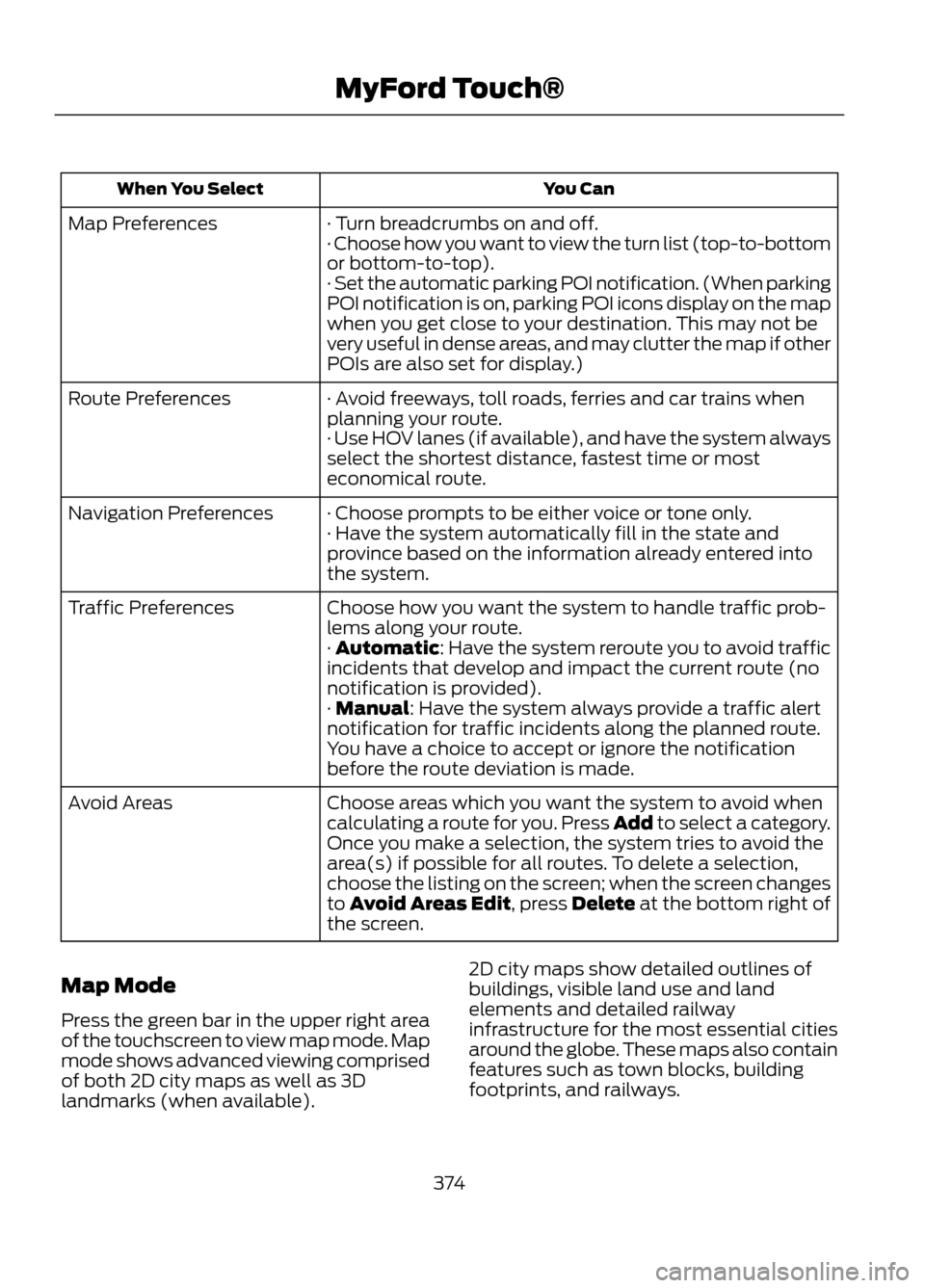
You Can
When You Select
· Turn breadcrumbs on and off.
Map Preferences
· Choose how you want to view the turn list (top-to-bottom
or bottom-to-top).
· Set the automatic parking POI notification. (When parking
POI notification is on, parking POI icons display on the map
when you get close to your destination. This may not be
very useful in dense areas, and may clutter the map if other
POIs are also set for display.)
· Avoid freeways, toll roads, ferries and car trains when
planning your route.
Route Preferences
· Use HOV lanes (if available), and have the system always
select the shortest distance, fastest time or most
economical route.
· Choose prompts to be either voice or tone only.
Navigation Preferences
· Have the system automatically fill in the state and
province based on the information already entered into
the system.
Choose how you want the system to handle traffic prob-
lems along your route.
Traffic Preferences
· Automatic: Have the system reroute you to avoid traffic
incidents that develop and impact the current route (no
notification is provided).
· Manual: Have the system always provide a traffic alert
notification for traffic incidents along the planned route.
You have a choice to accept or ignore the notification
before the route deviation is made.
Choose areas which you want the system to avoid when
calculating a route for you. Press Add to select a category.
Avoid Areas
Once you make a selection, the system tries to avoid the
area(s) if possible for all routes. To delete a selection,
choose the listing on the screen; when the screen changes
to Avoid Areas Edit, press Delete at the bottom right of
the screen.
Map Mode
Press the green bar in the upper right area
of the touchscreen to view map mode. Map
mode shows advanced viewing comprised
of both 2D city maps as well as 3D
landmarks (when available). 2D city maps show detailed outlines of
buildings, visible land use and land
elements and detailed railway
infrastructure for the most essential cities
around the globe. These maps also contain
features such as town blocks, building
footprints, and railways.
374
MyFord Touch®
Page 379 of 423
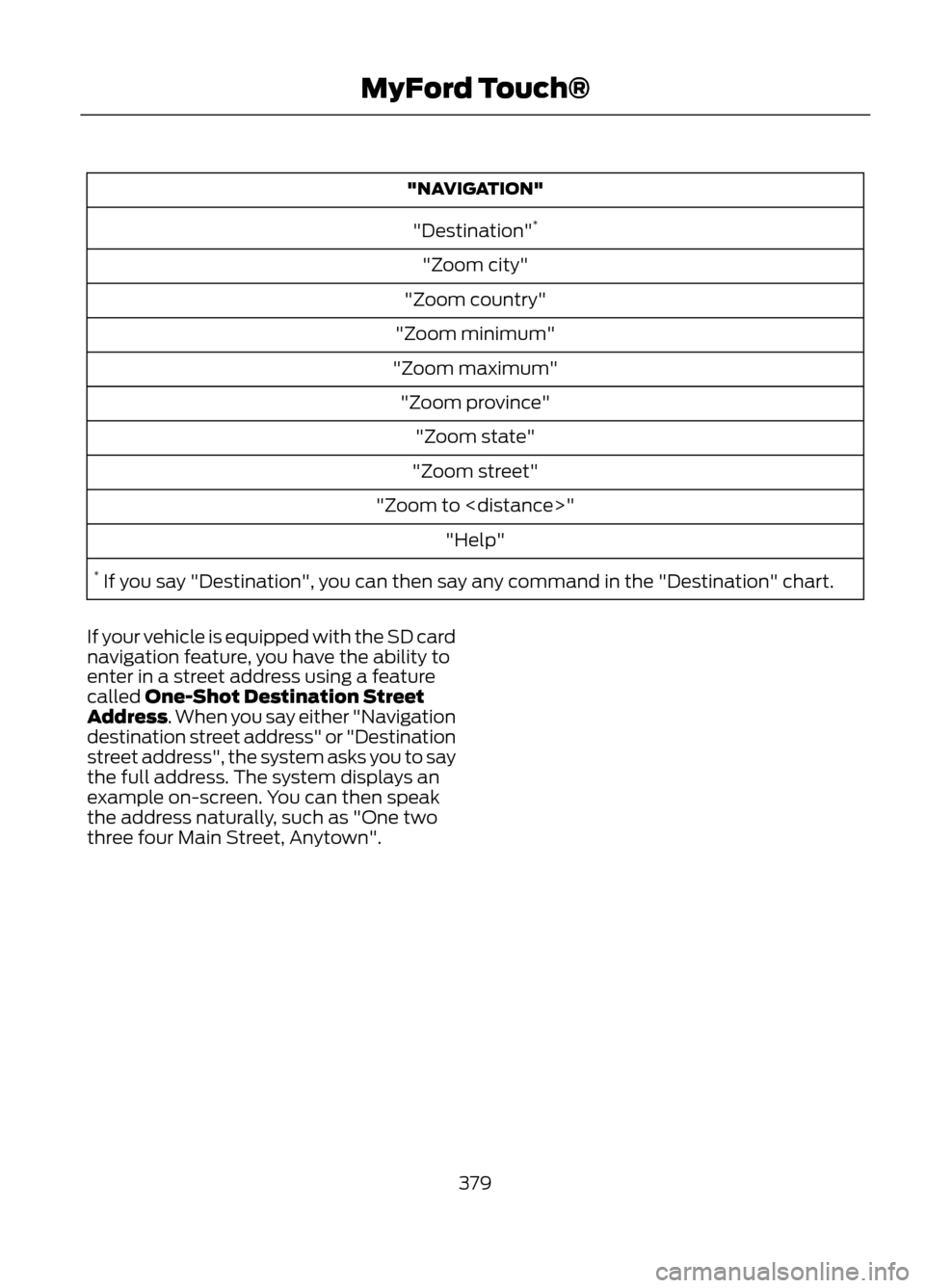
"NAVIGATION""Destination" *
"Zoom city"
"Zoom country"
"Zoom minimum"
"Zoom maximum" "Zoom province" "Zoom state"
"Zoom street"
"Zoom to
* If you say "Destination", you can then say any command in the "Destination" chart.
If your vehicle is equipped with the SD card
navigation feature, you have the ability to
enter in a street address using a feature
called One-Shot Destination Street
Address. When you say either "Navigation
destination street address" or "Destination
street address", the system asks you to say
the full address. The system displays an
example on-screen. You can then speak
the address naturally, such as "One two
three four Main Street, Anytown".
379
MyFord Touch®