tow FORD ESCAPE 2013 3.G Owner's Manual
[x] Cancel search | Manufacturer: FORD, Model Year: 2013, Model line: ESCAPE, Model: FORD ESCAPE 2013 3.GPages: 423, PDF Size: 4.59 MB
Page 116 of 423
Note:Do not place objects under the front
seats as this may interfere with the airflow
to the rear seats.
Note: Remove any snow, ice or leaves from
the air intake area at the base of the
windshield.
Manual Climate Control
Note: To reduce fogging of the windshield
during humid weather, adjust the air
distribution control to the windshield air
vents position. Increase the temperature
and fan speed to improve clearing, if
required.
Automatic Climate Control
Note: Do not adjust the settings when your
vehicle interior is extremely hot or cold. The
system automatically adjusts to the
previously stored settings. For the system
to function efficiently, the instrument panel
and side air vents should be fully open. Note:
At low ambient temperatures with
AUTO selected, the air stream is directed
toward the windshield and side windows
for as long as the engine remains cold.
Note: When the system is switched off,
outside air is prevented from entering your
vehicle.
Note: When the system is in AUTO mode,
and the interior and exterior temperatures
are high, the system automatically selects
recirculated air to maximize cooling of the
interior. When the selected air temperature
is reached, the system automatically selects
outside air.
Note: When you select windshield
defrosting and defogging, the instrument
panel and footwell level functions
automatically switch off and air conditioning
switches on. Outside air flows into your
vehicle.
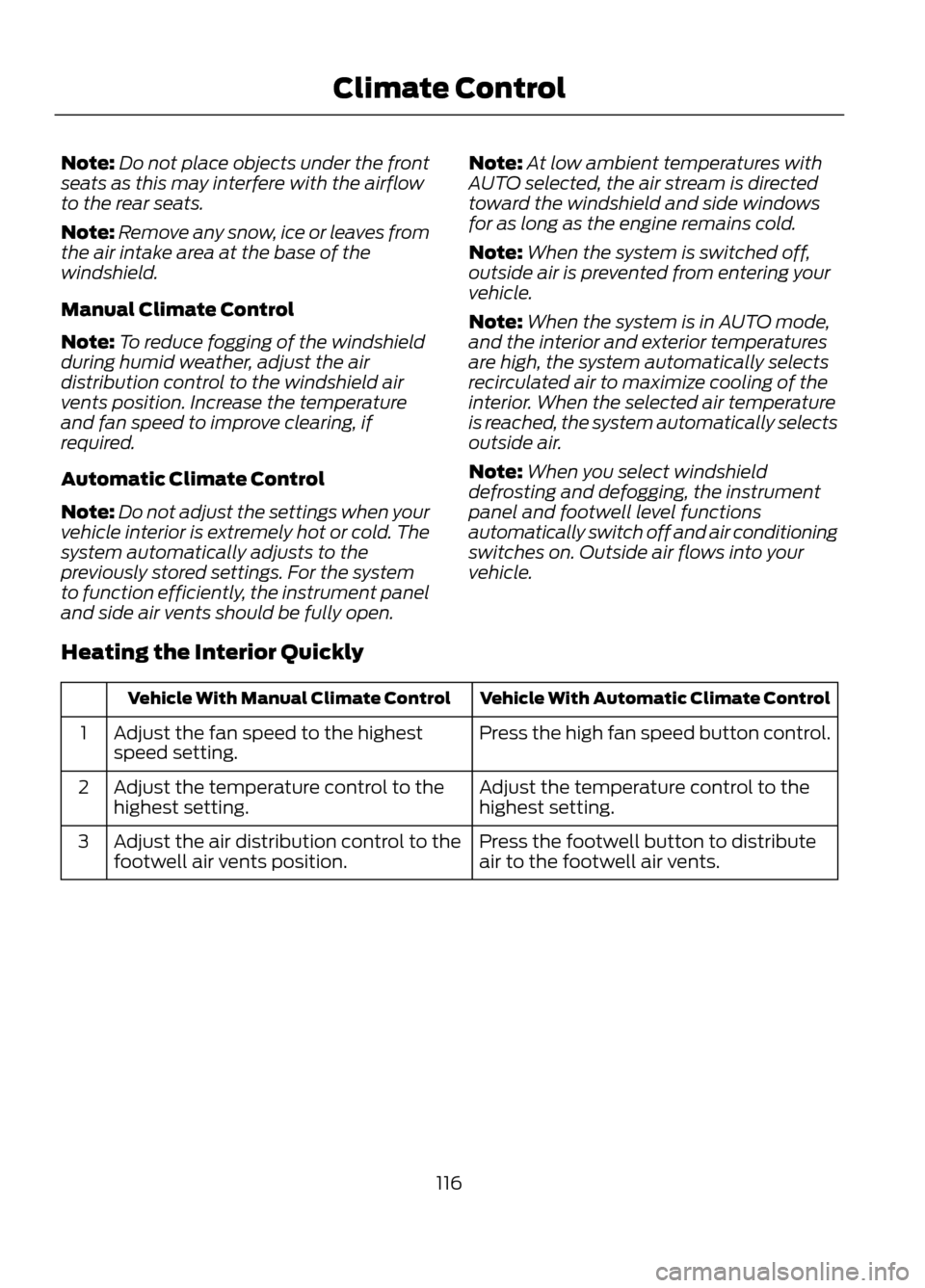
Heating the Interior Quickly
Vehicle With Automatic Climate Control
Vehicle With Manual Climate Control
Press the high fan speed button control.
Adjust the fan speed to the highest
speed setting.
1
Adjust the temperature control to the
highest setting.
Adjust the temperature control to the
highest setting.
2
Press the footwell button to distribute
air to the footwell air vents.
Adjust the air distribution control to the
footwell air vents position.
3
116
Climate Control
Page 117 of 423
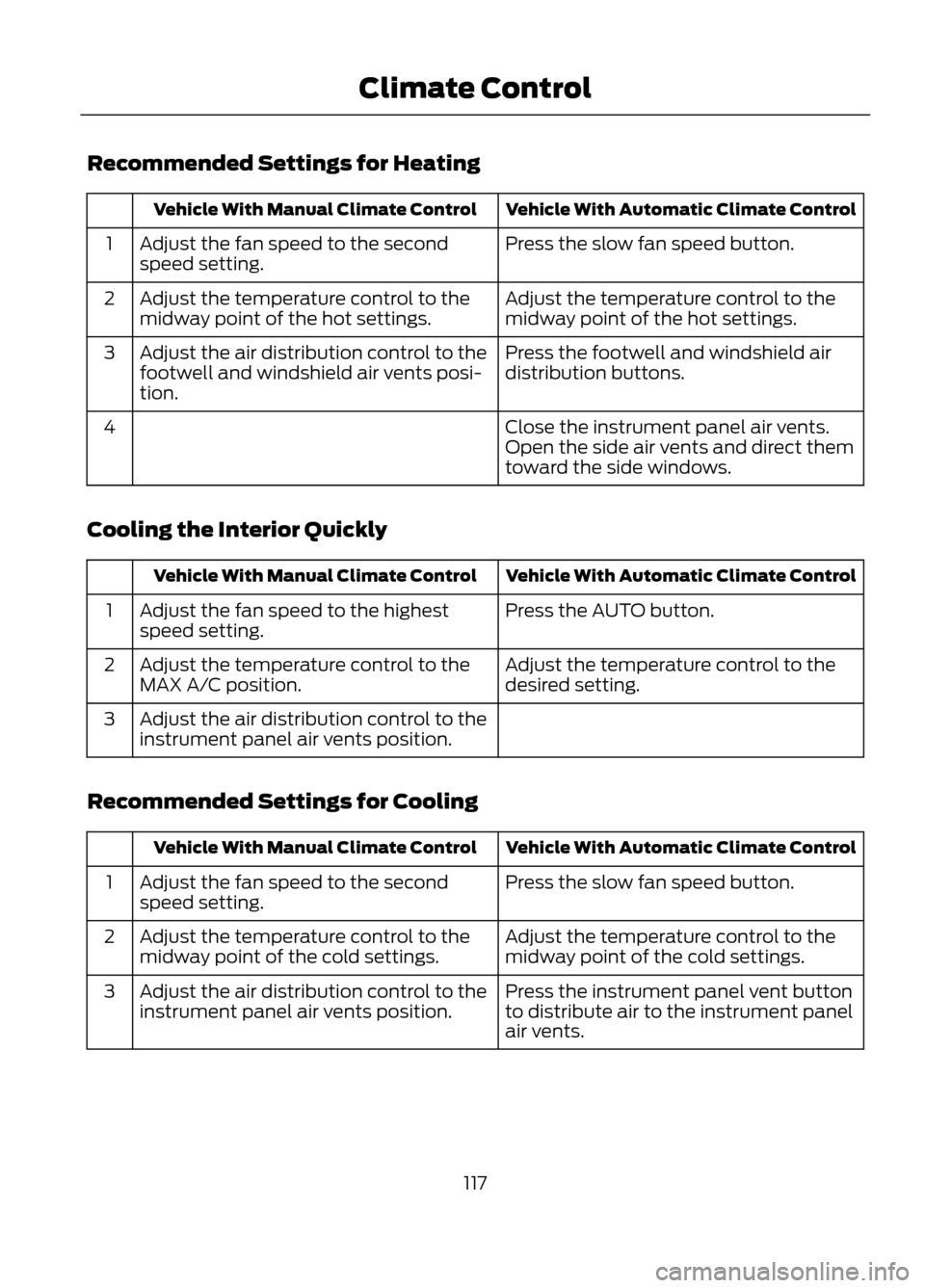
Recommended Settings for Heating
Vehicle With Automatic Climate Control
Vehicle With Manual Climate Control
Press the slow fan speed button.
Adjust the fan speed to the second
speed setting.
1
Adjust the temperature control to the
midway point of the hot settings.
Adjust the temperature control to the
midway point of the hot settings.
2
Press the footwell and windshield air
distribution buttons.
Adjust the air distribution control to the
footwell and windshield air vents posi-
tion.
3
Close the instrument panel air vents.
Open the side air vents and direct them
toward the side windows.
4
Cooling the Interior Quickly
Vehicle With Automatic Climate Control
Vehicle With Manual Climate Control
Press the AUTO button.
Adjust the fan speed to the highest
speed setting.
1
Adjust the temperature control to the
desired setting.
Adjust the temperature control to the
MAX A/C position.
2
Adjust the air distribution control to the
instrument panel air vents position.
3
Recommended Settings for Cooling
Vehicle With Automatic Climate Control
Vehicle With Manual Climate Control
Press the slow fan speed button.
Adjust the fan speed to the second
speed setting.
1
Adjust the temperature control to the
midway point of the cold settings.
Adjust the temperature control to the
midway point of the cold settings.
2
Press the instrument panel vent button
to distribute air to the instrument panel
air vents.
Adjust the air distribution control to the
instrument panel air vents position.
3
117
Climate Control
Page 118 of 423
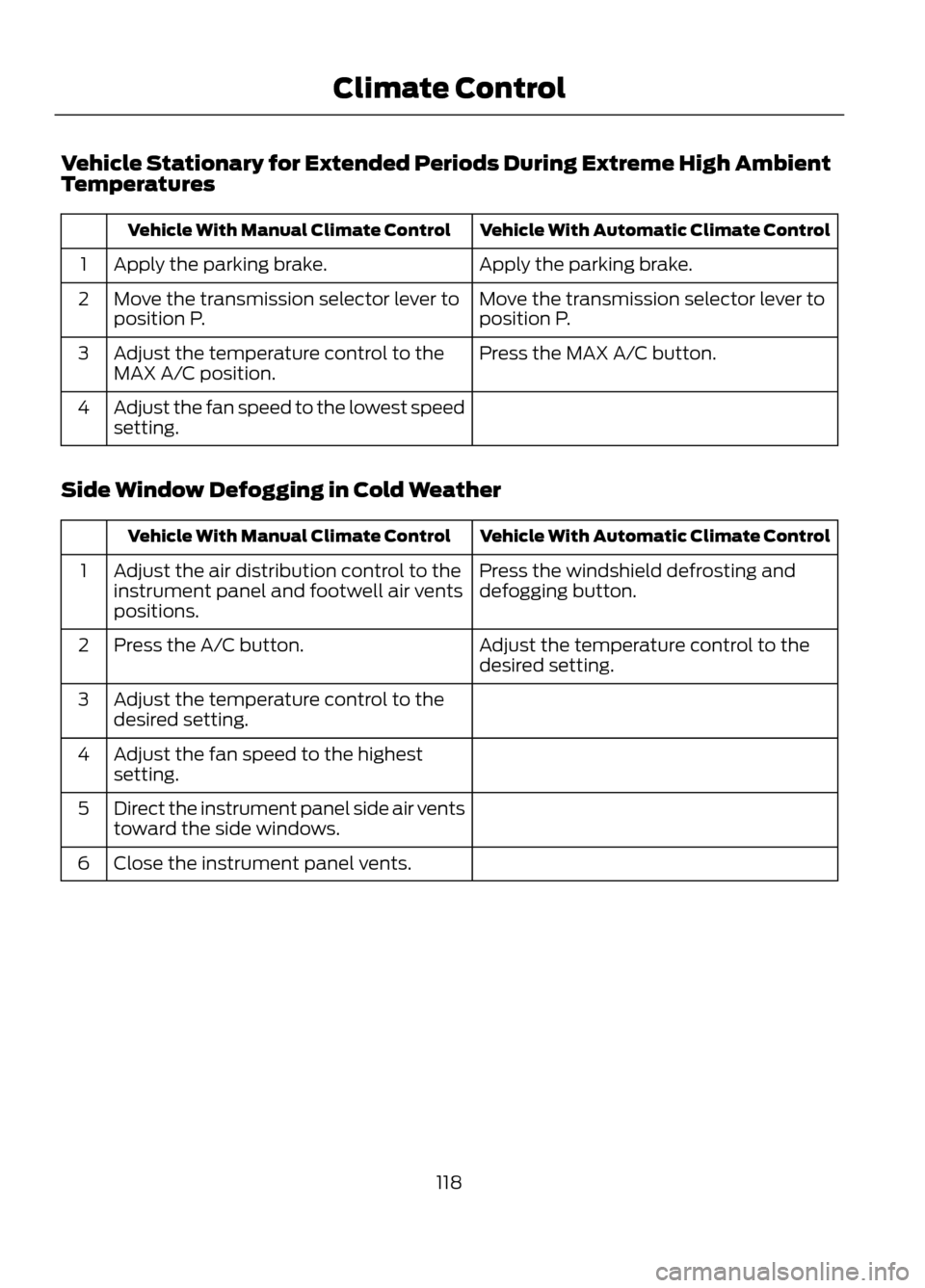
Vehicle Stationary for Extended Periods During Extreme High Ambient
Temperatures
Vehicle With Automatic Climate Control
Vehicle With Manual Climate Control
Apply the parking brake.
Apply the parking brake.
1
Move the transmission selector lever to
position P.
Move the transmission selector lever to
position P.
2
Press the MAX A/C button.
Adjust the temperature control to the
MAX A/C position.
3
Adjust the fan speed to the lowest speed
setting.
4
Side Window Defogging in Cold Weather
Vehicle With Automatic Climate Control
Vehicle With Manual Climate Control
Press the windshield defrosting and
defogging button.
Adjust the air distribution control to the
instrument panel and footwell air vents
positions.
1
Adjust the temperature control to the
desired setting.
Press the A/C button.
2
Adjust the temperature control to the
desired setting.
3
Adjust the fan speed to the highest
setting.
4
Direct the instrument panel side air vents
toward the side windows.
5
Close the instrument panel vents.
6
118
Climate Control
Page 123 of 423

Tilting Head Restraints (If Equipped)
The front head restraints may have a tilting
feature for extra comfort. To tilt the head
restraint, do the following:
1. Adjust the seatback to an uprightdriving or riding position.
2. Pivot the head restraint forward toward
your head to the desired position.
After the head restraint reaches the
forward-most tilt position, pivoting it
forward again will then release it to the
rearward, un-tilted position.
MANUAL SEATS
WARNING
Do not adjust the driver's seat or
seatback when your vehicle is
moving.
Moving the Seat Backward and
Forward
WARNING
Rock the seat backward and forward
after releasing the lever to make sure
that it is fully engaged.
Adjusting the Height of the
Driver's Seat
123
Seats
E144727
E130249
E70730
Page 139 of 423
•Make sure the system is unplugged and
properly stowed before driving your
vehicle. Make sure the protective cover
seals the prongs of the block heater
cord plug when not in use.
• Make sure the heater system is
checked for proper operation before
winter.
Using the Engine Block Heater
Make sure the receptacle terminals are
clean and dry prior to use. Clean them with
a dry cloth if necessary.
The heater uses 0.4 to 1.0 kilowatt-hours
of energy per hour of use. The system does
not have a thermostat. It will achieve
maximum temperature after
approximately three hours of operation. If
you use the heater longer than three hours,
this will not improve system performance
and will use unnecessary electricity.
139
Starting and Stopping the Engine
Page 141 of 423
FUEL QUALITY
Note:We recommend that you use only
high quality fuel without additives or other
engine treatments.
Do not use leaded gasoline or gasoline with
additives containing other metallic
compounds (e.g. manganese-based). They
could damage the emission system.
Choosing the Right Fuel
Note: Use of any fuel other than those
recommended may cause powertrain
damage, a loss of vehicle performance and
repairs may not be covered under warranty.
If your vehicle is not a flexible fuel vehicle,
then only use unleaded fuel or unleaded
fuel blended with a maximum of 15%
ethanol. Do not use fuel ethanol (E85),
diesel fuel, fuel methanol, leaded fuel or
any other fuel because it could damage or
impair the emission control system.
The use of leaded fuel is prohibited by law.
Your vehicle was not designed to use fuel
or fuel additives with metallic compounds,
including manganese-based additives.
Octane Recommendations
Regular unleaded gasoline with a pump
(R+M)/2 octane rating of 87 is
recommended. Some fuel stations offer
fuels posted as regular with an octane
rating below 87, particularly in high altitude
areas. Fuels with octane levels below 87
are not recommended.
Note: Premium fuel will provide improved
performance for vehicles with EcoBoost®
engines and is recommended for severe duty
use such as trailer tow. Do not be concerned if your engine
sometimes knocks lightly. However, if it
knocks heavily while you are using fuel with
the recommended octane rating, see your
authorized dealer to prevent any engine
damage.
RUNNING OUT OF FUEL
Avoid running out of fuel because this
situation may have an adverse effect on
powertrain components.
If you have run out of fuel:
•
You may need to cycle the ignition from
off to on several times after refueling
to allow the fuel system to pump the
fuel from the tank to the engine. On
restarting, cranking time will take a few
seconds longer than normal. With
keyless ignition, just start the engine.
Crank time will be longer than usual.
• Normally, adding 1 gallon (3.8 liters) of
fuel is enough to restart the engine. If
the vehicle is out of fuel and on a steep
grade, more than 1 gallon (3.8 liters)
may be required.
• The service engine soon indicator may
come on. For more information on the
service engine soon indicator, See
Warning Lamps and Indicators
(page 80).
Refilling With a Portable Fuel
Container
WARNINGS
Do not insert the nozzle of portable
fuel containers or aftermarket
funnels into the capless fuel system.
This could damage the fuel system and its
seal, and may cause fuel to run onto the
ground instead of filling the tank, which
could result in serious personal injury.
141
Fuel and Refueling
Page 149 of 423
3. Locate the white lever located on theleft side of the shifter.
4. Using the tool move the white lever towards the rear of the shifter.
5. While holding the white lever in the rear
position, move the shifter from the park
position.
6. Press the shifter bezel back into the top
finish panel until it snaps back into
position.
7. Apply the brake pedal, start the vehicle
and release the parking brake.
Note: See your authorized dealer as soon
as possible if this procedure is used.
If Your Vehicle Gets Stuck In Mud
or Snow
Note: Do not rock the vehicle if the engine
is not at normal operating temperature or
damage to the transmission may occur.
Note: Do not rock the vehicle for more than
a minute or damage to the transmission and
tires may occur, or the engine may overheat.
If your vehicle gets stuck in mud or snow,
it may be rocked out by shifting between
forward and reverse gears, stopping
between shifts in a steady pattern. Press
lightly on the accelerator in each gear.
HILL START ASSIST
WARNINGS
The hill start assist feature does not
replace the parking brake. When you
leave the vehicle, always apply the
parking brake and shift the transmission
into P (Park).
You must remain in the vehicle once
you have activated the hill start
assist feature.
WARNINGS
During all times, you are responsible
for controlling the vehicle,
supervising the hill start assist
system and intervening, if required.
If the engine is revved excessively, or
if a malfunction is detected when the
hill start assist feature is active, the
hill start assist feature will be deactivated.
This feature makes it easier to pull away
when the vehicle is on a slope without the
need to use the parking brake.
When this feature is active, the vehicle will
remain stationary on the slope for two to
three seconds after you release the brake
pedal. This allows you time to move your
foot from the brake to the accelerator
pedal. The brakes are released
automatically once the engine has
developed sufficient drive to prevent the
vehicle from rolling down the slope. This
is an advantage when pulling away on a
slope, (for example from a car park ramp,
traffic lights or when reversing uphill into
a parking space).
This feature is activated automatically on
any slope that can result in significant
vehicle rollback. This feature will not
operate if the parking brake is activated.
Using Hill Start Assist
1. Press the brake pedal to bring the vehicle to a complete standstill. Keep
the brake pedal pressed.
2. If the sensors detect that the vehicle is
on a slope, the hill start assist feature
will be activated automatically.
3. When you remove your foot from the brake pedal, the vehicle will remain on
the slope without rolling away for
approximately two or three seconds.
This hold time will automatically be
extended if you are in the process of
driving off.
149
Transmission
Page 156 of 423
GENERAL INFORMATION
Note:Occasional brake noise is normal. If
a metal-to-metal, continuous grinding or
continuous squeal sound is present, the
brake linings may be worn-out and should
be inspected by an authorized dealer. If the
vehicle has continuous vibration or shudder
in the steering wheel while braking, the
vehicle should be inspected by an
authorized dealer.
Note: Brake dust may accumulate on the
wheels, even under normal driving
conditions. Some dust is inevitable as the
brakes wear and does not contribute to
brake noise. See Cleaning the Alloy
Wheels (page 240).
See Warning Lamps and
Indicators (page 80).
Wet brakes result in reduced braking
efficiency. Gently press the brake pedal a
few times when driving from a car wash or
standing water to dry the brakes.
Brake Over Accelerator
In the event the accelerator pedal
becomes stuck or entrapped, apply steady
and firm pressure to the brake pedal to
slow the vehicle and reduce engine power.
If you experience this condition, apply the
brakes and bring your vehicle to a safe
stop. Turn the engine off, shift to position
P and apply the parking brake, and then
inspect the accelerator pedal for any
interferences. If none are found and the
condition persists, have your vehicle towed
to the nearest authorized dealer. Emergency Brake Assist
Emergency brake assist detects when you
brake heavily by measuring the rate at
which you press the brake pedal. It
provides maximum braking efficiency as
long as you press the pedal. Emergency
brake assist can reduce stopping distances
in critical situations.
Anti-lock Brake System
This system helps you maintain steering
control during emergency stops by keeping
the brakes from locking.
This lamp momentarily
illuminates when the ignition is
turned on. If the light does not
illuminate during start up, remains on or
flashes, the anti-lock braking system may
be disabled and may need to be serviced.
If the system is disabled, normal
braking is still effective. If the
brake warning lamp illuminates
with the parking brake released, have your
brake system serviced immediately.
HINTS ON DRIVING WITH
ANTI-LOCK BRAKES
Note: When the system is operating, the
brake pedal will pulse and may travel
further. Maintain pressure on the brake
pedal. You may also hear a noise from the
system. This is normal.
The ABS will not eliminate the risks when:
• you drive too closely to the vehicle in
front of you
• your vehicle is hydroplaning
• you take corners too fast
• the road surface is poor.
156
Brakes
E138644
E138644
Page 157 of 423
PARKING BRAKE
WARNING
Always set the parking brake fully
and leave your vehicle with the
transmission selector lever in
position P.
Note: Do not press the release button while
pulling the lever up.
To apply the parking brake:
1. Press the foot brake pedal firmly.
2. Pull the parking brake lever up to its fullest extent.
Note: If you park your vehicle on a hill and
facing uphill, move the transmission selector
lever to position P and turn the steering
wheel away from the curb.
Note: If you park your vehicle on a hill and
facing downhill, move the transmission
selector lever to P and turn the steering
wheel toward the curb.
To release the parking brake:
1. Press the brake pedal firmly.
2. Pull the lever up slightly.
3. Press the release button and push the lever down.
157
Brakes
Page 162 of 423
The system detects certain objects while
the transmission is in R (Reverse):
•and moving toward a stationary object
at a speed of 3 mph (5 km/h) or less
• but not moving, and a moving object is
approaching the rear of the vehicle at
a speed of 3 mph (5 km/h) or less
• and moving at a speed of less than 3
mph (5 km/h) and a moving object is
approaching the rear of the vehicle at
a speed of less than 3 mph (5 km/h).
The system can be turned off using the
information display control. See General
Information (page 84). If a fault is
present in the system, a warning message
appears in the information display and
does not allow the driver to switch the
faulted system on.
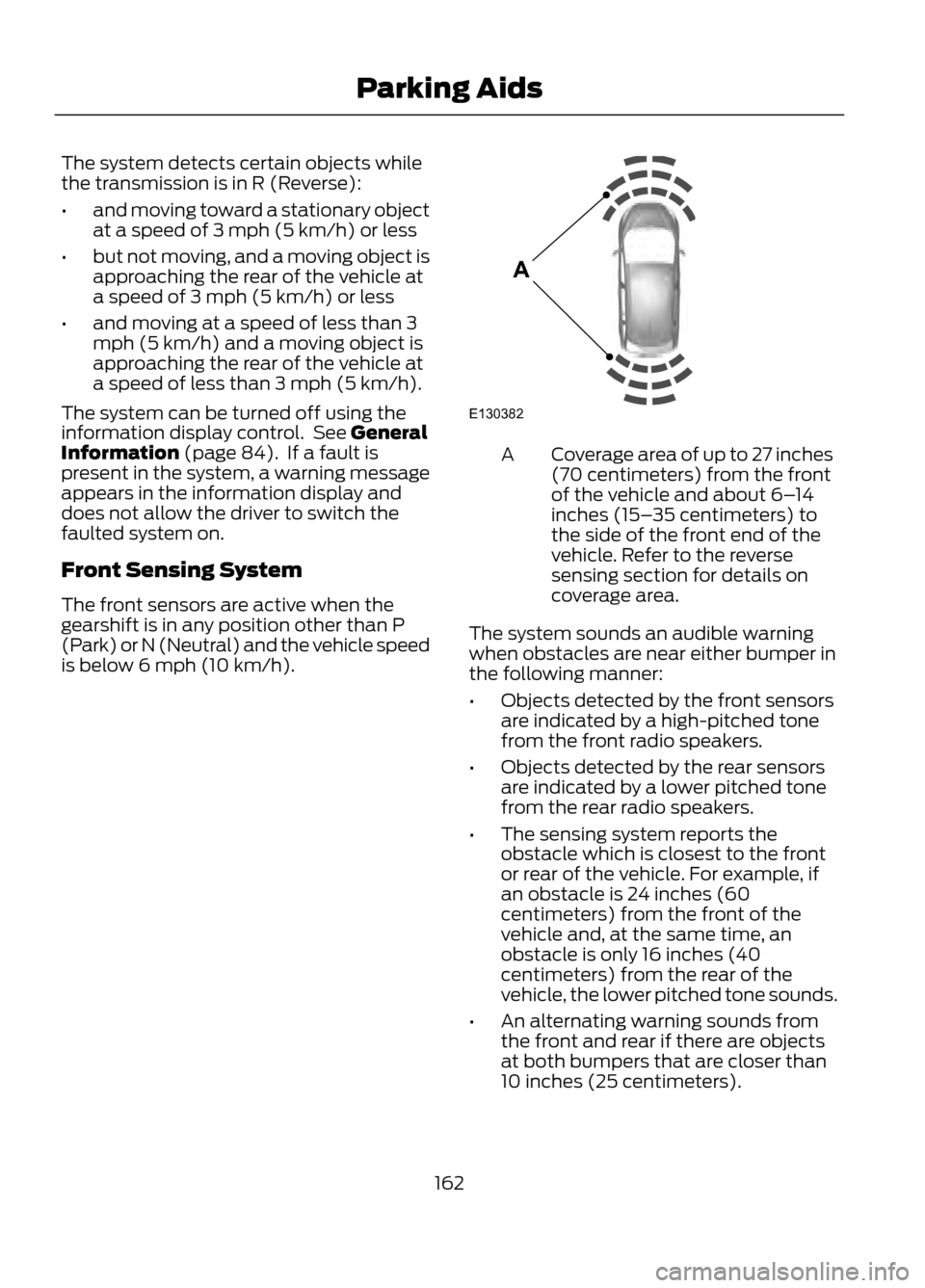
Front Sensing System
The front sensors are active when the
gearshift is in any position other than P
(Park) or N (Neutral) and the vehicle speed
is below 6 mph (10 km/h).
Coverage area of up to 27 inches
(70 centimeters) from the front
of the vehicle and about 6– 14
inches (15– 35 centimeters) to
the side of the front end of the
vehicle. Refer to the reverse
sensing section for details on
coverage area.
A
The system sounds an audible warning
when obstacles are near either bumper in
the following manner:
• Objects detected by the front sensors
are indicated by a high-pitched tone
from the front radio speakers.
• Objects detected by the rear sensors
are indicated by a lower pitched tone
from the rear radio speakers.
• The sensing system reports the
obstacle which is closest to the front
or rear of the vehicle. For example, if
an obstacle is 24 inches (60
centimeters) from the front of the
vehicle and, at the same time, an
obstacle is only 16 inches (40
centimeters) from the rear of the
vehicle, the lower pitched tone sounds.
• An alternating warning sounds from
the front and rear if there are objects
at both bumpers that are closer than
10 inches (25 centimeters).
162
Parking Aids
E130382
A