display FORD ESCAPE 2014 3.G Owner's Manual
[x] Cancel search | Manufacturer: FORD, Model Year: 2014, Model line: ESCAPE, Model: FORD ESCAPE 2014 3.GPages: 428, PDF Size: 16.6 MB
Page 96 of 428
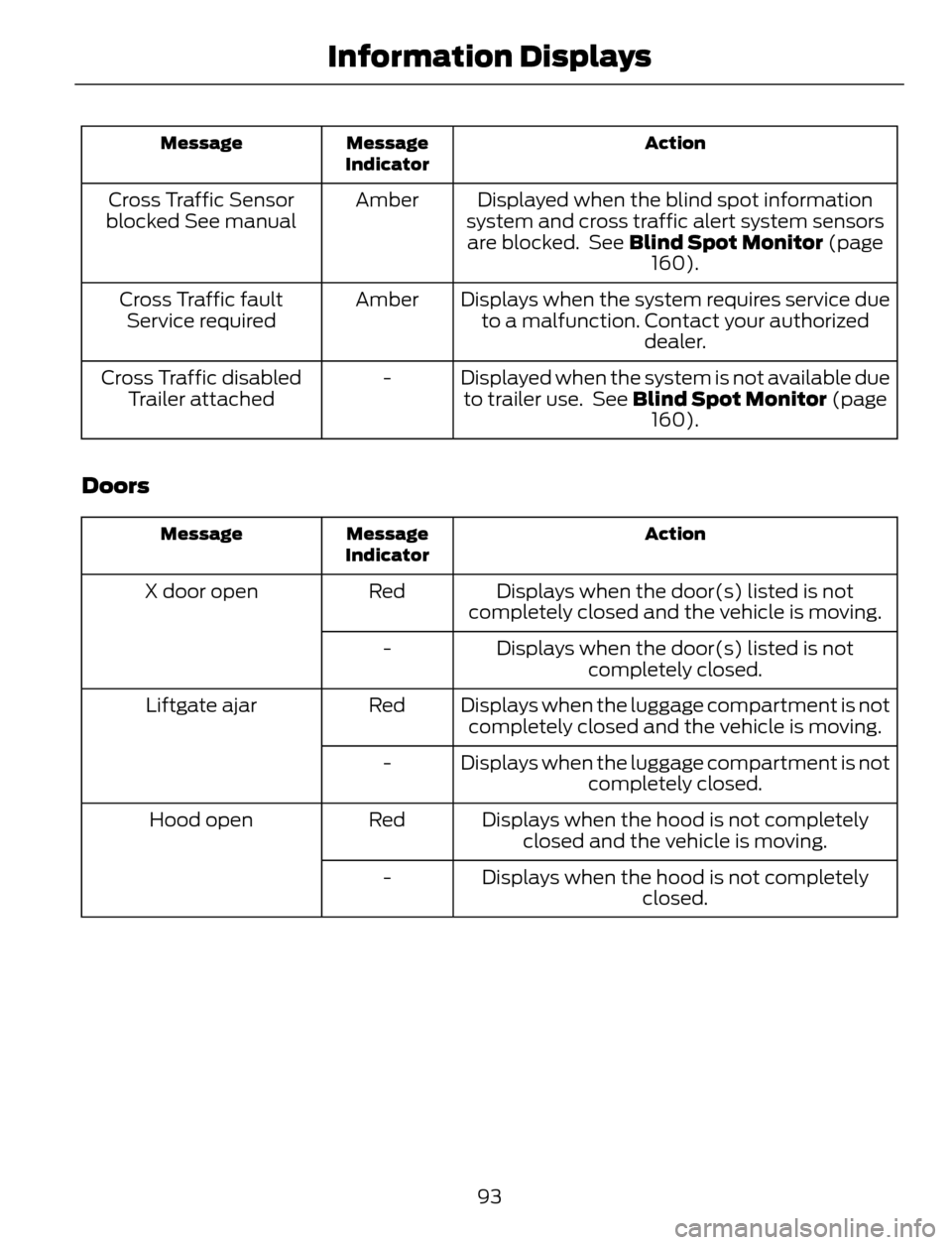
Action Message
Indicator Message
Displayed when the blind spot information
system and cross traffic alert system sensors
are blocked. See Blind Spot Monitor (page
160). Amber Cross Traffic Sensor
blocked See manual
Displays when the system requires service due
to a malfunction. Contact your authorized
dealer. Amber Cross Traffic fault
Service required
Displayed when the system is not available due
to trailer use. See Blind Spot Monitor (page
160). - Cross Traffic disabled
Trailer attached
Doors
Action Message
Indicator Message
Displays when the door(s) listed is not
completely closed and the vehicle is moving. Red X door open
Displays when the door(s) listed is not
completely closed. -
Displays when the luggage compartment is not
completely closed and the vehicle is moving. Red Liftgate ajar
Displays when the luggage compartment is not
completely closed. -
Displays when the hood is not completely
closed and the vehicle is moving. Red Hood open
Displays when the hood is not completely
closed. -
93
Information Displays
Page 97 of 428
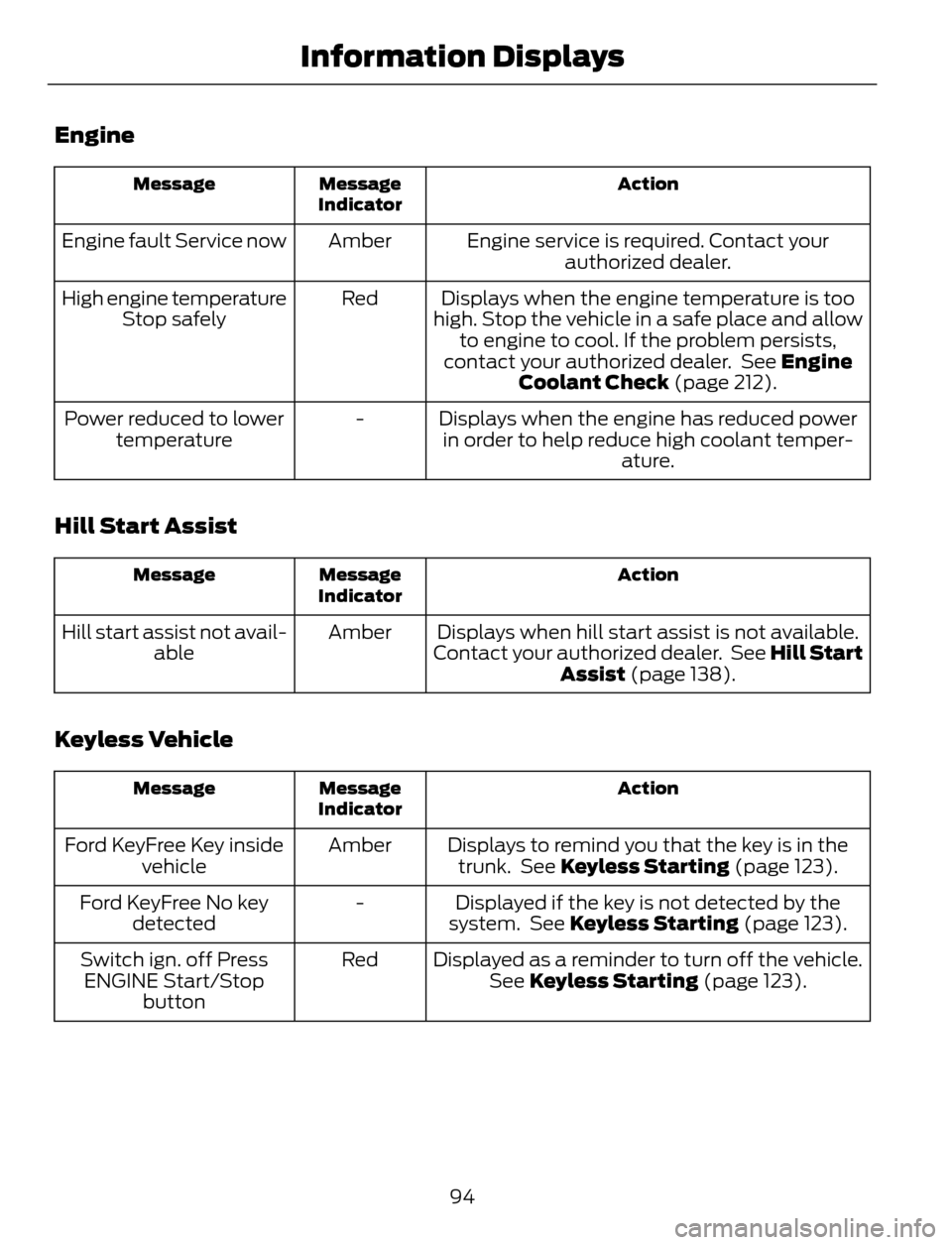
Engine
Action Message
Indicator Message
Engine service is required. Contact your
authorized dealer. Amber Engine fault Service now
Displays when the engine temperature is too
high. Stop the vehicle in a safe place and allow
to engine to cool. If the problem persists,
contact your authorized dealer. See Engine
Coolant Check (page 212). Red High engine temperature
Stop safely
Displays when the engine has reduced power
in order to help reduce high coolant temper-
ature. - Power reduced to lower
temperature
Hill Start Assist
Action Message
Indicator Message
Displays when hill start assist is not available.
Contact your authorized dealer. See Hill Start
Assist (page 138). Amber Hill start assist not avail-
able
Keyless Vehicle
Action Message
Indicator Message
Displays to remind you that the key is in the
trunk. See Keyless Starting (page 123). Amber Ford KeyFree Key inside
vehicle
Displayed if the key is not detected by the
system. See Keyless Starting (page 123). - Ford KeyFree No key
detected
Displayed as a reminder to turn off the vehicle.
See Keyless Starting (page 123). Red Switch ign. off Press
ENGINE Start/Stop
button
94
Information Displays
Page 98 of 428
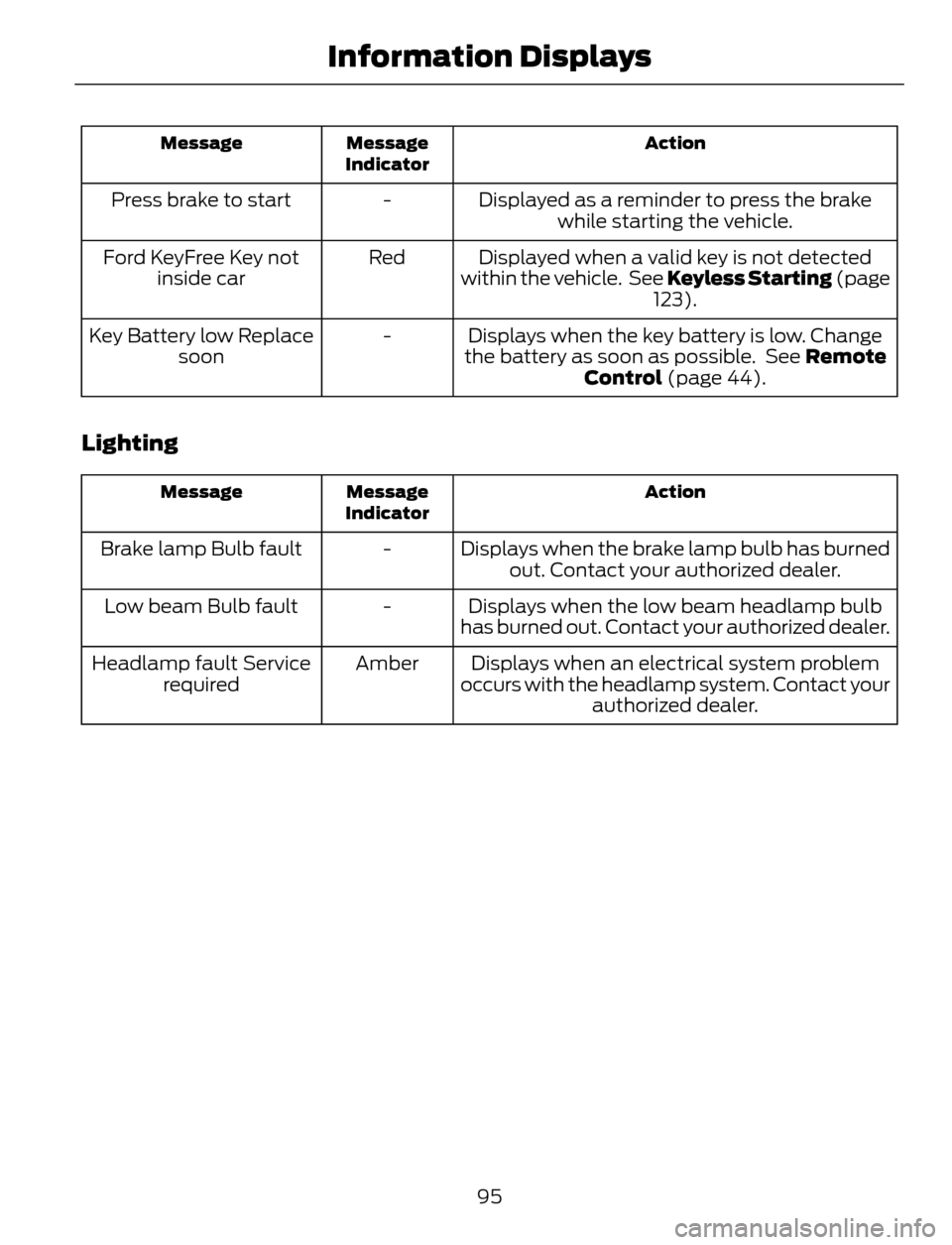
Action Message
Indicator Message
Displayed as a reminder to press the brake
while starting the vehicle. - Press brake to start
Displayed when a valid key is not detected
within the vehicle. See Keyless Starting (page
123). Red Ford KeyFree Key not
inside car
Displays when the key battery is low. Change
the battery as soon as possible. See Remote
Control (page 44). - Key Battery low Replace
soon
Lighting
Action Message
Indicator Message
Displays when the brake lamp bulb has burned
out. Contact your authorized dealer. - Brake lamp Bulb fault
Displays when the low beam headlamp bulb
has burned out. Contact your authorized dealer. - Low beam Bulb fault
Displays when an electrical system problem
occurs with the headlamp system. Contact your
authorized dealer. Amber Headlamp fault Service
required
95
Information Displays
Page 99 of 428
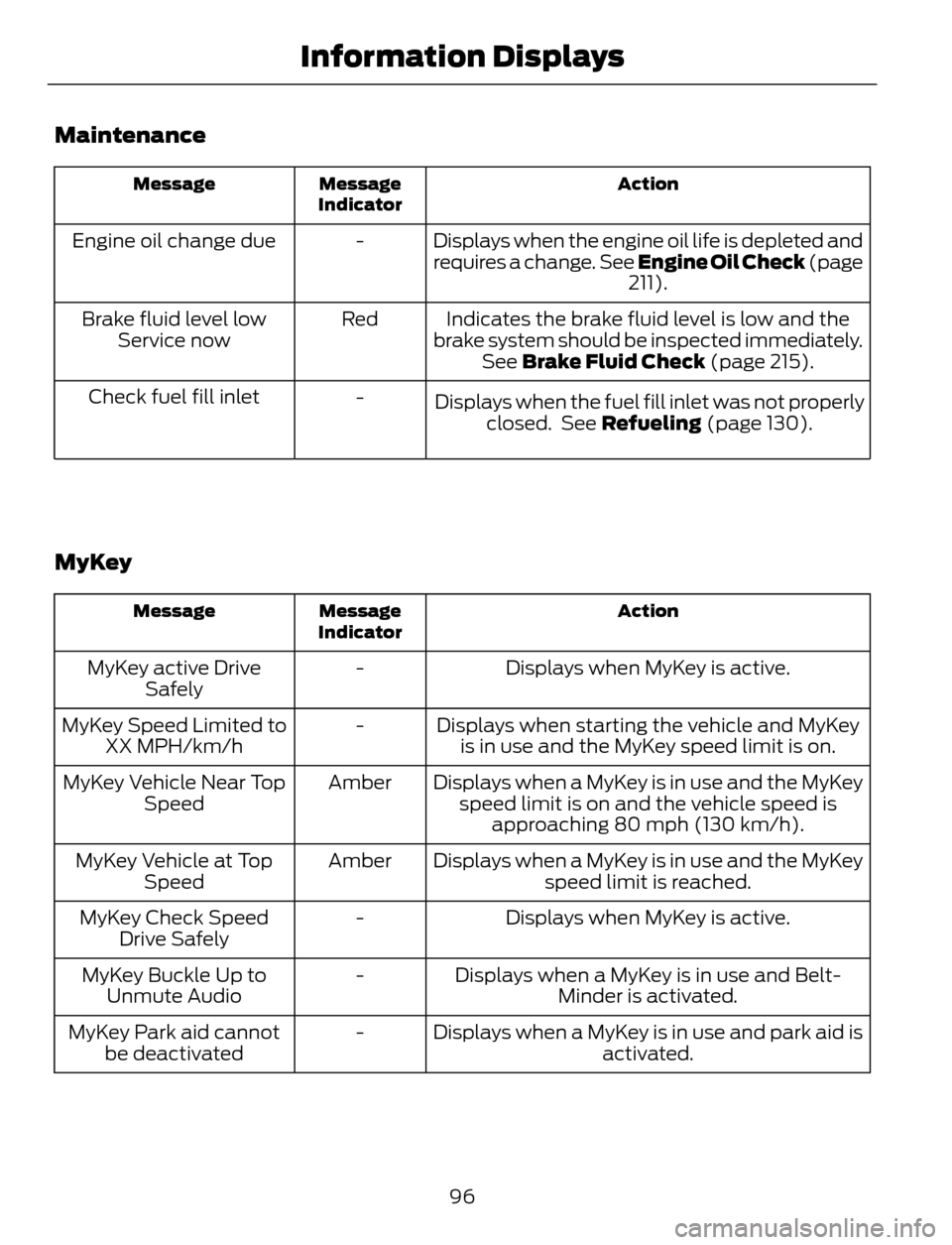
Maintenance
Action Message
Indicator Message
Displays when the engine oil life is depleted and
requires a change. See Engine Oil Check (page
211). - Engine oil change due
Indicates the brake fluid level is low and the
brake system should be inspected immediately.
See Brake Fluid Check (page 215). Red Brake fluid level low
Service now
-
Displays when the fuel fill inlet was not properly
closed. See Refueling (page 130). Check fuel fill inlet
MyKey
Action Message
Indicator Message
Displays when MyKey is active. - MyKey active Drive
Safely
Displays when starting the vehicle and MyKey
is in use and the MyKey speed limit is on. - MyKey Speed Limited to
XX MPH/km/h
Displays when a MyKey is in use and the MyKey
speed limit is on and the vehicle speed is
approaching 80 mph (130 km/h). Amber MyKey Vehicle Near Top
Speed
Displays when a MyKey is in use and the MyKey
speed limit is reached. Amber MyKey Vehicle at Top
Speed
Displays when MyKey is active. - MyKey Check Speed
Drive Safely
Displays when a MyKey is in use and Belt-
Minder is activated. - MyKey Buckle Up to
Unmute Audio
Displays when a MyKey is in use and park aid is
activated. - MyKey Park aid cannot
be deactivated
96
Information Displays
Page 100 of 428
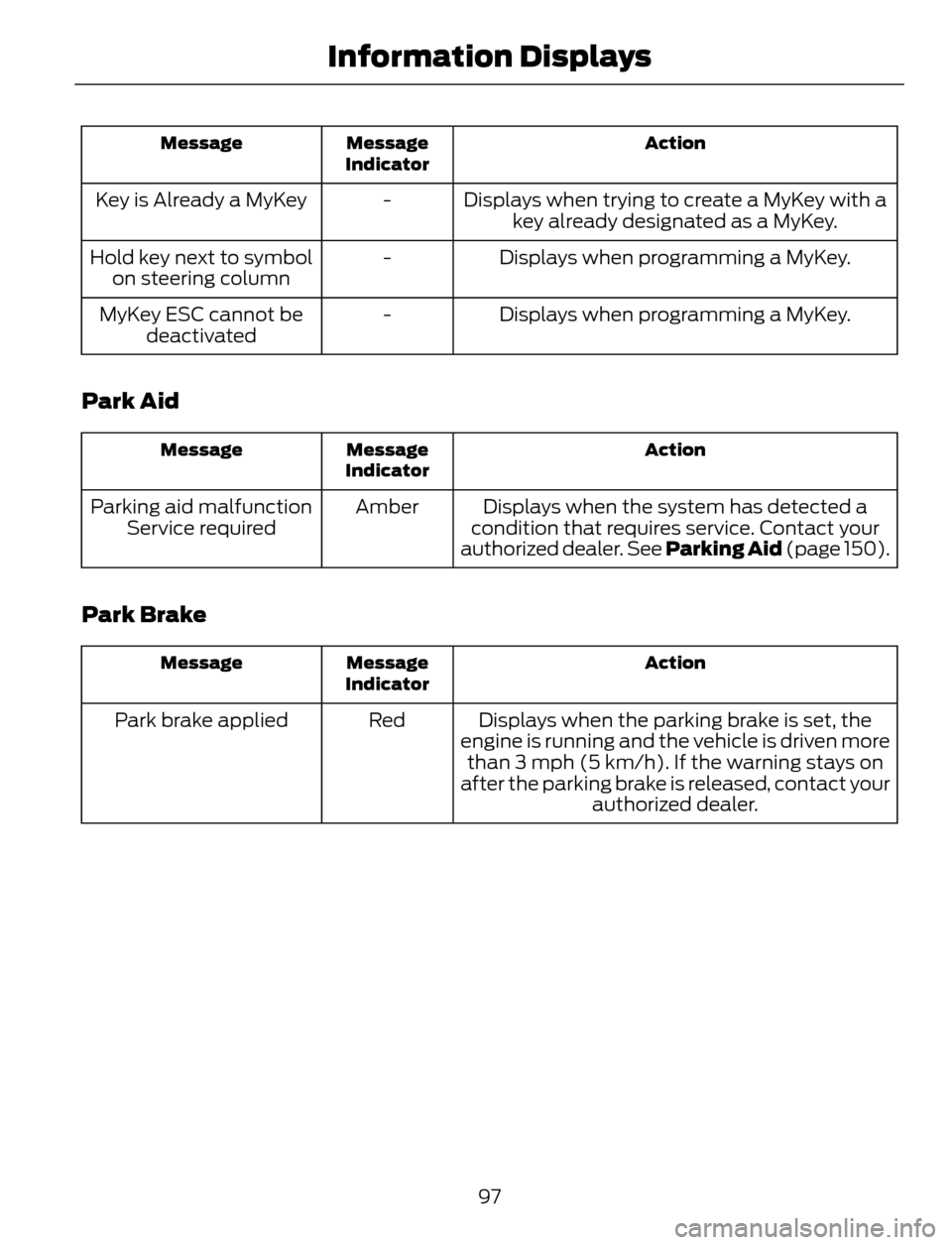
Action Message
Indicator Message
Displays when trying to create a MyKey with a
key already designated as a MyKey. - Key is Already a MyKey
Displays when programming a MyKey. - Hold key next to symbol
on steering column
Displays when programming a MyKey. - MyKey ESC cannot be
deactivated
Park Aid
Action Message
Indicator Message
Displays when the system has detected a
condition that requires service. Contact your
authorized dealer. See Parking Aid (page 150). Amber Parking aid malfunction
Service required
Park Brake
Action Message
Indicator Message
Displays when the parking brake is set, the
engine is running and the vehicle is driven more
than 3 mph (5 km/h). If the warning stays on
after the parking brake is released, contact your
authorized dealer. Red Park brake applied
97
Information Displays
Page 101 of 428
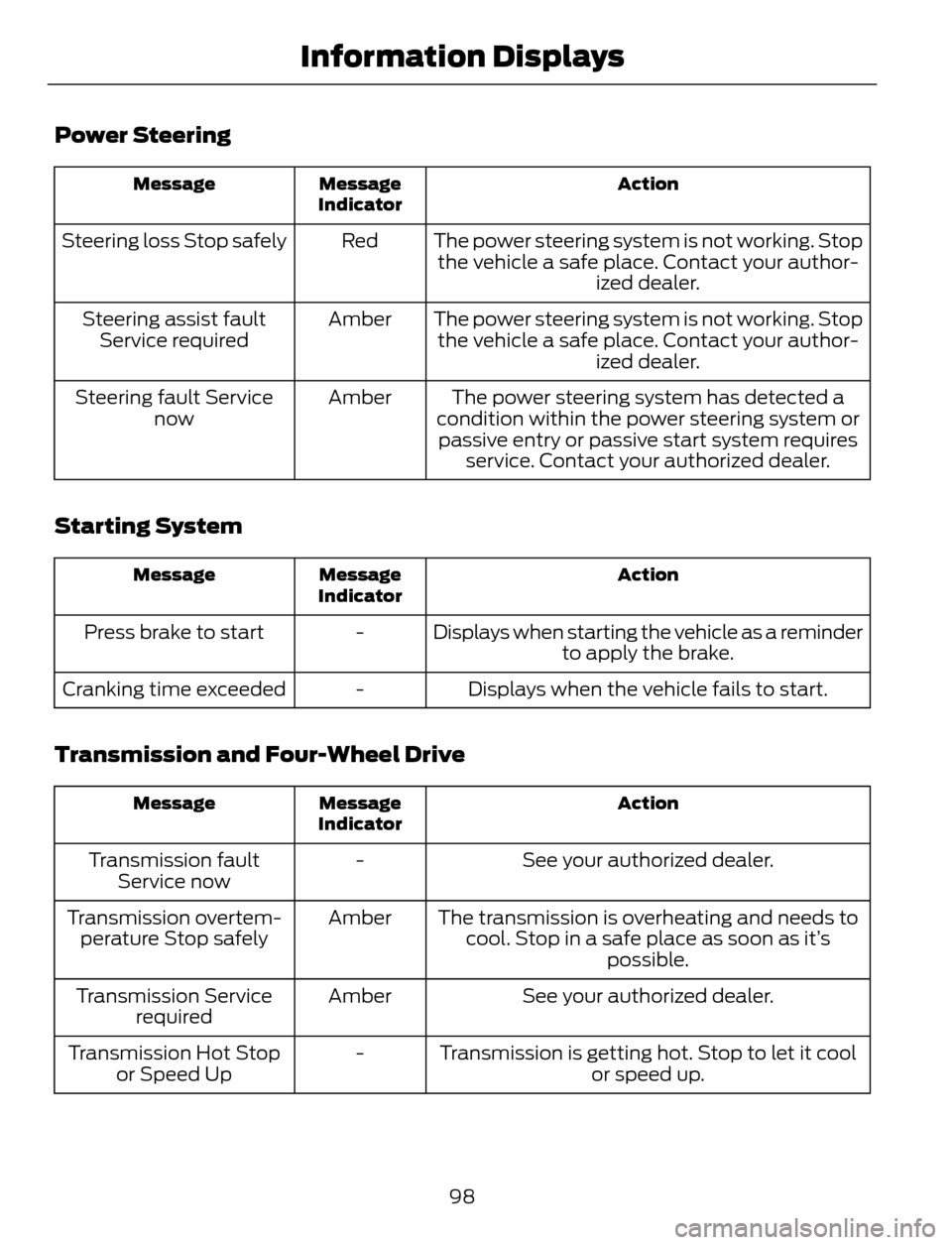
Power Steering
Action Message
Indicator Message
The power steering system is not working. Stop
the vehicle a safe place. Contact your author-
ized dealer. Red Steering loss Stop safely
The power steering system is not working. Stop
the vehicle a safe place. Contact your author-
ized dealer. Amber Steering assist fault
Service required
The power steering system has detected a
condition within the power steering system or
passive entry or passive start system requires
service. Contact your authorized dealer. Amber Steering fault Service
now
Starting System
Action Message
Indicator Message
Displays when starting the vehicle as a reminder
to apply the brake. - Press brake to start
Displays when the vehicle fails to start. - Cranking time exceeded
Transmission and Four-Wheel Drive
Action Message
Indicator Message
See your authorized dealer. - Transmission fault
Service now
The transmission is overheating and needs to
cool. Stop in a safe place as soon as it’s
possible. Amber Transmission overtem-
perature Stop safely
See your authorized dealer. Amber Transmission Service
required
Transmission is getting hot. Stop to let it cool
or speed up. - Transmission Hot Stop
or Speed Up
98
Information Displays
Page 102 of 428
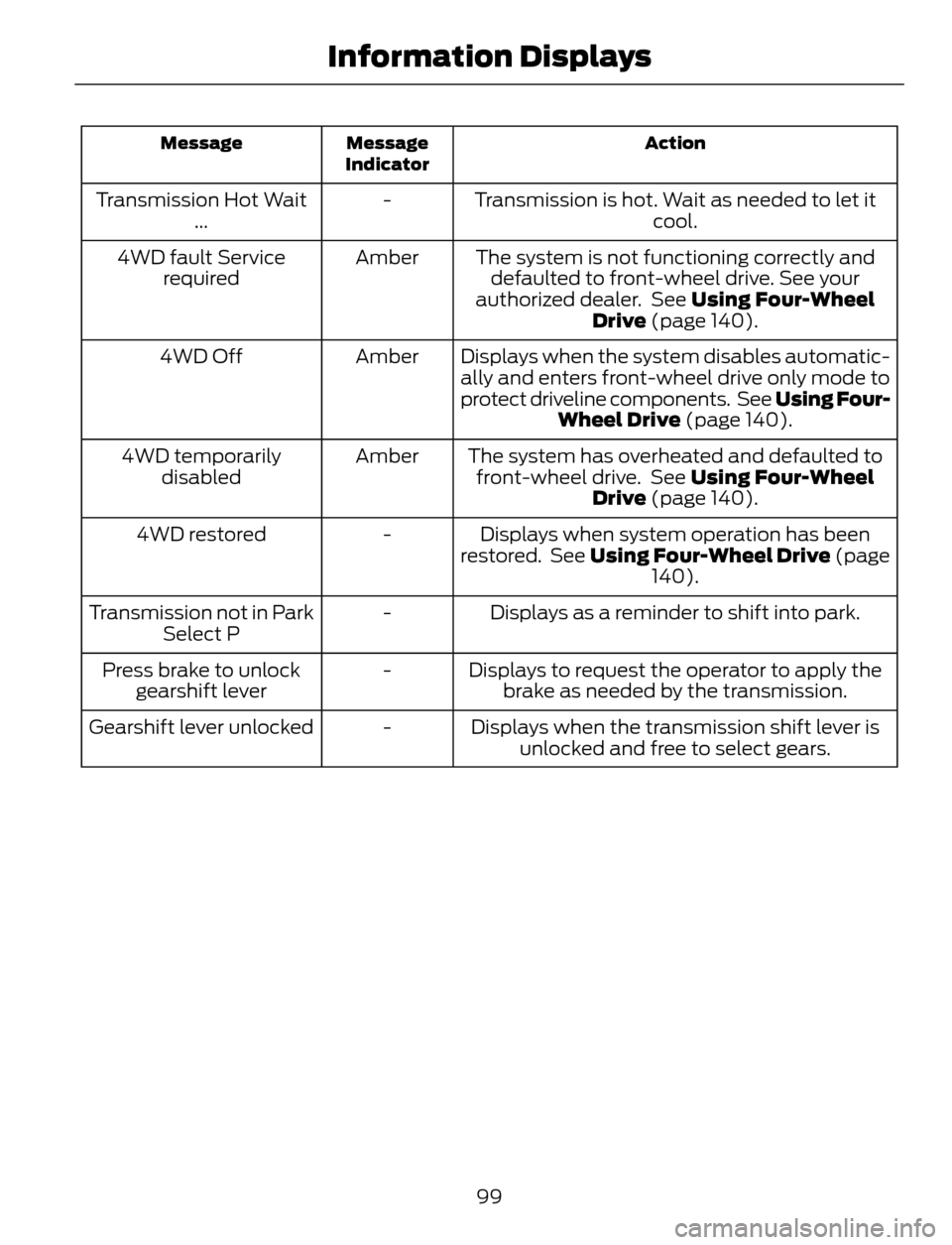
Action Message
Indicator Message
Transmission is hot. Wait as needed to let it
cool. - Transmission Hot Wait
...
The system is not functioning correctly and
defaulted to front-wheel drive. See your
authorized dealer. See Using Four-Wheel
Drive (page 140). Amber 4WD fault Service
required
Displays when the system disables automatic-
ally and enters front-wheel drive only mode to
protect driveline components. See Using Four-
Wheel Drive (page 140). Amber 4WD Off
The system has overheated and defaulted to
front-wheel drive. See Using Four-Wheel
Drive (page 140). Amber 4WD temporarily
disabled
Displays when system operation has been
restored. See Using Four-Wheel Drive (page
140). - 4WD restored
Displays as a reminder to shift into park. - Transmission not in Park
Select P
Displays to request the operator to apply the
brake as needed by the transmission. - Press brake to unlock
gearshift lever
Displays when the transmission shift lever is
unlocked and free to select gears. - Gearshift lever unlocked
99
Information Displays
Page 103 of 428
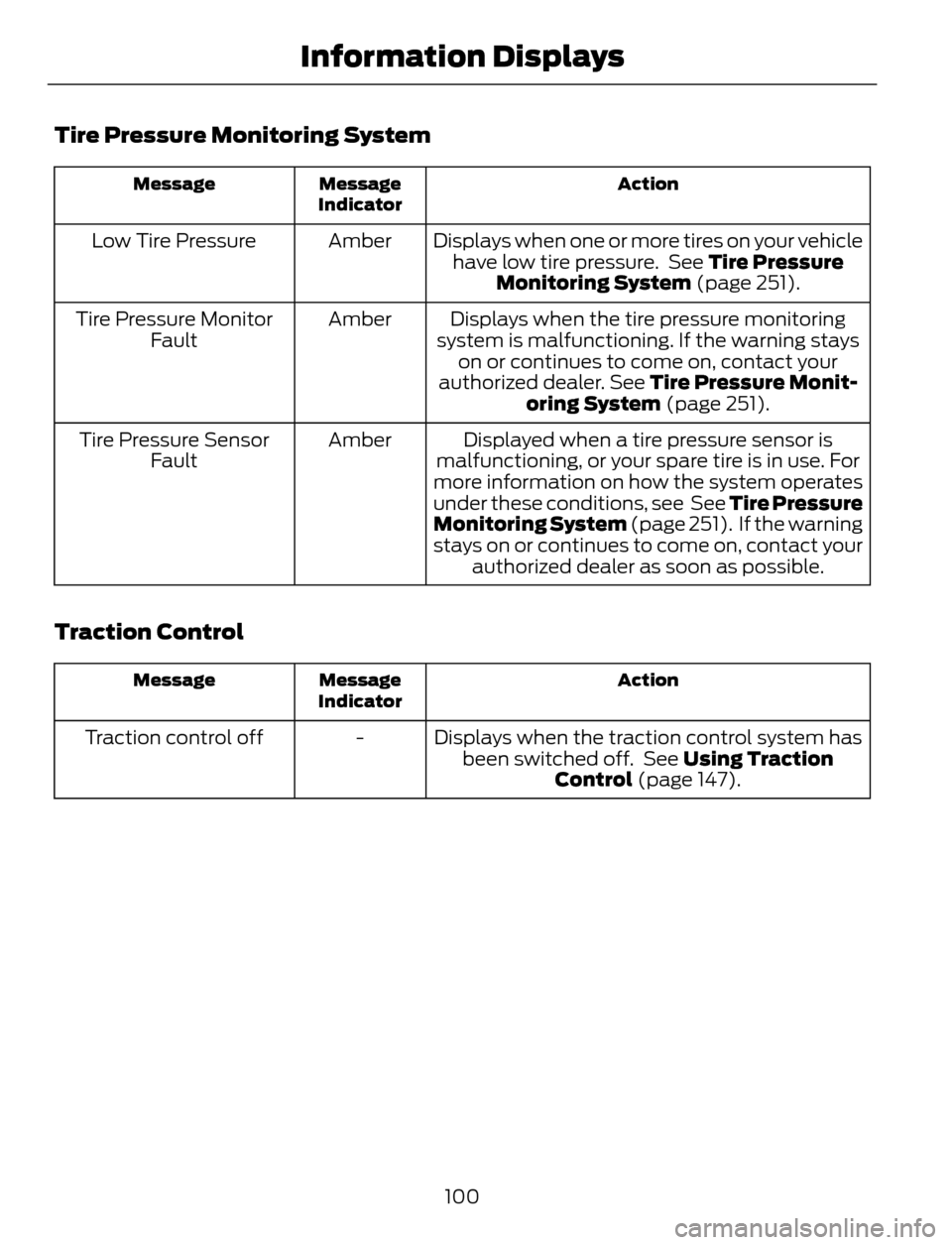
Tire Pressure Monitoring System
Action Message
Indicator Message
Displays when one or more tires on your vehicle
have low tire pressure. See Tire Pressure
Monitoring System (page 251). Amber Low Tire Pressure
Displays when the tire pressure monitoring
system is malfunctioning. If the warning stays
on or continues to come on, contact your
authorized dealer. See Tire Pressure Monit-
oring System (page 251). Amber Tire Pressure Monitor
Fault
Displayed when a tire pressure sensor is
malfunctioning, or your spare tire is in use. For
more information on how the system operates
under these conditions, see See Tire Pressure
Monitoring System (page 251). If the warning
stays on or continues to come on, contact your
authorized dealer as soon as possible. Amber Tire Pressure Sensor
Fault
Traction Control
Action Message
Indicator Message
Displays when the traction control system has
been switched off. See Using Traction
Control (page 147). - Traction control off
100
Information Displays
Page 105 of 428
Select to distribute air through
the windshield air vents. You can
also use this setting to defog andclear the windshield of a thin covering of
ice. You can also increase the temperature
and fan speed to improve clearing.
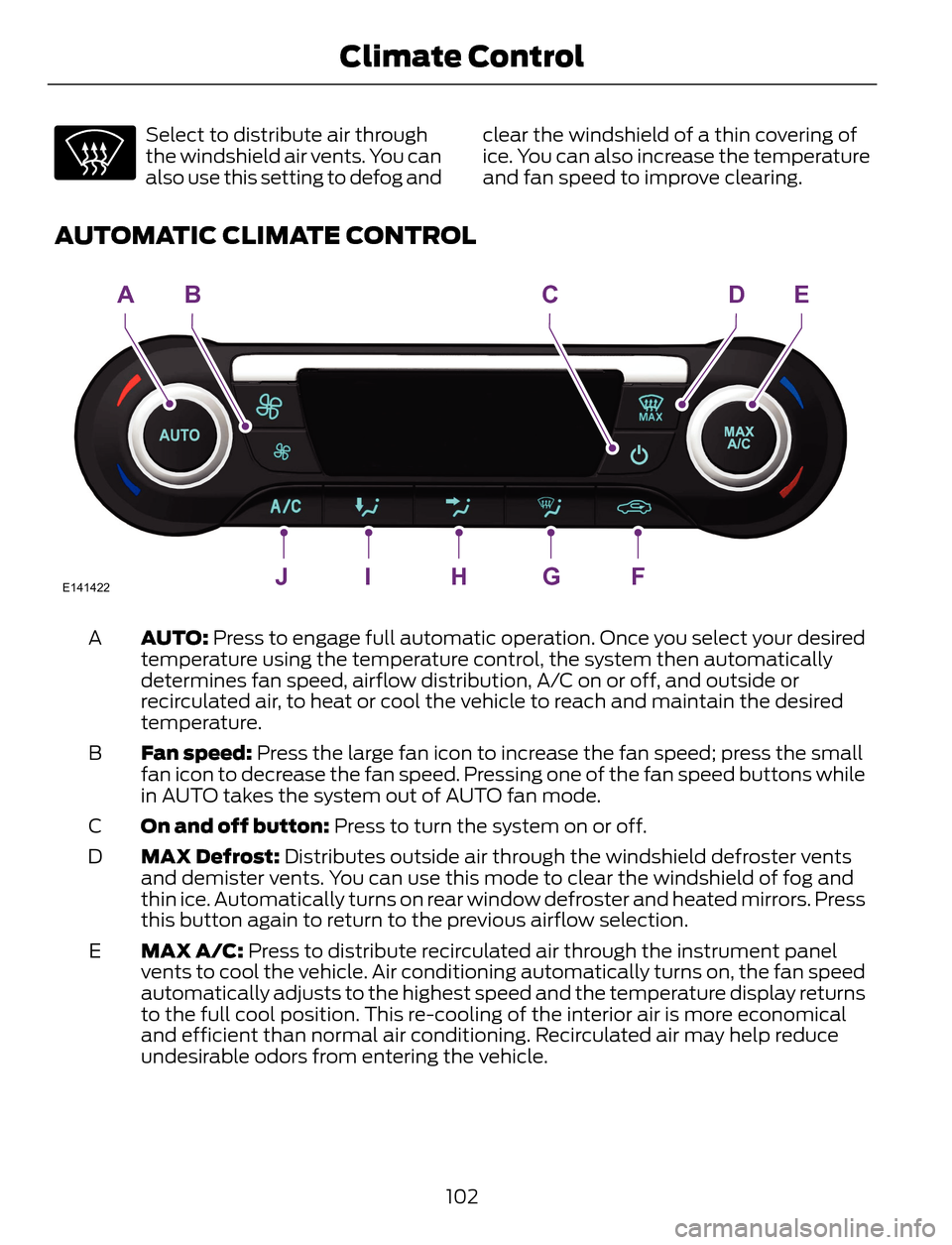
AUTOMATIC CLIMATE CONTROL
E141422JIHGF
ABCDE
AUTO: Press to engage full automatic operation. Once you select your desired
temperature using the temperature control, the system then automatically
determines fan speed, airflow distribution, A/C on or off, and outside or
recirculated air, to heat or cool the vehicle to reach and maintain the desired
temperature. A
Fan speed: Press the large fan icon to increase the fan speed; press the small
fan icon to decrease the fan speed. Pressing one of the fan speed buttons while
in AUTO takes the system out of AUTO fan mode. B
On and off button: Press to turn the system on or off. C
MAX Defrost: Distributes outside air through the windshield defroster vents
and demister vents. You can use this mode to clear the windshield of fog and
thin ice. Automatically turns on rear window defroster and heated mirrors. Press
this button again to return to the previous airflow selection. D
MAX A/C: Press to distribute recirculated air through the instrument panel
vents to cool the vehicle. Air conditioning automatically turns on, the fan speed
automatically adjusts to the highest speed and the temperature display returns
to the full cool position. This re-cooling of the interior air is more economical
and efficient than normal air conditioning. Recirculated air may help reduce
undesirable odors from entering the vehicle. E
102
Climate Control
Page 106 of 428
Recirculated air: Press to turn air recirculation in cabin on or off. Recirculated
air may reduce the amount of time to cool down the interior of the vehicle and
may help reduce undesired odors from reaching the interior of the vehicle.
Recirculated air engages automatically when you select MAX A/C, or manually
in any airflow mode except defrost. Recirculated air may turn off automatically
in all airflow modes except MAX A/C to reduce fog potential. F
Defrost: Distributes air through the windshield defroster vents and demister
vents. The system automatically provides outside air to reduce window fogging.
Press again to turn off defrost mode. G
Instrument panel: Press to distribute air through the instrument panel vents.
Press again to turn off panel mode. H
Floor: Distributes air through the demister vents and front and rear seat floor
vents. Press again to turn off floor mode. I
A/C: Press to turn air conditioning on or off. Use with recirculated air to improve
cooling performance and efficiency. Air conditioning also engages automatically
in some modes. J
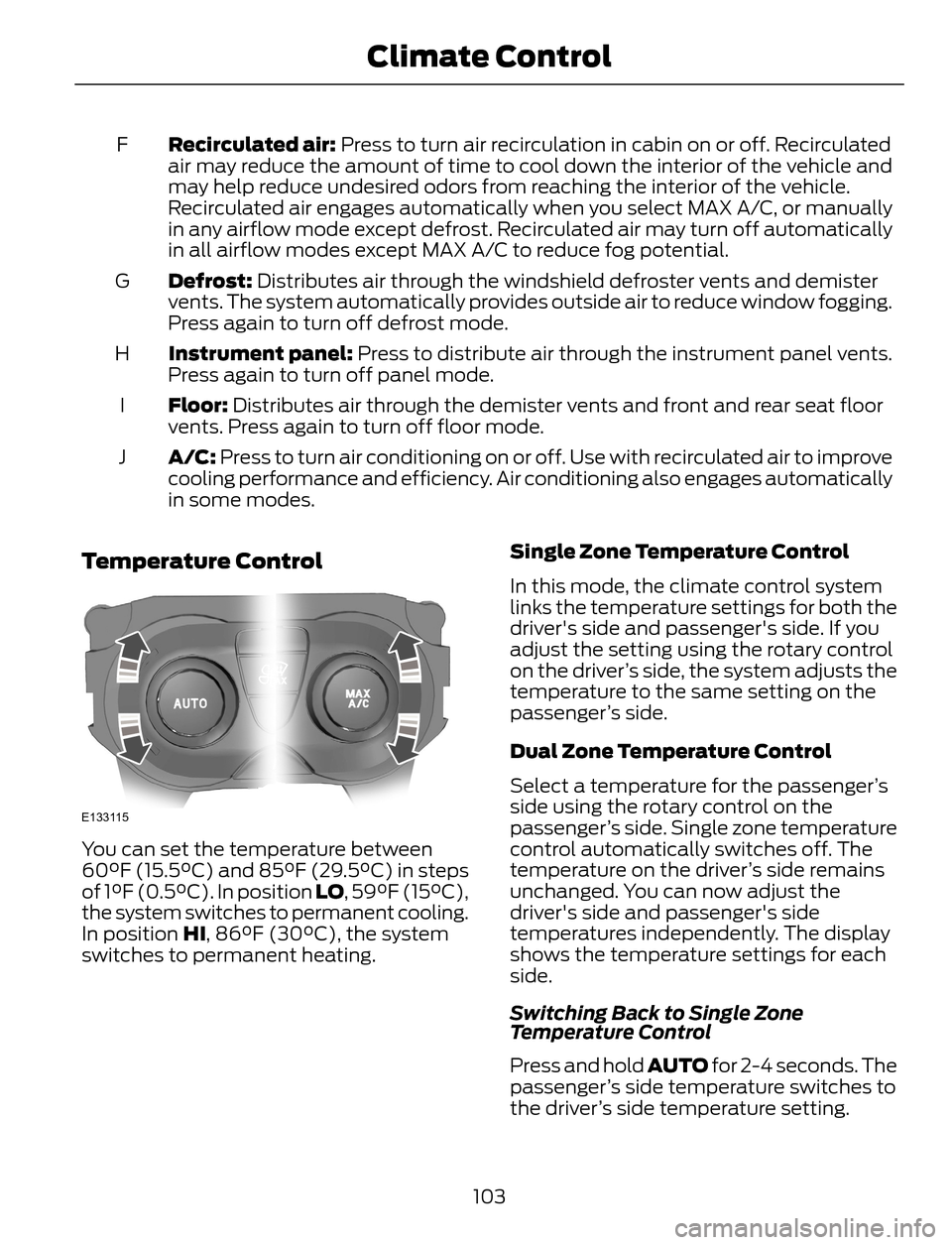
Temperature Control
E133115
You can set the temperature between
60°F (15.5°C) and 85°F (29.5°C) in steps
of 1°F (0.5°C). In position LO, 59°F (15°C),
the system switches to permanent cooling.
In position HI, 86°F (30°C), the system
switches to permanent heating.Single Zone Temperature Control
In this mode, the climate control system
links the temperature settings for both the
driver's side and passenger's side. If you
adjust the setting using the rotary control
on the driver’s side, the system adjusts the
temperature to the same setting on the
passenger’s side.
Dual Zone Temperature Control
Select a temperature for the passenger’s
side using the rotary control on the
passenger’s side. Single zone temperature
control automatically switches off. The
temperature on the driver’s side remains
unchanged. You can now adjust the
driver's side and passenger's side
temperatures independently. The display
shows the temperature settings for each
side.
Switching Back to Single Zone
Temperature Control
Press and hold AUTO for 2-4 seconds. The
passenger’s side temperature switches to
the driver’s side temperature setting.
103
Climate Control