heater FORD ESCAPE 2015 3.G Owners Manual
[x] Cancel search | Manufacturer: FORD, Model Year: 2015, Model line: ESCAPE, Model: FORD ESCAPE 2015 3.GPages: 449, PDF Size: 5.36 MB
Page 5 of 449
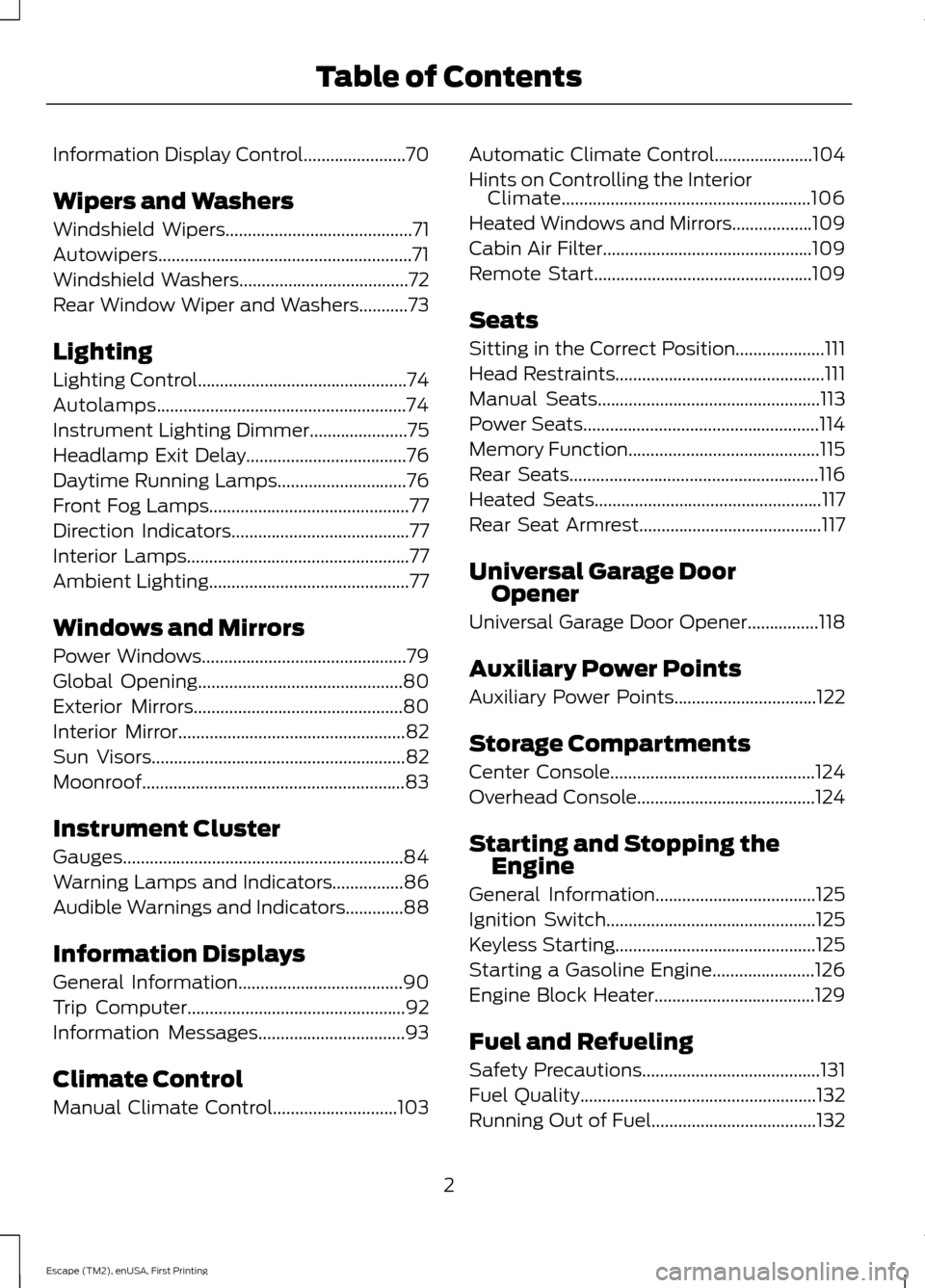
Information Display Control.......................70
Wipers and Washers
Windshield Wipers
..........................................71
Autowipers.........................................................71
Windshield Washers
......................................72
Rear Window Wiper and Washers...........73
Lighting
Lighting Control...............................................74
Autolamps........................................................74
Instrument Lighting Dimmer......................75
Headlamp Exit Delay....................................76
Daytime Running Lamps
.............................76
Front Fog Lamps.............................................77
Direction Indicators
........................................77
Interior Lamps
..................................................77
Ambient Lighting.............................................77
Windows and Mirrors
Power Windows
..............................................79
Global Opening
..............................................80
Exterior Mirrors
...............................................80
Interior Mirror
...................................................82
Sun Visors
.........................................................82
Moonroof...........................................................83
Instrument Cluster
Gauges...............................................................84
Warning Lamps and Indicators................86
Audible Warnings and Indicators.............88
Information Displays
General Information
.....................................90
Trip Computer.................................................92
Information Messages
.................................93
Climate Control
Manual Climate Control
............................103 Automatic Climate Control......................104
Hints on Controlling the Interior
Climate........................................................106
Heated Windows and Mirrors
..................109
Cabin Air Filter
...............................................109
Remote Start.................................................109
Seats
Sitting in the Correct Position....................111
Head Restraints
...............................................111
Manual Seats
..................................................113
Power Seats
.....................................................114
Memory Function
...........................................115
Rear Seats........................................................116
Heated Seats
...................................................117
Rear Seat Armrest.........................................117
Universal Garage Door Opener
Universal Garage Door Opener
................118
Auxiliary Power Points
Auxiliary Power Points
................................122
Storage Compartments
Center Console..............................................124
Overhead Console
........................................124
Starting and Stopping the Engine
General Information
....................................125
Ignition Switch
...............................................125
Keyless Starting.............................................125
Starting a Gasoline Engine
.......................126
Engine Block Heater....................................129
Fuel and Refueling
Safety Precautions
........................................131
Fuel Quality
.....................................................132
Running Out of Fuel.....................................132
2
Escape (TM2), enUSA, First Printing Table of Contents
Page 95 of 449
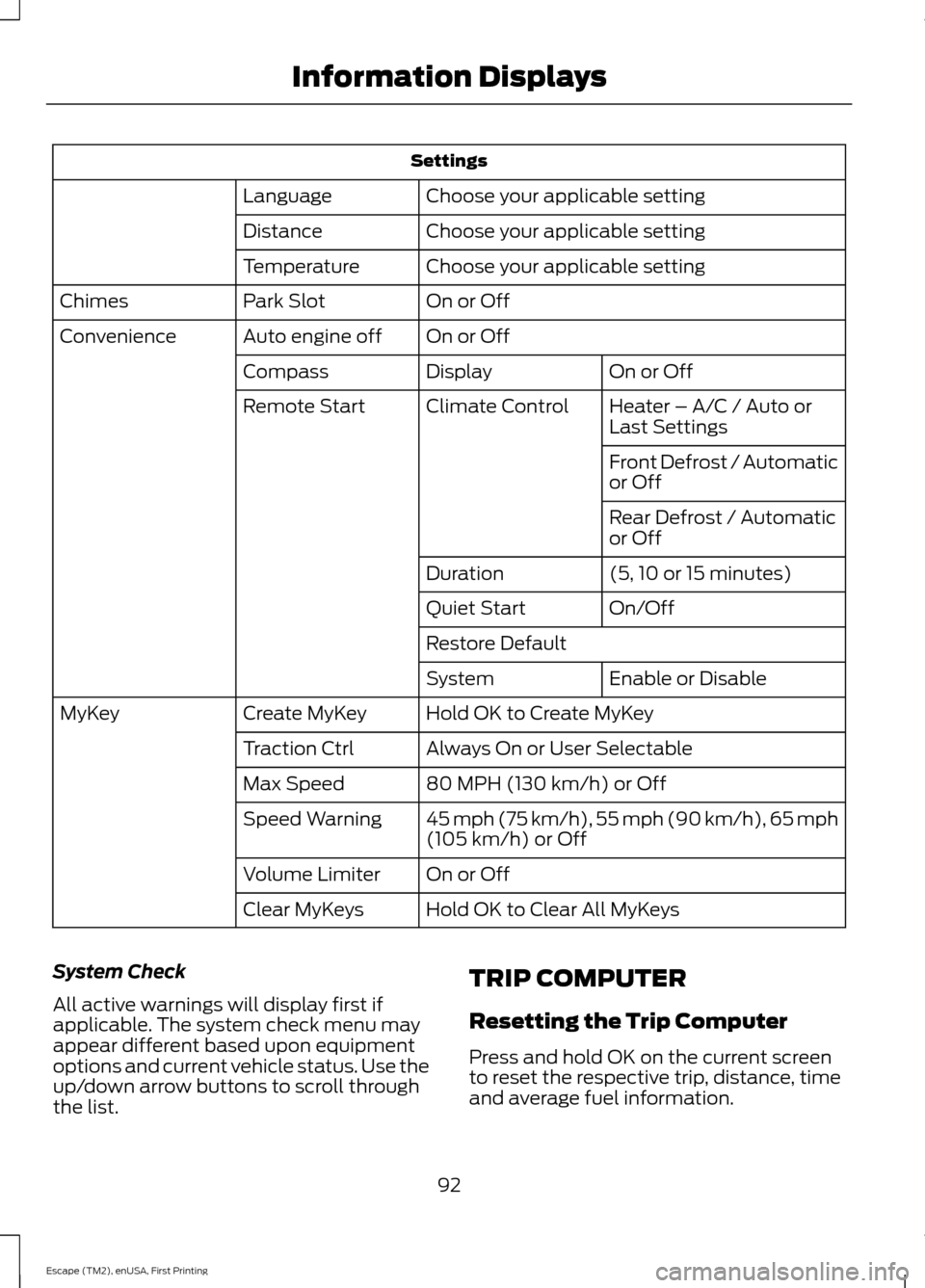
Settings
Choose your applicable setting
Language
Choose your applicable setting
Distance
Choose your applicable setting
Temperature
On or Off
Park Slot
Chimes
On or Off
Auto engine off
Convenience
On or Off
Display
Compass
Heater – A/C / Auto or
Last Settings
Climate Control
Remote Start
Front Defrost / Automatic
or Off
Rear Defrost / Automatic
or Off
(5, 10 or 15 minutes)
Duration
On/Off
Quiet Start
Restore Default
Enable or Disable
System
Hold OK to Create MyKey
Create MyKey
MyKey
Always On or User Selectable
Traction Ctrl
80 MPH (130 km/h) or Off
Max Speed
45 mph (75 km/h), 55 mph (90 km/h), 65 mph
(105 km/h) or Off
Speed Warning
On or Off
Volume Limiter
Hold OK to Clear All MyKeys
Clear MyKeys
System Check
All active warnings will display first if
applicable. The system check menu may
appear different based upon equipment
options and current vehicle status. Use the
up/down arrow buttons to scroll through
the list. TRIP COMPUTER
Resetting the Trip Computer
Press and hold OK on the current screen
to reset the respective trip, distance, time
and average fuel information.
92
Escape (TM2), enUSA, First Printing Information Displays
Page 113 of 449
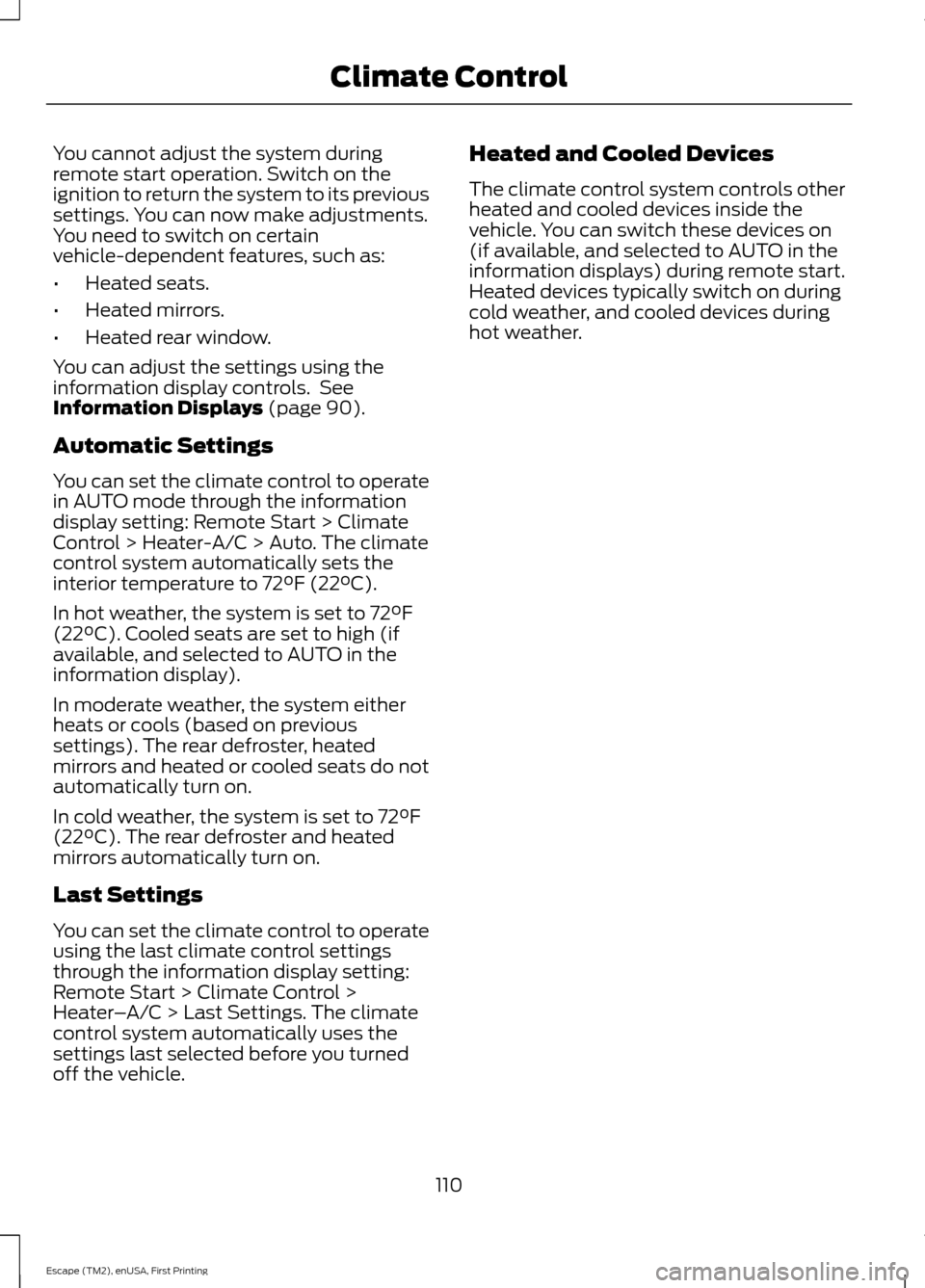
You cannot adjust the system during
remote start operation. Switch on the
ignition to return the system to its previous
settings. You can now make adjustments.
You need to switch on certain
vehicle-dependent features, such as:
•
Heated seats.
• Heated mirrors.
• Heated rear window.
You can adjust the settings using the
information display controls. See
Information Displays (page 90).
Automatic Settings
You can set the climate control to operate
in AUTO mode through the information
display setting: Remote Start > Climate
Control > Heater-A/C > Auto. The climate
control system automatically sets the
interior temperature to 72°F (22°C).
In hot weather, the system is set to 72°F
(22°C). Cooled seats are set to high (if
available, and selected to AUTO in the
information display).
In moderate weather, the system either
heats or cools (based on previous
settings). The rear defroster, heated
mirrors and heated or cooled seats do not
automatically turn on.
In cold weather, the system is set to 72°F
(22°C). The rear defroster and heated
mirrors automatically turn on.
Last Settings
You can set the climate control to operate
using the last climate control settings
through the information display setting:
Remote Start > Climate Control >
Heater –A/C > Last Settings. The climate
control system automatically uses the
settings last selected before you turned
off the vehicle. Heated and Cooled Devices
The climate control system controls other
heated and cooled devices inside the
vehicle. You can switch these devices on
(if available, and selected to AUTO in the
information displays) during remote start.
Heated devices typically switch on during
cold weather, and cooled devices during
hot weather.
110
Escape (TM2), enUSA, First Printing Climate Control
Page 132 of 449
Guarding Against Exhaust Fumes
WARNING
If you smell exhaust fumes inside
your vehicle, have your vehicle
checked by your authorized dealer
immediately. Do not drive your vehicle if
you smell exhaust fumes. Carbon
monoxide is present in exhaust fumes.
Take precautions to avoid its dangerous
effects. Important Ventilating Information
If you stop your vehicle and the leave the
engine idling for long periods of time, we
recommend that you do one of the
following:
•
Open the windows at least 1 inch (2.5
centimeters)
• Set your climate control to outside air.
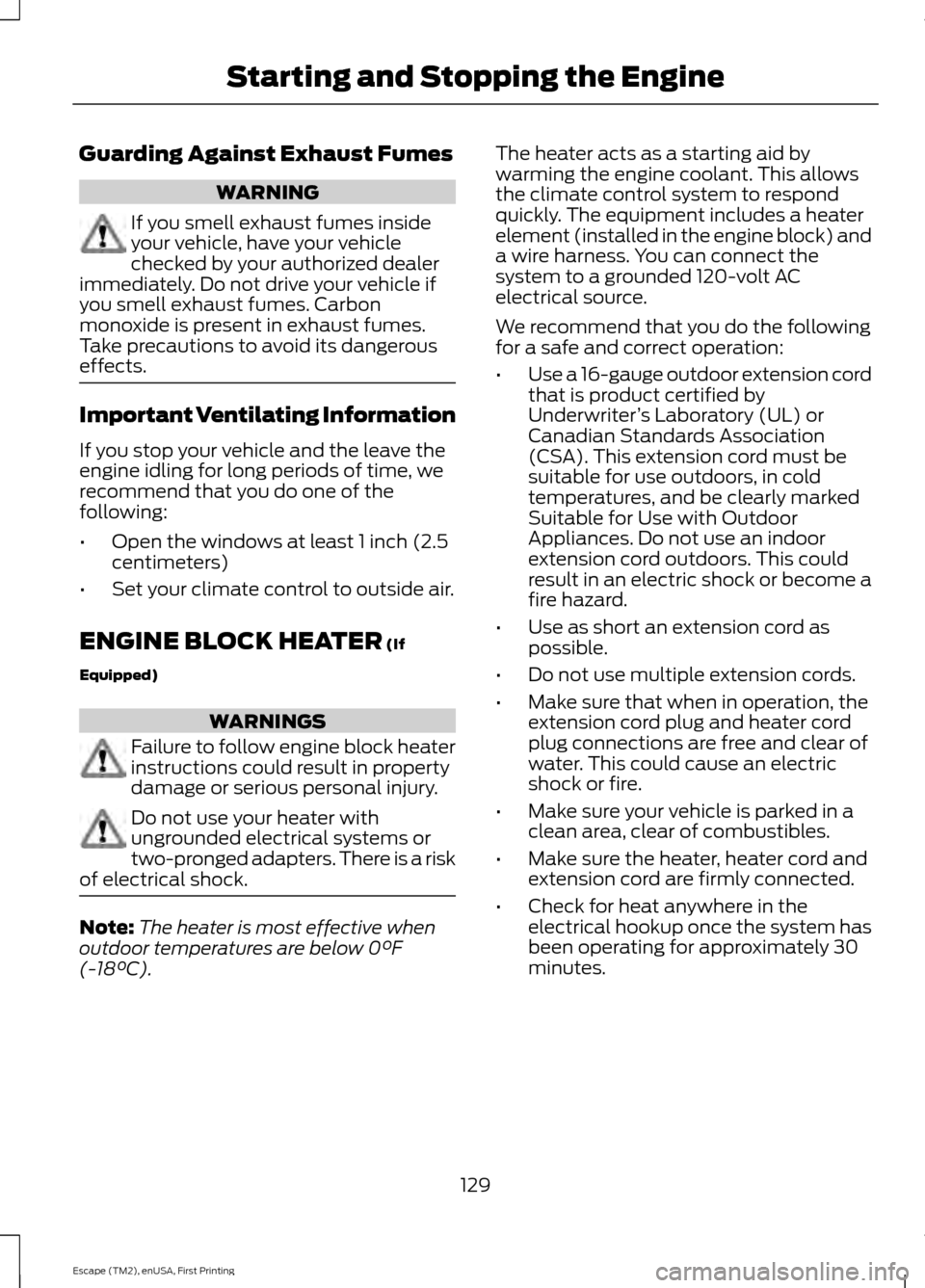
ENGINE BLOCK HEATER (If
Equipped) WARNINGS
Failure to follow engine block heater
instructions could result in property
damage or serious personal injury.
Do not use your heater with
ungrounded electrical systems or
two-pronged adapters. There is a risk
of electrical shock. Note:
The heater is most effective when
outdoor temperatures are below 0°F
(-18°C). The heater acts as a starting aid by
warming the engine coolant. This allows
the climate control system to respond
quickly. The equipment includes a heater
element (installed in the engine block) and
a wire harness. You can connect the
system to a grounded 120-volt AC
electrical source.
We recommend that you do the following
for a safe and correct operation:
•
Use a 16-gauge outdoor extension cord
that is product certified by
Underwriter ’s Laboratory (UL) or
Canadian Standards Association
(CSA). This extension cord must be
suitable for use outdoors, in cold
temperatures, and be clearly marked
Suitable for Use with Outdoor
Appliances. Do not use an indoor
extension cord outdoors. This could
result in an electric shock or become a
fire hazard.
• Use as short an extension cord as
possible.
• Do not use multiple extension cords.
• Make sure that when in operation, the
extension cord plug and heater cord
plug connections are free and clear of
water. This could cause an electric
shock or fire.
• Make sure your vehicle is parked in a
clean area, clear of combustibles.
• Make sure the heater, heater cord and
extension cord are firmly connected.
• Check for heat anywhere in the
electrical hookup once the system has
been operating for approximately 30
minutes.
129
Escape (TM2), enUSA, First Printing Starting and Stopping the Engine
Page 133 of 449
•
Make sure the system is unplugged and
properly stowed before starting and
driving your vehicle. Make sure the
protective cover seals the prongs of the
block heater cord plug when not in use.
• Make sure the heater system is
checked for proper operation before
winter.
Using the Engine Block Heater
Make sure the receptacle terminals are
clean and dry prior to use. Clean them with
a dry cloth if necessary.
The heater uses 0.4 to 1.0 kilowatt-hours
of energy per hour of use. The system does
not have a thermostat. It achieves
maximum temperature after
approximately three hours of operation.
Using the heater longer than three hours
does not improve system performance and
unnecessarily uses electricity.
130
Escape (TM2), enUSA, First Printing Starting and Stopping the Engine
Page 204 of 449
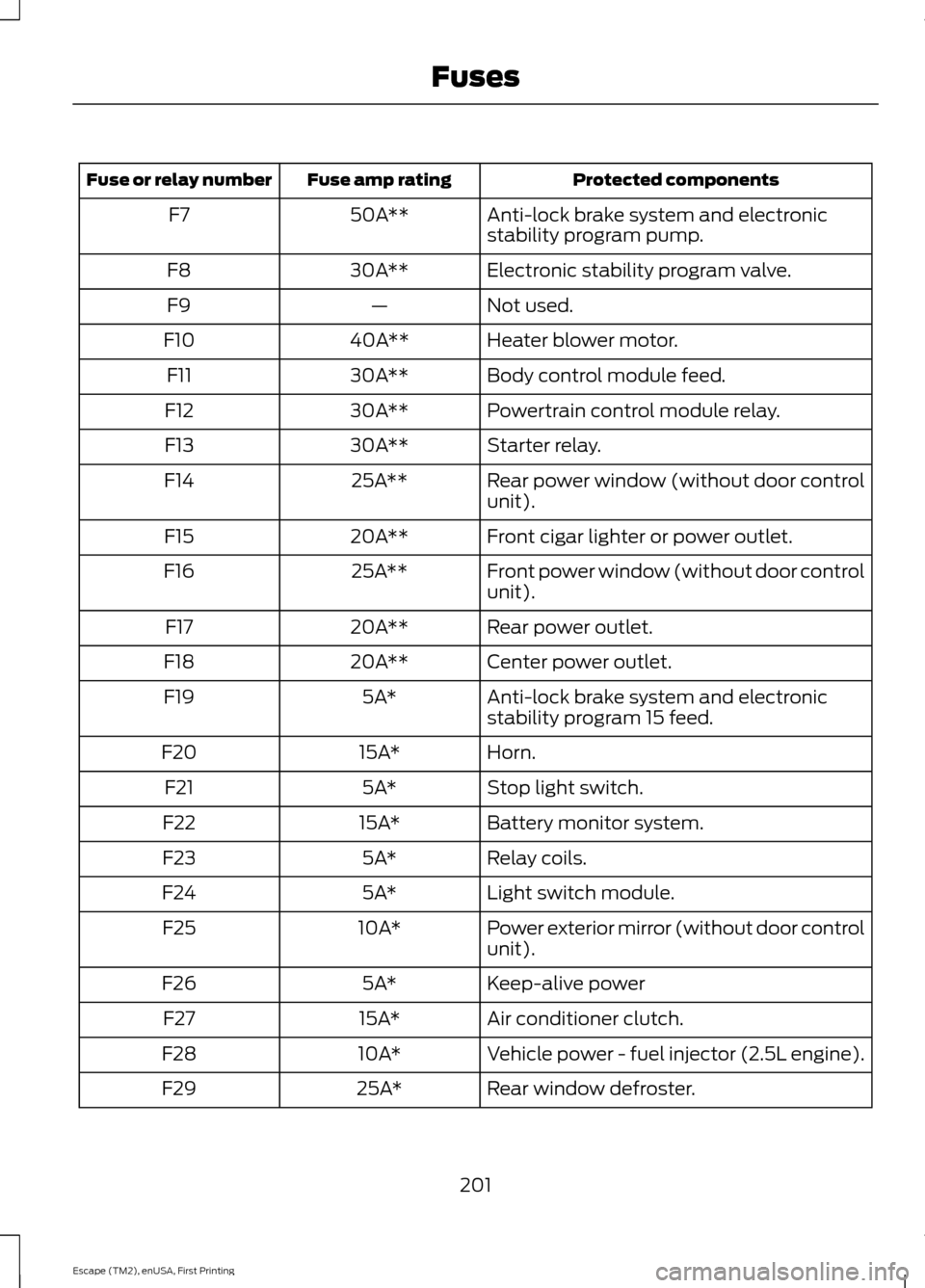
Protected components
Fuse amp rating
Fuse or relay number
Anti-lock brake system and electronic
stability program pump.
50A**
F7
Electronic stability program valve.
30A**
F8
Not used.
—
F9
Heater blower motor.
40A**
F10
Body control module feed.
30A**
F11
Powertrain control module relay.
30A**
F12
Starter relay.
30A**
F13
Rear power window (without door control
unit).
25A**
F14
Front cigar lighter or power outlet.
20A**
F15
Front power window (without door control
unit).
25A**
F16
Rear power outlet.
20A**
F17
Center power outlet.
20A**
F18
Anti-lock brake system and electronic
stability program 15 feed.
5A*
F19
Horn.
15A*
F20
Stop light switch.
5A*
F21
Battery monitor system.
15A*
F22
Relay coils.
5A*
F23
Light switch module.
5A*
F24
Power exterior mirror (without door control
unit).
10A*
F25
Keep-alive power
5A*
F26
Air conditioner clutch.
15A*
F27
Vehicle power - fuel injector (2.5L engine).
10A*
F28
Rear window defroster.
25A*
F29
201
Escape (TM2), enUSA, First Printing Fuses
Page 206 of 449
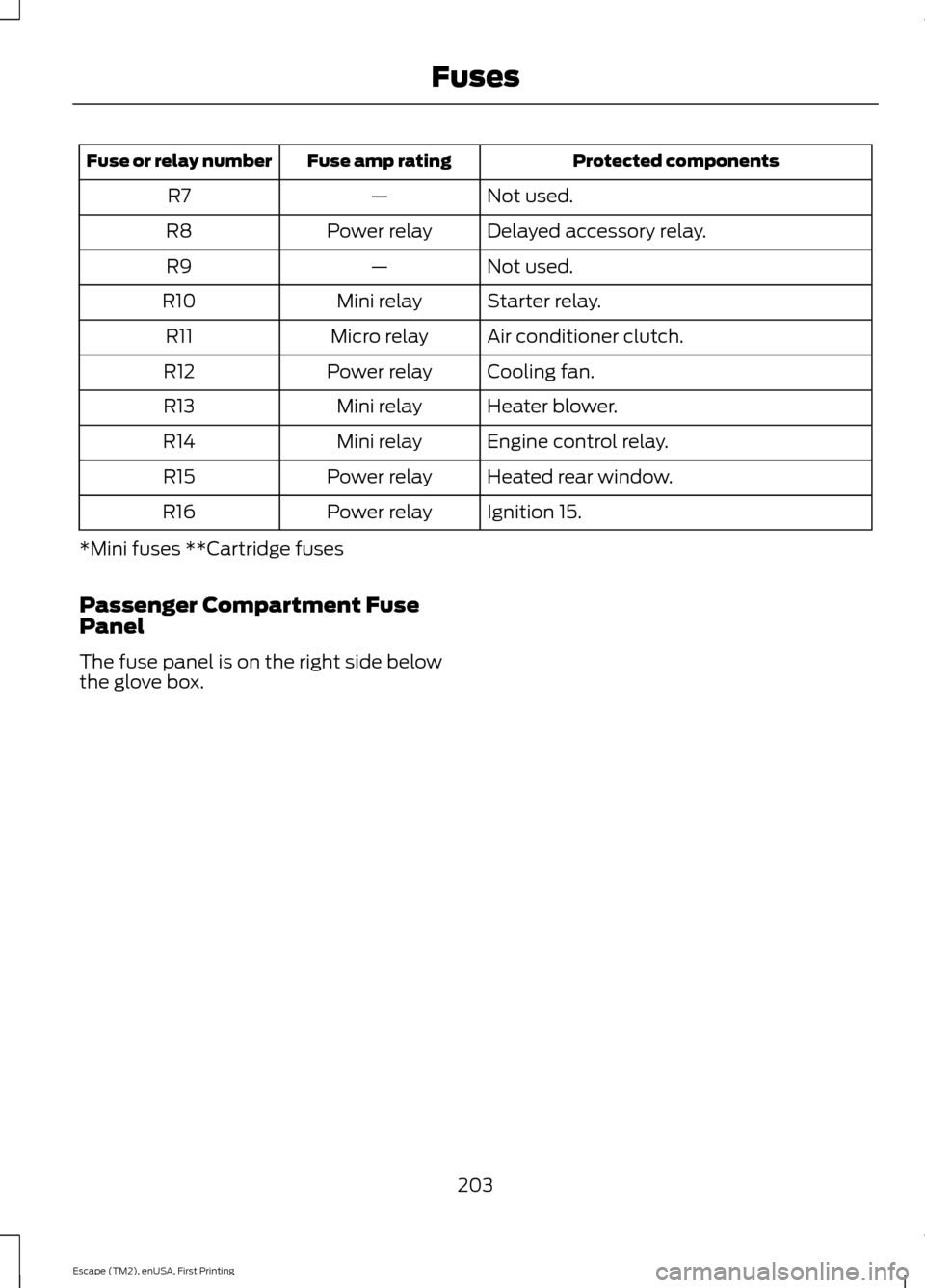
Protected components
Fuse amp rating
Fuse or relay number
Not used.
—
R7
Delayed accessory relay.
Power relay
R8
Not used.
—
R9
Starter relay.
Mini relay
R10
Air conditioner clutch.
Micro relay
R11
Cooling fan.
Power relay
R12
Heater blower.
Mini relay
R13
Engine control relay.
Mini relay
R14
Heated rear window.
Power relay
R15
Ignition 15.
Power relay
R16
*Mini fuses **Cartridge fuses
Passenger Compartment Fuse
Panel
The fuse panel is on the right side below
the glove box.
203
Escape (TM2), enUSA, First Printing Fuses
Page 211 of 449
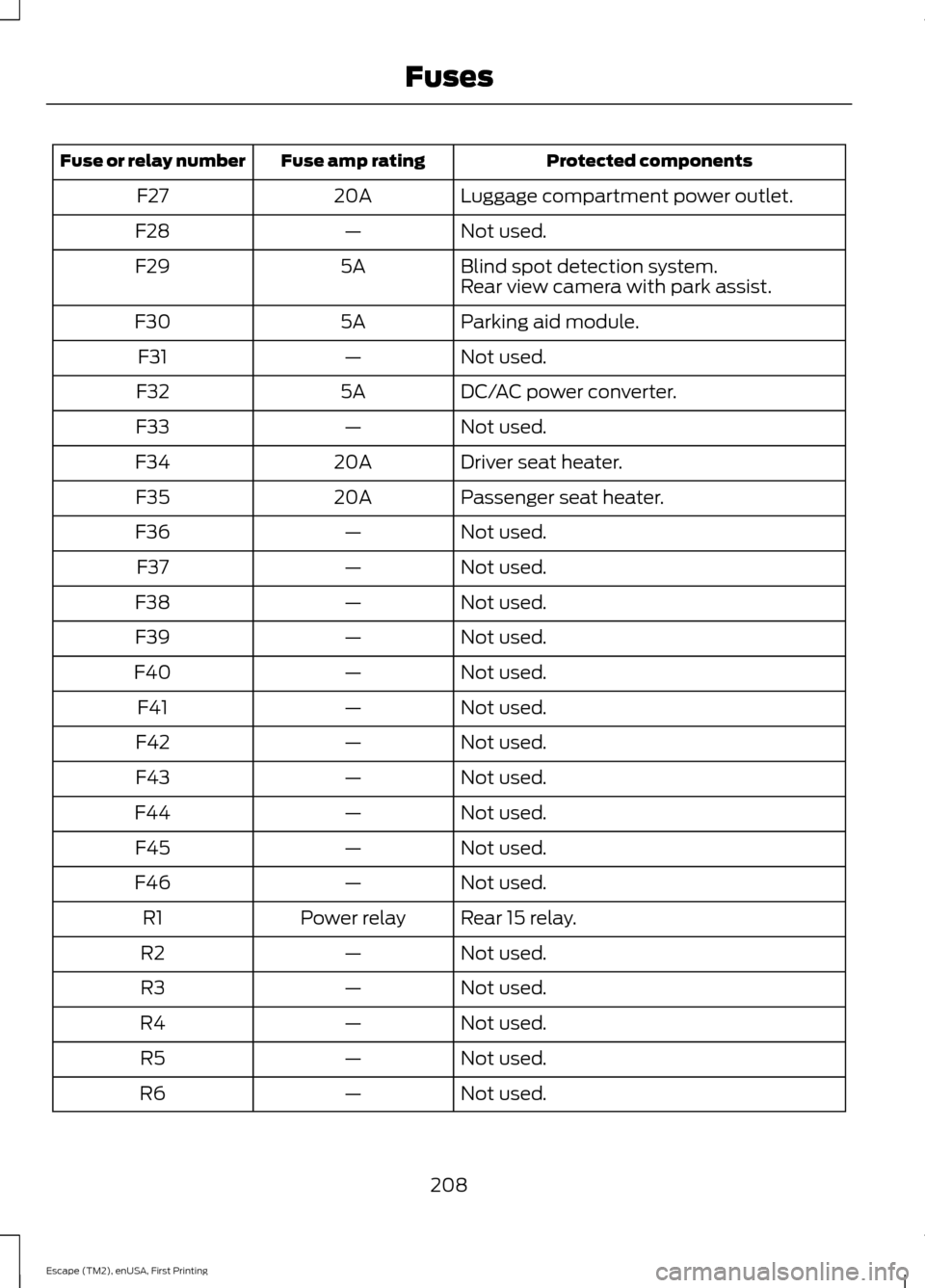
Protected components
Fuse amp rating
Fuse or relay number
Luggage compartment power outlet.
20A
F27
Not used.
—
F28
Blind spot detection system.
5A
F29
Rear view camera with park assist.
Parking aid module.
5A
F30
Not used.
—
F31
DC/AC power converter.
5A
F32
Not used.
—
F33
Driver seat heater.
20A
F34
Passenger seat heater.
20A
F35
Not used.
—
F36
Not used.
—
F37
Not used.
—
F38
Not used.
—
F39
Not used.
—
F40
Not used.
—
F41
Not used.
—
F42
Not used.
—
F43
Not used.
—
F44
Not used.
—
F45
Not used.
—
F46
Rear 15 relay.
Power relay
R1
Not used.
—
R2
Not used.
—
R3
Not used.
—
R4
Not used.
—
R5
Not used.
—
R6
208
Escape (TM2), enUSA, First Printing Fuses
Page 377 of 449
Note:
In order to use Sirius Travel Link, your
vehicle must be equipped with navigation
and your navigation SD card must be in the
SD card slot.
Note: This feature is only available in the
United States.
Note: A paid subscription is required to
access and use these features. Go to
www.siriusxm.com/travellink for more
information.
Note: Visit www.siriusxm.com/traffic and
click on Coverage map and details for a
complete listing of all traffic areas covered
by Sirius Travel Link.
Note: Neither Sirius nor Ford is responsible
for any errors or inaccuracies in the Sirius
Travel Link services or its use in vehicles.
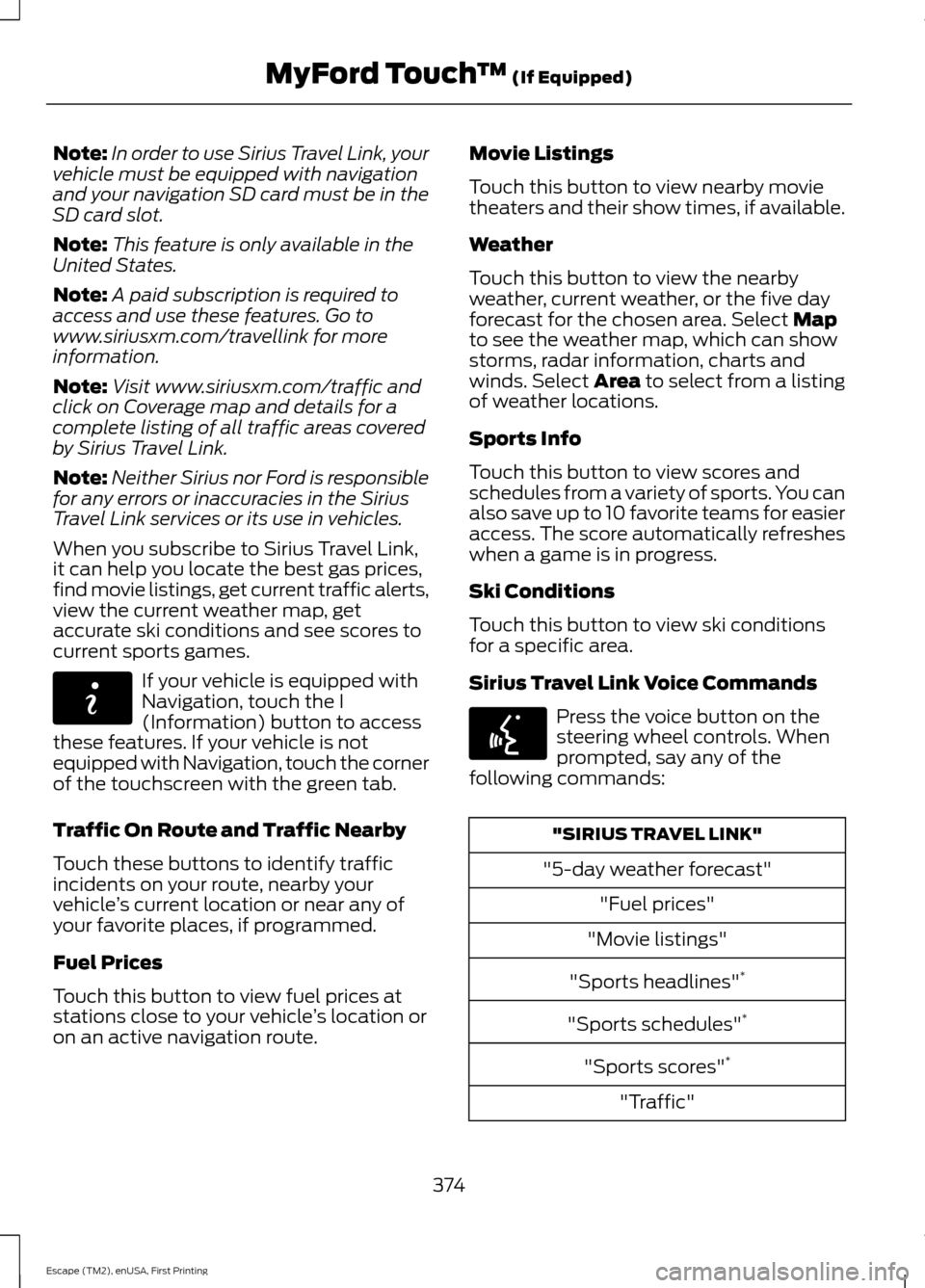
When you subscribe to Sirius Travel Link,
it can help you locate the best gas prices,
find movie listings, get current traffic alerts,
view the current weather map, get
accurate ski conditions and see scores to
current sports games. If your vehicle is equipped with
Navigation, touch the I
(Information) button to access
these features. If your vehicle is not
equipped with Navigation, touch the corner
of the touchscreen with the green tab.
Traffic On Route and Traffic Nearby
Touch these buttons to identify traffic
incidents on your route, nearby your
vehicle ’s current location or near any of
your favorite places, if programmed.
Fuel Prices
Touch this button to view fuel prices at
stations close to your vehicle ’s location or
on an active navigation route. Movie Listings
Touch this button to view nearby movie
theaters and their show times, if available.
Weather
Touch this button to view the nearby
weather, current weather, or the five day
forecast for the chosen area. Select Map
to see the weather map, which can show
storms, radar information, charts and
winds. Select Area to select from a listing
of weather locations.
Sports Info
Touch this button to view scores and
schedules from a variety of sports. You can
also save up to 10 favorite teams for easier
access. The score automatically refreshes
when a game is in progress.
Ski Conditions
Touch this button to view ski conditions
for a specific area.
Sirius Travel Link Voice Commands Press the voice button on the
steering wheel controls. When
prompted, say any of the
following commands: "SIRIUS TRAVEL LINK"
"5-day weather forecast" "Fuel prices"
"Movie listings"
"Sports headlines" *
"Sports schedules" *
"Sports scores" *
"Traffic"
374
Escape (TM2), enUSA, First Printing MyFord Touch
™
(If Equipped)E142608 E142599
Page 426 of 449
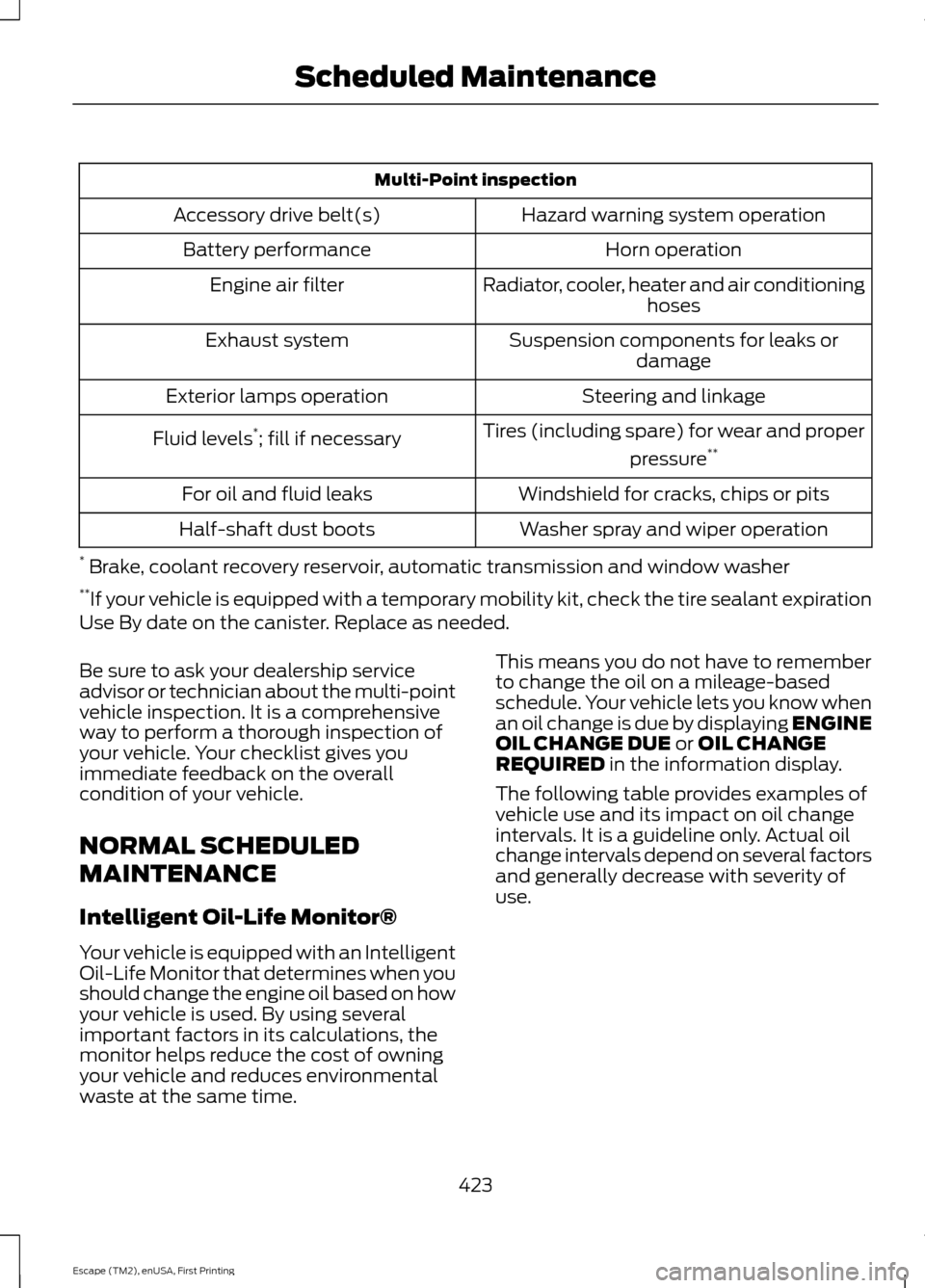
Multi-Point inspection
Hazard warning system operation
Accessory drive belt(s)
Horn operation
Battery performance
Radiator, cooler, heater and air conditioninghoses
Engine air filter
Suspension components for leaks ordamage
Exhaust system
Steering and linkage
Exterior lamps operation
Tires (including spare) for wear and properpressure**
Fluid levels *
; fill if necessary
Windshield for cracks, chips or pits
For oil and fluid leaks
Washer spray and wiper operation
Half-shaft dust boots
* Brake, coolant recovery reservoir, automatic transmission and window washer
** If your vehicle is equipped with a temporary mobility kit, check the tire sealant expiration
Use By date on the canister. Replace as needed.
Be sure to ask your dealership service
advisor or technician about the multi-point
vehicle inspection. It is a comprehensive
way to perform a thorough inspection of
your vehicle. Your checklist gives you
immediate feedback on the overall
condition of your vehicle.
NORMAL SCHEDULED
MAINTENANCE
Intelligent Oil-Life Monitor®
Your vehicle is equipped with an Intelligent
Oil-Life Monitor that determines when you
should change the engine oil based on how
your vehicle is used. By using several
important factors in its calculations, the
monitor helps reduce the cost of owning
your vehicle and reduces environmental
waste at the same time. This means you do not have to remember
to change the oil on a mileage-based
schedule. Your vehicle lets you know when
an oil change is due by displaying ENGINE
OIL CHANGE DUE or OIL CHANGE
REQUIRED in the information display.
The following table provides examples of
vehicle use and its impact on oil change
intervals. It is a guideline only. Actual oil
change intervals depend on several factors
and generally decrease with severity of
use.
423
Escape (TM2), enUSA, First Printing Scheduled Maintenance