keyless FORD ESCAPE 2015 3.G Owners Manual
[x] Cancel search | Manufacturer: FORD, Model Year: 2015, Model line: ESCAPE, Model: FORD ESCAPE 2015 3.GPages: 449, PDF Size: 5.36 MB
Page 4 of 449
Introduction
About This Manual...........................................7
Symbols Glossary
.............................................7
Data Recording
..................................................9
California Proposition 65..............................11
Perchlorate.........................................................11
Ford Credit
..........................................................11
Replacement Parts Recommendation
........................................11
Special Notices................................................12
Mobile Communications Equipment.....................................................12
Export Unique Options..................................13
At a Glance
At a Glance........................................................14
Child Safety
General Information
.......................................19
Installing Child Seats....................................20
Booster Seats..................................................26
Child Seat Positioning
..................................28
Child Safety Locks.........................................29
Safety Belts
Principle of Operation....................................31
Fastening the Safety Belts..........................32
Safety Belt Height Adjustment.................35
Safety Belt Warning Lamp and Indicator Chime
.............................................................35
Safety Belt Minder.........................................36
Child Restraint and Safety Belt Maintenance................................................37
Personal Safety System ™
Personal Safety System ™
..........................38
Supplementary Restraints System
Principle of Operation..................................39 Driver and Passenger Airbags
...................40
Front Passenger Sensing System.............41
Side Airbags
.....................................................43
Driver Knee Airbag
.........................................44
Safety Canopy ™
............................................44
Crash Sensors and Airbag Indicator.......46
Airbag Disposal
...............................................47
Keys and Remote Controls
Principle of Operation..................................48
General Information on Radio Frequencies.................................................48
Remote Control
..............................................49
Replacing a Lost Key or Remote Control............................................................52
MyKey ™
Principle of Operation..................................53
Creating a MyKey............................................53
Clearing All MyKeys
.......................................54
Checking MyKey System Status...............55
Using MyKey With Remote Start Systems.........................................................56
MyKey Troubleshooting...............................56
Locks
Locking and Unlocking
.................................58
Manual Liftgate
...............................................62
Power Liftgate
.................................................63
Keyless Entry
...................................................65
Security
Passive Anti-Theft System
.........................67
Anti-Theft Alarm
...........................................68
Steering Wheel
Adjusting the Steering Wheel...................69
Audio Control
..................................................69
Voice Control
...................................................70
Cruise Control..................................................70
1
Escape (TM2), enUSA, First Printing Table of Contents
Page 5 of 449
Information Display Control.......................70
Wipers and Washers
Windshield Wipers
..........................................71
Autowipers.........................................................71
Windshield Washers
......................................72
Rear Window Wiper and Washers...........73
Lighting
Lighting Control...............................................74
Autolamps........................................................74
Instrument Lighting Dimmer......................75
Headlamp Exit Delay....................................76
Daytime Running Lamps
.............................76
Front Fog Lamps.............................................77
Direction Indicators
........................................77
Interior Lamps
..................................................77
Ambient Lighting.............................................77
Windows and Mirrors
Power Windows
..............................................79
Global Opening
..............................................80
Exterior Mirrors
...............................................80
Interior Mirror
...................................................82
Sun Visors
.........................................................82
Moonroof...........................................................83
Instrument Cluster
Gauges...............................................................84
Warning Lamps and Indicators................86
Audible Warnings and Indicators.............88
Information Displays
General Information
.....................................90
Trip Computer.................................................92
Information Messages
.................................93
Climate Control
Manual Climate Control
............................103 Automatic Climate Control......................104
Hints on Controlling the Interior
Climate........................................................106
Heated Windows and Mirrors
..................109
Cabin Air Filter
...............................................109
Remote Start.................................................109
Seats
Sitting in the Correct Position....................111
Head Restraints
...............................................111
Manual Seats
..................................................113
Power Seats
.....................................................114
Memory Function
...........................................115
Rear Seats........................................................116
Heated Seats
...................................................117
Rear Seat Armrest.........................................117
Universal Garage Door Opener
Universal Garage Door Opener
................118
Auxiliary Power Points
Auxiliary Power Points
................................122
Storage Compartments
Center Console..............................................124
Overhead Console
........................................124
Starting and Stopping the Engine
General Information
....................................125
Ignition Switch
...............................................125
Keyless Starting.............................................125
Starting a Gasoline Engine
.......................126
Engine Block Heater....................................129
Fuel and Refueling
Safety Precautions
........................................131
Fuel Quality
.....................................................132
Running Out of Fuel.....................................132
2
Escape (TM2), enUSA, First Printing Table of Contents
Page 17 of 449
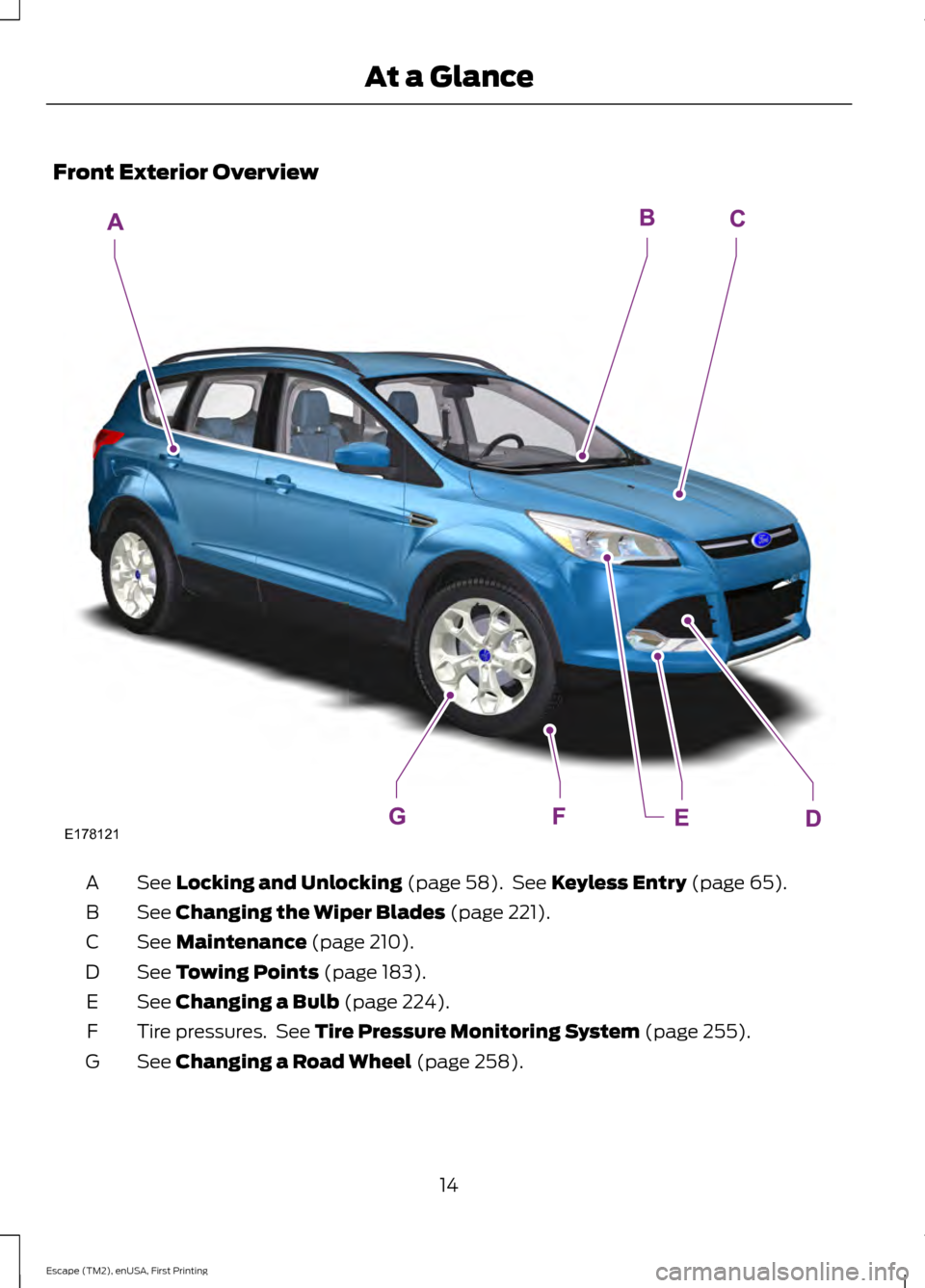
Front Exterior Overview
See Locking and Unlocking (page 58). See Keyless Entry (page 65).
A
See
Changing the Wiper Blades (page 221).
B
See
Maintenance (page 210).
C
See
Towing Points (page 183).
D
See
Changing a Bulb (page 224).
E
Tire pressures. See
Tire Pressure Monitoring System (page 255).
F
See
Changing a Road Wheel (page 258).
G
14
Escape (TM2), enUSA, First Printing At a GlanceE178121
Page 19 of 449
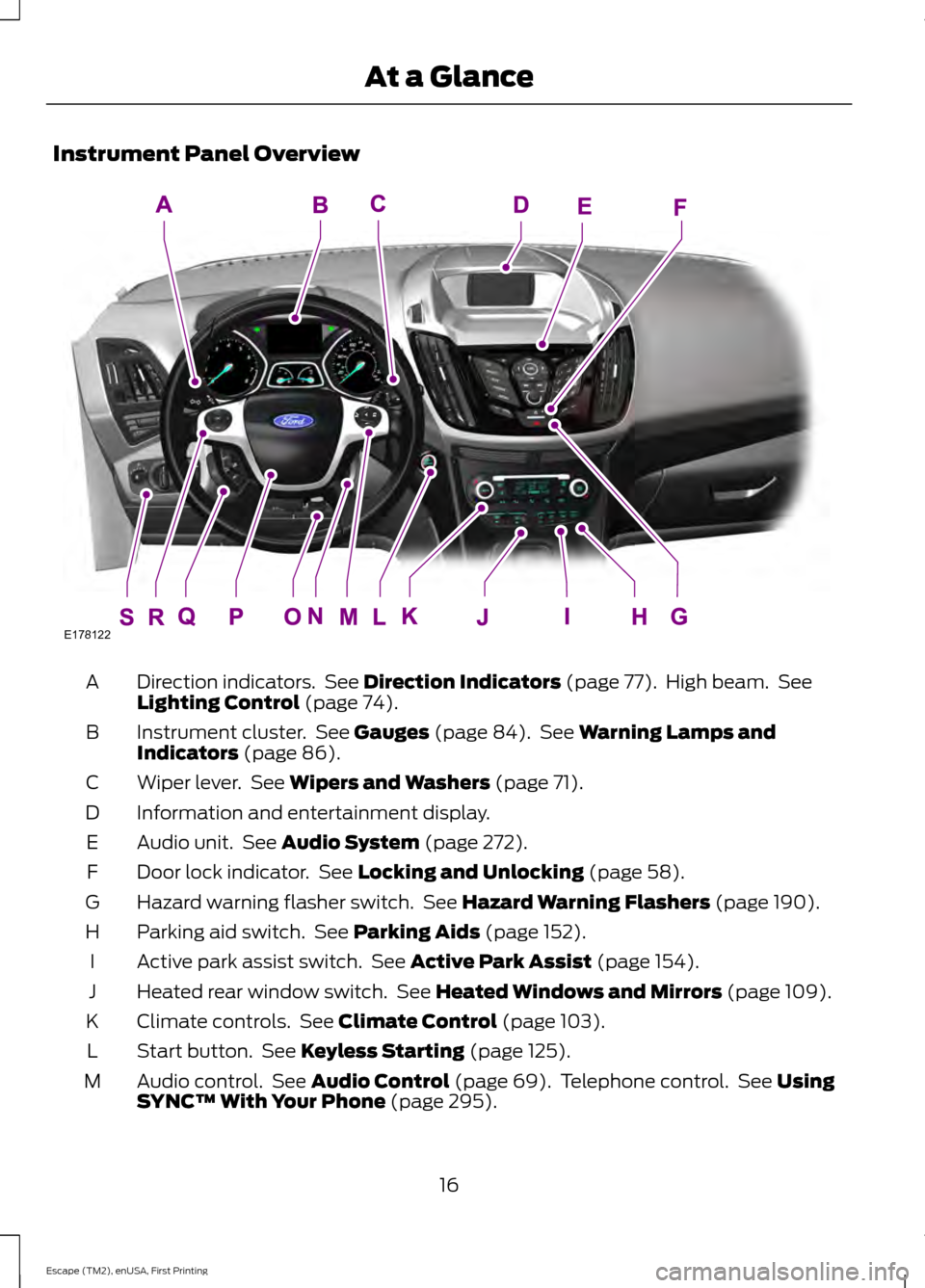
Instrument Panel Overview
Direction indicators. See Direction Indicators (page 77). High beam. See
Lighting Control (page 74).
A
Instrument cluster. See
Gauges (page 84). See Warning Lamps and
Indicators (page 86).
B
Wiper lever. See
Wipers and Washers (page 71).
C
Information and entertainment display.
D
Audio unit. See
Audio System (page 272).
E
Door lock indicator. See
Locking and Unlocking (page 58).
F
Hazard warning flasher switch. See
Hazard Warning Flashers (page 190).
G
Parking aid switch. See
Parking Aids (page 152).
H
Active park assist switch. See
Active Park Assist (page 154).
I
Heated rear window switch. See
Heated Windows and Mirrors (page 109).
J
Climate controls. See
Climate Control (page 103).
K
Start button. See
Keyless Starting (page 125).
L
Audio control. See
Audio Control (page 69). Telephone control. See Using
SYNC™ With Your Phone (page 295).
M
16
Escape (TM2), enUSA, First Printing At a GlanceE178122
Page 56 of 449
PRINCIPLE OF OPERATION
MyKey allows you to program keys with
restricted driving modes to promote good
driving habits. All but one of the keys
programmed to the vehicle can be
activated with these restricted modes.
Any keys that have not been programmed
are referred to as administrator keys or
admin keys. These can be used to:
•
Create a MyKey.
• Program configurable MyKey settings.
• Clear all MyKey features.
When you have created a MyKey, you can
access the following information using the
information display:
• How many admin keys and MyKeys are
programmed to your vehicle.
• The total distance your vehicle has
traveled using any MyKey.
Note: All MyKeys are programmed to the
same settings. You cannot program them
individually.
Note: For vehicles with keyless start, when
both a MyKey transmitter and an admin
transmitter are present, the admin
transmitter will be recognized by the vehicle
to start the engine.
Non-configurable Settings
The following settings cannot be changed
by an admin key user:
• Belt-minder. You cannot disable this
feature. The audio system will mute
when the safety belts are not fastened.
• Early low fuel warning. The low-fuel
warning activates earlier, giving the
MyKey user more time to refuel. •
Driver assist features, if equipped on
your vehicle, are forced on: parking aid,
blind spot information system (BLIS)
with cross traffic alert, lane departure
warning and forward collision warning
system.
• Satellite radio adult content
restrictions.
Configurable Settings
With an admin key, you can configure
certain MyKey settings when you first
create a MyKey and before you recycle the
key or restart the vehicle. You can also
change the settings afterward with an
admin key:
• Vehicle speed limits can be set.
Warnings will be shown in the display
followed by an audible tone when your
vehicle reaches the set speed. You
cannot override the set speed by fully
depressing the accelerator pedal.
• Vehicle speed minders. Once you select
a speed, it will be shown in the display
followed by a tone when the set vehicle
speed is exceeded.
• Audio system maximum volume of
45%. A message will be shown in the
display when you attempt to exceed
the limited volume. Also, the speed
sensitive compensated volume
(automatic volume control) feature
will be disabled.
• Always on setting. When this is
selected you will not be able to disable
AdvanceTrac, 911 Assist or the do not
disturb feature (if your vehicle is
equipped with these features).
CREATING A MYKEY
Use the information display to create a
MyKey:
53
Escape (TM2), enUSA, First Printing MyKey
™
Page 59 of 449
USING MYKEY WITH REMOTE
START SYSTEMS
MyKey is not compatible with non
Ford-approved, aftermarket remote start
systems. If you choose to install a remote
start system, see an authorized dealer for
a Ford-approved remote start system.
MYKEY TROUBLESHOOTING Potential Causes
Condition
I cannot create a MyKey. •The key or transmitter used to start the
vehicle does not have admin privileges.
• The key or transmitter used to start the
vehicle is the only admin key (there always
has to be at least one admin key).
• Vehicles with keyless start: The keyless
start transmitter is not placed in the backup
slot, located in the center console. See
Keyless Entry (page 65).
• SecuriLock passive anti-theft system is
disabled or in unlimited mode.
• The key or transmitter used to start your
vehicle does not have admin privileges.
• No MyKeys are created. See
Creating a
MyKey (page 53).
I cannot program the configurable
settings.
•The key or transmitter used to start your
vehicle does not have admin privileges.
• No MyKeys are created. See
Creating a
MyKey (page 53).
I cannot clear the MyKeys.
Purchase a new key from an authorized dealer.
I lost the only admin key.
56
Escape (TM2), enUSA, First Printing MyKey
™
Page 60 of 449
Potential Causes
Condition
Program a spare key. See Passive Anti-Theft
System (page 67).
I lost a key.
MyKey distances do not accumulate.
•The MyKey user is not using the MyKey.
• An admin key holder cleared the MyKeys
and created new MyKeys.
• The key system has been reset.
• An admin transmitter is present at vehicle
start.
• No MyKeys are created. See
Creating a
MyKey (page 53).
No MyKey functions with the keyless
entry transmitter.
57
Escape (TM2), enUSA, First Printing MyKey
™
Page 61 of 449
LOCKING AND UNLOCKING
You can use the power door lock control
or the remote control to lock and unlock
your vehicle.
Power Door Locks
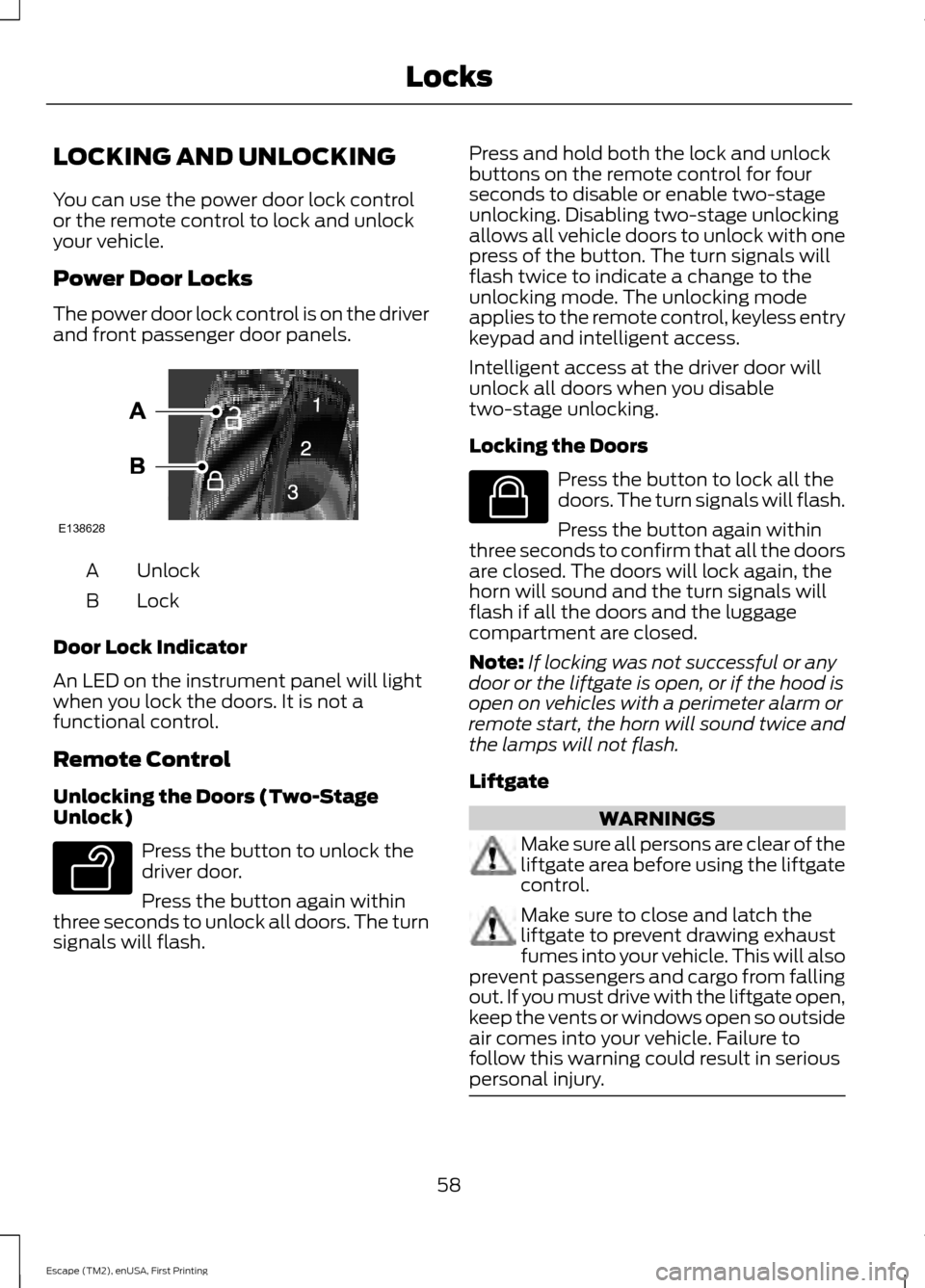
The power door lock control is on the driver
and front passenger door panels.
Unlock
A
Lock
B
Door Lock Indicator
An LED on the instrument panel will light
when you lock the doors. It is not a
functional control.
Remote Control
Unlocking the Doors (Two-Stage
Unlock) Press the button to unlock the
driver door.
Press the button again within
three seconds to unlock all doors. The turn
signals will flash. Press and hold both the lock and unlock
buttons on the remote control for four
seconds to disable or enable two-stage
unlocking. Disabling two-stage unlocking
allows all vehicle doors to unlock with one
press of the button. The turn signals will
flash twice to indicate a change to the
unlocking mode. The unlocking mode
applies to the remote control, keyless entry
keypad and intelligent access.
Intelligent access at the driver door will
unlock all doors when you disable
two-stage unlocking.
Locking the Doors
Press the button to lock all the
doors. The turn signals will flash.
Press the button again within
three seconds to confirm that all the doors
are closed. The doors will lock again, the
horn will sound and the turn signals will
flash if all the doors and the luggage
compartment are closed.
Note: If locking was not successful or any
door or the liftgate is open, or if the hood is
open on vehicles with a perimeter alarm or
remote start, the horn will sound twice and
the lamps will not flash.
Liftgate WARNINGS
Make sure all persons are clear of the
liftgate area before using the liftgate
control.
Make sure to close and latch the
liftgate to prevent drawing exhaust
fumes into your vehicle. This will also
prevent passengers and cargo from falling
out. If you must drive with the liftgate open,
keep the vents or windows open so outside
air comes into your vehicle. Failure to
follow this warning could result in serious
personal injury. 58
Escape (TM2), enUSA, First Printing LocksE138628 E138629 E138623
Page 63 of 449
At the Liftgate
Press the exterior liftgate release button
on the top of the liftgate pull-cup handle.
Smart Unlocks For Integrated
Keyhead Transmitter
This feature helps to prevent you from
locking yourself out of your vehicle if your
key is still in the ignition.
When you open one of the front doors and
lock your vehicle with the power door lock
control, all the doors will lock then unlock
if your key is still in the ignition.
You can still lock your vehicle with the key
in the ignition by either:
•
using the keyless entry keypad with the
driver door closed
• pressing the lock button on the
transmitter even if the doors are not
closed.
If both front doors are closed, you can lock
your vehicle by any method, regardless of
whether the key is in the ignition or not.
Smart Unlocks For Intelligent
Access Keys (If Equipped)
This feature helps to prevent you from
unintentionally locking your intelligent
access key inside your vehicle ’s passenger
compartment or rear cargo area.
When you lock your vehicle using the
power door lock control (with the door
open, vehicle in park and ignition off), your
vehicle will search for an intelligent access
key in the passenger compartment after
you close the door. If you vehicle finds a
key, all of the doors will immediately
unlock. In order to override the smart unlock
feature and intentionally lock the
intelligent access key inside your vehicle,
you can lock your vehicle after all doors
are closed by using the keyless entry
keypad, pressing the lock button on
another intelligent access key or touching
the locking area on the handle with another
intelligent access key in your hand.
When you open one of the front doors and
lock your vehicle using the power door lock
control, all doors will lock then unlock if
the ignition is on.
Autolock
(If Equipped)
The autolock feature will lock all the doors
when:
• all doors are closed,
• the ignition is on,
• you shift into any gear putting your
vehicle in motion, and
• your vehicle attains a speed greater
than 4 mph (7 km/h).
Autounlock (If Equipped)
The autounlock feature will unlock all the
doors when:
• the ignition is on, all the doors are
closed, and your vehicle has been in
motion at a speed greater than 4 mph
(7 km/h);
• your vehicle comes to a stop and you
switch the ignition off or to accessory;
and
• you open the driver door within 10
minutes of the switching the ignition
off or to accessory.
Note: The doors will not autounlock if you
electronically lock your vehicle after you
switch the ignition off and before you open
the driver door.
60
Escape (TM2), enUSA, First Printing Locks
Page 68 of 449
WARNING
Keep clear of the liftgate when
activating the rear switch.
Setting the Liftgate Open Height
1. Open the liftgate.
2. Manually move the liftgate to the
desired height.
3. Press and hold the control button on the liftgate until you hear a chime,
indicating programming is complete.
Note: You cannot program the height if the
liftgate position is too low.
The system recalls the new open liftgate
height when the power liftgate is opened.
To change the programmed height, repeat
the above procedure. Once you open the
power liftgate, you can manually move it
to a different height.
When operating the power liftgate after
you have programmed a lower height than
full-open, you can fully open the liftgate
by manually pushing it upward to the
maximum open position.
Obstacle Detection
When Closing
The system stops when it detects an
obstacle and two short tones sound. Once
you remove the obstacle, you can power
close the liftgate.
Note: Entering your vehicle while the
liftgate is closing can cause your vehicle to
bounce and activate obstacle detection. To
prevent this, let the power liftgate close
completely before you enter your vehicle.
Before driving off, check the instrument
cluster for a liftgate or door ajar message or
warning indicator. Failure to do this could
result in unintentionally leaving the liftgate
open while driving. When Opening
The system stops when it detects an
obstacle and two short tones sound.
Remove the obstacle to operate the
liftgate.
KEYLESS ENTRY (If Equipped)
SECURICODE™ KEYLESS ENTRY
KEYPAD
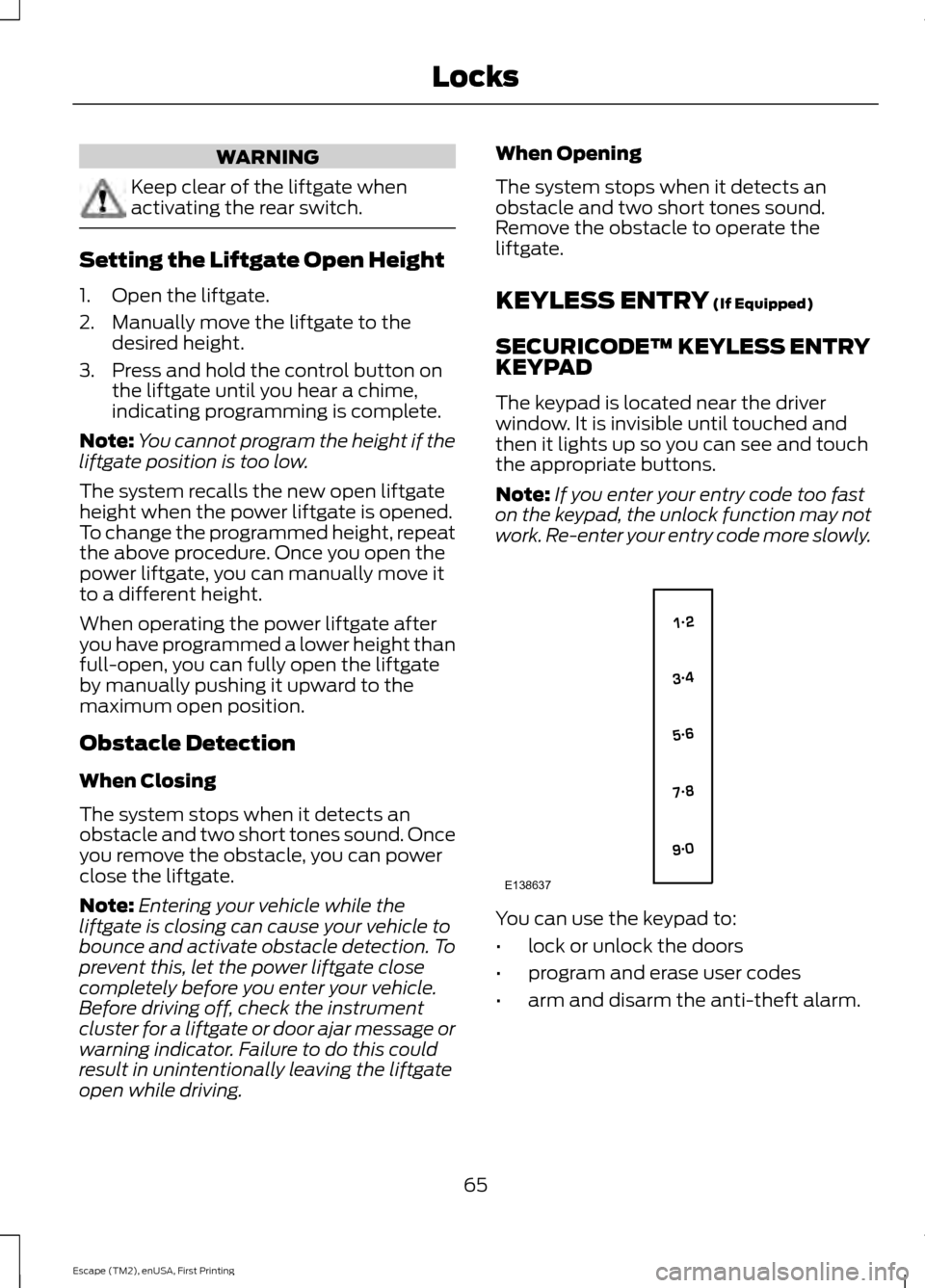
The keypad is located near the driver
window. It is invisible until touched and
then it lights up so you can see and touch
the appropriate buttons.
Note: If you enter your entry code too fast
on the keypad, the unlock function may not
work. Re-enter your entry code more slowly. You can use the keypad to:
•
lock or unlock the doors
• program and erase user codes
• arm and disarm the anti-theft alarm.
65
Escape (TM2), enUSA, First Printing LocksE138637