parking brake FORD ESCAPE 2015 3.G Owners Manual
[x] Cancel search | Manufacturer: FORD, Model Year: 2015, Model line: ESCAPE, Model: FORD ESCAPE 2015 3.GPages: 449, PDF Size: 5.36 MB
Page 6 of 449
Refueling..........................................................134
Fuel Consumption........................................135
Emission Control System..........................136
Transmission
Automatic Transmission............................139
Four-Wheel Drive
Principle of Operation.................................142
Using Four-Wheel Drive.............................142
Brakes
General Information
....................................147
Hints on Driving With Anti-Lock Brakes...........................................................147
Parking Brake
.................................................148
Hill Start Assist..............................................148
Traction Control
Principle of Operation................................149
Using Traction Control...............................149
Stability Control
Principle of Operation................................150
Using Stability Control.................................151
Parking Aids
Parking Aid......................................................152
Active Park Assist
.........................................154
Rear View Camera
.......................................158
Cruise Control
Principle of Operation..................................161
Using Cruise Control.....................................161
Driving Aids
Blind Spot Information System..............162
Eco Mode
........................................................166
Steering............................................................166 Load Carrying
Rear Under Floor Storage.........................168
Luggage Covers
.............................................168
Roof Racks and Load Carriers.................169
Load Limit........................................................170
Towing
Towing a Trailer..............................................178
Trailer Sway Control.....................................179
Recommended Towing Weights
.............179
Essential Towing Checks
............................181
Towing Points
................................................183
Transporting the Vehicle...........................184
Towing the Vehicle on Four Wheels......185
Driving Hints
Breaking-In.....................................................186
Economical Driving
......................................186
Driving Through Water................................187
Floor Mats........................................................187
Roadside Emergencies
Roadside Assistance..................................189
Hazard Warning Flashers
..........................190
Fuel Shutoff
...................................................190
Jump Starting the Vehicle..........................191
Post-Crash Alert System...........................193
Customer Assistance
Getting the Services You Need...............194
In California (U.S. Only).............................195
The Better Business Bureau (BBB) Auto Line Program (U.S. Only)......................196
Utilizing the Mediation/Arbitration Program (Canada Only)
........................196
Getting Assistance Outside the U.S. and Canada.........................................................197
Ordering Additional Owner's Literature.....................................................198
3
Escape (TM2), enUSA, First Printing Table of Contents
Page 12 of 449
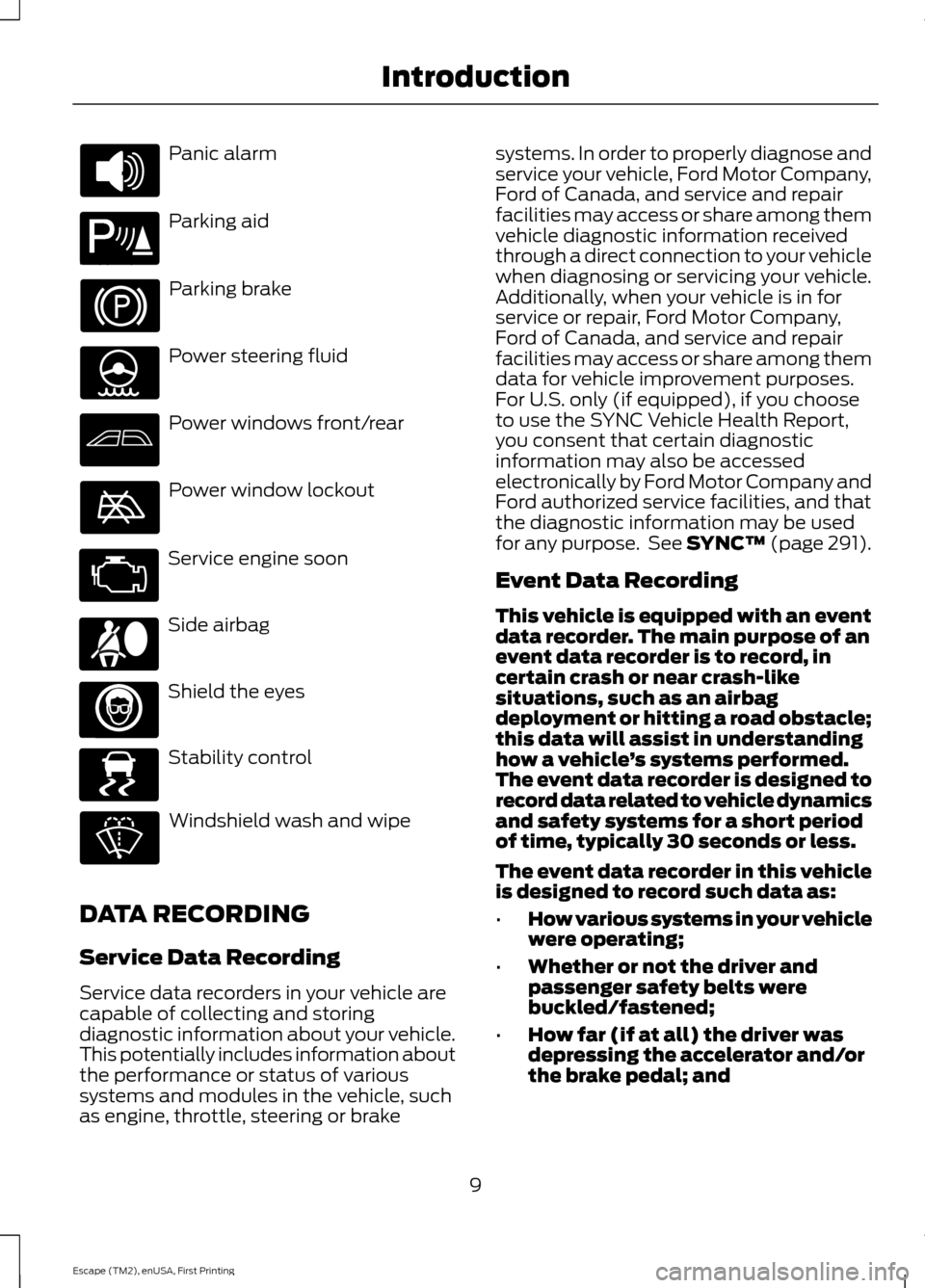
Panic alarm
Parking aid
Parking brake
Power steering fluid
Power windows front/rear
Power window lockout
Service engine soon
Side airbag
Shield the eyes
Stability control
Windshield wash and wipe
DATA RECORDING
Service Data Recording
Service data recorders in your vehicle are
capable of collecting and storing
diagnostic information about your vehicle.
This potentially includes information about
the performance or status of various
systems and modules in the vehicle, such
as engine, throttle, steering or brake systems. In order to properly diagnose and
service your vehicle, Ford Motor Company,
Ford of Canada, and service and repair
facilities may access or share among them
vehicle diagnostic information received
through a direct connection to your vehicle
when diagnosing or servicing your vehicle.
Additionally, when your vehicle is in for
service or repair, Ford Motor Company,
Ford of Canada, and service and repair
facilities may access or share among them
data for vehicle improvement purposes.
For U.S. only (if equipped), if you choose
to use the SYNC Vehicle Health Report,
you consent that certain diagnostic
information may also be accessed
electronically by Ford Motor Company and
Ford authorized service facilities, and that
the diagnostic information may be used
for any purpose. See SYNC™ (page 291).
Event Data Recording
This vehicle is equipped with an event
data recorder. The main purpose of an
event data recorder is to record, in
certain crash or near crash-like
situations, such as an airbag
deployment or hitting a road obstacle;
this data will assist in understanding
how a vehicle
’s systems performed.
The event data recorder is designed to
record data related to vehicle dynamics
and safety systems for a short period
of time, typically 30 seconds or less.
The event data recorder in this vehicle
is designed to record such data as:
• How various systems in your vehicle
were operating;
• Whether or not the driver and
passenger safety belts were
buckled/fastened;
• How far (if at all) the driver was
depressing the accelerator and/or
the brake pedal; and
9
Escape (TM2), enUSA, First Printing Introduction E139213 E167012 E138639
Page 18 of 449
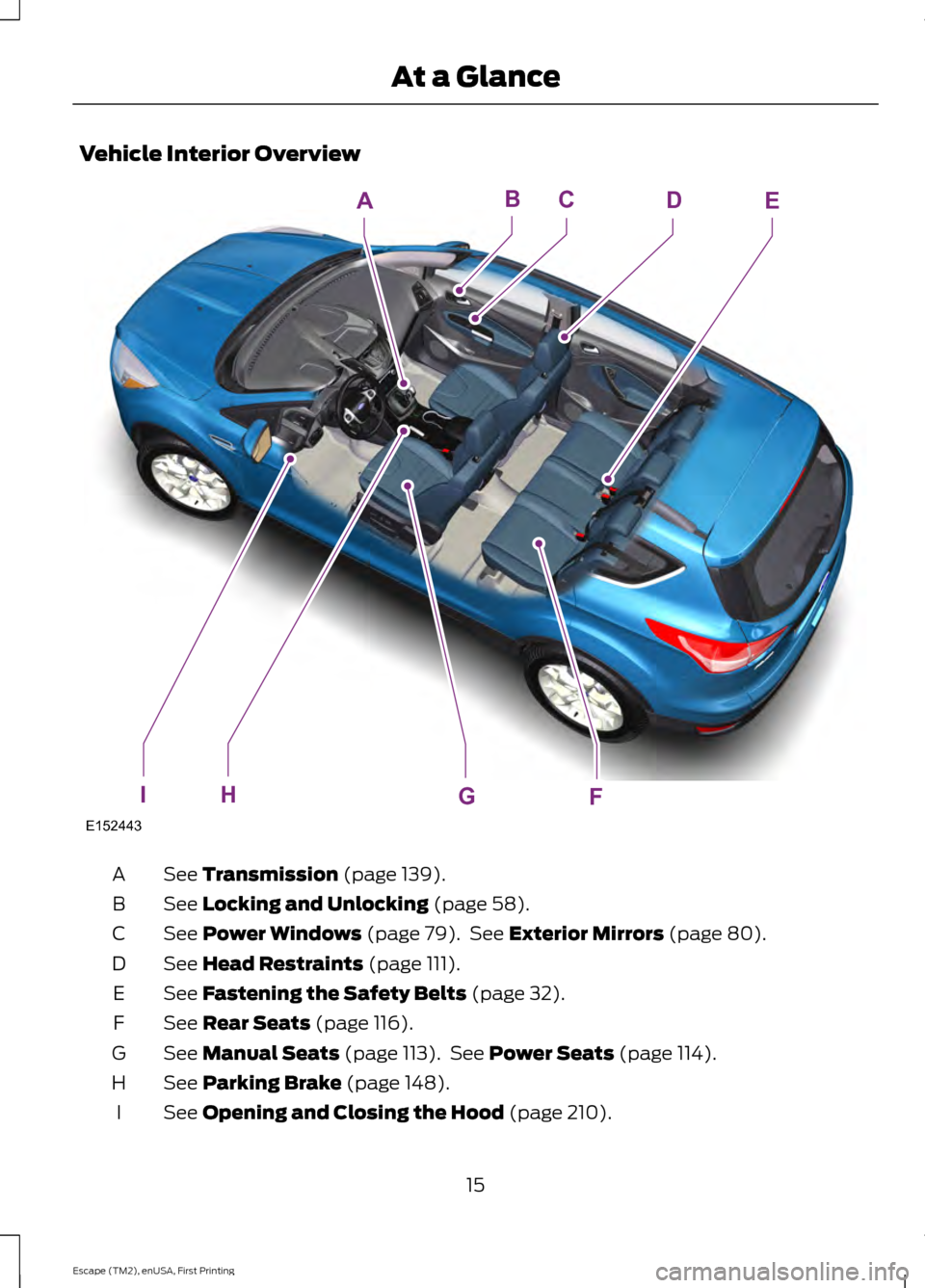
Vehicle Interior Overview
See Transmission (page 139).
A
See
Locking and Unlocking (page 58).
B
See
Power Windows (page 79). See Exterior Mirrors (page 80).
C
See
Head Restraints (page 111).
D
See
Fastening the Safety Belts (page 32).
E
See
Rear Seats (page 116).
F
See
Manual Seats (page 113). See Power Seats (page 114).
G
See
Parking Brake (page 148).
H
See
Opening and Closing the Hood (page 210).
I
15
Escape (TM2), enUSA, First Printing At a GlanceE152443
F
AEBCD
HIG
Page 40 of 449
Deactivating and Activating the
Belt-Minder Feature
WARNING
While the system allows you to
deactivate it, this system is designed
to improve your chances of being
safely belted and surviving an accident.
We recommend you leave the system
activated for yourself and others who may
use your vehicle. Note:
The driver and front passenger
warnings switch on and off independently.
When you perform this procedure for one
seating position, do not buckle the other
position as this will terminate the process.
Read Steps 1 - 4 thoroughly before
proceeding with the programming
procedure.
Before following the procedure, make sure
that:
• The parking brake is set.
• The transmission is in park (P).
• The ignition is off.
• The driver and front passenger safety
belts are unbuckled.
1. Switch the ignition on. Do not start the
engine.
2. Wait until the safety belt warning light turns off (about one minute). After
Step 2, wait an additional five seconds
before proceeding with Step 3. Once
you start Step 3, you must complete
the procedure within 60 seconds.
3. For the seating position you are switching off, buckle then unbuckle the
safety belt three times at a moderate
speed, ending in the unbuckled state.
After Step 3, the safety belt warning
light turns on. 4. While the safety belt warning light is
on, buckle and then unbuckle the
safety belt. After Step 4, the safety belt
warning light flashes for confirmation.
• This will switch the feature off for that
seating position if it is currently on.
• This will switch the feature on for that
seating position if it is currently off.
CHILD RESTRAINT AND
SAFETY BELT MAINTENANCE
Inspect the vehicle safety belts and child
safety seat systems periodically to make
sure they work properly and are not
damaged. Inspect the vehicle and child
seat safety belts to make sure there are no
nicks, tears or cuts. Replace if necessary.
All vehicle safety belt assemblies, including
retractors, buckles, front safety belt buckle
assemblies, buckle support assemblies
(slide bar-if equipped), shoulder belt
height adjusters (if equipped), shoulder
belt guide on seat back (if equipped), child
safety seat LATCH and tether anchors, and
attaching hardware, should be inspected
after a crash. Read the child restraint
manufacturer's instructions for additional
inspection and maintenance information
specific to the child restraint.
Ford Motor Company recommends that
all safety belt assemblies in use in vehicles
involved in a crash be replaced. However,
if the crash was minor and an authorized
dealer finds that the belts do not show
damage and continue to operate properly,
they do not need to be replaced. Safety
belt assemblies not in use during a crash
should also be inspected and replaced if
either damage or improper operation is
noted.
Properly care for safety belts. See Vehicle
Care (page 231).
37
Escape (TM2), enUSA, First Printing Safety Belts
Page 89 of 449
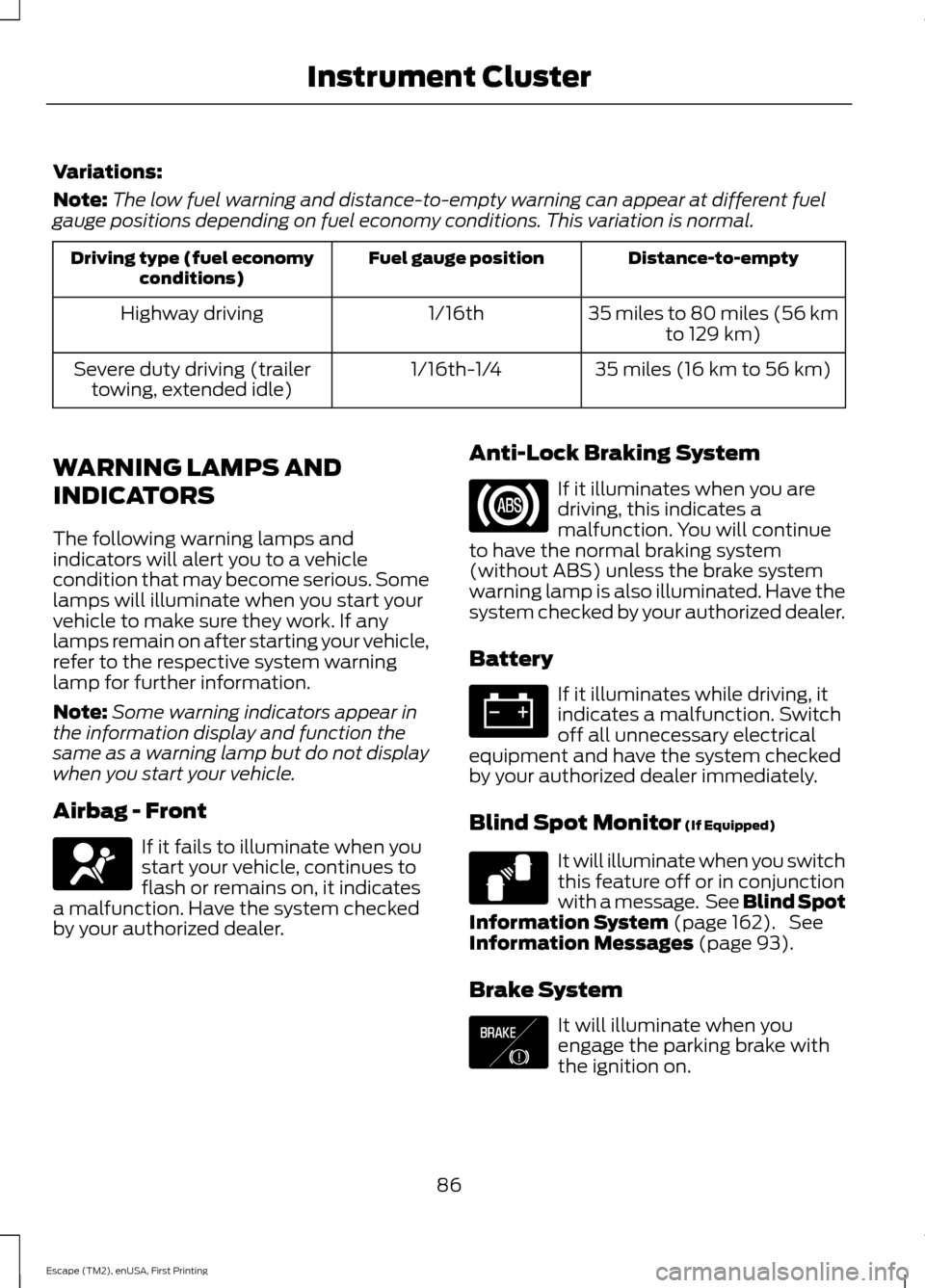
Variations:
Note:
The low fuel warning and distance-to-empty warning can appear at different fuel
gauge positions depending on fuel economy conditions. This variation is normal. Distance-to-empty
Fuel gauge position
Driving type (fuel economy
conditions)
35 miles to 80 miles (56 kmto 129 km)
1/16th
Highway driving
35 miles (16 km to 56 km)
1/16th-1/4
Severe duty driving (trailer
towing, extended idle)
WARNING LAMPS AND
INDICATORS
The following warning lamps and
indicators will alert you to a vehicle
condition that may become serious. Some
lamps will illuminate when you start your
vehicle to make sure they work. If any
lamps remain on after starting your vehicle,
refer to the respective system warning
lamp for further information.
Note: Some warning indicators appear in
the information display and function the
same as a warning lamp but do not display
when you start your vehicle.
Airbag - Front If it fails to illuminate when you
start your vehicle, continues to
flash or remains on, it indicates
a malfunction. Have the system checked
by your authorized dealer. Anti-Lock Braking System If it illuminates when you are
driving, this indicates a
malfunction. You will continue
to have the normal braking system
(without ABS) unless the brake system
warning lamp is also illuminated. Have the
system checked by your authorized dealer.
Battery If it illuminates while driving, it
indicates a malfunction. Switch
off all unnecessary electrical
equipment and have the system checked
by your authorized dealer immediately.
Blind Spot Monitor (If Equipped) It will illuminate when you switch
this feature off or in conjunction
with a message. See Blind Spot
Information System
(page 162). See
Information Messages (page 93).
Brake System It will illuminate when you
engage the parking brake with
the ignition on.
86
Escape (TM2), enUSA, First Printing Instrument Cluster E124823 E138644
Page 90 of 449
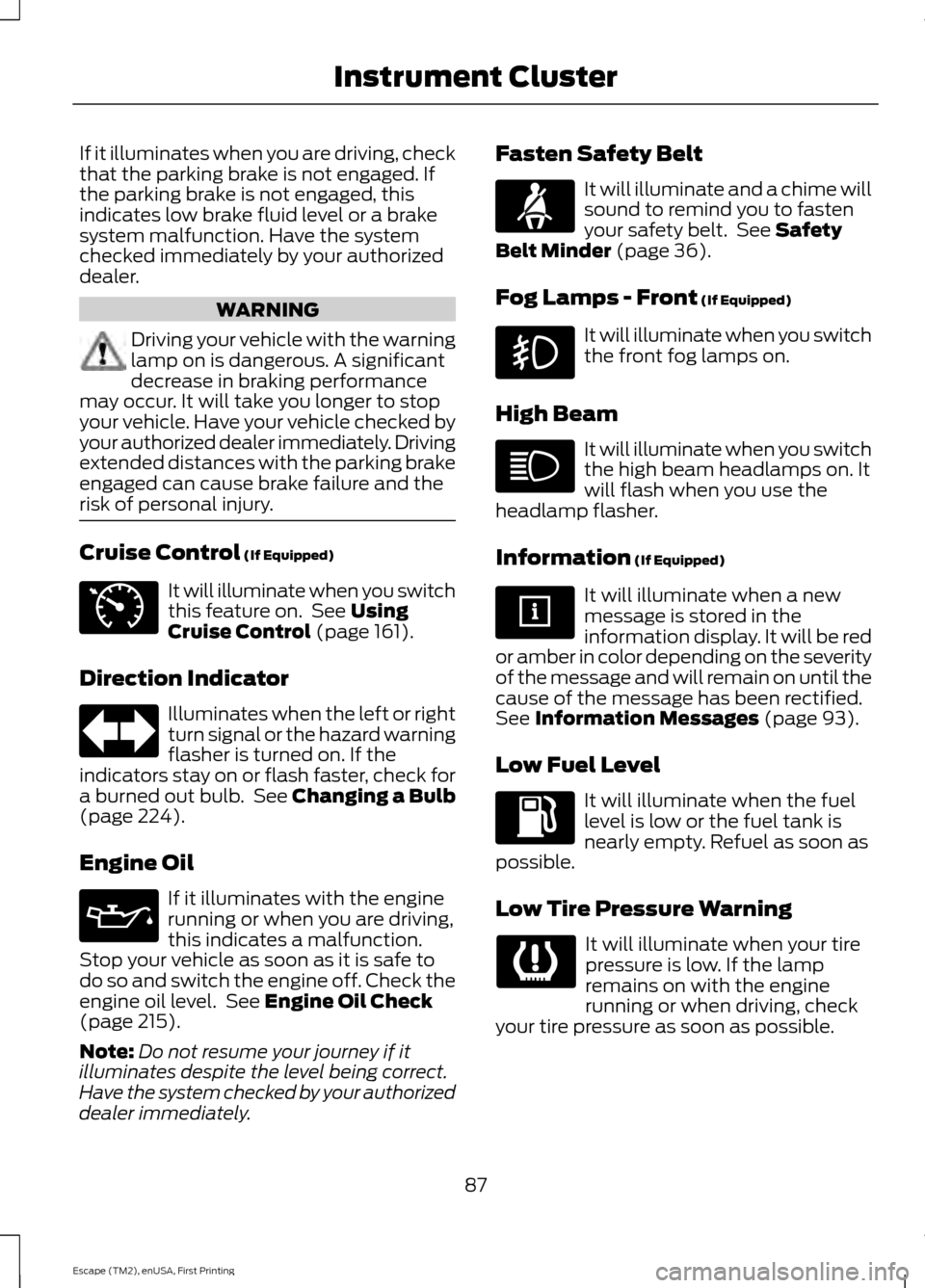
If it illuminates when you are driving, check
that the parking brake is not engaged. If
the parking brake is not engaged, this
indicates low brake fluid level or a brake
system malfunction. Have the system
checked immediately by your authorized
dealer.
WARNING
Driving your vehicle with the warning
lamp on is dangerous. A significant
decrease in braking performance
may occur. It will take you longer to stop
your vehicle. Have your vehicle checked by
your authorized dealer immediately. Driving
extended distances with the parking brake
engaged can cause brake failure and the
risk of personal injury. Cruise Control (If Equipped)
It will illuminate when you switch
this feature on. See
Using
Cruise Control (page 161).
Direction Indicator Illuminates when the left or right
turn signal or the hazard warning
flasher is turned on. If the
indicators stay on or flash faster, check for
a burned out bulb. See
Changing a Bulb
(page 224).
Engine Oil If it illuminates with the engine
running or when you are driving,
this indicates a malfunction.
Stop your vehicle as soon as it is safe to
do so and switch the engine off. Check the
engine oil level. See
Engine Oil Check
(page 215).
Note: Do not resume your journey if it
illuminates despite the level being correct.
Have the system checked by your authorized
dealer immediately. Fasten Safety Belt It will illuminate and a chime will
sound to remind you to fasten
your safety belt. See
Safety
Belt Minder (page 36).
Fog Lamps - Front
(If Equipped) It will illuminate when you switch
the front fog lamps on.
High Beam It will illuminate when you switch
the high beam headlamps on. It
will flash when you use the
headlamp flasher.
Information
(If Equipped) It will illuminate when a new
message is stored in the
information display. It will be red
or amber in color depending on the severity
of the message and will remain on until the
cause of the message has been rectified.
See
Information Messages (page 93).
Low Fuel Level It will illuminate when the fuel
level is low or the fuel tank is
nearly empty. Refuel as soon as
possible.
Low Tire Pressure Warning It will illuminate when your tire
pressure is low. If the lamp
remains on with the engine
running or when driving, check
your tire pressure as soon as possible.
87
Escape (TM2), enUSA, First Printing Instrument ClusterE71340
Page 92 of 449
Headlamps On Warning Chime
Sounds when you remove the key from the
ignition and open the driver's door and you
have left the headlamps or parking lamps
on.
Parking Brake On Warning Chime
Sounds when you have left the parking
brake on and drive your vehicle. If the
warning chime remains on after you have
released the parking brake, have the
system checked by your authorized dealer
immediately.
Automatic Transmission Warning
Chime
Sounds when you have not moved the
transmission selector lever to position P.
A message will be shown in the display.
89
Escape (TM2), enUSA, First Printing Instrument Cluster
Page 102 of 449
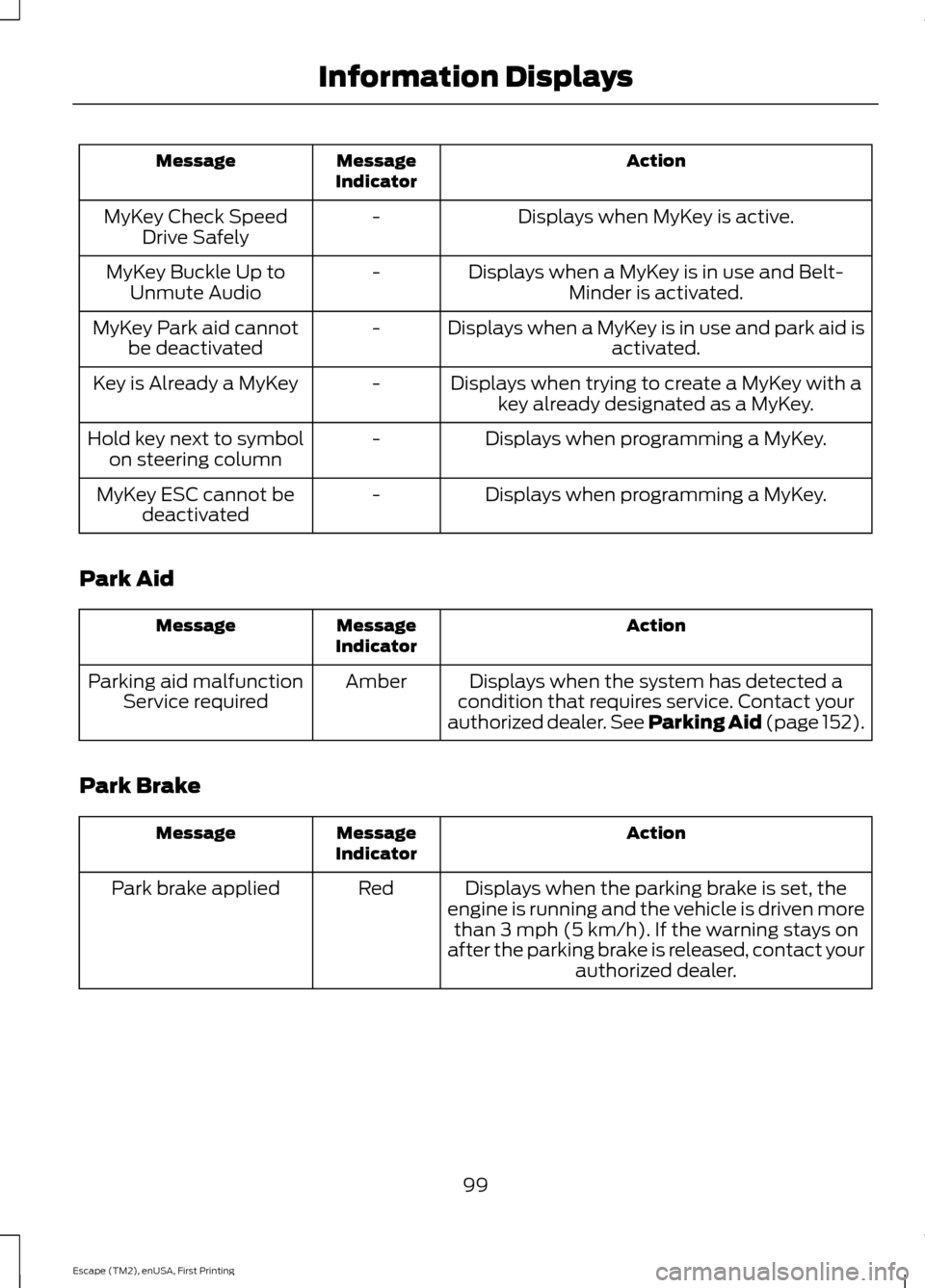
Action
Message
Indicator
Message
Displays when MyKey is active.
-
MyKey Check Speed
Drive Safely
Displays when a MyKey is in use and Belt-Minder is activated.
-
MyKey Buckle Up to
Unmute Audio
Displays when a MyKey is in use and park aid isactivated.
-
MyKey Park aid cannot
be deactivated
Displays when trying to create a MyKey with akey already designated as a MyKey.
-
Key is Already a MyKey
Displays when programming a MyKey.
-
Hold key next to symbol
on steering column
Displays when programming a MyKey.
-
MyKey ESC cannot be
deactivated
Park Aid Action
Message
Indicator
Message
Displays when the system has detected a
condition that requires service. Contact your
authorized dealer. See Parking Aid (page 152).
Amber
Parking aid malfunction
Service required
Park Brake Action
Message
Indicator
Message
Displays when the parking brake is set, the
engine is running and the vehicle is driven more than 3 mph (5 km/h). If the warning stays on
after the parking brake is released, contact your authorized dealer.
Red
Park brake applied
99
Escape (TM2), enUSA, First Printing Information Displays
Page 111 of 449
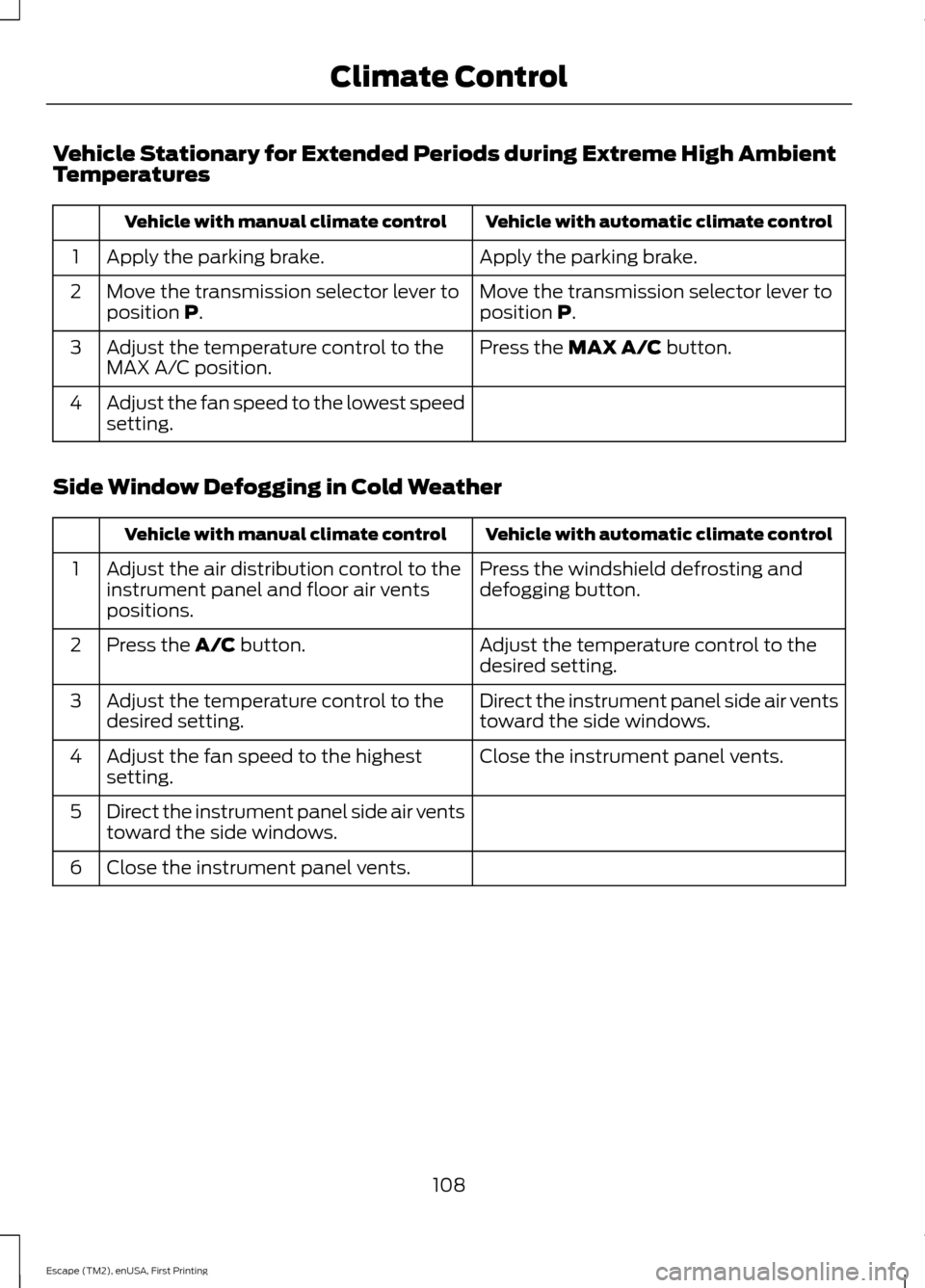
Vehicle Stationary for Extended Periods during Extreme High Ambient
Temperatures
Vehicle with automatic climate control
Vehicle with manual climate control
Apply the parking brake.
Apply the parking brake.
1
Move the transmission selector lever to
position P.
Move the transmission selector lever to
position P.
2
Press the
MAX A/C button.
Adjust the temperature control to the
MAX A/C position.
3
Adjust the fan speed to the lowest speed
setting.
4
Side Window Defogging in Cold Weather Vehicle with automatic climate control
Vehicle with manual climate control
Press the windshield defrosting and
defogging button.
Adjust the air distribution control to the
instrument panel and floor air vents
positions.
1
Adjust the temperature control to the
desired setting.
Press the
A/C button.
2
Direct the instrument panel side air vents
toward the side windows.
Adjust the temperature control to the
desired setting.
3
Close the instrument panel vents.
Adjust the fan speed to the highest
setting.
4
Direct the instrument panel side air vents
toward the side windows.
5
Close the instrument panel vents.
6
108
Escape (TM2), enUSA, First Printing Climate Control
Page 129 of 449
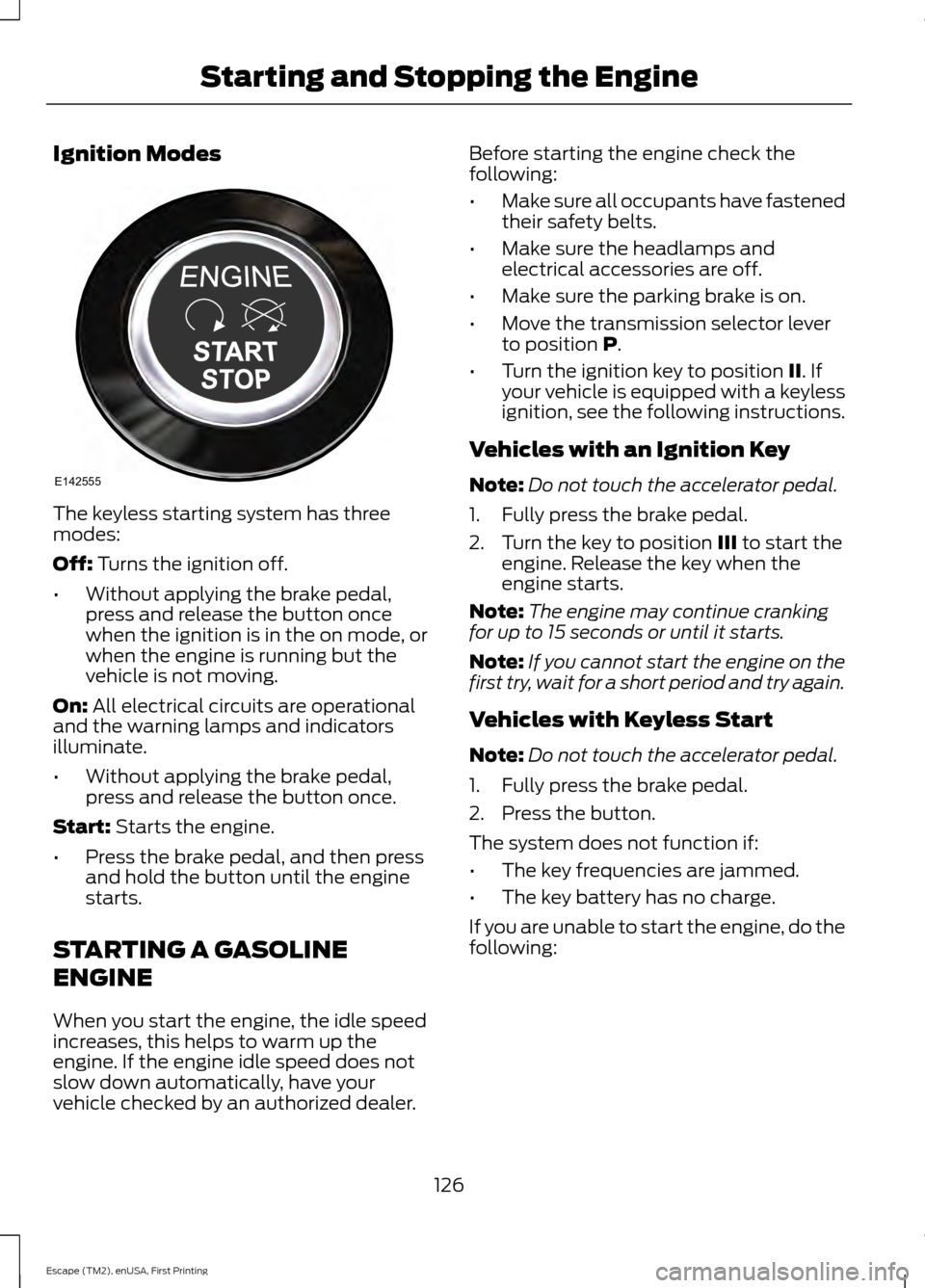
Ignition Modes
The keyless starting system has three
modes:
Off: Turns the ignition off.
• Without applying the brake pedal,
press and release the button once
when the ignition is in the on mode, or
when the engine is running but the
vehicle is not moving.
On:
All electrical circuits are operational
and the warning lamps and indicators
illuminate.
• Without applying the brake pedal,
press and release the button once.
Start:
Starts the engine.
• Press the brake pedal, and then press
and hold the button until the engine
starts.
STARTING A GASOLINE
ENGINE
When you start the engine, the idle speed
increases, this helps to warm up the
engine. If the engine idle speed does not
slow down automatically, have your
vehicle checked by an authorized dealer. Before starting the engine check the
following:
•
Make sure all occupants have fastened
their safety belts.
• Make sure the headlamps and
electrical accessories are off.
• Make sure the parking brake is on.
• Move the transmission selector lever
to position
P.
• Turn the ignition key to position
II. If
your vehicle is equipped with a keyless
ignition, see the following instructions.
Vehicles with an Ignition Key
Note: Do not touch the accelerator pedal.
1. Fully press the brake pedal.
2. Turn the key to position
III to start the
engine. Release the key when the
engine starts.
Note: The engine may continue cranking
for up to 15 seconds or until it starts.
Note: If you cannot start the engine on the
first try, wait for a short period and try again.
Vehicles with Keyless Start
Note: Do not touch the accelerator pedal.
1. Fully press the brake pedal.
2. Press the button.
The system does not function if:
• The key frequencies are jammed.
• The key battery has no charge.
If you are unable to start the engine, do the
following:
126
Escape (TM2), enUSA, First Printing Starting and Stopping the EngineE142555