remote control FORD ESCAPE 2017 3.G Owner's Manual
[x] Cancel search | Manufacturer: FORD, Model Year: 2017, Model line: ESCAPE, Model: FORD ESCAPE 2017 3.GPages: 486, PDF Size: 6.34 MB
Page 94 of 486
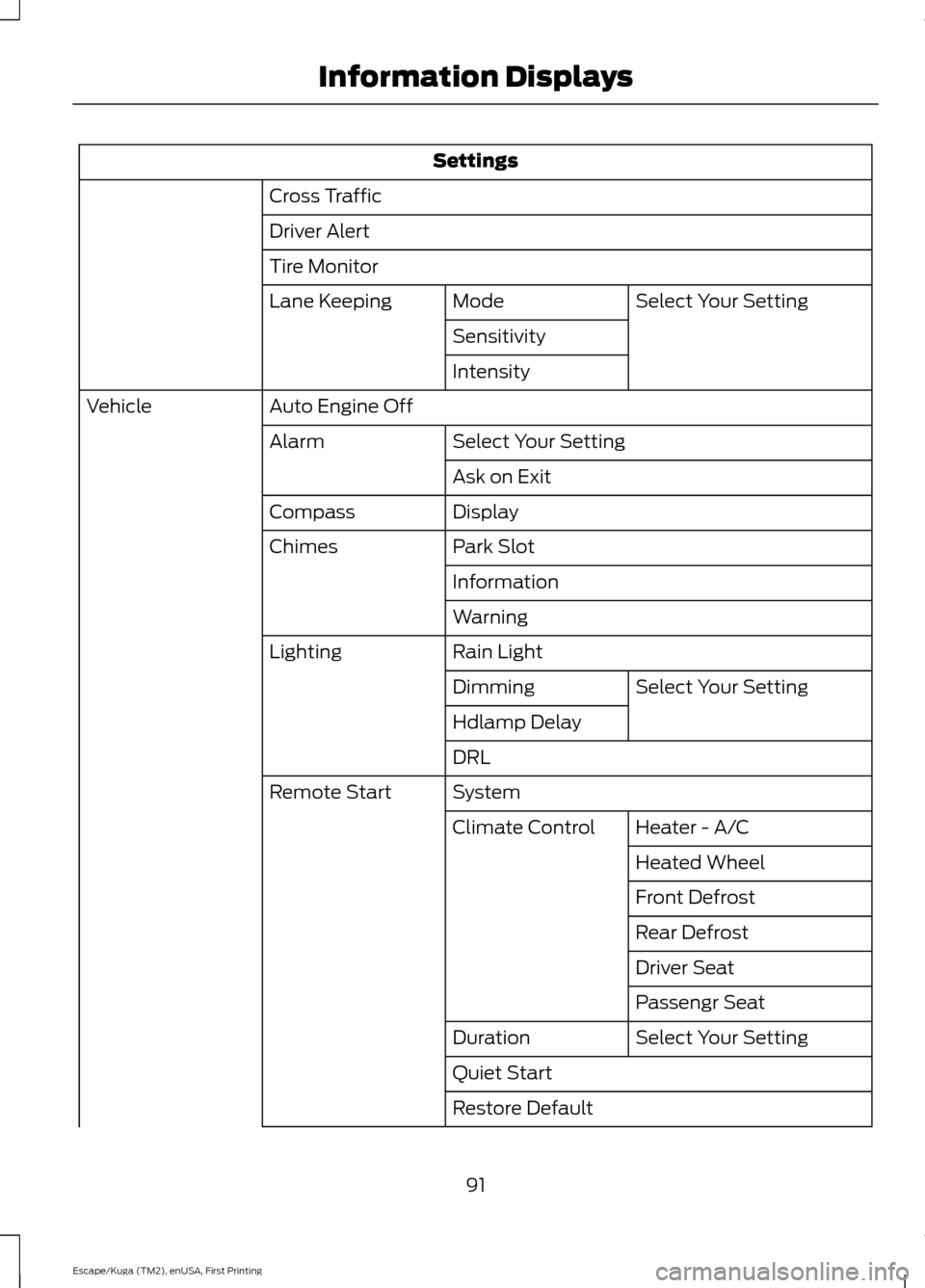
Settings
Cross Traffic
Driver Alert
Tire Monitor Select Your Setting
Mode
Lane Keeping
Sensitivity
Intensity
Auto Engine Off
Vehicle
Select Your Setting
Alarm
Ask on Exit
Display
Compass
Park Slot
Chimes
Information
Warning
Rain Light
Lighting
Select Your Setting
Dimming
Hdlamp Delay
DRL
System
Remote Start
Heater - A/C
Climate Control
Heated Wheel
Front Defrost
Rear Defrost
Driver Seat
Passengr Seat
Select Your Setting
Duration
Quiet Start
Restore Default
91
Escape/Kuga (TM2), enUSA, First Printing Information Displays
Page 102 of 486
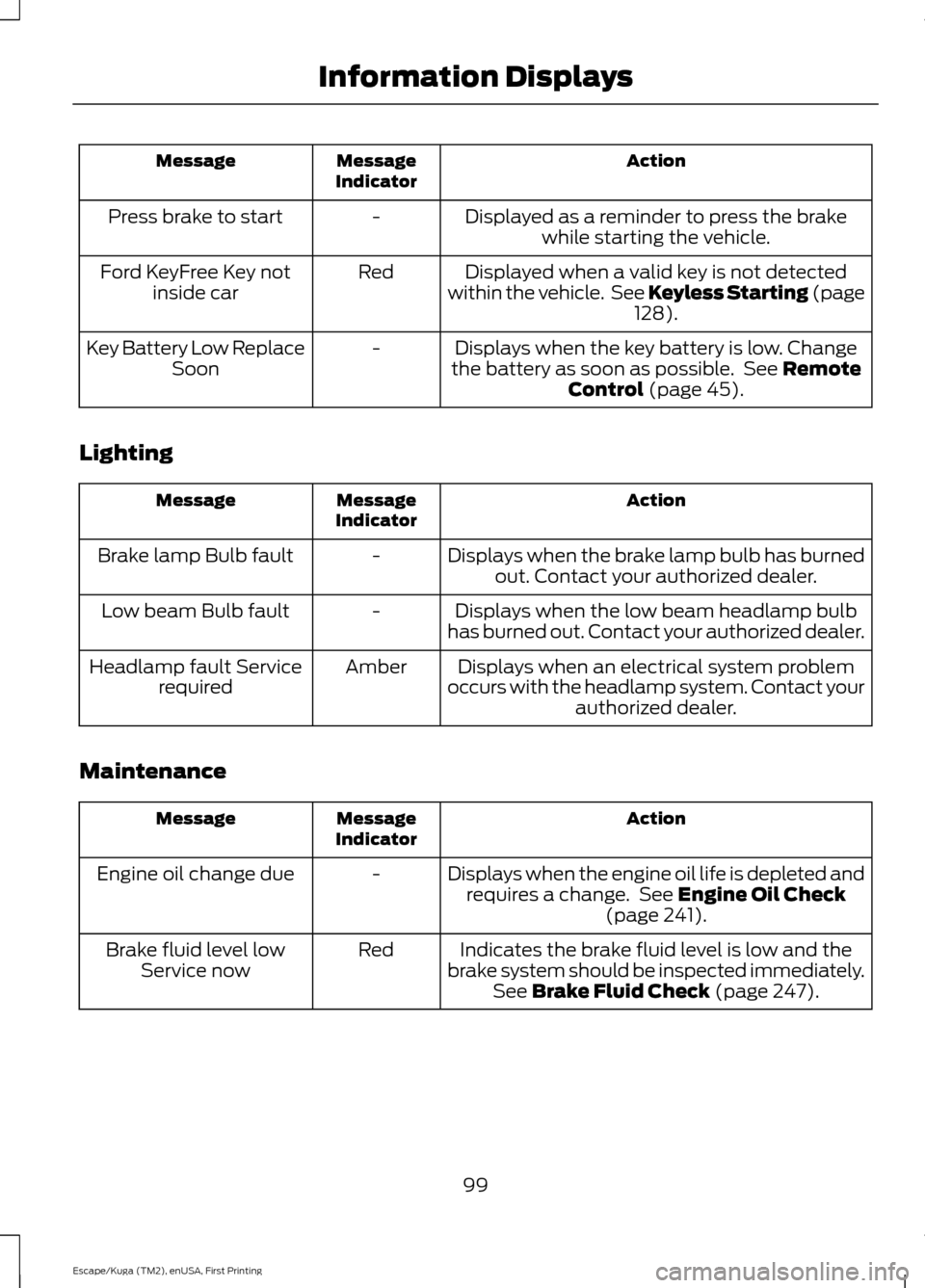
Action
Message
Indicator
Message
Displayed as a reminder to press the brakewhile starting the vehicle.
-
Press brake to start
Displayed when a valid key is not detected
within the vehicle. See Keyless Starting (page 128).
Red
Ford KeyFree Key not
inside car
Displays when the key battery is low. Change
the battery as soon as possible. See
Remote
Control (page 45).
-
Key Battery Low Replace
Soon
Lighting Action
Message
Indicator
Message
Displays when the brake lamp bulb has burnedout. Contact your authorized dealer.
-
Brake lamp Bulb fault
Displays when the low beam headlamp bulb
has burned out. Contact your authorized dealer.
-
Low beam Bulb fault
Displays when an electrical system problem
occurs with the headlamp system. Contact your authorized dealer.
Amber
Headlamp fault Service
required
Maintenance Action
Message
Indicator
Message
Displays when the engine oil life is depleted andrequires a change. See
Engine Oil Check
(page 241).
-
Engine oil change due
Indicates the brake fluid level is low and the
brake system should be inspected immediately. See
Brake Fluid Check (page 247).
Red
Brake fluid level low
Service now
99
Escape/Kuga (TM2), enUSA, First Printing Information Displays
Page 113 of 486
HEATED WINDOWS AND
MIRRORS (If Equipped)
Heated Rear Window
Note: Make sure the engine is running
before operating the heated windows. Press the button to clear the
heated rear window of thin ice
and fog. The heated rear window
will automatically turn off after a short
period of time. Start the engine before you
switch the heated rear window on.
Note: Do not use razor blades or other
sharp objects to clean or remove decals
from the inside of the heated rear window.
The vehicle warranty does not cover
damage caused to the heated rear window
grid lines.
Heated Exterior Mirror
(If Equipped)
When you switch the heated rear window
on, the heated exterior mirrors will
automatically turn on.
Note: Do not remove ice from the mirrors
with a scraper or adjust the mirror glass
when it is frozen in place.
Note: Do not clean the mirror housing or
glass with harsh abrasives, fuel or other
petroleum-based cleaning products.
CABIN AIR FILTER
Your vehicle is equipped with a cabin air
filter, which gives you and your passengers
the following benefits:
• It improves your driving comfort by
reducing particle concentration.
• It improves the interior compartment
cleanliness.
• It protects the climate control
components from particle deposits. Your cabin air filter is located under the
instrument panel in the passenger footwell
area.
Note:
Make sure you have a cabin air filter
installed at all times. This prevents foreign
objects from entering the system. Running
the system without a filter in place could
result in degradation or damage to the
system.
Replace the filter at regular intervals. See
Maintenance
(page 236).
For additional cabin air filter information,
or to replace the filter, see an authorized
dealer.
REMOTE START
(If Equipped)
The remote start feature allows you to
pre-condition the interior of your vehicle.
The climate control system works to
achieve comfort according to your previous
settings.
Note: You cannot adjust the system during
remote start operation.
Turn the ignition on to return the system
to its previous settings. You can now make
adjustments normally, but you need to turn
certain vehicle-dependent features back
on, such as:
• Heated seats.
• Cooled seats.
• Heated steering wheel.
• Heated mirrors.
• Heated rear window.
You can adjust the default remote start
settings using the information display
controls. See
Information Displays
(page 89).
110
Escape/Kuga (TM2), enUSA, First Printing Climate ControlE184884
Page 121 of 486
Note:
Using a linked key fob to recall your
memory position when the ignition is off
moves the seat to the Easy Entry position.
Note: Pressing any active memory feature
adjustment control (or any memory button)
during a memory recall cancels the
operation.
Linking a PreSet Position to your
Remote Control or Intelligent Access
Key Fob
You can save preset memory positions for
up to three remote controls or intelligent
access (IA) keys.
1. With the ignition on, move the memory
positions to the desired positions.
2. Press and hold the desired preset button for about five seconds. A tone
sounds after about two seconds.
Continue holding until you hear a
second tone.
3. Within three seconds, press the lock button on the remote control you are
linking.
To unlink a remote control, follow the
same procedure – except in step 3, press
the unlock button on the remote control.
Note: If more than one linked remote
control or intelligent access key is in range,
the memory function moves to the settings
of the first key to initiate a memory recall.
Easy Entry and Exit Feature
If you enable the easy entry and exit
feature, it automatically moves the driver
seat position rearward up to two inches
(five centimeters) when you switch the
ignition off.
The driver seat will return to its previous
position when you switch the ignition on.
You can enable or disable this feature in
the information display. See Information
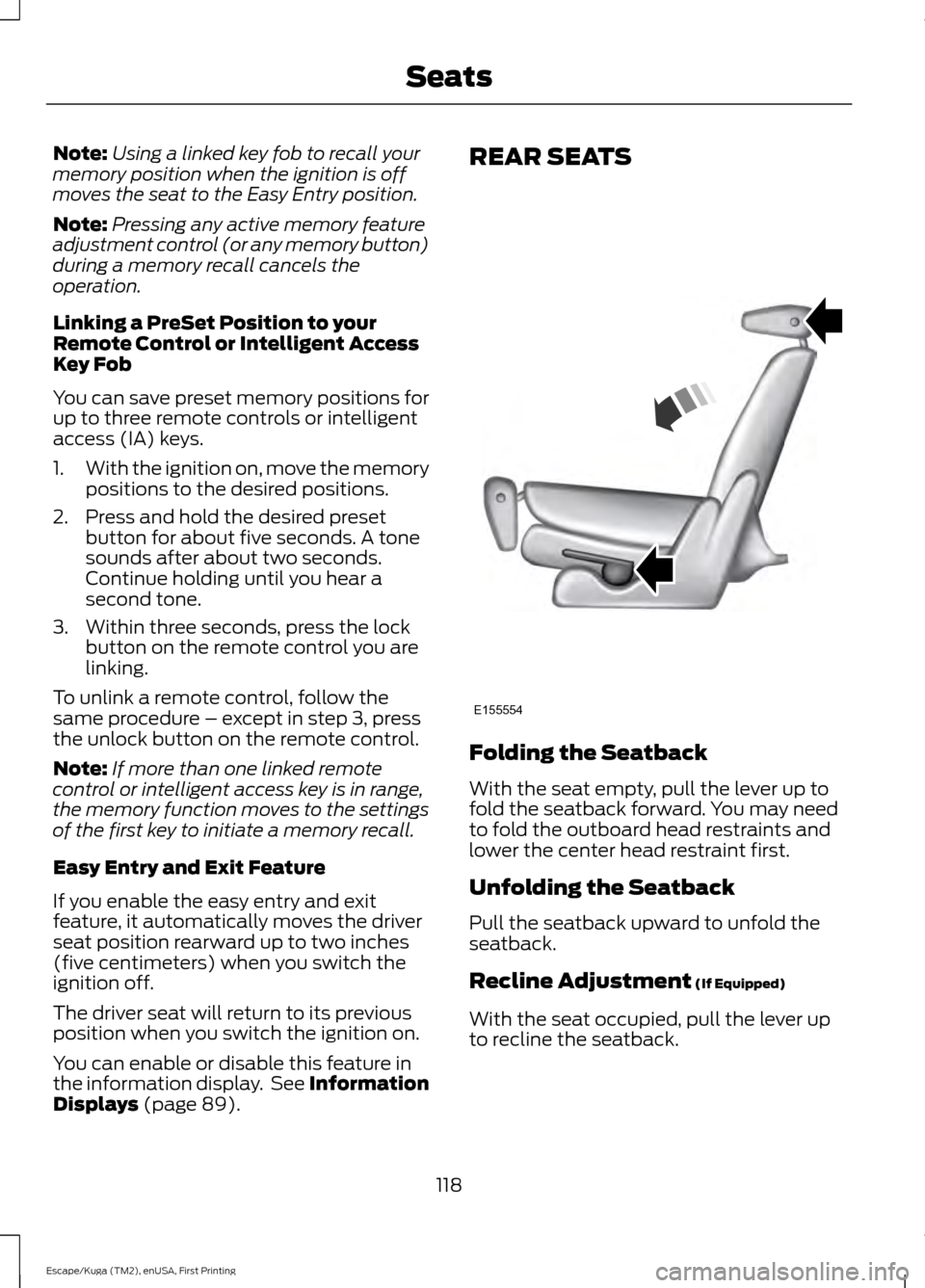
Displays (page 89). REAR SEATS
Folding the Seatback
With the seat empty, pull the lever up to
fold the seatback forward. You may need
to fold the outboard head restraints and
lower the center head restraint first.
Unfolding the Seatback
Pull the seatback upward to unfold the
seatback.
Recline Adjustment
(If Equipped)
With the seat occupied, pull the lever up
to recline the seatback.
118
Escape/Kuga (TM2), enUSA, First Printing SeatsE155554
Page 123 of 486
HomeLink Wireless Control
System
WARNINGS
Make sure that the garage door and
security device are free from
obstruction when you are
programming. Do not program the system
with the vehicle in the garage. Do not use the system with any
garage door opener that does not
have the safety stop and reverse
feature as required by U.S. Federal Safety
Standards (this includes any garage door
opener manufactured before April 1, 1982).
A garage door opener which cannot detect
an object, signaling the door to stop and
reverse, does not meet current federal
safety standards. Using a garage door
opener without these features increases
the risk of serious injury or death. Note:
Make sure you keep the original
remote control transmitter for use in other
vehicles as well as for future system
programming.
Note: We recommend that upon the sale
or lease termination of your vehicle, you
erase the programmed function buttons for
security reasons. See Erasing the Function
Button Codes.
Note: You can program a maximum of
three devices. To change or replace any of
the three devices after it has been initially
programmed, you must first erase the
current settings. See Erasing the Function
Button Codes
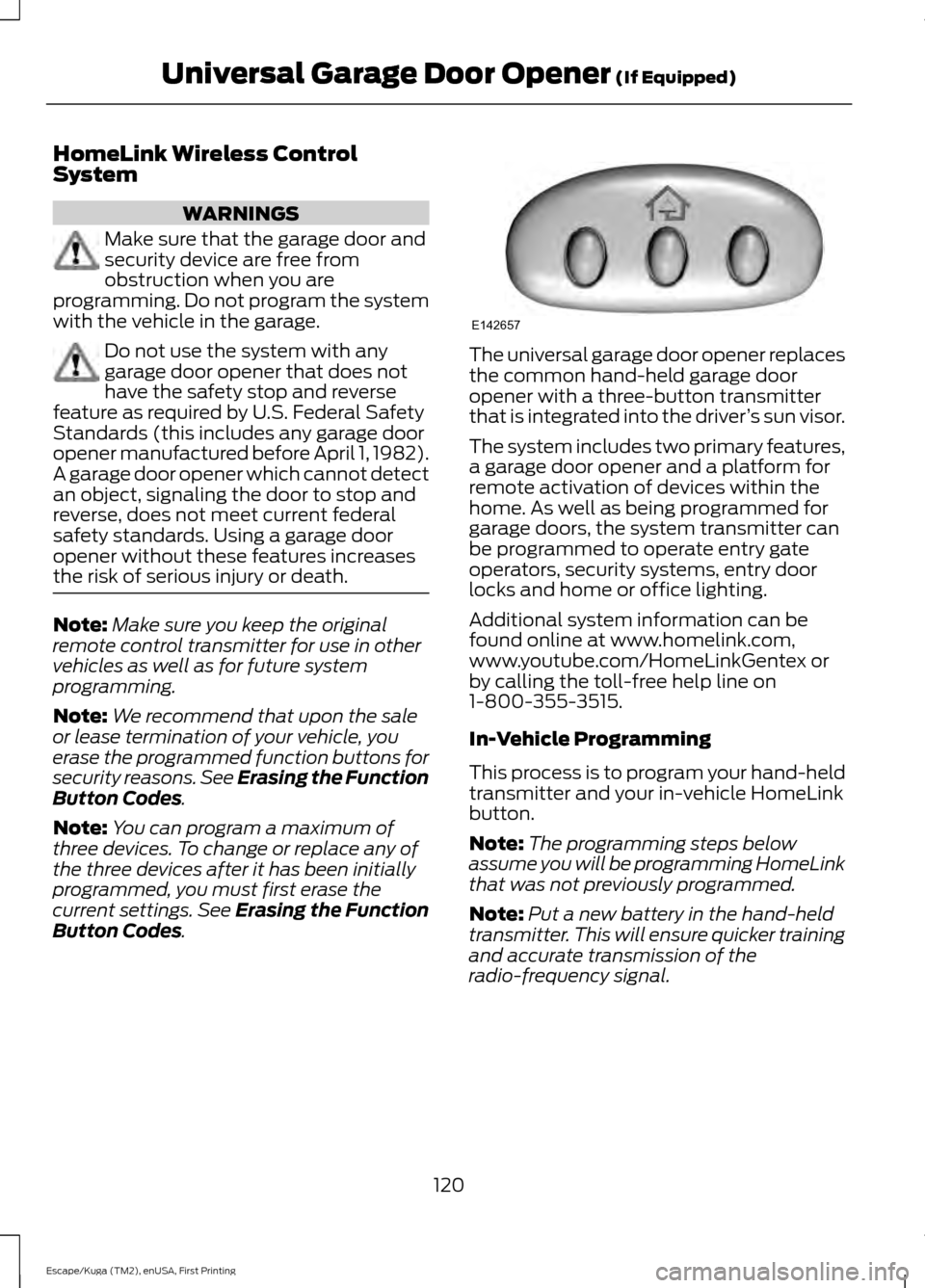
. The universal garage door opener replaces
the common hand-held garage door
opener with a three-button transmitter
that is integrated into the driver
’s sun visor.
The system includes two primary features,
a garage door opener and a platform for
remote activation of devices within the
home. As well as being programmed for
garage doors, the system transmitter can
be programmed to operate entry gate
operators, security systems, entry door
locks and home or office lighting.
Additional system information can be
found online at www.homelink.com,
www.youtube.com/HomeLinkGentex or
by calling the toll-free help line on
1-800-355-3515.
In-Vehicle Programming
This process is to program your hand-held
transmitter and your in-vehicle HomeLink
button.
Note: The programming steps below
assume you will be programming HomeLink
that was not previously programmed.
Note: Put a new battery in the hand-held
transmitter. This will ensure quicker training
and accurate transmission of the
radio-frequency signal.
120
Escape/Kuga (TM2), enUSA, First Printing Universal Garage Door Opener
(If Equipped)E142657
Page 219 of 486
POST-CRASH ALERT SYSTEM
The system flashes the direction indicators
and sounds the horn (intermittently) in the
event of a serious impact that deploys an
airbag (front, side, side curtain or Safety
Canopy) or the safety belt pretensioners.
The horn and indicators will turn off when:
•
You press the hazard control button.
• You press the panic button on the
remote entry transmitter (if equipped).
• Your vehicle runs out of power.
TRANSPORTING THE VEHICLE If you need to have your vehicle towed,
contact a professional towing service or,
if you are a member of a roadside
assistance program, your roadside
assistance service provider.
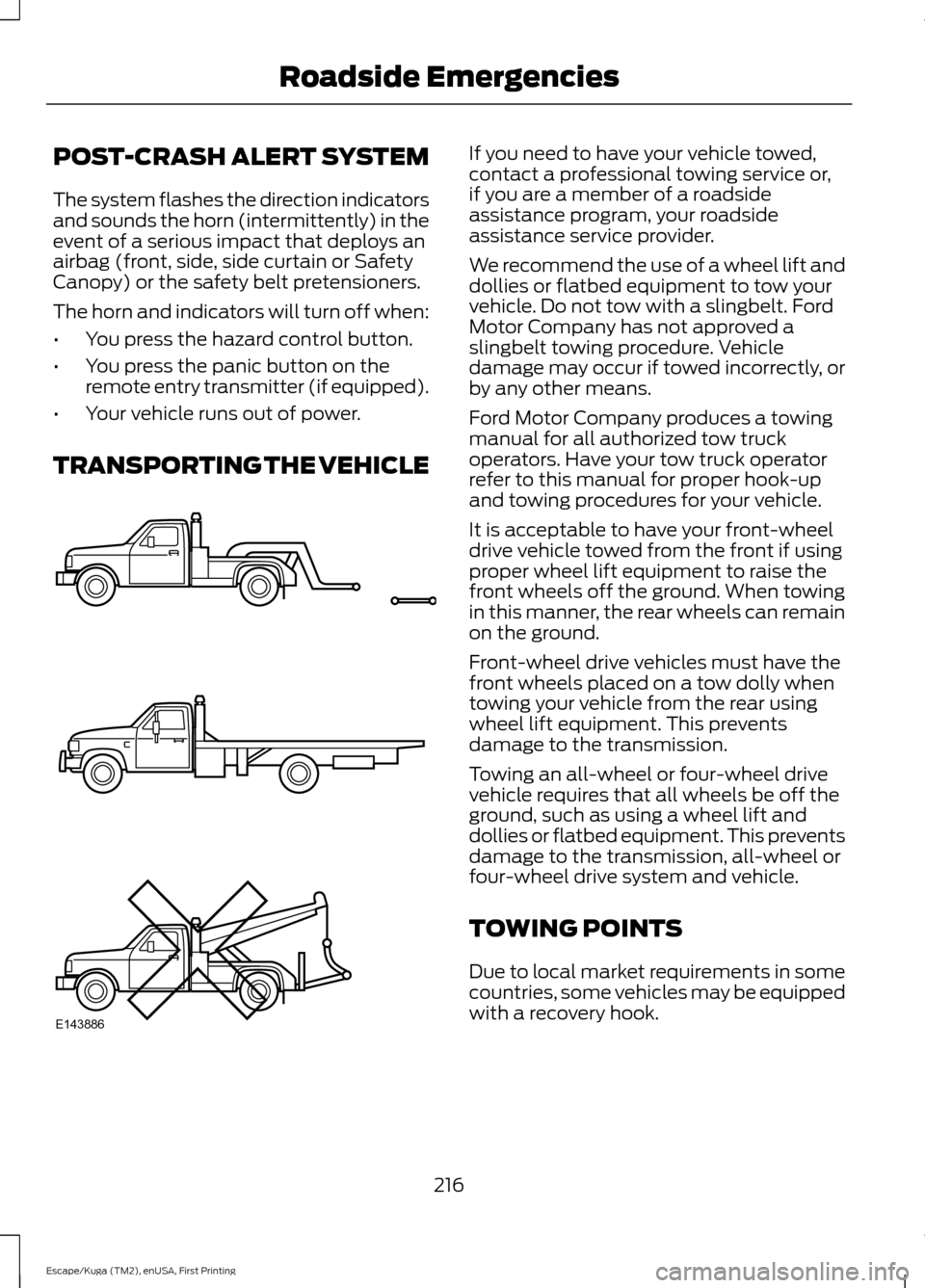
We recommend the use of a wheel lift and
dollies or flatbed equipment to tow your
vehicle. Do not tow with a slingbelt. Ford
Motor Company has not approved a
slingbelt towing procedure. Vehicle
damage may occur if towed incorrectly, or
by any other means.
Ford Motor Company produces a towing
manual for all authorized tow truck
operators. Have your tow truck operator
refer to this manual for proper hook-up
and towing procedures for your vehicle.
It is acceptable to have your front-wheel
drive vehicle towed from the front if using
proper wheel lift equipment to raise the
front wheels off the ground. When towing
in this manner, the rear wheels can remain
on the ground.
Front-wheel drive vehicles must have the
front wheels placed on a tow dolly when
towing your vehicle from the rear using
wheel lift equipment. This prevents
damage to the transmission.
Towing an all-wheel or four-wheel drive
vehicle requires that all wheels be off the
ground, such as using a wheel lift and
dollies or flatbed equipment. This prevents
damage to the transmission, all-wheel or
four-wheel drive system and vehicle.
TOWING POINTS
Due to local market requirements in some
countries, some vehicles may be equipped
with a recovery hook.
216
Escape/Kuga (TM2), enUSA, First Printing Roadside EmergenciesE143886
Page 481 of 486
K
Keyless Entry.....................................................61
SECURICODE™ Keyless Entry Keypad.........61
Keyless Starting
............................................128
Ignition Modes..................................................... 129
Keys and Remote Controls.........................44 Principle of Operation........................................ 44
L
Lane Keeping System..................................181 Switching the System On and Off................181
Lighting Control
...............................................72
Headlamp Flasher................................................ 73
High Beams............................................................. 72
Lighting...............................................................72 General Information............................................ 72
Load Carriers See: Roof Racks and Load Carriers..............197
Load Carrying
.................................................196
Load Limit.......................................................198
Special Loading Instructions for Owners of
Pick-up Trucks and Utility-type
Vehicles............................................................ 202
Vehicle Loading - with and without a Trailer................................................................. 198
Locking and Unlocking
.................................53
Activating Intelligent Access............................ 54
Autolock.................................................................. 56
Autounlock............................................................. 56
Battery Saver.......................................................... 57
Disabled Passive Keys........................................ 56
Illuminated Entry.................................................. 56
Illuminated Exit...................................................... 57
Locking and Unlocking the Doors with the Key Blade............................................................ 53
Opening a Rear Door From the Inside..........54
Power Door Locks................................................ 53
Remote Control..................................................... 53
Smart Unlocks for Integrated Keyhead Transmitter........................................................ 55
Smart Unlocks for Intelligent Access Keys...................................................................... 55
Locks...................................................................53
Luggage Covers.............................................196
Lug Nuts See: Changing a Road Wheel....................... 288M
Maintenance.................................................236
General Information......................................... 236
Manual Climate Control
............................104
Manual Liftgate...............................................57
Closing the Liftgate............................................. 58
Opening the Liftgate............................................ 57
Manual Seats
..................................................114
Adjusting the Height of the Driver
Seat...................................................................... 115
Moving the Seat Backward and Forward.............................................................. 114
Recline Adjustment............................................ 115
Media Hub......................................................326
Memory Function...........................................117 Saving a PreSet Position................................... 117
Message Center See: Information Displays................................. 89
Mirrors See: Heated Windows and Mirrors...............110
See: Windows and Mirrors................................ 78
Mobile Communications Equipment.......13
Moonroof............................................................81 Bounce-Back......................................................... 82
Opening and Closing the Moonroof..............82
Opening and Closing the Sunscreen............82
Venting the Moonroof........................................ 82
Motorcraft Parts - 1.5L EcoBoost™.................................................296
Motorcraft Parts - 2.0L EcoBoost™.................................................297
Motorcraft Parts - 2.5L..............................298
MyKey Troubleshooting
...............................52
MyKey ™.............................................................49
Principle of Operation........................................ 49
N
Navigation......................................................398 cityseeker............................................................. 405
Destination Mode.............................................. 399
Map Mode............................................................ 398
Navigation Map Updates............................... 405
Navigation Menu............................................... 402
SiriusXM Traffic and Travel Link.................. 405
Waypoints............................................................ 404
478
Escape/Kuga (TM2), enUSA, First Printing Index
Page 482 of 486
Normal Scheduled Maintenance..........440
Intelligent Oil-Life Monitor™........................ 440
Normal Maintenance Intervals...................... 441
O
Oil Change Indicator Reset......................242
Oil Check See: Engine Oil Check....................................... 241
Opening and Closing the Hood..............236
Closing the Hood................................................ 237
Opening the Hood............................................. 236
Ordering Additional Owner's Literature......................................................222
Obtaining a French Owner ’s Manual..........223
Overhead Console
........................................127
P
Parking Aids
.....................................................161
Principle of Operation........................................ 161
Passive Anti-Theft System
.........................63
SecuriLock®........................................................... 63
PATS See: Passive Anti-Theft System..................... 63
Perchlorate.........................................................11
Personal Safety System ™
..........................34
How Does the Personal Safety System
Work?.................................................................. 34
Phone...............................................................393 During a Phone Call.......................................... 396
Making Calls........................................................ 395
Pairing Your Cell Phone for the First Time................................................................... 393
Phone Menu........................................................ 394
Receiving Calls................................................... 396
Smartphone Connectivity.............................. 397
Text Messaging................................................... 397
Post-Crash Alert System...........................216
Power Door Locks See: Locking and Unlocking............................. 53
Power Liftgate
.................................................58
Hands-Free Feature........................................... 60
Obstacle Detection............................................. 60
Opening and Closing the Liftgate.................. 58
Setting the Liftgate Open Height.................. 60
Stopping the Liftgate Movement.................. 60Power Seats
.....................................................115
Power Lumbar....................................................... 117
Power Steering Fluid Check.....................247
Power Windows
..............................................78
Accessory Delay.................................................... 79
Bounce-Back......................................................... 78
One-Touch Down................................................. 78
One-Touch Up....................................................... 78
Window Lock......................................................... 78
Protecting the Environment........................14
R
Rear Parking Aid
.............................................161
Obstacle Distance Indicator........................... 162
Rear Seat Armrest.........................................119
Rear Seats........................................................118 Folding the Seatback......................................... 118
Recline Adjustment............................................ 118
Unfolding the Seatback.................................... 118
Rear Under Floor Storage.........................196 Adjustable Load Floor...................................... 196
Cargo Management System.......................... 196
Rear View Camera.........................................171 Using the Rear View Camera System...........171
Rear View Camera See: Rear View Camera..................................... 171
Rear Window Wiper and Washers............71 Rear Window Washer.......................................... 71
Rear Window Wiper.............................................. 71
Recommended Towing Weights...........204
Refueling..........................................................137 System Warnings................................................ 139
Remote Control..............................................45 Car Finder................................................................ 47
Integrated Keyhead Transmitter.................... 45
Intelligent Access Key......................................... 45
Memory Feature................................................... 48
Remote Start.......................................................... 47
Replacing the Battery......................................... 46
Sounding the Panic Alarm................................ 47
Remote Start..................................................110 Automatic Settings.............................................. 111
Removing a Headlamp
..............................253
Repairing Minor Paint Damage..............265
Replacement Parts Recommendation.........................................11
Collision Repairs..................................................... 11
479
Escape/Kuga (TM2), enUSA, First Printing Index
Page 483 of 486
Scheduled Maintenance and Mechanical
Repairs................................................................... 11
Warranty on Replacement Parts..................... 12
Replacing a Lost Key or Remote Control............................................................48
Reporting Safety Defects (Canada Only)..............................................................223
Reporting Safety Defects (U.S. Only)
..............................................................223
Roadside Assistance...................................212
Vehicles Sold in Canada: Getting Roadside
Assistance......................................................... 212
Vehicles Sold in Canada: Roadside Assistance Program Coverage.................. 213
Vehicles Sold in Canada: Using Roadside Assistance........................................................ 213
Vehicles Sold in the United States: Getting Roadside Assistance.................................... 212
Vehicles Sold in the United States: Using Roadside Assistance.................................... 212
Roadside Emergencies...............................212
Roof Racks and Load Carriers..................197 Adjusting the Crossbar..................................... 197
Running-In See: Breaking-In................................................ 209
Running Out of Fuel
....................................136
Adding Fuel From a Portable Fuel
Container........................................................... 137
Filling a Portable Fuel Container................... 137
S
Safety Canopy ™
............................................40
Safety Precautions.......................................135
Satellite Radio..............................................324
Satellite Radio Electronic Serial Number
(ESN)................................................................. 325
Satellite Radio Reception Factors...............324
SIRIUS® Satellite Radio Service.................. 324
Troubleshooting................................................. 325
Scheduled Maintenance Record
...........445
Scheduled Maintenance...........................437
Seatbelt Extension........................................33
Seatbelt Height Adjustment.....................30
Seatbelt Reminder
..........................................31
Belt-Minder™......................................................... 31
Seatbelts............................................................27 Principle of Operation......................................... 27Seatbelt Warning Lamp and Indicator
Chime................................................................31
Conditions of operation...................................... 31
Seats...................................................................112
Security..............................................................63
Settings..........................................................408 911 Assist................................................................ 413
Ambient Lighting................................................ 418
Bluetooth.............................................................. 410
Clock....................................................................... 410
Display.................................................................... 419
General.................................................................... 417
Media Player....................................................... 409
Mobile Apps.......................................................... 416
Navigation............................................................. 414
Phone..................................................................... 410
Radio....................................................................... 413
Sound.................................................................... 408
Valet Mode........................................................... 420
Vehicle.................................................................... 418
Voice Control....................................................... 420
Wi-Fi........................................................................\
418
Side Airbags.....................................................39
Side Sensing System..................................163 Obstacle Distance Indicator........................... 164
Sitting in the Correct Position...................112
Snow Chains See: Using Snow Chains................................. 284
Special Notices................................................12 New Vehicle Limited Warranty......................... 12
Notice to Owners of Pickup Trucks and Utility Type Vehicles........................................ 12
On Board Diagnostics Data Link Connector............................................................ 12
Special Instructions.............................................. 12
Using Your Vehicle as an Ambulance............13
Using Your Vehicle With a Snowplow............13
Special Operating Conditions Scheduled Maintenance..............................................443
Exceptions........................................................... 444
Speed Control See: Cruise Control............................................. 174
Stability Control............................................159 Principle of Operation....................................... 159
Starter Switch See: Ignition Switch........................................... 128
Starting a Gasoline Engine........................129 Automatic Engine Shutdown........................ 130
480
Escape/Kuga (TM2), enUSA, First Printing Index
Page 485 of 486
Universal Garage Door Opener...............120
HomeLink Wireless Control System...........120
USB Port
.........................................................326
Using Adaptive Cruise Control.................175 Automatic Braking.............................................. 176
Automatic Cancel............................................... 178
Changing the Set Speed................................... 177
Detection Beam Issues..................................... 176
Forward Alert Function..................................... 179
Setting a Speed.................................................... 177
Setting the Vehicle Gap.................................... 177
Standby Mode...................................................... 178
Switching the System Off................................ 178
Switching the System On................................. 177
Using the System................................................. 177
Using Cruise Control....................................174 Switching Cruise Control Off.......................... 174
Switching Cruise Control On........................... 174
Using Four-Wheel Drive
.............................148
Driving in Special Conditions With
Four-Wheel Drive.......................................... 148
Using MyKey With Remote Start Systems..........................................................52
Using Snow Chains
.....................................284
Using Stability Control...............................160
Using SYNC™ With Your Media Player............................................................348
Accessing Your USB Song Library...............352
Bluetooth Devices and System Settings............................................................ 354
Connecting Your Digital Media Player to the USB Port.......................................................... 348
Media Menu Features....................................... 352
Media Voice Commands................................ 349
USB 2...................................................................... 354
Voice Commands for Audio Sources.........355
Using SYNC™ With Your Phone.............331 Accessing Features through the Phone
Menu.................................................................. 336
Accessing Your Phone Settings................... 339
Bluetooth Devices............................................. 340
Making Calls........................................................ 334
Pairing a Phone for the First Time................331
Pairing Subsequent Phones.......................... 332
Phone Options during an Active Call.........335
Phone Voice Commands................................ 333
Receiving Calls.................................................... 335
System Settings.................................................. 341Text Messaging...................................................
337
Using Traction Control................................158 Switching the System Off............................... 158
System Indicator Lights and Messages.......................................................... 158
Using a Switch..................................................... 158
Using the Information Display Controls............................................................. 158
Using Voice Recognition
...........................329
Audio Voice Commands................................. 378
Initiating a Voice Session................................ 329
Mobile App Voice Commands....................... 381
Navigation Voice Commands....................... 380
Phone Voice Commands................................ 379
SiriusXM Traffic and Travel Link Voice Commands..................................................... 382
System Interaction and Feedback..............330
Voice Settings Commands............................ 382
Utilizing the Mediation/Arbitration Program (Canada Only)..........................221
V
Vehicle Care....................................................261 General Information.......................................... 261
Vehicle Certification Label
......................300
Vehicle Identification Number...............299
Vehicle Storage
............................................266
Battery.................................................................... 267
Body....................................................................... 266
Brakes..................................................................... 267
Cooling system................................................... 267
Engine.................................................................... 266
Fuel system.......................................................... 267
General.................................................................. 266
Miscellaneous...................................................... 267
Removing Vehicle From Storage.................. 267
Tires........................................................................\
. 267
Ventilation See: Climate Control......................................... 104
VIN See: Vehicle Identification Number............299
Voice Control
....................................................67
W
Warning Lamps and Indicators................85 Adaptive Cruise Control.................................... 85
482
Escape/Kuga (TM2), enUSA, First Printing Index