clock FORD ESCAPE 2018 User Guide
[x] Cancel search | Manufacturer: FORD, Model Year: 2018, Model line: ESCAPE, Model: FORD ESCAPE 2018Pages: 517, PDF Size: 6.62 MB
Page 266 of 517
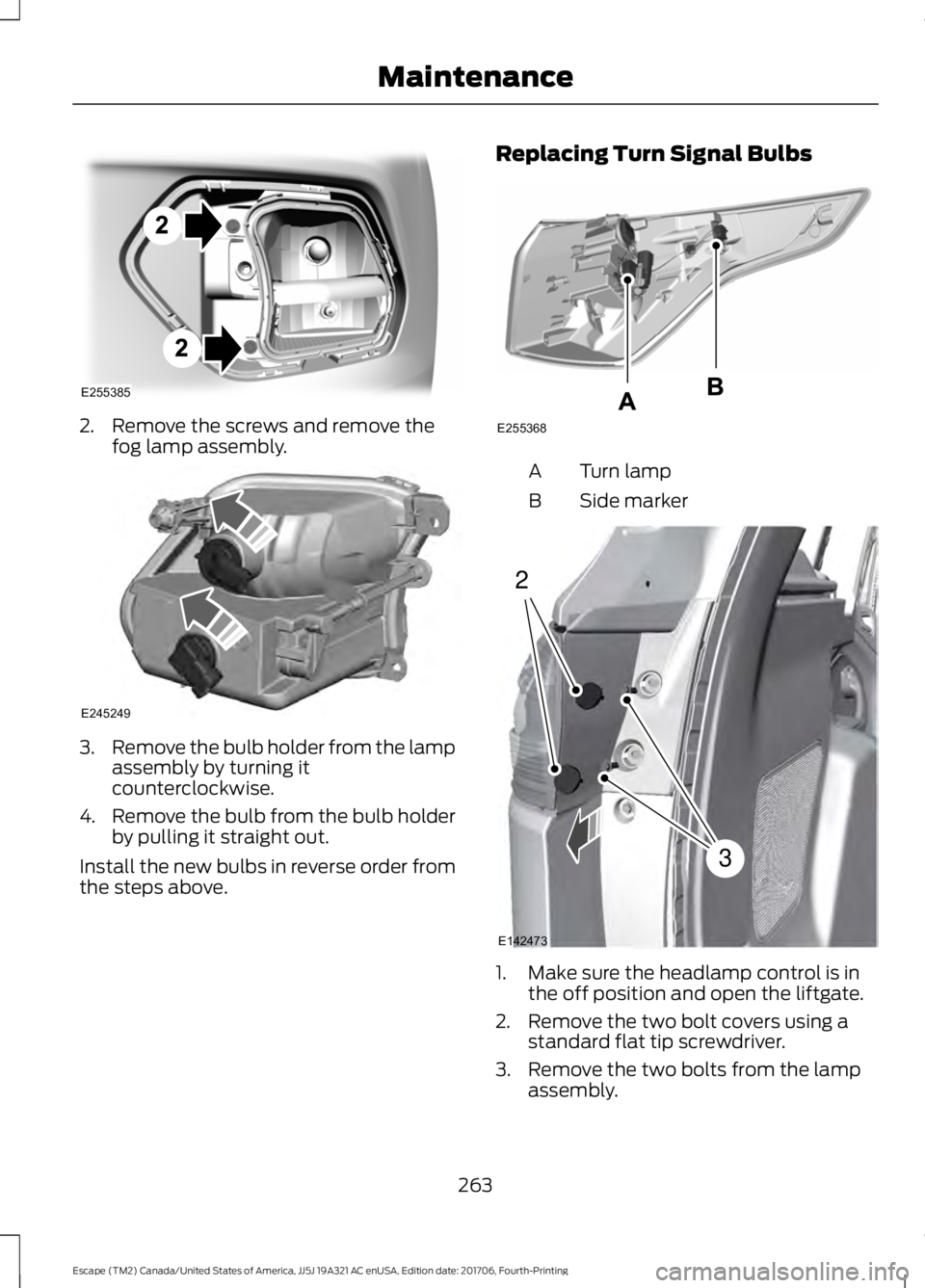
2. Remove the screws and remove the
fog lamp assembly. 3.
Remove the bulb holder from the lamp
assembly by turning it
counterclockwise.
4. Remove the bulb from the bulb holder
by pulling it straight out.
Install the new bulbs in reverse order from
the steps above. Replacing Turn Signal Bulbs Turn lamp
A
Side marker
B 1. Make sure the headlamp control is in
the off position and open the liftgate.
2. Remove the two bolt covers using a standard flat tip screwdriver.
3. Remove the two bolts from the lamp assembly.
263
Escape (TM2) Canada/United States of America, JJ5J 19A321 AC enUSA, Edition date: 201706, Fourth-Printing MaintenanceE255385 E245249 E255368 2
3
E142473
Page 267 of 517
4. Gently pull the lamp assembly away
from the vehicle.
5. Disconnect the electrical connector.
6. Remove the turn signal bulb by turning
the lower bulb socket
counterclockwise. Gently pull the bulb
straight out of the socket.
Install the new bulb in reverse order.
Replacing Reverse Lamp Assembly
For bulb replacement, see your authorized
dealer.
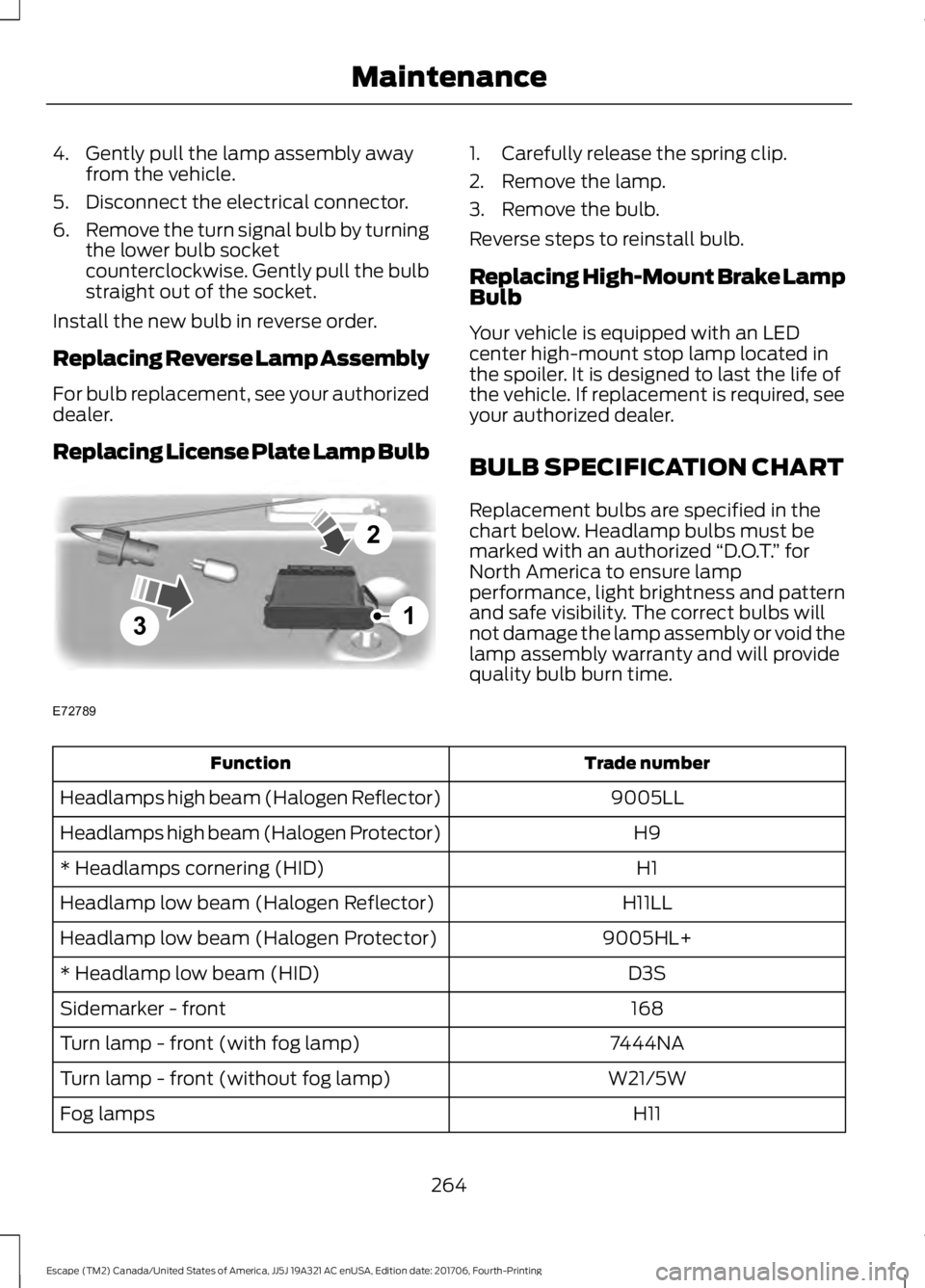
Replacing License Plate Lamp Bulb 1. Carefully release the spring clip.
2. Remove the lamp.
3. Remove the bulb.
Reverse steps to reinstall bulb.
Replacing High-Mount Brake Lamp
Bulb
Your vehicle is equipped with an LED
center high-mount stop lamp located in
the spoiler. It is designed to last the life of
the vehicle. If replacement is required, see
your authorized dealer.
BULB SPECIFICATION CHART
Replacement bulbs are specified in the
chart below. Headlamp bulbs must be
marked with an authorized
“D.O.T.” for
North America to ensure lamp
performance, light brightness and pattern
and safe visibility. The correct bulbs will
not damage the lamp assembly or void the
lamp assembly warranty and will provide
quality bulb burn time. Trade number
Function
9005LL
Headlamps high beam (Halogen Reflector)
H9
Headlamps high beam (Halogen Protector)
H1
* Headlamps cornering (HID)
H11LL
Headlamp low beam (Halogen Reflector)
9005HL+
Headlamp low beam (Halogen Protector)
D3S
* Headlamp low beam (HID)
168
Sidemarker - front
7444NA
Turn lamp - front (with fog lamp)
W21/5W
Turn lamp - front (without fog lamp)
H11
Fog lamps
264
Escape (TM2) Canada/United States of America, JJ5J 19A321 AC enUSA, Edition date: 201706, Fourth-Printing Maintenance3
2
1
E72789
Page 300 of 517
WARNING: It is recommended that
the wheels of the vehicle be chocked, and
that no person should remain in a vehicle
that is being jacked. WARNING:
The jack supplied with
this vehicle is only intended for changing
wheels. Do not use the vehicle jack other
than when you are changing a wheel in an
emergency. WARNING:
Check that the vehicle
jack is not damaged or deformed and the
thread is lubricated and clean. WARNING:
The jack should be used
on level firm ground wherever possible. WARNING:
Use only the specified
jacking points. If you use other positions,
you may damage the body, steering,
suspension, engine, braking system or the
fuel lines. WARNING: No person should place
any portion of their body under a vehicle
that is supported by a jack.
Note: The jack does not require
maintenance or additional lubrication over
the service life of your vehicle. 1.
Park on a level surface, set the parking
brake and activate the hazard flashers. 2.
Place the transmission in park (P) and
turn the engine off.
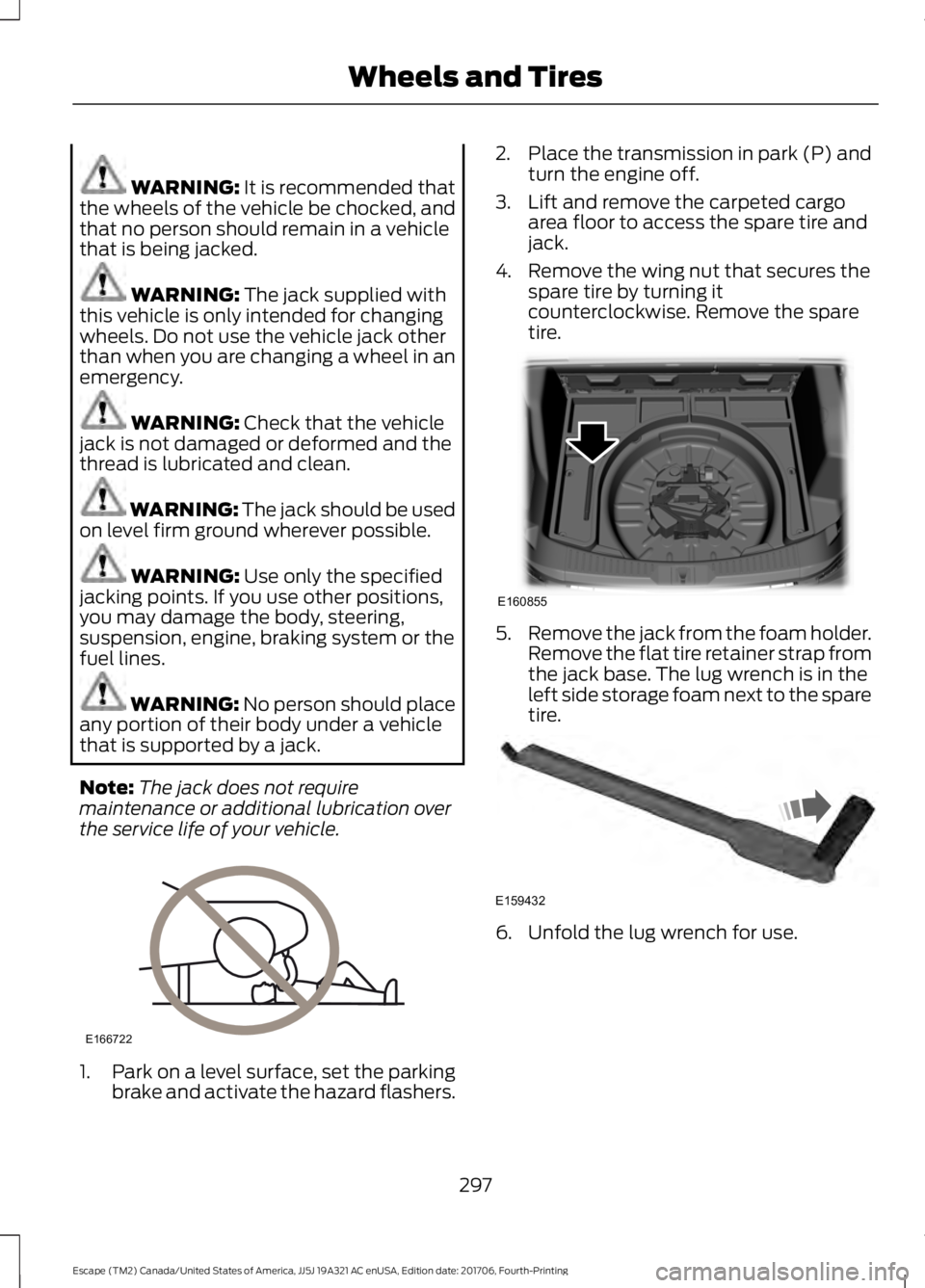
3. Lift and remove the carpeted cargo area floor to access the spare tire and
jack.
4. Remove the wing nut that secures the spare tire by turning it
counterclockwise. Remove the spare
tire. 5.
Remove the jack from the foam holder.
Remove the flat tire retainer strap from
the jack base. The lug wrench is in the
left side storage foam next to the spare
tire. 6. Unfold the lug wrench for use.
297
Escape (TM2) Canada/United States of America, JJ5J 19A321 AC enUSA, Edition date: 201706, Fourth-Printing Wheels and TiresE166722 E160855 E159432
Page 301 of 517
7. Block the diagonally opposite wheel.
8. Loosen each wheel lug nut one-half
turn counterclockwise, but do not
remove them until the wheel is raised
off the ground.
Note: Jack at the specified locations to
avoid damage to the vehicle.
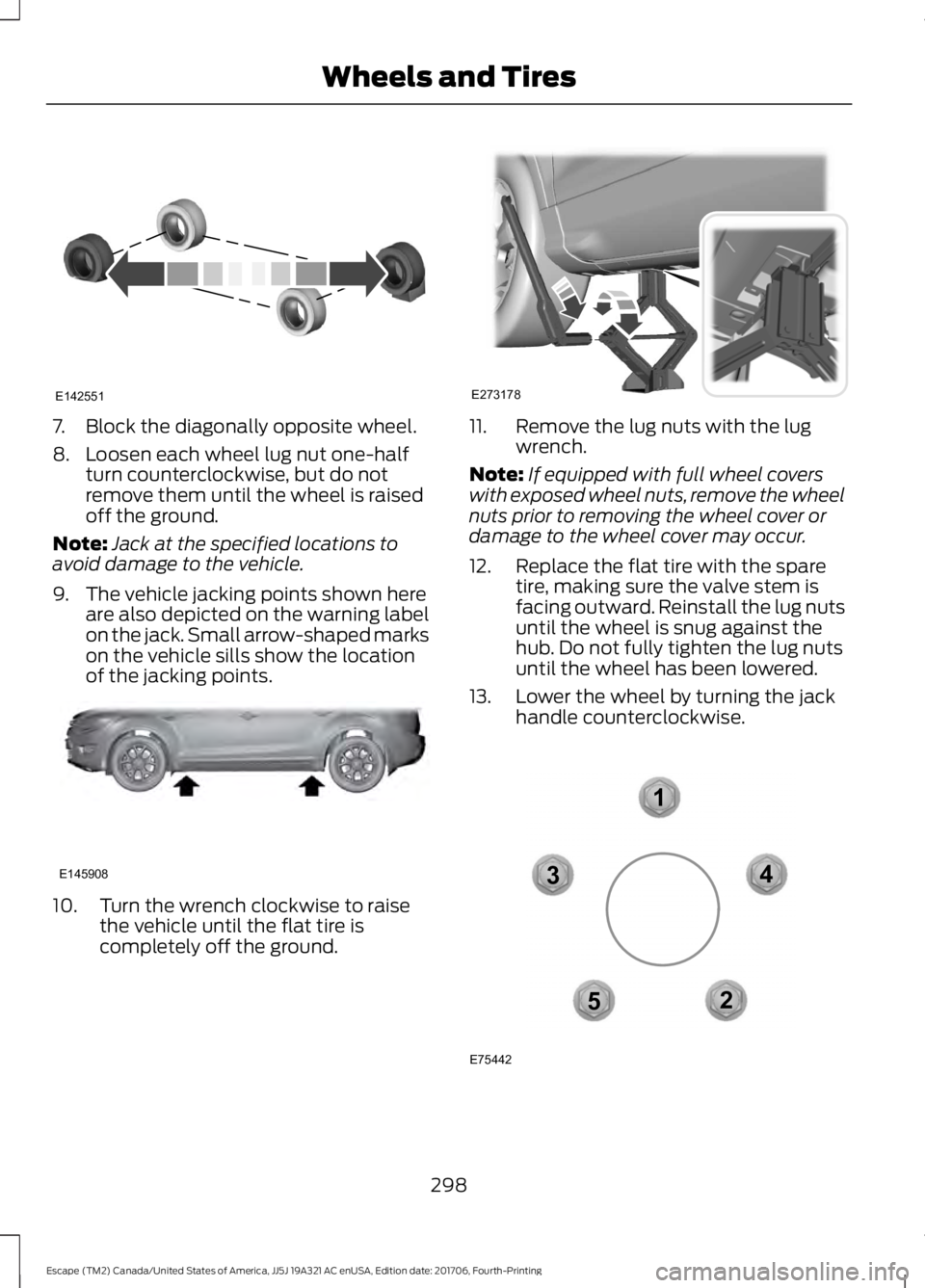
9. The vehicle jacking points shown here are also depicted on the warning label
on the jack. Small arrow-shaped marks
on the vehicle sills show the location
of the jacking points. 10. Turn the wrench clockwise to raise
the vehicle until the flat tire is
completely off the ground. 11. Remove the lug nuts with the lug
wrench.
Note: If equipped with full wheel covers
with exposed wheel nuts, remove the wheel
nuts prior to removing the wheel cover or
damage to the wheel cover may occur.
12. Replace the flat tire with the spare tire, making sure the valve stem is
facing outward. Reinstall the lug nuts
until the wheel is snug against the
hub. Do not fully tighten the lug nuts
until the wheel has been lowered.
13. Lower the wheel by turning the jack handle counterclockwise. 298
Escape (TM2) Canada/United States of America, JJ5J 19A321 AC enUSA, Edition date: 201706, Fourth-Printing Wheels and TiresE142551 E145908 E273178 12
3
4
5
E75442
Page 327 of 517
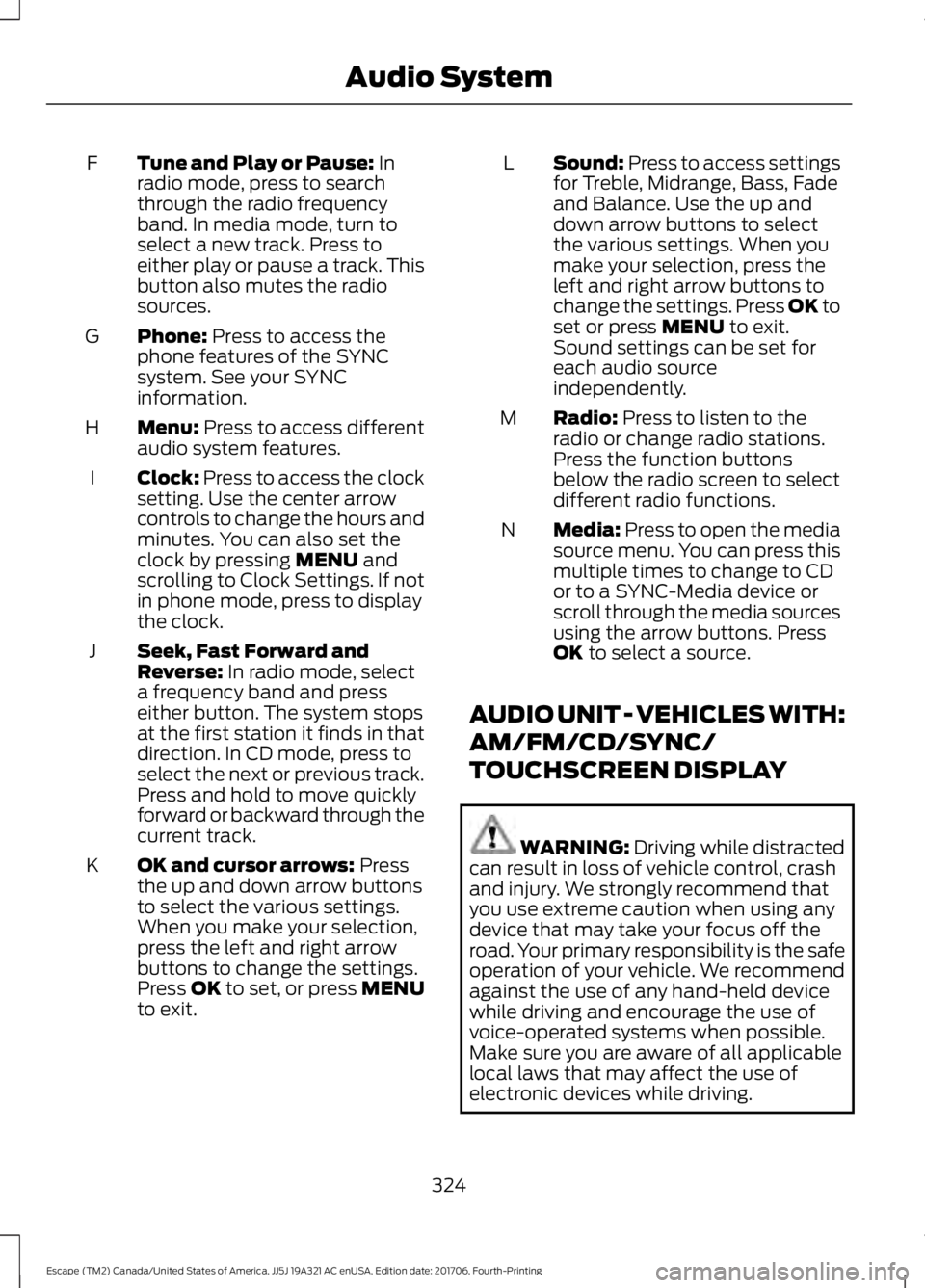
Tune and Play or Pause: In
radio mode, press to search
through the radio frequency
band. In media mode, turn to
select a new track. Press to
either play or pause a track. This
button also mutes the radio
sources.
F
Phone:
Press to access the
phone features of the SYNC
system. See your SYNC
information.
G
Menu:
Press to access different
audio system features.
H
Clock:
Press to access the clock
setting. Use the center arrow
controls to change the hours and
minutes. You can also set the
clock by pressing
MENU and
scrolling to Clock Settings. If not
in phone mode, press to display
the clock.
I
Seek, Fast Forward and
Reverse:
In radio mode, select
a frequency band and press
either button. The system stops
at the first station it finds in that
direction. In CD mode, press to
select the next or previous track.
Press and hold to move quickly
forward or backward through the
current track.
J
OK and cursor arrows:
Press
the up and down arrow buttons
to select the various settings.
When you make your selection,
press the left and right arrow
buttons to change the settings.
Press OK to set, or press MENU
to exit.
K Sound:
Press to access settings
for Treble, Midrange, Bass, Fade
and Balance. Use the up and
down arrow buttons to select
the various settings. When you
make your selection, press the
L
left and right arrow buttons to
change the settings. Press OK to
set or press
MENU to exit.
Sound settings can be set for
each audio source
independently.
Radio:
Press to listen to the
radio or change radio stations.
Press the function buttons
below the radio screen to select
different radio functions.
M
Media:
Press to open the media
source menu. You can press this
multiple times to change to CD
or to a SYNC-Media device or
scroll through the media sources
using the arrow buttons. Press
OK
to select a source.
N
AUDIO UNIT - VEHICLES WITH:
AM/FM/CD/SYNC/
TOUCHSCREEN DISPLAY WARNING:
Driving while distracted
can result in loss of vehicle control, crash
and injury. We strongly recommend that
you use extreme caution when using any
device that may take your focus off the
road. Your primary responsibility is the safe
operation of your vehicle. We recommend
against the use of any hand-held device
while driving and encourage the use of
voice-operated systems when possible.
Make sure you are aware of all applicable
local laws that may affect the use of
electronic devices while driving.
324
Escape (TM2) Canada/United States of America, JJ5J 19A321 AC enUSA, Edition date: 201706, Fourth-Printing Audio System
Page 332 of 517
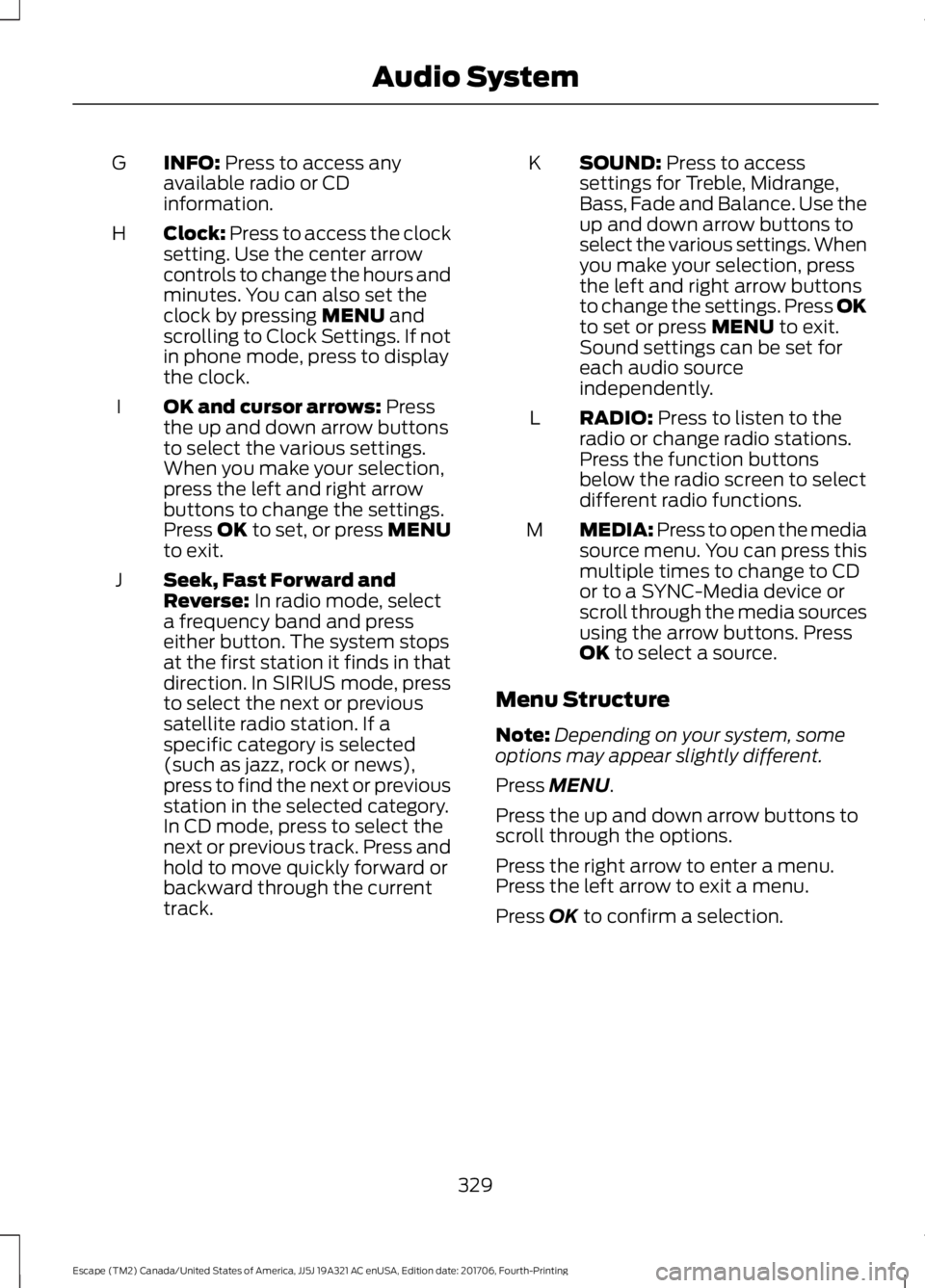
INFO: Press to access any
available radio or CD
information.
G
Clock:
Press to access the clock
setting. Use the center arrow
controls to change the hours and
minutes. You can also set the
clock by pressing
MENU and
scrolling to Clock Settings. If not
in phone mode, press to display
the clock.
H
OK and cursor arrows:
Press
the up and down arrow buttons
to select the various settings.
When you make your selection,
press the left and right arrow
buttons to change the settings.
Press OK to set, or press MENU
to exit.
I
Seek, Fast Forward and
Reverse:
In radio mode, select
a frequency band and press
either button. The system stops
at the first station it finds in that
direction. In SIRIUS mode, press
J
to select the next or previous
satellite radio station. If a
specific category is selected
(such as jazz, rock or news),
press to find the next or previous
station in the selected category.
In CD mode, press to select the
next or previous track. Press and
hold to move quickly forward or
backward through the current
track. SOUND:
Press to access
settings for Treble, Midrange,
Bass, Fade and Balance. Use the
up and down arrow buttons to
select the various settings. When
you make your selection, press
K
the left and right arrow buttons
to change the settings. Press OK
to set or press
MENU to exit.
Sound settings can be set for
each audio source
independently.
RADIO:
Press to listen to the
radio or change radio stations.
Press the function buttons
below the radio screen to select
different radio functions.
L
MEDIA: Press to open the media
source menu. You can press this
multiple times to change to CD
or to a SYNC-Media device or
scroll through the media sources
using the arrow buttons. Press
OK
to select a source.
M
Menu Structure
Note: Depending on your system, some
options may appear slightly different.
Press
MENU.
Press the up and down arrow buttons to
scroll through the options.
Press the right arrow to enter a menu.
Press the left arrow to exit a menu.
Press
OK to confirm a selection.
329
Escape (TM2) Canada/United States of America, JJ5J 19A321 AC enUSA, Edition date: 201706, Fourth-Printing Audio System
Page 334 of 517
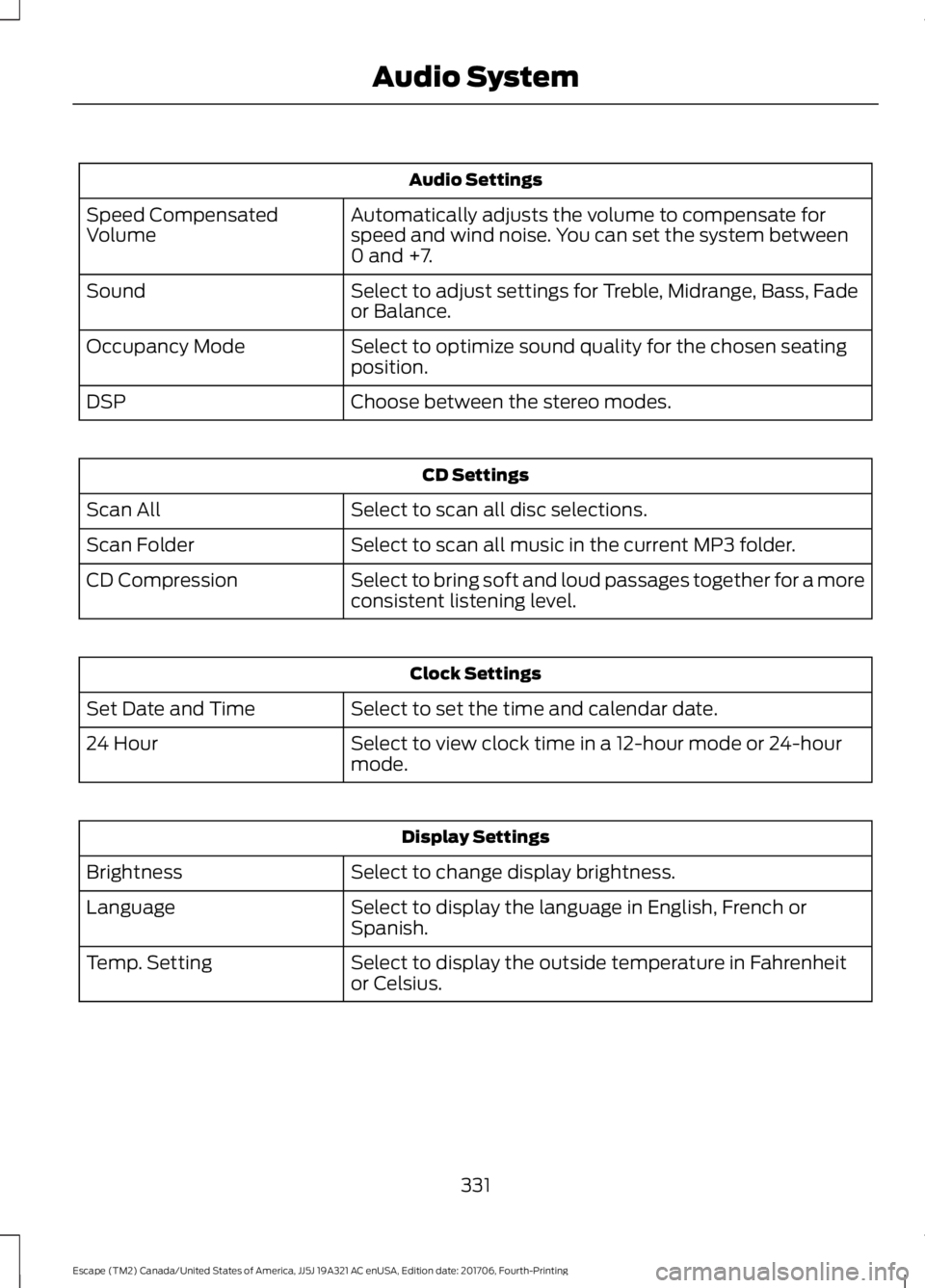
Audio Settings
Automatically adjusts the volume to compensate for
speed and wind noise. You can set the system between
0 and +7.
Speed Compensated
Volume
Select to adjust settings for Treble, Midrange, Bass, Fade
or Balance.
Sound
Select to optimize sound quality for the chosen seating
position.
Occupancy Mode
Choose between the stereo modes.
DSP CD Settings
Select to scan all disc selections.
Scan All
Select to scan all music in the current MP3 folder.
Scan Folder
Select to bring soft and loud passages together for a more
consistent listening level.
CD Compression Clock Settings
Select to set the time and calendar date.
Set Date and Time
Select to view clock time in a 12-hour mode or 24-hour
mode.
24 Hour Display Settings
Select to change display brightness.
Brightness
Select to display the language in English, French or
Spanish.
Language
Select to display the outside temperature in Fahrenheit
or Celsius.
Temp. Setting
331
Escape (TM2) Canada/United States of America, JJ5J 19A321 AC enUSA, Edition date: 201706, Fourth-Printing Audio System
Page 380 of 517
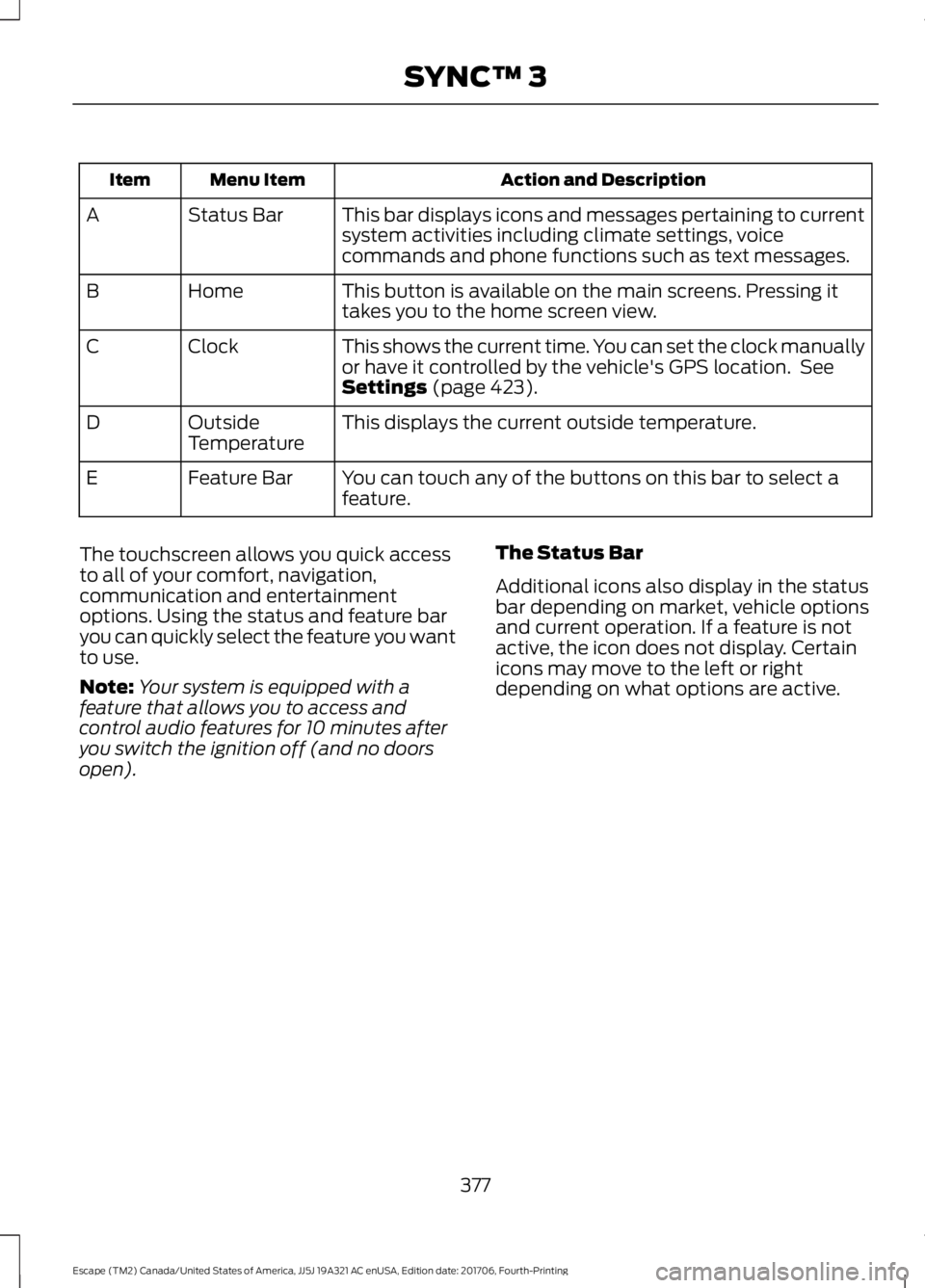
Action and Description
Menu Item
Item
This bar displays icons and messages pertaining to current
system activities including climate settings, voice
commands and phone functions such as text messages.
Status Bar
A
This button is available on the main screens. Pressing it
takes you to the home screen view.
Home
B
This shows the current time. You can set the clock manually
or have it controlled by the vehicle's GPS location. See
Settings (page 423).
Clock
C
This displays the current outside temperature.
Outside
Temperature
D
You can touch any of the buttons on this bar to select a
feature.
Feature Bar
E
The touchscreen allows you quick access
to all of your comfort, navigation,
communication and entertainment
options. Using the status and feature bar
you can quickly select the feature you want
to use.
Note: Your system is equipped with a
feature that allows you to access and
control audio features for 10 minutes after
you switch the ignition off (and no doors
open). The Status Bar
Additional icons also display in the status
bar depending on market, vehicle options
and current operation. If a feature is not
active, the icon does not display. Certain
icons may move to the left or right
depending on what options are active.
377
Escape (TM2) Canada/United States of America, JJ5J 19A321 AC enUSA, Edition date: 201706, Fourth-Printing SYNC™ 3
Page 428 of 517
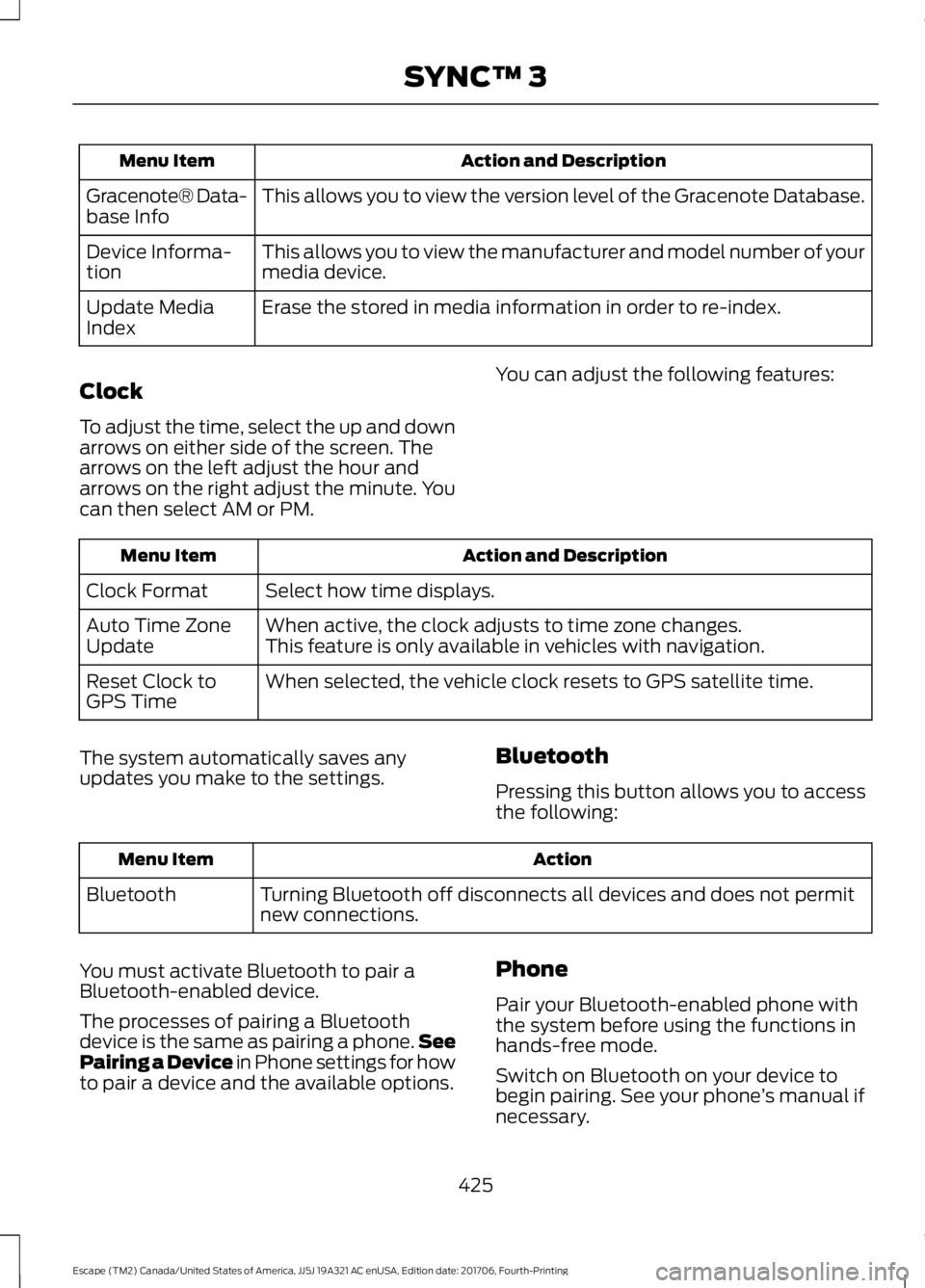
Action and Description
Menu Item
This allows you to view the version level of the Gracenote Database.
Gracenote® Data-
base Info
This allows you to view the manufacturer and model number of your
media device.
Device Informa-
tion
Erase the stored in media information in order to re-index.
Update Media
Index
Clock
To adjust the time, select the up and down
arrows on either side of the screen. The
arrows on the left adjust the hour and
arrows on the right adjust the minute. You
can then select AM or PM. You can adjust the following features: Action and Description
Menu Item
Select how time displays.
Clock Format
When active, the clock adjusts to time zone changes.
Auto Time Zone
Update This feature is only available in vehicles with navigation.
When selected, the vehicle clock resets to GPS satellite time.
Reset Clock to
GPS Time
The system automatically saves any
updates you make to the settings. Bluetooth
Pressing this button allows you to access
the following: Action
Menu Item
Turning Bluetooth off disconnects all devices and does not permit
new connections.
Bluetooth
You must activate Bluetooth to pair a
Bluetooth-enabled device.
The processes of pairing a Bluetooth
device is the same as pairing a phone. See
Pairing a Device in Phone settings for how
to pair a device and the available options. Phone
Pair your Bluetooth-enabled phone with
the system before using the functions in
hands-free mode.
Switch on Bluetooth on your device to
begin pairing. See your phone
’s manual if
necessary.
425
Escape (TM2) Canada/United States of America, JJ5J 19A321 AC enUSA, Edition date: 201706, Fourth-Printing SYNC™ 3
Page 514 of 517
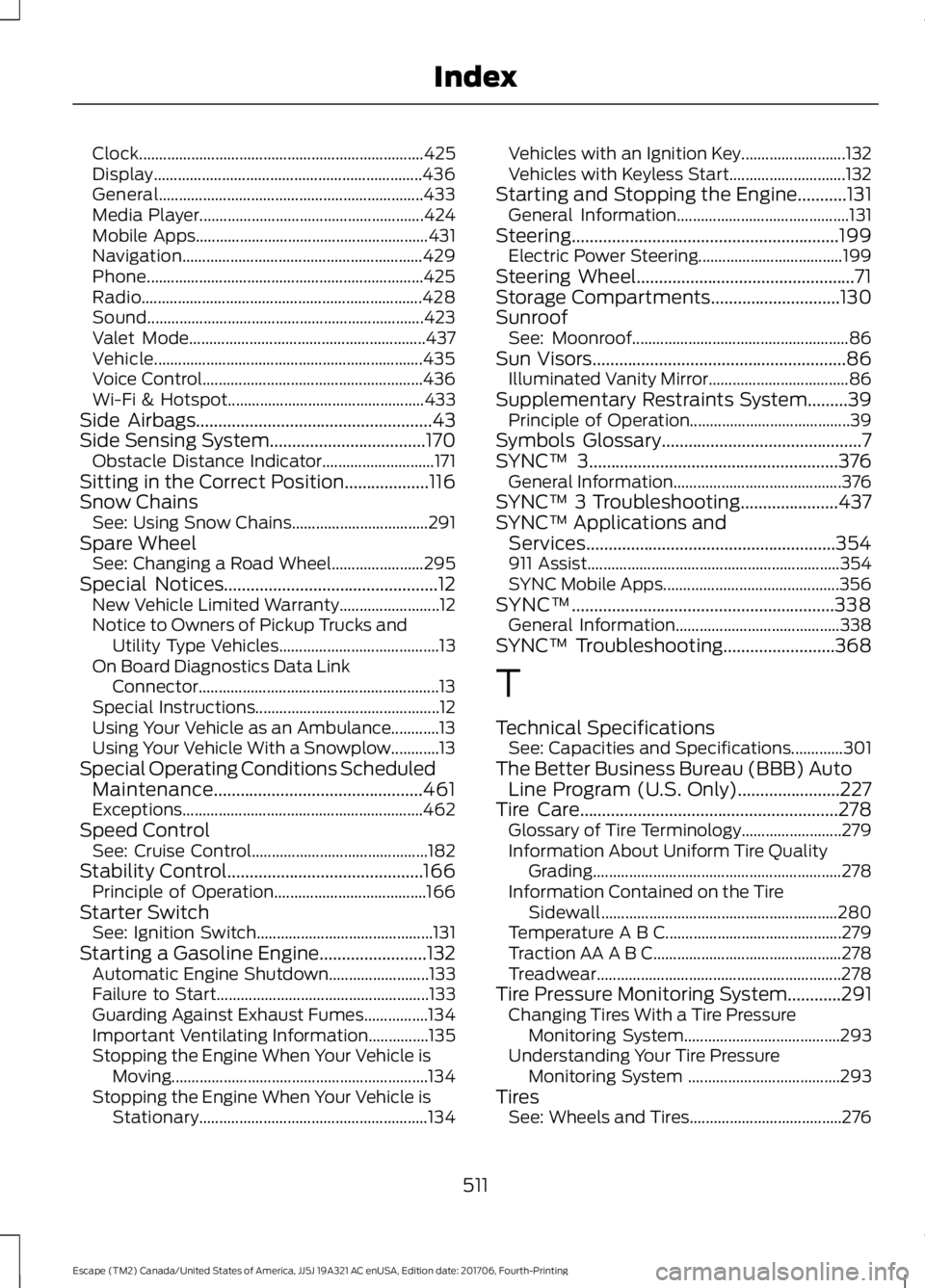
Clock.......................................................................
425
Display................................................................... 436
General.................................................................. 433
Media Player........................................................ 424
Mobile Apps.......................................................... 431
Navigation............................................................ 429
Phone..................................................................... 425
Radio...................................................................... 428
Sound..................................................................... 423
Valet Mode........................................................... 437
Vehicle................................................................... 435
Voice Control....................................................... 436
Wi-Fi & Hotspot................................................. 433
Side Airbags
.....................................................43
Side Sensing System...................................170 Obstacle Distance Indicator............................ 171
Sitting in the Correct Position...................116
Snow Chains See: Using Snow Chains.................................. 291
Spare Wheel See: Changing a Road Wheel....................... 295
Special Notices................................................12 New Vehicle Limited Warranty......................... 12
Notice to Owners of Pickup Trucks and Utility Type Vehicles........................................ 13
On Board Diagnostics Data Link Connector............................................................ 13
Special Instructions.............................................. 12
Using Your Vehicle as an Ambulance............13
Using Your Vehicle With a Snowplow............13
Special Operating Conditions Scheduled Maintenance...............................................461
Exceptions............................................................ 462
Speed Control See: Cruise Control............................................ 182
Stability Control............................................166 Principle of Operation...................................... 166
Starter Switch See: Ignition Switch............................................ 131
Starting a Gasoline Engine
........................132
Automatic Engine Shutdown......................... 133
Failure to Start..................................................... 133
Guarding Against Exhaust Fumes................134
Important Ventilating Information...............135
Stopping the Engine When Your Vehicle is Moving................................................................134
Stopping the Engine When Your Vehicle is Stationary......................................................... 134Vehicles with an Ignition Key..........................
132
Vehicles with Keyless Start............................. 132
Starting and Stopping the Engine...........131 General Information........................................... 131
Steering............................................................199 Electric Power Steering.................................... 199
Steering Wheel.................................................71
Storage Compartments.............................130
Sunroof See: Moonroof...................................................... 86
Sun Visors.........................................................86 Illuminated Vanity Mirror................................... 86
Supplementary Restraints System
.........39
Principle of Operation........................................ 39
Symbols Glossary
.............................................7
SYNC™ 3........................................................376
General Information.......................................... 376
SYNC™ 3 Troubleshooting......................437
SYNC™ Applications and Services........................................................354
911 Assist............................................................... 354
SYNC Mobile Apps............................................ 356
SYNC™...........................................................338 General Information......................................... 338
SYNC™ Troubleshooting
.........................368
T
Technical Specifications See: Capacities and Specifications.............301
The Better Business Bureau (BBB) Auto Line Program (U.S. Only).......................227
Tire Care..........................................................278 Glossary of Tire Terminology......................... 279
Information About Uniform Tire Quality Grading .............................................................. 278
Information Contained on the Tire Sidewall........................................................... 280
Temperature A B C............................................ 279
Traction AA A B C............................................... 278
Treadwear............................................................. 278
Tire Pressure Monitoring System............291 Changing Tires With a Tire Pressure
Monitoring System....................................... 293
Understanding Your Tire Pressure Monitoring System ...................................... 293
Tires See: Wheels and Tires...................................... 276
511
Escape (TM2) Canada/United States of America, JJ5J 19A321 AC enUSA, Edition date: 201706, Fourth-Printing Index