door lock FORD ESCAPE 2021 Owner's Manual
[x] Cancel search | Manufacturer: FORD, Model Year: 2021, Model line: ESCAPE, Model: FORD ESCAPE 2021Pages: 589, PDF Size: 9.2 MB
Page 217 of 589
2. Locate the manual park release cable
access cover on the lower instrument
panel dash to the bottom left hand
side of the steering column.
3. Using a tool, carefully open the access
cover.
Note: Do not pull the tether until you are in
the driver seat.
4. Switch the ignition on, but do not start
your vehicle.
5. Once in the driver seat, fully press the brake pedal and hold. Do not release.
Pull the orange tether towards the
driver seat until the tether gets locked
in the override position. Then leave the
tether.
6. If done correctly a message should display on the instrument cluster
screen.
Note: Your vehicle is now out of the park
(P) position and is free to roll.
7. With your foot still fully applied on the
brake pedal, disengage the parking
brake. See What Is the Electric
Parking Brake (page 224).
8. Your vehicle remains in neutral (N) for emergency towing purposes.
9. Switch off the ignition.
10. Once safe to do so, and there is no risk that your vehicle will roll,
disconnect the negative (black)
battery cable from the battery.
Note: If the vehicle detects wheel
movement before the battery is
disconnected, the electric parking brake
could apply. Returning Your Vehicle to Normal
Mode
1. Once it is safe to do so, reconnect the
negative (black) battery cable to the
battery.
2. Apply the parking brake. See What Is
the Electric Parking Brake (page 224).
Note: If the vehicle battery is dead, for
example, no electrical power is available,
you could use an external power source to
apply the parking brake.
3. Fully apply the brake pedal and hold. Do not release. Pull the orange tether
outward towards the driver seat to
release it from the override position.
4. The cable will release and retract back
to its original rest position.
5. Stow the manual park release cable tether back inside the instrument panel
dash hole, install the access cover by
pressing it back in position.
6. With your foot fully applied on the brake pedal, start your vehicle. Confirm
that your vehicle is in the park (P)
position and that the instrument
cluster indicates park (P).
7. If the instrument cluster is not displaying the park (P) position or a
message displays on the instrument
cluster screen, make sure you apply the
parking brake before exiting your
vehicle. Contact an authorized dealer
for service.
AUTOMATIC TRANSMISSION
AUDIBLE WARNINGS
Transmission Not In Park (P)
Audible Warning
Sounds if you open the driver door before
shifting into park (P).
214
Escape (CTC) Canada/United States of America, Vehicles Built From: 02-11-2020, enUSA, Edition date: 202011, First-Printing Automatic Transmission
Page 255 of 589
Optimal system performance requires a
clear view of the road by the
windshield-mounted camera.
Optimal performance may not occur if:
•
The camera is blocked.
• There is poor visibility or lighting
conditions.
• There are bad weather conditions.
SWITCHING ADAPTIVE
CRUISE CONTROL ON AND OFF
The cruise controls are on the steering
wheel. See What Is Cruise Control
(page 247).
Switching Adaptive Cruise Control
On Press the button to set the
system in standby mode.
The indicator, current gap setting and set
speed appear in the information display.
Switching Adaptive Cruise Control
Off Press the button when the
system is in standby mode, or
switch the ignition off.
Note: You erase the set speed when you
switch the system off.
ADAPTIVE CRUISE CONTROL
AUTOMATIC CANCELLATION
The system may cancel if:
• The tires lose traction.
• You apply the parking brake. The system may cancel and set the parking
brake if:
•
You unbuckle the seatbelt and open
the driver door after you stop your
vehicle.
• Your vehicle is at a stop continuously
for more than three minutes.
The system may deactivate or prevent
activating when requested if:
• The vehicle has a blocked sensor.
• The brake temperature is too high.
• There is a failure in the system or a
related system.
SETTING THE ADAPTIVE
CRUISE CONTROL SPEED
Drive to the speed you prefer. Press the toggle button upward
or downward to set the current
speed.
Take your foot off the accelerator pedal.
The indicator, current gap setting and set
speed appear in the information display. A vehicle image illuminates if there is a
vehicle detected in front of you.
Note:
When adaptive cruise control is
active, the speedometer may vary slightly
from the set speed displayed in the
information display.
252
Escape (CTC) Canada/United States of America, Vehicles Built From: 02-11-2020, enUSA, Edition date: 202011, First-Printing Adaptive Cruise Control
(If Equipped)E144529 E144529 E255686
Page 334 of 589
Protected Component
Fuse Rating
Fuse Location
Ignition switch.
10 A
4
Lock.
20 A
5
Unlock.
Moonroof.
10 A
6
DC inverter.
Passenger door module.
30 A
7
Parking assist control
module.
5 A
8
Electrochromatic mirror.
5 A
9
Image processing module A.
Extended power module.
10 A
10
Power liftgate.
5 A
11
Hands-free liftgate actu-
ation module.
Telematics control unit
module.
Head up display module.
5 A
12
Keyless keypad switch.
Driver door lock.
15 A
13
Driver door module.
30 A
14
Extended power module.
15 A
15
Not used (spare).
15 A
16
SYNC.
15 A
17
Receiver transceiver
module.
Integrated control panel.
Wireless accessory charging
module.
7.5 A
18
Headlamp switch pack.
7.5 A
19
Not used (spare).
10 A
20
Climate control.
7.5 A
21
E-shifter module.
Instrument cluster.
7.5 A
22
331
Escape (CTC) Canada/United States of America, Vehicles Built From: 02-11-2020, enUSA, Edition date: 202011, First-Printing Fuses
Page 336 of 589
MAINTENANCE PRECAUTIONS
Service your vehicle regularly to help
maintain its roadworthiness and resale
value. There is a large network of
authorized dealers that are there to help
you with their professional servicing
expertise. We believe that their specially
trained technicians are best qualified to
service your vehicle properly and expertly.
They are supported by a wide range of
highly specialized tools developed
specifically for servicing your vehicle.
If your vehicle requires professional service,
an authorized dealer can provide the
necessary parts and service. Check your
warranty information to find out which
parts and services are covered.
Use only recommended fuels, lubricants,
fluids and service parts conforming to
specifications.
•
Do not work on a hot engine.
• Make sure that nothing gets caught in
moving parts.
• Do not work on a vehicle with the
engine running in an enclosed space,
unless you are sure you have enough
ventilation.
• Keep all open flames and other burning
material, such as cigarettes, away from
the battery and all fuel related parts.
• Set the parking brake, shift the
transmission to park (P) and block the
wheels. OPENING AND CLOSING THE
HOOD
Opening the Hood
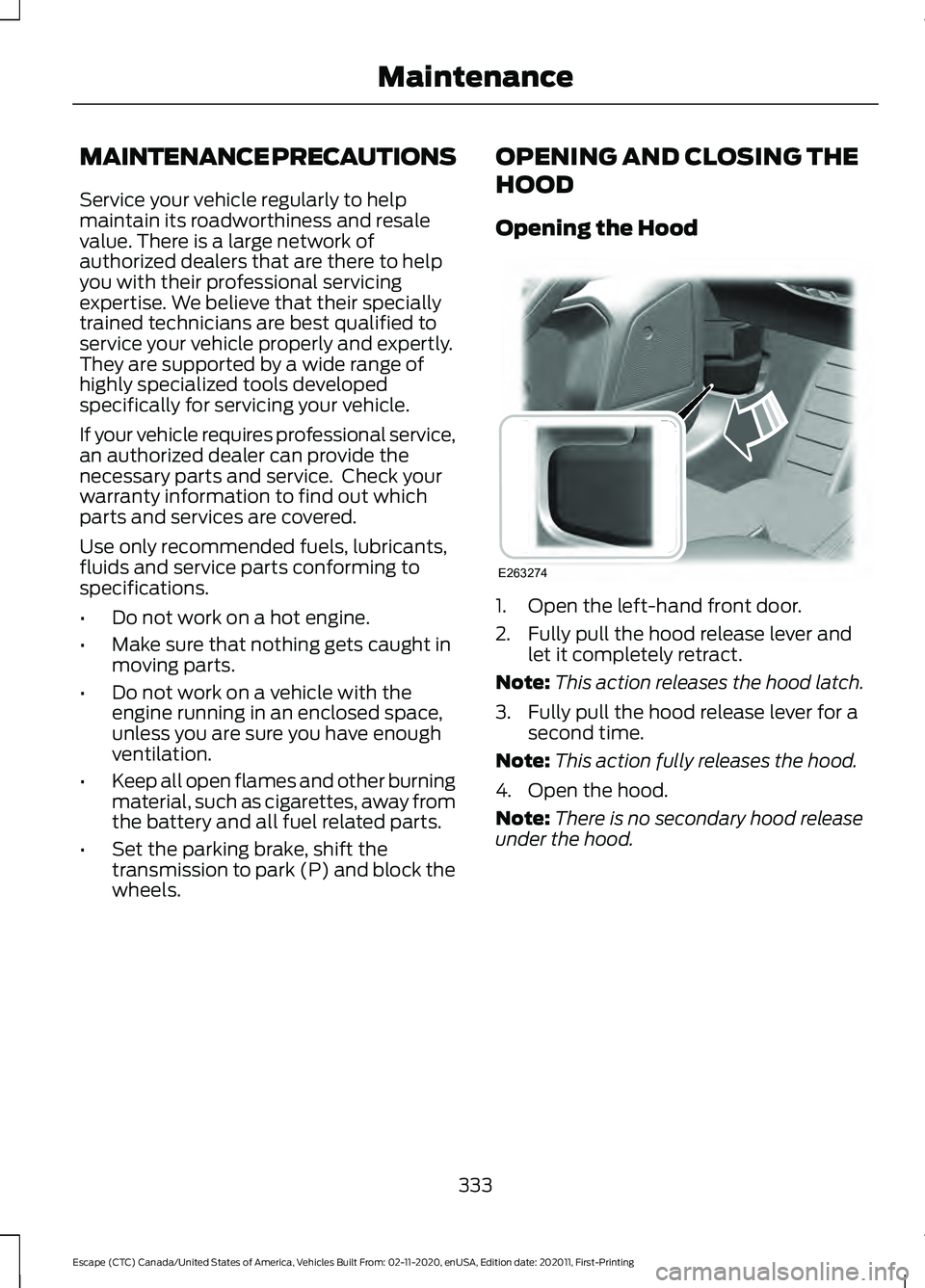
1. Open the left-hand front door.
2. Fully pull the hood release lever and
let it completely retract.
Note: This action releases the hood latch.
3. Fully pull the hood release lever for a second time.
Note: This action fully releases the hood.
4. Open the hood.
Note: There is no secondary hood release
under the hood.
333
Escape (CTC) Canada/United States of America, Vehicles Built From: 02-11-2020, enUSA, Edition date: 202011, First-Printing MaintenanceE263274
Page 382 of 589
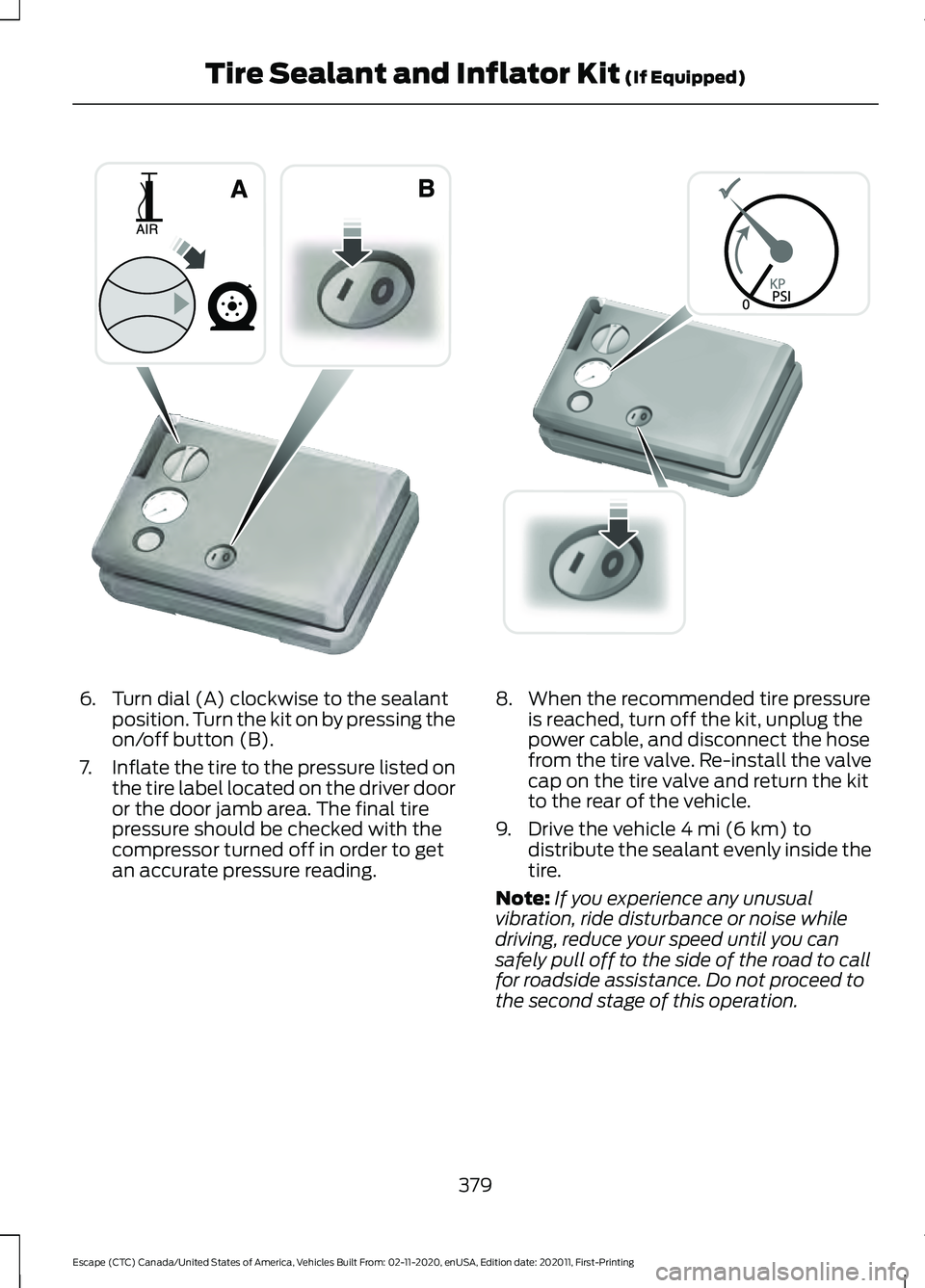
6. Turn dial (A) clockwise to the sealant
position. Turn the kit on by pressing the
on/off button (B).
7. Inflate the tire to the pressure listed on
the tire label located on the driver door
or the door jamb area. The final tire
pressure should be checked with the
compressor turned off in order to get
an accurate pressure reading. 8. When the recommended tire pressure
is reached, turn off the kit, unplug the
power cable, and disconnect the hose
from the tire valve. Re-install the valve
cap on the tire valve and return the kit
to the rear of the vehicle.
9. Drive the vehicle 4 mi (6 km) to
distribute the sealant evenly inside the
tire.
Note: If you experience any unusual
vibration, ride disturbance or noise while
driving, reduce your speed until you can
safely pull off to the side of the road to call
for roadside assistance. Do not proceed to
the second stage of this operation.
379
Escape (CTC) Canada/United States of America, Vehicles Built From: 02-11-2020, enUSA, Edition date: 202011, First-Printing Tire Sealant and Inflator Kit
(If Equipped)E175981 E175982
Page 439 of 589
GENERAL INFORMATION
WARNING: Driving while distracted
can result in loss of vehicle control, crash
and injury. We strongly recommend that
you use extreme caution when using any
device that may take your focus off the
road. Your primary responsibility is the
safe operation of your vehicle. We
recommend against the use of any
hand-held device while driving and
encourage the use of voice-operated
systems when possible. Make sure you
are aware of all applicable local laws
that may affect the use of electronic
devices while driving.
About SYNC
The system allows you to interact with the
entertainment, information and
communication systems on your vehicle
using voice commands and a touchscreen.
The system provides easy interaction with
audio, phone, navigation, mobile apps and
settings.
Note: You can switch the system on and
use it for up to an hour without switching
the ignition on.
Note: You can use the system after you
switch the ignition off for up to 10 minutes
or until you open a door.
Note: For your safety, some features are
speed-dependent. Their use is limited to
when your vehicle speed is less than 3 mph
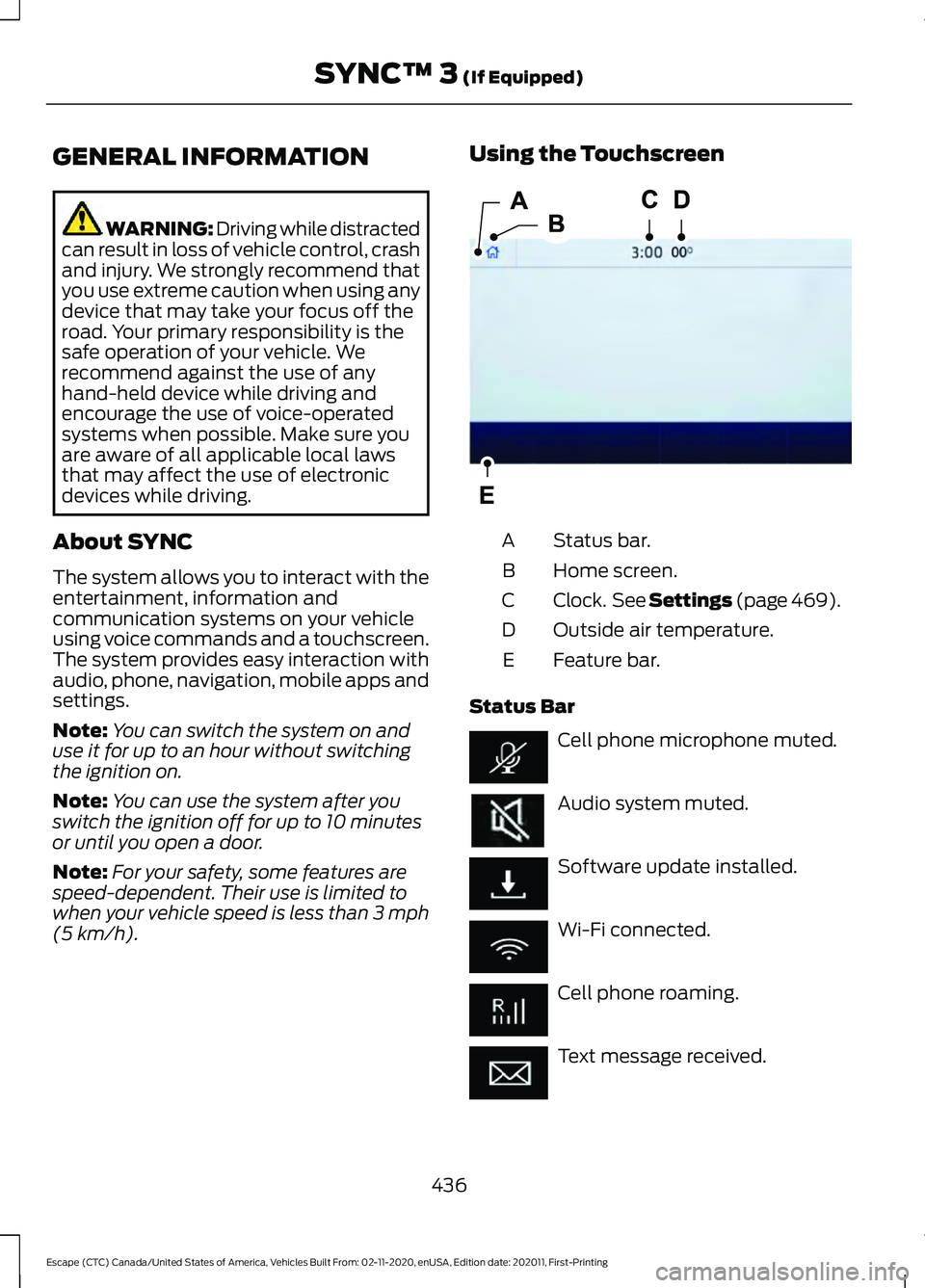
(5 km/h). Using the Touchscreen
Status bar.
A
Home screen.
B
Clock. See Settings (page 469).
C
Outside air temperature.
D
Feature bar.
E
Status Bar Cell phone microphone muted.
Audio system muted.
Software update installed.
Wi-Fi connected.
Cell phone roaming.
Text message received.
436
Escape (CTC) Canada/United States of America, Vehicles Built From: 02-11-2020, enUSA, Edition date: 202011, First-Printing SYNC™ 3
(If Equipped)E293823
Page 478 of 589
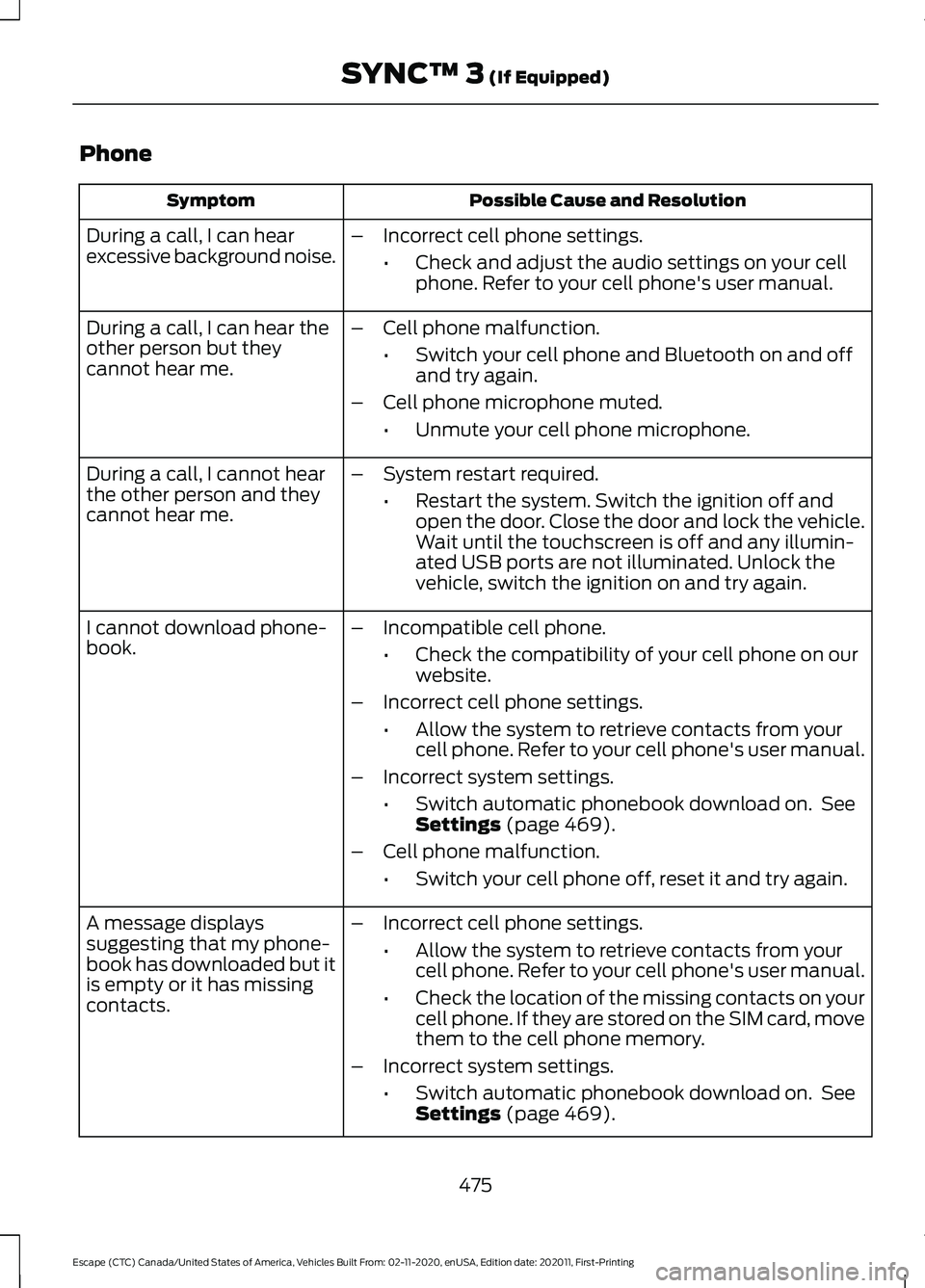
Phone
Possible Cause and Resolution
Symptom
During a call, I can hear
excessive background noise. –
Incorrect cell phone settings.
•Check and adjust the audio settings on your cell
phone. Refer to your cell phone's user manual.
– Cell phone malfunction.
•Switch your cell phone and Bluetooth on and off
and try again.
– Cell phone microphone muted.
•Unmute your cell phone microphone.
During a call, I can hear the
other person but they
cannot hear me.
During a call, I cannot hear
the other person and they
cannot hear me.
–
System restart required.
•Restart the system. Switch the ignition off and
open the door. Close the door and lock the vehicle.
Wait until the touchscreen is off and any illumin-
ated USB ports are not illuminated. Unlock the
vehicle, switch the ignition on and try again.
I cannot download phone-
book. –
Incompatible cell phone.
•Check the compatibility of your cell phone on our
website.
– Incorrect cell phone settings.
•Allow the system to retrieve contacts from your
cell phone. Refer to your cell phone's user manual.
– Incorrect system settings.
•Switch automatic phonebook download on. See
Settings (page 469).
– Cell phone malfunction.
•Switch your cell phone off, reset it and try again.
– Incorrect cell phone settings.
•Allow the system to retrieve contacts from your
cell phone. Refer to your cell phone's user manual.
• Check the location of the missing contacts on your
cell phone. If they are stored on the SIM card, move
them to the cell phone memory.
– Incorrect system settings.
•Switch automatic phonebook download on. See
Settings
(page 469).
A message displays
suggesting that my phone-
book has downloaded but it
is empty or it has missing
contacts.
475
Escape (CTC) Canada/United States of America, Vehicles Built From: 02-11-2020, enUSA, Edition date: 202011, First-Printing SYNC™ 3
(If Equipped)
Page 492 of 589
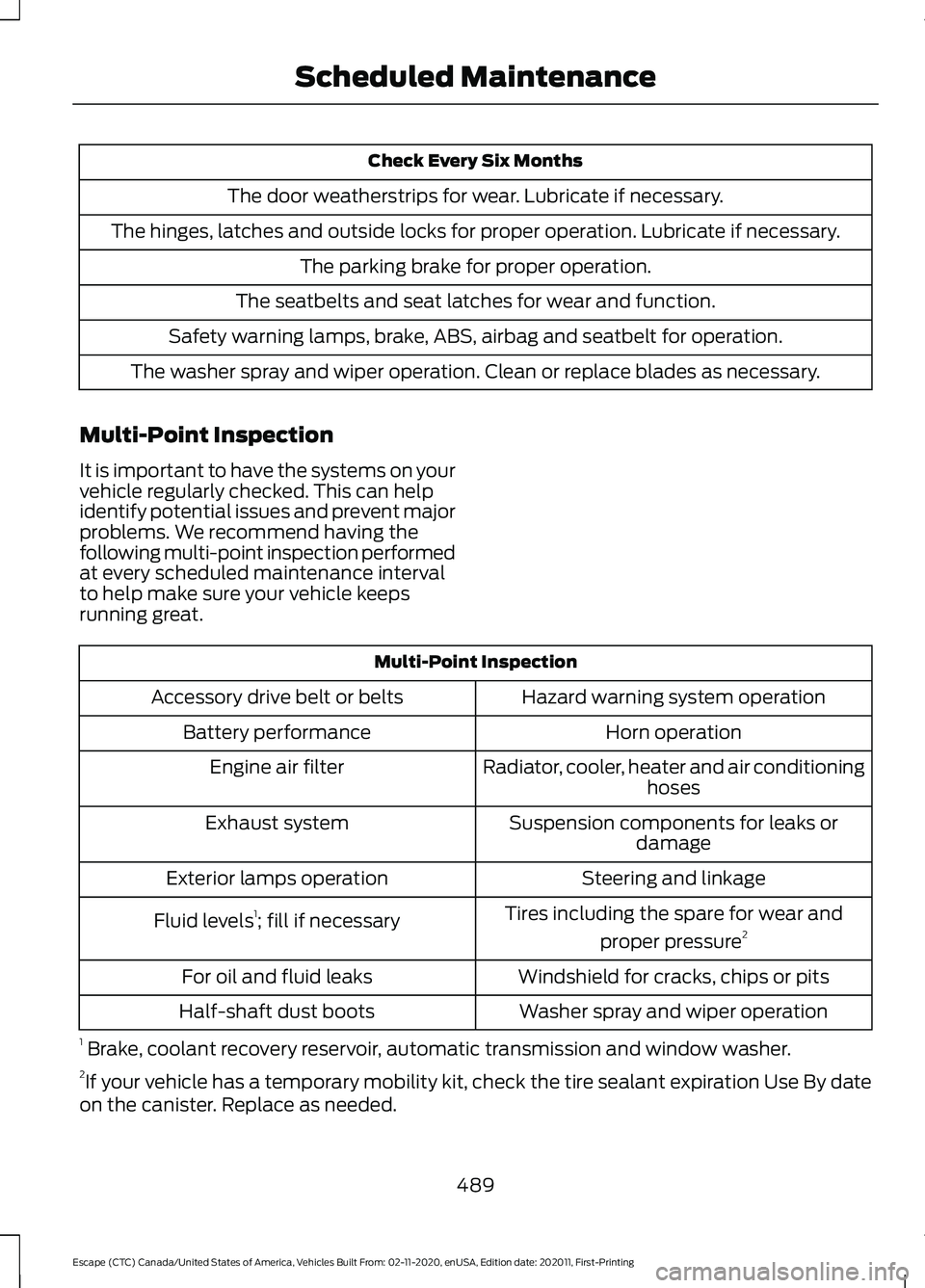
Check Every Six Months
The door weatherstrips for wear. Lubricate if necessary.
The hinges, latches and outside locks for proper operation. Lubricate if necessary. The parking brake for proper operation.
The seatbelts and seat latches for wear and function.
Safety warning lamps, brake, ABS, airbag and seatbelt for operation.
The washer spray and wiper operation. Clean or replace blades as necessary.
Multi-Point Inspection
It is important to have the systems on your
vehicle regularly checked. This can help
identify potential issues and prevent major
problems. We recommend having the
following multi-point inspection performed
at every scheduled maintenance interval
to help make sure your vehicle keeps
running great. Multi-Point Inspection
Hazard warning system operation
Accessory drive belt or belts
Horn operation
Battery performance
Radiator, cooler, heater and air conditioninghoses
Engine air filter
Suspension components for leaks ordamage
Exhaust system
Steering and linkage
Exterior lamps operation
Tires including the spare for wear andproper pressure 2
Fluid levels 1
; fill if necessary
Windshield for cracks, chips or pits
For oil and fluid leaks
Washer spray and wiper operation
Half-shaft dust boots
1 Brake, coolant recovery reservoir, automatic transmission and window washer.
2 If your vehicle has a temporary mobility kit, check the tire sealant expiration Use By date
on the canister. Replace as needed.
489
Escape (CTC) Canada/United States of America, Vehicles Built From: 02-11-2020, enUSA, Edition date: 202011, First-Printing Scheduled Maintenance
Page 570 of 589
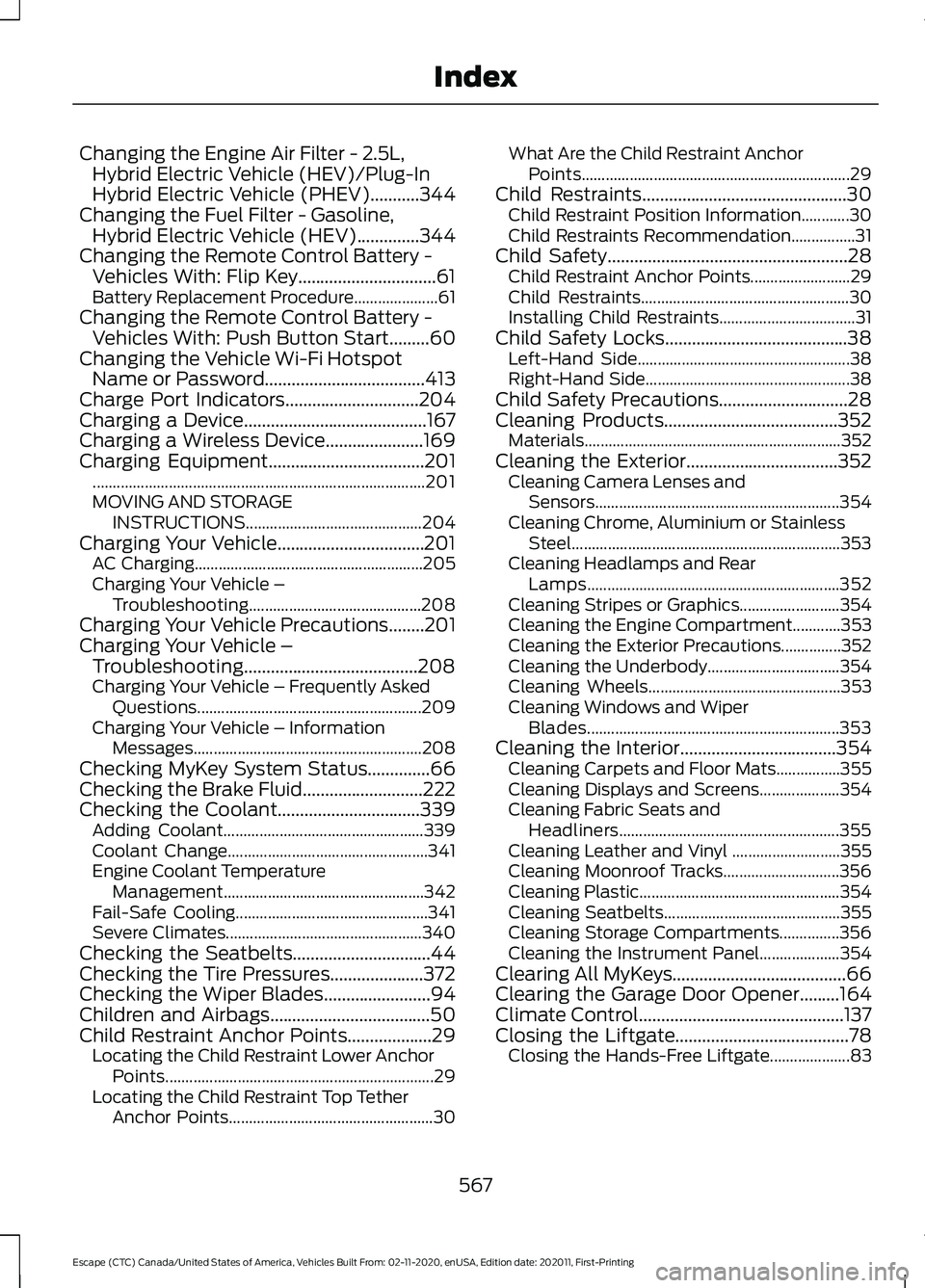
Changing the Engine Air Filter - 2.5L,
Hybrid Electric Vehicle (HEV)/Plug-In
Hybrid Electric Vehicle (PHEV)...........344
Changing the Fuel Filter - Gasoline, Hybrid Electric Vehicle (HEV)..............344
Changing the Remote Control Battery - Vehicles With: Flip Key...............................61
Battery Replacement Procedure..................... 61
Changing the Remote Control Battery - Vehicles With: Push Button Start.........60
Changing the Vehicle Wi-Fi Hotspot Name or Password
....................................413
Charge Port Indicators..............................204
Charging a Device.........................................167
Charging a Wireless Device
......................169
Charging Equipment...................................201
........................................................................\
........... 201
MOVING AND STORAGE INSTRUCTIONS............................................ 204
Charging Your Vehicle.................................201 AC Charging......................................................... 205
Charging Your Vehicle – Troubleshooting........................................... 208
Charging Your Vehicle Precautions
........201
Charging Your Vehicle – Troubleshooting.......................................208
Charging Your Vehicle – Frequently Asked Questions........................................................ 209
Charging Your Vehicle – Information Messages......................................................... 208
Checking MyKey System Status..............66
Checking the Brake Fluid...........................222
Checking the Coolant................................339 Adding Coolant.................................................. 339
Coolant Change.................................................. 341
Engine Coolant Temperature Management
.................................................. 342
Fail-Safe Cooling................................................ 341
Severe Climates................................................. 340
Checking the Seatbelts...............................44
Checking the Tire Pressures.....................372
Checking the Wiper Blades
........................94
Children and Airbags....................................50
Child Restraint Anchor Points...................29 Locating the Child Restraint Lower Anchor
Points................................................................... 29
Locating the Child Restraint Top Tether Anchor Points................................................... 30What Are the Child Restraint Anchor
Points................................................................... 29
Child Restraints
..............................................30
Child Restraint Position Information............30
Child Restraints Recommendation................31
Child Safety......................................................28 Child Restraint Anchor Points......................... 29
Child Restraints.................................................... 30
Installing Child Restraints.................................. 31
Child Safety Locks.........................................38 Left-Hand Side..................................................... 38
Right-Hand Side................................................... 38
Child Safety Precautions
.............................28
Cleaning Products.......................................352
Materials................................................................ 352
Cleaning the Exterior
..................................352
Cleaning Camera Lenses and
Sensors............................................................. 354
Cleaning Chrome, Aluminium or Stainless Steel................................................................... 353
Cleaning Headlamps and Rear Lamps............................................................... 352
Cleaning Stripes or Graphics......................... 354
Cleaning the Engine Compartment............353
Cleaning the Exterior Precautions...............352
Cleaning the Underbody................................. 354
Cleaning Wheels................................................ 353
Cleaning Windows and Wiper Blades............................................................... 353
Cleaning the Interior...................................354 Cleaning Carpets and Floor Mats................355
Cleaning Displays and Screens.................... 354
Cleaning Fabric Seats and Headliners....................................................... 355
Cleaning Leather and Vinyl ........................... 355
Cleaning Moonroof Tracks............................. 356
Cleaning Plastic.................................................. 354
Cleaning Seatbelts............................................ 355
Cleaning Storage Compartments...............356
Cleaning the Instrument Panel.................... 354
Clearing All MyKeys.......................................66
Clearing the Garage Door Opener.........164
Climate Control
..............................................137
Closing the Liftgate.......................................78 Closing the Hands-Free Liftgate.................... 83
567
Escape (CTC) Canada/United States of America, Vehicles Built From: 02-11-2020, enUSA, Edition date: 202011, First-Printing Index
Page 572 of 589
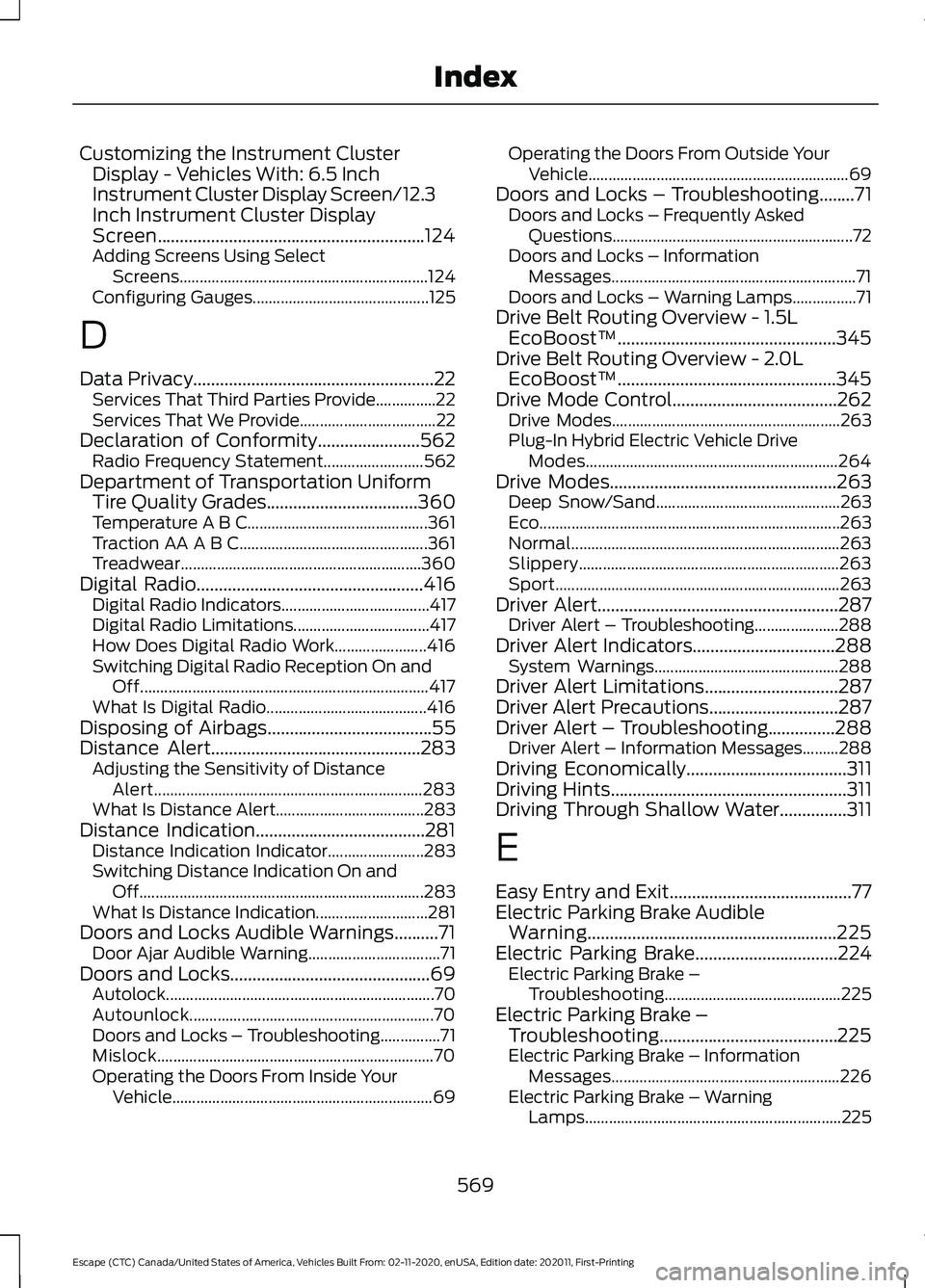
Customizing the Instrument Cluster
Display - Vehicles With: 6.5 Inch
Instrument Cluster Display Screen/12.3
Inch Instrument Cluster Display
Screen............................................................124
Adding Screens Using Select Screens.............................................................. 124
Configuring Gauges............................................ 125
D
Data Privacy......................................................22 Services That Third Parties Provide...............22
Services That We Provide.................................. 22
Declaration of Conformity.......................562
Radio Frequency Statement......................... 562
Department of Transportation Uniform Tire Quality Grades..................................360
Temperature A B C............................................. 361
Traction AA A B C............................................... 361
Treadwear............................................................ 360
Digital Radio
...................................................416
Digital Radio Indicators..................................... 417
Digital Radio Limitations.................................. 417
How Does Digital Radio Work....................... 416
Switching Digital Radio Reception On and Off........................................................................\
417
What Is Digital Radio........................................ 416
Disposing of Airbags.....................................55
Distance Alert
...............................................283
Adjusting the Sensitivity of Distance
Alert................................................................... 283
What Is Distance Alert..................................... 283
Distance Indication......................................281 Distance Indication Indicator........................ 283
Switching Distance Indication On and Off....................................................................... 283
What Is Distance Indication............................ 281
Doors and Locks Audible Warnings..........71 Door Ajar Audible Warning................................. 71
Doors and Locks.............................................69 Autolock................................................................... 70
Autounlock............................................................. 70
Doors and Locks – Troubleshooting...............71
Mislock..................................................................... 70
Operating the Doors From Inside Your Vehicle................................................................. 69Operating the Doors From Outside Your
Vehicle................................................................. 69
Doors and Locks – Troubleshooting........71 Doors and Locks – Frequently Asked
Questions............................................................ 72
Doors and Locks – Information Messages............................................................. 71
Doors and Locks – Warning Lamps................71
Drive Belt Routing Overview - 1.5L EcoBoost™.................................................345
Drive Belt Routing Overview - 2.0L EcoBoost™.................................................345
Drive Mode Control.....................................262 Drive Modes......................................................... 263
Plug-In Hybrid Electric Vehicle Drive Modes............................................................... 264
Drive Modes
...................................................263
Deep Snow/Sand.............................................. 263
Eco........................................................................\
... 263
Normal................................................................... 263
Slippery................................................................. 263
Sport....................................................................... 263
Driver Alert
......................................................287
Driver Alert – Troubleshooting..................... 288
Driver Alert Indicators................................288 System Warnings.............................................. 288
Driver Alert Limitations..............................287
Driver Alert Precautions.............................287
Driver Alert – Troubleshooting...............288 Driver Alert – Information Messages.........288
Driving Economically
....................................311
Driving Hints.....................................................311
Driving Through Shallow Water...............311
E
Easy Entry and Exit.........................................77
Electric Parking Brake Audible Warning........................................................225
Electric Parking Brake
................................224
Electric Parking Brake –
Troubleshooting............................................ 225
Electric Parking Brake – Troubleshooting........................................225
Electric Parking Brake – Information Messages......................................................... 226
Electric Parking Brake – Warning Lamps................................................................ 225
569
Escape (CTC) Canada/United States of America, Vehicles Built From: 02-11-2020, enUSA, Edition date: 202011, First-Printing Index