charging FORD ESCAPE 2022 User Guide
[x] Cancel search | Manufacturer: FORD, Model Year: 2022, Model line: ESCAPE, Model: FORD ESCAPE 2022Pages: 585, PDF Size: 6.15 MB
Page 206 of 585
What to Do
What it Means
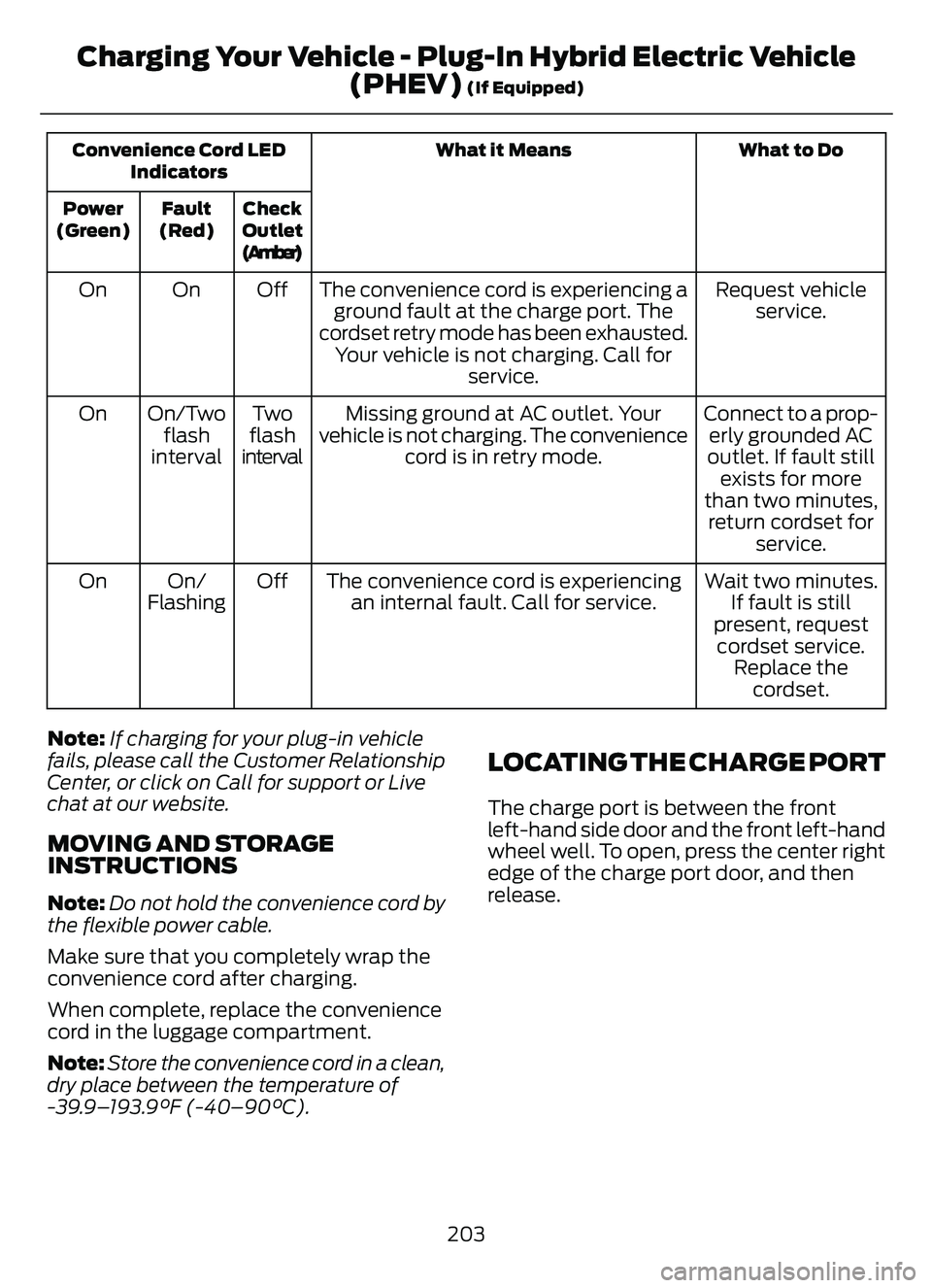
Convenience Cord LED
Indicators
Check
Outlet
(Amber)
Fault
(Red)
Power
(Green)
Request vehicle service.
The convenience cord is experiencing a
ground fault at the charge port. The
cordset retry mode has been exhausted. Your vehicle is not charging. Call for service.
Off
On
On
Connect to a prop-erly grounded AC
outlet. If fault still exists for more
than two minutes, return cordset for service.
Missing ground at AC outlet. Your
vehicle is not charging. The convenience cord is in retry mode.
Tw o
flash
interval
On/Two
flash
interval
On
Wait two minutes.If fault is still
present, request cordset service. Replace the cordset.
The convenience cord is experiencing
an internal fault. Call for service.
Off
On/
Flashing
On
Note: If charging for your plug-in vehicle
fails, please call the Customer Relationship
Center, or click on Call for support or Live
chat at our website.
MOVING AND STORAGE
INSTRUCTIONS
Note: Do not hold the convenience cord by
the flexible power cable.
Make sure that you completely wrap the
convenience cord after charging.
When complete, replace the convenience
cord in the luggage compartment.
Note: Store the convenience cord in a clean,
dry place between the temperature of
-39.9–193.9°F (-40–90°C).
LOCATING THE CHARGE PORT
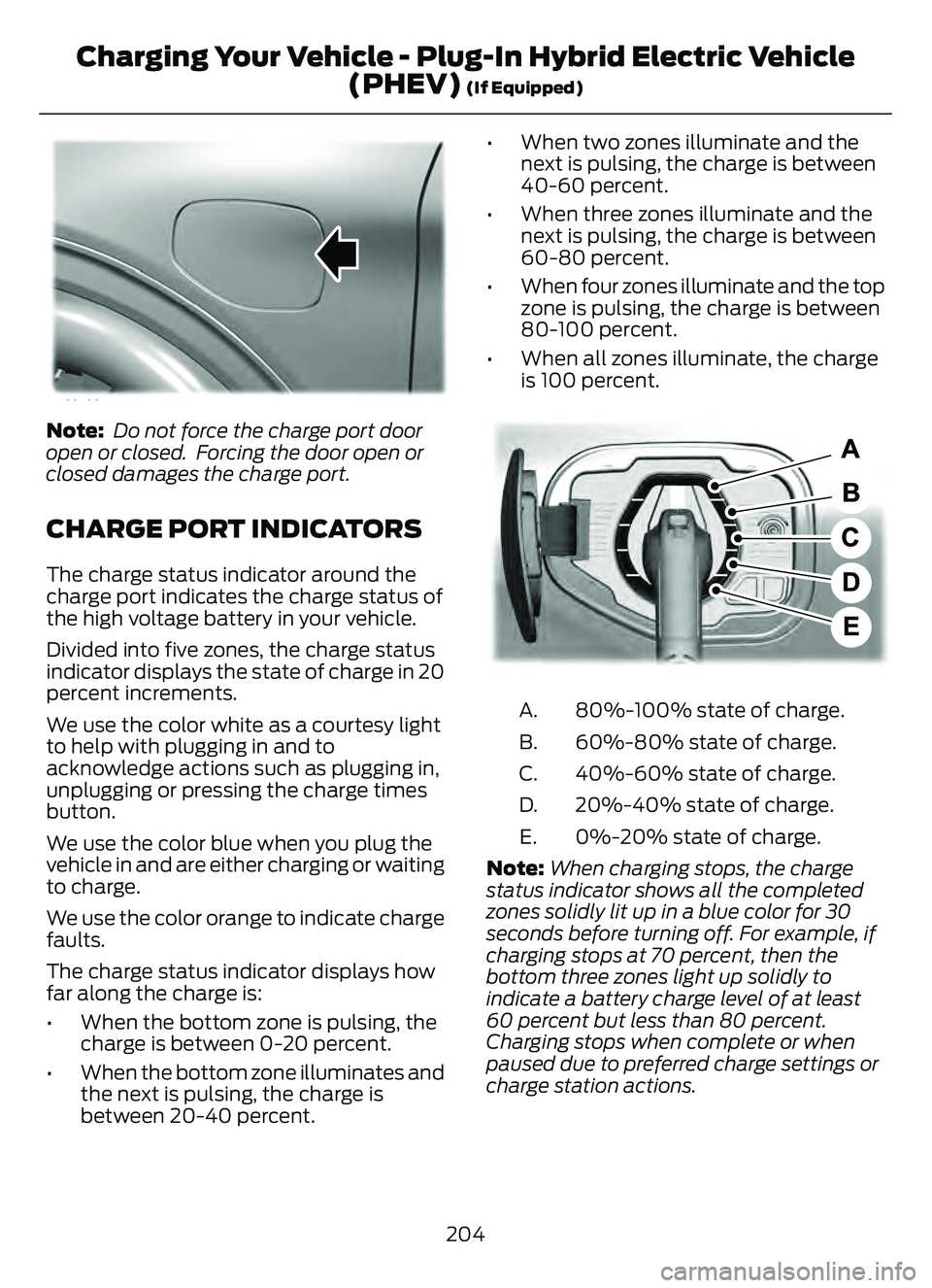
The charge port is between the front
left-hand side door and the front left-hand
wheel well. To open, press the center right
edge of the charge port door, and then
release.
203
Charging Your Vehicle - Plug-In Hybrid Electric Vehicle (PHEV)
(If Equipped)
Page 207 of 585
E295258
Note: Do not force the charge port door
open or closed. Forcing the door open or
closed damages the charge port.
CHARGE PORT INDICATORS
The charge status indicator around the
charge port indicates the charge status of
the high voltage battery in your vehicle.
Divided into five zones, the charge status
indicator displays the state of charge in 20
percent increments.
We use the color white as a courtesy light
to help with plugging in and to
acknowledge actions such as plugging in,
unplugging or pressing the charge times
button.
We use the color blue when you plug the
vehicle in and are either charging or waiting
to charge.
We use the color orange to indicate charge
faults.
The charge status indicator displays how
far along the charge is:
• When the bottom zone is pulsing, the charge is between 0-20 percent.
• When the bottom zone illuminates and the next is pulsing, the charge is
between 20-40 percent. • When two zones illuminate and the
next is pulsing, the charge is between
40-60 percent.
• When three zones illuminate and the next is pulsing, the charge is between
60-80 percent.
• When four zones illuminate and the top zone is pulsing, the charge is between
80-100 percent.
• When all zones illuminate, the charge is 100 percent.
E301E301E301E301E301E301E301301330133019719719719719719719719797197
80%-100% state of charge.
A.
60%-80% state of charge.
B.
40%-60% state of charge.
C.
20%-40% state of charge.
D.
0%-20% state of charge.
E.
Note: When charging stops, the charge
status indicator shows all the completed
zones solidly lit up in a blue color for 30
seconds before turning off. For example, if
charging stops at 70 percent, then the
bottom three zones light up solidly to
indicate a battery charge level of at least
60 percent but less than 80 percent.
Charging stops when complete or when
paused due to preferred charge settings or
charge station actions.
204
Charging Your Vehicle - Plug-In Hybrid Electric Vehicle (PHEV)
(If Equipped)
Page 208 of 585
Note:If the charge status indicator does
not light up or pulse after plugging in, please
verify that the charge port light setting is On.
If you do not wish to have the charge status
indicator light up at all while charging, then
you can switch it Off. See charge port light
under vehicle settings on your touchscreen.
See SYNC™ 3 (page 431).
AC CHARGING
CONNECTING THE CHARGER
E306676To charge the high-voltage battery:
1. Put the vehicle in park (P).
2. Press the center right edge of the
charge port door and then release to
open the door.
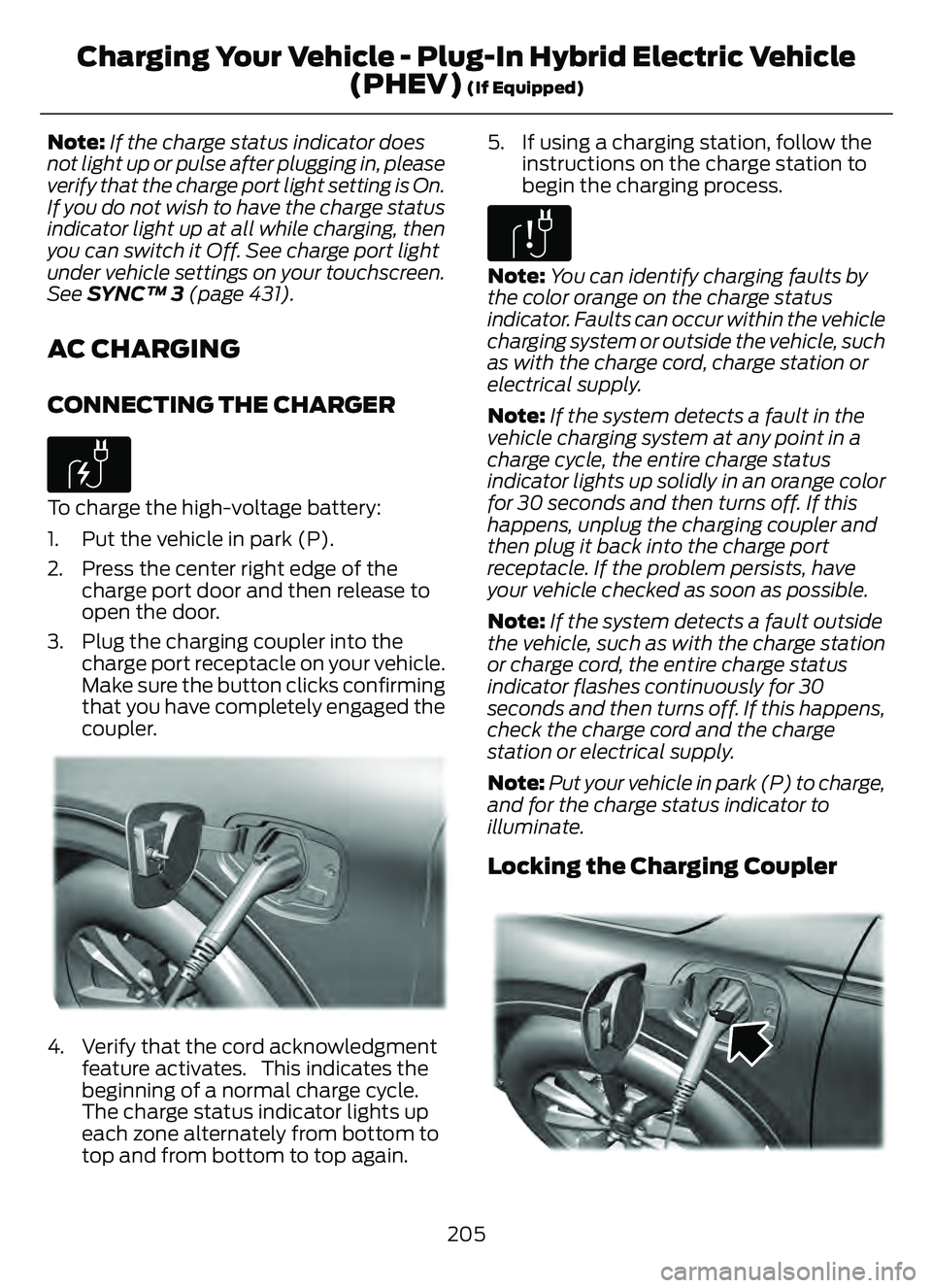
3. Plug the charging coupler into the charge port receptacle on your vehicle.
Make sure the button clicks confirming
that you have completely engaged the
coupler.
E295257E295257E29529522295229292929295295955295295292952992952295295995225725722577222557257257257225257252572572557
4. Verify that the cord acknowledgmentfeature activates. This indicates the
beginning of a normal charge cycle.
The charge status indicator lights up
each zone alternately from bottom to
top and from bottom to top again. 5. If using a charging station, follow the
instructions on the charge station to
begin the charging process.
E306677
Note: You can identify charging faults by
the color orange on the charge status
indicator. Faults can occur within the vehicle
charging system or outside the vehicle, such
as with the charge cord, charge station or
electrical supply.
Note: If the system detects a fault in the
vehicle charging system at any point in a
charge cycle, the entire charge status
indicator lights up solidly in an orange color
for 30 seconds and then turns off. If this
happens, unplug the charging coupler and
then plug it back into the charge port
receptacle. If the problem persists, have
your vehicle checked as soon as possible.
Note: If the system detects a fault outside
the vehicle, such as with the charge station
or charge cord, the entire charge status
indicator flashes continuously for 30
seconds and then turns off. If this happens,
check the charge cord and the charge
station or electrical supply.
Note: Put your vehicle in park (P) to charge,
and for the charge status indicator to
illuminate.
Locking the Charging Coupler
95 5E295451E295451
205
Charging Your Vehicle - Plug-In Hybrid Electric Vehicle (PHEV)
(If Equipped)
Page 209 of 585
Note:You need a padlock or a combination
lock with a shackle diameter of 0.2 in
(5 mm) or less, and the straight portion of
the shackle of 1.0 in (25.4 mm) of length or
more.
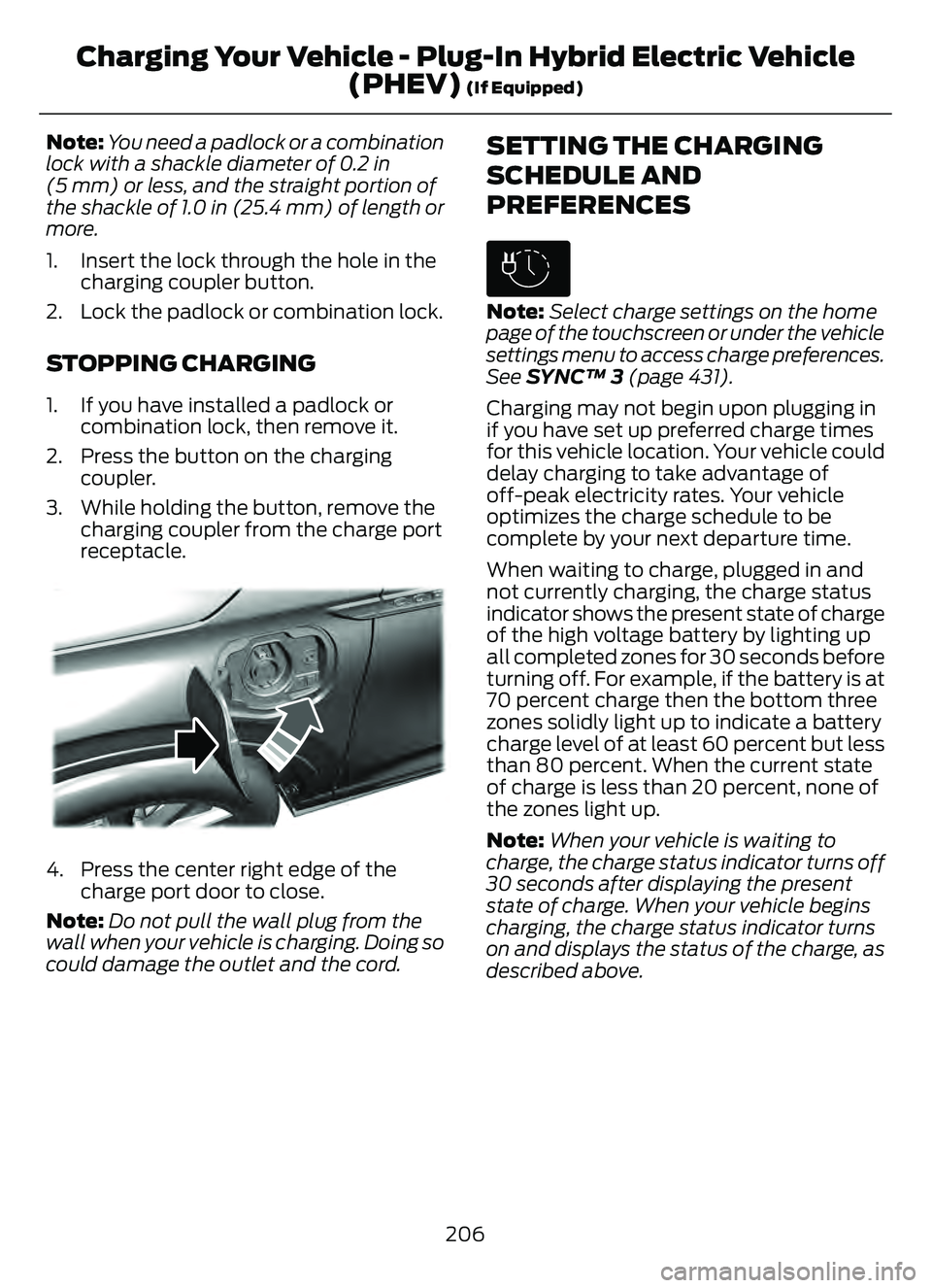
1. Insert the lock through the hole in the charging coupler button.
2. Lock the padlock or combination lock.
STOPPING CHARGING
1. If you have installed a padlock or combination lock, then remove it.
2. Press the button on the charging coupler.
3. While holding the button, remove the charging coupler from the charge port
receptacle.
E295444E295444E295444
4. Press the center right edge of thecharge port door to close.
Note: Do not pull the wall plug from the
wall when your vehicle is charging. Doing so
could damage the outlet and the cord.
SETTING THE CHARGING
SCHEDULE AND
PREFERENCES
E306678
Note: Select charge settings on the home
page of the touchscreen or under the vehicle
settings menu to access charge preferences.
See SYNC™ 3 (page 431).
Charging may not begin upon plugging in
if you have set up preferred charge times
for this vehicle location. Your vehicle could
delay charging to take advantage of
off-peak electricity rates. Your vehicle
optimizes the charge schedule to be
complete by your next departure time.
When waiting to charge, plugged in and
not currently charging, the charge status
indicator shows the present state of charge
of the high voltage battery by lighting up
all completed zones for 30 seconds before
turning off. For example, if the battery is at
70 percent charge then the bottom three
zones solidly light up to indicate a battery
charge level of at least 60 percent but less
than 80 percent. When the current state
of charge is less than 20 percent, none of
the zones light up.
Note: When your vehicle is waiting to
charge, the charge status indicator turns off
30 seconds after displaying the present
state of charge. When your vehicle begins
charging, the charge status indicator turns
on and displays the status of the charge, as
described above.
206
Charging Your Vehicle - Plug-In Hybrid Electric Vehicle (PHEV)
(If Equipped)
Page 210 of 585
Charge Times Button
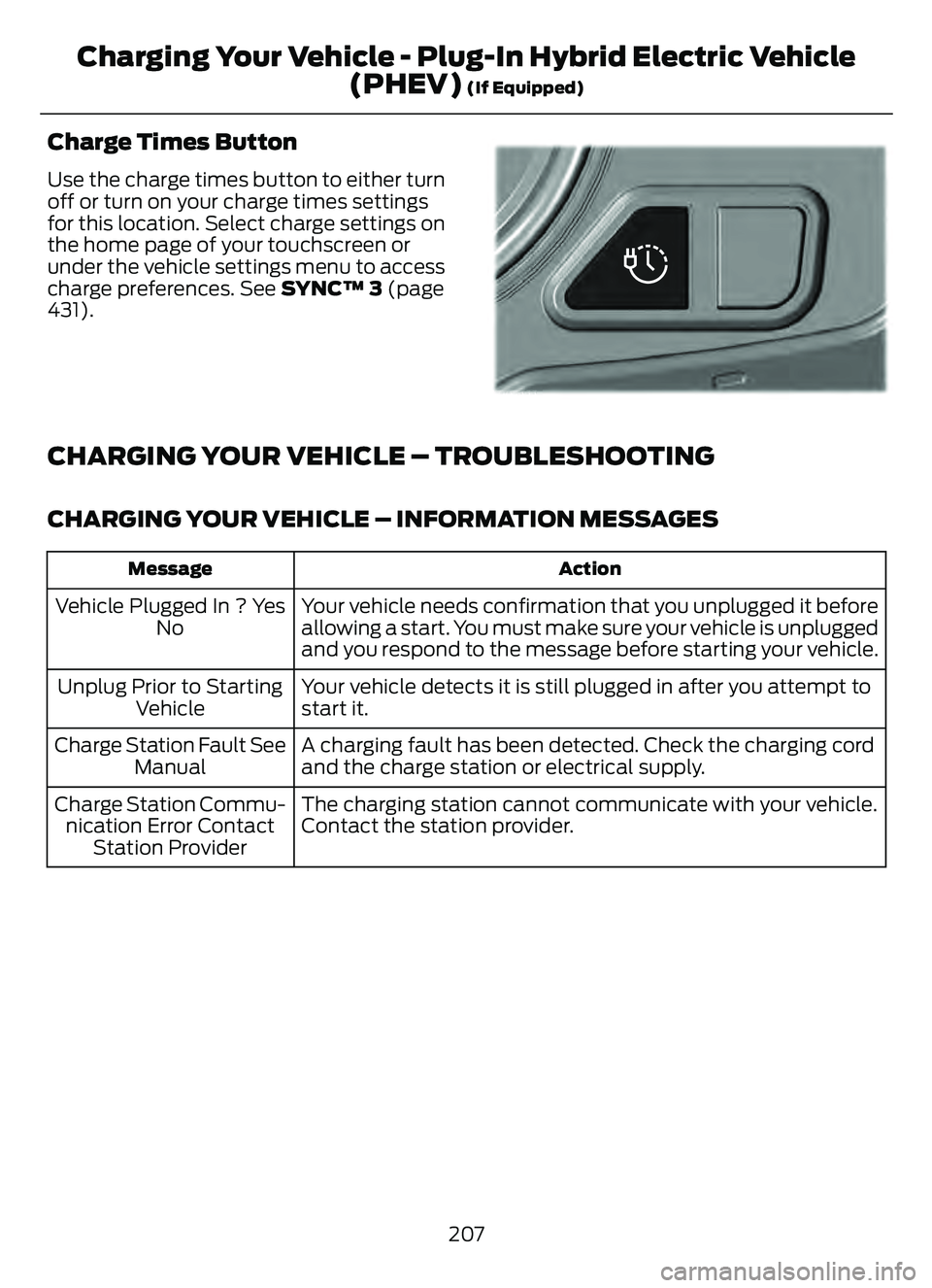
Use the charge times button to either turn
off or turn on your charge times settings
for this location. Select charge settings on
the home page of your touchscreen or
under the vehicle settings menu to access
charge preferences. See SYNC™ 3 (page
431).
E301E301E301E301E301E301E301001301E301E3013E111111111111111111111111111111
CHARGING YOUR VEHICLE – TROUBLESHOOTING
CHARGING YOUR VEHICLE – INFORMATION MESSAGES
Action
Message
Your vehicle needs confirmation that you unplugged it before
allowing a start. You must make sure your vehicle is unplugged
and you respond to the message before starting your vehicle.
Vehicle Plugged In ? Yes
No
Your vehicle detects it is still plugged in after you attempt to
start it.
Unplug Prior to Starting
Vehicle
A charging fault has been detected. Check the charging cord
and the charge station or electrical supply.
Charge Station Fault See
Manual
The charging station cannot communicate with your vehicle.
Contact the station provider.
Charge Station Commu-
nication Error Contact Station Provider
207
Charging Your Vehicle - Plug-In Hybrid Electric Vehicle(PHEV)
(If Equipped)
Page 211 of 585
CHARGING YOUR VEHICLE –
FREQUENTLY ASKED QUESTIONS
Why does my vehicle have a hum or fan
noise when charging?A hum or a fan noise could be present
when charging the high voltage
battery. This is a normal operation as
your vehicle is keeping the battery cool
while charging.
208
Charging Your Vehicle - Plug-In Hybrid Electric Vehicle(PHEV)
(If Equipped)
Page 215 of 585
HOW DOES AUTOMATIC RETURN
TO PARK (P) WORK
Your vehicle shifts into park (P) when your
vehicle is stationary and any of the
following occur:
• You switch the vehicle off.
• You open the driver door with yourseatbelt unlatched.
• You unlatch the driver seatbelt when the driver door is open.
Note: Do not use automatic return to park
(P) when your vehicle is moving, except in
an emergency. See Stopping the Engine
When Your Vehicle is Moving (page 175).
AUTOMATIC RETURN TO PARK
(P) LIMITATIONS
Automatic return to park may not work if
the door ajar switch is malfunctioning.
See an authorized dealer if any of the
following occur:
• Door ajar indicator does not illuminate with the driver door open.
• Door ajar indicator illuminates with the driver door closed.
• Transmission not in park message appears with the driver door closed,
after you shift out of park (P).
GRADE ASSIST - HYBRID
ELECTRIC VEHICLE (HEV)
WHAT IS GRADE ASSIST
Provides additional grade braking with a
combination of engine motoring and
high-voltage battery charging to help
maintain vehicle speed when descending
a grade.
SWITCHING GRADE ASSIST ON
AND OFF
1. Press Settings on the touchscreen.
2. Select Driver Assistance Settings .
3. Select Grade Assist.
The grade assist lamp appears in the
instrument cluster.
Your vehicle determines the amount of
engine motoring and high-voltage battery
charging. You could notice the engine
speed increasing and decreasing to help
maintain your vehicle speed when
descending a slope.
GRADE ASSIST INDICATORS
E345122E345122
MANUAL PARK RELEASE -
GASOLINE
WHAT IS MANUAL PARK RELEASE
Manual park release is used to move your
transmission from the park (P) position in
the event of an electrical malfunction or
emergency.
MANUAL PARK RELEASE
PRECAUTIONS
WARNING: When doing this
procedure, you need to take the
transmission out of park (P) which
means your vehicle can roll freely. To
avoid unwanted vehicle movement,
always fully apply the parking brake prior
to doing this procedure. Use wheel
chocks if appropriate.
212
Automatic Transmission
Page 217 of 585
Returning Your Vehicle to Normal
Mode
1. Once it is safe to do so, reconnect thenegative (black) battery cable to the
battery.
2. Apply the parking brake. See What Is
the Electric Parking Brake (page 220).
Note: If the vehicle battery is dead, for
example, no electrical power is available,
you could use an external power source to
apply the parking brake.
3. Fully apply the brake pedal and hold. Do not release. Pull the orange tether
outward towards the driver seat to
release it from the override position.
4. The cable will release and retract back to its original rest position.
5. Stow the manual park release cable tether back inside the instrument panel
dash hole, install the access cover by
pressing it back in position.
6. With your foot fully applied on the brake pedal, start your vehicle. Confirm
that your vehicle is in the park (P)
position and that the instrument
cluster indicates park (P).
7. If the instrument cluster is not displaying the park (P) position or a
message displays on the instrument
cluster screen, make sure you apply the
parking brake before exiting your
vehicle. Contact an authorized dealer
for service.
AUTOMATIC TRANSMISSION
AUDIBLE WARNINGS
Transmission Not In Park (P)
Audible Warning
Sounds if you open the driver door before
shifting into park (P).
AUTOMATIC TRANSMISSION
– TROUBLESHOOTING
AUTOMATIC TRANSMISSION –
INFORMATION MESSAGES
Description
Message
The electric parking
brake is not fully applied.
Park Brake Not
Applied
A reminder to shiftinto park. In addi-
tion, this message is typically afterreconnecting or recharging the
battery until you
cycle the ignition to the on mode.
Transmission Not in
Park
Displays when
there is a system
fault and the park
brake needs to be depressed before
exiting the vehicle.
See your authorized dealer.
SHIFT SYS FAULT
Apply Park Brake
Before Exiting the Vehicle
The system has
detected a fault that requires
service. Have your
vehicle checked as soon as possible.
Transmission
Malfunction Service Now
214
Automatic Transmission
Page 329 of 585
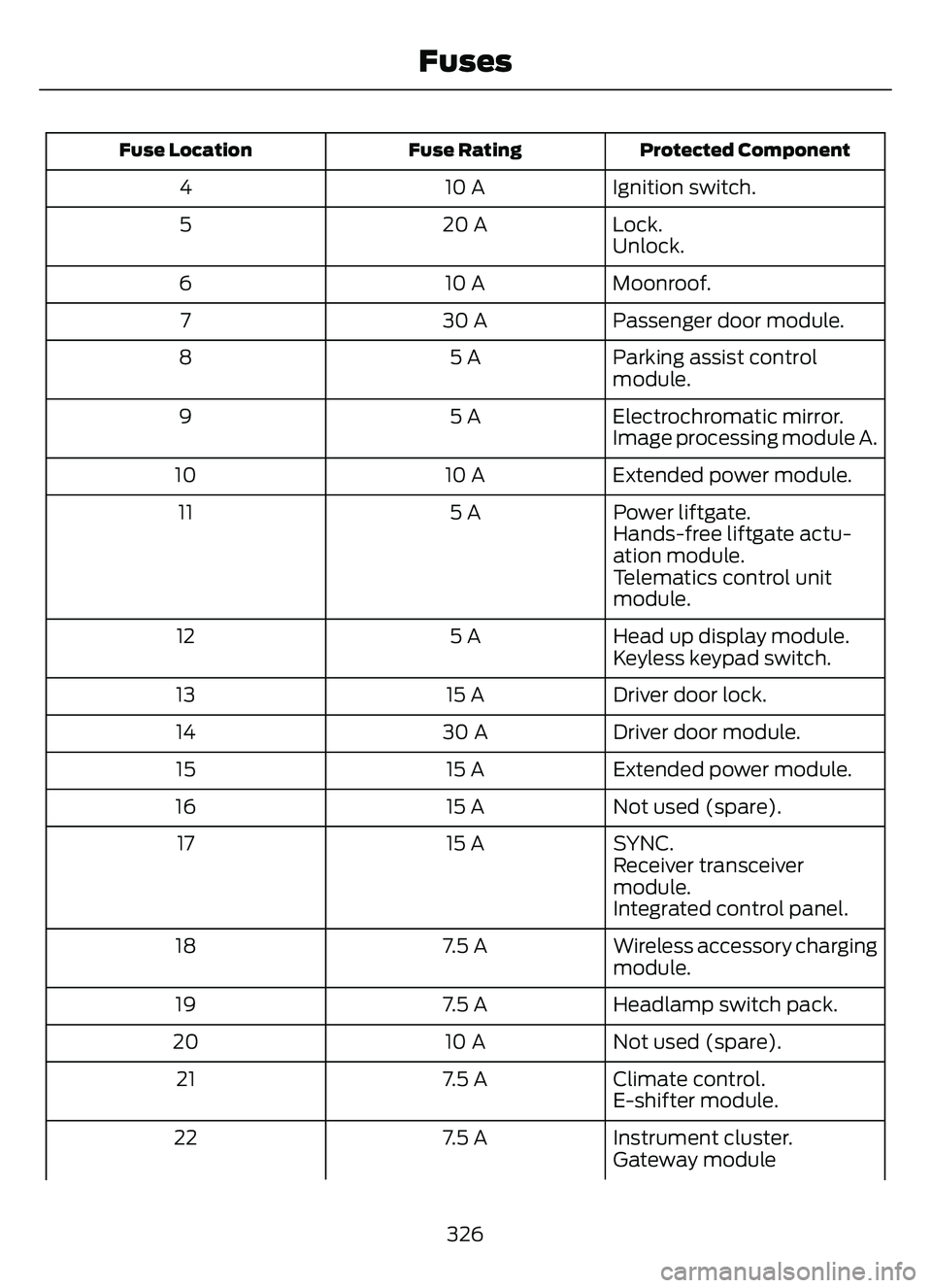
Protected Component
Fuse Rating
Fuse Location
Ignition switch.
10 A
4
Lock.
20 A
5
Unlock.
Moonroof.
10 A
6
Passenger door module.
30 A
7
Parking assist control
module.
5 A
8
Electrochromatic mirror.
5 A
9
Image processing module A.
Extended power module.
10 A
10
Power liftgate.
5 A
11
Hands-free liftgate actu-
ation module.
Telematics control unit
module.
Head up display module.
5 A
12
Keyless keypad switch.
Driver door lock.
15 A
13
Driver door module.
30 A
14
Extended power module.
15 A
15
Not used (spare).
15 A
16
SYNC.
15 A
17
Receiver transceiver
module.
Integrated control panel.
Wireless accessory charging
module.
7.5 A
18
Headlamp switch pack.
7.5 A
19
Not used (spare).
10 A
20
Climate control.
7.5 A
21
E-shifter module.
Instrument cluster.
7.5 A
22
Gateway module
326
Fuses
Page 345 of 585
WHAT IS THE BATTERY
MANAGEMENT SYSTEM
The battery management system monitors
battery conditions and takes actions to
extend battery life.
HOW DOES THE BATTERY
MANAGEMENT SYSTEM WORK
If excessive battery drain is detected, the
system temporarily disables some
electrical systems to protect the battery.
Systems included are:
• Heated rear window.
• Heated seats.
• Climate control.
• Heated steering wheel.
• Audio unit.
• Navigation system.
A message could appear in the information
display to alert you that battery protection
actions are active. This message is only for
notification that an action is taking place,
and not intended to indicate an electrical
problem or that the battery requires
replacement.
BATTERY MANAGEMENT SYSTEM
LIMITATIONS
After battery replacement, or in some
cases after charging the battery with an
external charger, the battery management
system requires eight hours of vehicle sleep
time to relearn the battery state of charge.
During this time, your vehicle must remain
fully locked with the ignition switched off.
Note:Prior to relearning the battery state
of charge, the battery management system
could temporarily disable some electrical
systems.
Electrical Accessory Installation
To make sure the battery management
system works correctly, do not connect an
electrical device ground connection
directly to the battery negative post. This
can cause inaccurate measurements of
the battery condition and potential
incorrect system operation.
Note: If you add electrical accessories or
components to the vehicle, it could
adversely affect battery performance and
durability. This could also affect the
performance of other electrical systems in
the vehicle.
RESETTING THE BATTERY
SENSOR
When you install a new battery, reset the
battery sensor by doing the following:
1. Switch the ignition on, and leave the engine off.
Note: Complete Steps 2 and 3 within 10
seconds.
2. Flash the high beam headlamps five times, ending with the high beams off.
3. Press and release the brake pedal three times.
The battery warning lamp flashes three
times to confirm that the reset is
successful.
RECYCLING AND DISPOSING OF
THE 12V BATTERY
E107998
Make sure that you dispose of
old batteries in an
environmentally friendly way.
Seek advice from your local authority
about recycling old batteries.
342
Maintenance