wipers FORD ESCAPE 2022 Owners Manual
[x] Cancel search | Manufacturer: FORD, Model Year: 2022, Model line: ESCAPE, Model: FORD ESCAPE 2022Pages: 585, PDF Size: 6.15 MB
Page 5 of 585
Changing the Remote Control Battery -Vehicles With: Push Button Start .......60
Changing the Remote Control Battery - Vehicles With: Flip Key .............................61
Replacing a Lost Key or Remote Control ........................................................................\
..6 2
Programming the Remote Control .........62
Keys and Remote Controls – Troubleshooting ........................................63
MyKey™
What Is MyKey ...............................................64
MyKey Settings ..............................................64
Creating a MyKey - Vehicles With: PushButton Start ................................................65
Creating a MyKey - Vehicles With: Flip Key ..................................................................65
Programming a MyKey ................................65
Clearing All MyKeys ......................................66
Checking MyKey System Status .............66
Using MyKey With Remote Start Systems ........................................................66
MyKey – Troubleshooting ..........................66
Doors and Locks
Operating the Doors From Outside Your Vehicle ..........................................................69
Operating the Doors From Inside Your Vehicle ..........................................................69
Autounlock ......................................................70
Autolock ............................................................70
Mislock ..............................................................70
Doors and Locks Audible Warnings .........71
Doors and Locks – Troubleshooting ........................................................................\
....7 1
Keyless Entry
Locating the Keyless Entry Keypad .........73
Keyless Entry Limitations ...........................73
Master Access Code .....................................73
Keyless Entry Settings .................................74 Locking and Unlocking the Doors Using
Keyless Entry ...............................................75
Keyless Entry – Troubleshooting .............75
Easy Entry and Exit
How Does Easy Entry and Exit Work ........................................................................\
...7 7
Switching Easy Entry and Exit On and Off ....................................................................77
Liftgate - Vehicles With:Manual Liftgate
Opening the Liftgate ....................................78
Closing the Liftgate ......................................78
Liftgate - Vehicles With: PowerLiftgate
Liftgate Precautions ....................................80
Opening the Liftgate ...................................80
Setting the Liftgate Opening Height........................................................................\
..8 2
Closing the Liftgate ......................................82
Stopping the Liftgate Movement ...........84
Liftgate Obstacle Detection .....................84
Liftgate – Troubleshooting ........................85
Security
Passive Anti-Theft System ........................87
Anti-Theft Alarm System ...........................87
Anti-Theft Alarm System Settings ........88
Security – Troubleshooting .......................89
Steering Wheel
Adjusting the Steering Wheel ...................91
Horn .....................................................................91
Switching the Heated Steering Wheel On and Off ....................................................91
Wipers and Washers
Wipers ...............................................................92
Autowipers ......................................................92
2
Table of Contents
Page 6 of 585
Switching the Rear Window Wiper Onand Off ..........................................................93
Reverse Wipe ..................................................93
Checking the Wiper Blades .......................94
Replacing the Front Wiper Blades .........94
Replacing the Rear Wiper Blades ...........94
Washers ............................................................95
Wipers and Washers – Troubleshooting ........................................................................\
..9 6
Exterior Lighting
Exterior Lighting Control .............................97
Headlamps ......................................................97
Headlamps – Troubleshooting ...............98
Autolamps .......................................................98
Exterior Lamps ...............................................99
Automatic High Beam Control ..............100
Automatic High Beam Control –Troubleshooting .......................................102
Interior Lighting
Switching All of the Interior Lamps Onand Off ........................................................103
Switching the Front Interior Lamps On and Off ........................................................103
Switching the Rear Interior Lamps On and Off ........................................................103
Interior Lamp Function ..............................103
Adjusting the Instrument Panel Lighting Brightness ..................................................103
Ambient Lighting .........................................103
Interior Lighting – Troubleshooting ......104
Windows
Opening and Closing the Windows ......105
Window Bounce-Back ..............................105
Locking the Rear Window Controls ......106
Interior Mirror
Interior Mirror Precautions ........................107 Manually Dimming the Interior Mirror
........................................................................\
.107
Auto-Dimming Interior Mirror ..................107
Exterior Mirrors
Adjusting the Exterior Mirrors .................108
Folding the Exterior Mirrors .....................108
Moonroof
Opening and Closing the Sun Shade ........................................................................\
1 0 9
Opening and Closing the Moonroof ......109
Venting the Moonroof ...............................109
Moonroof Bounce-Back ............................110
Instrument Cluster
Instrument Cluster Overview - Hybrid Electric Vehicle (HEV), Vehicles With:
6.5 Inch Instrument Cluster Display
Screen ............................................................111
Instrument Cluster Overview - Hybrid Electric Vehicle (HEV), Vehicles With:
12.3 Inch Instrument Cluster Display
Screen ...........................................................112
Instrument Cluster Overview - Gasoline, Vehicles With: 4.2 Inch Instrument
Cluster Display Screen ............................113
Instrument Cluster Overview - Gasoline, Vehicles With: 6.5 Inch Instrument
Cluster Display Screen ...........................114
Instrument Cluster Overview - Gasoline, Vehicles With: 12.3 Inch Instrument
Cluster Display Screen ............................115
Instrument Cluster Overview - Plug-In Hybrid Electric Vehicle (PHEV),
Vehicles With: 6.5 Inch Instrument
Cluster Display Screen ...........................116
Instrument Cluster Overview - Plug-In Hybrid Electric Vehicle (PHEV),
Vehicles With: 12.3 Inch Instrument
Cluster Display Screen ............................117
Tachometer - Excluding: Hybrid Electric Vehicle (HEV)/Plug-In Hybrid Electric
Vehicle (PHEV) ..........................................117
3
Table of Contents
Page 29 of 585
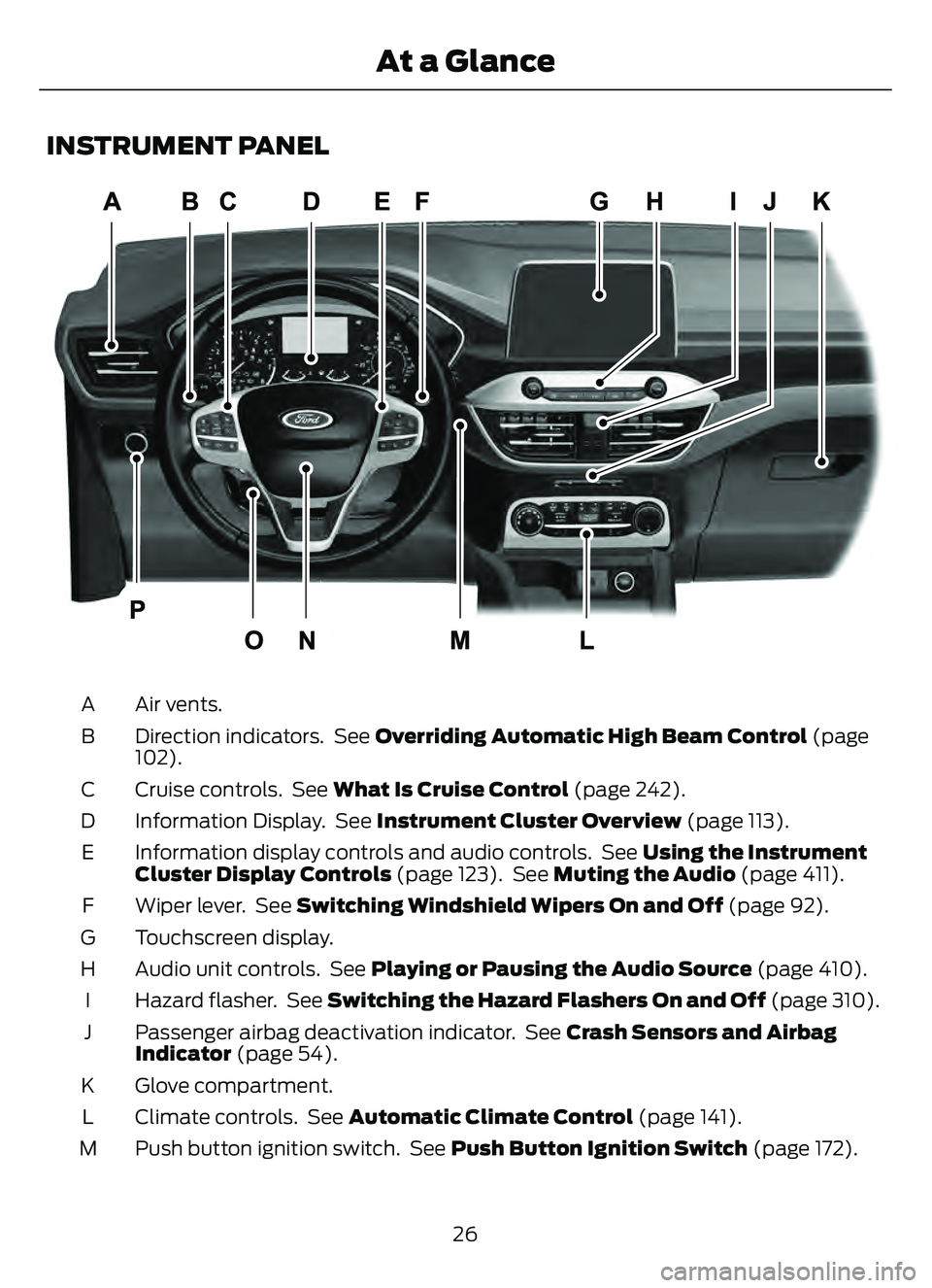
INSTRUMENT PANEL
E285284
Air vents.
A
Direction indicators. See Overriding Automatic High Beam Control (page
102).
B
Cruise controls. See What Is Cruise Control (page 242).
C
Information Display. See Instrument Cluster Overview (page 113).
D
Information display controls and audio controls. See Using the Instrument
Cluster Display Controls (page 123). See Muting the Audio (page 411).
E
Wiper lever. See Switching Windshield Wipers On and Off (page 92).
F
Touchscreen display.
G
Audio unit controls. See Playing or Pausing the Audio Source (page 410).
H
Hazard flasher. See Switching the Hazard Flashers On and Off (page 310).
I
Passenger airbag deactivation indicator. See Crash Sensors and Airbag
Indicator (page 54).
J
Glove compartment.
K
Climate controls. See Automatic Climate Control (page 141).
L
Push button ignition switch. See Push Button Ignition Switch (page 172).
M
26
At a Glance
Page 95 of 585
WIPERS
WIPER PRECAUTIONS
Do not operate the wipers on a dry
windshield. This could scratch the glass or
damage the wiper blades. Use the
windshield washers before wiping a dry
windshield.
Fully defrost the windshield before you
switch the windshield wipers on.
Switch the windshield wipers off before
entering a car wash.
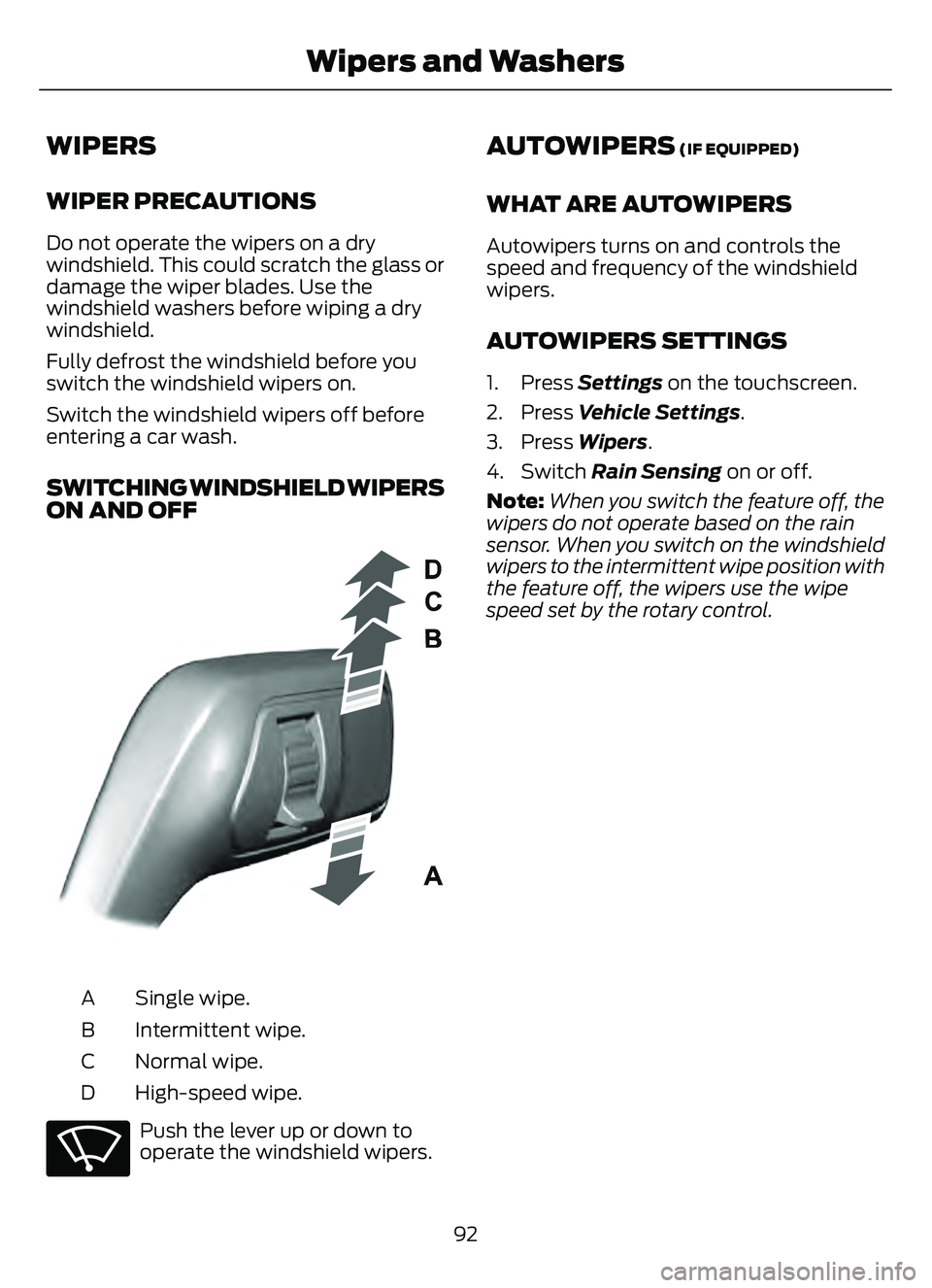
SWITCHING WINDSHIELD WIPERS
ON AND OFF
E295996E295996
Single wipe.
A
Intermittent wipe.
B
Normal wipe.
C
High-speed wipe.
D
E270969
Push the lever up or down to
operate the windshield wipers.
AUTOWIPERS (IF EQUIPPED)
WHAT ARE AUTOWIPERS
Autowipers turns on and controls the
speed and frequency of the windshield
wipers.
AUTOWIPERS SETTINGS
1. Press Settings on the touchscreen.
2. Press Vehicle Settings .
3. Press Wipers .
4. Switch Rain Sensing on or off.
Note: When you switch the feature off, the
wipers do not operate based on the rain
sensor. When you switch on the windshield
wipers to the intermittent wipe position with
the feature off, the wipers use the wipe
speed set by the rotary control.
92
Wipers and Washers
Page 96 of 585
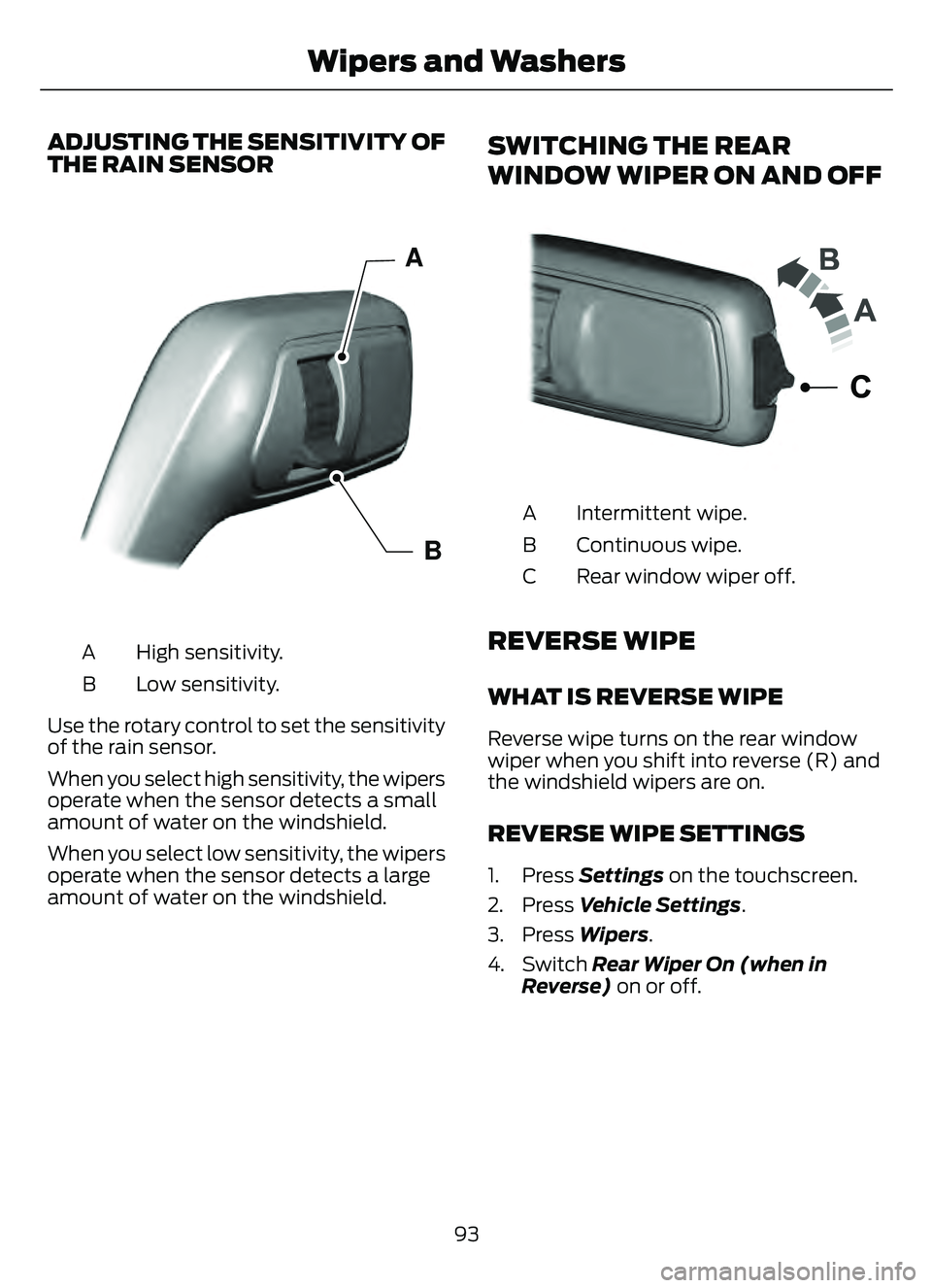
ADJUSTING THE SENSITIVITY OF
THE RAIN SENSOR
E308824E308824
A
B
High sensitivity.
A
Low sensitivity.
B
Use the rotary control to set the sensitivity
of the rain sensor.
When you select high sensitivity, the wipers
operate when the sensor detects a small
amount of water on the windshield.
When you select low sensitivity, the wipers
operate when the sensor detects a large
amount of water on the windshield.
SWITCHING THE REAR
WINDOW WIPER ON AND OFF
E2422324
Intermittent wipe.
A
Continuous wipe.
B
Rear window wiper off.
C
REVERSE WIPE
WHAT IS REVERSE WIPE
Reverse wipe turns on the rear window
wiper when you shift into reverse (R) and
the windshield wipers are on.
REVERSE WIPE SETTINGS
1. Press Settings on the touchscreen.
2. Press Vehicle Settings .
3. Press Wipers .
4. Switch Rear Wiper On (when in Reverse) on or off.
93
Wipers and Washers
Page 97 of 585
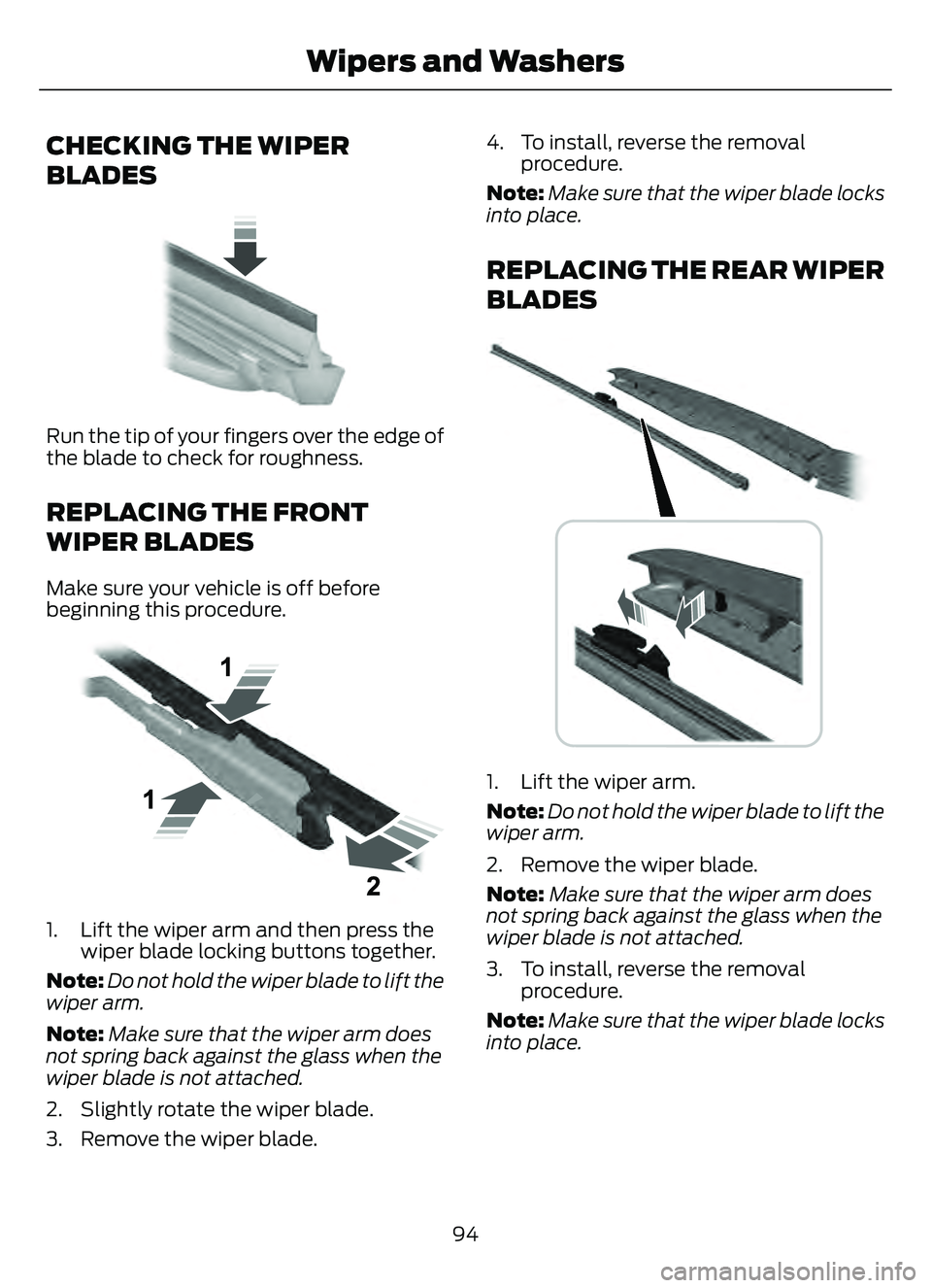
CHECKING THE WIPER
BLADES
E142463
Run the tip of your fingers over the edge of
the blade to check for roughness.
REPLACING THE FRONT
WIPER BLADES
Make sure your vehicle is off before
beginning this procedure.
E1299990E1299990
1. Lift the wiper arm and then press thewiper blade locking buttons together.
Note: Do not hold the wiper blade to lift the
wiper arm.
Note: Make sure that the wiper arm does
not spring back against the glass when the
wiper blade is not attached.
2. Slightly rotate the wiper blade.
3. Remove the wiper blade. 4. To install, reverse the removal
procedure.
Note: Make sure that the wiper blade locks
into place.
REPLACING THE REAR WIPER
BLADES
E271380
1. Lift the wiper arm.
Note: Do not hold the wiper blade to lift the
wiper arm.
2. Remove the wiper blade.
Note: Make sure that the wiper arm does
not spring back against the glass when the
wiper blade is not attached.
3. To install, reverse the removal procedure.
Note: Make sure that the wiper blade locks
into place.
94
Wipers and Washers
Page 98 of 585
WASHERS
WASHER PRECAUTIONS
WARNING: If you operate your
vehicle in temperatures below 41°F
(5°C), use washer fluid with antifreeze
protection. Failure to use washer fluid
with antifreeze protection in cold
weather could result in impaired
windshield vision and increase the risk
of injury or accident.
Do not operate the washers when the
washer reservoir is empty. This could cause
the washer pump to overheat.
Keep the outside of the windshield clean.
The rain sensor is very sensitive and the
wipers may operate if dirt, mist or insects
hit the windshield.
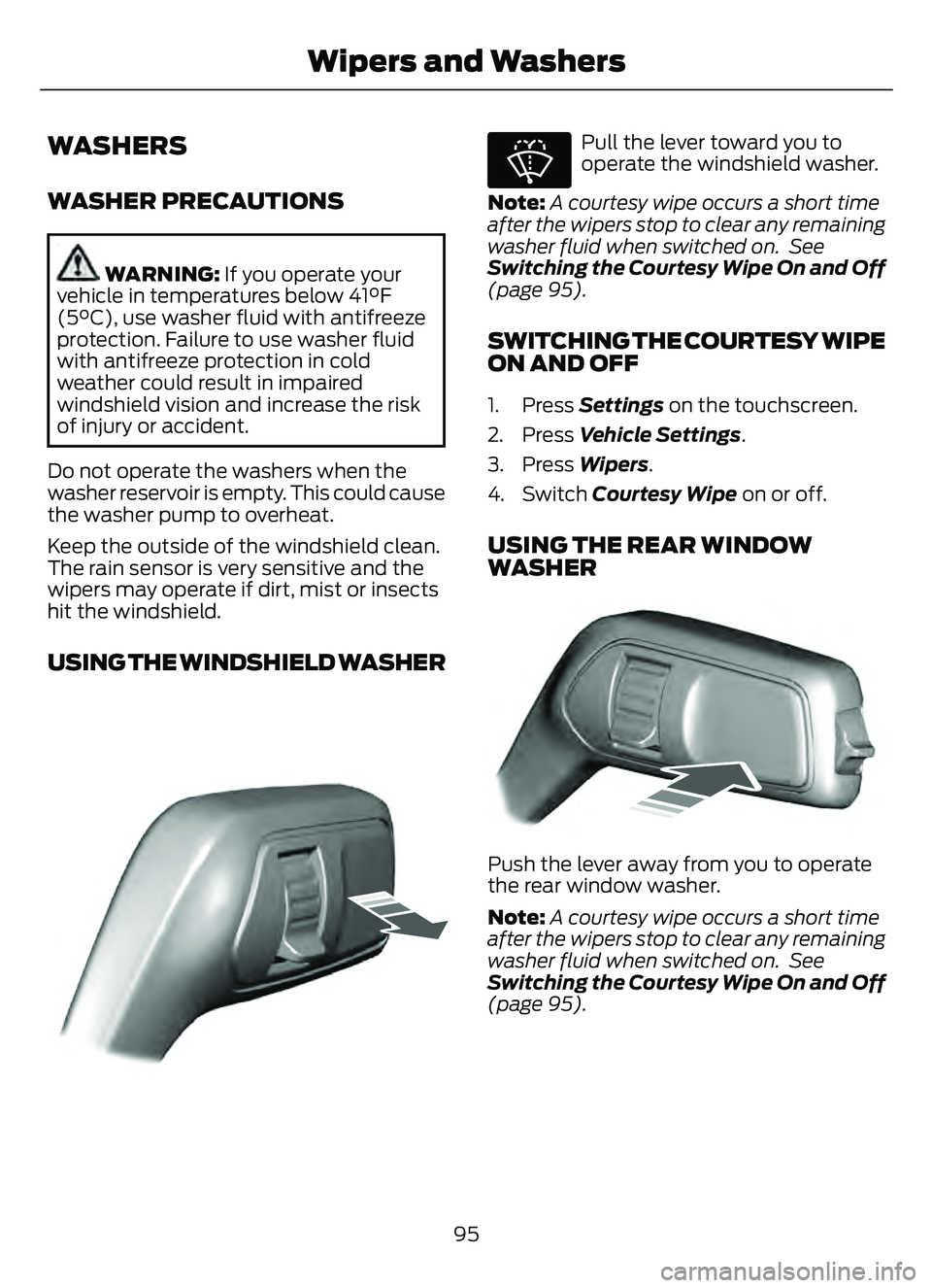
USING THE WINDSHIELD WASHER
E308825
E270967
Pull the lever toward you to
operate the windshield washer.
Note: A courtesy wipe occurs a short time
after the wipers stop to clear any remaining
washer fluid when switched on. See
Switching the Courtesy Wipe On and Off
(page 95).
SWITCHING THE COURTESY WIPE
ON AND OFF
1. Press Settings on the touchscreen.
2. Press Vehicle Settings .
3. Press Wipers .
4. Switch Courtesy Wipe on or off.
USING THE REAR WINDOW
WASHER
E2422224344343433334324434
Push the lever away from you to operate
the rear window washer.
Note:A courtesy wipe occurs a short time
after the wipers stop to clear any remaining
washer fluid when switched on. See
Switching the Courtesy Wipe On and Off
(page 95).
95
Wipers and Washers
Page 99 of 585
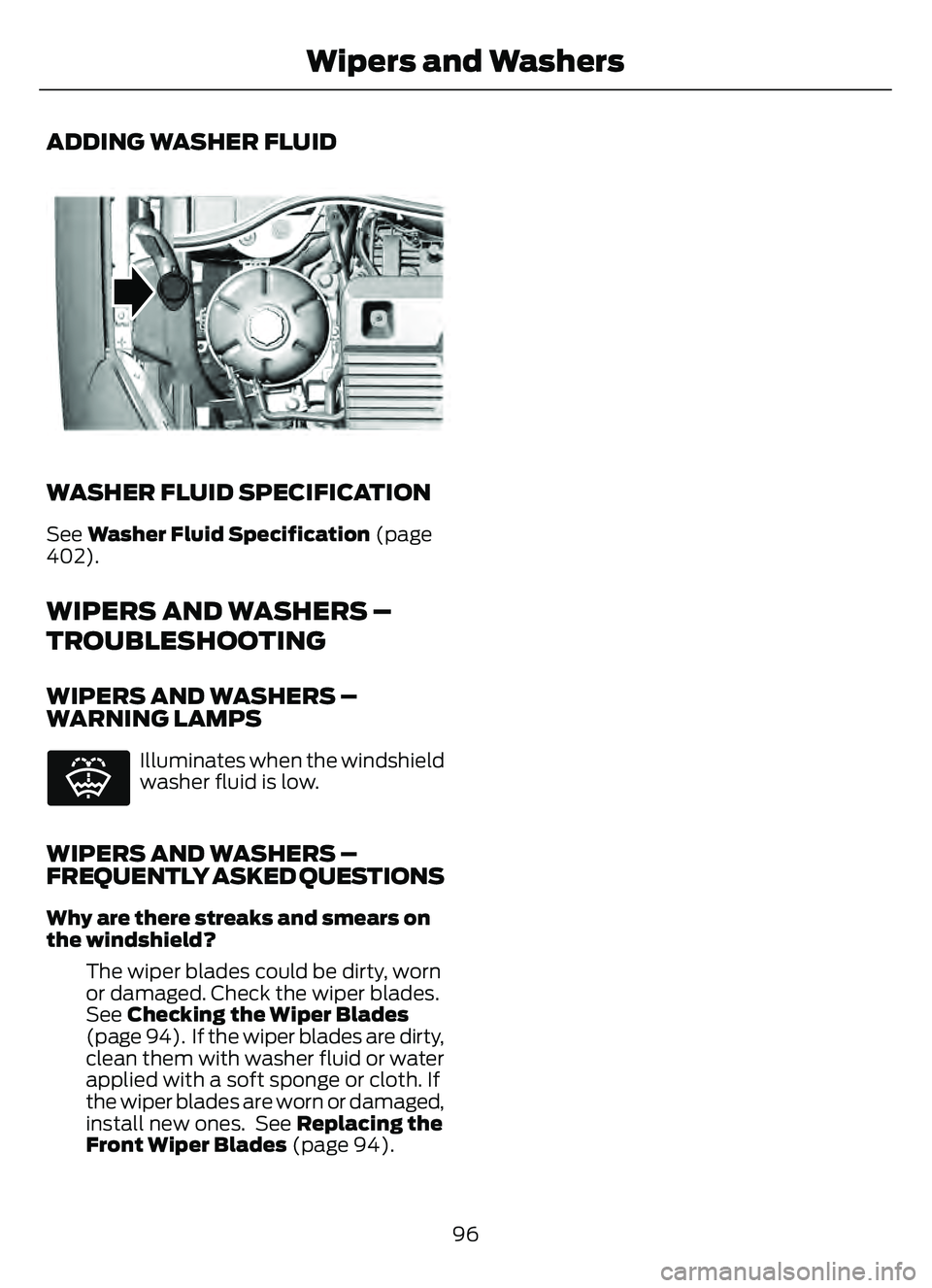
ADDING WASHER FLUID
E334429E334429
WASHER FLUID SPECIFICATION
See Washer Fluid Specification (page
402).
WIPERS AND WASHERS –
TROUBLESHOOTING
WIPERS AND WASHERS –
WARNING LAMPS
E132353
Illuminates when the windshield
washer fluid is low.
WIPERS AND WASHERS –
FREQUENTLY ASKED QUESTIONS
Why are there streaks and smears on
the windshield?
The wiper blades could be dirty, worn
or damaged. Check the wiper blades.
See Checking the Wiper Blades
(page 94). If the wiper blades are dirty,
clean them with washer fluid or water
applied with a soft sponge or cloth. If
the wiper blades are worn or damaged,
install new ones. See Replacing the
Front Wiper Blades (page 94).
96
Wipers and Washers
Page 101 of 585
HEADLAMPS –
TROUBLESHOOTING
HEADLAMPS – FREQUENTLY
ASKED QUESTIONS
Why is there condensation in the
headlamps?Headlamps have vents to
accommodate normal changes in air
pressure. Condensation can be a
natural by-product of this design.
When moist air enters the lamp
assembly through the vents, there is a
possibility that condensation can
occur when the temperature is cold.
When normal condensation occurs, a
fine mist can form on the interior of the
lens. The fine mist eventually clears
and exits through the vents during
normal operation.
How much condensation is
acceptable? The presence of a fine mist, for
example no streaks, drip marks or
large droplets. A fine mist covers less
than 50% of the lens.
How long may it take for the
acceptable condensation to be
cleared? Clearing time may take as long as 48
hours under dry weather conditions.
How much condensation is
unacceptable? A water puddle inside the lamp.
Streaks, drip marks or large droplets
present on the interior of the lens.
What should I do if unacceptable
condensation is present? Have your vehicle checked as soon as
possible. Why do my headlamps turn off when I
have them switched on when I switch
my vehicle off?
The battery saver turns the headlamps
off after a short period of time after
you switch your vehicle off.AUTOLAMPS
WHAT ARE AUTOLAMPS
WARNING: The system does not
relieve you of your responsibility to drive
with due care and attention. You may
need to override the system if it does not
turn the headlamps on in low visibility
conditions, for example daytime fog.
Autolamps turn the headlamps on in low
light situations or when the windshield
wipers operate.
AUTOLAMP SETTINGS
1. Press Settings on the touchscreen.
2. Press Vehicle Settings .
3. Press Lighting.
4. Press Autolamp Delay.
5. Press a setting.
98
Exterior Lighting
Page 359 of 585
Note:If you intend on parking your vehicle
for an extended period after cleaning the
wheels with a wheel cleaner, drive your
vehicle for a few minutes before doing so to
reduce the risk of increased corrosion of the
brake discs, brake pads and linings.
Tires
• Maintain recommended air pressure.
Note: If you intend on parking your vehicle
for an extended period after cleaning the
wheels with a wheel cleaner, drive your
vehicle for a few minutes before doing so.
This reduces the risk of corrosion of the
brake discs, brake pads and linings.
REMOVING YOUR VEHICLE
FROM STORAGE
When your vehicle is ready to come out of
storage, do the following:
• We recommend that you change the engine oil before you use your vehicle
again.
• Wash your vehicle to remove any dirt or grease film build-up on window
surfaces.
• Check windshield wipers for any deterioration.
• Check under the hood for any foreign material that may have collected
during storage such as mice or squirrel
nests.
• Check the exhaust for any foreign material that may have collected
during storage.
• Check tire pressures and set tire inflation per the Tire Label.
• Check brake pedal operation. Drive your vehicle 15 ft (4.5 m) back and
forth to remove rust build-up. • Check fluid levels (including coolant,
oil and gas) to make sure there are no
leaks, and fluids are at recommended
levels.
• If you remove the battery, clean the battery cable ends and check for
damage.
Contact an authorized dealer if you have
any concerns or issues.
356
Storing Your Vehicle