light FORD EXCURSION 2003 1.G Owner's Manual
[x] Cancel search | Manufacturer: FORD, Model Year: 2003, Model line: EXCURSION, Model: FORD EXCURSION 2003 1.GPages: 240, PDF Size: 2.2 MB
Page 50 of 240
Function Number of
bulbsTrade number
Second row reading lamp 2 578
Third row reading lamp 2 211-2
License lamp 2 168
All replacement bulbs are clear in color except where noted.
To replace all instrument panel lights - see your dealer
Interior bulbs
Check the operation of all bulbs frequently.
Replacing headlamp bulbs
1. Make sure that the headlamp control is in the OFF position then open
the hood.
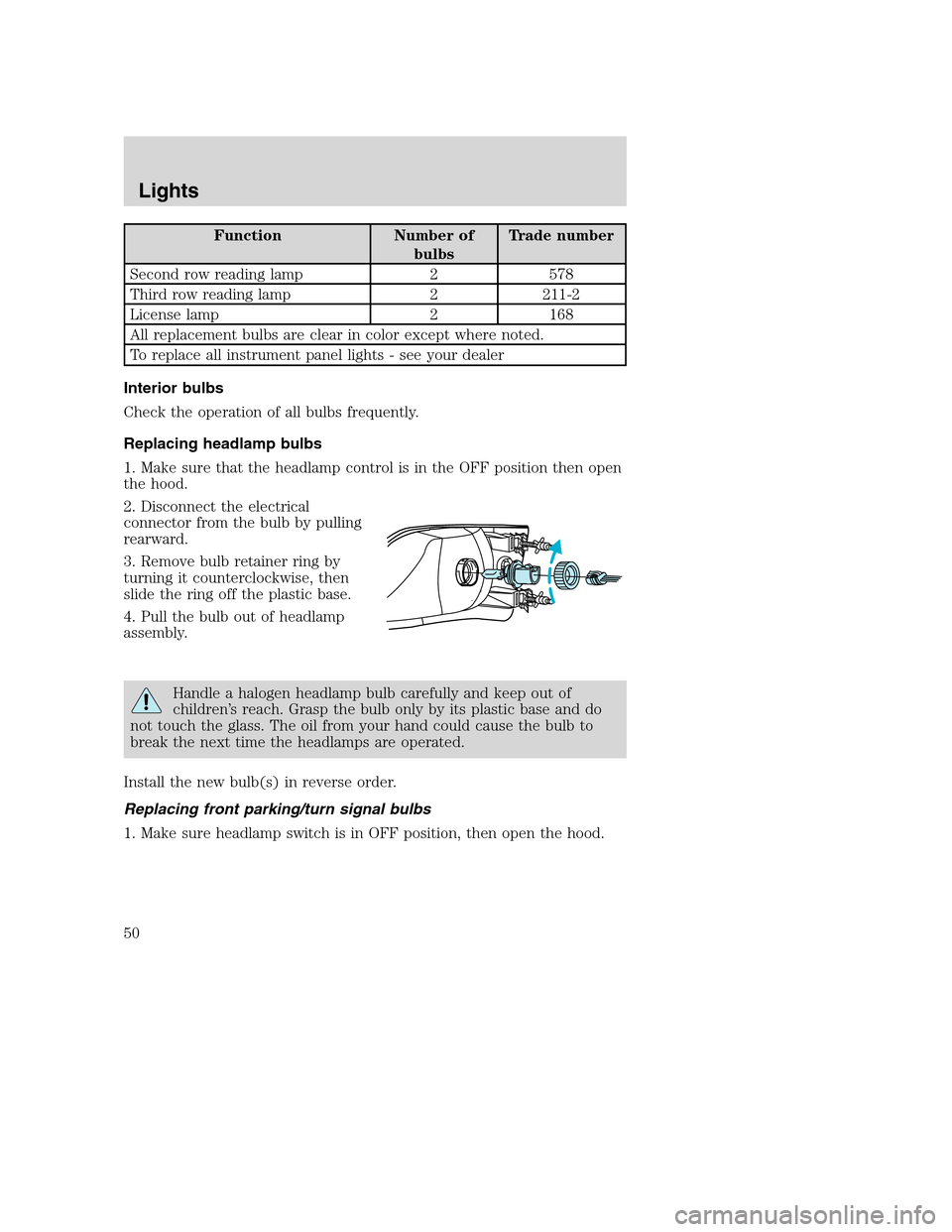
2. Disconnect the electrical
connector from the bulb by pulling
rearward.
3. Remove bulb retainer ring by
turning it counterclockwise, then
slide the ring off the plastic base.
4. Pull the bulb out of headlamp
assembly.
Handle a halogen headlamp bulb carefully and keep out of
children’s reach. Grasp the bulb only by its plastic base and do
not touch the glass. The oil from your hand could cause the bulb to
break the next time the headlamps are operated.
Install the new bulb(s) in reverse order.
Replacing front parking/turn signal bulbs
1. Make sure headlamp switch is in OFF position, then open the hood.
Lights
50
Page 51 of 240
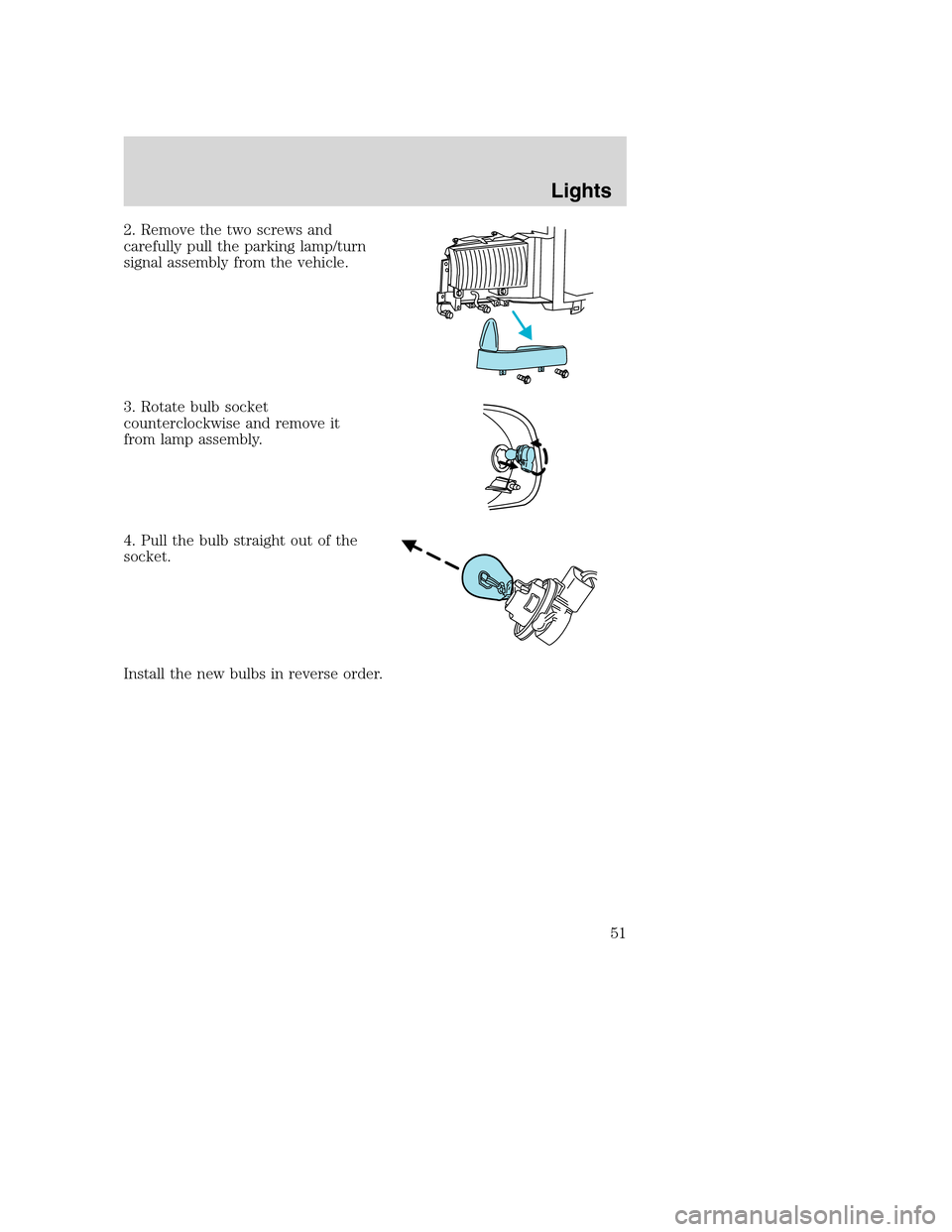
2. Remove the two screws and
carefully pull the parking lamp/turn
signal assembly from the vehicle.
3. Rotate bulb socket
counterclockwise and remove it
from lamp assembly.
4. Pull the bulb straight out of the
socket.
Install the new bulbs in reverse order.
Lights
51
Page 52 of 240
Replacing foglamp bulbs
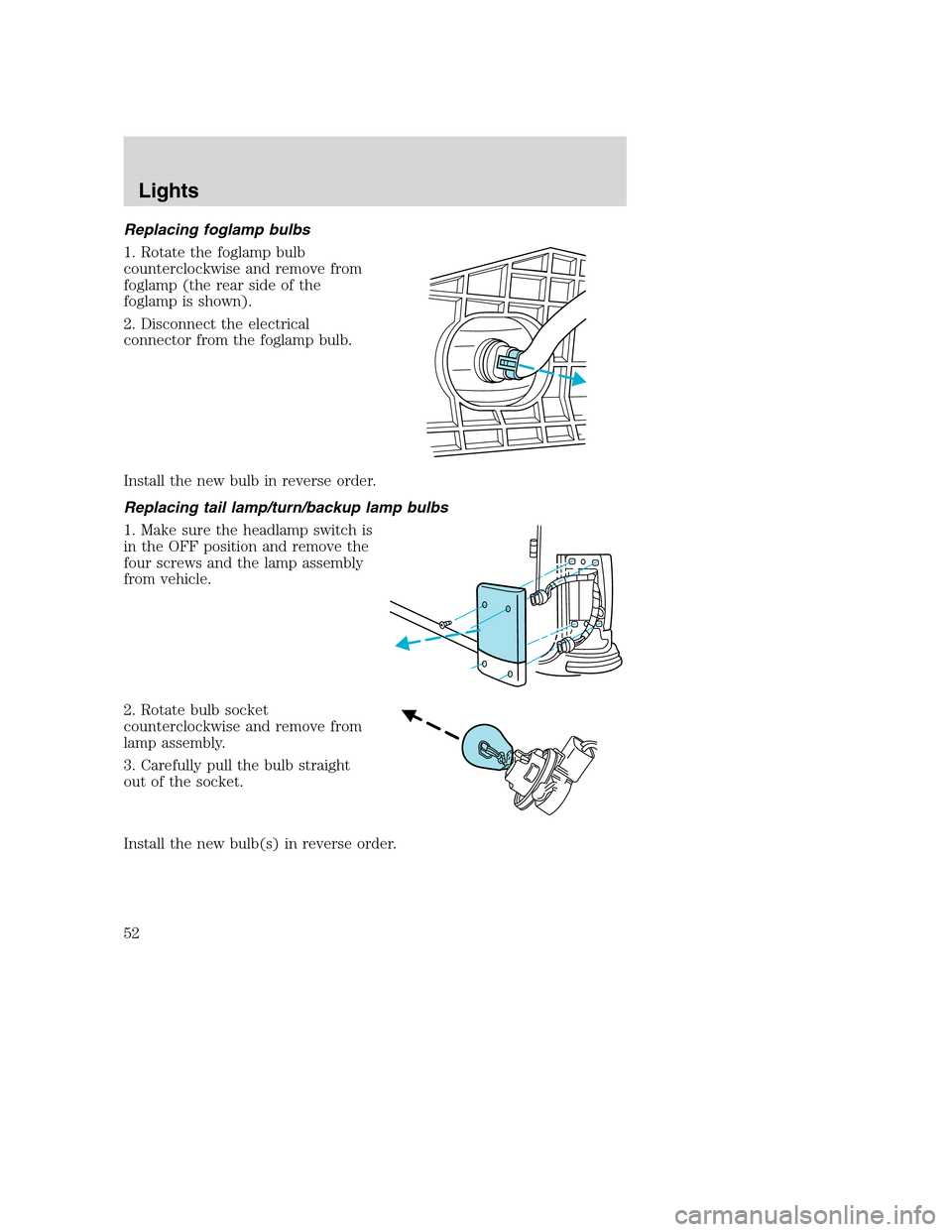
1. Rotate the foglamp bulb
counterclockwise and remove from
foglamp (the rear side of the
foglamp is shown).
2. Disconnect the electrical
connector from the foglamp bulb.
Install the new bulb in reverse order.
Replacing tail lamp/turn/backup lamp bulbs
1. Make sure the headlamp switch is
in the OFF position and remove the
four screws and the lamp assembly
from vehicle.
2. Rotate bulb socket
counterclockwise and remove from
lamp assembly.
3. Carefully pull the bulb straight
out of the socket.
Install the new bulb(s) in reverse order.
Lights
52
Page 53 of 240
Replacing high-mount brakelamp bulbs
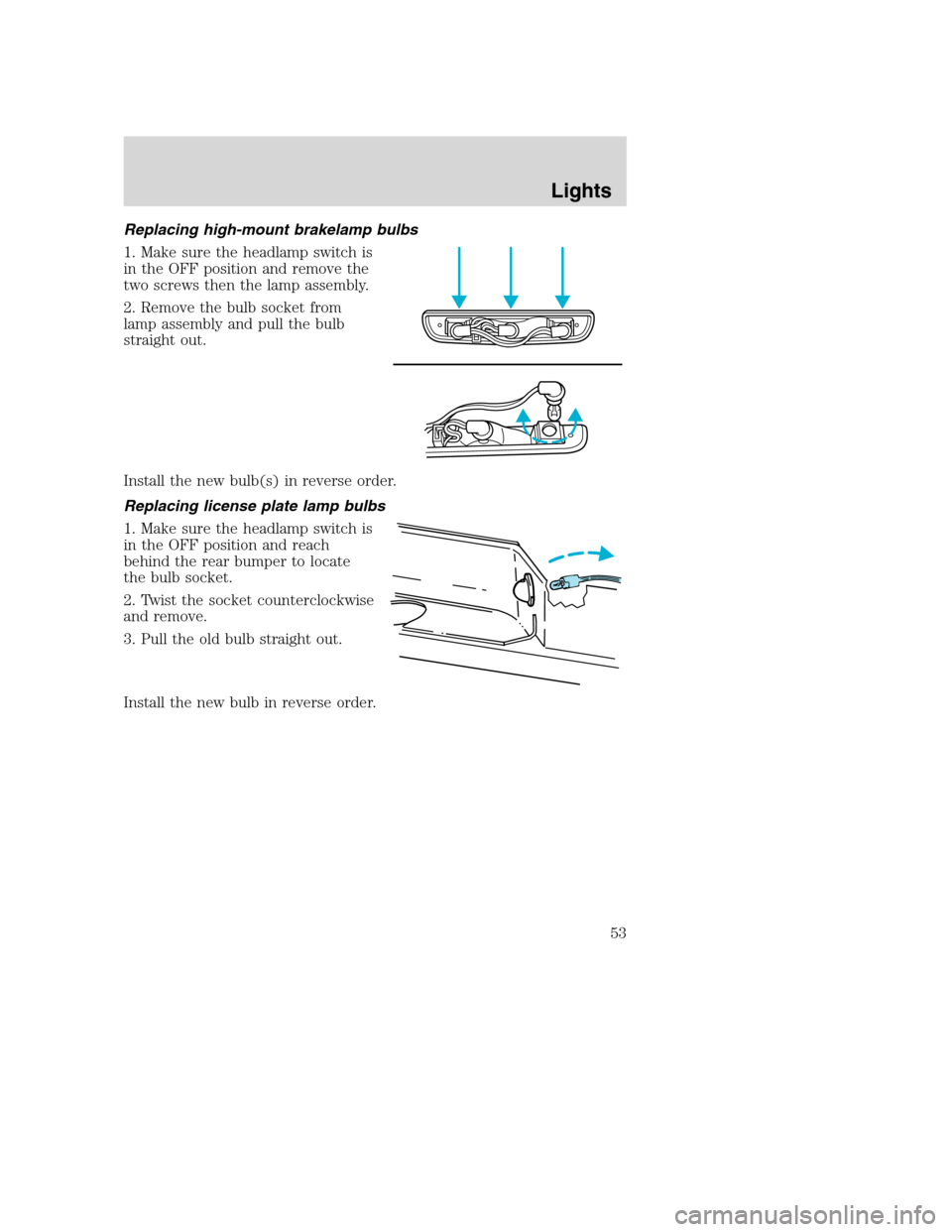
1. Make sure the headlamp switch is
in the OFF position and remove the
two screws then the lamp assembly.
2. Remove the bulb socket from
lamp assembly and pull the bulb
straight out.
Install the new bulb(s) in reverse order.
Replacing license plate lamp bulbs
1. Make sure the headlamp switch is
in the OFF position and reach
behind the rear bumper to locate
the bulb socket.
2. Twist the socket counterclockwise
and remove.
3. Pull the old bulb straight out.
Install the new bulb in reverse order.
Lights
53
Page 56 of 240
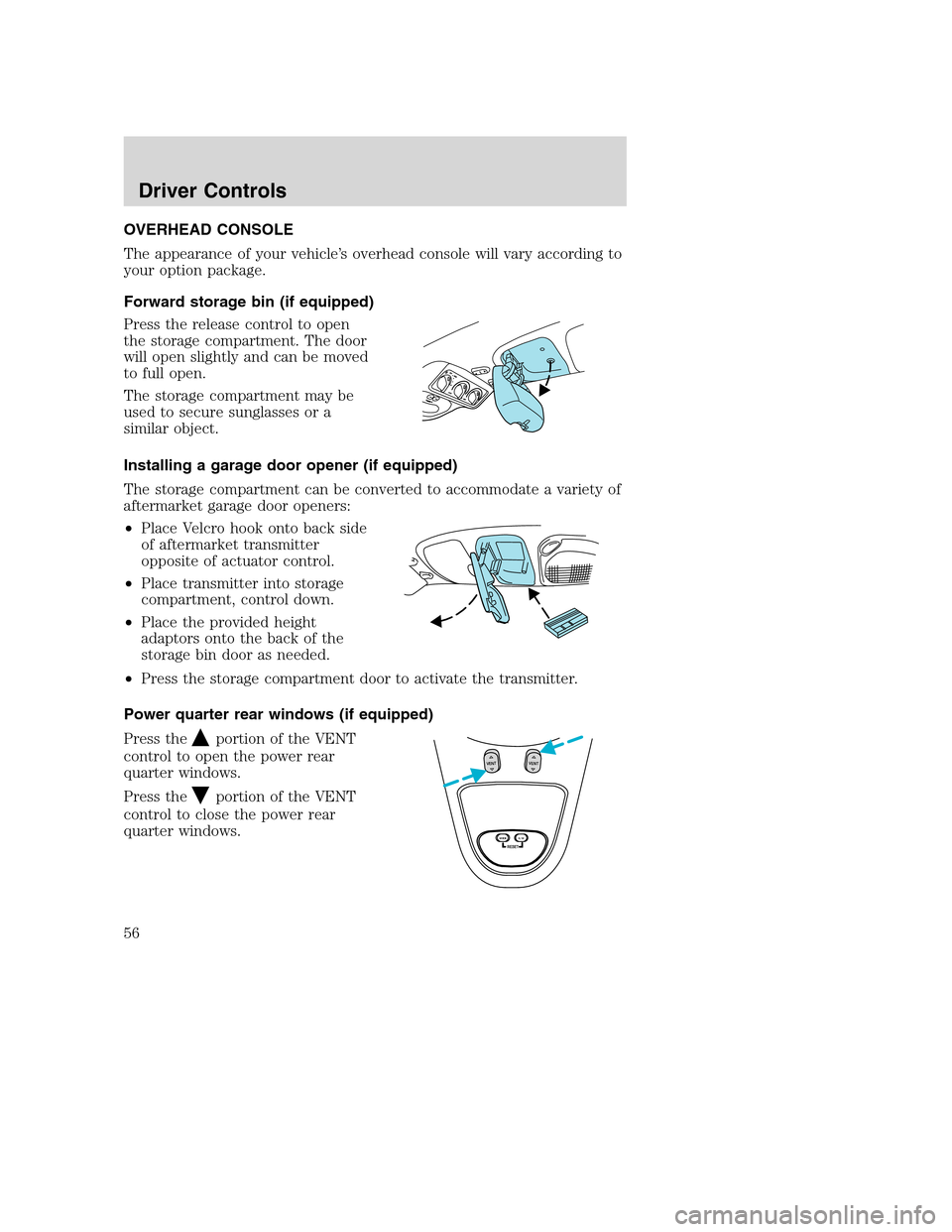
OVERHEAD CONSOLE
The appearance of your vehicle’s overhead console will vary according to
your option package.
Forward storage bin (if equipped)
Press the release control to open
the storage compartment. The door
will open slightly and can be moved
to full open.
The storage compartment may be
used to secure sunglasses or a
similar object.
Installing a garage door opener (if equipped)
The storage compartment can be converted to accommodate a variety of
aftermarket garage door openers:
•Place Velcro hook onto back side
of aftermarket transmitter
opposite of actuator control.
•Place transmitter into storage
compartment, control down.
•Place the provided height
adaptors onto the back of the
storage bin door as needed.
•Press the storage compartment door to activate the transmitter.
Power quarter rear windows (if equipped)
Press the
portion of the VENT
control to open the power rear
quarter windows.
Press the
portion of the VENT
control to close the power rear
quarter windows.
RESET
V
E
N
TV
E
N
T
MODE E/M
Driver Controls
56
Page 57 of 240
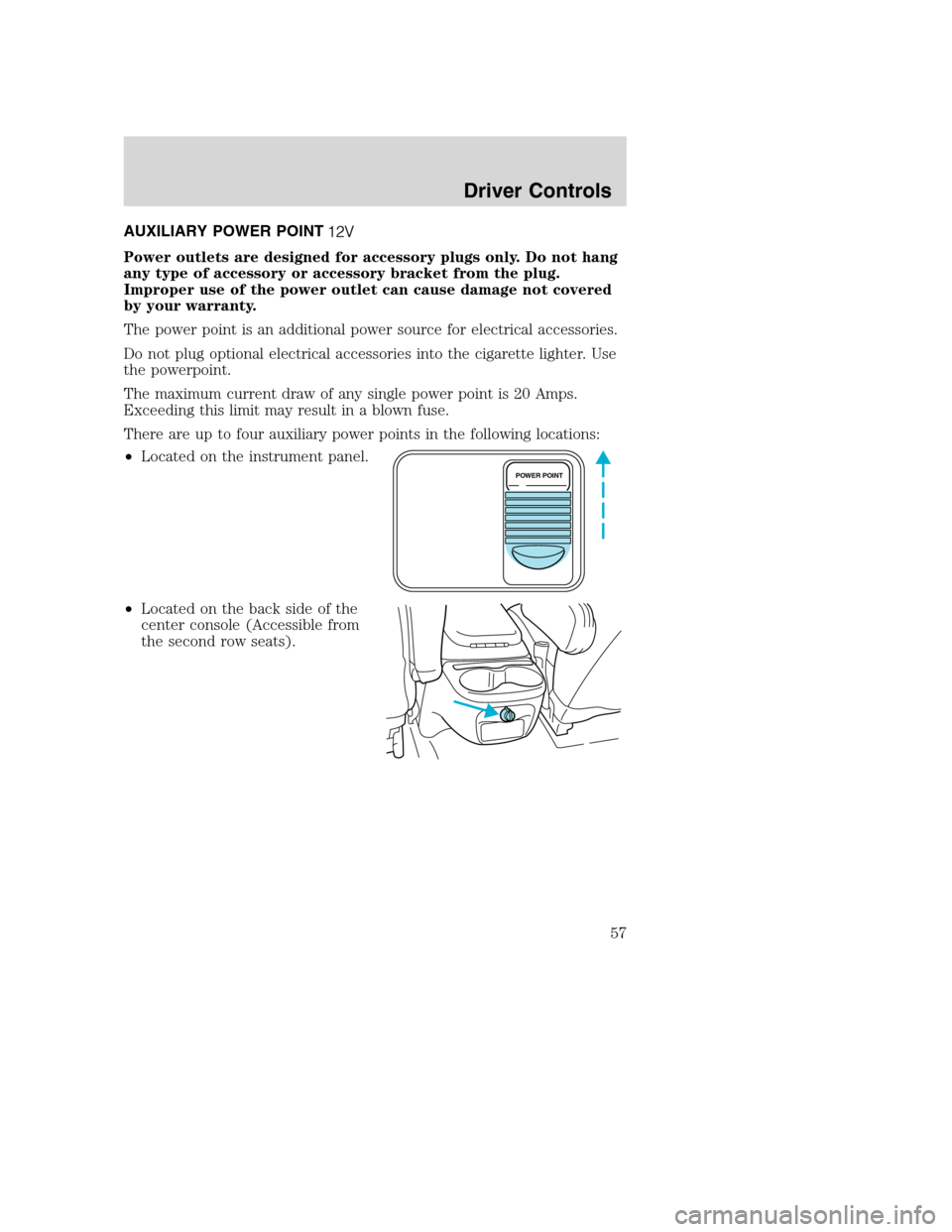
AUXILIARY POWER POINT
Power outlets are designed for accessory plugs only. Do not hang
any type of accessory or accessory bracket from the plug.
Improper use of the power outlet can cause damage not covered
by your warranty.
The power point is an additional power source for electrical accessories.
Do not plug optional electrical accessories into the cigarette lighter. Use
the powerpoint.
The maximum current draw of any single power point is 20 Amps.
Exceeding this limit may result in a blown fuse.
There are up to four auxiliary power points in the following locations:
•Located on the instrument panel.
•Located on the back side of the
center console (Accessible from
the second row seats).
POWER POINT
Driver Controls
57
Page 59 of 240
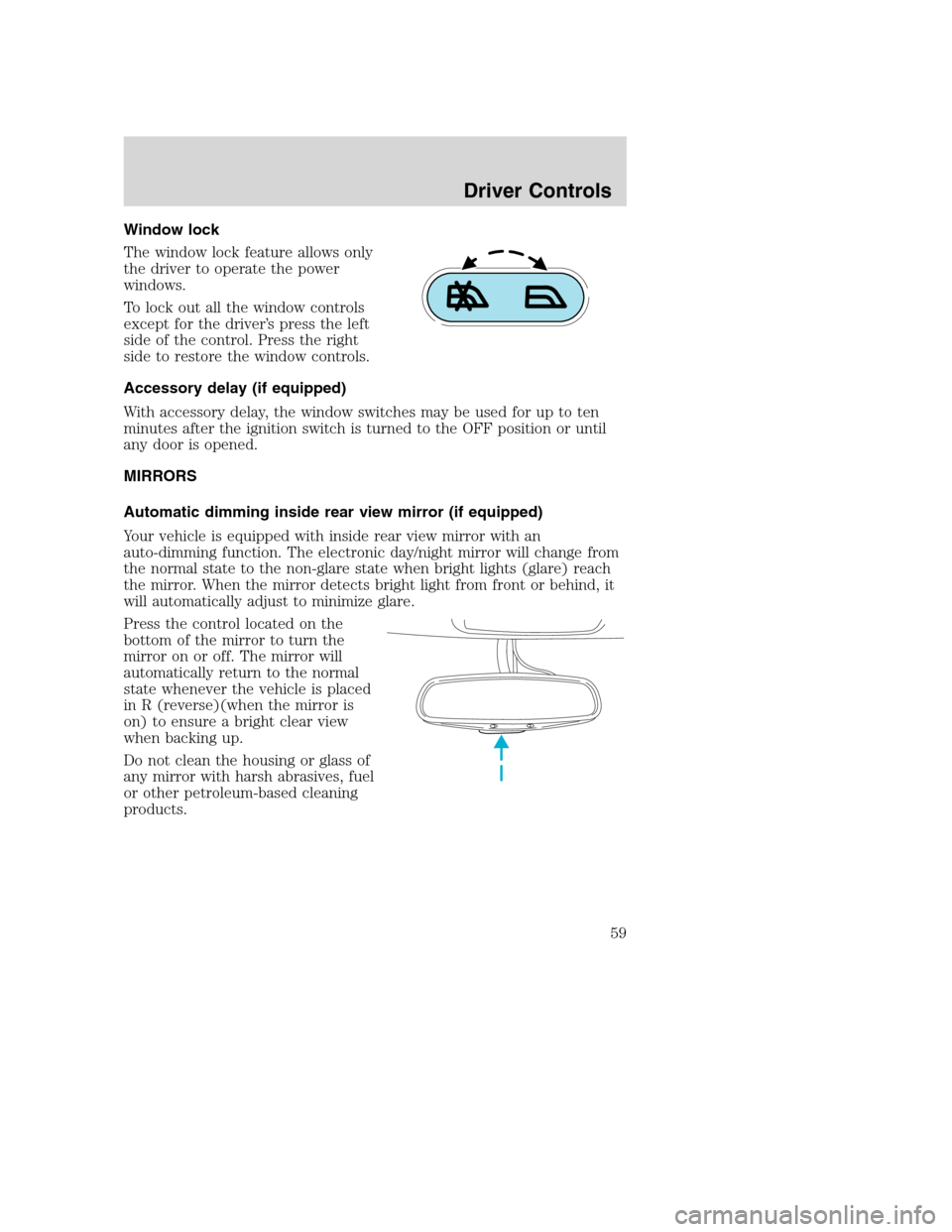
Window lock
The window lock feature allows only
the driver to operate the power
windows.
To lock out all the window controls
except for the driver’s press the left
side of the control. Press the right
side to restore the window controls.
Accessory delay (if equipped)
With accessory delay, the window switches may be used for up to ten
minutes after the ignition switch is turned to the OFF position or until
any door is opened.
MIRRORS
Automatic dimming inside rear view mirror (if equipped)
Your vehicle is equipped with inside rear view mirror with an
auto-dimming function. The electronic day/night mirror will change from
the normal state to the non-glare state when bright lights (glare) reach
the mirror. When the mirror detects bright light from front or behind, it
will automatically adjust to minimize glare.
Press the control located on the
bottom of the mirror to turn the
mirror on or off. The mirror will
automatically return to the normal
state whenever the vehicle is placed
in R (reverse)(when the mirror is
on) to ensure a bright clear view
when backing up.
Do not clean the housing or glass of
any mirror with harsh abrasives, fuel
or other petroleum-based cleaning
products.
Driver Controls
59
Page 62 of 240
Do not use the speed control in heavy traffic or on roads that
are winding, slippery or unpaved.
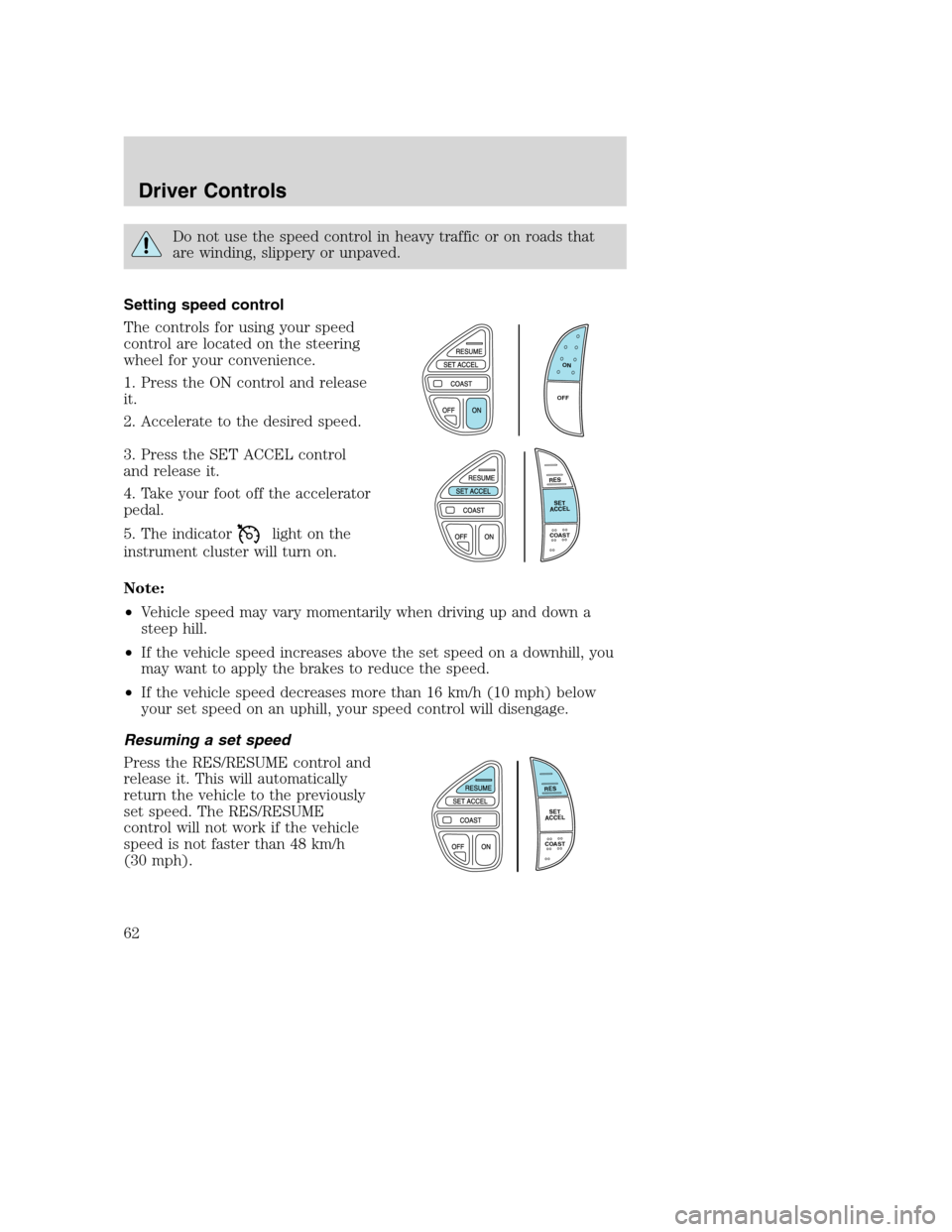
Setting speed control
The controls for using your speed
control are located on the steering
wheel for your convenience.
1. Press the ON control and release
it.
2. Accelerate to the desired speed.
3. Press the SET ACCEL control
and release it.
4. Take your foot off the accelerator
pedal.
5. The indicator
light on the
instrument cluster will turn on.
Note:
•Vehicle speed may vary momentarily when driving up and down a
steep hill.
•If the vehicle speed increases above the set speed on a downhill, you
may want to apply the brakes to reduce the speed.
•If the vehicle speed decreases more than 16 km/h (10 mph) below
your set speed on an uphill, your speed control will disengage.
Resuming a set speed
Press the RES/RESUME control and
release it. This will automatically
return the vehicle to the previously
set speed. The RES/RESUME
control will not work if the vehicle
speed is not faster than 48 km/h
(30 mph).
O
N
O
F
F
R
E
S
S
E
T
A
C
C
E
L
COAST
R
E
S
S
E
T
A
C
C
E
L
COAST
Driver Controls
62
Page 64 of 240
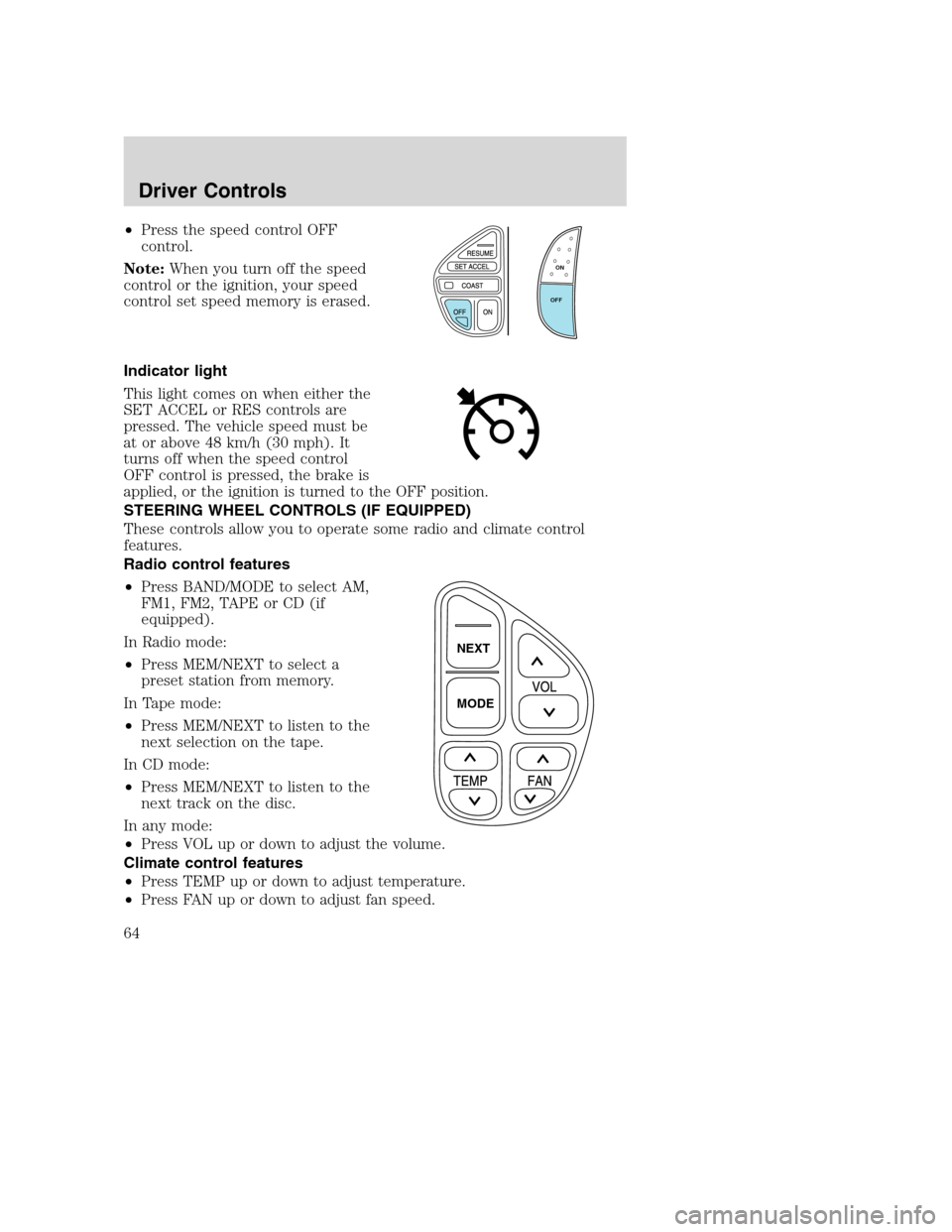
•Press the speed control OFF
control.
Note:When you turn off the speed
control or the ignition, your speed
control set speed memory is erased.
Indicator light
This light comes on when either the
SET ACCEL or RES controls are
pressed. The vehicle speed must be
at or above 48 km/h (30 mph). It
turns off when the speed control
OFF control is pressed, the brake is
applied, or the ignition is turned to the OFF position.
STEERING WHEEL CONTROLS (IF EQUIPPED)
These controls allow you to operate some radio and climate control
features.
Radio control features
•Press BAND/MODE to select AM,
FM1, FM2, TAPE or CD (if
equipped).
In Radio mode:
•Press MEM/NEXT to select a
preset station from memory.
In Tape mode:
•Press MEM/NEXT to listen to the
next selection on the tape.
In CD mode:
•Press MEM/NEXT to listen to the
next track on the disc.
In any mode:
•Press VOL up or down to adjust the volume.
Climate control features
•Press TEMP up or down to adjust temperature.
•Press FAN up or down to adjust fan speed.
O
N
O
F
F
NEXT
MODE
Driver Controls
64
Page 67 of 240
Compass
The compass display is contained in the overhead console. The vehicle
heading is displayed as one of N, NE, E, SE, S, SW, W and NW.
The compass heading is displayed in average fuel economy modes, fuel
range modes and temperature modes.
The compass reading may be affected when you drive near large
buildings, bridges, power lines and powerful broadcast antenna. Magnetic
or metallic objects placed in or on the vehicle may also affect compass
accuracy. Adjustments may need to be made to the zone and calibration
of the compass.
Compass zone adjustment
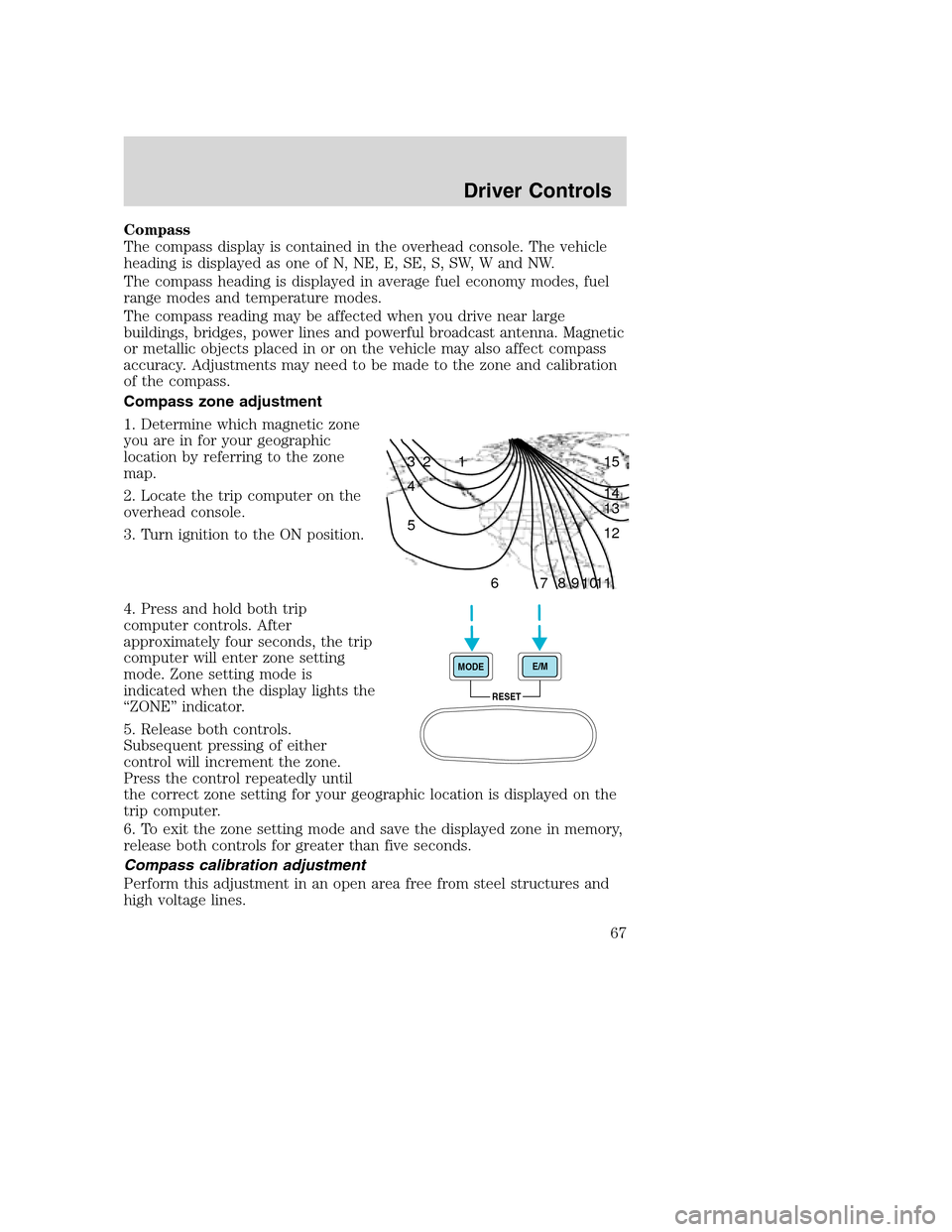
1. Determine which magnetic zone
you are in for your geographic
location by referring to the zone
map.
2. Locate the trip computer on the
overhead console.
3. Turn ignition to the ON position.
4. Press and hold both trip
computer controls. After
approximately four seconds, the trip
computer will enter zone setting
mode. Zone setting mode is
indicated when the display lights the
“ZONE” indicator.
5. Release both controls.
Subsequent pressing of either
control will increment the zone.
Press the control repeatedly until
the correct zone setting for your geographic location is displayed on the
trip computer.
6. To exit the zone setting mode and save the displayed zone in memory,
release both controls for greater than five seconds.
Compass calibration adjustment
Perform this adjustment in an open area free from steel structures and
high voltage lines.
1 2 3
4
5
6 7 8 9 101112 13 14 15
RESET MODEE/M
Driver Controls
67