display FORD EXPEDITION 2005 2.G User Guide
[x] Cancel search | Manufacturer: FORD, Model Year: 2005, Model line: EXPEDITION, Model: FORD EXPEDITION 2005 2.GPages: 368, PDF Size: 11.76 MB
Page 31 of 368
Press TEXT/SEL to increase/decreasevolume compensation
levels. The selected level will appear in the display.
•Compression:In CD/MP3 modes, select to bring loud and soft
passages together for a more consistent listening level.
•Folder/Track mode:In MP3 mode, press MENU until MODE appears
in teh display. Use SEL to toggle between FOLDER (only tracks within
selected folder are accessible) or TRACK (all tracks on disc are
accessible).
13.TUNE/CAT:In radio mode,
press to manually advance up/down
the frequency band. In satellite
radio mode, press CAT for a listing of available music categories.
CAT:CAT is only available when equipped with Satellite Radio. Your
radio comes equipped with Satellite ready capability. The kit to enable
Satellite reception is available through your dealer. Detailed Satellite
instructions are included with the dealer installed kit.Dealer installed
satellite kit only available in the continental United States.
For information regarding SIRIUS Satellite Radio, please call toll-free
888-539-SIRIUS (888-539-7474) or visit the SIRIUS website at
www.siriusradio.com
14.SEEK:Works in radio, tape and
CD modes. Press to access the
previous
or nextlistenable
radio station, tape selection or CD track.
15.BAND:Press to toggle between
AM/FM1/FM2 frequency bands.
Press while in tape or CD mode to
return to radio mode.
CD:Press CD to enter CD mode
and to play a CD already in the
system.
16.Power/volume:Press to turn
the system on/off. Turn to
raise/lower the volume.
If the volume is set above a certain
level and the ignition is turned off,
the volume will come back on at a
REVIEW COPY
2005 Expedition(exd), Owners Guide (post-2002-fmt)(own2002),
Market:USA_English(fus)
Entertainment Systems
31
Page 33 of 368
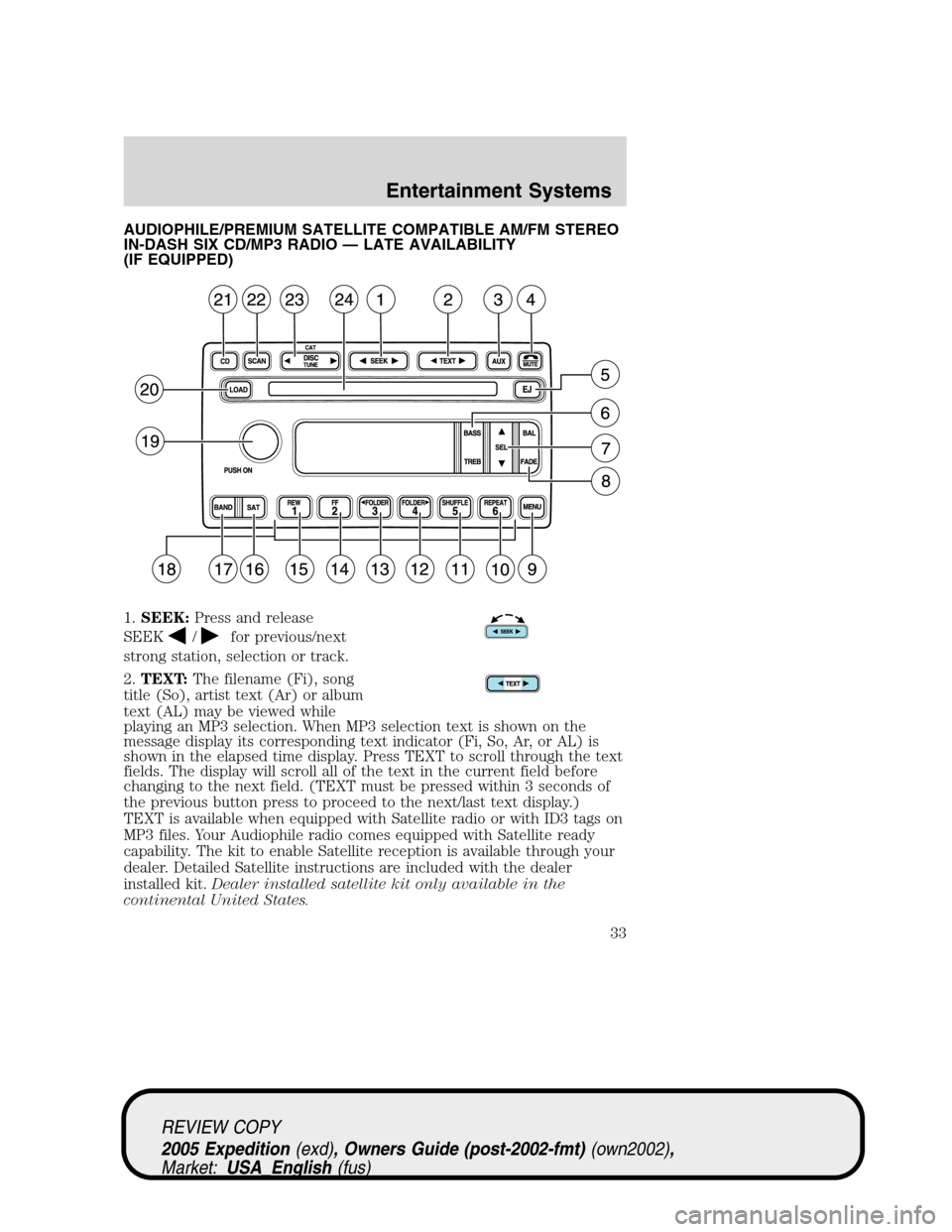
AUDIOPHILE/PREMIUM SATELLITE COMPATIBLE AM/FM STEREO
IN-DASH SIX CD/MP3 RADIO — LATE AVAILABILITY
(IF EQUIPPED)
1.SEEK:Press and release
SEEK
/for previous/next
strong station, selection or track.
2.TEXT:The filename (Fi), song
title (So), artist text (Ar) or album
text (AL) may be viewed while
playing an MP3 selection. When MP3 selection text is shown on the
message display its corresponding text indicator (Fi, So, Ar, or AL) is
shown in the elapsed time display. Press TEXT to scroll through the text
fields. The display will scroll all of the text in the current field before
changing to the next field. (TEXT must be pressed within 3 seconds of
the previous button press to proceed to the next/last text display.)
TEXT is available when equipped with Satellite radio or with ID3 tags on
MP3 files. Your Audiophile radio comes equipped with Satellite ready
capability. The kit to enable Satellite reception is available through your
dealer. Detailed Satellite instructions are included with the dealer
installed kit.Dealer installed satellite kit only available in the
continental United States.
REVIEW COPY
2005 Expedition(exd), Owners Guide (post-2002-fmt)(own2002),
Market:USA_English(fus)
Entertainment Systems
33
Page 35 of 368
Traffic (if equipped):Allows you to hear traffic broadcasts. With the
feature ON, press SEEK or SCAN to find a station broadcasting a traffic
report (if it is broadcasting RDS data).Traffic information is not
available in most U.S. markets.
FIND Program type (if equipped):Allows you to search
RDS-equipped stations for a certain category of music format: Classic,
Country, Info, Jazz, Oldies, R&B, Religious, Rock, Soft, Top 40.
Show TYPE (if equipped):Displays the station’s call letters and
format.
Compression:Brings soft and loud CD passages together for a more
consistent listening level when in CD mode. Press MENU until
compression status is displayed. Press the SEL control to enable the
compression feature when COMPRESS OFF is displayed. Press the SEL
control again to disable the feature when COMPRESS ON is displayed.
Occupancy mode (if equipped):Press SEL to select ALL, DRIVER or
REAR SEAT occupancy mode.
Folder/Track Mode:In MP3 mode, press MENU until MODE appears in
the display. Use SEL to toggle between FOLDER (only tracks within
selected folder are accessible) or TRACK (all tracks on the disc are
accessible).
Autoset:Allows you to set the strongest local radio stations without
losing your original manually set preset stations for AM/FM1/FM2 . Press
MENU until AUTOSET appears in the display. Press SEL to toggle
ON/OFF. When the six strongest stations are filled, the station stored in
preset 1 will begin playing. If there are less than six strong stations, the
system will store the last one in the remaining presets. Press again to
disengage.
Speed sensitive volume:Radio volume changes automatically and
slightly with vehicle speed to compensate for road and wind noise.
Recommended level is 1–3. Level 0 turns the feature off and level 7 is
the maximum setting.
Press MENU until SPEED VOL X appears in the display. Then press SEL
to increase (
) or decrease () the volume setting. The level will
appear in the display.
Setting the clock:Press MENU until SELECT HOUR or SELECT
MINUTE is displayed. Use SEL to manually increase (
) or decrease
(
) the hours/minutes. Press MENU again to disengage clock mode.
REVIEW COPY
2005 Expedition(exd), Owners Guide (post-2002-fmt)(own2002),
Market:USA_English(fus)
Entertainment Systems
35
Page 38 of 368
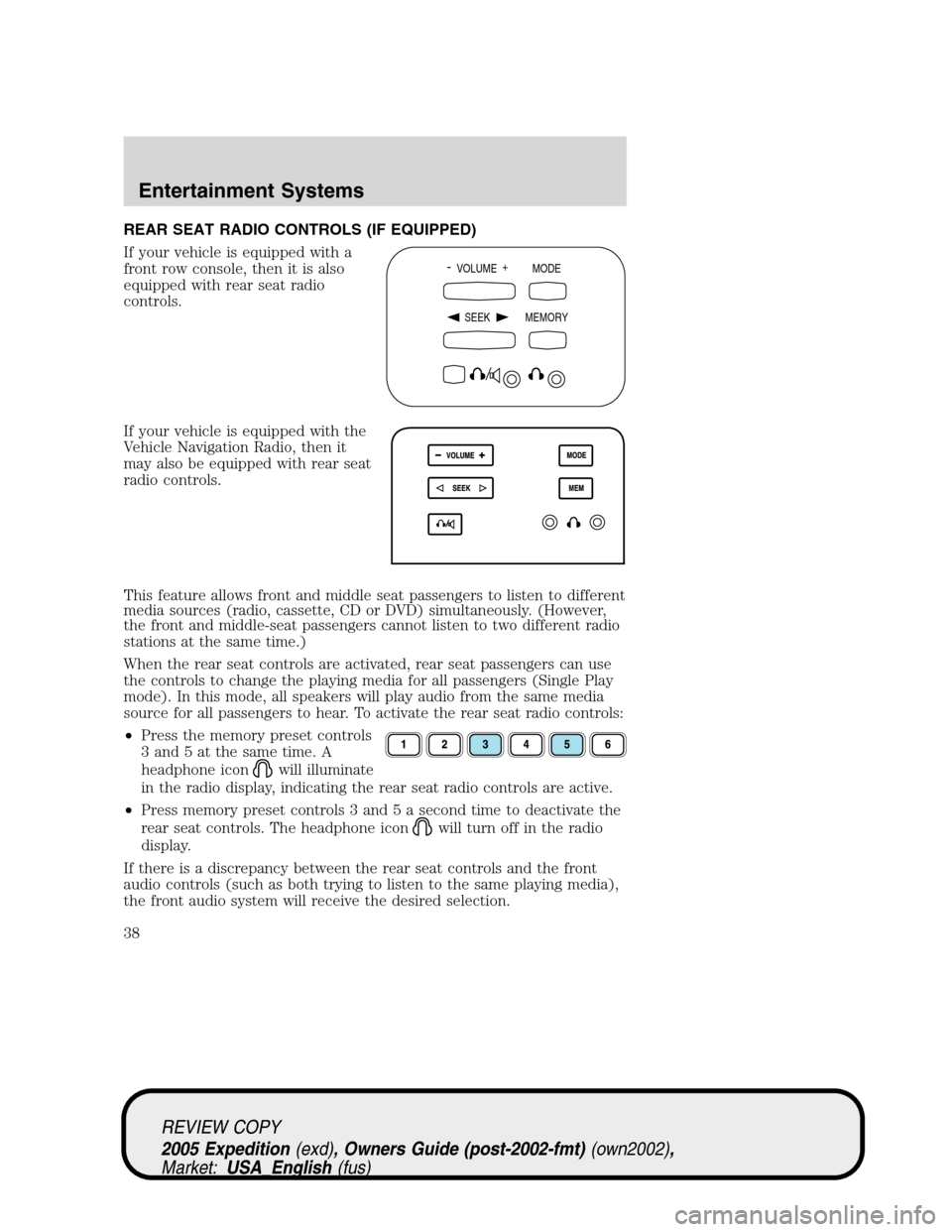
REAR SEAT RADIO CONTROLS (IF EQUIPPED)
If your vehicle is equipped with a
front row console, then it is also
equipped with rear seat radio
controls.
If your vehicle is equipped with the
Vehicle Navigation Radio, then it
may also be equipped with rear seat
radio controls.
This feature allows front and middle seat passengers to listen to different
media sources (radio, cassette, CD or DVD) simultaneously. (However,
the front and middle-seat passengers cannot listen to two different radio
stations at the same time.)
When the rear seat controls are activated, rear seat passengers can use
the controls to change the playing media for all passengers (Single Play
mode). In this mode, all speakers will play audio from the same media
source for all passengers to hear. To activate the rear seat radio controls:
•Press the memory preset controls
3 and 5 at the same time. A
headphone icon
will illuminate
in the radio display, indicating the rear seat radio controls are active.
•Press memory preset controls 3 and 5 a second time to deactivate the
rear seat controls. The headphone icon
will turn off in the radio
display.
If there is a discrepancy between the rear seat controls and the front
audio controls (such as both trying to listen to the same playing media),
the front audio system will receive the desired selection.
- VOLUME +
MODE
SEEK MEMORY
REVIEW COPY
2005 Expedition(exd), Owners Guide (post-2002-fmt)(own2002),
Market:USA_English(fus)
Entertainment Systems
38
Page 40 of 368
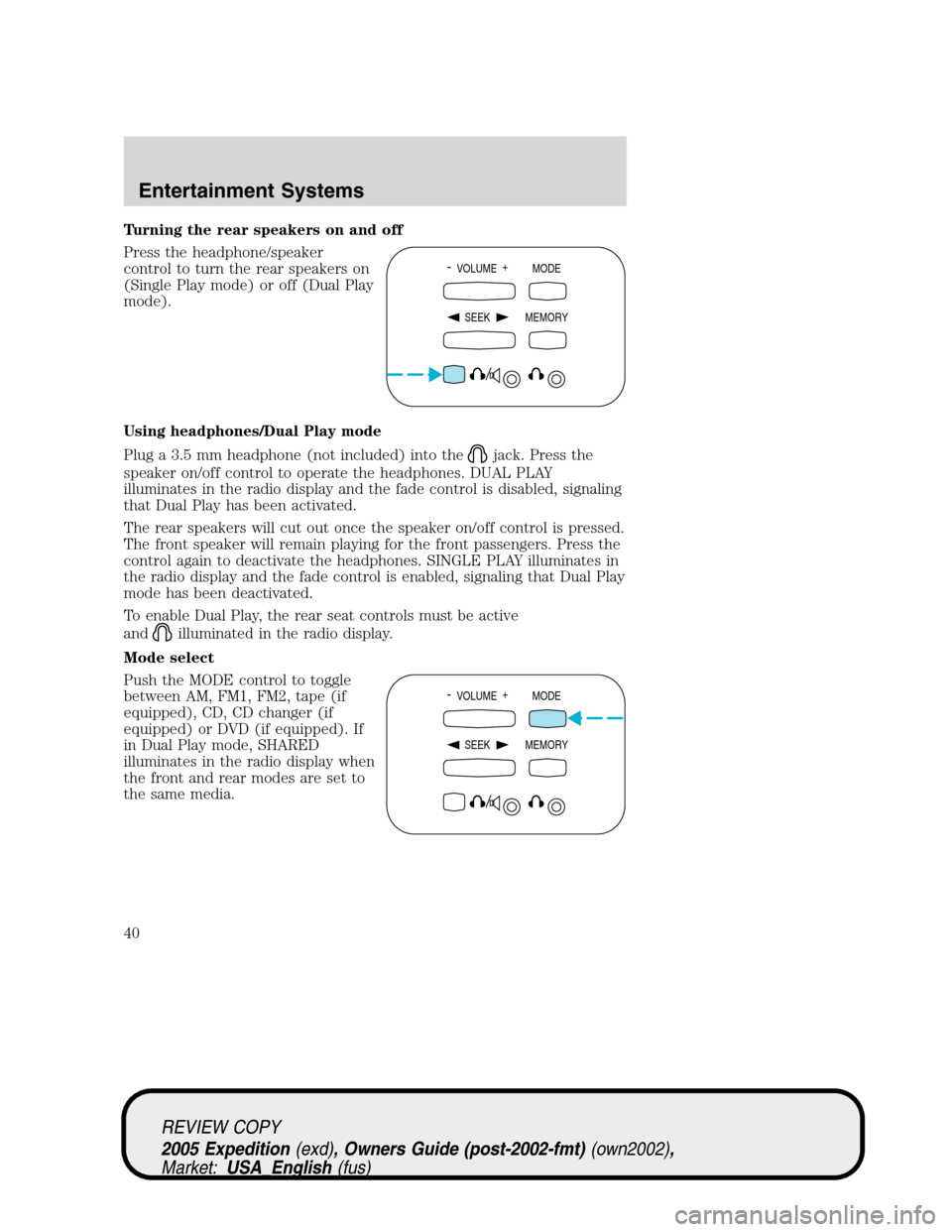
Turning the rear speakers on and off
Press the headphone/speaker
control to turn the rear speakers on
(Single Play mode) or off (Dual Play
mode).
Using headphones/Dual Play mode
Plug a 3.5 mm headphone (not included) into the
jack. Press the
speaker on/off control to operate the headphones. DUAL PLAY
illuminates in the radio display and the fade control is disabled, signaling
that Dual Play has been activated.
The rear speakers will cut out once the speaker on/off control is pressed.
The front speaker will remain playing for the front passengers. Press the
control again to deactivate the headphones. SINGLE PLAY illuminates in
the radio display and the fade control is enabled, signaling that Dual Play
mode has been deactivated.
To enable Dual Play, the rear seat controls must be active
and
illuminated in the radio display.
Mode select
Push the MODE control to toggle
between AM, FM1, FM2, tape (if
equipped), CD, CD changer (if
equipped) or DVD (if equipped). If
in Dual Play mode, SHARED
illuminates in the radio display when
the front and rear modes are set to
the same media.
- VOLUME +
MODE
SEEK MEMORY
- VOLUME +
MODE
SEEK MEMORY
REVIEW COPY
2005 Expedition(exd), Owners Guide (post-2002-fmt)(own2002),
Market:USA_English(fus)
Entertainment Systems
40
Page 42 of 368
RADIO FREQUENCIES
AM and FM frequencies are established by the Federal Communications
Commission (FCC) and the Canadian Radio and Telecommunications
Commission (CRTC). Those frequencies are:
AM - 530, 540–1700, 1710 kHz
FM- 87.7, 87.9–107.7, 107.9 MHz
RADIO RECEPTION FACTORS
There are three factors that can affect radio reception:
•Distance/strength: The further you travel from an FM station, the
weaker the signal and the weaker the reception.
•Terrain: Hills, mountains, tall buildings, power lines, electric fences,
traffic lights and thunderstorms can interfere with your reception.
•Station overload: When you pass a broadcast tower, a stronger signal
may overtake a weaker one and play while the weak station frequency
is displayed.
CASSETTE/PLAYER CARE
Do:
•Use only cassettes that are 90 minutes long or less.
•Tighten very loose tapes by inserting a finger or pencil into the hole
and turning the hub.
•Remove loose labels before inserting tapes.
•Allow tapes which have been subjected to extreme heat, humidity or
cold to reach a moderate temperature before playing.
•Clean the cassette player head with a cassette cleaning cartridge after
10–12 hours of play to maintain good sound/operation.
Don’t:
•Expose tapes to direct sunlight, extreme humidity, heat or cold.
•Leave tapes in the cassette player for a long time when not being
played.
CD/CD PLAYER CARE
Do:
•Handle discs by their edges only. Never touch the playing surface.
•Inspect discs before playing. Clean only with an approved CD cleaner
and wipe from the center out.
REVIEW COPY
2005 Expedition(exd), Owners Guide (post-2002-fmt)(own2002),
Market:USA_English(fus)
Entertainment Systems
42
Page 45 of 368
7.Auxiliary jacks
Insert lines for standard video game players.
8.STOP/EJECTcontrol
Press once to stop DVD play. Press again to eject the DVD.
9.DISPLAY (DISP)control
Press to enable on screen display of player menu and user display
adjustments.
DVD control features
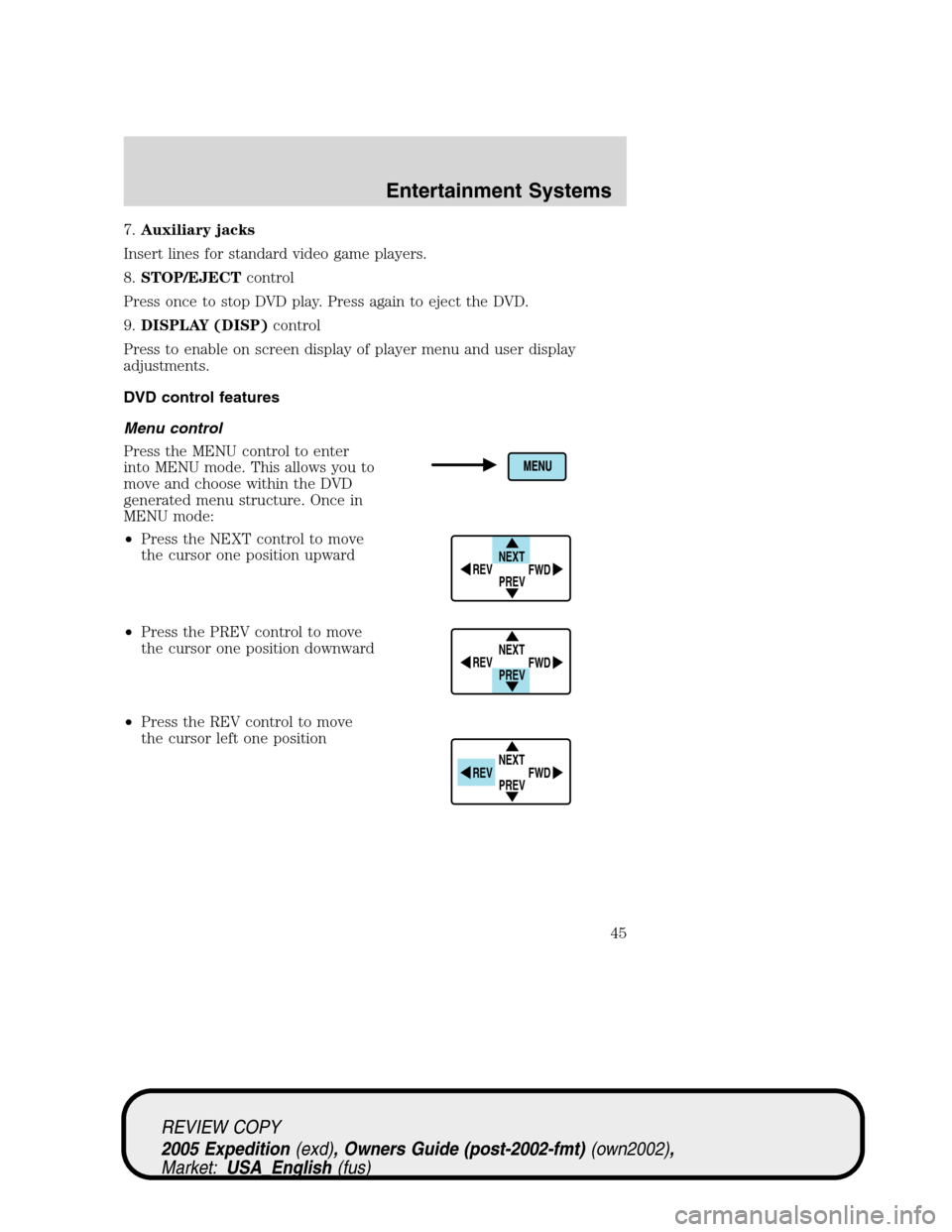
Menu control
Press the MENU control to enter
into MENU mode. This allows you to
move and choose within the DVD
generated menu structure. Once in
MENU mode:
•Press the NEXT control to move
the cursor one position upward
•Press the PREV control to move
the cursor one position downward
•Press the REV control to move
the cursor left one position
NEXT
PREV REV
FWD
NEXT
PREV REV
FWD
NEXT
PREV REV
FWD
REVIEW COPY
2005 Expedition(exd), Owners Guide (post-2002-fmt)(own2002),
Market:USA_English(fus)
Entertainment Systems
45
Page 47 of 368
Slow play mode
To enter slow play mode, press the
PLAY/PAUSE control. Once the
system is in pause mode, press the
FWD or REV control for slow motion playback. Three different speeds
are available depending on how long the control is held. Press the
control once for slow motion playback. Press the control again to
disengage slow motion playback. Press the PLAY/PAUSE control to
return to normal playback mode.
User menu mode
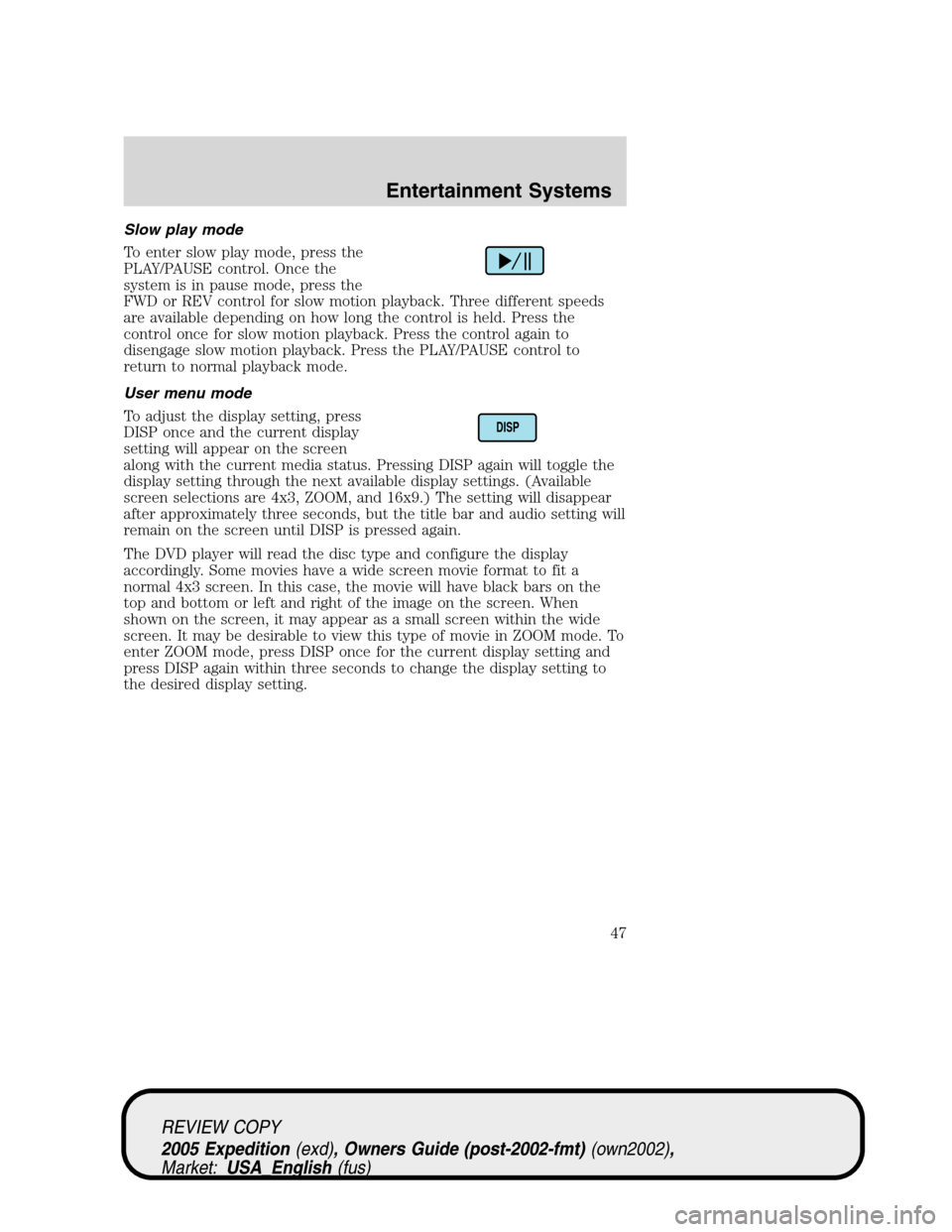
To adjust the display setting, press
DISP once and the current display
setting will appear on the screen
along with the current media status. Pressing DISP again will toggle the
display setting through the next available display settings. (Available
screen selections are 4x3, ZOOM, and 16x9.) The setting will disappear
after approximately three seconds, but the title bar and audio setting will
remain on the screen until DISP is pressed again.
The DVD player will read the disc type and configure the display
accordingly. Some movies have a wide screen movie format to fit a
normal 4x3 screen. In this case, the movie will have black bars on the
top and bottom or left and right of the image on the screen. When
shown on the screen, it may appear as a small screen within the wide
screen. It may be desirable to view this type of movie in ZOOM mode. To
enter ZOOM mode, press DISP once for the current display setting and
press DISP again within three seconds to change the display setting to
the desired display setting.
DISP
REVIEW COPY
2005 Expedition(exd), Owners Guide (post-2002-fmt)(own2002),
Market:USA_English(fus)
Entertainment Systems
47
Page 48 of 368
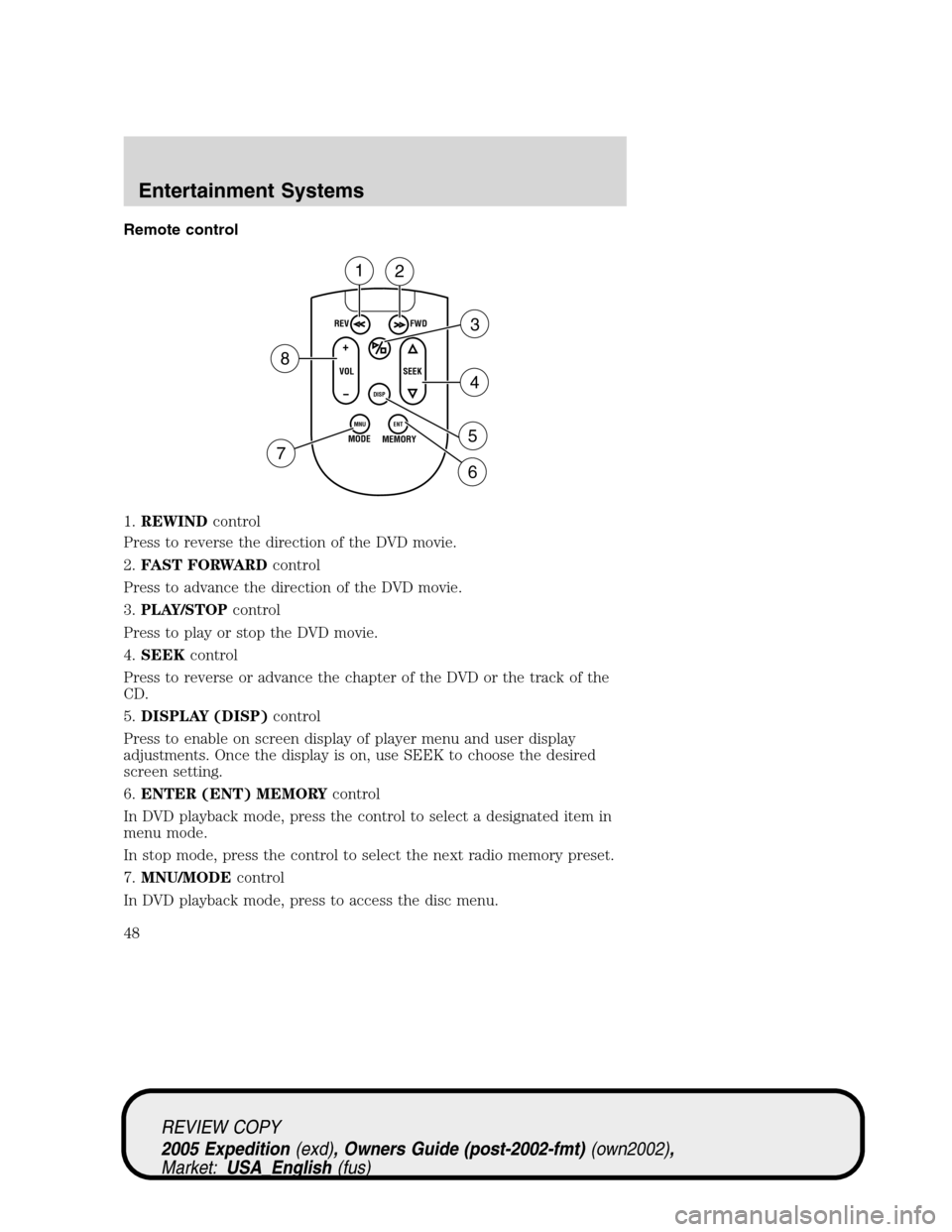
Remote control
1.REWINDcontrol
Press to reverse the direction of the DVD movie.
2.FAST FORWARDcontrol
Press to advance the direction of the DVD movie.
3.PLAY/STOPcontrol
Press to play or stop the DVD movie.
4.SEEKcontrol
Press to reverse or advance the chapter of the DVD or the track of the
CD.
5.DISPLAY (DISP)control
Press to enable on screen display of player menu and user display
adjustments. Once the display is on, use SEEK to choose the desired
screen setting.
6.ENTER (ENT) MEMORYcontrol
In DVD playback mode, press the control to select a designated item in
menu mode.
In stop mode, press the control to select the next radio memory preset.
7.MNU/MODEcontrol
In DVD playback mode, press to access the disc menu.
REV
FWD
SEEK VOL
MODE
MEMORY
+
DISP
MNU
ENT-
12
3
4
5
6 7
8
REVIEW COPY
2005 Expedition(exd), Owners Guide (post-2002-fmt)(own2002),
Market:USA_English(fus)
Entertainment Systems
48
Page 51 of 368
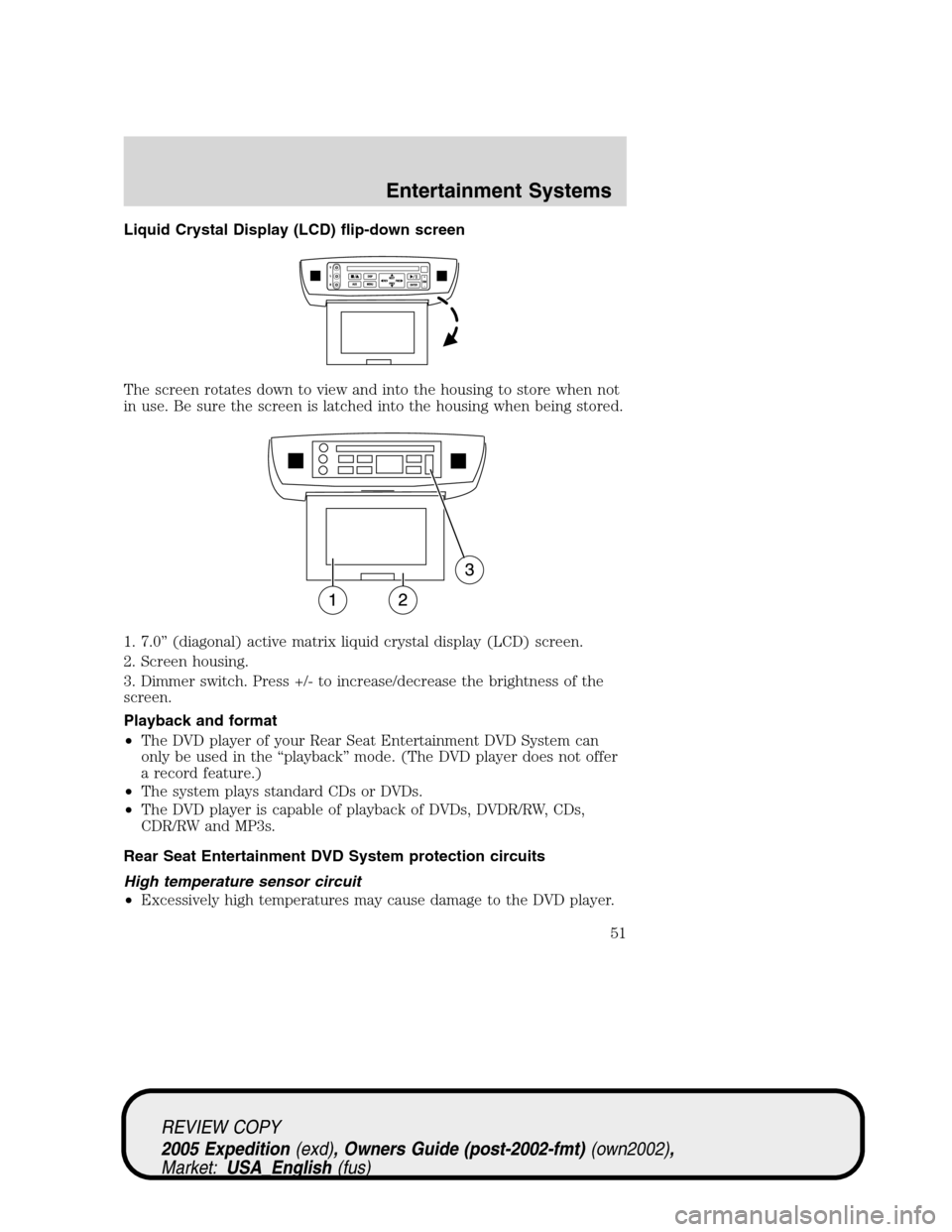
Liquid Crystal Display (LCD) flip-down screen
The screen rotates down to view and into the housing to store when not
in use. Be sure the screen is latched into the housing when being stored.
1. 7.0” (diagonal) active matrix liquid crystal display (LCD) screen.
2. Screen housing.
3. Dimmer switch. Press +/- to increase/decrease the brightness of the
screen.
Playback and format
•The DVD player of your Rear Seat Entertainment DVD System can
only be used in the “playback” mode. (The DVD player does not offer
a record feature.)
•The system plays standard CDs or DVDs.
•The DVD player is capable of playback of DVDs, DVDR/RW, CDs,
CDR/RW and MP3s.
Rear Seat Entertainment DVD System protection circuits
High temperature sensor circuit
•Excessively high temperatures may cause damage to the DVD player.
REVIEW COPY
2005 Expedition(exd), Owners Guide (post-2002-fmt)(own2002),
Market:USA_English(fus)
Entertainment Systems
51