buttons FORD EXPEDITION 2015 3.G User Guide
[x] Cancel search | Manufacturer: FORD, Model Year: 2015, Model line: EXPEDITION, Model: FORD EXPEDITION 2015 3.GPages: 564, PDF Size: 6.71 MB
Page 122 of 564
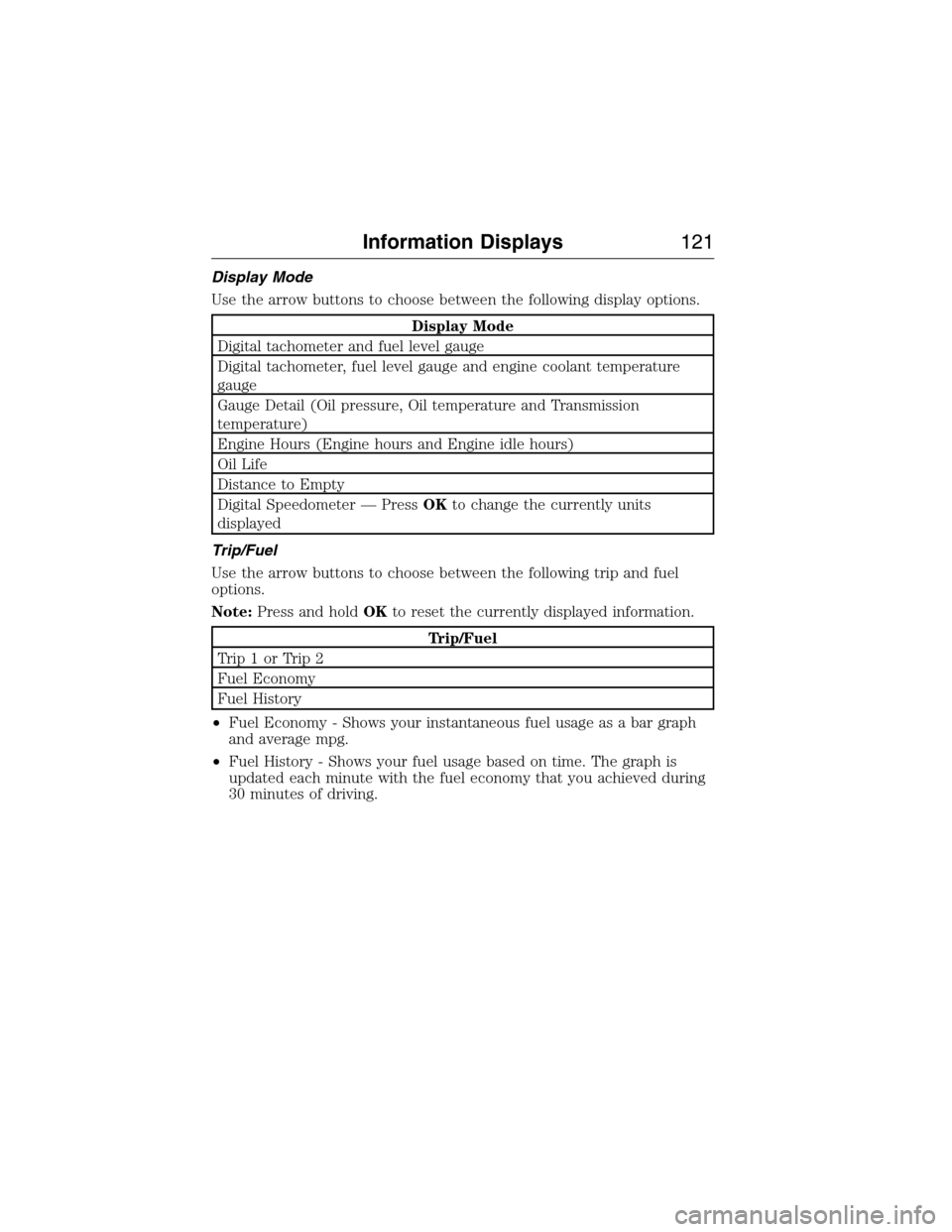
Display Mode
Use the arrow buttons to choose between the following display options.
Display Mode
Digital tachometer and fuel level gauge
Digital tachometer, fuel level gauge and engine coolant temperature
gauge
Gauge Detail (Oil pressure, Oil temperature and Transmission
temperature)
Engine Hours (Engine hours and Engine idle hours)
Oil Life
Distance to Empty
Digital Speedometer — PressOKto change the currently units
displayed
Trip/Fuel
Use the arrow buttons to choose between the following trip and fuel
options.
Note:Press and holdOKto reset the currently displayed information.
Trip/Fuel
Trip1orTrip2
Fuel Economy
Fuel History
•Fuel Economy - Shows your instantaneous fuel usage as a bar graph
and average mpg.
•Fuel History - Shows your fuel usage based on time. The graph is
updated each minute with the fuel economy that you achieved during
30 minutes of driving.
Information Displays121
2015 Expedition(exd)
Owners Guide gf, 1st Printing, July 2014
USA(fus)
Page 123 of 564
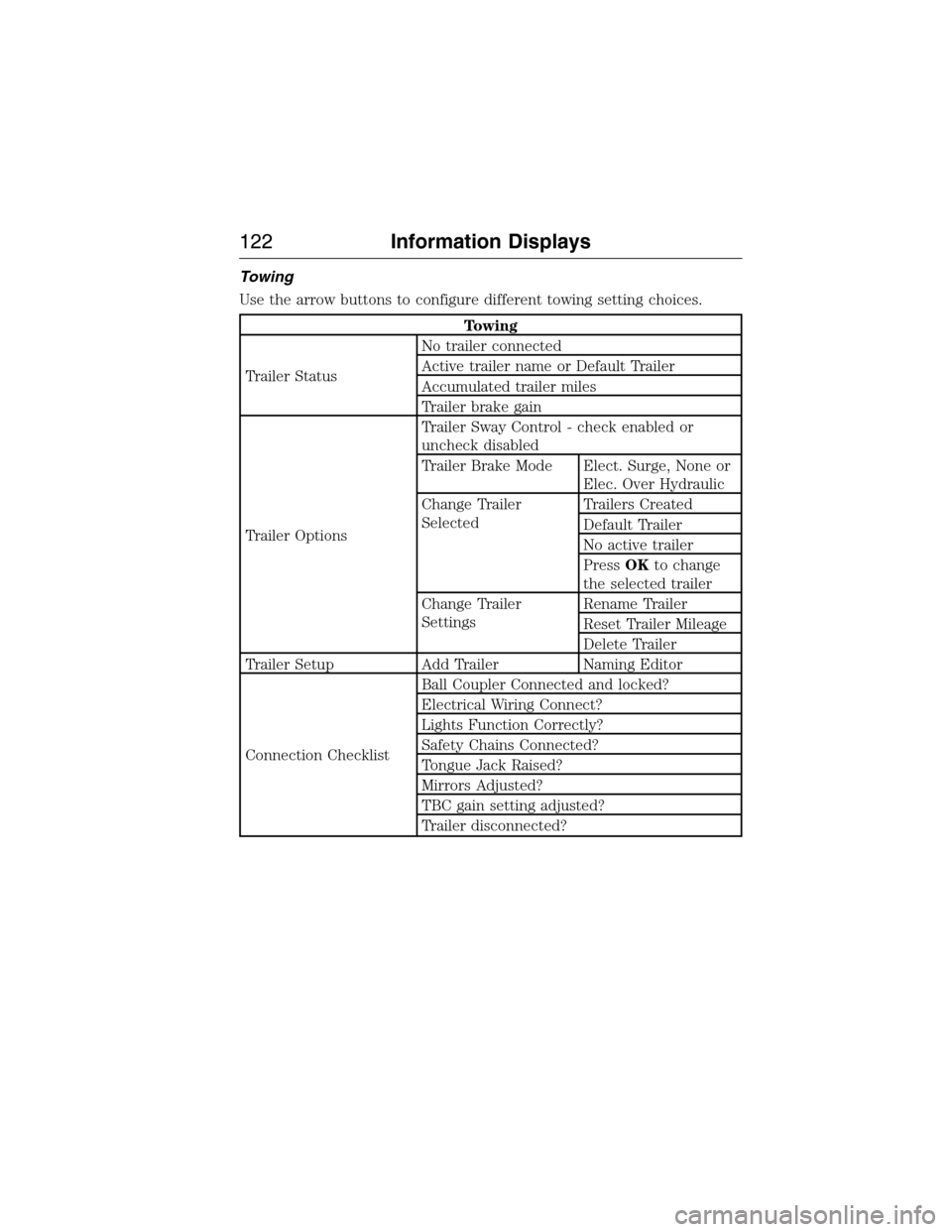
Towing
Use the arrow buttons to configure different towing setting choices.
Towing
Trailer StatusNo trailer connected
Active trailer name or Default Trailer
Accumulated trailer miles
Trailer brake gain
Trailer OptionsTrailer Sway Control - check enabled or
uncheck disabled
Trailer Brake Mode Elect. Surge, None or
Elec. Over Hydraulic
Change Trailer
SelectedTrailers Created
Default Trailer
No active trailer
PressOKto change
the selected trailer
Change Trailer
SettingsRename Trailer
Reset Trailer Mileage
Delete Trailer
Trailer Setup Add Trailer Naming Editor
Connection ChecklistBall Coupler Connected and locked?
Electrical Wiring Connect?
Lights Function Correctly?
Safety Chains Connected?
Tongue Jack Raised?
Mirrors Adjusted?
TBC gain setting adjusted?
Trailer disconnected?
122Information Displays
2015 Expedition(exd)
Owners Guide gf, 1st Printing, July 2014
USA(fus)
Page 140 of 564
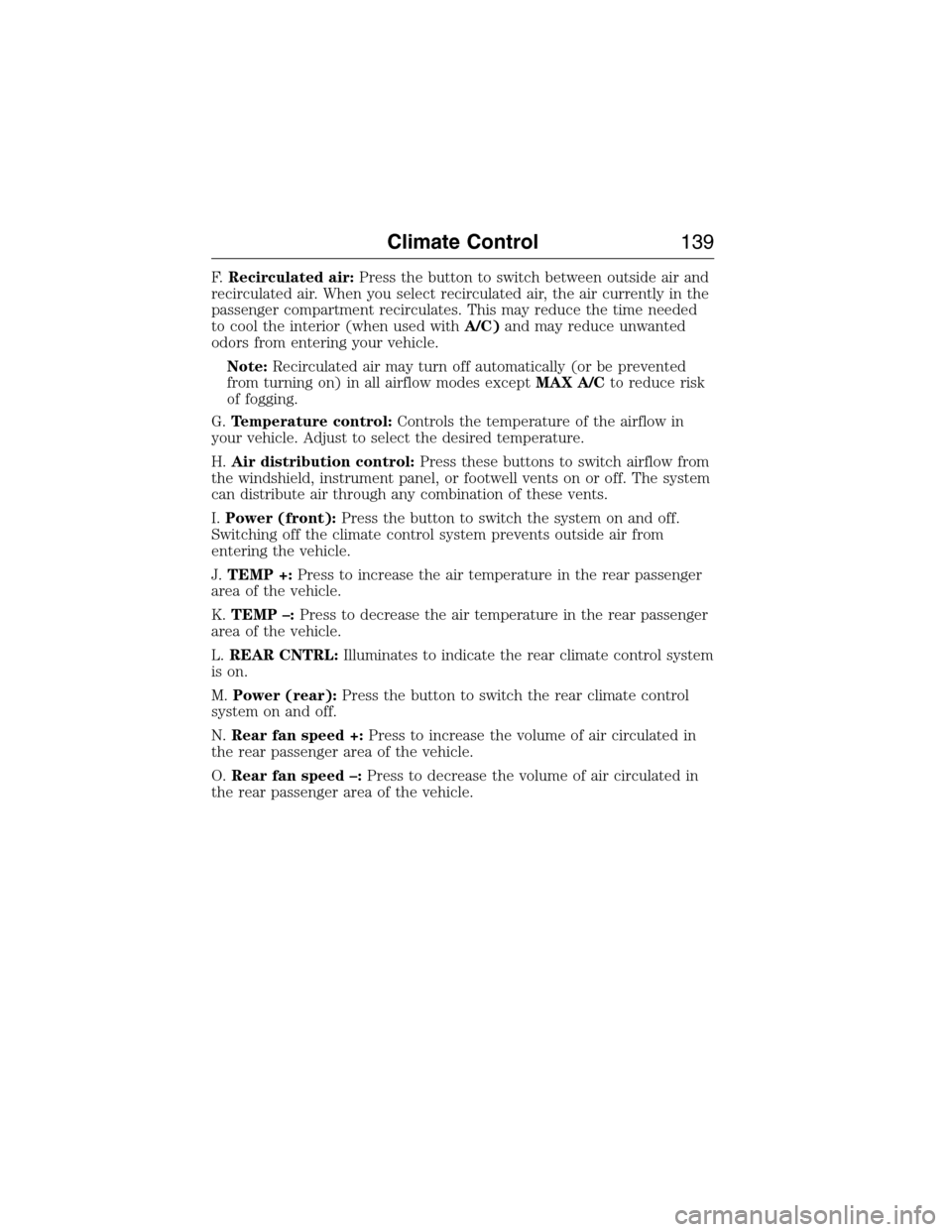
F.Recirculated air:Press the button to switch between outside air and
recirculated air. When you select recirculated air, the air currently in the
passenger compartment recirculates. This may reduce the time needed
to cool the interior (when used withA/C)and may reduce unwanted
odors from entering your vehicle.
Note:Recirculated air may turn off automatically (or be prevented
from turning on) in all airflow modes exceptMAX A/Cto reduce risk
of fogging.
G.Temperature control:Controls the temperature of the airflow in
your vehicle. Adjust to select the desired temperature.
H.Air distribution control:Press these buttons to switch airflow from
the windshield, instrument panel, or footwell vents on or off. The system
can distribute air through any combination of these vents.
I.Power (front):Press the button to switch the system on and off.
Switching off the climate control system prevents outside air from
entering the vehicle.
J.TEMP +:Press to increase the air temperature in the rear passenger
area of the vehicle.
K.TEMP –:Press to decrease the air temperature in the rear passenger
area of the vehicle.
L.REAR CNTRL:Illuminates to indicate the rear climate control system
is on.
M.Power (rear):Press the button to switch the rear climate control
system on and off.
N.Rear fan speed +:Press to increase the volume of air circulated in
the rear passenger area of the vehicle.
O.Rear fan speed –:Press to decrease the volume of air circulated in
the rear passenger area of the vehicle.
Climate Control139
2015 Expedition(exd)
Owners Guide gf, 1st Printing, July 2014
USA(fus)
Page 143 of 564
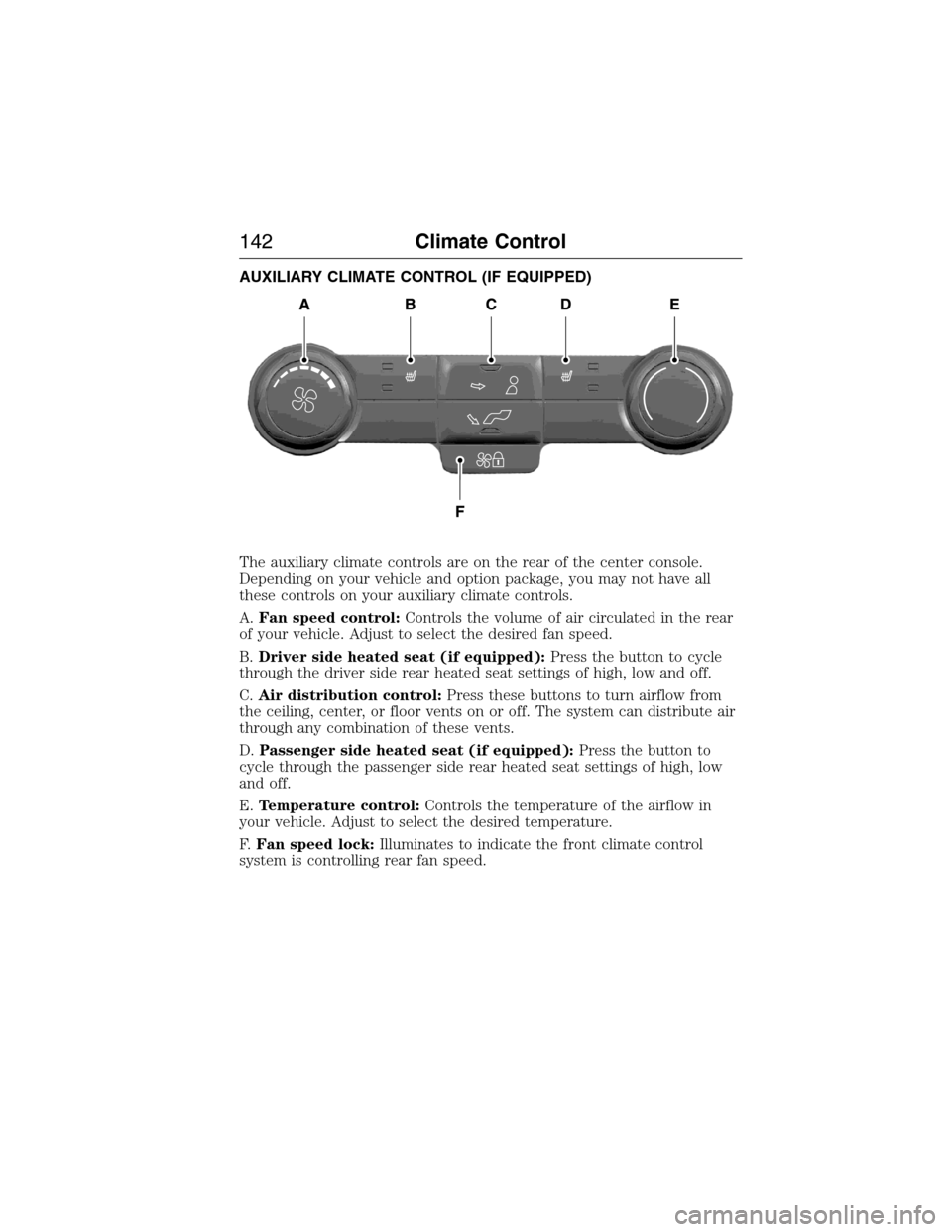
AUXILIARY CLIMATE CONTROL (IF EQUIPPED)
The auxiliary climate controls are on the rear of the center console.
Depending on your vehicle and option package, you may not have all
these controls on your auxiliary climate controls.
A.Fan speed control:Controls the volume of air circulated in the rear
of your vehicle. Adjust to select the desired fan speed.
B.Driver side heated seat (if equipped):Press the button to cycle
through the driver side rear heated seat settings of high, low and off.
C.Air distribution control:Press these buttons to turn airflow from
the ceiling, center, or floor vents on or off. The system can distribute air
through any combination of these vents.
D.Passenger side heated seat (if equipped):Press the button to
cycle through the passenger side rear heated seat settings of high, low
and off.
E.Temperature control:Controls the temperature of the airflow in
your vehicle. Adjust to select the desired temperature.
F.Fan speed lock:Illuminates to indicate the front climate control
system is controlling rear fan speed.
142Climate Control
2015 Expedition(exd)
Owners Guide gf, 1st Printing, July 2014
USA(fus)
Page 145 of 564
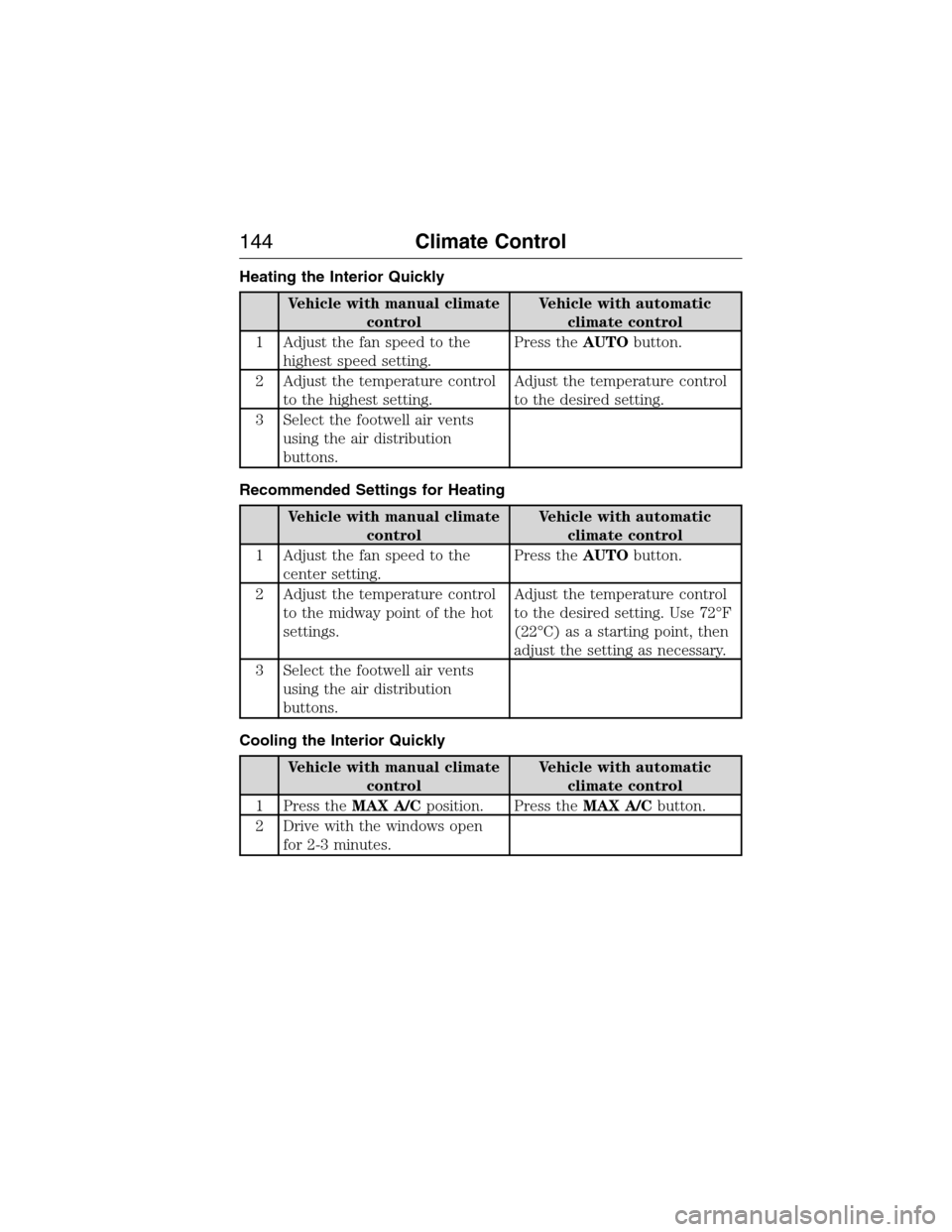
Heating the Interior Quickly
Vehicle with manual climate
controlVehicle with automatic
climate control
1 Adjust the fan speed to the
highest speed setting.Press theAUTObutton.
2 Adjust the temperature control
to the highest setting.Adjust the temperature control
to the desired setting.
3 Select the footwell air vents
using the air distribution
buttons.
Recommended Settings for Heating
Vehicle with manual climate
controlVehicle with automatic
climate control
1 Adjust the fan speed to the
center setting.Press theAUTObutton.
2 Adjust the temperature control
to the midway point of the hot
settings.Adjust the temperature control
to the desired setting. Use 72°F
(22°C) as a starting point, then
adjust the setting as necessary.
3 Select the footwell air vents
using the air distribution
buttons.
Cooling the Interior Quickly
Vehicle with manual climate
controlVehicle with automatic
climate control
1 Press theMAX A/Cposition. Press theMAX A/Cbutton.
2 Drive with the windows open
for 2-3 minutes.
144Climate Control
2015 Expedition(exd)
Owners Guide gf, 1st Printing, July 2014
USA(fus)
Page 146 of 564
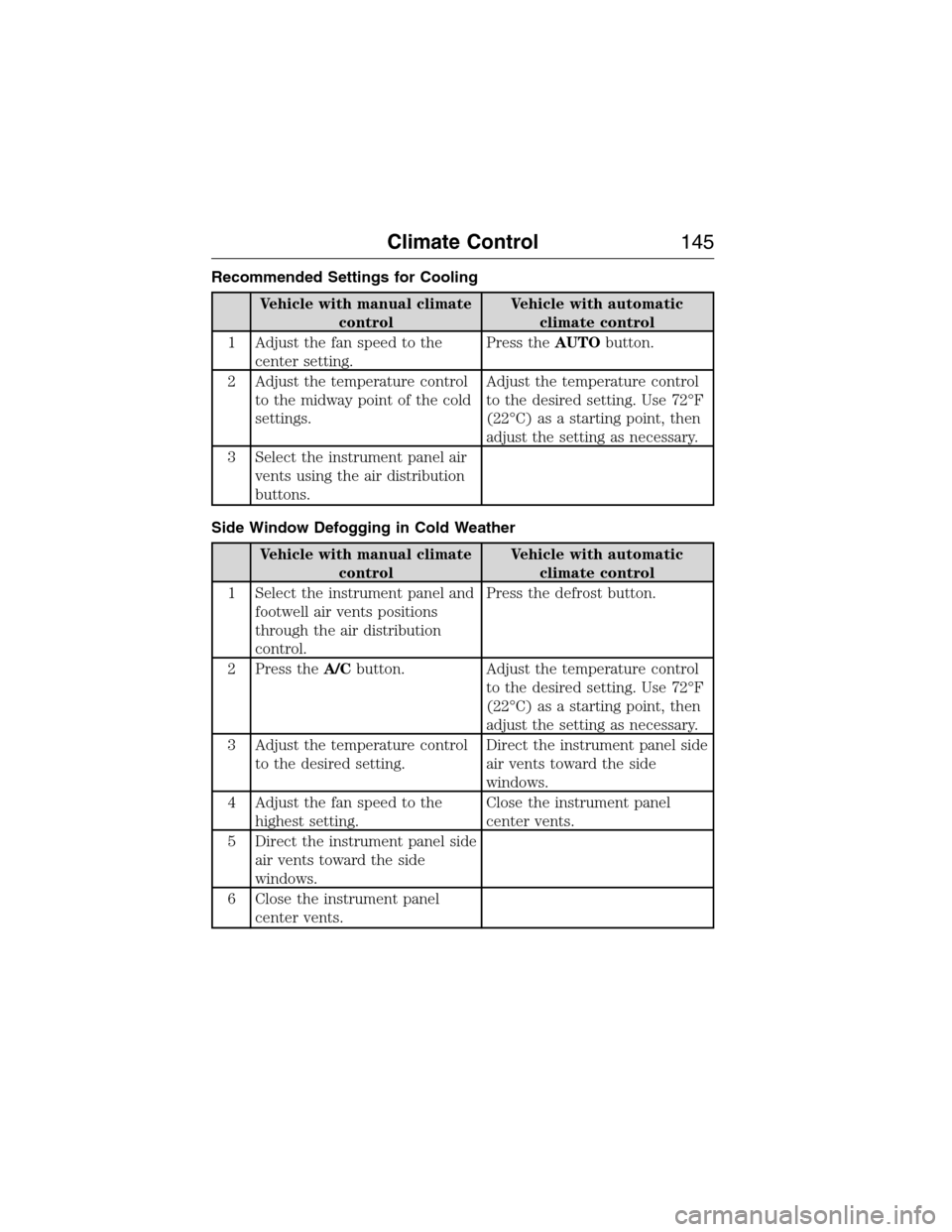
Recommended Settings for Cooling
Vehicle with manual climate
controlVehicle with automatic
climate control
1 Adjust the fan speed to the
center setting.Press theAUTObutton.
2 Adjust the temperature control
to the midway point of the cold
settings.Adjust the temperature control
to the desired setting. Use 72°F
(22°C) as a starting point, then
adjust the setting as necessary.
3 Select the instrument panel air
vents using the air distribution
buttons.
Side Window Defogging in Cold Weather
Vehicle with manual climate
controlVehicle with automatic
climate control
1 Select the instrument panel and
footwell air vents positions
through the air distribution
control.Press the defrost button.
2 Press theA/Cbutton. Adjust the temperature control
to the desired setting. Use 72°F
(22°C) as a starting point, then
adjust the setting as necessary.
3 Adjust the temperature control
to the desired setting.Direct the instrument panel side
air vents toward the side
windows.
4 Adjust the fan speed to the
highest setting.Close the instrument panel
center vents.
5 Direct the instrument panel side
air vents toward the side
windows.
6 Close the instrument panel
center vents.
Climate Control145
2015 Expedition(exd)
Owners Guide gf, 1st Printing, July 2014
USA(fus)
Page 151 of 564
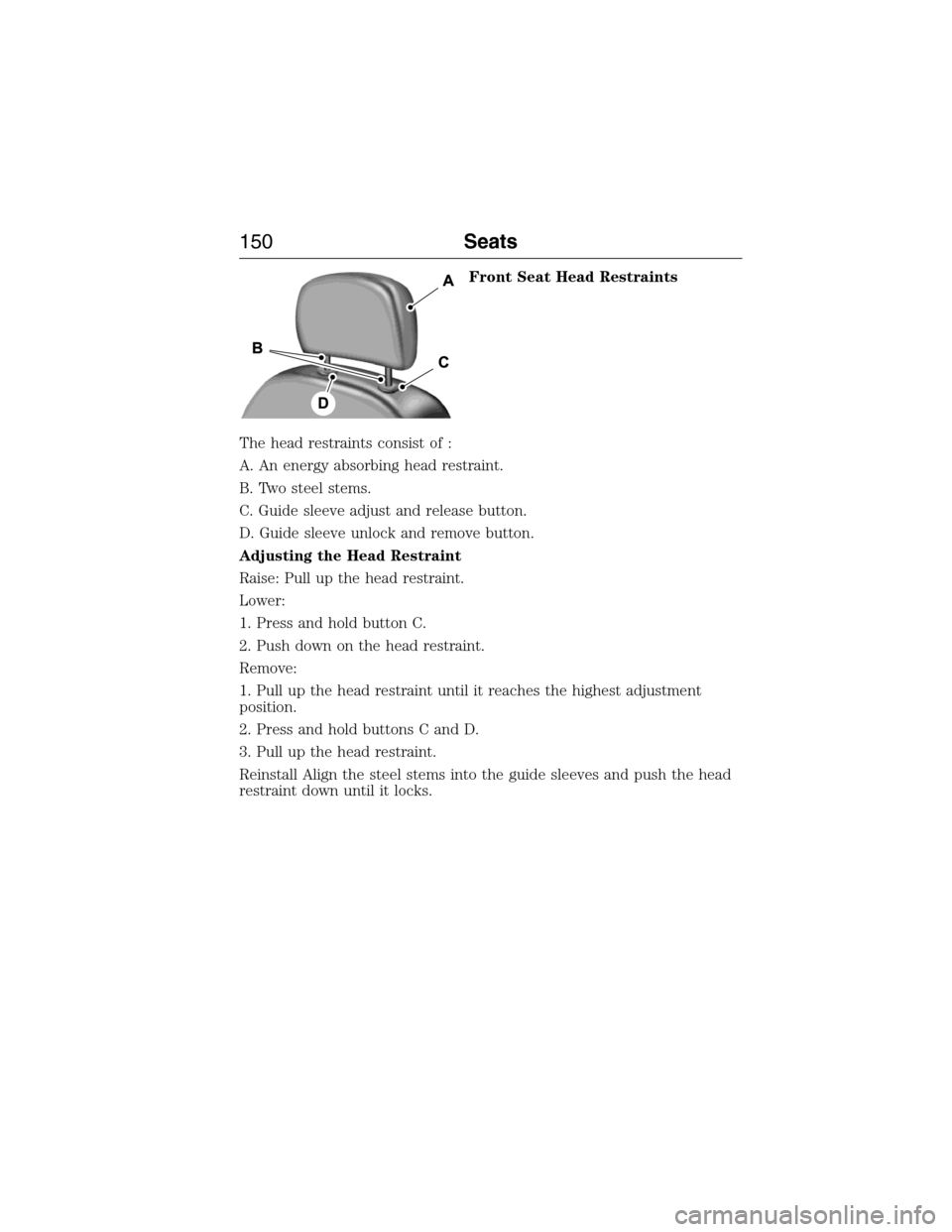
Front Seat Head Restraints
The head restraints consist of :
A. An energy absorbing head restraint.
B. Two steel stems.
C. Guide sleeve adjust and release button.
D. Guide sleeve unlock and remove button.
Adjusting the Head Restraint
Raise: Pull up the head restraint.
Lower:
1. Press and hold button C.
2. Push down on the head restraint.
Remove:
1. Pull up the head restraint until it reaches the highest adjustment
position.
2. Press and hold buttons C and D.
3. Pull up the head restraint.
Reinstall Align the steel stems into the guide sleeves and push the head
restraint down until it locks.
150Seats
2015 Expedition(exd)
Owners Guide gf, 1st Printing, July 2014
USA(fus)
Page 168 of 564
PowerFold™ Third-Row Seat (If Equipped)
Note:The power fold down seats will operate for 10 minutes after the
ignition switch is in off. The transmission must be in park (P) and the
liftgate, or liftgate glass must be open. Similar to the battery saver
feature, the power third row seat will be disabled 10 minutes after
turning the vehicle off.
Note:Be sure that the head restraints are folded down before powering
the third row seat down.
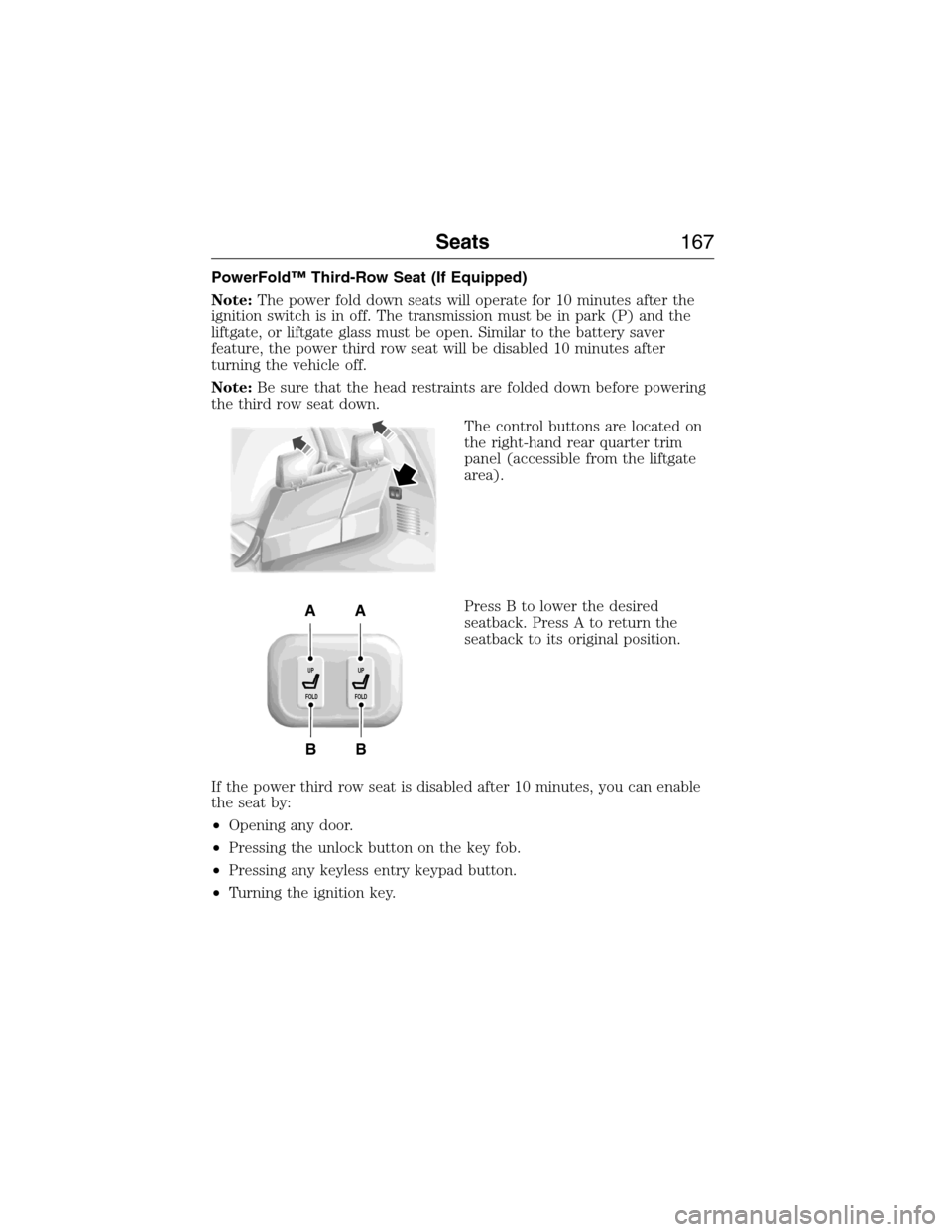
The control buttons are located on
the right-hand rear quarter trim
panel (accessible from the liftgate
area).
Press B to lower the desired
seatback. Press A to return the
seatback to its original position.
If the power third row seat is disabled after 10 minutes, you can enable
the seat by:
•Opening any door.
•Pressing the unlock button on the key fob.
•Pressing any keyless entry keypad button.
•Turning the ignition key.
B
AA
B
UP
FOLDUP
FOLD
Seats167
2015 Expedition(exd)
Owners Guide gf, 1st Printing, July 2014
USA(fus)
Page 169 of 564
HOMELINK® WIRELESS CONTROL SYSTEM (IF EQUIPPED)
WARNING:Make sure that the garage door and security device
are free from obstruction when you are programming. Do not
program the system with the vehicle in the garage.
WARNING:Do not use the system with any garage door opener
that does not have the safety stop and reverse feature as
required by U.S. Federal Safety Standards (this includes any garage
door opener manufactured before April 1, 1982).
Note:Make sure you keep the original remote control transmitter for
use in other vehicles as well as for future system programming.
Note:We recommend that upon the sale or lease termination of your
vehicle, you erase the programmed function buttons for security reasons.
SeeErasing the function button codeslater in this section.
Note:You can program a maximum of three devices. To change or
replace any of the three devices after it has been initially programmed,
you must first erase the current settings. SeeErasing the function
button codeslater in this section.
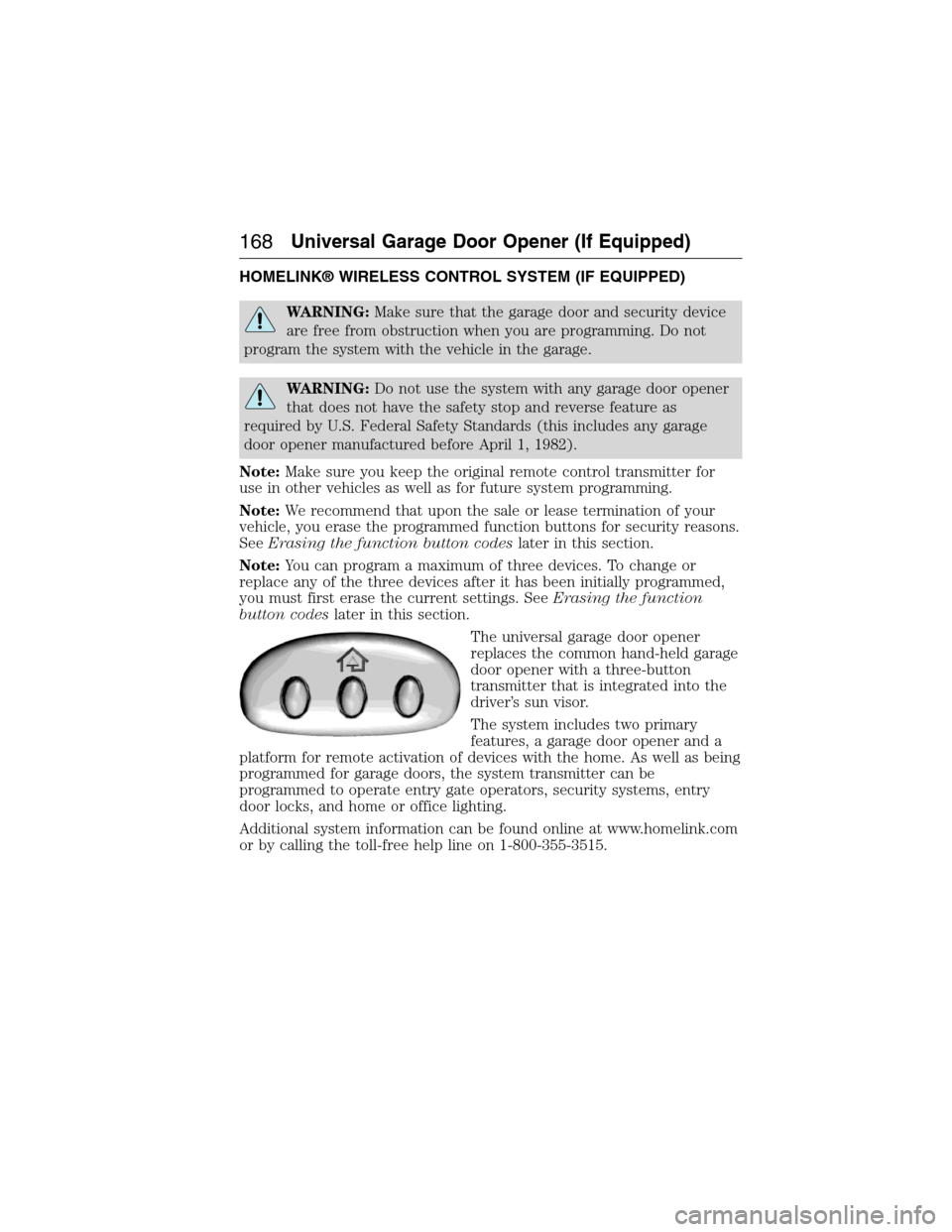
The universal garage door opener
replaces the common hand-held garage
door opener with a three-button
transmitter that is integrated into the
driver’s sun visor.
The system includes two primary
features, a garage door opener and a
platform for remote activation of devices with the home. As well as being
programmed for garage doors, the system transmitter can be
programmed to operate entry gate operators, security systems, entry
door locks, and home or office lighting.
Additional system information can be found online at www.homelink.com
or by calling the toll-free help line on 1-800-355-3515.
168Universal Garage Door Opener (If Equipped)
2015 Expedition(exd)
Owners Guide gf, 1st Printing, July 2014
USA(fus)
Page 170 of 564
Programming
Note:Put a new battery in the hand-held transmitter. This will ensure
quicker training and accurate transmission of the radio-frequency signal.
1. With your vehicle parked outside of the garage and your key in the
ignition, turn the key so that the ignition is in the on position.
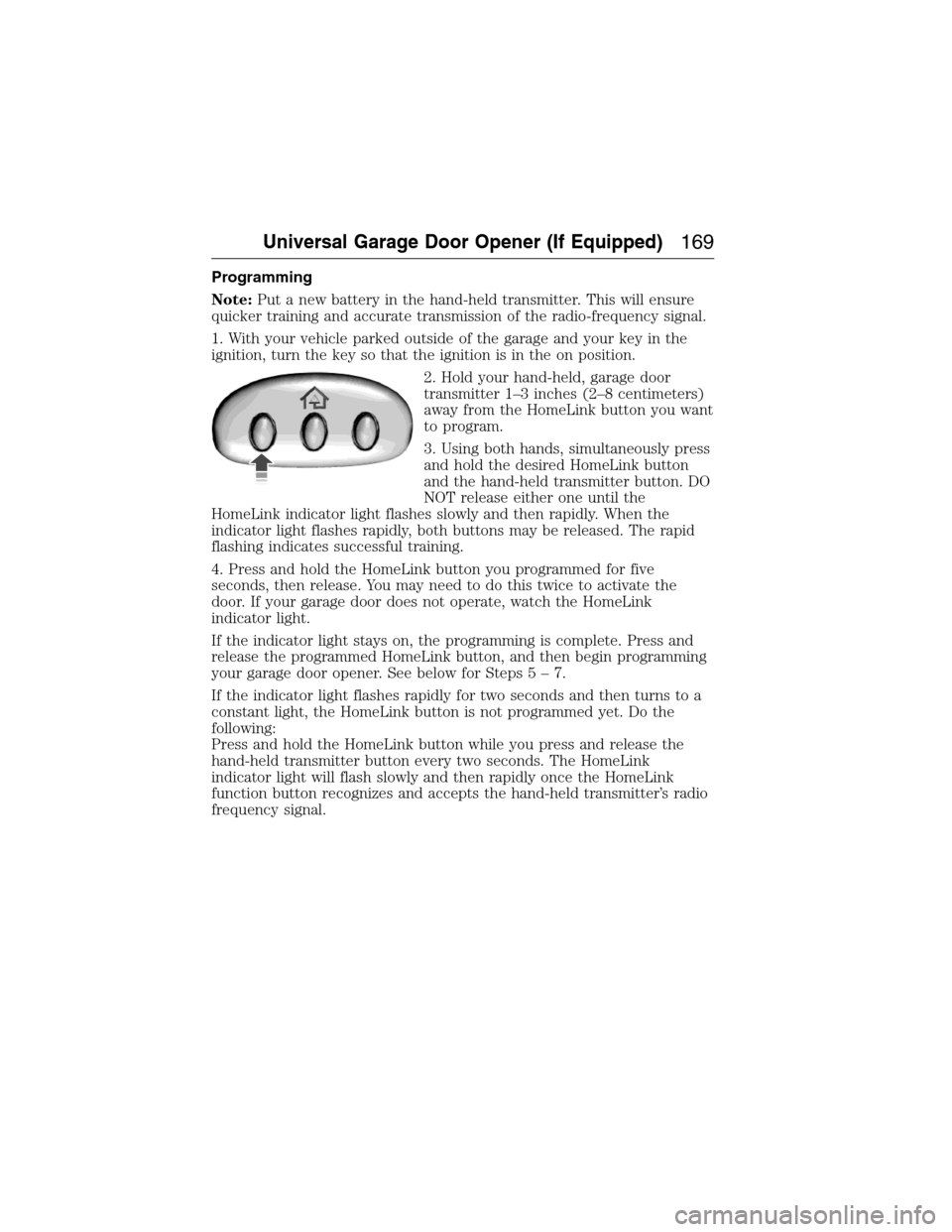
2. Hold your hand-held, garage door
transmitter 1–3 inches (2–8 centimeters)
away from the HomeLink button you want
to program.
3. Using both hands, simultaneously press
and hold the desired HomeLink button
and the hand-held transmitter button. DO
NOT release either one until the
HomeLink indicator light flashes slowly and then rapidly. When the
indicator light flashes rapidly, both buttons may be released. The rapid
flashing indicates successful training.
4. Press and hold the HomeLink button you programmed for five
seconds, then release. You may need to do this twice to activate the
door. If your garage door does not operate, watch the HomeLink
indicator light.
If the indicator light stays on, the programming is complete. Press and
release the programmed HomeLink button, and then begin programming
your garage door opener. See below for Steps5–7.
If the indicator light flashes rapidly for two seconds and then turns to a
constant light, the HomeLink button is not programmed yet. Do the
following:
Press and hold the HomeLink button while you press and release the
hand-held transmitter button every two seconds. The HomeLink
indicator light will flash slowly and then rapidly once the HomeLink
function button recognizes and accepts the hand-held transmitter’s radio
frequency signal.
Universal Garage Door Opener (If Equipped)169
2015 Expedition(exd)
Owners Guide gf, 1st Printing, July 2014
USA(fus)