key FORD EXPEDITION 2015 3.G Repair Manual
[x] Cancel search | Manufacturer: FORD, Model Year: 2015, Model line: EXPEDITION, Model: FORD EXPEDITION 2015 3.GPages: 564, PDF Size: 6.71 MB
Page 292 of 564
Working with the Engine Off
1. Set the parking brake and shift toP(Park).
2. Turn off the engine and remove the key (if equipped).
3. Block the wheels.
Working with the Engine On
WARNING:To reduce the risk of vehicle damage or personal
burn injuries, do not start your engine with the air cleaner
removed and do not remove it while the engine is running.
1. Set the parking brake and shift to positionP(Park) .
2. Block the wheels.
OPENING AND CLOSING THE HOOD
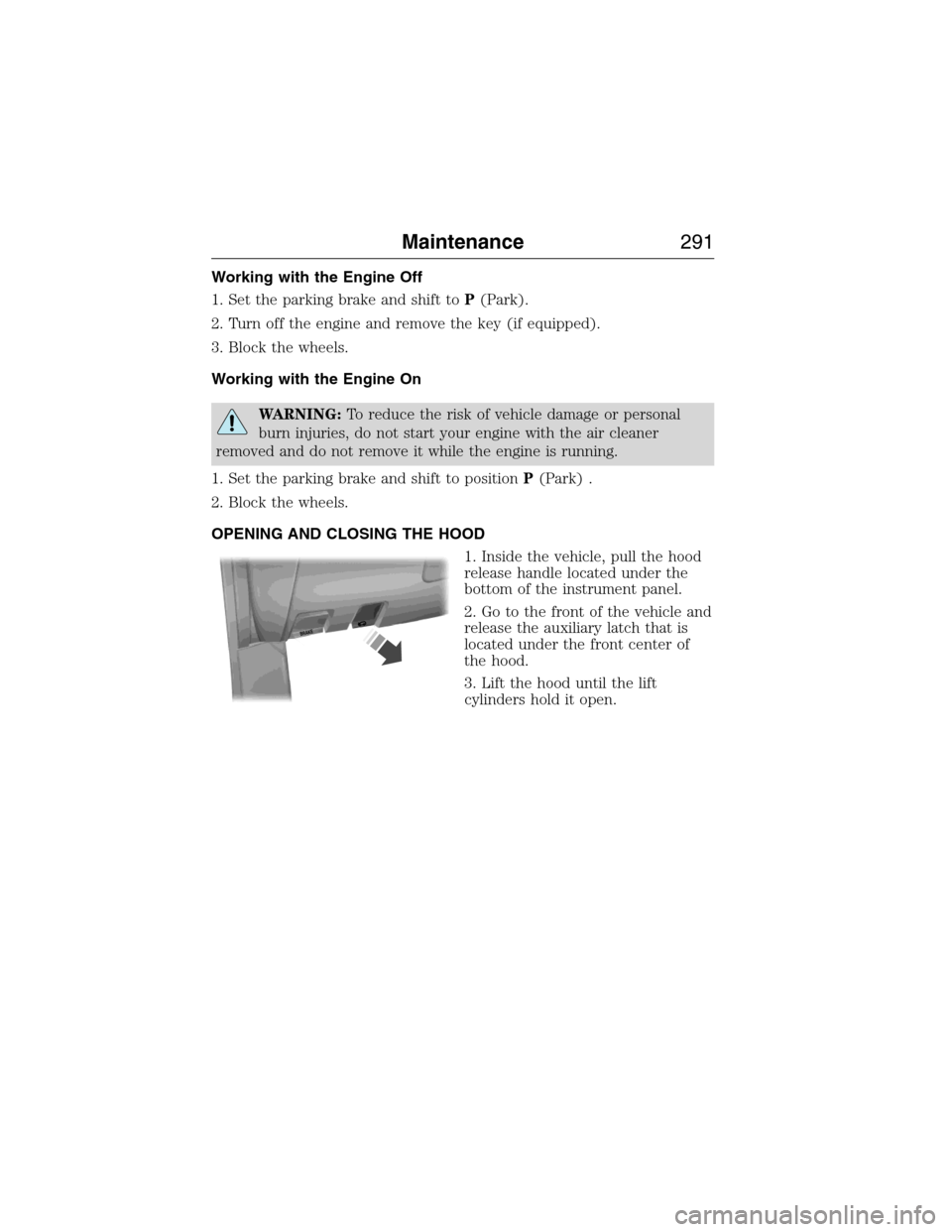
1. Inside the vehicle, pull the hood
release handle located under the
bottom of the instrument panel.
2. Go to the front of the vehicle and
release the auxiliary latch that is
located under the front center of
the hood.
3. Lift the hood until the lift
cylinders hold it open.
B
R
A
K
E
Maintenance291
2015 Expedition(exd)
Owners Guide gf, 1st Printing, July 2014
USA(fus)
Page 304 of 564
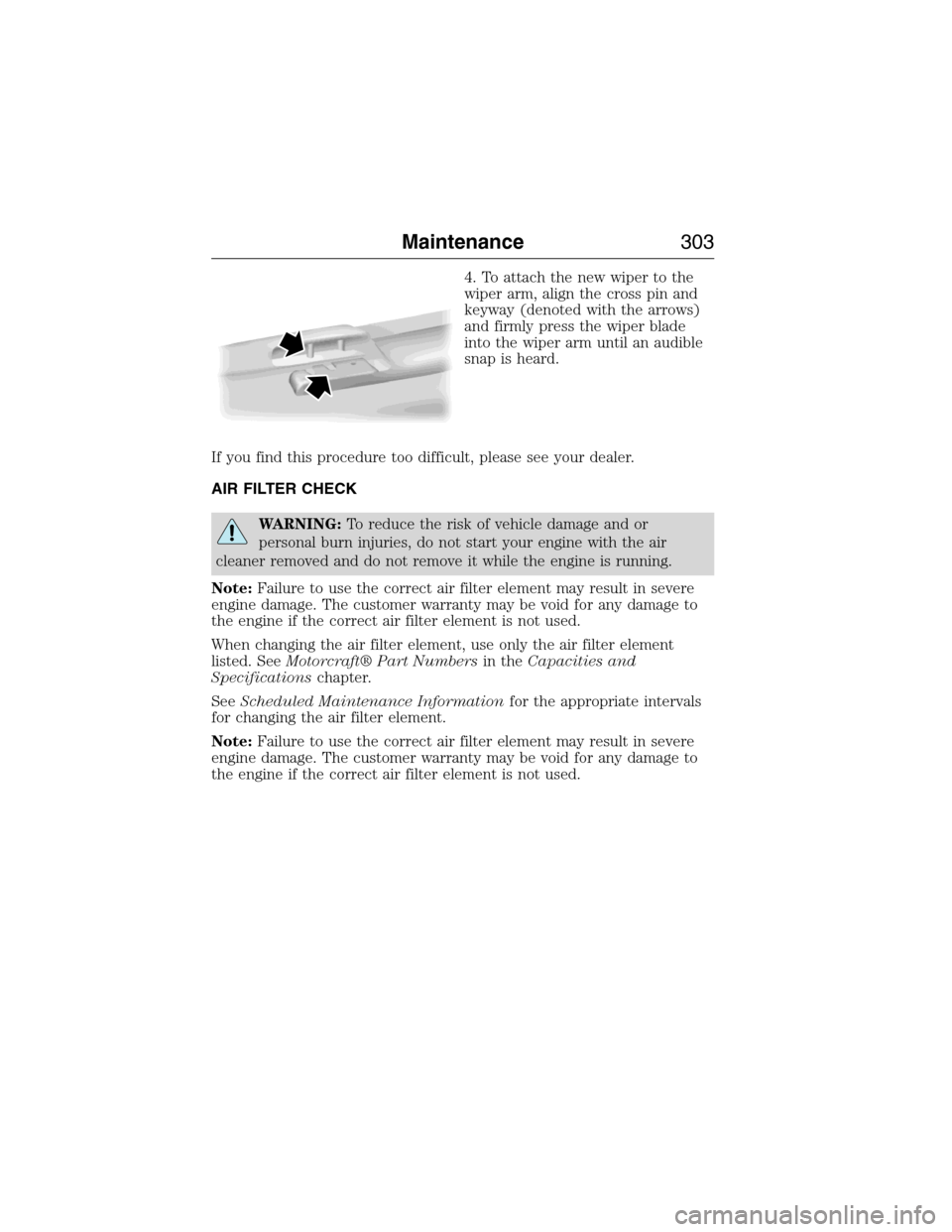
4. To attach the new wiper to the
wiper arm, align the cross pin and
keyway (denoted with the arrows)
and firmly press the wiper blade
into the wiper arm until an audible
snap is heard.
If you find this procedure too difficult, please see your dealer.
AIR FILTER CHECK
WARNING:To reduce the risk of vehicle damage and or
personal burn injuries, do not start your engine with the air
cleaner removed and do not remove it while the engine is running.
Note:Failure to use the correct air filter element may result in severe
engine damage. The customer warranty may be void for any damage to
the engine if the correct air filter element is not used.
When changing the air filter element, use only the air filter element
listed. SeeMotorcraft® Part Numbersin theCapacities and
Specificationschapter.
SeeScheduled Maintenance Informationfor the appropriate intervals
for changing the air filter element.
Note:Failure to use the correct air filter element may result in severe
engine damage. The customer warranty may be void for any damage to
the engine if the correct air filter element is not used.
Maintenance303
2015 Expedition(exd)
Owners Guide gf, 1st Printing, July 2014
USA(fus)
Page 382 of 564
Sirius Satellite Radio Service
Note:Sirius reserves the unrestricted right to change, rearrange, add or
delete programming including canceling, moving or adding particular
channels, and its prices, at any time, with or without notice to you. Ford
Motor Company shall not be responsible for any such programming changes.
Sirius satellite radio is a
subscription-based satellite radio
service that broadcasts a variety of
music, sports, news, weather, traffic
and entertainment programming.
Your factory-installed Sirius satellite
radio system includes hardware and
a limited subscription term which begins on the date of sale or lease of
your vehicle. See an authorized dealer for availability.
For more information on extended subscription terms (a service fee is
required), the online media player and a complete list of Sirius satellite
radio channels, and other features, please visit www.siriusxm.com in the
United States, www.sirius.ca in Canada, or call Sirius at 1–888–539–7474.
Satellite Radio Electronic Serial Number (ESN)
You need your ESN to activate, modify or track your satellite radio account.
When in satellite radio mode, you can view this number by pressingSIRIUS
and memory preset 1 at the same time. To access your ESN, press the
bottom left corner of the touchscreen, thenSIRIUS>Options.
Troubleshooting
Radio display Condition Possible action
Acquiring Radio requires more
than two seconds to
produce audio for the
selected channel.No action required.
This message should
disappear shortly.
Sat Fault/SIRIUS
system failureThere is an internal
module or system
failure present.If this message does
not clear shortly, or
with an ignition key
cycle, your receiver
may have a fault. See
an authorized dealer
for service.
Audio System381
2015 Expedition(exd)
Owners Guide gf, 1st Printing, July 2014
USA(fus)
Page 442 of 564
Speed-restricted Features
Some features of this system may be too difficult to use while your
vehicle is moving so they are restricted from use unless your vehicle is
stationary.
•Screens that are too crowded with information, such as Point of
Interest reviews and ratings, Sirius Travel Link sports scores, movie
times and ski conditions.
•Any action that requires you to use a keyboard is restricted, such as
entering a navigation destination or editing information.
•All lists are limited so the user can view fewer entries (such as phone
contacts or recent phone call entries).
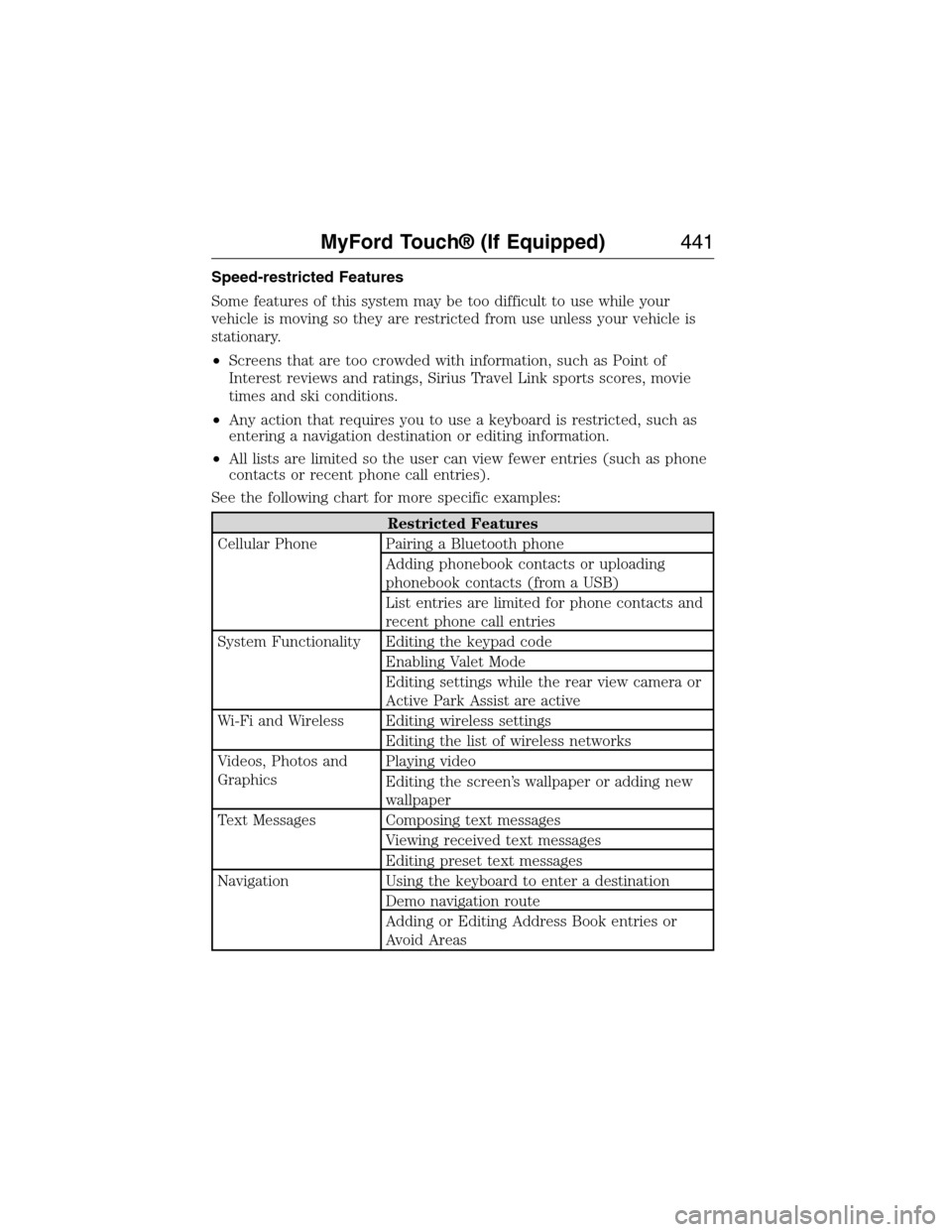
See the following chart for more specific examples:
Restricted Features
Cellular Phone Pairing a Bluetooth phone
Adding phonebook contacts or uploading
phonebook contacts (from a USB)
List entries are limited for phone contacts and
recent phone call entries
System Functionality Editing the keypad code
Enabling Valet Mode
Editing settings while the rear view camera or
Active Park Assist are active
Wi-Fi and Wireless Editing wireless settings
Editing the list of wireless networks
Videos, Photos and
GraphicsPlaying video
Editing the screen’s wallpaper or adding new
wallpaper
Text Messages Composing text messages
Viewing received text messages
Editing preset text messages
Navigation Using the keyboard to enter a destination
Demo navigation route
Adding or Editing Address Book entries or
Avoid Areas
MyFord Touch® (If Equipped)441
2015 Expedition(exd)
Owners Guide gf, 1st Printing, July 2014
USA(fus)
Page 460 of 564
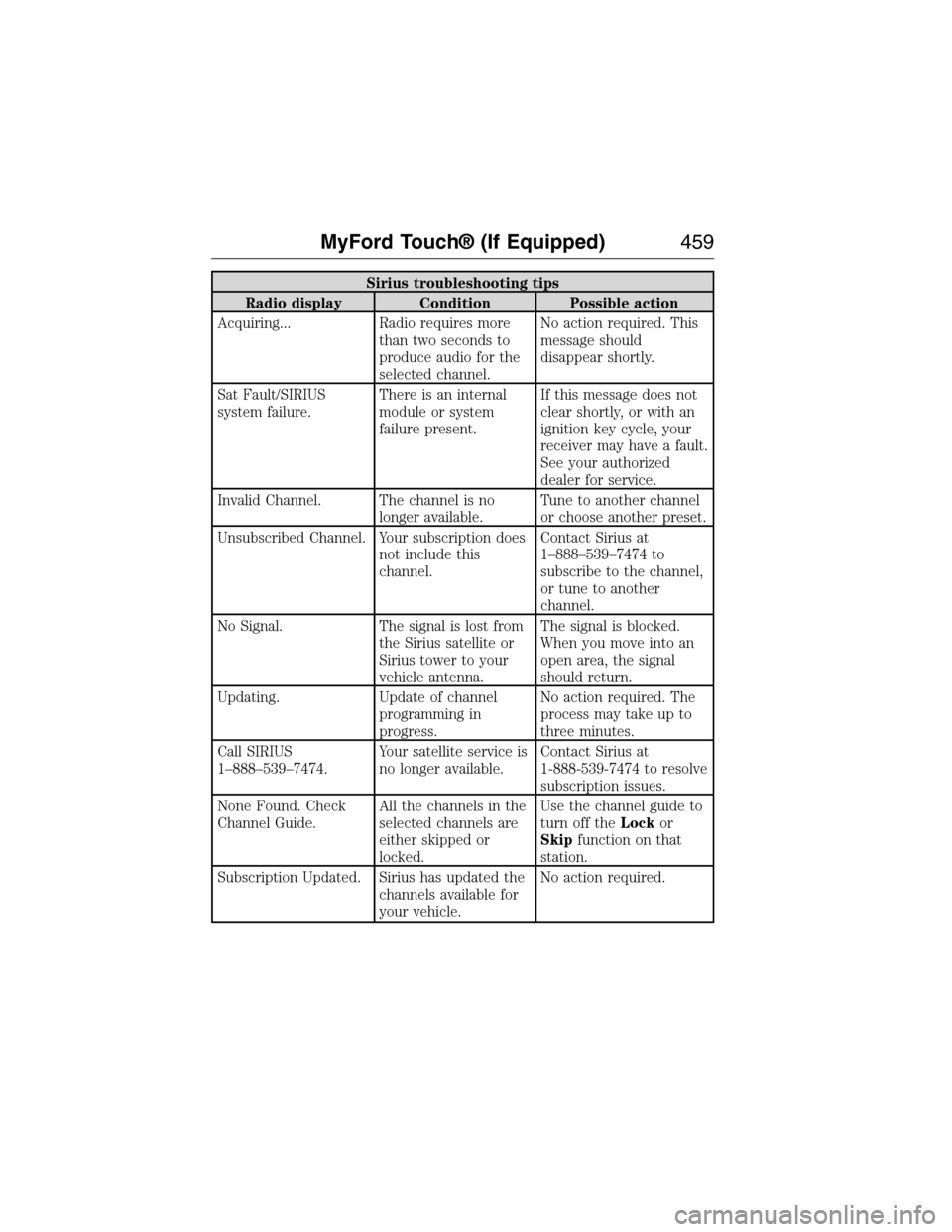
Sirius troubleshooting tips
Radio display Condition Possible action
Acquiring... Radio requires more
than two seconds to
produce audio for the
selected channel.No action required. This
message should
disappear shortly.
Sat Fault/SIRIUS
system failure.There is an internal
module or system
failure present.If this message does not
clear shortly, or with an
ignition key cycle, your
receiver may have a fault.
See your authorized
dealer for service.
Invalid Channel. The channel is no
longer available.Tune to another channel
or choose another preset.
Unsubscribed Channel. Your subscription does
not include this
channel.Contact Sirius at
1–888–539–7474 to
subscribe to the channel,
or tune to another
channel.
No Signal. The signal is lost from
the Sirius satellite or
Sirius tower to your
vehicle antenna.The signal is blocked.
When you move into an
open area, the signal
should return.
Updating. Update of channel
programming in
progress.No action required. The
process may take up to
three minutes.
Call SIRIUS
1–888–539–7474.Your satellite service is
no longer available.Contact Sirius at
1-888-539-7474 to resolve
subscription issues.
None Found. Check
Channel Guide.All the channels in the
selected channels are
either skipped or
locked.Use the channel guide to
turn off theLockor
Skipfunction on that
station.
Subscription Updated. Sirius has updated the
channels available for
your vehicle.No action required.
MyFord Touch® (If Equipped)459
2015 Expedition(exd)
Owners Guide gf, 1st Printing, July 2014
USA(fus)
Page 489 of 564
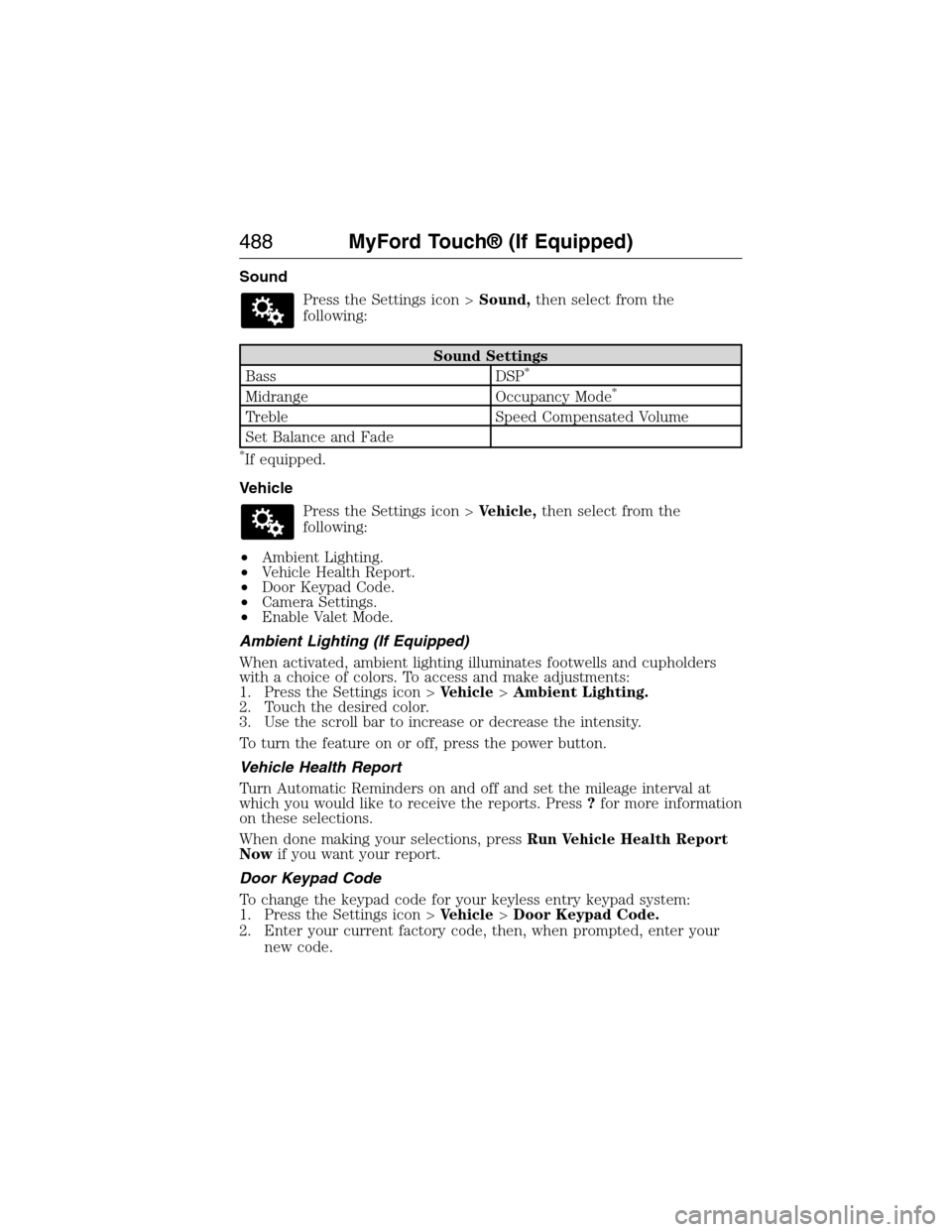
Sound
Press the Settings icon >Sound,then select from the
following:
Sound Settings
Bass DSP*
Midrange Occupancy Mode*
Treble Speed Compensated Volume
Set Balance and Fade
*If equipped.
Vehicle
Press the Settings icon >Vehicle,then select from the
following:
•Ambient Lighting.
•Vehicle Health Report.
•Door Keypad Code.
•Camera Settings.
•Enable Valet Mode.
Ambient Lighting (If Equipped)
When activated, ambient lighting illuminates footwells and cupholders
with a choice of colors. To access and make adjustments:
1. Press the Settings icon >Vehicle>Ambient Lighting.
2. Touch the desired color.
3. Use the scroll bar to increase or decrease the intensity.
To turn the feature on or off, press the power button.
Vehicle Health Report
Turn Automatic Reminders on and off and set the mileage interval at
which you would like to receive the reports. Press?for more information
on these selections.
When done making your selections, pressRun Vehicle Health Report
Nowif you want your report.
Door Keypad Code
To change the keypad code for your keyless entry keypad system:
1. Press the Settings icon >Vehicle>Door Keypad Code.
2. Enter your current factory code, then, when prompted, enter your
new code.
488MyFord Touch® (If Equipped)
2015 Expedition(exd)
Owners Guide gf, 1st Printing, July 2014
USA(fus)
Page 491 of 564
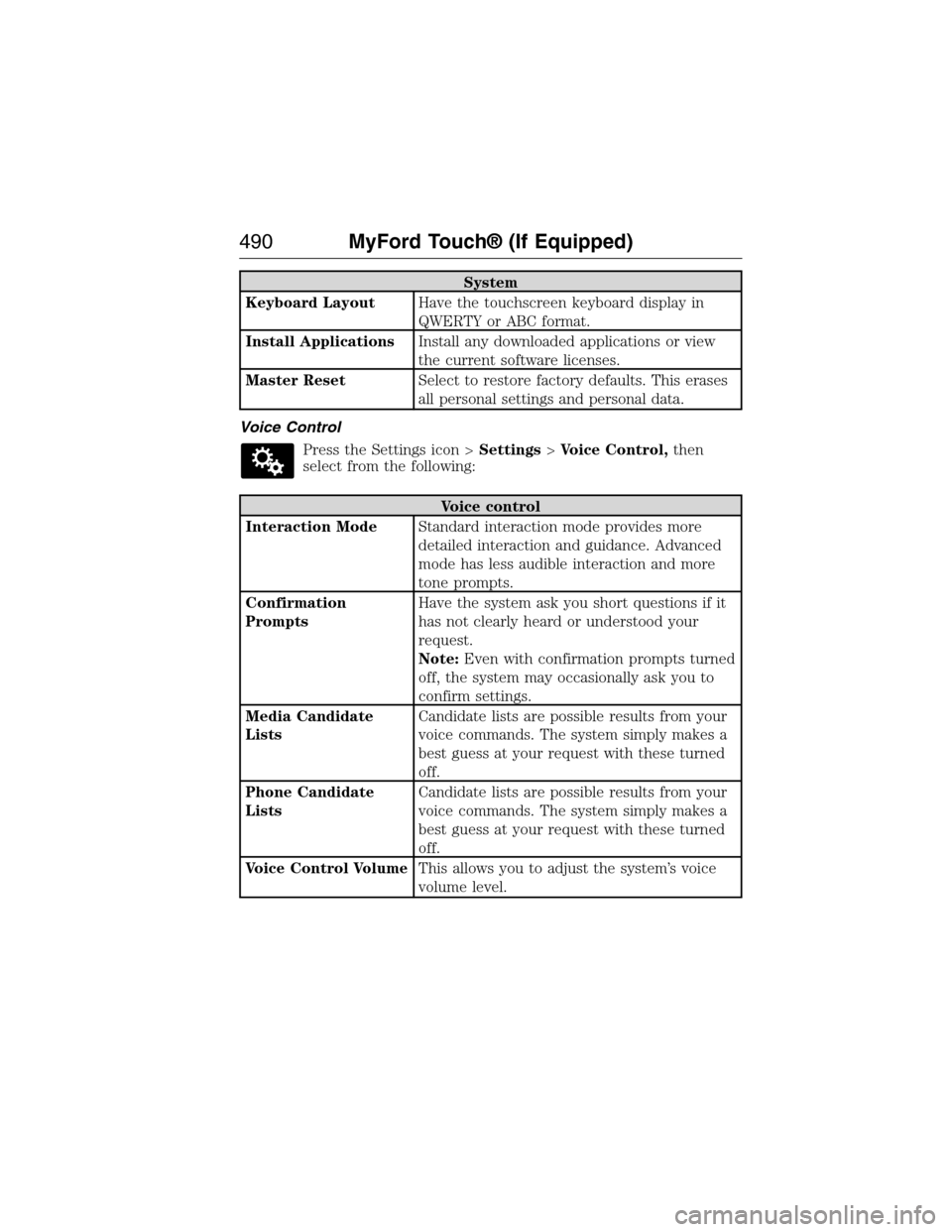
System
Keyboard LayoutHave the touchscreen keyboard display in
QWERTY or ABC format.
Install ApplicationsInstall any downloaded applications or view
the current software licenses.
Master ResetSelect to restore factory defaults. This erases
all personal settings and personal data.
Voice Control
Press the Settings icon >Settings>Voice Control,then
select from the following:
Voice control
Interaction ModeStandard interaction mode provides more
detailed interaction and guidance. Advanced
mode has less audible interaction and more
tone prompts.
Confirmation
PromptsHave the system ask you short questions if it
has not clearly heard or understood your
request.
Note:Even with confirmation prompts turned
off, the system may occasionally ask you to
confirm settings.
Media Candidate
ListsCandidate lists are possible results from your
voice commands. The system simply makes a
best guess at your request with these turned
off.
Phone Candidate
ListsCandidate lists are possible results from your
voice commands. The system simply makes a
best guess at your request with these turned
off.
Voice Control VolumeThis allows you to adjust the system’s voice
volume level.
490MyFord Touch® (If Equipped)
2015 Expedition(exd)
Owners Guide gf, 1st Printing, July 2014
USA(fus)
Page 505 of 564
To expand these listings, press the+in front of the point of interest
listing.
When programming a point of interest destination, the system allows you
to sort the resulting lists alphabetically, by distance or by cityseekr
listings (if available).
Pressing theSearch Areasbutton allows you to search for points of
interest nearby, near a city or state or near a destination, if a route is
active.
Pressing theSearch By Namebutton allows you to directly enter the
point of interest name into the system by using the keyboard.
cityseekr (If Available)
Note:cityseekr point of interest information is limited to approximately
912 cities (881 in the United States, 20 in Canada and 11 in Mexico).
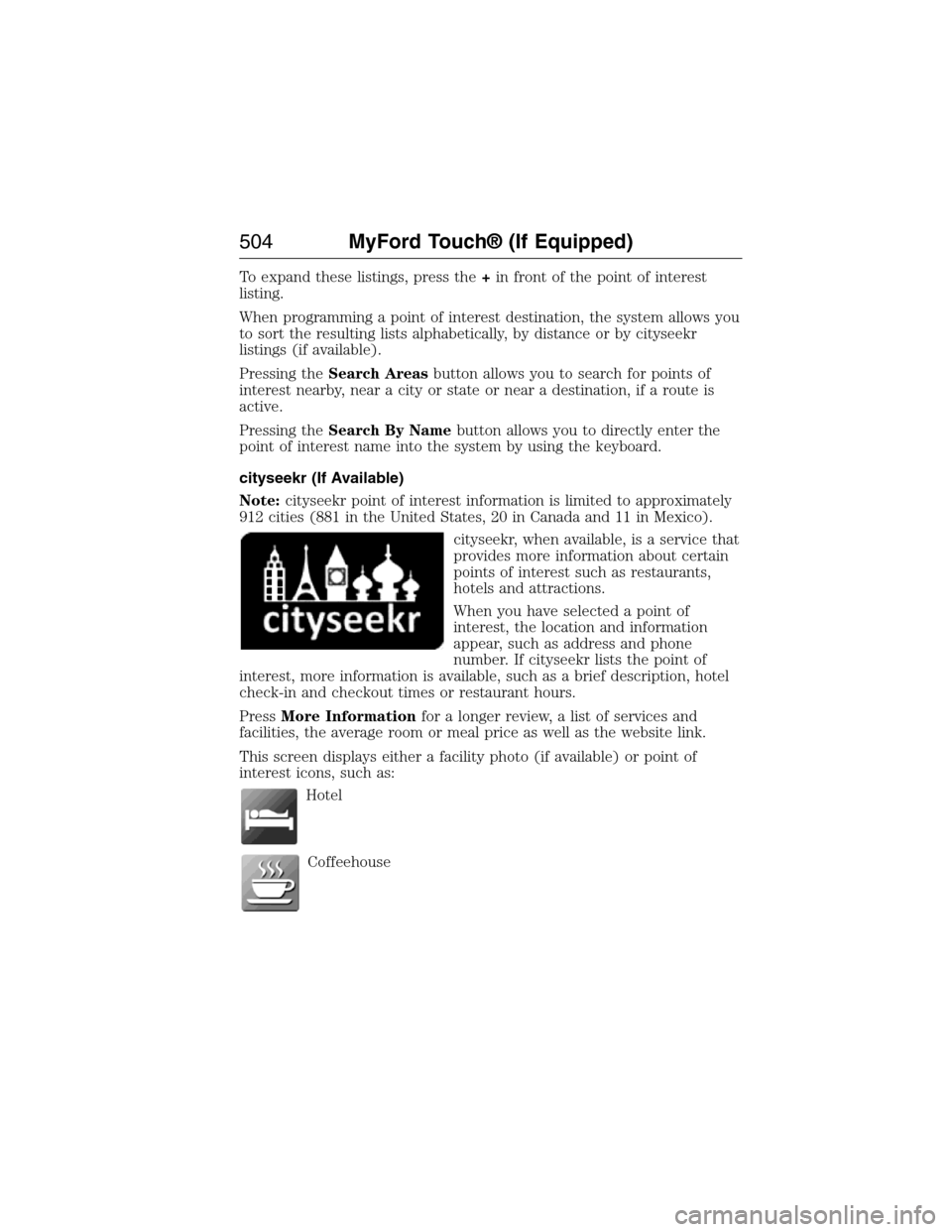
cityseekr, when available, is a service that
provides more information about certain
points of interest such as restaurants,
hotels and attractions.
When you have selected a point of
interest, the location and information
appear, such as address and phone
number. If cityseekr lists the point of
interest, more information is available, such as a brief description, hotel
check-in and checkout times or restaurant hours.
PressMore Informationfor a longer review, a list of services and
facilities, the average room or meal price as well as the website link.
This screen displays either a facility photo (if available) or point of
interest icons, such as:
Hotel
Coffeehouse
504MyFord Touch® (If Equipped)
2015 Expedition(exd)
Owners Guide gf, 1st Printing, July 2014
USA(fus)
Page 559 of 564
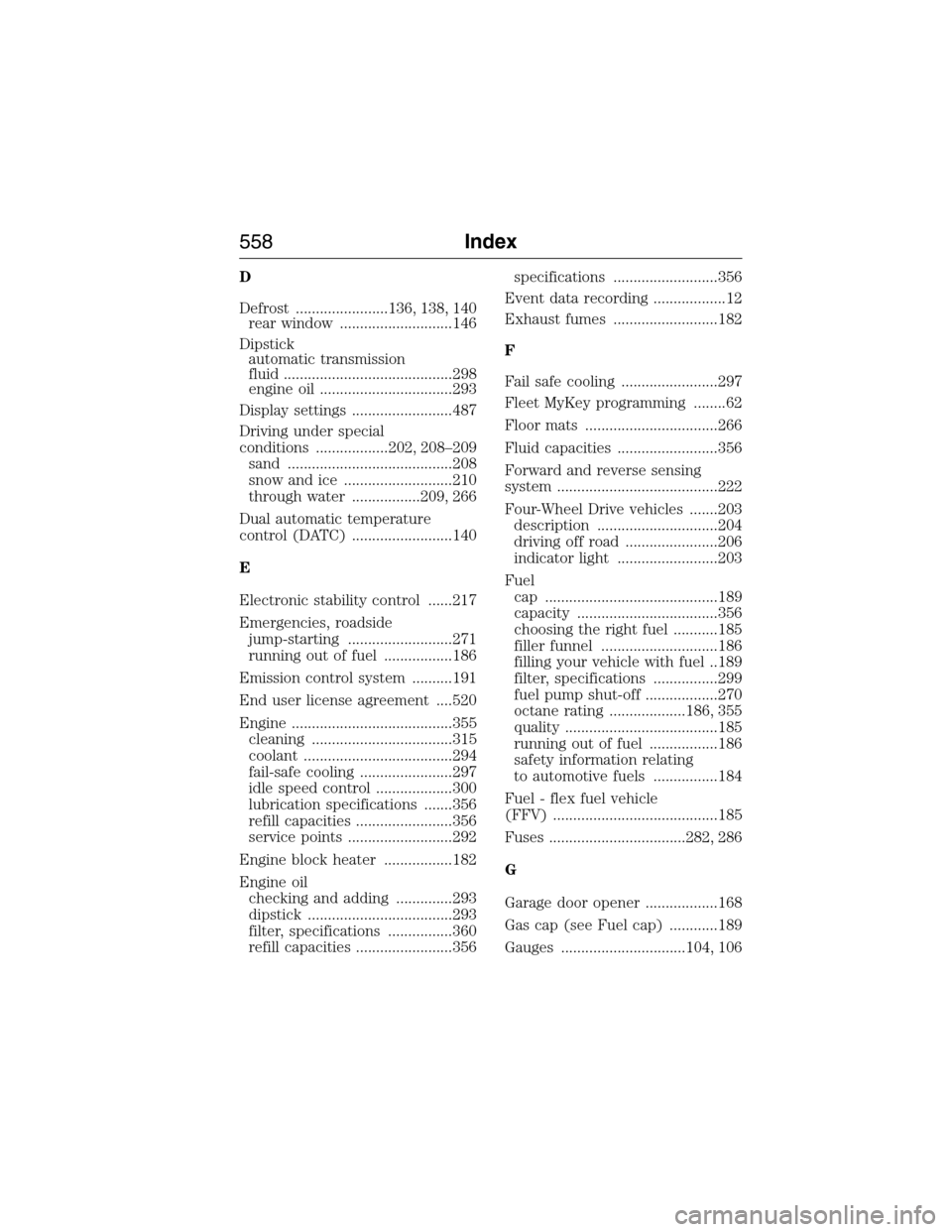
D
Defrost .......................136, 138, 140
rear window ............................146
Dipstick
automatic transmission
fluid ..........................................298
engine oil .................................293
Display settings .........................487
Driving under special
conditions ..................202, 208–209
sand .........................................208
snow and ice ...........................210
through water .................209, 266
Dual automatic temperature
control (DATC) .........................140
E
Electronic stability control ......217
Emergencies, roadside
jump-starting ..........................271
running out of fuel .................186
Emission control system ..........191
End user license agreement ....520
Engine ........................................355
cleaning ...................................315
coolant .....................................294
fail-safe cooling .......................297
idle speed control ...................300
lubrication specifications .......356
refill capacities ........................356
service points ..........................292
Engine block heater .................182
Engine oil
checking and adding ..............293
dipstick ....................................293
filter, specifications ................360
refill capacities ........................356specifications ..........................356
Event data recording ..................12
Exhaust fumes ..........................182
F
Fail safe cooling ........................297
Fleet MyKey programming ........62
Floor mats .................................266
Fluid capacities .........................356
Forward and reverse sensing
system ........................................222
Four-Wheel Drive vehicles .......203
description ..............................204
driving off road .......................206
indicator light .........................203
Fuel
cap ...........................................189
capacity ...................................356
choosing the right fuel ...........185
filler funnel .............................186
filling your vehicle with fuel ..189
filter, specifications ................299
fuel pump shut-off ..................270
octane rating ...................186, 355
quality ......................................185
running out of fuel .................186
safety information relating
to automotive fuels ................184
Fuel - flex fuel vehicle
(FFV) .........................................185
Fuses ..................................282, 286
G
Garage door opener ..................168
Gas cap (see Fuel cap) ............189
Gauges ...............................104, 106
558Index
2015 Expedition(exd)
Owners Guide gf, 1st Printing, July 2014
USA(fus)
Page 560 of 564
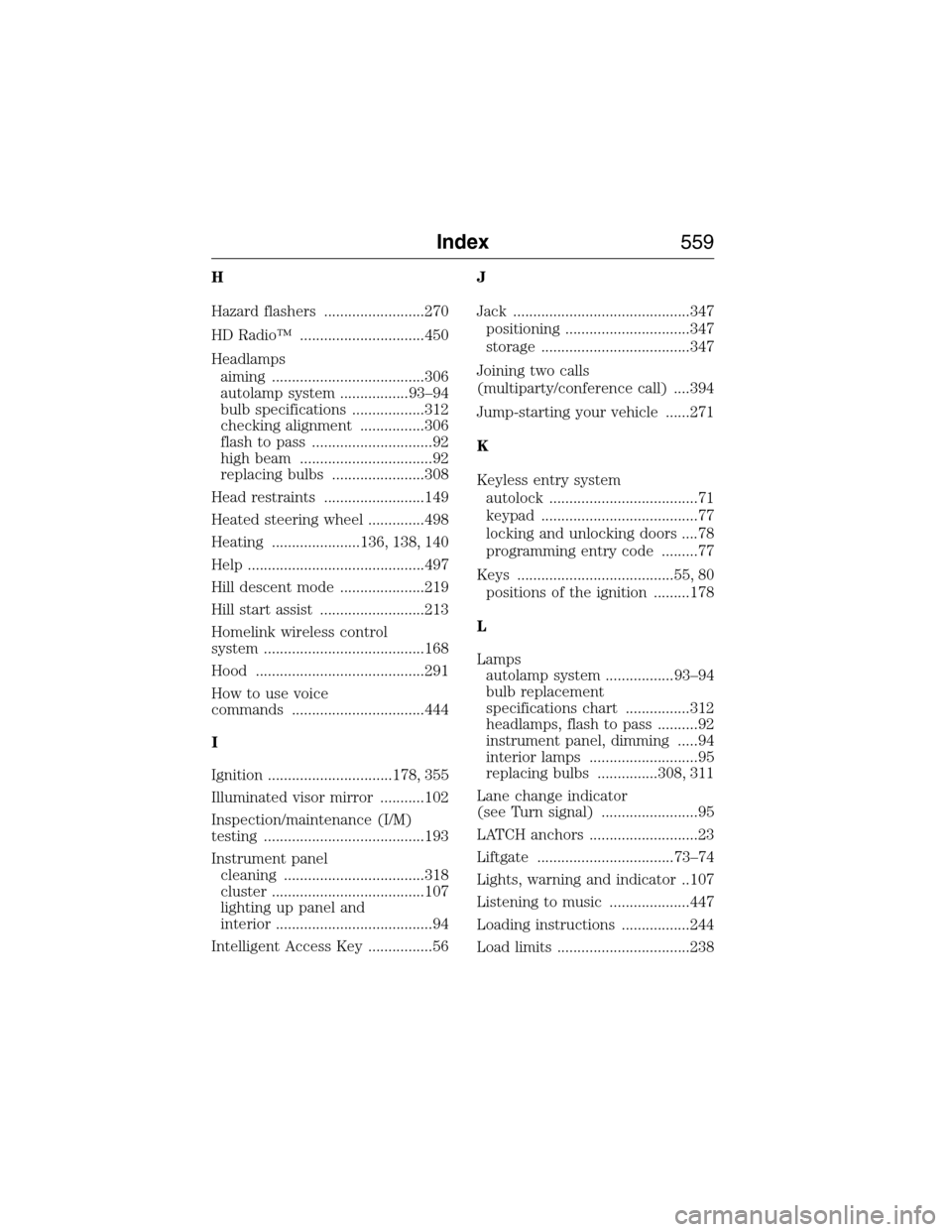
H
Hazard flashers .........................270
HD Radio™ ...............................450
Headlamps
aiming ......................................306
autolamp system .................93–94
bulb specifications ..................312
checking alignment ................306
flash to pass ..............................92
high beam .................................92
replacing bulbs .......................308
Head restraints .........................149
Heated steering wheel ..............498
Heating ......................136, 138, 140
Help ............................................497
Hill descent mode .....................219
Hill start assist ..........................213
Homelink wireless control
system ........................................168
Hood ..........................................291
How to use voice
commands .................................444
I
Ignition ...............................178, 355
Illuminated visor mirror ...........102
Inspection/maintenance (I/M)
testing ........................................193
Instrument panel
cleaning ...................................318
cluster ......................................107
lighting up panel and
interior .......................................94
Intelligent Access Key ................56J
Jack ............................................347
positioning ...............................347
storage .....................................347
Joining two calls
(multiparty/conference call) ....394
Jump-starting your vehicle ......271
K
Keyless entry system
autolock .....................................71
keypad .......................................77
locking and unlocking doors ....78
programming entry code .........77
Keys .......................................55, 80
positions of the ignition .........178
L
Lamps
autolamp system .................93–94
bulb replacement
specifications chart ................312
headlamps, flash to pass ..........92
instrument panel, dimming .....94
interior lamps ...........................95
replacing bulbs ...............308, 311
Lane change indicator
(see Turn signal) ........................95
LATCH anchors ...........................23
Liftgate ..................................73–74
Lights, warning and indicator ..107
Listening to music ....................447
Loading instructions .................244
Load limits .................................238
Index559
2015 Expedition(exd)
Owners Guide gf, 1st Printing, July 2014
USA(fus)