weight FORD EXPEDITION 2016 3.G Owner's Guide
[x] Cancel search | Manufacturer: FORD, Model Year: 2016, Model line: EXPEDITION, Model: FORD EXPEDITION 2016 3.GPages: 421, PDF Size: 6.3 MB
Page 281 of 421
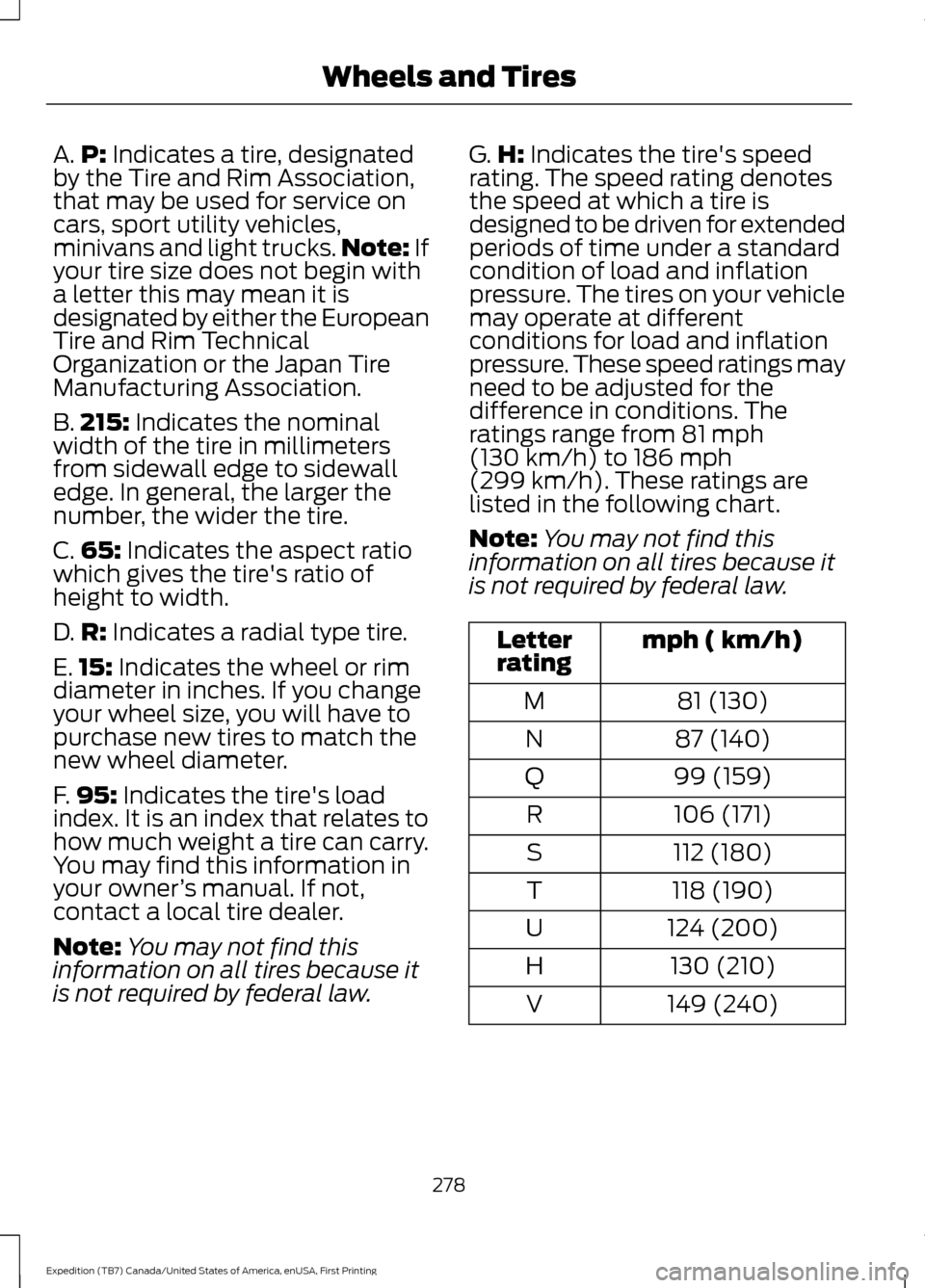
A.
P: Indicates a tire, designated
by the Tire and Rim Association,
that may be used for service on
cars, sport utility vehicles,
minivans and light trucks. Note:
If
your tire size does not begin with
a letter this may mean it is
designated by either the European
Tire and Rim Technical
Organization or the Japan Tire
Manufacturing Association.
B. 215:
Indicates the nominal
width of the tire in millimeters
from sidewall edge to sidewall
edge. In general, the larger the
number, the wider the tire.
C. 65:
Indicates the aspect ratio
which gives the tire's ratio of
height to width.
D. R:
Indicates a radial type tire.
E. 15:
Indicates the wheel or rim
diameter in inches. If you change
your wheel size, you will have to
purchase new tires to match the
new wheel diameter.
F. 95:
Indicates the tire's load
index. It is an index that relates to
how much weight a tire can carry.
You may find this information in
your owner ’s manual. If not,
contact a local tire dealer.
Note: You may not find this
information on all tires because it
is not required by federal law. G.
H:
Indicates the tire's speed
rating. The speed rating denotes
the speed at which a tire is
designed to be driven for extended
periods of time under a standard
condition of load and inflation
pressure. The tires on your vehicle
may operate at different
conditions for load and inflation
pressure. These speed ratings may
need to be adjusted for the
difference in conditions. The
ratings range from
81 mph
(130 km/h) to 186 mph
(299 km/h). These ratings are
listed in the following chart.
Note: You may not find this
information on all tires because it
is not required by federal law. mph ( km/h)
Letter
rating
81 (130)
M
87 (140)
N
99 (159)
Q
106 (171)
R
112 (180)
S
118 (190)
T
124 (200)
U
130 (210)
H
149 (240)
V
278
Expedition (TB7) Canada/United States of America, enUSA, First Printing Wheels and Tires
Page 301 of 421
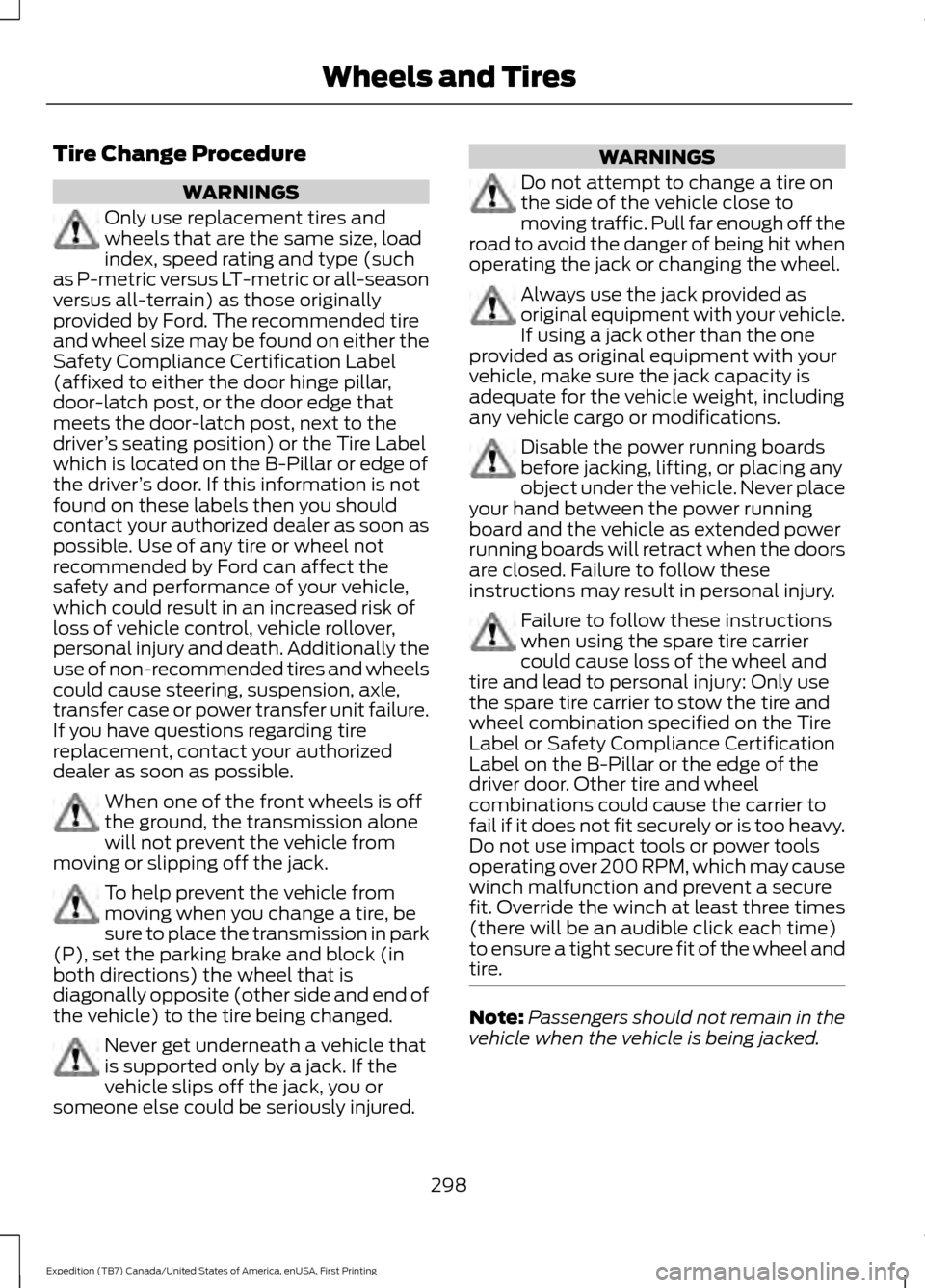
Tire Change Procedure
WARNINGS
Only use replacement tires and
wheels that are the same size, load
index, speed rating and type (such
as P-metric versus LT-metric or all-season
versus all-terrain) as those originally
provided by Ford. The recommended tire
and wheel size may be found on either the
Safety Compliance Certification Label
(affixed to either the door hinge pillar,
door-latch post, or the door edge that
meets the door-latch post, next to the
driver ’s seating position) or the Tire Label
which is located on the B-Pillar or edge of
the driver ’s door. If this information is not
found on these labels then you should
contact your authorized dealer as soon as
possible. Use of any tire or wheel not
recommended by Ford can affect the
safety and performance of your vehicle,
which could result in an increased risk of
loss of vehicle control, vehicle rollover,
personal injury and death. Additionally the
use of non-recommended tires and wheels
could cause steering, suspension, axle,
transfer case or power transfer unit failure.
If you have questions regarding tire
replacement, contact your authorized
dealer as soon as possible. When one of the front wheels is off
the ground, the transmission alone
will not prevent the vehicle from
moving or slipping off the jack. To help prevent the vehicle from
moving when you change a tire, be
sure to place the transmission in park
(P), set the parking brake and block (in
both directions) the wheel that is
diagonally opposite (other side and end of
the vehicle) to the tire being changed. Never get underneath a vehicle that
is supported only by a jack. If the
vehicle slips off the jack, you or
someone else could be seriously injured. WARNINGS
Do not attempt to change a tire on
the side of the vehicle close to
moving traffic. Pull far enough off the
road to avoid the danger of being hit when
operating the jack or changing the wheel. Always use the jack provided as
original equipment with your vehicle.
If using a jack other than the one
provided as original equipment with your
vehicle, make sure the jack capacity is
adequate for the vehicle weight, including
any vehicle cargo or modifications. Disable the power running boards
before jacking, lifting, or placing any
object under the vehicle. Never place
your hand between the power running
board and the vehicle as extended power
running boards will retract when the doors
are closed. Failure to follow these
instructions may result in personal injury. Failure to follow these instructions
when using the spare tire carrier
could cause loss of the wheel and
tire and lead to personal injury: Only use
the spare tire carrier to stow the tire and
wheel combination specified on the Tire
Label or Safety Compliance Certification
Label on the B-Pillar or the edge of the
driver door. Other tire and wheel
combinations could cause the carrier to
fail if it does not fit securely or is too heavy.
Do not use impact tools or power tools
operating over 200 RPM, which may cause
winch malfunction and prevent a secure
fit. Override the winch at least three times
(there will be an audible click each time)
to ensure a tight secure fit of the wheel and
tire. Note:
Passengers should not remain in the
vehicle when the vehicle is being jacked.
298
Expedition (TB7) Canada/United States of America, enUSA, First Printing Wheels and Tires
Page 308 of 421
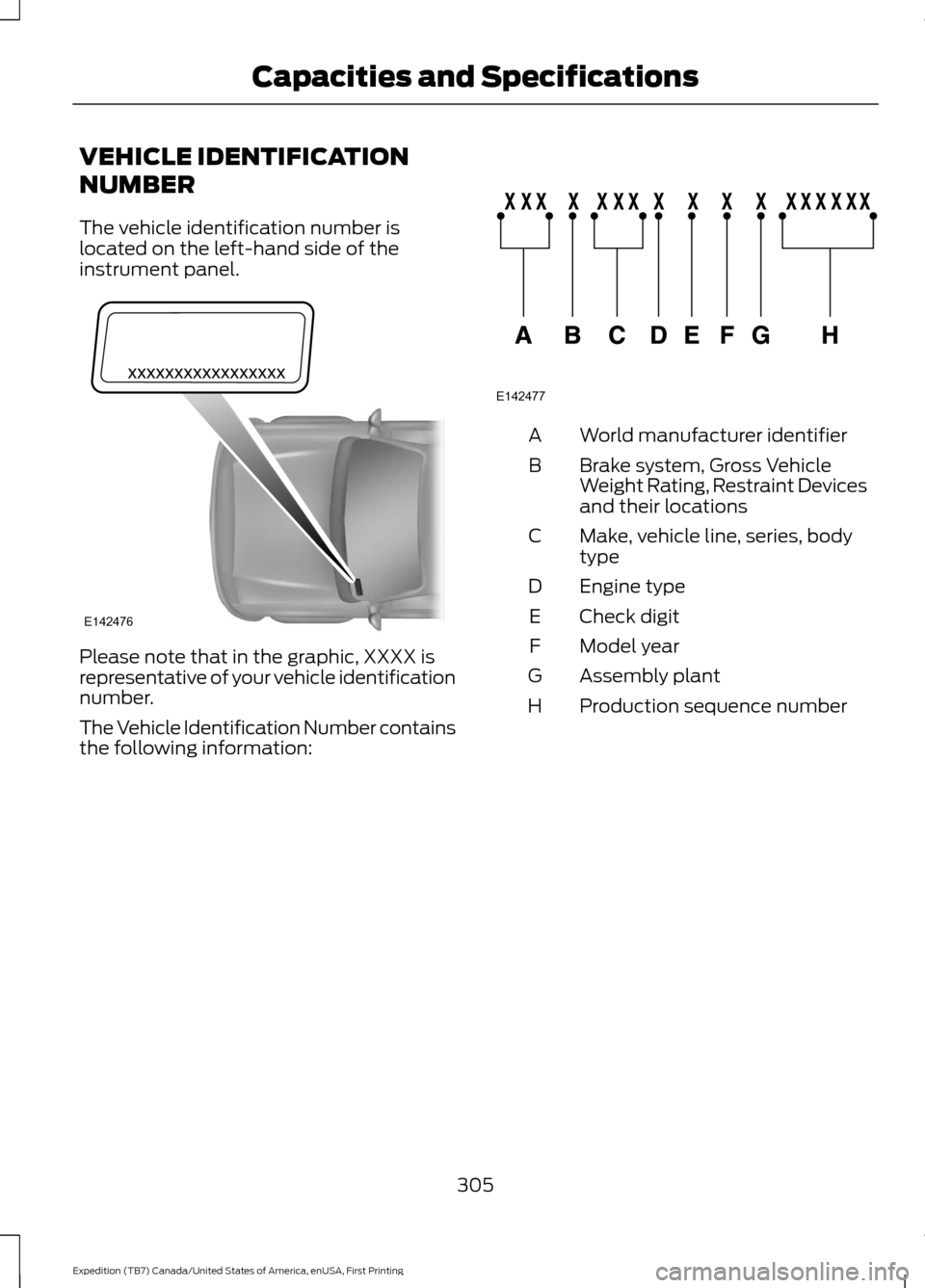
VEHICLE IDENTIFICATION
NUMBER
The vehicle identification number is
located on the left-hand side of the
instrument panel.
Please note that in the graphic, XXXX is
representative of your vehicle identification
number.
The Vehicle Identification Number contains
the following information: World manufacturer identifier
A
Brake system, Gross Vehicle
Weight Rating, Restraint Devices
and their locations
B
Make, vehicle line, series, body
type
C
Engine type
D
Check digit
E
Model year
F
Assembly plant
G
Production sequence number
H
305
Expedition (TB7) Canada/United States of America, enUSA, First Printing Capacities and SpecificationsE142476 E142477
Page 372 of 421
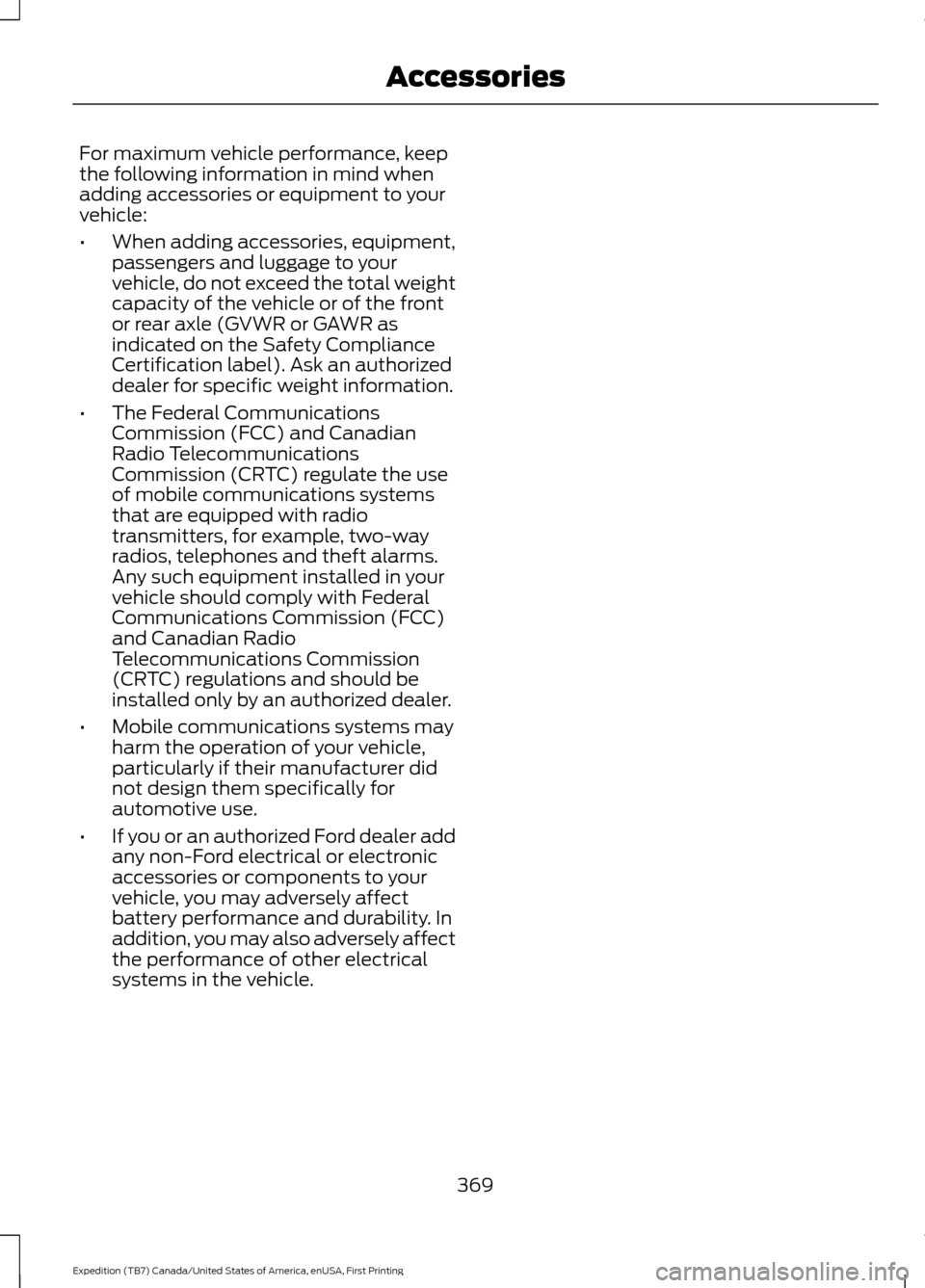
For maximum vehicle performance, keep
the following information in mind when
adding accessories or equipment to your
vehicle:
•
When adding accessories, equipment,
passengers and luggage to your
vehicle, do not exceed the total weight
capacity of the vehicle or of the front
or rear axle (GVWR or GAWR as
indicated on the Safety Compliance
Certification label). Ask an authorized
dealer for specific weight information.
• The Federal Communications
Commission (FCC) and Canadian
Radio Telecommunications
Commission (CRTC) regulate the use
of mobile communications systems
that are equipped with radio
transmitters, for example, two-way
radios, telephones and theft alarms.
Any such equipment installed in your
vehicle should comply with Federal
Communications Commission (FCC)
and Canadian Radio
Telecommunications Commission
(CRTC) regulations and should be
installed only by an authorized dealer.
• Mobile communications systems may
harm the operation of your vehicle,
particularly if their manufacturer did
not design them specifically for
automotive use.
• If you or an authorized Ford dealer add
any non-Ford electrical or electronic
accessories or components to your
vehicle, you may adversely affect
battery performance and durability. In
addition, you may also adversely affect
the performance of other electrical
systems in the vehicle.
369
Expedition (TB7) Canada/United States of America, enUSA, First Printing Accessories
Page 416 of 421
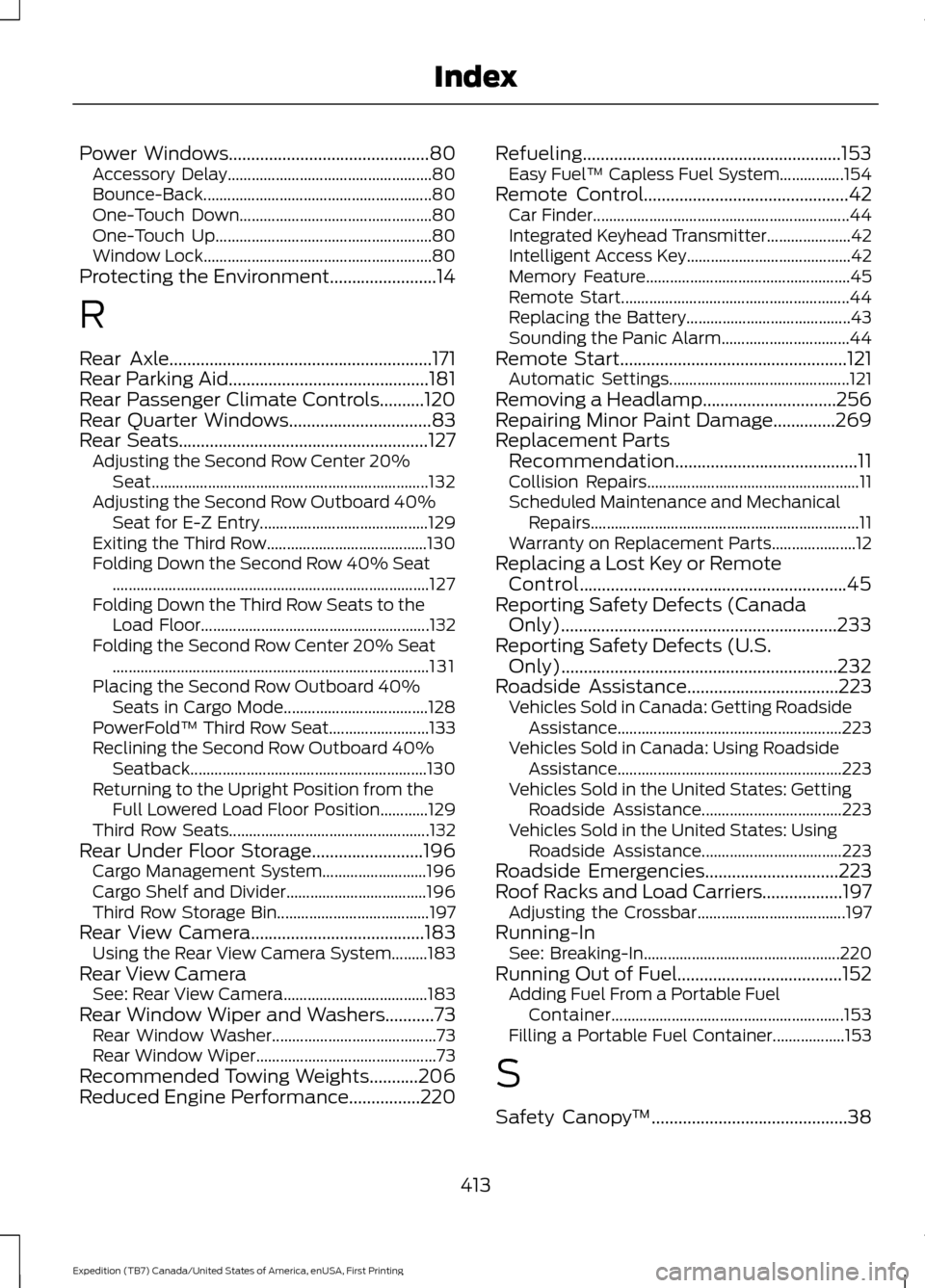
Power Windows.............................................80
Accessory Delay................................................... 80
Bounce-Back......................................................... 80
One-Touch Down................................................ 80
One-Touch Up...................................................... 80
Window Lock......................................................... 80
Protecting the Environment........................14
R
Rear Axle
...........................................................171
Rear Parking Aid.............................................181
Rear Passenger Climate Controls..........120
Rear Quarter Windows
................................83
Rear Seats........................................................127
Adjusting the Second Row Center 20%
Seat..................................................................... 132
Adjusting the Second Row Outboard 40% Seat for E-Z Entry.......................................... 129
Exiting the Third Row........................................ 130
Folding Down the Second Row 40% Seat ........................................................................\
....... 127
Folding Down the Third Row Seats to the Load Floor......................................................... 132
Folding the Second Row Center 20% Seat ........................................................................\
....... 131
Placing the Second Row Outboard 40% Seats in Cargo Mode.................................... 128
PowerFold™ Third Row Seat......................... 133
Reclining the Second Row Outboard 40% Seatback........................................................... 130
Returning to the Upright Position from the Full Lowered Load Floor Position............129
Third Row Seats.................................................. 132
Rear Under Floor Storage.........................196 Cargo Management System.......................... 196
Cargo Shelf and Divider................................... 196
Third Row Storage Bin...................................... 197
Rear View Camera.......................................183 Using the Rear View Camera System.........183
Rear View Camera See: Rear View Camera.................................... 183
Rear Window Wiper and Washers
...........73
Rear Window Washer......................................... 73
Rear Window Wiper............................................. 73
Recommended Towing Weights...........206
Reduced Engine Performance
................220 Refueling..........................................................153
Easy Fuel ™ Capless Fuel System................154
Remote Control
..............................................42
Car Finder................................................................ 44
Integrated Keyhead Transmitter..................... 42
Intelligent Access Key......................................... 42
Memory Feature................................................... 45
Remote Start......................................................... 44
Replacing the Battery......................................... 43
Sounding the Panic Alarm................................ 44
Remote Start
...................................................121
Automatic Settings............................................. 121
Removing a Headlamp..............................256
Repairing Minor Paint Damage..............269
Replacement Parts Recommendation.........................................11
Collision Repairs..................................................... 11
Scheduled Maintenance and Mechanical Repairs................................................................... 11
Warranty on Replacement Parts..................... 12
Replacing a Lost Key or Remote Control............................................................45
Reporting Safety Defects (Canada Only)..............................................................233
Reporting Safety Defects (U.S. Only)
..............................................................232
Roadside Assistance..................................223 Vehicles Sold in Canada: Getting Roadside
Assistance........................................................ 223
Vehicles Sold in Canada: Using Roadside Assistance........................................................ 223
Vehicles Sold in the United States: Getting Roadside Assistance................................... 223
Vehicles Sold in the United States: Using Roadside Assistance................................... 223
Roadside Emergencies
..............................223
Roof Racks and Load Carriers..................197 Adjusting the Crossbar..................................... 197
Running-In See: Breaking-In................................................. 220
Running Out of Fuel.....................................152 Adding Fuel From a Portable Fuel
Container.......................................................... 153
Filling a Portable Fuel Container.................. 153
S
Safety Canopy ™
............................................38
413
Expedition (TB7) Canada/United States of America, enUSA, First Printing Index