steering FORD EXPEDITION 2016 3.G Workshop Manual
[x] Cancel search | Manufacturer: FORD, Model Year: 2016, Model line: EXPEDITION, Model: FORD EXPEDITION 2016 3.GPages: 421, PDF Size: 6.3 MB
Page 345 of 421
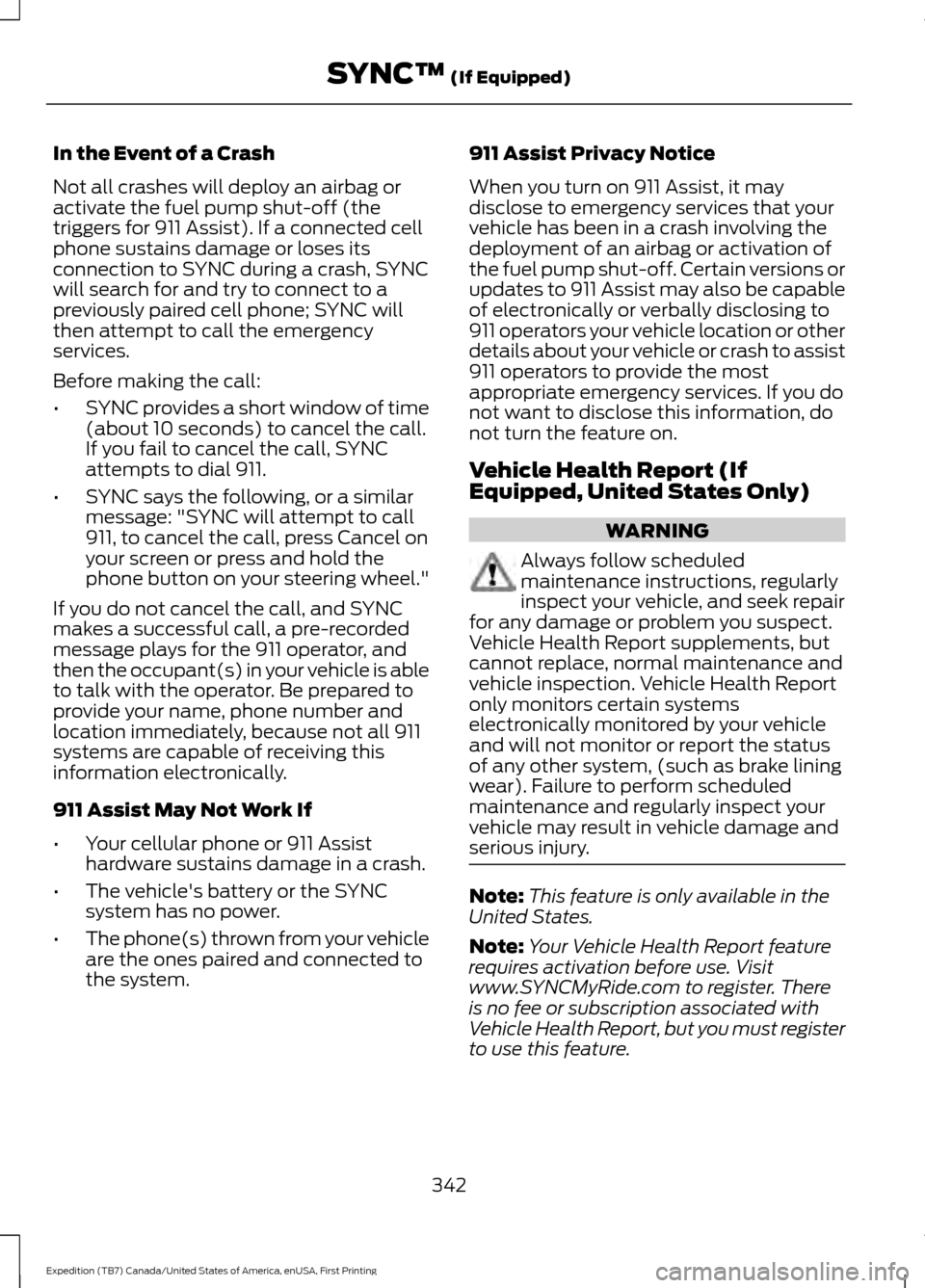
In the Event of a Crash
Not all crashes will deploy an airbag or
activate the fuel pump shut-off (the
triggers for 911 Assist). If a connected cell
phone sustains damage or loses its
connection to SYNC during a crash, SYNC
will search for and try to connect to a
previously paired cell phone; SYNC will
then attempt to call the emergency
services.
Before making the call:
•
SYNC provides a short window of time
(about 10 seconds) to cancel the call.
If you fail to cancel the call, SYNC
attempts to dial 911.
• SYNC says the following, or a similar
message: "SYNC will attempt to call
911, to cancel the call, press Cancel on
your screen or press and hold the
phone button on your steering wheel."
If you do not cancel the call, and SYNC
makes a successful call, a pre-recorded
message plays for the 911 operator, and
then the occupant(s) in your vehicle is able
to talk with the operator. Be prepared to
provide your name, phone number and
location immediately, because not all 911
systems are capable of receiving this
information electronically.
911 Assist May Not Work If
• Your cellular phone or 911 Assist
hardware sustains damage in a crash.
• The vehicle's battery or the SYNC
system has no power.
• The phone(s) thrown from your vehicle
are the ones paired and connected to
the system. 911 Assist Privacy Notice
When you turn on 911 Assist, it may
disclose to emergency services that your
vehicle has been in a crash involving the
deployment of an airbag or activation of
the fuel pump shut-off. Certain versions or
updates to 911 Assist may also be capable
of electronically or verbally disclosing to
911 operators your vehicle location or other
details about your vehicle or crash to assist
911 operators to provide the most
appropriate emergency services. If you do
not want to disclose this information, do
not turn the feature on.
Vehicle Health Report (If
Equipped, United States Only)
WARNING
Always follow scheduled
maintenance instructions, regularly
inspect your vehicle, and seek repair
for any damage or problem you suspect.
Vehicle Health Report supplements, but
cannot replace, normal maintenance and
vehicle inspection. Vehicle Health Report
only monitors certain systems
electronically monitored by your vehicle
and will not monitor or report the status
of any other system, (such as brake lining
wear). Failure to perform scheduled
maintenance and regularly inspect your
vehicle may result in vehicle damage and
serious injury. Note:
This feature is only available in the
United States.
Note: Your Vehicle Health Report feature
requires activation before use. Visit
www.SYNCMyRide.com to register. There
is no fee or subscription associated with
Vehicle Health Report, but you must register
to use this feature.
342
Expedition (TB7) Canada/United States of America, enUSA, First Printing SYNC™ (If Equipped)
Page 350 of 421
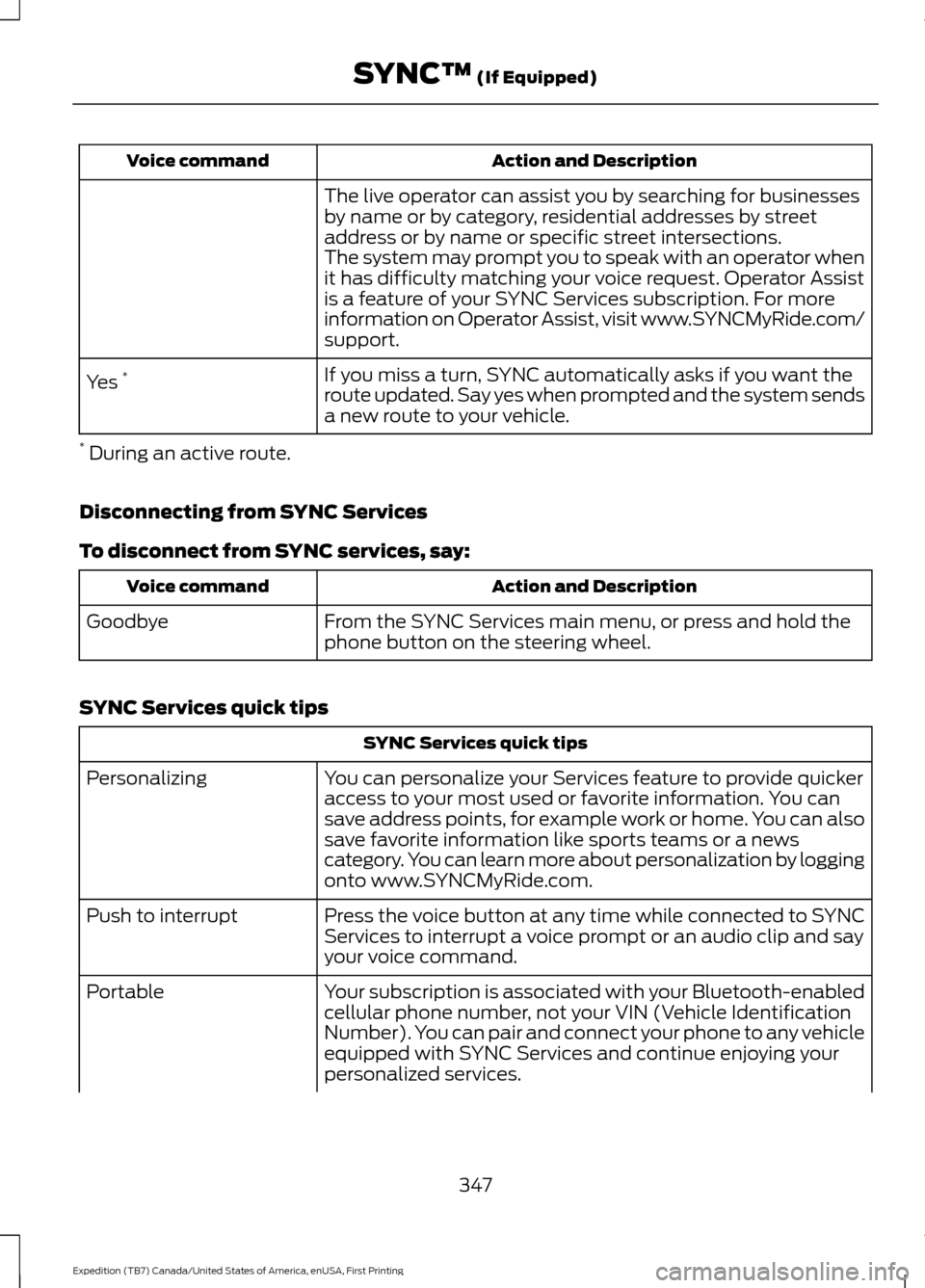
Action and Description
Voice command
The live operator can assist you by searching for businesses
by name or by category, residential addresses by street
address or by name or specific street intersections.
The system may prompt you to speak with an operator when
it has difficulty matching your voice request. Operator Assist
is a feature of your SYNC Services subscription. For more
information on Operator Assist, visit www.SYNCMyRide.com/
support.
If you miss a turn, SYNC automatically asks if you want the
route updated. Say yes when prompted and the system sends
a new route to your vehicle.
Yes
*
* During an active route.
Disconnecting from SYNC Services
To disconnect from SYNC services, say: Action and Description
Voice command
From the SYNC Services main menu, or press and hold the
phone button on the steering wheel.
Goodbye
SYNC Services quick tips SYNC Services quick tips
You can personalize your Services feature to provide quicker
access to your most used or favorite information. You can
save address points, for example work or home. You can also
save favorite information like sports teams or a news
category. You can learn more about personalization by logging
onto www.SYNCMyRide.com.
Personalizing
Press the voice button at any time while connected to SYNC
Services to interrupt a voice prompt or an audio clip and say
your voice command.
Push to interrupt
Your subscription is associated with your Bluetooth-enabled
cellular phone number, not your VIN (Vehicle Identification
Number). You can pair and connect your phone to any vehicle
equipped with SYNC Services and continue enjoying your
personalized services.
Portable
347
Expedition (TB7) Canada/United States of America, enUSA, First Printing SYNC™ (If Equipped)
Page 351 of 421
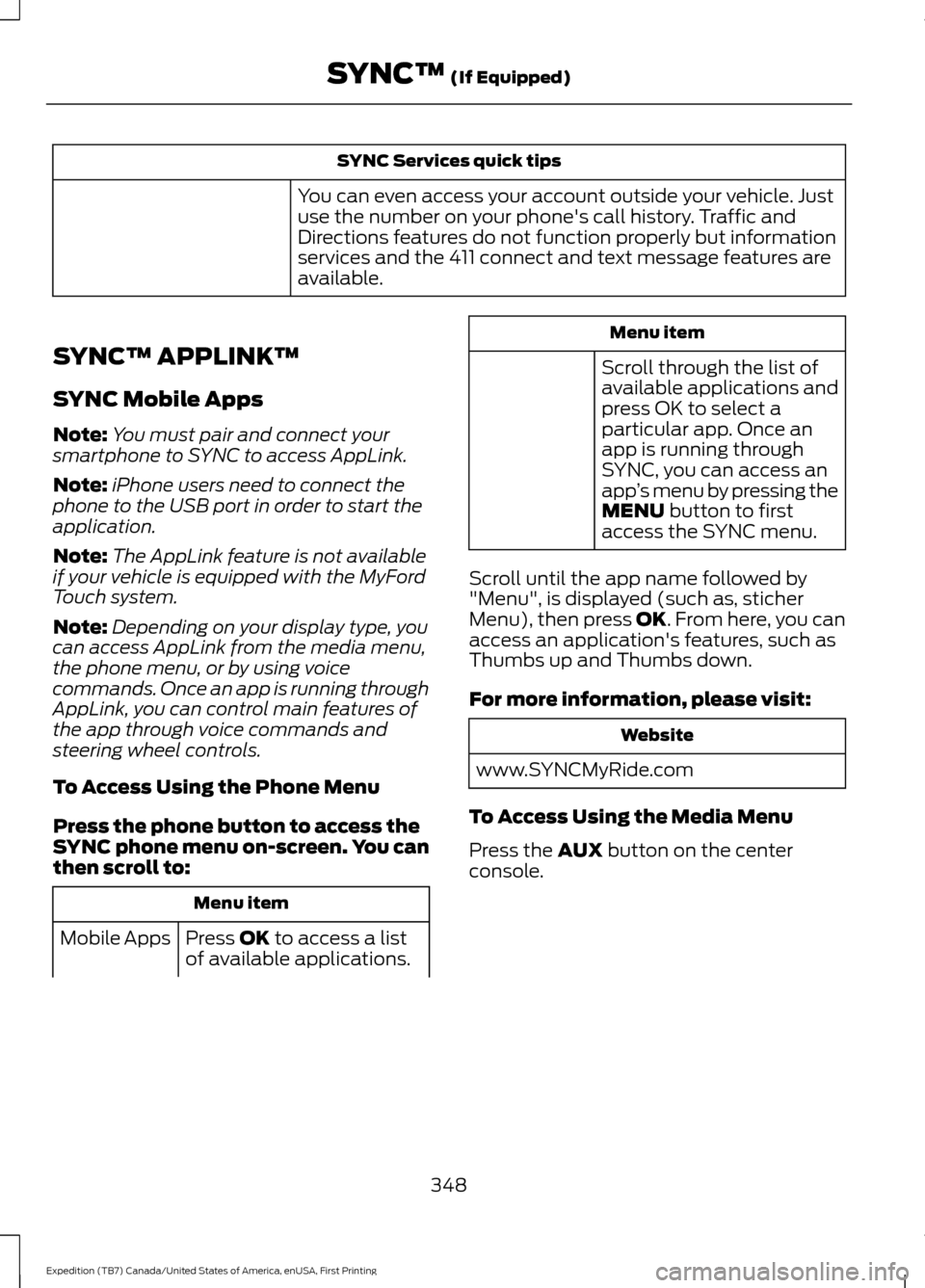
SYNC Services quick tips
You can even access your account outside your vehicle. Just
use the number on your phone's call history. Traffic and
Directions features do not function properly but information
services and the 411 connect and text message features are
available.
SYNC™ APPLINK ™
SYNC Mobile Apps
Note: You must pair and connect your
smartphone to SYNC to access AppLink.
Note: iPhone users need to connect the
phone to the USB port in order to start the
application.
Note: The AppLink feature is not available
if your vehicle is equipped with the MyFord
Touch system.
Note: Depending on your display type, you
can access AppLink from the media menu,
the phone menu, or by using voice
commands. Once an app is running through
AppLink, you can control main features of
the app through voice commands and
steering wheel controls.
To Access Using the Phone Menu
Press the phone button to access the
SYNC phone menu on-screen. You can
then scroll to: Menu item
Press OK to access a list
of available applications.
Mobile Apps Menu item
Scroll through the list of
available applications and
press OK to select a
particular app. Once an
app is running through
SYNC, you can access an
app ’s menu by pressing the
MENU
button to first
access the SYNC menu.
Scroll until the app name followed by
"Menu", is displayed (such as, sticher
Menu), then press
OK. From here, you can
access an application's features, such as
Thumbs up and Thumbs down.
For more information, please visit: Website
www.SYNCMyRide.com
To Access Using the Media Menu
Press the
AUX button on the center
console.
348
Expedition (TB7) Canada/United States of America, enUSA, First Printing SYNC™
(If Equipped)
Page 378 of 421
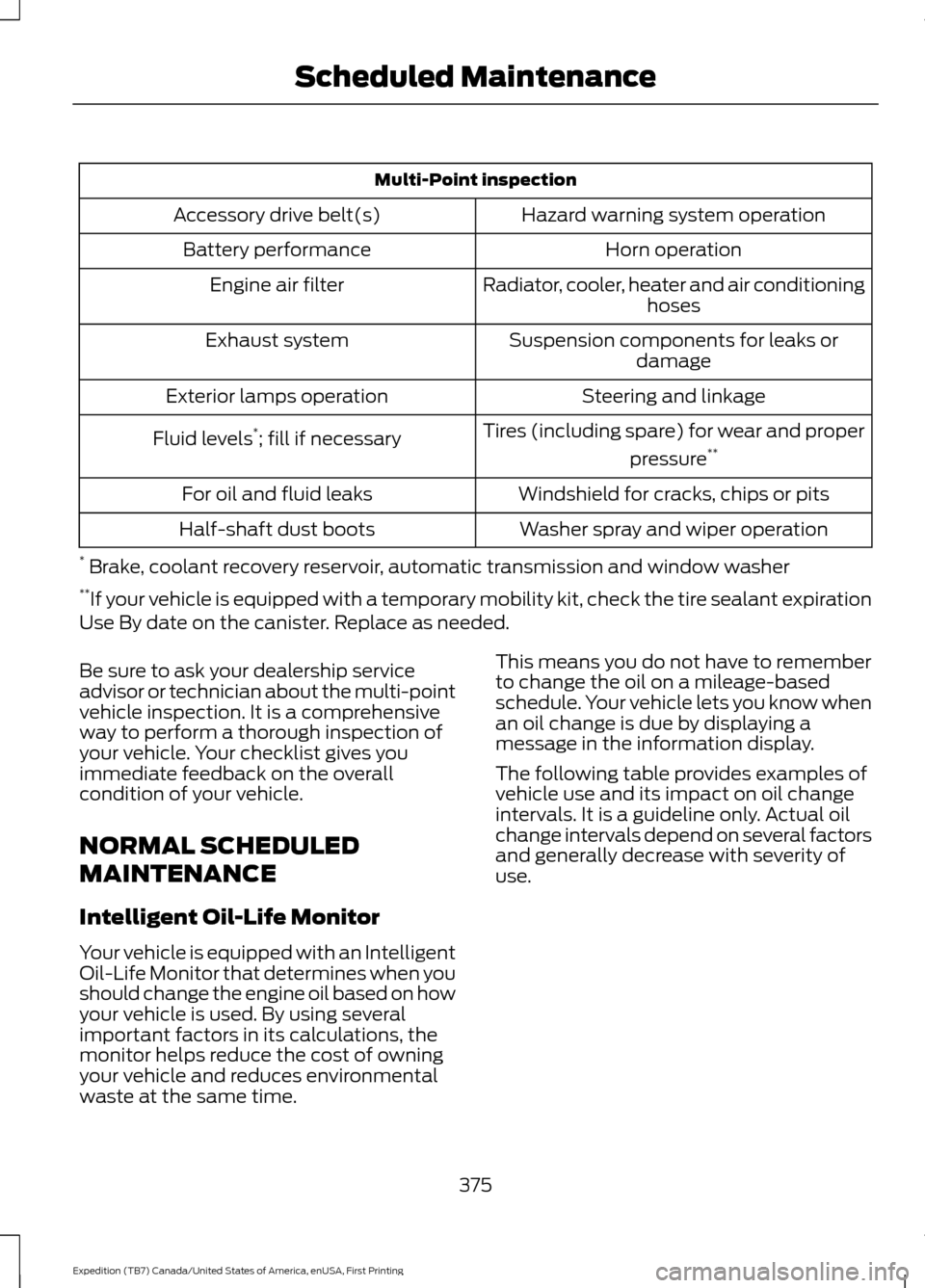
Multi-Point inspection
Hazard warning system operation
Accessory drive belt(s)
Horn operation
Battery performance
Radiator, cooler, heater and air conditioninghoses
Engine air filter
Suspension components for leaks ordamage
Exhaust system
Steering and linkage
Exterior lamps operation
Tires (including spare) for wear and properpressure**
Fluid levels *
; fill if necessary
Windshield for cracks, chips or pits
For oil and fluid leaks
Washer spray and wiper operation
Half-shaft dust boots
* Brake, coolant recovery reservoir, automatic transmission and window washer
** If your vehicle is equipped with a temporary mobility kit, check the tire sealant expiration
Use By date on the canister. Replace as needed.
Be sure to ask your dealership service
advisor or technician about the multi-point
vehicle inspection. It is a comprehensive
way to perform a thorough inspection of
your vehicle. Your checklist gives you
immediate feedback on the overall
condition of your vehicle.
NORMAL SCHEDULED
MAINTENANCE
Intelligent Oil-Life Monitor
Your vehicle is equipped with an Intelligent
Oil-Life Monitor that determines when you
should change the engine oil based on how
your vehicle is used. By using several
important factors in its calculations, the
monitor helps reduce the cost of owning
your vehicle and reduces environmental
waste at the same time. This means you do not have to remember
to change the oil on a mileage-based
schedule. Your vehicle lets you know when
an oil change is due by displaying a
message in the information display.
The following table provides examples of
vehicle use and its impact on oil change
intervals. It is a guideline only. Actual oil
change intervals depend on several factors
and generally decrease with severity of
use.
375
Expedition (TB7) Canada/United States of America, enUSA, First Printing Scheduled Maintenance
Page 380 of 421
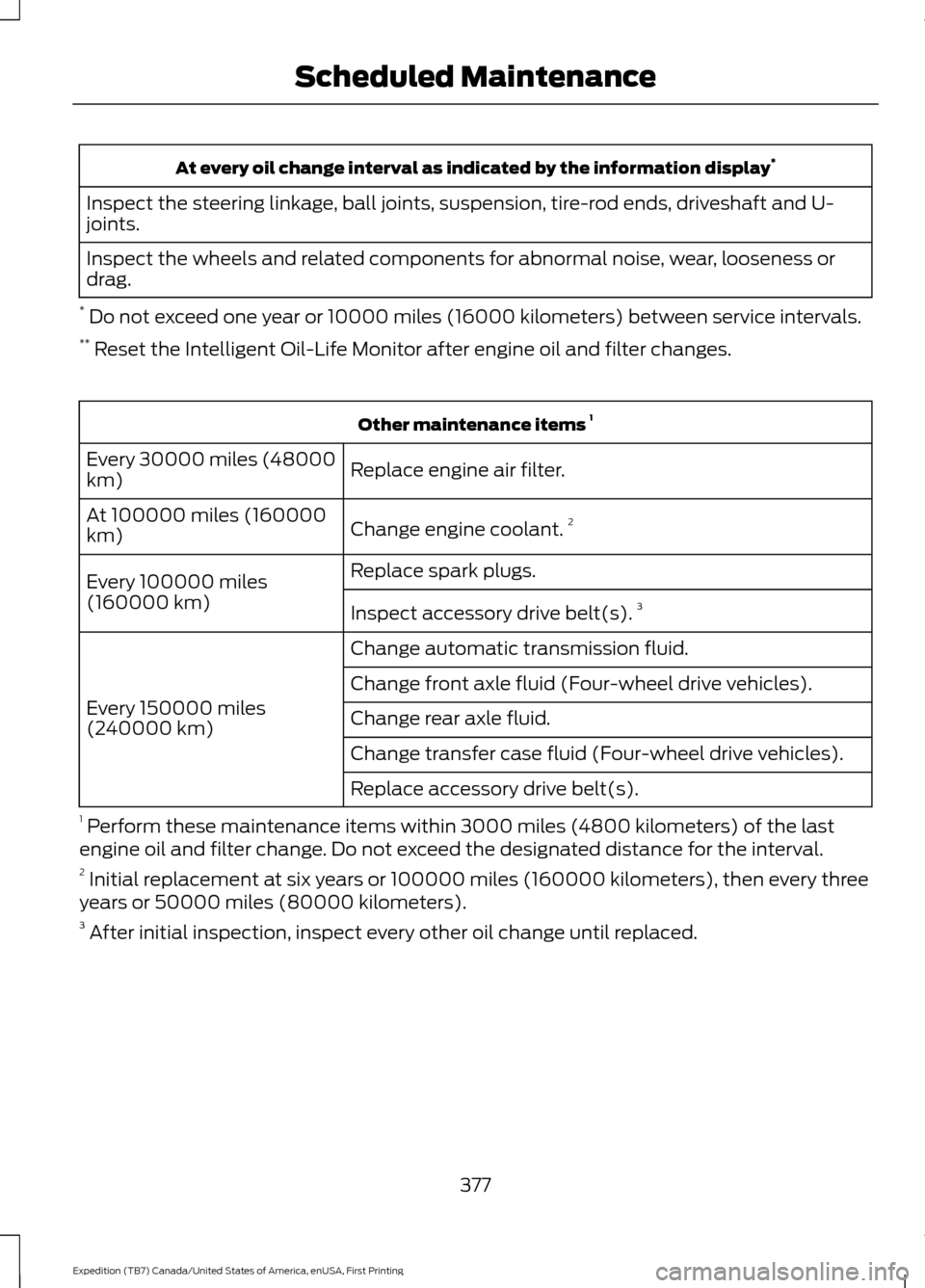
At every oil change interval as indicated by the information display
*
Inspect the steering linkage, ball joints, suspension, tire-rod ends, driveshaft and U-
joints.
Inspect the wheels and related components for abnormal noise, wear, looseness or
drag.
* Do not exceed one year or 10000 miles (16000 kilometers) between service intervals.
** Reset the Intelligent Oil-Life Monitor after engine oil and filter changes. Other maintenance items
1
Replace engine air filter.
Every 30000 miles (48000
km)
Change engine coolant.2
At 100000 miles (160000
km)
Replace spark plugs.
Every 100000 miles
(160000 km) Inspect accessory drive belt(s). 3
Change automatic transmission fluid.
Every 150000 miles
(240000 km) Change front axle fluid (Four-wheel drive vehicles).
Change rear axle fluid.
Change transfer case fluid (Four-wheel drive vehicles).
Replace accessory drive belt(s).
1 Perform these maintenance items within 3000 miles (4800 kilometers) of the last
engine oil and filter change. Do not exceed the designated distance for the interval.
2 Initial replacement at six years or 100000 miles (160000 kilometers), then every three
years or 50000 miles (80000 kilometers).
3 After initial inspection, inspect every other oil change until replaced.
377
Expedition (TB7) Canada/United States of America, enUSA, First Printing Scheduled Maintenance
Page 382 of 421
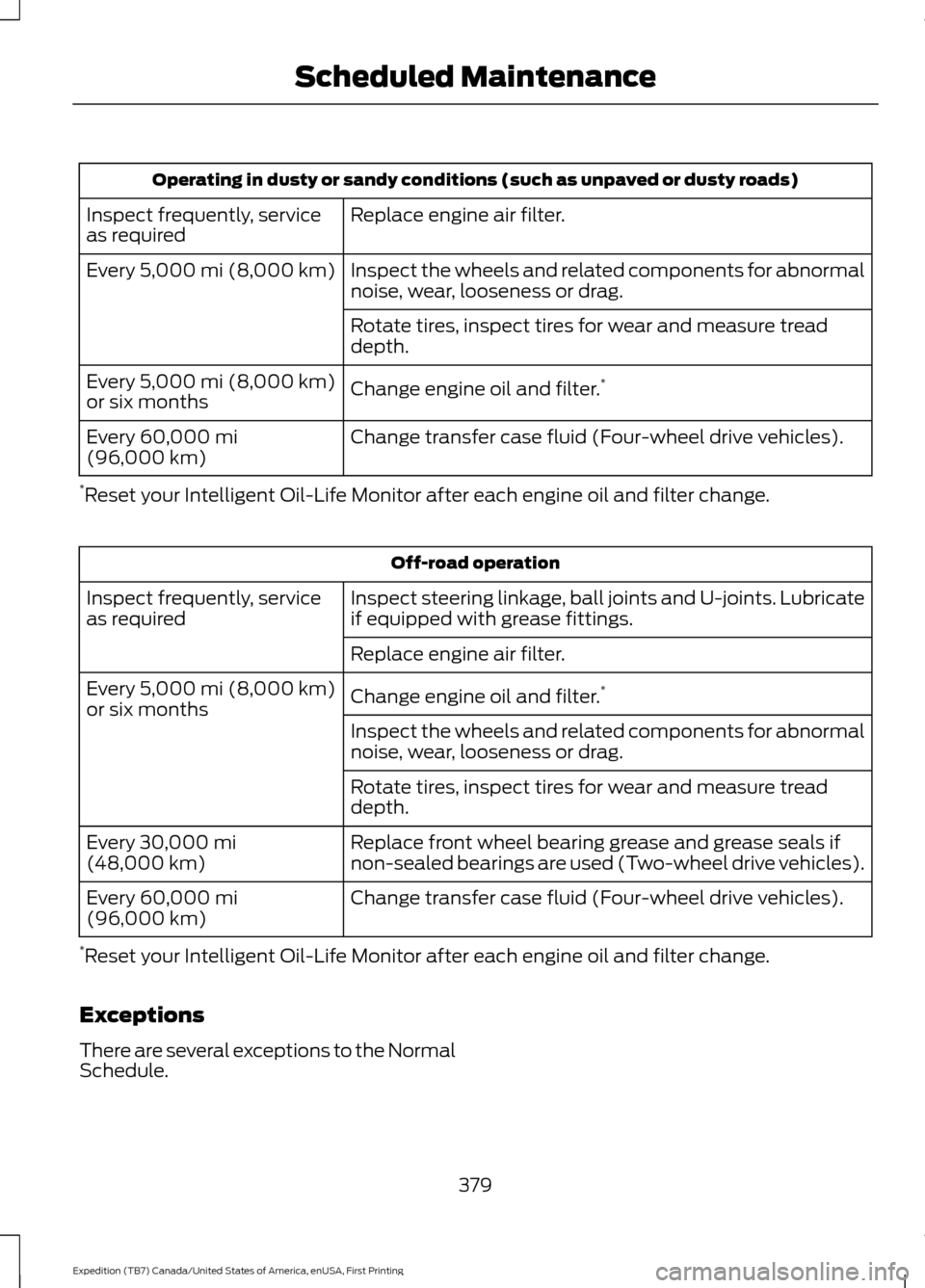
Operating in dusty or sandy conditions (such as unpaved or dusty roads)
Replace engine air filter.
Inspect frequently, service
as required
Inspect the wheels and related components for abnormal
noise, wear, looseness or drag.
Every 5,000 mi (8,000 km)
Rotate tires, inspect tires for wear and measure tread
depth.
Change engine oil and filter. *
Every
5,000 mi (8,000 km)
or six months
Change transfer case fluid (Four-wheel drive vehicles).
Every
60,000 mi
(96,000 km)
* Reset your Intelligent Oil-Life Monitor after each engine oil and filter change. Off-road operation
Inspect steering linkage, ball joints and U-joints. Lubricate
if equipped with grease fittings.
Inspect frequently, service
as required
Replace engine air filter.
Change engine oil and filter.*
Every
5,000 mi (8,000 km)
or six months
Inspect the wheels and related components for abnormal
noise, wear, looseness or drag.
Rotate tires, inspect tires for wear and measure tread
depth.
Replace front wheel bearing grease and grease seals if
non-sealed bearings are used (Two-wheel drive vehicles).
Every
30,000 mi
(48,000 km)
Change transfer case fluid (Four-wheel drive vehicles).
Every
60,000 mi
(96,000 km)
* Reset your Intelligent Oil-Life Monitor after each engine oil and filter change.
Exceptions
There are several exceptions to the Normal
Schedule.
379
Expedition (TB7) Canada/United States of America, enUSA, First Printing Scheduled Maintenance
Page 410 of 421
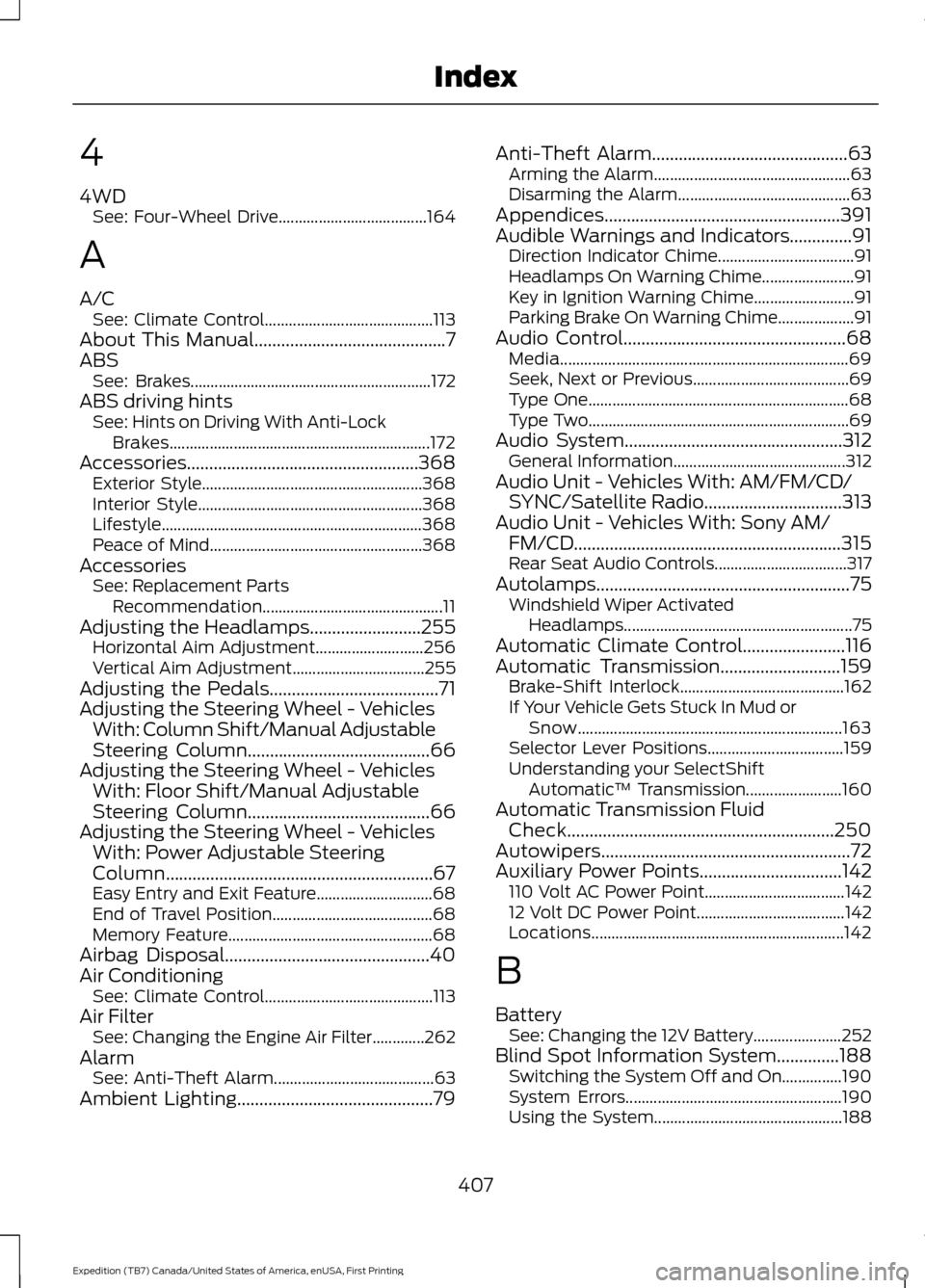
4
4WD
See: Four-Wheel Drive..................................... 164
A
A/C See: Climate Control.......................................... 113
About This Manual...........................................7
ABS See: Brakes............................................................ 172
ABS driving hints See: Hints on Driving With Anti-Lock
Brakes................................................................. 172
Accessories....................................................368 Exterior Style....................................................... 368
Interior Style........................................................ 368
Lifestyle................................................................. 368
Peace of Mind..................................................... 368
Accessories See: Replacement Parts
Recommendation............................................. 11
Adjusting the Headlamps.........................255 Horizontal Aim Adjustment........................... 256
Vertical Aim Adjustment................................. 255
Adjusting the Pedals......................................71
Adjusting the Steering Wheel - Vehicles With: Column Shift/Manual Adjustable
Steering Column
.........................................66
Adjusting the Steering Wheel - Vehicles With: Floor Shift/Manual Adjustable
Steering Column
.........................................66
Adjusting the Steering Wheel - Vehicles With: Power Adjustable Steering
Column............................................................67
Easy Entry and Exit Feature............................. 68
End of Travel Position........................................ 68
Memory Feature................................................... 68
Airbag Disposal..............................................40
Air Conditioning See: Climate Control.......................................... 113
Air Filter See: Changing the Engine Air Filter.............262
Alarm See: Anti-Theft Alarm........................................ 63
Ambient Lighting............................................79 Anti-Theft Alarm
............................................63
Arming the Alarm................................................. 63
Disarming the Alarm........................................... 63
Appendices.....................................................391
Audible Warnings and Indicators..............91 Direction Indicator Chime.................................. 91
Headlamps On Warning Chime....................... 91
Key in Ignition Warning Chime......................... 91
Parking Brake On Warning Chime................... 91
Audio Control..................................................68 Media........................................................................\
69
Seek, Next or Previous....................................... 69
Type One................................................................. 68
Type Two................................................................. 69
Audio System
.................................................312
General Information........................................... 312
Audio Unit - Vehicles With: AM/FM/CD/ SYNC/Satellite Radio...............................313
Audio Unit - Vehicles With: Sony AM/ FM/CD............................................................315
Rear Seat Audio Controls................................. 317
Autolamps.........................................................75 Windshield Wiper Activated
Headlamps......................................................... 75
Automatic Climate Control
.......................116
Automatic Transmission...........................159
Brake-Shift Interlock......................................... 162
If Your Vehicle Gets Stuck In Mud or Snow.................................................................. 163
Selector Lever Positions.................................. 159
Understanding your SelectShift Automatic ™ Transmission........................ 160
Automatic Transmission Fluid Check............................................................250
Autowipers
........................................................72
Auxiliary Power Points................................142
110 Volt AC Power Point................................... 142
12 Volt DC Power Point..................................... 142
Locations............................................................... 142
B
Battery See: Changing the 12V Battery...................... 252
Blind Spot Information System
..............188
Switching the System Off and On...............190
System Errors...................................................... 190
Using the System............................................... 188
407
Expedition (TB7) Canada/United States of America, enUSA, First Printing Index
Page 412 of 421
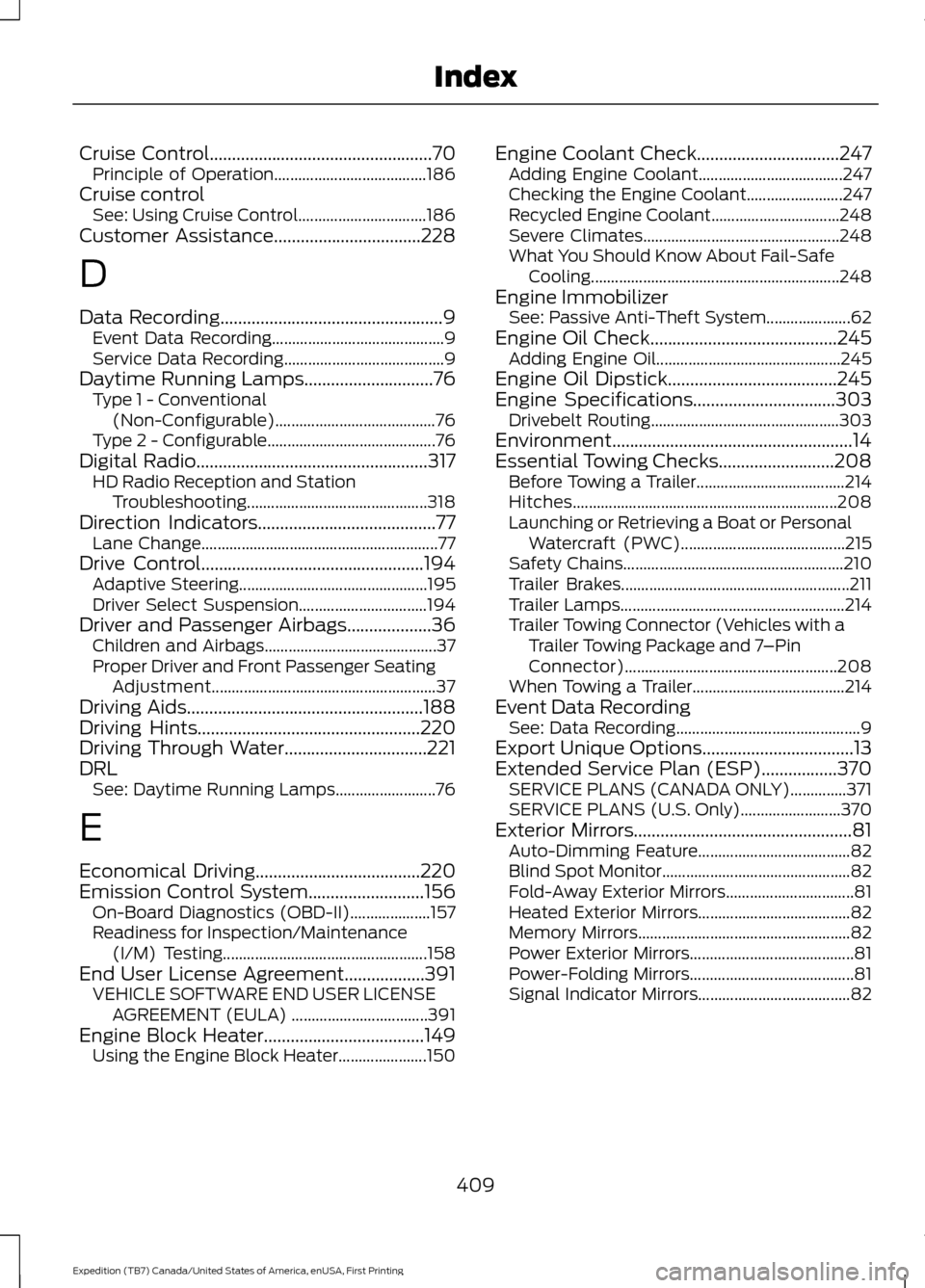
Cruise Control..................................................70
Principle of Operation...................................... 186
Cruise control See: Using Cruise Control................................ 186
Customer Assistance.................................228
D
Data Recording
..................................................9
Event Data Recording........................................... 9
Service Data Recording........................................ 9
Daytime Running Lamps.............................76 Type 1 - Conventional
(Non-Configurable)........................................ 76
Type 2 - Configurable.......................................... 76
Digital Radio
....................................................317
HD Radio Reception and Station
Troubleshooting............................................. 318
Direction Indicators
........................................77
Lane Change........................................................... 77
Drive Control
..................................................194
Adaptive Steering............................................... 195
Driver Select Suspension................................ 194
Driver and Passenger Airbags...................36 Children and Airbags........................................... 37
Proper Driver and Front Passenger Seating Adjustment........................................................ 37
Driving Aids
.....................................................188
Driving Hints..................................................220
Driving Through Water................................221
DRL See: Daytime Running Lamps......................... 76
E
Economical Driving
.....................................220
Emission Control System..........................156 On-Board Diagnostics (OBD-II).................... 157
Readiness for Inspection/Maintenance (I/M) Testing................................................... 158
End User License Agreement
..................391
VEHICLE SOFTWARE END USER LICENSE
AGREEMENT (EULA) .................................. 391
Engine Block Heater
....................................149
Using the Engine Block Heater...................... 150Engine Coolant Check................................247
Adding Engine Coolant.................................... 247
Checking the Engine Coolant........................ 247
Recycled Engine Coolant................................ 248
Severe Climates................................................. 248
What You Should Know About Fail-Safe Cooling.............................................................. 248
Engine Immobilizer See: Passive Anti-Theft System..................... 62
Engine Oil Check
..........................................245
Adding Engine Oil.............................................. 245
Engine Oil Dipstick......................................245
Engine Specifications
................................303
Drivebelt Routing............................................... 303
Environment......................................................14
Essential Towing Checks..........................208 Before Towing a Trailer..................................... 214
Hitches.................................................................. 208
Launching or Retrieving a Boat or Personal Watercraft (PWC)......................................... 215
Safety Chains....................................................... 210
Trailer Brakes......................................................... 211
Trailer Lamps........................................................ 214
Trailer Towing Connector (Vehicles with a Trailer Towing Package and 7 –Pin
Connector)..................................................... 208
When Towing a Trailer...................................... 214
Event Data Recording See: Data Recording.............................................. 9
Export Unique Options..................................13
Extended Service Plan (ESP)
.................370
SERVICE PLANS (CANADA ONLY)..............371
SERVICE PLANS (U.S. Only)......................... 370
Exterior Mirrors
.................................................81
Auto-Dimming Feature...................................... 82
Blind Spot Monitor............................................... 82
Fold-Away Exterior Mirrors................................ 81
Heated Exterior Mirrors...................................... 82
Memory Mirrors..................................................... 82
Power Exterior Mirrors......................................... 81
Power-Folding Mirrors......................................... 81
Signal Indicator Mirrors...................................... 82
409
Expedition (TB7) Canada/United States of America, enUSA, First Printing Index
Page 413 of 421
F
Fastening the Seatbelts..............................29
Safety Belt Extension Assembly...................... 31
Safety Belt Locking Modes............................... 30
Using Safety Belts During Pregnancy...........29
Floor Mats
........................................................221
Fog Lamps - Front See: Front Fog Lamps......................................... 77
Foot Pedals See: Adjusting the Pedals................................... 71
Ford Credit
..........................................................11
(U.S. Only)................................................................. 11
Four-Wheel Drive
.........................................164
Front Fog Lamps.............................................77
Front Parking Aid
..........................................182
Fuel and Refueling........................................151
Fuel Consumption
........................................155
Calculating Fuel Economy.............................. 156
Filling the Tank..................................................... 155
Fuel Filler Funnel Location
........................152
Fuel Filter........................................................252
Fuel Quality.....................................................152
Choosing the Right Fuel................................... 152
Fuel Shutoff
...................................................224
Fuses................................................................234
Fuse Specification Chart..........................234 Passenger Compartment Fuse
Panel.................................................................. 238
Power Distribution Box.................................... 234
G
Garage Door Opener See: Universal Garage Door Opener............137
Gauges...............................................................85 Type 1 and 2............................................................ 85
Type 3........................................................................\
87
General Information on Radio Frequencies....................................................41
Intelligent Access.................................................. 41
General Maintenance Information
........372
Multi-Point Inspection...................................... 374
Owner Checks and Services.......................... 373
Protecting Your Investment........................... 372
Why Maintain Your Vehicle?.......................... 372
Why Maintain Your Vehicle at Your Dealership?...................................................... 372Getting Assistance Outside the U.S. and
Canada..........................................................231
Getting the Services You Need...............228 Away From Home.............................................. 228
H
Handbrake See: Parking Brake.............................................. 173
Hazard Warning Flashers..........................224
HDC See: Using Hill Descent Control.................... 179
Headlamp Adjusting See: Adjusting the Headlamps..................... 255
Headlamp Removal See: Removing a Headlamp.......................... 256
Head Restraints.............................................122 Adjusting the Head Restraint......................... 123
Heated Seats
..................................................134
Front Seats............................................................ 134
Rear Seats............................................................. 134
Heated Steering Wheel................................70
Heated Windows and Mirrors
....................121
Heated Exterior Mirror........................................ 121
Heated Rear Window......................................... 121
Heating See: Climate Control.......................................... 113
Hill Start Assist
..............................................173
Switching the System On and Off................174
Using Hill Start Assist........................................ 174
Hints on Controlling the Interior Climate............................................................117
Cooling the Interior Quickly............................. 119
General Hints......................................................... 117
Heating the Interior Quickly............................. 118
Recommended Settings for Cooling ...........119
Recommended Settings for Heating...........118
Side Window Defogging in Cold Weather.............................................................. 119
Hints on Driving With Anti-Lock Brakes.............................................................172
Hood Lock See: Opening and Closing the Hood..........243
I
Ignition Switch
...............................................145
In California (U.S. Only).............................229
410
Expedition (TB7) Canada/United States of America, enUSA, First Printing Index
Page 414 of 421
Information Display Control.......................70
Information Displays.....................................92
General Information............................................ 92
Information Messages................................103
4WD Messages..................................................... 112
AdvanceTrac ™ / Traction Control
Messages.......................................................... 104
Alarm Messages................................................. 104
Battery and Charging System Messages.......................................................... 104
Blind Spot Information System Messages.......................................................... 105
Brake System Messages.................................. 105
Door Messages.................................................... 105
Engine Messages................................................ 106
Fuel Messages..................................................... 106
Keys and Intelligent Access Messages......................................................... 106
Maintenance Messages.................................... 107
MyKey ™ Messages............................................ 108
Off Road Messages........................................... 108
Park Aid Messages............................................. 109
Power Steering Messages............................... 109
Remote Start Messages................................... 110
Suspension System Messages....................... 110
Tire Messages....................................................... 110
Trailer Messages.................................................. 110
Transmission Messages..................................... 111
Installing Child Restraints
............................16
Child Seats............................................................... 16
Combining Safety Belt and LATCH Lower Anchors for Attaching Child Safety
Seats.................................................................... 20
Using Lap and Shoulder Belts ......................... 17
Using Lower Anchors and Tethers for CHildren (LATCH)............................................ 19
Using Tether Straps............................................. 20
Instrument Cluster
........................................85
Instrument Lighting Dimmer......................76
Interior Lamps.................................................78
Front Row Map and Dome Lamps.................78
Front Row Map Lamps....................................... 78
Rear Cargo Lamp.................................................. 79
Second Row Map Lamps.................................. 78
Interior Mirror
...................................................82
Auto-Dimming Mirror.......................................... 82
Introduction.........................................................7 J
Jump Starting the Vehicle........................225
Connecting the Jumper Cables.................... 225
Jump Starting...................................................... 226
Preparing Your Vehicle..................................... 225
Removing the Jumper Cables....................... 226
K
Keyless Entry
....................................................59
SECURICODE™ KEYLESS ENTRY
KEYPAD
.............................................................. 59
Unlocking and Locking the Doors................... 61
Keyless Starting............................................145 Ignition Modes..................................................... 146
Keys and Remote Controls
..........................41
Principle of Operation......................................... 41
L
Lighting Control
...............................................74
Headlamp Flasher................................................ 75
High Beams............................................................. 74
Lighting...............................................................74 General Information............................................ 74
Limited Slip Differential...............................171
Load Carriers See: Roof Racks and Load Carriers..............197
Load Carrying
.................................................196
Load Limit.......................................................198
Special Loading Instructions for Owners of
Pick-up Trucks and Utility-type
Vehicles............................................................ 204
Vehicle Loading - with and without a Trailer................................................................. 198
411
Expedition (TB7) Canada/United States of America, enUSA, First Printing Index