climate settings FORD EXPEDITION 2017 3.G User Guide
[x] Cancel search | Manufacturer: FORD, Model Year: 2017, Model line: EXPEDITION, Model: FORD EXPEDITION 2017 3.GPages: 500, PDF Size: 4.83 MB
Page 369 of 500
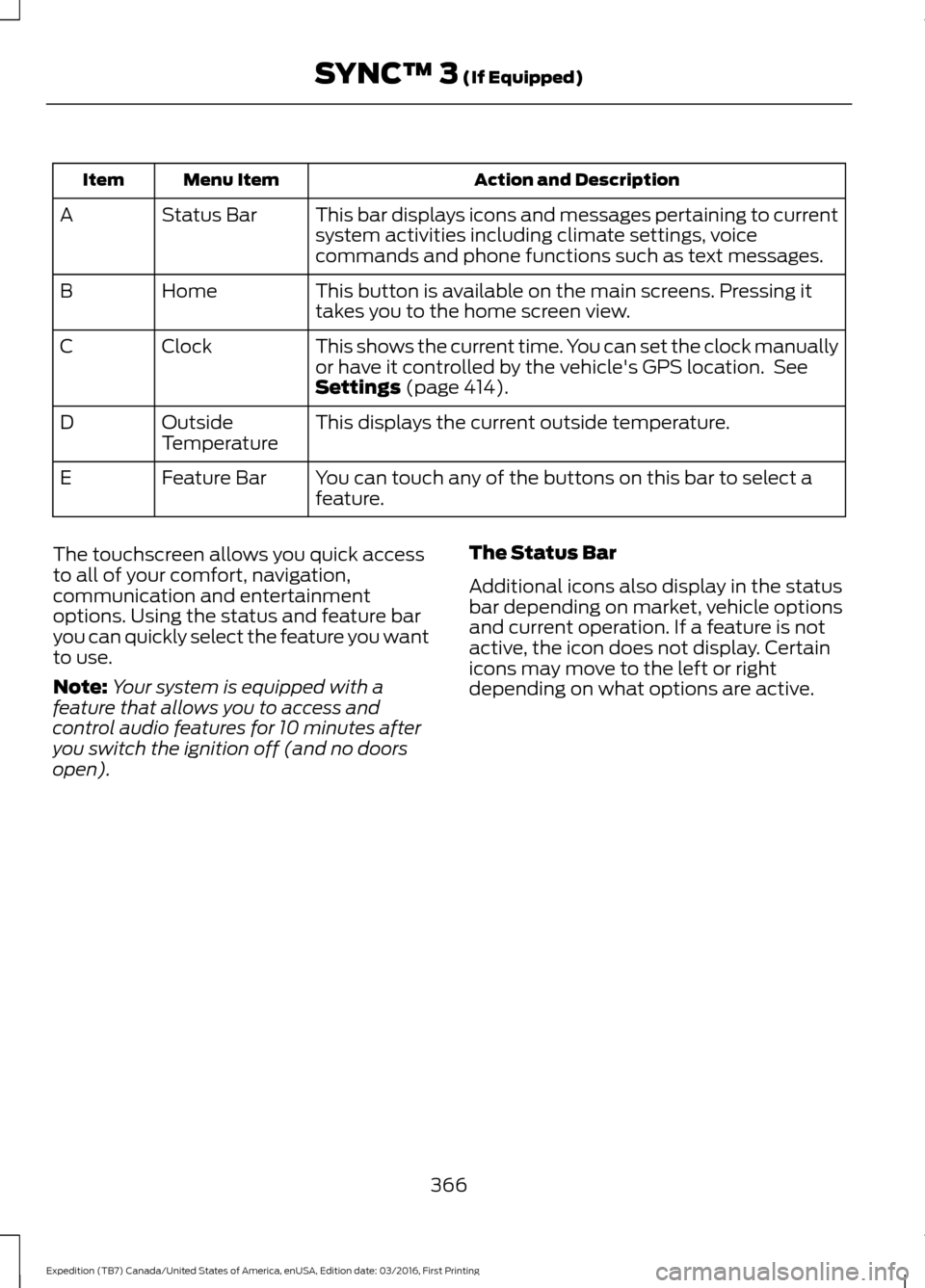
Action and Description
Menu Item
Item
This bar displays icons and messages pertaining to current
system activities including climate settings, voice
commands and phone functions such as text messages.
Status Bar
A
This button is available on the main screens. Pressing it
takes you to the home screen view.
Home
B
This shows the current time. You can set the clock manually
or have it controlled by the vehicle's GPS location. See
Settings (page 414).
Clock
C
This displays the current outside temperature.
Outside
Temperature
D
You can touch any of the buttons on this bar to select a
feature.
Feature Bar
E
The touchscreen allows you quick access
to all of your comfort, navigation,
communication and entertainment
options. Using the status and feature bar
you can quickly select the feature you want
to use.
Note: Your system is equipped with a
feature that allows you to access and
control audio features for 10 minutes after
you switch the ignition off (and no doors
open). The Status Bar
Additional icons also display in the status
bar depending on market, vehicle options
and current operation. If a feature is not
active, the icon does not display. Certain
icons may move to the left or right
depending on what options are active.
366
Expedition (TB7) Canada/United States of America, enUSA, Edition date: 03/2016, First Printing SYNC™ 3
(If Equipped)
Page 375 of 500
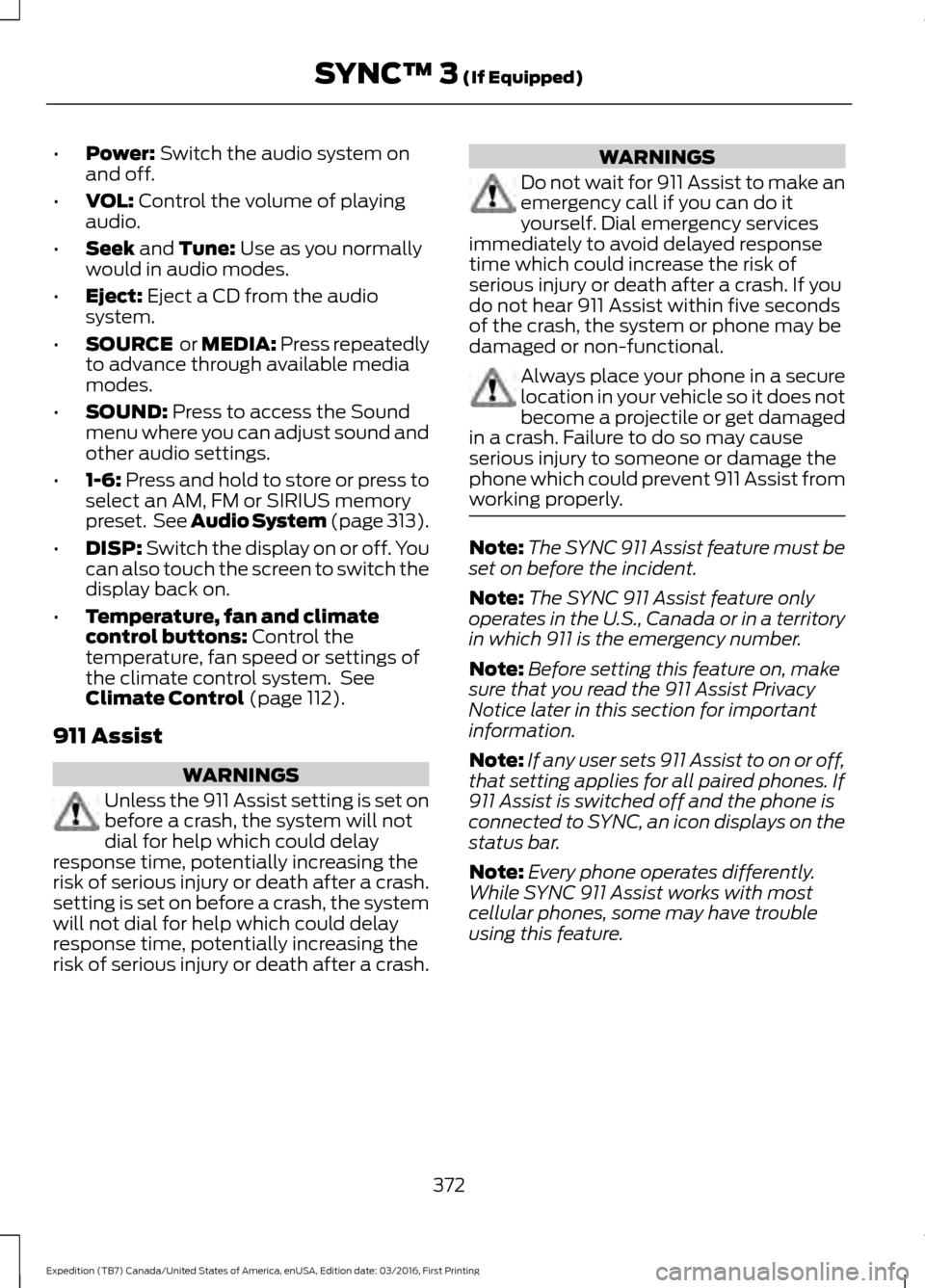
•
Power: Switch the audio system on
and off.
• VOL:
Control the volume of playing
audio.
• Seek
and Tune: Use as you normally
would in audio modes.
• Eject:
Eject a CD from the audio
system.
• SOURCE
or MEDIA: Press repeatedly
to advance through available media
modes.
• SOUND:
Press to access the Sound
menu where you can adjust sound and
other audio settings.
• 1-6:
Press and hold to store or press to
select an AM, FM or SIRIUS memory
preset. See Audio System (page 313).
• DISP:
Switch the display on or off. You
can also touch the screen to switch the
display back on.
• Temperature, fan and climate
control buttons:
Control the
temperature, fan speed or settings of
the climate control system. See
Climate Control
(page 112).
911 Assist WARNINGS
Unless the 911 Assist setting is set on
before a crash, the system will not
dial for help which could delay
response time, potentially increasing the
risk of serious injury or death after a crash.
setting is set on before a crash, the system
will not dial for help which could delay
response time, potentially increasing the
risk of serious injury or death after a crash. WARNINGS
Do not wait for 911 Assist to make an
emergency call if you can do it
yourself. Dial emergency services
immediately to avoid delayed response
time which could increase the risk of
serious injury or death after a crash. If you
do not hear 911 Assist within five seconds
of the crash, the system or phone may be
damaged or non-functional. Always place your phone in a secure
location in your vehicle so it does not
become a projectile or get damaged
in a crash. Failure to do so may cause
serious injury to someone or damage the
phone which could prevent 911 Assist from
working properly. Note:
The SYNC 911 Assist feature must be
set on before the incident.
Note: The SYNC 911 Assist feature only
operates in the U.S., Canada or in a territory
in which 911 is the emergency number.
Note: Before setting this feature on, make
sure that you read the 911 Assist Privacy
Notice later in this section for important
information.
Note: If any user sets 911 Assist to on or off,
that setting applies for all paired phones. If
911 Assist is switched off and the phone is
connected to SYNC, an icon displays on the
status bar.
Note: Every phone operates differently.
While SYNC 911 Assist works with most
cellular phones, some may have trouble
using this feature.
372
Expedition (TB7) Canada/United States of America, enUSA, Edition date: 03/2016, First Printing SYNC™ 3
(If Equipped)
Page 384 of 500
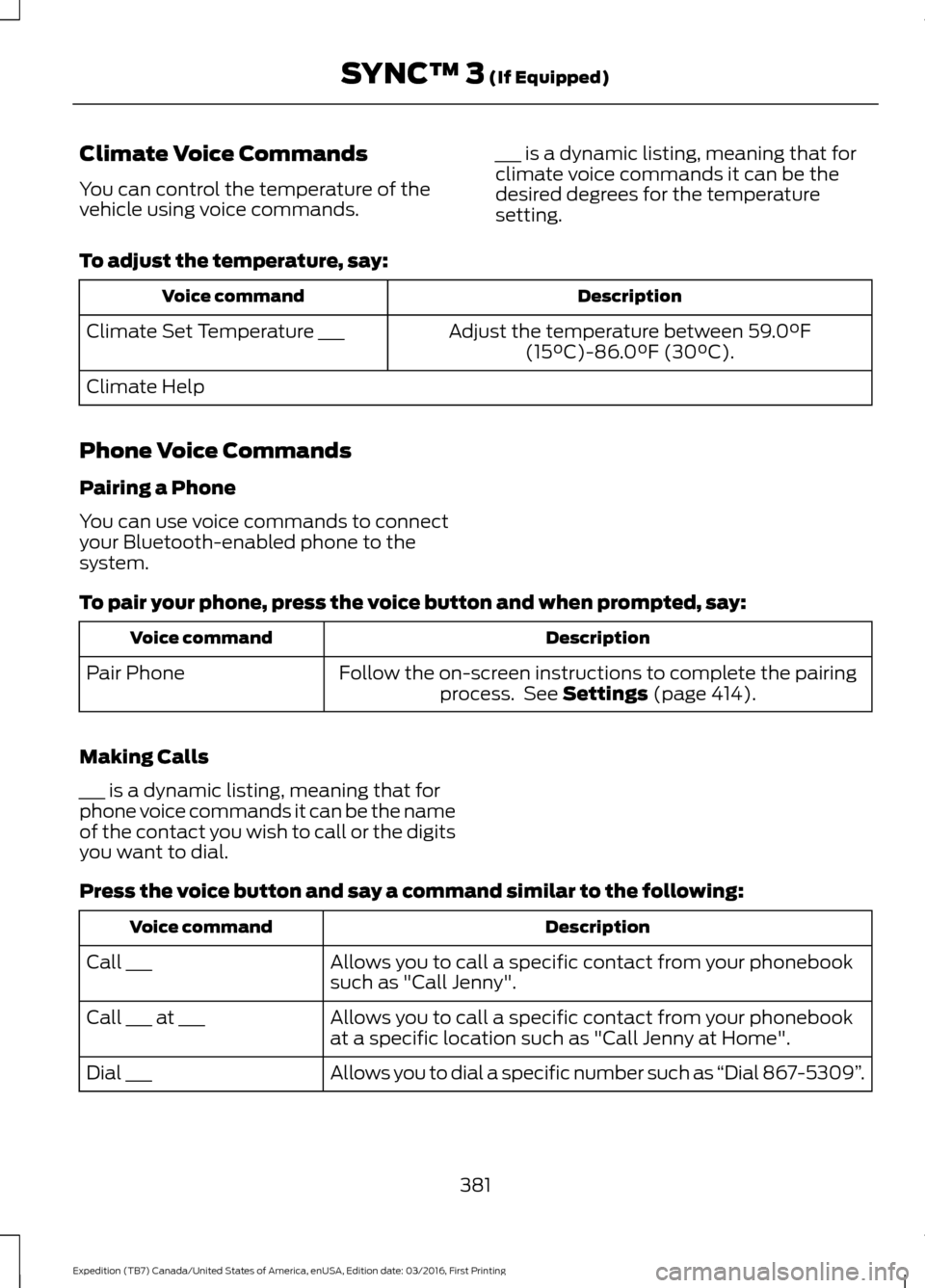
Climate Voice Commands
You can control the temperature of the
vehicle using voice commands.
___ is a dynamic listing, meaning that for
climate voice commands it can be the
desired degrees for the temperature
setting.
To adjust the temperature, say: Description
Voice command
Adjust the temperature between 59.0°F
(15°C)-86.0°F (30°C).
Climate Set Temperature ___
Climate Help
Phone Voice Commands
Pairing a Phone
You can use voice commands to connect
your Bluetooth-enabled phone to the
system.
To pair your phone, press the voice button and when prompted, say: Description
Voice command
Follow the on-screen instructions to complete the pairingprocess. See
Settings (page 414).
Pair Phone
Making Calls
___ is a dynamic listing, meaning that for
phone voice commands it can be the name
of the contact you wish to call or the digits
you want to dial.
Press the voice button and say a command similar to the following: Description
Voice command
Allows you to call a specific contact from your phonebook
such as "Call Jenny".
Call ___
Allows you to call a specific contact from your phonebook
at a specific location such as "Call Jenny at Home".
Call ___ at ___
Allows you to dial a specific number such as “Dial 867-5309”.
Dial ___
381
Expedition (TB7) Canada/United States of America, enUSA, Edition date: 03/2016, First Printing SYNC™ 3
(If Equipped)
Page 388 of 500
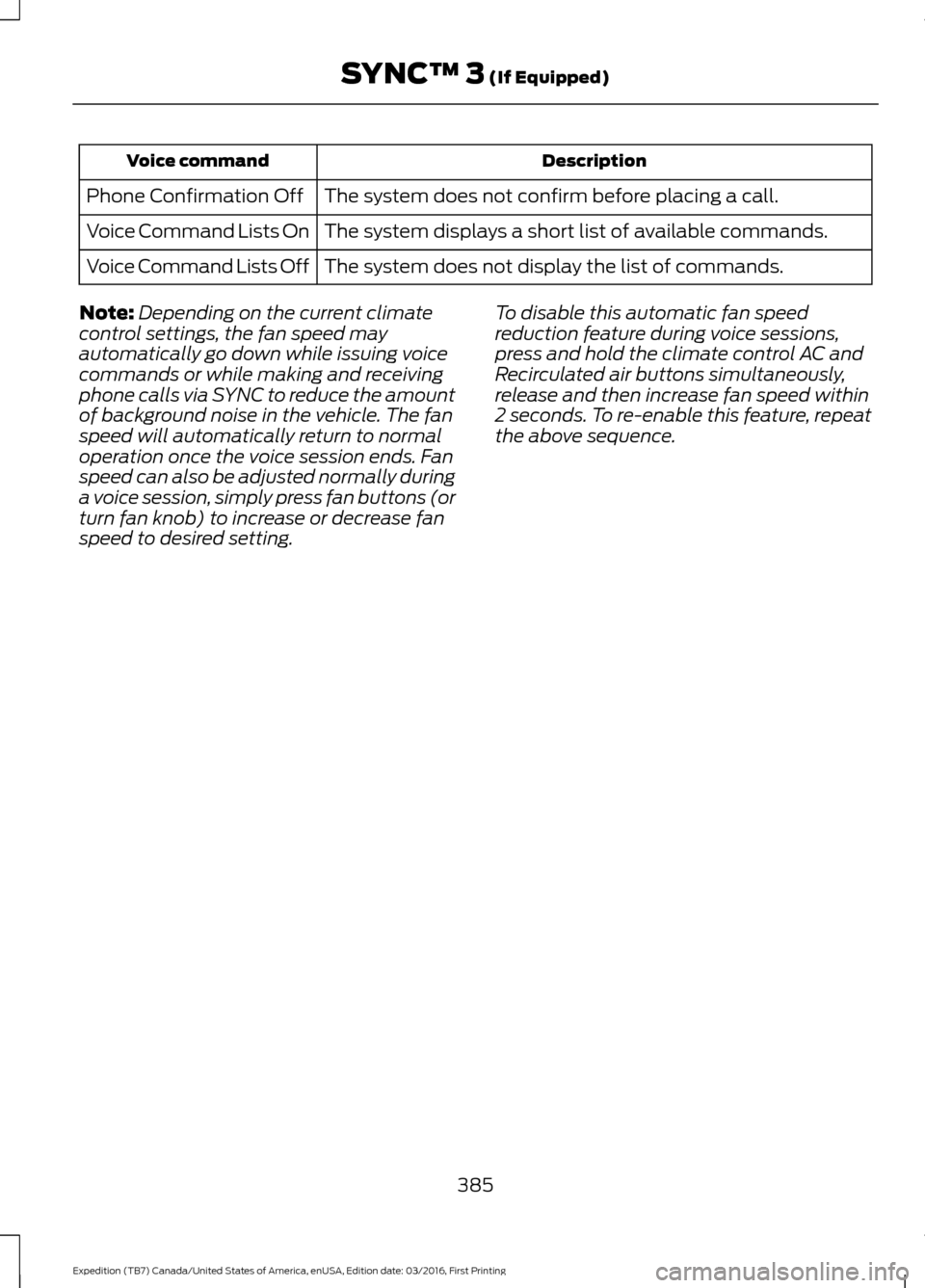
Description
Voice command
The system does not confirm before placing a call.
Phone Confirmation Off
The system displays a short list of available commands.
Voice Command Lists On
The system does not display the list of commands.
Voice Command Lists Off
Note: Depending on the current climate
control settings, the fan speed may
automatically go down while issuing voice
commands or while making and receiving
phone calls via SYNC to reduce the amount
of background noise in the vehicle. The fan
speed will automatically return to normal
operation once the voice session ends. Fan
speed can also be adjusted normally during
a voice session, simply press fan buttons (or
turn fan knob) to increase or decrease fan
speed to desired setting. To disable this automatic fan speed
reduction feature during voice sessions,
press and hold the climate control AC and
Recirculated air buttons simultaneously,
release and then increase fan speed within
2 seconds. To re-enable this feature, repeat
the above sequence.
385
Expedition (TB7) Canada/United States of America, enUSA, Edition date: 03/2016, First Printing SYNC™ 3 (If Equipped)
Page 399 of 500
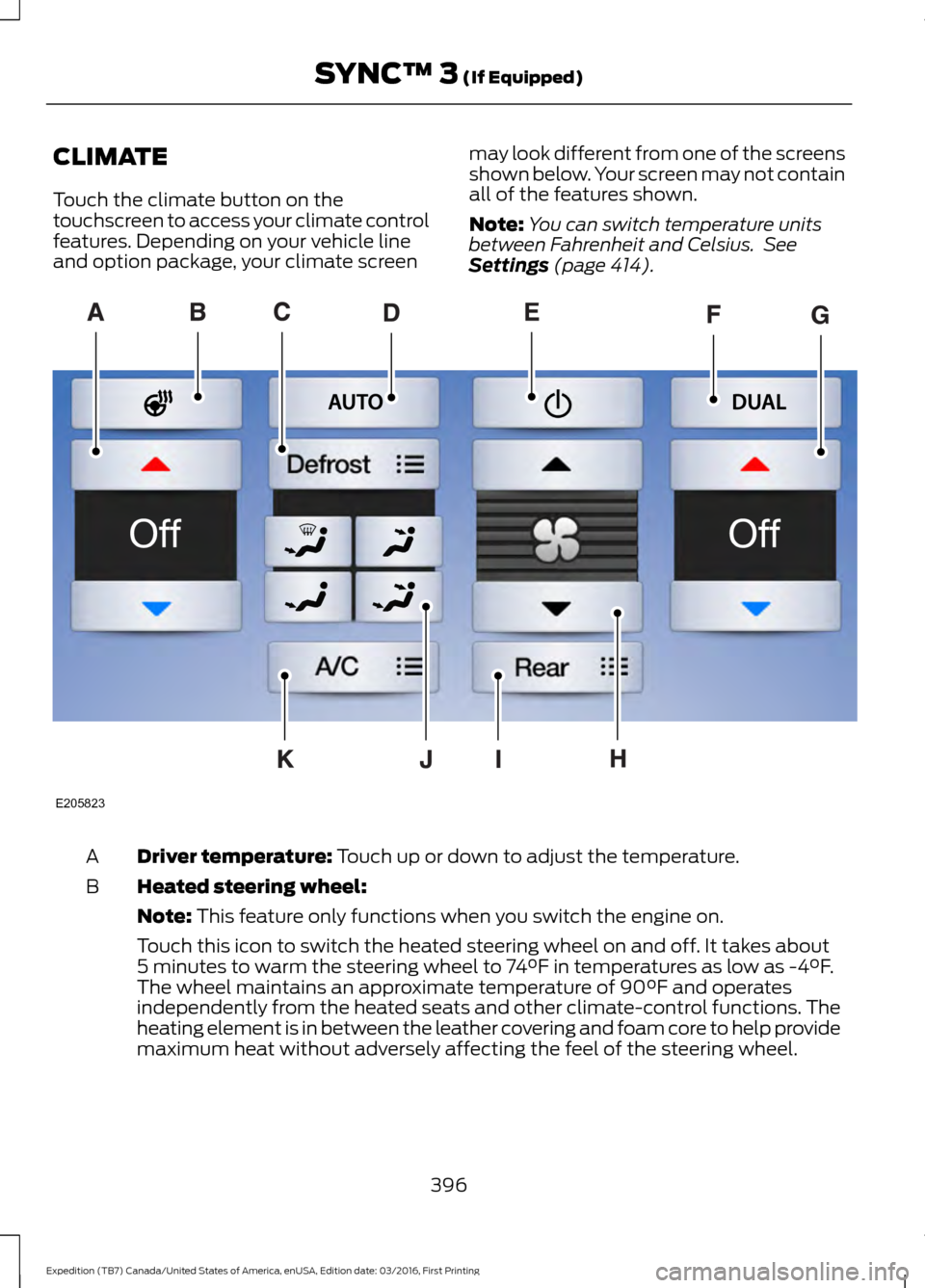
CLIMATE
Touch the climate button on the
touchscreen to access your climate control
features. Depending on your vehicle line
and option package, your climate screen
may look different from one of the screens
shown below. Your screen may not contain
all of the features shown.
Note:
You can switch temperature units
between Fahrenheit and Celsius. See
Settings (page 414). Driver temperature:
Touch up or down to adjust the temperature.
A
Heated steering wheel:
B
Note:
This feature only functions when you switch the engine on.
Touch this icon to switch the heated steering wheel on and off. It takes about
5 minutes to warm the steering wheel to 74°F in temperatures as low as -4°F.
The wheel maintains an approximate temperature of 90°F and operates
independently from the heated seats and other climate-control functions. The
heating element is in between the leather covering and foam core to help provide
maximum heat without adversely affecting the feel of the steering wheel.
396
Expedition (TB7) Canada/United States of America, enUSA, Edition date: 03/2016, First Printing SYNC™ 3
(If Equipped)E205823
Page 400 of 500
Note: The heated steering wheel may remain on after remote starting the
vehicle, based on your remote start settings. The heated steering wheel may
also turn on when you start your vehicle, if it was on when you switched your
vehicle off.
Note:
For steering wheels with wood trim, the heating feature will not heat the
wheel between the 10 and 2 o'clock positions.
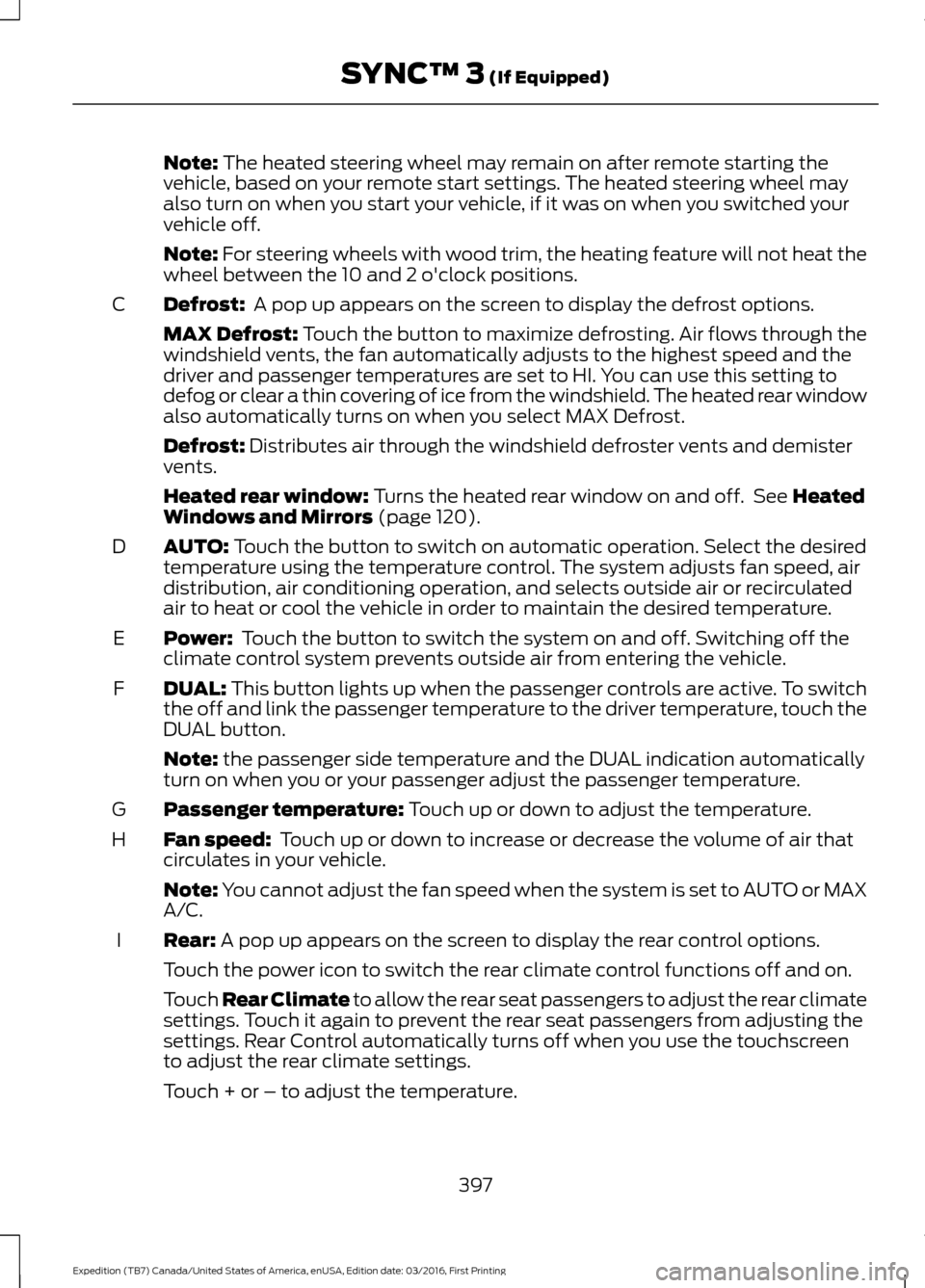
Defrost:
A pop up appears on the screen to display the defrost options.
C
MAX Defrost: Touch the button to maximize defrosting. Air flows through the
windshield vents, the fan automatically adjusts to the highest speed and the
driver and passenger temperatures are set to HI. You can use this setting to
defog or clear a thin covering of ice from the windshield. The heated rear window
also automatically turns on when you select MAX Defrost.
Defrost:
Distributes air through the windshield defroster vents and demister
vents.
Heated rear window:
Turns the heated rear window on and off. See Heated
Windows and Mirrors (page 120).
AUTO:
Touch the button to switch on automatic operation. Select the desired
temperature using the temperature control. The system adjusts fan speed, air
distribution, air conditioning operation, and selects outside air or recirculated
air to heat or cool the vehicle in order to maintain the desired temperature.
D
Power:
Touch the button to switch the system on and off. Switching off the
climate control system prevents outside air from entering the vehicle.
E
DUAL:
This button lights up when the passenger controls are active. To switch
the off and link the passenger temperature to the driver temperature, touch the
DUAL button.
F
Note:
the passenger side temperature and the DUAL indication automatically
turn on when you or your passenger adjust the passenger temperature.
Passenger temperature:
Touch up or down to adjust the temperature.
G
Fan speed:
Touch up or down to increase or decrease the volume of air that
circulates in your vehicle.
H
Note:
You cannot adjust the fan speed when the system is set to AUTO or MAX
A/C.
Rear:
A pop up appears on the screen to display the rear control options.
I
Touch the power icon to switch the rear climate control functions off and on.
Touch Rear Climate to allow the rear seat passengers to adjust the rear climate
settings. Touch it again to prevent the rear seat passengers from adjusting the
settings. Rear Control automatically turns off when you use the touchscreen
to adjust the rear climate settings.
Touch + or – to adjust the temperature.
397
Expedition (TB7) Canada/United States of America, enUSA, Edition date: 03/2016, First Printing SYNC™ 3
(If Equipped)
Page 401 of 500
To adjust fan speed, touch + or – next to the fan icon.
Touch Rear again to close the rear controls. Closing the rear climate control
functions does not affect their current settings.
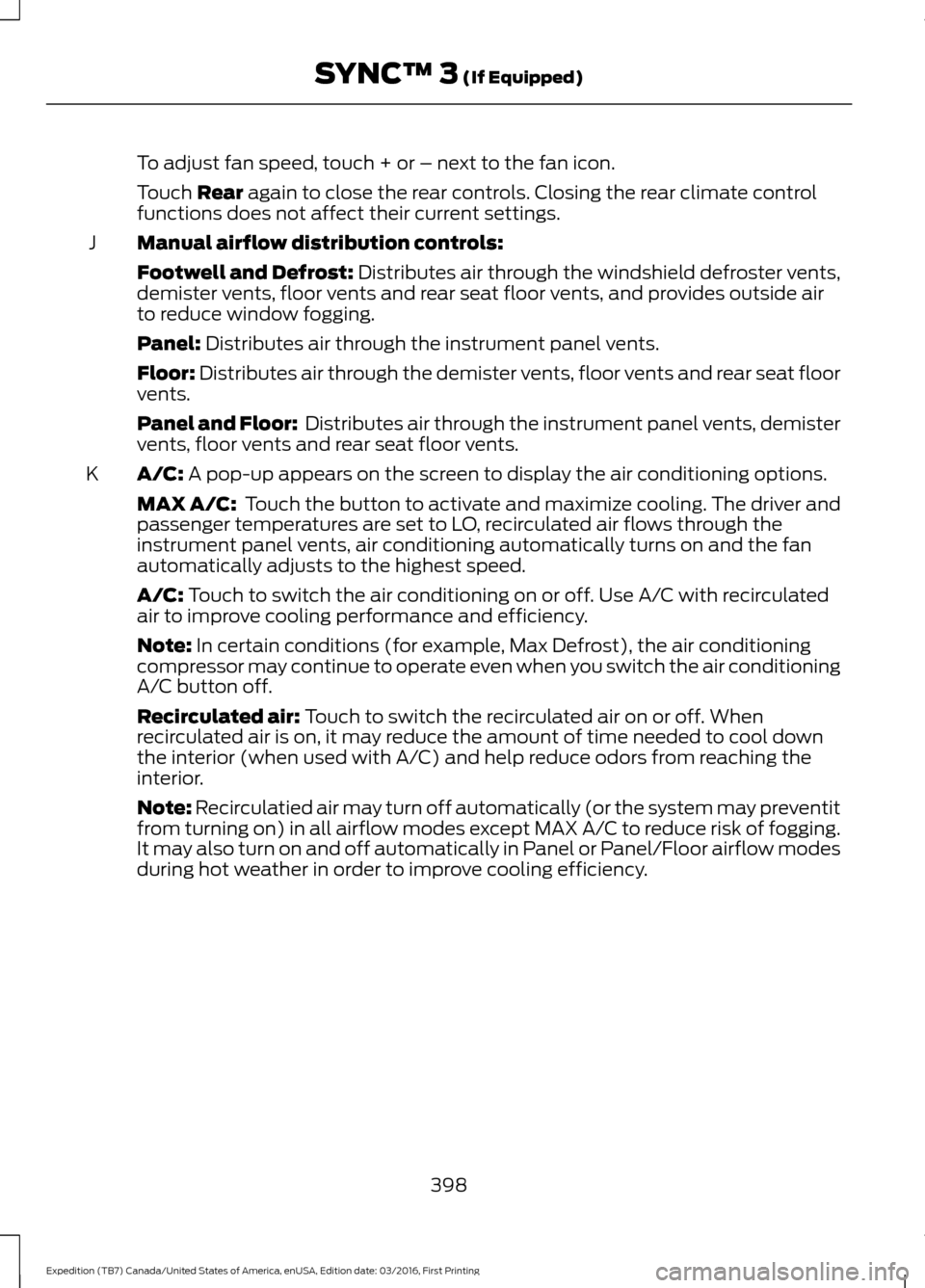
Manual airflow distribution controls:
J
Footwell and Defrost: Distributes air through the windshield defroster vents,
demister vents, floor vents and rear seat floor vents, and provides outside air
to reduce window fogging.
Panel:
Distributes air through the instrument panel vents.
Floor:
Distributes air through the demister vents, floor vents and rear seat floor
vents.
Panel and Floor: Distributes air through the instrument panel vents, demister
vents, floor vents and rear seat floor vents.
A/C:
A pop-up appears on the screen to display the air conditioning options.
K
MAX A/C: Touch the button to activate and maximize cooling. The driver and
passenger temperatures are set to LO, recirculated air flows through the
instrument panel vents, air conditioning automatically turns on and the fan
automatically adjusts to the highest speed.
A/C:
Touch to switch the air conditioning on or off. Use A/C with recirculated
air to improve cooling performance and efficiency.
Note:
In certain conditions (for example, Max Defrost), the air conditioning
compressor may continue to operate even when you switch the air conditioning
A/C button off.
Recirculated air:
Touch to switch the recirculated air on or off. When
recirculated air is on, it may reduce the amount of time needed to cool down
the interior (when used with A/C) and help reduce odors from reaching the
interior.
Note:
Recirculatied air may turn off automatically (or the system may preventit
from turning on) in all airflow modes except MAX A/C to reduce risk of fogging.
It may also turn on and off automatically in Panel or Panel/Floor airflow modes
during hot weather in order to improve cooling efficiency.
398
Expedition (TB7) Canada/United States of America, enUSA, Edition date: 03/2016, First Printing SYNC™ 3
(If Equipped)
Page 491 of 500
Blind Spot Information System..............189
False Alerts........................................................... 192
Switching the System Off and On...............193
System Errors....................................................... 192
System Limitations............................................ 192
Using the System............................................... 189
Bonnet Lock See: Opening and Closing the Hood..........243
Booster Seats..................................................24 Types of Booster Seats...................................... 25
Brake Fluid Check........................................252
Brakes................................................................173 General Information........................................... 173
Breaking-In......................................................218
Bulb Specification Chart..........................260
C
California Proposition 65..............................11
Capacities and Specifications...............308 Specifications..................................................... 309
Car Wash See: Cleaning the Exterior.............................. 265
Center Console
..............................................143
Changing a Bulb...........................................257 Central High-mounted Brake Lamp
Bulb................................................................... 260
Fog Lamp Bulb................................................... 259
Front Direction Indicator Bulb....................... 258
Headlamp Bulb.................................................. 258
LED Central High-mounted Brake Lamp Bulb................................................................... 260
LED Direction Indicator and Side Marker Bulbs.................................................................. 259
LED Headlamp Bulb......................................... 258
LED Rear Lamp, Brake Lamp, Rear Direction Indicator and Reverse Lamp
Bulbs................................................................. 260
License Plate Lamp Bulb............................... 260
Rear Lamp, Brake Lamp, Rear Direction Indicator and Reverse Lamp
Bulbs.................................................................. 259
Side Direction Indicator Bulb........................ 260
Side Marker Bulb............................................... 258
Changing a Fuse............................................241 Fuses....................................................................... 241Changing a Road Wheel............................297
Dissimilar Spare Wheel and Tire Assembly
Information
...................................................... 297
Location of the Spare Tire and Tools.........298
Tire Change Procedure.................................... 299
Changing the 12V Battery.........................253 Battery Management System....................... 254
Changing the Engine Air Filter.................262
Changing the Wiper Blades.....................255
Checking MyKey System Status..............50
Checking the Wiper Blades......................255
Childminder Mirror
..........................................81
Child Restraint and Seatbelt Maintenance.................................................35
Child Restraint Positioning
.........................26
Child Safety.......................................................16 General Information............................................. 16
Child Safety Locks..........................................27
Cleaning Leather Seats.............................268 With King Ranch Edition................................. 269
Without King Ranch Edition.......................... 268
Cleaning Products
.......................................264
Cleaning the Alloy Wheels.......................270
Cleaning the Engine...................................266
Cleaning the Exterior..................................265 Exterior Chrome Parts...................................... 265
Exterior Plastic Parts........................................ 265
Stripes or Graphics............................................ 265
Underbody........................................................... 266
Under Hood......................................................... 266
Cleaning the Instrument Panel and Instrument Cluster Lens........................268
Cleaning the Interior....................................267
Cleaning the Windows and Wiper Blades............................................................267
Clearing All MyKeys.......................................49
Climate............................................................396
Climate Control
..............................................112
Climate Controlled Seats..........................134 Cooled Seats........................................................ 134
Coolant Check See: Engine Coolant Check............................ 247
Crash Sensors and Airbag Indicator.......40
Creating a MyKey...........................................48 Programming/Changing Configurable
Settings............................................................... 48
Cruise Control
.................................................69
Principle of Operation....................................... 187
488
Expedition (TB7) Canada/United States of America, enUSA, Edition date: 03/2016, First Printing Index
Page 493 of 500
F
Fastening the Seatbelts..............................30
Seatbelt Locking Modes..................................... 31
Using Seatbelts During Pregnancy...............30
Floor Mats........................................................219
Fog Lamps - Front See: Front Fog Lamps......................................... 76
Foot Pedals See: Adjusting the Pedals................................. 70
Ford Credit
..........................................................11
US Only...................................................................... 11
Ford Protect....................................................441 Ford Protect (CANADA ONLY)..................... 442
Ford Protect Extended Service Plans (U.S. Only)................................................................... 441
Four-Wheel Drive.........................................165
Front Fog Lamps............................................76
Front Parking Aid
..........................................183
Fuel and Refueling.......................................150
Fuel Consumption
........................................155
Calculating Fuel Economy.............................. 155
Filling the Fuel Tank........................................... 155
Fuel Filler Funnel Location.........................151
Fuel Filter
........................................................253
Fuel Quality......................................................151 Choosing the Right Fuel.................................... 151
Fuel Shutoff
...................................................222
Fuses.................................................................233
Fuse Specification Chart...........................233 Passenger Compartment Fuse Panel........237
Power Distribution Box.................................... 233
G
Garage Door Opener See: Universal Garage Door Opener...........136
Gauges...............................................................84 Type 1 and 2............................................................ 84
Type 3....................................................................... 86
General Information on Radio Frequencies...................................................42
Intelligent Access................................................. 42
General Maintenance Information.......443 Multi-Point Inspection..................................... 445
Owner Checks and Services......................... 444
Protecting Your Investment........................... 443
Why Maintain Your Vehicle?......................... 443Why Maintain Your Vehicle at Your
Dealership?..................................................... 443
Getting Assistance Outside the U.S. and Canada.........................................................229
Getting the Services You Need...............226 Away From Home.............................................. 226
H
Handbrake See: Parking Brake.............................................. 174
Hazard Warning Flashers..........................222
HDC See: Using Hill Descent Control.................... 180
Headlamp Adjusting See: Adjusting the Headlamps..................... 256
Headlamp Removal See: Removing a Headlamp.......................... 257
Head Restraints
..............................................121
Adjusting the Head Restraint......................... 122
Heated Seats
..................................................133
Front Seats............................................................ 133
Rear Seats............................................................. 133
Heated Steering Wheel...............................69
Heated Windows and Mirrors..................120 Heated Exterior Mirror....................................... 120
Heated Rear Window........................................ 120
Heating See: Climate Control........................................... 112
Hill Start Assist..............................................174 Switching the System On and Off................175
Using Hill Start Assist........................................ 175
Hints on Controlling the Interior Climate...........................................................116
Cooling the Interior Quickly............................. 118
General Hints........................................................ 116
Heating the Interior Quickly.............................. 117
Recommended Settings for Cooling............118
Recommended Settings for Heating............117
Side Window Defogging in Cold Weather.............................................................. 118
Hints on Driving With Anti-Lock Brakes
.............................................................173
Home Screen.................................................378
Hood Lock See: Opening and Closing the Hood..........243
490
Expedition (TB7) Canada/United States of America, enUSA, Edition date: 03/2016, First Printing Index
Page 496 of 500
Power Liftgate.................................................56
Obstacle Detection............................................. 58
Opening and Closing the Liftgate................... 57
Stopping the Liftgate Movement................... 58
Power Running Boards
................................63
Power Seats....................................................124
Power Lumbar...................................................... 125
Power Recline...................................................... 124
Power Windows
..............................................79
Accessory Delay.................................................... 79
Bounce-Back......................................................... 79
One-Touch Down................................................. 79
One-Touch Up....................................................... 79
Window Lock......................................................... 79
Protecting the Environment........................15
R
Rear Axle
...........................................................172
Rear Parking Aid............................................182
Obstacle Distance Indicator........................... 183
Rear Passenger Climate Controls...........119
Rear Quarter Windows
................................82
Rear Seats.......................................................126
Adjusting the Second Row Center 20%
Seat...................................................................... 131
Adjusting the Second Row Outboard 40% Seat for E-Z Entry.......................................... 128
Exiting the Third Row........................................ 129
Folding Down the Second Row 40% Seat ........................................................................\
...... 126
Folding Down the Third Row Seats to the Load Floor.......................................................... 131
Folding the Second Row Center 20% Seat ........................................................................\
...... 130
Placing the Second Row Outboard 40% Seats in Cargo Mode..................................... 127
PowerFold™ Third Row Seat......................... 132
Reclining the Second Row Outboard 40% Seatback........................................................... 129
Returning to the Upright Position from the Full Lowered Load Floor Position............128
Third Row Seats................................................... 131
Rear Under Floor Storage.........................196 Cargo Management System.......................... 196
Cargo Shelf and Divider................................... 196
Third Row Storage Bin...................................... 197Rear View Camera.......................................184
Using the Rear View Camera System.........184
Rear View Camera See: Rear View Camera................................... 184
Rear Window Wiper and Washers...........72 Rear Window Washer.......................................... 72
Rear Window Wiper............................................. 72
Recommended Towing Weights...........204
Reduced Engine Performance.................218
Refueling..........................................................152 System Warnings................................................ 154
Remote Control..............................................43 Car Finder................................................................ 45
Integrated Keyhead Transmitter..................... 43
Intelligent Access Key......................................... 43
Memory Feature................................................... 46
Remote Start......................................................... 45
Replacing the Battery......................................... 44
Sounding the Panic Alarm................................ 45
Remote Start
.................................................120
Automatic Settings............................................ 120
Removing a Headlamp
..............................257
Repairing Minor Paint Damage...............270
Replacement Parts Recommendation........................................12
Collision Repairs.................................................... 12
Scheduled Maintenance and Mechanical Repairs.................................................................. 12
Warranty on Replacement Parts..................... 12
Replacing a Lost Key or Remote Control............................................................46
Reporting Safety Defects (Canada Only)...............................................................231
Reporting Safety Defects (U.S. Only)...............................................................231
Roadside Assistance
...................................221
Vehicles Sold in Canada: Getting Roadside
Assistance......................................................... 221
Vehicles Sold in Canada: Roadside Assistance Program Coverage.................222
Vehicles Sold in Canada: Using Roadside Assistance........................................................ 222
Vehicles Sold in the United States: Getting Roadside Assistance.................................... 221
Vehicles Sold in the United States: Using Roadside Assistance.................................... 221
Roadside Emergencies...............................221
493
Expedition (TB7) Canada/United States of America, enUSA, Edition date: 03/2016, First Printing Index