towing FORD EXPEDITION 2018 Owners Manual
[x] Cancel search | Manufacturer: FORD, Model Year: 2018, Model line: EXPEDITION, Model: FORD EXPEDITION 2018Pages: 571, PDF Size: 25.8 MB
Page 7 of 571
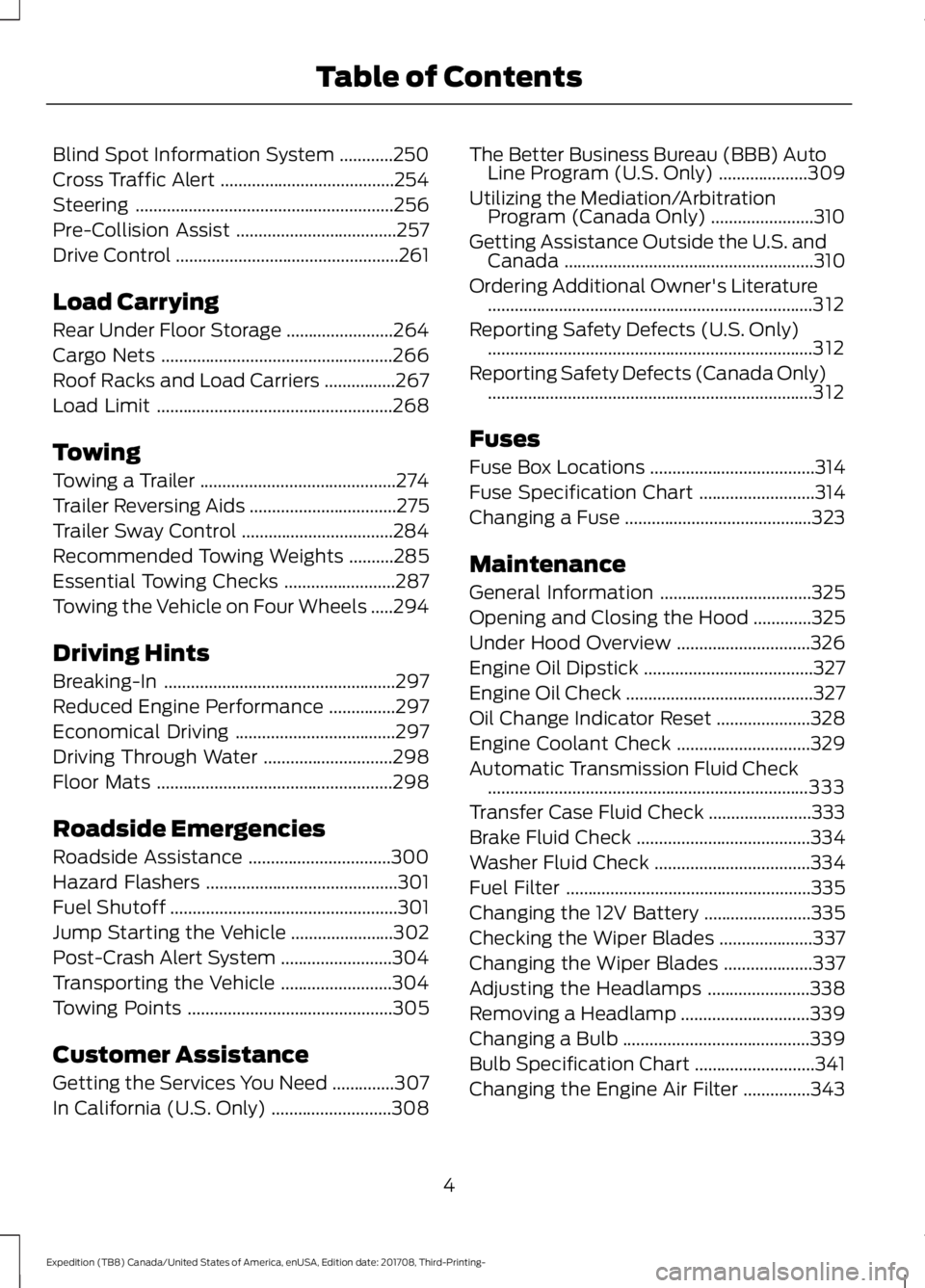
Blind Spot Information System
............250
Cross Traffic Alert .......................................
254
Steering ..........................................................
256
Pre-Collision Assist ....................................
257
Drive Control ..................................................
261
Load Carrying
Rear Under Floor Storage ........................
264
Cargo Nets ....................................................
266
Roof Racks and Load Carriers ................
267
Load Limit .....................................................
268
Towing
Towing a Trailer ............................................
274
Trailer Reversing Aids .................................
275
Trailer Sway Control ..................................
284
Recommended Towing Weights ..........
285
Essential Towing Checks .........................
287
Towing the Vehicle on Four Wheels .....
294
Driving Hints
Breaking-In ....................................................
297
Reduced Engine Performance ...............
297
Economical Driving ....................................
297
Driving Through Water .............................
298
Floor Mats .....................................................
298
Roadside Emergencies
Roadside Assistance ................................
300
Hazard Flashers ...........................................
301
Fuel Shutoff ...................................................
301
Jump Starting the Vehicle .......................
302
Post-Crash Alert System .........................
304
Transporting the Vehicle .........................
304
Towing Points ..............................................
305
Customer Assistance
Getting the Services You Need ..............
307
In California (U.S. Only) ...........................
308The Better Business Bureau (BBB) Auto
Line Program (U.S. Only) ....................
309
Utilizing the Mediation/Arbitration Program (Canada Only) .......................
310
Getting Assistance Outside the U.S. and Canada ........................................................
310
Ordering Additional Owner's Literature ........................................................................\
.
312
Reporting Safety Defects (U.S. Only) ........................................................................\
.
312
Reporting Safety Defects (Canada Only) ........................................................................\
.
312
Fuses
Fuse Box Locations .....................................
314
Fuse Specification Chart ..........................
314
Changing a Fuse ..........................................
323
Maintenance
General Information ..................................
325
Opening and Closing the Hood .............
325
Under Hood Overview ..............................
326
Engine Oil Dipstick ......................................
327
Engine Oil Check ..........................................
327
Oil Change Indicator Reset .....................
328
Engine Coolant Check ..............................
329
Automatic Transmission Fluid Check ........................................................................\
333
Transfer Case Fluid Check .......................
333
Brake Fluid Check .......................................
334
Washer Fluid Check ...................................
334
Fuel Filter .......................................................
335
Changing the 12V Battery ........................
335
Checking the Wiper Blades .....................
337
Changing the Wiper Blades ....................
337
Adjusting the Headlamps .......................
338
Removing a Headlamp .............................
339
Changing a Bulb ..........................................
339
Bulb Specification Chart ...........................
341
Changing the Engine Air Filter ...............
343
4
Expedition (TB8) Canada/United States of America, enUSA, Edition date: 201708, Third-Printing- Table of Contents
Page 109 of 571
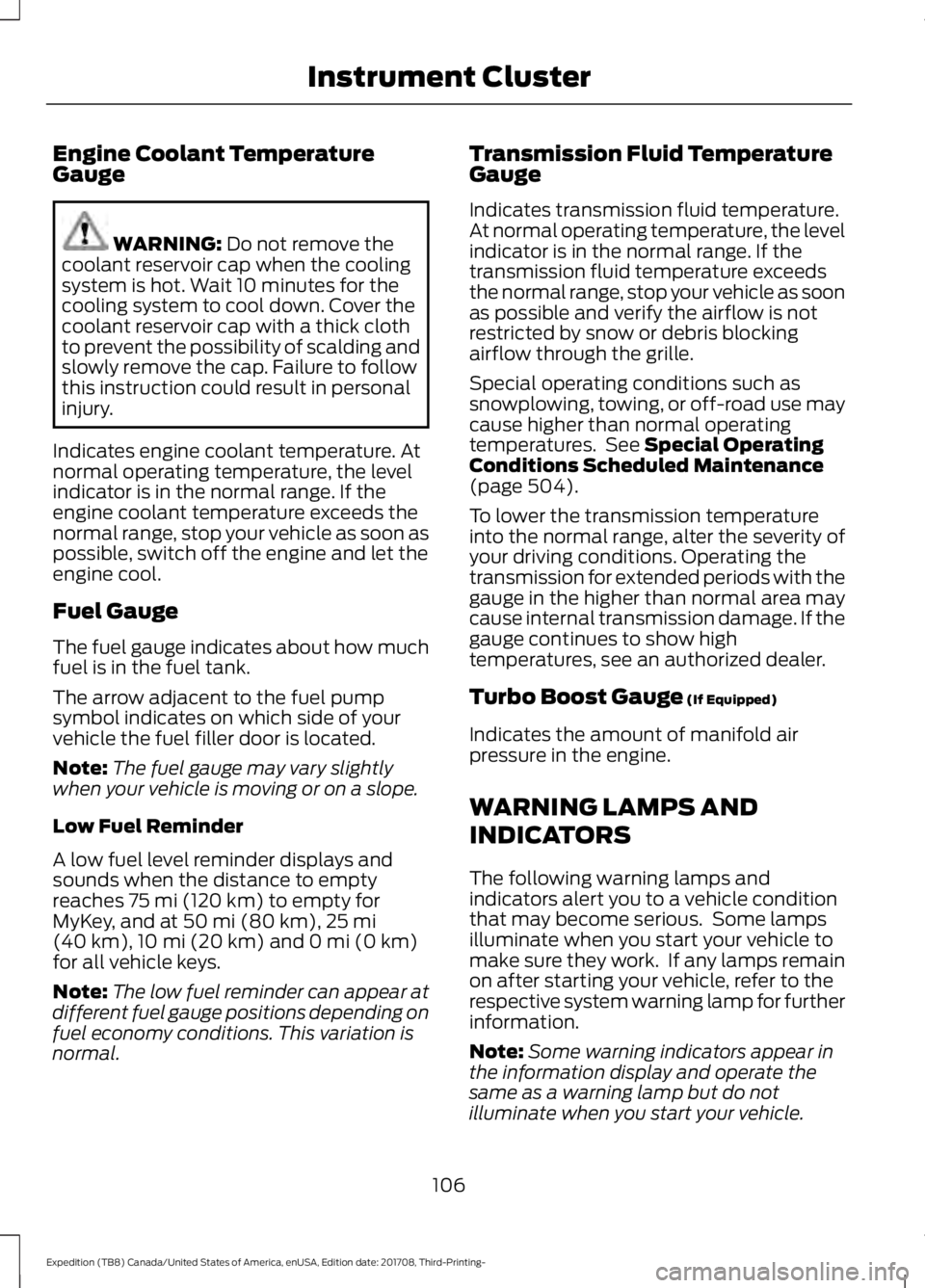
Engine Coolant Temperature
Gauge
WARNING: Do not remove the
coolant reservoir cap when the cooling
system is hot. Wait 10 minutes for the
cooling system to cool down. Cover the
coolant reservoir cap with a thick cloth
to prevent the possibility of scalding and
slowly remove the cap. Failure to follow
this instruction could result in personal
injury.
Indicates engine coolant temperature. At
normal operating temperature, the level
indicator is in the normal range. If the
engine coolant temperature exceeds the
normal range, stop your vehicle as soon as
possible, switch off the engine and let the
engine cool.
Fuel Gauge
The fuel gauge indicates about how much
fuel is in the fuel tank.
The arrow adjacent to the fuel pump
symbol indicates on which side of your
vehicle the fuel filler door is located.
Note: The fuel gauge may vary slightly
when your vehicle is moving or on a slope.
Low Fuel Reminder
A low fuel level reminder displays and
sounds when the distance to empty
reaches
75 mi (120 km) to empty for
MyKey, and at 50 mi (80 km), 25 mi
(40 km), 10 mi (20 km) and 0 mi (0 km)
for all vehicle keys.
Note: The low fuel reminder can appear at
different fuel gauge positions depending on
fuel economy conditions. This variation is
normal. Transmission Fluid Temperature
Gauge
Indicates transmission fluid temperature.
At normal operating temperature, the level
indicator is in the normal range. If the
transmission fluid temperature exceeds
the normal range, stop your vehicle as soon
as possible and verify the airflow is not
restricted by snow or debris blocking
airflow through the grille.
Special operating conditions such as
snowplowing, towing, or off-road use may
cause higher than normal operating
temperatures. See
Special Operating
Conditions Scheduled Maintenance
(page
504).
To lower the transmission temperature
into the normal range, alter the severity of
your driving conditions. Operating the
transmission for extended periods with the
gauge in the higher than normal area may
cause internal transmission damage. If the
gauge continues to show high
temperatures, see an authorized dealer.
Turbo Boost Gauge
(If Equipped)
Indicates the amount of manifold air
pressure in the engine.
WARNING LAMPS AND
INDICATORS
The following warning lamps and
indicators alert you to a vehicle condition
that may become serious. Some lamps
illuminate when you start your vehicle to
make sure they work. If any lamps remain
on after starting your vehicle, refer to the
respective system warning lamp for further
information.
Note: Some warning indicators appear in
the information display and operate the
same as a warning lamp but do not
illuminate when you start your vehicle.
106
Expedition (TB8) Canada/United States of America, enUSA, Edition date: 201708, Third-Printing- Instrument Cluster
Page 117 of 571
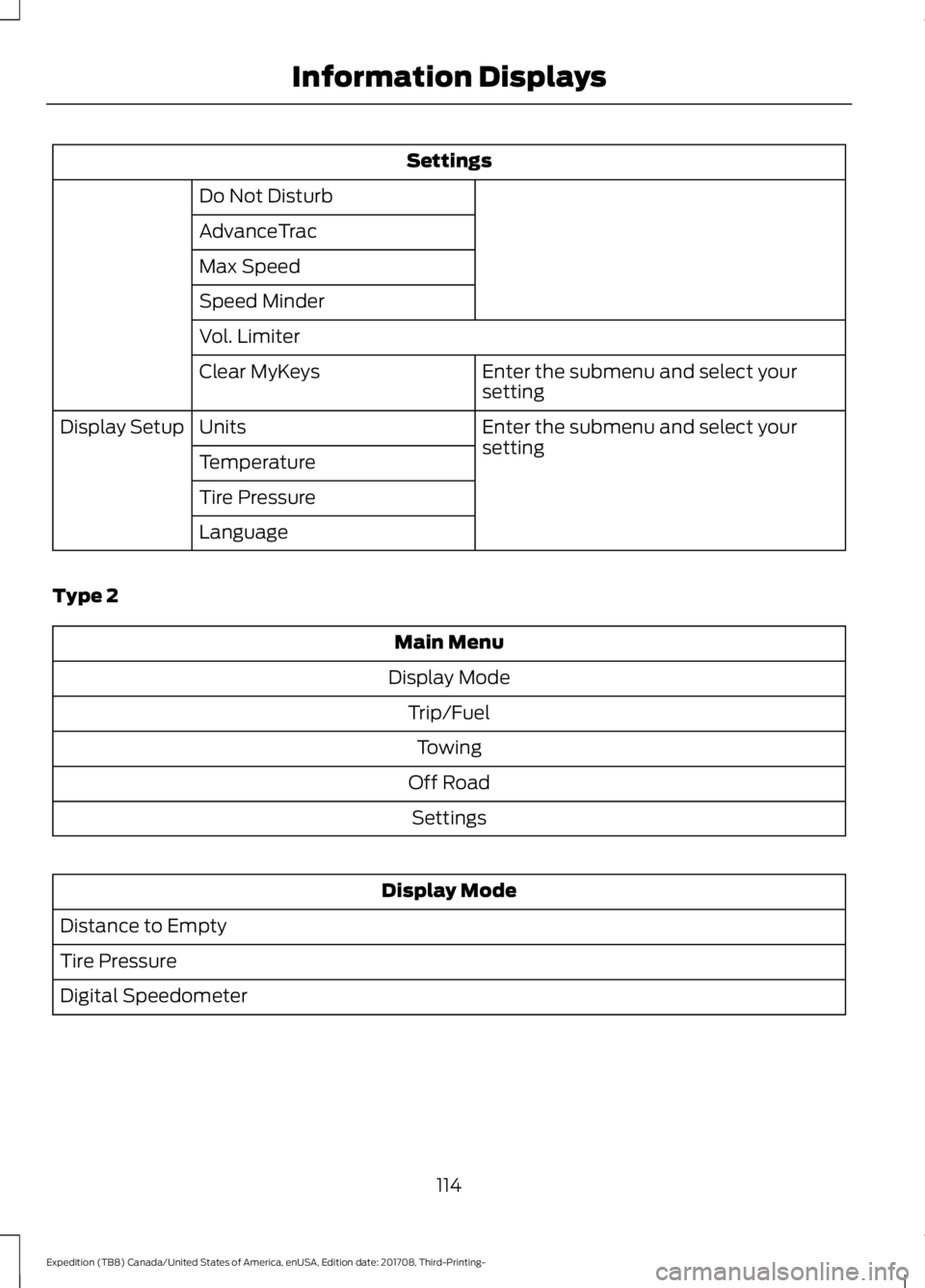
Settings
Do Not Disturb
AdvanceTrac
Max Speed
Speed Minder
Vol. Limiter Enter the submenu and select your
setting
Clear MyKeys
Enter the submenu and select your
setting
Units
Display Setup
Temperature
Tire Pressure
Language
Type 2 Main Menu
Display Mode Trip/FuelTowing
Off Road Settings Display Mode
Distance to Empty
Tire Pressure
Digital Speedometer
114
Expedition (TB8) Canada/United States of America, enUSA, Edition date: 201708, Third-Printing- Information Displays
Page 119 of 571
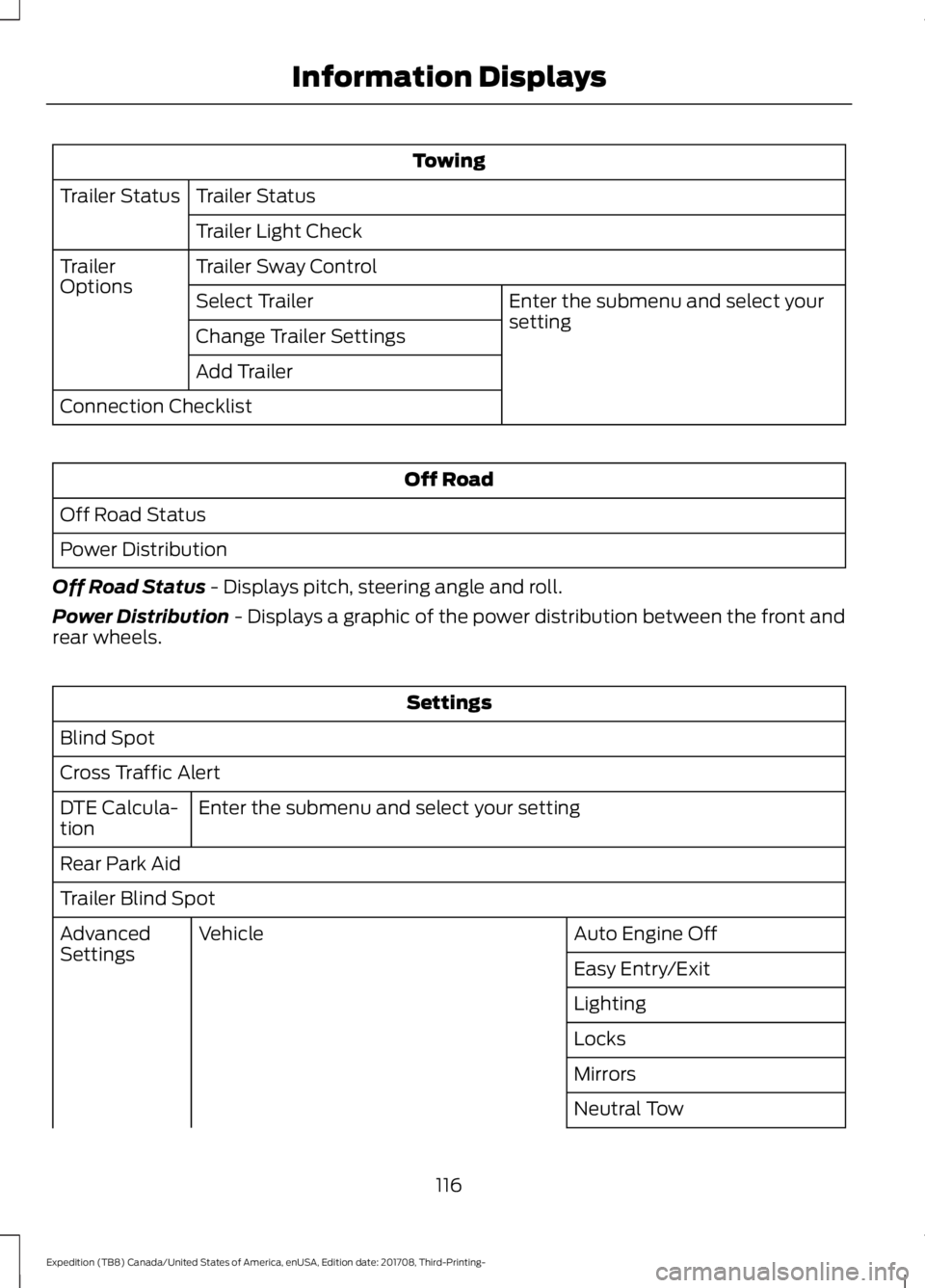
Towing
Trailer Status
Trailer Status
Trailer Light Check
Trailer Sway Control
Trailer
Options
Enter the submenu and select your
setting
Select Trailer
Change Trailer Settings
Add Trailer
Connection Checklist Off Road
Off Road Status
Power Distribution
Off Road Status - Displays pitch, steering angle and roll.
Power Distribution
- Displays a graphic of the power distribution between the front and
rear wheels. Settings
Blind Spot
Cross Traffic Alert Enter the submenu and select your setting
DTE Calcula-
tion
Rear Park Aid
Trailer Blind Spot
Auto Engine Off
Vehicle
Advanced
Settings
Easy Entry/Exit
Lighting
Locks
Mirrors
Neutral Tow
116
Expedition (TB8) Canada/United States of America, enUSA, Edition date: 201708, Third-Printing- Information Displays
Page 121 of 571
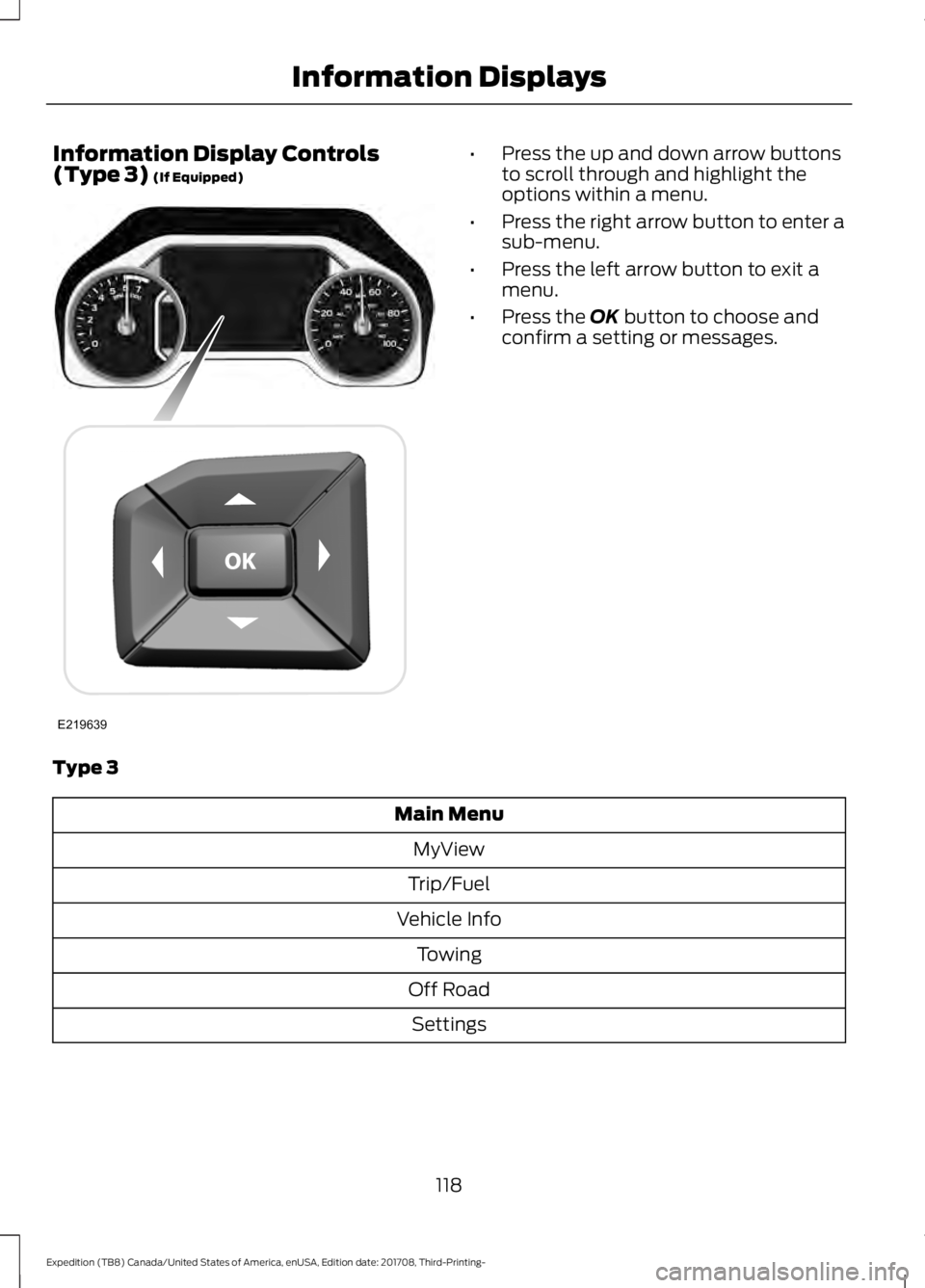
Information Display Controls
(Type 3) (If Equipped) •
Press the up and down arrow buttons
to scroll through and highlight the
options within a menu.
• Press the right arrow button to enter a
sub-menu.
• Press the left arrow button to exit a
menu.
• Press the
OK button to choose and
confirm a setting or messages.
Type 3 Main Menu
MyView
Trip/Fuel
Vehicle Info Towing
Off Road Settings
118
Expedition (TB8) Canada/United States of America, enUSA, Edition date: 201708, Third-Printing- Information DisplaysE219639
Page 124 of 571
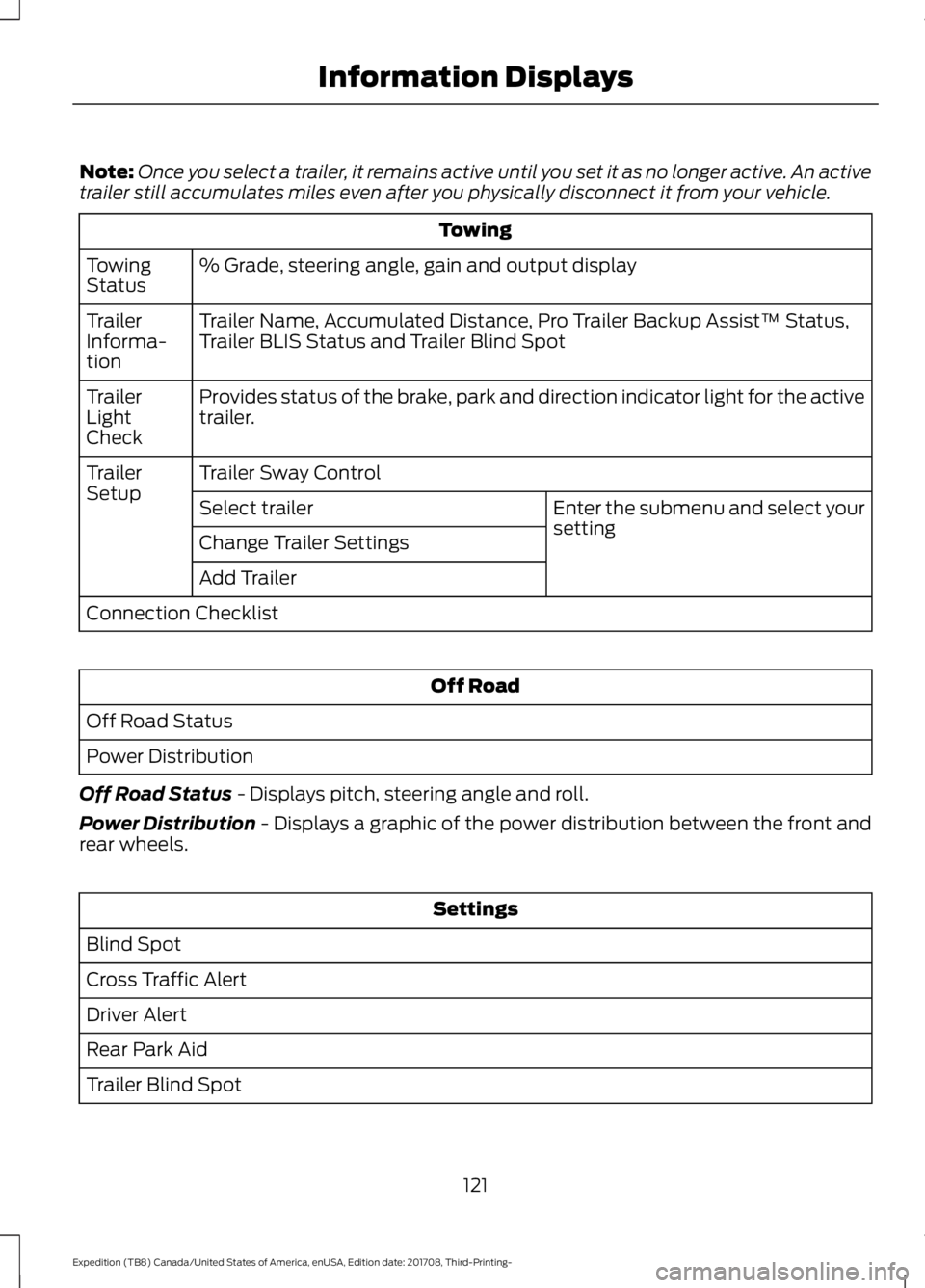
Note:
Once you select a trailer, it remains active until you set it as no longer active. An active
trailer still accumulates miles even after you physically disconnect it from your vehicle. Towing
% Grade, steering angle, gain and output display
Towing
Status
Trailer Name, Accumulated Distance, Pro Trailer Backup Assist™ Status,
Trailer BLIS Status and Trailer Blind Spot
Trailer
Informa-
tion
Provides status of the brake, park and direction indicator light for the active
trailer.
Trailer
Light
Check
Trailer Sway Control
Trailer
Setup
Enter the submenu and select your
setting
Select trailer
Change Trailer Settings
Add Trailer
Connection Checklist Off Road
Off Road Status
Power Distribution
Off Road Status - Displays pitch, steering angle and roll.
Power Distribution
- Displays a graphic of the power distribution between the front and
rear wheels. Settings
Blind Spot
Cross Traffic Alert
Driver Alert
Rear Park Aid
Trailer Blind Spot
121
Expedition (TB8) Canada/United States of America, enUSA, Edition date: 201708, Third-Printing- Information Displays
Page 140 of 571
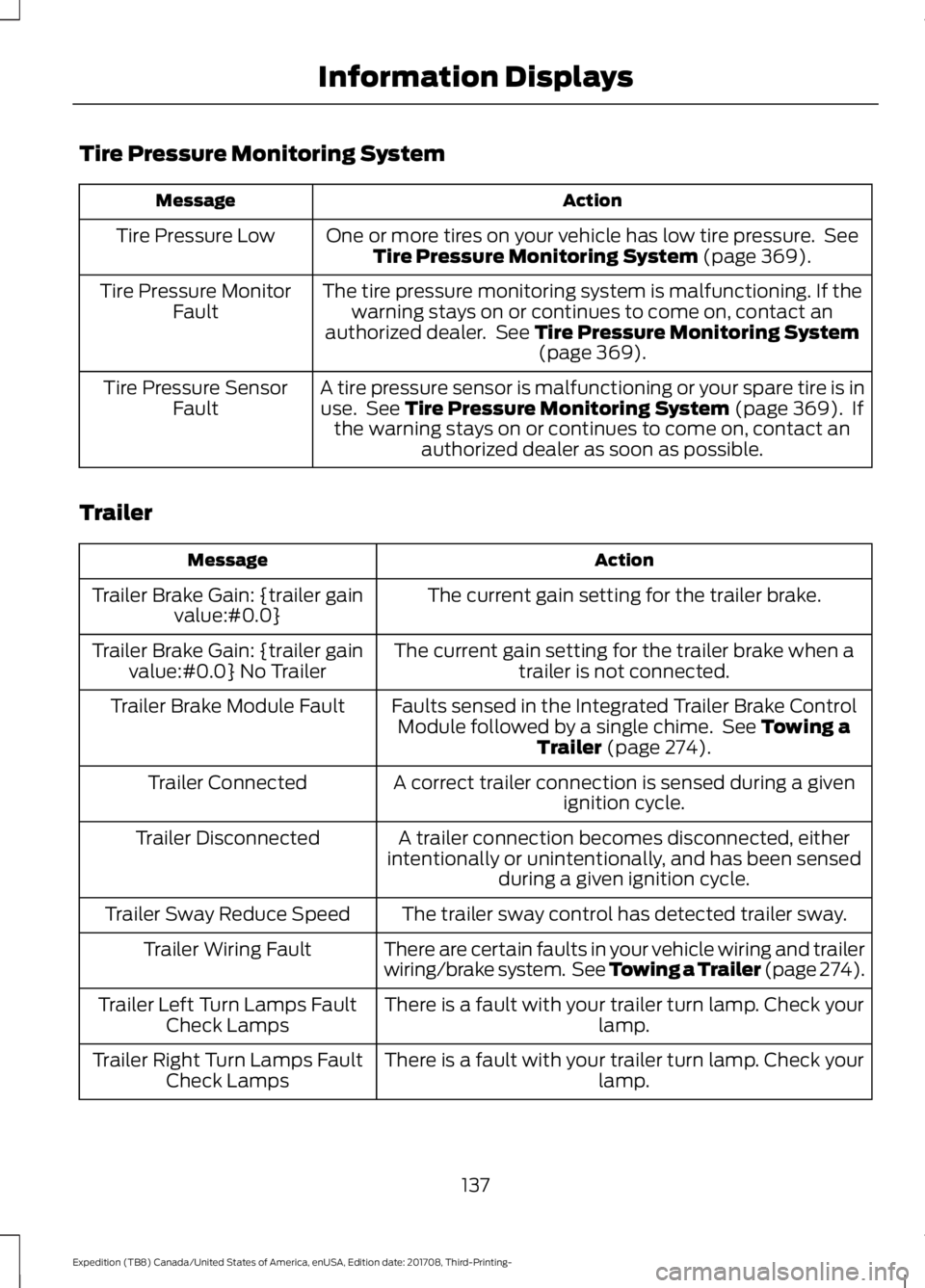
Tire Pressure Monitoring System
Action
Message
One or more tires on your vehicle has low tire pressure. SeeTire Pressure Monitoring System (page 369).
Tire Pressure Low
The tire pressure monitoring system is malfunctioning. If thewarning stays on or continues to come on, contact an
authorized dealer. See
Tire Pressure Monitoring System (page 369).
Tire Pressure Monitor
Fault
A tire pressure sensor is malfunctioning or your spare tire is inuse. See
Tire Pressure Monitoring System (page 369). If
the warning stays on or continues to come on, contact an authorized dealer as soon as possible.
Tire Pressure Sensor
Fault
Trailer Action
Message
The current gain setting for the trailer brake.
Trailer Brake Gain: {trailer gain
value:#0.0}
The current gain setting for the trailer brake when atrailer is not connected.
Trailer Brake Gain: {trailer gain
value:#0.0} No Trailer
Faults sensed in the Integrated Trailer Brake ControlModule followed by a single chime. See
Towing a
Trailer (page 274).
Trailer Brake Module Fault
A correct trailer connection is sensed during a givenignition cycle.
Trailer Connected
A trailer connection becomes disconnected, either
intentionally or unintentionally, and has been sensed during a given ignition cycle.
Trailer Disconnected
The trailer sway control has detected trailer sway.
Trailer Sway Reduce Speed
There are certain faults in your vehicle wiring and trailer
wiring/brake system. See Towing a Trailer (page 274).
Trailer Wiring Fault
There is a fault with your trailer turn lamp. Check yourlamp.
Trailer Left Turn Lamps Fault
Check Lamps
There is a fault with your trailer turn lamp. Check yourlamp.
Trailer Right Turn Lamps Fault
Check Lamps
137
Expedition (TB8) Canada/United States of America, enUSA, Edition date: 201708, Third-Printing- Information Displays
Page 141 of 571
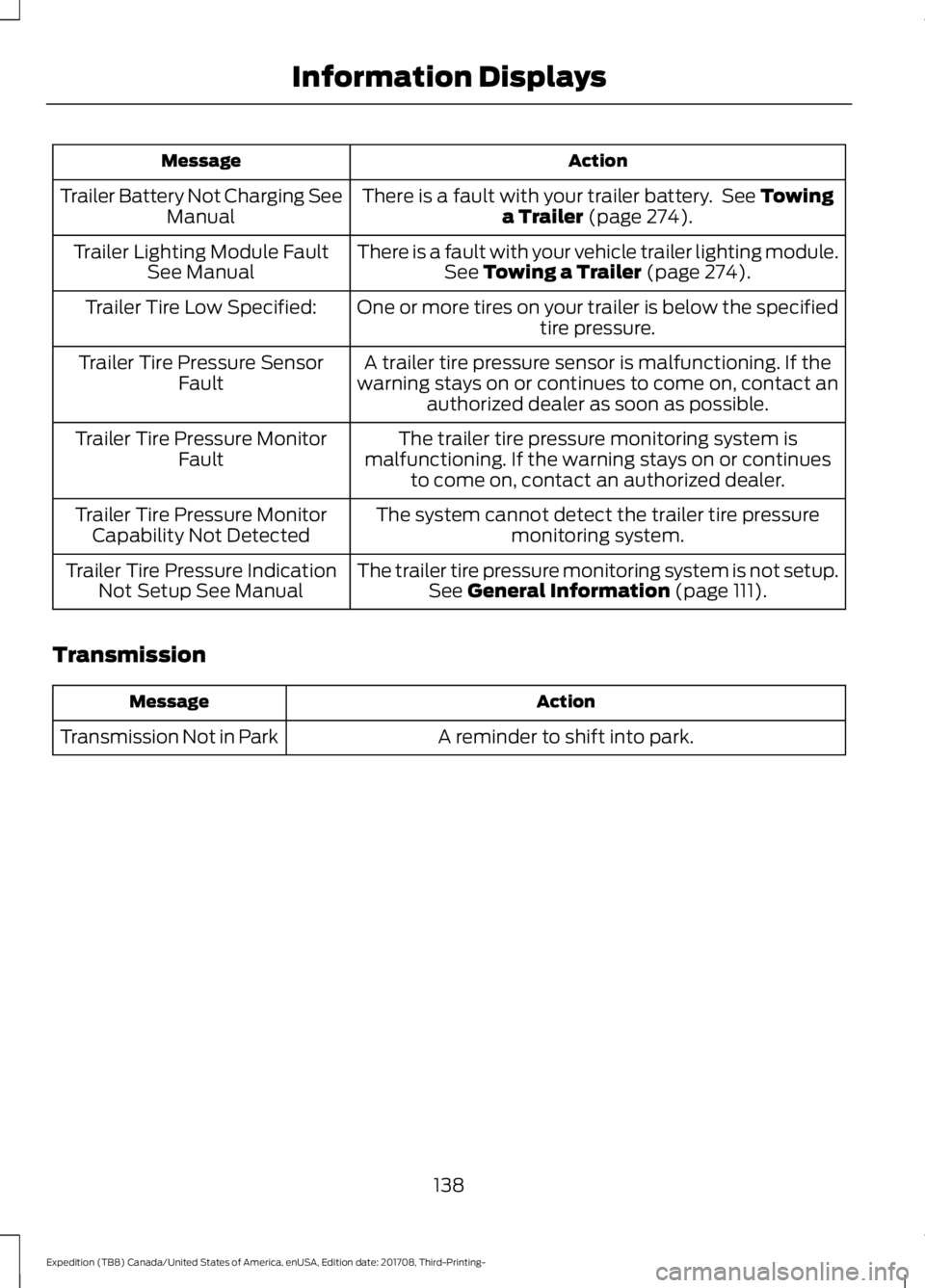
Action
Message
There is a fault with your trailer battery. See Towing
a Trailer (page 274).
Trailer Battery Not Charging See
Manual
There is a fault with your vehicle trailer lighting module.See
Towing a Trailer (page 274).
Trailer Lighting Module Fault
See Manual
One or more tires on your trailer is below the specifiedtire pressure.
Trailer Tire Low Specified:
A trailer tire pressure sensor is malfunctioning. If the
warning stays on or continues to come on, contact an authorized dealer as soon as possible.
Trailer Tire Pressure Sensor
Fault
The trailer tire pressure monitoring system is
malfunctioning. If the warning stays on or continues to come on, contact an authorized dealer.
Trailer Tire Pressure Monitor
Fault
The system cannot detect the trailer tire pressuremonitoring system.
Trailer Tire Pressure Monitor
Capability Not Detected
The trailer tire pressure monitoring system is not setup.See
General Information (page 111).
Trailer Tire Pressure Indication
Not Setup See Manual
Transmission Action
Message
A reminder to shift into park.
Transmission Not in Park
138
Expedition (TB8) Canada/United States of America, enUSA, Edition date: 201708, Third-Printing- Information Displays
Page 188 of 571
Some fuel stations, particularly those in
high altitude areas, offer fuels posted as
regular unleaded gasoline with an octane
rating below 87. The use of these fuels
could result in engine damage that will not
be covered by the vehicle warranty.
For best overall vehicle and engine
performance, premium fuel with an octane
rating of 91 or higher is recommended. The
performance gained by using premium fuel
is most noticeable in hot weather as well
as other conditions, for example when
towing a trailer. See Towing (page 274).
Do not be concerned if the engine
sometimes knocks lightly. However, if the
engine knocks heavily while using fuel with
the recommended octane rating, contact
an authorized dealer to prevent any engine
damage.
We recommend Top Tier detergent
gasolines, where available to help minimize
engine deposits and maintain optimal
vehicle and engine performance. For
additional information, refer to
www.toptiergas.com.
Note: Use of any fuel for which the vehicle
was not designed can impair the emission
control system, cause loss of vehicle
performance, and cause damage to the
engine which may not be covered by the
vehicle Warranty.
Do not use:
• Diesel fuel.
• Fuels containing kerosene or paraffin.
• Fuel containing more than 15% ethanol
or E85 fuel.
• Fuels containing methanol.
• Fuels containing metallic-based
additives, including manganese-based
compounds. •
Fuels containing the octane booster
additive, methylcyclopentadienyl
manganese tricarbonyl (MMT).
• Leaded fuel, using leaded fuel is
prohibited by law.
The use of fuels with metallic compounds
such as methylcyclopentadienyl
manganese tricarbonyl (commonly known
as MMT), which is a manganese-based
fuel additive, will impair engine
performance and affect the emission
control system.
FUEL FILLER FUNNEL
LOCATION
The fuel filler funnel is under the luggage
compartment floor covering.
RUNNING OUT OF FUEL
Running out of fuel can cause damage not
covered by the vehicle Warranty.
If your vehicle runs out of fuel:
• Add a minimum of
1.3 gal (5 L) of fuel
to restart the engine.
• You may need to switch the ignition
from off to on several times after
refueling to allow the fuel system to
pump the fuel from the tank to the
engine. When restarting, cranking time
takes a few seconds longer than
normal.
Note: If your vehicle is on a steep slope,
more fuel may be required.
Filling a Portable Fuel Container WARNING:
Flow of fuel through
a fuel pump nozzle can produce static
electricity. This can cause a fire if you are
filling an ungrounded fuel container.
185
Expedition (TB8) Canada/United States of America, enUSA, Edition date: 201708, Third-Printing- Fuel and Refueling
Page 200 of 571
Stay in Neutral Mode - Console Shifter
Stay in Neutral mode allows your vehicle
to stay in neutral when you exit your
vehicle. Extended usage of Stay in Neutral
mode may result in a battery voltage
reduction to a level where the vehicle may
no longer start. Your vehicle must be
stationary to enter this mode.
Note:
Stay in neutral mode is a temporary
vehicle state with the ignition off. Once in
this mode, sufficient battery voltage must
be maintained or your vehicle returns to
park. Do not tow your vehicle in this mode.
Note: Always put your vehicle in Stay in
Neutral mode if you want your vehicle to
stay in neutral when you exit or turn off your
vehicle. Refer to the Return to Park section
for more information.
Note: Do not use this feature for towing
your vehicle. WARNING: When doing this
procedure, you need to take the
transmission out of park (P) which
means your vehicle can roll freely. To
avoid unwanted vehicle movement,
always fully apply the parking brake prior
to doing this procedure. Use wheels
chocks if appropriate. To enter Stay in Neutral mode:
•
Move the transmission selector to
neutral (N).
• A message appears in your information
display screen prompting you to press
the manual (M) button.
• Press the manual (M) button again to
enter Stay in Neutral mode.
•This step can be completed as long
as the message prompts you to
remain in Neutral (N).
• A confirmation message appears
in the information display when
your vehicle has entered Stay in
Neutral mode.
To exit Stay in Neutral mode, apply the
brake and select a different gear. See
Putting your vehicle in or out of gear for
more information.
Stay in Neutral Mode - Console Shifter -
No Start
Use this feature to move your transmission
from the park position in the event of a no
start situation. If your vehicle has a dead
battery, an external power source is
required. Do not tow your vehicle in this
mode.
Note: This feature only functions if your
12-volt battery has power and the starter
can spin the engine. If vehicle battery
voltage is not sufficient, an external 12-volt
power source (for example, jumper cables,
battery charger or jump pack) may be
required for this feature to function.
Note: Once in this mode, sufficient battery
voltage must be maintained or your vehicle
returns to park.
197
Expedition (TB8) Canada/United States of America, enUSA, Edition date: 201708, Third-Printing- Transmission